change time BMW 650I COUPE 2010 E63 Owner's Guide
[x] Cancel search | Manufacturer: BMW, Model Year: 2010, Model line: 650I COUPE, Model: BMW 650I COUPE 2010 E63Pages: 252, PDF Size: 8.4 MB
Page 157 of 252
Navigation
Entertainment
Driving tips
155Reference
At a glance
Controls
Communications
Mobility
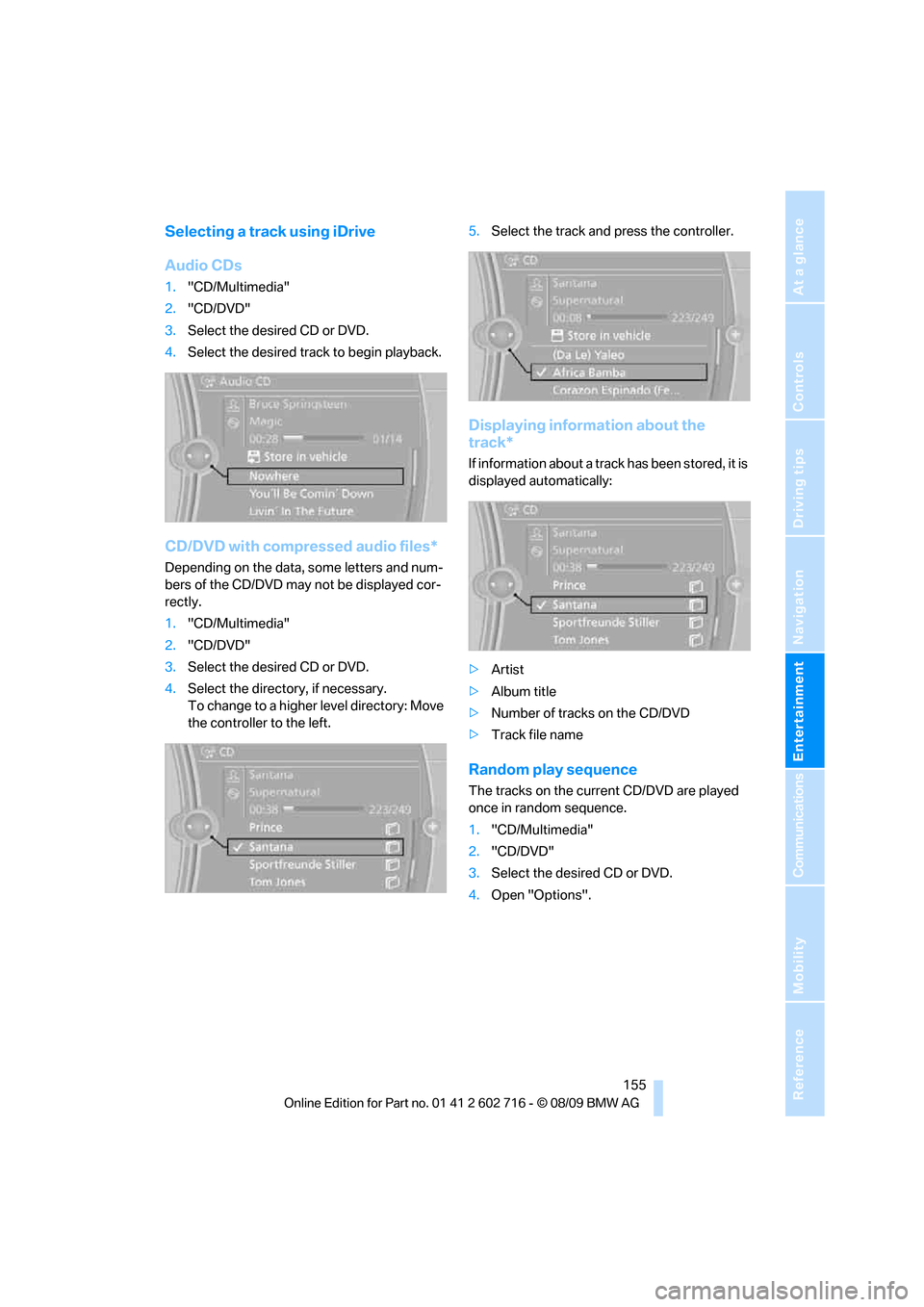
Selecting a track using iDrive
Audio CDs
1."CD/Multimedia"
2."CD/DVD"
3.Select the desired CD or DVD.
4.Select the desired track to begin playback.
CD/DVD with compressed audio files*
Depending on the data, some letters and num-
bers of the CD/DVD may not be displayed cor-
rectly.
1."CD/Multimedia"
2."CD/DVD"
3.Select the desired CD or DVD.
4.Select the directory, if necessary.
To change to a higher level directory: Move
the controller to the left.5.Select the track and press the controller.
Displaying information about the
track*
If information about a track has been stored, it is
displayed automatically:
>Artist
>Album title
>Number of tracks on the CD/DVD
>Track file name
Random play sequence
The tracks on the current CD/DVD are played
once in random sequence.
1."CD/Multimedia"
2."CD/DVD"
3.Select the desired CD or DVD.
4.Open "Options".
Page 158 of 252
CD/DVD player and CD changer
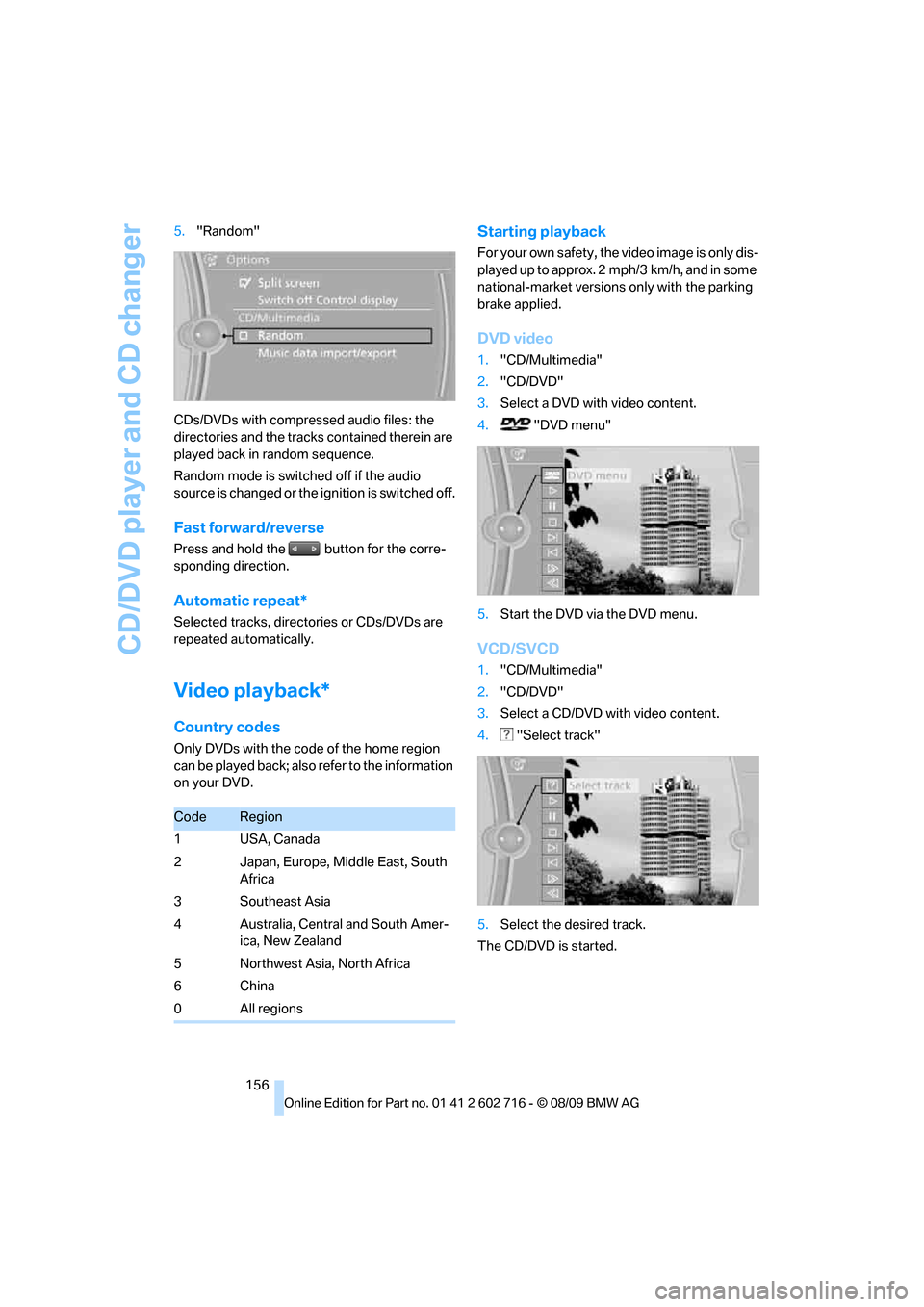
156 5."Random"
CDs/DVDs with compressed audio files: the
directories and the tracks contained therein are
played back in random sequence.
Random mode is switched off if the audio
source is changed or the ignition is switched off.
Fast forward/reverse
Press and hold the button for the corre-
sponding direction.
Automatic repeat*
Selected tracks, directories or CDs/DVDs are
repeated automatically.
Video playback*
Country codes
Only DVDs with the code of the home region
can be played back; also refer to the information
on your DVD.
Starting playback
For your own safety, the video image is only dis-
played up to approx. 2 mph/3 km/h, and in some
national-market versions only with the parking
brake applied.
DVD video
1."CD/Multimedia"
2."CD/DVD"
3.Select a DVD with video content.
4. "DVD menu"
5.Start the DVD via the DVD menu.
VCD/SVCD
1."CD/Multimedia"
2."CD/DVD"
3.Select a CD/DVD with video content.
4. "Select track"
5.Select the desired track.
The CD/DVD is started.
CodeRegion
1USA, Canada
2 Japan, Europe, Middle East, South
Africa
3Southeast Asia
4 Australia, Central and South Amer-
ica, New Zealand
5 Northwest Asia, North Africa
6China
0All regions
Page 159 of 252
Navigation
Entertainment
Driving tips
157Reference
At a glance
Controls
Communications
Mobility
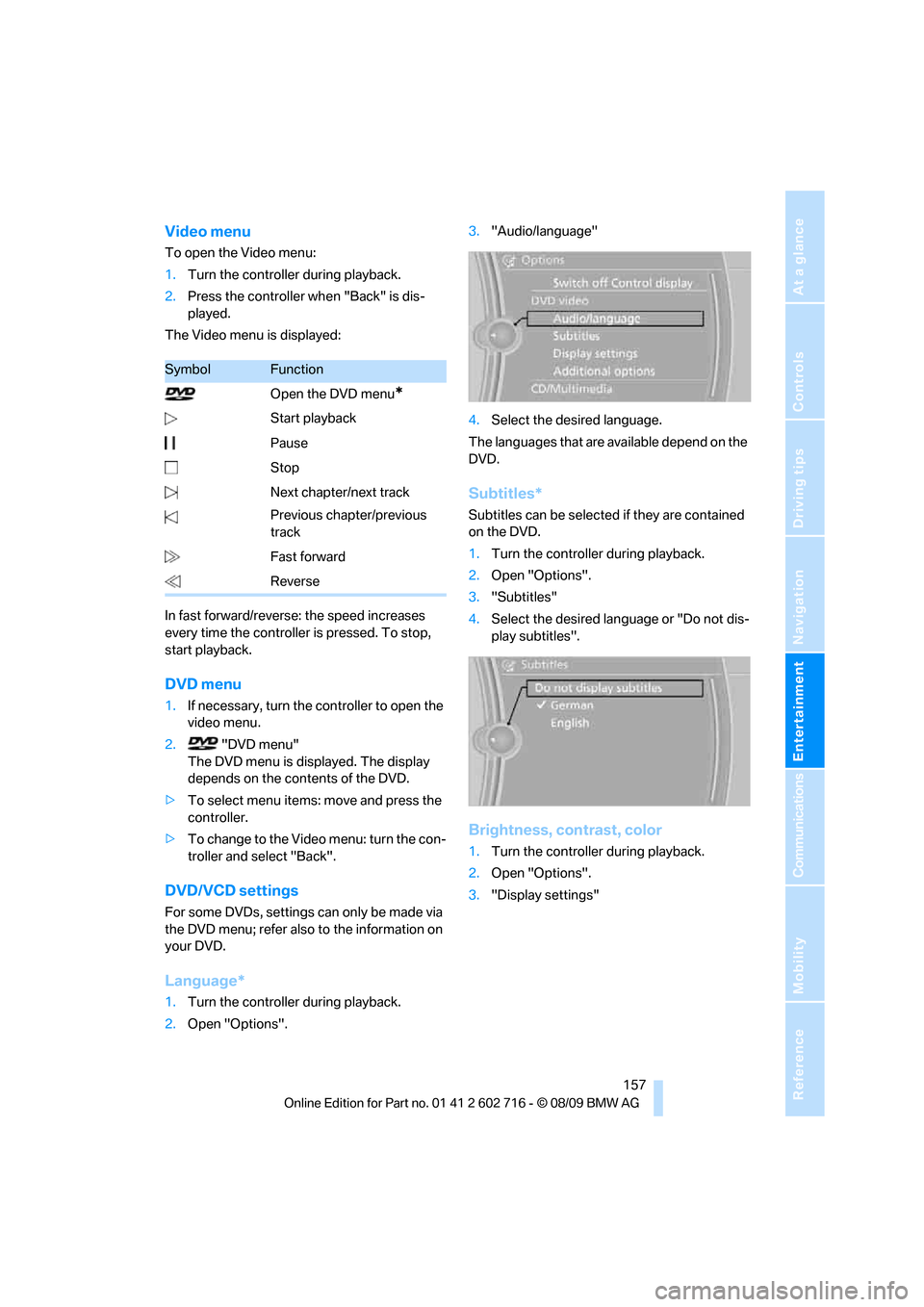
Video menu
To open the Video menu:
1.Turn the controller during playback.
2.Press the controller when "Back" is dis-
played.
The Video menu is displayed:
In fast forward/reverse: the speed increases
every time the controller is pressed. To stop,
start playback.
DVD menu
1.If necessary, turn the controller to open the
video menu.
2. "DVD menu"
The DVD menu is displayed. The display
depends on the contents of the DVD.
>To select menu items: move and press the
controller.
>To change to the Video menu: turn the con-
troller and select "Back".
DVD/VCD settings
For some DVDs, settings can only be made via
the DVD menu; refer also to the information on
your DVD.
Language*
1.Turn the controller during playback.
2.Open "Options".3."Audio/language"
4.Select the desired language.
The languages that are available depend on the
DVD.
Subtitles*
Subtitles can be selected if they are contained
on the DVD.
1.Turn the controller during playback.
2.Open "Options".
3."Subtitles"
4.Select the desired language or "Do not dis-
play subtitles".
Brightness, contrast, color
1.Turn the controller during playback.
2.Open "Options".
3."Display settings"
SymbolFunction
Open the DVD menu
*
Start playback
Pause
Stop
Next chapter/next track
Previous chapter/previous
track
Fast forward
Reverse
Page 166 of 252
Music collection
164 Depending on the album, the tracks or the
subdirectories of the album are displayed.
The first track is played automatically, if
possible.
4.To select tracks, change directories if
needed. To go up one level in the directory,
move the controller to the left.
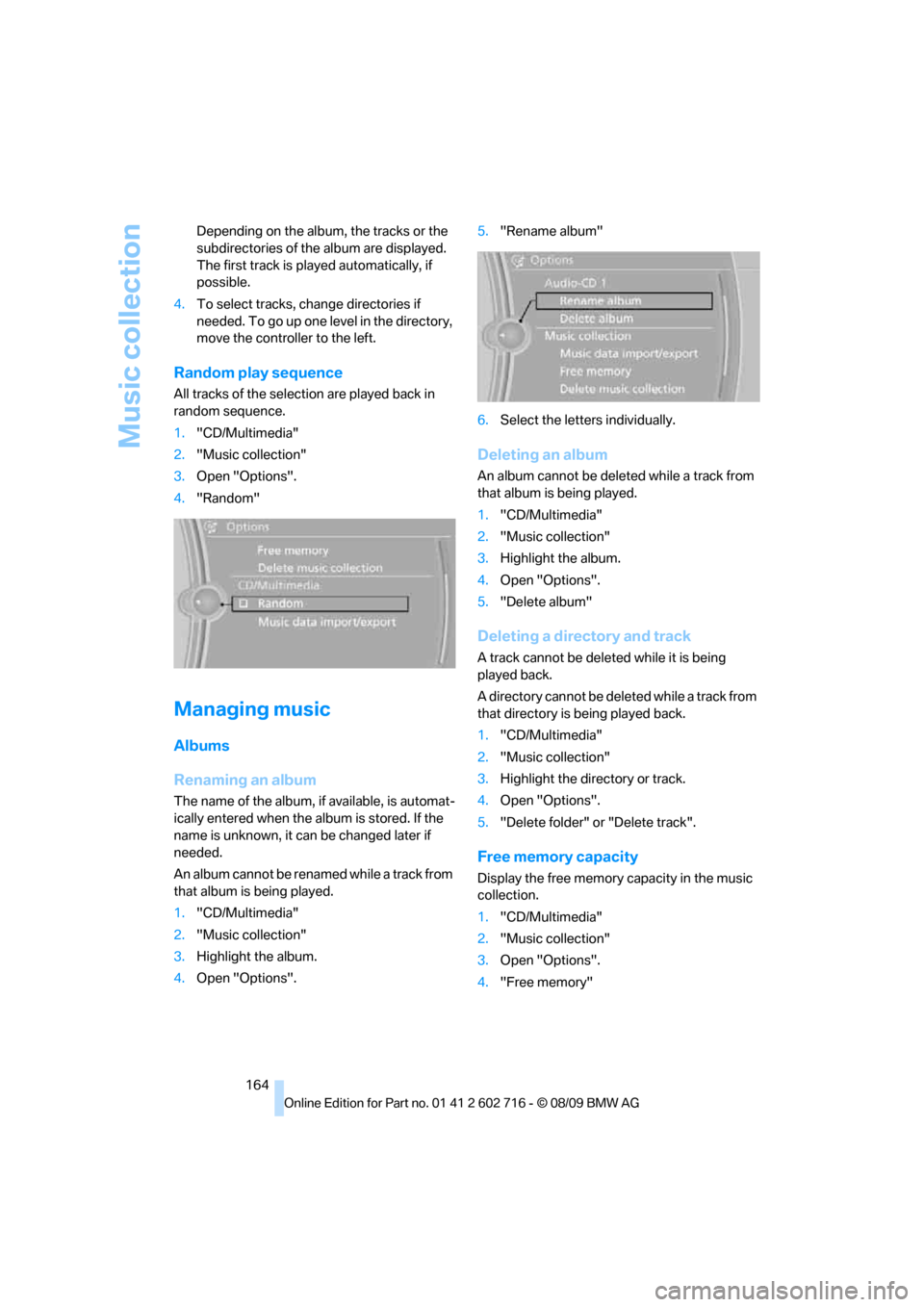
Random play sequence
All tracks of the selection are played back in
random sequence.
1."CD/Multimedia"
2."Music collection"
3.Open "Options".
4."Random"
Managing music
Albums
Renaming an album
The name of the album, if available, is automat-
ically entered when the album is stored. If the
name is unknown, it can be changed later if
needed.
An album cannot be renamed while a track from
that album is being played.
1."CD/Multimedia"
2."Music collection"
3.Highlight the album.
4.Open "Options".5."Rename album"
6.Select the letters individually.
Deleting an album
An album cannot be deleted while a track from
that album is being played.
1."CD/Multimedia"
2."Music collection"
3.Highlight the album.
4.Open "Options".
5."Delete album"
Deleting a directory and track
A track cannot be deleted while it is being
played back.
A directory cannot be deleted while a track from
that directory is being played back.
1."CD/Multimedia"
2."Music collection"
3.Highlight the directory or track.
4.Open "Options".
5."Delete folder" or "Delete track".
Free memory capacity
Display the free memory capacity in the music
collection.
1."CD/Multimedia"
2."Music collection"
3.Open "Options".
4."Free memory"
Page 238 of 252
Everything from A to Z
236 Care208
– car-care products208
– carpets210
– car washes208
– CD/DVD player211
– chrome components210
– convertible top209
– displays211
– exterior208
– fine wooden
components211
– hand washing209
– headlamps209
– high-pressure cleaning
jets208
– interior210
– leather210
– light-alloy wheels210
– paint209
– plastic components210
– rubber gaskets210
– safety belts211
– sensors and cameras211
– upholstery and cloth-
covered paneling210
– windows209
Cargo bay
– capacity227
– emergency release32
– opening/closing, refer to
Luggage compartment
lid31
– opening from inside31
– opening from outside31
– opening with remote
control28
Caring for the vehicle
finish209
Car key, refer to Keys/remote
control26
Car phone
– installation location, refer to
Center armrest111
– refer to separate operating
instructions
Car phone, refer to
Telephone172
Car radio, refer to Radio149
Car Shampoo211Car wash57
– with Comfort Access35
Car washes208
Catalytic converter, refer to
Hot exhaust system119
CBC Cornering Brake
Control83
CBS Condition Based
Service206
CD, audio playback154
CD changer154,158
– controls146
– fast forward/reverse156
– filling or emptying the
magazine158
– random sequence155
– selecting a track154
– switching on/off146
– tone control146
– volume146
CD player154
– controls146
– fast forward/reverse156
– random sequence155
– selecting a track154
– switching on/off146
– tone control146
– volume146
Center armrest, adjusting
height111
Center console14
Central locking
– from inside30
– from outside28
Central locking system27
– Comfort Access34
– hotel function30
Changes, technical, refer to
For your own safety5
Changing language on
Control Display80
Changing units of measure on
Control Display74
Changing wheels200,214
CHECK button78
Check Control77
Check Gas Cap194
Checking air pressure, refer to
Tire inflation pressure196Child restraint fixing system
LATCH54
Child restraint systems53
Child seats, refer to
Transporting children
safely53
Chrome-plated parts211
Chrome polish211
Cigarette lighter113
Cigarette lighter socket, refer
to Connecting electrical
devices113
Cleaning your BMW, refer to
Care208
Clock72
– 12h/24h format77
– setting time76
– setting time and date
77
Closing
– from inside30
– from outside28
Closing fuel filler cap194
Clothes hooks, Coupe112
Cockpit10
Cold start, refer to Starting
engine57
Comfort Access34
– observe in car wash35
– replacing battery, remote
control35
Compartment for remote
control, refer to Ignition
lock56
Compartments, refer to
Storage compartments112
Computer73
– displays on Control
Display74
Concierge service187
Condensation, refer to When
vehicle is parked120
Condition Based Service
CBS206
Confirmation signals for
locking and unlocking29
Connecting car vacuum
cleaner, refer to Connecting
electrical devices113
Page 247 of 252
Reference 245
At a glance
Controls
Driving tips
Communications
Navigation
Entertainment
Mobility
S
Safety belts50
– damage50
– indicator lamp50
– reminder50
– sitting safely45
Safety belt tensioners, refer to
Safety belts50
Safety systems
– ABS Antilock Brake
System83
– airbags90
– driving stability control
systems83
– rollover protection system,
Convertible92
– safety belts50
Safety tires, refer to Run-flat
tires200
Satellite radio152
– enabling or disabling
channel152
– selecting channel153
– storing channel153
Scale for navigation,
changing139
Screen, refer to iDrive16
Screw thread for tow
fitting219
SDARS, refer to Satellite
radio152
Seats45
– adjusting the seats46
– heating50
– lumbar support46
– memory, refer to Seat, mirror
and steering wheel
memory47
– sitting safely45
– sports seat46
– storing the setting47
– thigh support46
Section of route, altering137
Securing cargo122
– ski bag114
Selecting distance with active
cruise control66
Selecting route136Selection options with
navigation system136
Service, refer to Roadside
Assistance217
Service Interval Display
– refer to CBS Condition
Based Service206
– refer to Service
requirements75
Service Request189
Service requirements75
– refer to CBS Condition
Based Service206
Services status190
Setting button, refer to
Controls, controller16
Settings
– BMW Night Vision96
– changing on Control
Display80
– clock, 12h/24h mode77
– configuring, refer to
Personal Profile26
– DVD157
– language80
Settings for the map view139
Setting time, refer to
Preselecting activation
times107
Shifting, Sport automatic
transmission59
Short commands of voice
activation system228
Short route in navigation, refer
to Selecting route136
Shuffled, refer to Random
– CD changer155
– CD player155
Side airbags90
Side-mounted turn signals,
replacing bulbs213
Signal horn, refer to Horn10
Sill panel lighting, refer to
Interior lamps102
Sitting safely45
– with airbags45
– with head restraint45
– with safety belts45
Ski bag113Sliding/tilt roof, refer to Glass
sunroof, electric with raise
function38
Slope assistant, refer to Drive-
off assistant85
Smokers' package, refer to
Ashtray113
Snap-in adapter
– mounting/removing182
– using172
Snow chains201
Socket, refer to Connecting
electrical devices113
Socket for Onboard
Diagnostics interface207
Socket for remote control,
refer to Ignition lock56
Soft closure aid, refer to
Automatic soft closing31
SOS, refer to Initiating an
emergency request216
Spare
– adapter for spare key26
– fuses215
– key26
Special destinations130
Special destinations,
displaying132
Special destinations, entering
by name
131
Special oils, refer to Approved
engine oils204
Specified oil grades, refer to
Approved engine oils204
Speed limit warning, refer to
Speed limit79
Speedometer12
Speed Volume147
Speed with winter tires201
Split screen, refer to Control
Display, switching on/off19
Split screen content, refer to
Display for split screen
content, selecting20
Page 248 of 252
Everything from A to Z
246 Sport automatic
transmission58
– Dynamic Driving Control60
– kickdown59
– releasing transmission
lock60
– towing219,220
– with Comfort Access35
Sport program in the Sport
automatic transmission59
Stability control, refer to
Driving stability control
systems83
Start/Stop button56
– starting the engine57
– switching off the engine57
Starting, refer to Starting
engine57
Starting assistance, refer to
Jump starting217
Starting difficulties, refer to
Jump starting217
Starting off on slopes, refer to
Drive-off assistant85
Start menu17
Station, refer to Radio149
Station, selecting
– radio149
Stationary ventilation
– preselecting activation
times107
Status information on Control
Display19
Status of this Owner's Manual
at time of printing5
Steam cleaners208,209
Steering wheel
– adjustment52
– automatic adjustment, refer
to Easy entry/exit52
– automatic adjustment, refer
to Steering wheel
memory47
– buttons on steering
wheel11
– heating52
– lock, refer to Ignition lock56
– memory47Steering with variable ratio,
refer to Active steering89
Steptronic, refer to Sport
automatic transmission58
Storage compartments112
Stored trip, calling up135
Storing211
Storing a destination in the
address book129
Storing music161
Storing sitting position, refer
to Seat, mirror and steering
wheel memory
47
Storing tires201
Storing your vehicle211
Street, entering for
navigation128
Summer tires, refer to Wheels
and tires196
Surround147
SVCD156
SW, waveband149
Switches, refer to Cockpit10
Switching automatically
between high beams and
low beams, refer to High-
beam Assistant100
Switching automatically
between high beams and
low beams, refer to High-
beam assistant100
Switching off
– engine57
Switching on
– audio146
– CD changer146
– CD player146
– radio146
Swiveling headlamps, refer to
Adaptive Light Control99
Symbols4
– indicator/warning lamps13
T
Tachometer72
Tail lamps213
– replacing bulbs213Tank capacity
– also refer to Capacities227
– fuel tank capacity194
Target cursor for
navigation132
Technical alterations, refer to
For your own safety5
Technical data224
– capacities227
– dimensions225
Telephone172
– installation location, refer to
Center armrest111
– refer to separate operating
instructions
– voice commands179
TeleService186
TeleService Diagnosis188
TeleService Help188
Temperature
– adjusting in upper body
region106
– adjusting with automatic
climate control104
– changing unit of measure74
– refer to Coolant
temperature72
Temperature display
– outside temperature72
– outside temperature
warning72
– setting the units74
Temperature gauge
– engine oil73
Tempomat, refer to Cruise
control63
The individual vehicle5
Tilt alarm sensor33
– switching off34
Tilting down passenger-side
exterior mirror51
Timer, refer to Preselecting
activation times107
Tire inflation pressure196
Tire pressure
– loss86,87
Tire Pressure Monitor
TPM87
Tire Quality Grading198