radio BMW 650I COUPE 2010 E63 Owner's Guide
[x] Cancel search | Manufacturer: BMW, Model Year: 2010, Model line: 650I COUPE, Model: BMW 650I COUPE 2010 E63Pages: 252, PDF Size: 8.4 MB
Page 152 of 252
Radio
150
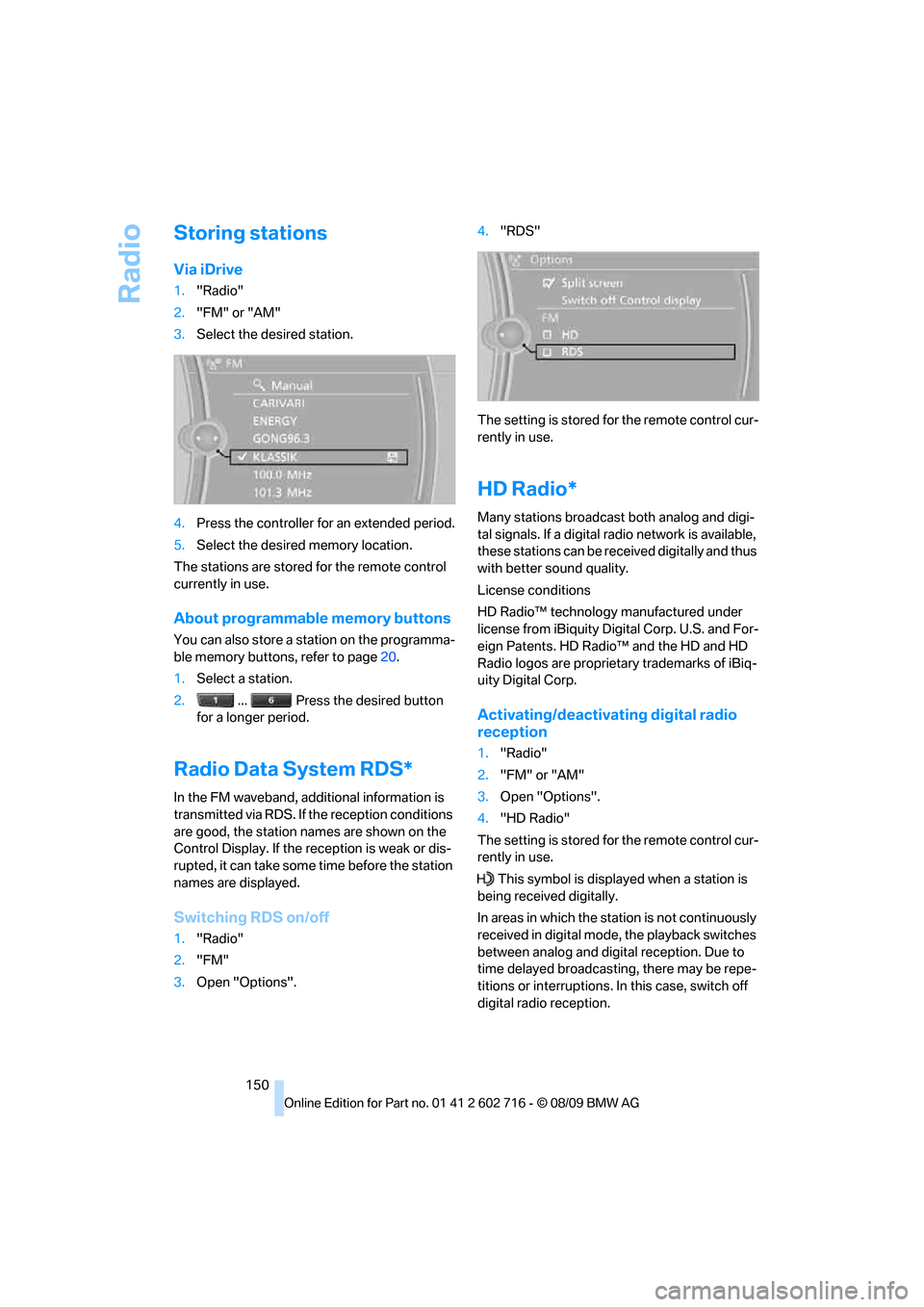
Storing stations
Via iDrive
1."Radio"
2."FM" or "AM"
3.Select the desired station.
4.Press the controller for an extended period.
5.Select the desired memory location.
The stations are stored for the remote control
currently in use.
About programmable memory buttons
You can also store a station on the programma-
ble memory buttons, refer to page20.
1.Select a station.
2. ... Press the desired button
for a longer period.
Radio Data System RDS*
In the FM waveband, additional information is
transmitted via RDS. If the reception conditions
are good, the station names are shown on the
Control Display. If the reception is weak or dis-
rupted, it can take some time before the station
names are displayed.
Switching RDS on/off
1."Radio"
2."FM"
3.Open "Options".4."RDS"
The setting is stored for the remote control cur-
rently in use.
HD Radio*
Many stations broadcast both analog and digi-
tal signals. If a digital radio network is available,
these stations can be received digitally and thus
with better sound quality.
License conditions
HD Radio™ technology manufactured under
license from iBiquity Digital Corp. U.S. and For-
eign Patents. HD Radio™ and the HD and HD
Radio logos are proprietary trademarks of iBiq-
uity Digital Corp.
Activating/deactivating digital radio
reception
1."Radio"
2."FM" or "AM"
3.Open "Options".
4."HD Radio"
The setting is stored for the remote control cur-
rently in use.
This symbol is displayed when a station is
being received digitally.
In areas in which the station is not continuously
received in digital mode, the playback switches
between analog and digital reception. Due to
time delayed broadcasting, there may be repe-
titions or interruptions. In this case, switch off
digital radio reception.
Page 153 of 252
Navigation
Entertainment
Driving tips
151Reference
At a glance
Controls
Communications
Mobility
Displaying additional information
Some stations broadcast additional information
on the current track, such as the name of the
artist.
1.Select the desired station.
2.Open "Options".
3."Station info"
Selecting a substation
1.Select the desired station.
2.Press the controller.
3.Select the substation.
Presets
It is possible to store up to 40 stations.
Calling up a station
1."Radio"
2."Presets"
3.Select the desired station.
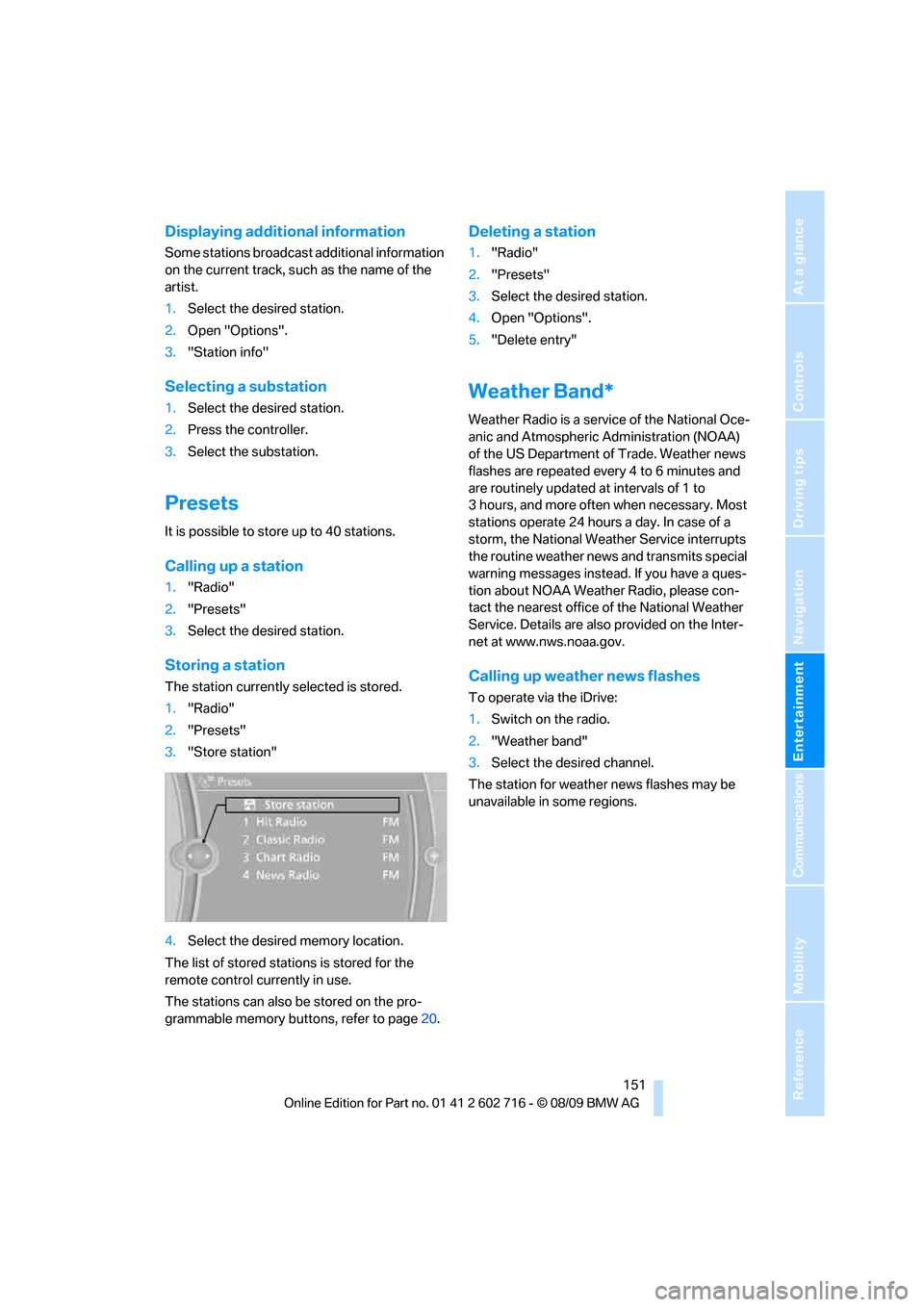
Storing a station
The station currently selected is stored.
1."Radio"
2."Presets"
3."Store station"
4.Select the desired memory location.
The list of stored stations is stored for the
remote control currently in use.
The stations can also be stored on the pro-
grammable memory buttons, refer to page20.
Deleting a station
1."Radio"
2."Presets"
3.Select the desired station.
4.Open "Options".
5."Delete entry"
Weather Band*
Weather Radio is a service of the National Oce-
anic and Atmospheric Administration (NOAA)
of the US Department of Trade. Weather news
flashes are repeated every 4 to 6 minutes and
are routinely updated at intervals of 1 to
3 hours, and more often when necessary. Most
stations operate 24 hours a day. In case of a
storm, the National Weather Service interrupts
the routine weather news and transmits special
warning messages instead. If you have a ques-
tion about NOAA Weather Radio, please con-
tact the nearest office of the National Weather
Service. Details are also provided on the Inter-
net at www.nws.noaa.gov.
Calling up weather news flashes
To operate via the iDrive:
1.Switch on the radio.
2."Weather band"
3.Select the desired channel.
The station for weather news flashes may be
unavailable in some regions.
Page 154 of 252
Satellite radio
152
Satellite radio
You can receive over 100 different channels
with high sound quality.
The channels are offered to you in predefined
packages. To receive the channels of your
choice, you must have this package enabled.
With this new technology the signal may
fail, causing interruptions in reception.<
Enabling or disabling
channels
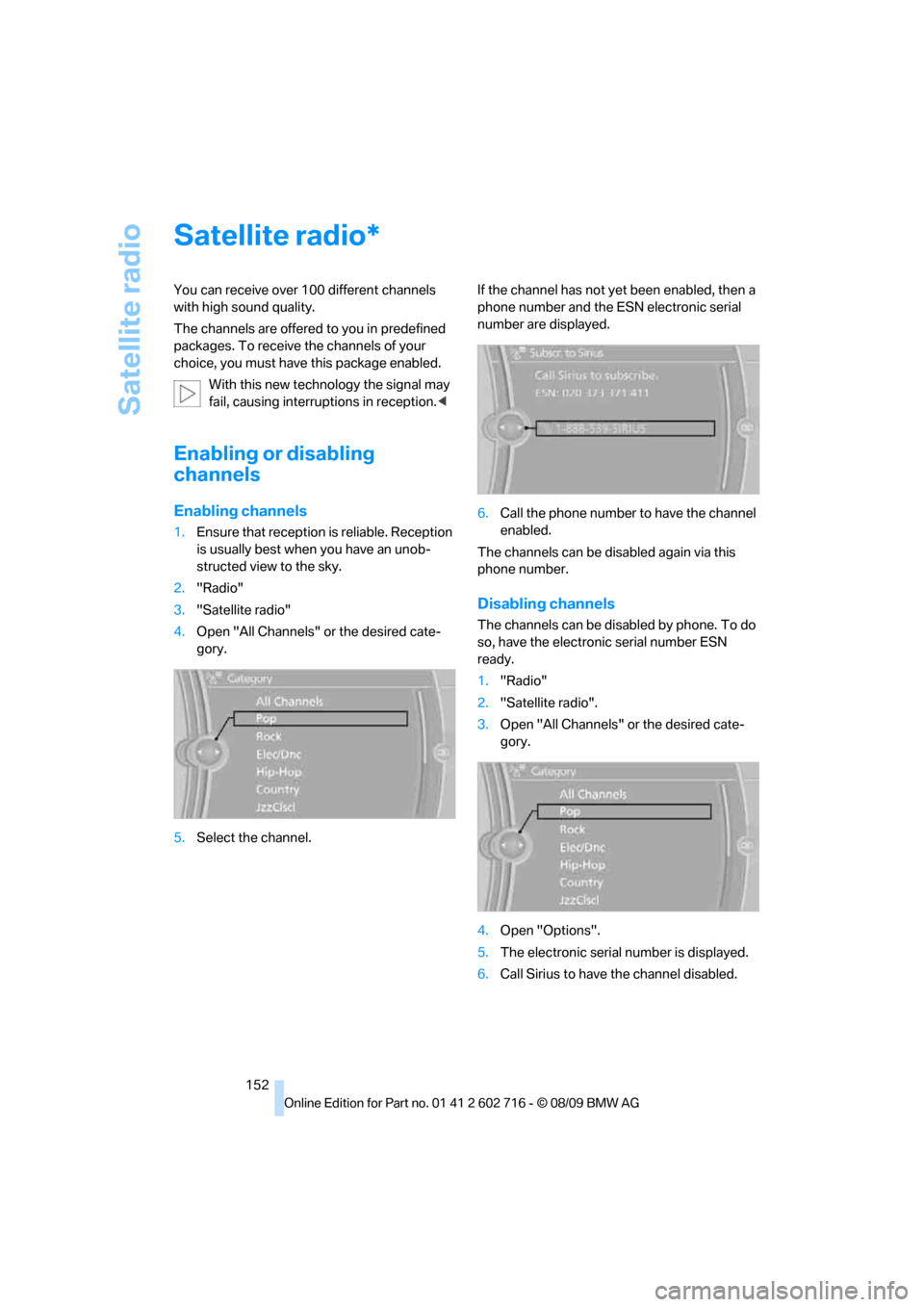
Enabling channels
1.Ensure that reception is reliable. Reception
is usually best when you have an unob-
structed view to the sky.
2."Radio"
3."Satellite radio"
4.Open "All Channels" or the desired cate-
gory.
5.Select the channel.If the channel has not yet been enabled, then a
phone number and the ESN electronic serial
number are displayed.
6.Call the phone number to have the channel
enabled.
The channels can be disabled again via this
phone number.
Disabling channels
The channels can be disabled by phone. To do
so, have the electronic serial number ESN
ready.
1."Radio"
2."Satellite radio".
3.Open "All Channels" or the desired cate-
gory.
4.Open "Options".
5.The electronic serial number is displayed.
6.Call Sirius to have the channel disabled.
*
Page 155 of 252
Navigation
Entertainment
Driving tips
153Reference
At a glance
Controls
Communications
Mobility
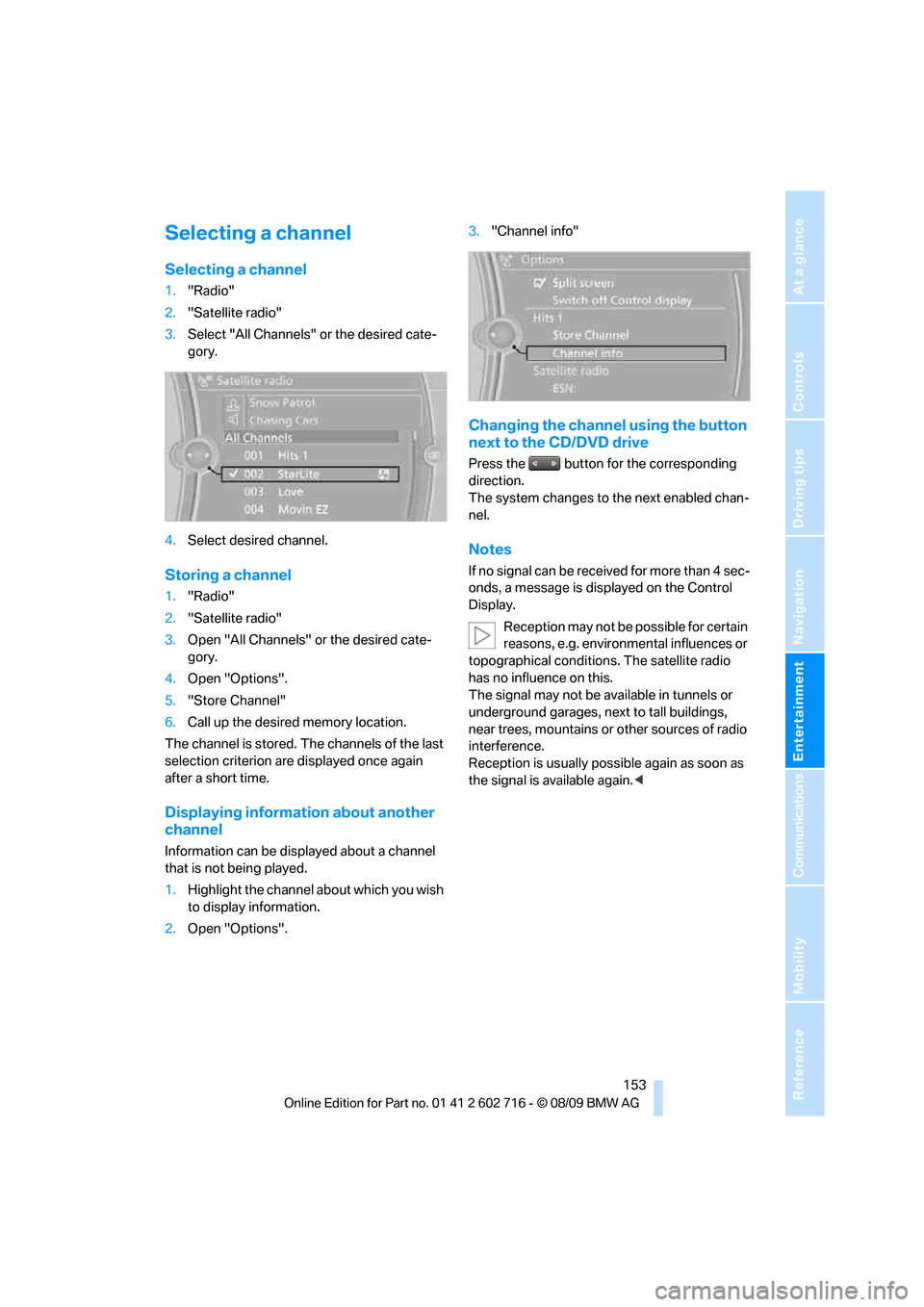
Selecting a channel
Selecting a channel
1."Radio"
2."Satellite radio"
3.Select "All Channels" or the desired cate-
gory.
4.Select desired channel.
Storing a channel
1."Radio"
2."Satellite radio"
3.Open "All Channels" or the desired cate-
gory.
4.Open "Options".
5."Store Channel"
6.Call up the desired memory location.
The channel is stored. The channels of the last
selection criterion are displayed once again
after a short time.
Displaying information about another
channel
Information can be displayed about a channel
that is not being played.
1.Highlight the channel about which you wish
to display information.
2.Open "Options".3."Channel info"
Changing the channel using the button
next to the CD/DVD drive
Press the button for the corresponding
direction.
The system changes to the next enabled chan-
nel.
Notes
If no signal can be received for more than 4 sec-
onds, a message is displayed on the Control
Display.
Reception may not be possible for certain
reasons, e.g. environmental influences or
topographical conditions. The satellite radio
has no influence on this.
The signal may not be available in tunnels or
underground garages, next to tall buildings,
near trees, mountains or other sources of radio
interference.
Reception is usually possible again as soon as
the signal is available again.<
Page 177 of 252
175
Entertainment
Reference
At a glance
Controls
Driving tips Communications
Navigation
Mobility
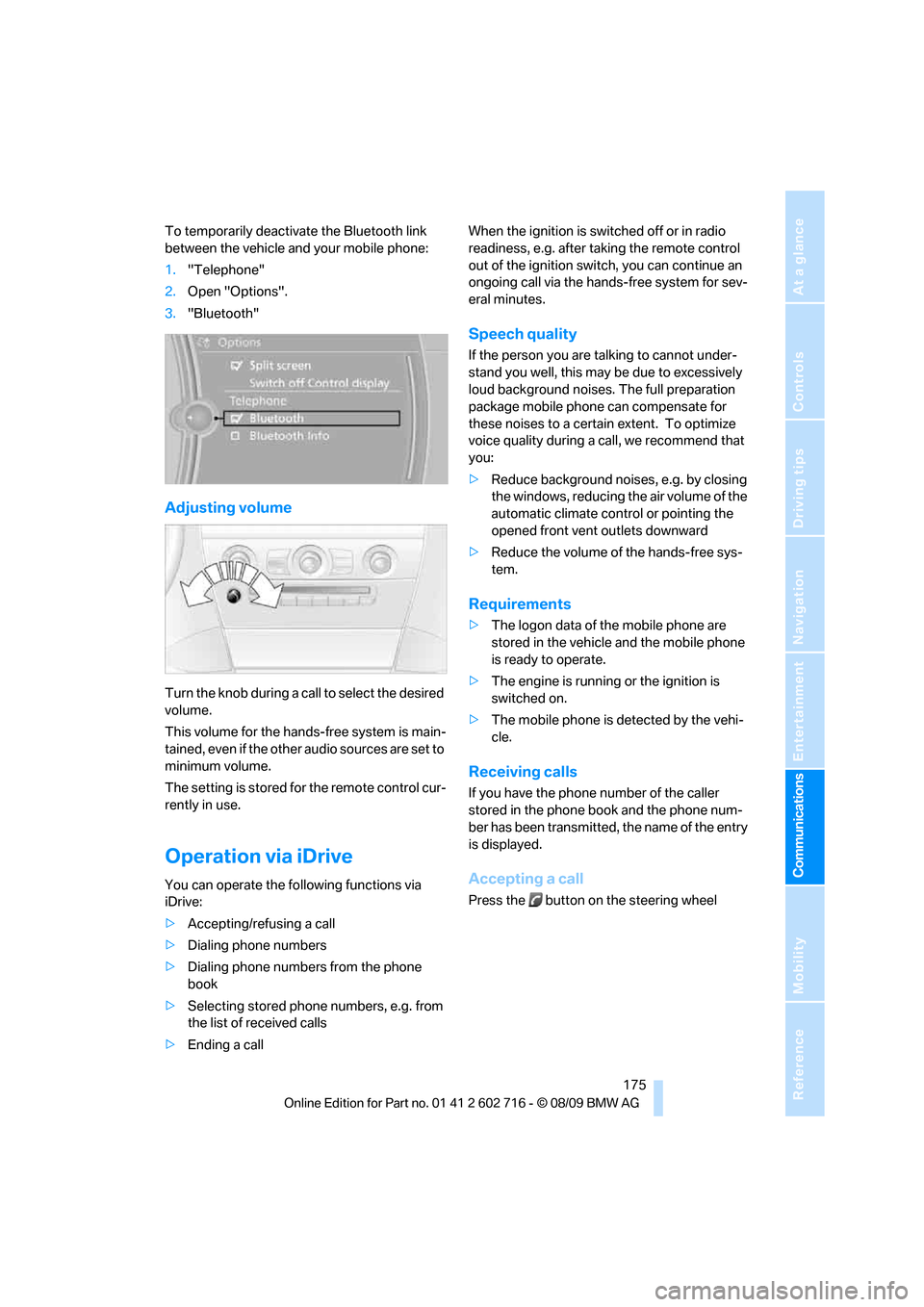
To temporarily deactivate the Bluetooth link
between the vehicle and your mobile phone:
1."Telephone"
2.Open "Options".
3."Bluetooth"
Adjusting volume
Turn the knob during a call to select the desired
volume.
This volume for the hands-free system is main-
tained, even if the other audio sources are set to
minimum volume.
The setting is stored for the remote control cur-
rently in use.
Operation via iDrive
You can operate the following functions via
iDrive:
>Accepting/refusing a call
>Dialing phone numbers
>Dialing phone numbers from the phone
book
>Selecting stored phone numbers, e.g. from
the list of received calls
>Ending a callWhen the ignition is switched off or in radio
readiness, e.g. after taking the remote control
out of the ignition switch, you can continue an
ongoing call via the hands-free system for sev-
eral minutes.
Speech quality
If the person you are talking to cannot under-
stand you well, this may be due to excessively
loud background noises. The full preparation
package mobile phone can compensate for
these noises to a certain extent. To optimize
voice quality during a call, we recommend that
you:
>Reduce background noises, e.g. by closing
the windows, reducing the air volume of the
automatic climate control or pointing the
opened front vent outlets downward
>Reduce the volume of the hands-free sys-
tem.
Requirements
>The logon data of the mobile phone are
stored in the vehicle and the mobile phone
is ready to operate.
>The engine is running or the ignition is
switched on.
>The mobile phone is detected by the vehi-
cle.
Receiving calls
If you have the phone number of the caller
stored in the phone book and the phone num-
ber has been transmitted, the name of the entry
is displayed.
Accepting a call
Press the button on the steering wheel
Page 185 of 252
183
Entertainment
Reference
At a glance
Controls
Driving tips Communications
Navigation
Mobility
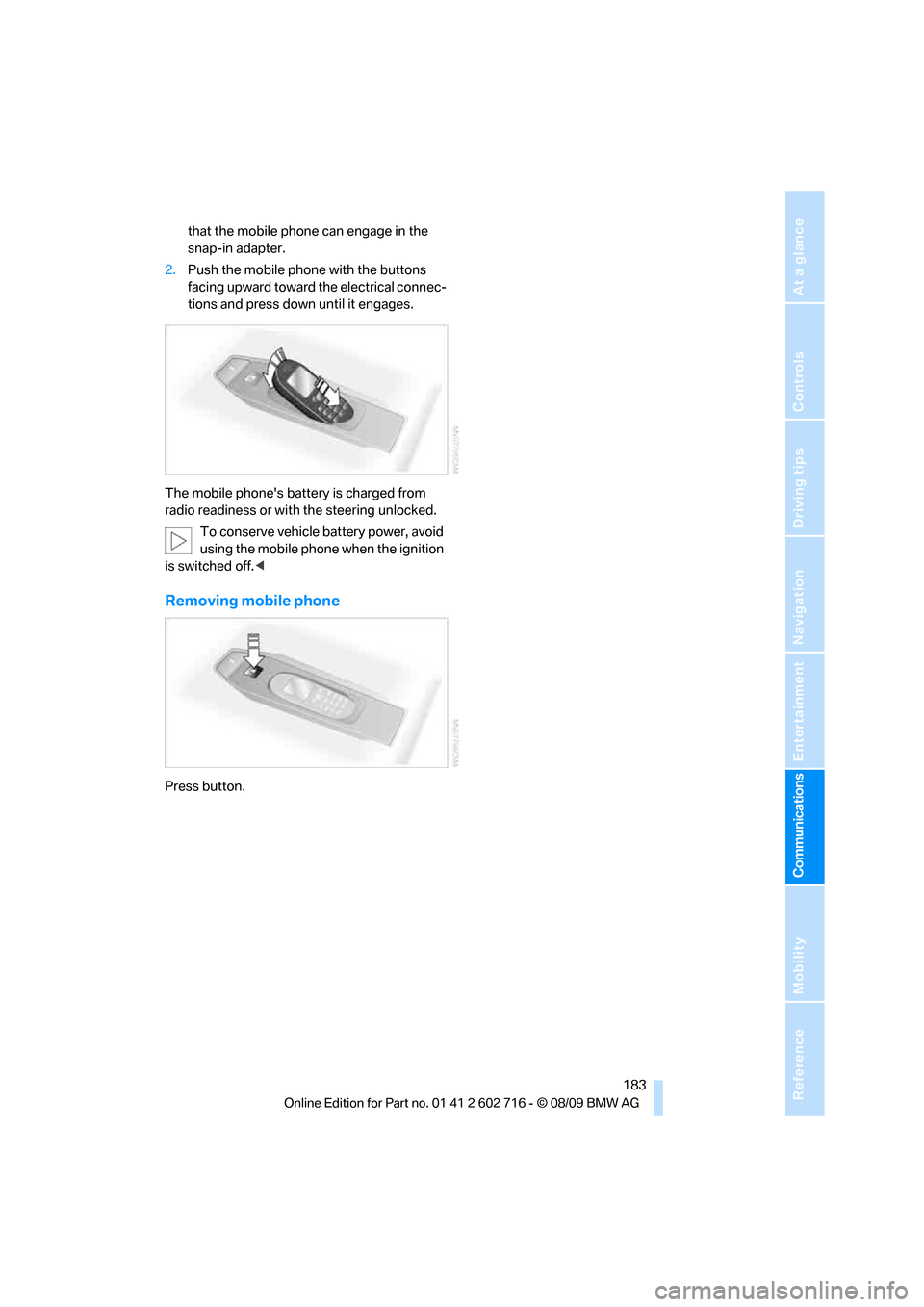
that the mobile phone can engage in the
snap-in adapter.
2.Push the mobile phone with the buttons
facing upward toward the electrical connec-
tions and press down until it engages.
The mobile phone's battery is charged from
radio readiness or with the steering unlocked.
To conserve vehicle battery power, avoid
using the mobile phone when the ignition
is switched off.<
Removing mobile phone
Press button.
Page 213 of 252
Mobility
211Reference
At a glance
Controls
Driving tips
Communications
Navigation
Entertainment
matte components with water and, if necessary,
a solvent-free plastic cleaner.
Fine wooden components
Use a damp cloth to clean fine wooden trim
panels and components. Follow up by drying
with a soft cloth.
Safety belts
Dirty belt straps impede the reeling action and
thus have a negative impact on safety.
Chemical cleaning
Do not clean chemically, as this may
destroy the webbing.<
Inside sensors
Clean inside sensors such as those of the High-
beam Assistant using a lint-free cloth moist-
ened with glass cleaner.
Displays
Clean displays like the radio or the Control Dis-
play using a display-cleaning cloth or a soft,
nonabrasive lint-free cloth.
Avoid using excessive pressure when
cleaning displays; otherwise, you could
damage them.<
Never use chemical-based cleansers or
household scouring products. Keep all
liquids away from the equipment. Otherwise
corrosion or damage to surfaces or electrical
components can occur.<
CD/DVD drives
Do not use cleaning CDs; they can dam-
age parts of the player.<
Storing your vehicle
When storing your vehicle for longer than three
months, please seek the advice of your BMW
center or a workshop that works in accordance
with BMW guidelines.
Page 217 of 252
Mobility
215Reference
At a glance
Controls
Driving tips
Communications
Navigation
Entertainment
>Seat, mirror and steering wheel* memory
The positions must be stored again, refer to
page47.
>Time and date
Must be updated again, refer to page76.
>Radio
Radio stations need to be stored again,
refer to page150.
>Navigation system
You must wait until the system becomes
functional again, refer to page126.
>Glass roof, electric
It may not be possible to move the glass
roof. The system must be initialized, refer to
page38.
>Active steering
The system automatically initializes itself
briefly during a trip. The system is deacti-
vated during this time, refer to page89.
>Power windows
The pinch prevention system for the power
windows must be reinitialized, refer to
page36.
Talk to your BMW center before placing
the stored vehicle back in service. <
Fuses
Never attempt to repair a blown fuse and
do not replace a defective fuse with a sub-
stitute of another color or amperage rating, as
this could lead to a circuit overload, ultimately
resulting in a fire in the vehicle.<
Spare fuses and a pair of plastic tweezers are
located in the compartment for the onboard tool
kit, refer to page212.
Information on fuse allocation is located below
the bracket for the onboard tool kit, see below.
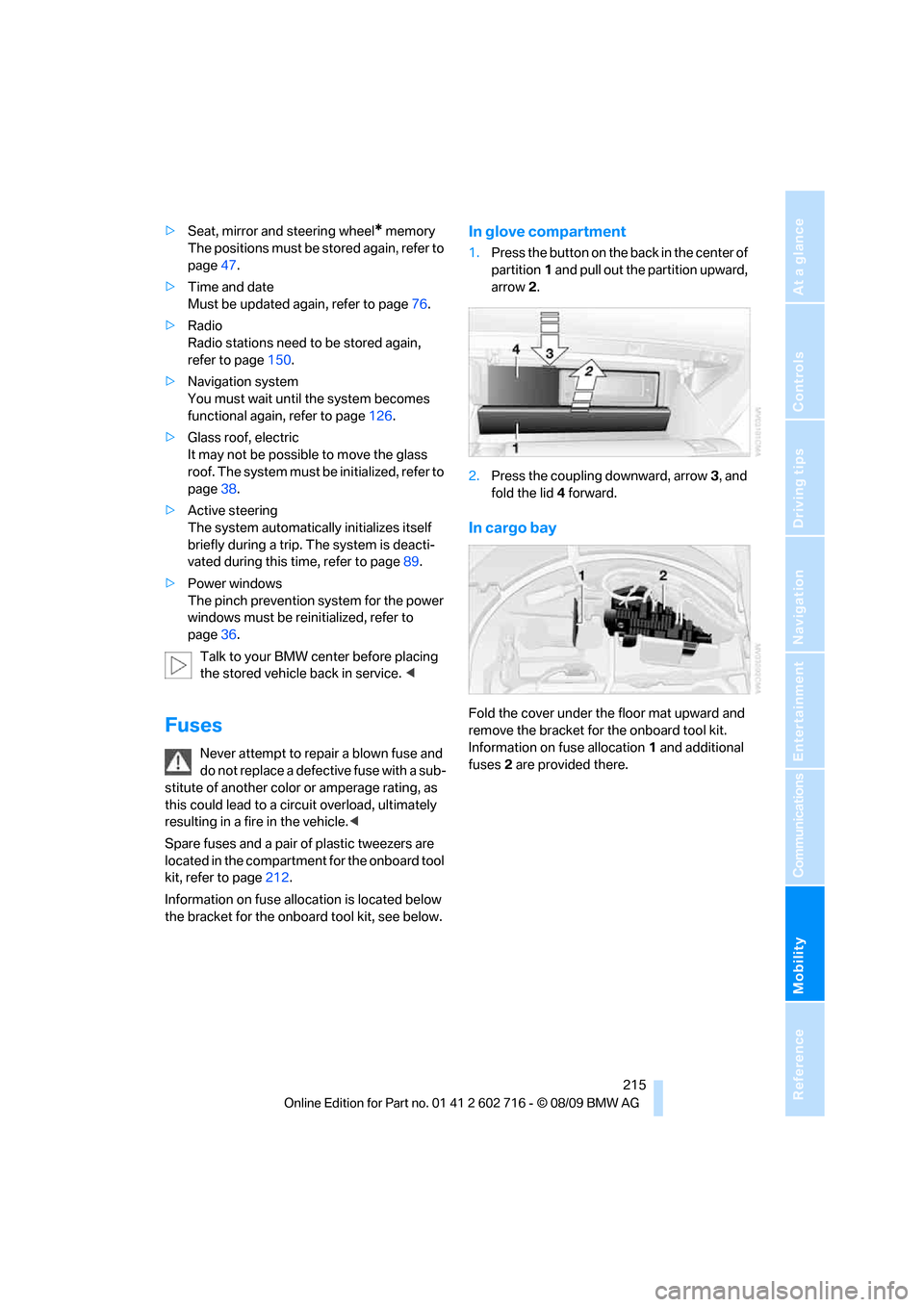
In glove compartment
1.Press the button on the back in the center of
partition1 and pull out the partition upward,
arrow2.
2.Press the coupling downward, arrow3, and
fold the lid 4 forward.
In cargo bay
Fold the cover under the floor mat upward and
remove the bracket for the onboard tool kit.
Information on fuse allocation1 and additional
fuses2 are provided there.
Page 218 of 252
Giving and receiving assistance
216
Giving and receiving assistance
Emergency request
Requirements
>BMW Assist is activated.
Activating BMW Assist, refer to page188.
>Radio readiness is activated.
>The BMW Assist system is logged on to a
mobile phone network.
>The BMW Assist system is functional.
>Full preparation package mobile phone.
With this equipment, an Emergency
Request is still possible when no mobile
phone is paired with the vehicle.
Once your BMW Assist subscription expires,
the BMW Assist system can be deactivated by
a BMW center without you having to visit a
workshop. If the BMW Assist system has been
deactivated, Emergency Requests are not pos-
sible. The BMW Assist system can be reacti-
vated by a BMW center after signing a new con-
tract.
Initiating an Emergency Request
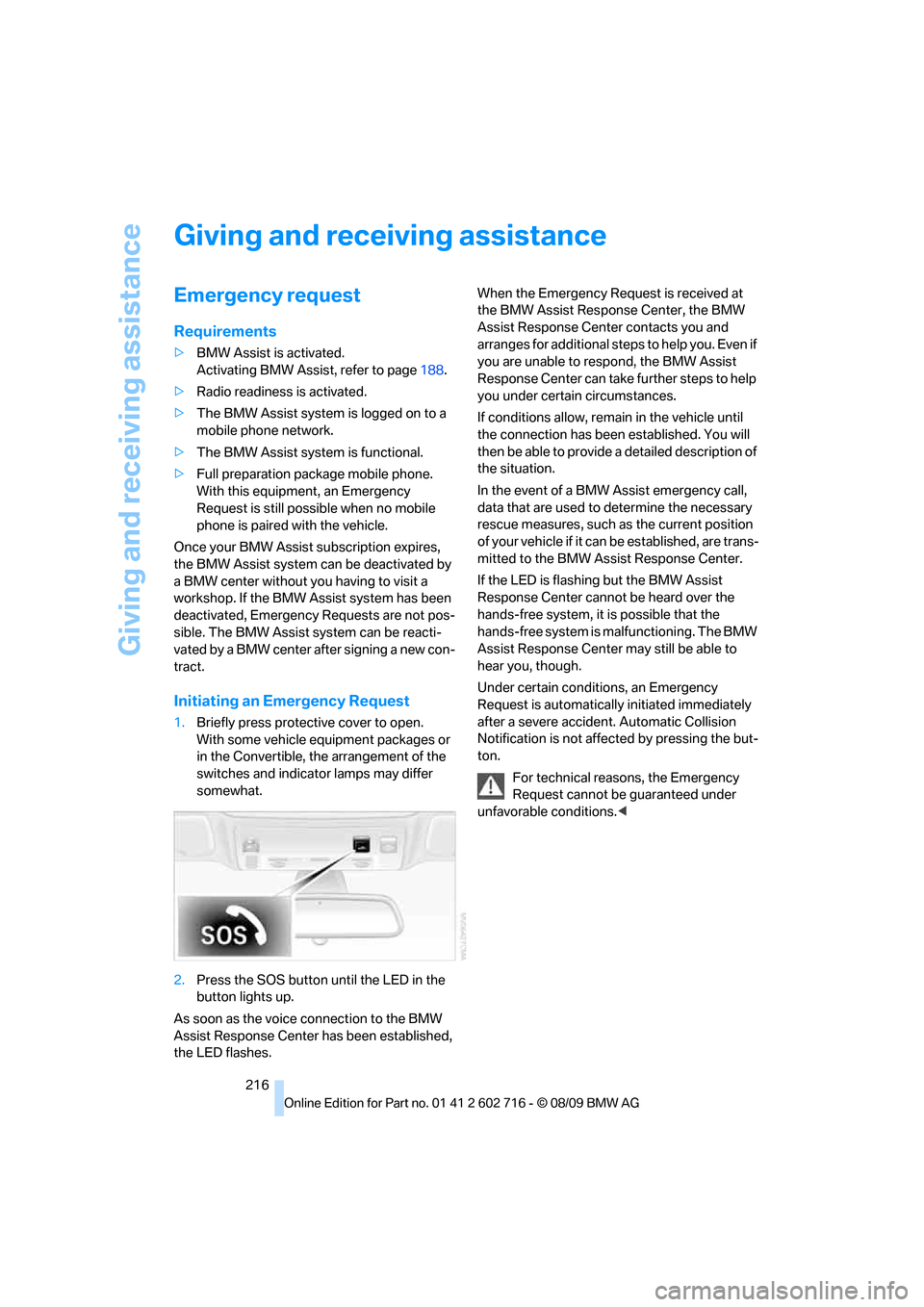
1.Briefly press protective cover to open.
With some vehicle equipment packages or
in the Convertible, the arrangement of the
switches and indicator lamps may differ
somewhat.
2.Press the SOS button until the LED in the
button lights up.
As soon as the voice connection to the BMW
Assist Response Center has been established,
the LED flashes.When the Emergency Request is received at
the BMW Assist Response Center, the BMW
Assist Response Center contacts you and
arranges for additional steps to help you. Even if
you are unable to respond, the BMW Assist
Response Center can take further steps to help
you under certain circumstances.
If conditions allow, remain in the vehicle until
the connection has been established. You will
then be able to provide a detailed description of
the situation.
In the event of a BMW Assist emergency call,
data that are used to determine the necessary
rescue measures, such as the current position
of your vehicle if it can be established, are trans-
mitted to the BMW Assist Response Center.
If the LED is flashing but the BMW Assist
Response Center cannot be heard over the
hands-free system, it is possible that the
hands-free system is malfunctioning. The BMW
Assist Response Center may still be able to
hear you, though.
Under certain conditions, an Emergency
Request is automatically initiated immediately
after a severe accident. Automatic Collision
Notification is not affected by pressing the but-
ton.
For technical reasons, the Emergency
Request cannot be guaranteed under
unfavorable conditions.<
Page 231 of 252
Reference 229
At a glance
Controls
Driving tips
Communications
Navigation
Entertainment
Mobility
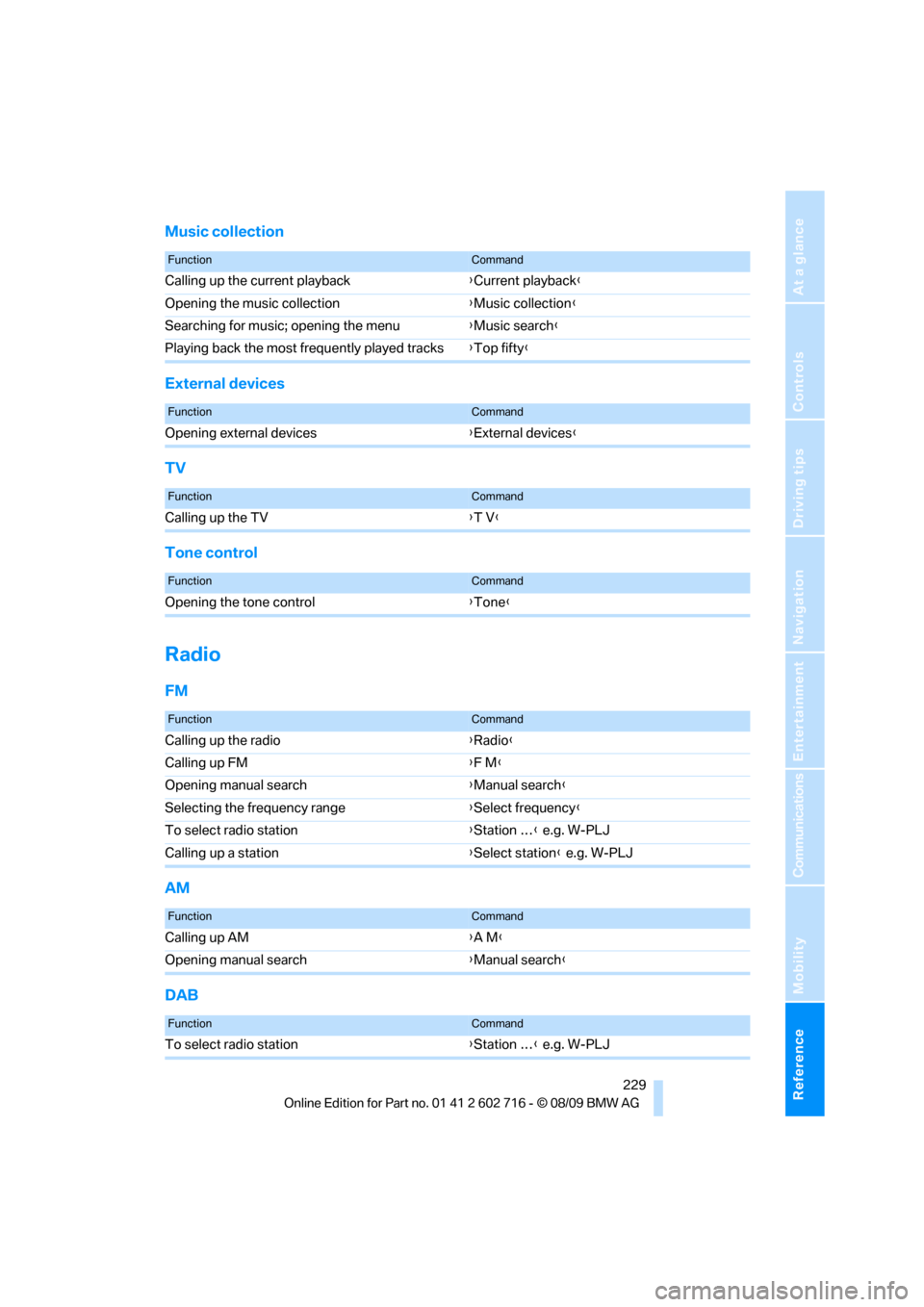
Music collection
External devices
TV
Tone control
Radio
FM
AM
DAB
FunctionCommand
Calling up the current playback{Current playback}
Opening the music collection{Music collection}
Searching for music; opening the menu{Music search}
Playing back the most frequently played tracks{Top fifty}
FunctionCommand
Opening external devices{External devices}
FunctionCommand
Calling up the TV{T V}
FunctionCommand
Opening the tone control{Tone}
FunctionCommand
Calling up the radio{Radio}
Calling up FM{F M}
Opening manual search{Manual search}
Selecting the frequency range{Select frequency}
To select radio station{Station …} e.g. W-PLJ
Calling up a station{Select station} e.g. W-PLJ
FunctionCommand
Calling up AM{A M}
Opening manual search{Manual search}
FunctionCommand
To select radio station{Station …} e.g. W-PLJ