wheel BMW 650I COUPE 2010 E63 Service Manual
[x] Cancel search | Manufacturer: BMW, Model Year: 2010, Model line: 650I COUPE, Model: BMW 650I COUPE 2010 E63Pages: 252, PDF Size: 8.4 MB
Page 202 of 252
Wheels and tires
200
Run-flat tires
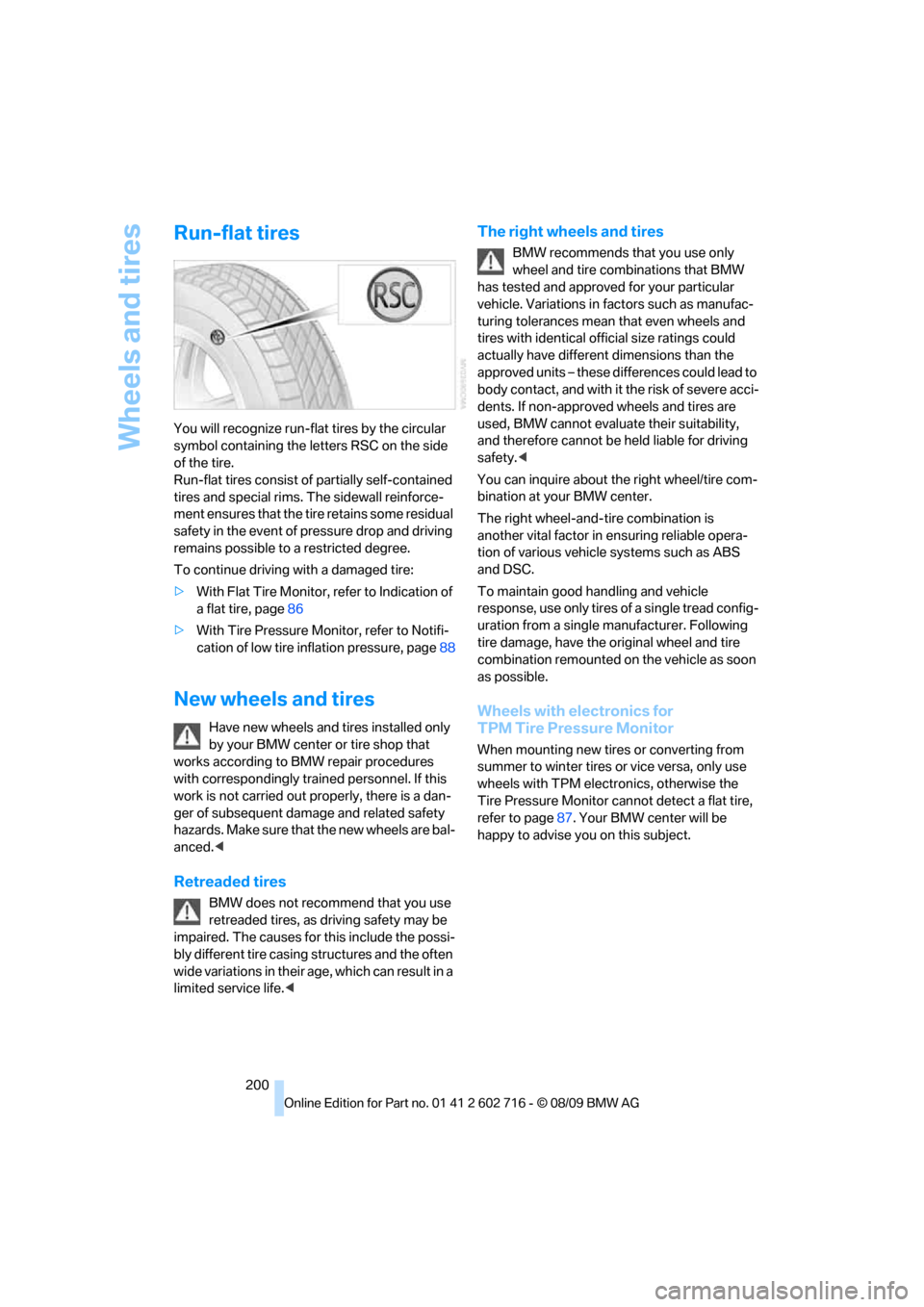
You will recognize run-flat tires by the circular
symbol containing the letters RSC on the side
of the tire.
Run-flat tires consist of partially self-contained
tires and special rims. The sidewall reinforce-
ment ensures that the tire retains some residual
safety in the event of pressure drop and driving
remains possible to a restricted degree.
To continue driving with a damaged tire:
>With Flat Tire Monitor, refer to Indication of
a flat tire, page86
>With Tire Pressure Monitor, refer to Notifi-
cation of low tire inflation pressure, page88
New wheels and tires
Have new wheels and tires installed only
by your BMW center or tire shop that
works according to BMW repair procedures
with correspondingly trained personnel. If this
work is not carried out properly, there is a dan-
ger of subsequent damage and related safety
h a z a r d s . M a k e s u re t h a t t h e n e w w h ee l s a r e b a l-
anced.<
Retreaded tires
BMW does not recommend that you use
retreaded tires, as driving safety may be
impaired. The causes for this include the possi-
bly different tire casing structures and the often
wide variations in their age, which can result in a
limited service life.<
The right wheels and tires
BMW recommends that you use only
wheel and tire combinations that BMW
has tested and approved for your particular
vehicle. Variations in factors such as manufac-
turing tolerances mean that even wheels and
tires with identical official size ratings could
actually have different dimensions than the
approved units – these differences could lead to
body contact, and with it the risk of severe acci-
dents. If non-approved wheels and tires are
used, BMW cannot evaluate their suitability,
and therefore cannot be held liable for driving
safety.<
You can inquire about the right wheel/tire com-
bination at your BMW center.
The right wheel-and-tire combination is
another vital factor in ensuring reliable opera-
tion of various vehicle systems such as ABS
and DSC.
To maintain good handling and vehicle
response, use only tires of a single tread config-
uration from a single manufacturer. Following
tire damage, have the original wheel and tire
combination remounted on the vehicle as soon
as possible.
Wheels with electronics for
TPM Tire Pressure Monitor
When mounting new tires or converting from
summer to winter tires or vice versa, only use
wheels with TPM electronics, otherwise the
Tire Pressure Monitor cannot detect a flat tire,
refer to page87. Your BMW center will be
happy to advise you on this subject.
Page 203 of 252
Mobility
201Reference
At a glance
Controls
Driving tips
Communications
Navigation
Entertainment
Recommended tire brands
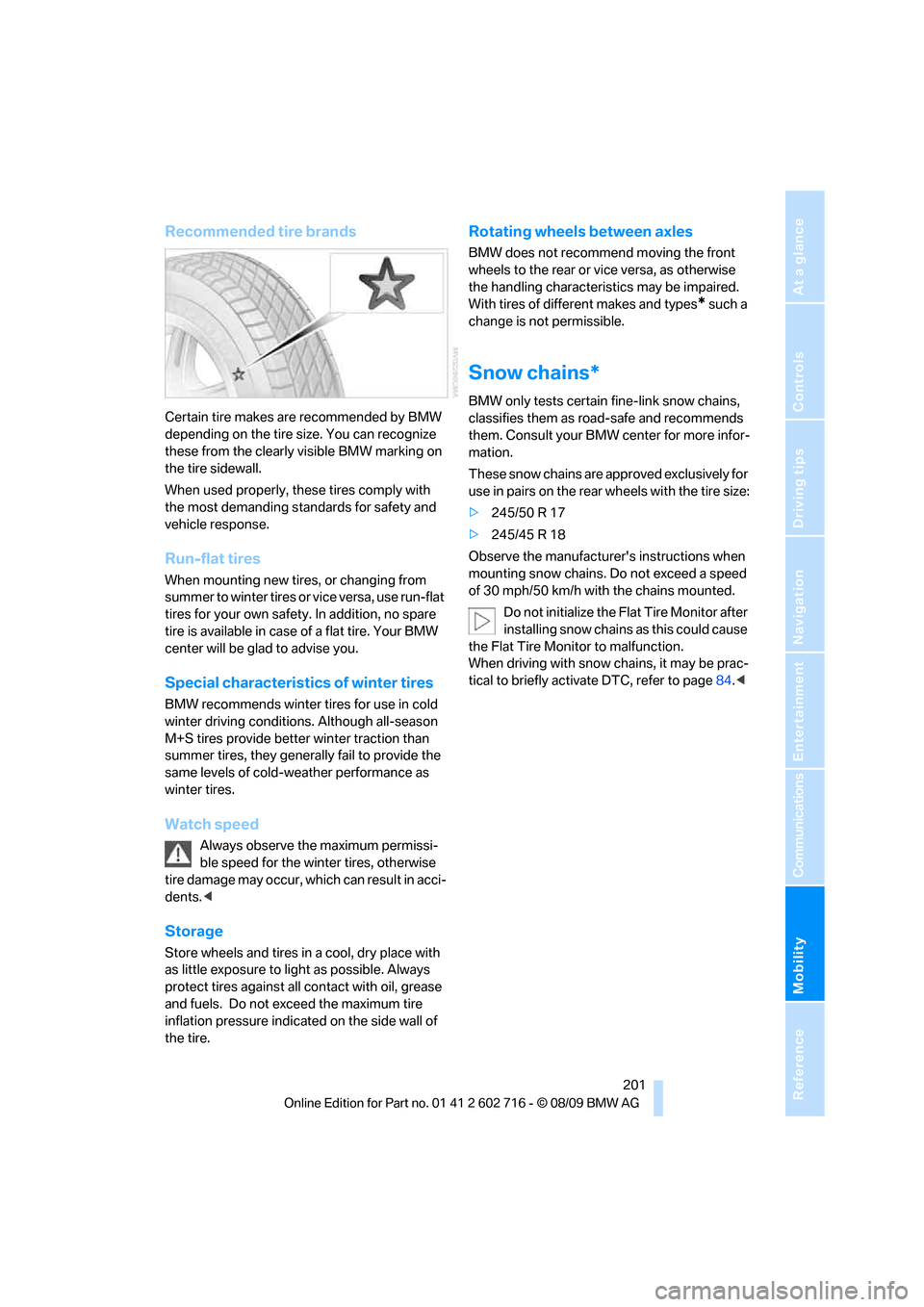
Certain tire makes are recommended by BMW
depending on the tire size. You can recognize
these from the clearly visible BMW marking on
the tire sidewall.
When used properly, these tires comply with
the most demanding standards for safety and
vehicle response.
Run-flat tires
When mounting new tires, or changing from
summer to winter tires or vice versa, use run-flat
tires for your own safety. In addition, no spare
tire is available in case of a flat tire. Your BMW
center will be glad to advise you.
Special characteristics of winter tires
BMW recommends winter tires for use in cold
winter driving conditions. Although all-season
M+S tires provide better winter traction than
summer tires, they generally fail to provide the
same levels of cold-weather performance as
winter tires.
Watch speed
Always observe the maximum permissi-
ble speed for the winter tires, otherwise
tire damage may occur, which can result in acci-
dents.<
Storage
Store wheels and tires in a cool, dry place with
as little exposure to light as possible. Always
protect tires against all contact with oil, grease
and fuels. Do not exceed the maximum tire
inflation pressure indicated on the side wall of
the tire.
Rotating wheels between axles
BMW does not recommend moving the front
wheels to the rear or vice versa, as otherwise
the handling characteristics may be impaired.
With tires of different makes and types
* such a
change is not permissible.
Snow chains*
BMW only tests certain fine-link snow chains,
classifies them as road-safe and recommends
them. Consult your BMW center for more infor-
mation.
These snow chains are approved exclusively for
use in pairs on the rear wheels with the tire size:
>245/50 R 17
>245/45 R 18
Observe the manufacturer's instructions when
mounting snow chains. Do not exceed a speed
of 30 mph/50 km/h with the chains mounted.
Do not initialize the Flat Tire Monitor after
installing snow chains as this could cause
the Flat Tire Monitor to malfunction.
When driving with snow chains, it may be prac-
tical to briefly activate DTC, refer to page84.<
Page 212 of 252
Care
210
Waxing
Sealant is required when water no longer beads
on the clean surface of the paint. Use only prod-
ucts that contain carnauba wax or synthetic wax
to seal your finish.
Rubber gaskets
Treat only with water or a rubber care product.
To avoid noise or damage, do not use
products that contain silicone to care for
rubber gaskets.<
Chrome components
Particularly after exposure to road salt, thor-
oughly cleanse parts like the radiator grille, door
handles, or window frames with plenty of water
with shampoo added to it. For additional treat-
ment, use chrome polish.
Alloy wheels
Depending on your system, braking can gener-
ate dust, which settles on the light-alloy wheels.
Remove this dust regularly with acid-free wheel
cleaner.
Do not use aggressive, acid-containing,
strongly alkaline, or coarse cleansers and
do not use steam cleaners at temperatures
greater than 140 °F/606, otherwise you may
damage your vehicle.<
Outside sensors
Sensors on the outside of the vehicle, such as
Park Distance Control sensors or radar sensors,
should be kept clean and free of ice to retain
their full function.
Interior care
Upholstery/fabrics
Clean regularly with a vacuum cleaner in order
to remove surface dirt.
In the event of more serious soiling such as bev-
erage stains, use a soft sponge or a lint-free
microfiber cloth in combination with suitable interior cleaners. Follow the instructions on the
packaging.
Clean upholstery material over a large
area extending out to the seams. Avoid
intense friction.<
Open Velcro fasteners on pants or other
items of clothing can cause damage to
the seat covering. Make sure that the Velcro
fasteners are closed.<
Leather/leather coverings
The leather used by BMW is a high quality
natural product. Slight patterns in the
grain are part of the typical properties of a natu-
ral leather.<
Dust and dirt from the road chafe in pores and
folds and result in considerable wear and cause
the leather surface to become prematurely brit-
tle. We therefore suggest that you clean the
leather with a dust cloth or vacuum cleaner at
regular intervals.
Particularly with light-colored leather, make
sure to clean it regularly since it has a greater
tendency to become soiled.
Treat the leather twice a year with a leather
lotion since dirt and grease harm the protective
layer of the leather.
Carpets/cargo bay
Carpeting, floor mats, and luggage compart-
ment rugs and paneling can be cleaned with a
vacuum or in the event of more serious soiling,
cleansed with an interior cleaner.
Floor mats and luggage compartment rugs can
be removed for cleaning. When inserting into
place, make sure that the seat rails do not pro-
trude over the floor mats; otherwise floor mats
can be damaged.
Fluff on new floor mats is a result of the produc-
tion process and can be removed by repeated
vacuuming.
Plastic components inside
Clean the glass cover of the instrument panel,
imitation leather surfaces, lamp lenses, and
Page 216 of 252
Replacing components
214
License plate lamps
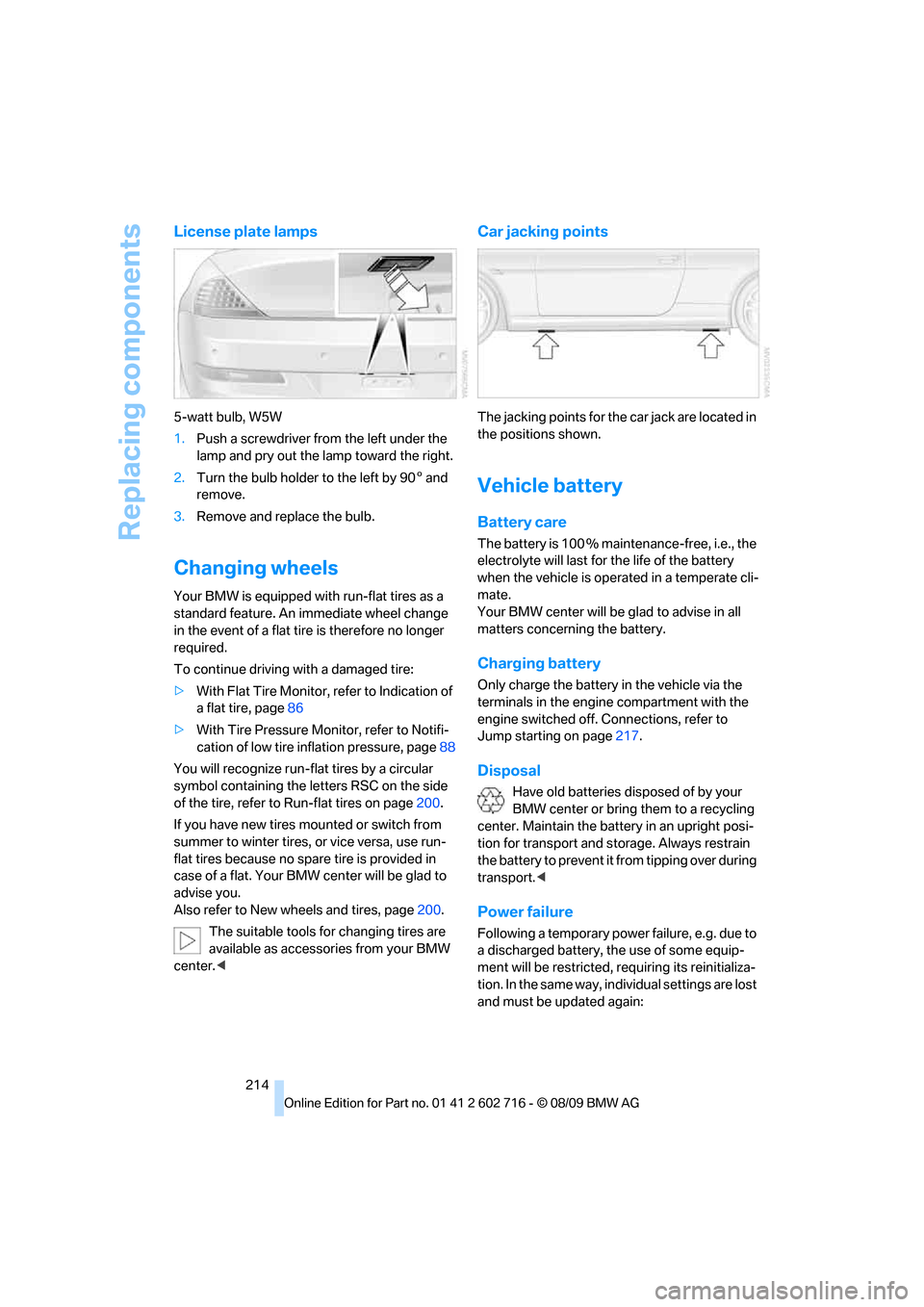
5-watt bulb, W5W
1.Push a screwdriver from the left under the
lamp and pry out the lamp toward the right.
2.Turn the bulb holder to the left by 905 and
remove.
3.Remove and replace the bulb.
Changing wheels
Your BMW is equipped with run-flat tires as a
standard feature. An immediate wheel change
in the event of a flat tire is therefore no longer
required.
To continue driving with a damaged tire:
>With Flat Tire Monitor, refer to Indication of
a flat tire, page86
>With Tire Pressure Monitor, refer to Notifi-
cation of low tire inflation pressure, page88
You will recognize run-flat tires by a circular
symbol containing the letters RSC on the side
of the tire, refer to Run-flat tires on page200.
If you have new tires mounted or switch from
summer to winter tires, or vice versa, use run-
flat tires because no spare tire is provided in
case of a flat. Your BMW center will be glad to
advise you.
Also refer to New wheels and tires, page200.
The suitable tools for changing tires are
available as accessories from your BMW
center.<
Car jacking points
The jacking points for the car jack are located in
the positions shown.
Vehicle battery
Battery care
The battery is 100 % maintenance-free, i.e., the
electrolyte will last for the life of the battery
when the vehicle is operated in a temperate cli-
mate.
Your BMW center will be glad to advise in all
matters concerning the battery.
Charging battery
Only charge the battery in the vehicle via the
terminals in the engine compartment with the
engine switched off. Connections, refer to
Jump starting on page217.
Disposal
Have old batteries disposed of by your
BMW center or bring them to a recycling
center. Maintain the battery in an upright posi-
tion for transport and storage. Always restrain
the battery to prevent it from tipping over during
transport.<
Power failure
Following a temporary power failure, e.g. due to
a discharged battery, the use of some equip-
ment will be restricted, requiring its reinitializa-
tion. In the same way, individual settings are lost
and must be updated again:
Page 217 of 252
Mobility
215Reference
At a glance
Controls
Driving tips
Communications
Navigation
Entertainment
>Seat, mirror and steering wheel* memory
The positions must be stored again, refer to
page47.
>Time and date
Must be updated again, refer to page76.
>Radio
Radio stations need to be stored again,
refer to page150.
>Navigation system
You must wait until the system becomes
functional again, refer to page126.
>Glass roof, electric
It may not be possible to move the glass
roof. The system must be initialized, refer to
page38.
>Active steering
The system automatically initializes itself
briefly during a trip. The system is deacti-
vated during this time, refer to page89.
>Power windows
The pinch prevention system for the power
windows must be reinitialized, refer to
page36.
Talk to your BMW center before placing
the stored vehicle back in service. <
Fuses
Never attempt to repair a blown fuse and
do not replace a defective fuse with a sub-
stitute of another color or amperage rating, as
this could lead to a circuit overload, ultimately
resulting in a fire in the vehicle.<
Spare fuses and a pair of plastic tweezers are
located in the compartment for the onboard tool
kit, refer to page212.
Information on fuse allocation is located below
the bracket for the onboard tool kit, see below.
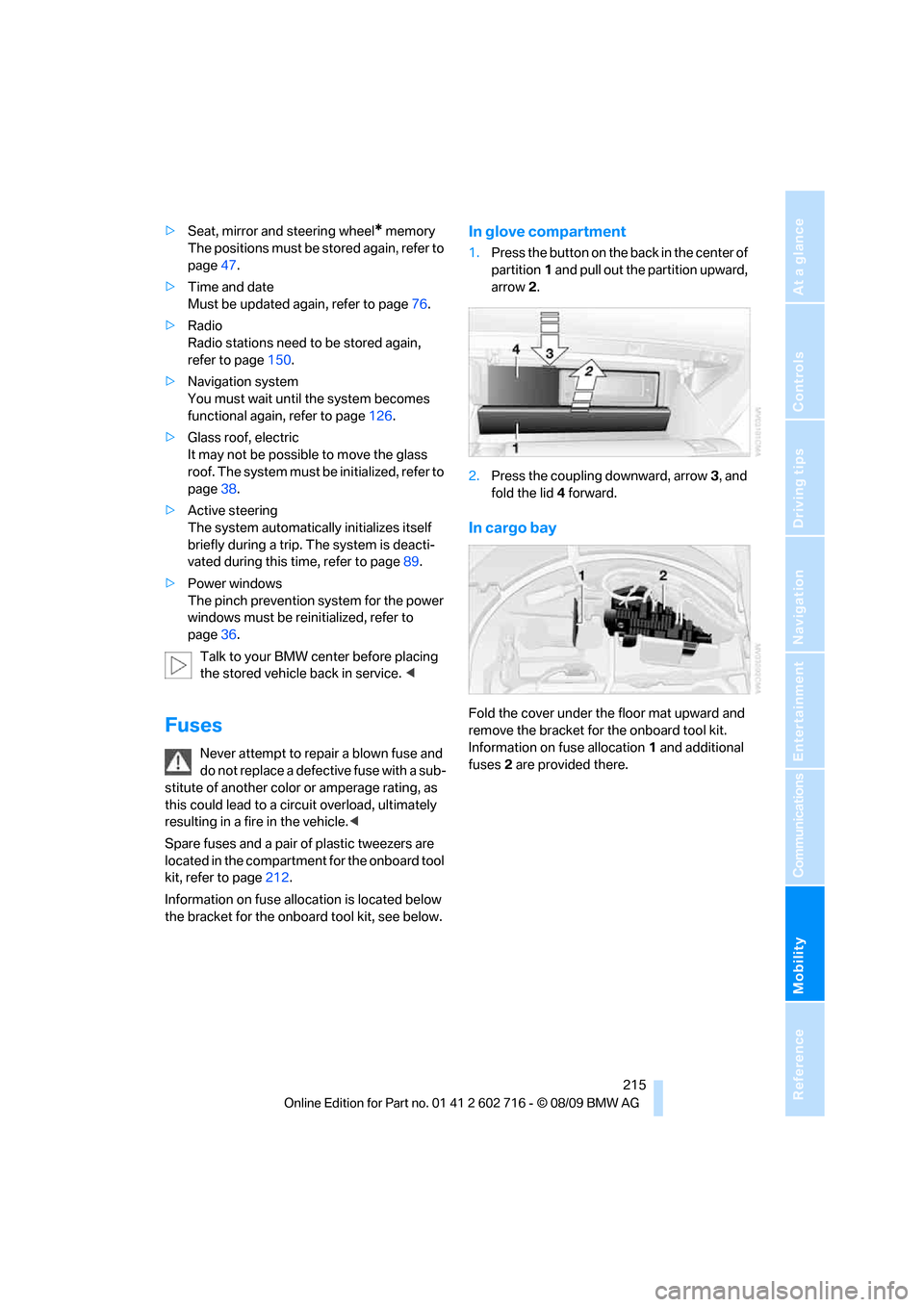
In glove compartment
1.Press the button on the back in the center of
partition1 and pull out the partition upward,
arrow2.
2.Press the coupling downward, arrow3, and
fold the lid 4 forward.
In cargo bay
Fold the cover under the floor mat upward and
remove the bracket for the onboard tool kit.
Information on fuse allocation1 and additional
fuses2 are provided there.
Page 221 of 252
Mobility
219Reference
At a glance
Controls
Driving tips
Communications
Navigation
Entertainment
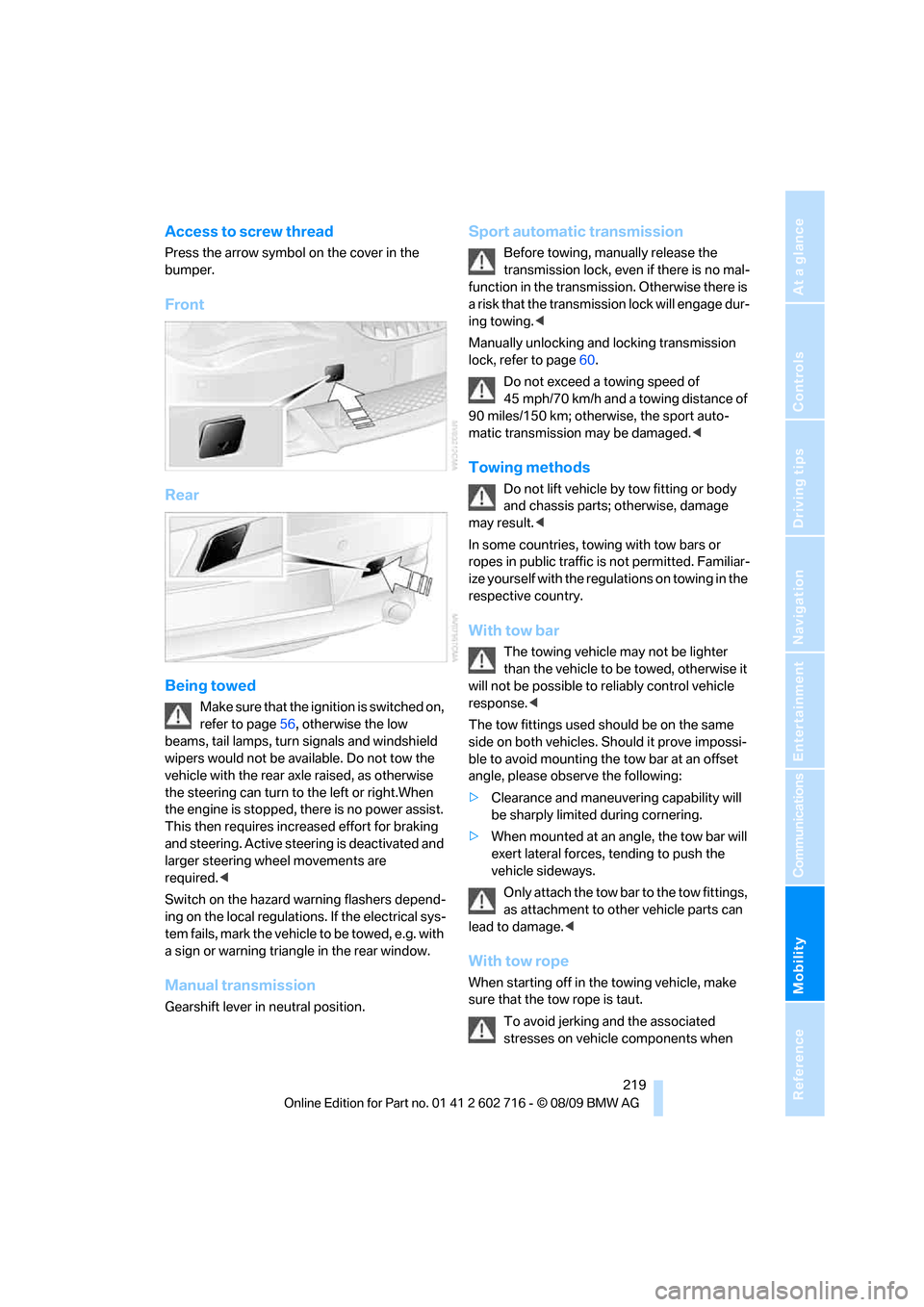
Access to screw thread
Press the arrow symbol on the cover in the
bumper.
Front
Rear
Being towed
Make sure that the ignition is switched on,
refer to page56, otherwise the low
beams, tail lamps, turn signals and windshield
wipers would not be available. Do not tow the
vehicle with the rear axle raised, as otherwise
the steering can turn to the left or right.When
the engine is stopped, there is no power assist.
This then requires increased effort for braking
and steering. Active steering is deactivated and
larger steering wheel movements are
required.<
Switch on the hazard warning flashers depend-
ing on the local regulations. If the electrical sys-
tem fails, mark the vehicle to be towed, e.g. with
a sign or warning triangle in the rear window.
Manual transmission
Gearshift lever in neutral position.
Sport automatic transmission
Before towing, manually release the
transmission lock, even if there is no mal-
function in the transmission. Otherwise there is
a risk that the transmission lock will engage dur-
ing towing.<
Manually unlocking and locking transmission
lock, refer to page60.
Do not exceed a towing speed of
45 mph/70 km/h and a towing distance of
90 miles/150 km; otherwise, the sport auto-
matic transmission may be damaged.<
Towing methods
Do not lift vehicle by tow fitting or body
and chassis parts; otherwise, damage
may result.<
In some countries, towing with tow bars or
ropes in public traffic is not permitted. Familiar-
ize yourself with the regulations on towing in the
respective country.
With tow bar
The towing vehicle may not be lighter
than the vehicle to be towed, otherwise it
will not be possible to reliably control vehicle
response.<
The tow fittings used should be on the same
side on both vehicles. Should it prove impossi-
ble to avoid mounting the tow bar at an offset
angle, please observe the following:
>Clearance and maneuvering capability will
be sharply limited during cornering.
>When mounted at an angle, the tow bar will
exert lateral forces, tending to push the
vehicle sideways.
Only attach the tow bar to the tow fittings,
as attachment to other vehicle parts can
lead to damage.<
With tow rope
When starting off in the towing vehicle, make
sure that the tow rope is taut.
To avoid jerking and the associated
stresses on vehicle components when
Page 236 of 252
Everything from A to Z
234
Everything from A to Z
Index
A
ABS Antilock Brake
System83
– indicator lamp84
ACC, refer to Active cruise
control64
Accessories6
Accident, refer to Emergency
request216
Activated-charcoal filter for
automatic climate
control107
Activation times of parked car
ventilation, preselecting107
Active cruise control64
– indicator lamp68
– radar sensor68
– selecting distance66
– warning lamps68
Active front head restraints48
Active steering89
– warning lamp89
Adapter for spare key26
Adaptive brake assistant83
Adaptive brake lamps, refer to
Brake force display90
Adaptive Light Control99
Additional connection of
music player in mobile
phone166
Additives
– coolant205
– engine oil, refer to Approved
engine oils204
Address, entering127,133
Address for navigation
– entering127
Adjusting interior
temperature104
Adjusting the tone during
audio operation, refer to
Tone control146Adjusting thigh support46
Airbags90
– deactivating, refer to
Exception for front
passenger seat53
– indicator/warning lamp92
– indicator lamp for front
passenger airbags91
– sitting safely45
Air distribution
– automatic104
– manual105
Airing, refer to Ventilation106
Air outlets, refer to
Ventilation106
Air recirculation, refer to AUC
Automatic recirculated-air
control105
Air supply, automatic climate
control103
Air volume105
AKI, refer to Fuel
specifications195
Alarm system33
– avoiding unintentional
alarms34
– interior motion sensor33
– switching off alarm33
– switching off tilt alarm
sensor and interior motion
sensor34
– tilt alarm sensor33
Albums of music
collection163
Alloy wheels210
All-season tires, refer to
Winter tires201
Alterations, technical, refer to
For your own safety5
Antenna for mobile phone172
Antifreeze
– coolant205
– washer fluid63Antilock Brake System
ABS83
Anti-theft alarm system, refer
to Alarm system33
Anti-theft system, refer to
Central locking system27
Approved axle loads, refer to
Weights227
Approved engine oils204
Approved gross vehicle
weight, refer to Weights227
Armrest, refer to Center
armrest111
Around the center console14
Around the steering wheel10
Arrival time
– refer to Computer74
Ashtray113
Assistance systems, refer to
Driving stability control
systems83
AUC Automatic recirculated-
air control105
Audio146
– controls146
– switching on/off146
– tone control146
– volume146
Audio device, external111
Automatic
– air distribution104
– air volume104
– cruise control63,64
– headlamp control98
– steering wheel
adjustment47
Automatic car washes
– also refer to Comfort
Access35
Page 237 of 252
Reference 235
At a glance
Controls
Driving tips
Communications
Navigation
Entertainment
Mobility
Automatic climate control103
– automatic air
distribution104
– convertible program104
– parked car ventilation/
heating107
– switching on and off106
Automatic closing of doors,
refer to Automatic soft
closing31
Automatic curb monitor51
Automatic lighting
– refer to Automatic headlamp
control98
– refer to Daytime running
lamps99
– refer to Interior lamps102
– refer to Pathway lighting99
– refer to Welcome lamps98
Automatic lights
– refer to High-beam
Assistant100
Automatic Service
Request190
Automatic soft closing31
AUTO program for automatic
climate control104
AUX-IN connection111
AUX-IN port166
Available services190
Average fuel consumption73
– setting units74
Average speed73
Avoiding highways for
navigation136
Avoiding unintentional
alarms34
Axle loads, refer to
Weights227
B
Backrest contour, refer to
Lumbar support46
Backrests, refer to Seats45
Backup lamps, replacing
bulbs, refer to Tail
lamps213Band-aids, refer to First aid
kit217
Bass, refer to Tone
control146
Battery
– jump starting217
– refer to Vehicle battery214
Battery replacement, remote
control for Comfort
Access36
BC button, refer to
Computer73
Being towed219
Belts, refer to Safety belts50
Beverage holder, refer to
Cupholders112
Blower, refer to Air
volume105
Bluetooth, activating/
deactivating174
BMW
– Car Shampoo211
BMW Assist,
activating188,190
BMW Assist186
BMW homepage4
BMW maintenance
system206
BMW Night Vision94
– activating95
– cleaning camera96
– cleaning camera, refer to
Wiper system62
– deactivating96
– making settings96
BMW Search188
BMW website4
Bottle holder, refer to
Cupholders112
Bracket for telephone or
mobile phone
– refer to Snap-in adapter182
Brake assistant83
– adaptive83
Brake force display90
Brake lamps
– replacing bulbs, refer to Tail
lamps213
– two-stage90Brake rotors
– breaking-in118
– refer to Braking safely120
Brakes
– ABS Antilock Brake
System83
– brake force display90
– breaking-in
118
– CBC Cornering Brake
Control83
– electronic brake-force
distribution83
– parking brake58
– refer to Braking safely120
Brake system118
– brake pads118
– brake rotors120
– breaking-in118
– warning lamp13,84
Braking safely120
Breakdown services, refer to
Roadside Assistance217
Breaking-in brake pads118
Breaking-in the clutch118
Breaking-in the differential,
refer to Engine and
differential118
Break-in period118
Brightness of Control
Display81
Button for starting engine,
refer to Start/Stop button56
Buttons on steering wheel11
C
California Proposition 65
Warning6
Call
– accepting175
– ending176
– rejecting176
Calling, refer to Phone
numbers, dialing176
Can holder, refer to
Cupholders112
Capacities227
Car battery, refer to Vehicle
battery214
Page 238 of 252
Everything from A to Z
236 Care208
– car-care products208
– carpets210
– car washes208
– CD/DVD player211
– chrome components210
– convertible top209
– displays211
– exterior208
– fine wooden
components211
– hand washing209
– headlamps209
– high-pressure cleaning
jets208
– interior210
– leather210
– light-alloy wheels210
– paint209
– plastic components210
– rubber gaskets210
– safety belts211
– sensors and cameras211
– upholstery and cloth-
covered paneling210
– windows209
Cargo bay
– capacity227
– emergency release32
– opening/closing, refer to
Luggage compartment
lid31
– opening from inside31
– opening from outside31
– opening with remote
control28
Caring for the vehicle
finish209
Car key, refer to Keys/remote
control26
Car phone
– installation location, refer to
Center armrest111
– refer to separate operating
instructions
Car phone, refer to
Telephone172
Car radio, refer to Radio149
Car Shampoo211Car wash57
– with Comfort Access35
Car washes208
Catalytic converter, refer to
Hot exhaust system119
CBC Cornering Brake
Control83
CBS Condition Based
Service206
CD, audio playback154
CD changer154,158
– controls146
– fast forward/reverse156
– filling or emptying the
magazine158
– random sequence155
– selecting a track154
– switching on/off146
– tone control146
– volume146
CD player154
– controls146
– fast forward/reverse156
– random sequence155
– selecting a track154
– switching on/off146
– tone control146
– volume146
Center armrest, adjusting
height111
Center console14
Central locking
– from inside30
– from outside28
Central locking system27
– Comfort Access34
– hotel function30
Changes, technical, refer to
For your own safety5
Changing language on
Control Display80
Changing units of measure on
Control Display74
Changing wheels200,214
CHECK button78
Check Control77
Check Gas Cap194
Checking air pressure, refer to
Tire inflation pressure196Child restraint fixing system
LATCH54
Child restraint systems53
Child seats, refer to
Transporting children
safely53
Chrome-plated parts211
Chrome polish211
Cigarette lighter113
Cigarette lighter socket, refer
to Connecting electrical
devices113
Cleaning your BMW, refer to
Care208
Clock72
– 12h/24h format77
– setting time76
– setting time and date
77
Closing
– from inside30
– from outside28
Closing fuel filler cap194
Clothes hooks, Coupe112
Cockpit10
Cold start, refer to Starting
engine57
Comfort Access34
– observe in car wash35
– replacing battery, remote
control35
Compartment for remote
control, refer to Ignition
lock56
Compartments, refer to
Storage compartments112
Computer73
– displays on Control
Display74
Concierge service187
Condensation, refer to When
vehicle is parked120
Condition Based Service
CBS206
Confirmation signals for
locking and unlocking29
Connecting car vacuum
cleaner, refer to Connecting
electrical devices113
Page 240 of 252
Everything from A to Z
238 Displacement, refer to Engine
data224
Display, refer to iDrive
controls16
Display elements, refer to
Instrument cluster12
Display lighting, refer to
Instrument lighting102
Displays
– on Control Display, refer to
iDrive16
– refer to Instrument
cluster12
Displays on the windshield,
refer to Head-up Display93
Disposal
– battery of remote control
with Comfort Access36
– coolant205
– vehicle battery214
Distance, refer to
Computer74
Distance control, refer to
Active cruise control64
Distance to destination, refer
to Computer74
Distance warning, refer to
PDC Park Distance
Control82
Door entry lighting, refer to
Interior lamps102
Door key, refer to Keys/
remote control26
Door lock29
Doors
– manual operation30
– remote control28
DOT Quality Grades198
Draft-free ventilation106
Drinks holder, refer to
Cupholders112
Drive-off assistant85
Driving lamps, refer to Parking
lamps/low beams98
Driving stability control
systems83
Driving through water120
Driving tips, refer to General
driving notes118Dry air, refer to Cooling
function105
Drying the air, refer to Cooling
function105
DSC Dynamic Stability
Control83
– indicator lamp13,84
– malfunction84
DTC Dynamic Traction
Control84
– activating84
– indicator lamp13,84
DVD
– country codes156
– settings157
– video playback156
DVD menu157
DVD player, refer to CD
player154
DVD video156
Dynamic Brake Control DBC
– warning lamp85
Dynamic destination
guidance137
Dynamic Drive85
Dynamic Driving Control60
Dynamic Stability Control
DSC83
Dynamic Traction Control
DTC84
E
Easy entry, refer to Entering
rear49
Easy entry/exit52
Eject button, refer to Buttons
in area of the CD/DVD
player146
Electrical malfunction
– convertible top41
– door lock30
– driver's door30
– fuel filler flap194
– glass sunroof39
– luggage compartment lid32
– storage compartment, hotel
function31
Electric convertible top39Electric steering wheel
adjustment52
Electronic brake-force
distribution83
Electronic oil level check203
Emergency operation, refer to
Manual operation
– convertible top41
– door lock30
– driver's door30
– fuel filler flap194
– glass sunroof39
– hotel function31
– luggage compartment lid32
– transmission lock, sport
automatic transmission60
Emergency release for
luggage compartment lid in
cargo bay32
Emergency request216
Emergency services, refer to
Roadside Assistance217
Engine
– breaking-in118
– data224
– overheated, refer to Coolant
temperature72
– speed224
– starting57
– starting, Comfort Access34
– switching off57
– switching off when equipped
with Automatic
transmission, with Comfort
Access35
Engine compartment203
Engine coolant205