alarm BMW 650I COUPE 2010 E63 Owner's Manual
[x] Cancel search | Manufacturer: BMW, Model Year: 2010, Model line: 650I COUPE, Model: BMW 650I COUPE 2010 E63Pages: 252, PDF Size: 8.4 MB
Page 8 of 252
Notes
6
Parts and accessories
For your own safety, use genuine parts
and accessories approved by BMW.
When you purchase accessories tested and
approved by BMW and Genuine BMW Parts,
you simultaneously acquire the assurance that
they have been thoroughly tested by BMW to
ensure optimum performance when installed
on your vehicle.
BMW warrants these parts to be free from
defects in material and workmanship.
BMW will not accept any liability for damage
resulting from installation of parts and accesso-
ries not approved by BMW.
BMW cannot test every product made by other
manufacturers to verify if it can be used on a
BMW safely and without risk to either the vehi-
cle, its operation or its occupants.
Genuine BMW Parts, BMW Accessories and
other products approved by BMW, together
with professional advice on using these items,
are available from all BMW centers.
Installation and operation of non BMW
approved accessories such as alarms, radios,
amplifiers, radar detectors, wheels, suspension
components, brake dust shields, telephones,
including operation of any mobile phone from
within the vehicle without using an externally
mounted antenna, or transceiver equipment
such as CBs, walkie-talkies, ham radios or the
like may cause extensive damage to the vehicle,
compromise its safety, interfere with the vehi-
cle's electrical system, or affect the validity of
the BMW Limited Warranty. See your BMW
center for additional information.<
Maintenance, replacement, or repair of
the emission control devices and sys-
tems may be performed by any automotive
repair establishment or individual using any cer-
tified automotive part.<
California Proposition 65 Warning
California law requires us to issue the following
warning:
Engine exhaust and a wide variety of
automobile components and parts,
including components found in the interior fur-
nishings in a vehicle, contain or emit chemicals
known to the State of California to cause cancer
and birth defects and reproductive harm. In
addition, certain fluids contained in vehicles and
certain products of component wear contain or
emit chemicals known to the State of California
to cause cancer and birth defects or other
reproductive harm.
Battery posts, terminals and related accesso-
ries contain lead and lead compounds. Wash
your hands after handling.
Used engine oil contains chemicals that have
caused cancer in laboratory animals. Always
protect your skin by washing thoroughly with
soap and water.<
Page 29 of 252
Controls
27Reference
At a glance
Driving tips
Communications
Navigation
Entertainment
Mobility
the vehicle is unlocked, the corresponding
remote control is detected and the settings
stored for it are called up and carried out.
This means that you will always find your BMW
set to your own personal settings even if
another person with his/her own remote control
and settings has used the vehicle since the last
time you drove it. The individual settings are
stored for a maximum of four remote controls,
for two with Comfort Access
*.
Personal Profile settings
Details on the settings are provided on the
specified pages.
>Behavior of the central locking system
when unlocking vehicle, refer to page28
>Automatic locking of the vehicle, refer to
page30
>Displays on Control Display:
>12h/24h clock mode, refer to page77
>Date format, refer to page77
>Brightness of the Control Display, refer
to page81
>Units of measure for consumption,
route/distances, temperature and pres-
sure, refer to page74
>Language on the Control Display, refer
to page80
>Lighting settings:
>Triple turn signal activation, refer to
page62
>Welcome lamps, refer to page98
>Pathway lighting, refer to page99
>Daytime running lamps
*, refer to
page99
>High-beam Assistant
*, refer to
page100
>PDC Park Distance Control
*: optical warn-
ing, refer to page82
>Head-up Display
*: selection and brightness
of display, refer to page93
>BMW Night Vision
*: display settings, refer
to page96>Automatic climate control: for AUTO pro-
gram and intensity, cooling function, and
automatic recirculated air control/recircu-
lated air mode, temperature, air distribution,
temperature in the upper body region, refer
to page104
>Navigation system
*: voice instructions for
destination guidance, refer to page137
In addition, the following, most recently
selected settings are recalled during unlocking:
>Programmable memory buttons: selecting
stored functions, refer to page20
>Driver's seat, exterior-mirror and steering-
wheel position, refer to page47
>Audio sources: volume and tone settings,
refer to page146
>Radio: display of stored stations, refer to
page151
>Phone: adjusting volume, refer to page175
Central locking system
The concept
The central locking system functions when the
driver's door is closed.
The system simultaneously engages and
releases the locks on the following:
>Doors
>Compartment in the front center console
>Luggage compartment lid
>Fuel filler flap
Operating from outside
>Via the remote control
>Using door lock
>With Comfort Access
* via the door handles
These actions operate the anti-theft system
* at
the same time. It prevents the doors from being
unlocked using the lock buttons or door han-
dles. The interior lamps and the courtesy
lamps
* are also switched on and off with the
remote control. The alarm system
is armed/dis-
armed at the same time.
Page 30 of 252
Opening and closing
28 You can find more detailed information on the
alarm system
on page33.
Operating from inside
Via the central locking button, refer to page30.
The fuel filler flapand the compartment in the
front center console are not locked, refer to
page30.
In the event of a serious accident, the central
locking system unlocks automatically. In addi-
tion, the hazard warning flashers and interior
lamps come on.
Opening and closing:
Using remote control
Persons or animals left unattended in a
parked vehicle can lock the doors from
the inside. Always take along the remote control
when leaving the vehicle so that the vehicle can
then be opened from the outside.<
Unlocking
Press the button.
The interior lamps, the courtesy lamps
*, and
the welcome lamps are switched on.
Setting unlocking behavior
You can set whether the first press of the button
unlocks only the driver's door or the entire vehi-
cle.
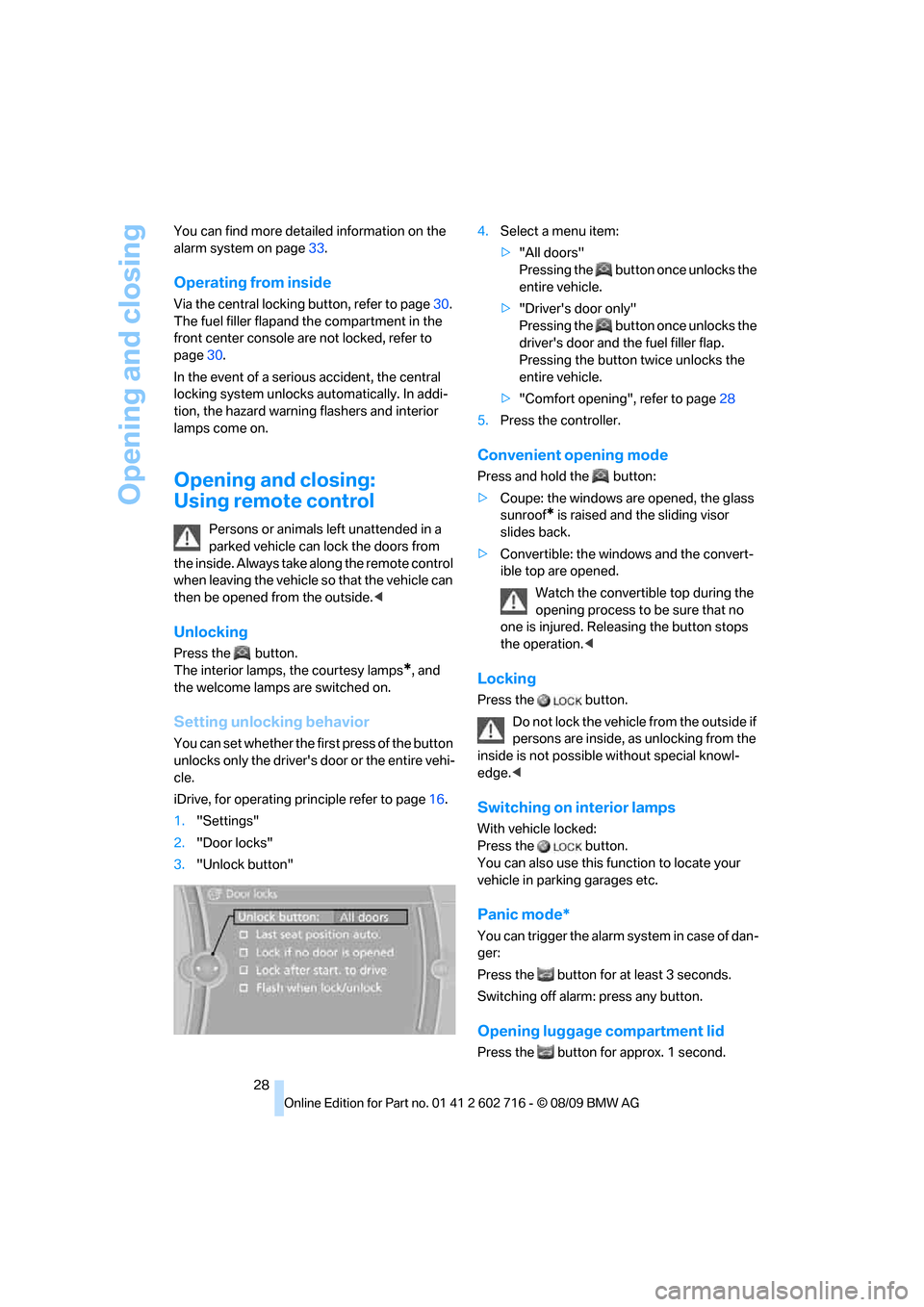
iDrive, for operating principle refer to page16.
1."Settings"
2."Door locks"
3."Unlock button"4.Select a menu item:
>"All doors"
Pressing the button once unlocks the
entire vehicle.
>"Driver's door only"
Pressing the button once unlocks the
driver's door and the fuel filler flap.
Pressing the button twice unlocks the
entire vehicle.
>"Comfort opening", refer to page28
5.Press the controller.
Convenient opening mode
Press and hold the button:
>Coupe: the windows are opened, the glass
sunroof
* is raised and the sliding visor
slides back.
>Convertible: the windows and the convert-
ible top are opened.
Watch the convertible top during the
opening process to be sure that no
one is injured. Releasing the button stops
the operation.<
Locking
Press the button.
Do not lock the vehicle from the outside if
persons are inside, as unlocking from the
inside is not possible without special knowl-
edge.<
Switching on interior lamps
With vehicle locked:
Press the button.
You can also use this function to locate your
vehicle in parking garages etc.
Panic mode*
You can trigger the alarm system in case of dan-
ger:
Press the button for at least 3 seconds.
Switching off alarm: press any button.
Opening luggage compartment lid
Press the button for approx. 1 second.
Page 34 of 252
Opening and closing
32
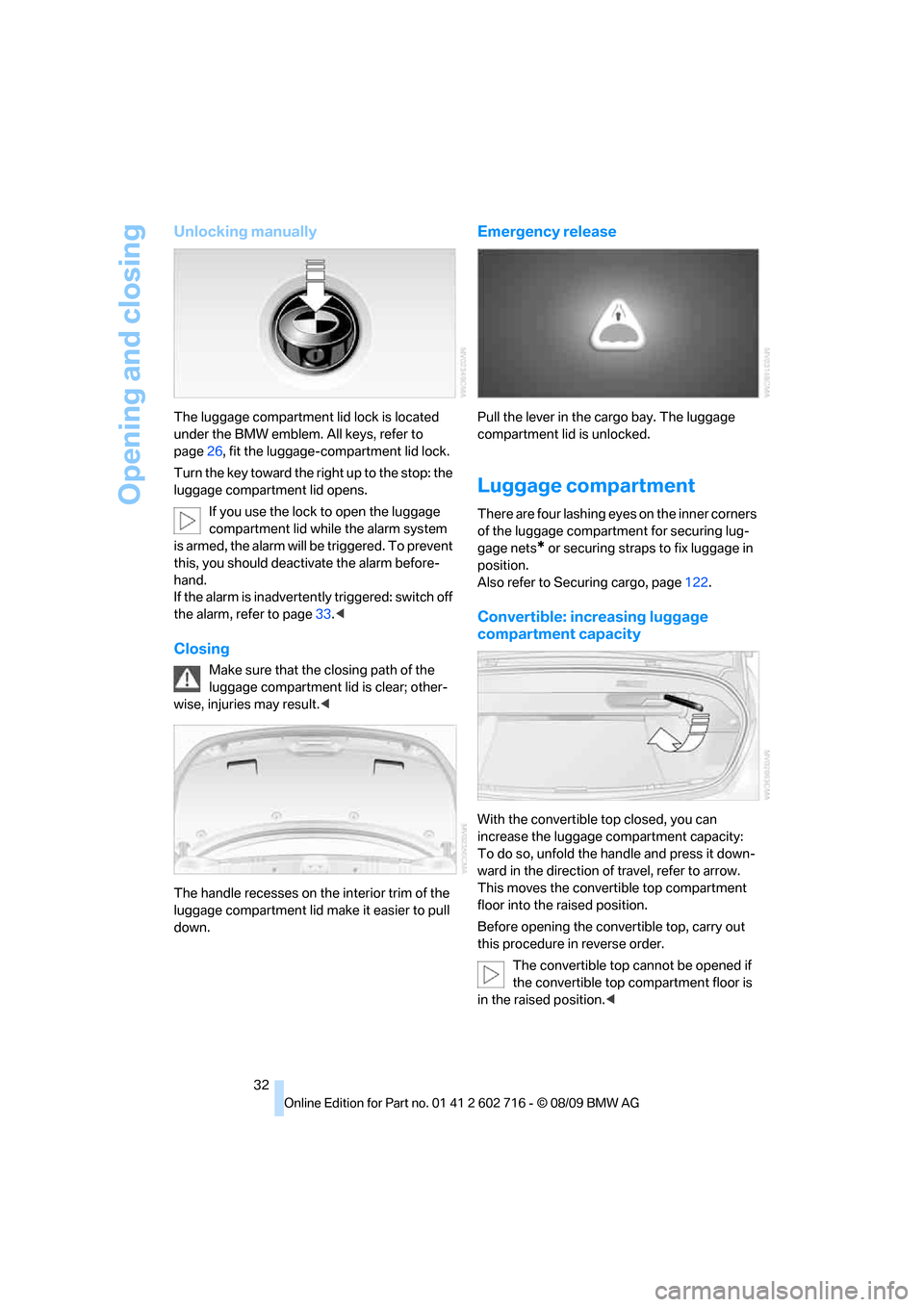
Unlocking manually
The luggage compartment lid lock is located
under the BMW emblem. All keys, refer to
page26, fit the luggage-compartment lid lock.
Turn the key toward the right up to the stop: the
luggage compartment lid opens.
If you use the lock to open the luggage
compartment lid while the alarm system
is armed, the alarm will be triggered. To prevent
this, you should deactivate the alarm before-
hand.
If the alarm is inadvertently triggered: switch off
the alarm, refer to page33.<
Closing
Make sure that the closing path of the
luggage compartment lid is clear; other-
wise, injuries may result.<
The handle recesses on the interior trim of the
luggage compartment lid make it easier to pull
down.
Emergency release
Pull the lever in the cargo bay. The luggage
compartment lid is unlocked.
Luggage compartment
There are four lashing eyes on the inner corners
of the luggage compartment for securing lug-
gage nets
* or securing straps to fix luggage in
position.
Also refer to Securing cargo, page122.
Convertible: increasing luggage
compartment capacity
With the convertible top closed, you can
increase the luggage compartment capacity:
To do so, unfold the handle and press it down-
ward in the direction of travel, refer to arrow.
This moves the convertible top compartment
floor into the raised position.
Before opening the convertible top, carry out
this procedure in reverse order.
The convertible top cannot be opened if
the convertible top compartment floor is
in the raised position.<
Page 35 of 252
Controls
33Reference
At a glance
Driving tips
Communications
Navigation
Entertainment
Mobility
Alarm system
The concept
The vehicle alarm system responds:
>To the opening of a door, the hood, or the
luggage compartment lid
>To movements in the vehicle interior: inte-
rior motion sensor, refer to page33
>To changes in the vehicle's tilt if someone
attempts to steal the wheels or tow the
vehicle
>To interruptions in battery voltage
Unauthorized operations are briefly signaled by
the alarm system:
>with an acoustic alarm
>by switching on
the hazard warning flashers
>by flashing the high beams
Arming and disarming alarm system
When you lock or unlock the vehicle, either with
the remote control or at the door lock, the alarm
system is armed or disarmed at the same time.
You can open the luggage compartment lid,
even with the system armed, by using the
button of the remote control, refer to
page28. When the luggage compartment lid is
closed, it is once again locked and monitored.
Switching off alarm
>Unlock the vehicle using the remote control,
refer to page28, or
>insert the remote control all the way into the
ignition lock.
Indicator lamp displays
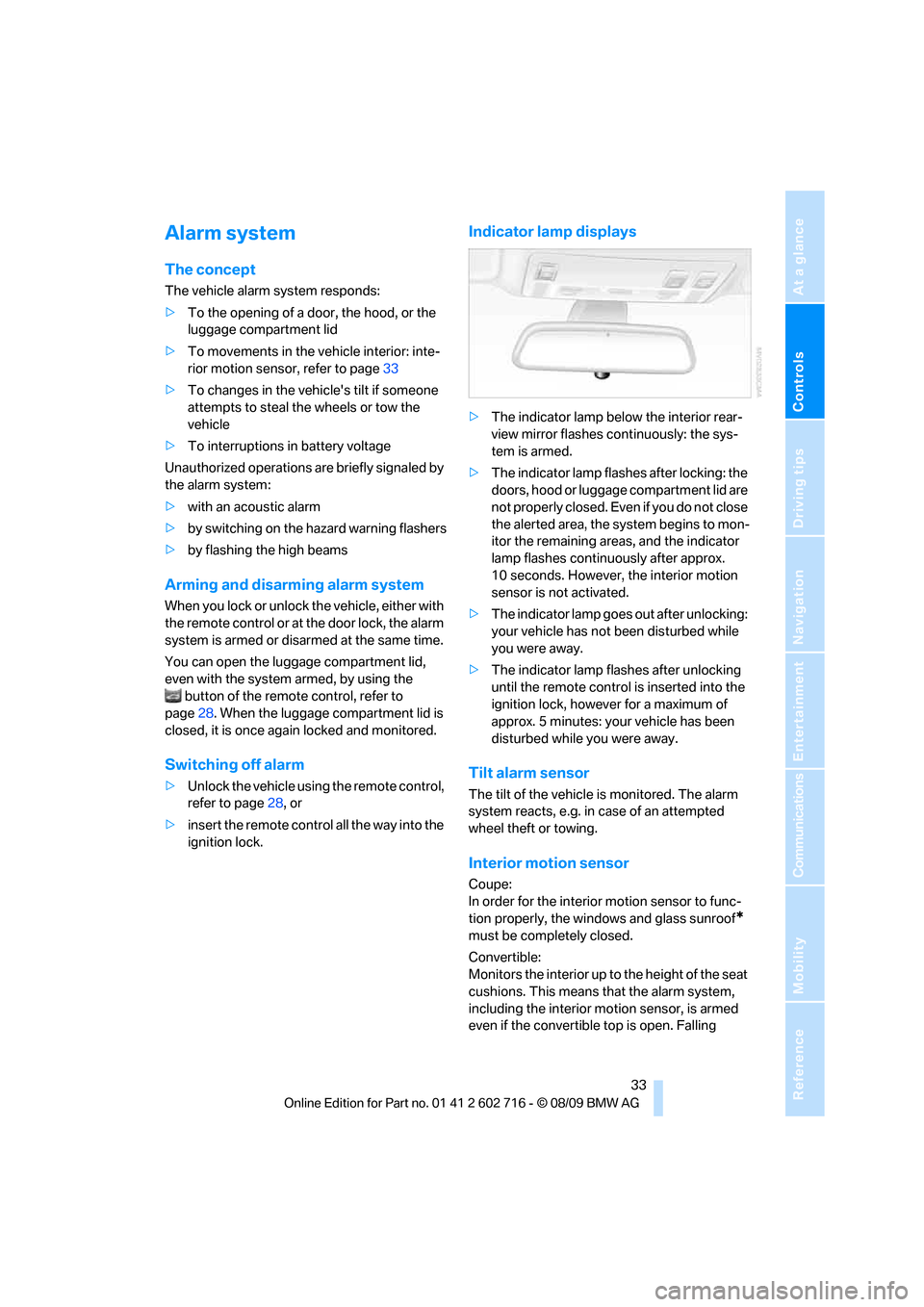
>The indicator lamp below the interior rear-
view mirror flashes continuously: the sys-
tem is armed.
>The indicator lamp flashes after locking: the
doors, hood or luggage compartment lid are
not properly closed. Even if you do not close
the alerted area, the system begins to mon-
itor the remaining areas, and the indicator
lamp flashes continuously after approx.
10 seconds. However, the interior motion
sensor is not activated.
>The indicator lamp goes out after unlocking:
your vehicle has not been disturbed while
you were away.
>The indicator lamp flashes after unlocking
until the remote control is inserted into the
ignition lock, however for a maximum of
approx. 5 minutes: your vehicle has been
disturbed while you were away.
Tilt alarm sensor
The tilt of the vehicle is monitored. The alarm
system reacts, e.g. in case of an attempted
wheel theft or towing.
Interior motion sensor
Coupe:
In order for the interior motion sensor to func-
tion properly, the windows and glass sunroof
*
must be completely closed.
Convertible:
Monitors the interior up to the height of the seat
cushions. This means that the alarm system,
including the interior motion sensor, is armed
even if the convertible top is open. Falling
Page 36 of 252
Opening and closing
34 objects, e.g. leaves, can trigger false alarms,
refer to Avoiding unintentional alarms.
Avoiding unintentional alarms
The tilt alarm sensor and interior motion sensor
may be switched off at the same time. This pre-
vents unintentional alarms, e.g. in the following
situations:
>In two-level garages
>When transporting on car-carrying trains,
by sea or on a trailer
>When animals are to remain in the vehicle
Switching off tilt alarm sensor and
interior motion sensor
Press the button on the remote control
again as soon as the vehicle is locked.
The indicator lamp lights up briefly and then
flashes continuously. The tilt alarm sensor and
the interior motion sensor are switched off until
the next time the vehicle is unlocked and subse-
quently locked again.
Comfort Access*
Comfort Access allows you to access your vehi-
cle without having to hold the remote control in
your hand. It is sufficient to carry the remote
control with you, e.g. in your jacket pocket. The
vehicle automatically detects the associated
remote control in the immediate vicinity or in
the interior.
Comfort Access supports the following func-
tions:
>Unlocking/locking vehicle
>Convenient closing with Coupe
>Opening luggage compartment lid sepa-
rately
>Starting engine
Functional requirement
>The vehicle or the luggage compartment lid
can only be locked if the vehicle detects that
the remote control you are carrying is out-
side the vehicle.>The next unlocking and locking cycle is not
possible until after approx. 2 seconds.
>The engine can only be started if the vehicle
detects that the remote control is located in
the vehicle.
Comparison with ordinary remote
control
You can control the functions mentioned previ-
ously with the Comfort Access or by pressing
the buttons on the remote control. Therefore,
please familiarize yourself with the information
on opening and closing beginning on page26
beforehand.
The special features when using Comfort
Access are described in the following.
Should a short delay occur when opening
or closing the windows, the glass sunroof
or the convertible top, the system is checking
whether a remote control is located in the vehi-
cle. Please repeat opening or closing if neces-
sary.<
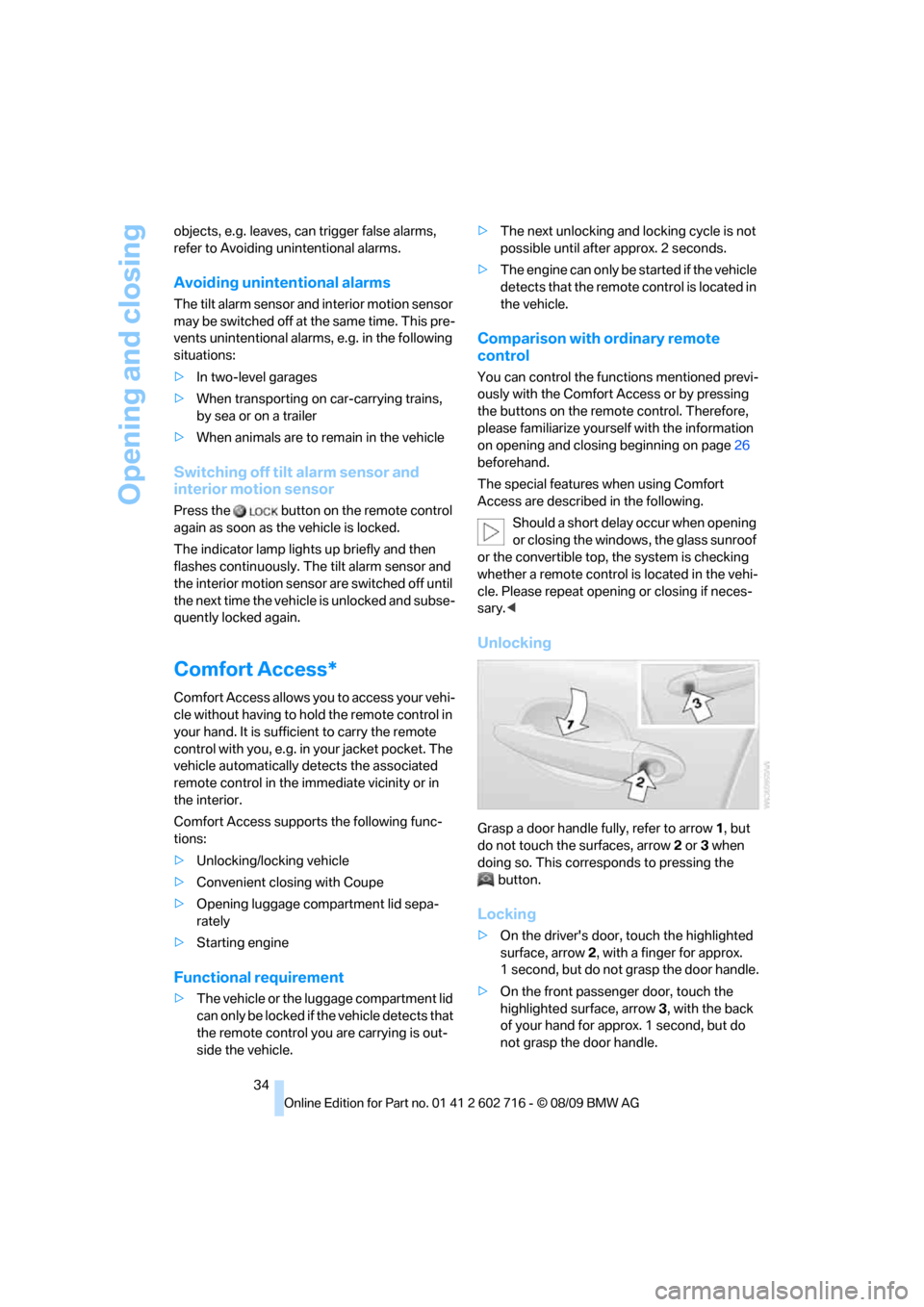
Unlocking
Grasp a door handle fully, refer to arrow1, but
do not touch the surfaces, arrow2 or 3 when
doing so. This corresponds to pressing the
button.
Locking
>On the driver's door, touch the highlighted
surface, arrow2, with a finger for approx.
1 second, but do not grasp the door handle.
>On the front passenger door, touch the
highlighted surface, arrow3, with the back
of your hand for approx. 1 second, but do
not grasp the door handle.
Page 236 of 252
Everything from A to Z
234
Everything from A to Z
Index
A
ABS Antilock Brake
System83
– indicator lamp84
ACC, refer to Active cruise
control64
Accessories6
Accident, refer to Emergency
request216
Activated-charcoal filter for
automatic climate
control107
Activation times of parked car
ventilation, preselecting107
Active cruise control64
– indicator lamp68
– radar sensor68
– selecting distance66
– warning lamps68
Active front head restraints48
Active steering89
– warning lamp89
Adapter for spare key26
Adaptive brake assistant83
Adaptive brake lamps, refer to
Brake force display90
Adaptive Light Control99
Additional connection of
music player in mobile
phone166
Additives
– coolant205
– engine oil, refer to Approved
engine oils204
Address, entering127,133
Address for navigation
– entering127
Adjusting interior
temperature104
Adjusting the tone during
audio operation, refer to
Tone control146Adjusting thigh support46
Airbags90
– deactivating, refer to
Exception for front
passenger seat53
– indicator/warning lamp92
– indicator lamp for front
passenger airbags91
– sitting safely45
Air distribution
– automatic104
– manual105
Airing, refer to Ventilation106
Air outlets, refer to
Ventilation106
Air recirculation, refer to AUC
Automatic recirculated-air
control105
Air supply, automatic climate
control103
Air volume105
AKI, refer to Fuel
specifications195
Alarm system33
– avoiding unintentional
alarms34
– interior motion sensor33
– switching off alarm33
– switching off tilt alarm
sensor and interior motion
sensor34
– tilt alarm sensor33
Albums of music
collection163
Alloy wheels210
All-season tires, refer to
Winter tires201
Alterations, technical, refer to
For your own safety5
Antenna for mobile phone172
Antifreeze
– coolant205
– washer fluid63Antilock Brake System
ABS83
Anti-theft alarm system, refer
to Alarm system33
Anti-theft system, refer to
Central locking system27
Approved axle loads, refer to
Weights227
Approved engine oils204
Approved gross vehicle
weight, refer to Weights227
Armrest, refer to Center
armrest111
Around the center console14
Around the steering wheel10
Arrival time
– refer to Computer74
Ashtray113
Assistance systems, refer to
Driving stability control
systems83
AUC Automatic recirculated-
air control105
Audio146
– controls146
– switching on/off146
– tone control146
– volume146
Audio device, external111
Automatic
– air distribution104
– air volume104
– cruise control63,64
– headlamp control98
– steering wheel
adjustment47
Automatic car washes
– also refer to Comfort
Access35
Page 237 of 252
Reference 235
At a glance
Controls
Driving tips
Communications
Navigation
Entertainment
Mobility
Automatic climate control103
– automatic air
distribution104
– convertible program104
– parked car ventilation/
heating107
– switching on and off106
Automatic closing of doors,
refer to Automatic soft
closing31
Automatic curb monitor51
Automatic lighting
– refer to Automatic headlamp
control98
– refer to Daytime running
lamps99
– refer to Interior lamps102
– refer to Pathway lighting99
– refer to Welcome lamps98
Automatic lights
– refer to High-beam
Assistant100
Automatic Service
Request190
Automatic soft closing31
AUTO program for automatic
climate control104
AUX-IN connection111
AUX-IN port166
Available services190
Average fuel consumption73
– setting units74
Average speed73
Avoiding highways for
navigation136
Avoiding unintentional
alarms34
Axle loads, refer to
Weights227
B
Backrest contour, refer to
Lumbar support46
Backrests, refer to Seats45
Backup lamps, replacing
bulbs, refer to Tail
lamps213Band-aids, refer to First aid
kit217
Bass, refer to Tone
control146
Battery
– jump starting217
– refer to Vehicle battery214
Battery replacement, remote
control for Comfort
Access36
BC button, refer to
Computer73
Being towed219
Belts, refer to Safety belts50
Beverage holder, refer to
Cupholders112
Blower, refer to Air
volume105
Bluetooth, activating/
deactivating174
BMW
– Car Shampoo211
BMW Assist,
activating188,190
BMW Assist186
BMW homepage4
BMW maintenance
system206
BMW Night Vision94
– activating95
– cleaning camera96
– cleaning camera, refer to
Wiper system62
– deactivating96
– making settings96
BMW Search188
BMW website4
Bottle holder, refer to
Cupholders112
Bracket for telephone or
mobile phone
– refer to Snap-in adapter182
Brake assistant83
– adaptive83
Brake force display90
Brake lamps
– replacing bulbs, refer to Tail
lamps213
– two-stage90Brake rotors
– breaking-in118
– refer to Braking safely120
Brakes
– ABS Antilock Brake
System83
– brake force display90
– breaking-in
118
– CBC Cornering Brake
Control83
– electronic brake-force
distribution83
– parking brake58
– refer to Braking safely120
Brake system118
– brake pads118
– brake rotors120
– breaking-in118
– warning lamp13,84
Braking safely120
Breakdown services, refer to
Roadside Assistance217
Breaking-in brake pads118
Breaking-in the clutch118
Breaking-in the differential,
refer to Engine and
differential118
Break-in period118
Brightness of Control
Display81
Button for starting engine,
refer to Start/Stop button56
Buttons on steering wheel11
C
California Proposition 65
Warning6
Call
– accepting175
– ending176
– rejecting176
Calling, refer to Phone
numbers, dialing176
Can holder, refer to
Cupholders112
Capacities227
Car battery, refer to Vehicle
battery214
Page 241 of 252
Reference 239
At a glance
Controls
Driving tips
Communications
Navigation
Entertainment
Mobility
Engine oil
– adding204
– additives, refer to Approved
engine oils204
– approved oils204
– electronic oil level check203
– interval between changes,
refer to Service
requirements75
– oil change204
– oil grades, refer to Approved
engine oils204
– recommended oils204
– temperature73
– temperature gauge73
Engine output, refer to Engine
data224
Engine overheating, refer to
Coolant temperature72
Engine speed, refer to Engine
data224
Engine starting, refer to
Starting engine57
Entering destination via town/
city name127
Entering rear49
Entering zip code for
navigation128
Entertainment sound output
on/off146
Entry map for destination132
Equalizer, refer to Tone
control147
ESP Electronic Stability
Program, refer to DSC
Dynamic Stability
Control83
Event Data Recorders207
Exhaust system, refer to Hot
exhaust system119
Exterior mirrors51
– adjusting51
– automatic dimming
feature52
– automatic heating51
– folding in and out51
– tilting down passenger-side
exterior mirror51
External audio device111External devices
– random sequence168
Eye for tow-starting and
towing, refer to Tow
fitting218
F
Failure messages, refer to
Check Control77
False alarm
– refer to Avoiding
unintentional alarms34
– refer to Switching off
alarm33
Fastening safety belts, refer to
Safety belts50
Fastest route for
navigation136
Fast forward
– CD changer156
– CD player156
Filler neck for washer fluid63
Filter, refer to Microfilter/
activated-charcoal filter107
First aid, refer to First aid
kit217
First aid kit217
Flashing
– during locking/unlocking,
refer to Setting confirmation
signals29
– triple turn signal
activation62
Flat tire
– Flat Tire Monitor85
– run-flat tires86,88,200
– Tire Pressure Monitor87
– TPM Tire Pressure
Monitor87
– warning lamp86,88
Flat tire, refer to Run-flat
tires200
Flat Tire Monitor85
– false alarms85
– initializing system86
– snow chains201
– system limits85
– warning lamp86Fluid reservoir, refer to Filler
neck for washer fluid63
FM, waveband149
Fog lamps102
– indicator lamp13,102
Folding into raised position
convertible top
compartment floor,
Convertible32
Footbrake, refer to Braking
safely120
Footwell lamps, refer to
Interior lamps102
For your own safety5
Free memory capacity, music
collection164
Front airbags90
Front passenger airbags
– deactivating91
FTM, refer to Flat Tire
Monitor
85
Fuel
– average consumption73
– display73
– fuel specifications195
– high-quality brands195
– quality195
– specifications195
– tank contents, refer to
Capacities227
Fuel clock, refer to Fuel
gauge73
Fuel display, refer to Fuel
gauge73
Fuel-efficient driving
– refer to Saving fuel118
Fuel filler door
– releasing in the event of
electrical malfunction194
Fuel filler flap194
Fuses215
G
Garage door opener, refer to
Integrated universal remote
control109
Page 248 of 252
Everything from A to Z
246 Sport automatic
transmission58
– Dynamic Driving Control60
– kickdown59
– releasing transmission
lock60
– towing219,220
– with Comfort Access35
Sport program in the Sport
automatic transmission59
Stability control, refer to
Driving stability control
systems83
Start/Stop button56
– starting the engine57
– switching off the engine57
Starting, refer to Starting
engine57
Starting assistance, refer to
Jump starting217
Starting difficulties, refer to
Jump starting217
Starting off on slopes, refer to
Drive-off assistant85
Start menu17
Station, refer to Radio149
Station, selecting
– radio149
Stationary ventilation
– preselecting activation
times107
Status information on Control
Display19
Status of this Owner's Manual
at time of printing5
Steam cleaners208,209
Steering wheel
– adjustment52
– automatic adjustment, refer
to Easy entry/exit52
– automatic adjustment, refer
to Steering wheel
memory47
– buttons on steering
wheel11
– heating52
– lock, refer to Ignition lock56
– memory47Steering with variable ratio,
refer to Active steering89
Steptronic, refer to Sport
automatic transmission58
Storage compartments112
Stored trip, calling up135
Storing211
Storing a destination in the
address book129
Storing music161
Storing sitting position, refer
to Seat, mirror and steering
wheel memory
47
Storing tires201
Storing your vehicle211
Street, entering for
navigation128
Summer tires, refer to Wheels
and tires196
Surround147
SVCD156
SW, waveband149
Switches, refer to Cockpit10
Switching automatically
between high beams and
low beams, refer to High-
beam Assistant100
Switching automatically
between high beams and
low beams, refer to High-
beam assistant100
Switching off
– engine57
Switching on
– audio146
– CD changer146
– CD player146
– radio146
Swiveling headlamps, refer to
Adaptive Light Control99
Symbols4
– indicator/warning lamps13
T
Tachometer72
Tail lamps213
– replacing bulbs213Tank capacity
– also refer to Capacities227
– fuel tank capacity194
Target cursor for
navigation132
Technical alterations, refer to
For your own safety5
Technical data224
– capacities227
– dimensions225
Telephone172
– installation location, refer to
Center armrest111
– refer to separate operating
instructions
– voice commands179
TeleService186
TeleService Diagnosis188
TeleService Help188
Temperature
– adjusting in upper body
region106
– adjusting with automatic
climate control104
– changing unit of measure74
– refer to Coolant
temperature72
Temperature display
– outside temperature72
– outside temperature
warning72
– setting the units74
Temperature gauge
– engine oil73
Tempomat, refer to Cruise
control63
The individual vehicle5
Tilt alarm sensor33
– switching off34
Tilting down passenger-side
exterior mirror51
Timer, refer to Preselecting
activation times107
Tire inflation pressure196
Tire pressure
– loss86,87
Tire Pressure Monitor
TPM87
Tire Quality Grading198