light BMW 650I COUPE 2012 Owners Manual
[x] Cancel search | Manufacturer: BMW, Model Year: 2012, Model line: 650I COUPE, Model: BMW 650I COUPE 2012Pages: 303, PDF Size: 11.32 MB
Page 264 of 303
With LED headlamps, all front lamps are de‐
signed with LED technology or as a light module.
Contact your service center in the event of a
malfunction.
Follow the General instructions on lamps and
bulbs., refer to page 262
Turning lamp on the Xenon headlamp
Follow the General instructions on lamps and
bulbs., refer to page 262
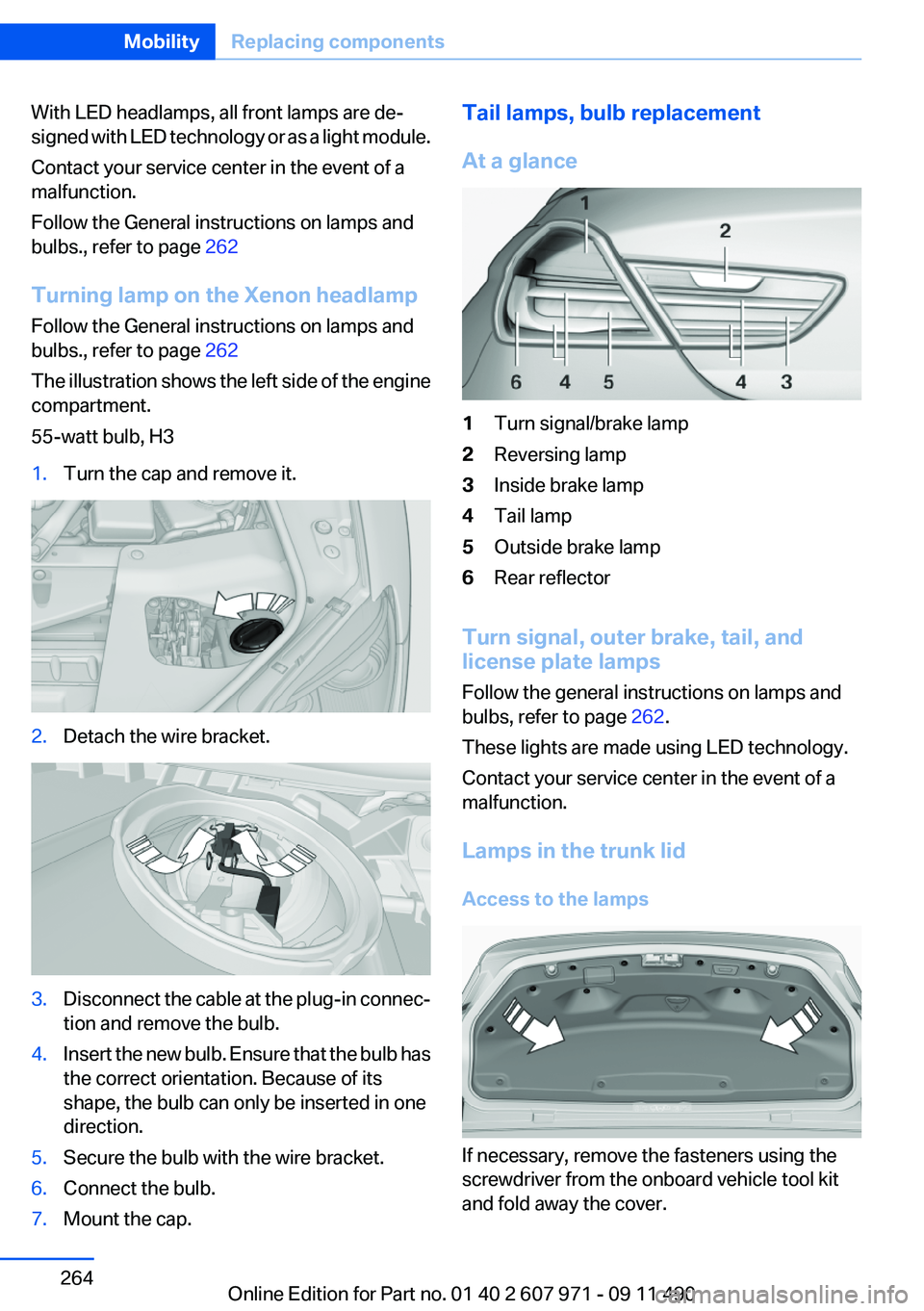
The illustration shows the left side of the engine
compartment.
55-watt bulb, H31.Turn the cap and remove it.2.Detach the wire bracket.3.Disconnect the cable at the plug-in connec‐
tion and remove the bulb.4.Insert the new bulb. Ensure that the bulb has
the correct orientation. Because of its
shape, the bulb can only be inserted in one
direction.5.Secure the bulb with the wire bracket.6.Connect the bulb.7.Mount the cap.Tail lamps, bulb replacement
At a glance1Turn signal/brake lamp2Reversing lamp3Inside brake lamp4Tail lamp5Outside brake lamp6Rear reflector
Turn signal, outer brake, tail, and
license plate lamps
Follow the general instructions on lamps and
bulbs, refer to page 262.
These lights are made using LED technology.
Contact your service center in the event of a
malfunction.
Lamps in the trunk lid
Access to the lamps
If necessary, remove the fasteners using the
screwdriver from the onboard vehicle tool kit
and fold away the cover.
Seite 264MobilityReplacing components264
Online Edition for Part no. 01 40 2 607 971 - 09 11 490
Page 267 of 303
Breakdown assistanceVehicle equipment
All standard, country-specific and optional
equipment that is offered in the model series is
described in this chapter. Therefore, equipment
is also described that is not available in a vehicle,
e. g., because of the selected optional equip‐
ment or country variant. This also applies for
safety-related functions and systems.
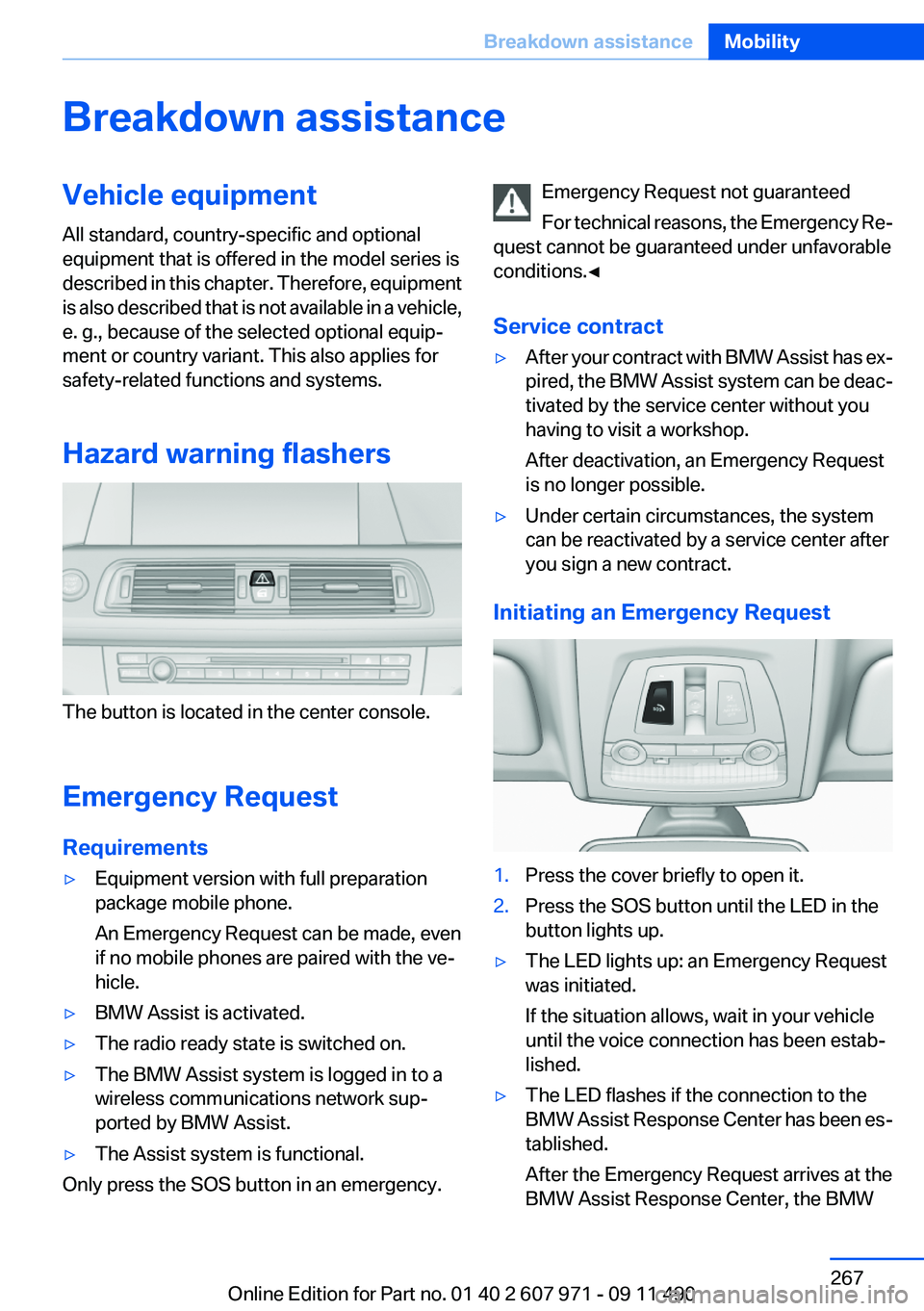
Hazard warning flashers
The button is located in the center console.
Emergency Request
Requirements
▷Equipment version with full preparation
package mobile phone.
An Emergency Request can be made, even
if no mobile phones are paired with the ve‐
hicle.▷BMW Assist is activated.▷The radio ready state is switched on.▷The BMW Assist system is logged in to a
wireless communications network sup‐
ported by BMW Assist.▷The Assist system is functional.
Only press the SOS button in an emergency.
Emergency Request not guaranteed
For technical reasons, the Emergency Re‐
quest cannot be guaranteed under unfavorable
conditions.◀
Service contract▷After your contract with BMW Assist has ex‐
pired, the BMW Assist system can be deac‐
tivated by the service center without you
having to visit a workshop.
After deactivation, an Emergency Request
is no longer possible.▷Under certain circumstances, the system
can be reactivated by a service center after
you sign a new contract.
Initiating an Emergency Request
1.Press the cover briefly to open it.2.Press the SOS button until the LED in the
button lights up.▷The LED lights up: an Emergency Request
was initiated.
If the situation allows, wait in your vehicle
until the voice connection has been estab‐
lished.▷The LED flashes if the connection to the
BMW Assist Response Center has been es‐
tablished.
After the Emergency Request arrives at the
BMW Assist Response Center, the BMWSeite 267Breakdown assistanceMobility267
Online Edition for Part no. 01 40 2 607 971 - 09 11 490
Page 271 of 303
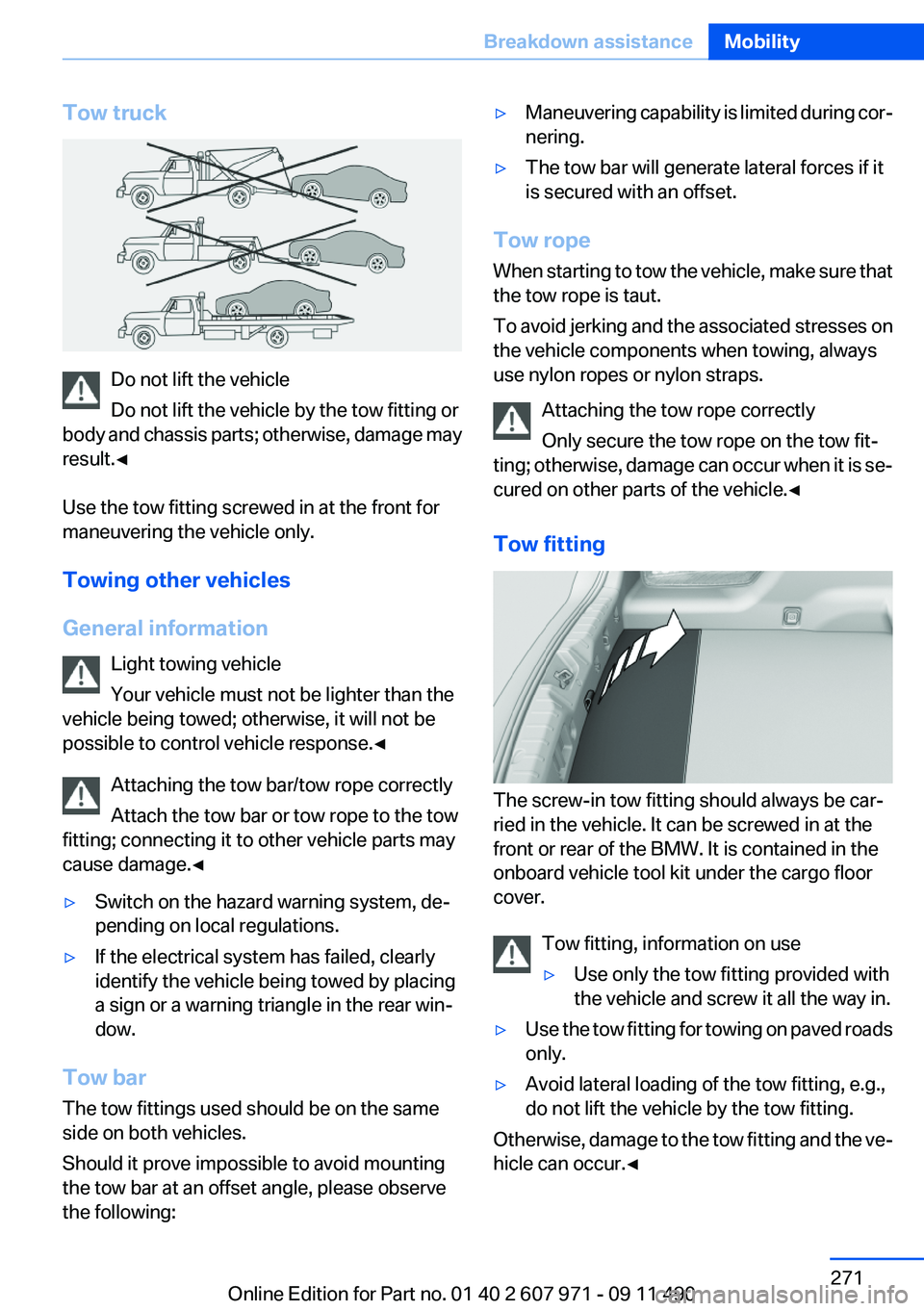
Tow truck
Do not lift the vehicle
Do not lift the vehicle by the tow fitting or
body and chassis parts; otherwise, damage may
result.◀
Use the tow fitting screwed in at the front for
maneuvering the vehicle only.
Towing other vehicles
General information Light towing vehicle
Your vehicle must not be lighter than the
vehicle being towed; otherwise, it will not be
possible to control vehicle response.◀
Attaching the tow bar/tow rope correctly
Attach the tow bar or tow rope to the tow
fitting; connecting it to other vehicle parts may
cause damage.◀
▷Switch on the hazard warning system, de‐
pending on local regulations.▷If the electrical system has failed, clearly
identify the vehicle being towed by placing
a sign or a warning triangle in the rear win‐
dow.
Tow bar
The tow fittings used should be on the same
side on both vehicles.
Should it prove impossible to avoid mounting
the tow bar at an offset angle, please observe
the following:
▷Maneuvering capability is limited during cor‐
nering.▷The tow bar will generate lateral forces if it
is secured with an offset.
Tow rope
When starting to tow the vehicle, make sure that
the tow rope is taut.
To avoid jerking and the associated stresses on
the vehicle components when towing, always
use nylon ropes or nylon straps.
Attaching the tow rope correctly
Only secure the tow rope on the tow fit‐
ting; otherwise, damage can occur when it is se‐
cured on other parts of the vehicle.◀
Tow fitting
The screw-in tow fitting should always be car‐
ried in the vehicle. It can be screwed in at the
front or rear of the BMW. It is contained in the
onboard vehicle tool kit under the cargo floor
cover.
Tow fitting, information on use
▷Use only the tow fitting provided with
the vehicle and screw it all the way in.▷Use the tow fitting for towing on paved roads
only.▷Avoid lateral loading of the tow fitting, e.g.,
do not lift the vehicle by the tow fitting.
Otherwise, damage to the tow fitting and the ve‐
hicle can occur.◀
Seite 271Breakdown assistanceMobility271
Online Edition for Part no. 01 40 2 607 971 - 09 11 490
Page 274 of 303
Automatic transmission:1.Release the parking brake, refer to page 61,
and deactivate Automatic Hold, refer to
page 62.2.Drive into the car wash.3.Depress the brake pedal as needed.4.Engage transmission position N.5.Switch the engine off. In this way, the igni‐
tion remains switched on, and a Check-Con‐
trol message is displayed.
Transmission position P with the igni‐
tion off
When the ignition is switched off, position P
is engaged automatically. When in an auto‐
matic car wash, for example, ensure that the
ignition is not switched off accidentally.◀
The vehicle cannot be locked from the outside
when in transmission position N.
A signal is sounded when an attempt is made to
lock the vehicle.
Transmission position
Transmission position P is engaged automati‐
cally:
▷When the ignition is switched off.▷After approx. 15 minutes.
Headlamps
▷Do not rub dry and do not use abrasive or
caustic cleansers.▷Soak areas that have been soiled e.g. due to
insects, with shampoo and wash off with
water.▷Thaw ice with deicing spray; do not use an
ice scraper.
After washing the vehicle
After washing the vehicle, apply the brakes
briefly to dry them; otherwise, braking action can
be reduced and corrosion of the brake discs can
occur.
Vehicle care
Car care products
BMW recommends using cleaning and care
products from BMW, since these have been
tested and approved.
Car care and cleaning products
Follow the instructions on the container.
When cleaning the interior, open the doors or
windows.
Only use products intended for cleaning vehi‐
cles.
Cleansers can contain substances that are dan‐
gerous and harmful to your health.◀
Vehicle paint
Regular care contributes to driving safety and
value retention.
Environmental influences can act on the vehicle
paint. Tailor the frequency and extent of your car
care to these influences.
Leather care
Remove dust from the leather often, using a
cloth or vacuum cleaner.
Otherwise, particles of dust and road grime
chafe in pores and folds, and lead to increased
wear and premature degradation of the leather
surface.
To guard against discoloration, such as from
clothing, provide leather care roughly every two
months.
Clean light-colored leather more frequently be‐
cause soiling on such surfaces is substantially
more visible.
Use leather care products; otherwise, dirt and
grease will gradually break down the protective
layer of the leather surface.
Suitable care products are available from the
service center.Seite 274MobilityCare274
Online Edition for Part no. 01 40 2 607 971 - 09 11 490
Page 275 of 303
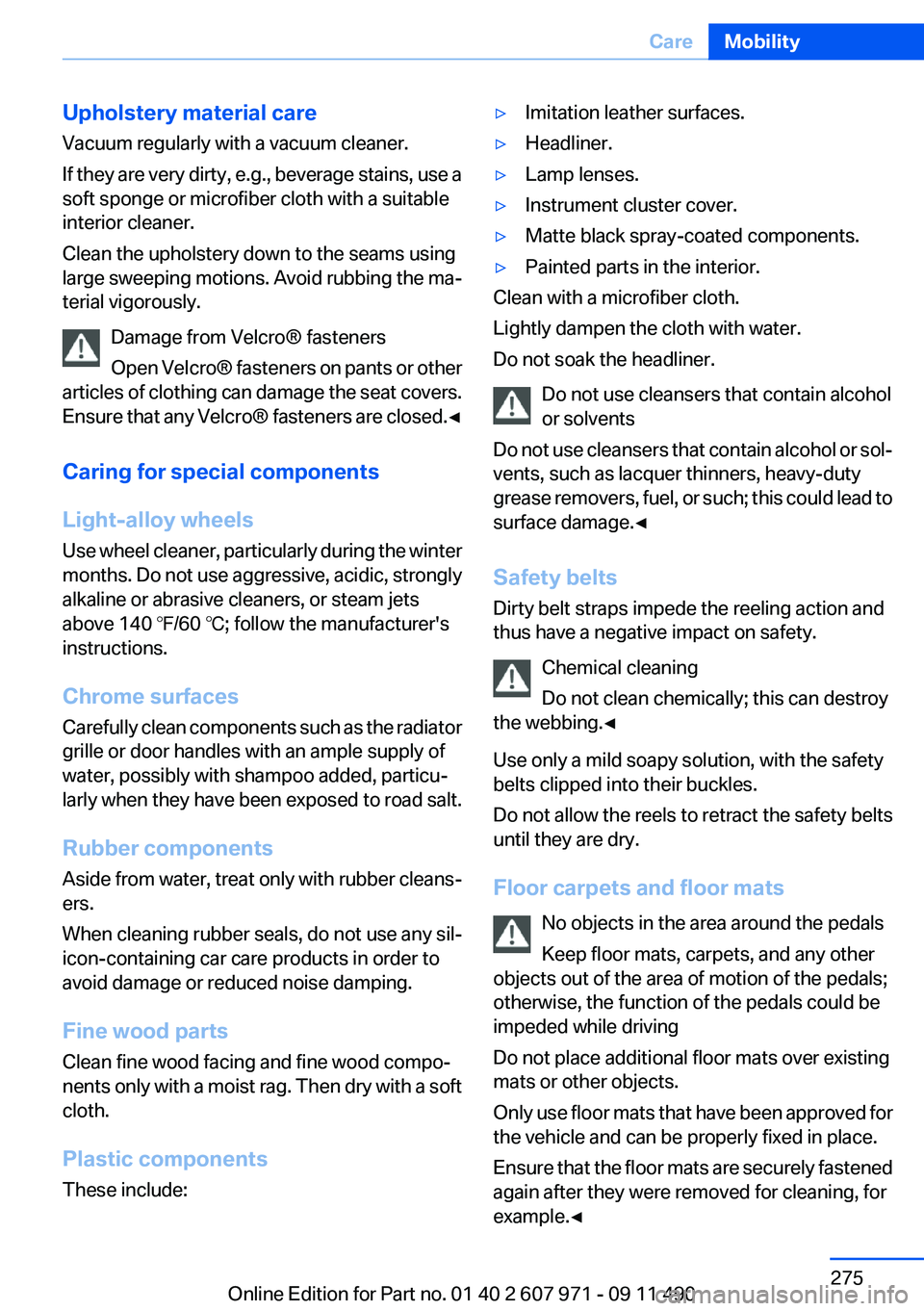
Upholstery material care
Vacuum regularly with a vacuum cleaner.
If they are very dirty, e.g., beverage stains, use a
soft sponge or microfiber cloth with a suitable
interior cleaner.
Clean the upholstery down to the seams using
large sweeping motions. Avoid rubbing the ma‐
terial vigorously.
Damage from Velcro® fasteners
Open Velcro® fasteners on pants or other
articles of clothing can damage the seat covers.
Ensure that any Velcro® fasteners are closed. ◀
Caring for special components
Light-alloy wheels
Use wheel cleaner, particularly during the winter
months. Do not use aggressive, acidic, strongly
alkaline or abrasive cleaners, or steam jets
above 140 ℉/60 ℃; follow the manufacturer's
instructions.
Chrome surfaces
Carefully clean components such as the radiator
grille or door handles with an ample supply of
water, possibly with shampoo added, particu‐
larly when they have been exposed to road salt.
Rubber components
Aside from water, treat only with rubber cleans‐
ers.
When cleaning rubber seals, do not use any sil‐
icon-containing car care products in order to
avoid damage or reduced noise damping.
Fine wood parts
Clean fine wood facing and fine wood compo‐
nents only with a moist rag. Then dry with a soft
cloth.
Plastic components
These include:▷Imitation leather surfaces.▷Headliner.▷Lamp lenses.▷Instrument cluster cover.▷Matte black spray-coated components.▷Painted parts in the interior.
Clean with a microfiber cloth.
Lightly dampen the cloth with water.
Do not soak the headliner.
Do not use cleansers that contain alcohol
or solvents
Do not use cleansers that contain alcohol or sol‐
vents, such as lacquer thinners, heavy-duty
grease removers, fuel, or such; this could lead to
surface damage.◀
Safety belts
Dirty belt straps impede the reeling action and
thus have a negative impact on safety.
Chemical cleaning
Do not clean chemically; this can destroy
the webbing.◀
Use only a mild soapy solution, with the safety
belts clipped into their buckles.
Do not allow the reels to retract the safety belts
until they are dry.
Floor carpets and floor mats No objects in the area around the pedals
Keep floor mats, carpets, and any other
objects out of the area of motion of the pedals;
otherwise, the function of the pedals could be
impeded while driving
Do not place additional floor mats over existing
mats or other objects.
Only use floor mats that have been approved for
the vehicle and can be properly fixed in place.
Ensure that the floor mats are securely fastened
again after they were removed for cleaning, for
example.◀
Seite 275CareMobility275
Online Edition for Part no. 01 40 2 607 971 - 09 11 490
Page 283 of 303
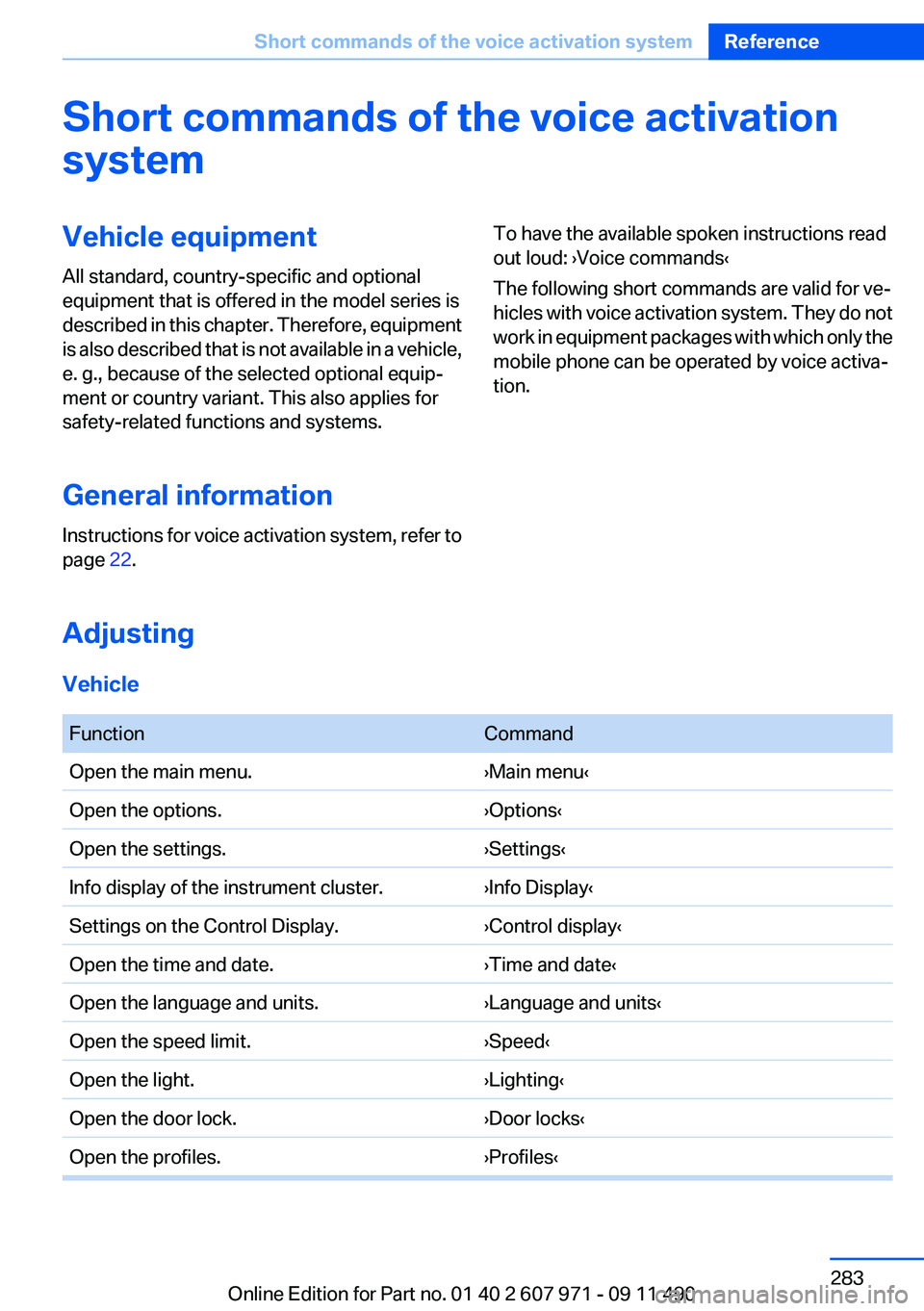
Short commands of the voice activation
systemVehicle equipment
All standard, country-specific and optional
equipment that is offered in the model series is
described in this chapter. Therefore, equipment
is also described that is not available in a vehicle,
e. g., because of the selected optional equip‐
ment or country variant. This also applies for
safety-related functions and systems.
General information
Instructions for voice activation system, refer to
page 22.To have the available spoken instructions read
out loud: ›Voice commands‹
The following short commands are valid for ve‐
hicles with voice activation system. They do not
work in equipment packages with which only the
mobile phone can be operated by voice activa‐
tion.
Adjusting
Vehicle
FunctionCommandOpen the main menu.›Main menu‹Open the options.›Options‹Open the settings.›Settings‹Info display of the instrument cluster.›Info Display‹Settings on the Control Display.›Control display‹Open the time and date.›Time and date‹Open the language and units.›Language and units‹Open the speed limit.›Speed‹Open the light.›Lighting‹Open the door lock.›Door locks‹Open the profiles.›Profiles‹Seite 283Short commands of the voice activation systemReference283
Online Edition for Part no. 01 40 2 607 971 - 09 11 490
Page 287 of 303

FunctionCommandSplit screen scale...miles.›Split screen scale ... miles‹ e.g., split screen
scale 5 milesSplit screen, highlight the traffic situation.›Split screen, Traffic conditions‹Split screen, computer.›Split screen on board info‹Split screen, trip computer.›Splitscreen trip computer‹Split screen, scale automatically.›Split screen automatic scaling‹
Destination guidance with intermediate destinations
FunctionCommandEnter a new destination.›Enter address‹Trip list.›Stored trips‹
Radio
FM
FunctionCommandOpen a frequency.›Frequency ... megahertz‹ e.g., 93.5 megahertz
or frequency 93.5Open the radio.›Radio‹Open the FM stations.›F M‹Open the manual search.›Manual‹Select a frequency range.›Select frequency‹Open a station.›Select station‹Seite 287Short commands of the voice activation systemReference287
Online Edition for Part no. 01 40 2 607 971 - 09 11 490
Page 292 of 303
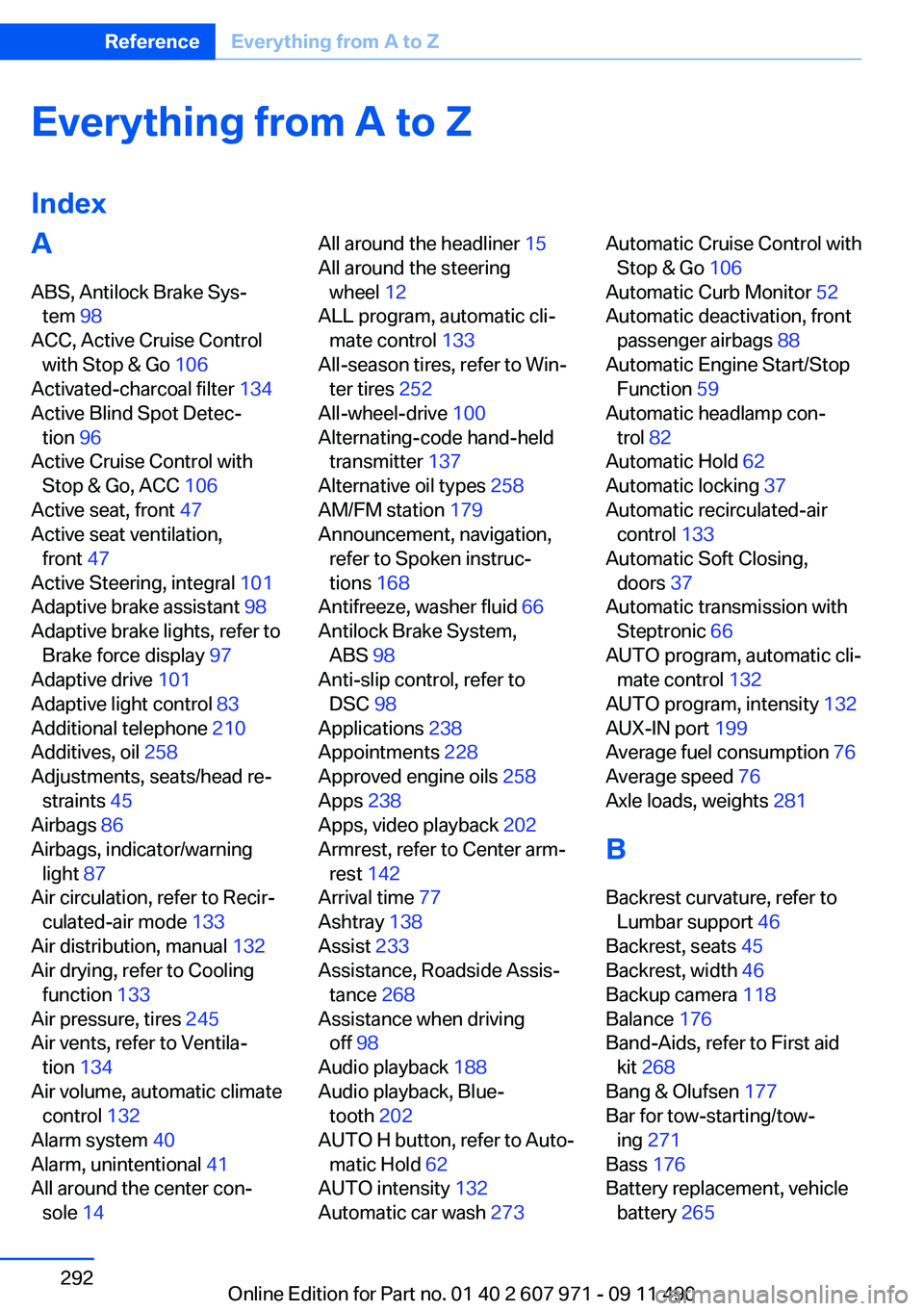
Everything from A to Z
IndexA
ABS, Antilock Brake Sys‐ tem 98
ACC, Active Cruise Control with Stop & Go 106
Activated-charcoal filter 134
Active Blind Spot Detec‐ tion 96
Active Cruise Control with Stop & Go, ACC 106
Active seat, front 47
Active seat ventilation, front 47
Active Steering, integral 101
Adaptive brake assistant 98
Adaptive brake lights, refer to Brake force display 97
Adaptive drive 101
Adaptive light control 83
Additional telephone 210
Additives, oil 258
Adjustments, seats/head re‐ straints 45
Airbags 86
Airbags, indicator/warning light 87
Air circulation, refer to Recir‐ culated-air mode 133
Air distribution, manual 132
Air drying, refer to Cooling function 133
Air pressure, tires 245
Air vents, refer to Ventila‐ tion 134
Air volume, automatic climate control 132
Alarm system 40
Alarm, unintentional 41
All around the center con‐ sole 14 All around the headliner 15
All around the steering wheel 12
ALL program, automatic cli‐ mate control 133
All-season tires, refer to Win‐ ter tires 252
All-wheel-drive 100
Alternating-code hand-held transmitter 137
Alternative oil types 258
AM/FM station 179
Announcement, navigation, refer to Spoken instruc‐
tions 168
Antifreeze, washer fluid 66
Antilock Brake System, ABS 98
Anti-slip control, refer to DSC 98
Applications 238
Appointments 228
Approved engine oils 258
Apps 238
Apps, video playback 202
Armrest, refer to Center arm‐ rest 142
Arrival time 77
Ashtray 138
Assist 233
Assistance, Roadside Assis‐ tance 268
Assistance when driving off 98
Audio playback 188
Audio playback, Blue‐ tooth 202
AUTO H button, refer to Auto‐ matic Hold 62
AUTO intensity 132
Automatic car wash 273 Automatic Cruise Control with
Stop & Go 106
Automatic Curb Monitor 52
Automatic deactivation, front passenger airbags 88
Automatic Engine Start/Stop Function 59
Automatic headlamp con‐ trol 82
Automatic Hold 62
Automatic locking 37
Automatic recirculated-air control 133
Automatic Soft Closing, doors 37
Automatic transmission with Steptronic 66
AUTO program, automatic cli‐ mate control 132
AUTO program, intensity 132
AUX-IN port 199
Average fuel consumption 76
Average speed 76
Axle loads, weights 281
B
Backrest curvature, refer to Lumbar support 46
Backrest, seats 45
Backrest, width 46
Backup camera 118
Balance 176
Band-Aids, refer to First aid kit 268
Bang & Olufsen 177
Bar for tow-starting/tow‐ ing 271
Bass 176
Battery replacement, vehicle battery 265 Seite 292ReferenceEverything from A to Z292
Online Edition for Part no. 01 40 2 607 971 - 09 11 490
Page 293 of 303
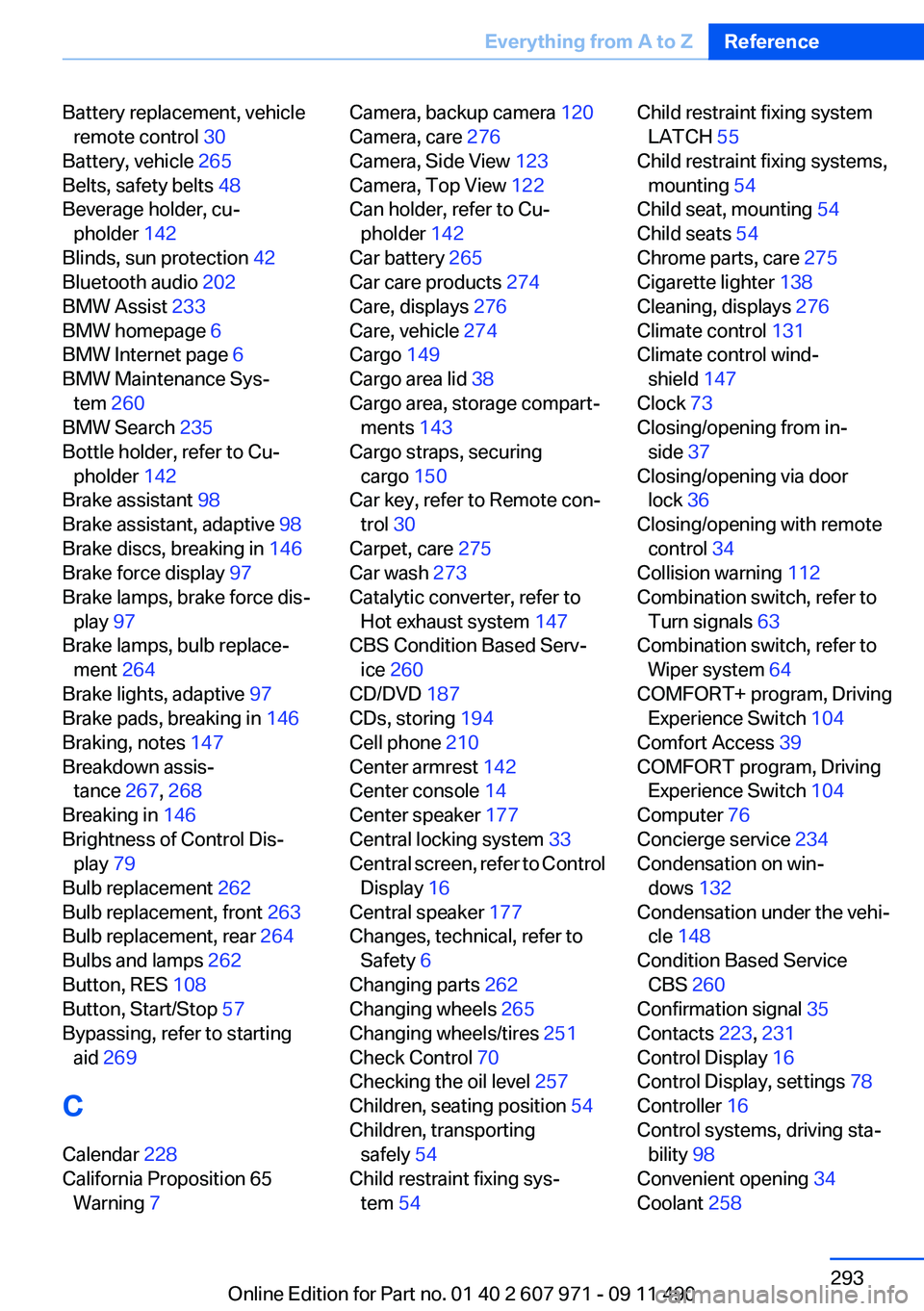
Battery replacement, vehicleremote control 30
Battery, vehicle 265
Belts, safety belts 48
Beverage holder, cu‐ pholder 142
Blinds, sun protection 42
Bluetooth audio 202
BMW Assist 233
BMW homepage 6
BMW Internet page 6
BMW Maintenance Sys‐ tem 260
BMW Search 235
Bottle holder, refer to Cu‐ pholder 142
Brake assistant 98
Brake assistant, adaptive 98
Brake discs, breaking in 146
Brake force display 97
Brake lamps, brake force dis‐ play 97
Brake lamps, bulb replace‐ ment 264
Brake lights, adaptive 97
Brake pads, breaking in 146
Braking, notes 147
Breakdown assis‐ tance 267, 268
Breaking in 146
Brightness of Control Dis‐ play 79
Bulb replacement 262
Bulb replacement, front 263
Bulb replacement, rear 264
Bulbs and lamps 262
Button, RES 108
Button, Start/Stop 57
Bypassing, refer to starting aid 269
C
Calendar 228
California Proposition 65 Warning 7 Camera, backup camera 120
Camera, care 276
Camera, Side View 123
Camera, Top View 122
Can holder, refer to Cu‐ pholder 142
Car battery 265
Car care products 274
Care, displays 276
Care, vehicle 274
Cargo 149
Cargo area lid 38
Cargo area, storage compart‐ ments 143
Cargo straps, securing cargo 150
Car key, refer to Remote con‐ trol 30
Carpet, care 275
Car wash 273
Catalytic converter, refer to Hot exhaust system 147
CBS Condition Based Serv‐ ice 260
CD/DVD 187
CDs, storing 194
Cell phone 210
Center armrest 142
Center console 14
Center speaker 177
Central locking system 33
Central screen, refer to Control Display 16
Central speaker 177
Changes, technical, refer to Safety 6
Changing parts 262
Changing wheels 265
Changing wheels/tires 251
Check Control 70
Checking the oil level 257
Children, seating position 54
Children, transporting safely 54
Child restraint fixing sys‐ tem 54 Child restraint fixing system
LATCH 55
Child restraint fixing systems, mounting 54
Child seat, mounting 54
Child seats 54
Chrome parts, care 275
Cigarette lighter 138
Cleaning, displays 276
Climate control 131
Climate control wind‐ shield 147
Clock 73
Closing/opening from in‐ side 37
Closing/opening via door lock 36
Closing/opening with remote control 34
Collision warning 112
Combination switch, refer to Turn signals 63
Combination switch, refer to Wiper system 64
COMFORT+ program, Driving Experience Switch 104
Comfort Access 39
COMFORT program, Driving Experience Switch 104
Computer 76
Concierge service 234
Condensation on win‐ dows 132
Condensation under the vehi‐ cle 148
Condition Based Service CBS 260
Confirmation signal 35
Contacts 223, 231
Control Display 16
Control Display, settings 78
Controller 16
Control systems, driving sta‐ bility 98
Convenient opening 34
Coolant 258 Seite 293Everything from A to ZReference293
Online Edition for Part no. 01 40 2 607 971 - 09 11 490
Page 294 of 303
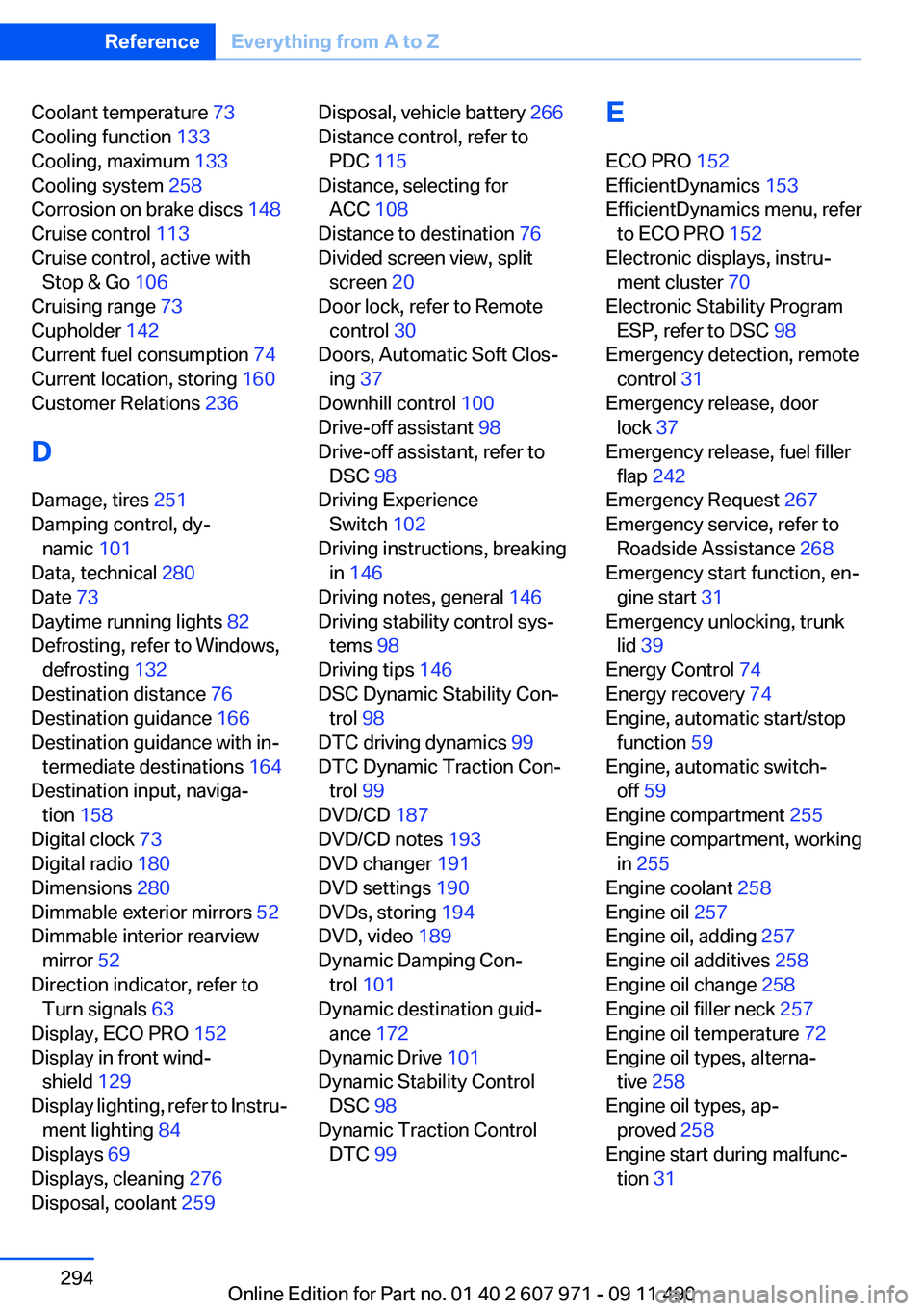
Coolant temperature 73
Cooling function 133
Cooling, maximum 133
Cooling system 258
Corrosion on brake discs 148
Cruise control 113
Cruise control, active with Stop & Go 106
Cruising range 73
Cupholder 142
Current fuel consumption 74
Current location, storing 160
Customer Relations 236
D
Damage, tires 251
Damping control, dy‐ namic 101
Data, technical 280
Date 73
Daytime running lights 82
Defrosting, refer to Windows, defrosting 132
Destination distance 76
Destination guidance 166
Destination guidance with in‐ termediate destinations 164
Destination input, naviga‐ tion 158
Digital clock 73
Digital radio 180
Dimensions 280
Dimmable exterior mirrors 52
Dimmable interior rearview mirror 52
Direction indicator, refer to Turn signals 63
Display, ECO PRO 152
Display in front wind‐ shield 129
Display lighting, refer to Instru‐ ment lighting 84
Displays 69
Displays, cleaning 276
Disposal, coolant 259 Disposal, vehicle battery 266
Distance control, refer to PDC 115
Distance, selecting for ACC 108
Distance to destination 76
Divided screen view, split screen 20
Door lock, refer to Remote control 30
Doors, Automatic Soft Clos‐ ing 37
Downhill control 100
Drive-off assistant 98
Drive-off assistant, refer to DSC 98
Driving Experience Switch 102
Driving instructions, breaking in 146
Driving notes, general 146
Driving stability control sys‐ tems 98
Driving tips 146
DSC Dynamic Stability Con‐ trol 98
DTC driving dynamics 99
DTC Dynamic Traction Con‐ trol 99
DVD/CD 187
DVD/CD notes 193
DVD changer 191
DVD settings 190
DVDs, storing 194
DVD, video 189
Dynamic Damping Con‐ trol 101
Dynamic destination guid‐ ance 172
Dynamic Drive 101
Dynamic Stability Control DSC 98
Dynamic Traction Control DTC 99 E
ECO PRO 152
EfficientDynamics 153
EfficientDynamics menu, refer to ECO PRO 152
Electronic displays, instru‐ ment cluster 70
Electronic Stability Program ESP, refer to DSC 98
Emergency detection, remote control 31
Emergency release, door lock 37
Emergency release, fuel filler flap 242
Emergency Request 267
Emergency service, refer to Roadside Assistance 268
Emergency start function, en‐ gine start 31
Emergency unlocking, trunk lid 39
Energy Control 74
Energy recovery 74
Engine, automatic start/stop function 59
Engine, automatic switch- off 59
Engine compartment 255
Engine compartment, working in 255
Engine coolant 258
Engine oil 257
Engine oil, adding 257
Engine oil additives 258
Engine oil change 258
Engine oil filler neck 257
Engine oil temperature 72
Engine oil types, alterna‐ tive 258
Engine oil types, ap‐ proved 258
Engine start during malfunc‐ tion 31 Seite 294ReferenceEverything from A to Z294
Online Edition for Part no. 01 40 2 607 971 - 09 11 490