CD player BMW 650I COUPE&CONVERTIBLE 2006 User Guide
[x] Cancel search | Manufacturer: BMW, Model Year: 2006, Model line: 650I COUPE&CONVERTIBLE, Model: BMW 650I COUPE&CONVERTIBLE 2006Pages: 242, PDF Size: 8.47 MB
Page 158 of 242
Navigation
Entertainment
Driving tips
157Reference
At a glance
Controls
Communications
Mobility
CD player and CD changer
Listening to CDs
Compressed audio files*
CDs with compressed audio files, i.e. MP3,
can be played by the CD player, but not by the
CD changer.
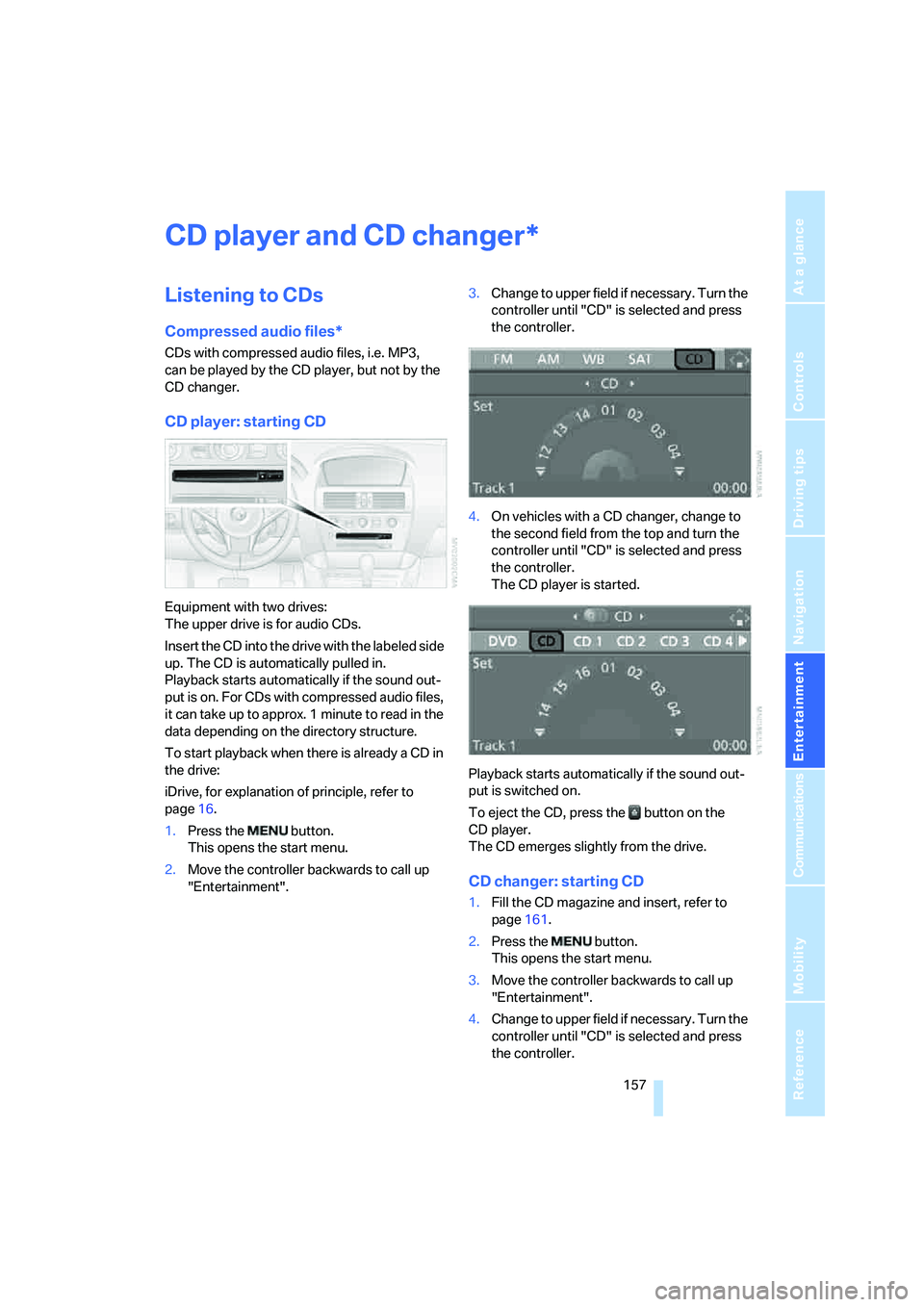
CD player: starting CD
Equipment with two drives:
The upper drive is for audio CDs.
Insert the CD into the drive with the labeled side
up. The CD is automatically pulled in.
Playback starts automatically if the sound out-
put is on. For CDs with compressed audio files,
it can take up to approx. 1 minute to read in the
data depending on the directory structure.
To start playback when there is already a CD in
the drive:
iDrive, for explanation of principle, refer to
page16.
1.Press the button.
This opens the start menu.
2.Move the controller backwards to call up
"Entertainment".3.Change to upper field if necessary. Turn the
controller until "CD" is selected and press
the controller.
4.On vehicles with a CD changer, change to
the second field from the top and turn the
controller until "CD" is selected and press
the controller.
The CD player is started.
Playback starts automatically if the sound out-
put is switched on.
To eject the CD, press the button on the
CD player.
The CD emerges slightly from the drive.
CD changer: starting CD
1.Fill the CD magazine and insert, refer to
page161.
2.Press the button.
This opens the start menu.
3.Move the controller backwards to call up
"Entertainment".
4.Change to upper field if necessary. Turn the
controller until "CD" is selected and press
the controller.
*
Page 159 of 242
CD player and CD changer
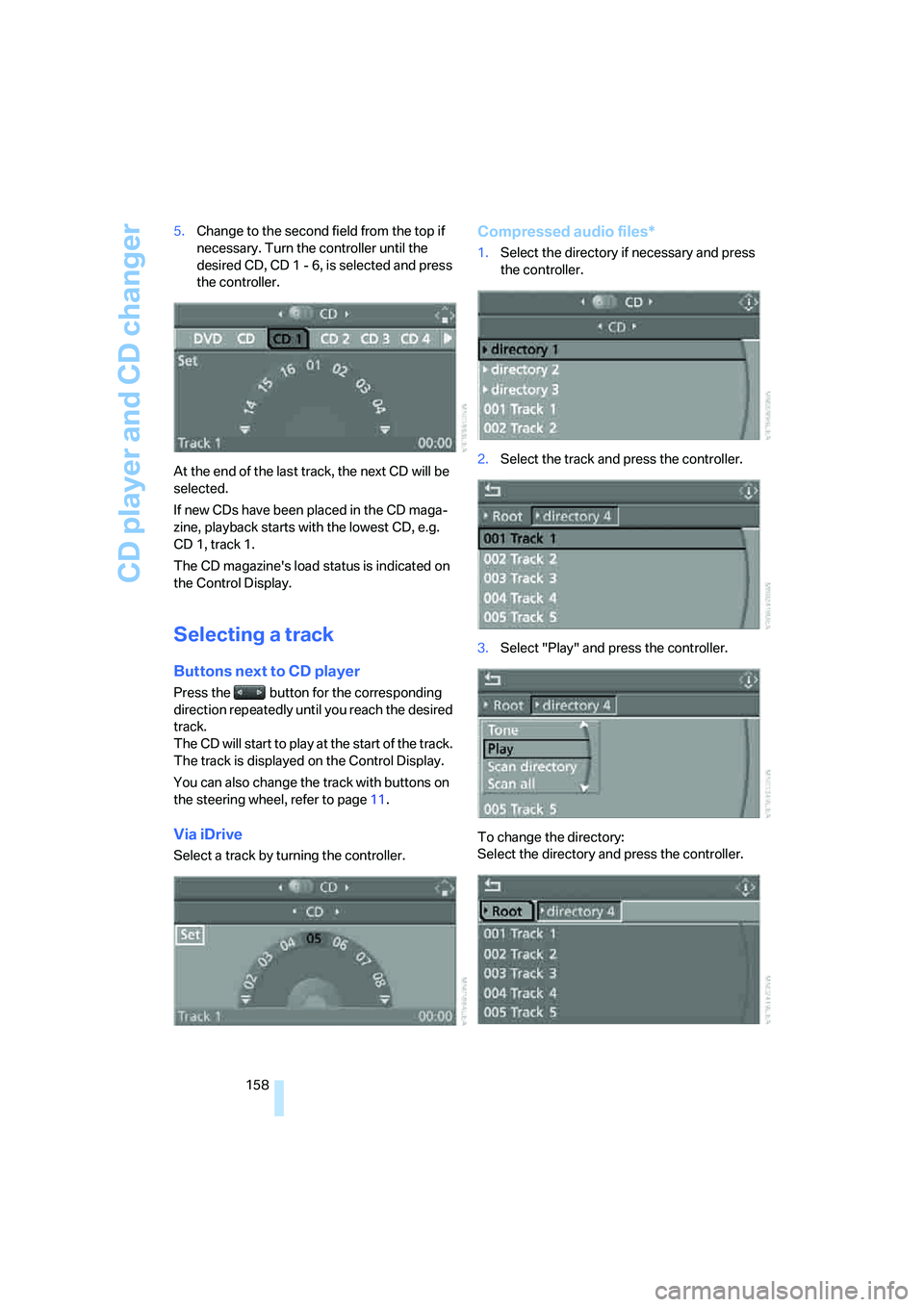
158 5.Change to the second field from the top if
necessary. Turn the controller until the
desired CD, CD 1 - 6, is selected and press
the controller.
At the end of the last track, the next CD will be
selected.
If new CDs have been placed in the CD maga-
zine, playback starts with the lowest CD, e.g.
CD 1, track 1.
The CD magazine's load status is indicated on
the Control Display.
Selecting a track
Buttons next to CD player
Press the button for the corresponding
direction repeatedly until you reach the desired
track.
The CD will start to play at the start of the track.
The track is displayed on the Control Display.
You can also change the track with buttons on
the steering wheel, refer to page11.
Via iDrive
Select a track by turning the controller.
Compressed audio files*
1.Select the directory if necessary and press
the controller.
2.Select the track and press the controller.
3.Select "Play" and press the controller.
To change the directory:
Select the directory and press the controller.
Page 160 of 242
Navigation
Entertainment
Driving tips
159Reference
At a glance
Controls
Communications
Mobility
To exit from the menu:
Select the arrow and press the controller.
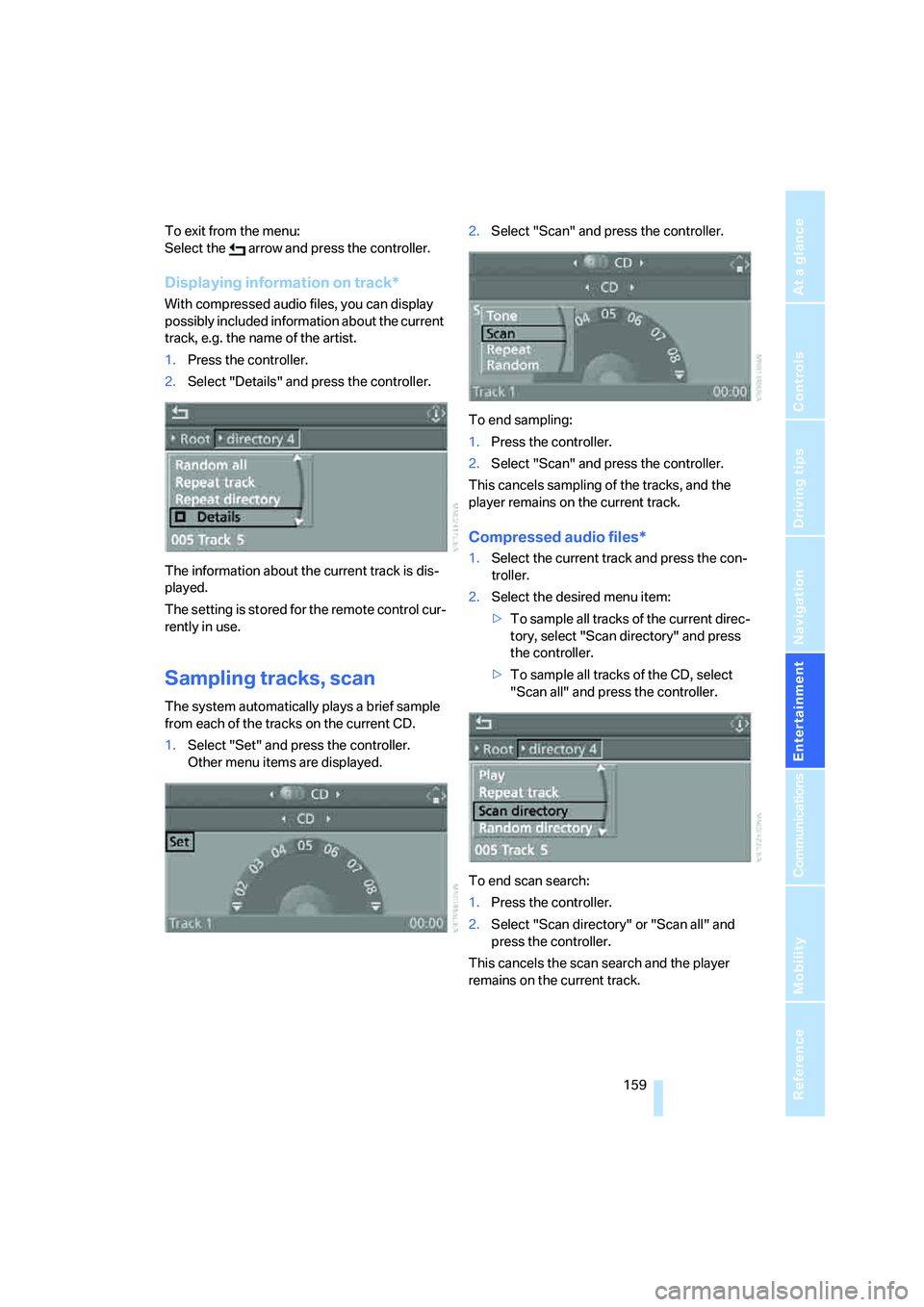
Displaying information on track*
With compressed audio files, you can display
possibly included information about the current
track, e.g. the name of the artist.
1.Press the controller.
2.Select "Details" and press the controller.
The information about the current track is dis-
played.
The setting is stored for the remote control cur-
rently in use.
Sampling tracks, scan
The system automatically plays a brief sample
from each of the tracks on the current CD.
1.Select "Set" and press the controller.
Other menu items are displayed.2.Select "Scan" and press the controller.
To end sampling:
1.Press the controller.
2.Select "Scan" and press the controller.
This cancels sampling of the tracks, and the
player remains on the current track.
Compressed audio files*
1.Select the current track and press the con-
troller.
2.Select the desired menu item:
>To sample all tracks of the current direc-
tory, select "Scan directory" and press
the controller.
>To sample all tracks of the CD, select
"Scan all" and press the controller.
To end scan search:
1.Press the controller.
2.Select "Scan directory" or "Scan all" and
press the controller.
This cancels the scan search and the player
remains on the current track.
Page 161 of 242
CD player and CD changer
160
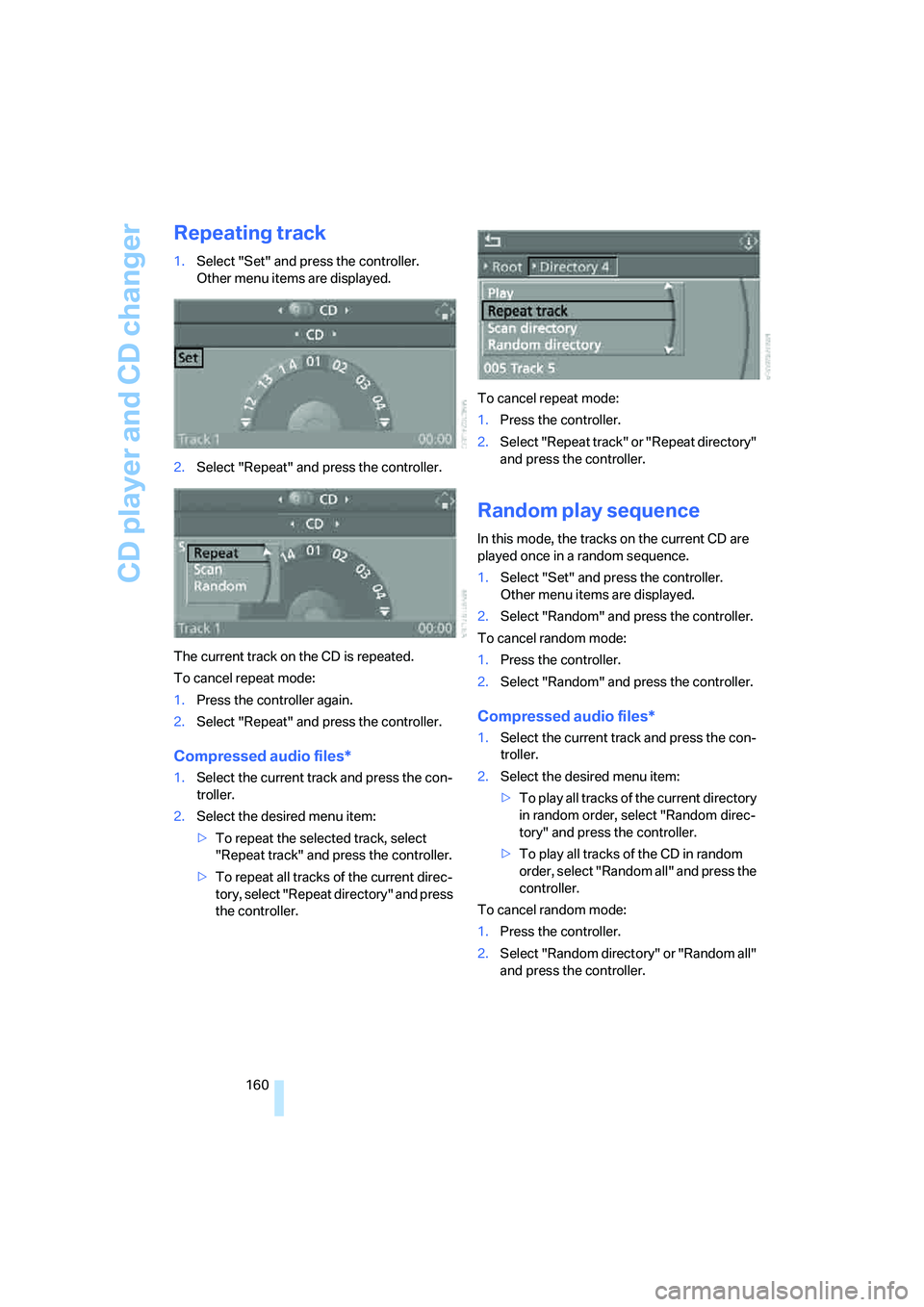
Repeating track
1.Select "Set" and press the controller.
Other menu items are displayed.
2.Select "Repeat" and press the controller.
The current track on the CD is repeated.
To cancel repeat mode:
1.Press the controller again.
2.Select "Repeat" and press the controller.
Compressed audio files*
1.Select the current track and press the con-
troller.
2.Select the desired menu item:
>To repeat the selected track, select
"Repeat track" and press the controller.
>To repeat all tracks of the current direc-
tory, select "Repeat directory" and press
the controller.To cancel repeat mode:
1.Press the controller.
2.Select "Repeat track" or "Repeat directory"
and press the controller.
Random play sequence
In this mode, the tracks on the current CD are
played once in a random sequence.
1.Select "Set" and press the controller.
Other menu items are displayed.
2.Select "Random" and press the controller.
To cancel random mode:
1.Press the controller.
2.Select "Random" and press the controller.
Compressed audio files*
1.Select the current track and press the con-
troller.
2.Select the desired menu item:
>To pla y all tracks of the current directory
in random order, select "Random direc-
tory" and press the controller.
>To play all tracks of the CD in random
order, select "Random all" and press the
controller.
To cancel random mode:
1.Press the controller.
2.Select "Random directory" or "Random all"
and press the controller.
Page 162 of 242

Navigation
Entertainment
Driving tips
161Reference
At a glance
Controls
Communications
Mobility
Fast forward/reverse
Buttons next to CD player:
Press and hold the button for the corre-
sponding direction.
CD magazine
The BMW CD changer for six CDs is installed in
the glove compartment.
Removing CD magazine
To insert CDs into the CD magazine 1 or
remove them from it, you must first remove the
magazine from the CD changer:
Press button2 to eject the CD magazine1.
Wait at least 2 seconds before pushing in the
magazine again so that the inserted CDs can be
read in again.
Inserting/removing CDs into/from
CD magazine
When inserting or removing CDs, remember to
hold them only by their edges, taking care to
avoid touching the reflective CD memory sur-
face.To insert:
Insert one CD into each compartment of the
magazine with the labeled side up.
To remove:
Pull out the desired tray and remove the CD.
Inserting CD magazine
Push in the CD magazine as far as possible in
the direction of the arrow.
The CD changer automatically reads in the
inserted CDs and is then ready for operation.
Page 163 of 242
CD player and CD changer
162
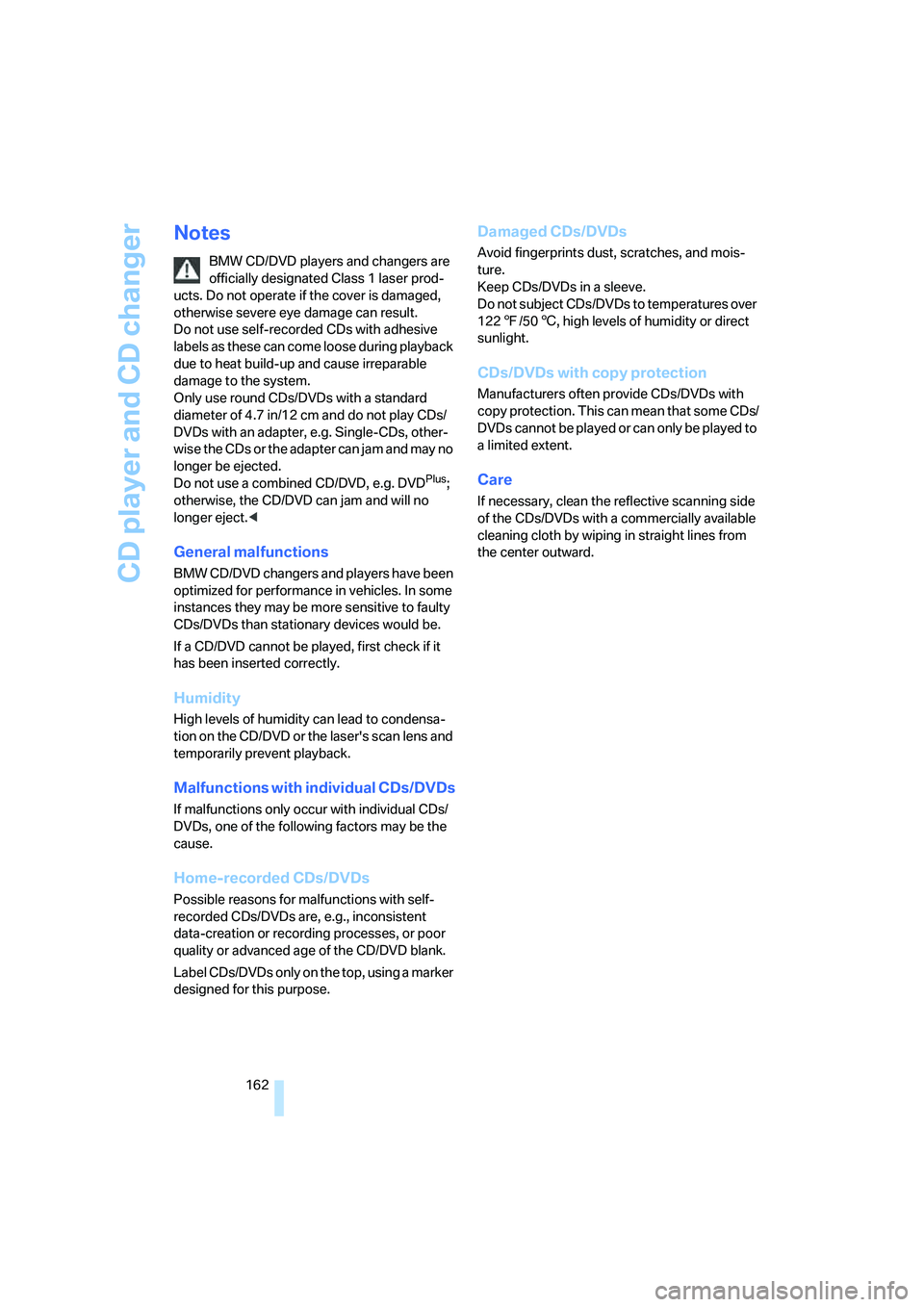
Notes
BMW CD/DVD players and changers are
officially designated Class 1 laser prod-
ucts. Do not operate if the cover is damaged,
otherwise severe eye damage can result.
Do not use self-recorded CDs with adhesive
labels as these can come loose during playback
due to heat build-up and cause irreparable
damage to the system.
Only use round CDs/DVDs with a standard
diameter of 4.7 in/12 cm and do not play CDs/
DVDs with an adapter, e.g. Single-CDs, other-
wise the CDs or the adapter can jam and may no
longer be ejected.
Do not use a combined CD/DVD, e.g. DVD
Plus;
otherwise, the CD/DVD can jam and will no
longer eject.<
General malfunctions
BMW CD/DVD changers and players have been
optimized for performance in vehicles. In some
instances they may be more sensitive to faulty
CDs/DVDs than stationary devices would be.
If a CD/DVD cannot be played, first check if it
has been inserted correctly.
Humidity
High levels of humidity can lead to condensa-
tion on the CD/DVD or the laser's scan lens and
temporarily prevent playback.
Malfunctions with individual CDs/DVDs
If malfunctions only occur with individual CDs/
DVDs, one of the following factors may be the
cause.
Home-recorded CDs/DVDs
Possible reasons for malfunctions with self-
recorded CDs/DVDs are, e.g., inconsistent
data-creation or recording processes, or poor
quality or advanced age of the CD/DVD blank.
Label CDs/DVDs only on the top, using a marker
designed for this purpose.
Damaged CDs/DVDs
Avoid fingerprints dust, scratches, and mois-
ture.
Keep CDs/DVDs in a sleeve.
Do not subject CDs/DVDs to temperatures over
1227/506, high levels of humidity or direct
sunlight.
CDs/DVDs with copy protection
Manufacturers often provide CDs/DVDs with
copy protection. This can mean that some CDs/
DVDs cannot be played or can only be played to
a limited extent.
Care
If necessary, clean the reflective scanning side
of the CDs/DVDs with a commercially available
cleaning cloth by wiping in straight lines from
the center outward.
Page 221 of 242
Short commands of voice command system
220
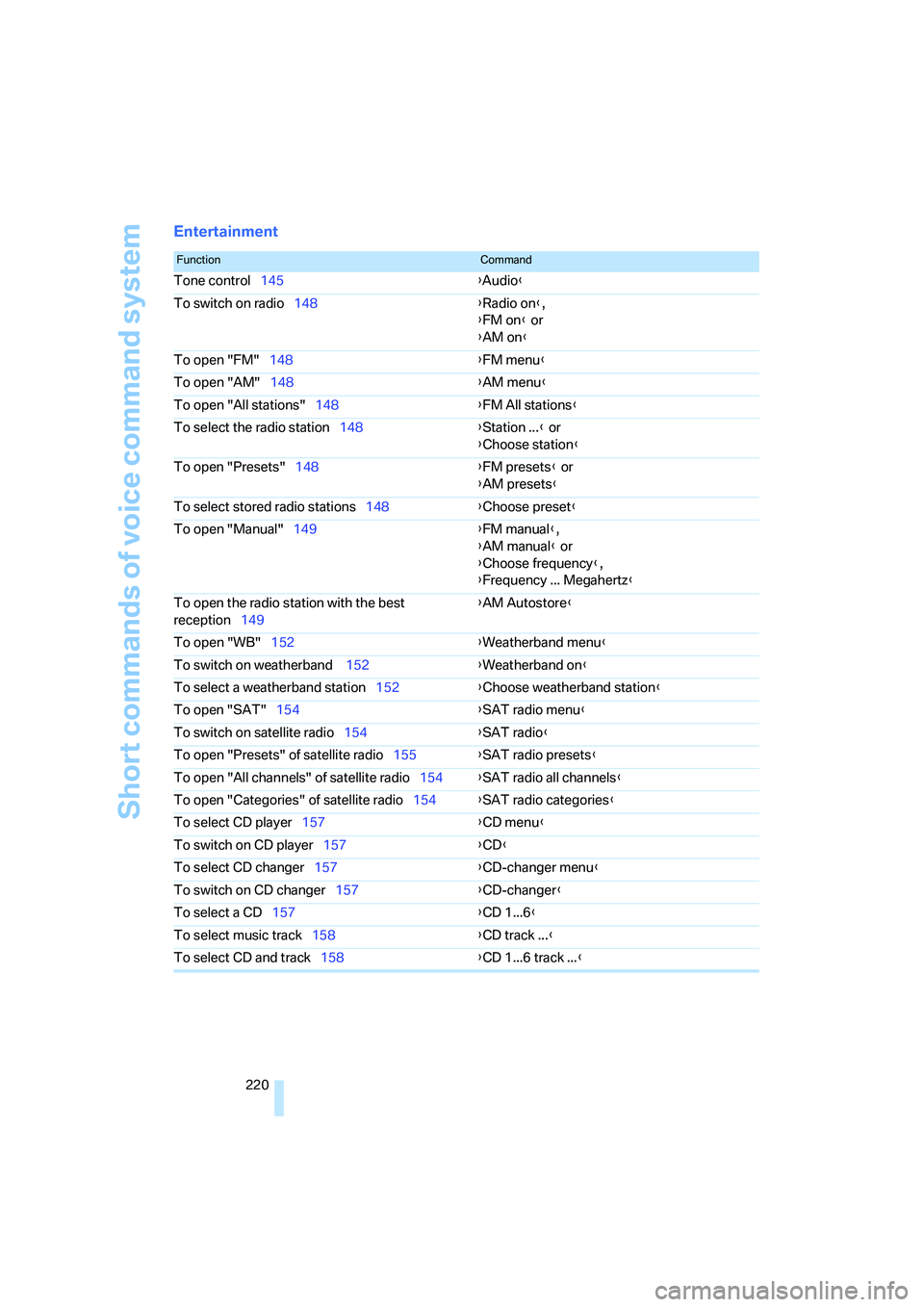
Entertainment
FunctionCommand
Tone control145{Audio}
To switch on radio148{Radio on},
{FM on} or
{AM on}
To open "FM"148{FM menu}
To open "AM"148{AM menu}
To open "All stations"148{FM All stations}
To select the radio station148{Station ...} or
{Choose station}
To open "Presets"148{FM presets} or
{AM presets}
To select stored radio stations148{Choose preset}
To open "Manual"149{FM manual},
{AM manual} or
{Choose frequency},
{Frequency ... Megahertz}
To open the radio station with the best
reception149{AM Autostore}
To open "WB"152{Weatherband menu}
To switch on weatherband 152{Weatherband on}
To select a weatherband station152{Choose weatherband station}
To open "SAT"154{SAT radio menu}
To switch on satellite radio154
{SAT radio}
To open "Presets" of satellite radio155{SAT radio presets}
To open "All channels" of satellite radio154{SAT radio all channels}
To open "Categories" of satellite radio154{SAT radio categories}
To select CD player157{CD menu}
To switch on CD player157{CD}
To select CD changer157{CD-changer menu}
To switch on CD changer157{CD-changer}
To select a CD157{CD 1...6}
To select music track158{CD track ...}
To select CD and track158{CD 1...6 track ...}
Page 225 of 242
Everything from A to Z
224 Brake pads198
– breaking-in118
Brakes
– ABS Antilock Brake
System86
– brake fluid197
– brake force display92
– brake pads198
– breaking-in118
– CBC Cornering Brake
Control86
– handbrake60
Brake system118
– brake fluid level197
– brake pads118,198
– brake rotors120
– breaking-in118
– warning lamp13,197
Brake wear warning
– brake pads198
– warning lamp198
Braking
– electronic brake-force
distribution86
– refer to Braking safely119
Braking safely119
Breakdown assistance181
Breakdown services, refer to
Roadside Assistance207
Breaking-in118
Breaking-in the clutch118
Breaking-in the
differential118
"Brightness"83,96
– with BMW Night Vision99
Brightness of Control
Display83
Button for starting engine58
Buttons on steering wheel11
Bypassing route sections140
C
California Proposition 65
Warning6
"Call"172
Call
– accepting170
– displaying accepted172
– ending171
– in absence172
– starting171
Calling
– from phone book171
– from Top 8 list172
– redialing172
Capacity of luggage
compartment217
Car care, refer to the Caring
for your vehicle brochure
Car-care products, refer to the
Caring for your vehicle
brochure
"Car Data"76
Care200
– refer to the Caring for your
vehicle brochure
Cargo loading
– securing cargo121
– stowing cargo121
– vehicle120
Caring for artificial leather,
refer to the Caring for your
vehicle brochure
Caring for leather, refer to the
Caring for your vehicle
brochure
Caring for light-alloy wheels,
refer to the Caring for your
vehicle brochure
Caring for plastic, refer to the
Caring for your vehicle
brochure
Caring for the carpet, refer to
the Caring for your vehicle
brochure
Caring for the vehicle finish,
refer to the Caring for your
vehicle brochureCar key, refer to Keys/remote
control28
Car phone166
– installation location, refer to
Center armrest112
– refer to Mobile phone166
– refer to separate operating
instructions
Car radio, refer to Radio148
Car wash120
– refer to Before driving into a
car wash120
– refer to the Caring for your
vehicle brochure
– with comfort access38
Catalytic converter, refer to
Hot exhaust system118
"Categories"155
CBC Cornering Brake
Control86
CBS Condition Based
Service199
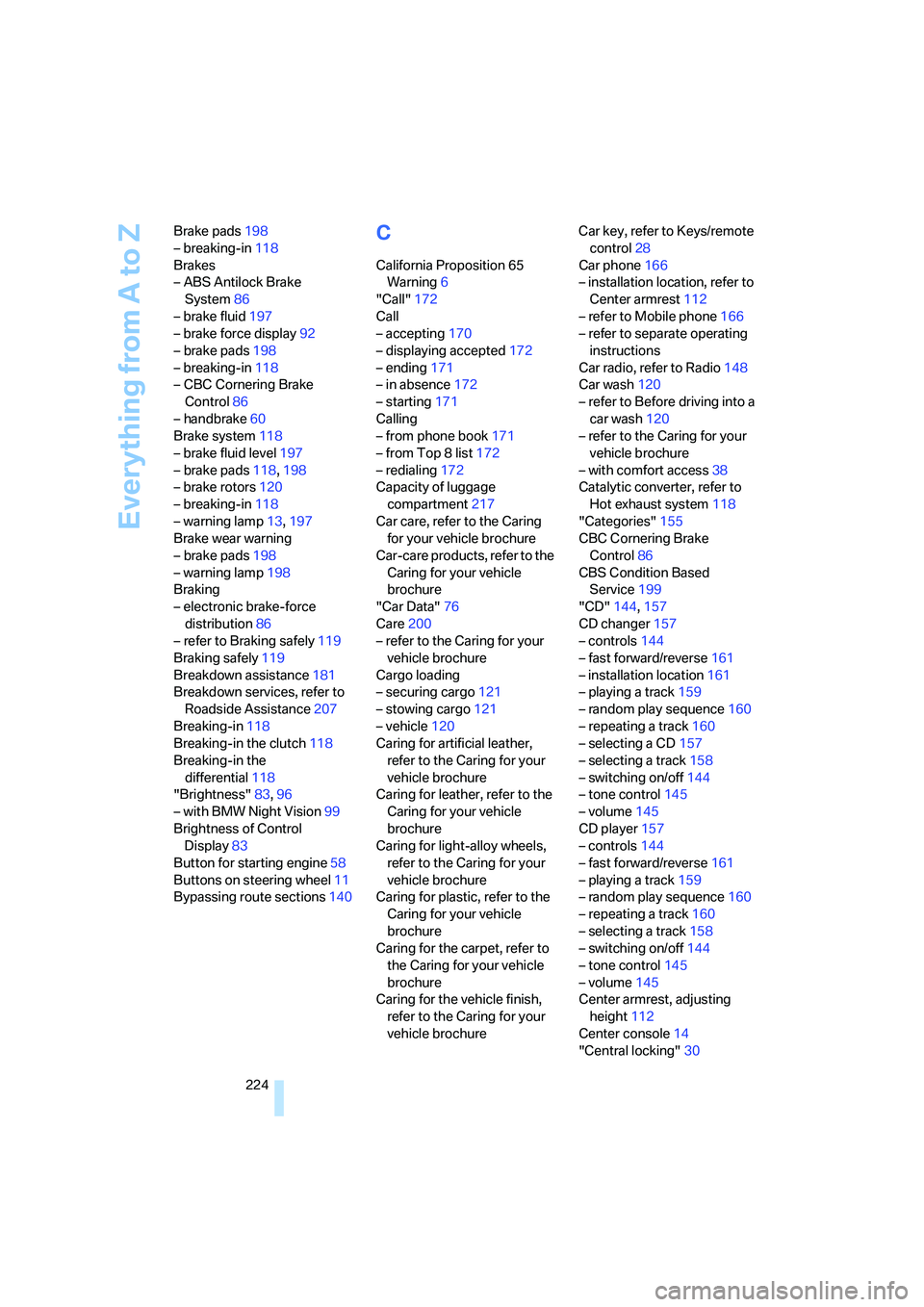
"CD"144,157
CD changer157
– controls144
– fast forward/reverse161
– installation location
161
– playing a track159
– random play sequence160
– repeating a track160
– selecting a CD157
– selecting a track158
– switching on/off144
– tone control145
– volume145
CD player157
– controls144
– fast forward/reverse161
– playing a track159
– random play sequence160
– repeating a track160
– selecting a track158
– switching on/off144
– tone control145
– volume145
Center armrest, adjusting
height112
Center console14
"Central locking"30
Page 226 of 242
Reference 225
At a glance
Controls
Driving tips
Communications
Navigation
Entertainment
Mobility
Central locking system29
– comfort access36
– from inside vehicle32
Changes, technical, refer to
For your own safety6
Changing a wheel204
Changing language on
Control Display84
Changing units of measure on
Control Display84
Changing wheels192
CHECK button80
Check Control79
"Check Control
messages"80
Check Gas Cap186
Checking air pressure, refer to
Tire inflation pressure188
Children's seats, refer to Child
restraint systems56
Child-restraint fixing system
LATCH57
Child restraint systems56
Chrome parts, care, refer to
the Caring for your vehicle
brochure
Cigarette lighter113
Cigarette lighter socket, refer
to Connecting electrical
devices114
Cleaning, refer to Caring for
your vehicle brochure
"Climate"105
Clock74
– 12h/24h mode83
– setting time and date82
Closing
– from inside32
– from outside30
Closing fuel filler cap186
Clothes hooks, Coupe113
Cockpit10
Cold start, refer to Starting
engine59
Comfort access36
– observe in car wash38
– replacing battery38Comfort closing
– windows, with comfort
access with Coupe37
– with comfort access37
"Communication"170,181
"Communication
settings"180
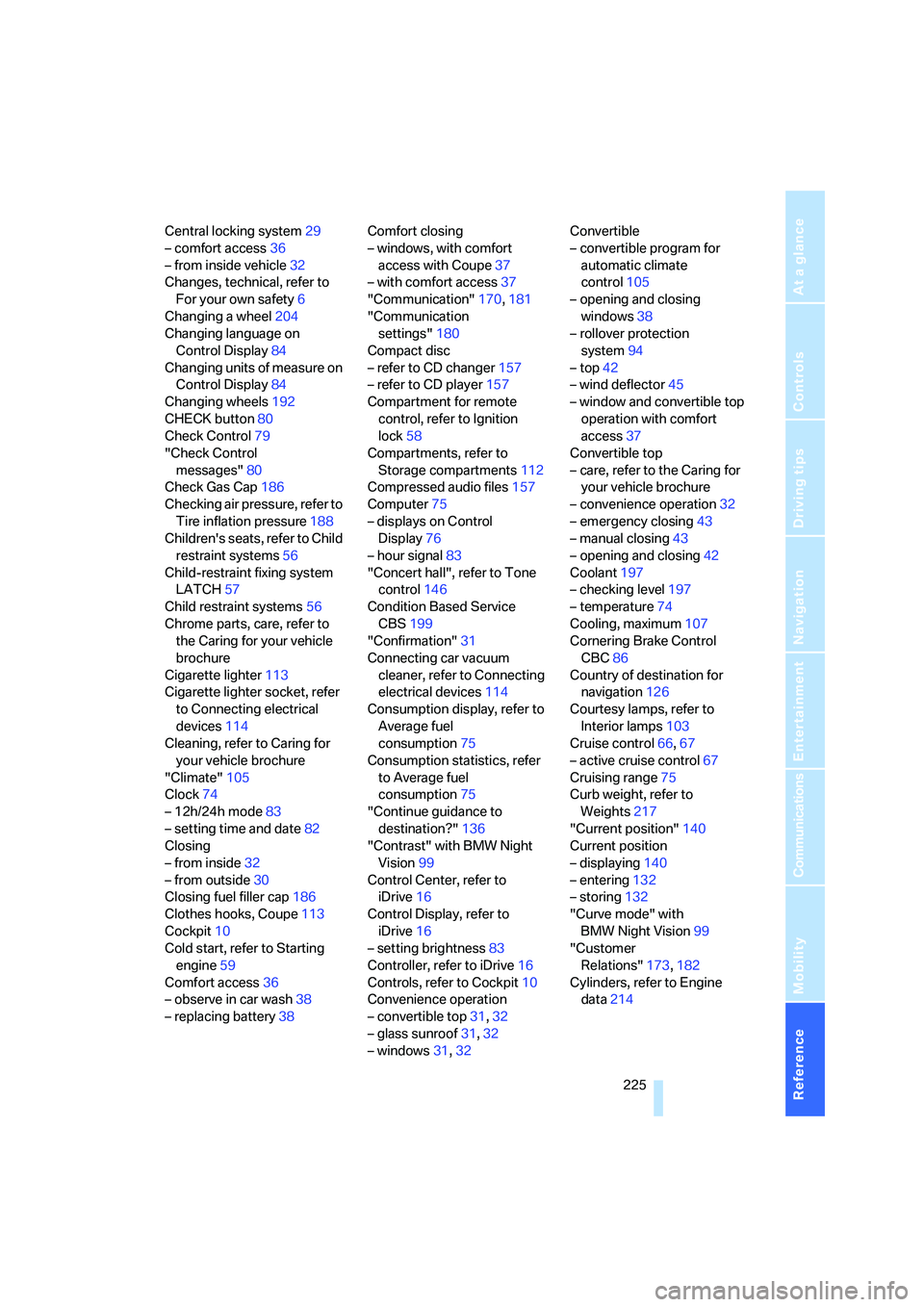
Compact disc
– refer to CD changer157
– refer to CD player157
Compartment for remote
control, refer to Ignition
lock58
Compartments, refer to
Storage compartments112
Compressed audio files157
Computer75
– displays on Control
Display76
– hour signal83
"Concert hall", refer to Tone
control146
Condition Based Service
CBS199
"Confirmation"31
Connecting car vacuum
cleaner, refer to Connecting
electrical devices114
Consumption display, refer to
Average fuel
consumption75
Consumption statistics, refer
to Average fuel
consumption75
"Continue guidance to
destination?"136
"Contrast" with BMW Night
Vision99
Control Center, refer to
iDrive16
Control Display, refer to
iDrive16
– setting brightness83
Controller, refer to iDrive16
Controls, refer to Cockpit10
Convenience operation
– convertible top31,32
– glass sunroof31,32
– windows31,32Convertible
– convertible program for
automatic climate
control105
– opening and closing
windows38
– rollover protection
system94
– top42
– wind deflector45
– window and convertible top
operation with comfort
access37
Convertible top
– care, refer to the Caring for
your vehicle brochure
– convenience operation32
– emergency closing43
– manual closing43
– opening and closing42
Coolant197
– checking level197
– temperature74
Cooling, maximum107
Cornering Brake Control
CBC86
Country of destination for
navigation126
Courtesy lamps, refer to
Interior lamps103
Cruise control66,67
– active cruise control67
Cruising range75
Curb weight, refer to
Weights217
"Current position"140
Current position
– displaying140
– entering132
– storing132
"Curve mode" with
BMW Night Vision99
"Customer
Relations"173,182
Cylinders, refer to Engine
data214
Page 228 of 242
Reference 227
At a glance
Controls
Driving tips
Communications
Navigation
Entertainment
Mobility
Drying the air, refer to Cooling
function106
DSC Dynamic Stability
Control86
– indicator lamp13,87
DTC Dynamic Traction
Control87
– activating87
– indicator lamp13,87
DVD for navigation124
Dynamic Brake Control
DBC86
Dynamic Drive87
Dynamic Driving Control64
Dynamic Stability Control
DSC86
Dynamic Traction Control
DTC87
E
Easy entry, refer to Entering
rear51
Easy entry/exit53
EBV, refer to Electronic brake-
force distribution86
Eject button, refer to Buttons
on CD player144
Electrical malfunction
– convertible top43
– door lock32
– driver's door32
– fuel filler door186
– glass sunroof41
– luggage compartment lid34
– storage compartment, hotel
function33
Electric steering wheel
adjustment53
Electronic brake-force
distribution86
Electronic oil level check195
Emergency assistance, refer
to Roadside Assistance207
Emergency call206Emergency operation, refer to
Manual operation
– convertible top43
– door lock32
– driver's door32
– fuel filler door186
– glass sunroof41
– hotel function33
– luggage compartment lid34
– selector lever interlock,
automatic transmission63
Emergency release for
luggage compartment lid in
luggage compartment35
Emergency services, refer to
Roadside Assistance207
"Emission inspect."78
"Enable services"180
"End call"171
"End Night Vision"99
Engine
– breaking-in118
– data214
– overheated, refer to Coolant
temperature74
– speed214
– starting59
– starting, comfort access36
– starting difficulties59
– switching off60
– switching off when equipped
with Automatic trans-
mission, with comfort
access38
Engine compartment195
Engine coolant197
Engine oil
– additives
196
– approved oils196
– electronic oil level check195
– recommended oils196
– temperature75
– temperature gauge75
– topping off196
"Engine oil level"196
Engine output, refer to Engine
data214Engine overheating, refer to
Coolant temperature74
Engine speed, refer to Engine
specifications214
Engine starting, refer to
Starting engine59
"Enter address"126,132
Entering address125,128
Entering destination via town/
city name126
Entering intersection127
Entering rear51
Entering town/city for
navigation126
Entering zip code for
navigation127
"Entertainment"144
"Entertainment
settings"145,152
Entertainment sound output
on/off145
Entry map for destination129
Equalizer, refer to Tone
control147
"Equalizer", tone control147
"ESN"154
ESP Electronic Stability
Program, refer to DSC
Dynamic Stability
Control86
Event data recorders200
Exhaust system, refer to Hot
exhaust system118
Exterior mirrors52
– automatic dimming
feature53
– automatic heating53
– folding in and out52
– tilting down passenger-side
mirror53
Eye for tow-starting and
towing, refer to Tow
fitting208
Eyes for lashing, refer to
Securing cargo121