language BMW 650I COUPE&CONVERTIBLE 2006 Owners Manual
[x] Cancel search | Manufacturer: BMW, Model Year: 2006, Model line: 650I COUPE&CONVERTIBLE, Model: BMW 650I COUPE&CONVERTIBLE 2006Pages: 242, PDF Size: 8.47 MB
Page 23 of 242
Voice command system
22
Voice command system
The concept
The voice command system allows you to con-
trol operation of various vehicle systems with-
out ever removing your hands from the steering
wheel.
Individual menu items on the Control Display
can be spoken as commands. This frees you of
having to use the controller.
The voice command system transforms your
spoken commands into control signals for the
selected systems and provides support in the
form of instructions or questions.
The voice command system includes a special
microphone.
The microphone is located:
>Near the interior rearview mirror in the
Coupe, refer to page14
>On the steering column in the Convertible
Prerequisite
In order to enable identification of the com-
mands to be spoken, use iDrive to set the lan-
guage for the voice command system. Setting
iDrive language, refer to page84.
Symbols in Owner's Manual
Voice commands
Activating voice command system
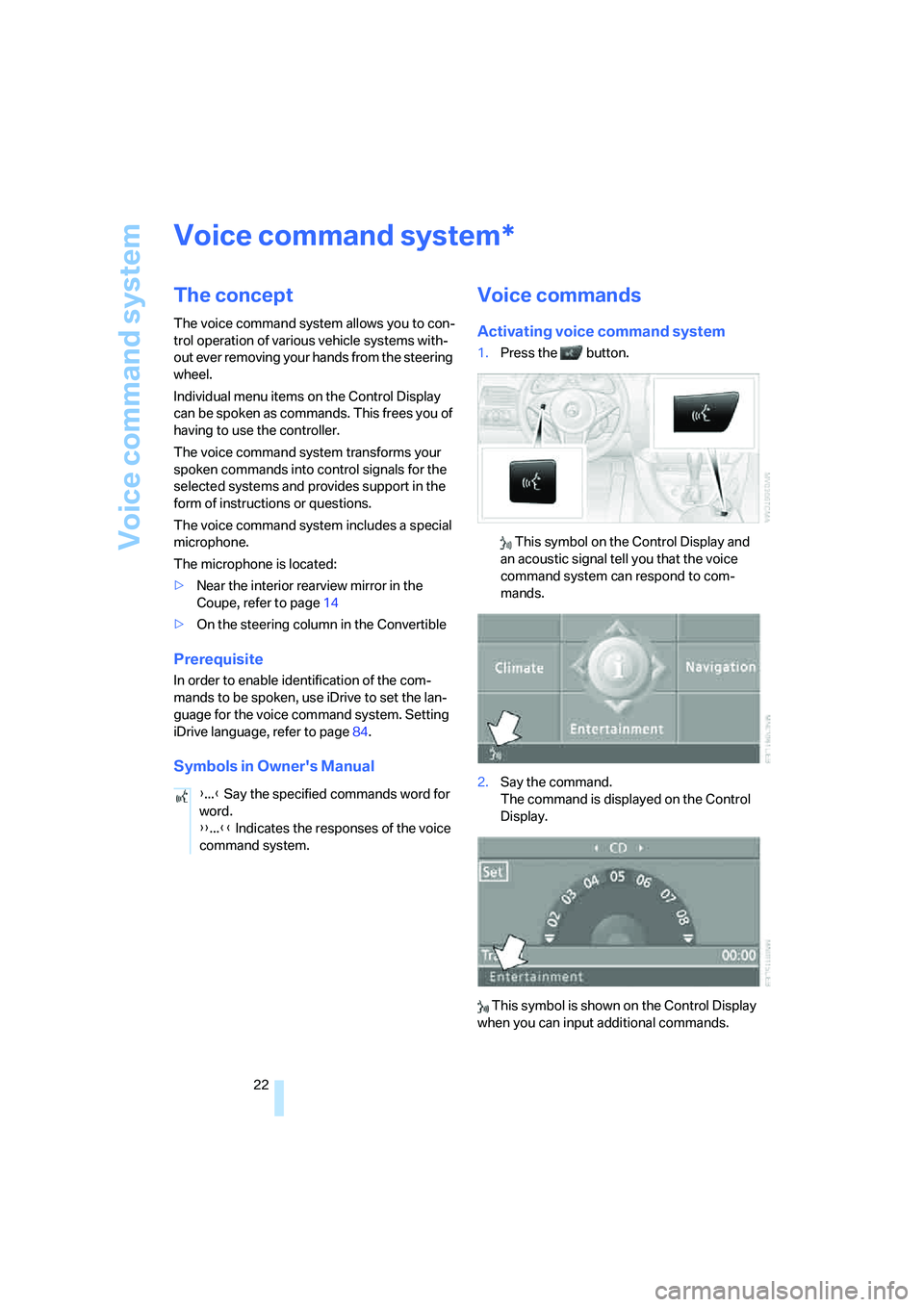
1.Press the button.
This symbol on the Control Display and
an acoustic signal tell you that the voice
command system can respond to com-
mands.
2.Say the command.
The command is displayed on the Control
Display.
This symbol is shown on the Control Display
when you can input additional commands.
*
{...} Say the specified commands word for
word.
{{...}} Indicates the responses of the voice
command system.
Page 25 of 242
Voice command system
24
Notes
The mobile phone can also be operated
with voice commands, refer to
page174.<
For voice commands, bear the following in
mind:
>Say the commands and numbers smoothly
and at normal volume, avoiding excessive
emphasis and pauses. This also applies to
spelling when entering the destination.
>Always say the commands in the language
of voice command system.
>When selecting a radio station, use the
usual pronunciation of the station name.
>For entries in the voice-activated phone
book, only use names in the language of the
voice command system and no abbrevia-
tions.
>Keep the doors, windows and glass sun-
roof
* or convertible top closed to prevent
interference from ambient noise.
>Avoid background noises in the vehicle
while speaking.
Page 30 of 242
Controls
29Reference
At a glance
Driving tips
Communications
Navigation
Entertainment
Mobility
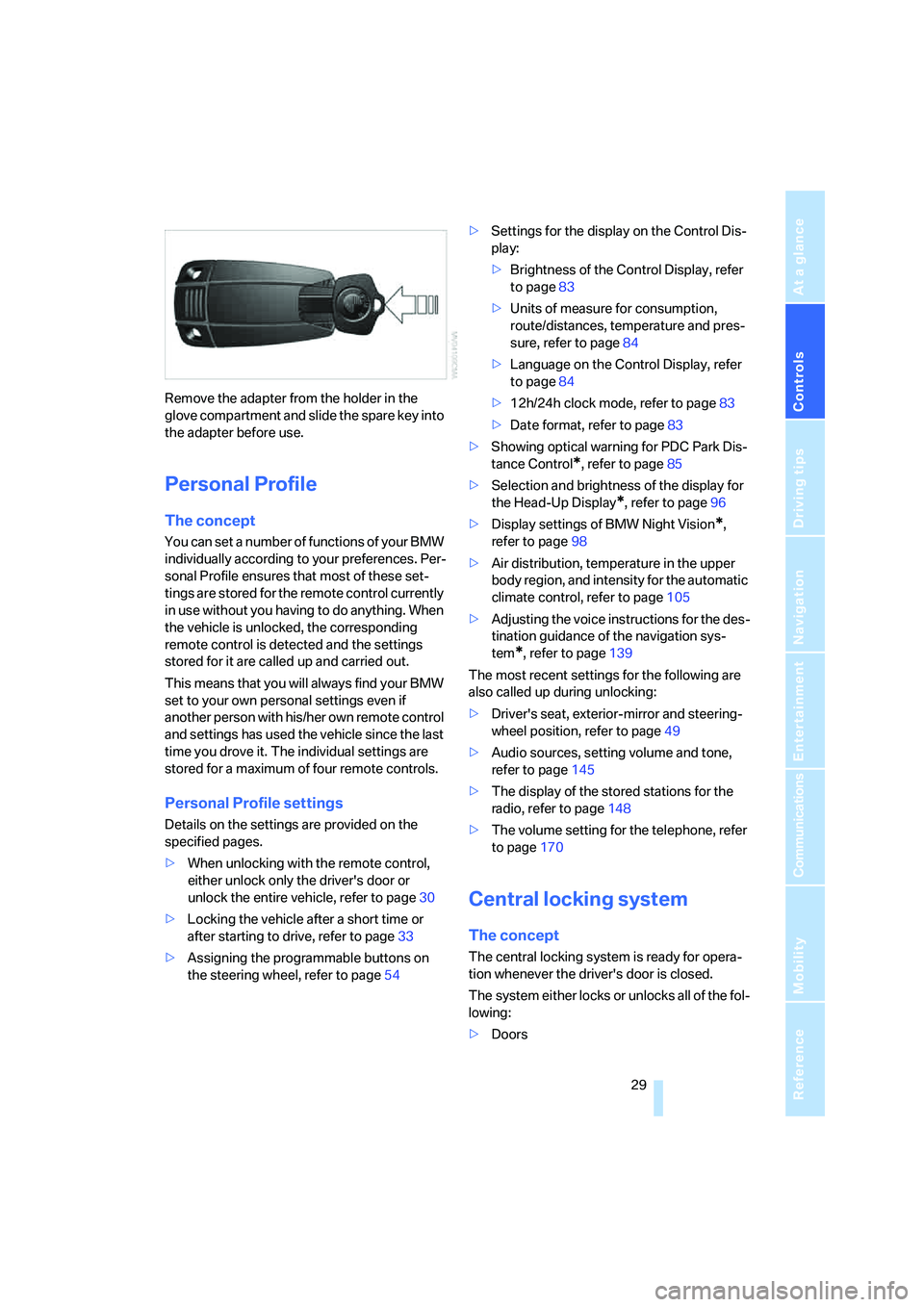
Remove the adapter from the holder in the
glove compartment and slide the spare key into
the adapter before use.
Personal Profile
The concept
You can set a number of functions of your BMW
individually according to your preferences. Per-
sonal Profile ensures that most of these set-
tings are stored for the remote control currently
in use without you having to do anything. When
the vehicle is unlocked, the corresponding
remote control is detected and the settings
stored for it are called up and carried out.
This means that you will always find your BMW
set to your own personal settings even if
another person with his/her own remote control
and settings has used the vehicle since the last
time you drove it. The individual settings are
stored for a maximum of four remote controls.
Personal Profile settings
Details on the settings are provided on the
specified pages.
>When unlocking with the remote control,
either unlock only the driver's door or
unlock the entire vehicle, refer to page30
>Locking the vehicle after a short time or
after starting to drive, refer to page33
>Assigning the programmable buttons on
the steering wheel, refer to page54>Settings for the display on the Control Dis-
play:
>Brightness of the Control Display, refer
to page83
>Units of measure for consumption,
route/distances, temperature and pres-
sure, refer to page84
>Language on the Control Display, refer
to page84
>12h/24h clock mode, refer to page83
>Date format, refer to page83
>Showing optical warning for PDC Park Dis-
tance Control
*, refer to page85
>Selection and brightness of the display for
the Head-Up Display
*, refer to page96
>Display settings of BMW Night Vision
*,
refer to page98
>Air distribution, temperature in the upper
body region, and intensity for the automatic
climate control, refer to page105
>Adjusting the voice instructions for the des-
tination guidance of the navigation sys-
tem
*, refer to page139
The most recent settings for the following are
also called up during unlocking:
>Driver's seat, exterior-mirror and steering-
wheel position, refer to page49
>Audio sources, setting volume and tone,
refer to page145
>The display of the stored stations for the
radio, refer to page148
>The volume setting for the telephone, refer
to page170
Central locking system
The concept
The central locking system is ready for opera-
tion whenever the driver's door is closed.
The system either locks or unlocks all of the fol-
lowing:
>Doors
Page 85 of 242
Everything under control
84
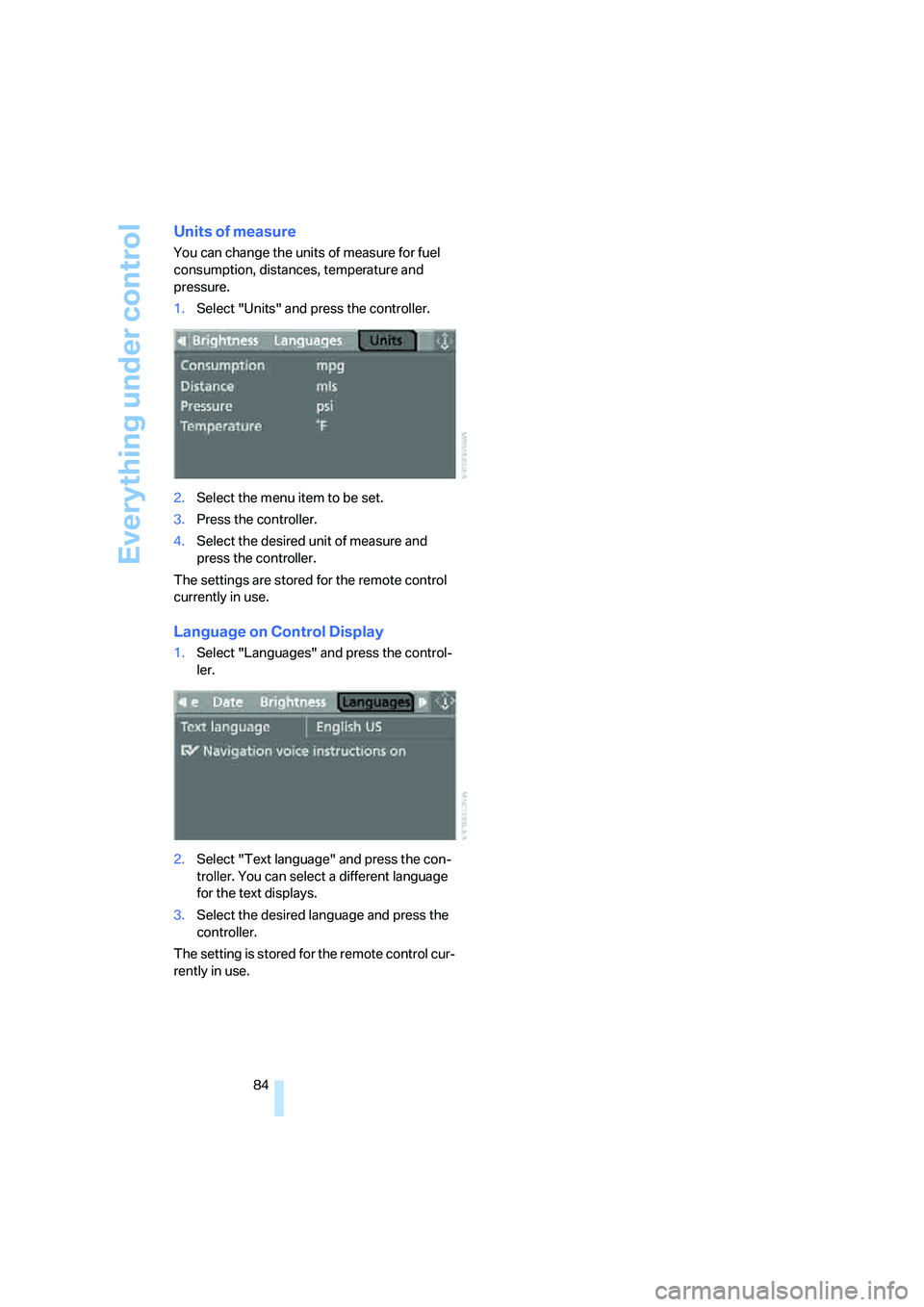
Units of measure
You can change the units of measure for fuel
consumption, distances, temperature and
pressure.
1.Select "Units" and press the controller.
2.Select the menu item to be set.
3.Press the controller.
4.Select the desired unit of measure and
press the controller.
The settings are stored for the remote control
currently in use.
Language on Control Display
1.Select "Languages" and press the control-
ler.
2.Select "Text language" and press the con-
troller. You can select a different language
for the text displays.
3.Select the desired language and press the
controller.
The setting is stored for the remote control cur-
rently in use.
Page 130 of 242
Navigation
Driving tips
129Reference
At a glance
Controls
Communications
Entertainment
Mobility
Selecting country
Say the name of the destination country in the
language of the voice input system.
Entering destination
To enter the destination, spell it using the cus-
tomary spelling of the destination country.
Say the letters smoothly and at normal volume,
avoiding excessive emphasis and pauses.
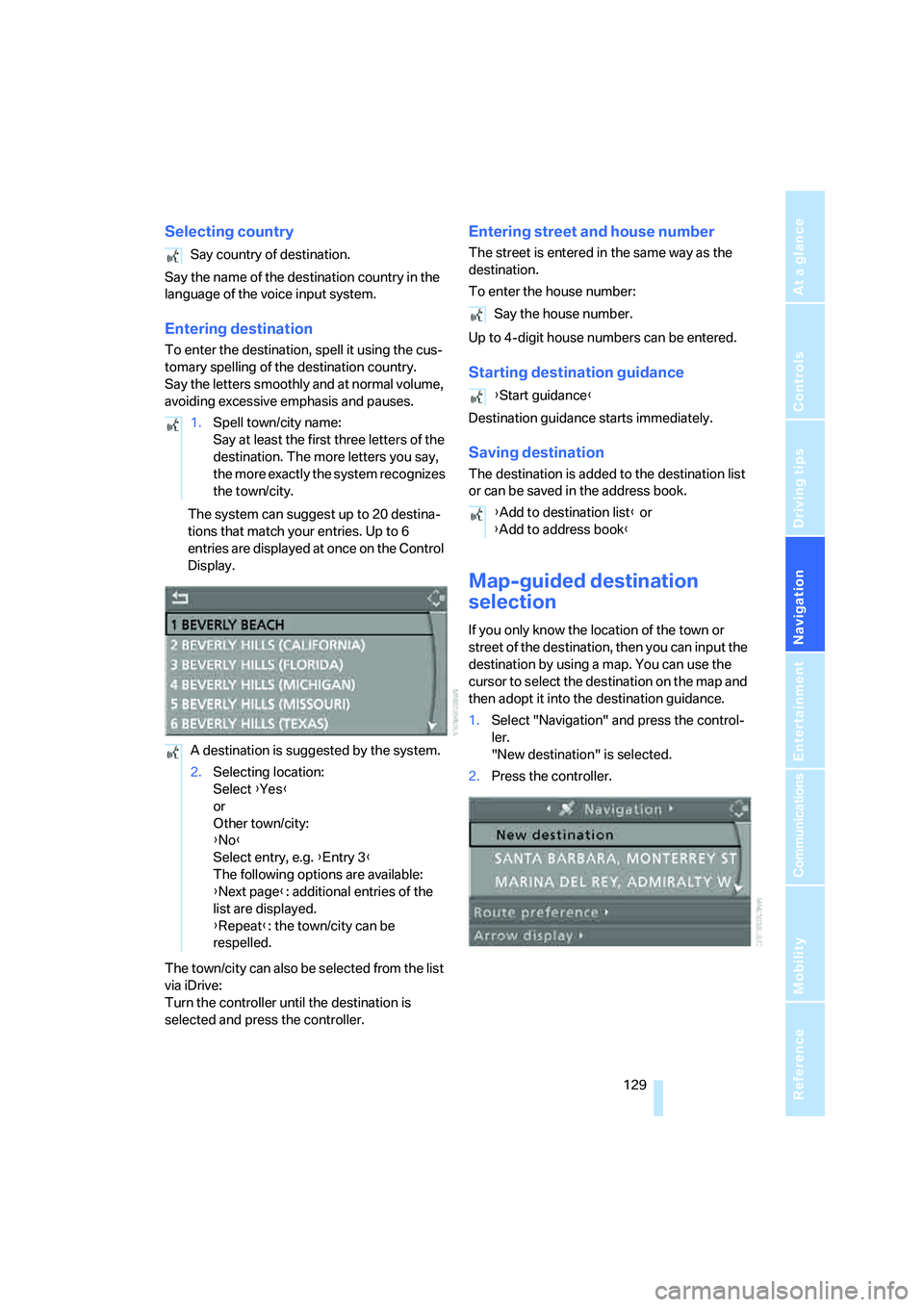
The system can suggest up to 20 destina-
tions that match your entries. Up to 6
entries are displayed at once on the Control
Display.
The town/city can also be selected from the list
via iDrive:
Turn the controller until the destination is
selected and press the controller.
Entering street and house number
The street is entered in the same way as the
destination.
To enter the house number:
Up to 4-digit house numbers can be entered.
Starting destination guidance
Destination guidance starts immediately.
Saving destination
The destination is added to the destination list
or can be saved in the address book.
Map-guided destination
selection
If you only know the location of the town or
street of the destination, then you can input the
destination by using a map. You can use the
cursor to select the destination on the map and
then adopt it into the destination guidance.
1.Select "Navigation" and press the control-
ler.
"New destination" is selected.
2.Press the controller. Say country of destination.
1.Spell town/city name:
Say at least the first three letters of the
destination. The more letters you say,
the more exactly the system recognizes
the town/city.
A destination is suggested by the system.
2.Selecting location:
Select {Yes}
or
Other town/city:
{No}
Select entry, e.g. {Entry 3}
The following options are available:
{Next page}: additional entries of the
list are displayed.
{Repeat}: the town/city can be
respelled.
Say the house number.
{Start guidance}
{Add to destination list} or
{Add to address book}
Page 140 of 242
Navigation
Driving tips
139Reference
At a glance
Controls
Communications
Entertainment
Mobility
Destination guidance
through voice instructions
Switching voice instructions on/off
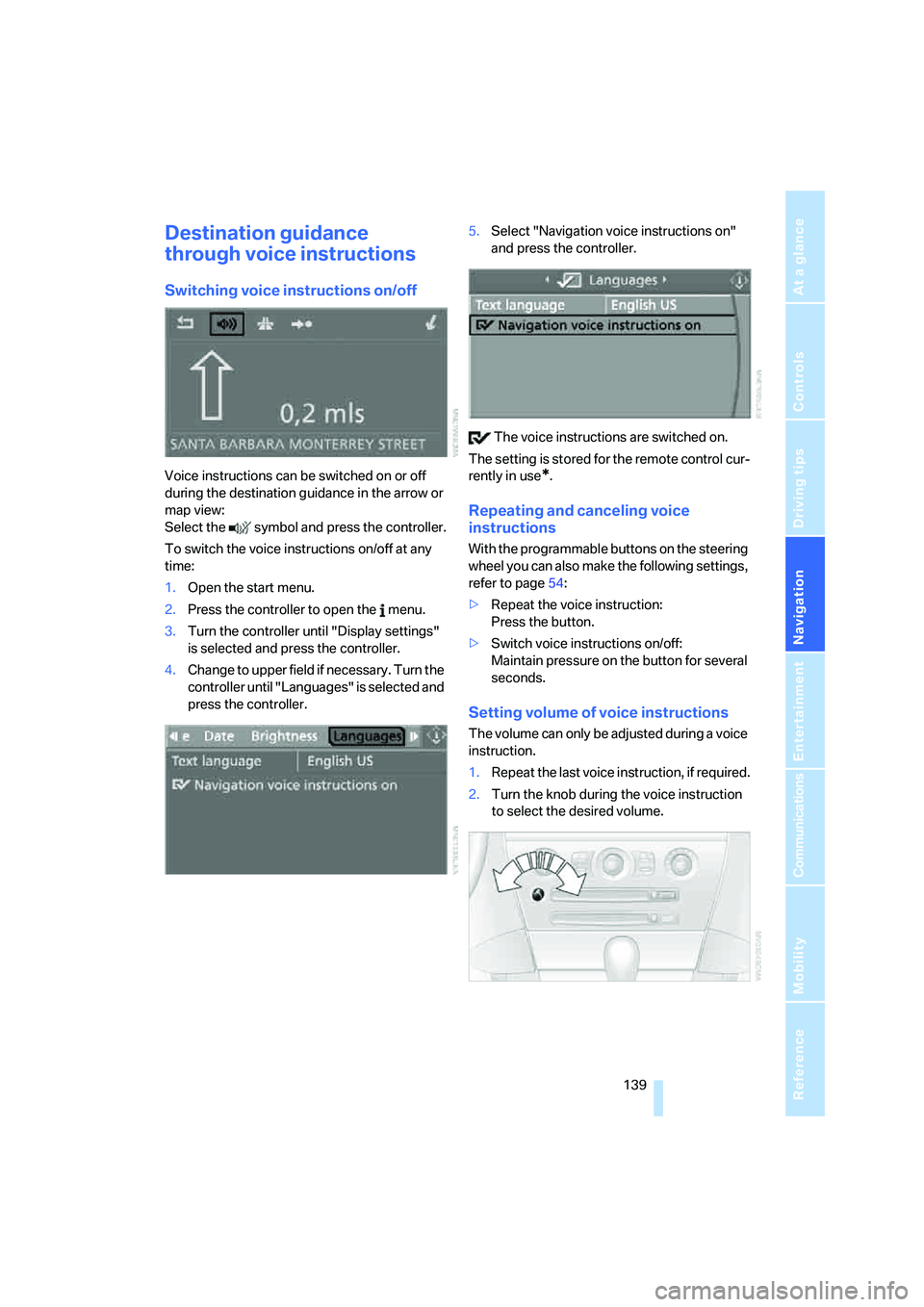
Voice instructions can be switched on or off
during the destination guidance in the arrow or
map view:
Select the symbol and press the controller.
To switch the voice instructions on/off at any
time:
1.Open the start menu.
2.Press the controller to open the menu.
3.Turn the controller until "Display settings"
is selected and press the controller.
4.Change to upper field if necessary. Turn the
controller until "Languages" is selected and
press the controller.5.Select "Navigation voice instructions on"
and press the controller.
The voice instructions are switched on.
The setting is stored for the remote control cur-
rently in use*.
Repeating and canceling voice
instructions
With the programmable buttons on the steering
wheel you can also make the following settings,
refer to page54:
>Repeat the voice instruction:
Press the button.
>Switch voice instructions on/off:
Maintain pressure on the button for several
seconds.
Setting volume of voice instructions
The volume can only be adjusted during a voice
instruction.
1.Repeat the last voice instruction, if required.
2.Turn the knob during the voice instruction
to select the desired volume.
Page 178 of 242
177
Entertainment
Reference
At a glance
Controls
Driving tips Communications
Navigation
Mobility
Selecting an entry
The connection to the phone number of the
selected entry is established.
Redialing
The {Redial} command calls up "Redial".
Notes
The commands in English were available
as of this printing. Other languages are
currently not available. To operate the mobile
phone via the voice command system, refer to
page22.<
Important for voice commands
For voice commands, keep the following in
mind:
>Issue the commands smoothly and at nor-
mal volume, avoiding excessive emphasis
and pauses.
>Keep the doors, windows and glass sunroof
closed to prevent interference from ambi-
ent noise.
>Avoid making other noise in the vehicle
while speaking.
Mounting/removing snap-in
adapter
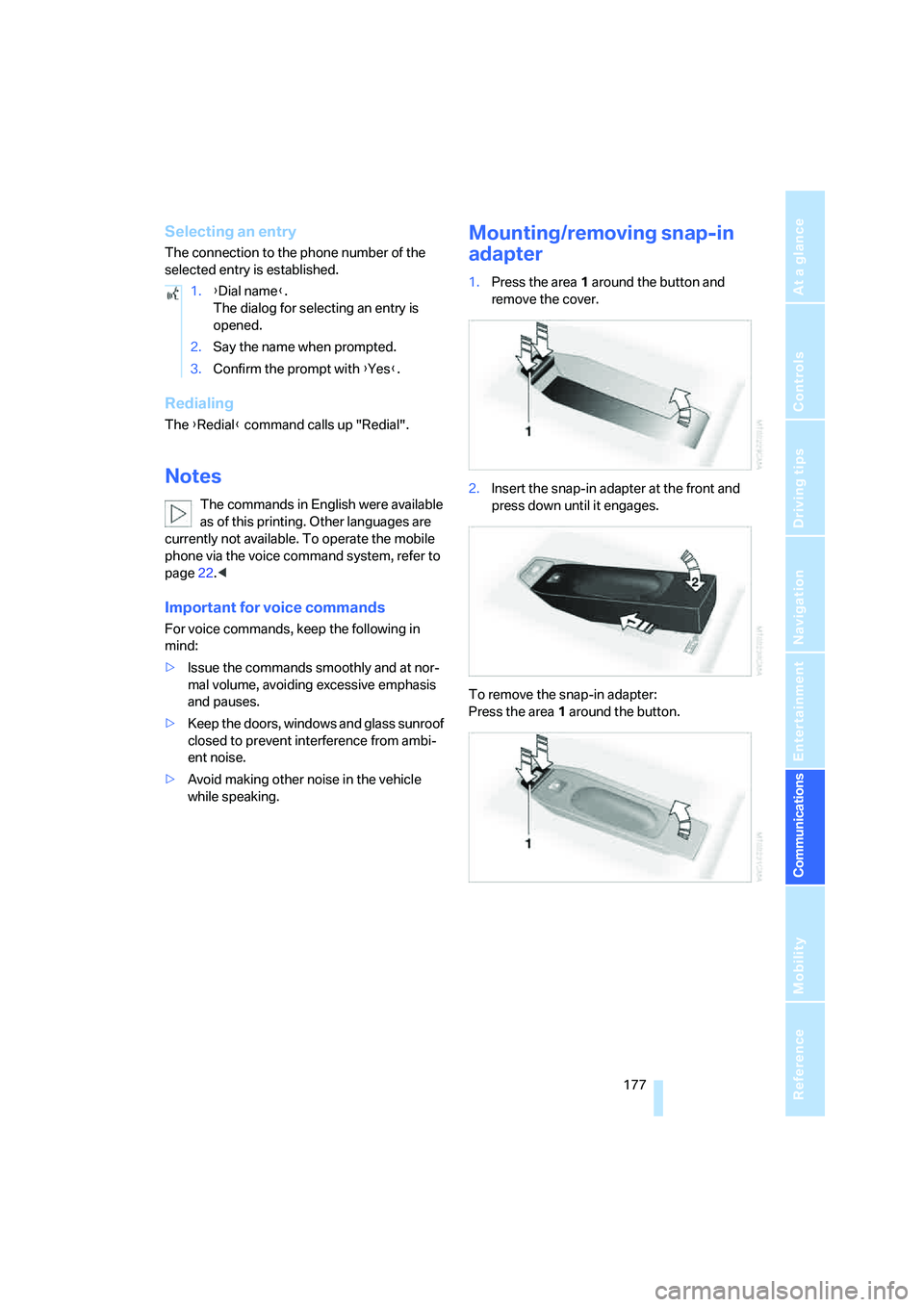
1.Press the area 1 around the button and
remove the cover.
2.Insert the snap-in adapter at the front and
press down until it engages.
To remove the snap-in adapter:
Press the area 1 around the button. 1.{Dial name}.
The dialog for selecting an entry is
opened.
2.Say the name when prompted.
3.Confirm the prompt with {Yes}.
Page 222 of 242
Reference 221
At a glance
Controls
Driving tips
Communications
Navigation
Entertainment
Mobility
Climate
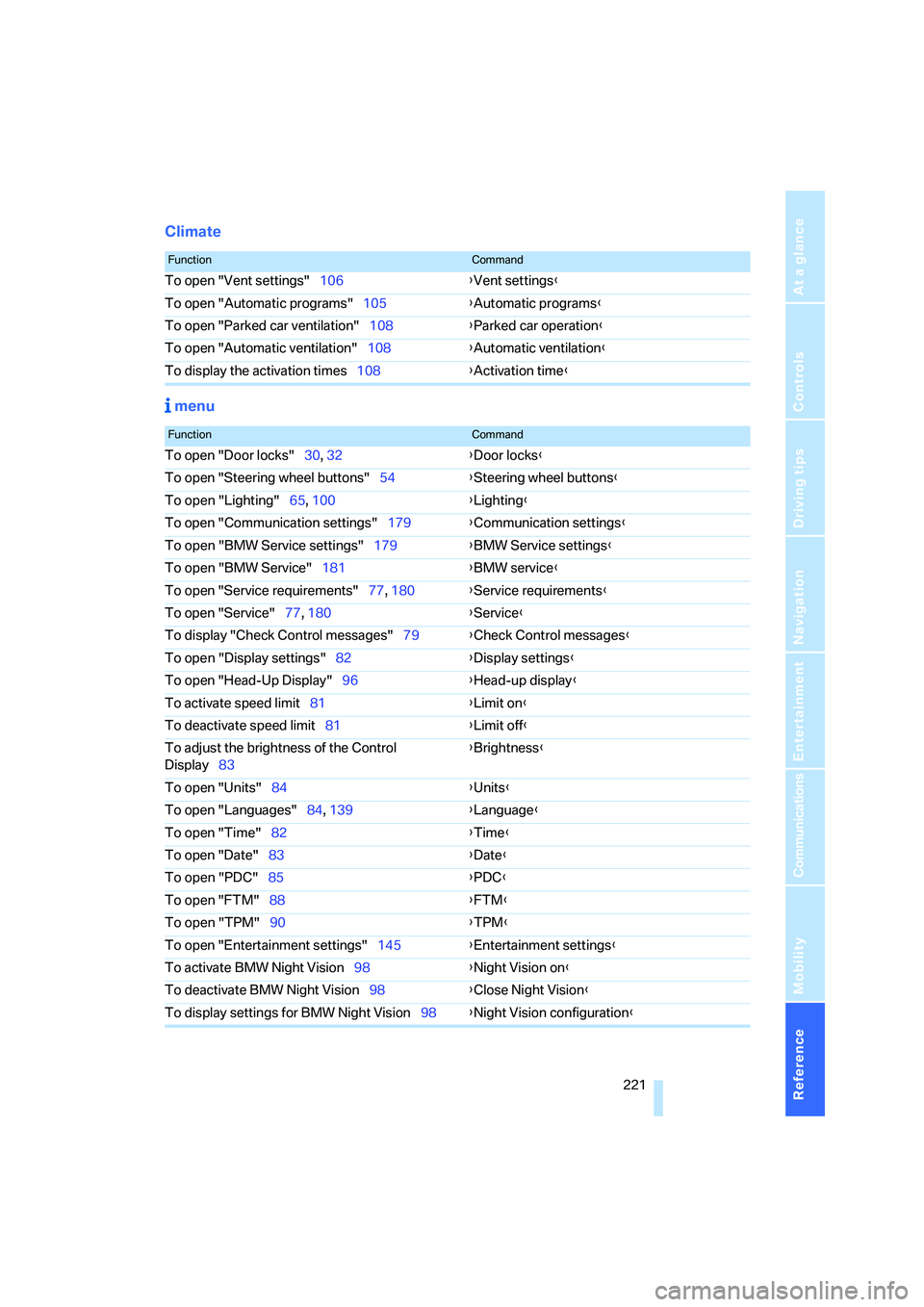
menu
FunctionCommand
To open "Vent settings"106{Vent settings}
To open "Automatic programs"105{Automatic programs}
To open "Parked car ventilation"108{Parked car operation}
To open "Automatic ventilation"108{Automatic ventilation}
To display the activation times108{Activation time}
FunctionCommand
To open "Door locks"30, 32{Door locks}
To open "Steering wheel buttons"54{Steering wheel buttons}
To open "Lighting"65, 100{Lighting}
To open "Communication settings"179{Communication settings}
To open "BMW Service settings"179{BMW Service settings}
To open "BMW Service"181{BMW service}
To open "Service requirements"77, 180{Service requirements}
To open "Service"77, 180{Service}
To display "Check Control messages"79{Check Control messages}
To open "Display settings"82{Display settings}
To open "Head-Up Display"96{Head-up display}
To activate speed limit81{Limit on}
To deactivate speed limit81{Limit off}
To adjust the brightness of the Control
Display83{Brightness}
To open "Units"84{Units}
To open "Languages"84, 139{Language}
To open "Time"82{Time}
To open "Date"83{Date}
To open "PDC"85{PDC}
To open "FTM"88{FTM}
To open "TPM"90{TPM}
To open "Entertainment settings"145{Entertainment settings}
To activate BMW Night Vision98{Night Vision on}
To deactivate BMW Night Vision98{Close Night Vision}
To display settings for BMW Night Vision98{Night Vision configuration}
Page 226 of 242
Reference 225
At a glance
Controls
Driving tips
Communications
Navigation
Entertainment
Mobility
Central locking system29
– comfort access36
– from inside vehicle32
Changes, technical, refer to
For your own safety6
Changing a wheel204
Changing language on
Control Display84
Changing units of measure on
Control Display84
Changing wheels192
CHECK button80
Check Control79
"Check Control
messages"80
Check Gas Cap186
Checking air pressure, refer to
Tire inflation pressure188
Children's seats, refer to Child
restraint systems56
Child-restraint fixing system
LATCH57
Child restraint systems56
Chrome parts, care, refer to
the Caring for your vehicle
brochure
Cigarette lighter113
Cigarette lighter socket, refer
to Connecting electrical
devices114
Cleaning, refer to Caring for
your vehicle brochure
"Climate"105
Clock74
– 12h/24h mode83
– setting time and date82
Closing
– from inside32
– from outside30
Closing fuel filler cap186
Clothes hooks, Coupe113
Cockpit10
Cold start, refer to Starting
engine59
Comfort access36
– observe in car wash38
– replacing battery38Comfort closing
– windows, with comfort
access with Coupe37
– with comfort access37
"Communication"170,181
"Communication
settings"180
Compact disc
– refer to CD changer157
– refer to CD player157
Compartment for remote
control, refer to Ignition
lock58
Compartments, refer to
Storage compartments112
Compressed audio files157
Computer75
– displays on Control
Display76
– hour signal83
"Concert hall", refer to Tone
control146
Condition Based Service
CBS199
"Confirmation"31
Connecting car vacuum
cleaner, refer to Connecting
electrical devices114
Consumption display, refer to
Average fuel
consumption75
Consumption statistics, refer
to Average fuel
consumption75
"Continue guidance to
destination?"136
"Contrast" with BMW Night
Vision99
Control Center, refer to
iDrive16
Control Display, refer to
iDrive16
– setting brightness83
Controller, refer to iDrive16
Controls, refer to Cockpit10
Convenience operation
– convertible top31,32
– glass sunroof31,32
– windows31,32Convertible
– convertible program for
automatic climate
control105
– opening and closing
windows38
– rollover protection
system94
– top42
– wind deflector45
– window and convertible top
operation with comfort
access37
Convertible top
– care, refer to the Caring for
your vehicle brochure
– convenience operation32
– emergency closing43
– manual closing43
– opening and closing42
Coolant197
– checking level197
– temperature74
Cooling, maximum107
Cornering Brake Control
CBC86
Country of destination for
navigation126
Courtesy lamps, refer to
Interior lamps103
Cruise control66,67
– active cruise control67
Cruising range75
Curb weight, refer to
Weights217
"Current position"140
Current position
– displaying140
– entering132
– storing132
"Curve mode" with
BMW Night Vision99
"Customer
Relations"173,182
Cylinders, refer to Engine
data214
Page 230 of 242
Reference 229
At a glance
Controls
Driving tips
Communications
Navigation
Entertainment
Mobility
Headlamps
– care, refer to the Caring for
your vehicle brochure
– cleaning, refer to Wiper
system66
– replacing bulbs201
Head Light, refer to Adaptive
Head Light101
Head restraints
– front50
– removing50
– sitting safely47
"Head-Up Display"96
Head-Up Display95
Heated
– mirrors, refer to Automatic
functions53
– rear window106
– seats52
– steering wheel54
Heater105
Heating
– exterior mirrors53
– interior104
– rear window106
– residual heat107
– seats52
– steering wheel54
Heating with engine switched
off, refer to Residual
heat107
Heavy cargo, refer to Securing
cargo121
Height, refer to
Dimensions215
Height adjustment
– seats48
– steering wheel53
High-beam assistant102
High beams101
– headlamp flasher101
– indicator lamp13
– replacing bulbs202
High Definition Radio152
High water, refer to Driving
through water119
Hills119
"Home address" in
navigation134Homepage4
Hood194
Horn10
Hotel function33
– unlocking manually33
Hot exhaust system118
"Hour memo"83
"House number" for desti-
nation entry128
Hydraulic brake assistant,
refer to DBC Dynamic Brake
Control86
Hydroplaning119
– also refer to Minimum tread
depth191
I
IBOC, refer to High Definition
Radio152
Ice, refer to Outside temper-
ature warning74
ID3-Tag, refer to Information
about track159
iDrive16
– adjusting brightness83
– assistance window20
– changing date and time82
– changing language84
– changing menu page19
– changing settings82
– changing unit of measure
units and display form84
– controller16
– controls16
– displaying menus17
– selecting menu item19
– selecting or confirming
entry19
– start menu17
– status information20
– symbols18
Ignition58
– switched off58
– switched on58
Ignition key, refer to Keys/
remote control28
Ignition key position 1, refer to
Radio readiness58Ignition key position 2, refer to
Ignition on58
Ignition lock58
– starting engine with comfort
access37
Indicator/warning lamps
– active steering92
– airbags94
– DSC13,87
– DTC13,87
– Flat Tire Monitor89
– fog lamps13,103
– handbrake13,60
– safety belt warning52
– TPM Tire Pressure
Monitor91
Indicator and warning lamps,
overview13
Individually programmable
buttons on steering
wheel54
Individual settings, refer to
Personal Profile29
Inflation pressure, refer to Tire
inflation pressure188
Inflation pressure monitoring
– refer to Flat Tire Monitor88
– refer to Tire Pressure
Monitor89
Information
– on another location130
– on current position130
– on destination location130
"Information" for
navigation130
"Information on
destination"132
Initializing
– Flat Tire Monitor88
– radio, refer to Storing
stations150
– refer to Power failure204
– seat, mirror and steering
wheel memory49
– time and date82
"Input map"130
Installation location
– CD changer161
– navigation drive124