oil temperature BMW 650I GRAN COUPE 2013 Owners Manual
[x] Cancel search | Manufacturer: BMW, Model Year: 2013, Model line: 650I GRAN COUPE, Model: BMW 650I GRAN COUPE 2013Pages: 232, PDF Size: 9.31 MB
Page 70 of 232
DisplaysVehicle equipment
All standard, country-specific and optional
equipment that is offered in the model series is
described in this chapter. Therefore, equipmentis also described that is not available in a vehicle,
e. g., because of the selected optional equip‐
ment or country variant. This also applies for
safety-related functions and systems.
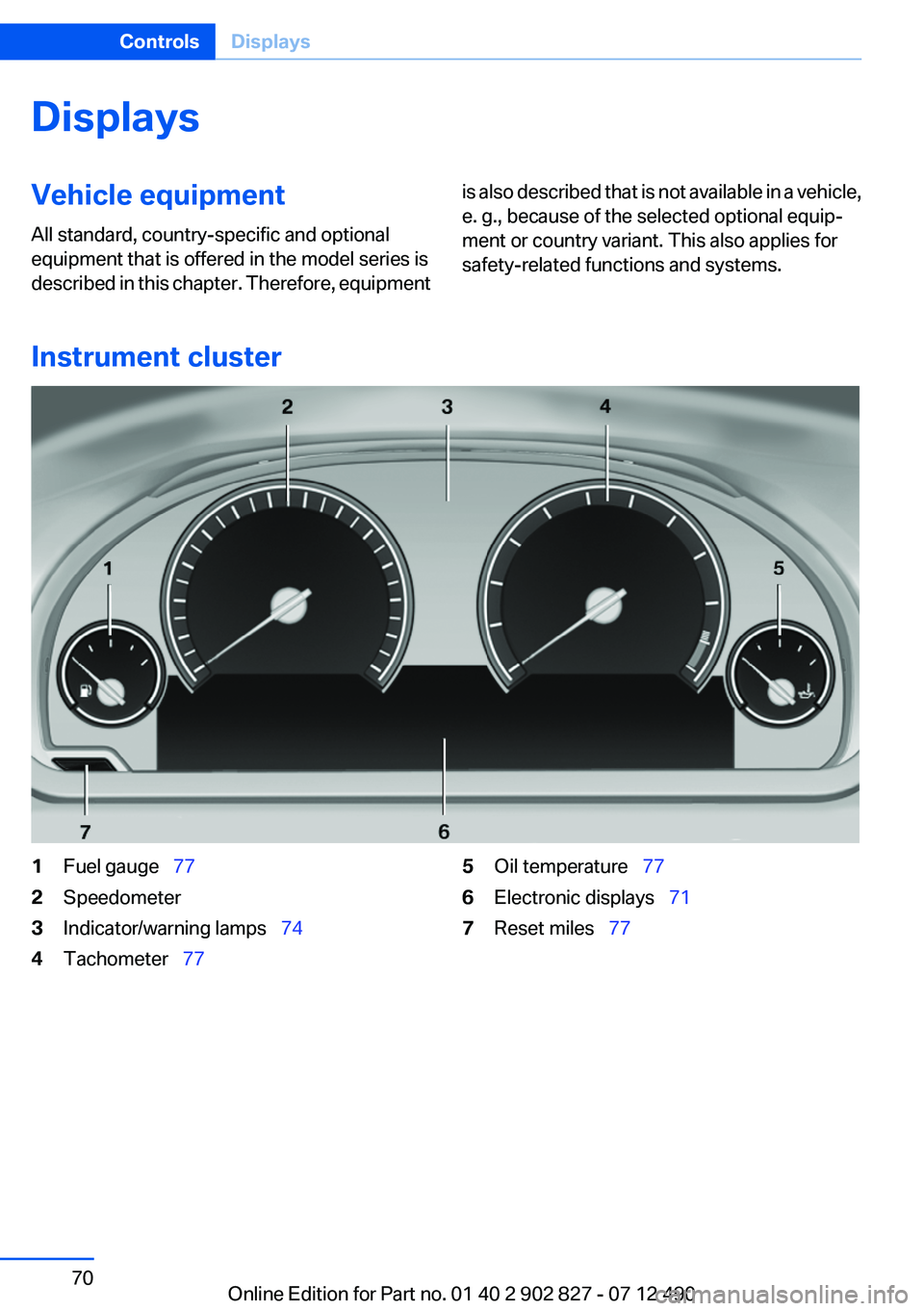
Instrument cluster
1Fuel gauge 772Speedometer3Indicator/warning lamps 744Tachometer 775Oil temperature 776Electronic displays 717Reset miles 77Seite 70ControlsDisplays70
Online Edition for Part no. 01 40 2 902 827 - 07 12 490
Page 72 of 232
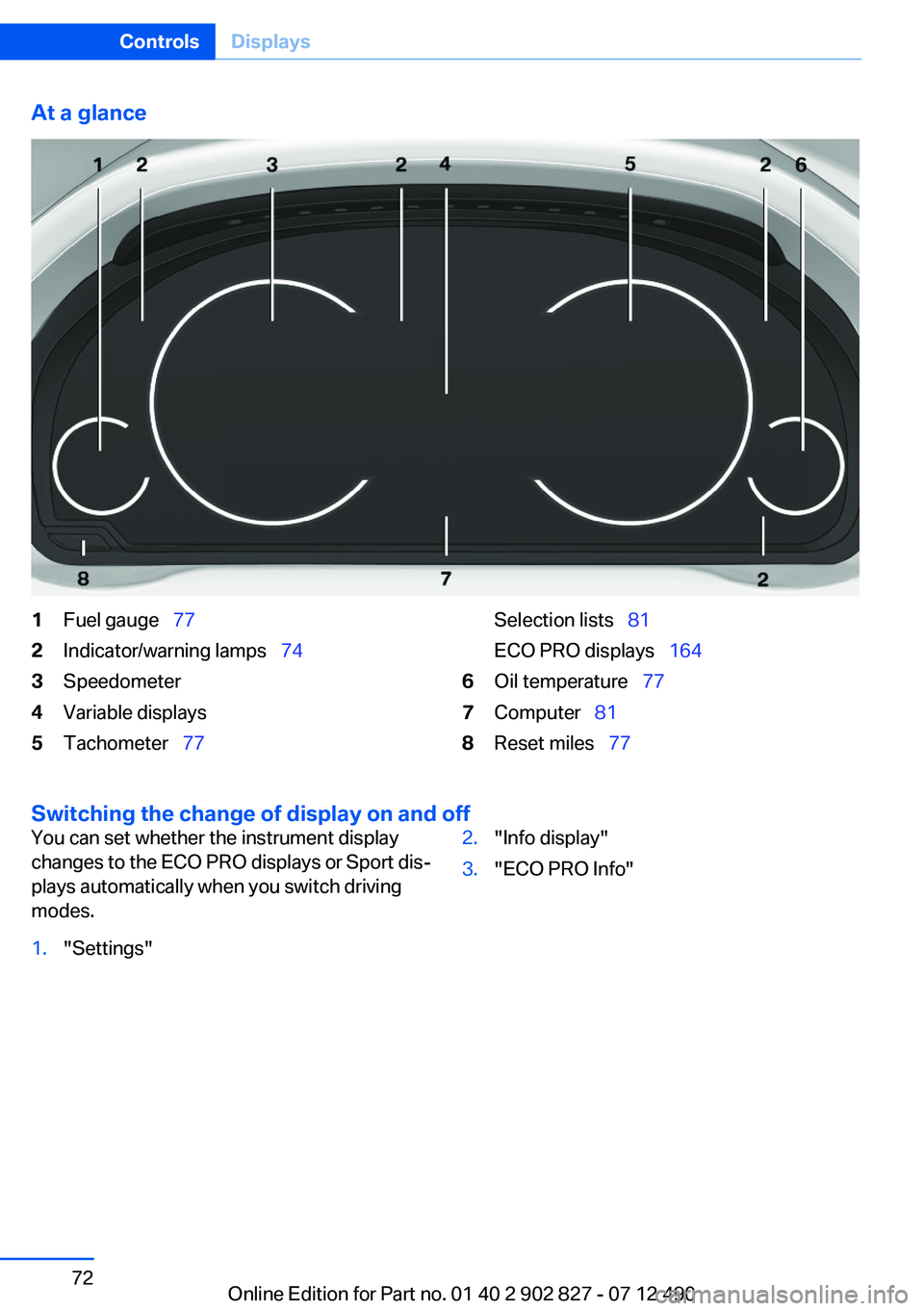
At a glance1Fuel gauge 772Indicator/warning lamps 743Speedometer4Variable displays5Tachometer 77Selection lists 81
ECO PRO displays 1646Oil temperature 777Computer 818Reset miles 77
Switching the change of display on and off
You can set whether the instrument display
changes to the ECO PRO displays or Sport dis‐
plays automatically when you switch driving
modes.1."Settings"2."Info display"3."ECO PRO Info"Seite 72ControlsDisplays72
Online Edition for Part no. 01 40 2 902 827 - 07 12 490
Page 77 of 232
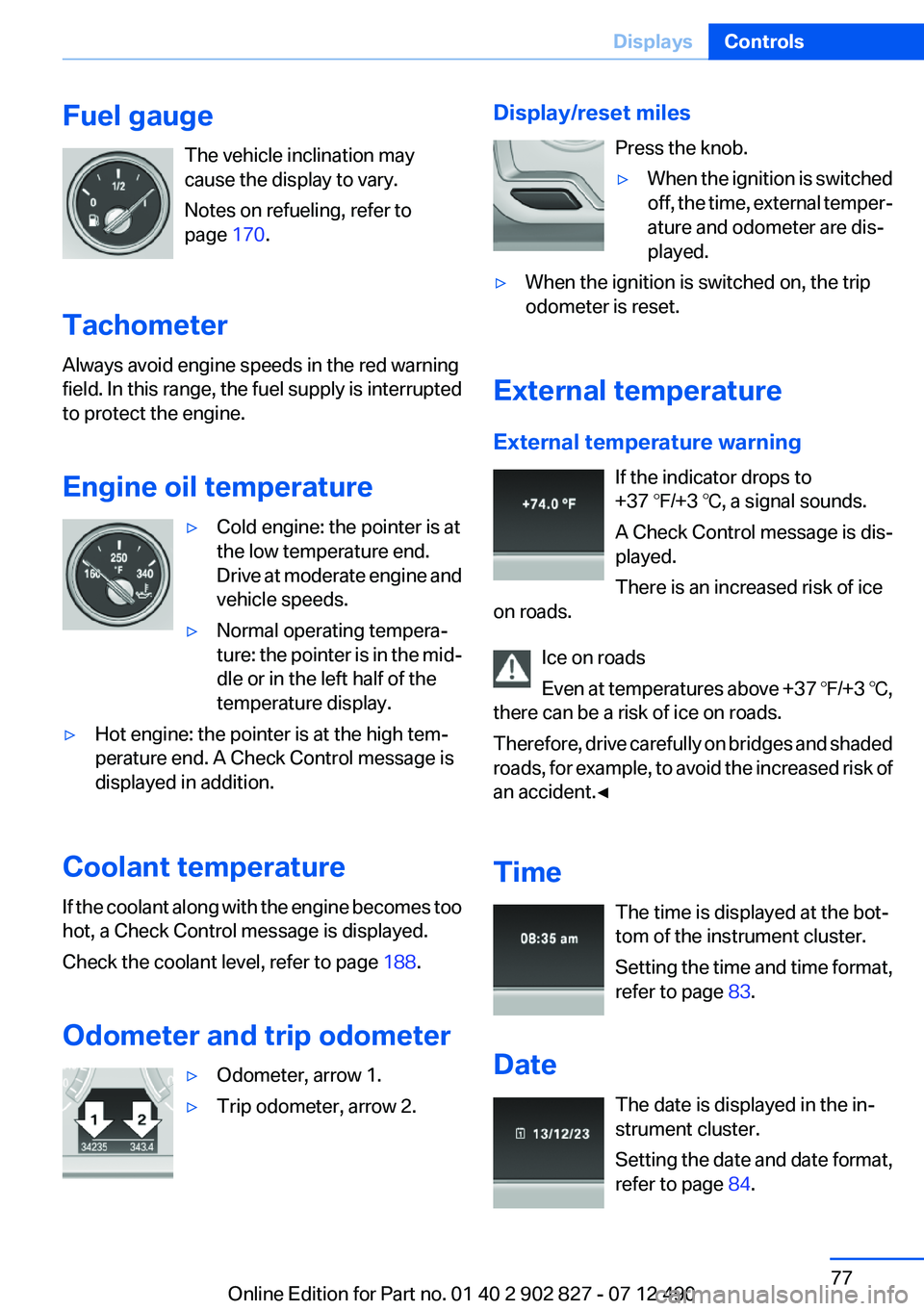
Fuel gaugeThe vehicle inclination may
cause the display to vary.
Notes on refueling, refer to
page 170.
Tachometer
Always avoid engine speeds in the red warning
field. In this range, the fuel supply is interrupted
to protect the engine.
Engine oil temperature▷Cold engine: the pointer is at
the low temperature end.
Drive at moderate engine and
vehicle speeds.▷Normal operating tempera‐
ture: the pointer is in the mid‐
dle or in the left half of the
temperature display.▷Hot engine: the pointer is at the high tem‐
perature end. A Check Control message is
displayed in addition.
Coolant temperature
If the coolant along with the engine becomes too
hot, a Check Control message is displayed.
Check the coolant level, refer to page 188.
Odometer and trip odometer
▷Odometer, arrow 1.▷Trip odometer, arrow 2.Display/reset miles Press the knob.▷When the ignition is switched
off, the time, external temper‐
ature and odometer are dis‐
played.▷When the ignition is switched on, the trip
odometer is reset.
External temperature
External temperature warning If the indicator drops to
+37 ℉/+3 ℃, a signal sounds.
A Check Control message is dis‐
played.
There is an increased risk of ice
on roads.
Ice on roads
Even at temperatures above +37 ℉/+3 ℃,
there can be a risk of ice on roads.
Therefore, drive carefully on bridges and shaded
roads, for example, to avoid the increased risk of
an accident.◀
Time The time is displayed at the bot‐
tom of the instrument cluster.
Setting the time and time format,
refer to page 83.
Date The date is displayed in the in‐
strument cluster.
Setting the date and date format,
refer to page 84.
Seite 77DisplaysControls77
Online Edition for Part no. 01 40 2 902 827 - 07 12 490
Page 181 of 232
New tires
Due to technical factors associated with their
manufacture, tires do not achieve their full trac‐
tion potential until after an initial breaking-in pe‐
riod.
Drive conservatively for the first
200 miles/300 km.
Retreaded tires
The manufacturer of your vehicle does not rec‐
ommend the use of retreaded tires.
Retreaded tires
Possibly substantial variations in the de‐
sign and age of the tire casing structures can
limit service life and have a negative impact on
road safety.◀
Winter tires
The manufacturer of your vehicle recommends
winter tires for winter roads or at temperatures
below +45 ℉/+7 ℃.
Although so-called all-season M+S tires do pro‐
vide better winter traction than summer tires,
they do not provide the same level of perform‐
ance as winter tires.
Maximum speed of winter tires
If the maximum speed of the vehicle is higher
than the permissible speed for the winter tires,
then display a corresponding sign in the field of
vision. You can obtain this sign from the tire spe‐
cialist or from your service center.
Maximum speed for winter tires
Do not exceed the maximum speed for the
winter tires; otherwise, tire damage and acci‐
dents can occur.◀
Run-flat tires
If you are already using run-flat tires, for your
own safety you should replace them only with
the same kind. No spare tire is available in thecase of a flat tire. Your service center will be glad
to advise you.
Rotating wheels between axles
The manufacturer of your vehicle advises
against swapping wheels between the front and
rear axles.
This can impair the handling characteristics.
Storage
Store wheels and tires in a cool, dry place with
as little exposure to light as possible.
Always protect tires against all contact with oil,
grease and fuels.
Do not exceed the maximum tire inflation pres‐
sure indicated on the side wall of the tire.
Run-flat tires
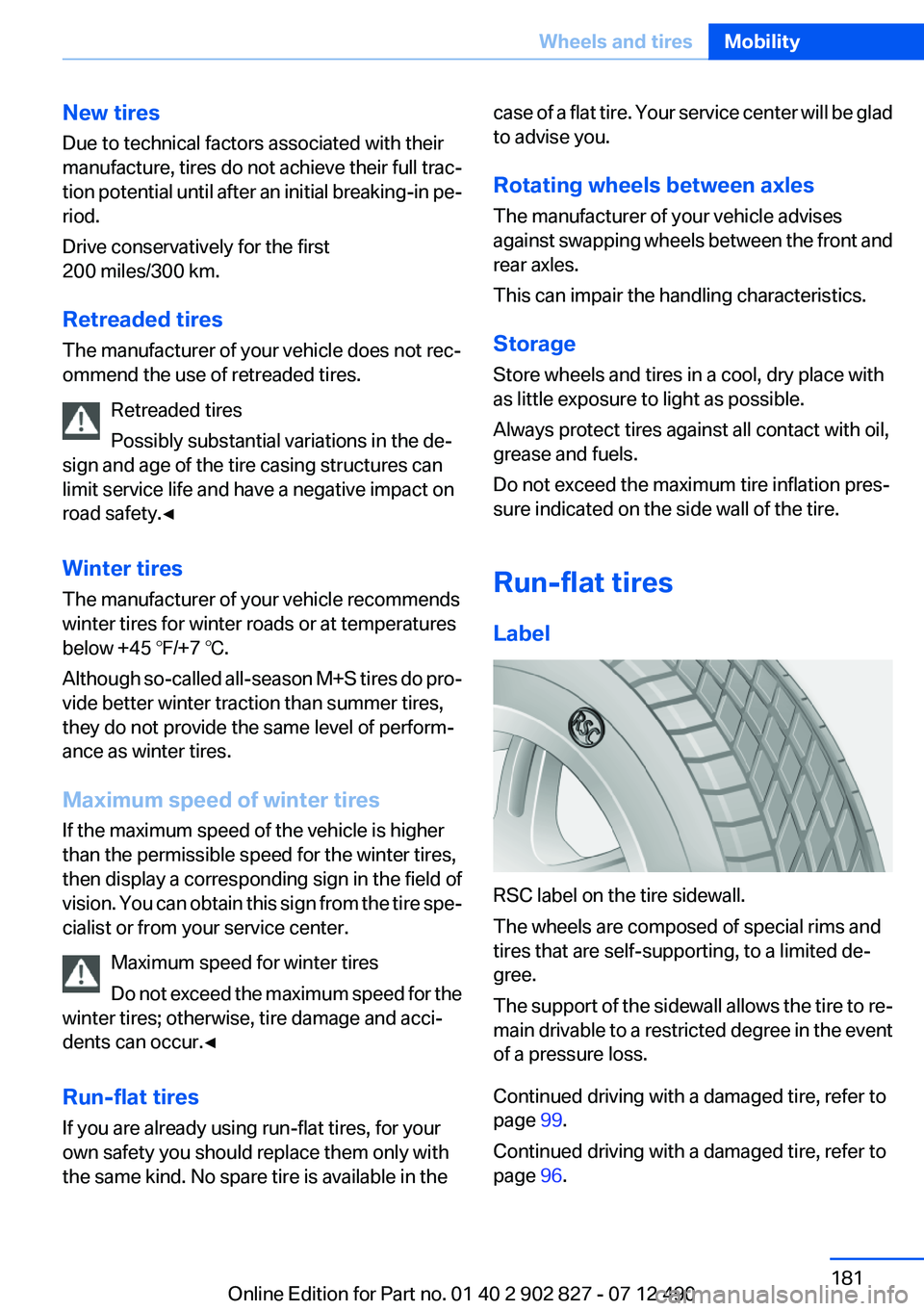
Label
RSC label on the tire sidewall.
The wheels are composed of special rims and
tires that are self-supporting, to a limited de‐
gree.
The support of the sidewall allows the tire to re‐
main drivable to a restricted degree in the event
of a pressure loss.
Continued driving with a damaged tire, refer to
page 99.
Continued driving with a damaged tire, refer to
page 96.
Seite 181Wheels and tiresMobility181
Online Edition for Part no. 01 40 2 902 827 - 07 12 490
Page 186 of 232
Engine oilVehicle equipment
All standard, country-specific and optional
equipment that is offered in the model series is
described in this chapter. Therefore, equipment
is also described that is not available in a vehicle,
e. g., because of the selected optional equip‐
ment or country variant. This also applies for
safety-related functions and systems.
General information
Engine oil consumption depends on driving
style and driving conditions, e.g., if your driving
style is very sporty engine oil consumption will
be considerably greater.
Therefore, regularly check the engine oil level
after refueling.
Checking the oil level
electronically
Status display
The concept
The oil level is monitored electronically during
driving and shown on the Control Display.
If the oil level reaches the minimum level, a
check control message is displayed.
Requirements
Depending on the previous displays, the status
display appears when the engine is running or
after the vehicle has been driven for at least 30
minutes.
Displaying the oil level1."Vehicle Info"2."Vehicle status"3. "Engine oil level"
Oil level display messages
Different messages appear on the display de‐
pending on the oil level. Pay attention to these
messages.
If oil level is too low, immediately add 1 US
quart/liter of oil.
Take care not to add too much engine oil.
Too much engine oil
Have the vehicle checked immediately;
otherwise, surplus oil can lead to engine dam‐
age.◀
Detailed measurement
The concept
In the detailed measurement the oil level is
checked and displayed via a scale.
During the measurement, the idle speed is in‐
creased somewhat.
General information
A detailed measurement is only possible with
certain engines.
Requirements
▷Automatic transmission: selector lever in
transmission position N or P and accelerator
not depressed.▷Vehicle is on a level road and the engine is
running at operating temperature.
Performing a detailed measurement
In order to perform a detailed measurement of
the engine oil level:
1."Vehicle Info"2."Vehicle status"Seite 186MobilityEngine oil186
Online Edition for Part no. 01 40 2 902 827 - 07 12 490
Page 203 of 232
CareVehicle equipment
All standard, country-specific and optional
equipment that is offered in the model series is
described in this chapter. Therefore, equipment
is also described that is not available in a vehicle,
e. g., because of the selected optional equip‐
ment or country variant. This also applies for
safety-related functions and systems.
Car washes
Notes Steam jets or high-pressure washers
When using steam jets or high-pressure
washers, hold them a sufficient distance away
and use a maximum temperature of
140 ℉/60 ℃.
Ensure that a distance of at least 31.5 in‐
ches/50 cm is maintained at all times. Holding
them too close or using excessively high pres‐
sures or temperatures can cause damage or
preliminary damage that may then lead to long-
term damage.
Follow the operating instructions for the high-
pressure washer.◀
Cleaning sensors/cameras with high-
pressure washers
When using high-pressure washers, do not
spray the exterior sensors and cameras, e.g.,
Park Distance Control, for extended periods of
time and only from a distance of at least
12 in/30 cm.◀
Wash your vehicle frequently, particularly in win‐
ter.
Intense soiling and road salt can damage the ve‐
hicle.Automatic car washes
Notes
Note the following:▷Give preference to cloth car washes or those
that use soft brushes in order to avoid paint
damage.▷Make sure that the wheels and tires are not
damaged by the transport mechanisms.▷Fold in the exterior mirrors; otherwise, they
may be damaged, depending on the width of
the vehicle.▷Deactivate the rain sensor, refer to
page 66,to avoid unintentional wiper activa‐
tion.▷In some cases, an unintentional alarm can be
triggered by the interior motion sensor of the
alarm system. Follow the instructions on
avoiding an unintentional alarm, refer to
page 41.
Guide rails in car washes
Avoid car washes with guide rails higher
than 4 in/10 cm; otherwise, the vehicle body
could be damaged.◀
Before driving into a car wash
In order to ensure that the vehicle can roll in a car
wash, take the following steps:
1.Release parking brake, refer to page 62, and
deactivate Automatic Hold, refer to
page 63.2.Drive into the car wash.3.Depress the brake pedal as needed.4.Engage transmission position N.5.Switch the engine off. In this way, the igni‐
tion remains switched on, and a Check-Con‐
trol message is displayed.Seite 203CareMobility203
Online Edition for Part no. 01 40 2 902 827 - 07 12 490
Page 224 of 232
Cruising range 78
Cupholder 153
Current fuel consumption 78
D
Damage, tires 179
Damping control, dy‐ namic 113
Data, technical 210
Date 77
Daytime running lights 87
Defrosting, refer to Windows, defrosting 141
Dehumidifying, air 142
Destination distance 82
Digital clock 77
Dimensions 210
Dimmable exterior mirrors 52
Dimmable interior rearview mirror 53
Direction indicator, refer to Turn signals 64
Display in windshield 138
Display lighting, refer to Instru‐ ment lighting 89
Displays 70, 71
Displays, cleaning 206
Disposal, vehicle battery 196
Distance control, refer to PDC 126
Distance, selecting for ACC 120
Distance to destination 82
Divided screen view, split screen 20
Door lock, refer to Remote control 30
Doors, Automatic Soft Clos‐ ing 37
Downhill control 112
Drive-off assistant 110
Drive-off assistant, refer to DSC 110
Driving Experience Switch 114 Driving instructions, breaking
in 158
Driving mode 114
Driving notes, general 158
Driving stability control sys‐ tems 110
Driving tips 158
DSC Dynamic Stability Con‐ trol 110
DTC driving dynamics 111
DTC Dynamic Traction Con‐ trol 111
Dynamic Damping Con‐ trol 113
Dynamic Drive 113
Dynamic Stability Control DSC 110
Dynamic Traction Control DTC 111
E
ECO PRO 164
ECO PRO display 164
ECO PRO mode 164
EfficientDynamics 165
Electronic displays, instru‐ ment cluster 71
Electronic Stability Program ESP, refer to DSC 110
Emergency detection, remote control 31
Emergency release, door lock 36
Emergency release, fuel filler flap 170
Emergency Request 198
Emergency service, refer to Roadside Assistance 199
Emergency start function, en‐ gine start 31
Emergency unlocking, trunk lid 38
Energy Control 78
Energy recovery 78 Engine, automatic Start/Stop
function 60
Engine, automatic switch- off 60
Engine compartment 184
Engine compartment, working in 184
Engine coolant 188
Engine oil 186
Engine oil, adding 187
Engine oil additives 187
Engine oil change 187
Engine oil filler neck 187
Engine oil temperature 77
Engine oil types, alterna‐ tive 187
Engine oil types, ap‐ proved 187
Engine start during malfunc‐ tion 31
Engine start, jump-start‐ ing 199
Engine start, refer to Starting the engine 59
Engine stop 59
Engine temperature 77
Entering/exiting vehicle, assis‐ tance, steering wheel 53
Entering a car wash 203
Equipment, interior 145
ESP Electronic Stability Pro‐ gram, refer to DSC 110
Exchanging wheels/tires 180
Exhaust system 158
Exterior mirror, automatic dim‐ ming feature 52
Exterior mirrors 51
External start 199
External temperature dis‐ play 77
External temperature warn‐ ing 77
Eyes for securing cargo 162 Seite 224ReferenceEverything from A to Z224
Online Edition for Part no. 01 40 2 902 827 - 07 12 490
Page 225 of 232
F
Failure message, refer to Check Control 74
False alarm, refer to Uninten‐ tional alarm 41
Fan, refer to Air flow 141
Fault displays, refer to Check Control 74
Filler neck for engine oil 187
Fine wood, care 205
First aid kit 199
Fitting for towing, refer to Tow fitting 202
Flat tire, changing wheels 195
Flat Tire Monitor FTM 97
Flat tire, Tire Pressure Monitor TPM 94
Flat tire, warning lamp 95, 98
Flooding 159
Floor carpet, care 205
Floor mats, care 205
Fold-out position, windshield wipers 66
Foot brake 159
For the headliner, refer to All around the interior rearview
mirror 15
Front airbags 91
Front center armrest 152
Front fog lamps 89
Front lamps 0
Front passenger airbags, au‐ tomatic deactivation 93
Front passenger airbags, indi‐ cator lamp 93
Front seats 45
Front turn signals, refer to Light-emitting diodes,
LEDs 193
FTM Flat Tire Monitor 97
Fuel cap 170
Fuel consumption, current 78
Fuel consumption, refer to Average fuel consump‐
tion 82 Fuel filler flap 170
Fuel gauge 77
Fuel quality 172
Fuel, tank capacity 212
Fuse 197
G
Garage door opener, refer to Integrated universal remote
control 145
Gasoline 172
Gasoline quality 172
Gear change, automatic trans‐ mission 68
General driving notes 158
Glass sunroof, powered with tilt function 43
Glove compartment 151
Gross vehicle weight, ap‐ proved 211
H
Handbrake, refer to Parking brake 62
Hand-held transmitter, alter‐ nating code 146
Hazard warning flashers 198
HDC Hill Descent Control 112
Head airbags 91
Headlamp control, auto‐ matic 87
Headlamp courtesy delay fea‐ ture 87
Headlamp courtesy delay fea‐ ture via remote control 35
Headlamp flasher 65
Headlamp glass 193
Headlamps 0
Headlamps, care 204
Headlamp washer system 65
Head restraints 45
Head restraints, front 50
Head-Up Display 138
Head-up Display, care 206 Heavy cargo, stowing 162
Height, seats 45
Height, vehicle 210
High-beam Assistant 88
High beams 65
High beams/low beams, refer to High-beam Assistant 88
Hill Descent Control HDC 112
Hills 160
Hill start assistant, refer to Drive-off assistant 110
Hints 6
Holder for beverages 153
Homepage 6
Hood 184
Horn 12
Hotel function, trunk lid 38
Hot exhaust system 158
HUD Head-Up Display 138
Hydroplaning 159
I
Ice warning, refer to External temperature warning 77
Icy roads, refer to External temperature warning 77
Identification marks, tires 178
Identification number, refer to Important features in the en‐
gine compartment 184
iDrive 16
Ignition key, refer to Remote control 30
Ignition off 58
Ignition on 58
Indication of a flat tire 95, 98
Individual air distribution 141
Individual settings, refer to Personal Profile 31
Inflation pressure, tires 173
Inflation pressure warning FTM, tires 97
Info display, refer to Com‐ puter 81 Seite 225Everything from A to ZReference225
Online Edition for Part no. 01 40 2 902 827 - 07 12 490
Page 227 of 232
Massage seat, front 47
Master key, refer to Remote control 30
Maximum cooling 141
Maximum speed, display 79
Maximum speed, winter tires 181
Measure, units of 85
Medical kit 199
Memory for seat, mirrors, steering wheel 51
Menu, EfficientDynamics 165
Menu in instrument cluster 81
Menus, operating, iDrive 16
Menus, refer to iDrive operat‐ ing concept 17
Messages, refer to Check Control 74
Microfilter 143
Minimum tread, tires 179
Mirror 51
Mirror memory 51
Mobile communication devi‐ ces in the vehicle 159
Modifications, technical, refer to Safety 7
Moisture in headlamp 193
Monitor, refer to Control Dis‐ play 16
Mounting of child restraint fix‐ ing systems 54
Multifunctional instrument display 71
Multifunction steering wheel, buttons 12
N
Navigation, see user's manual for Navigation, Entertain‐
ment and Communication
Neck restraints, front, refer to Head restraints 50
New wheels and tires 180
Night Vision with pedestrian detection 103 No Passing Information 79
Nylon rope for tow-starting/ towing 201
O
OBD Onboard Diagnos‐ tics 190
Obstacle marking, backup camera 130
Octane rating, refer to Gaso‐ line quality 172
Odometer 77
Office, see user's manual for Navigation, Entertainment
and Communication
Oil 186
Oil, adding 187
Oil additives 187
Oil change 187
Oil change interval, service re‐ quirements 78
Oil filler neck 187
Oil types, alternative 187
Oil types, approved 187
Old batteries, disposal 196
Onboard Diagnostics OBD 190
Onboard monitor, refer to Control Display 16
Onboard vehicle tool kit 192
Opening/closing from in‐ side 37
Opening/closing via door lock 36
Opening/closing with remote control 34
Operating concept, iDrive 16
Optional equipment, standard equipment 6
Outside air, refer to Automatic recirculated-air control 142
Overheating of engine, refer to Coolant temperature 77
Overtaking prohibitions 79 P
Paint, vehicle 204
Panic mode 35
Parallel parking assistant 134
Park Distance Control PDC 126
Parked-car ventilation 144
Parked vehicle, condensa‐ tion 160
Parking aid, refer to PDC 126
Parking assistant 134
Parking brake 62
Parking lamps 86
Parking lamps and roadside parking lamps, refer to Light-
emitting diodes, LEDs 193
Parking with Auto Hold 63
Passenger side mirror, tilting downward 52
Pathway lines, backup cam‐ era 130
PDC Park Distance Con‐ trol 126
Pedestrian detection, refer to Night Vision 103
People detection, refer to Night Vision 103
Personal Profile 31
Pinch protection system, glass sunroof 44
Pinch protection system, win‐ dows 42
Plastic, care 205
Power failure 196
Power sunroof, glass 43
Power windows 41
Pressure, tire air pres‐ sure 173
Pressure warning FTM, tires 97
Profile, refer to Personal Pro‐ file 31
Programmable memory but‐ tons, iDrive 20 Seite 227Everything from A to ZReference227
Online Edition for Part no. 01 40 2 902 827 - 07 12 490
Page 229 of 232
Speed limit in the com‐puter 82
Split screen 20
SPORT+ program, Dynamic Driving Control 115
Sport automatic transmis‐ sion 69
SPORT program, Dynamic Driving Control 115
Sport program, transmis‐ sion 68
Stability control systems 110
Start/stop, automatic func‐ tion 60
Start/Stop button 58
Start function during malfunc‐ tion 31
Starting the engine 59
Status display, tires 94
Status information, iDrive 19
Status of Owner's Manual 6
Steering, Integral Active Steering 113
Steering wheel, adjusting 53
Steering wheel heating 53
Steering wheel memory 51
Steptronic, automatic trans‐ mission 67
Stopping the engine 59
Storage compartments 151
Storage compartments, loca‐ tions 151
Storage, tires 181
Storing the vehicle 206
Summer tires, tread 179
Supplementary text mes‐ sage 76
Surround View 128
Suspension settings 114
Switch for Dynamic Driving Control 114
Switch-on times, parked-car ventilation 144
Switch, refer to Cockpit 12
Symbols 6 T
Tachometer 77
Tail and brake lamps 194
Tailgate 37
Tailgate via remote control 35
Tail lamps 194
Tail lamps, bulb replace‐ ment 194
Technical changes, refer to Safety 7
Technical data 210
Telephone, see user's manual for Navigation, Entertain‐
ment and Communication
Temperature, automatic cli‐ mate control 141
Temperature display, external temperature 77
Temperature, engine oil 77
Tempomat, refer to Active Cruise Control 118
Terminal, jump-starting 200
Text message, supplemen‐ tary 76
Theft alarm system, refer to Alarm system 40
Theft protection, lug bolts 196
Theft protection, refer to Cen‐ tral locking system 33
Thermal camera, refer to Night Vision 103
Thigh support 46
Through-loading system 148
Tilt alarm sensor 41
Tilt glass roof 43
Tilt, seats 45
Time of arrival 82
Tire damage 179
Tire identification marks 178
Tire inflation pressure 173
Tire inflation pressure monitor, refer to FTM 97
Tire Pressure Monitor TPM 94 Tires, changing 180
Tires, everything on wheels and tires 173
Tires, run-flat tires 181
Tire tread 179
Tone, see user's manual for Navigation, Entertainment
and Communication
Tools 192
Top View 131
Total vehicle weight 211
Tow fitting 202
Towing 201
Tow-starting 201
TPM Tire Pressure Moni‐ tor 94
Traction control 111
TRACTION program, Dynamic Driving Control 115
Transmission, automatic 67
Transporting children safely 54
Tread, tires 179
Trip computer 83
Triple turn signal activa‐ tion 64
Trip odometer 77
Trunk lid 37
Trunk lid, emergency unlock‐ ing 38
Trunk lid, hotel function 38
Trunk lid via remote con‐ trol 35
Turning circle 211
Turning circle lines, backup camera 130
Turn signals, operation 64
Turn signals, rear, bulb re‐ placement 194
U
Unintentional alarm 41
Units of measure 85
Universal remote control 145 Seite 229Everything from A to ZReference229
Online Edition for Part no. 01 40 2 902 827 - 07 12 490