display BMW 7 SERIES 2011 Owners Manual
[x] Cancel search | Manufacturer: BMW, Model Year: 2011, Model line: 7 SERIES, Model: BMW 7 SERIES 2011Pages: 299, PDF Size: 8.49 MB
Page 258 of 299
Maintenance
BMW Maintenance System
The maintenance system directs you to re‐
quired
maintenance measures and thereby sup‐
ports you in maintaining road safety and the op‐
erational reliability of the vehicle.
Condition Based Service CBS
Sensors and special algorithms take into ac‐
count the driving conditions of your vehicle.
Based on this, Condition Based Service deter‐
mines the maintenance requirements.
The system makes it possible to adapt the
amount of maintenance you need to your user
profile.
Details on the service requirements, refer to
page 81, can be displayed on the Control Dis‐
play.
Service data in the remote control
Information on the required maintenance is con‐
tinuously stored in the remote control. Your
service center will read out this data and suggest
the right array of service procedures for your ve‐
hicle.
Therefore, hand your service specialist the re‐
mote control that you used most recently.
Storage periods
Storage periods during which the vehicle bat‐
tery was disconnected are not taken into ac‐
count.
If this occurs, have a service center update the
time-dependent maintenance procedures,
such as checking brake fluid and, if necessary,
changing the engine oil and the microfilter/acti‐
vated-charcoal filter. Service and Warranty
Information Booklet for US
models and Warranty and
Service Guide Booklet for
Canadian models
Please
consult your Service and Warranty Infor‐
mation Booklet for US models and Warranty and
Service Guide Booklet for Canadian models for
additional information on service requirements.
Maintenance and repair should be performed by
your service center. Make sure to have regular
maintenance procedures recorded in the vehi‐
cle's Service and Warranty Information Booklet
for US models, and in the Warranty and Service
Guide Booklet for Canadian models. These en‐
tries are proof of regular maintenance.
Socket for OBD Onboard
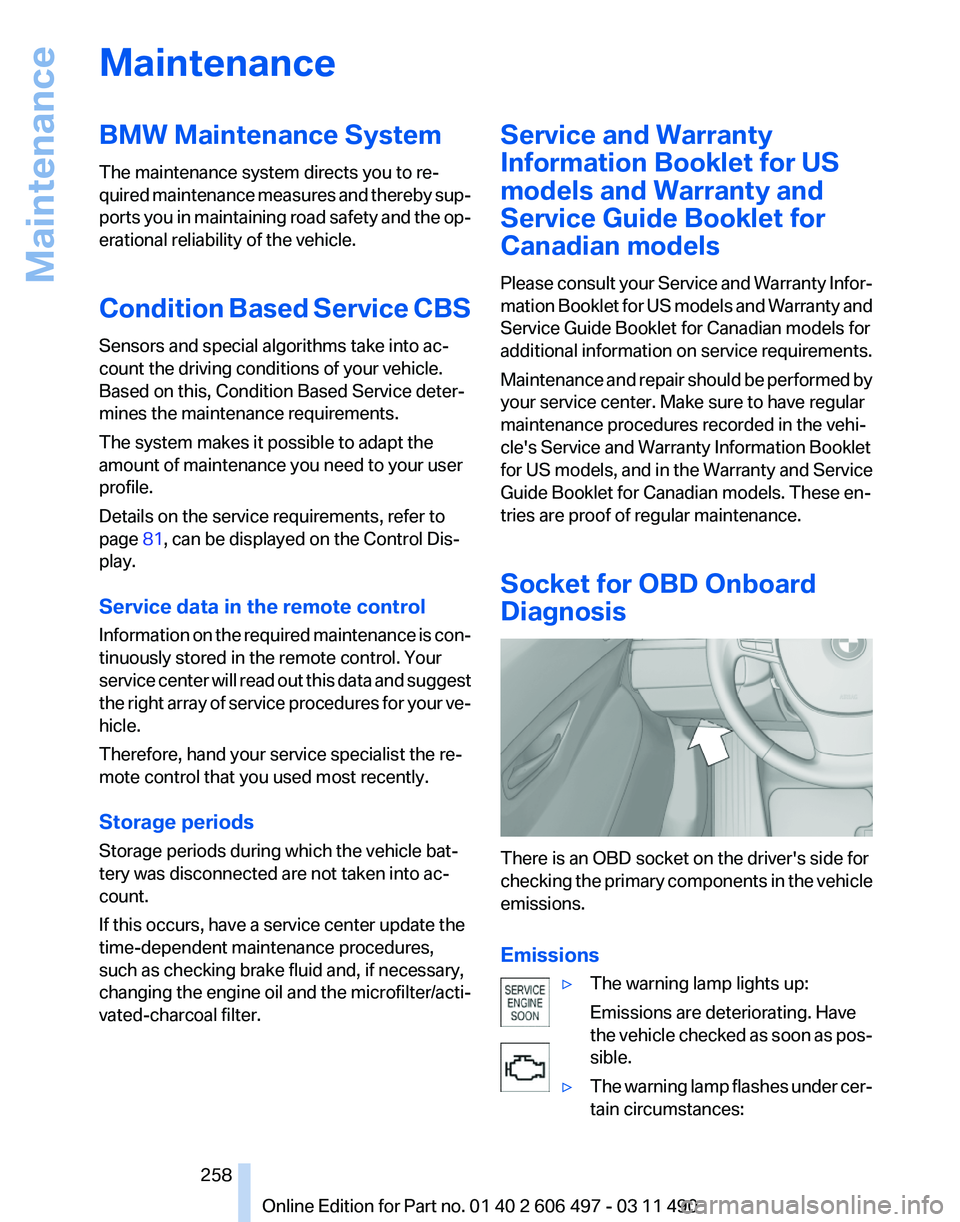
Diagnosis There is an OBD socket on the driver's side for
checking
the primary components in the vehicle
emissions.
Emissions
▷The warning lamp lights up:
Emissions are deteriorating. Have
the
vehicle checked as soon as pos‐
sible.
▷ The warning lamp flashes under cer‐
tain circumstances: Seite 258
258 Online Edition for Part no. 01 40 2 606 497 - 03 11 490
Maintenance
Page 259 of 299
This indicates that there is excessive
misfiring in the engine.
Reduce the vehicle speed and have
the system checked immediately;
otherwise, serious engine misfiring
within a brief period can seriously
damage emission control compo‐
nents,
in particular the catalytic con‐
verter.
Fuel cap The indicator lamp lights up.
If the fuel cap is not properly tightened,
the
OBD system may conclude that fuel
vapor is escaping. If the cap is then tightened,
the display should go out in a short time.
Data memory
Your vehicle records data relating to vehicle op‐
eration, faults and user settings. These data are
stored in the remote control and can be read out
with suitable devices, particularly when the ve‐
hicle is serviced. The data obtained in this way
provide valuable information for service proc‐
esses and repair or for optimizing and develop‐
ing vehicle functions further.
In addition, if you signed a service contract for
Assist, certain vehicle data can be sent directly
from the vehicle to facilitate the desired serv‐
ices. Seite 259
259Online Edition for Part no. 01 40 2 606 497 - 03 11 490
Reference
Mobility Communication Entertainment Navigation Driving tips Controls At a glance
Page 261 of 299
Do not touch the bulbs
Do not touch the glass of new bulbs with
your bare hands, as even minute amounts of
contamination will burn into the bulb's surface
and reduce its service life.
Use
a clean tissue, cloth or something similar, or
hold the bulb by its base.◀
Light-emitting diodes (LEDs)
Light-emitting diodes installed behind a cover
serve as the light source for controls, display el‐
ements and other equipment.
These light-emitting diodes, which are related
to conventional lasers, are officially designated
as Class 1 light-emitting diodes.
Do not remove the covers
Do not remove the covers, and never stare
into the unfiltered light for several hours; other‐
wise, irritation of the retina could result.◀
Headlamp glass
Condensation can form on the inside of the ex‐
ternal lamps in cool or humid weather. When the
light is switched on, the condensation evapo‐
rates after a short time. The headlamp glasses
do not need to be changed.
If there is a large amount of moisture, e.g., water
droplets form in the lamp, have it checked by
your service center.
Front lamps, bulb replacement
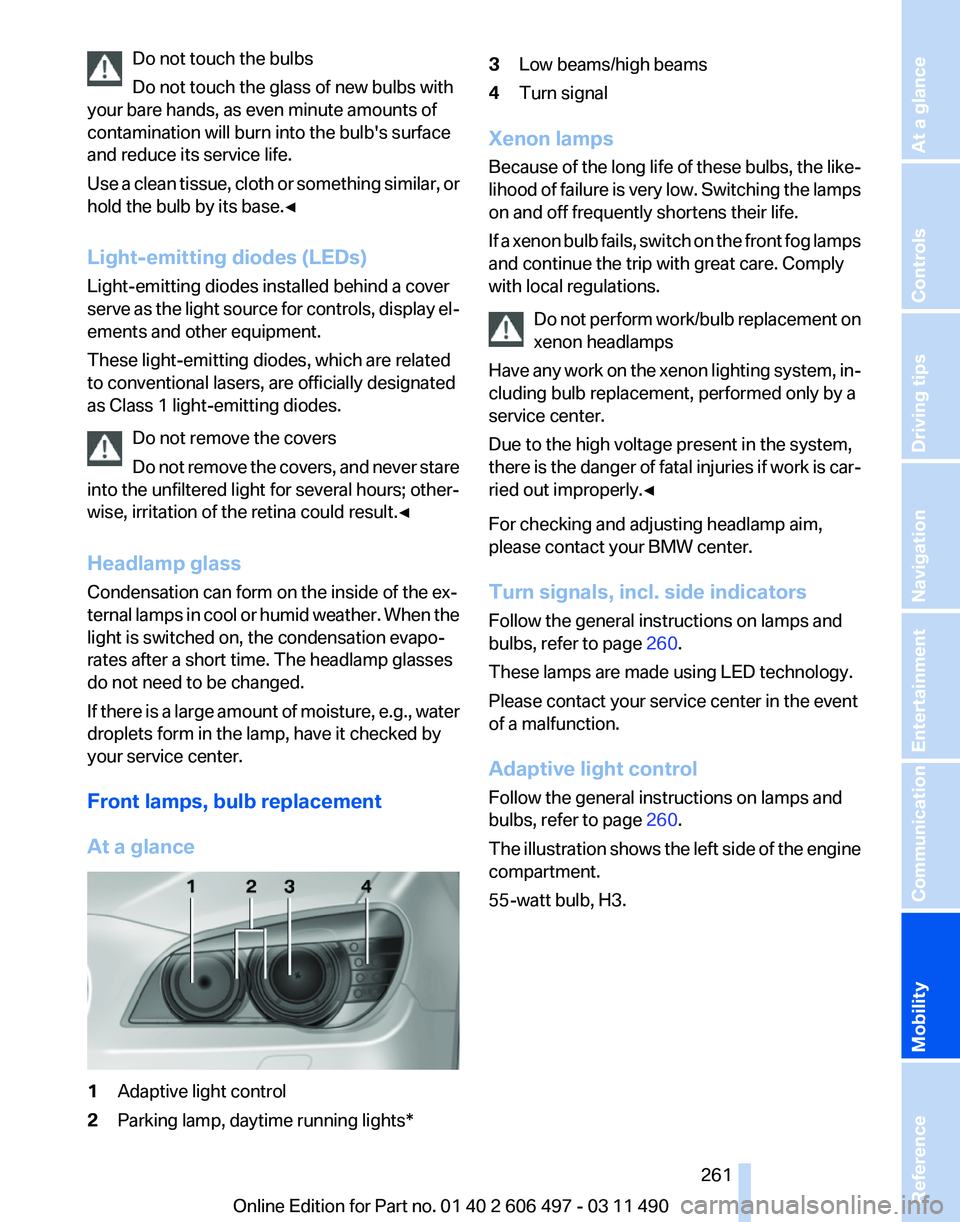
At a glance 1
Adaptive light control
2 Parking lamp, daytime running lights* 3
Low beams/high beams
4 Turn signal
Xenon lamps
Because
of the long life of these bulbs, the like‐
lihood of failure is very low. Switching the lamps
on and off frequently shortens their life.
If a xenon bulb fails, switch on the front fog lamps
and continue the trip with great care. Comply
with local regulations.
Do not perform work/bulb replacement on
xenon headlamps
Have any work on the xenon lighting system, in‐
cluding bulb replacement, performed only by a
service center.
Due to the high voltage present in the system,
there is the danger of fatal injuries if work is car‐
ried out improperly.◀
For checking and adjusting headlamp aim,
please contact your BMW center.
Turn signals, incl. side indicators
Follow the general instructions on lamps and
bulbs, refer to page 260.
These lamps are made using LED technology.
Please contact your service center in the event
of a malfunction.
Adaptive light control
Follow the general instructions on lamps and
bulbs, refer to page 260.
The illustration shows the left side of the engine
compartment.
55-watt bulb, H3. Seite 261
261Online Edition for Part no. 01 40 2 606 497 - 03 11 490
Reference
Mobility Communication Entertainment Navigation Driving tips Controls At a glance
Page 273 of 299
When cleaning rubber seals, do not use any sil‐
icon-containing car care products in order to
avoid damage or reduced noise damping.
Fine wood parts*
Clean fine wood facing and fine wood compo‐
nents
only with a moist rag. Then dry with a soft
cloth.
Plastic components
These include:
▷ Imitation leather surfaces.
▷ Headliner.
▷ Lamp lenses.
▷ Instrument cluster cover.
▷ Matte black spray-coated components.
Clean with a microfiber cloth.
Moisten the cloth lightly and use plastic
cleanser, if necessary.
Do not soak the headliner.
Do not use cleansers that contain alcohol
or solvents
Do
not use cleansers that contain alcohol or sol‐
vents, such as lacquer thinners, heavy-duty
grease removers, fuel, or such; this could lead to
surface damage.◀
Safety belts
Dirty belt straps impede the reeling action and
thus have a negative impact on safety.
Chemical cleaning
Do not clean chemically; this can destroy
the webbing.◀
Use only a mild soapy solution, with the safety
belts clipped into their buckles.
Do not allow the reels to retract the safety belts
until they are dry. Floor carpets and floor mats*
No objects in the area around the pedals
Keep floor mats, carpets, and any other
objects out of the area of motion of the pedals;
otherwise, the function of the pedals could be
impeded while driving
Do not place additional floor mats over existing
mats or other objects.
Only
use floor mats that have been approved for
the vehicle and can be properly fixed in place.
Ensure that the floor mats are securely fastened
again after they were removed for cleaning, for
example.◀
Floor mats can be removed from the passenger
compartment for cleaning.
If the floor carpets are very dirty, clean with a
microfiber cloth and water or a textile cleaner. To
prevent matting of the carpet, rub back and forth
in the direction of travel only.
Sensors/cameras
To clean sensors and cameras, use a cloth mois‐
tened with a small amount of glass cleaner.
Displays/screens
Clean the displays with a microfiber cloth.
Cleaning displays
Do not use chemical or household cleans‐
ers.
Keep all fluids and moisture away from the unit.
Otherwise, they could affect or damage surfa‐
ces or electrical components.
Avoid pressing too hard when cleaning and do
not use abrasive materials; otherwise, damage
can result.◀
Long-term vehicle storage
Your service center can advise you on what to
consider when storing the vehicle for longer
than three months. Seite 273
273Online Edition for Part no. 01 40 2 606 497 - 03 11 490
Reference
Mobility Communication Entertainment Navigation Driving tips Controls At a glance
Page 280 of 299
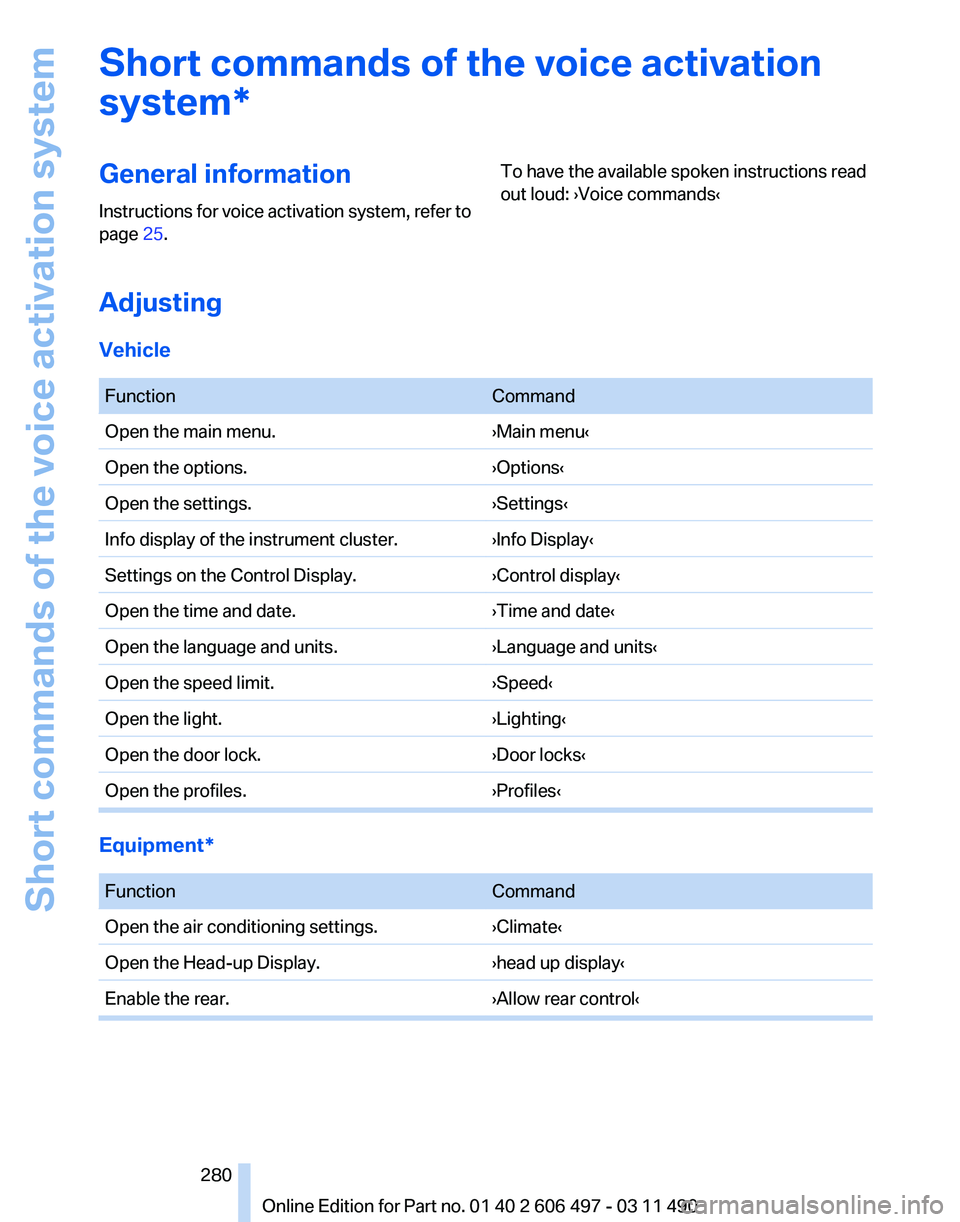
Short commands of the voice activation
system*
General information
Instructions
for voice activation system, refer to
page 25. To have the available spoken instructions read
out loud: ›Voice commands‹
Adjusting
Vehicle
Function
Command
Open the main menu. ›Main menu‹
Open the options. ›Options‹
Open the settings. ›Settings‹
Info display of the instrument cluster. ›Info Display‹
Settings on the Control Display. ›Control display‹
Open the time and date. ›Time and date‹
Open the language and units. ›Language and units‹
Open the speed limit. ›Speed‹
Open the light. ›Lighting‹
Open the door lock. ›Door locks‹
Open the profiles. ›Profiles‹Equipment*
Function
Command
Open the air conditioning settings. ›Climate‹
Open the Head-up Display. ›head up display‹
Enable the rear. ›Allow rear control‹ Seite 280
280 Online Edition for Part no. 01 40 2 606 497 - 03 11 490
Short commands of the voice activation system
Page 281 of 299
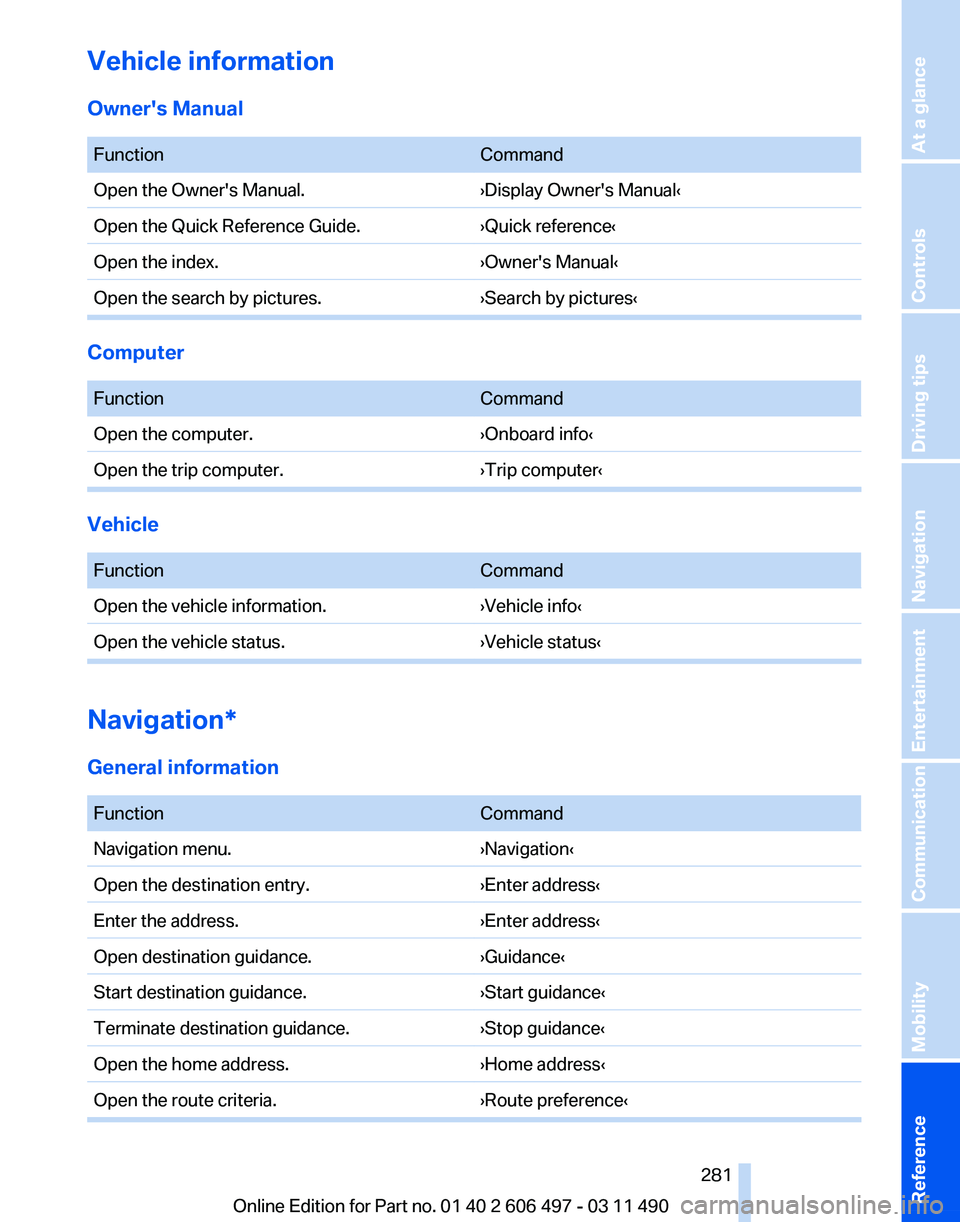
Vehicle information
Owner's Manual
Function
Command
Open the Owner's Manual. ›Display Owner's Manual‹
Open the Quick Reference Guide. ›Quick reference‹
Open the index. ›Owner's Manual‹
Open the search by pictures. ›Search by pictures‹Computer
Function
Command
Open the computer. ›Onboard info‹
Open the trip computer. ›Trip computer‹Vehicle
Function
Command
Open the vehicle information. ›Vehicle info‹
Open the vehicle status. ›Vehicle status‹Navigation*
General information
Function
Command
Navigation menu. ›Navigation‹
Open the destination entry. ›Enter address‹
Enter the address. ›Enter address‹
Open destination guidance. ›Guidance‹
Start destination guidance. ›Start guidance‹
Terminate destination guidance. ›Stop guidance‹
Open the home address. ›Home address‹
Open the route criteria. ›Route preference‹ Seite 281
281Online Edition for Part no. 01 40 2 606 497 - 03 11 490
Reference Mobility Communication Entertainment Navigation Driving tips Controls At a glance
Page 282 of 299
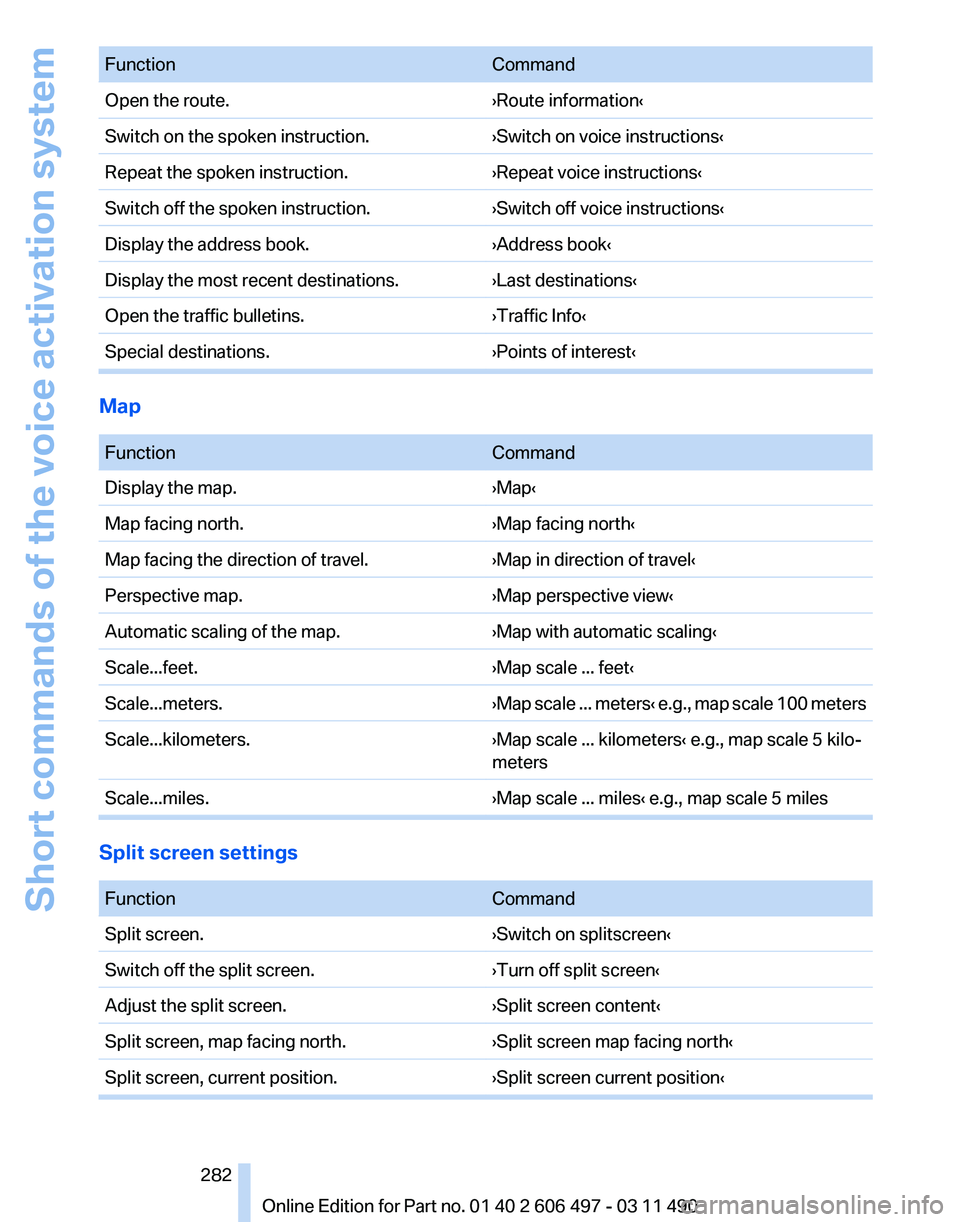
Function
Command
Open the route. ›Route information‹
Switch on the spoken instruction. ›Switch on voice instructions‹
Repeat the spoken instruction. ›Repeat voice instructions‹
Switch off the spoken instruction. ›Switch off voice instructions‹
Display the address book. ›Address book‹
Display the most recent destinations. ›Last destinations‹
Open the traffic bulletins. ›Traffic Info‹
Special destinations. ›Points of interest‹Map
Function
Command
Display the map. ›Map‹
Map facing north. ›Map facing north‹
Map facing the direction of travel. ›Map in direction of travel‹
Perspective map. ›Map perspective view‹
Automatic scaling of the map. ›Map with automatic scaling‹
Scale...feet. ›Map scale ... feet‹
Scale...meters. ›Map scale ... meters‹ e.g., map scale 100 meters
Scale...kilometers. ›Map scale ... kilometers‹ e.g., map scale 5 kilo‐
meters
Scale...miles. ›Map scale ... miles‹ e.g., map scale 5 milesSplit screen settings
Function
Command
Split screen. ›Switch on splitscreen‹
Switch off the split screen. ›Turn off split screen‹
Adjust the split screen. ›Split screen content‹
Split screen, map facing north. ›Split screen map facing north‹
Split screen, current position. ›Split screen current position‹ Seite 282
282 Online Edition for Part no. 01 40 2 606 497 - 03 11 490
Short commands of the voice activation system
Page 285 of 299
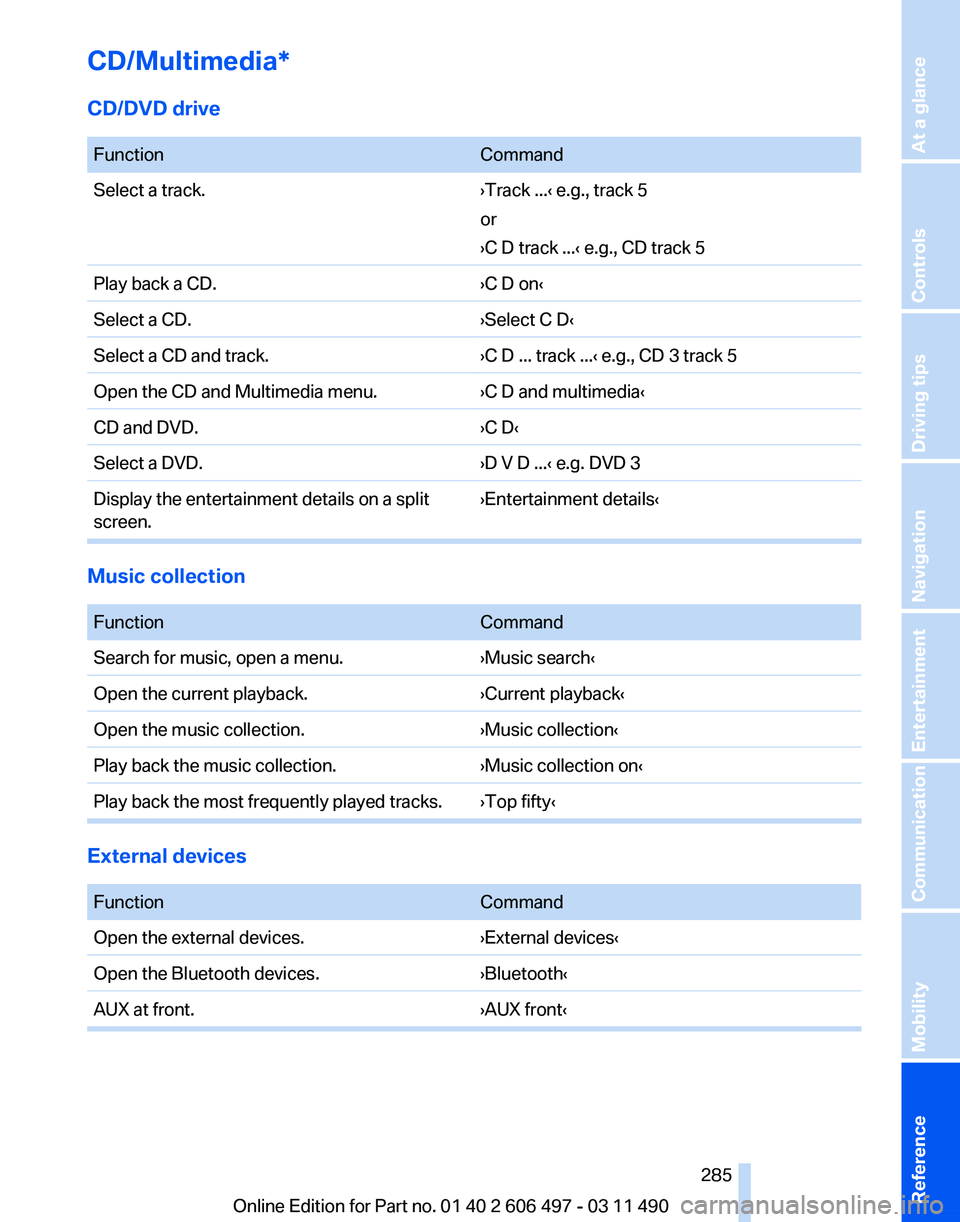
CD/Multimedia*
CD/DVD drive
Function
Command
Select a track. ›Track ...‹ e.g., track 5
or
›C D track ...
‹ e.g., CD track 5
Play back a CD. ›C D on‹
Select a CD. ›Select C D‹
Select a CD and track. ›C D ... track ...‹ e.g., CD 3 track 5
Open the CD and Multimedia menu. ›C D and multimedia‹
CD and DVD. ›C D‹
Select a DVD. ›D V D ...‹ e.g. DVD 3
Display the entertainment details on a split
screen. ›Entertainment details‹Music collection
Function
Command
Search for music, open a menu. ›Music search‹
Open the current playback. ›Current playback‹
Open the music collection. ›Music collection‹
Play back the music collection. ›Music collection on‹
Play back the most frequently played tracks. ›Top fifty‹ External devices
Function
Command
Open the external devices. ›External devices‹
Open the Bluetooth devices. ›Bluetooth‹
AUX at front. ›AUX front‹ Seite 285
285Online Edition for Part no. 01 40 2 606 497 - 03 11 490
Reference Mobility Communication Entertainment Navigation Driving tips Controls At a glance
Page 286 of 299
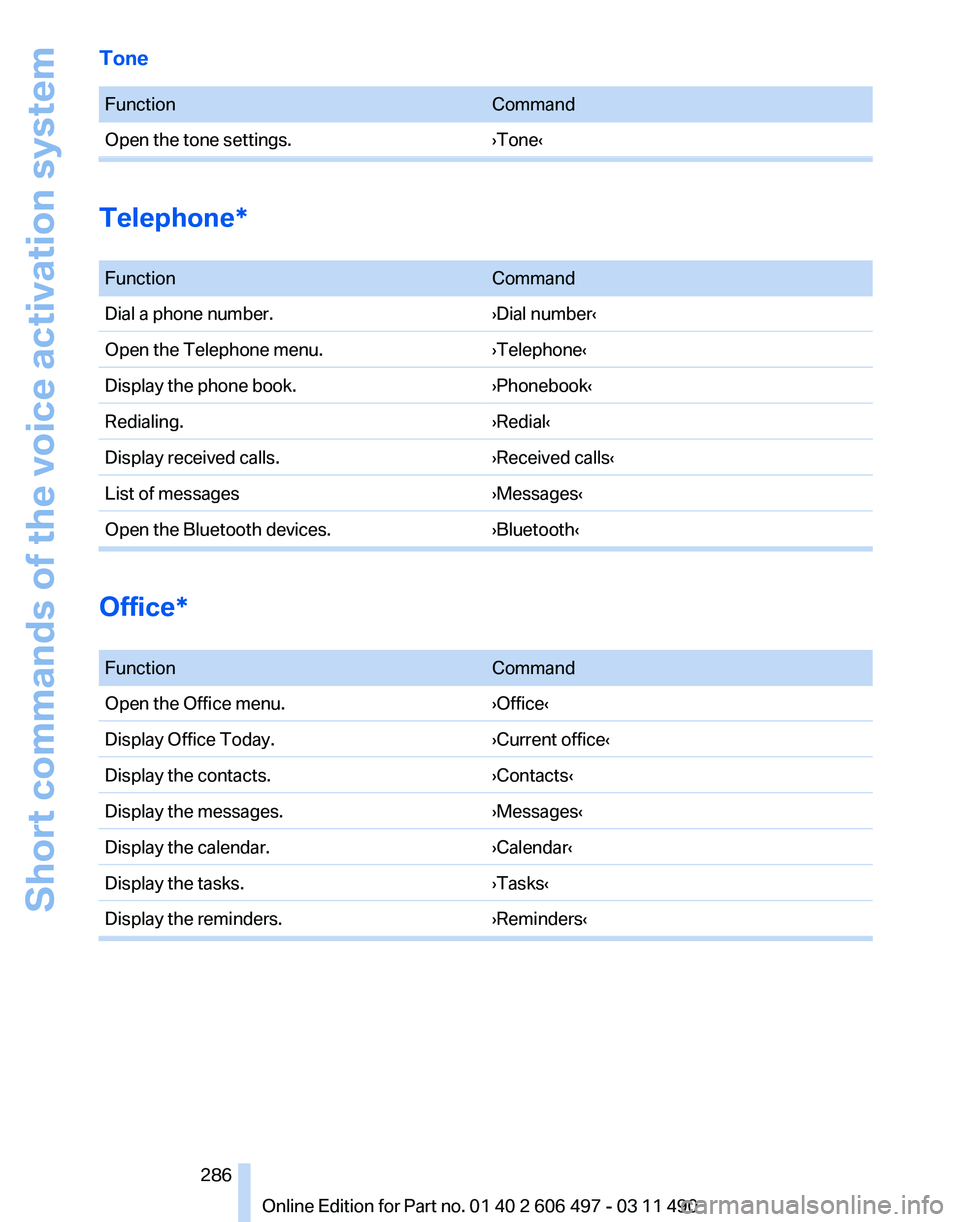
Tone
Function
Command
Open the tone settings. ›Tone‹Telephone*
Function
Command
Dial a phone number. ›Dial number‹
Open the Telephone menu. ›Telephone‹
Display the phone book. ›Phonebook‹
Redialing. ›Redial‹
Display received calls. ›Received calls‹
List of messages ›Messages‹
Open the Bluetooth devices. ›Bluetooth‹Office*
Function
Command
Open the Office menu. ›Office‹
Display Office Today. ›Current office‹
Display the contacts. ›Contacts‹
Display the messages. ›Messages‹
Display the calendar. ›Calendar‹
Display the tasks. ›Tasks‹
Display the reminders. ›Reminders‹ Seite 286
286 Online Edition for Part no. 01 40 2 606 497 - 03 11 490Short commands of the voice activation system
Page 288 of 299
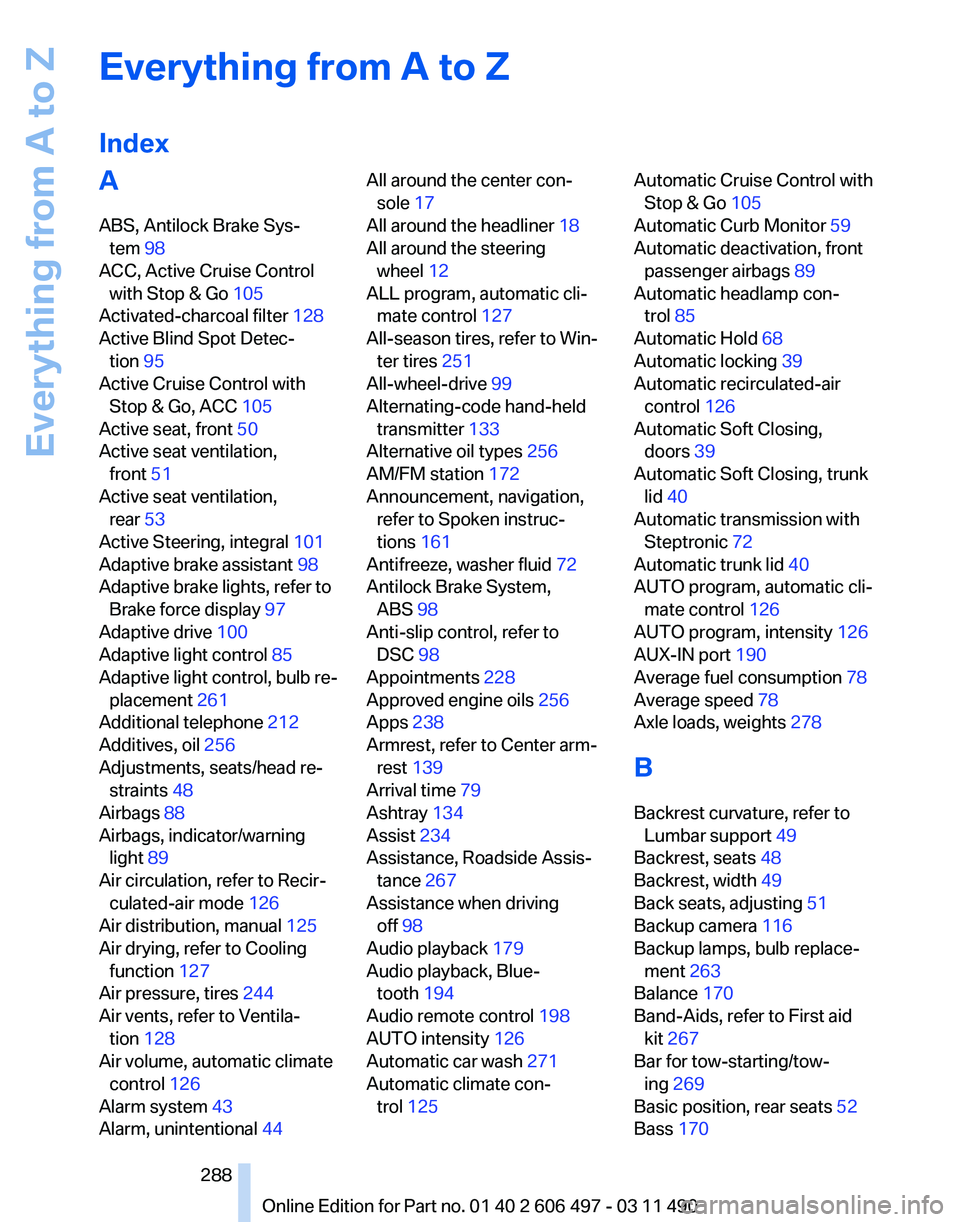
Everything from A to Z
Index
A
ABS, Antilock Brake Sys‐
tem 98
ACC, Active Cruise Control with Stop & Go 105
Activated-charcoal filter 128
Active Blind Spot Detec‐ tion 95
Active Cruise Control with Stop & Go, ACC 105
Active seat, front 50
Active seat ventilation, front 51
Active seat ventilation, rear 53
Active Steering, integral 101
Adaptive brake assistant 98
Adaptive brake lights, refer to Brake force display 97
Adaptive drive 100
Adaptive light control 85
Adaptive
light control, bulb re‐
placement 261
Additional telephone 212
Additives, oil 256
Adjustments, seats/head re‐ straints 48
Airbags 88
Airbags, indicator/warning light 89
Air circulation, refer to Recir‐ culated-air mode 126
Air distribution, manual 125
Air drying, refer to Cooling function 127
Air pressure, tires 244
Air vents, refer to Ventila‐ tion 128
Air volume, automatic climate control 126
Alarm system 43
Alarm, unintentional 44 All around the center con‐
sole 17
All around the headliner 18
All around the steering wheel 12
ALL program, automatic cli‐ mate control 127
All-season tires, refer to Win‐ ter tires 251
All-wheel-drive 99
Alternating-code hand-held transmitter 133
Alternative oil types 256
AM/FM station 172
Announcement, navigation, refer to Spoken instruc‐
tions 161
Antifreeze, washer fluid 72
Antilock Brake System, ABS 98
Anti-slip control, refer to DSC 98
Appointments 228
Approved engine oils 256
Apps 238
Armrest, refer to Center arm‐ rest 139
Arrival time 79
Ashtray 134
Assist 234
Assistance, Roadside Assis‐ tance 267
Assistance when driving off 98
Audio playback 179
Audio playback, Blue‐ tooth 194
Audio remote control 198
AUTO intensity 126
Automatic car wash 271
Automatic climate con‐ trol 125 Automatic Cruise Control with
Stop & Go 105
Automatic Curb Monitor 59
Automatic deactivation, front passenger airbags 89
Automatic headlamp con‐ trol 85
Automatic Hold 68
Automatic locking 39
Automatic recirculated-air control 126
Automatic Soft Closing, doors 39
Automatic Soft Closing, trunk lid 40
Automatic transmission with Steptronic 72
Automatic trunk lid 40
AUTO program, automatic cli‐ mate control 126
AUTO program, intensity 126
AUX-IN port 190
Average fuel consumption 78
Average speed 78
Axle loads, weights 278
B
Backrest curvature, refer to Lumbar support 49
Backrest, seats 48
Backrest, width 49
Back seats, adjusting 51
Backup camera 116
Backup lamps, bulb replace‐ ment 263
Balance 170
Band-Aids, refer to First aid kit 267
Bar for tow-starting/tow‐ ing 269
Basic position, rear seats 52
Bass 170
Seite 288
288 Online Edition for Part no. 01 40 2 606 497 - 03 11 490
Everything from A to Z