language BMW 7 SERIES 2011 User Guide
[x] Cancel search | Manufacturer: BMW, Model Year: 2011, Model line: 7 SERIES, Model: BMW 7 SERIES 2011Pages: 299, PDF Size: 8.49 MB
Page 206 of 299
Suggesting a destination
A destination or trip can be sent to the front as
a suggestion. The suggestion can be adopted,
stored, or declined in the front. This function is
not available with the following setting:
"Driver
control".
1. Enter the destination.
2. "Suggest destination"
Contacts
Operation is the same as for the front contacts.
BMW Assist
Operation is the same as for BMW Assist in the
front, refer to page 234.
Adjusting
The following settings are available:
▷ "Rear display"
▷ "Language/Units": language can be set
globally for all screens.
▷ "Tone"
▷ "Climate"
Vehicle information
Computer content can be displayed. Operation
is only possible in the front.
Options menu
The split screen is not available and there is no
Integrated Owner's Manual.
Operation
is the same as for the front menu op‐
tions, refer to page 21.
Enabling
Enabling operation in the rear
Only possible via the iDrive in the front.
1. "Settings"
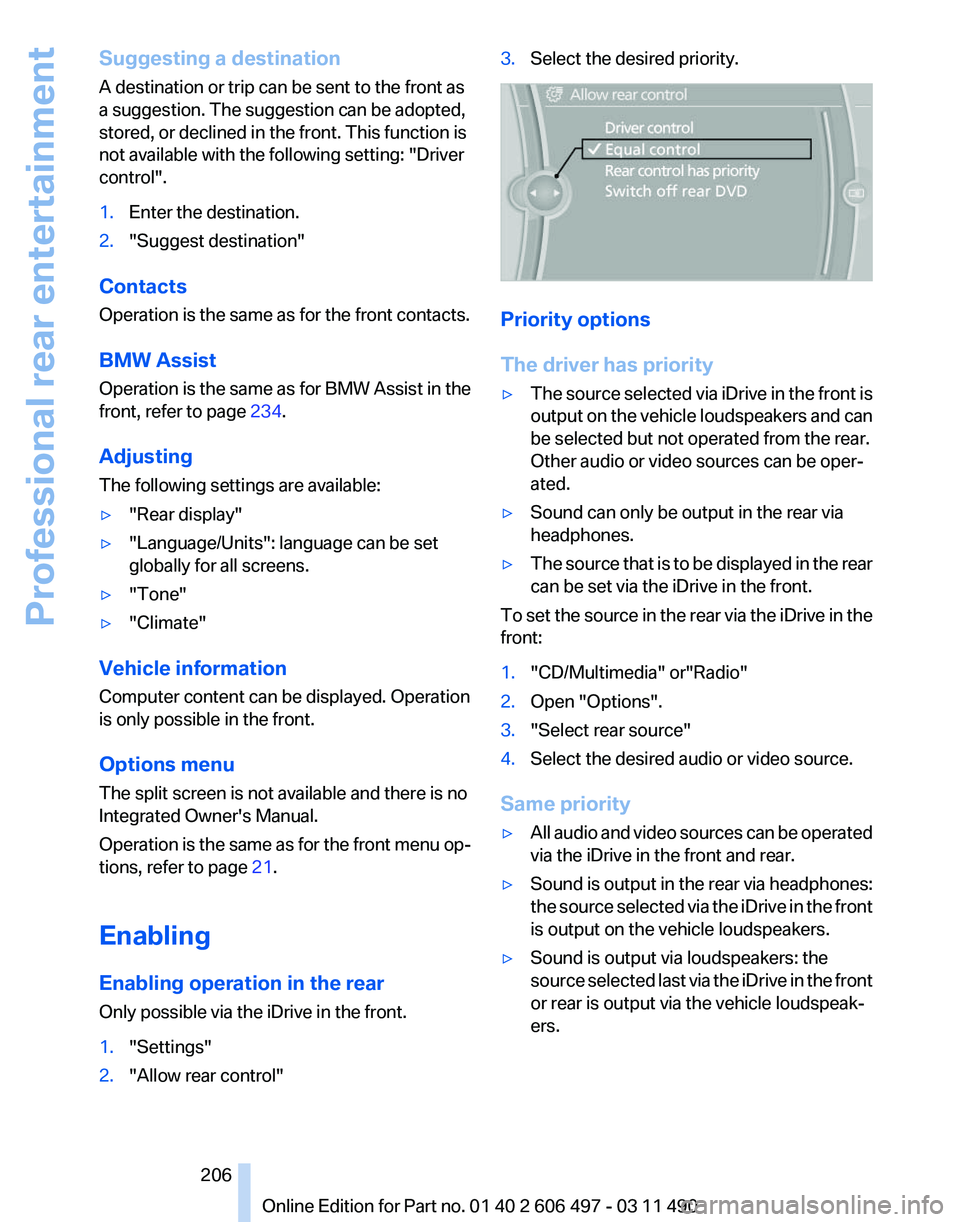
2. "Allow rear control" 3.
Select the desired priority. Priority options
The driver has priority
▷
The source selected via iDrive in the front is
output
on the vehicle loudspeakers and can
be selected but not operated from the rear.
Other audio or video sources can be oper‐
ated.
▷ Sound can only be output in the rear via
headphones.
▷ The source that is to be displayed in the rear
can be set via the iDrive in the front.
To set the source in the rear via the iDrive in the
front:
1. "CD/Multimedia" or"Radio"
2. Open "Options".
3. "Select rear source"
4. Select the desired audio or video source.
Same priority
▷ All audio and video sources can be operated
via the iDrive in the front and rear.
▷ Sound is output in the rear via headphones:
the
source selected via the iDrive in the front
is output on the vehicle loudspeakers.
▷ Sound is output via loudspeakers: the
source
selected last via the iDrive in the front
or rear is output via the vehicle loudspeak‐
ers.
Seite 206
206 Online Edition for Part no. 01 40 2 606 497 - 03 11 490
Professional rear entertainment
Page 221 of 299
Adjusting the volume
Turn the knob during an announcement.
▷
The volume remains constant even if the
volume of other audio sources is changed.
▷ The volume is stored for the remote control
currently in use.
Notes
Do not use the voice operation to initiate an
Emergency
Request. In stressful situations, the
voice and vocal pitch can change. This can un‐
necessarily delay the establishment of a tele‐
phone connection.
Instead, use the SOS button*, refer to
page 266, in the vicinity of the interior mirror.
Environmental conditions
▷ Say the commands, numbers, and letters
smoothly and with normal volume, empha‐
sis, and speed.
▷ Always say commands in the language of
the system. The language for the mobile
phone voice operation is preset and cannot
be changed in the Control Display.
▷ Keep the doors, windows, and glass sun‐
roof* closed to prevent noise interference.
▷ Avoid making other noise in the vehicle
while speaking.
Snap-in adapter*
Installation position
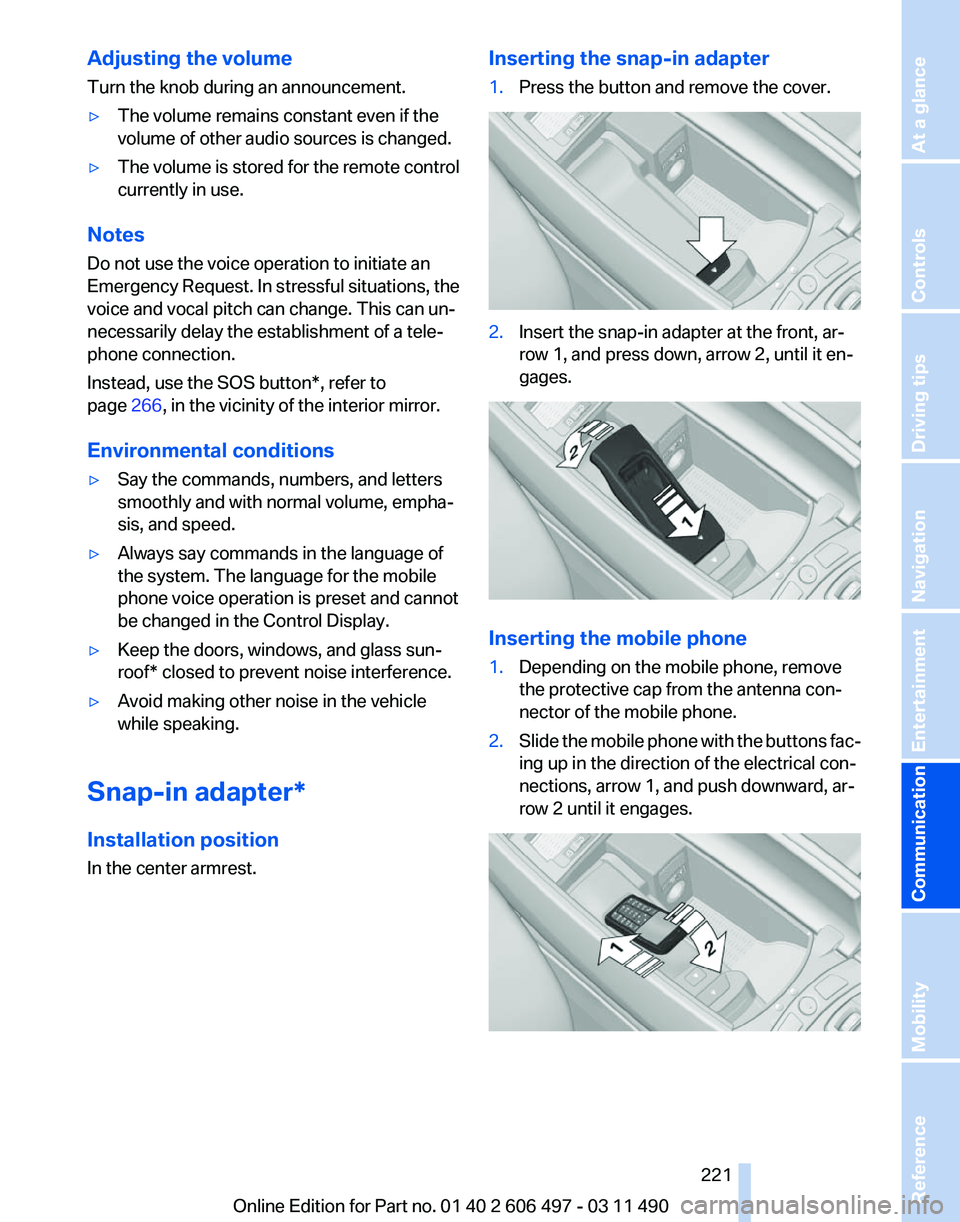
In the center armrest. Inserting the snap-in adapter
1.
Press the button and remove the cover. 2.
Insert the snap-in adapter at the front, ar‐
row 1, and press down, arrow 2, until it en‐
gages. Inserting the mobile phone
1.
Depending on the mobile phone, remove
the protective cap from the antenna con‐
nector of the mobile phone.
2. Slide the mobile phone with the buttons fac‐
ing up in the direction of the electrical con‐
nections, arrow 1, and push downward, ar‐
row 2 until it engages. Seite 221
221Online Edition for Part no. 01 40 2 606 497 - 03 11 490
Reference Mobility
Communication Entertainment Navigation Driving tips Controls At a glance
Page 280 of 299
Short commands of the voice activation
system*
General information
Instructions
for voice activation system, refer to
page 25. To have the available spoken instructions read
out loud: ›Voice commands‹
Adjusting
Vehicle
Function
Command
Open the main menu. ›Main menu‹
Open the options. ›Options‹
Open the settings. ›Settings‹
Info display of the instrument cluster. ›Info Display‹
Settings on the Control Display. ›Control display‹
Open the time and date. ›Time and date‹
Open the language and units. ›Language and units‹
Open the speed limit. ›Speed‹
Open the light. ›Lighting‹
Open the door lock. ›Door locks‹
Open the profiles. ›Profiles‹Equipment*
Function
Command
Open the air conditioning settings. ›Climate‹
Open the Head-up Display. ›head up display‹
Enable the rear. ›Allow rear control‹ Seite 280
280 Online Edition for Part no. 01 40 2 606 497 - 03 11 490
Short commands of the voice activation system
Page 292 of 299
House number, entering for
navigation 153
Hydroplaning 145
I
Ice warning, refer to External temperature warning 76
Icy roads, refer to External temperature warning 76
Identification marks, tires 248
Identification number, refer to Engine compartment 253
iDrive 19
Ignition key, refer to Remote control 32
Ignition off 65
Ignition on 65
Indication of a flat tire 92
Indicator and warning mes‐ sages 14
Indicator lamps 14
Individual air distribution 125
Individual settings, refer to Personal Profile 33
Inflation pressure, tires 244
Info display, refer to Com‐ puter 77
Information on the navigation data 166
Initialization, Integral Active Steering 101
Initializing,
Tire Pressure Mon‐
itor TPM 92
Instrument cluster 14, 75
Instrument cluster, electronic displays 16
Instrument lighting 87
Integral Active Steering 101
Integrated key 32
Integrated universal remote control 132
Intensity, AUTO program 126
Interactive map 156
Interior equipment 132
Interior lamps 87
Interior lamps via remote con‐ trol 36 Interior motion sensor 44
Interior rearview mirror
59
Interior rearview mirror, auto‐ matic dimming feature 59
Intermediate
destinations 158
Internet page 6
Intersection, entering for navi‐ gation 153
Interval display, service re‐ quirements 81
iPod/iPhone 191
J
Jacking points for the vehicle jack 264
Jack, refer to Vehicle jack 264
Joystick, automatic transmis‐ sion 73
K
Key/remote control 32
Keyless Go, refer to Comfort Access 42
Key Memory, refer to Personal Profile 33
Kickdown, automatic trans‐ mission 73
Knee airbag 88
L
Lamp replacement 260
Lamp replacement, front 261
Lamp replacement, rear 263
Lamps 84
Lamps and bulbs 260
Lane departure warning 94
Lane margin, warning 94
Language on Control Dis‐ play 81
Lashing eyes, securing cargo 147
LATCH child restraint fixing system 62
Leather, care 272 LEDs, light-emitting di‐
odes 261
Length, vehicle 277
Letters and numbers, enter‐ ing 24
License plate lamp, bulb re‐ placement 263
Light-alloy wheels, care 272
Light control 85
Light-emitting diodes, LEDs 261
Lighter, front 134
Lighter, rear 134
Lighting 84
Lighting
via remote control 36
Light switch 84
Load 147
Loading 146
Lock, door 38
Locking/unlocking from in‐ side 39
Locking/unlocking via door lock 38
Locking/unlocking with re‐ mote control 36
Locking, automatic 39
Locking, central 35
Locking via trunk lid 40
Lock, power window 45
Locks, doors, and win‐ dows 64
Low beams 84
Low beams, automatic, refer to High-beam Assistant 86
Lower back support 49
Lug bolt lock 264
Luggage rack, refer to Roof- mounted luggage rack 148
Lumbar support 49
M
Maintenance 258
Maintenance require‐ ments 258
Maintenance, service require‐ ments 81
Seite 292
292 Online Edition for Part no. 01 40 2 606 497 - 03 11 490
Everything from A to Z