radio controls BMW 7 SERIES 2012 Owner's Manual
[x] Cancel search | Manufacturer: BMW, Model Year: 2012, Model line: 7 SERIES, Model: BMW 7 SERIES 2012Pages: 299, PDF Size: 8.49 MB
Page 197 of 299
▷
Adjust the volume settings on the device.
Playback is disturbed when buttons are pressed
or by other messages on the device.
▷ Switch off the button tones and other signal
tones on the device.
Playback is interrupted by a telephone call or
traffic bulletin and is not resumed automatically.
▷ Switch the radio off and on again.
Playback is not possible if the mobile phone is
connected
both via Bluetooth Audio and via the
extended connectivity of the music player in the
mobile phone*.
▷ Disconnect one of the two connections; for
example, disconnect the audio connection,
refer to page 196, and restart playback.
If all points in this list have been checked and the
required function is still not available, please
contact the hotline or service center.
Software Update*
The vehicle supports various external devices
depending
on the current software version. With
a software update, the vehicle can support new
cell phones* or new external devices*.
The updating of the software is done via:
▷ USB*.
Updates and related current information is
available at www.bmw.com/update.
▷ TeleService*.
Existing
software can be updated directly via
the vehicle.
Displaying the current version
The currently installed software is displayed.
1. "Settings"
2. "Software update"
3. "Show current version"
SelectDesired version* to displayAdditional in‐
formation*.
Updating software via USB
*
The software may only be updated when the ve‐
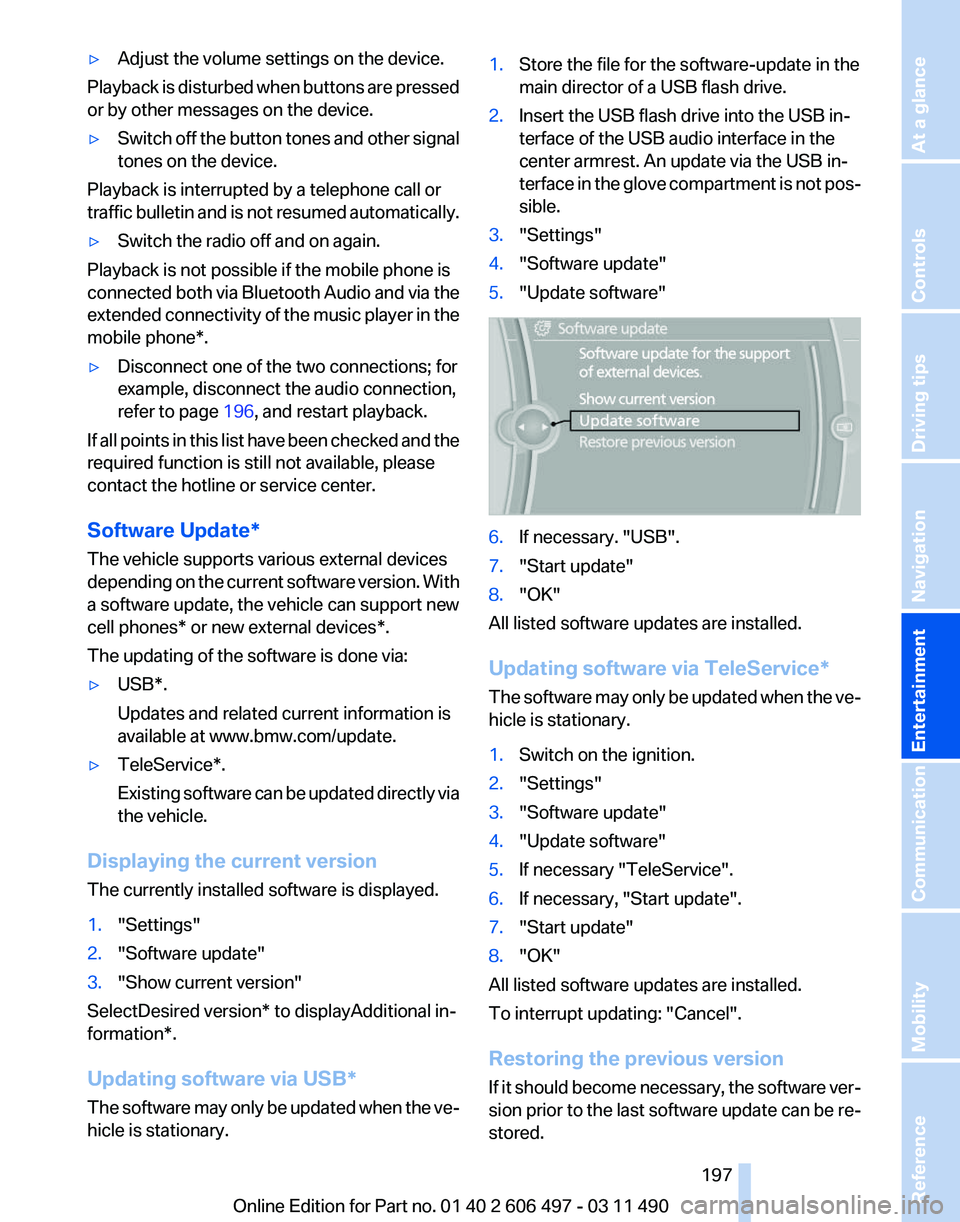
hicle is stationary. 1.
Store the file for the software-update in the
main director of a USB flash drive.
2. Insert the USB flash drive into the USB in‐
terface of the USB audio interface in the
center armrest. An update via the USB in‐
terface
in the glove compartment is not pos‐
sible.
3. "Settings"
4. "Software update"
5. "Update software" 6.
If necessary. "USB".
7. "Start update"
8. "OK"
All listed software updates are installed.
Updating software via
TeleService*
The software may only be updated when the ve‐
hicle is stationary.
1. Switch on the ignition.
2. "Settings"
3. "Software update"
4. "Update software"
5. If necessary "TeleService".
6. If necessary, "Start update".
7. "Start update"
8. "OK"
All listed software updates are installed.
To interrupt updating:
"Cancel".
Restoring the previous version
If it should become necessary, the software ver‐
sion prior to the last software update can be re‐
stored.
Seite 197
197Online Edition for Part no. 01 40 2 606 497 - 03 11 490
Reference Mobility Communication
Entertainment Navigation Driving tips Controls At a glance
Page 201 of 299
▷
DVD changer*.
▷ Rear CD/DVD player.
▷ External device in rear.
If a video image is being played back in the rear,
the rear CD/DVD player cannot be selected in
the front.
Operation
is the same as for the front video play‐
back, refer to page 181.
Radio
When the same radio source is selected in the
front and rear (e.g., FM/AM), the same radio sta‐
tion is played.
Operation is the same as for the front radio, refer
to page 172.
CD/multimedia
CD/DVD
When the same audio source (front CD/DVD
player, rear CD/DVD player, DVD changer) is se‐
lected in the front and rear, the same material is
played.
Operation is the same as for the front CD/DVD,
refer to page 179.
Notes on CDs/DVDs, refer to page 185.
Music collection*
Music can only be stored and data can only be
exported and imported via the front CD/DVD
player or the USB interface in the glove com‐
partment.
When music collections are selected in the front
and rear, they are played back separately.
Operation is the same as for the front music col‐
lection, refer to page 186.
Tone
Only treble and bass can be set in the rear. The
settings are made separately for the left and
right headphones.
Operation is the same as for the front tone, refer
to page 170. Adjusting
The following settings are available:
▷
"Rear displays"
▷ "Language/Units": language can be set
globally for all screens.
▷ "Tone"
Options menu
The split screen is not available and there is no
Integrated Owner's Manual.
Operation
is the same as for the front menu op‐
tions, refer to page 21.
Enabling
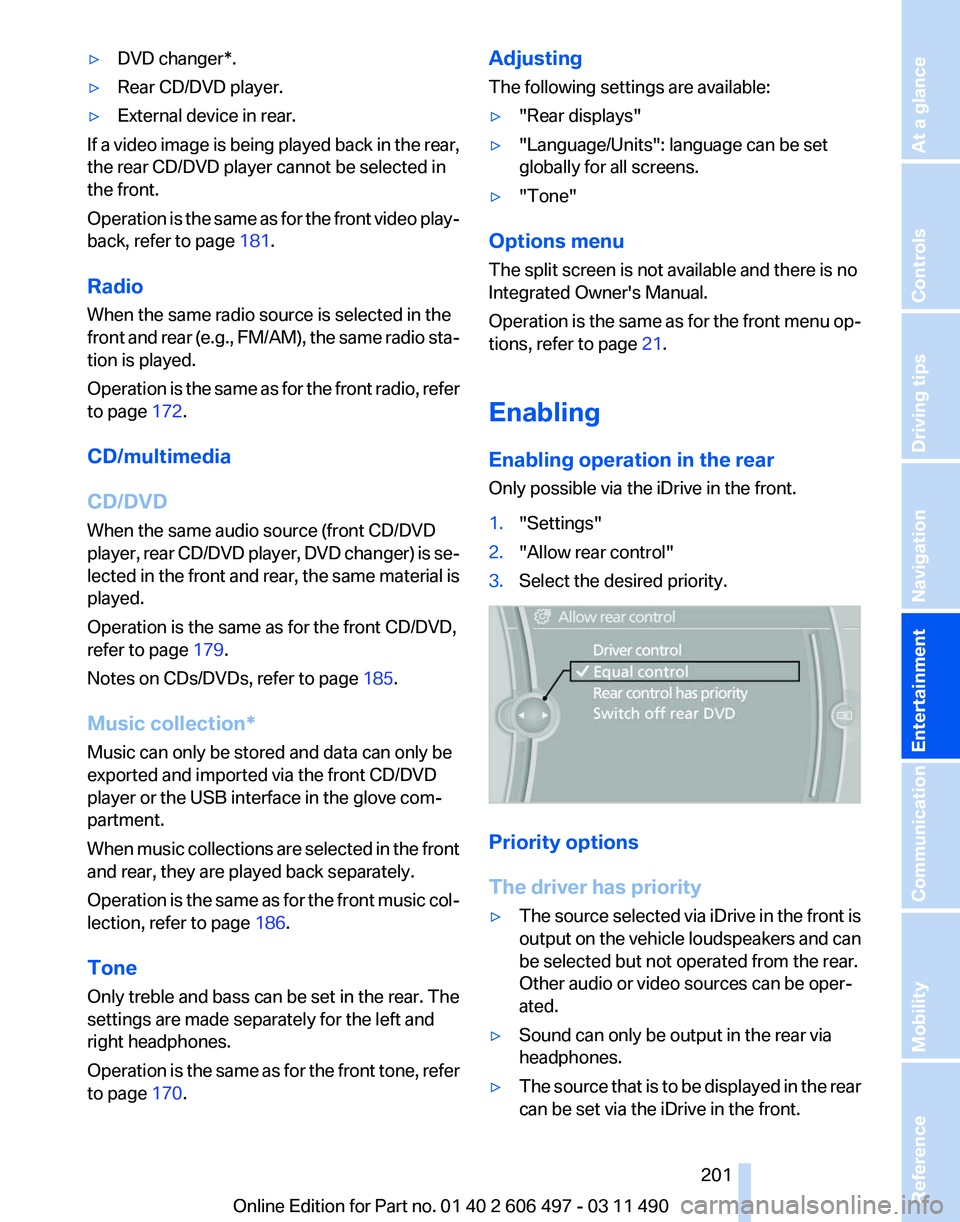
Enabling operation in the rear
Only possible via the iDrive in the front.
1. "Settings"
2. "Allow rear control"
3. Select the desired priority. Priority options
The driver has priority
▷
The source selected via iDrive in the front is
output
on the vehicle loudspeakers and can
be selected but not operated from the rear.
Other audio or video sources can be oper‐
ated.
▷ Sound can only be output in the rear via
headphones.
▷ The source that is to be displayed in the rear
can be set via the iDrive in the front.
Seite 201
201Online Edition for Part no. 01 40 2 606 497 - 03 11 490
Reference Mobility Communication
Entertainment Navigation Driving tips Controls At a glance
Page 203 of 299
Due to the large number of different audio and
video devices available on the market, it cannot
be ensured that every audio and video device
will be displayed correctly on the screen.
Connecting an external device
1.
Fold down the cover in front of the cinch
sockets on the CD/DVD player.
2. Connect the external device to the RCA
sockets.
▷Video: yellow socket.
▷ Audio: white and red socket.
Starting playback
1. "CD/Multimedia"
2. "External devices"
3. Select the or symbol.
Volume
The volume of the sound output is dependent
on the audio device. If this volume differs mark‐
edly
from the volume of the other audio sources,
it is advisable to adjust the volumes.
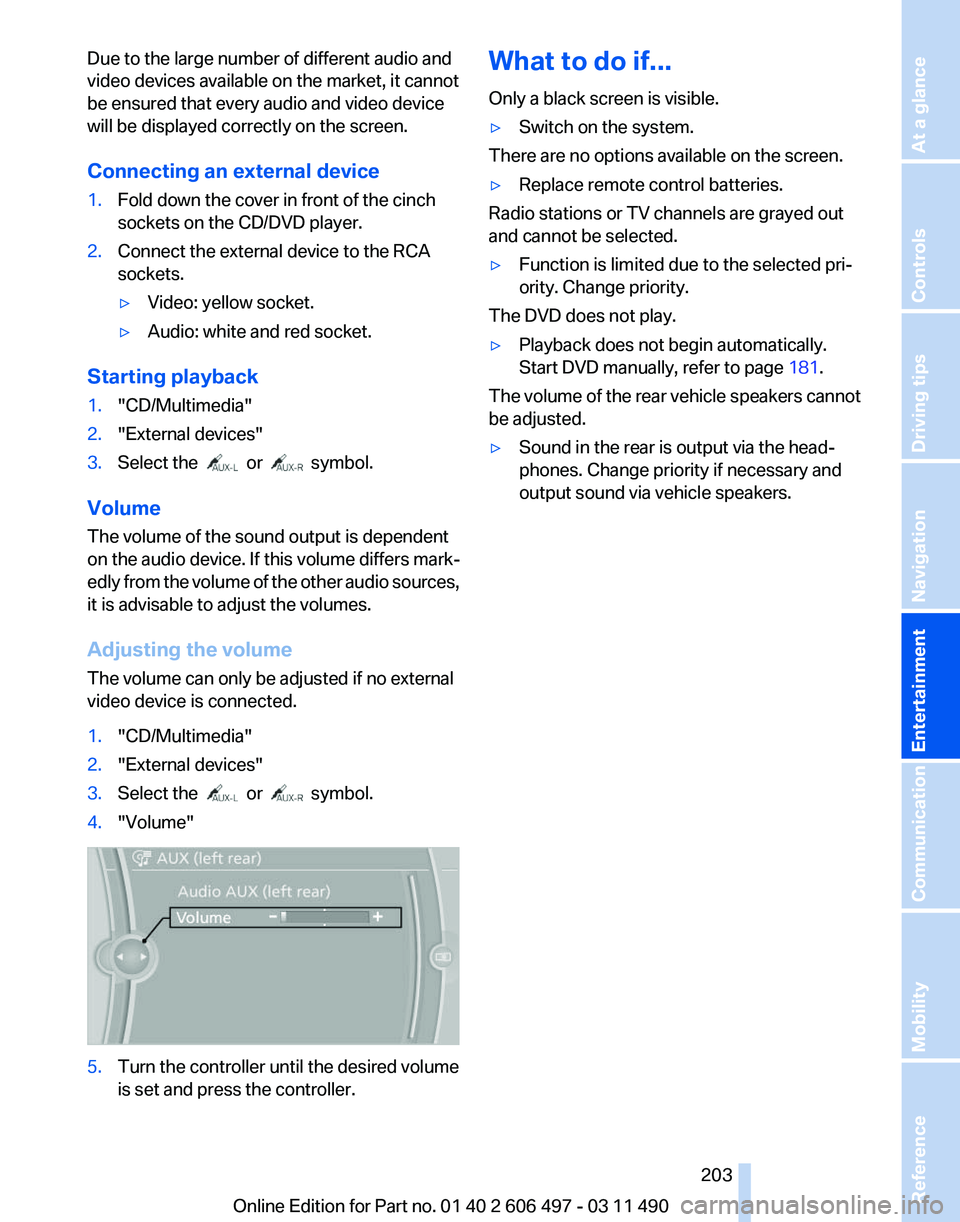
Adjusting the volume
The volume can only be adjusted if no external
video device is connected.
1. "CD/Multimedia"
2. "External devices"
3. Select the or symbol.
4. "Volume" 5.
Turn the controller until the desired volume
is set and press the controller. What to do if...
Only a black screen is visible.
▷
Switch on the system.
There are no options available on the screen.
▷ Replace remote control batteries.
Radio stations or TV channels are grayed out
and cannot be selected.
▷ Function is limited due to the selected pri‐
ority. Change priority.
The DVD does not play.
▷ Playback does not begin automatically.
Start DVD manually, refer to page 181.
The volume of the rear vehicle speakers cannot
be adjusted.
▷ Sound in the rear is output via the head‐
phones. Change priority if necessary and
output sound via vehicle speakers.
Seite 203
203Online Edition for Part no. 01 40 2 606 497 - 03 11 490
Reference Mobility Communication
Entertainment Navigation Driving tips Controls At a glance
Page 205 of 299
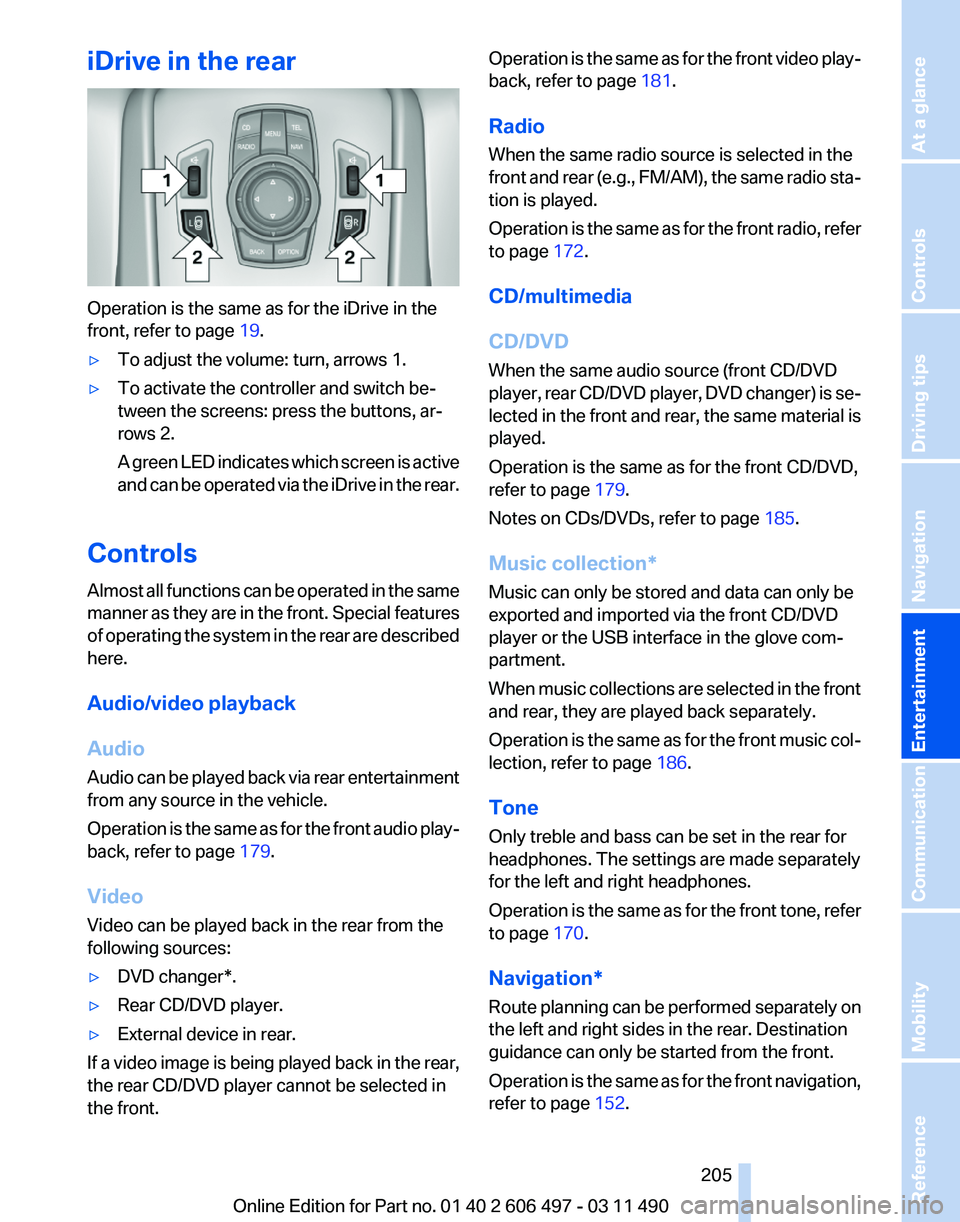
iDrive in the rear
Operation is the same as for the iDrive in the
front, refer to page
19.
▷ To adjust the volume: turn, arrows 1.
▷ To activate the controller and switch be‐
tween the screens: press the buttons, ar‐
rows 2.
A
green LED indicates which screen is active
and can be operated via the iDrive in the rear.
Controls
Almost
all functions can be operated in the same
manner as they are in the front. Special features
of operating the system in the rear are described
here.
Audio/video playback
Audio
Audio can be played back via rear entertainment
from any source in the vehicle.
Operation is the same as for the front audio play‐
back, refer to page 179.
Video
Video can be played back in the rear from the
following sources:
▷ DVD changer*.
▷ Rear CD/DVD player.
▷ External device in rear.
If a video image is being played back in the rear,
the rear CD/DVD player cannot be selected in
the front. Operation is the same as for the front video play‐
back, refer to page
181.
Radio
When the same radio source is selected in the
front
and rear (e.g., FM/AM), the same radio sta‐
tion is played.
Operation is the same as for the front radio, refer
to page 172.
CD/multimedia
CD/DVD
When the same audio source (front CD/DVD
player, rear CD/DVD player, DVD changer) is se‐
lected in the front and rear, the same material is
played.
Operation is the same as for the front CD/DVD,
refer to page 179.
Notes on CDs/DVDs, refer to page 185.
Music collection*
Music can only be stored and data can only be
exported and imported via the front CD/DVD
player or the USB interface in the glove com‐
partment.
When music collections are selected in the front
and rear, they are played back separately.
Operation is the same as for the front music col‐
lection, refer to page 186.
Tone
Only treble and bass can be set in the rear for
headphones. The settings are made separately
for the left and right headphones.
Operation is the same as for the front tone, refer
to page 170.
Navigation*
Route planning can be performed separately on
the left and right sides in the rear. Destination
guidance can only be started from the front.
Operation is the same as for the front navigation,
refer to page 152.
Seite 205
205Online Edition for Part no. 01 40 2 606 497 - 03 11 490
Reference Mobility Communication
Entertainment Navigation Driving tips Controls At a glance
Page 265 of 299
Vehicle battery
Maintenance
The battery is maintenance-free, i.e., the elec‐
trolyte will last for the life of the battery.
Your
service center will be glad to advise you on
questions regarding the battery.
Battery replacement
Use approved vehicle batteries only.
Only use vehicle batteries that have been
approved for your vehicle by the manufacturer;
otherwise, the vehicle could be damaged and
systems or functions may not be fully availa‐
ble.◀
After a battery replacement, have the battery
registered on the vehicle by your service center
to ensure that all comfort functions are fully
available.
Charging the battery
In the vehicle, only charge the battery via the
terminals, refer to page 268, in the engine com‐
partment with the engine off.
Power failure
After a temporary power loss, some equipment
needs to be reinitialized.
Individual settings need to be reprogrammed:
▷ Seat, mirror, and steering wheel memory:
store the positions again.
▷ Time: update.
▷ Date: update.
▷ Radio station: save again.
▷ Navigation system: wait for the operability of
the navigation.
Disposing of old batteries Have old batteries disposed of by your
service center or bring them to a recy‐
cling center.
Maintain the battery in an upright position for
transport and storage. Secure the battery so
that it does not tip over during transport. Fuses
Notes
Replacing fuses
Never attempt to repair a blown fuse and
do
not replace a defective fuse with a substitute
of another color or amperage rating; this could
lead to a circuit overload, ultimately resulting in
a fire in the vehicle.◀
Plastic tweezers and information on the fuse
types and locations are stored in the fuse box in
the cargo area.
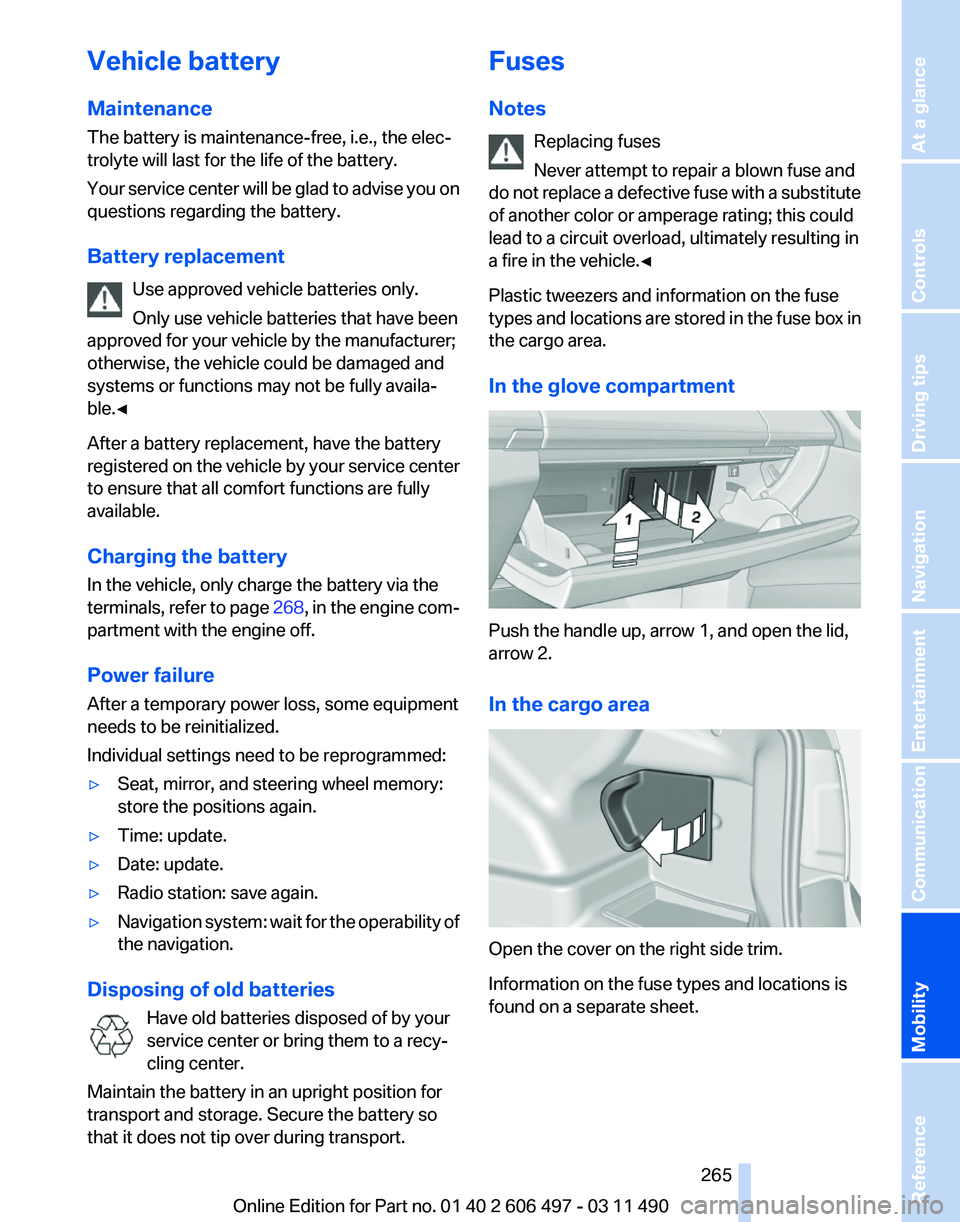
In the glove compartment Push the handle up, arrow 1, and open the lid,
arrow 2.
In the cargo area
Open the cover on the right side trim.
Information on the fuse types and locations is
found on a separate sheet. Seite 265
265Online Edition for Part no. 01 40 2 606 497 - 03 11 490
Reference
Mobility Communication Entertainment Navigation Driving tips Controls At a glance
Page 283 of 299
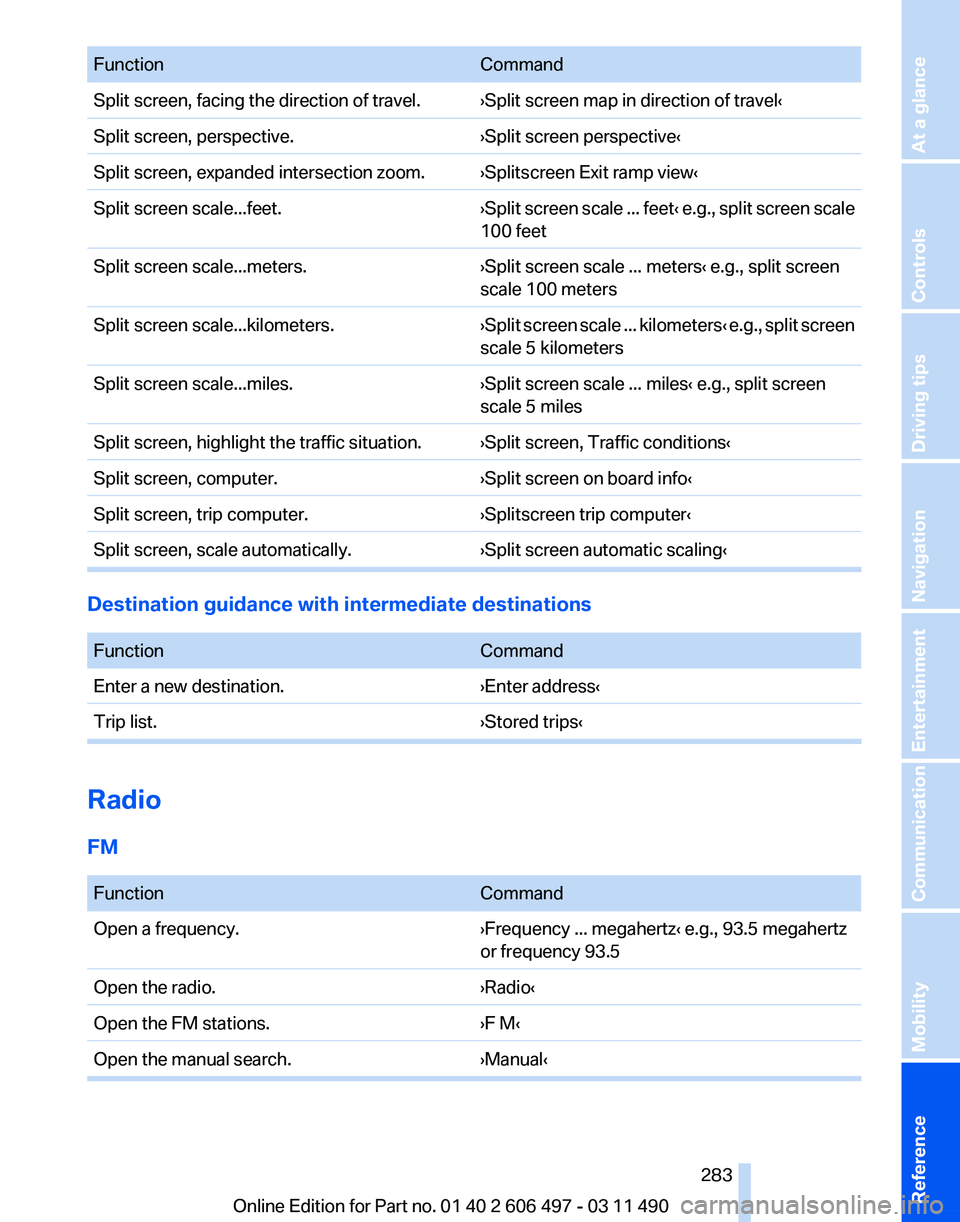
Function
Command
Split screen, facing the direction of travel. ›Split screen map in direction of travel‹
Split screen, perspective. ›Split screen perspective‹
Split screen, expanded intersection zoom. ›Splitscreen Exit ramp view‹
Split screen scale...feet. ›Split screen scale ... feet‹ e.g., split screen scale
100 feet
Split screen scale...meters. ›Split screen scale ... meters‹ e.g., split screen
scale 100 meters
Split screen scale...kilometers. ›Split
screen scale ... kilometers‹ e.g., split screen
scale 5 kilometers
Split screen scale...miles. ›Split screen scale ... miles‹ e.g., split screen
scale 5 miles
Split screen, highlight the traffic situation. ›Split screen, Traffic conditions‹
Split screen, computer. ›Split screen on board info‹
Split screen, trip computer. ›Splitscreen trip computer‹
Split screen, scale automatically. ›Split screen automatic scaling‹Destination guidance with intermediate destinations
Function
Command
Enter a new destination. ›Enter address‹
Trip list. ›Stored trips‹Radio
FM
Function
Command
Open a frequency. ›Frequency ... megahertz‹ e.g., 93.5 megahertz
or frequency 93.5
Open the radio. ›Radio‹
Open the FM stations. ›F M‹
Open the manual search. ›Manual‹ Seite 283
283Online Edition for Part no. 01 40 2 606 497 - 03 11 490
Reference Mobility Communication Entertainment Navigation Driving tips Controls At a glance
Page 291 of 299
Engine start, refer to Starting
the engine 65
Engine start, Starting aid 267
Engine stop 66
Engine temperature 76
Entering/exiting
vehicle, assis‐
tance, steering wheel 60
Equalizer 170
Equipment, interior 132
ESP Electronic Stability Pro‐ gram, refer to DSC 98
Exchanging wheels/tires 250
Exhaust system 144
Exterior mirror, automatic dim‐ ming feature, dimmable exte‐
rior mirrors 59
Exterior mirrors 58
External devices 190
External start 267
External temperature dis‐ play 76
External temperature warn‐ ing 76
Eyes for securing cargo 147
F
Fader 170
Failure message, refer to Check Control 82
False alarm, refer to Uninten‐ tional alarm 44
Fan, refer to Air volume 126
Fault displays, refer to Check Control 82
Filler neck for engine oil 255
Fine wood, care 273
First aid kit 267
Fitting for towing, refer to Tow fitting 269
Flat tire, Tire Pressure Monitor TPM 91
Flat tire, warning lamp 92
Flat tire, wheel change 264
Flooding 145
Floor carpet, care 273
Floor mats, care 273
FM/AM station 172 Folding table in the rear
136
Fold-out position, windshield wipers 72
Foot brake 145
Front airbags 88
Front fog lamps 87
Front
fog lamps, front, bulb re‐
placement 262
Front lamps 261
Front passenger airbags, au‐ tomatic deactivation 89
Front passenger airbags, indi‐ cator lamp 90
Front passenger seat, adjust‐ ing 50
Front seats, adjusting 48
Fuel cap 242
Fuel consumption, current 76
Fuel consumption, refer to Average fuel consump‐
tion 78
Fuel filler flap 242
Fuel gauge 75
Fuel quality 243
Fuel, tank capacity 279
Fuse 265
G
Garage door opener, refer to Integrated universal remote
control 132
Gas station recommenda‐ tion 161
Gear change, automatic trans‐ mission 73
General driving notes 144
Gentleman function 50
Glass sunroof, powered 46
Glove compartment 138
GPS navigation, refer to Navi‐ gation system 152
Gross vehicle weight, ap‐ proved 278
Gross weight, permissible for trailer towing 278 H
Hand brake, refer to Parking
brake 66
Hand-held transmitter, alter‐ nating code 133
Hazard warning flashers 266
HDC Hill Descent Control 99
HD Radio 173
Head airbags 88
Headlamp control, auto‐ matic 85
Headlamp courtesy delay fea‐ ture 84
Headlamp courtesy delay fea‐ ture via remote control 37
Headlamp flasher 70
Headlamp glass 261
Headlamps 261
Headlamps, care 272
Headlamp washer system 70
Headliner 18
Headphones, rear entertain‐ ment 202, 207
Head restraints 48
Head restraints, front 54
Head restraints, rear 55
Head-up Display 123
Head-up Display, care 273
Heavy cargo, stowing 147
Height, seats 48
Height
with roof-mounted aer‐
ial, vehicle 276
High-beam Assistant 86
High beams 70
High beams/low beams, refer to High-beam Assistant 86
Hill Descent Control HDC 99
Hills 146
Hill start assistant, refer to Drive-off assistant 98
Hints 6
Holder for beverages 140
Homepage 6
Hood 253
Horn 12
Hotel function, trunk lid 41
Hot exhaust system 144
Seite 291
291Online Edition for Part no. 01 40 2 606 497 - 03 11 490
Reference Mobility Communication Entertainment Navigation Driving tips Controls At a glance