phone BMW 7 SERIES 2012 Repair Manual
[x] Cancel search | Manufacturer: BMW, Model Year: 2012, Model line: 7 SERIES, Model: BMW 7 SERIES 2012Pages: 299, PDF Size: 8.49 MB
Page 237 of 299
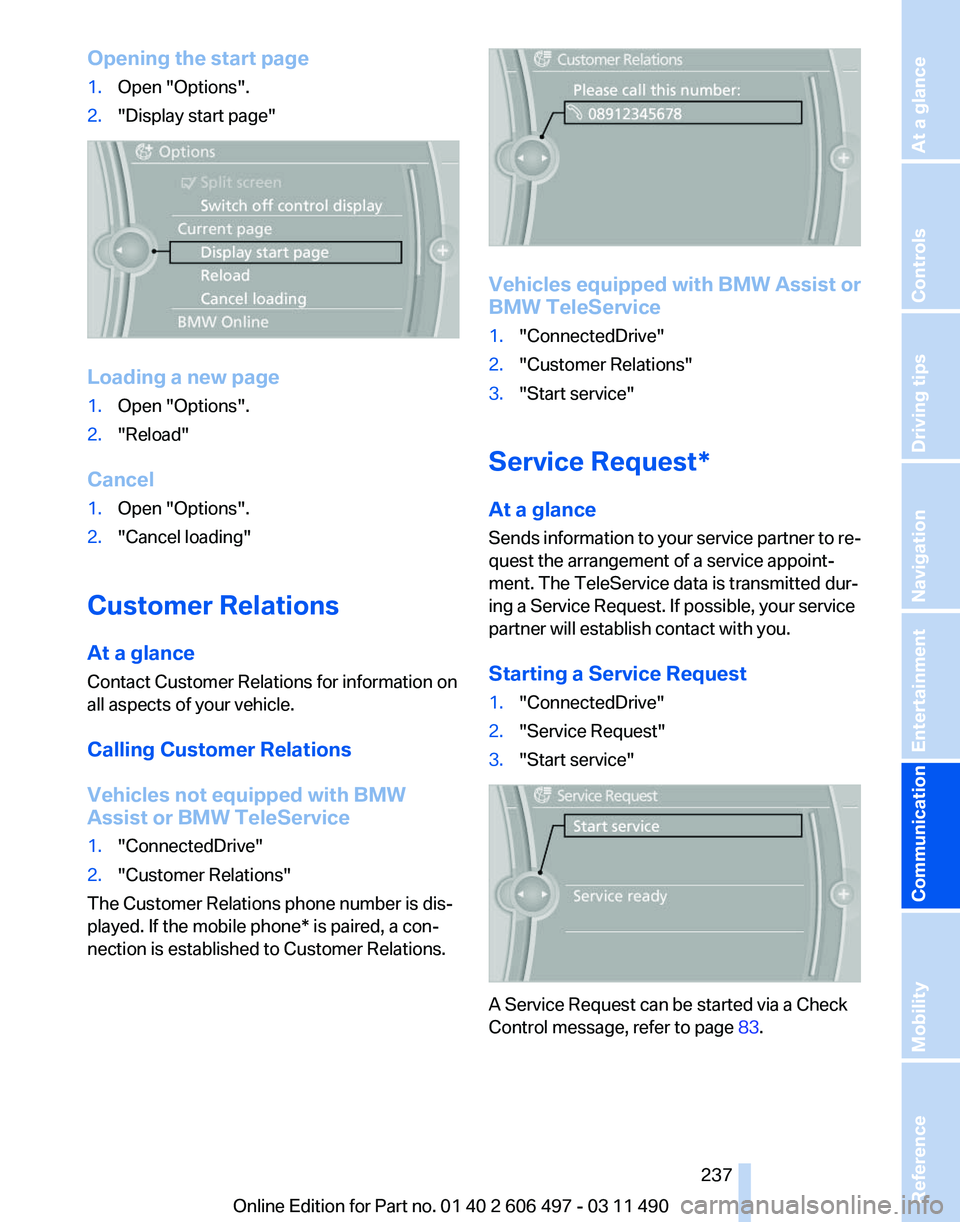
Opening the start page
1.
Open "Options".
2. "Display start page" Loading a new page
1.
Open "Options".
2. "Reload"
Cancel
1. Open "Options".
2. "Cancel loading"
Customer Relations
At a glance
Contact Customer Relations for information on
all aspects of your vehicle.
Calling Customer Relations
Vehicles not equipped with BMW
Assist or BMW TeleService
1. "ConnectedDrive"
2. "Customer Relations"
The Customer Relations phone number is dis‐
played. If the mobile phone* is paired, a con‐
nection is established to Customer Relations. Vehicles equipped with BMW Assist or
BMW TeleService
1.
"ConnectedDrive"
2. "Customer Relations"
3. "Start service"
Service Request*
At a glance
Sends
information to your service partner to re‐
quest the arrangement of a service appoint‐
ment. The TeleService data is transmitted dur‐
ing a Service Request. If possible, your service
partner will establish contact with you.
Starting a Service Request
1. "ConnectedDrive"
2. "Service Request"
3. "Start service" A Service Request can be started via a Check
Control message, refer to page
83.
Seite 237
237Online Edition for Part no. 01 40 2 606 497 - 03 11 490
Reference Mobility
Communication Entertainment Navigation Driving tips Controls At a glance
Page 238 of 299
Automatic Service Request*
The TeleService data necessary for servicing
the
vehicle are automatically sent to your service
partner prior to the service deadline. If possible,
the service partner will contact you and a service
appointment can be arranged.
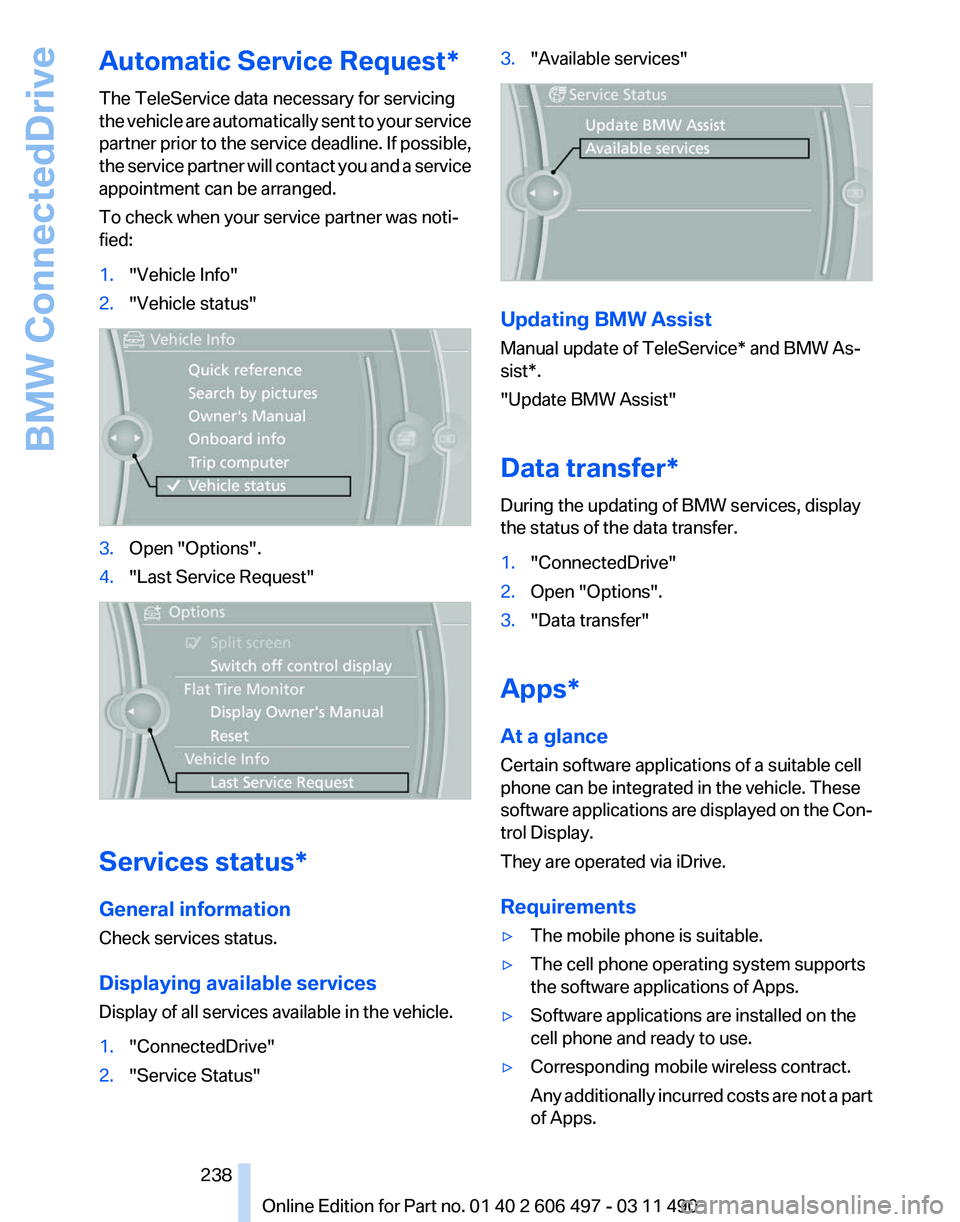
To check when your service partner was noti‐
fied:
1. "Vehicle Info"
2. "Vehicle status" 3.
Open "Options".
4. "Last Service Request" Services status*
General information
Check services status.
Displaying available services
Display of all services available in the vehicle.
1.
"ConnectedDrive"
2. "Service Status" 3.
"Available services" Updating BMW Assist
Manual update of
TeleService* and BMW As‐
sist*.
"Update BMW Assist"
Data transfer*
During the updating of BMW services, display
the status of the data transfer.
1. "ConnectedDrive"
2. Open "Options".
3. "Data transfer"
Apps*
At a glance
Certain software applications of a suitable cell
phone can be integrated in the vehicle. These
software
applications are displayed on the Con‐
trol Display.
They are operated via iDrive.
Requirements
▷ The mobile phone is suitable.
▷ The cell phone operating system supports
the software applications of Apps.
▷ Software applications are installed on the
cell phone and ready to use.
▷ Corresponding mobile wireless contract.
Any
additionally incurred costs are not a part
of Apps.
Seite 238
238 Online Edition for Part no. 01 40 2 606 497 - 03 11 490
BMW ConnectedDrive
Page 239 of 299
▷
Use only BMW approved software applica‐
tions; otherwise, it may result in malfunc‐
tions.
Information about suitable cell phones, available
software applications and their installation can
be found at www.bmw.com/connectivity or at
the service center.
Create the entries.
Make entries only when traffic and road
conditions allow. Otherwise, the vehicle occu‐
pants
and other road users may be put in danger
because of the distraction from driving.
For reasons of safety, some software applica‐
tions are usable only while the vehicle is station‐
ary.◀
Operate Apps
1. Connect the cell phone via the snap-in
adapter or via the USB audio interface.
2. "ConnectedDrive"
3. Select the desired software application.
Displaying status
Information about the currently available soft‐
ware applications can be displayed.
1. "ConnectedDrive"
2. "BMW apps"
PlugIn*
Selected functions of the cell phone are dis‐
played on the Control Display. They can be op‐
erated via iDrive.
1. Connect cell phone via the snap-in adapter.
2. "ConnectedDrive"
3. "PlugIn"
4. "Activate PlugIn"
5. Navigate to the displayed functions via the
controller
and select, for example, a desired
category or track.
Press button to switch within the cell
phone functions to a higher level or back. Press button twice to switch back to the
main menu.
Notes
▷ The ranges of Apps that can be displayed on
the Control Display depend on the range of
installed software applications on the cell
phone.
▷ The data transmission of the software ap‐
plications
from the cell phone to the vehicle
can last some time. Some software applica‐
tions depend on the speed of the available
Internet connection of the cell phone.
▷ Some cell phones cannot simultaneously
use
Apps and the Bluetooth hands-free sys‐
tem.
If necessary, restart the software application
on the cell phone after a phone conversa‐
tion.
TeleService Report*
Transmits
technical data that is evaluated for the
ongoing development of BMW products from
your vehicle to BMW in regular intervals if nec‐
essary.
TeleService Report is activated in vehicles that
meet certain technical requirements and have a
valid Assist contract; this feature is free of
charge.
Neither personal data nor position data is trans‐
mitted.
Indicate when the last Teleservice Report was
transmitted:
1. "Vehicle Info"
2. "Vehicle status"
3. Open "Options".
4. "Last Teleservice Info" Seite 239
239Online Edition for Part no. 01 40 2 606 497 - 03 11 490
Reference Mobility
Communication Entertainment Navigation Driving tips Controls At a glance
Page 266 of 299
Breakdown assistance
Hazard warning flashers
The button is located in the center console.
Emergency Request
*
Requirements
▷ Equipment version with full preparation
package mobile phone.
An Emergency Request can be made, even
if no mobile phones are paired with the ve‐
hicle.
▷ BMW Assist is activated.
▷ The radio ready state is switched on.
▷ The BMW Assist system is logged in to a
wireless communications network sup‐
ported by BMW Assist.
▷ The Assist system is functional.
Only press the SOS button in an emergency.
Emergency Request not guaranteed
For
technical reasons, the Emergency Re‐
quest cannot be guaranteed under unfavorable
conditions.◀
Service contract
▷ After your contract with BMW Assist has ex‐
pired,
the BMW Assist system can be deac‐
tivated by the service center without you
having to visit a workshop.
After deactivation, an Emergency Request
is no longer possible. ▷
Under certain circumstances, the system
can be reactivated by a service center after
you sign a new contract.
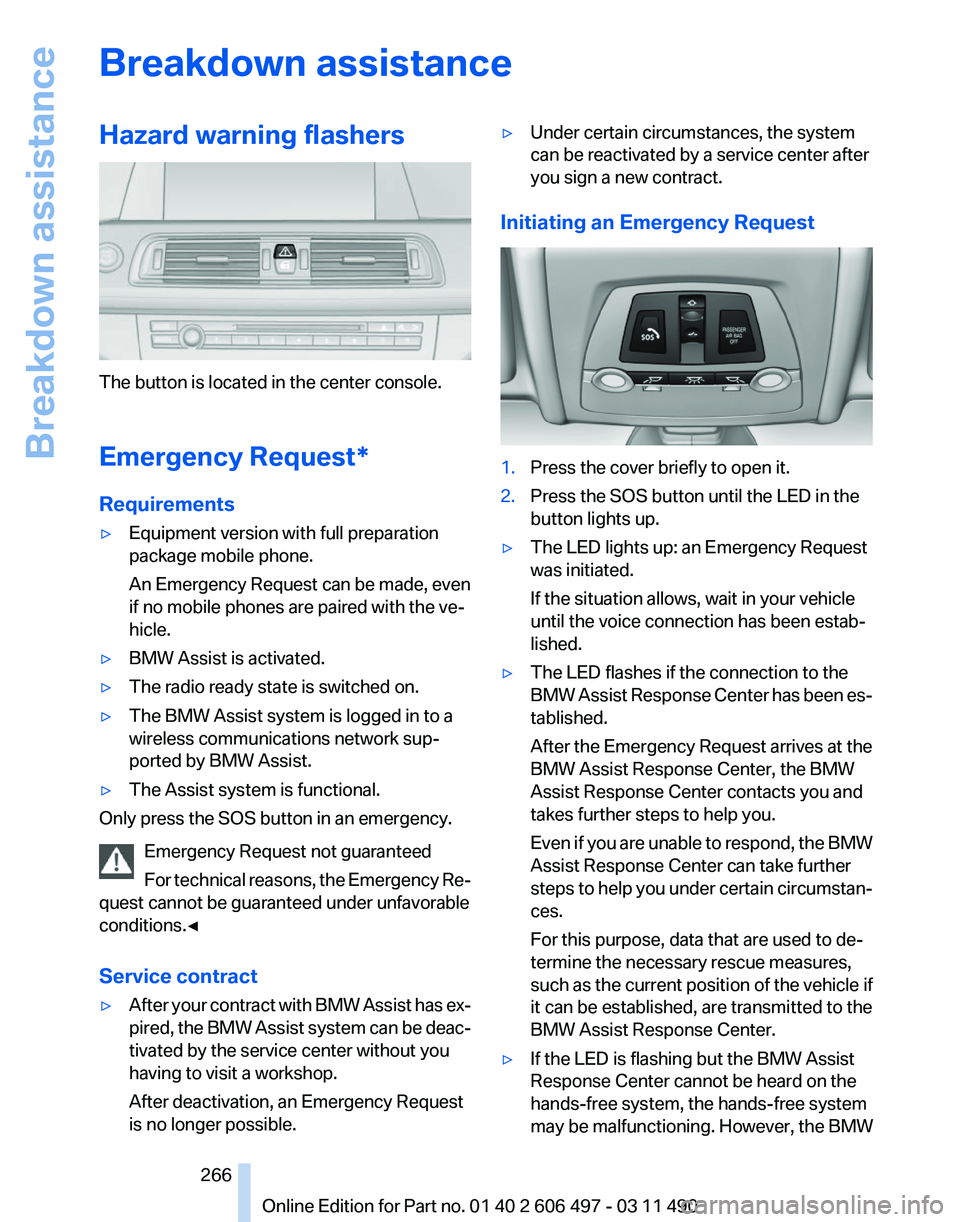
Initiating an Emergency Request 1.
Press the cover briefly to open it.
2. Press the SOS button until the LED in the
button lights up.
▷ The LED lights up: an Emergency Request
was initiated.
If the situation allows, wait in your vehicle
until the voice connection has been estab‐
lished.
▷ The LED flashes if the connection to the
BMW
Assist Response Center has been es‐
tablished.
After the Emergency Request arrives at the
BMW Assist Response Center, the BMW
Assist Response Center contacts you and
takes further steps to help you.
Even if you are unable to respond, the BMW
Assist Response Center can take further
steps to help you under certain circumstan‐
ces.
For this purpose, data that are used to de‐
termine the necessary rescue measures,
such as the current position of the vehicle if
it can be established, are transmitted to the
BMW Assist Response Center.
▷ If the LED is flashing but the BMW Assist
Response Center cannot be heard on the
hands-free system, the hands-free system
may be malfunctioning. However, the BMW
Seite 266
266 Online Edition for Part no. 01 40 2 606 497 - 03 11 490
Breakdown assistance
Page 267 of 299
Assist Response Center may still be able to
hear you.
Initiating an Emergency Request
automatically
Under certain conditions, an Emergency Re‐
quest is automatically initiated immediately after
a severe accident. Automatic Collision Notifica‐
tion is not affected by pressing the SOS button.
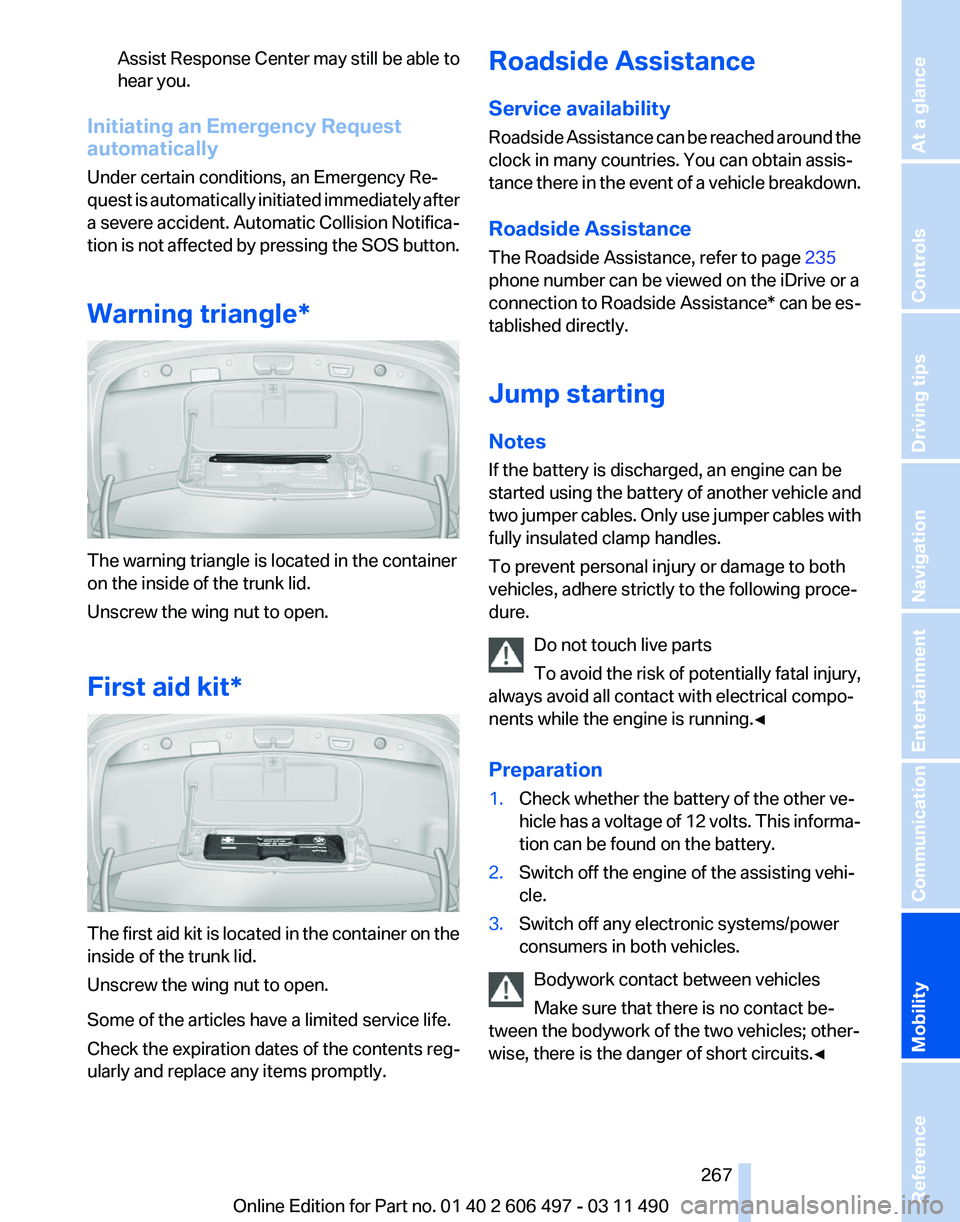
Warning triangle* The warning triangle is located in the container
on the inside of the trunk lid.
Unscrew the wing nut to open.
First aid kit*
The first aid kit is located in the container on the
inside of the trunk lid.
Unscrew the wing nut to open.
Some of the articles have a limited service life.
Check the expiration dates of the contents reg‐
ularly and replace any items promptly. Roadside Assistance
Service availability
Roadside Assistance can be reached around the
clock in many countries. You can obtain assis‐
tance there in the event of a vehicle breakdown.
Roadside Assistance
The Roadside Assistance, refer to page
235
phone number can be viewed on the iDrive or a
connection to Roadside Assistance* can be es‐
tablished directly.
Jump starting
Notes
If the battery is discharged, an engine can be
started using the battery of another vehicle and
two jumper cables. Only use jumper cables with
fully insulated clamp handles.
To prevent personal injury or damage to both
vehicles, adhere strictly to the following proce‐
dure.
Do not touch live parts
To avoid the risk of potentially fatal injury,
always avoid all contact with electrical compo‐
nents while the engine is running.◀
Preparation
1. Check whether the battery of the other ve‐
hicle has a voltage of 12 volts. This informa‐
tion can be found on the battery.
2. Switch off the engine of the assisting vehi‐
cle.
3. Switch off any electronic systems/power
consumers in both vehicles.
Bodywork contact between vehicles
Make sure that there is no contact be‐
tween the bodywork of the two vehicles; other‐
wise, there is the danger of short circuits.◀ Seite 267
267Online Edition for Part no. 01 40 2 606 497 - 03 11 490
Reference
Mobility Communication Entertainment Navigation Driving tips Controls At a glance
Page 286 of 299
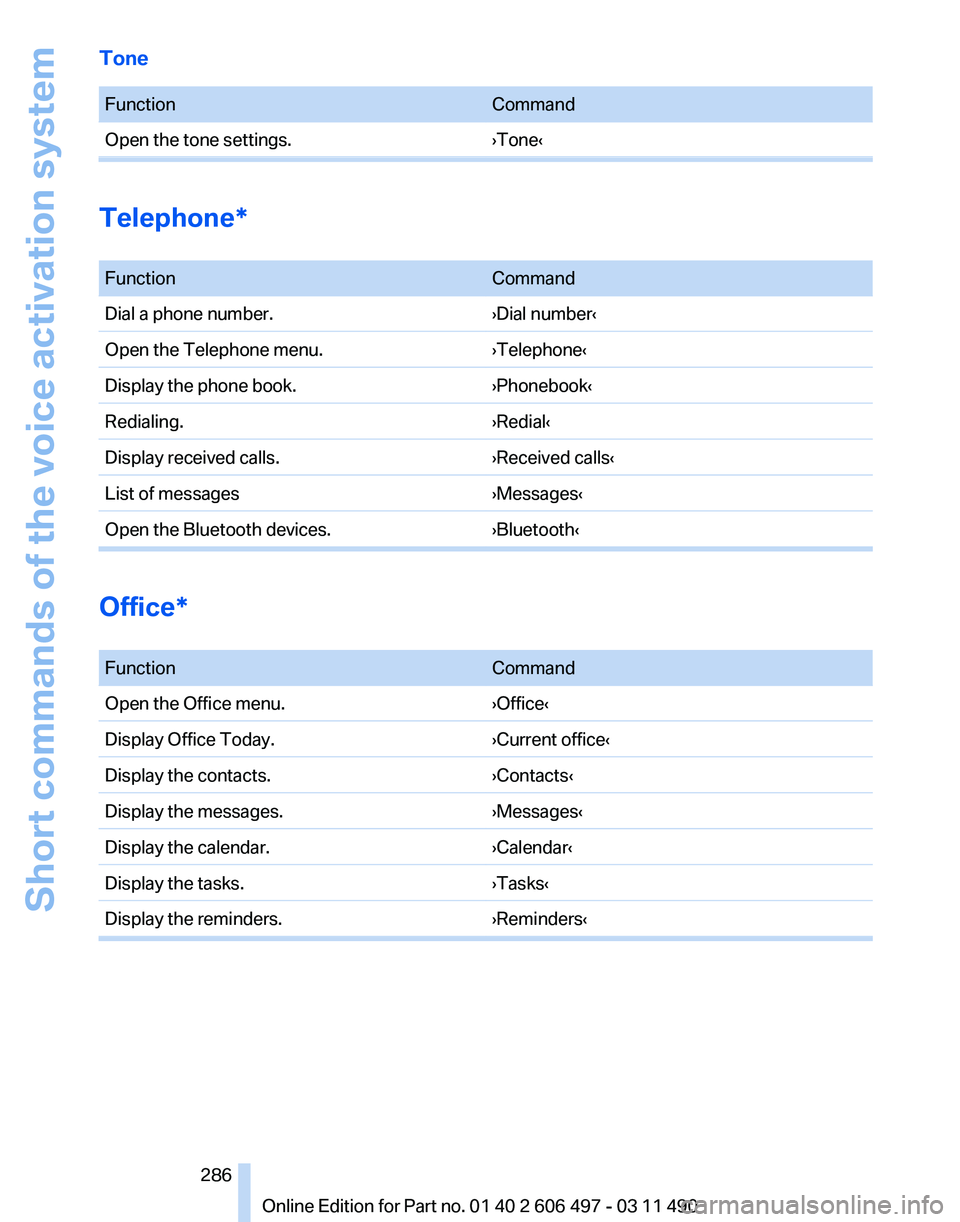
Tone
Function
Command
Open the tone settings. ›Tone‹Telephone*
Function
Command
Dial a phone number. ›Dial number‹
Open the Telephone menu. ›Telephone‹
Display the phone book. ›Phonebook‹
Redialing. ›Redial‹
Display received calls. ›Received calls‹
List of messages ›Messages‹
Open the Bluetooth devices. ›Bluetooth‹Office*
Function
Command
Open the Office menu. ›Office‹
Display Office Today. ›Current office‹
Display the contacts. ›Contacts‹
Display the messages. ›Messages‹
Display the calendar. ›Calendar‹
Display the tasks. ›Tasks‹
Display the reminders. ›Reminders‹ Seite 286
286 Online Edition for Part no. 01 40 2 606 497 - 03 11 490Short commands of the voice activation system
Page 288 of 299
Everything from A to Z
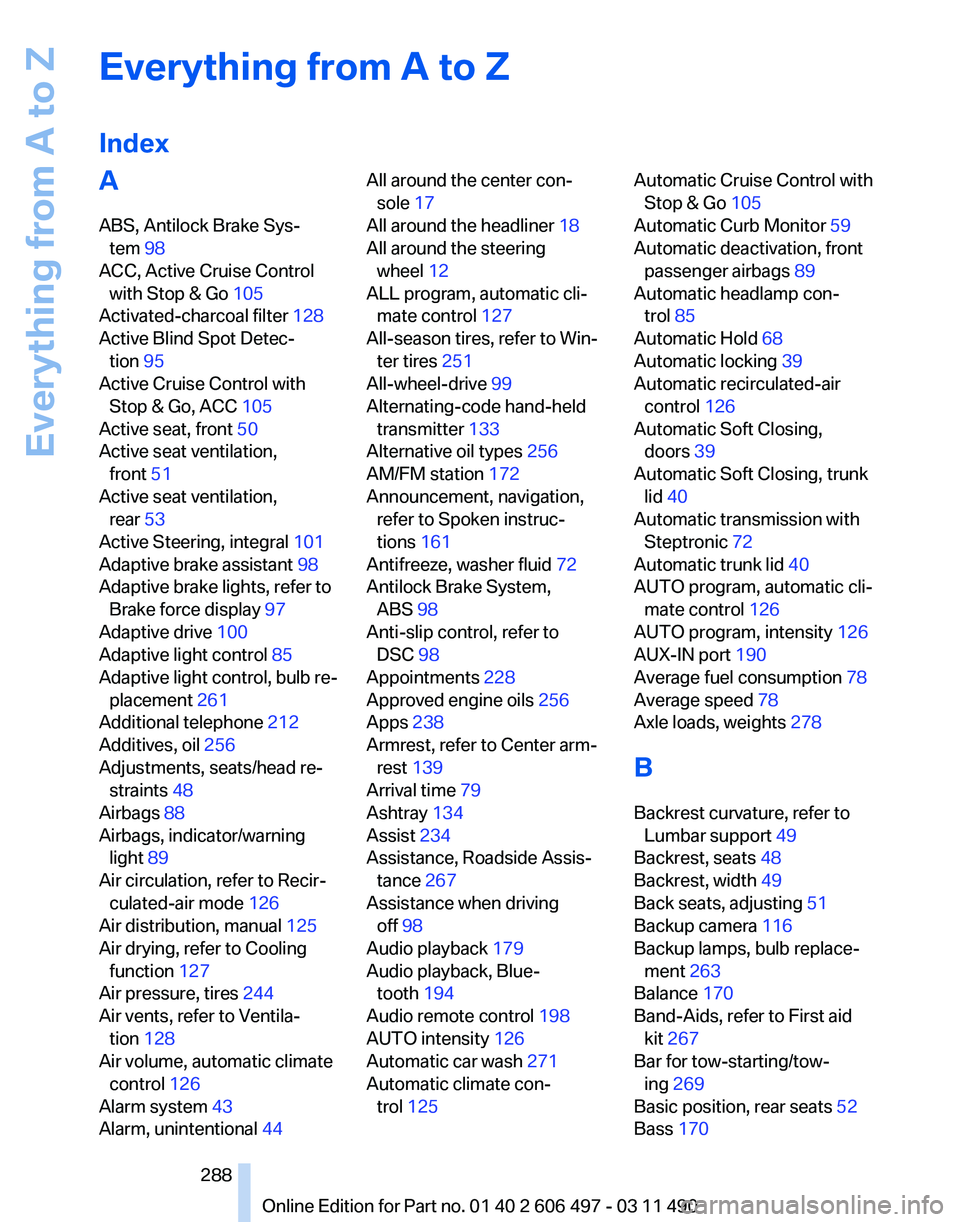
Index
A
ABS, Antilock Brake Sys‐
tem 98
ACC, Active Cruise Control with Stop & Go 105
Activated-charcoal filter 128
Active Blind Spot Detec‐ tion 95
Active Cruise Control with Stop & Go, ACC 105
Active seat, front 50
Active seat ventilation, front 51
Active seat ventilation, rear 53
Active Steering, integral 101
Adaptive brake assistant 98
Adaptive brake lights, refer to Brake force display 97
Adaptive drive 100
Adaptive light control 85
Adaptive
light control, bulb re‐
placement 261
Additional telephone 212
Additives, oil 256
Adjustments, seats/head re‐ straints 48
Airbags 88
Airbags, indicator/warning light 89
Air circulation, refer to Recir‐ culated-air mode 126
Air distribution, manual 125
Air drying, refer to Cooling function 127
Air pressure, tires 244
Air vents, refer to Ventila‐ tion 128
Air volume, automatic climate control 126
Alarm system 43
Alarm, unintentional 44 All around the center con‐
sole 17
All around the headliner 18
All around the steering wheel 12
ALL program, automatic cli‐ mate control 127
All-season tires, refer to Win‐ ter tires 251
All-wheel-drive 99
Alternating-code hand-held transmitter 133
Alternative oil types 256
AM/FM station 172
Announcement, navigation, refer to Spoken instruc‐
tions 161
Antifreeze, washer fluid 72
Antilock Brake System, ABS 98
Anti-slip control, refer to DSC 98
Appointments 228
Approved engine oils 256
Apps 238
Armrest, refer to Center arm‐ rest 139
Arrival time 79
Ashtray 134
Assist 234
Assistance, Roadside Assis‐ tance 267
Assistance when driving off 98
Audio playback 179
Audio playback, Blue‐ tooth 194
Audio remote control 198
AUTO intensity 126
Automatic car wash 271
Automatic climate con‐ trol 125 Automatic Cruise Control with
Stop & Go 105
Automatic Curb Monitor 59
Automatic deactivation, front passenger airbags 89
Automatic headlamp con‐ trol 85
Automatic Hold 68
Automatic locking 39
Automatic recirculated-air control 126
Automatic Soft Closing, doors 39
Automatic Soft Closing, trunk lid 40
Automatic transmission with Steptronic 72
Automatic trunk lid 40
AUTO program, automatic cli‐ mate control 126
AUTO program, intensity 126
AUX-IN port 190
Average fuel consumption 78
Average speed 78
Axle loads, weights 278
B
Backrest curvature, refer to Lumbar support 49
Backrest, seats 48
Backrest, width 49
Back seats, adjusting 51
Backup camera 116
Backup lamps, bulb replace‐ ment 263
Balance 170
Band-Aids, refer to First aid kit 267
Bar for tow-starting/tow‐ ing 269
Basic position, rear seats 52
Bass 170
Seite 288
288 Online Edition for Part no. 01 40 2 606 497 - 03 11 490
Everything from A to Z
Page 289 of 299
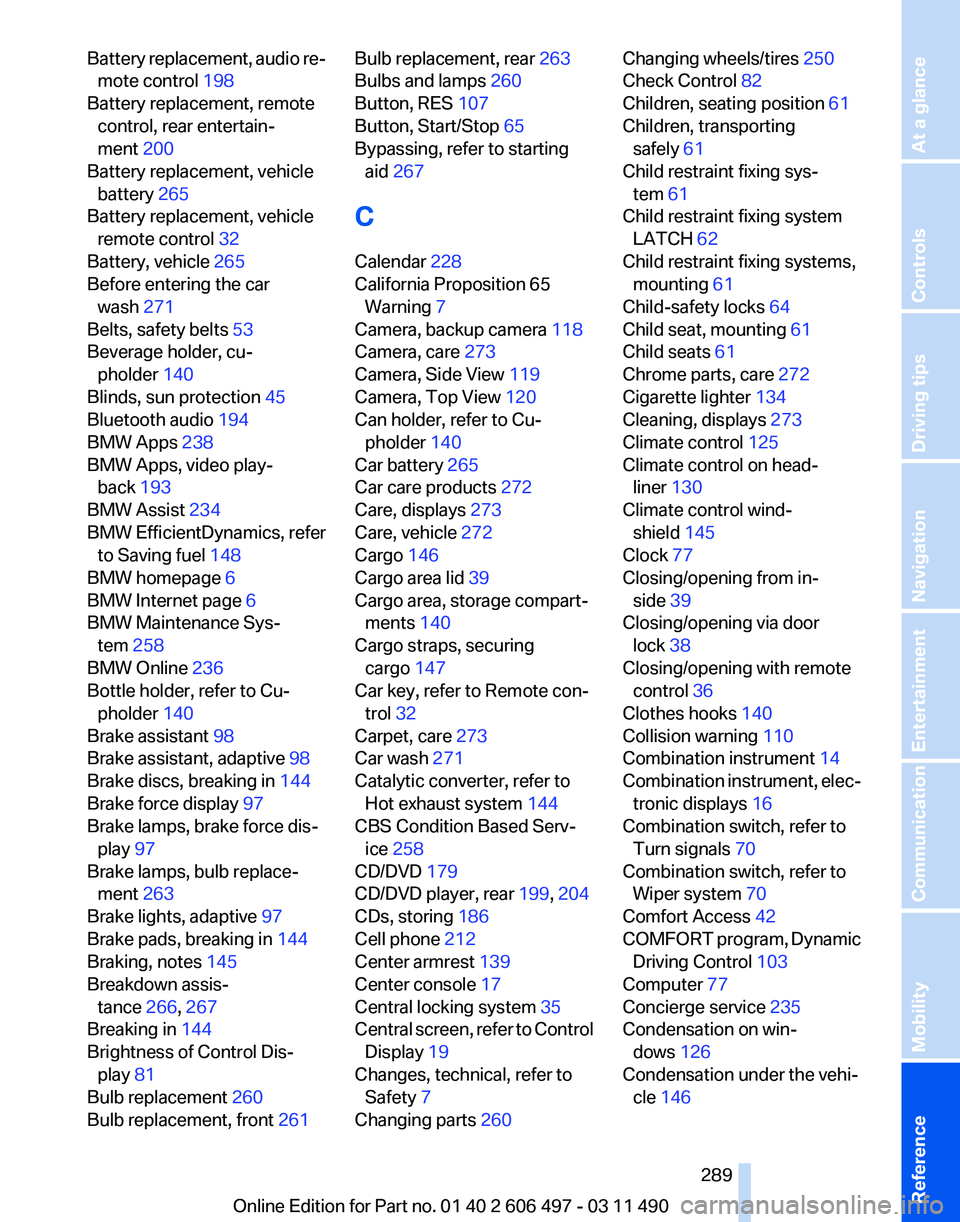
Battery replacement, audio re‐
mote control 198
Battery replacement, remote control, rear entertain‐
ment 200
Battery replacement, vehicle battery 265
Battery replacement, vehicle remote control 32
Battery, vehicle 265
Before entering the car wash 271
Belts, safety belts 53
Beverage holder, cu‐ pholder 140
Blinds, sun protection 45
Bluetooth audio 194
BMW Apps 238
BMW Apps, video play‐ back 193
BMW Assist 234
BMW EfficientDynamics, refer to Saving fuel 148
BMW homepage 6
BMW Internet page 6
BMW Maintenance Sys‐ tem 258
BMW Online 236
Bottle holder, refer to Cu‐ pholder 140
Brake assistant 98
Brake assistant, adaptive 98
Brake discs, breaking in 144
Brake force display 97
Brake lamps, brake force dis‐ play 97
Brake lamps, bulb replace‐ ment 263
Brake lights, adaptive 97
Brake pads, breaking in 144
Braking, notes 145
Breakdown assis‐ tance 266, 267
Breaking in 144
Brightness of Control Dis‐ play 81
Bulb replacement 260
Bulb replacement, front 261 Bulb replacement, rear
263
Bulbs and lamps 260
Button, RES 107
Button, Start/Stop 65
Bypassing, refer to starting aid 267
C
Calendar 228
California Proposition 65 Warning 7
Camera, backup camera 118
Camera, care 273
Camera, Side View 119
Camera, Top View 120
Can holder, refer to Cu‐ pholder 140
Car battery 265
Car care products 272
Care, displays 273
Care, vehicle 272
Cargo 146
Cargo area lid 39
Cargo area, storage compart‐ ments 140
Cargo straps, securing cargo 147
Car key, refer to Remote con‐ trol 32
Carpet, care 273
Car wash 271
Catalytic converter, refer to Hot exhaust system 144
CBS Condition Based Serv‐ ice 258
CD/DVD 179
CD/DVD player, rear 199, 204
CDs, storing 186
Cell phone 212
Center armrest 139
Center console 17
Central locking system 35
Central
screen, refer to Control
Display 19
Changes, technical, refer to Safety 7
Changing parts 260 Changing wheels/tires 250
Check Control 82
Children, seating position 61
Children, transporting safely 61
Child restraint fixing sys‐ tem 61
Child restraint fixing system LATCH 62
Child restraint fixing systems, mounting 61
Child-safety locks 64
Child seat, mounting 61
Child seats 61
Chrome parts, care 272
Cigarette lighter 134
Cleaning, displays 273
Climate control 125
Climate control on head‐ liner 130
Climate control wind‐ shield 145
Clock 77
Closing/opening from in‐ side 39
Closing/opening via door lock 38
Closing/opening with remote control 36
Clothes hooks 140
Collision warning 110
Combination instrument 14
Combination
instrument, elec‐
tronic displays 16
Combination switch, refer to Turn signals 70
Combination switch, refer to Wiper system 70
Comfort Access 42
COMFORT program, Dynamic Driving Control 103
Computer 77
Concierge service 235
Condensation on win‐ dows 126
Condensation under the vehi‐ cle 146
Seite 289
289Online Edition for Part no. 01 40 2 606 497 - 03 11 490
Reference Mobility Communication Entertainment Navigation Driving tips Controls At a glance
Page 291 of 299
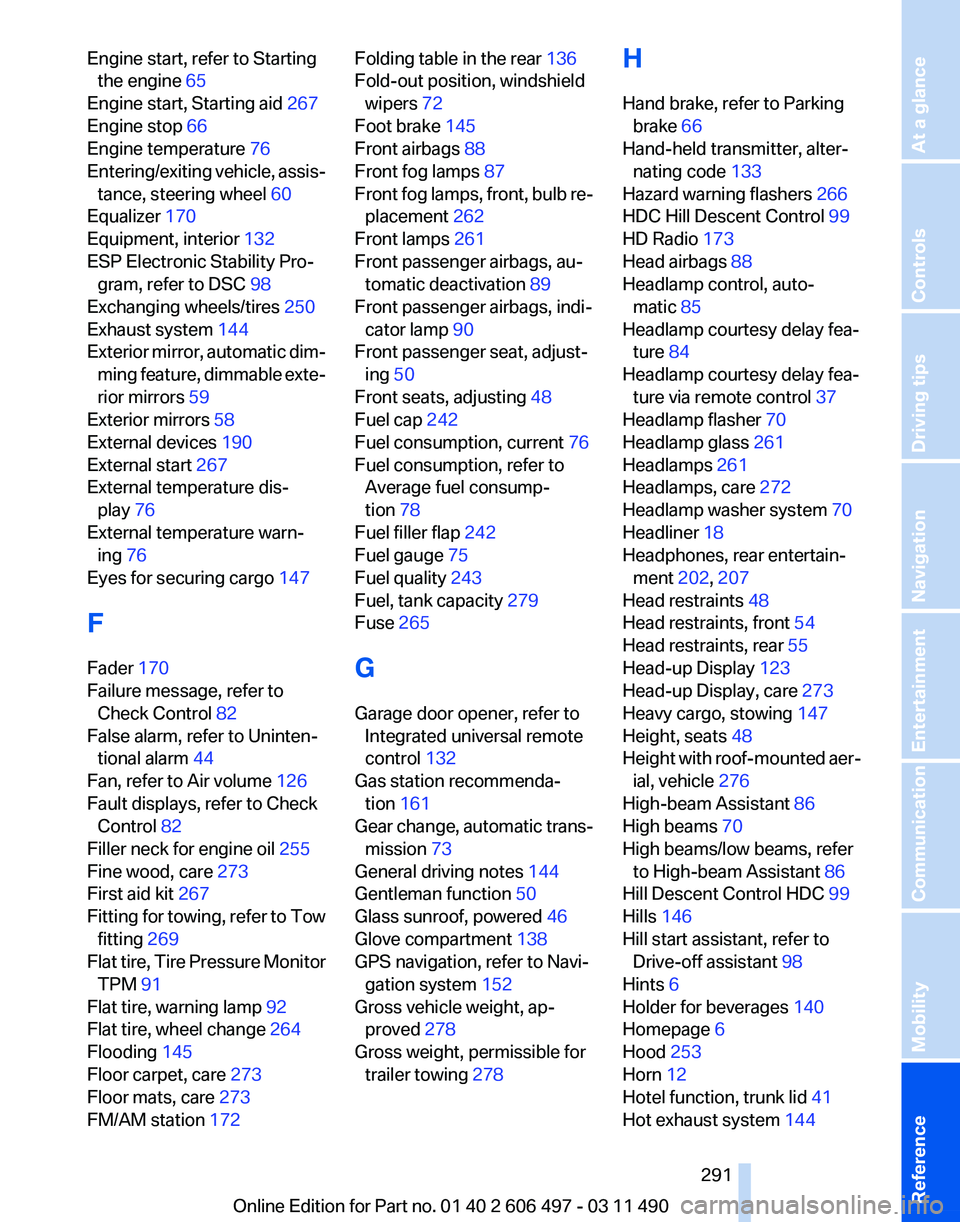
Engine start, refer to Starting
the engine 65
Engine start, Starting aid 267
Engine stop 66
Engine temperature 76
Entering/exiting
vehicle, assis‐
tance, steering wheel 60
Equalizer 170
Equipment, interior 132
ESP Electronic Stability Pro‐ gram, refer to DSC 98
Exchanging wheels/tires 250
Exhaust system 144
Exterior mirror, automatic dim‐ ming feature, dimmable exte‐
rior mirrors 59
Exterior mirrors 58
External devices 190
External start 267
External temperature dis‐ play 76
External temperature warn‐ ing 76
Eyes for securing cargo 147
F
Fader 170
Failure message, refer to Check Control 82
False alarm, refer to Uninten‐ tional alarm 44
Fan, refer to Air volume 126
Fault displays, refer to Check Control 82
Filler neck for engine oil 255
Fine wood, care 273
First aid kit 267
Fitting for towing, refer to Tow fitting 269
Flat tire, Tire Pressure Monitor TPM 91
Flat tire, warning lamp 92
Flat tire, wheel change 264
Flooding 145
Floor carpet, care 273
Floor mats, care 273
FM/AM station 172 Folding table in the rear
136
Fold-out position, windshield wipers 72
Foot brake 145
Front airbags 88
Front fog lamps 87
Front
fog lamps, front, bulb re‐
placement 262
Front lamps 261
Front passenger airbags, au‐ tomatic deactivation 89
Front passenger airbags, indi‐ cator lamp 90
Front passenger seat, adjust‐ ing 50
Front seats, adjusting 48
Fuel cap 242
Fuel consumption, current 76
Fuel consumption, refer to Average fuel consump‐
tion 78
Fuel filler flap 242
Fuel gauge 75
Fuel quality 243
Fuel, tank capacity 279
Fuse 265
G
Garage door opener, refer to Integrated universal remote
control 132
Gas station recommenda‐ tion 161
Gear change, automatic trans‐ mission 73
General driving notes 144
Gentleman function 50
Glass sunroof, powered 46
Glove compartment 138
GPS navigation, refer to Navi‐ gation system 152
Gross vehicle weight, ap‐ proved 278
Gross weight, permissible for trailer towing 278 H
Hand brake, refer to Parking
brake 66
Hand-held transmitter, alter‐ nating code 133
Hazard warning flashers 266
HDC Hill Descent Control 99
HD Radio 173
Head airbags 88
Headlamp control, auto‐ matic 85
Headlamp courtesy delay fea‐ ture 84
Headlamp courtesy delay fea‐ ture via remote control 37
Headlamp flasher 70
Headlamp glass 261
Headlamps 261
Headlamps, care 272
Headlamp washer system 70
Headliner 18
Headphones, rear entertain‐ ment 202, 207
Head restraints 48
Head restraints, front 54
Head restraints, rear 55
Head-up Display 123
Head-up Display, care 273
Heavy cargo, stowing 147
Height, seats 48
Height
with roof-mounted aer‐
ial, vehicle 276
High-beam Assistant 86
High beams 70
High beams/low beams, refer to High-beam Assistant 86
Hill Descent Control HDC 99
Hills 146
Hill start assistant, refer to Drive-off assistant 98
Hints 6
Holder for beverages 140
Homepage 6
Hood 253
Horn 12
Hotel function, trunk lid 41
Hot exhaust system 144
Seite 291
291Online Edition for Part no. 01 40 2 606 497 - 03 11 490
Reference Mobility Communication Entertainment Navigation Driving tips Controls At a glance
Page 292 of 299
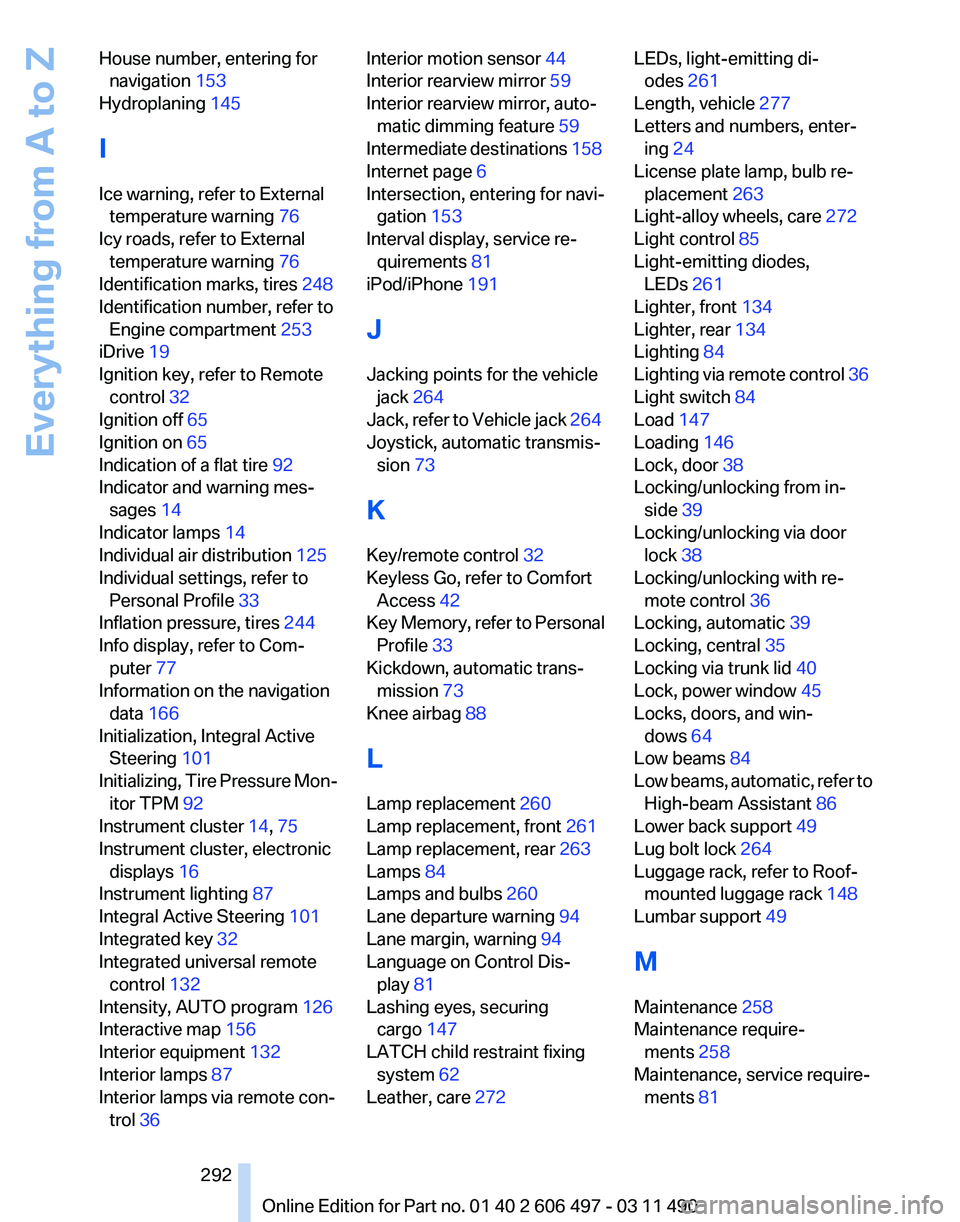
House number, entering for
navigation 153
Hydroplaning 145
I
Ice warning, refer to External temperature warning 76
Icy roads, refer to External temperature warning 76
Identification marks, tires 248
Identification number, refer to Engine compartment 253
iDrive 19
Ignition key, refer to Remote control 32
Ignition off 65
Ignition on 65
Indication of a flat tire 92
Indicator and warning mes‐ sages 14
Indicator lamps 14
Individual air distribution 125
Individual settings, refer to Personal Profile 33
Inflation pressure, tires 244
Info display, refer to Com‐ puter 77
Information on the navigation data 166
Initialization, Integral Active Steering 101
Initializing,
Tire Pressure Mon‐
itor TPM 92
Instrument cluster 14, 75
Instrument cluster, electronic displays 16
Instrument lighting 87
Integral Active Steering 101
Integrated key 32
Integrated universal remote control 132
Intensity, AUTO program 126
Interactive map 156
Interior equipment 132
Interior lamps 87
Interior lamps via remote con‐ trol 36 Interior motion sensor 44
Interior rearview mirror
59
Interior rearview mirror, auto‐ matic dimming feature 59
Intermediate
destinations 158
Internet page 6
Intersection, entering for navi‐ gation 153
Interval display, service re‐ quirements 81
iPod/iPhone 191
J
Jacking points for the vehicle jack 264
Jack, refer to Vehicle jack 264
Joystick, automatic transmis‐ sion 73
K
Key/remote control 32
Keyless Go, refer to Comfort Access 42
Key Memory, refer to Personal Profile 33
Kickdown, automatic trans‐ mission 73
Knee airbag 88
L
Lamp replacement 260
Lamp replacement, front 261
Lamp replacement, rear 263
Lamps 84
Lamps and bulbs 260
Lane departure warning 94
Lane margin, warning 94
Language on Control Dis‐ play 81
Lashing eyes, securing cargo 147
LATCH child restraint fixing system 62
Leather, care 272 LEDs, light-emitting di‐
odes 261
Length, vehicle 277
Letters and numbers, enter‐ ing 24
License plate lamp, bulb re‐ placement 263
Light-alloy wheels, care 272
Light control 85
Light-emitting diodes, LEDs 261
Lighter, front 134
Lighter, rear 134
Lighting 84
Lighting
via remote control 36
Light switch 84
Load 147
Loading 146
Lock, door 38
Locking/unlocking from in‐ side 39
Locking/unlocking via door lock 38
Locking/unlocking with re‐ mote control 36
Locking, automatic 39
Locking, central 35
Locking via trunk lid 40
Lock, power window 45
Locks, doors, and win‐ dows 64
Low beams 84
Low beams, automatic, refer to High-beam Assistant 86
Lower back support 49
Lug bolt lock 264
Luggage rack, refer to Roof- mounted luggage rack 148
Lumbar support 49
M
Maintenance 258
Maintenance require‐ ments 258
Maintenance, service require‐ ments 81
Seite 292
292 Online Edition for Part no. 01 40 2 606 497 - 03 11 490
Everything from A to Z