Plug BMW 7 SERIES 2016 G11 Owner's Manual
[x] Cancel search | Manufacturer: BMW, Model Year: 2016, Model line: 7 SERIES, Model: BMW 7 SERIES 2016 G11Pages: 314, PDF Size: 7.9 MB
Page 221 of 314
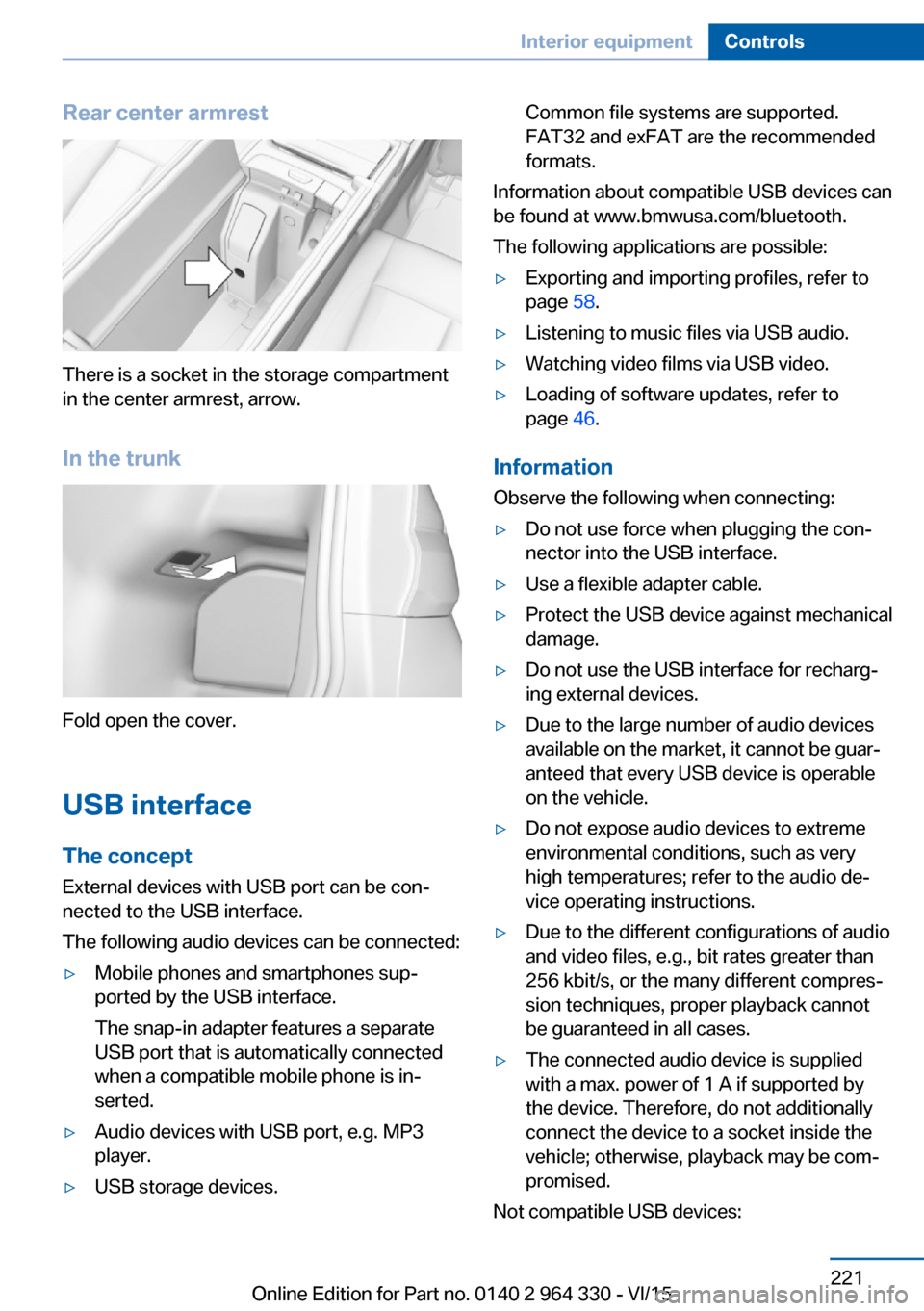
Rear center armrest
There is a socket in the storage compartment
in the center armrest, arrow.
In the trunk
Fold open the cover.
USB interface The concept
External devices with USB port can be con‐
nected to the USB interface.
The following audio devices can be connected:
▷Mobile phones and smartphones sup‐
ported by the USB interface.
The snap-in adapter features a separate
USB port that is automatically connected
when a compatible mobile phone is in‐
serted.▷Audio devices with USB port, e.g. MP3
player.▷USB storage devices.Common file systems are supported.
FAT32 and exFAT are the recommended
formats.
Information about compatible USB devices can
be found at www.bmwusa.com/bluetooth.
The following applications are possible:
▷Exporting and importing profiles, refer to
page 58.▷Listening to music files via USB audio.▷Watching video films via USB video.▷Loading of software updates, refer to
page 46.
Information
Observe the following when connecting:
▷Do not use force when plugging the con‐
nector into the USB interface.▷Use a flexible adapter cable.▷Protect the USB device against mechanical
damage.▷Do not use the USB interface for recharg‐
ing external devices.▷Due to the large number of audio devices
available on the market, it cannot be guar‐
anteed that every USB device is operable
on the vehicle.▷Do not expose audio devices to extreme
environmental conditions, such as very
high temperatures; refer to the audio de‐
vice operating instructions.▷Due to the different configurations of audio
and video files, e.g., bit rates greater than
256 kbit/s, or the many different compres‐
sion techniques, proper playback cannot
be guaranteed in all cases.▷The connected audio device is supplied
with a max. power of 1 A if supported by
the device. Therefore, do not additionally
connect the device to a socket inside the
vehicle; otherwise, playback may be com‐
promised.
Not compatible USB devices:
Seite 221Interior equipmentControls221
Online Edition for Part no. 0140 2 964 330 - VI/15
Page 262 of 314
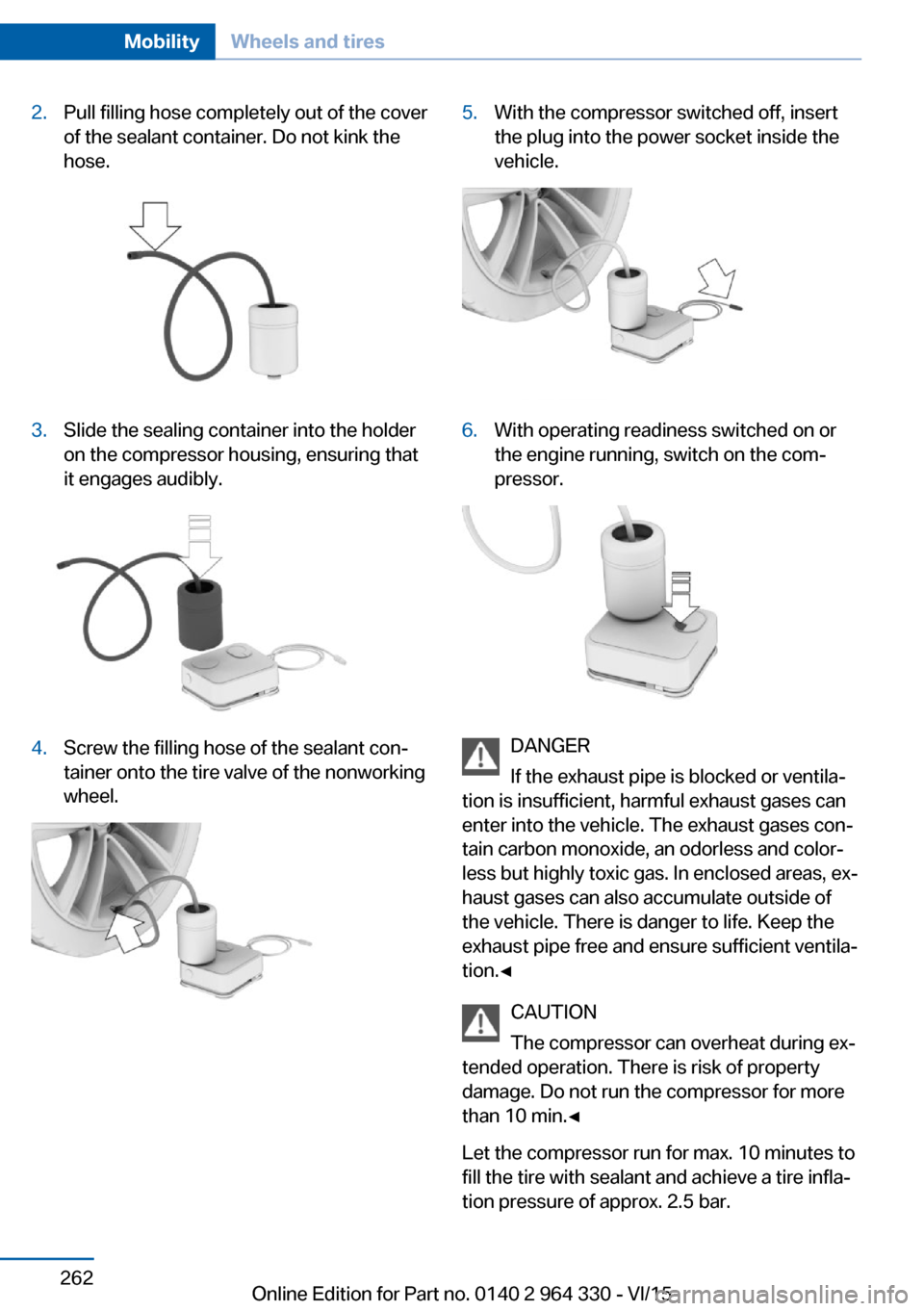
2.Pull filling hose completely out of the cover
of the sealant container. Do not kink the
hose.3.Slide the sealing container into the holder
on the compressor housing, ensuring that
it engages audibly.4.Screw the filling hose of the sealant con‐
tainer onto the tire valve of the nonworking
wheel.5.With the compressor switched off, insert
the plug into the power socket inside the
vehicle.6.With operating readiness switched on or
the engine running, switch on the com‐
pressor.
DANGER
If the exhaust pipe is blocked or ventila‐
tion is insufficient, harmful exhaust gases can
enter into the vehicle. The exhaust gases con‐
tain carbon monoxide, an odorless and color‐
less but highly toxic gas. In enclosed areas, ex‐
haust gases can also accumulate outside of
the vehicle. There is danger to life. Keep the
exhaust pipe free and ensure sufficient ventila‐
tion.◀
CAUTION
The compressor can overheat during ex‐
tended operation. There is risk of property
damage. Do not run the compressor for more
than 10 min.◀
Let the compressor run for max. 10 minutes to
fill the tire with sealant and achieve a tire infla‐
tion pressure of approx. 2.5 bar.
Seite 262MobilityWheels and tires262
Online Edition for Part no. 0140 2 964 330 - VI/15