fuel BMW 740I SEDAN 2016 User Guide
[x] Cancel search | Manufacturer: BMW, Model Year: 2016, Model line: 740I SEDAN, Model: BMW 740I SEDAN 2016Pages: 314, PDF Size: 7.9 MB
Page 107 of 314
▷On uphill grades or on a slope, also secure
the vehicle, e.g. with a wheel chock.◀
Selector lever positions
D Drive
Selector lever position for normal vehicle oper‐
ation. All gears for forward travel are activated
automatically.
To reduce fuel consumption, the engine is au‐
tomatically decoupled from the transmission
under the conditions described for Coasting,
refer to page 245.
R is Reverse
Select only when the vehicle is stationary.
N Neutral:
The vehicle may roll in selector lever posi‐
tion N.
Engage selector lever position N, e.g. in car
washes, refer to page 291.
With operating readiness switched off, refer to
page 20, selector lever position P is engaged
automatically.
P Park Select only when the vehicle is stationary. The
drive wheels are blocked.
Selector lever position P is engaged automati‐
cally:
▷After drive readiness, refer to page 97, is
switched off and selector lever position R
or D is engaged.▷If operating readiness is switched off and
selector lever position N is engaged.▷If the driver's safety belt is released, the
driver's door is opened, and the brake
pedal is not pressed while the vehicle is
stationary and selector lever position D or
R is set.Kickdown
Kickdown is used to achieve maximum driving
performance. Step on the accelerator pedal
beyond the resistance point at the full throttle
position.
Engaging selector lever positions General information To prevent the vehicle from creeping after you
select a gear, maintain pressure on the brake
pedal until you are ready to start.
It is not possible to shift out of selector lever
position P until the engine is running and the
brake is applied.
With the vehicle is stationary, press on the
brake pedal before shifting out of selector lever
position P or N; otherwise, the shift command
will not be executed: shift lock.
A block prevents the inadvertent switching to
selector lever position R or the inadvertent
change from selector lever position P.
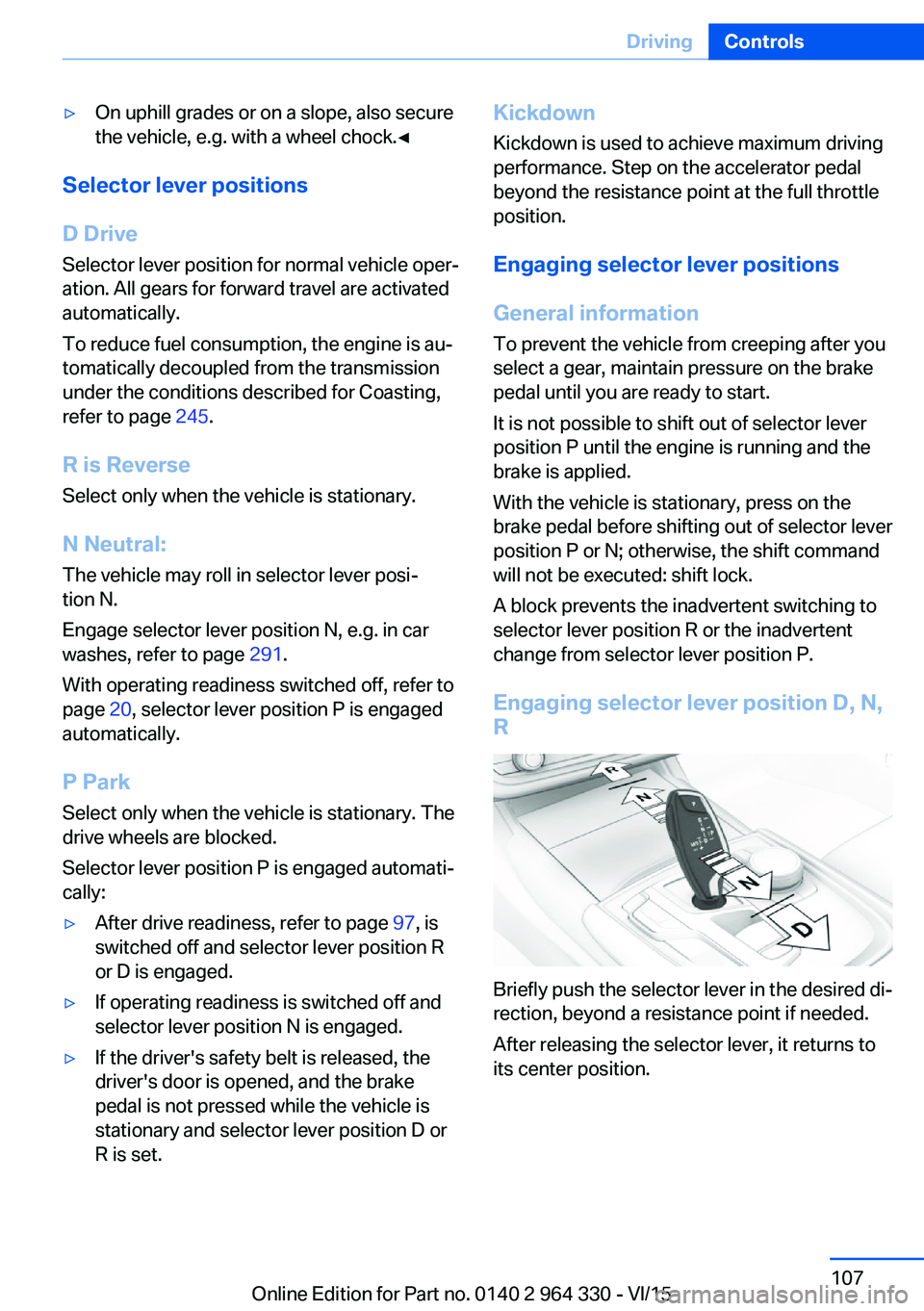
Engaging selector lever position D, N, R
Briefly push the selector lever in the desired di‐
rection, beyond a resistance point if needed.
After releasing the selector lever, it returns to
its center position.
Seite 107DrivingControls107
Online Edition for Part no. 0140 2 964 330 - VI/15
Page 113 of 314
DisplaysVehicle features and optionsThis chapter describes all standard, country-
specific and optional features offered with the
series. It also describes features that are not
necessarily available in your car, e. g., due tothe selected options or country versions. This
also applies to safety-related functions and
systems. The respectively applicable country
provisions must be observed when using the
respective features and systems.
Instrument cluster
The concept
The instrument cluster is a variable display. In
the event of a program change, the display
rendition adapts to the respective program
through the Driving Dynamics Control. The
change of the display type can be deactivated
via iDrive.Some of the displays in the instrument cluster
may differ from the way they are shown in this
Owner's Manual.
Overview
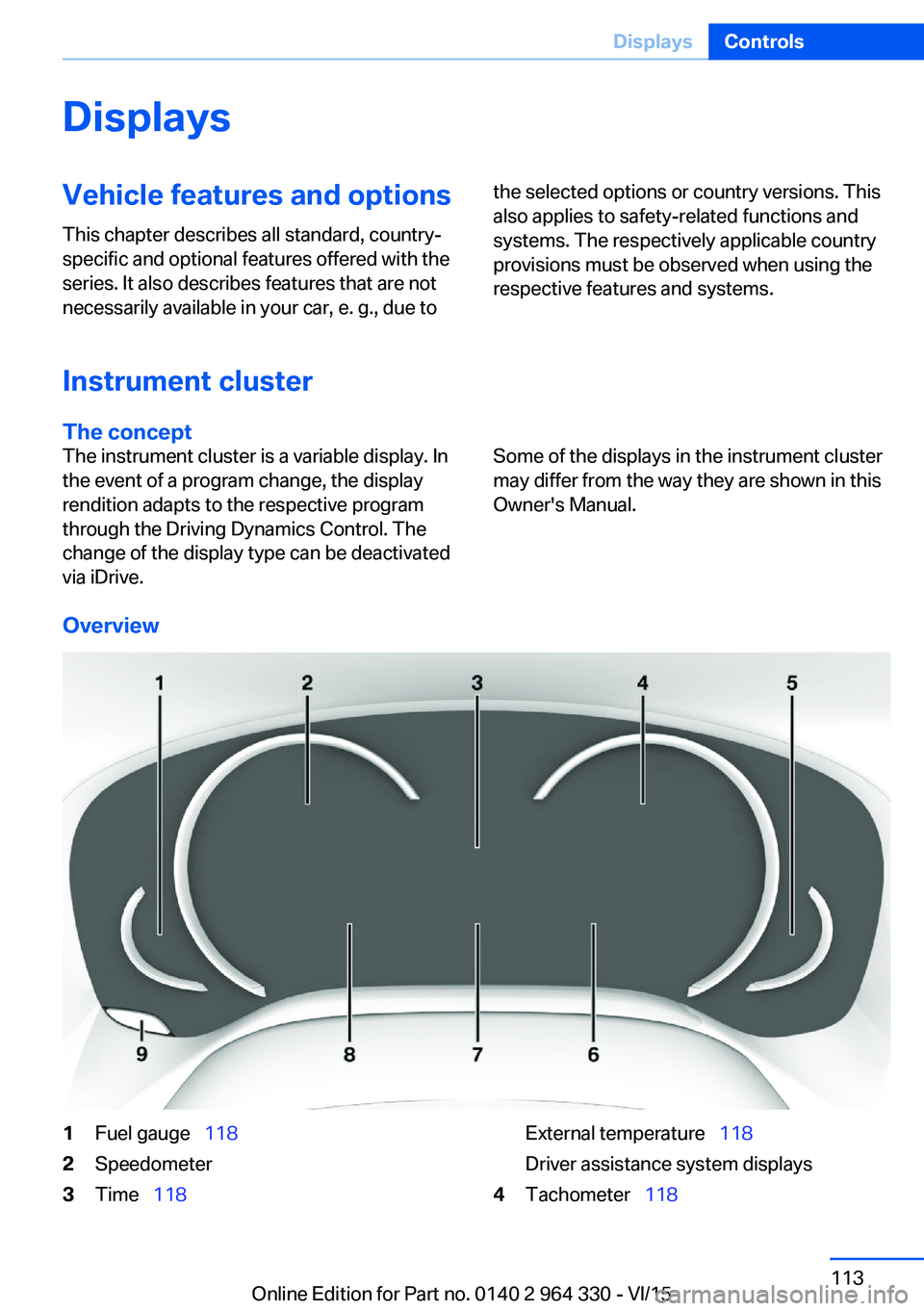
1Fuel gauge 1182Speedometer3Time 118External temperature 118
Driver assistance system displays4Tachometer 118Seite 113DisplaysControls113
Online Edition for Part no. 0140 2 964 330 - VI/15
Page 118 of 314
Fuel gauge
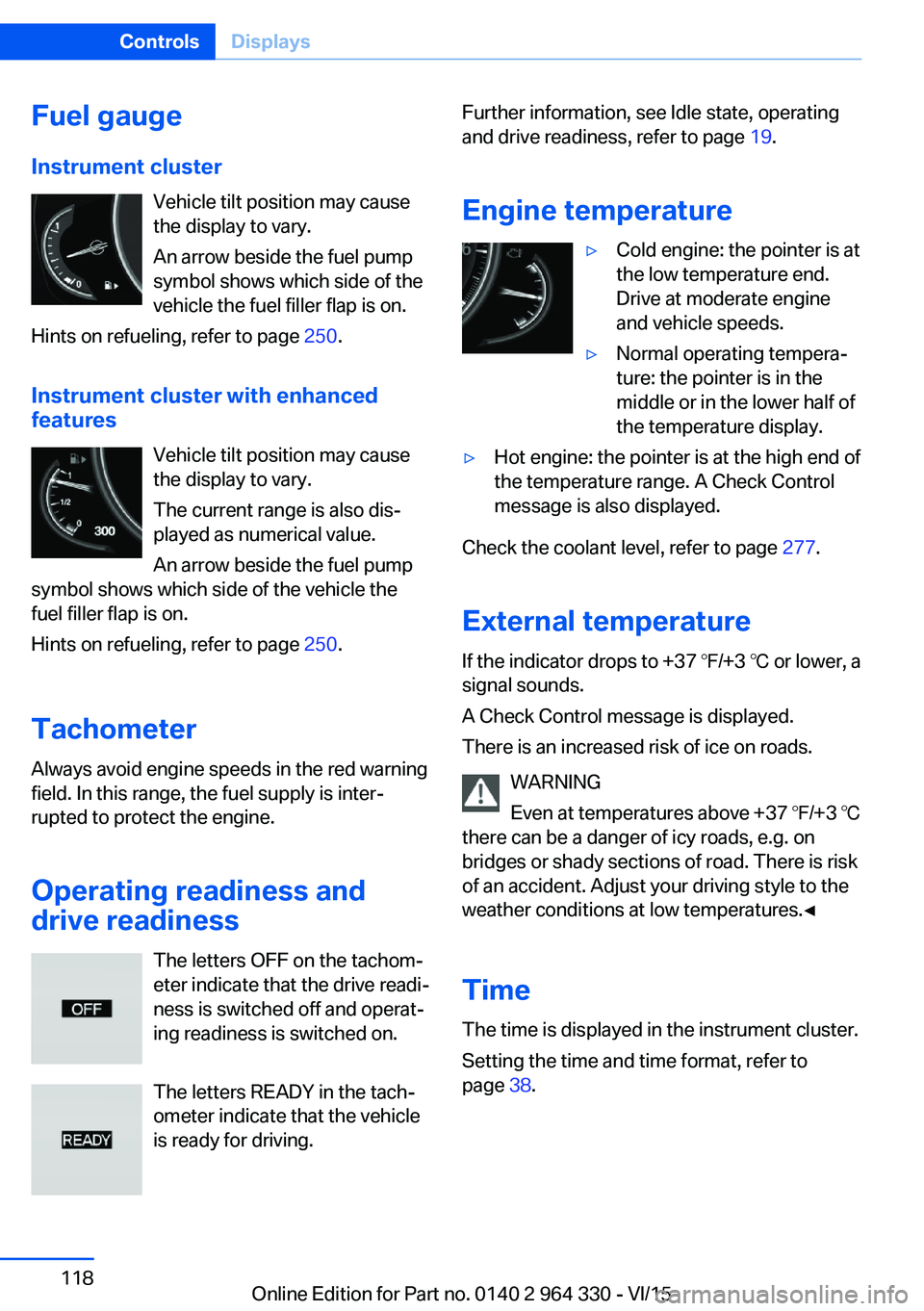
Instrument cluster Vehicle tilt position may cause
the display to vary.
An arrow beside the fuel pump
symbol shows which side of the
vehicle the fuel filler flap is on.
Hints on refueling, refer to page 250.
Instrument cluster with enhanced features
Vehicle tilt position may causethe display to vary.
The current range is also dis‐
played as numerical value.
An arrow beside the fuel pump
symbol shows which side of the vehicle the
fuel filler flap is on.
Hints on refueling, refer to page 250.
Tachometer
Always avoid engine speeds in the red warning
field. In this range, the fuel supply is inter‐
rupted to protect the engine.
Operating readiness and
drive readiness
The letters OFF on the tachom‐
eter indicate that the drive readi‐
ness is switched off and operat‐
ing readiness is switched on.
The letters READY in the tach‐
ometer indicate that the vehicle
is ready for driving.Further information, see Idle state, operating
and drive readiness, refer to page 19.
Engine temperature▷Cold engine: the pointer is at
the low temperature end.
Drive at moderate engine
and vehicle speeds.▷Normal operating tempera‐
ture: the pointer is in the
middle or in the lower half of
the temperature display.▷Hot engine: the pointer is at the high end of
the temperature range. A Check Control
message is also displayed.
Check the coolant level, refer to page 277.
External temperature
If the indicator drops to +37 ℉/+3 ℃ or lower, a
signal sounds.
A Check Control message is displayed.
There is an increased risk of ice on roads.
WARNING
Even at temperatures above +37 ℉/+3 ℃
there can be a danger of icy roads, e.g. on
bridges or shady sections of road. There is risk
of an accident. Adjust your driving style to the
weather conditions at low temperatures.◀
Time The time is displayed in the instrument cluster.
Setting the time and time format, refer to
page 38.
Seite 118ControlsDisplays118
Online Edition for Part no. 0140 2 964 330 - VI/15
Page 120 of 314
Gear shift indicatorThe conceptThe system recommends the most fuel effi‐
cient gear for the current driving situation.
General information
Depending on the vehicle's features and coun‐
try version of the vehicle, the gear shift indica‐
tor is active in the manual mode of the Step‐
tronic transmission.
Suggestions to shift gear up or down are dis‐
played in the instrument cluster.
On vehicles without a gear shift indicator, the
engaged gear is displayed.
DisplaysExampleDescriptionFuel efficient gear is set.Shift into fuel efficient gear.
Speed limit detection
The concept
Speed limit detection
Speed limit detection shows the current maxi‐
mum permitted speed in the instrument clus‐
ter. The camera in the area of the interior rear‐
view mirror detects traffic signs at the edge of
the road as well as variable overhead sign
posts. Traffic signs with extra symbols for wet
road conditions, etc. are also detected and
compared with the vehicle's onboard data,
such as for the rain sensor, and will be dis‐
played depending on the situation. The system
takes into account the information stored in
the navigation system and also displays speed
limits present on routes without signs.
Information WARNING
The system does not relieve from the
personal responsibility to correctly assess visi‐
bility and traffic situation. There is risk of an ac‐
cident. Adjust the driving style to the traffic
conditions. Watch traffic closely and actively
interfere in the respective situations.◀
Overview
Camera
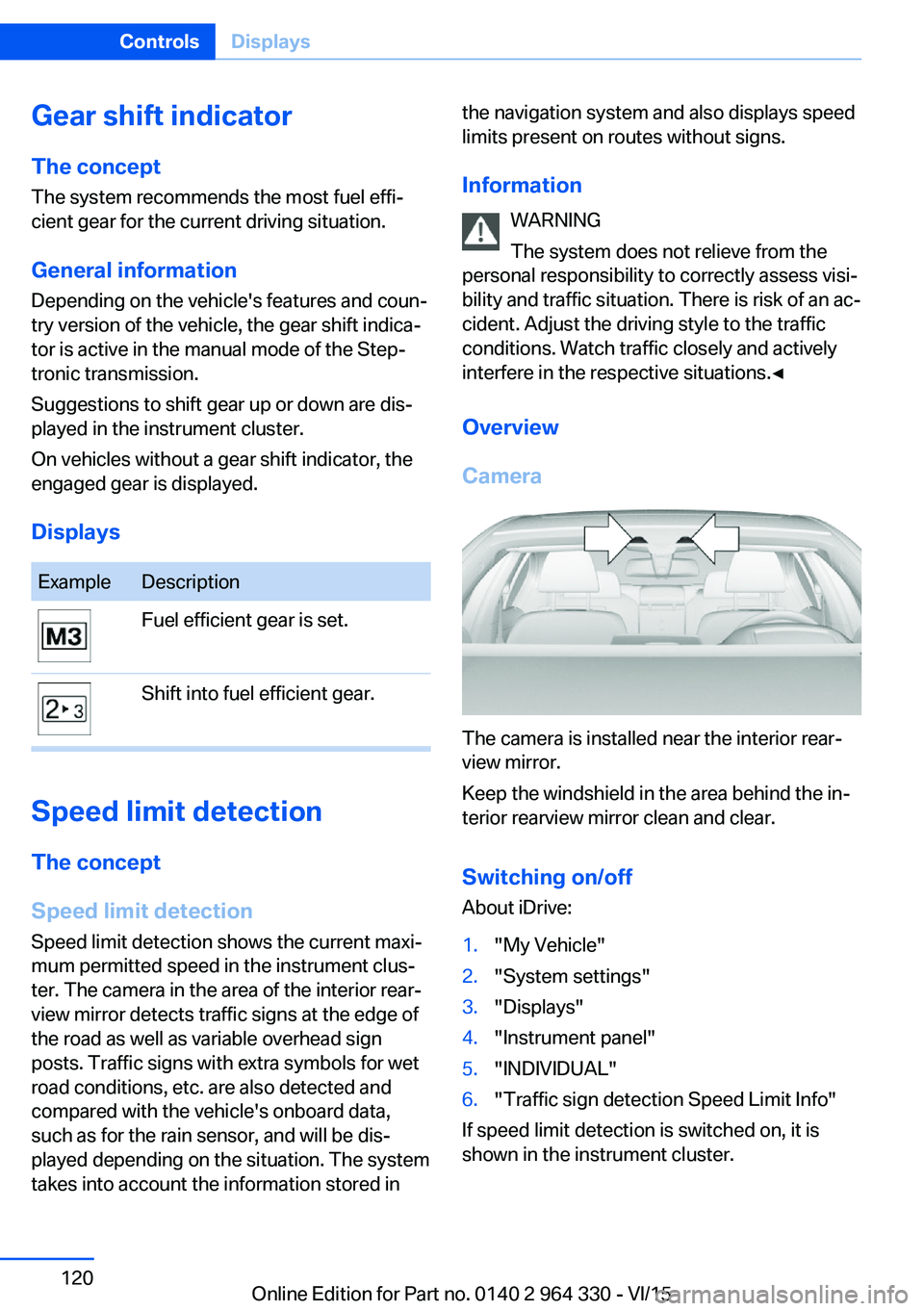
The camera is installed near the interior rear‐
view mirror.
Keep the windshield in the area behind the in‐
terior rearview mirror clean and clear.
Switching on/offAbout iDrive:
1."My Vehicle"2."System settings"3."Displays"4."Instrument panel"5."INDIVIDUAL"6."Traffic sign detection Speed Limit Info"
If speed limit detection is switched on, it is
shown in the instrument cluster.
Seite 120ControlsDisplays120
Online Edition for Part no. 0140 2 964 330 - VI/15
Page 122 of 314
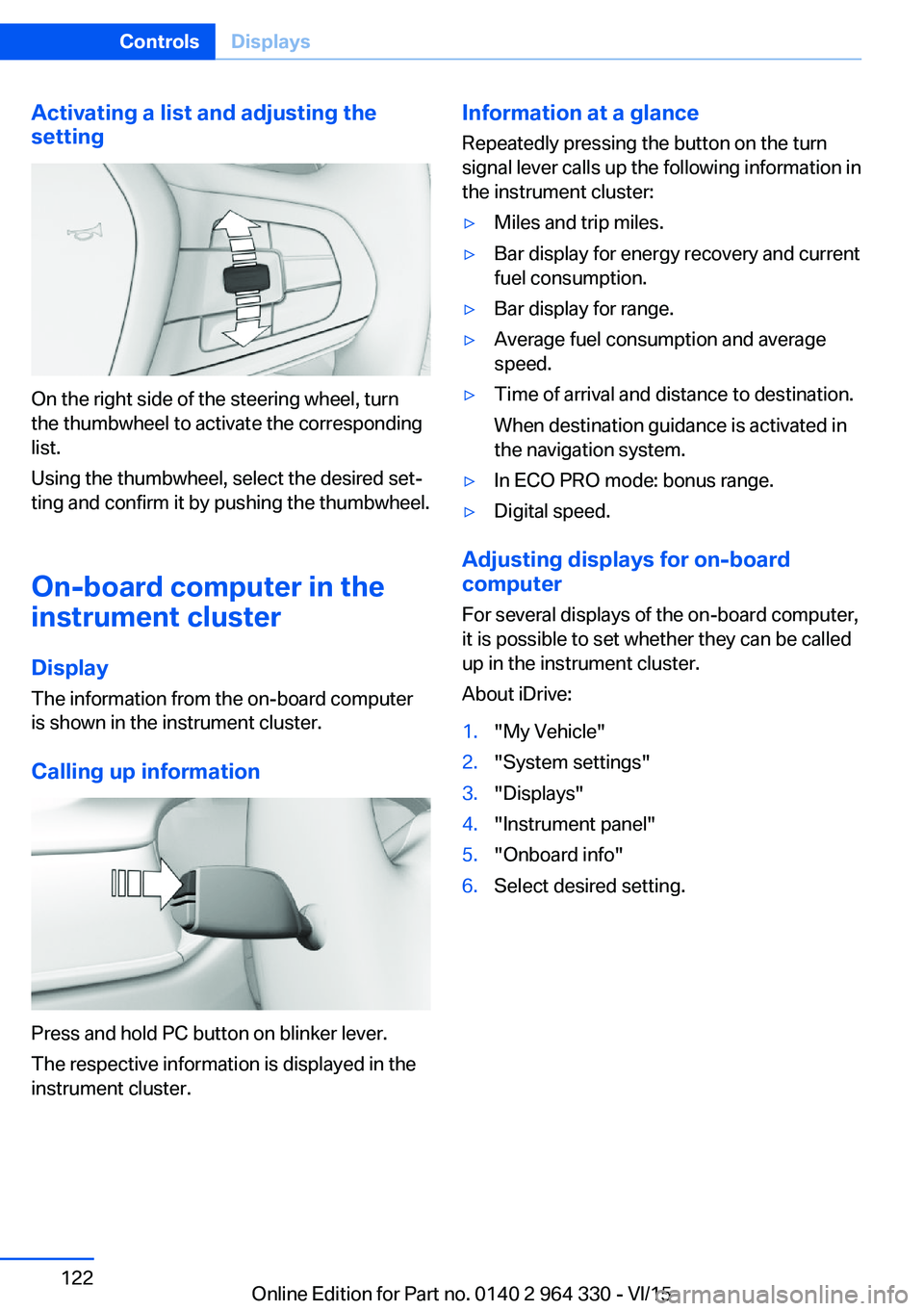
Activating a list and adjusting the
setting
On the right side of the steering wheel, turn
the thumbwheel to activate the corresponding
list.
Using the thumbwheel, select the desired set‐
ting and confirm it by pushing the thumbwheel.
On-board computer in the
instrument cluster
Display
The information from the on-board computer
is shown in the instrument cluster.
Calling up information
Press and hold PC button on blinker lever.
The respective information is displayed in the
instrument cluster.
Information at a glance
Repeatedly pressing the button on the turn
signal lever calls up the following information in
the instrument cluster:▷Miles and trip miles.▷Bar display for energy recovery and current
fuel consumption.▷Bar display for range.▷Average fuel consumption and average
speed.▷Time of arrival and distance to destination.
When destination guidance is activated in
the navigation system.▷In ECO PRO mode: bonus range.▷Digital speed.
Adjusting displays for on-board
computer
For several displays of the on-board computer,
it is possible to set whether they can be called
up in the instrument cluster.
About iDrive:
1."My Vehicle"2."System settings"3."Displays"4."Instrument panel"5."Onboard info"6.Select desired setting.Seite 122ControlsDisplays122
Online Edition for Part no. 0140 2 964 330 - VI/15
Page 123 of 314
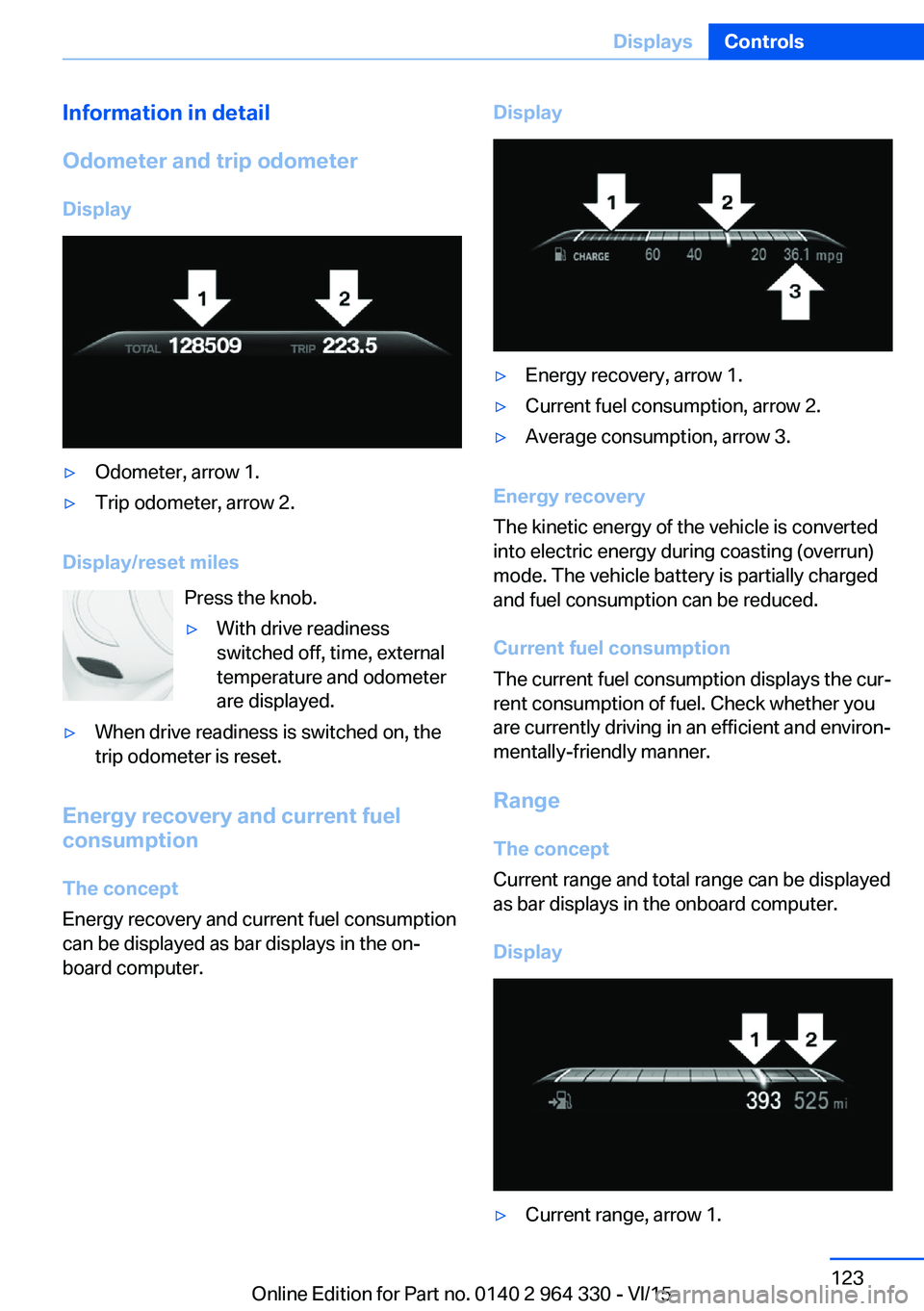
Information in detail
Odometer and trip odometer
Display▷Odometer, arrow 1.▷Trip odometer, arrow 2.
Display/reset miles Press the knob.
▷With drive readiness
switched off, time, external
temperature and odometer
are displayed.▷When drive readiness is switched on, the
trip odometer is reset.
Energy recovery and current fuel
consumption
The concept
Energy recovery and current fuel consumption
can be displayed as bar displays in the on‐
board computer.
Display▷Energy recovery, arrow 1.▷Current fuel consumption, arrow 2.▷Average consumption, arrow 3.
Energy recovery
The kinetic energy of the vehicle is converted
into electric energy during coasting (overrun)
mode. The vehicle battery is partially charged
and fuel consumption can be reduced.
Current fuel consumption
The current fuel consumption displays the cur‐
rent consumption of fuel. Check whether you
are currently driving in an efficient and environ‐
mentally-friendly manner.
Range
The concept
Current range and total range can be displayed
as bar displays in the onboard computer.
Display
▷Current range, arrow 1.Seite 123DisplaysControls123
Online Edition for Part no. 0140 2 964 330 - VI/15
Page 124 of 314
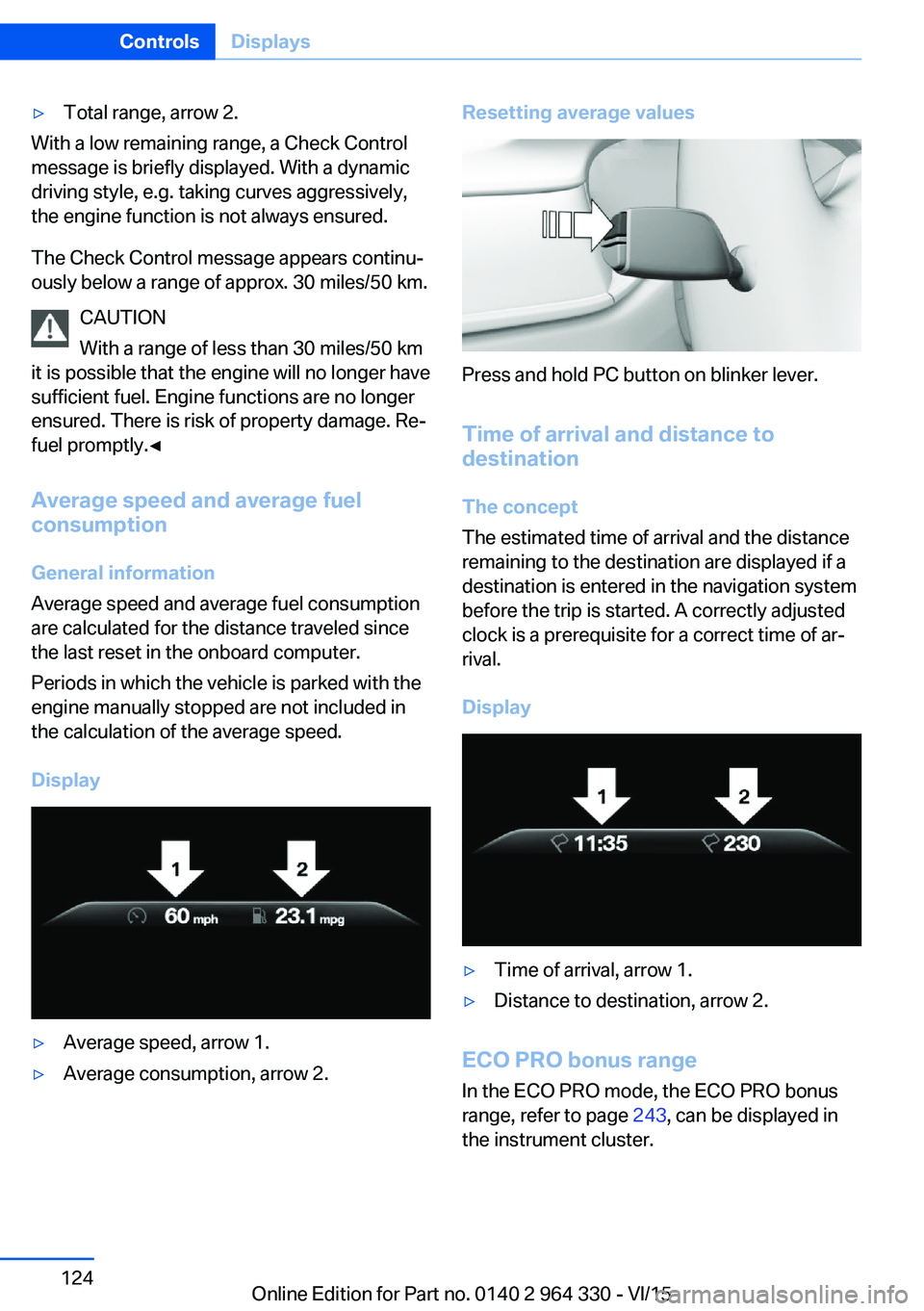
▷Total range, arrow 2.
With a low remaining range, a Check Control
message is briefly displayed. With a dynamic
driving style, e.g. taking curves aggressively,
the engine function is not always ensured.
The Check Control message appears continu‐
ously below a range of approx. 30 miles/50 km.
CAUTION
With a range of less than 30 miles/50 km
it is possible that the engine will no longer have
sufficient fuel. Engine functions are no longer
ensured. There is risk of property damage. Re‐
fuel promptly.◀
Average speed and average fuel
consumption
General information
Average speed and average fuel consumption
are calculated for the distance traveled since
the last reset in the onboard computer.
Periods in which the vehicle is parked with the
engine manually stopped are not included in
the calculation of the average speed.
Display
▷Average speed, arrow 1.▷Average consumption, arrow 2.Resetting average values
Press and hold PC button on blinker lever.
Time of arrival and distance to
destination
The concept
The estimated time of arrival and the distance
remaining to the destination are displayed if a
destination is entered in the navigation system
before the trip is started. A correctly adjusted
clock is a prerequisite for a correct time of ar‐
rival.
Display
▷Time of arrival, arrow 1.▷Distance to destination, arrow 2.
ECO PRO bonus range In the ECO PRO mode, the ECO PRO bonus
range, refer to page 243, can be displayed in
the instrument cluster.
Seite 124ControlsDisplays124
Online Edition for Part no. 0140 2 964 330 - VI/15
Page 125 of 314
Onboard computer on the
Control Display
General information
Two types of onboard computers are available
on the Control Display:▷"Onboard info": the values can be reset as
often as necessary.▷"Trip computer": the values provide an
overview of the current trip.
Calling up the onboard computer or
trip computer
About iDrive:
1."My Vehicle"2."Driving information"3."Onboard info" or "Trip computer"
Resetting the trip on-board computer
About iDrive:
1."My Vehicle"2."Driving information"3."Trip computer"4.▷ "Reset": all values are reset.▷ "Automatic reset": all values are
reset approx. 4 hours after the vehicle
came to a standstill.
Resetting the fuel consumption or
speed
About iDrive:
1."My Vehicle"2."Driving information"3."Onboard info"4."Consumption" or "Speed"5."OK"Sport displays
The concept
On the Control Display, the current values for
performance and torque can be displayed if
the vehicle is appropriately equipped.
Displaying sport displays on the
Control Display
About iDrive:1."My Vehicle"2."Technology in action"3."Sport displays"
Speed warning
The concept Displays a speed, when reached, should cause
a warning to be issued.
The warning is repeated if the vehicle speed
drops below the set speed once by at least
3 mph/5 km/h.
Displaying, setting or changing the
speed warning
About iDrive:
1."My Vehicle"2."Vehicle settings"3."Speed warning"4."Warning at:"5.Turn the controller until the desired speed
is displayed.6.Press the controller.
Speed warning is stored.
Seite 125DisplaysControls125
Online Edition for Part no. 0140 2 964 330 - VI/15
Page 168 of 314
Driver assistance systemsVehicle features and options
This chapter describes all standard, country-
specific and optional features offered with the
series. It also describes features that are not
necessarily available in your car, e. g., due to
the selected options or country versions. This
also applies to safety-related functions and
systems. The respectively applicable country
provisions must be observed when using the
respective features and systems.
Active Cruise Control with Stop & Go function, ACC
The concept
Use this system to select a desired speed that
the vehicle will maintain automatically on clear
roads.
To the extent possible, the system automati‐
cally adjusts the speed to a slower vehicle
ahead of you.
The distance that the vehicle maintains to the
vehicle ahead of you can be varied. For safety
reasons, it depends on the speed.
To maintain a certain distance, the system au‐
tomatically reduces the speed, applies the
brakes lightly, or accelerates again if the vehi‐
cle ahead begins moving faster.
If the vehicle ahead of you brakes to a halt, and
then proceeds to drive again within a brief pe‐
riod, the system is able to detect this within the
given system limits. Your own vehicle will
brake automatically and then accelerate again.
If the vehicle ahead of you drives away again
after a prolonged period, briefly press the ac‐
celerator pedal or press the appropriate button
to reactivate the system. The vehicle will auto‐
matically accelerate.As soon as the road is clear, the vehicle accel‐
erates to the desired speed.
Vehicles driving ahead are captured by a radar
sensor and a camera.
General information
Depending on the driving settings, the features
of the cruise control can change in certain
areas.
The desired speed is also maintained downhill,
but may not be maintained on uphill grades if
engine power is insufficient.
Due to the driving style that minimizes fuel
consumption in ECO PRO drive mode, the ve‐
hicle may drop below the set desired speed in
some situations, e.g. on uphill grades.
Information WARNING
The system does not relieve from the
personal responsibility to correctly assess the
traffic situation. Based on the limits of the sys‐
tem, it cannot independently react to all traffic
situations. There is risk of an accident. Adjust
the driving style to the traffic conditions. Watch
traffic closely and actively interfere in the re‐
spective situations.◀
WARNING
An unsecured vehicle can put itself into
motion and roll away. There is risk of an acci‐
dent. Before exiting, secure the vehicle against
rolling.
In order to ensure that the vehicle is secured
against rolling away, observe the following:▷Set the parking brake.▷On uphill grades or on a slope, turn the
front wheels in the direction of the curb.▷On uphill grades or on a slope, also secure
the vehicle, e.g. with a wheel chock.◀Seite 168ControlsDriver assistance systems168
Online Edition for Part no. 0140 2 964 330 - VI/15
Page 175 of 314
Weather
In the event of unfavorable weather and light conditions, e. g. if there is rain, snowfall, slush,
fog or glare, this may result in poorer recogni‐
tion of vehicles as well as short-term interrup‐
tions for vehicles that are already detected. Drive attentively, and react to the current trafficsituation. If necessary, intervene actively, e.g.
by braking, steering or evading.
Radar sensor
For US owners only
The transmitter and receiver units comply with
part 15 of the FCC/Federal Communication
Commission regulations. Operation is gov‐
erned by the following:
FCC ID:▷OAYARS3-A
Compliance statement:
This device complies with part 15 of the FCC
Rules. Operation is subject to the following
two conditions:
▷This device may not cause harmful inter‐
ference, and▷this device must accept any interference
received, including interference that may
cause undesired operation.
Any unauthorized modifications or changes to
these devices could void the user's authority to
operate this equipment.
Malfunction
The system cannot be activated if the radar sensor is not aligned correctly. This may be
caused by damage incurred during parking,
e.g.
A Check Control message is displayed if the
system fails.
The function for detecting and responding
when approaching stationary vehicles may be limited in the following situations:
▷During calibration of the camera immedi‐
ately after vehicle delivery.▷If the camera is malfunctioning or dirty. A
Check Control message is displayed.
Cruise control
The concept The system maintains a preset speed via the
buttons on the steering wheel. The system
brakes on downhill gradients if engine braking
is insufficient.
General information
Depending on the driving settings, the features
of the cruise control can change in certain
areas.
The desired speed is also maintained downhill,
but may not be maintained on uphill grades if
engine power is insufficient.
Due to the driving style that minimizes fuel
consumption in ECO PRO drive mode, the ve‐
hicle may drop below the set desired speed in
some situations, e.g. on uphill grades.
Information WARNING
The use of the system can lead to an in‐
creased risk of accidents in the following situa‐
tions:
▷On winding roads.▷In heavy traffic.▷On slippery roads, in fog, snow or rain, or
on a loose road surface.
There is risk of accidents or risk of property
damage. Only use the system if driving at con‐
stant speed is possible.◀
Seite 175Driver assistance systemsControls175
Online Edition for Part no. 0140 2 964 330 - VI/15