door lock BMW 740LI 2013 User Guide
[x] Cancel search | Manufacturer: BMW, Model Year: 2013, Model line: 740LI, Model: BMW 740LI 2013Pages: 243, PDF Size: 5.37 MB
Page 45 of 243
Roller sunblinds
General information
The safety switch in the driver's door can be
used to prevent children, for example, from op‐
erating the roller blinds using the switches in the
rear.
Press the safety switch in the driver's door. The
LED lights up if the safety function is switched
on.
If you are no longer able to move the roller blinds
after having activated them consecutively a
number of times, the system is blocked for a
limited time to prevent overheating. Let the sys‐
tem cool.
The roller sunblinds cannot be moved at low in‐
terior temperatures.
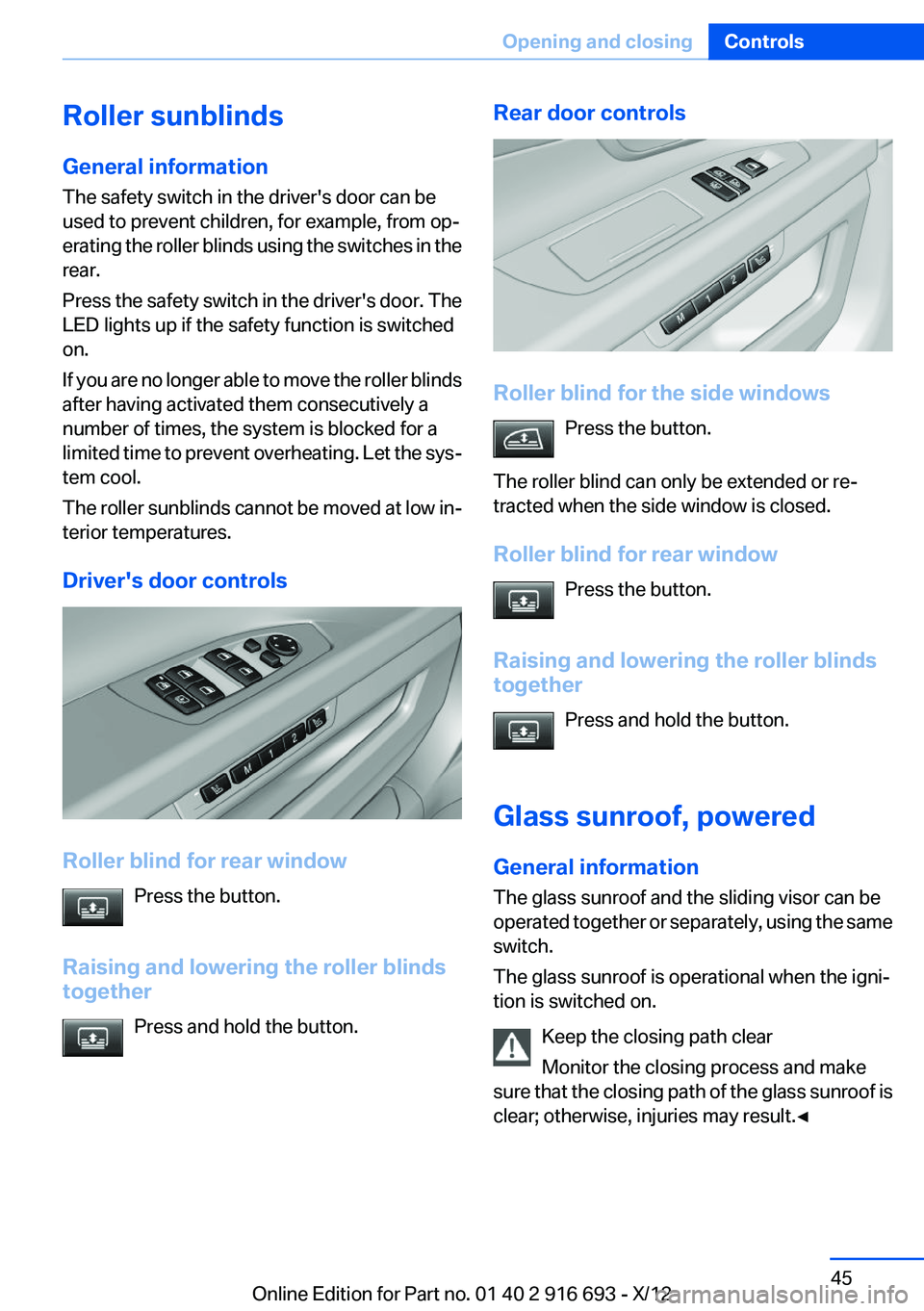
Driver's door controls
Roller blind for rear window Press the button.
Raising and lowering the roller blinds
together
Press and hold the button.
Rear door controls
Roller blind for the side windowsPress the button.
The roller blind can only be extended or re‐
tracted when the side window is closed.
Roller blind for rear window Press the button.
Raising and lowering the roller blinds
together
Press and hold the button.
Glass sunroof, powered
General information
The glass sunroof and the sliding visor can be
operated together or separately, using the same
switch.
The glass sunroof is operational when the igni‐
tion is switched on.
Keep the closing path clear
Monitor the closing process and make
sure that the closing path of the glass sunroof is
clear; otherwise, injuries may result.◀
Seite 45Opening and closingControls45
Online Edition for Part no. 01 40 2 916 693 - X/12
Page 59 of 243
▷Open or close the door or trunk lid.▷Press a button on the remote control.▷Press the Start/Stop button.
Mirrors
Exterior mirrors
At a glance
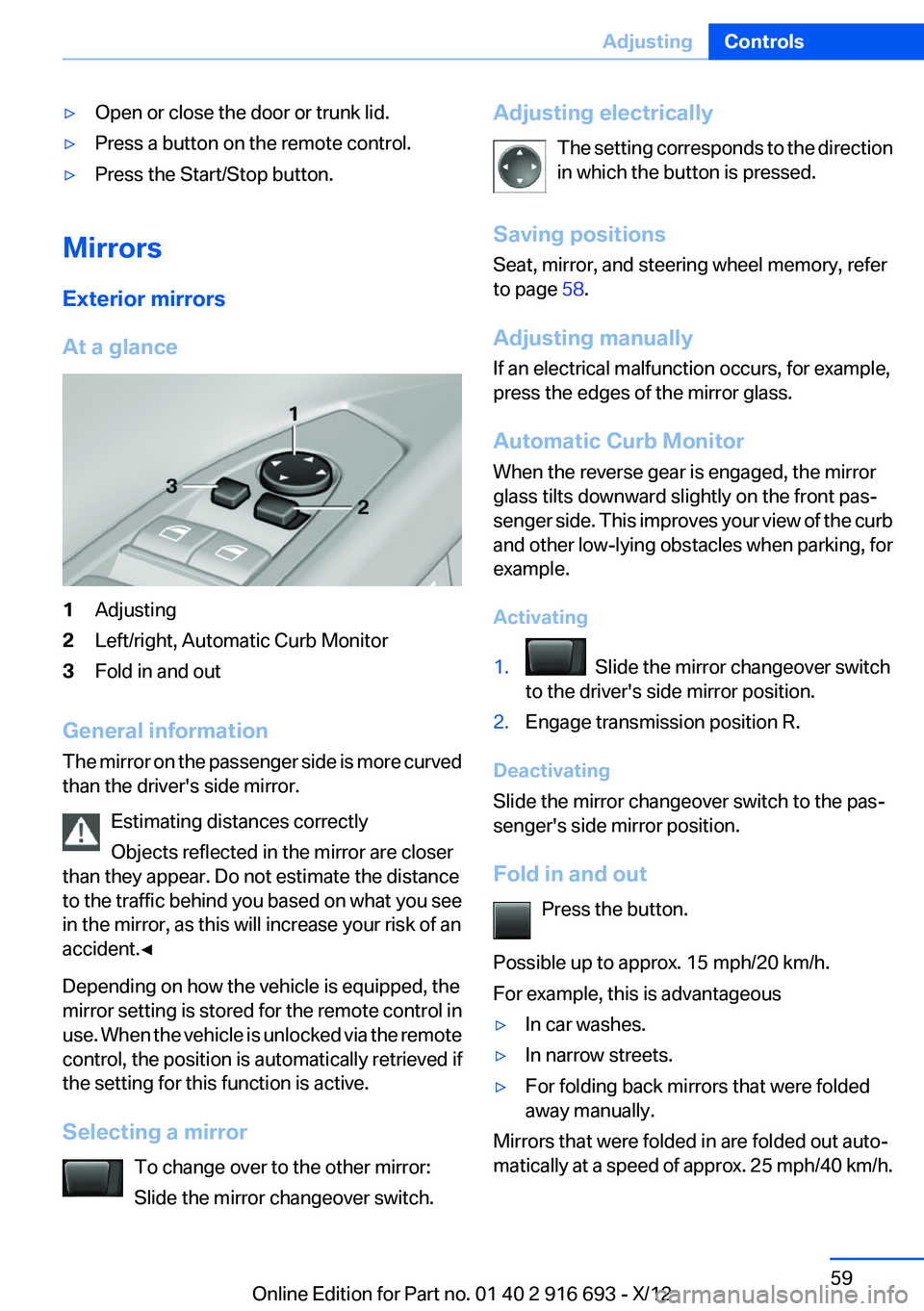
1Adjusting2Left/right, Automatic Curb Monitor3Fold in and out
General information
The mirror on the passenger side is more curved
than the driver's side mirror.
Estimating distances correctly
Objects reflected in the mirror are closer
than they appear. Do not estimate the distance
to the traffic behind you based on what you see
in the mirror, as this will increase your risk of an
accident.◀
Depending on how the vehicle is equipped, the
mirror setting is stored for the remote control in
use. When the vehicle is unlocked via the remote
control, the position is automatically retrieved if
the setting for this function is active.
Selecting a mirror To change over to the other mirror:
Slide the mirror changeover switch.
Adjusting electrically
The setting corresponds to the direction
in which the button is pressed.
Saving positions
Seat, mirror, and steering wheel memory, refer
to page 58.
Adjusting manually
If an electrical malfunction occurs, for example,
press the edges of the mirror glass.
Automatic Curb Monitor
When the reverse gear is engaged, the mirror
glass tilts downward slightly on the front pas‐
senger side. This improves your view of the curb
and other low-lying obstacles when parking, for
example.
Activating1. Slide the mirror changeover switch
to the driver's side mirror position.2.Engage transmission position R.
Deactivating
Slide the mirror changeover switch to the pas‐
senger's side mirror position.
Fold in and out Press the button.
Possible up to approx. 15 mph/20 km/h.
For example, this is advantageous
▷In car washes.▷In narrow streets.▷For folding back mirrors that were folded
away manually.
Mirrors that were folded in are folded out auto‐
matically at a speed of approx. 25 mph/40 km/h.
Seite 59AdjustingControls59
Online Edition for Part no. 01 40 2 916 693 - X/12
Page 65 of 243
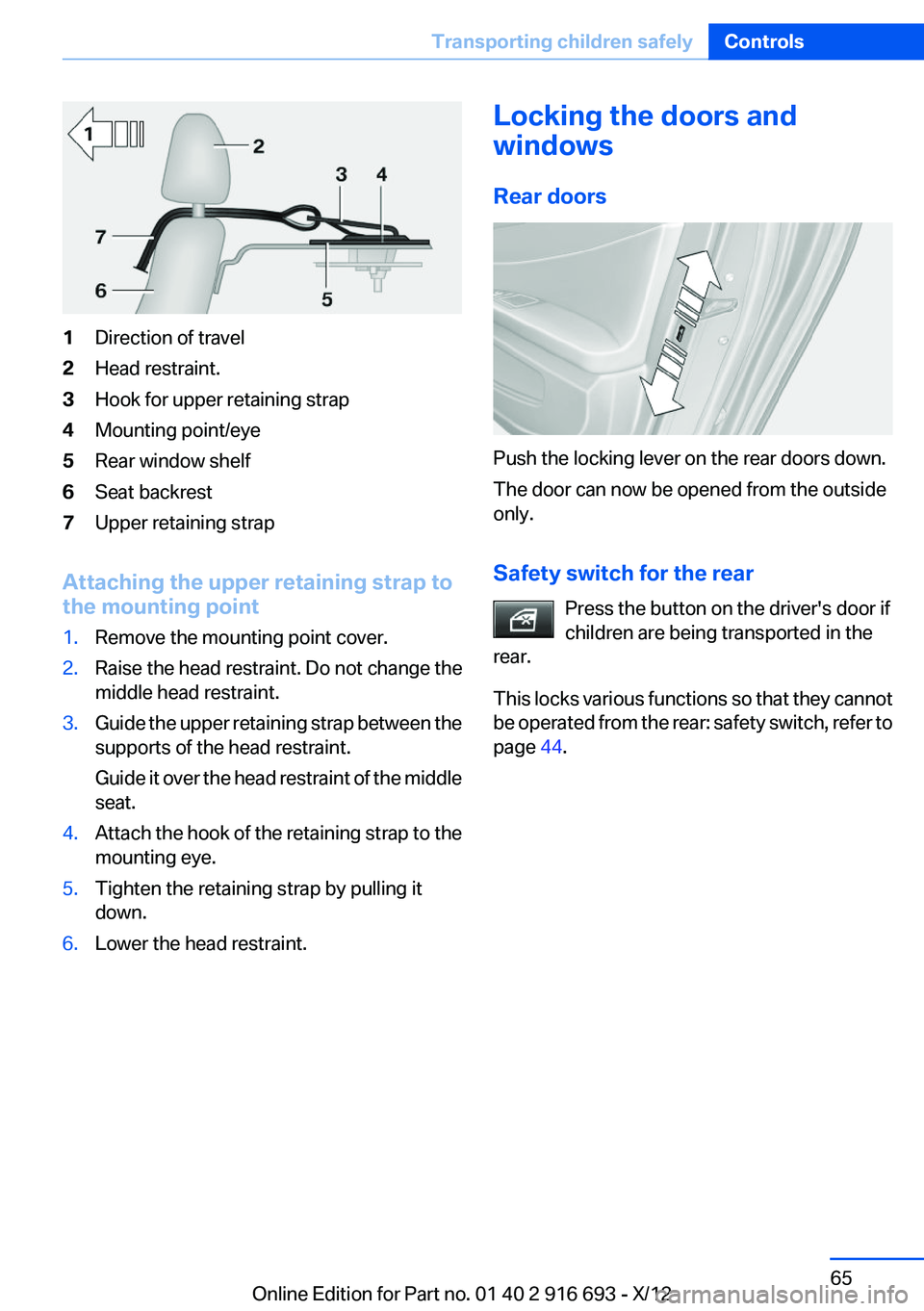
1Direction of travel2Head restraint.3Hook for upper retaining strap4Mounting point/eye5Rear window shelf6Seat backrest7Upper retaining strap
Attaching the upper retaining strap to
the mounting point
1.Remove the mounting point cover.2.Raise the head restraint. Do not change the
middle head restraint.3.Guide the upper retaining strap between the
supports of the head restraint.
Guide it over the head restraint of the middle
seat.4.Attach the hook of the retaining strap to the
mounting eye.5.Tighten the retaining strap by pulling it
down.6.Lower the head restraint.Locking the doors and
windows
Rear doors
Push the locking lever on the rear doors down.
The door can now be opened from the outside
only.
Safety switch for the rear Press the button on the driver's door if
children are being transported in the
rear.
This locks various functions so that they cannot
be operated from the rear: safety switch, refer to
page 44.
Seite 65Transporting children safelyControls65
Online Edition for Part no. 01 40 2 916 693 - X/12
Page 66 of 243
DrivingVehicle equipment
All standard, country-specific and optional
equipment that is offered in the model series is
described in this chapter. Therefore, equipment
is also described that is not available in a vehicle,
e. g., because of the selected optional equip‐
ment or country variant. This also applies for
safety-related functions and systems.
Start/Stop button
The concept Pressing the Start/Stop button
switches the ignition on or off and
starts the engine.
The engine starts if the brake
pedal is pressed when you press
the Start/Stop button.
Ignition on
Press the Start/Stop button, and do not press on
the brake pedal at the same time.
All vehicle systems are ready for operation.
Most of the indicator and warning lamps in the
instrument cluster light up for varying lengths of
time.
To save battery power when the engine is off,
switch off the ignition and any unnecessary
electronic systems/power consumers.
The ignition switches off automatically:▷When the vehicle is locked, if the low beams
are switched on.▷Shortly before the battery is discharged
completely, so that the engine can still be
started.Note
If the engine is switched off and the ignition is
switched on, the system automatically switches
to the radio ready state when the door is opened
if the lights are switched off or the daytime run‐
ning lights are switched on.
Ignition off
Press the Start/Stop button again, and do not
press on the brake pedal at the same time.
All indicator lamps in the instrument cluster go
out.
To save battery power when the engine is off,
switch off the ignition and any unnecessary
electronic systems/power consumers.
Transmission position P with the ignition
off
When the ignition is switched off, position P is
engaged automatically. When in an automatic
car wash, for example, ensure that the ignition is
not switched off accidentally.◀
Ignition automatically cuts off while the vehicle
is stationary and the engine is stopped:▷During locking, also with the low beams ac‐
tivated.▷Shortly before the battery is discharged
completely, so that the engine can still be
started. This function is only available when
the low beams are switched off.▷When opening and closing the driver door, if
the driver's seat belt is unbuckled and the
low beams are switched off.▷While the driver's seat belt is unbuckled, if
the driver's door is open and the low beams
are switched off.
When the ignition is switched off, by opening or
closing the driver's door or unbuckling the driv‐
er's seat belt, the radio ready state remains ac‐
tive.
Seite 66ControlsDriving66
Online Edition for Part no. 01 40 2 916 693 - X/12
Page 68 of 243
Auto Start/Stop function
The concept
The Auto Start/Stop function helps save fuel.
The system switches off the engine during a
stop, e.g., in a traffic congestion or at traffic
lights. The ignition remains switched on. The
engine starts again automatically for driving off.
Certain vehicle components may experience
additional wear as a result of this system.
Automatic mode
The Auto Start/Stop function is operational after
each engine start.
This function is activated at speeds faster than
about 3 mph, approx. 5 km/h.
Engine stop
The engine is switched off automatically during
a stop under the following conditions:
Automatic transmission:▷The selector lever is in transmission position
D.▷The brake pedal remains pressed while the
vehicle is stationary or the vehicle is held by
Automatic Hold.▷The driver's seat belt is buckled or the driv‐
er's door is closed.
The air volume of the air conditioner is reduced
when the engine is switched off.
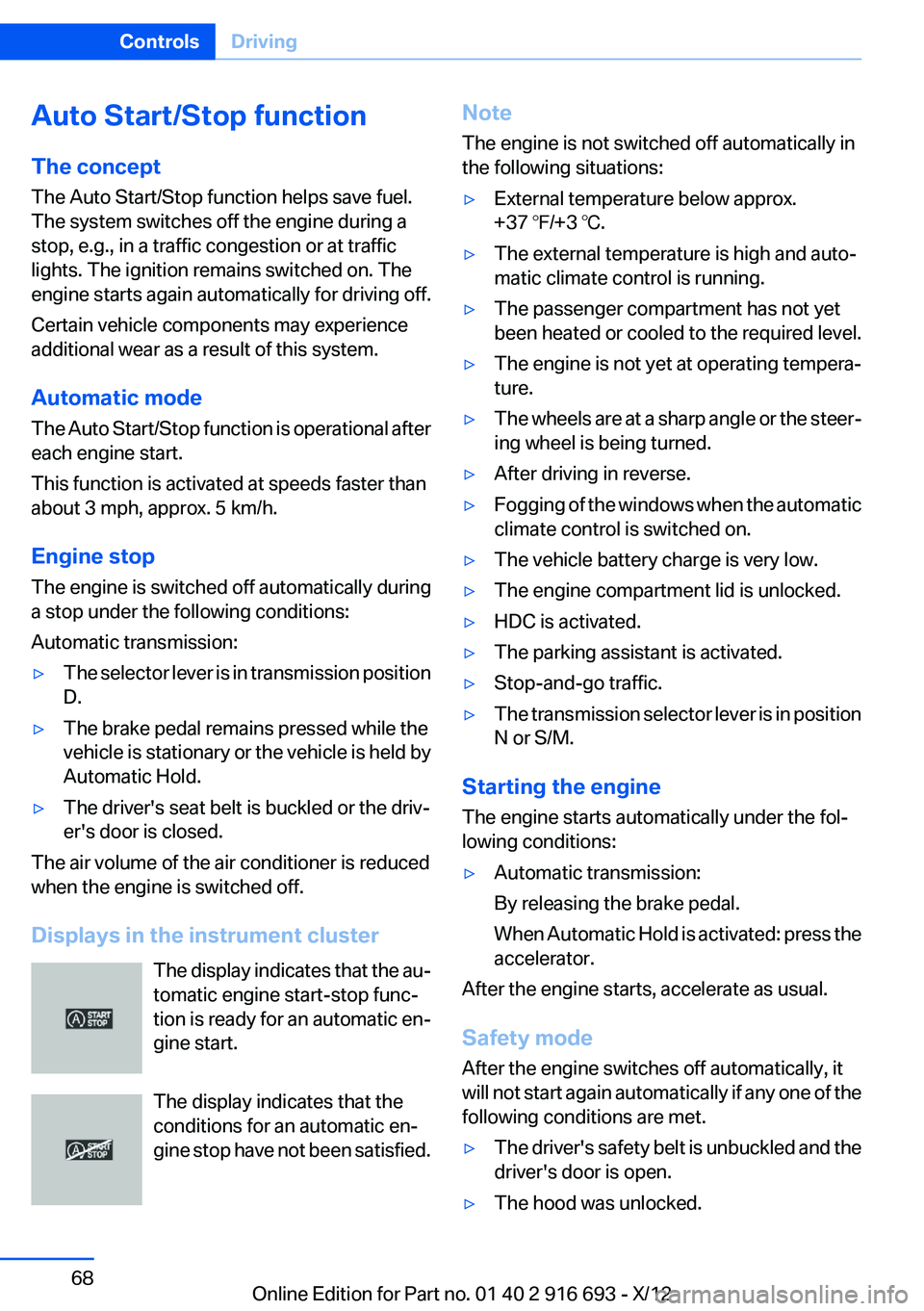
Displays in the instrument cluster The display indicates that the au‐
tomatic engine start-stop func‐
tion is ready for an automatic en‐
gine start.
The display indicates that the
conditions for an automatic en‐
gine stop have not been satisfied.
Note
The engine is not switched off automatically in
the following situations:▷External temperature below approx.
+37 ℉/+3 ℃.▷The external temperature is high and auto‐
matic climate control is running.▷The passenger compartment has not yet
been heated or cooled to the required level.▷The engine is not yet at operating tempera‐
ture.▷The wheels are at a sharp angle or the steer‐
ing wheel is being turned.▷After driving in reverse.▷Fogging of the windows when the automatic
climate control is switched on.▷The vehicle battery charge is very low.▷The engine compartment lid is unlocked.▷HDC is activated.▷The parking assistant is activated.▷Stop-and-go traffic.▷The transmission selector lever is in position
N or S/M.
Starting the engine
The engine starts automatically under the fol‐
lowing conditions:
▷Automatic transmission:
By releasing the brake pedal.
When Automatic Hold is activated: press the
accelerator.
After the engine starts, accelerate as usual.
Safety mode
After the engine switches off automatically, it
will not start again automatically if any one of the
following conditions are met.
▷The driver's safety belt is unbuckled and the
driver's door is open.▷The hood was unlocked.Seite 68ControlsDriving68
Online Edition for Part no. 01 40 2 916 693 - X/12
Page 77 of 243
P is engaged automatically:▷After the engine is switched off when the
vehicle is in radio ready state, refer to
page 67, or when the ignition is switched off,
refer to page 66, and when position R or D is
engaged.▷With the ignition is off, if position N is en‐
gaged.▷If the safety belt is unbuckled, the driver's
door is opened, and the brake pedal is not
pressed while the vehicle is stationary and
transmission position R or D is engaged.
Before exiting the vehicle, make sure that posi‐
tion P of the automatic transmission is engaged.
Otherwise, the vehicle may begin to roll.
Kickdown
Kickdown is used to achieve maximum driving
performance. Press on the gas pedal beyond the
resistance point at the full throttle position.
Engaging the transmission position
▷Transmission position P can only be disen‐
gaged if the engine is running and the brake
pedal is pressed.▷With the vehicle stationary, press on the
brake pedal before shifting out of P or N;
otherwise, the shift command will not be
executed: shift lock.
Depress the brake until you start driv‐
ing
To prevent the vehicle from creeping after
you select a driving position, maintain pres‐
sure on the brake pedal until you are ready
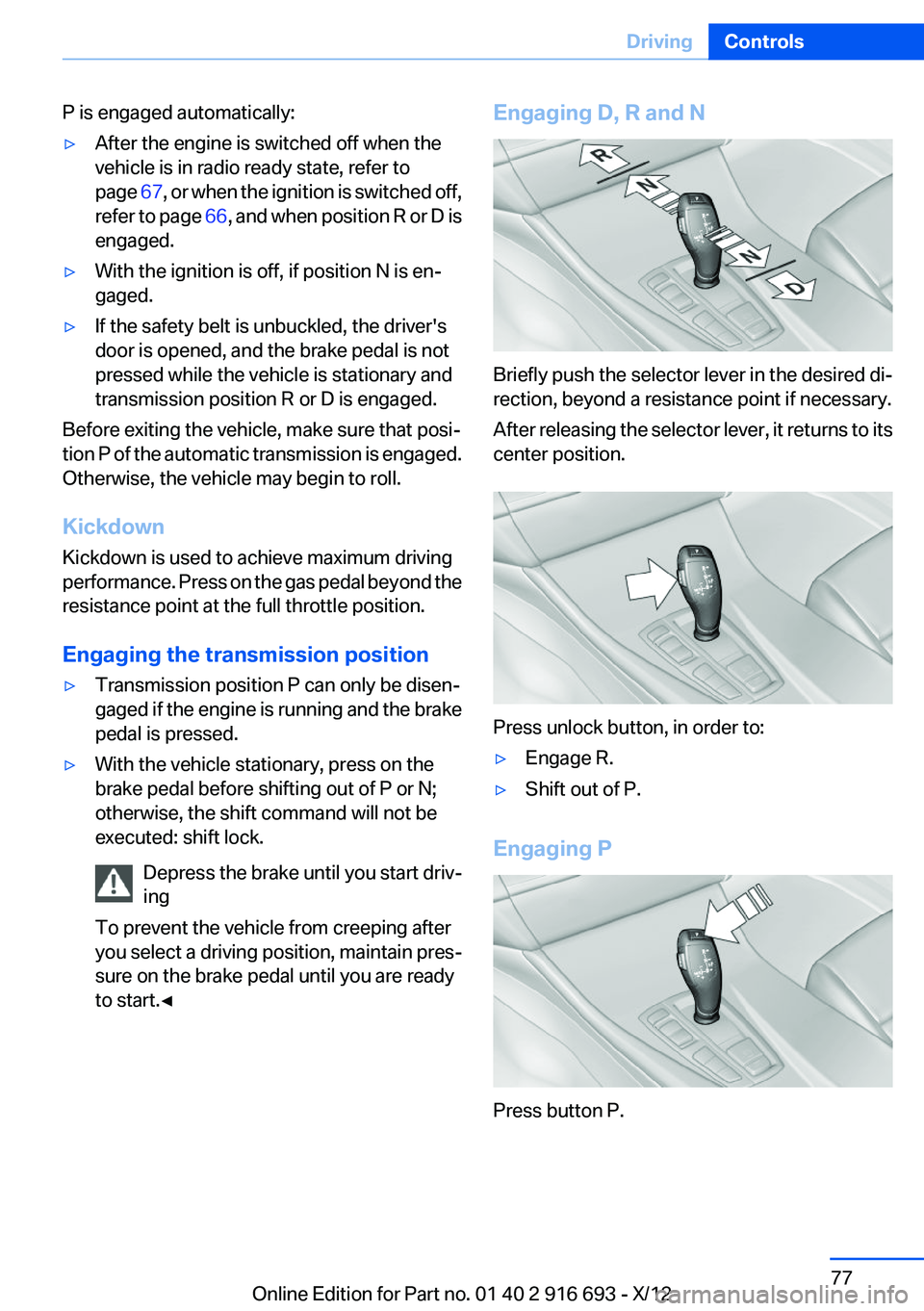
to start.◀Engaging D, R and N
Briefly push the selector lever in the desired di‐
rection, beyond a resistance point if necessary.
After releasing the selector lever, it returns to its
center position.
Press unlock button, in order to:
▷Engage R.▷Shift out of P.
Engaging P
Press button P.
Seite 77DrivingControls77
Online Edition for Part no. 01 40 2 916 693 - X/12
Page 95 of 243
LampsVehicle equipment
All standard, country-specific and optional
equipment that is offered in the model series is
described in this chapter. Therefore, equipment
is also described that is not available in a vehicle,
e. g., because of the selected optional equip‐
ment or country variant. This also applies for
safety-related functions and systems.
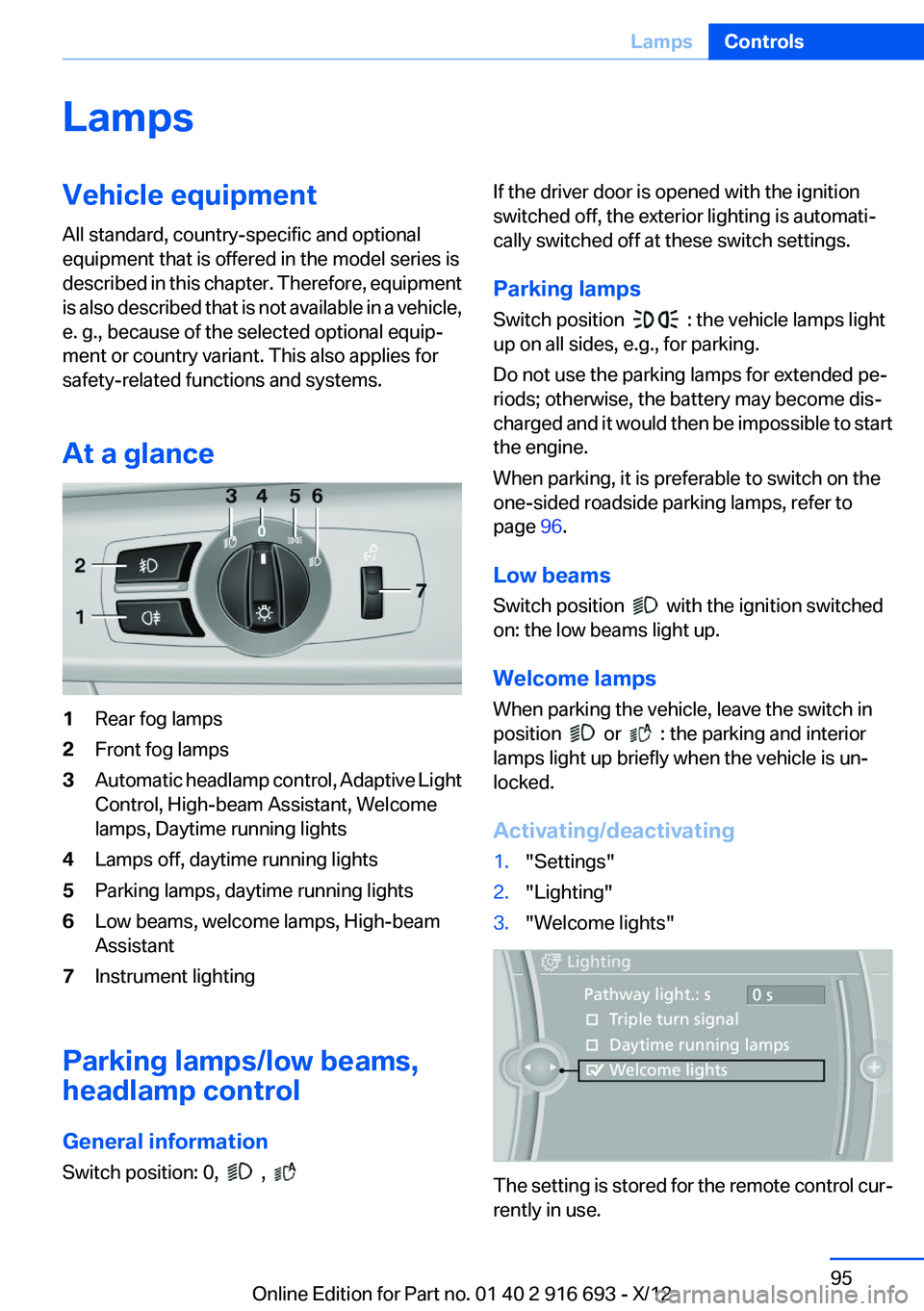
At a glance1Rear fog lamps2Front fog lamps3Automatic headlamp control, Adaptive Light
Control, High-beam Assistant, Welcome
lamps, Daytime running lights4Lamps off, daytime running lights5Parking lamps, daytime running lights6Low beams, welcome lamps, High-beam
Assistant7Instrument lighting
Parking lamps/low beams,
headlamp control
General information
Switch position: 0,
,
If the driver door is opened with the ignition
switched off, the exterior lighting is automati‐
cally switched off at these switch settings.
Parking lamps
Switch position
: the vehicle lamps light
up on all sides, e.g., for parking.
Do not use the parking lamps for extended pe‐
riods; otherwise, the battery may become dis‐
charged and it would then be impossible to start
the engine.
When parking, it is preferable to switch on the
one-sided roadside parking lamps, refer to
page 96.
Low beams
Switch position
with the ignition switched
on: the low beams light up.
Welcome lamps
When parking the vehicle, leave the switch in
position
or : the parking and interior
lamps light up briefly when the vehicle is un‐
locked.
Activating/deactivating
1."Settings"2."Lighting"3."Welcome lights"
The setting is stored for the remote control cur‐
rently in use.
Seite 95LampsControls95
Online Edition for Part no. 01 40 2 916 693 - X/12
Page 223 of 243
4.Engage transmission position N.5.Switch the engine off. In this way, the igni‐
tion remains switched on, and a Check-Con‐
trol message is displayed.
Transmission position P with the igni‐
tion off
When the ignition is switched off, position P
is engaged automatically. When in an auto‐
matic car wash, for example, ensure that the
ignition is not switched off accidentally.◀
The vehicle cannot be locked from the outside
when in transmission position N. A signal is
sounded when an attempt is made to lock the
vehicle.
Transmission position
Transmission position P is engaged automati‐
cally:
▷When the ignition is switched off.▷After approx. 15 minutes.
Headlamps
▷Do not rub dry and do not use abrasive or
caustic cleansers.▷Soak areas that have been soiled e.g. due to
insects, with shampoo and wash off with
water.▷Thaw ice with deicing spray; do not use an
ice scraper.
After washing the vehicle
After washing the vehicle, apply the brakes
briefly to dry them; otherwise, braking action can
be reduced and corrosion of the brake discs can
occur.
Completely remove all residues on the windows,
to minimize loss of visibility due to smearing and
to reduce wiper noises and wiper blade wear.
Vehicle care
Car care products
BMW recommends using cleaning and care
products from BMW, since these have been
tested and approved.
Car care and cleaning products
Follow the instructions on the container.
When cleaning the interior, open the doors or
windows.
Only use products intended for cleaning vehi‐
cles.
Cleansers can contain substances that are dan‐
gerous and harmful to your health.◀
Vehicle paint
Regular care contributes to driving safety and
value retention. Environmental influences in
areas with elevated air pollution or natural con‐
taminants, such as tree resin or pollen can affect
the vehicle's paintwork. Tailor the frequency
and extent of your car care to these influences.
Aggressive substances such as spilled fuel, oil,
grease or bird droppings must be removed im‐
mediately to prevent the finish from being al‐
tered or discolored.
Leather care
Remove dust from the leather often, using a
cloth or vacuum cleaner.
Otherwise, particles of dust and road grime
chafe in pores and folds, and lead to increased
wear and premature degradation of the leather
surface.
To guard against discoloration, such as from
clothing, provide leather care roughly every two
months.
Clean light-colored leather more frequently be‐
cause soiling on such surfaces is substantially
more visible.Seite 223CareMobility223
Online Edition for Part no. 01 40 2 916 693 - X/12
Page 232 of 243
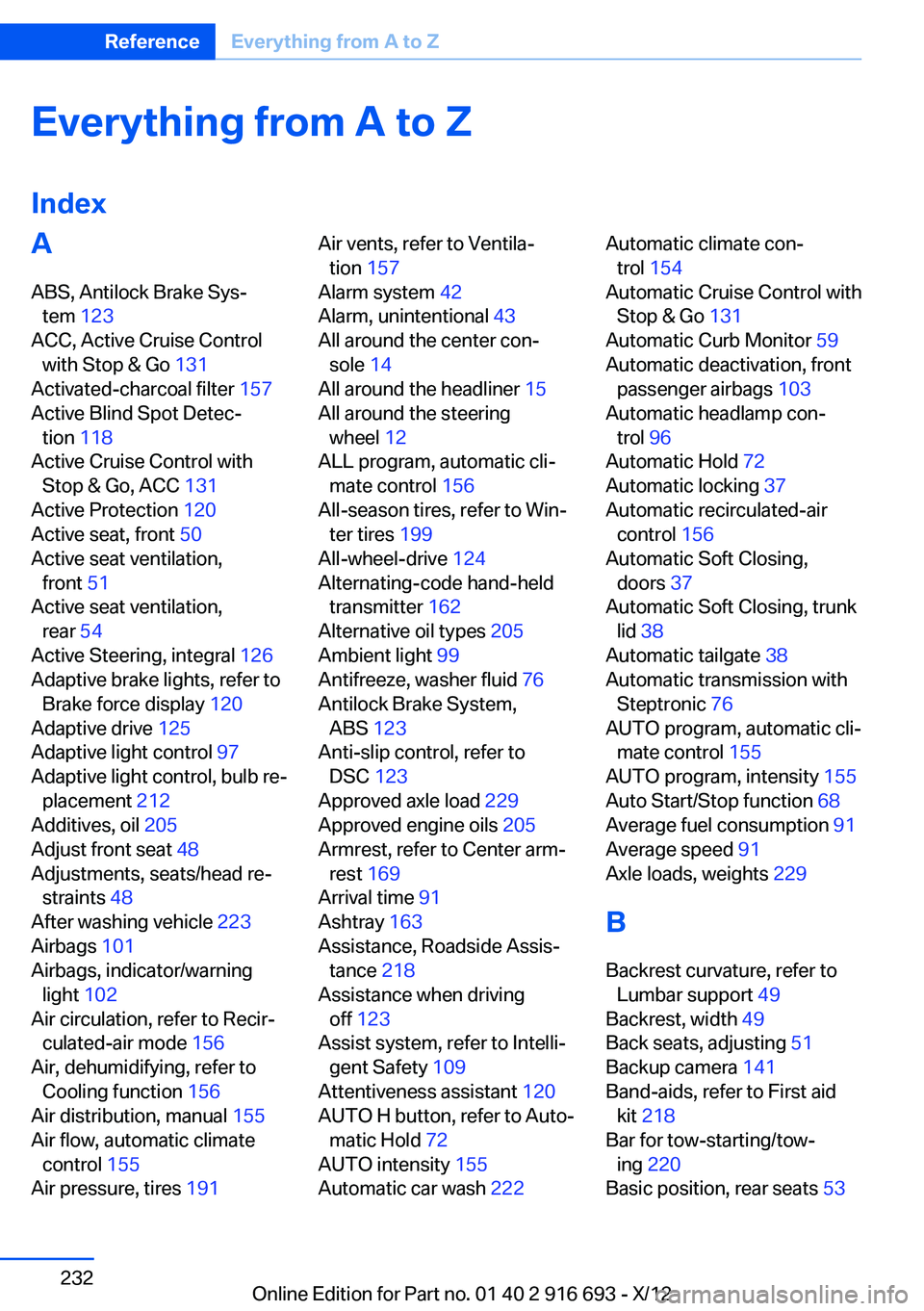
Everything from A to Z
IndexA
ABS, Antilock Brake Sys‐ tem 123
ACC, Active Cruise Control with Stop & Go 131
Activated-charcoal filter 157
Active Blind Spot Detec‐ tion 118
Active Cruise Control with Stop & Go, ACC 131
Active Protection 120
Active seat, front 50
Active seat ventilation, front 51
Active seat ventilation, rear 54
Active Steering, integral 126
Adaptive brake lights, refer to Brake force display 120
Adaptive drive 125
Adaptive light control 97
Adaptive light control, bulb re‐ placement 212
Additives, oil 205
Adjust front seat 48
Adjustments, seats/head re‐ straints 48
After washing vehicle 223
Airbags 101
Airbags, indicator/warning light 102
Air circulation, refer to Recir‐ culated-air mode 156
Air, dehumidifying, refer to Cooling function 156
Air distribution, manual 155
Air flow, automatic climate control 155
Air pressure, tires 191 Air vents, refer to Ventila‐
tion 157
Alarm system 42
Alarm, unintentional 43
All around the center con‐ sole 14
All around the headliner 15
All around the steering wheel 12
ALL program, automatic cli‐ mate control 156
All-season tires, refer to Win‐ ter tires 199
All-wheel-drive 124
Alternating-code hand-held transmitter 162
Alternative oil types 205
Ambient light 99
Antifreeze, washer fluid 76
Antilock Brake System, ABS 123
Anti-slip control, refer to DSC 123
Approved axle load 229
Approved engine oils 205
Armrest, refer to Center arm‐ rest 169
Arrival time 91
Ashtray 163
Assistance, Roadside Assis‐ tance 218
Assistance when driving off 123
Assist system, refer to Intelli‐ gent Safety 109
Attentiveness assistant 120
AUTO H button, refer to Auto‐ matic Hold 72
AUTO intensity 155
Automatic car wash 222 Automatic climate con‐
trol 154
Automatic Cruise Control with Stop & Go 131
Automatic Curb Monitor 59
Automatic deactivation, front passenger airbags 103
Automatic headlamp con‐ trol 96
Automatic Hold 72
Automatic locking 37
Automatic recirculated-air control 156
Automatic Soft Closing, doors 37
Automatic Soft Closing, trunk lid 38
Automatic tailgate 38
Automatic transmission with Steptronic 76
AUTO program, automatic cli‐ mate control 155
AUTO program, intensity 155
Auto Start/Stop function 68
Average fuel consumption 91
Average speed 91
Axle loads, weights 229
B
Backrest curvature, refer to Lumbar support 49
Backrest, width 49
Back seats, adjusting 51
Backup camera 141
Band-aids, refer to First aid kit 218
Bar for tow-starting/tow‐ ing 220
Basic position, rear seats 53 Seite 232ReferenceEverything from A to Z232
Online Edition for Part no. 01 40 2 916 693 - X/12
Page 233 of 243
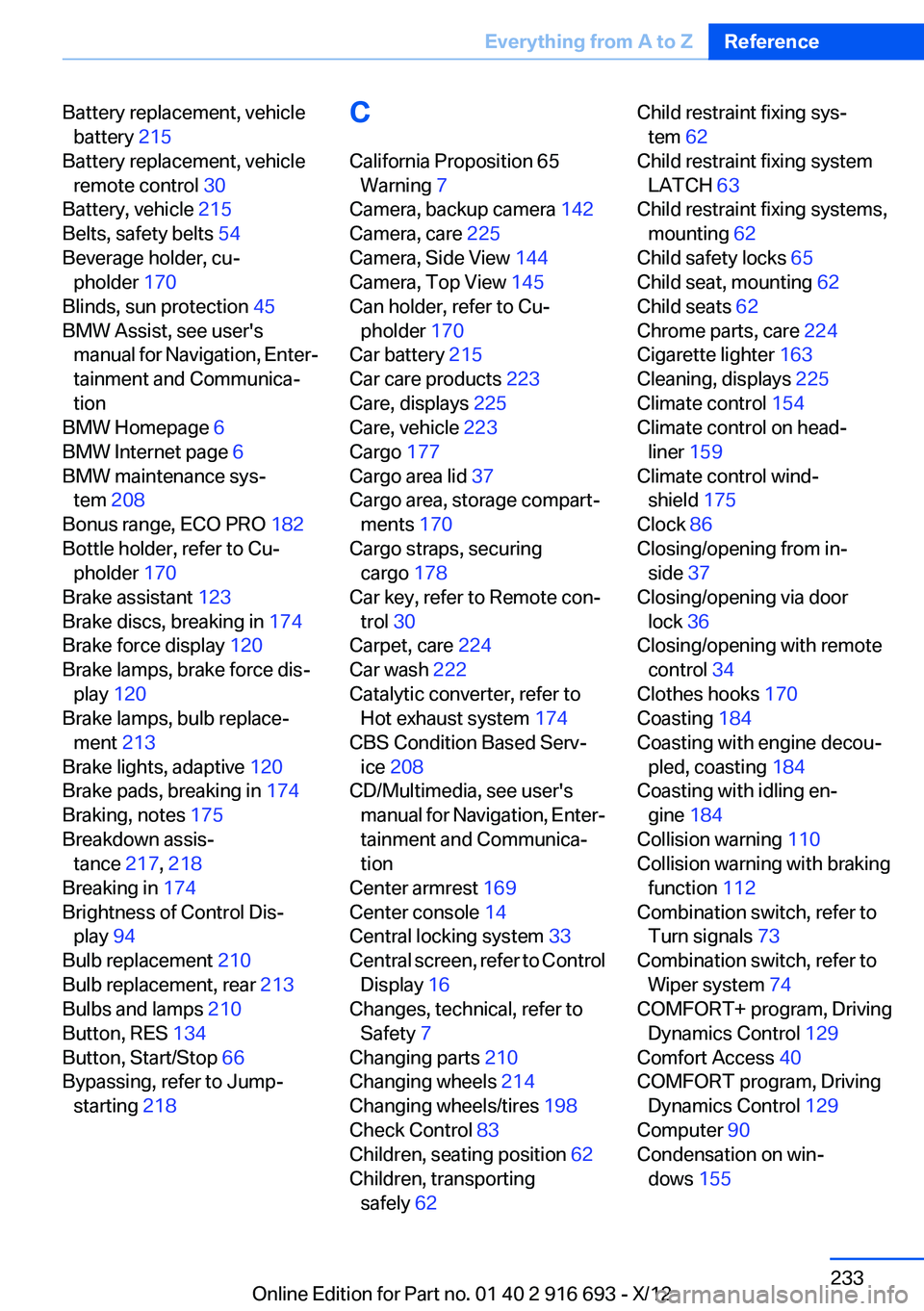
Battery replacement, vehiclebattery 215
Battery replacement, vehicle remote control 30
Battery, vehicle 215
Belts, safety belts 54
Beverage holder, cu‐ pholder 170
Blinds, sun protection 45
BMW Assist, see user's manual for Navigation, Enter‐
tainment and Communica‐
tion
BMW Homepage 6
BMW Internet page 6
BMW maintenance sys‐ tem 208
Bonus range, ECO PRO 182
Bottle holder, refer to Cu‐ pholder 170
Brake assistant 123
Brake discs, breaking in 174
Brake force display 120
Brake lamps, brake force dis‐ play 120
Brake lamps, bulb replace‐ ment 213
Brake lights, adaptive 120
Brake pads, breaking in 174
Braking, notes 175
Breakdown assis‐ tance 217, 218
Breaking in 174
Brightness of Control Dis‐ play 94
Bulb replacement 210
Bulb replacement, rear 213
Bulbs and lamps 210
Button, RES 134
Button, Start/Stop 66
Bypassing, refer to Jump- starting 218 C
California Proposition 65 Warning 7
Camera, backup camera 142
Camera, care 225
Camera, Side View 144
Camera, Top View 145
Can holder, refer to Cu‐ pholder 170
Car battery 215
Car care products 223
Care, displays 225
Care, vehicle 223
Cargo 177
Cargo area lid 37
Cargo area, storage compart‐ ments 170
Cargo straps, securing cargo 178
Car key, refer to Remote con‐ trol 30
Carpet, care 224
Car wash 222
Catalytic converter, refer to Hot exhaust system 174
CBS Condition Based Serv‐ ice 208
CD/Multimedia, see user's manual for Navigation, Enter‐
tainment and Communica‐
tion
Center armrest 169
Center console 14
Central locking system 33
Central screen, refer to Control Display 16
Changes, technical, refer to Safety 7
Changing parts 210
Changing wheels 214
Changing wheels/tires 198
Check Control 83
Children, seating position 62
Children, transporting safely 62 Child restraint fixing sys‐
tem 62
Child restraint fixing system LATCH 63
Child restraint fixing systems, mounting 62
Child safety locks 65
Child seat, mounting 62
Child seats 62
Chrome parts, care 224
Cigarette lighter 163
Cleaning, displays 225
Climate control 154
Climate control on head‐ liner 159
Climate control wind‐ shield 175
Clock 86
Closing/opening from in‐ side 37
Closing/opening via door lock 36
Closing/opening with remote control 34
Clothes hooks 170
Coasting 184
Coasting with engine decou‐ pled, coasting 184
Coasting with idling en‐ gine 184
Collision warning 110
Collision warning with braking function 112
Combination switch, refer to Turn signals 73
Combination switch, refer to Wiper system 74
COMFORT+ program, Driving Dynamics Control 129
Comfort Access 40
COMFORT program, Driving Dynamics Control 129
Computer 90
Condensation on win‐ dows 155 Seite 233Everything from A to ZReference233
Online Edition for Part no. 01 40 2 916 693 - X/12