buttons BMW 740LI SEDAN 2012 Owner's Guide
[x] Cancel search | Manufacturer: BMW, Model Year: 2012, Model line: 740LI SEDAN, Model: BMW 740LI SEDAN 2012Pages: 299, PDF Size: 8.49 MB
Page 204 of 299
Professional rear entertainment*
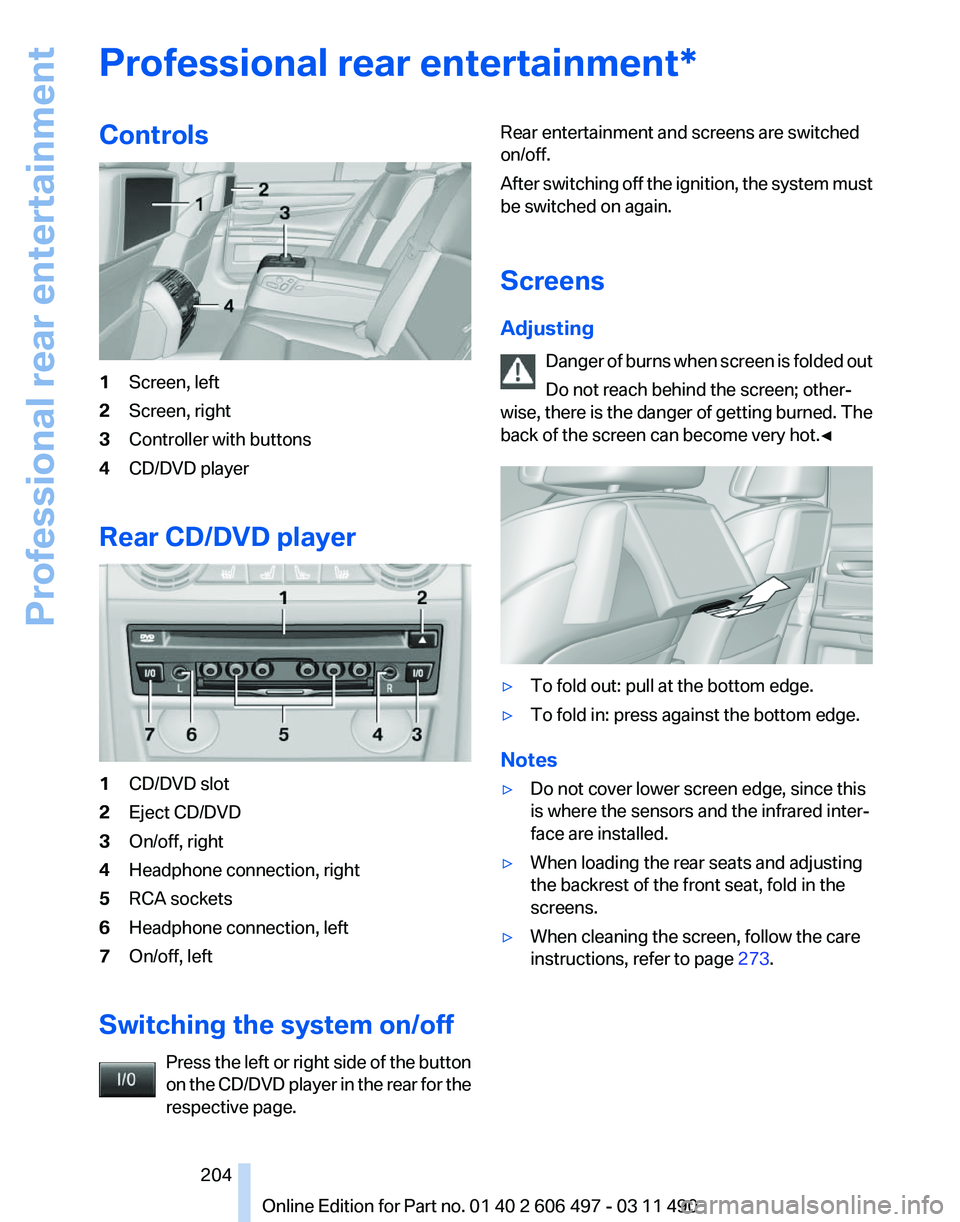
Controls
1
Screen, left
2 Screen, right
3 Controller with buttons
4 CD/DVD player
Rear CD/DVD player 1
CD/DVD slot
2 Eject CD/DVD
3 On/off, right
4 Headphone connection, right
5 RCA sockets
6 Headphone connection, left
7 On/off, left
Switching the system on/off Press the left or right side of the button
on the CD/DVD player in the rear for the
respective page. Rear entertainment and screens are switched
on/off.
After
switching off the ignition, the system must
be switched on again.
Screens
Adjusting
Danger of burns when screen is folded out
Do not reach behind the screen; other‐
wise, there is the danger of getting burned. The
back of the screen can become very hot.◀ ▷
To fold out: pull at the bottom edge.
▷ To fold in: press against the bottom edge.
Notes
▷ Do not cover lower screen edge, since this
is where the sensors and the infrared inter‐
face are installed.
▷ When loading the rear seats and adjusting
the backrest of the front seat, fold in the
screens.
▷ When cleaning the screen, follow the care
instructions, refer to page 273. Seite 204
204 Online Edition for Part no. 01 40 2 606 497 - 03 11 490
Professional rear entertainment
Page 205 of 299
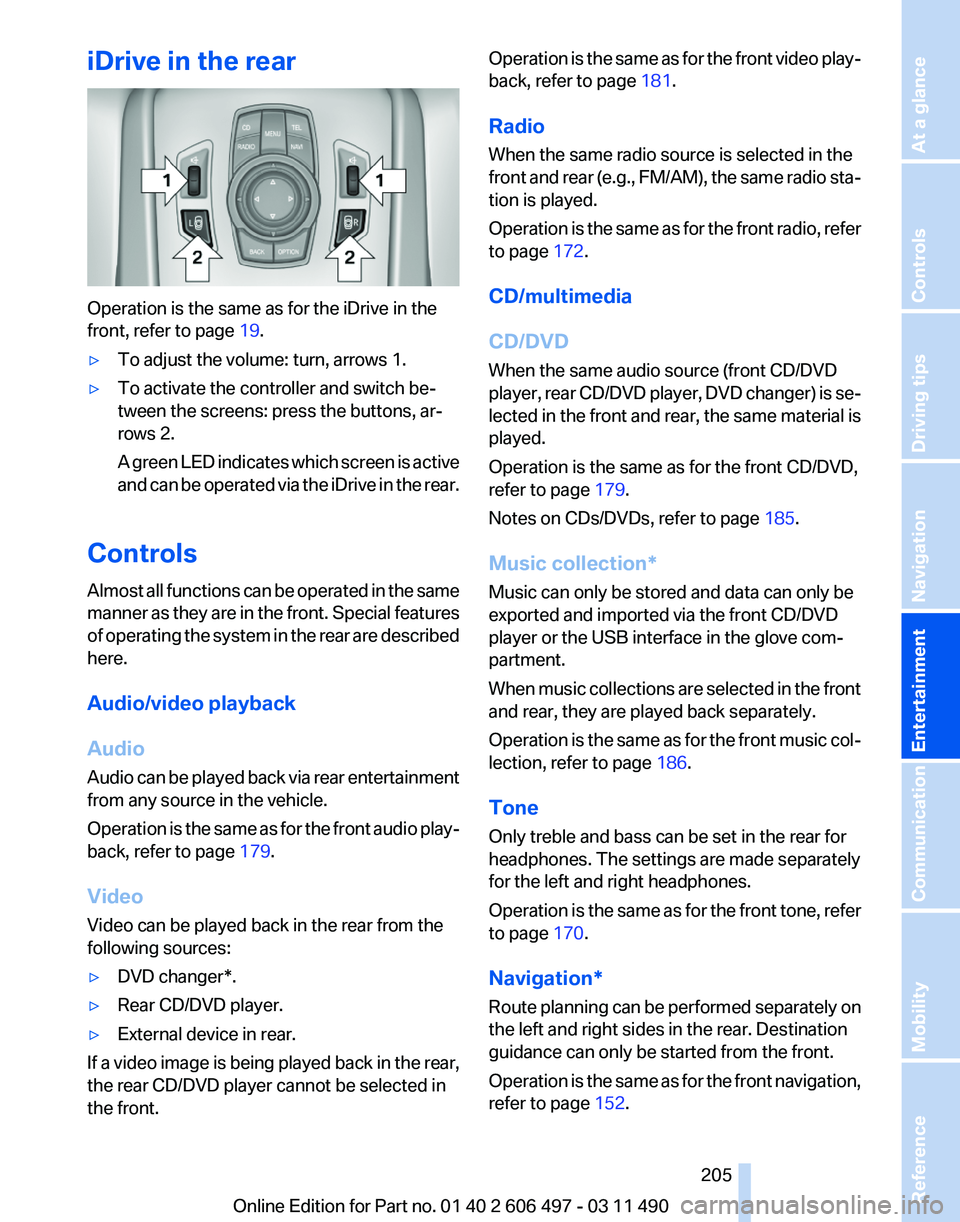
iDrive in the rear
Operation is the same as for the iDrive in the
front, refer to page
19.
▷ To adjust the volume: turn, arrows 1.
▷ To activate the controller and switch be‐
tween the screens: press the buttons, ar‐
rows 2.
A
green LED indicates which screen is active
and can be operated via the iDrive in the rear.
Controls
Almost
all functions can be operated in the same
manner as they are in the front. Special features
of operating the system in the rear are described
here.
Audio/video playback
Audio
Audio can be played back via rear entertainment
from any source in the vehicle.
Operation is the same as for the front audio play‐
back, refer to page 179.
Video
Video can be played back in the rear from the
following sources:
▷ DVD changer*.
▷ Rear CD/DVD player.
▷ External device in rear.
If a video image is being played back in the rear,
the rear CD/DVD player cannot be selected in
the front. Operation is the same as for the front video play‐
back, refer to page
181.
Radio
When the same radio source is selected in the
front
and rear (e.g., FM/AM), the same radio sta‐
tion is played.
Operation is the same as for the front radio, refer
to page 172.
CD/multimedia
CD/DVD
When the same audio source (front CD/DVD
player, rear CD/DVD player, DVD changer) is se‐
lected in the front and rear, the same material is
played.
Operation is the same as for the front CD/DVD,
refer to page 179.
Notes on CDs/DVDs, refer to page 185.
Music collection*
Music can only be stored and data can only be
exported and imported via the front CD/DVD
player or the USB interface in the glove com‐
partment.
When music collections are selected in the front
and rear, they are played back separately.
Operation is the same as for the front music col‐
lection, refer to page 186.
Tone
Only treble and bass can be set in the rear for
headphones. The settings are made separately
for the left and right headphones.
Operation is the same as for the front tone, refer
to page 170.
Navigation*
Route planning can be performed separately on
the left and right sides in the rear. Destination
guidance can only be started from the front.
Operation is the same as for the front navigation,
refer to page 152.
Seite 205
205Online Edition for Part no. 01 40 2 606 497 - 03 11 490
Reference Mobility Communication
Entertainment Navigation Driving tips Controls At a glance
Page 212 of 299
Telephone*
At a glance
The concept
Mobile
phones or other external devices such as
audio players can be connected to the vehicle
via Bluetooth.
After these devices are paired once, they are
recognized automatically when the ignition is
switched on as soon as they are inside the ve‐
hicle and can be operated via iDrive, the buttons
on the steering wheel, and via voice activation*.
Depending on their functionality, external devi‐
ces can be used via the vehicle as a telephone
or as an audio source.
The telephone functions are described in the
following. Operating the audio functions, refer to
page 194.
Up to four external devices can be paired.
Certain functions may need to be enabled by the
mobile phone provider or service provider.
Using the mobile phone while driving
Make entries only when traffic and road
conditions allow. Do not hold the mobile phone
in your hand while you are driving; use the
hands-free system instead. If you do not ob‐
serve this precaution, you can endanger the ve‐
hicle occupants and other road users.◀
Snap-in adapter*
The snap-in adapter is used to:
▷ Hold the mobile phone.
▷ Recharge the battery.
▷ Connect the mobile phone to an outside an‐
tenna of the vehicle.
This provides for better network reception
and consistent sound quality.
Approved mobile phones
Details on which mobile phones and external
devices with a Bluetooth interface are sup‐
ported by the mobile phone preparation pack‐ age can be obtained at www.bmwusa.com/blue‐
tooth.
Displaying the vehicle identification
number and software part number
The vehicle identification number and software
part
number are needed to determine which mo‐
bile phones are supported by the mobile phone
preparation package. The software version of
the mobile phone may also be required.
1. "Telephone"
2. Open "Options".
3. "Bluetooth® info"
4. "Display system information"
These approved mobile phones with a certain
software version, support the vehicle functions
described below.
Malfunctions may occur with other mobile
phones or software versions.
Do
not operate a mobile phone that is connected
to the vehicle on the mobile phone keypad, as
this may lead to a malfunction.
A software update can be performed if neces‐
sary.
Pairing/unpairing the mobile
phone
General information
The following functions are available:
▷ Use of a mobile phone as a telephone.
▷ Use of a mobile phone as an additional tele‐
phone.
▷ Use of a mobile phone as an audio source.
▷ Use of an audio device as an audio source,
refer to page 194.
Requirements
▷ The mobile phone is suitable.
Seite 212
212 Online Edition for Part no. 01 40 2 606 497 - 03 11 490
Telephone
Page 221 of 299
Adjusting the volume
Turn the knob during an announcement.
▷
The volume remains constant even if the
volume of other audio sources is changed.
▷ The volume is stored for the remote control
currently in use.
Notes
Do not use the voice operation to initiate an
Emergency
Request. In stressful situations, the
voice and vocal pitch can change. This can un‐
necessarily delay the establishment of a tele‐
phone connection.
Instead, use the SOS button*, refer to
page 266, in the vicinity of the interior mirror.
Environmental conditions
▷ Say the commands, numbers, and letters
smoothly and with normal volume, empha‐
sis, and speed.
▷ Always say commands in the language of
the system. The language for the mobile
phone voice operation is preset and cannot
be changed in the Control Display.
▷ Keep the doors, windows, and glass sun‐
roof* closed to prevent noise interference.
▷ Avoid making other noise in the vehicle
while speaking.
Snap-in adapter*
Installation position
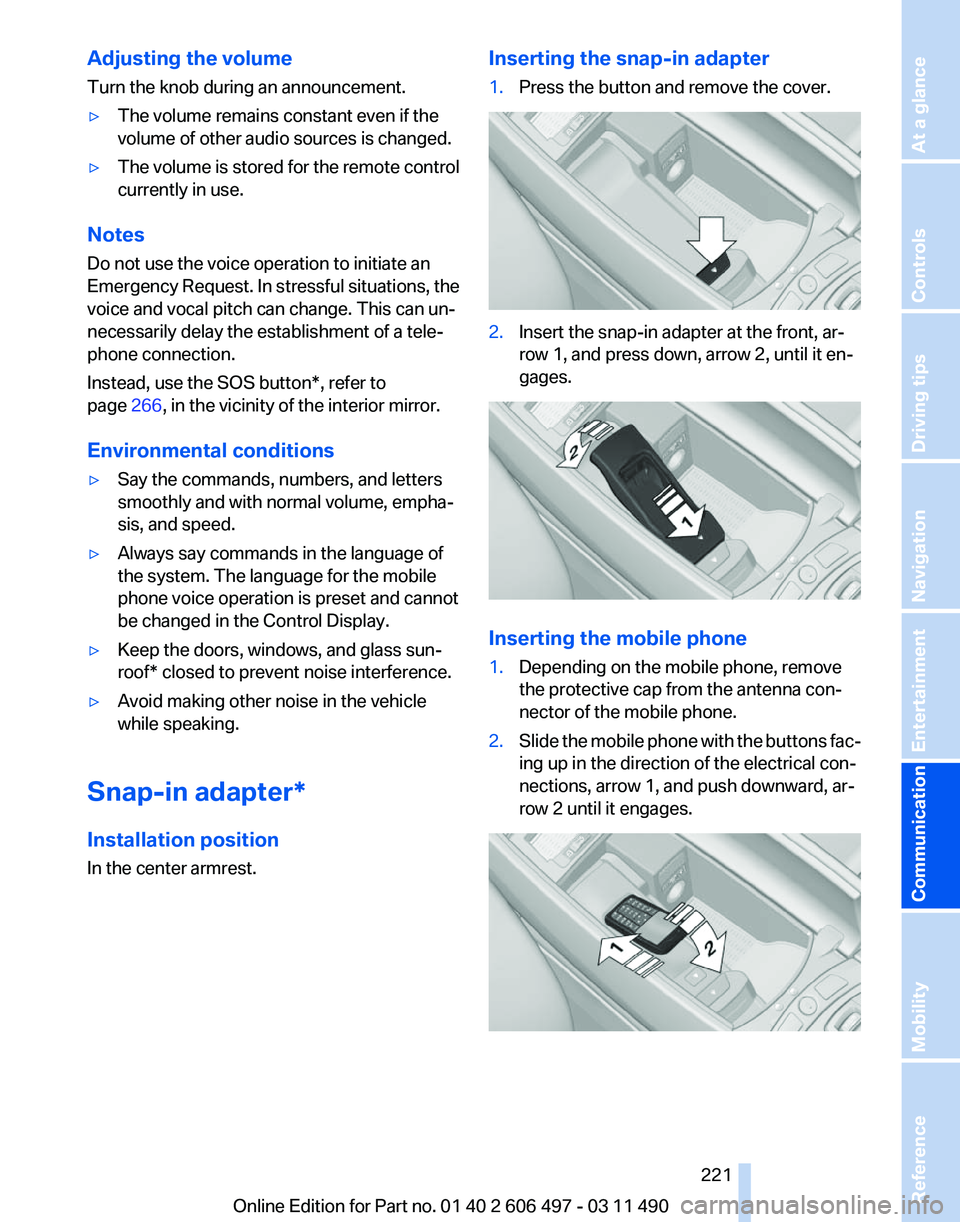
In the center armrest. Inserting the snap-in adapter
1.
Press the button and remove the cover. 2.
Insert the snap-in adapter at the front, ar‐
row 1, and press down, arrow 2, until it en‐
gages. Inserting the mobile phone
1.
Depending on the mobile phone, remove
the protective cap from the antenna con‐
nector of the mobile phone.
2. Slide the mobile phone with the buttons fac‐
ing up in the direction of the electrical con‐
nections, arrow 1, and push downward, ar‐
row 2 until it engages. Seite 221
221Online Edition for Part no. 01 40 2 606 497 - 03 11 490
Reference Mobility
Communication Entertainment Navigation Driving tips Controls At a glance
Page 293 of 299
Maintenance System,
BMW 258
Malfunction displays, refer to Check Control 82
Malfunction, self-leveling sus‐ pension 102
Manual air distribution 125
Manual air volume 126
Manual brake, refer to Parking brake 66
Manual mode, transmis‐ sion 74
Manual operation, backup camera 116
Manual operation, door lock 38
Manual
operation, exterior mir‐
rors 59
Manual operation, fuel filler flap 242
Manual operation, Park Dis‐ tance Control PDC 114
Manual operation, parking brake 67
Manual operation, Side View 118
Manual operation, Top View 119
Manual operation, trunk lid 40
Map, destination entry 156
Map in split screen 163
Map view 161
Marking on approved tires 250
Marking, run-flat tires 251
Massage seat, front 50
Massage seat, rear 52
Master key, refer to Remote control 32
Maximum cooling 126
Maximum speed, winter tires 251
Measure, units of 81
Medical kit 267
Memory for seat, mirrors, steering wheel 57
Menu in instrument cluster 77
Menus, operating, iDrive 19 Menus, refer to iDrive operat‐
ing concept 20
Message list, traffic bulle‐ tins 163
Messages 226
Messages, refer to Check Control 82
Microfilter 128
Minimum tread, tires 249
Mirror 58
Mirror memory 57
Mobile communication devi‐ ces in the vehicle 145
Mobile phone 212
Modifications, technical, refer to Safety 7
Moisture in headlamp 261
Monitor, refer to Control Dis‐ play 19
Mounting of child restraint fix‐ ing systems 61
MP3 player 190
Multifunction steering wheel, buttons 12
Multimedia 179
Music collection 186
Music search 187
Music, storing 186
N
Navigation 152
Navigation data 166
Neck restraints, front, refer to Head restraints 54
Neck restraints, rear, refer to Head restraints 55
New wheels and tires 250
Night Vision with pedestrian detection 120
NORMAL program, Dynamic Driving Control 103
Notes 229
Nylon rope for tow-starting/ towing 269 O
OBD Onboard Diagnos‐
tics 258
Obstacle marking, backup camera 117
Odometer 77
Office 223
Oil 255
Oil, adding 255
Oil additives 256
Oil
change interval, service re‐
quirements 81
Oil filler neck 255
Oil level check 255
Oil types, alternative 256
Oil types, approved 256
Old batteries, disposal 265
Onboard Diagnostics OBD 258
Onboard monitor, refer to Control Display 19
Online, refer to BMW On‐ line 236
Opening/closing from in‐ side 39
Opening/closing via door lock 38
Opening/closing with remote control 36
Operating concept, iDrive 19
Outside air, refer to Automatic recirculated-air control 126
Overheating of engine, refer to Coolant temperature 76
P
Paint, vehicle 272
Panic mode 36
Park Distance Control PDC 113
Parked-car ventilation 130
Parked vehicle, condensa‐ tion 146
Parking aid, refer to PDC 113
Parking brake 66
Parking lamps 84
Seite 293
293Online Edition for Part no. 01 40 2 606 497 - 03 11 490
Reference Mobility Communication Entertainment Navigation Driving tips Controls At a glance