transmission BMW 745i 2004 E65 User Guide
[x] Cancel search | Manufacturer: BMW, Model Year: 2004, Model line: 745i, Model: BMW 745i 2004 E65Pages: 232, PDF Size: 5.27 MB
Page 74 of 232
Driving
72
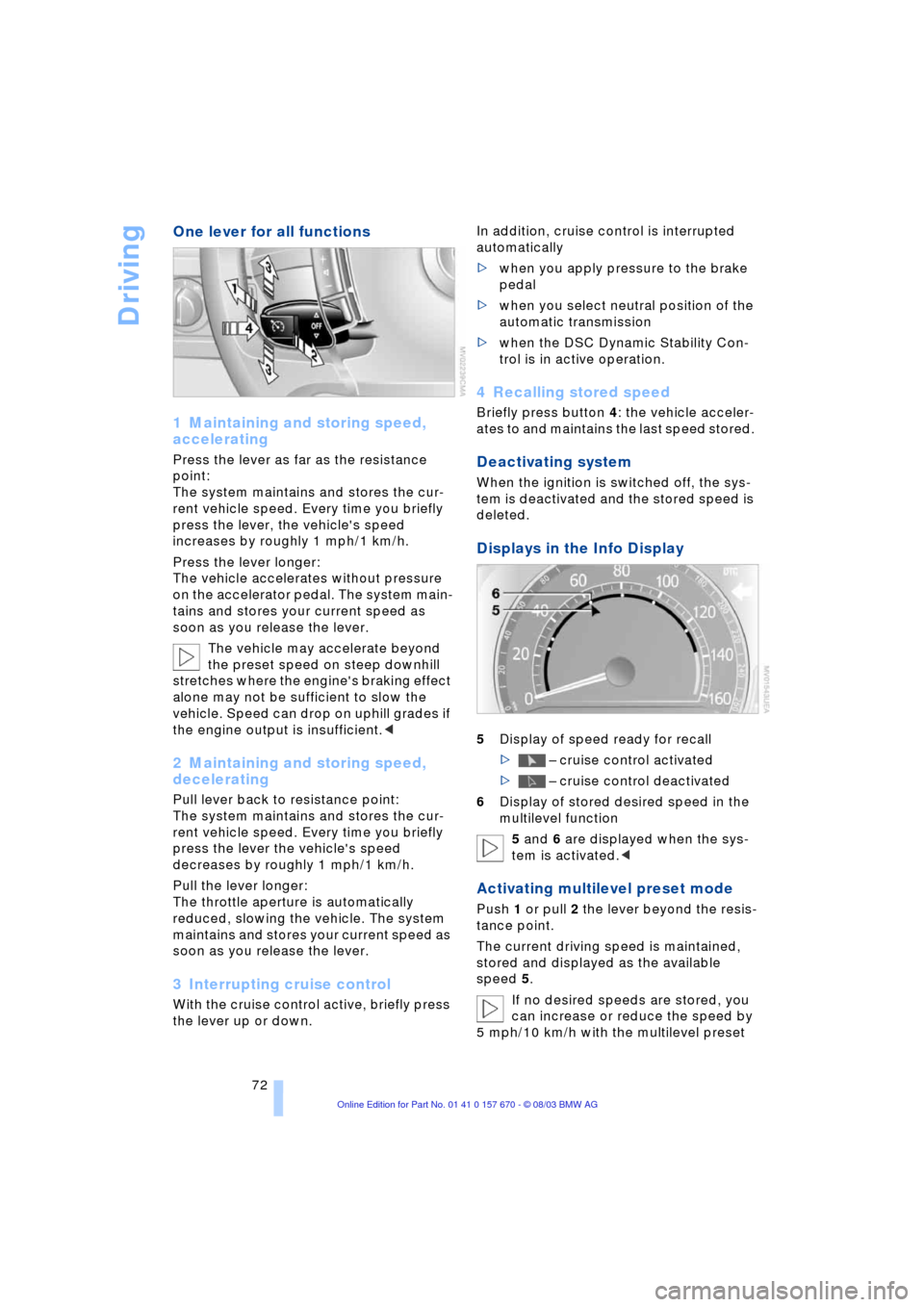
One lever for all functions
1 Maintaining and storing speed,
accelerating
Press the lever as far as the resistance
point:
The system maintains and stores the cur-
rent vehicle speed. Every time you briefly
press the lever, the vehicle's speed
increases by roughly 1 mph/1 km/h.
Press the lever longer:
The vehicle accelerates without pressure
on the accelerator pedal. The system main-
tains and stores your current speed as
soon as you release the lever.
The vehicle may accelerate beyond
the preset speed on steep downhill
stretches where the engine's braking effect
alone may not be sufficient to slow the
vehicle. Speed can drop on uphill grades if
the engine output is insufficient.<
2 Maintaining and storing speed,
decelerating
Pull lever back to resistance point:
The system maintains and stores the cur-
rent vehicle speed. Every time you briefly
press the lever the vehicle's speed
decreases by roughly 1 mph/1 km/h.
Pull the lever longer:
The throttle aperture is automatically
reduced, slowing the vehicle. The system
maintains and stores your current speed as
soon as you release the lever.
3 Interrupting cruise control
With the cruise control active, briefly press
the lever up or down. In addition, cruise control is interrupted
automatically
>when you apply pressure to the brake
pedal
>when you select neutral position of the
automatic transmission
>when the DSC Dynamic Stability Con-
trol is in active operation.
4 Recalling stored speed
Briefly press button 4: the vehicle acceler-
ates to and maintains the last speed stored.
Deactivating system
When the ignition is switched off, the sys-
tem is deactivated and the stored speed is
deleted.
Displays in the Info Display
5Display of speed ready for recall
> Ð cruise control activated
> Ð cruise control deactivated
6Display of stored desired speed in the
multilevel function
5 and 6 are displayed when the sys-
tem is activated.<
Activating multilevel preset mode
Push 1 or pull 2 the lever beyond the resis-
tance point.
The current driving speed is maintained,
stored and displayed as the available
speed 5.
If no desired speeds are stored, you
can increase or reduce the speed by
5 mph/10 km/h with the multilevel preset
Page 79 of 232
Controls
77Reference
At a glance
Driving tips
Communications
Navigation
Entertainment
Mobility
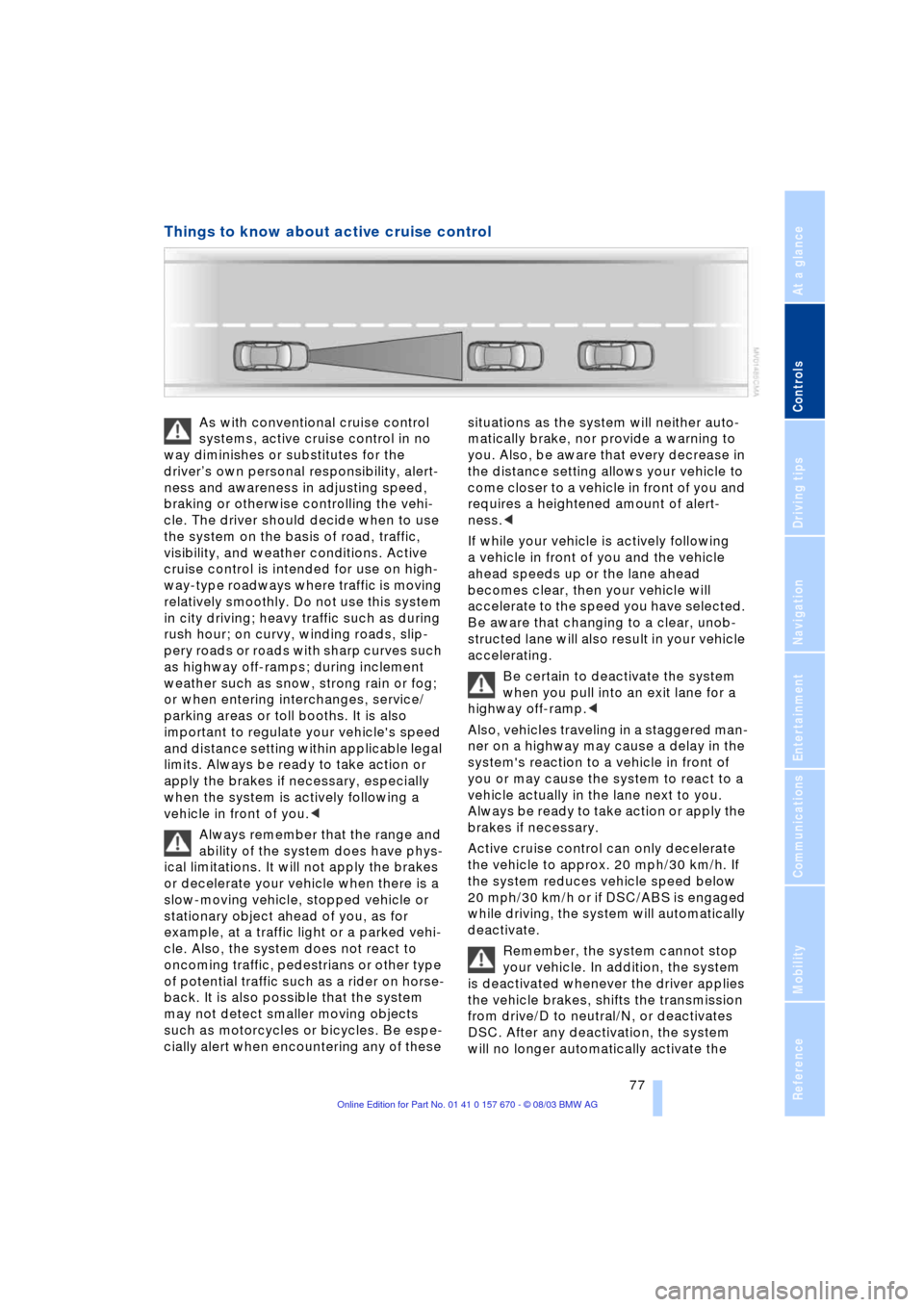
Things to know about active cruise control
As with conventional cruise control
systems, active cruise control in no
way diminishes or substitutes for the
driverÕs own personal responsibility, alert-
ness and awareness in adjusting speed,
braking or otherwise controlling the vehi-
cle. The driver should decide when to use
the system on the basis of road, traffic,
visibility, and weather conditions. Active
cruise control is intended for use on high-
way-type roadways where traffic is moving
relatively smoothly. Do not use this system
in city driving; heavy traffic such as during
rush hour; on curvy, winding roads, slip-
pery roads or roads with sharp curves such
as highway off-ramps; during inclement
weather such as snow, strong rain or fog;
or when entering interchanges, service/
parking areas or toll booths. It is also
important to regulate your vehicle's speed
and distance setting within applicable legal
limits. Always be ready to take action or
apply the brakes if necessary, especially
when the system is actively following a
vehicle in front of you.<
Always remember that the range and
ability of the system does have phys-
ical limitations. It will not apply the brakes
or decelerate your vehicle when there is a
slow-moving vehicle, stopped vehicle or
stationary object ahead of you, as for
example, at a traffic light or a parked vehi-
cle. Also, the system does not react to
oncoming traffic, pedestrians or other type
of potential traffic such as a rider on horse-
back. It is also possible that the system
may not detect smaller moving objects
such as motorcycles or bicycles. Be espe-
cially alert when encountering any of these situations as the system will neither auto-
matically brake, nor provide a warning to
you. Also, be aware that every decrease in
the distance setting allows your vehicle to
come closer to a vehicle in front of you and
requires a heightened amount of alert-
ness.<
If while your vehicle is actively following
a vehicle in front of you and the vehicle
ahead speeds up or the lane ahead
becomes clear, then your vehicle will
accelerate to the speed you have selected.
Be aware that changing to a clear, unob-
structed lane will also result in your vehicle
accelerating.
Be certain to deactivate the system
when you pull into an exit lane for a
highway off-ramp.<
Also, vehicles traveling in a staggered man-
ner on a highway may cause a delay in the
system's reaction to a vehicle in front of
you or may cause the system to react to a
vehicle actually in the lane next to you.
Always be ready to take action or apply the
brakes if necessary.
Active cruise control can only decelerate
the vehicle to approx. 20 mph/30 km/h. If
the system reduces vehicle speed below
20 mph/30 km/h or if DSC/ABS is engaged
while driving, the system will automatically
deactivate.
Remember, the system cannot stop
your vehicle. In addition, the system
is deactivated whenever the driver applies
the vehicle brakes, shifts the transmission
from drive/D to neutral/N, or deactivates
DSC. After any deactivation, the system
will no longer automatically activate the
Page 92 of 232
Technology for comfort, convenience and safety
90
Technology for comfort, convenience
and safety
PDC Park Distance Control*
The concept
The PDC assists you when you are parking.
Signal tones indicate the current distance
to an object behind or in front of your vehi-
cle. Four ultrasonic sensors in both the
bumpers monitor the distance to the near-
est object. The sensors at the front and at
the two rear corners have a range of
approx. 2 ft/60 cm; the rear middle sensors
have approx. 5 ft/1.50 m.
PDC is a parking aid that can indicate
objects when they are approached
slowly, as is usually the case when parking.
Avoid approaching an object at high speed,
as otherwise the physical circumstances
would mean that the system warning was
too late.<
Automatic function
Whenever the ignition is on the system
automatically assumes operational status
after a few seconds each time you engage
the transmission position R.
Wait this short period before revers-
ing.<
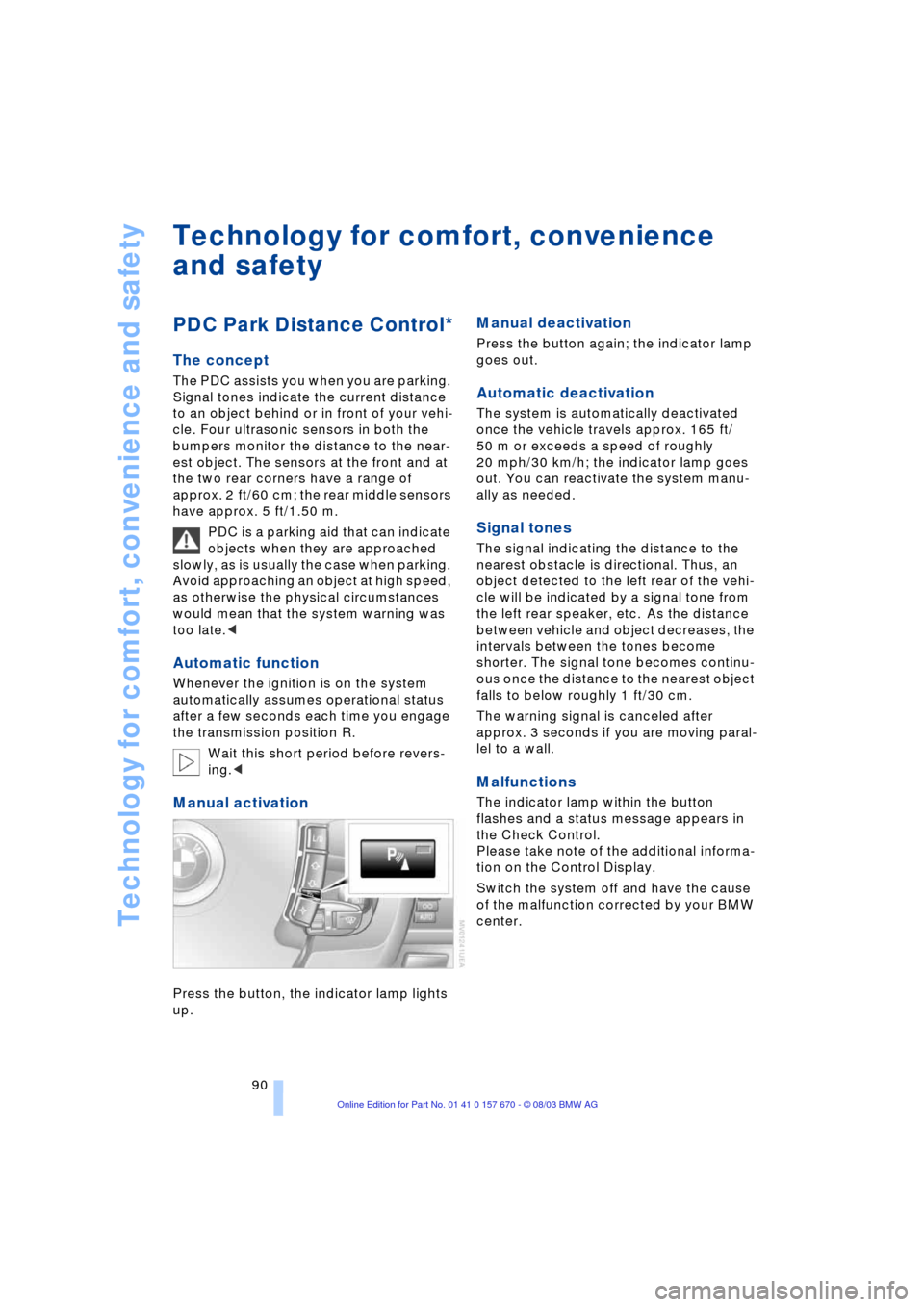
Manual activation
Press the button, the indicator lamp lights
up.
Manual deactivation
Press the button again; the indicator lamp
goes out.
Automatic deactivation
The system is automatically deactivated
once the vehicle travels approx. 165 ft/
50 m or exceeds a speed of roughly
20 mph/30 km/h; the indicator lamp goes
out. You can reactivate the system manu-
ally as needed.
Signal tones
The signal indicating the distance to the
nearest obstacle is directional. Thus, an
object detected to the left rear of the vehi-
cle will be indicated by a signal tone from
the left rear speaker, etc. As the distance
between vehicle and object decreases, the
intervals between the tones become
shorter. The signal tone becomes continu-
ous once the distance to the nearest object
falls to below roughly 1 ft/30 cm.
The warning signal is canceled after
approx. 3 seconds if you are moving paral-
lel to a wall.
Malfunctions
The indicator lamp within the button
flashes and a status message appears in
the Check Control.
Please take note of the additional informa-
tion on the Control Display.
Switch the system off and have the cause
of the malfunction corrected by your BMW
center.
Page 113 of 232
Controls
111Reference
At a glance
Driving tips
Communications
Navigation
Entertainment
Mobility
Practical interior accessories
Integrated universal remote
control*
The concept
The integrated universal remote control
can replace as many as three hand-held
transmitters for various remote-controlled
accessories, such as door openers and
house alarm systems. The integrated uni-
versal remote control registers and stores
signals from the original hand-held trans-
mitters.
The signal of an original hand-held trans-
mitter can be programmed on one of the
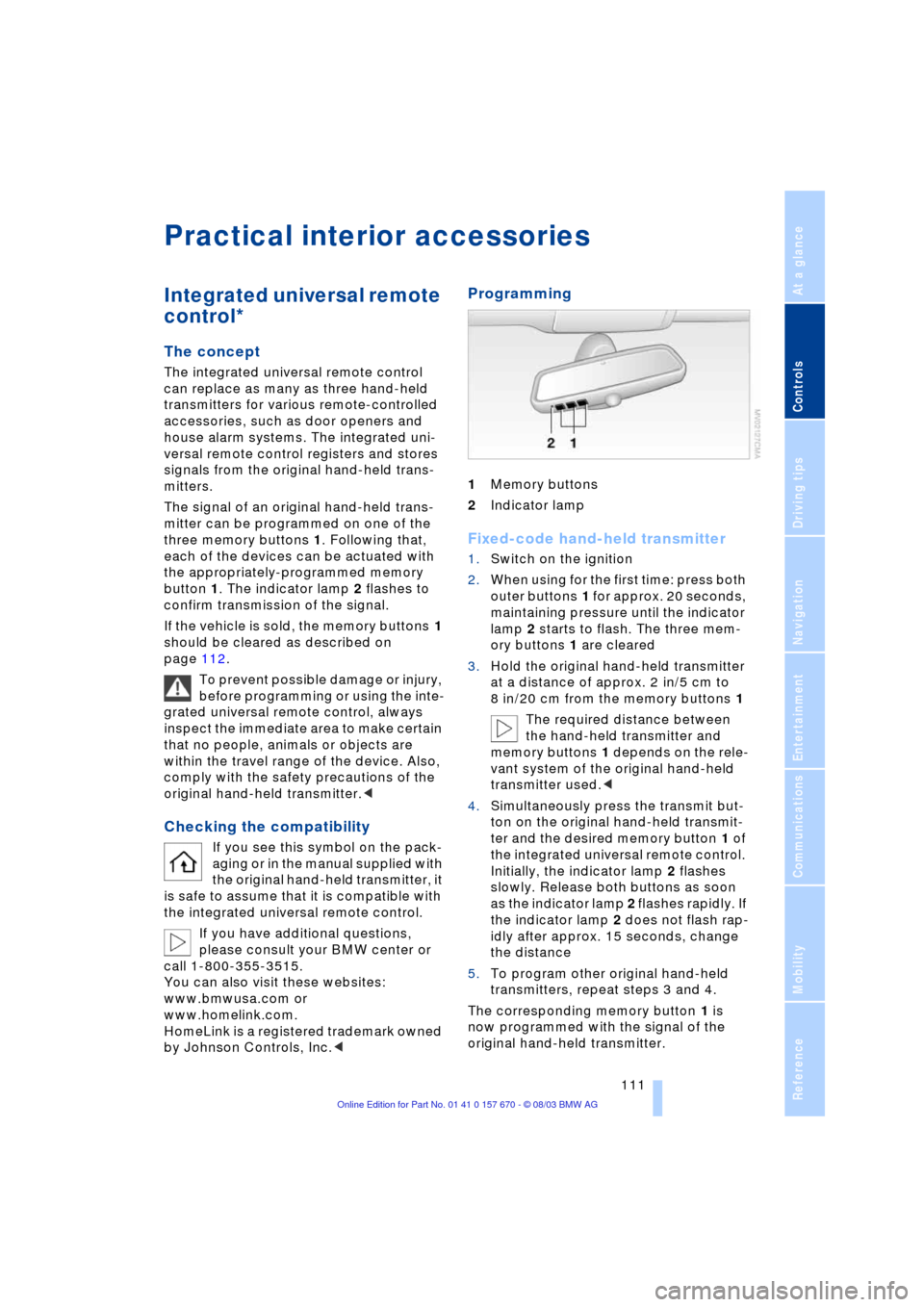
three memory buttons 1. Following that,
each of the devices can be actuated with
the appropriately-programmed memory
button 1. The indicator lamp 2 flashes to
confirm transmission of the signal.
If the vehicle is sold, the memory buttons 1
should be cleared as described on
page 112.
To prevent possible damage or injury,
before programming or using the inte-
grated universal remote control, always
inspect the immediate area to make certain
that no people, animals or objects are
within the travel range of the device. Also,
comply with the safety precautions of the
original hand-held transmitter.<
Checking the compatibility
If you see this symbol on the pack-
aging or in the manual supplied with
the original hand-held transmitter, it
is safe to assume that it is compatible with
the integrated universal remote control.
If you have additional questions,
please consult your BMW center or
call 1-800-355-3515.
You can also visit these websites:
www.bmwusa.com or
www.homelink.com.
HomeLink is a registered trademark owned
by Johnson Controls, Inc.<
Programming
1Memory buttons
2Indicator lamp
Fixed-code hand-held transmitter
1.Switch on the ignition
2.When using for the first time: press both
outer buttons 1 for approx. 20 seconds,
maintaining pressure until the indicator
lamp 2 starts to flash. The three mem-
ory buttons 1 are cleared
3.Hold the original hand-held transmitter
at a distance of approx. 2 in/5 cm to
8 in/20 cm from the memory buttons 1
The required distance between
the hand-held transmitter and
memory buttons 1 depends on the rele-
vant system of the original hand-held
transmitter used.<
4.Simultaneously press the transmit but-
ton on the original hand-held transmit-
ter and the desired memory button 1 of
the integrated universal remote control.
Initially, the indicator lamp 2 flashes
slowly. Release both buttons as soon
as the indicator lamp 2 flashes rapidly. If
the indicator lamp 2 does not flash rap-
idly after approx. 15 seconds, change
the distance
5.To program other original hand-held
transmitters, repeat steps 3 and 4.
The corresponding memory button 1 is
now programmed with the signal of the
original hand-held transmitter.
Page 124 of 232
Things to remember when driving
122
Things to remember when driving
Break-in procedures
To ensure that your vehicle continues to
furnish optimized economy of operation
throughout an extended service life, we
request that you devote careful attention
to the following section.
Engine and differential
Up to 1,200 miles/2,000 km:
During this initial period you should attempt
to avoid constant, steady-state operation
and vary both vehicle and engine speeds
as often as possible. Until the break-in
period has been completed you should
also refrain from exceeding the following:
>4,500 rpm or 105 mph/170 km/h.
Always obey all official speed limits.
Avoid full-throttle operation and use of the
transmission's kickdown mode during
these initial miles.
Once you have driven 1,200 miles/
2,000 km, the engine or vehicle speeds
can be gradually increased.
You should also comply with these break-in
procedures should the engine or differen-
tial need to be replaced at a later point.
Tires
Due to technical factors associated with
their manufacture, tires do not achieve their
full traction potential until after an initial
break-in period.Therefore, drive reservedly
during the first 200 miles/300 km.
Brake system
Brakes require an initial break-in period of
approx. 300 miles/500 km to achieve opti-
mized contact and wear patterns between
brake pads and rotors.
General driving notes
High temperatures
Extreme temperatures occur at the
catalytic converter on this and every
catalyst-equipped vehicle. Do not remove
the heat shields installed adjacent to vari-
ous sections of the exhaust system, and
never apply undercoating to them.
When driving, standing at idle and while
parking take care to avoid possible contact
between the hot exhaust system and any
highly flammable materials such as hay,
leaves, grass, etc. Such contact could lead
to a fire, accompanied by the risk of serious
property damage as well as personal
injury.<
Parking the vehicle
Condensation forms in the air conditioner
system during operation, and then exits
under the vehicle. Traces of condensed
water under the vehicle are thus normal.
Before driving into the car wash
1.Fold in the exterior mirrors, refer to
page 51, as otherwise they could be
damaged due to the width of the vehicle
2.Leave the remote control in the ignition
lock, as otherwise the position P of the
automatic transmission will automati-
cally be selected when the remote con-
trol is removed, refer to pages 61
and 67.
With Comfort Access, be sure to
observe the instructions on page 61
3.Release the parking brake, especially
when you have activated Automatic
Hold, refer to pages 62 and 63.
Hydroplaning
When driving on wet or slushy roads,
reduce road speed. If you do not, a
wedge of water can form between tires and
road surface. This phenomenon is referred
Page 125 of 232
Driving tips
123Reference
At a glance
Controls
Communications
Navigation
Entertainment
Mobility
to as hydroplaning, and is characterized
by a partial or complete loss of contact
between tires and road surface, ultimately
undermining your ability to steer and brake
the vehicle.<
Driving through water
Do not drive through water on the
road if it is deeper than 1 ft/30 cm,
and then only at walking speed at the most.
Otherwise, the vehicle's engine, the electri-
cal systems and the transmission may be
damaged.<
Brake system
Braking with ABS
The best way to achieve the best response
from the ABS is to apply maximum pres-
sure to the brake pedal Ð panic stop. Since
the vehicle maintains steering responsive-
ness, you can nevertheless avoid possible
obstacles with a minimum of steering
effort.
Pulsation at the brake pedal combines with
sounds from the hydraulic circuits to indi-
cate to the driver that ABS is in its active
mode.
Do not drive with your foot resting on
the brake pedal. Otherwise, even light
but consistent pedal pressure can lead to
high temperatures, brake wear and possi-
bly even brake failure.<
Disc brakes
Driving in wet conditions
While driving in wet conditions and in
heavy rain, it is a good idea to apply light
pressure to the brake pedal every few
miles. Monitor traffic conditions to ensure
that this maneuver does not endanger
other road users. The heat generated in this
process helps dry the pads and rotors to
ensure that full braking efficiency will then
be available when you need it.
Hills
You can retain full and unimpaired braking
efficiency by downshifting to a gear in
which only minimal brake applications are
needed when descending long or steep
downhill stretches.
You can further enhance the engine's
braking effect by selecting a lower gear
in the automatic transmission's manual
mode, downshifting as far as first gear
on extremely steep stretches, refer to
page 67. This strategy helps you avoid
placing excessive loads on the brake sys-
tem.
Never allow the vehicle to coast with
the transmission in Neutral Ð or with
the engine switched off Ð as there is no
engine braking when the transmission is in
Neutral, and no power-assist for brakes
and steering when the engine is not run-
ning.
Never allow floor mats, carpets or any other
objects to protrude into the area around the
accelerator and brake pedals and obstruct
their movement.<
Corrosion
When the vehicle is driven only occasion-
ally, during extended periods when the
vehicle is not used at all, and in operating
conditions where brake applications are
less frequent, there is an increased ten-
dency for corrosion to form on rotors, while
contaminants accumulate on the brake
pads. This occurs because the minimal
pressure which must be exerted by the
pads during brake applications to clean the
rotors is not reached.
Should corrosion form on the brake rotors,
the brakes will tend to respond with a pul-
sating effect that even extended applica-
tion will fail to cure.
Brake pads
If the brake pad wear warning lamp
appears in the Check Control,
accompanied by a text. Please take
careful note of the additional information on
the Control Display.
Page 158 of 232
Radio
156
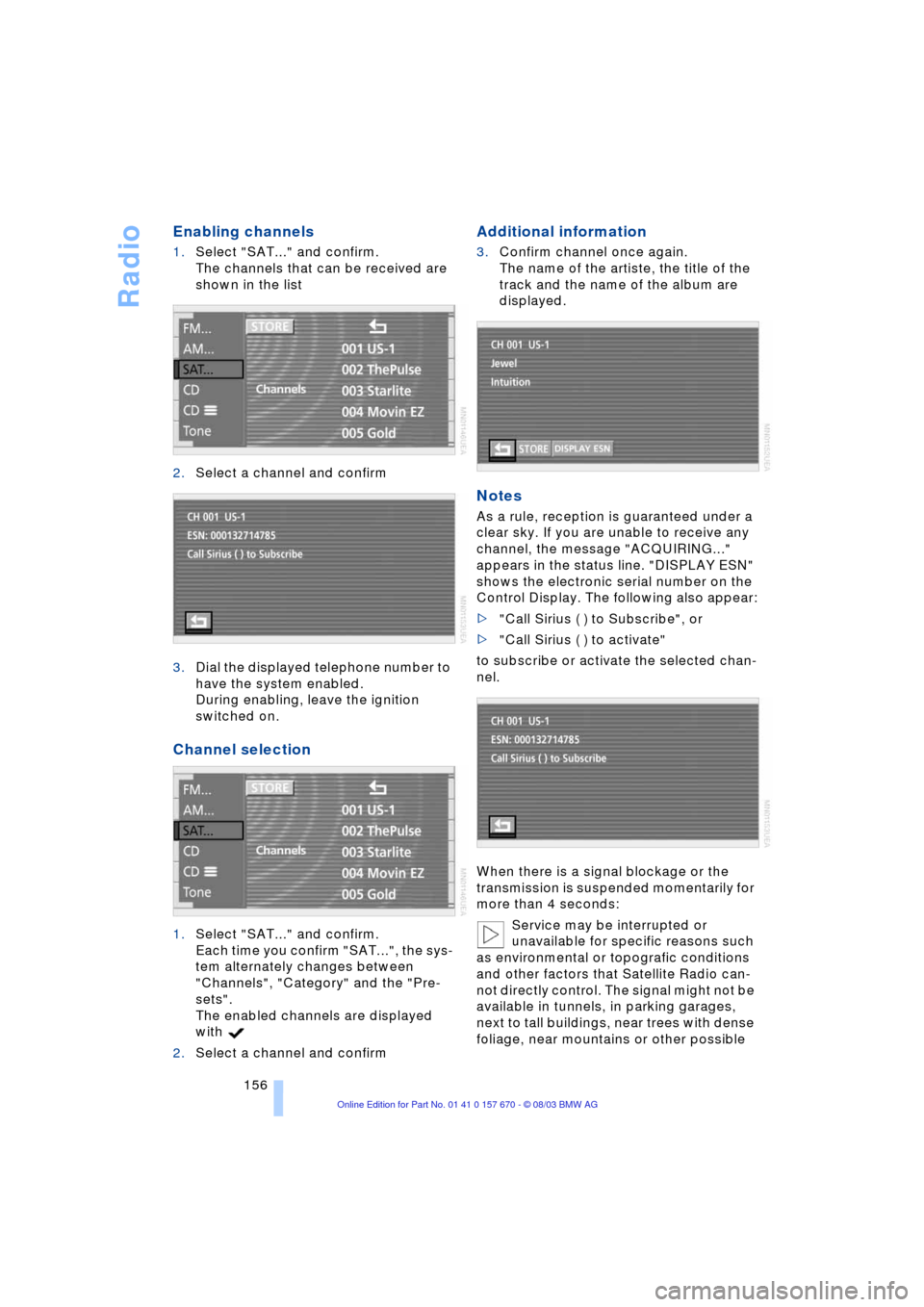
Enabling channels
1.Select "SAT..." and confirm.
The channels that can be received are
shown in the list
2.Select a channel and confirm
3.Dial the displayed telephone number to
have the system enabled.
During enabling, leave the ignition
switched on.
Channel selection
1.Select "SAT..." and confirm.
Each time you confirm "SAT...", the sys-
tem alternately changes between
"Channels", "Category" and the "Pre-
sets".
The enabled channels are displayed
with
2.Select a channel and confirm
Additional information
3.Confirm channel once again.
The name of the artiste, the title of the
track and the name of the album are
displayed.
Notes
As a rule, reception is guaranteed under a
clear sky. If you are unable to receive any
channel, the message "ACQUIRING..."
appears in the status line. "DISPLAY ESN"
shows the electronic serial number on the
Control Display. The following also appear:
>"Call Sirius ( ) to Subscribe", or
>"Call Sirius ( ) to activate"
to subscribe or activate the selected chan-
nel.
When there is a signal blockage or the
transmission is suspended momentarily for
more than 4 seconds:
Service may be interrupted or
unavailable for specific reasons such
as environmental or topografic conditions
and other factors that Satellite Radio can-
not directly control. The signal might not be
available in tunnels, in parking garages,
next to tall buildings, near trees with dense
foliage, near mountains or other possible
Page 179 of 232
177
Entertainment
Reference
At a glance
Controls
Driving tips Communications
Navigation
Mobility
Hands-free system
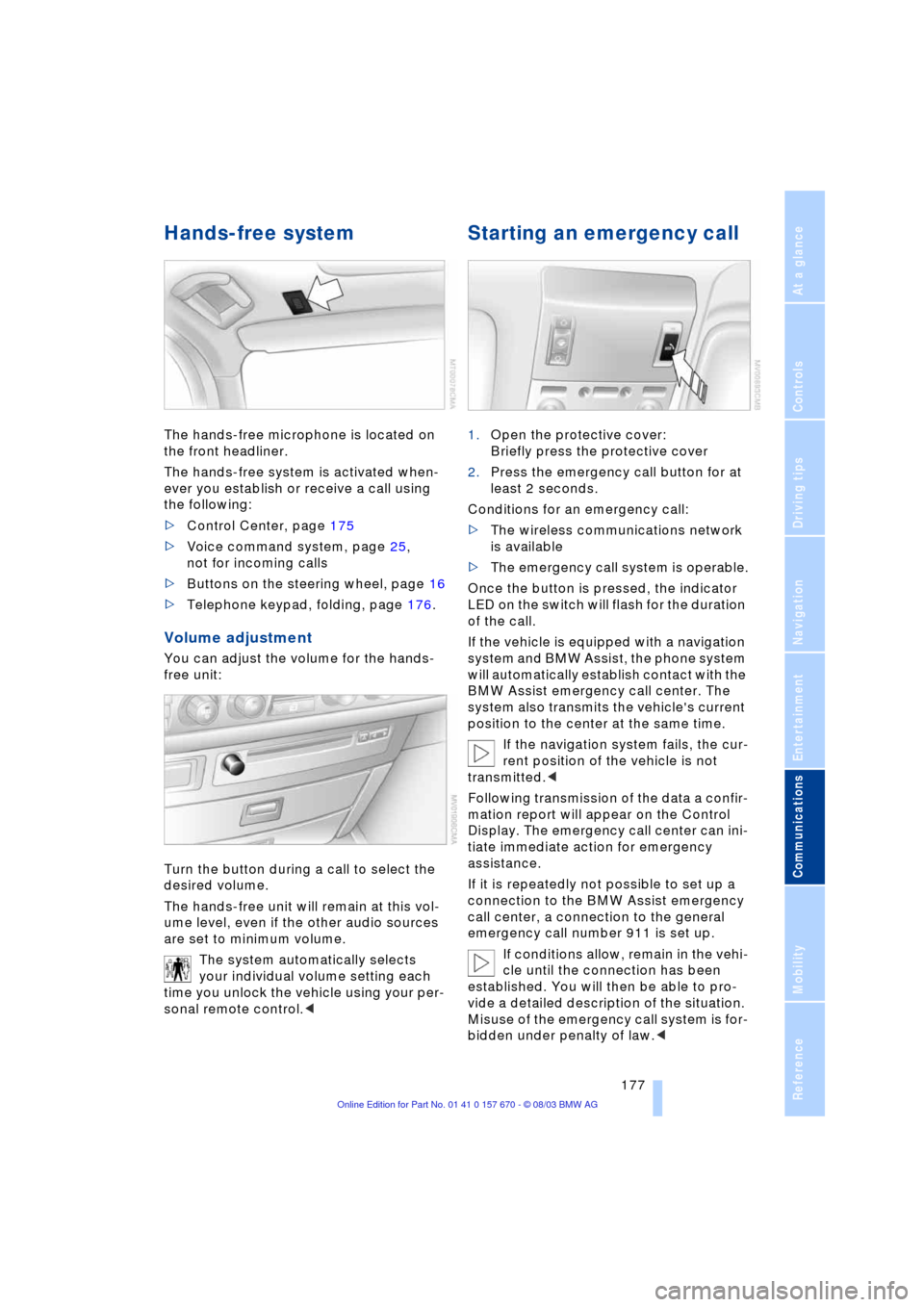
The hands-free microphone is located on
the front headliner.
The hands-free system is activated when-
ever you establish or receive a call using
the following:
>Control Center, page 175
>Voice command system, page 25,
not for incoming calls
>Buttons on the steering wheel, page 16
>Telephone keypad, folding, page 176.
Volume adjustment
You can adjust the volume for the hands-
free unit:
Turn the button during a call to select the
desired volume.
The hands-free unit will remain at this vol-
ume level, even if the other audio sources
are set to minimum volume.
The system automatically selects
your individual volume setting each
time you unlock the vehicle using your per-
sonal remote control.<
Starting an emergency call
1.Open the protective cover:
Briefly press the protective cover
2.Press the emergency call button for at
least 2 seconds.
Conditions for an emergency call:
>The wireless communications network
is available
>The emergency call system is operable.
Once the button is pressed, the indicator
LED on the switch will flash for the duration
of the call.
If the vehicle is equipped with a navigation
system and BMW Assist, the phone system
will automatically establish contact with the
BMW Assist emergency call center. The
system also transmits the vehicle's current
position to the center at the same time.
If the navigation system fails, the cur-
rent position of the vehicle is not
transmitted.<
Following transmission of the data a confir-
mation report will appear on the Control
Display. The emergency call center can ini-
tiate immediate action for emergency
assistance.
If it is repeatedly not possible to set up a
connection to the BMW Assist emergency
call center, a connection to the general
emergency call number 911 is set up.
If conditions allow, remain in the vehi-
cle until the connection has been
established. You will then be able to pro-
vide a detailed description of the situation.
Misuse of the emergency call system is for-
bidden under penalty of law.<
Page 184 of 232
BMW Assist
182
BMW Assist
To avoid posing an unnecessary haz-
ard, both to your own vehicle's occu-
pants and to other road users, only make
entries with the vehicle stationary.<
Requirements
If the following requirements are met, you
can call up BMW Assist:
>Telephone is connected and switched
on
>The lock code has been entered
>The mobile communications network is
available
>GPS reception for transmission of the
data is ensured.
The position of the vehicle can influ-
ence the mobile communications/
GPS reception. As a rule, mobile communi-
cations/GPS reception is only possible
under a clear sky.
When vehicle data is exchanged with the
BMW center, a corresponding message
appears on the Control Display.<
Roadside Assistance of
the BMW Group
Here, you automatically dial the number
of the Roadside Assistance of the BMW
Group, your BMW center or BMW Cus-
tomer Relations.
To contact Roadside Assistance, for exam-
ple in the event of a breakdown:
1.Select "BMW Assist" and confirm your
selection
2.Select "BMW Services" and confirm
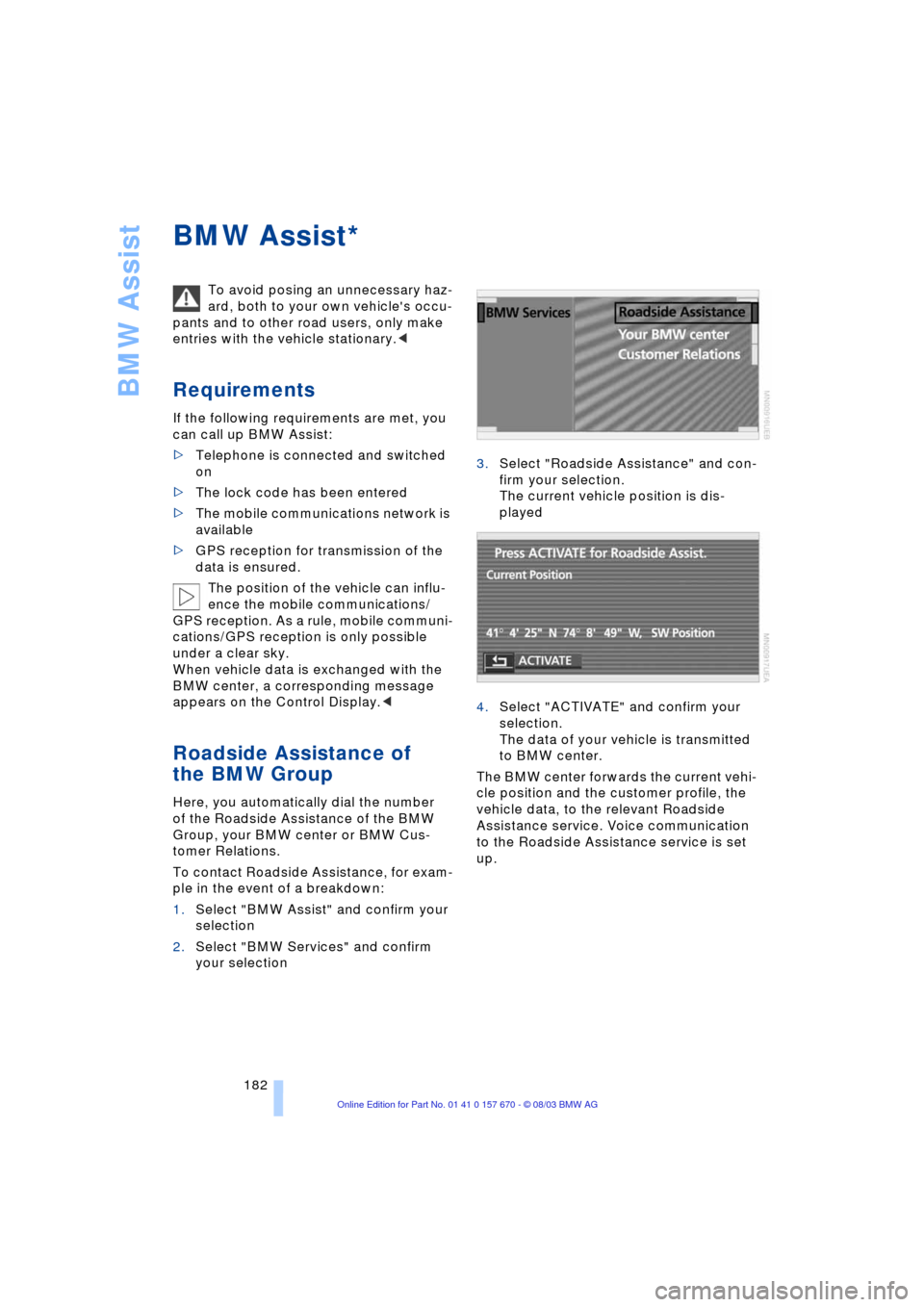
your selection3.Select "Roadside Assistance" and con-
firm your selection.
The current vehicle position is dis-
played
4.Select "ACTIVATE" and confirm your
selection.
The data of your vehicle is transmitted
to BMW center.
The BMW center forwards the current vehi-
cle position and the customer profile, the
vehicle data, to the relevant Roadside
Assistance service. Voice communication
to the Roadside Assistance service is set
up.
*
Page 210 of 232
Giving and receiving assistance
208 1.Remove the cover of the BMW auxiliary
terminal for jump-starting
2.Connect one terminal clamp of the pos-
itive/+ jumper cable to the positive ter-
minal of the battery or an auxiliary ter-
minal for jump-starting of the vehicle
providing starting assistance
3.Connect the second terminal clamp of
the positive/+ jumper cable to the posi-
tive terminal of the battery or to an aux-
iliary terminal for jump-starting of the
vehicle to be started
On your BMW, there is a special nut as
body ground on the suspension strut
dome, refer to arrow 2 in the illustration.
4.Attach one end of the negative/Ð jumper
cable to the negative terminal of the
battery or to an engine or body ground
of the vehicle providing assistance
5.Connect the second terminal clamp of
the negative/Ð jumper cable to the neg-
ative terminal of the battery or to the
engine or body ground of the vehicle to
be started.
Starting the engine
1.Start the engine on the support vehicle
and allow it to run for several minutes
at a fast idle
2.Start the engine on the other vehicle in
the usual way.
If the first start attempt is not success-
ful, wait a few minutes before another
attempt in order to allow the discharged
battery to recharge
3.Allow the engines to run for several
minutes
4.Disconnect the jumper cables by
reversing the connection sequence.
If required, have the battery inspected and
recharged at your BMW center.
Never use spray fluids to start the
engine.<
Having vehicle towed
Always observe all applicable towing
laws and regulations.
Even if the transmission is in perfect work-
ing order, remember to disengage the
transmission lockout manually before tow-
ing the vehicle. Failure to observe this pre-
caution could result in automatic activation
of the transmission lockout while the vehi-
cle is being towed.<
Manual release of the transmission lockout,
refer to page 68.
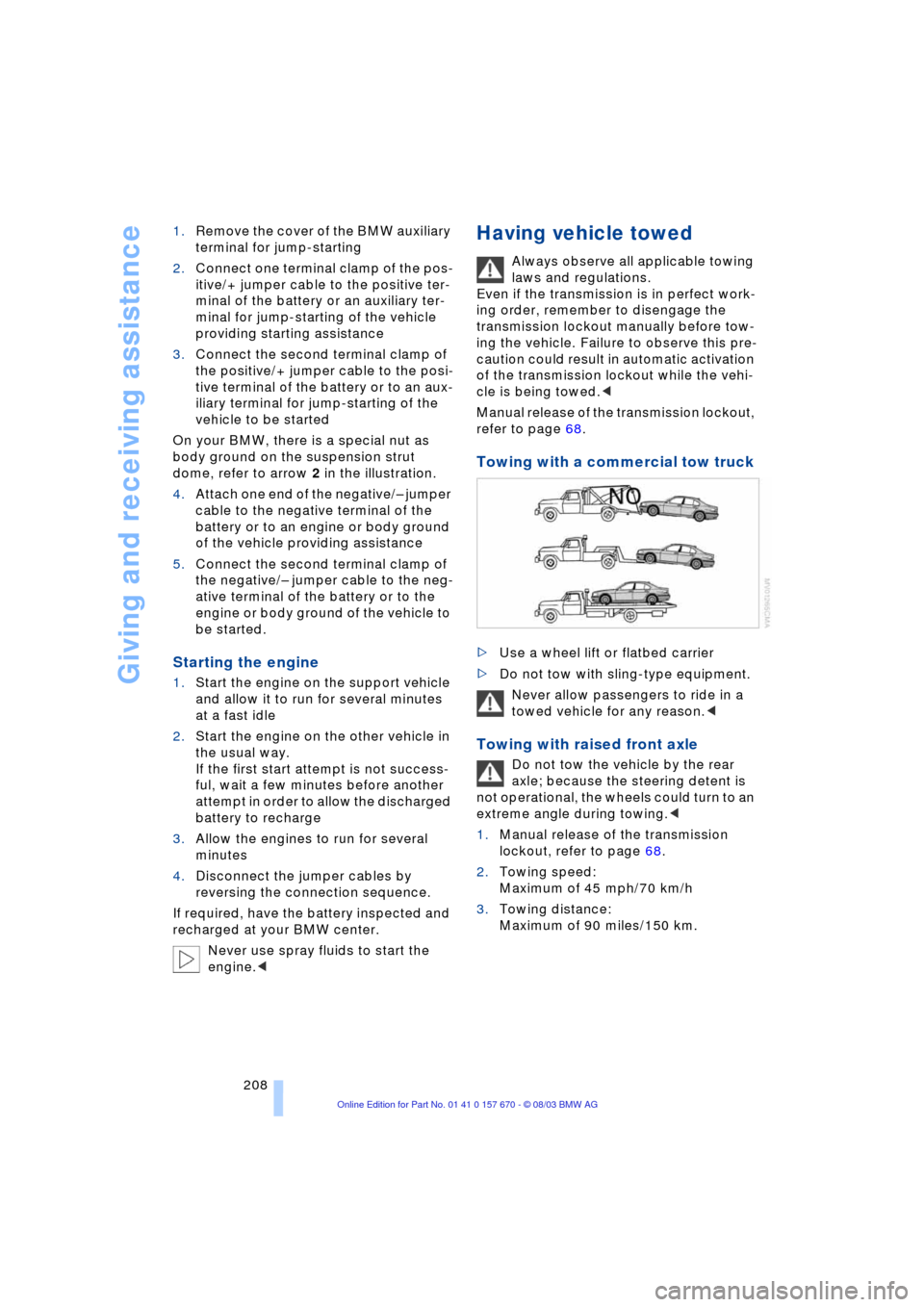
Towing with a commercial tow truck
>Use a wheel lift or flatbed carrier
>Do not tow with sling-type equipment.
Never allow passengers to ride in a
towed vehicle for any reason.<
Towing with raised front axle
Do not tow the vehicle by the rear
axle; because the steering detent is
not operational, the wheels could turn to an
extreme angle during towing.<
1.Manual release of the transmission
lockout, refer to page 68.
2.Towing speed:
Maximum of 45 mph/70 km/h
3.Towing distance:
Maximum of 90 miles/150 km.