mirror BMW 745i 2005 E65 User Guide
[x] Cancel search | Manufacturer: BMW, Model Year: 2005, Model line: 745i, Model: BMW 745i 2005 E65Pages: 239, PDF Size: 8.03 MB
Page 101 of 239
Controls
99Reference
At a glance
Driving tips
Communications
Navigation
Entertainment
Mobility
whether or not the seat is occupied by a
child in the child-restraint system or an
adult.
>When a child is seated in the child-
restraint system or with an empty seat,
the front and side airbags are automat-
ically deactivated on the passenger's
side
>When an adult is traveling in the front
seat, the front and side airbags remain
active on the passenger side.
Although not desired, it can occur in
the case of heavier children that the
front passenger airbags remain active or in
the case of very light adults or young per-
sons that the front passenger airbags are
deactivated.
The state of the front passenger airbags is
shown with the indicator lamp, refer to Indi-
cator lamps in the following. In this case
transport the corresponding persons on the
rear seat.
Except when persons to be transported, do
not increase the load on the front passen-
ger seat with additional items. Do not fit
seat covers, seat cushion padding, ball
mats or other items to the front passenger
seat unless they are specifically recom-
mended by BMW. Do not place any items
under the seat. Otherwise, the function of
the seat occupation detection could be
impaired.<
Indicator lamps
Airbag system ready for use
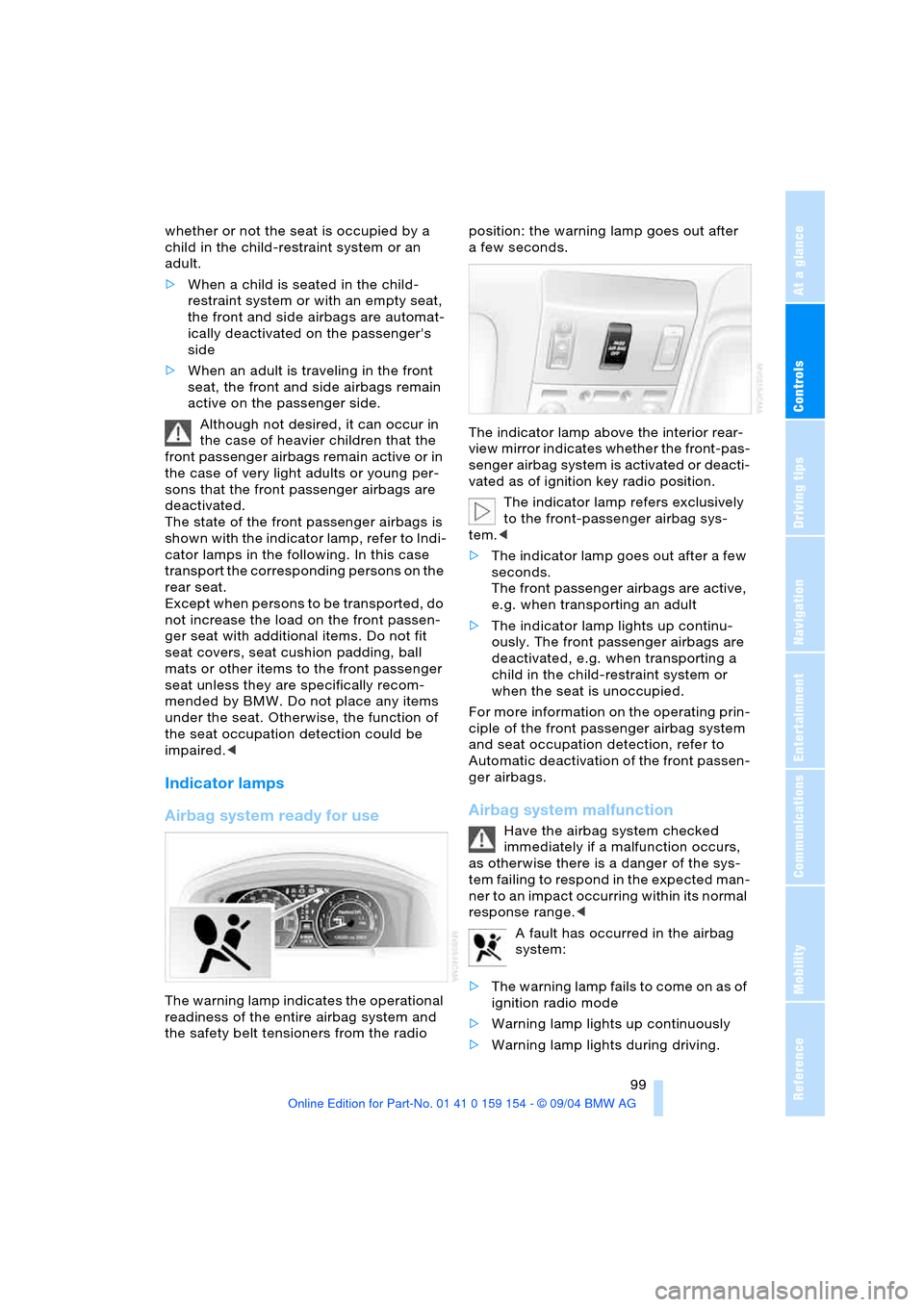
The warning lamp indicates the operational
readiness of the entire airbag system and
the safety belt tensioners from the radio position: the warning lamp goes out after
afew seconds.
The indicator lamp above the interior rear-
view mirror indicates whether the front-pas-
senger airbag system is activated or deacti-
vated as of ignition key radio position.
The indicator lamp refers exclusively
to the front-passenger airbag sys-
tem.<
>The indicator lamp goes out after a few
seconds.
The front passenger airbags are active,
e.g. when transporting an adult
>The indicator lamp lights up continu-
ously. The front passenger airbags are
deactivated, e.g. when transporting a
child in the child-restraint system or
when the seat is unoccupied.
For more information on the operating prin-
ciple of the front passenger airbag system
and seat occupation detection, refer to
Automatic deactivation of the front passen-
ger airbags.
Airbag system malfunction
Have the airbag system checked
immediately if a malfunction occurs,
as otherwise there is a danger of the sys-
tem failing to respond in the expected man-
ner to an impact occurring within its normal
response range.<
A fault has occurred in the airbag
system:
>The warning lamp fails to come on as of
ignition radio mode
>Warning lamp lights up continuously
>Warning lamp lights during driving.
Page 124 of 239
Things to remember when driving
122
Things to remember when driving
Break-in procedures
To ensure that your vehicle continues to
furnish optimized economy of operation
throughout an extended service life, we
request that you devote careful attention
to the following information.
Engine and differential
Up to 1,200 miles/2,000 km:
During this initial period you should attempt
to avoid constant, steady-state operation
and vary both vehicle and engine speeds
as often as possible. Until the break-in
period has been completed you should
also refrain from exceeding the following:
>4,500 rpm or 105 mph/170 km/h
Always obey all official speed limits.
Avoid full-throttle operation and use of the
transmission's kick-down mode during
these initial miles.
Once you have driven 1,200 miles/
2,000 km, the engine or vehicle speeds can
be gradually increased.
Tires
Due to technical factors associated with
their manufacture, tires do not achieve their
full traction potential until after an initial
break-in period. Therefore, drive reservedly
during the first 200 miles/300 km.
Brake system
Brakes require an initial break-in period of
approx. 300 miles/500 km to achieve opti-
mized contact and wear patterns between
brake pads and rotors.
Following component replacements
Observe the break-in instructions again if
previously addressed components must be
replaced again during driving later.
General driving notes
Hot exhaust system
Extreme temperatures occur at the
catalytic converter on this and every
catalyst-equipped vehicle. Do not remove
the heat shields installed adjacent to vari-
ous sections of the exhaust system, and
never apply undercoating to them. When
driving, standing at idle and while parking
take care to avoid possible contact
between the hot exhaust system and any
highly flammable materials such as hay,
leaves, grass, etc. Such contact could lead
to a fire, accompanied by the risk of serious
property damage as well as personal
injury.<
Air conditioning
Condensation forms in the air conditioner
system during operation, and then exits
under the vehicle. Traces of condensed
water under the vehicle are thus normal.
Before driving into a car wash
1.Fold in the exterior mirrors, refer to
page53, as otherwise they could be
damaged due to the width of the vehicle
2.Leave the remote control in the ignition
lock, as otherwise the P position of the
automatic transmission will automati-
cally be selected when the remote con-
trol is removed. Refer to page63
and69.
With Comfort Access, be sure to
observe the instructions on page63
3.Release the parking brake, especially
when you have activated Automatic
Hold. Refer to page64 and65.
Page 162 of 239
CD changer
160
CD changer
Location
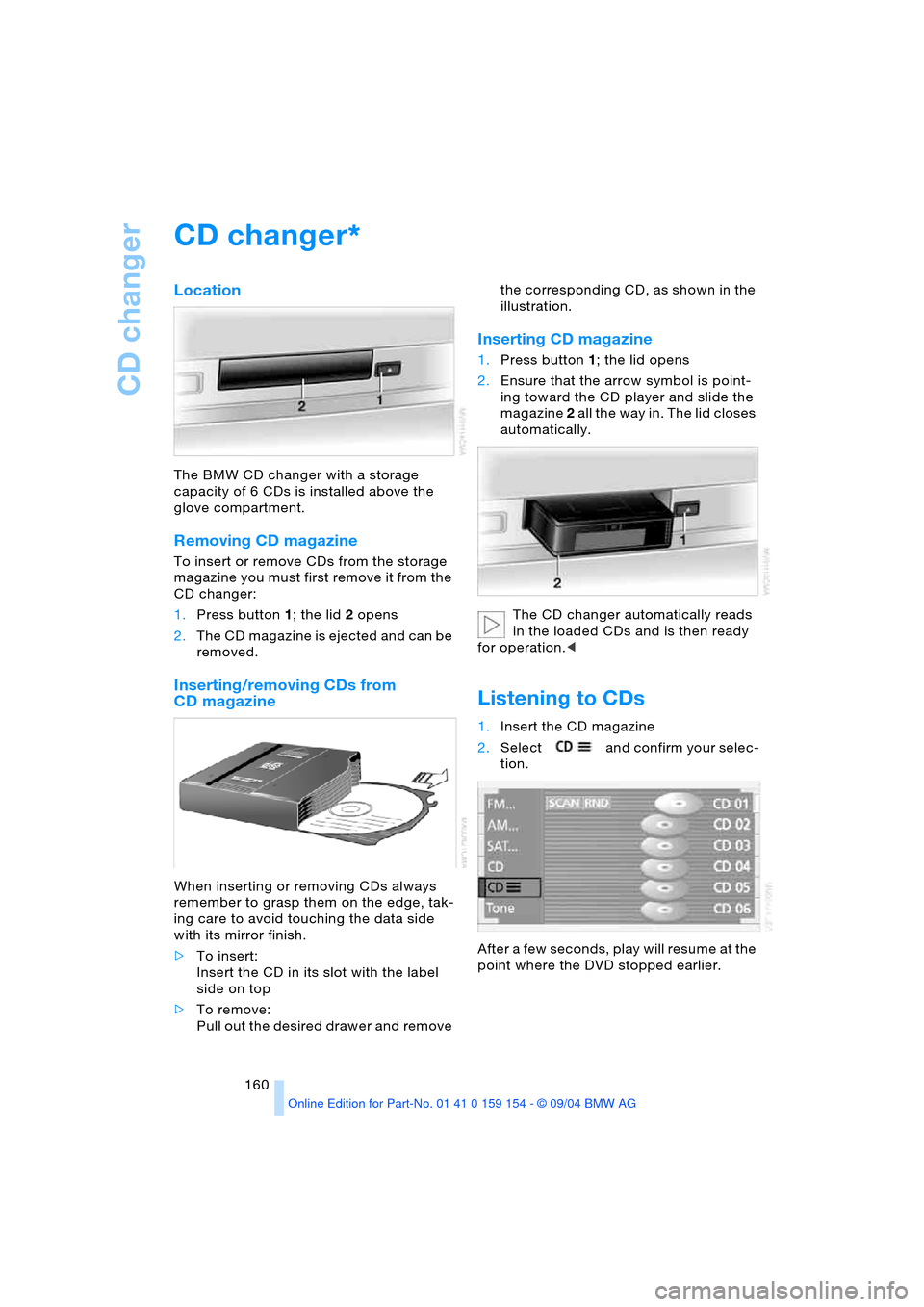
The BMW CD changer with a storage
capacity of 6 CDs is installed above the
glove compartment.
Removing CD magazine
To insert or remove CDs from the storage
magazine you must first remove it from the
CD changer:
1.Press button 1; the lid 2 opens
2.The CD magazine is ejected and can be
removed.
Inserting/removing CDs from
CD magazine
When inserting or removing CDs always
remember to grasp them on the edge, tak-
ing care to avoid touching the data side
with its mirror finish.
>To insert:
Insert the CD in its slot with the label
side on top
>To remove:
Pull out the desired drawer and remove the corresponding CD, as shown in the
illustration.
Inserting CD magazine
1.Press button 1; the lid opens
2.Ensure that the arrow symbol is point-
ing toward the CD player and slide the
magazine 2 all the way in. The lid closes
automatically.
The CD changer automatically reads
in the loaded CDs and is then ready
for operation.<
Listening to CDs
1.Insert the CD magazine
2.Select and confirm your selec-
tion.
After a few seconds, play will resume at the
point where the DVD stopped earlier.
*
Page 167 of 239
Navigation
Entertainment
Driving tips
165Reference
At a glance
Controls
Communications
Mobility
DVD changer
Location
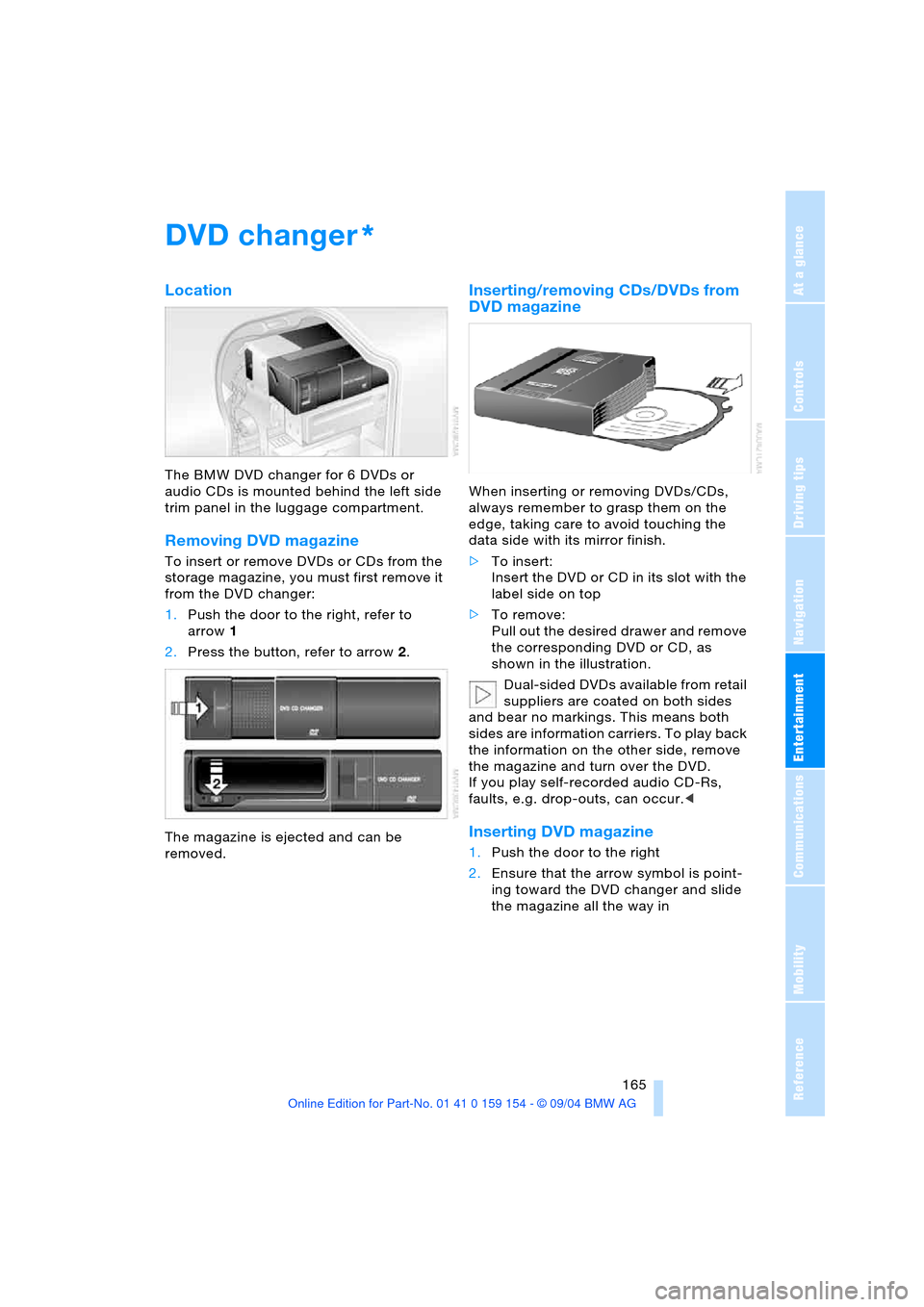
The BMW DVD changer for 6 DVDs or
audio CDs is mounted behind the left side
trim panel in the luggage compartment.
Removing DVD magazine
To insert or remove DVDs or CDs from the
storage magazine, you must first remove it
from the DVD changer:
1.Push the door to the right, refer to
arrow1
2.Press the button, refer to arrow2.
The magazine is ejected and can be
removed.
Inserting/removing CDs/DVDs from
DVD magazine
When inserting or removing DVDs/CDs,
always remember to grasp them on the
edge, taking care to avoid touching the
data side with its mirror finish.
>To insert:
Insert the DVD or CD in its slot with the
label side on top
>To remove:
Pull out the desired drawer and remove
the corresponding DVD or CD, as
shown in the illustration.
Dual-sided DVDs available from retail
suppliers are coated on both sides
and bear no markings. This means both
sides are information carriers. To play back
the information on the other side, remove
the magazine and turn over the DVD.
If you play self-recorded audio CD-Rs,
faults, e.g. drop-outs, can occur.<
Inserting DVD magazine
1.Push the door to the right
2.Ensure that the arrow symbol is point-
ing toward the DVD changer and slide
the magazine all the way in
*
Page 209 of 239
Mobility
207Reference
At a glance
Controls
Driving tips
Communications
Navigation
Entertainment
Battery
Battery care
The battery is 100 % maintenance-free, i.e.,
the electrolyte will last for the life of the bat-
tery when the vehicle is operated in a tem-
perate climate. Your BMW center will be
happy to advise you on all questions con-
cerning the battery.
Charging battery
Only charge the battery in the vehicle via
the terminals in the engine compartment
with the engine off. Connections, refer to
Jump-starting on page210.
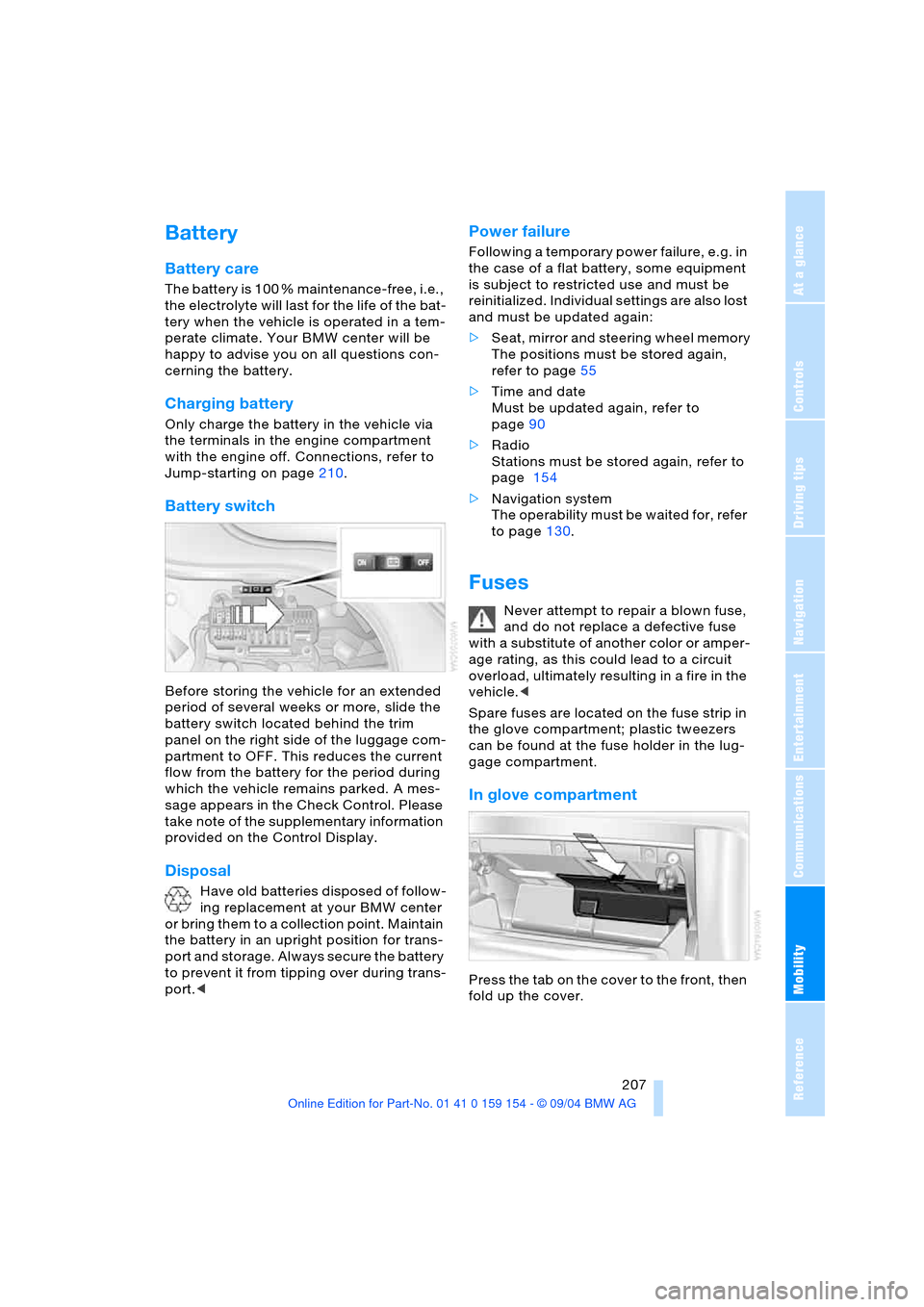
Battery switch
Before storing the vehicle for an extended
period of several weeks or more, slide the
battery switch located behind the trim
panel on the right side of the luggage com-
partment to OFF. This reduces the current
flow from the battery for the period during
which the vehicle remains parked. A mes-
sage appears in the Check Control. Please
take note of the supplementary information
provided on the Control Display.
Disposal
Have old batteries disposed of follow-
ing replacement at your BMW center
or bring them to a collection point. Maintain
the battery in an upright position for trans-
port and storage. Always secure the battery
to prevent it from tipping over during trans-
port.<
Power failure
Following a temporary power failure, e.g. in
the case of a flat battery, some equipment
is subject to restricted use and must be
reinitialized. Individual settings are also lost
and must be updated again:
>Seat, mirror and steering wheel memory
The positions must be stored again,
refer to page55
>Time and date
Must be updated again, refer to
page90
>Radio
Stations must be stored again, refer to
page 154
>Navigation system
The operability must be waited for, refer
to page130.
Fuses
Never attempt to repair a blown fuse,
and do not replace a defective fuse
with a substitute of another color or amper-
age rating, as this could lead to a circuit
overload, ultimately resulting in a fire in the
vehicle.<
Spare fuses are located on the fuse strip in
the glove compartment; plastic tweezers
can be found at the fuse holder in the lug-
gage compartment.
In glove compartment
Press the tab on the cover to the front, then
fold up the cover.
Page 224 of 239
Everything from A to Z
222 Defrosting windows105
– automatic climate
control105
Defrosting windows and
removing condensation,
automatic climate
control105
Defrosting windshield,
refer to Defrosting
windows105
"DELETE" for
navigation136,137
Destination address
– deleting137
– entering134
Destination for
navigation132
– selecting using voice142
– selecting via
information135
Destination guidance139
– changing route
specifications137
– continuing142
– displaying driving
route131
– distance and arrival86
– interrupting142
– interrupting voice
instructions141
– selecting new route140
– starting139
– terminating142
– volume of voice
instructions141
Destinations recently
driven to137
"Dest. input" for
navigation132
"Detour" for navigation141
Dialed numbers for
telephone180
Differential, break-in122
Digital clock81
Dimensions215
Dimmed interior mirror53
Dipstick, engine oil195
Directional indicators,
refer to Turn signals71Direction instruction, refer
to Voice instructions141
Directory, refer to
– Address book142
– Phone book179
Disc brakes123
Displacement, refer to
Engine specifications214
Display, refer to Control
Display18
Display direction,
altering140
Display elements12
Display illumination101
Display lighting, refer to
Instrument lighting101
Display of faults83
Displays, refer to Info
Display12
Disposal
– battery of remote
control37
– vehicle battery207
Distance86
– unit of measure89
Distance control, refer to
Active cruise control75
Distance to destination86
Distance warning91
Door entry lighting102
Door keys34
Door lock38
DOT Quality Grades190
Draft-free ventilation106
Driving lamps, refer to
Parking lamps/
low beams100
Driving notes122
Driving stability control92
Driving through water,
flooding123
Driving time87
Dry air, refer to
A/C operation105
"DSC", vehicle94
DSC Dynamic Stability
Control93
– indicator lamp13
"DTC", vehicle93DTC Dynamic Traction
Control93
– indicator lamp13
"DVD"
– in audio mode148
– in DVD mode166
DVD changer165
– adjusting picture168
– adjusting tone149
– controls148
– country codes166
– DVD controller166
– fast forward167
– fast reverse167
– freezing frame168
– searching for chapter168
– selecting a track167
– selecting DVD167
– selecting language168
– selecting picture
format168
– selecting subtitles168
– specific menu169
– starting166
– volume149
DVD multimedia changer,
refer to DVD changer165
Dynamic Brake Control
DBC94
– indicator lamp13
Dynamic destination
guidance, traffic
information during
destination guidance140
Dynamic Drive95
Dynamic Stability Control
DSC93
– indicator lamp13
Dynamic Traction Control
DTC93
– indicator lamp13
E
EBV Electronic brake-force
distribution93
EDC Electronic Damping
Control95
Editorial notice5
Page 225 of 239
Reference 223
At a glance
Controls
Driving tips
Communications
Navigation
Entertainment
Mobility
Electrical defect
– door lock38
– driver's door38
– fuel filler door186
– glass roof, electric45
– luggage compartment
lid40
– parking brake66
– transmission interlock for
automatic transmission
with Steptronic70
Electric steering wheel
adjustment54
Electronic Damping Control
EDC95
Electronic Stability
Program ESP, refer to
DSC Dynamic Stability
Control93
Electronic toll collection
device, refer to
Entry/pass tags126
Emergency actuation, refer
to Manual operation
– driver's door38
– fuel filler door186
– glass roof, electric45
– luggage compartment
lid40
– parking brake66
– transmission interlock for
automatic transmission
with Steptronic70
Emergency call177
– dialing phone number178
– with emergency call
button177
Emergency release of
luggage compartment lid
from luggage
compartment's interior41
Emergency services, refer
to Roadside
Assistance182
"Emissions inspection",
vehicle83
Energy-conscious driving,
refer to Energy Control86
Energy Control86
Engaging locks from
inside39Engine
– break-in122
– data214
– indicator lamp13
– speed214
– starting63
– switching off63
Engine compartment195
Engine coolant196
Engine oil195
– filling capacity217
– indicator/warning lamp83
– specified engine oils196
Engine oil level195
Engine oil pressure83
Engine oil sensor83
Engine output, refer to
Engine specifications214
Engine specifications214
Engine speed214
Entering country133
Entering house number134
Entering intersection134
Entering street134
Entering switch-on time of
independent ventilation
system110
"Entertainm.",
Control Center24
"Entertainment" in audio
mode148
Entry/pass tags126
Entry map for current
position and
destination132
Environmentally friendly
driving, refer to
Energy Control86
Equalizer150
ESP Electronic Stability
Program, refer to DSC
Dynamic Stability
Control93
Exhaust system, refer to
High temperatures122
Exterior mirrors53
– automatic dimming
feature53
"Extra"
– rear air conditioning109
– rear cooler114F
"Fader" in audio mode150
Failure messages13
– refer to Check Control83
Failure of a current
consumer207
False alarm, refer to
Avoiding unintentional
alarms43
Fan, refer to Air supply105
Fasten safety belt51
Fastest route137
"Fastest route" for
navigation137
Fast forward
– CD159,162
– DVD167
Fault displays, refer to
Check Control83
Filter, refer to Microfilter/
activated-charcoal
filter108
Fine wood, refer to the
Caring for your vehicle
brochure
First aid, refer to First-aid
kit209
First-aid kit209
Fittings for tow-starting and
towing210
Flashlight, refer to
Rechargeable
flashlight115
Flat tire206
– Flat Tire Monitor95
– refer to Tire condition191
– run-flat tires206
– spare tire205
Flat Tire Monitor95
– indicator lamp96
Flooding, refer to Driving
through water123
Floor coverings, carpet,
refer to the Caring for
your vehicle brochure
Floor mat, refer to the
Caring for your vehicle
brochure
Page 226 of 239
Everything from A to Z
224 "FM..."
– audio mode148
– radio152
FM, waveband152
Fog lamps101
– indicator lamp11
Footbrake, refer to
Driving notes123
Front airbags98
Front armrest115
Front fog lamps
– indicator lamp11
Front passenger airbags,
deactivating58
Fuel187
– average consumption86
– gauge86
– quality187
– volume217
Fuel filler door186
– releasing in the event of
an electrical defect186
Fuel level, refer to
Fuel gauge85
Fuel level gauge, refer to
Fuel gauge85
Fuel level indicator, refer to
Fuel gauge86
Fuel-saving driving, refer to
Energy Control86
Fuel tank capacity217
"FULL MENU" in DVD
mode167,168
"Full Release",
Control Center24
Fuses207
G
Garage door opener, refer
to Integrated universal
remote control112
Gasoline, refer to Fuel
specifications187
Gear changes, refer to
Automatic transmission
with Steptronic70
Gear indicator68
General driving notes122
Glasses compartment116Glass roof, electric,
convenience
operation36,38
Glove compartment115
GPS, refer to Navigation
system130
Grills, refer to
Ventilation106
Gross weight, refer to
Weights216
H
Handbrake64
– Automatic Hold65
– indicator lamp13
Hands-free mode177
Hands-free system177
Hazard warning flashers15
Head airbags98
Headlamp control,
automatic100
Headlamp cover, care,
refer to the Caring for
your vehicle brochure
Headlamp flasher71
– indicator lamp13
Headlamps100
– bulb replacement201
– care, refer to the Caring
for your vehicle brochure
Headlamp washer fluid
tank, capacity, refer to
Filling capacities217
Headlamp washer system
– cleaning headlamps72
– fluid tank73
– washer fluid73
Head Light, refer to
Adaptive Head Light101
Headphones25
Head restraints49
– front head restraints,
active49
Heated mirrors53
Heated rear window,
automatic climate
control104
Heated seats52
Heated steering wheel54Heated windshield,
automatic climate
control105
Heating103
– exterior mirrors53
– seats52
– steering wheel54
Heating and ventilation103
Heating while stopped105
Heavy cargo, refer to
Stowing cargo124
Height, refer to
Dimensions215
Height adjustment
– seats47
– steering wheel54
"Help", Control Center22
Help text on Control
Display22
High beams101
– bulb replacement202
– headlamp flasher101
– indicator lamp13
Highs, refer to Tone
settings150
High temperatures122
Highway137
Hills123
Holders for beverage
cans116
Home address142,143
Hood194
Horn11
Hydraulic Brake Assistant,
refer to DBC Dynamic
Brake Control94
Hydraulic system,
brakes197
Hydroplaning123
I
Ice warning81
iDrive, refer to
Control Center17
Ignition62
Ignition key34
Ignition lock62
– with Comfort Access62
Illuminated vanity mirror54
Page 227 of 239
Reference 225
At a glance
Controls
Driving tips
Communications
Navigation
Entertainment
Mobility
Imitation leather, refer to
the Caring for your vehicle
brochure
Independent ventilation
– entering switch-on
times110
– switching on and off110
"Indep. ventil",
independent
ventilation110
Index218
Indicator/warning lamp
– airbags99
– alarm system42
– brakes13
– coolant temperature83
– DSC93
– engine temperature83
– fasten safety belt51
– Flat Tire Monitor96
– fog lamps101
– reserve86
Indicator and warning
lamps, overview13
"Individual", automatic
climate control108
Individual adjustments,
refer to Vehicle Memory,
Key Memory56
Individual air
distribution108
Individual button
assignment17
– on steering wheel54
Inflation pressure, tires188
Inflation pressure
monitoring, refer to Flat
Tire Monitor95
Info Display12
Info menu22
Information
– on country135
– on current position135
– on destination
location135
"Information" for
navigation135,136
Information on travel
direction, refer to Voice
instructions141Infrared windshield, refer to
Entry/pass tags126
Instrument cluster, refer to
Info Display12
Instrument illumination,
refer to Instrument
lighting101
Instrument lighting101
Instrument panel, refer to
Cockpit10,14
Integrated universal remote
control112
Interesting destination136
Interior lamps102
– remote control36
Interior mirror, automatic
dimming feature53
Interior motion sensor43
– switching off43
Interior rearview mirror53
Interlock, refer to Steering
locked62
Intermittent operation,
wiper72
J
Jacking points for vehicle
jack205
Joystick, refer to Control
Center17
Jumpering, refer to Jump-
starting209
Jump-starting209
K
Keyless Go, refer to
Comfort Access37
Keyless opening and
closing, refer to
Comfort Access37
Key Memory56
Keys34
– adapter for spare key34
Kick-down69
Knock control187
L
Lamps, refer to Parking
lamps/low beams100
Lamps and bulbs201
Lashing eyes, refer to
Securing cargo125
"Last dest." for
navigation136
"Last" for telephone180
LATCH child-restraint
fixing60
Leather care, refer to the
Caring for your vehicle
brochure
LEDs light-emitting
diodes204
"Left"
– for seat heating52
– with the automatic climate
control107
Length, refer to
Dimensions215
Level control system97
License plate lamp, bulb
replacement203
Light alloy wheels, care,
refer to the Caring for
your vehicle brochure
Light-emitting diodes204
Lighter117,118
Lighter socket117
Lighting
– of instruments101
– of vehicle100
Lights on warning100
Light switch100
Limit87
"Limit", refer to Setting
speed limit88
"Limited Release",
Control Center24
Lists in Control Display19
Litter container115
Load, refer to Loading124
Loading, vehicle124
Location
– CD changer160
– DVD changer165
– navigation drive130
– telephone176,178
Page 228 of 239
Everything from A to Z
226 "Location" for naviga-
tion135,142,143,144
Lock buttons, doors, refer
to Engaging locks39
Lock code178
Locking, vehicle
– from inside39
– from outside36
Locking without key, refer
to Comfort Access37
"LOGIC7" in audio
mode150
Longlife oils196
– specified engine oils196
Low beams100
– automatic100
– indicator lamp, defective
lamp83
Lower back support, refer
to Lumbar support48
Low-fuel warning light,
refer to Fuel gauge86
Lug bolts205
Luggage compartment
– Comfort Access37
– locking separately40
– opening, remote
control36
– opening/closing, refer to
Luggage compartment
lid39
– opening from inside40
– opening from outside39
– remote control36
– volume216
Luggage compartment
lid39
– Comfort Access37
– emergency release, refer
to Manual
operation40,41
– indicator lamp83
– locking separately40
– manually unlocking39
– opening, remote
control36
– opening from inside40
– opening from outside39
– operation,
automatic36,41
– remote control36Luggage compartment
net42
Luggage rack, refer to
Roof-mounted luggage
rack125
Luggage strap125
Lumbar support47,48
M
M+S tires, refer to
Winter tires193
Maintenance82
Maintenance System198
Make-up mirror, refer to
Illuminated vanity
mirror54
"MANUAL" for radio153
Manual operation
– door lock38
– driver's door38
– glass roof, electric45
– parking brake66
– transmission interlock for
automatic transmission
with Steptronic70
Manual release
– fuel filler door186
– luggage compartment
lid40
Manual station search153
Manufacturer5
Map
– changing scale27,135
– destination entry135
"Map dir. travel" for
navigation139,140
"Map facing N." for
navigation139,140
Map facing north139
Marking, tires190
Master key34
– with remote control34
Maximum cooling105
Maximum roof weight216
"Memo"90
Memo90
"Memorize", automatic
climate control108
"MEMORIZE" for radio154Memory, refer to
– Seat, mirror and steering
wheel memory55
– Vehicle Memory,
Key Memory56
MENU button18
"MENU" for DVD mode169
"Menu name",
Control Center22
Menus, Control Display21
Microfilter, automatic
climate control108
Microphone for voice
command177
Mirrors53
– automatic curb
monitor56
– dimming feature53
– memory, refer to Seat,
mirror and steering wheel
memory55
– mirror heating53
Missed calls, on Control
Display181
"Missed" for telephone181
Mobile service182
Modifications, technical,
refer to For your own
safety5
Monitor
– refer to Control Center17
– refer to Control Center in
rear24
Most recent portable phone
numbers180
Multi-function steering
wheel10,16
Multi-function switch
– turn signals/headlamp
flasher71
– wiper system72
Multimedia monitor, refer to
Control Display18
Music track,
sampling158,161