change wheel BMW 745Li 2005 E66 User Guide
[x] Cancel search | Manufacturer: BMW, Model Year: 2005, Model line: 745Li, Model: BMW 745Li 2005 E66Pages: 239, PDF Size: 8.03 MB
Page 206 of 239
Replacing components
204
Light-emitting diodes LEDs
Light-emitting diodes installed behind
translucent lenses serve as the light source
for many of the controls and displays in
your vehicle. These light-emitting diodes,
which operate using a concept similar to
that applied in conventional lasers, are offi-
cially designated as Class 1 light-emitting
diodes.
Do not remove the covers, and never
stare into the unfiltered light for sev-
eral hours, as irritation of the iris could
result.<
Changing wheels
Safety precautions to observe in the
event of a flat and during all tire
changes:
Park the vehicle as far as possible from
passing traffic. Park on a firm, flat, surface.
Switch on the hazard warning flashers.
Engage the parking brake and move the
transmission's selector lever to P.
Have all vehicle occupants get out of the
vehicle and ensure that they remain outside
the immediate area in a safe place, such as
behind a guardrail.
If a warning triangle or portable hazard
warning lamp is required, set it up on the
roadside at an appropriate distance from
the rear of the vehicle. Comply with all
safety guidelines and regulations.
Change the wheel only on a level, firm sur-
face which is not slippery. The vehicle or
the jack could slip to the side if you attempt
to raise the vehicle on a soft or slippery sur-
face such as snow, ice, tiles, etc.
Position the jack on a firm support surface.
Do not use a wooden block or similar
object as a support base for the jack, as
this would prevent it from extending to its
full support height and reduce its load-
carrying capacity.
To avoid serious or fatal injury: never lie
under the vehicle, and never start the
engine while it is supported by the jack.<
What you will need
To avoid rattling noises, note the positions
of the tools before removing them, then
return them to their initial positions after
completing work.
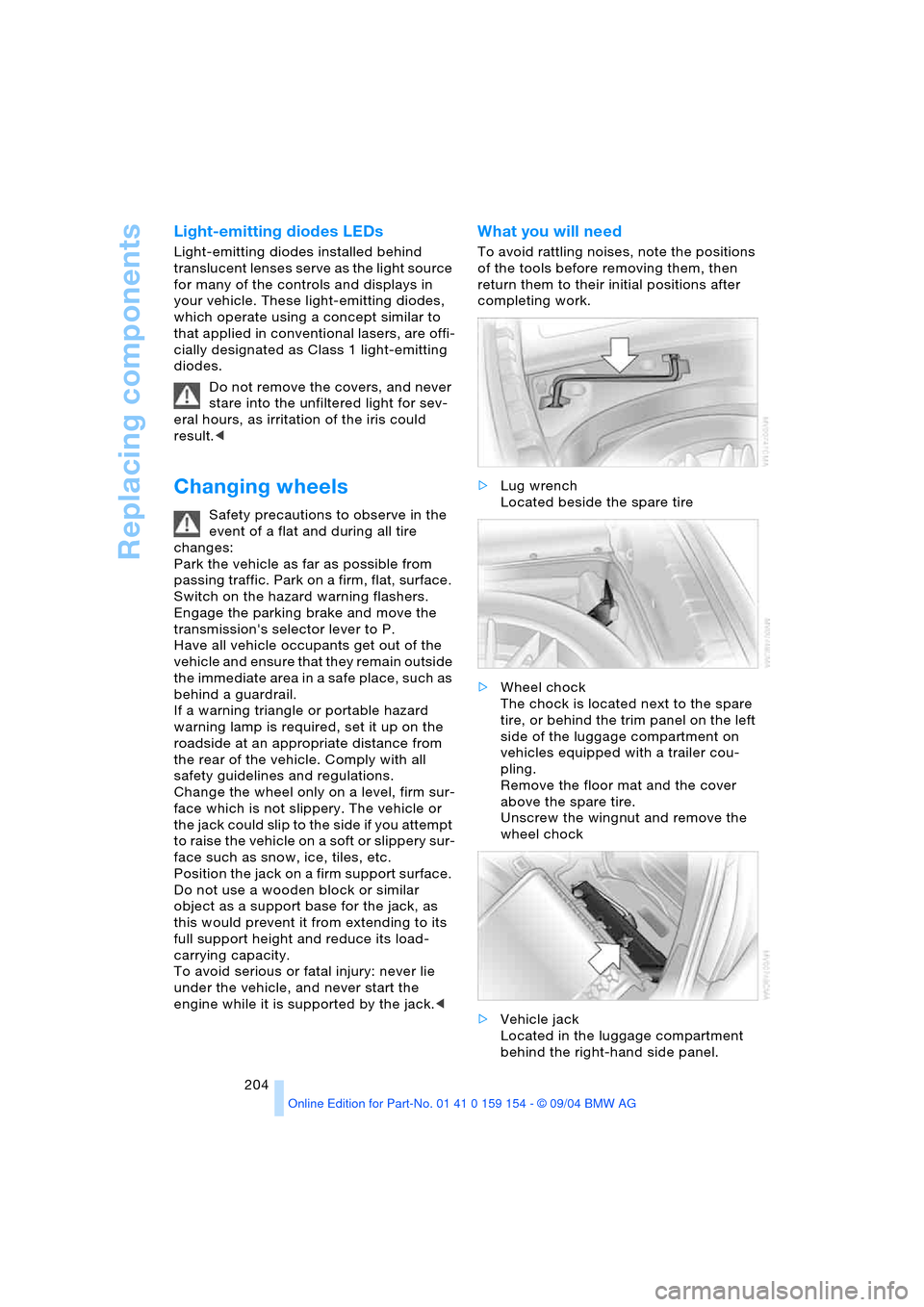
>Lug wrench
Located beside the spare tire
>Wheel chock
The chock is located next to the spare
tire, or behind the trim panel on the left
side of the luggage compartment on
vehicles equipped with a trailer cou-
pling.
Remove the floor mat and the cover
above the spare tire.
Unscrew the wingnut and remove the
wheel chock
>Vehicle jack
Located in the luggage compartment
behind the right-hand side panel.
Page 207 of 239
Mobility
205Reference
At a glance
Controls
Driving tips
Communications
Navigation
Entertainment
Grasp the handle in the upper panel and
fold it down.
Undo the wingnut and remove the jack.
After use, screw the jack all the way
back down and snap the handle back
into place.
Spare tire
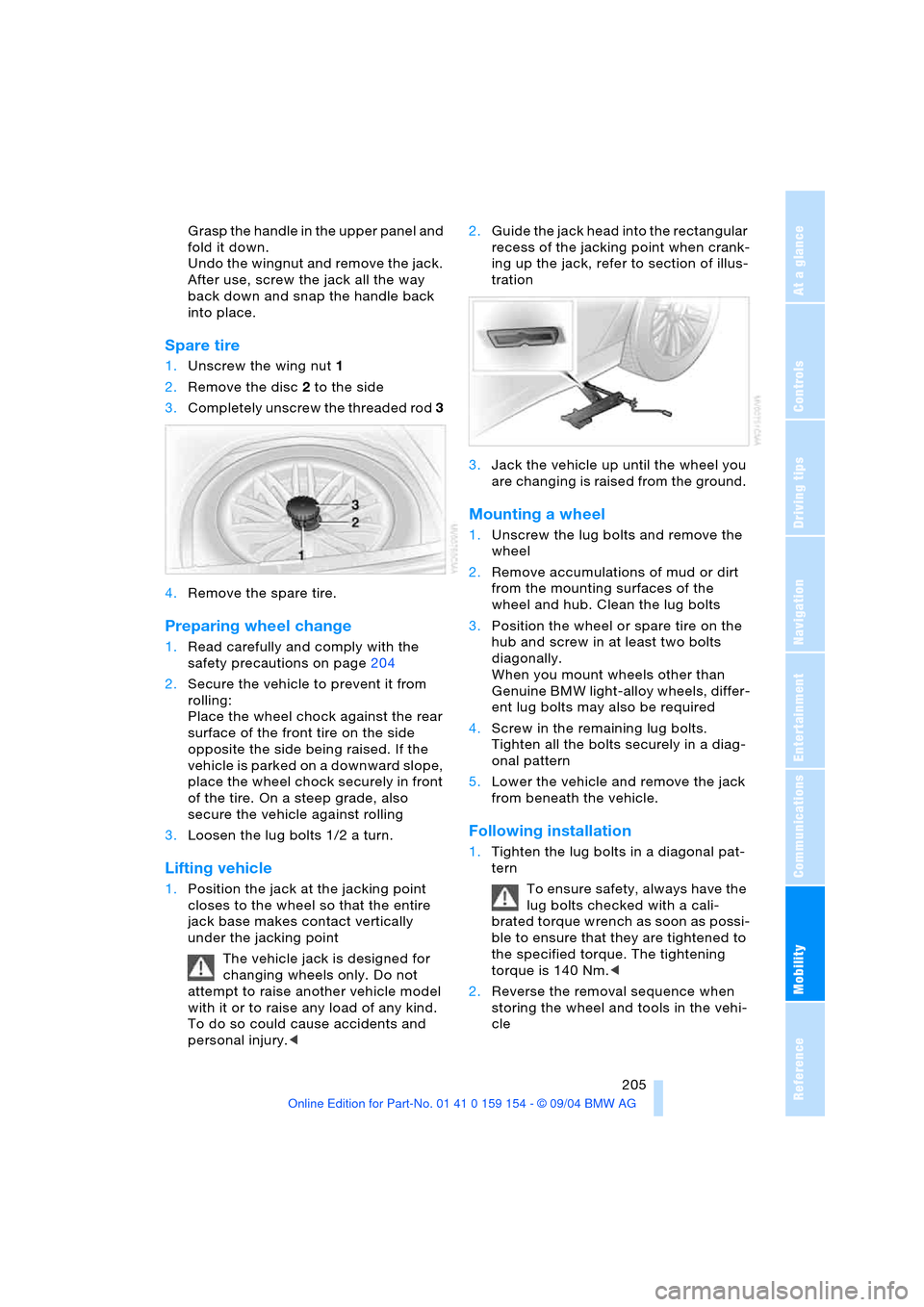
1.Unscrew the wing nut 1
2.Remove the disc 2 to the side
3.Completely unscrew the threaded rod 3
4.Remove the spare tire.
Preparing wheel change
1.Read carefully and comply with the
safety precautions on page204
2.Secure the vehicle to prevent it from
rolling:
Place the wheel chock against the rear
surface of the front tire on the side
opposite the side being raised. If the
vehicle is parked on a downward slope,
place the wheel chock securely in front
of the tire. On a steep grade, also
secure the vehicle against rolling
3.Loosen the lug bolts 1/2 a turn.
Lifting vehicle
1.Position the jack at the jacking point
closes to the wheel so that the entire
jack base makes contact vertically
under the jacking point
The vehicle jack is designed for
changing wheels only. Do not
attempt to raise another vehicle model
with it or to raise any load of any kind.
To do so could cause accidents and
personal injury.<2.Guide the jack head into the rectangular
recess of the jacking point when crank-
ing up the jack, refer to section of illus-
tration
3.Jack the vehicle up until the wheel you
are changing is raised from the ground.
Mounting a wheel
1.Unscrew the lug bolts and remove the
wheel
2.Remove accumulations of mud or dirt
from the mounting surfaces of the
wheel and hub. Clean the lug bolts
3.Position the wheel or spare tire on the
hub and screw in at least two bolts
diagonally.
When you mount wheels other than
Genuine BMW light-alloy wheels, differ-
ent lug bolts may also be required
4.Screw in the remaining lug bolts.
Tighten all the bolts securely in a diag-
onal pattern
5.Lower the vehicle and remove the jack
from beneath the vehicle.
Following installation
1.Tighten the lug bolts in a diagonal pat-
tern
To ensure safety, always have the
lug bolts checked with a cali-
brated torque wrench as soon as possi-
ble to ensure that they are tightened to
the specified torque. The tightening
torque is 140 Nm.<
2.Reverse the removal sequence when
storing the wheel and tools in the vehi-
cle
Page 208 of 239
Replacing components
206 3.Check and correct the tire inflation
pressure at the earliest opportunity
Protect valve stems and valve
stem seal caps against dirt and
contamination. Dirt in valve stems is a
frequent source of gradual air loss.<
4.Reinitialize the Flat Tire Monitor, refer
to page 96
5.Replace the damaged tire with a new
one as soon as possible and have the
new wheel balanced.
Driving with spare tire
On certain wheel-tire combinations,
the size of the spare tire deviates from
that of the rest of the tires. The spare tire is
fully capable of running in all load and
speed ranges. However, to recreate the
original conditions, the tire should be
replaced as soon as possible.<
Run-flat tires*
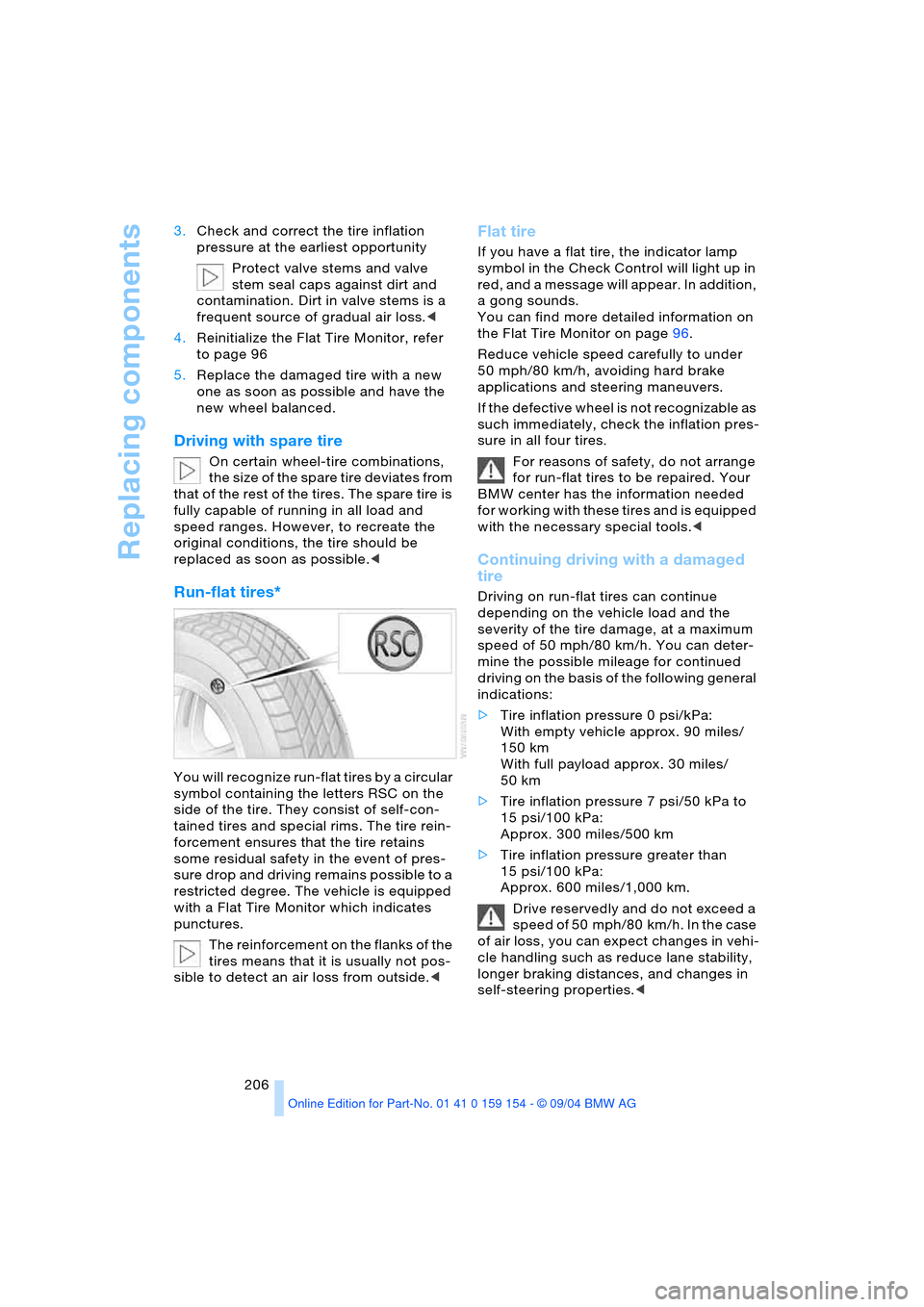
You will recognize run-flat tires by a circular
symbol containing the letters RSC on the
side of the tire. They consist of self-con-
tained tires and special rims. The tire rein-
forcement ensures that the tire retains
some residual safety in the event of pres-
sure drop and driving remains possible to a
restricted degree. The vehicle is equipped
with a Flat Tire Monitor which indicates
punctures.
The reinforcement on the flanks of the
tires means that it is usually not pos-
sible to detect an air loss from outside.<
Flat tire
If you have a flat tire, the indicator lamp
symbol in the Check Control will light up in
red, and a message will appear. In addition,
a gong sounds.
You can find more detailed information on
the Flat Tire Monitor on page96.
Reduce vehicle speed carefully to under
50 mph/80 km/h, avoiding hard brake
applications and steering maneuvers.
If the defective wheel is not recognizable as
such immediately, check the inflation pres-
sure in all four tires.
For reasons of safety, do not arrange
for run-flat tires to be repaired. Your
BMW center has the information needed
for working with these tires and is equipped
with the necessary special tools.<
Continuing driving with a damaged
tire
Driving on run-flat tires can continue
depending on the vehicle load and the
severity of the tire damage, at a maximum
speed of 50 mph/80 km/h. You can deter-
mine the possible mileage for continued
driving on the basis of the following general
indications:
>Tire inflation pressure 0 psi/kPa:
With empty vehicle approx. 90 miles/
150 km
With full payload approx. 30 miles/
50 km
>Tire inflation pressure 7 psi/50 kPa to
15 psi/100 kPa:
Approx. 300 miles/500 km
>Tire inflation pressure greater than
15 psi/100 kPa:
Approx. 600 miles/1,000 km.
Drive reservedly and do not exceed a
speed of 50 mph/80 km/h. In the case
of air loss, you can expect changes in vehi-
cle handling such as reduce lane stability,
longer braking distances, and changes in
self-steering properties.<
Page 222 of 239
Everything from A to Z
220 "Brightness"
– in the Control Center90
– in TV mode164
Brightness90
– in TV mode164
– on Control Display90
Bulb replacement, refer to
Lamps and bulbs201
Buttons on multi-function
steering wheel16
– automatic transmission
with Steptronic70
Bypassing traffic
congestion140
C
Calculating distance86
California laws
– Event Data Recorders200
– Proposition 65
Warning200
Call
– beginning178
– during a call179
– ending178
– replacing179
– when absent181
Calling
– from phone book179
– from the Top 8 list180
– redialing180
– with telephone keypad,
folding176
Calls, switching between
two calls179
Can holder, refer to
Beverage holders116
Capacities217
Car care, refer to the Caring
for your vehicle brochure
Car-care products, refer to
the Caring for your vehicle
brochure
"Car data", vehicle84
Care, refer to the Caring for
your vehicle brochure
Caring for the vehicle finish,
refer to the Caring for
your vehicle brochure
Car jack points205Car key, refer to
Key/remote control34
Carpet care, refer to the
Caring for your vehicle
brochure
Car phone, refer to
separate portable phone
Owner's Manual174
Car radio, refer to
Radio152
Car wash122
– refer to the Caring for your
vehicle brochure
– with Comfort Access122
Catalytic converter, refer to
High temperatures122
CBC Cornering Brake
Control92
– warning lamp13
CBS Condition Based
Service198
"CD"
– in audio mode148
– in CD player mode158
CD changer160
– adjusting tone149
– controls148
– fast forward, reverse162
– location160
– random sequence161
– sampling161
– selecting a CD161
– selecting track162
– starting160
– volume149
CD player158
– adjusting tone149
– controls148
– fast forward, reverse159
– random sequence158
– sampling158
– selecting tracks158
– starting158
– volume149
Center armrest115,118
Center brake lamp, bulb
replacement203
Center console, refer to
Comfort features14Central locking system35
– Comfort Access37
– interior38
"CHANGE" for
navigation137
Changes, technical, refer to
For your own safety5
Changing language89
Changing navigation CDs/
DVDs130
Changing scale140
Changing settings on the
Control Display89
Changing time display89
Changing units of measure
in Control Display89
Changing wheels204
Charge current indicator
lamp83
CHECK button84
Check Control83
– "Check"84
Child's seats, refer to Child-
restraint systems58
Child-restraint systems58
Child-safety lock60
Chrome parts, refer to the
Caring for your vehicle
brochure
Chrome-plated parts, care,
refer to the Caring for
your vehicle brochure
Cigarette lighter117,118
Cleaning, vehicle, refer to
the Caring for your vehicle
brochure
Cleaning windshield72
Climate comfort
windshield126
"Climate" for seat
heating52
"Clock"90
Clock81
– 12/24-hour mode89
– setting90
– setting time and date90
Closing
– from inside38
– from outside35
Clothes hooks116
Cockpit10,14
Page 223 of 239
Reference 221
At a glance
Controls
Driving tips
Communications
Navigation
Entertainment
Mobility
Coin holder, refer to
Storage
compartments115
Cold start, refer to Starting
engine63
"Color" in TV mode164
Comfort Access37
– changing battery37
– observe in the car
wash122
Comfort features14
Comfort mode, vehicle95
Comfort seat47
– in rear48
Comfort starting, refer to
Starting engine63
"Comm.",
Control Center24
Compact Disc, refer to
– CD changer160
– CD player158
Compartments, refer to
Storage
compartments115
Computer85
– "BC"87
– Control Display screen
contents87
Condensation, refer to
A/C operation122
Condition Based Service
CBS198
Configuring adjustments56
"CONFIRM", vehicle83
Connecting a car vacuum
cleaner, refer to Lighter
socket117
Consumption, refer to
Average consumption86
Consumption display,
refer to
– Control Display screen
contents87
– Fuel gauge85
Contents3
"Contrast" in TV mode164
Contrast in TV mode164Control Center17
– adjusting the
brightness90
– assistance window22
– automatic climate
control107
– changing menu page19
– changing settings89
– confirming selection or
entry18
– display, menus21
– displaying help text22
– language selection89
– lists19
– menu item selection18
– menus21
– rear24
– selecting units of measure
and display format89
– setting time and date90
– status lines23
– symbols20
– symbols and lists19
Control Display18
– rear24
Controller, refer to
Control Center17
Controls10,14
– refer to Cockpit10,14
Convenience operation
– from inside38
– from outside36,38
– glass roof, electric36,38
– windows36,38
Coolant196
– indicator lamp83
– level196
– temperature gauge83
Cooler, refer to Rear
cooler114
Cooling
– maximum105,109
– refer to Temperature105
Cooling system196
Copyright2
Cornering Brake Control
CBC92
Creating voice address
book143Cruise control73,75
– indicator lamp11
– multi-function steering
wheel11
Cruising range86
Cup holder, refer to
Beverage holders116
Curb weight, refer to
Weights216
Current fuel
consumption86
Current position
– correcting143
– displaying143
– entering143
– storing143
Cylinders, refer to Engine
specifications214
D
Dashboard10,14
Data214
– dimensions215
– engine214
– filling capacities217
– technical214
– weights216
"Date"90
Date90
– changing90
– display format89
– displaying90
Daytime driving lamps100
DBC Dynamic Brake
Control94
– indicator lamp13
Defect
– door lock38
– fuel filler door186
– glass roof, electric45
– luggage compartment
lid41
Defective lamp201
Defroster
– rear window104
– windshield105
Defrosting position, refer to
Defrosting windows105
Page 226 of 239
Everything from A to Z
224 "FM..."
– audio mode148
– radio152
FM, waveband152
Fog lamps101
– indicator lamp11
Footbrake, refer to
Driving notes123
Front airbags98
Front armrest115
Front fog lamps
– indicator lamp11
Front passenger airbags,
deactivating58
Fuel187
– average consumption86
– gauge86
– quality187
– volume217
Fuel filler door186
– releasing in the event of
an electrical defect186
Fuel level, refer to
Fuel gauge85
Fuel level gauge, refer to
Fuel gauge85
Fuel level indicator, refer to
Fuel gauge86
Fuel-saving driving, refer to
Energy Control86
Fuel tank capacity217
"FULL MENU" in DVD
mode167,168
"Full Release",
Control Center24
Fuses207
G
Garage door opener, refer
to Integrated universal
remote control112
Gasoline, refer to Fuel
specifications187
Gear changes, refer to
Automatic transmission
with Steptronic70
Gear indicator68
General driving notes122
Glasses compartment116Glass roof, electric,
convenience
operation36,38
Glove compartment115
GPS, refer to Navigation
system130
Grills, refer to
Ventilation106
Gross weight, refer to
Weights216
H
Handbrake64
– Automatic Hold65
– indicator lamp13
Hands-free mode177
Hands-free system177
Hazard warning flashers15
Head airbags98
Headlamp control,
automatic100
Headlamp cover, care,
refer to the Caring for
your vehicle brochure
Headlamp flasher71
– indicator lamp13
Headlamps100
– bulb replacement201
– care, refer to the Caring
for your vehicle brochure
Headlamp washer fluid
tank, capacity, refer to
Filling capacities217
Headlamp washer system
– cleaning headlamps72
– fluid tank73
– washer fluid73
Head Light, refer to
Adaptive Head Light101
Headphones25
Head restraints49
– front head restraints,
active49
Heated mirrors53
Heated rear window,
automatic climate
control104
Heated seats52
Heated steering wheel54Heated windshield,
automatic climate
control105
Heating103
– exterior mirrors53
– seats52
– steering wheel54
Heating and ventilation103
Heating while stopped105
Heavy cargo, refer to
Stowing cargo124
Height, refer to
Dimensions215
Height adjustment
– seats47
– steering wheel54
"Help", Control Center22
Help text on Control
Display22
High beams101
– bulb replacement202
– headlamp flasher101
– indicator lamp13
Highs, refer to Tone
settings150
High temperatures122
Highway137
Hills123
Holders for beverage
cans116
Home address142,143
Hood194
Horn11
Hydraulic Brake Assistant,
refer to DBC Dynamic
Brake Control94
Hydraulic system,
brakes197
Hydroplaning123
I
Ice warning81
iDrive, refer to
Control Center17
Ignition62
Ignition key34
Ignition lock62
– with Comfort Access62
Illuminated vanity mirror54
Page 227 of 239
Reference 225
At a glance
Controls
Driving tips
Communications
Navigation
Entertainment
Mobility
Imitation leather, refer to
the Caring for your vehicle
brochure
Independent ventilation
– entering switch-on
times110
– switching on and off110
"Indep. ventil",
independent
ventilation110
Index218
Indicator/warning lamp
– airbags99
– alarm system42
– brakes13
– coolant temperature83
– DSC93
– engine temperature83
– fasten safety belt51
– Flat Tire Monitor96
– fog lamps101
– reserve86
Indicator and warning
lamps, overview13
"Individual", automatic
climate control108
Individual adjustments,
refer to Vehicle Memory,
Key Memory56
Individual air
distribution108
Individual button
assignment17
– on steering wheel54
Inflation pressure, tires188
Inflation pressure
monitoring, refer to Flat
Tire Monitor95
Info Display12
Info menu22
Information
– on country135
– on current position135
– on destination
location135
"Information" for
navigation135,136
Information on travel
direction, refer to Voice
instructions141Infrared windshield, refer to
Entry/pass tags126
Instrument cluster, refer to
Info Display12
Instrument illumination,
refer to Instrument
lighting101
Instrument lighting101
Instrument panel, refer to
Cockpit10,14
Integrated universal remote
control112
Interesting destination136
Interior lamps102
– remote control36
Interior mirror, automatic
dimming feature53
Interior motion sensor43
– switching off43
Interior rearview mirror53
Interlock, refer to Steering
locked62
Intermittent operation,
wiper72
J
Jacking points for vehicle
jack205
Joystick, refer to Control
Center17
Jumpering, refer to Jump-
starting209
Jump-starting209
K
Keyless Go, refer to
Comfort Access37
Keyless opening and
closing, refer to
Comfort Access37
Key Memory56
Keys34
– adapter for spare key34
Kick-down69
Knock control187
L
Lamps, refer to Parking
lamps/low beams100
Lamps and bulbs201
Lashing eyes, refer to
Securing cargo125
"Last dest." for
navigation136
"Last" for telephone180
LATCH child-restraint
fixing60
Leather care, refer to the
Caring for your vehicle
brochure
LEDs light-emitting
diodes204
"Left"
– for seat heating52
– with the automatic climate
control107
Length, refer to
Dimensions215
Level control system97
License plate lamp, bulb
replacement203
Light alloy wheels, care,
refer to the Caring for
your vehicle brochure
Light-emitting diodes204
Lighter117,118
Lighter socket117
Lighting
– of instruments101
– of vehicle100
Lights on warning100
Light switch100
Limit87
"Limit", refer to Setting
speed limit88
"Limited Release",
Control Center24
Lists in Control Display19
Litter container115
Load, refer to Loading124
Loading, vehicle124
Location
– CD changer160
– DVD changer165
– navigation drive130
– telephone176,178
Page 231 of 239
Reference 229
At a glance
Controls
Driving tips
Communications
Navigation
Entertainment
Mobility
Rear seats
– adjusting48
– adjusting passenger seat
from the rear48
– head restraint
adjustment50
– heating52
Rear seats, power48
Rear TV24
Rearview mirror53
Rear window blind, refer to
Sun blinds113
Rear window defroster,
automatic climate
control104
Rear window safety
switch44
Recent destinations,
navigation136
Reception
– radio station152
– TV programs163
"Recirc. air", function
button54
Recirculated-air mode,
automatic climate
control105
Recirculating air, refer to
Recirculated-air
mode105
Reclining seat, refer to
Backrest tilt47,48
Redialing list, display
persons not reached180
Refueling186
– fuel filler door186
"Release",
Control Center24
Releasing
– from outside36
– luggage compartment
lid36,37
Remaining distance, refer
to Cruising range86
Remaining distance for
service82,83Remote control34
– changing battery37
– Comfort Access37
– garage door opener112
– luggage compartment
lid36
– malfunctions37
Replacement fuses207
Replacement keys34
Replacement of tires
– changing wheels204
– tire replacement192
Replacement tire205
Replacing lamps, refer to
Lamps and bulbs201
Replacing light bulbs201
Replacing tires192
Replacing windshield
wipers201
Reservoir, washer
system73
Reset, resetting tone
settings151
"RESET" in audio mode151
Residual heat105
Restraint systems
– for children58
– refer to Safety belts51
Returning to starting
point143
Reverse
– CD159,162
– DVD167
Reverse gear, automatic
transmission with
Steptronic69
"Right"
– for seat heating52
– with the automatic climate
control107
"RND"
– CD changer161
– CD player158
Road map135
"Roadside Assistance",
BMW Assist182
Rod antenna, refer to the
Caring for your vehicle
brochure
Roller sun blind, refer to
Sun blinds113Roof-mounted luggage
rack125
Rope, refer to Having
vehicle towed210
Route
– altering140
– displaying139
– displaying map139
– list140
– new140
– selecting137
– selecting criteria137
"Route" for
navigation139,140
"Route guid." for
navigation139,142
Route instruction, refer to
Voice instructions141
"Route selec." for
navigation137
"RPA", vehicle96
RSC Run-flat System
Component, refer to
Run-flat tires206
Run-flat System
Component RSC, refer to
Run-flat tires206
Run-flat tires192
– flat tire206
– tire inflation pressure188
– tire replacement192,193
– winter tires193
S
Safety belts51
– care, refer to the Caring
for your vehicle brochure
– sitting safely46
– warning lamp13,51
Safety belt tensioners, refer
to Safety belts51
Safety systems, refer to
– ABS Antilock Brake
System92
– Brake system94
– DSC Dynamic Stability
Control93
Safety tires, refer to
Run-flat tires206
Page 232 of 239
Everything from A to Z
230 Sampling, Scan
– CD158,161
– radio153
SAT, waveband155
"SCAN"
– CD changer161
– CD player158
– radio153
Scan
– CD changer161
– CD player158
– radio153
Scan, sampling
– CD changer161
– CD player158
– radio153
Screen, refer to Control
Display18
Screwdriver, refer to
Onboard tool kit201
Searching for music track,
CD158,161
Seat adjustment
– electric47,48
– electric, BMW sports
seat48
Seats47
– heating52
– memory, refer to Seat,
mirror and steering wheel
memory55
"Seat temp." for seat
heating52
Seat ventilation, refer to
Active seat ventilation52
Securing cargo, refer to
Loading125
Securing luggage125
Select functions17
Selecting audio source152
Selecting menu21
Selecting roaming23
Selector lever, automatic
transmission with
Steptronic68
Selector lever interlock,
refer to Shiftlock69
Selector-lever positions,
automatic transmission
with Steptronic68Service, refer to Roadside
Assistance182
"Service", vehicle82
Service and Warranty
Information Booklet for
US models198
Service Interval Display,
refer to Service
requirement
display82,198
Service Mobile, refer to
Roadside Assistance182
Service requirement
display82,198
"SET", refer to Setting
speed limit88
"Set time 1", independent
ventilation110
"Set time 2", independent
ventilation110
Setting button, refer to
Controller17
"Settings"
– comfort mode95
– Control Center24
– function button54
– Sport program95
Settings
– data and time90
– language89
– screen display22
– units of measure89
Setting time, refer to
Preselecting switch-on
time110
Setting time and date90
Shifting, automatic
transmission with
Steptronic68
Shiftlock, refer to Engaging
selector lever position68
Short commands for voice
command system29
Shortest route137
"Shortest route" for
navigation137
Shoulder support48
Side airbags98Side-mounted turn signals,
bulb replacement202
Side window blind, refer to
Sun blinds113
Sitting safely46
– with airbags46
– with safety belts46
Ski bag118
Sliding/tilt sunroof, refer to
Glass roof, electric44
Smokers' package, refer to
Ashtray117
Snow chains193
Socket, refer to Lighter
socket117
Socket for onboard
diagnosis200
Soft closure aid, refer to
Automatic soft
closing39,40
Spare fuses207
Spare key34
– adapter34
Spare tire205
Special oils, refer to
Specified engine oils196
Special washing program,
refer to Caring for your
vehicle brochure
Specified engine oils196
Speed
– average86
– limit87
Speed-dependent
volume150
Speed limit87
– "Limit"88
Speed limit "ON/OFF"88
Speedometer12
"Speed Vol." in audio
mode150
Sport program
– automatic transmission
with Steptronic70
– vehicle95
Sports characteristic95
Sports seat48
Stability control, refer to
– Driving stability control93
– DSC Dynamic Stability
Control93
Page 233 of 239
Reference 231
At a glance
Controls
Driving tips
Communications
Navigation
Entertainment
Mobility
Standing lamps101
– bulb replacement202
Start/Stop button62
Starting, refer to Starting
engine63
Starting assistance, refer to
Jump-starting209
Starting engine63
Starting problems
– jump-starting209
– temperature63
Start menu18
Station, refer to Radio152
Status lines in Control
Center23
Steering wheel16
– adjustment54
– adjustment, automatic54
– heater54
– individual button
assignment54
– memory55
– with multi-function
buttons16
Steptronic, refer to Manual
mode70
Stopwatch
– intermediate time88
– starting and stopping88
Storage, tires193
Storage
compartments115,116
Storage space, refer to
Luggage compartment42
Storing current
position143
Storing desired speeds,
refer to Programmable
cruise control74
Storing destination per
voice142
Storing numbers, refer to
Phone book179
Storing programs, TV163
Storing seat adjustment55Storing sitting position,
refer to Seat, mirror and
steering wheel
memory55
Storing stations, radio153
Storing vehicle, refer to the
Caring for your vehicle
brochure
Straps, refer to
Loading124
"SUBTITLE" for DVD
mode169
Summer tires, refer to
Wheels and tires188
Sun blinds113
Sun visors113
Surface ice, refer to
Ice warning81
Switches, refer to
Cockpit10,14
Switch for battery207
Switching air conditioner
mode on and off
manually105
Switching between
calls179
Switching navigation voice
instructions on/off141
Switching off engine63
Switching off portable
phone178
Switching on
– audio149
– CD changer160
– CD player158
– DVD changer166
– portable phone178
– radio152
– TV163
"Switch. time 1",
independent
ventilation111
"Switch. time 2",
independent
ventilation111
Symbols,
Control Center19T
Tachometer81
Tail lamps, bulb
replacement203
Taking time, refer to
Stopwatch88
Tank contents, refer to
Fuel tank capacity217
Target cursor for
navigation135
Technical data214
Technical modifications5
Telephone174
– accepting calls16,176
– dialing phone number178
– entering lock code178
– hands-free mode177
– phone book179
– redialing180
– switching off176,178
– Top 8180
Television, refer to TV163
Temperature122
– automatic climate
control105
– changing unit of
measure89
Temperature display
– ice warning81
– interior temperature105
– outside temperature81
– setting units89
Tempomat, refer to
– Cruise control75
– Programmable cruise
control73
The right tires192
Thigh support
adjustment47
Third brake lamp
– bulb replacement203
– refer to Brake lamps203
Three-point belt51
Through loading
system118
Tightening torque, refer to
Tightening lug bolts205
Tilt alarm sensor
– remote control43
– switching off43