engine BMW 745LI SEDAN 2002 Service Manual
[x] Cancel search | Manufacturer: BMW, Model Year: 2002, Model line: 745LI SEDAN, Model: BMW 745LI SEDAN 2002Pages: 208, PDF Size: 6.33 MB
Page 188 of 208
At a glanceControlsDriving tipsCommunicationsNavigationEntertainmentMobilityReference
187
Help Ð Giving and receiving Warning triangle*
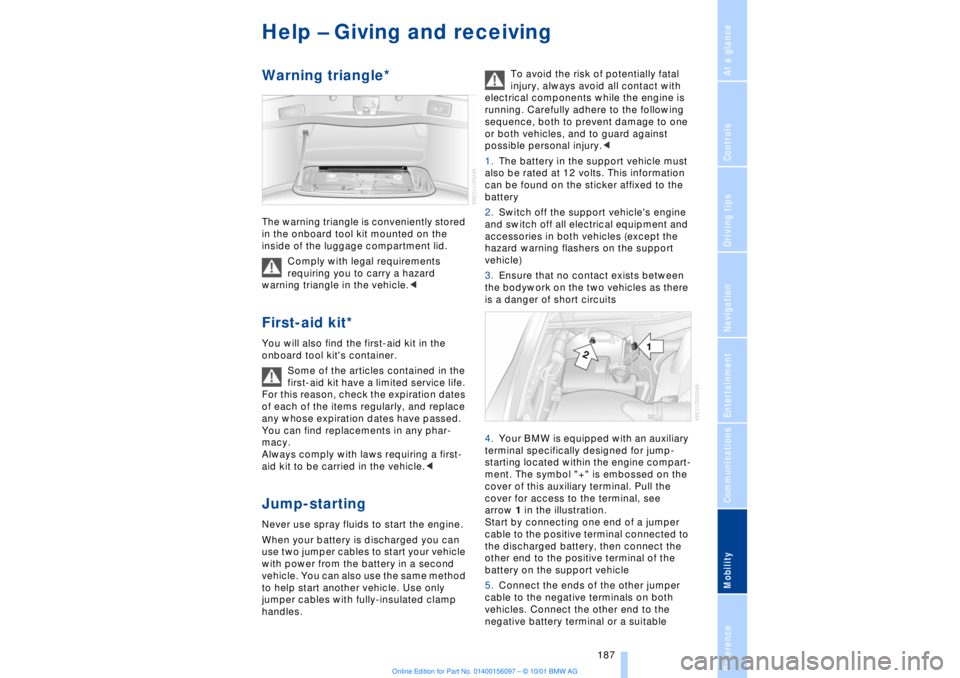
The warning triangle is conveniently stored
in the onboard tool kit mounted on the
inside of the luggage compartment lid.
Comply with legal requirements
requiring you to carry a hazard
warning triangle in the vehicle.< First-aid kit*
You will also find the first-aid kit in the
onboard tool kit's container.
Some of the articles contained in the
first-aid kit have a limited service life.
For this reason, check the expiration dates
of each of the items regularly, and replace
any whose expiration dates have passed.
You can find replacements in any phar-
macy.
Always comply with laws requiring a first-
aid kit to be carried in the vehicle.< Jump-starting Never use spray fluids to start the engine.
When your battery is discharged you can
use two jumper cables to start your vehicle
with power from the battery in a second
vehicle. You can also use the same method
to help start another vehicle. Use only
jumper cables with fully-insulated clamp
handles. To avoid the risk of potentially fatal
injury, always avoid all contact with
electrical components while the engine is
running. Carefully adhere to the following
sequence, both to prevent damage to one
or both vehicles, and to guard against
possible personal injury.<
1.The battery in the support vehicle must
also be rated at 12 volts. This information
can be found on the sticker affixed to the
battery
2.Switch off the support vehicle's engine
and switch off all electrical equipment and
accessories in both vehicles (except the
hazard warning flashers on the support
vehicle)
3.Ensure that no contact exists between
the bodywork on the two vehicles as there
is a danger of short circuits
4.Your BMW is equipped with an auxiliary
terminal specifically designed for jump-
starting located within the engine compart-
ment. The symbol "+" is embossed on the
cover of this auxiliary terminal. Pull the
cover for access to the terminal, see
arrow 1 in the illustration.
Start by connecting one end of a jumper
cable to the positive terminal connected to
the discharged battery, then connect the
other end to the positive terminal of the
battery on the support vehicle
5.Connect the ends of the other jumper
cable to the negative terminals on both
vehicles. Connect the other end to the
negative battery terminal or a suitable
Page 189 of 208
Help Ð Giving and receiving
188 ground on the vehicle being started. A
special nut on the strut dome, see arrow 2
in the illustration, serves as the negative
terminal on your BMW
To avoid personal injury from sparks,
always observe this sequence when
connecting the jumper cables.<
6.Start the engine on the support vehicle
and allow it to run for several minutes at a
fast idle
7.Start the engine on the other vehicle in
the usual way. If the first start attempt is not
successful, wait a few minutes before
another attempt in order to allow the
discharged battery to recharge
8.Allow the engines to run for several
minutes before disconnecting the jumper
cables
9.Disconnect the jumper cables by
reversing the connection sequence.
If required, have the battery inspected and
recharged at your BMW center.
Towing
Even if the transmission is in perfect
working order, you should always
remember to disengage the transmission
lockout manually before towing the vehicle.
Failure to observe this precaution could
result in automatic activation of the trans-
mission lockout while the vehicle is being
towed.<
Releasing transmission lockout manually,
refer to page 70.
Tow fittingThe threaded tow fitting is stored in the tool
kit mounted on the inside of the luggage
compartment lid, refer to page 181, and
should always remain in the vehicle. This
fitting, which fits the tow sockets on both
the front and the rear of the vehicle, is
intended exclusively for use in towing the
vehicle on paved roads.
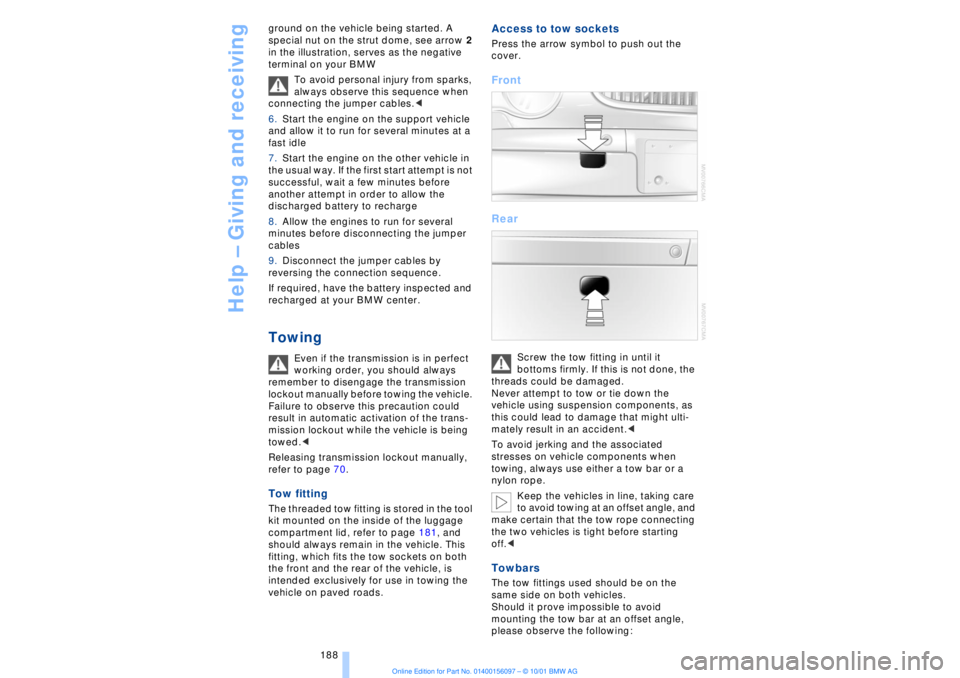
Access to tow sockets Press the arrow symbol to push out the
cover. Front
Rear
Screw the tow fitting in until it
bottoms firmly. If this is not done, the
threads could be damaged.
Never attempt to tow or tie down the
vehicle using suspension components, as
this could lead to damage that might ulti-
mately result in an accident.<
To avoid jerking and the associated
stresses on vehicle components when
towing, always use either a tow bar or a
nylon rope.
Keep the vehicles in line, taking care
to avoid towing at an offset angle, and
make certain that the tow rope connecting
the two vehicles is tight before starting
off.<
Towbars The tow fittings used should be on the
same side on both vehicles.
Should it prove impossible to avoid
mounting the tow bar at an offset angle,
please observe the following:
Page 190 of 208
At a glanceControlsDriving tipsCommunicationsNavigationEntertainmentMobilityReference
189
>Clearance and maneuvering capability
will be strictly limited in corners
>When mounted at an angle, the towbar
will exert lateral forces, tending to push the
vehicle sideways.
Never use a vehicle to tow another
vehicle that is heavier than itself, as
this could lead to a loss of control.< Towing
Do not tow the vehicle by the rear
axle; because the steering detent is
not operational, the wheels could turn to an
extreme angle during towing.<
1.Switch on the ignition to allow operation
of the brake lamps, turn signal indicators,
horn, parking brake and windshield wipers
2.Turn on the hazard warning flashers
where allowed by law
3.Manual release of the transmission
lockout, refer to page 70
4.Maximum towing speed:
maximum 43 mph (70 km/h)
5.Maximum towing distance:
maximum 93 miles (150 km).
If the electrical system in the towed vehicle
has failed, use an alternate means to iden-
tify the vehicle as being towed such as a
sign or warning triangle placed in the rear
window.
The steering and brakes are without
power assistance when the engine is
off. This means that higher levels of effort
will be required to operate the steering and
brakes.<
Tow-starting It is not possible to start the engine by tow-
starting the vehicle.
Jump starting, refer to page 187.
Have the source of the starting difficulties
diagnosed and repaired at your BMW
center.
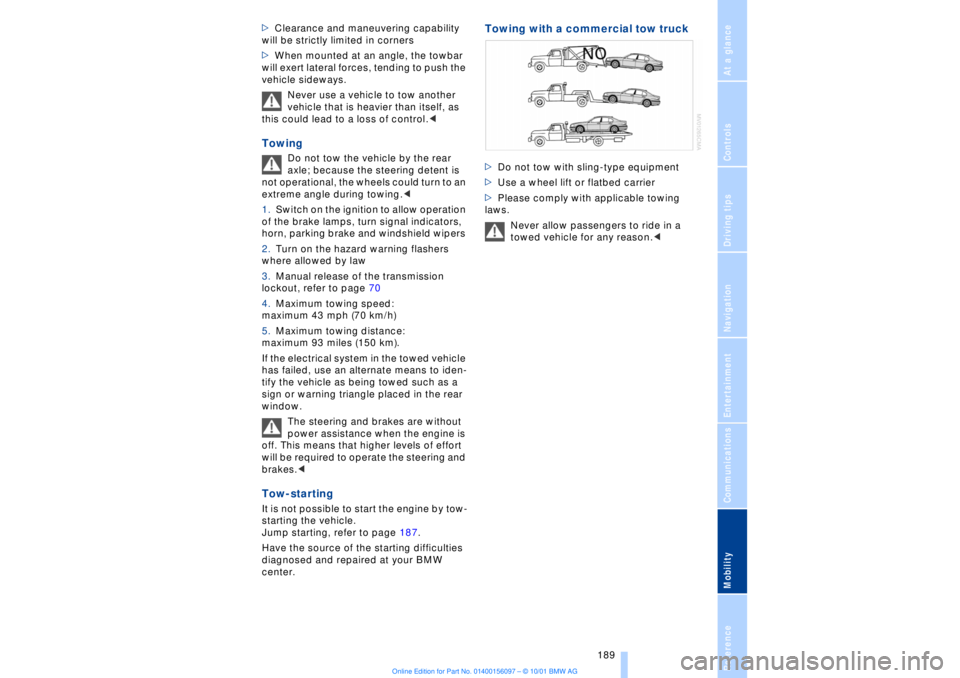
Towing with a commercial tow truck >Do not tow with sling-type equipment
>Use a wheel lift or flatbed carrier
>Please comply with applicable towing
laws.
Never allow passengers to ride in a
towed vehicle for any reason.<
Page 193 of 208
Technical data
192
Technical dataEngine specifications
BMW 745i, 745Li
Displacement
Number of cylinders cu in/cmm268.4/4398
8
Maximum output
at engine speed hp
rpm 325
6100
Maximum torque
at engine speed lb ft/Nm
rpm 330/450
3600
Compression ratio e 10.5
Stroke
Bore in/mm
in/mm 3.26/82.7
3.6/92.0
Fuel-injection system Digital electronic engine-management system
Page 195 of 208
Technical data
194
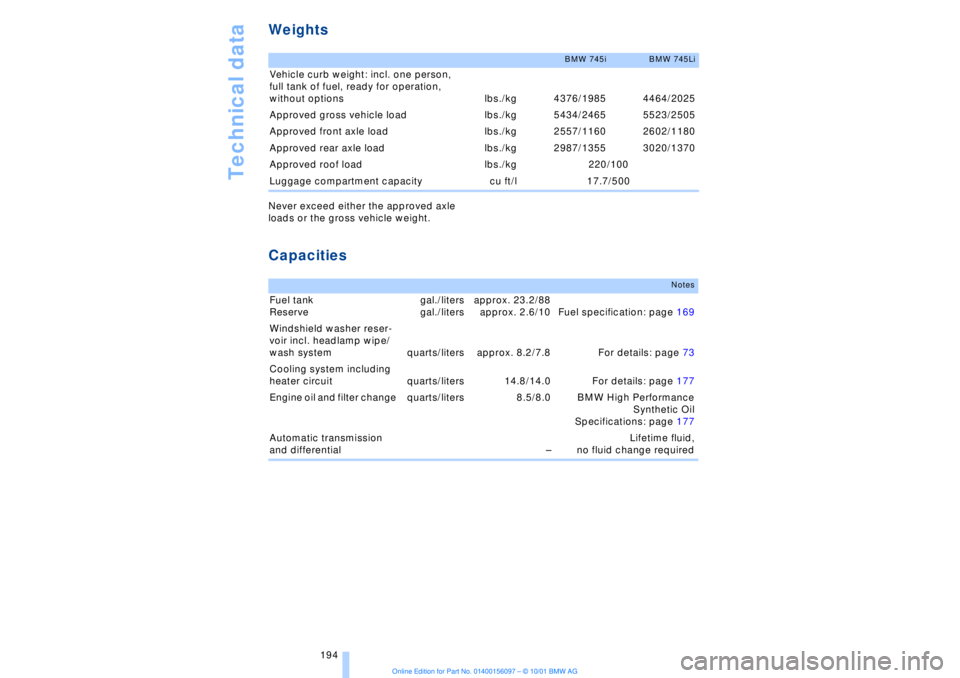
Weights Never exceed either the approved axle
loads or the gross vehicle weight. Capacities
BMW 745i
BMW 745Li
Vehicle curb weight: incl. one person,
full tank of fuel, ready for operation,
without options lbs./kg 4376/1985 4464/2025
Approved gross vehicle load lbs./kg 5434/2465 5523/2505
Approved front axle load lbs./kg 2557/1160 2602/1180
Approved rear axle load lbs./kg 2987/1355 3020/1370
Approved roof load lbs./kg 220/100
Luggage compartment capacity cu ft/l 17.7/500
Notes
Fuel tank
Reserve gal./liters
gal./litersapprox. 23.2/88
approx. 2.6/10 Fuel specification: page 169
Windshield washer reser-
voir incl. headlamp wipe/
wash system quarts/liters approx. 8.2/7.8 For details: page 73
Cooling system including
heater circuit quarts/liters 14.8/14.0 For details: page 177
Engine oil and filter change quarts/liters 8.5/8.0 BMW High Performance
Synthetic Oil
Specifications: page 177
Automatic transmission
and differential ÐLifetime fluid,
no fluid change required
Page 196 of 208
195
At a glanceControlsDriving tipsCommunicationsNavigationEntertainmentMobilityReference
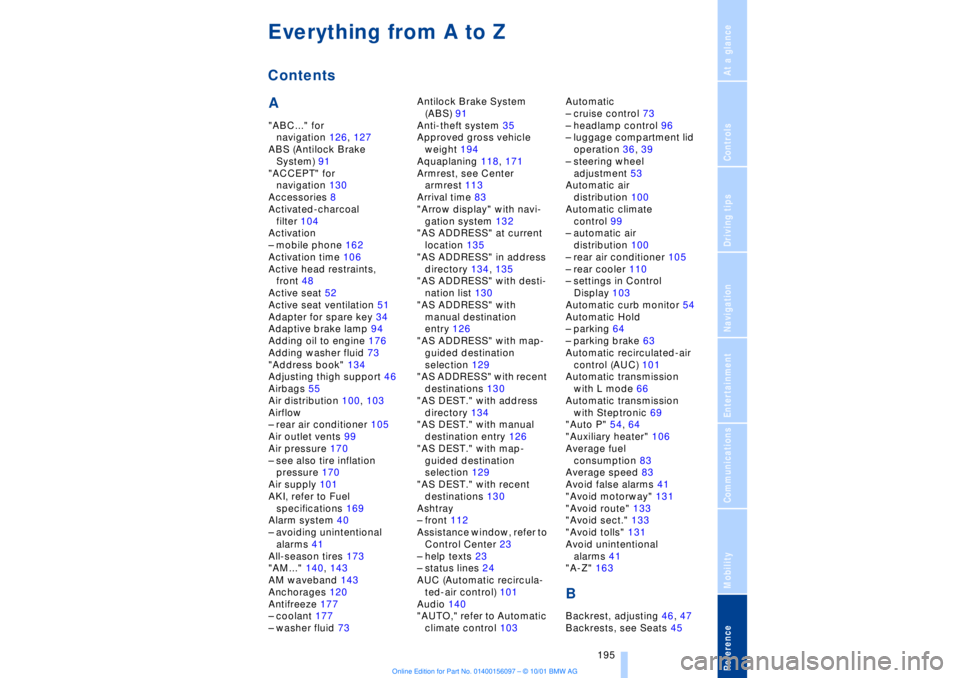
A"ABC..." for
navigation 126, 127
ABS (Antilock Brake
System) 91
"ACCEPT" for
navigation 130
Accessories 8
Activated-charcoal
filter 104
Activation
Ð mobile phone 162
Activation time 106
Active head restraints,
front 48
Active seat 52
Active seat ventilation 51
Adapter for spare key 34
Adaptive brake lamp 94
Adding oil to engine 176
Adding washer fluid 73
"Address book" 134
Adjusting thigh support 46
Airbags 55
Air distribution 100, 103
Airflow
Ð rear air conditioner 105
Air outlet vents 99
Air pressure 170
Ð see also tire inflation
pressure 170
Air supply 101
AKI, refer to Fuel
specifications 169
Alarm system 40
Ð avoiding unintentional
alarms 41
All-season tires 173
"AM..." 140, 143
AM waveband 143
Anchorages 120
Antifreeze 177
Ð coolant 177
Ð washer fluid 73Antilock Brake System
(ABS) 91
Anti-theft system 35
Approved gross vehicle
weight 194
Aquaplaning 118, 171
Armrest, see Center
armrest 113
Arrival time 83
"Arrow display" with navi-
gation system 132
"AS ADDRESS" at current
location 135
"AS ADDRESS" in address
directory 134, 135
"AS ADDRESS" with desti-
nation list 130
"AS ADDRESS" with
manual destination
entry 126
"AS ADDRESS" with map-
guided destination
selection 129
"AS ADDRESS" with recent
destinations 130
"AS DEST." with address
directory 134
"AS DEST." with manual
destination entry 126
"AS DEST." with map-
guided destination
selection 129
"AS DEST." with recent
destinations 130
Ashtray
Ð front 112
Assistance window, refer to
Control Center 23
Ð help texts 23
Ð status lines 24
AUC (Automatic recircula-
ted-air control) 101
Audio 140
"AUTO," refer to Automatic
climate control 103Automatic
Ð cruise control 73
Ð headlamp control 96
Ð luggage compartment lid
operation 36, 39
Ð steering wheel
adjustment 53
Automatic air
distribution 100
Automatic climate
control 99
Ð automatic air
distribution 100
Ð rear air conditioner 105
Ð rear cooler 110
Ð settings in Control
Display 103
Automatic curb monitor 54
Automatic Hold
Ð parking 64
Ð parking brake 63
Automatic recirculated-air
control (AUC) 101
Automatic transmission
with L mode 66
Automatic transmission
with Steptronic 69
"Auto P" 54, 64
"Auxiliary heater" 106
Average fuel
consumption 83
Average speed 83
Avoid false alarms 41
"Avoid motorway" 131
"Avoid route" 133
"Avoid sect." 133
"Avoid tolls" 131
Avoid unintentional
alarms 41
"A-Z" 163
BBackrest, adjusting 46, 47
Backrests, see Seats 45
Everything from A to ZContents
Page 197 of 208
Everything from A to Z
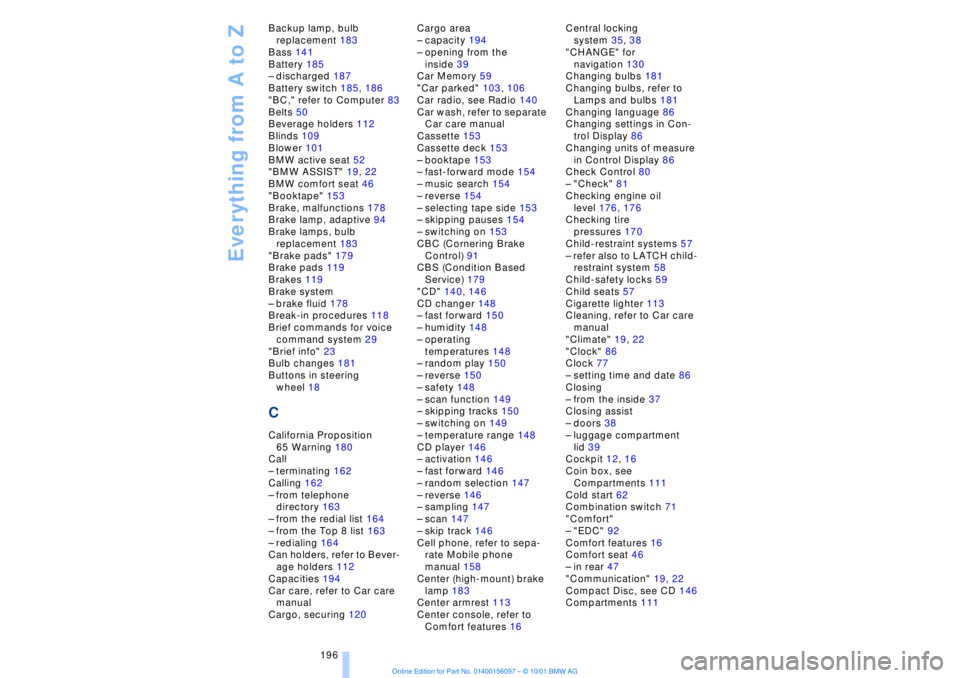
196 Backup lamp, bulb
replacement 183
Bass 141
Battery 185
Ð discharged 187
Battery switch 185, 186
"BC," refer to Computer 83
Belts 50
Beverage holders 112
Blinds 109
Blower 101
BMW active seat 52
"BMW ASSIST" 19, 22
BMW comfort seat 46
"Booktape" 153
Brake, malfunctions 178
Brake lamp, adaptive 94
Brake lamps, bulb
replacement 183
"Brake pads" 179
Brake pads 119
Brakes 119
Brake system
Ð brake fluid 178
Break-in procedures 118
Brief commands for voice
command system 29
"Brief info" 23
Bulb changes 181
Buttons in steering
wheel 18
CCalifornia Proposition
65 Warning 180
Call
Ð terminating 162
Calling 162
Ð from telephone
directory 163
Ð from the redial list 164
Ð from the Top 8 list 163
Ð redialing 164
Can holders, refer to Bever-
age holders 112
Capacities 194
Car care, refer to Car care
manual
Cargo, securing 120Cargo area
Ð capacity 194
Ð opening from the
inside 39
Car Memory 59
"Car parked" 103, 106
Car radio, see Radio 140
Car wash, refer to separate
Car care manual
Cassette 153
Cassette deck 153
Ð booktape 153
Ð fast-forward mode 154
Ð music search 154
Ð reverse 154
Ð selecting tape side 153
Ð skipping pauses 154
Ð switching on 153
CBC (Cornering Brake
Control) 91
CBS (Condition Based
Service) 179
"CD" 140, 146
CD changer 148
Ð fast forward 150
Ð humidity 148
Ð operating
temperatures 148
Ð random play 150
Ð reverse 150
Ð safety 148
Ð scan function 149
Ð skipping tracks 150
Ð switching on 149
Ð temperature range 148
CD player 146
Ð activation 146
Ð fast forward 146
Ð random selection 147
Ð reverse 146
Ð sampling 147
Ð scan 147
Ð skip track 146
Cell phone, refer to sepa-
rate Mobile phone
manual 158
Center (high-mount) brake
lamp 183
Center armrest 113
Center console, refer to
Comfort features 16Central locking
system 35, 38
"CHANGE" for
navigation 130
Changing bulbs 181
Changing bulbs, refer to
Lamps and bulbs 181
Changing language 86
Changing settings in Con-
trol Display 86
Changing units of measure
in Control Display 86
Check Control 80
Ð "Check" 81
Checking engine oil
level 176, 176
Checking tire
pressures 170
Child-restraint systems 57
Ð refer also to LATCH child-
restraint system 58
Child-safety locks 59
Child seats 57
Cigarette lighter 113
Cleaning, refer to Car care
manual
"Climate" 19, 22
"Clock" 86
Clock 77
Ð setting time and date 86
Closing
Ð from the inside 37
Closing assist
Ð doors 38
Ð luggage compartment
lid 39
Cockpit 12, 16
Coin box, see
Compartments 111
Cold start 62
Combination switch 71
"Comfort"
Ð "EDC" 92
Comfort features 16
Comfort seat 46
Ð in rear 47
"Communication" 19, 22
Compact Disc, see CD 146
Compartments 111
Page 198 of 208
197
At a glanceControlsDriving tipsCommunicationsNavigationEntertainmentMobilityReference
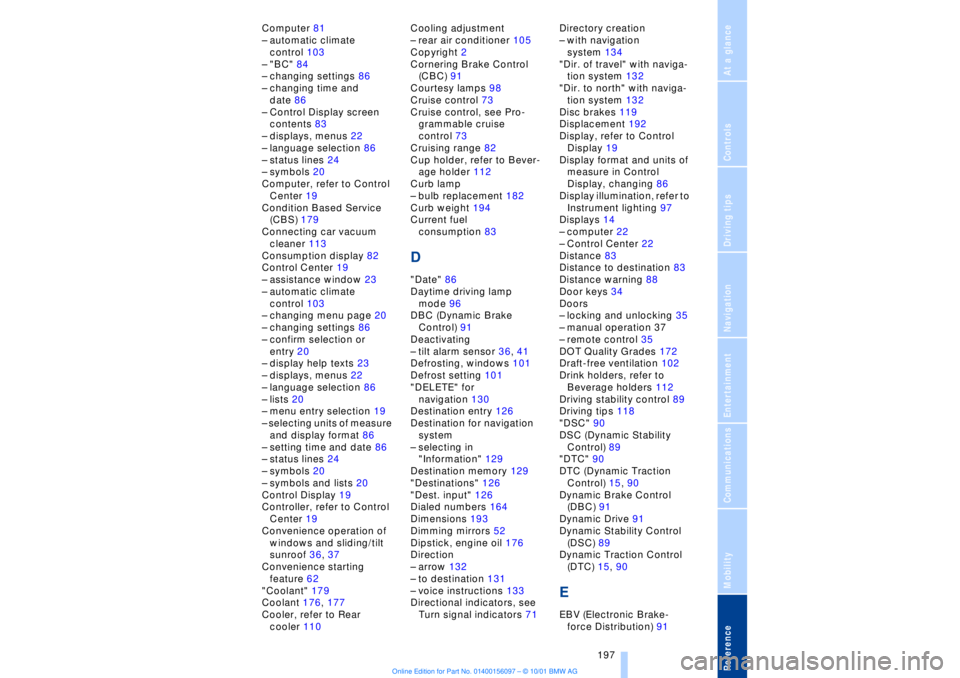
Computer 81
Ð automatic climate
control 103
Ð "BC" 84
Ð changing settings 86
Ð changing time and
date 86
Ð Control Display screen
contents 83
Ð displays, menus 22
Ð language selection 86
Ð status lines 24
Ð symbols 20
Computer, refer to Control
Center 19
Condition Based Service
(CBS) 179
Connecting car vacuum
cleaner 113
Consumption display 82
Control Center 19
Ð assistance window 23
Ð automatic climate
control 103
Ð changing menu page 20
Ð changing settings 86
Ð confirm selection or
entry 20
Ð display help texts 23
Ð displays, menus 22
Ð language selection 86
Ð lists 20
Ð menu entry selection 19
Ð selecting units of measure
and display format 86
Ð setting time and date 86
Ð status lines 24
Ð symbols 20
Ð symbols and lists 20
Control Display 19
Controller, refer to Control
Center 19
Convenience operation of
windows and sliding/tilt
sunroof 36, 37
Convenience starting
feature 62
"Coolant" 179
Coolant 176, 177
Cooler, refer to Rear
cooler 110Cooling adjustment
Ð rear air conditioner 105
Copyright 2
Cornering Brake Control
(CBC) 91
Courtesy lamps 98
Cruise control 73
Cruise control, see Pro-
grammable cruise
control 73
Cruising range 82
Cup holder, refer to Bever-
age holder 112
Curb lamp
Ð bulb replacement 182
Curb weight 194
Current fuel
consumption 83
D"Date" 86
Daytime driving lamp
mode 96
DBC (Dynamic Brake
Control) 91
Deactivating
Ð tilt alarm sensor 36, 41
Defrosting, windows 101
Defrost setting 101
"DELETE" for
navigation 130
Destination entry 126
Destination for navigation
system
Ð selecting in
"Information" 129
Destination memory 129
"Destinations" 126
"Dest. input" 126
Dialed numbers 164
Dimensions 193
Dimming mirrors 52
Dipstick, engine oil 176
Direction
Ð arrow 132
Ð to destination 131
Ð voice instructions 133
Directional indicators, see
Turn signal indicators 71Directory creation
Ð with navigation
system 134
"Dir. of travel" with naviga-
tion system 132
"Dir. to north" with naviga-
tion system 132
Disc brakes 119
Displacement 192
Display, refer to Control
Display 19
Display format and units of
measure in Control
Display, changing 86
Display illumination, refer to
Instrument lighting 97
Displays 14
Ð computer 22
Ð Control Center 22
Distance 83
Distance to destination 83
Distance warning 88
Door keys 34
Doors
Ð locking and unlocking 35
Ð manual operation 37
Ð remote control 35
DOT Quality Grades 172
Draft-free ventilation 102
Drink holders, refer to
Beverage holders 112
Driving stability control 89
Driving tips 118
"DSC" 90
DSC (Dynamic Stability
Control) 89
"DTC" 90
DTC (Dynamic Traction
Control) 15, 90
Dynamic Brake Control
(DBC) 91
Dynamic Drive 91
Dynamic Stability Control
(DSC) 89
Dynamic Traction Control
(DTC) 15, 90
EEBV (Electronic Brake-
force Distribution) 91
Page 199 of 208
Everything from A to Z
198 "EDC" 92
Ð "Comfort" 92
Ð "Sport" 92
EDC (Electronic Damping
Control) 92
Electrical malfunction
Ð automatic transmission
lockout 70
Ð fuel filler door 168
Ð parking brake, emergency
use 65
Ð sliding/tilt sunroof 44
Electric power seats 46
Electric power windows 42
Electric seats 46
Electric steering column
adjustment 53
Electronic Brake-force Dis-
tribution (EBV) 91
Electronic Damping Control
(EDC) 92
Elements of operation 12
Emergency operation
Ð doors 37
Ð fuel filler door 168
Ð luggage compartment
lid 40
Ð sliding/tilt sunroof 44
Ð transmission lockout
(automatic
transmission) 70
Emergency SOS call
Ð automatic activation 161
"Emissions inspection" 79
Energy Control 83
Engine compartment 176
Engine coolant 176, 177
"Engine oil" 179
Engine oil
Ð consumption 176
Ð grades 177
Engine oils 177
Engine output, data 192
Engine specifications 192
"Entertainment" 19, 22
Estimated time of arrival 83
Extended vehicle storage,
see supplemental Car
care manual
Exterior mirrors 52
Ð automatic dimming 52"Extra" in "Climate"
menu 103
"Extra" with rear air
conditioner 105
"Extra" with rear cooler 110
FFactory preparations for
phone installation 161
Fader 141
Failure of an electrical
accessory 186
"Fastest route" 131
Fastest route 131
Fault displays 80
Filling the washer
reservoir 73
Filling the windshield
washer reservoir 73
First-aid kit 187
Fittings, tow-starting and
towing 189
Flashlight 111
Flat tires 171
"FM..." 140, 143
FM waveband 143
Fog lamps 97
"Footwell" 103
Footwell lamps 98
Forward lamps 98
Front armrest 111
Front seat adjustment 45
Fuel 169
Fuel consumption
display 83
Fuel economy 83
Fuel filler cap cover 168
Fuel filler door
Ð releasing in the event of
electrical defect 168
Fuel gauge 82
Fuel level display 82, 83
Fuel specifications 169
Fuel tank capacity 168
Fuses 186
GGarage door opener, refer
to Universal garage door
opener 108
Gasoline 169
General operating
information 118
Glasses compartment 111
Glove compartment 110
GPS, refer to Navigation
system 124
GPS navigation system 124
Ð address book, refer to
Creating a directory 134
Ð current location 135
Ð destination entry 126
Ð destination guidance in
assistance window 125
Ð destination list 130
Ð digital coverage area 124
Ð directory 128
Ð manual entry of destina-
tion address 126
Ð map CD 124
Ð map-guided destination
selection 128
Ð new route 133
Ð recent destinations 130
Ð route display 132
Ð route list 132
Ð route selection 130
Ð safety 124
Ð selecting destination in
"Information" 129
Ð selecting points of
interest 129
Ð selection options 126
Ð start active guidance 131
Ð starting 125
Ð terminate/interrupt active
guidance 134
Ð voice guidance 133
Ð wordmatch principle 136
Guidance
Ð terminate 134
Guidance system
Ð interrupt 134
Ð starting 131
Page 203 of 208
Everything from A to Z
202 Sampling
Ð CD changer 149
Ð MD player 152
Satellite 124
Scan
Ð CD player 147
Ð MiniDisc 152
Ð radio 143
Scan, station sampling
Ð radio 143
Scan audio sampling
Ð CD 147
Scan mode
Ð radio 144
"SCAN" with CD
changer 149
"SCAN" with CD player 147
"SCAN" with MD
player 152
Seat heating 50
Seat memory 54
Seats
Ð adjusting 45
Ð correct position 45
"Seat temp." 51, 103
Seat ventilation, see Active
seat ventilation 51
Securing cargo, see
Cargo 120
Securing the load 114
Selecting new route with
navigation system 133
Selecting new scale for
navigation system
display 132
Selecting stored radio
stations 145
Selector lever, automatic
transmission 67
Select "Route" 133
"Service" 78, 179
Ð "Emissions inspection" 79
Ð "Spark plugs" 78
Ð "State inspection" 79
Service and Warranty Infor-
mation Booklet (US
models) 179
Service brakes 119
Service Guide Booklet
(Canadian models) 179Service Interval
Display 78, 179
Service Requirement Dis-
play, see Service Interval
Display 179
"SET", refer to Setting
speed limit 84
Set time 106
"Settings" 19, 22
Setting time and date 86
Shifting, refer to Automatic
transmission with
Steptronic 69
Shiftlock 67
"Shortest route" 131
Shortest travel
distance 131
Shoulder support 46
"Side" in sound system
operation 153
Side window blind, see Sun
blinds 109
Sitting correctly 45
Ski bag 114
Sliding/tilt sunroof 43
Ð closing in the event of an
electrical defect 44
Ð convenience mode 37
Snow chains 173, 174
Soft Close Automatic
Ð doors 38
Ð luggage compartment
lid 39
SOS call
Ð using SOS button 161
Sound system
Ð switching on and off 140
Ð volume 141
Sound system adjustments
Ð balance 141
Ð bass 141
Ð default settings 142
Ð fader, front/rear 141
Ð left/right 141
Ð treble 141
Sound system "AUTO"
function 145
Sound system "Balance"
adjustment 141
Sound system "Bass"
adjustment 141Sound system "Dolby..."
feature 153
Sound system "Fader"
adjustment 141
Sound system "MANUAL"
selection mode 144
Sound system "Memorize"
feature 144
Sound system "Memory"
feature 141, 144
Sound system "Reset"
function 142
Sound system "Speed Vol."
feature 142
Spare fuses 186
Spare key 34
Ð adapter 34
Spare tire 184
"Spark plugs" 78, 179
Specifications for engine
oil 177
Speed limit
Ð "Limit" 84
Speed limit selection,
revision 84
Speedometer 14
"Sport"
Ð "EDC" 92
Stability control, refer to
Driving stability control 89
Standing lamps 97
Start/stop button 61
Starting 62
Starting assistance 187
Starting problems 62, 188
Starting the engine 62
"State inspection" 79
Station
Ð sample 143
Ð scan mode 144
Status lines in Control
Center 24
Steering column
Ð adjustment 53
Steering wheel 18
Ð individual button assign-
ment options 53
Steering wheel adjustment,
automatic 53
Steering wheel heater 53
Steering wheel memory 54