CD changer BMW 745LI SEDAN 2002 Owners Manual
[x] Cancel search | Manufacturer: BMW, Model Year: 2002, Model line: 745LI SEDAN, Model: BMW 745LI SEDAN 2002Pages: 208, PDF Size: 6.33 MB
Page 5 of 208
Inhaltsverzeichnis
Radio
143Select the frequency band
143Station selection
144Storing and retrieving a station
145Weather Band
CD Compact Disc
146Using the buttons to search for music
tracks
147Searching for music tracks in the
Control Display
CD changer
149Starting and stopping the CD changer
149Status displays
149Searching for music tracks in the
Control Display
150Using the buttons to search for music
tracks
MiniDisc MD
151Using the buttons to search for music
tracks
152Searching for music tracks in the
Control Display
Cassette
153Noise suppression
154Music track search
Using your mobile phone
158Safety notice
159Care instructions
159Operation
161Hands-free system
161To make SOS call
161Initial operation
162Getting started
162Telephone directory
163To select a number from the Top 8 list
164Redialing, including numbers not
initially reached
164Missed calls
Refueling
168Fuel filler door
169Fuel specifications
Wheels and tires
170Tire inflation pressure
171Tire condition
172Tire replacement
173Wheel and tire combinations
173Special characteristics of winter tires
173Snow chains*
Under the hood
175Hood
176Engine compartment
176Engine oil
177Coolant
178Brake fluid
Maintenance
179The BMW Maintenance System
179Care
Rules and regulations
180California Proposition 65 Warning
180OBD connector
Replacing components
181Onboard tool kit
181Windshield wiper blades
181Lamps and bulbs
183Changing a tire
185Battery
186Fuses
Help Ð Giving and receiving
187Warning triangle*
187First-aid kit*
187Jump-starting
188Towing
Technical data
192Engine specifications
193Dimensions
194Weights
194Capacities
Everything from A to Z
195Contents
Page 26 of 208
At a glanceControlsDriving tipsCommunicationsNavigationEntertainmentMobilityReference
25
Voice commandVoice command system*The conceptThe voice command system allows you to
control operation of various vehicle
systems without ever removing your hands
from the steering wheel. The system oper-
ates on the basis of voice commands that
you will learn easily after using them a few
times. You issue your commands in the
form of instructions or in dialogs. The
dialog functions provide you with additional
support in the form of questions and infor-
mation.
The voice command system transforms
your commands and dialog answers into
control signals for the selected systems.
Please take the time to acquaint your-
self with how a particular system
operates before proceeding to control it
using the voice command system. At the
time of publication the voice command
system was available for use with the
English and German languages. Other
languages are currently in preparation.
When the voice command system is active
you can adjust the volume, refer to
page 141.
command system.<
>>...<< identifies commands used in the
voice command system. It is not necessary
to speak the words in parentheses.
>...< identifies the answers provided by the
voice command system.
Systems available for use with voice
command>Mobile phone, refer to page 158
>>Telephone (menu)<<
>Navigation system, refer to page 124
>>Navigation (menu)<< or
>>Navi (menu)<<>Radio, refer to page 140
>>Radio (menu)<<
>CD, refer to page 146
>>CD (menu)<<
>CD changer, refer to page 148
>>CD changer (menu)<<
>MiniDisc, refer to page 151
>>MiniDisc (menu)<<
>Cassette, refer to page 153
>>Tape (menu)<<
>Notebook, refer to page 28
>>Notepad (menu)<< or
>>Notebook (menu)<< or >>Note
recorder (menu)<<
Either the system that you are now control-
ling, or any current error messages will
appear in the Info Display, refer to page 14.
Voice commandsTo activate voice command systemActivate by briefly pressing the
button in the steering wheel.
A signal tone and "SVS" in the Info Display
indicate that the system is ready for use.
You automatically proceed to the orienta-
tion menu.
Except in dialogs, always press
the button again before issuing voice
commands.
During dialogs that include entry of text or
numbers, the information that the voice
command system has registered will
appear on the Info Display screen, refer to
page 14.To cancel voice command entryYou can terminate execution of a command
or dialog with >>Cancel<<, >>Exit<< or by
pressing the button in the steering
wheel.
Page 141 of 208
Sound system
140
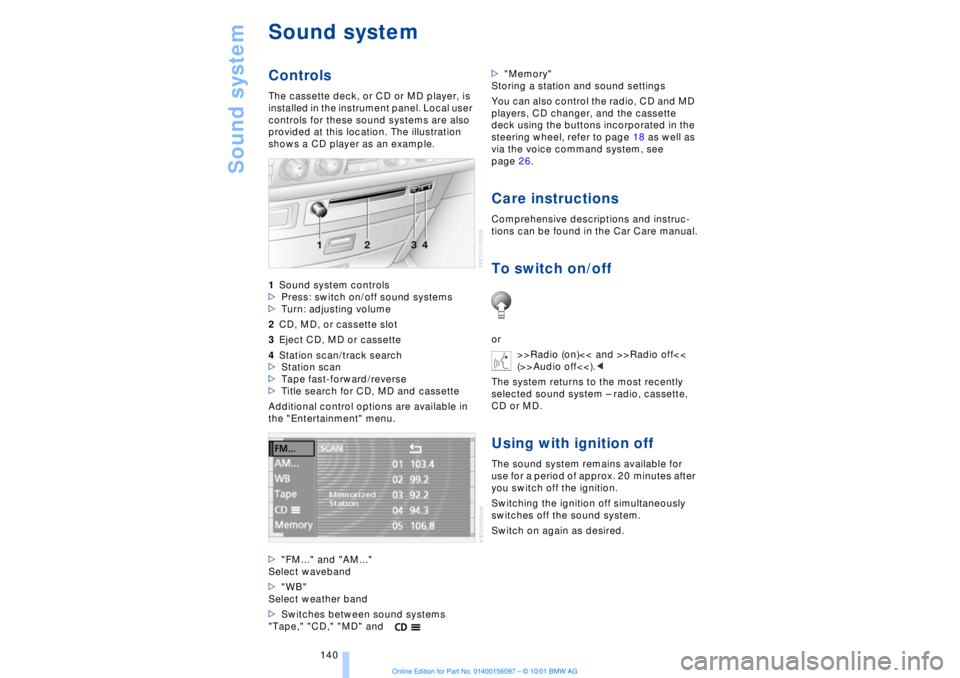
Sound systemControlsThe cassette deck, or CD or MD player, is
installed in the instrument panel. Local user
controls for these sound systems are also
provided at this location. The illustration
shows a CD player as an example.
1Sound system controls
>Press: switch on/off sound systems
>Turn: adjusting volume
2CD, MD, or cassette slot
3Eject CD, MD or cassette
4Station scan/track search
>Station scan
>Tape fast-forward/reverse
>Title search for CD, MD and cassette
Additional control options are available in
the "Entertainment" menu.
>"FM..." and "AM..."
Select waveband
>"WB"
Select weather band
>Switches between sound systems
"Tape," "CD," "MD" and>"Memory"
Storing a station and sound settings
You can also control the radio, CD and MD
players, CD changer, and the cassette
deck using the buttons incorporated in the
steering wheel, refer to page 18 as well as
via the voice command system, see
page 26.
Care instructionsComprehensive descriptions and instruc-
tions can be found in the Car Care manual.To switch on/offor
>>Radio (on)<< and >>Radio off<<
(>>Audio off<<).<
The system returns to the most recently
selected sound system Ð radio, cassette,
CD or MD.Using with ignition offThe sound system remains available for
use for a period of approx. 20 minutes after
you switch off the ignition.
Switching the ignition off simultaneously
switches off the sound system.
Switch on again as desired.
Page 149 of 208
CD changer
148
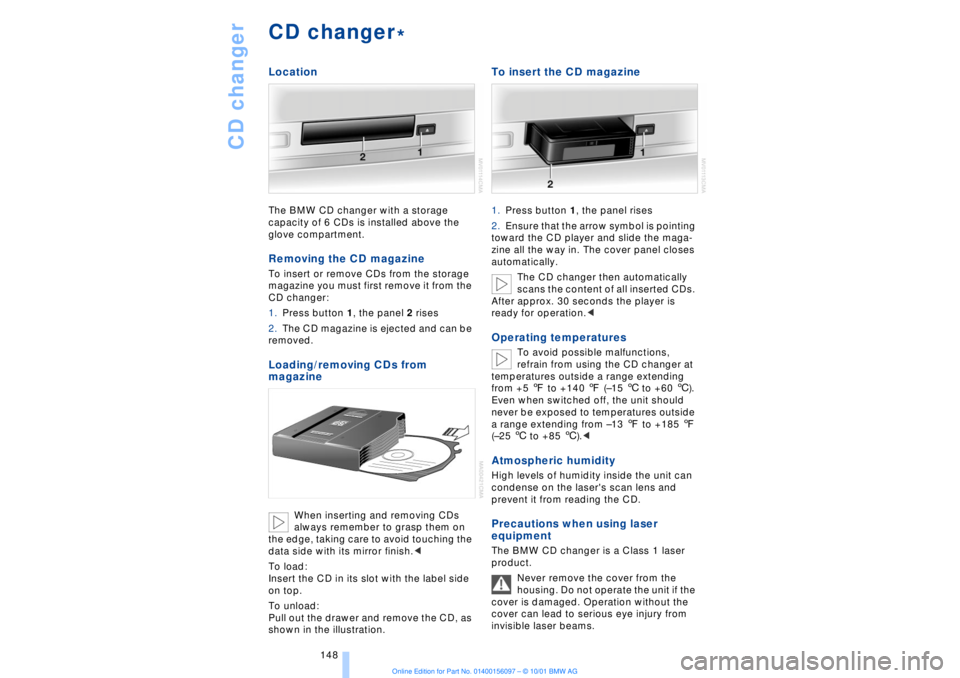
CD changerLocationThe BMW CD changer with a storage
capacity of 6 CDs is installed above the
glove compartment.Removing the CD magazineTo insert or remove CDs from the storage
magazine you must first remove it from the
CD changer:
1.Press button 1, the panel 2 rises
2.The CD magazine is ejected and can be
removed.Loading/removing CDs from
magazine
When inserting and removing CDs
always remember to grasp them on
the edge, taking care to avoid touching the
data side with its mirror finish.<
To load:
Insert the CD in its slot with the label side
on top.
To unload:
Pull out the drawer and remove the CD, as
shown in the illustration.
To insert the CD magazine1.Press button 1, the panel rises
2.Ensure that the arrow symbol is pointing
toward the CD player and slide the maga-
zine all the way in. The cover panel closes
automatically.
The CD changer then automatically
scans the content of all inserted CDs.
After approx. 30 seconds the player is
ready for operation.
refrain from using the CD changer at
temperatures outside a range extending
from +5 7 to +140 7 (Ð15 6 to +60 6).
Even when switched off, the unit should
never be exposed to temperatures outside
a range extending from Ð13 7 to +185 7
(Ð25 6 to +85 6).<
Atmospheric humidityHigh levels of humidity inside the unit can
condense on the laser's scan lens and
prevent it from reading the CD.Precautions when using laser
equipmentThe BMW CD changer is a Class 1 laser
product.
Never remove the cover from the
housing. Do not operate the unit if the
cover is damaged. Operation without the
cover can lead to serious eye injury from
invisible laser beams.
*
Page 150 of 208
At a glanceControlsDriving tipsCommunicationsNavigationEntertainmentMobilityReference
149
Always refer all repair and maintenance
operations to qualified technicians.
You may experience playback prob-
lems, such as skips, when using CDs
that you have copied at home.<
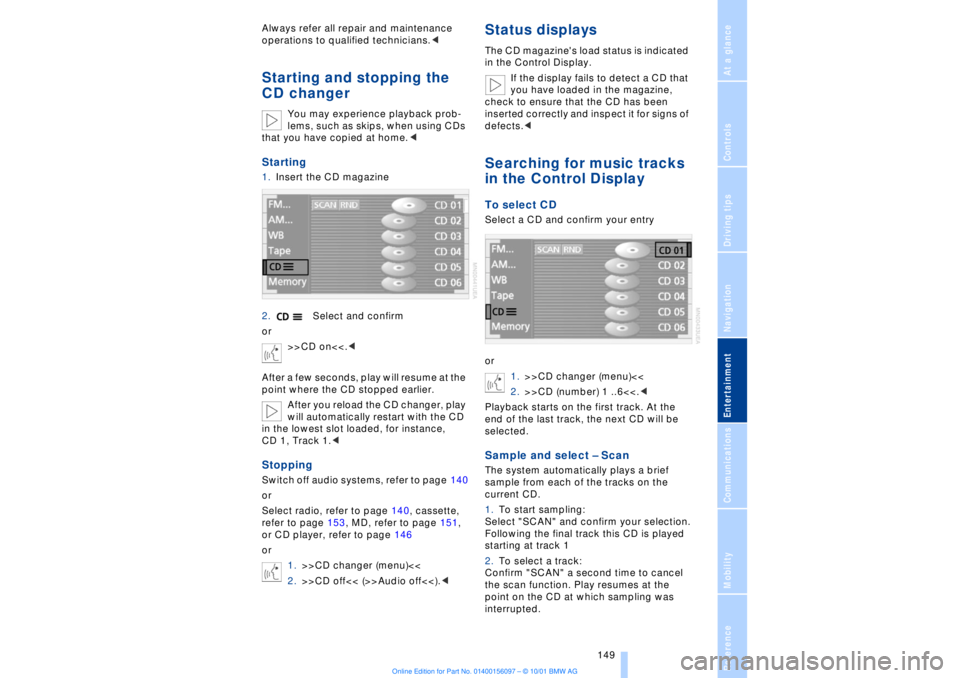
Starting1.Insert the CD magazine
2.Select and confirm
or
>>CD on<<.<
After a few seconds, play will resume at the
point where the CD stopped earlier.
After you reload the CD changer, play
will automatically restart with the CD
in the lowest slot loaded, for instance,
CD 1, Track 1.
Select radio, refer to page 140, cassette,
refer to page 153, MD, refer to page 151,
or CD player, refer to page 146
or
1.>>CD changer (menu)<<
2.>>CD off<< (>>Audio off<<).<
Status displaysThe CD magazine's load status is indicated
in the Control Display.
If the display fails to detect a CD that
you have loaded in the magazine,
check to ensure that the CD has been
inserted correctly and inspect it for signs of
defects.
or
1.>>CD changer (menu)<<
2.>>CD (number) 1 ..6<<.<
Playback starts on the first track. At the
end of the last track, the next CD will be
selected.Sample and select Ð ScanThe system automatically plays a brief
sample from each of the tracks on the
current CD.
1.To start sampling:
Select "SCAN" and confirm your selection.
Following the final track this CD is played
starting at track 1
2.To select a track:
Confirm "SCAN" a second time to cancel
the scan function. Play resumes at the
point on the CD at which sampling was
interrupted.
Page 151 of 208
CD changer
150
Random sequence Ð RandomIn this mode the music tracks on the
current CD are played in a random
sequence Ð Random.
To start random play:
Select "RND" and confirm your selection.
To cancel the random mode:
Select any other function except skip track.Using the buttons to search
for music tracksTo select music track
1.>>CD changer (menu)<<
2.>>(CD) track 1 ..12<<, or
>>CD (number) 1 ..12, Track 1 ..30<<.<
Track search To select a direction
Press repeatedly, continuing until you
reach the desired track on the current CD
or
1.>>CD changer (menu)<<
2.>>(CD) Next track<< or
>>(CD) track back<<.<
The CD will start play at the title selected.
Fast forward/reverse1.To select the direction
Press and hold the button. You can hear
the tracks, although the sound will be
distorted
2.To interrupt the fast forward/reverse,
release the button.
The system will continue play at the point
on the CD at which the button was
released.
Page 197 of 208
Everything from A to Z
196 Backup lamp, bulb
replacement 183
Bass 141
Battery 185
Ð discharged 187
Battery switch 185, 186
"BC," refer to Computer 83
Belts 50
Beverage holders 112
Blinds 109
Blower 101
BMW active seat 52
"BMW ASSIST" 19, 22
BMW comfort seat 46
"Booktape" 153
Brake, malfunctions 178
Brake lamp, adaptive 94
Brake lamps, bulb
replacement 183
"Brake pads" 179
Brake pads 119
Brakes 119
Brake system
Ð brake fluid 178
Break-in procedures 118
Brief commands for voice
command system 29
"Brief info" 23
Bulb changes 181
Buttons in steering
wheel 18
CCalifornia Proposition
65 Warning 180
Call
Ð terminating 162
Calling 162
Ð from telephone
directory 163
Ð from the redial list 164
Ð from the Top 8 list 163
Ð redialing 164
Can holders, refer to Bever-
age holders 112
Capacities 194
Car care, refer to Car care
manual
Cargo, securing 120Cargo area
Ð capacity 194
Ð opening from the
inside 39
Car Memory 59
"Car parked" 103, 106
Car radio, see Radio 140
Car wash, refer to separate
Car care manual
Cassette 153
Cassette deck 153
Ð booktape 153
Ð fast-forward mode 154
Ð music search 154
Ð reverse 154
Ð selecting tape side 153
Ð skipping pauses 154
Ð switching on 153
CBC (Cornering Brake
Control) 91
CBS (Condition Based
Service) 179
"CD" 140, 146
CD changer 148
Ð fast forward 150
Ð humidity 148
Ð operating
temperatures 148
Ð random play 150
Ð reverse 150
Ð safety 148
Ð scan function 149
Ð skipping tracks 150
Ð switching on 149
Ð temperature range 148
CD player 146
Ð activation 146
Ð fast forward 146
Ð random selection 147
Ð reverse 146
Ð sampling 147
Ð scan 147
Ð skip track 146
Cell phone, refer to sepa-
rate Mobile phone
manual 158
Center (high-mount) brake
lamp 183
Center armrest 113
Center console, refer to
Comfort features 16Central locking
system 35, 38
"CHANGE" for
navigation 130
Changing bulbs 181
Changing bulbs, refer to
Lamps and bulbs 181
Changing language 86
Changing settings in Con-
trol Display 86
Changing units of measure
in Control Display 86
Check Control 80
Ð "Check" 81
Checking engine oil
level 176, 176
Checking tire
pressures 170
Child-restraint systems 57
Ð refer also to LATCH child-
restraint system 58
Child-safety locks 59
Child seats 57
Cigarette lighter 113
Cleaning, refer to Car care
manual
"Climate" 19, 22
"Clock" 86
Clock 77
Ð setting time and date 86
Closing
Ð from the inside 37
Closing assist
Ð doors 38
Ð luggage compartment
lid 39
Cockpit 12, 16
Coin box, see
Compartments 111
Cold start 62
Combination switch 71
"Comfort"
Ð "EDC" 92
Comfort features 16
Comfort seat 46
Ð in rear 47
"Communication" 19, 22
Compact Disc, see CD 146
Compartments 111
Page 202 of 208
201
At a glanceControlsDriving tipsCommunicationsNavigationEntertainmentMobilityReference
Parking brake 62
Ð Automatic Hold 63
Ð manual operation 65
Parking brake lockout, refer
to Transmission
lockout 67, 70
Parking lamps 96
Ð bulb replacement 182
Parking with
Automatic Hold 64
Passenger-side mirror tilt
function 54
PDC (Park Distance
Control) 88
"PDC pic." 88
Phone directory 162
Ð deleting all entries 163
Ð dialing numbers using
voice command
system 163
Ð entering numbers in voice
command directory 163
Ð entry deletion 163
Ð viewing entries 163
Phone number, see Mobile
phone 162
Please fasten safety belts
warning lamp 50
Pollen 104
Power electric seat 47
Power rating 192
Power socket 113
Pressure, tires 170
Pressure control, tires 92
Programmable cruise
control 73
Programming settings,
refer to Car Memory, Key
Memory 59
Publishers 2
RRadio
Ð autostore 144
Ð memory locations 144
Ð search 144
Ð station search 144
Ð station selection 145
Ð switching on and off 140
Ð waveband selection 143
Ð Weather Band 145
Radio "Autostore"
feature 144
Radio mode 61
Radio "SCAN"
feature 143, 144
Rain sensor 72
"RDC" 93
RDC (Tire Pressure
Monitor) 92
Reading lamps 98
Rear air conditioner 105
Ð activation and deactiva-
tion in Control
Display 105
Ð air supply 105
Ð cooling adjustment 105
Ð deactivating 105
Rear armrest, see Center
armrest 113
Rear cooler 110
Rear seat heaters 51
Rear seats
Ð adjusting passenger seat
from the rear 47
Ð comfort seat
adjustments 47
Ð head restraint
adjustment 48
Rearview mirror 52
Rear window blind, see Sun
blind 109
Rear window defroster 16
Rear window safety
switch 13
"Recirc. air" 53
Reclining seat 45
Redialing with mobile
phone 164
Redial list 164Refrigerator box, refer to
Rear cooler 110
Refueling 168
Releasing the hood 175
Remaining distance 83
Remote control 34, 35
Remote-control unit 34
Removing condensation
from windows 101
Replacement fuses 186
Replacement keys 35
Replacing tires 172
Reserve warning 82
Reservoir, washer
system 73
Reset 141
Residual heat 101
"Right"
Ð for heated seats 51
Ð with automatic climate
control 103
"RND" with CD
changer 150
"RND" with CD player 147
"RND" with MD player 152
Roadside assistance calls
Ð manual activation 161
Roof-mounted luggage
rack 120
Route
Ð display 132
Ð list 132
Ð map cancelation 132
Ð map display 132
Ð selection 130
"Route guide" 131, 134
"Route select" 131
SSafety belts 50
Safety belt tensioners, see
Safety belts 50
Safety lock buttons 38
Safety precautions to
observe when using your
phone 158
Safety switch for rear
windows 42
Page 203 of 208
Everything from A to Z
202 Sampling
Ð CD changer 149
Ð MD player 152
Satellite 124
Scan
Ð CD player 147
Ð MiniDisc 152
Ð radio 143
Scan, station sampling
Ð radio 143
Scan audio sampling
Ð CD 147
Scan mode
Ð radio 144
"SCAN" with CD
changer 149
"SCAN" with CD player 147
"SCAN" with MD
player 152
Seat heating 50
Seat memory 54
Seats
Ð adjusting 45
Ð correct position 45
"Seat temp." 51, 103
Seat ventilation, see Active
seat ventilation 51
Securing cargo, see
Cargo 120
Securing the load 114
Selecting new route with
navigation system 133
Selecting new scale for
navigation system
display 132
Selecting stored radio
stations 145
Selector lever, automatic
transmission 67
Select "Route" 133
"Service" 78, 179
Ð "Emissions inspection" 79
Ð "Spark plugs" 78
Ð "State inspection" 79
Service and Warranty Infor-
mation Booklet (US
models) 179
Service brakes 119
Service Guide Booklet
(Canadian models) 179Service Interval
Display 78, 179
Service Requirement Dis-
play, see Service Interval
Display 179
"SET", refer to Setting
speed limit 84
Set time 106
"Settings" 19, 22
Setting time and date 86
Shifting, refer to Automatic
transmission with
Steptronic 69
Shiftlock 67
"Shortest route" 131
Shortest travel
distance 131
Shoulder support 46
"Side" in sound system
operation 153
Side window blind, see Sun
blinds 109
Sitting correctly 45
Ski bag 114
Sliding/tilt sunroof 43
Ð closing in the event of an
electrical defect 44
Ð convenience mode 37
Snow chains 173, 174
Soft Close Automatic
Ð doors 38
Ð luggage compartment
lid 39
SOS call
Ð using SOS button 161
Sound system
Ð switching on and off 140
Ð volume 141
Sound system adjustments
Ð balance 141
Ð bass 141
Ð default settings 142
Ð fader, front/rear 141
Ð left/right 141
Ð treble 141
Sound system "AUTO"
function 145
Sound system "Balance"
adjustment 141
Sound system "Bass"
adjustment 141Sound system "Dolby..."
feature 153
Sound system "Fader"
adjustment 141
Sound system "MANUAL"
selection mode 144
Sound system "Memorize"
feature 144
Sound system "Memory"
feature 141, 144
Sound system "Reset"
function 142
Sound system "Speed Vol."
feature 142
Spare fuses 186
Spare key 34
Ð adapter 34
Spare tire 184
"Spark plugs" 78, 179
Specifications for engine
oil 177
Speed limit
Ð "Limit" 84
Speed limit selection,
revision 84
Speedometer 14
"Sport"
Ð "EDC" 92
Stability control, refer to
Driving stability control 89
Standing lamps 97
Start/stop button 61
Starting 62
Starting assistance 187
Starting problems 62, 188
Starting the engine 62
"State inspection" 79
Station
Ð sample 143
Ð scan mode 144
Status lines in Control
Center 24
Steering column
Ð adjustment 53
Steering wheel 18
Ð individual button assign-
ment options 53
Steering wheel adjustment,
automatic 53
Steering wheel heater 53
Steering wheel memory 54
Page 204 of 208
203
At a glanceControlsDriving tipsCommunicationsNavigationEntertainmentMobilityReference
Steptronic 69
Stopwatch 85
Storage, refer to Car care
manual
Storage compartments 111
Storing preset speeds,
refer to Programmable
cruise control 75
Straps, refer to
Loading 120
Summer tires 173
Sun blinds 109
Switch for battery 185
Switching air conditioner
on and off 101
Switching off the engine 62
Switching off with mobile
phone 162
Switching on
Ð audio 140
Ð cassette deck 153
Ð CD changer 149
Ð CD player 146
Ð MD player 151
Ð radio 140
Symbols 6
Ð Control Center 20
System failure reports, refer
to Check Control 80TTachometer 77
Tail lamps 183
Ð bulb replacement 183
"Tape" 140, 153
Technical
modifications 8, 98
Telephone, refer to Mobile
phone 158
Telephone directory
Ð creating voice command
telephone directory 162
Ð dialing numbers 163
Ð updating voice command
telephone directory 162
"Temp. distribution" 51
Temperature
adjustment 101
Temperature display, out-
side temperature 77Third brake lamp 183
Tilt function, passenger-
side mirror 54
Time
Ð of arrival, estimated 83
Timing 85
Tire change 184
Tire inflation pressures 170
Tire pressure monitor 92
Tire Quality Grading 172
Tires
Ð flat tire 184
Ð tire changes 184
Ð tire damage 171
Ð tire inflation
pressures 170
Ð tire pressure monitoring
system 92
Ð tire replacement 172
Ð tire size, refer to Wheel
and tire
combinations 173
Ð tire tread 171
Ð tire tread wear
indicators 171
Title search
Ð cassette deck 154
Tone in audio operation
Ð adjusting 141
"Tone" in sound system
operation 141
Tools 181
"TOP 8" 163
Torque 192
Tow fittings 188
Towing 188
Track 193
Traction Control System,
refer to DSC 89
Traffic congestion, refer to
Selecting new route 133
Transmission
Ð automatic transmission
with L mode 66
Ð automatic transmission
with Steptronic 69
Transmission
lockout 67, 70
Ð manual release 70
Travel route, see Route 132
Tread depth, tires 171"Treble" in sound system
operation 141
Trip odometer 77
Trunk lid
Ð emergency release 40
Ð refer to luggage compart-
ment lid 38
Turning circle 193
Turn signal indicators 71
Ð bulb
replacement 182, 183
UUndercoating, refer to Car
care manual
Uniform Tire Quality Gra-
ding (UTQR) 172
Universal garage door
opener 108
Upholstery care, refer
to Car Care
Used batteries 186
User controls 16
"Using motorway" 130VVacuum cleaner
connection 113
Valve caps 185
Vanity mirror 53
Vehicle battery 185
Vehicle dimensions 193
Vehicle keys 34
Vehicle stability control 89
Ventilation 102
Ventilation, draft-free 102
Ventilation while
parked 106
Vents, ventilation 99
"View" with navigation
system 132, 133
Viscosity 177
Voice command
system 18, 25
Voice command system
notebook 27