traction control BMW 745LI SEDAN 2002 Owners Manual
[x] Cancel search | Manufacturer: BMW, Model Year: 2002, Model line: 745LI SEDAN, Model: BMW 745LI SEDAN 2002Pages: 208, PDF Size: 6.33 MB
Page 16 of 208
At a glanceControlsDriving tipsCommunicationsNavigationEntertainmentMobilityReference
15
Indicator and warning lamps
Technology that monitors itself
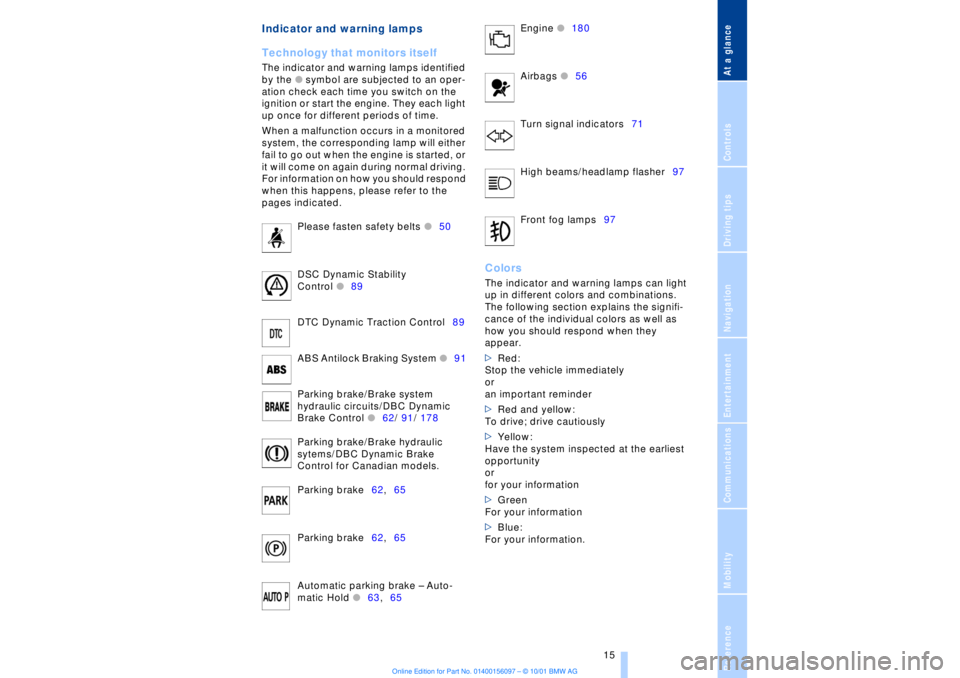
The indicator and warning lamps identified
by the
l
symbol are subjected to an oper-
ation check each time you switch on the
ignition or start the engine. They each light
up once for different periods of time.
When a malfunction occurs in a monitored
system, the corresponding lamp will either
fail to go out when the engine is started, or
it will come on again during normal driving.
For information on how you should respond
when this happens, please refer to the
pages indicated.
Please fasten safety belts
l
50
DSC Dynamic Stability
Control
l
89
DTC Dynamic Traction Control89
ABS Antilock Braking System
l
91
Parking brake/Brake system
hydraulic circuits/DBC Dynamic
Brake Control
l
62/ 91/ 178
Parking brake/Brake hydraulic
sytems/DBC Dynamic Brake
Control for Canadian models.
Parking brake62,65
Parking brake62,65
Automatic parking brake Ð Auto-
matic Hold
l
63,65 Engine
l
180
Airbags
l56
Turn signal indicators71
High beams/headlamp flasher97
Front fog lamps97
ColorsThe indicator and warning lamps can light
up in different colors and combinations.
The following section explains the signifi-
cance of the individual colors as well as
how you should respond when they
appear.
>Red:
Stop the vehicle immediately
or
an important reminder
>Red and yellow:
To drive; drive cautiously
>Yellow:
Have the system inspected at the earliest
opportunity
or
for your information
>Green
For your information
>Blue:
For your information.
Page 19 of 208
Cockpit
18
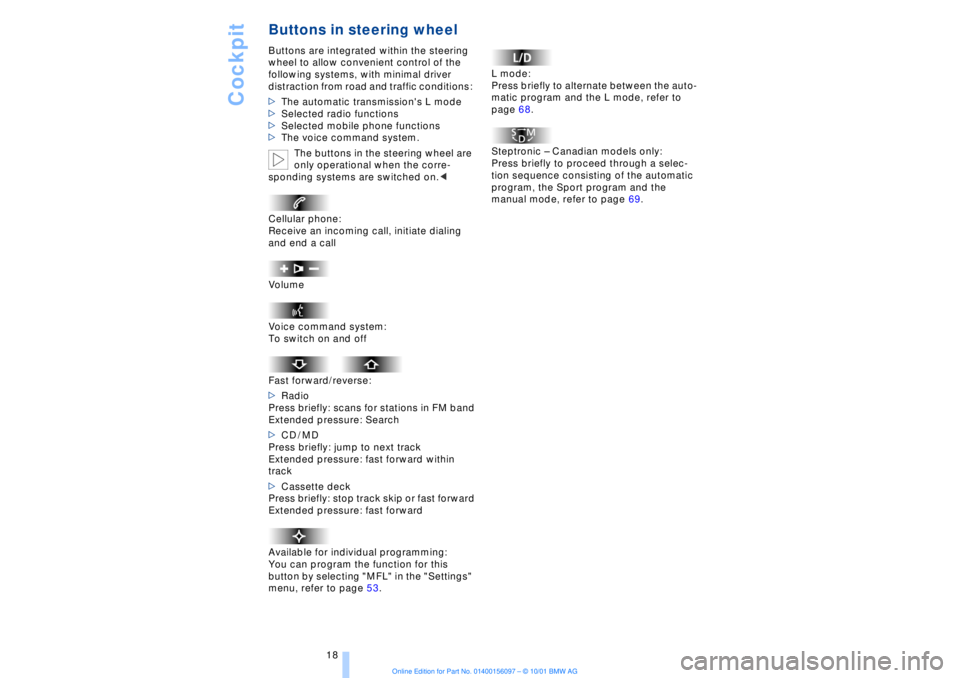
Buttons in steering wheel Buttons are integrated within the steering
wheel to allow convenient control of the
following systems, with minimal driver
distraction from road and traffic conditions:
>The automatic transmission's L mode
>Selected radio functions
>Selected mobile phone functions
>The voice command system.
The buttons in the steering wheel are
only operational when the corre-
sponding systems are switched on.<
Cellular phone:
Receive an incoming call, initiate dialing
and end a call
Volume
Voice command system:
To switch on and off
Fast forward/reverse:
>Radio
Press briefly: scans for stations in FM band
Extended pressure: Search
>CD / MD
Press briefly: jump to next track
Extended pressure: fast forward within
track
>Cassette deck
Press briefly: stop track skip or fast forward
Extended pressure: fast forward
Available for individual programming:
You can program the function for this
button by selecting "MFL" in the "Settings"
menu, refer to page 53. L mode:
Press briefly to alternate between the auto-
matic program and the L mode, refer to
page 68.
Steptronic Ð Canadian models only:
Press briefly to proceed through a selec-
tion sequence consisting of the automatic
program, the Sport program and the
manual mode, refer to page 69.
Page 54 of 208
At a glanceControlsDriving tipsCommunicationsNavigationEntertainmentMobilityReference
53
Lighted vanity mirror
In rear 1.Press button 1. The vanity mirror folds
down
2.Pull the mirror down slightly before
proceeding to turn it or tilt it into the
desired position
3.Press the vanity mirror back up before
folding it back in.
The mirror is illuminated from the radio
mode on. Steering wheel adjustment The steering wheel can be adjusted in any
of four directions by pressing the appro-
priate end of the button.
Do not adjust the steering wheel while
the vehicle is moving. There is a risk
of accident from unexpected movement.<
Storing steering wheel positions, refer to
Seat, mirror and steering wheel memory on
page 54.
Automatic steering wheel
adjustment The steering wheel automatically moves as
high up and far forward as possible to ease
driver entry and exit before then returning
to the standard position or stored memory
setting.
This automatic feature is governed by the
door and the ignition switch. Heated steering wheel*
The steering wheel's heater operates when
the ignition is on.
Press the button to activate or deactivate
this system.
The indicator lamp within the button lights
up when the steering wheel heater is in
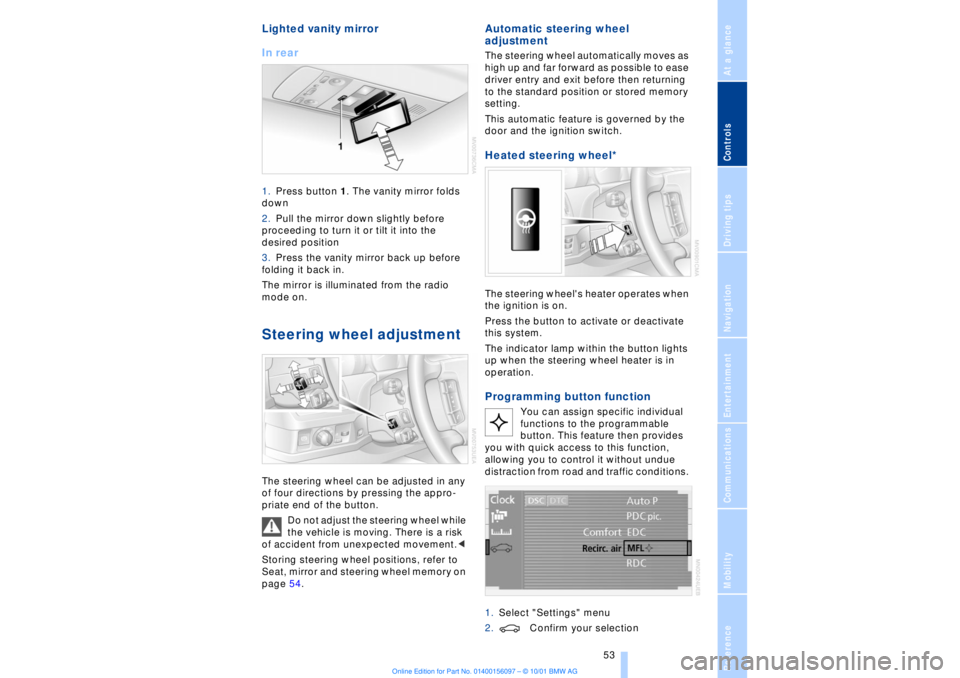
operation.Programming button function
You can assign specific individual
functions to the programmable
button. This feature then provides
you with quick access to this function,
allowing you to control it without undue
distraction from road and traffic conditions.
1.Select "Settings" menu
2.Confirm your selection
Page 65 of 208
Driving
64 in stop-and-go traffic, etc. As the vehicle
then no longer tends to "creep" when a
driving position is engaged, it is no longer
necessary to hold the vehicle by
depressing the brake pedal.
It prevents the vehicle from rolling back-
ward during uphill starts.
The parking brake also engages automati-
cally when you switch off the engine after
stopping the vehicle.
You can activate and deactivate the Auto-
matic Hold feature by selecting the
"Settings" menu in the Control Center. A
description of the Control Center is
provided on page 19.
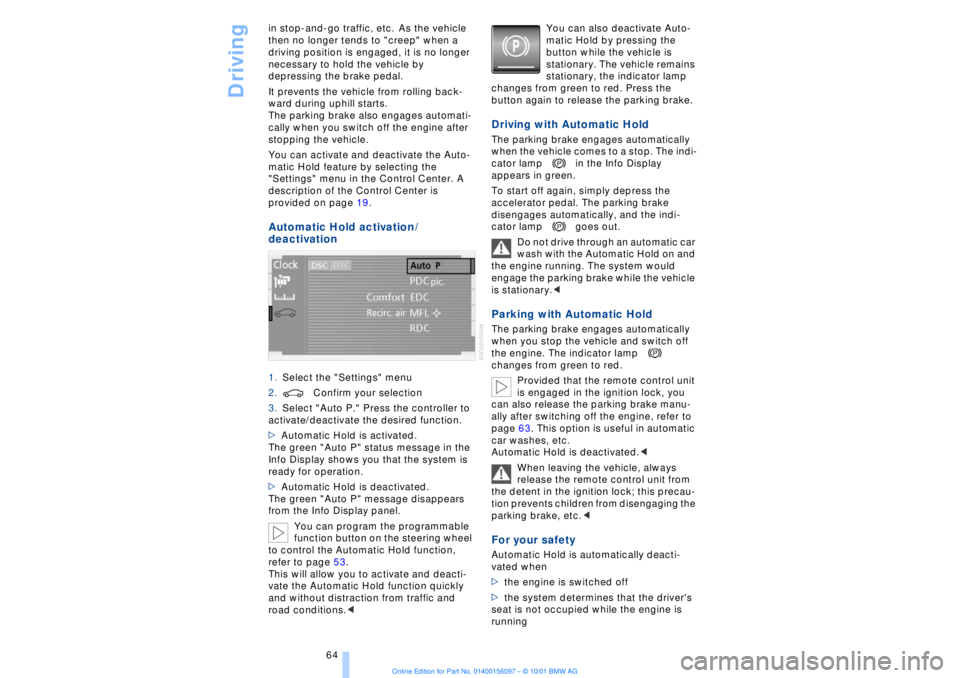
Automatic Hold activation /
deactivation 1.Select the "Settings" menu
2.Confirm your selection
3.Select "Auto P." Press the controller to
activate/deactivate the desired function.
>Automatic Hold is activated.
The green "Auto P" status message in the
Info Display shows you that the system is
ready for operation.
>Automatic Hold is deactivated.
The green "Auto P" message disappears
from the Info Display panel.
You can program the programmable
function button on the steering wheel
to control the Automatic Hold function,
refer to page 53.
This will allow you to activate and deacti-
vate the Automatic Hold function quickly
and without distraction from traffic and
road conditions.< You can also deactivate Auto-
matic Hold by pressing the
button while the vehicle is
stationary. The vehicle remains
stationary, the indicator lamp
changes from green to red. Press the
button again to release the parking brake.
Driving with Automatic Hold The parking brake engages automatically
when the vehicle comes to a stop. The indi-
cator lamp in the Info Display
appears in green.
To start off again, simply depress the
accelerator pedal. The parking brake
disengages automatically, and the indi-
cator lamp goes out.
Do not drive through an automatic car
wash with the Automatic Hold on and
the engine running. The system would
engage the parking brake while the vehicle
is stationary.
the engine. The indicator lamp
changes from green to red.
Provided that the remote control unit
is engaged in the ignition lock, you
can also release the parking brake manu-
ally after switching off the engine, refer to
page 63. This option is useful in automatic
car washes, etc.
Automatic Hold is deactivated.<
When leaving the vehicle, always
release the remote control unit from
the detent in the ignition lock; this precau-
tion prevents children from disengaging the
parking brake, etc.
>the engine is switched off
>the system determines that the driver's
seat is not occupied while the engine is
running
Page 90 of 208
At a glanceControlsDriving tipsCommunicationsNavigationEntertainmentMobilityReference
89
You also enjoy the option of having the
system show distances to objects in the
Control Display. The Control Display will
also indicate the presence of objects in
green before they are close enough to
generate a signal tone.
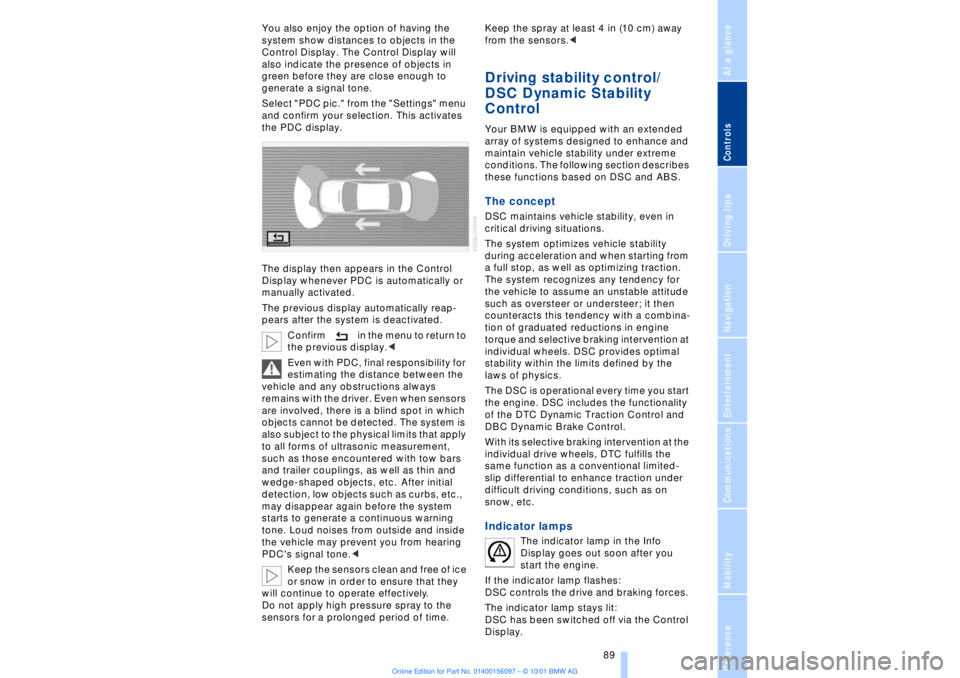
Select "PDC pic." from the "Settings" menu
and confirm your selection. This activates
the PDC display.
The display then appears in the Control
Display whenever PDC is automatically or
manually activated.
The previous display automatically reap-
pears after the system is deactivated.
Confirm in the menu to return to
the previous display.<
Even with PDC, final responsibility for
estimating the distance between the
vehicle and any obstructions always
remains with the driver. Even when sensors
are involved, there is a blind spot in which
objects cannot be detected. The system is
also subject to the physical limits that apply
to all forms of ultrasonic measurement,
such as those encountered with tow bars
and trailer couplings, as well as thin and
wedge-shaped objects, etc. After initial
detection, low objects such as curbs, etc.,
may disappear again before the system
starts to generate a continuous warning
tone. Loud noises from outside and inside
the vehicle may prevent you from hearing
PDC's signal tone.<
Keep the sensors clean and free of ice
or snow in order to ensure that they
will continue to operate effectively.
Do not apply high pressure spray to the
sensors for a prolonged period of time. Keep the spray at least 4 in (10 cm) away
from the sensors.<
Driving stability control/
DSC Dynamic Stability
Control Your BMW is equipped with an extended
array of systems designed to enhance and
maintain vehicle stability under extreme
conditions. The following section describes
these functions based on DSC and ABS. The concept DSC maintains vehicle stability, even in
critical driving situations.
The system optimizes vehicle stability
during acceleration and when starting from
a full stop, as well as optimizing traction.
The system recognizes any tendency for
the vehicle to assume an unstable attitude
such as oversteer or understeer; it then
counteracts this tendency with a combina-
tion of graduated reductions in engine
torque and selective braking intervention at
individual wheels. DSC provides optimal
stability within the limits defined by the
laws of physics.
The DSC is operational every time you start
the engine. DSC includes the functionality
of the DTC Dynamic Traction Control and
DBC Dynamic Brake Control.
With its selective braking intervention at the
individual drive wheels, DTC fulfills the
same function as a conventional limited-
slip differential to enhance traction under
difficult driving conditions, such as on
snow, etc. Indicator lamps
The indicator lamp in the Info
Display goes out soon after you
start the engine.
If the indicator lamp flashes:
DSC controls the drive and braking forces.
The indicator lamp stays lit:
DSC has been switched off via the Control
Display.
Page 91 of 208
Technology for comfort, convenience and safety
90 The indicator lamp and the brake
warning lamp remain on continu-
ously:
DSC, DTC and DBC have been
deactivated or a system malfunc-
tion is present.
When the system is off, the stability main-
tenance functions described above are no
longer available. The vehicle will remain
completely operational, however, without
DSC.
Please respond to any malfunctions by
referring the problem to your BMW center.
Indicator and warning lamps on
Canadian models.
Activating DTC Dynamic Traction
Control You may find it useful to briefly activate
DTC under the following special circum-
stances:
>When rocking the vehicle and starting off
in deep snow or on loose road surfaces
>When ascending snow-covered hills,
and when driving in deep or on hard-
packed snow
>When driving with snow chains.
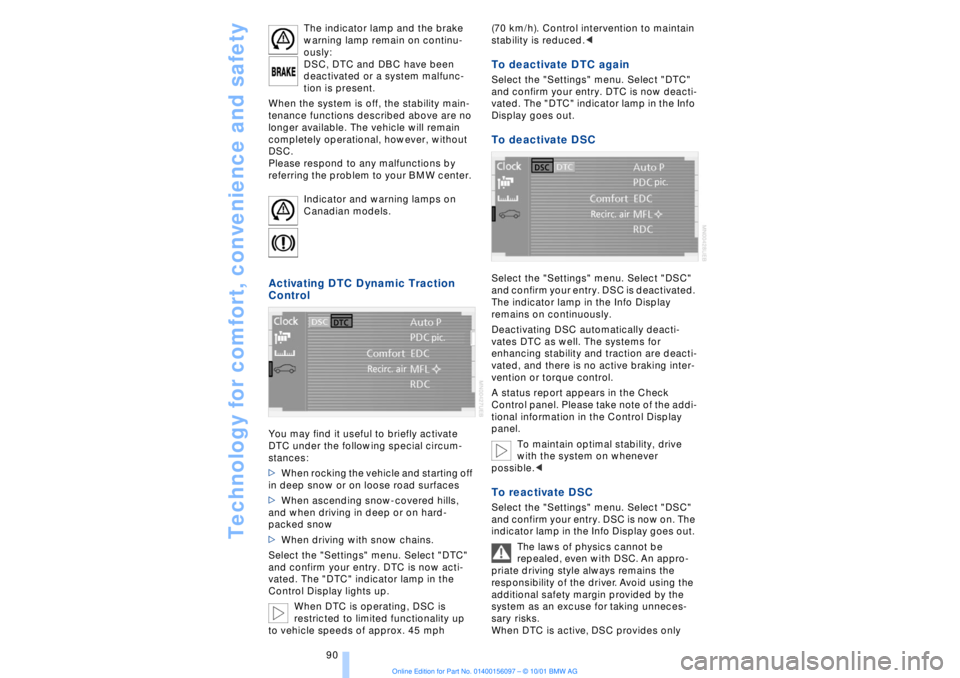
Select the "Settings" menu. Select "DTC"
and confirm your entry. DTC is now acti-
vated. The "DTC" indicator lamp in the
Control Display lights up.
When DTC is operating, DSC is
restricted to limited functionality up
to vehicle speeds of approx. 45 mph (70 km/h). Control intervention to maintain
stability is reduced.<
To deactivate DTC again Select the "Settings" menu. Select "DTC"
and confirm your entry. DTC is now deacti-
vated. The "DTC" indicator lamp in the Info
Display goes out. To deactivate DSC Select the "Settings" menu. Select "DSC"
and confirm your entry. DSC is deactivated.
The indicator lamp in the Info Display
remains on continuously.
Deactivating DSC automatically deacti-
vates DTC as well. The systems for
enhancing stability and traction are deacti-
vated, and there is no active braking inter-
vention or torque control.
A status report appears in the Check
Control panel. Please take note of the addi-
tional information in the Control Display
panel.
To maintain optimal stability, drive
with the system on whenever
possible.< To reactivate DSC Select the "Settings" menu. Select "DSC"
and confirm your entry. DSC is now on. The
indicator lamp in the Info Display goes out.
The laws of physics cannot be
repealed, even with DSC. An appro-
priate driving style always remains the
responsibility of the driver. Avoid using the
additional safety margin provided by the
system as an excuse for taking unneces-
sary risks.
When DTC is active, DSC provides only
Page 130 of 208
At a glanceControlsDriving tipsCommunicationsNavigationEntertainmentMobilityReference
129
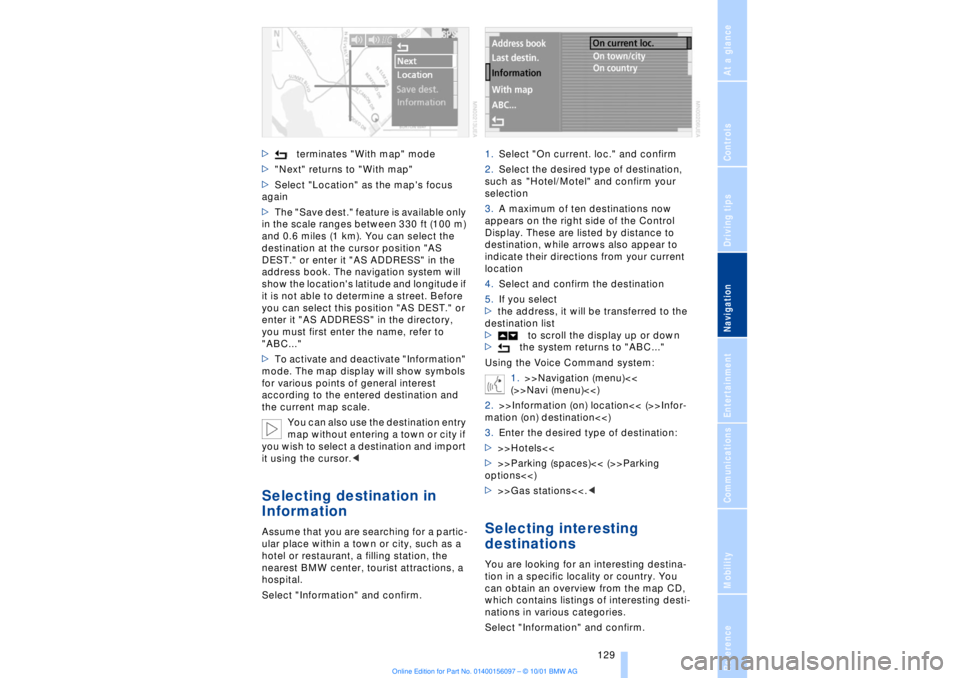
>terminates "With map" mode
>"Next" returns to "With map"
>Select "Location" as the map's focus
again
>The "Save dest." feature is available only
in the scale ranges between 330 ft (100 m)
and 0.6 miles (1 km). You can select the
destination at the cursor position "AS
DEST." or enter it "AS ADDRESS" in the
address book. The navigation system will
show the location's latitude and longitude if
it is not able to determine a street. Before
you can select this position "AS DEST." or
enter it "AS ADDRESS" in the directory,
you must first enter the name, refer to
"ABC..."
>To activate and deactivate "Information"
mode. The map display will show symbols
for various points of general interest
according to the entered destination and
the current map scale.
You can also use the destination entry
map without entering a town or city if
you wish to select a destination and import
it using the cursor.< Selecting destination in
Information Assume that you are searching for a partic-
ular place within a town or city, such as a
hotel or restaurant, a filling station, the
nearest BMW center, tourist attractions, a
hospital.
Select "Information" and confirm.1.Select "On current. loc." and confirm
2.Select the desired type of destination,
such as "Hotel/Motel" and confirm your
selection
3.A maximum of ten destinations now
appears on the right side of the Control
Display. These are listed by distance to
destination, while arrows also appear to
indicate their directions from your current
location
4.Select and confirm the destination
5.If you select
>the address, it will be transferred to the
destination list
>to scroll the display up or down
>the system returns to "ABC..."
Using the Voice Command system:
1.>>Navigation (menu)<<
(>>Navi (menu)<<)
2.>>Information (on) location<< (>>Infor-
mation (on) destination<<)
3.Enter the desired type of destination:
>>>Hotels<<
>>>Parking (spaces)<< (>>Parking
options<<)
>>>Gas stations<<.<
Selecting interesting
destinationsYou are looking for an interesting destina-
tion in a specific locality or country. You
can obtain an overview from the map CD,
which contains listings of interesting desti-
nations in various categories.
Select "Information" and confirm.
Page 173 of 208
Wheels and tires
172
Tire replacement To maintain good handling and vehicle
response, use only tires of a single tread
configuration from a single manufacturer.
BMW tests and approves specific wheel
and tire combinations. DOT Quality Grades Treadwear
Traction AA A B C
Temperature A B C
All passenger car tires must conform
to Federal Safety Requirements in
addition to these grades.< TreadwearThe treadwear grade is a comparative
rating based on the wear rate of the tire
when tested under controlled conditions
on a specified government test course.
For example, a tire graded 150 would wear
one and one-half (1g) times as well on the
government course as a tire graded 100.
The relative performance of tires depends
upon the actual conditions of their use,
however, and may depart significantly from
the norm due to variations in driving habits,
service practices and differences in road
characteristics and climate.TractionThe traction grades, from highest to lowest,
are AA, A, B, and C.
Those grades represent the tire's ability to
stop on wet pavement as measured under
controlled conditions on specified govern-
ment test surfaces of asphalt and concrete.
A tire marked C may have poor traction
performance.
The traction grade assigned to this
tire is based on straight-ahead
braking traction tests, and does not include
acceleration, cornering, hydroplaning, or
peak traction characteristics.< TemperatureThe temperature grades are A (the highest),
B, and C, representing the tire's resistance to the generation of heat and its ability to
dissipate heat when tested under
controlled conditions on a specified indoor
laboratory test wheel.
Sustained high temperature can cause the
material of the tire to degenerate and
reduce tire life, and excessive temperature
can lead to sudden tire failure. The grade C
corresponds to a level of performance
which all passenger car tires must meet
under the Federal Motor Safety Standard
No. 109. Grades B and A represent higher
levels of performance on the laboratory test
wheel than the minimum required by law.
The temperature grade for this tire is
established for a tire that is properly
inflated and not overloaded. Excessive
speed, underinflation, or excessive
loading, either separately or in combina-
tion, can cause heat buildup and possible
tire failure.<
Uniform Tire Quality Grading Quality grades can be found where appli-
cable on the tire sidewall between tread
shoulder and maximum section width. For
example:
Treadwear 200 Traction AA
Temperature A
Do not use retreaded tires, since
driving safety may be impaired.
Possible variations in the design and the
age (which could be substantial) of the
carcasses can lead to unusually rapid
wear.< Tire age The tire's date of manufacture is indicated
on the sidewall:
DOT ... 4901 indicates that a tire was
manufactured in week 49 of the year 2001.
Regardless of milage or wear, BMW
recommends that you replace all tires Ð
including the spare tire Ð after a maximum
of 6 years, even though the tires may have
a theoretical service life of up to 10 years.
Page 174 of 208
At a glanceControlsDriving tipsCommunicationsNavigationEntertainmentMobilityReference
173
Wheel and tire
combinationsThe right choice
Use only wheel and tire combinations
that BMW has approved for your
particular vehicle. Variations in factors such
as manufacturing tolerances mean that
even wheels and tires with identical official
size ratings could actually have different
dimensions than the approved units. These
differences could lead to body contact, and
with it the risk of severe accidents . If non-
approved wheels and tires are used, BMW
cannot evaluate their suitability, and there-
fore cannot be held liable for driving
safety.<
BMW tests certain tire brands for each tire
size, classifies them as road-safe and
approves them. Consult your BMW center
for more information. Observe any country-
specific regulations, e.g. on making a
corresponding entry in the vehicle
documents.
The correct combination of wheels
and tires is a vital factor in ensuring
reliable operation of various vehicle
systems such as ABS and DSC.
It is therefore important to ensure that tires
from a single manufacturer with a single
tread configuration are always mounted on
all vehicle wheels. After a flat tire, always
remember to have the specified wheel and
tire combination remounted on the vehicle
as soon as possible.<
Storage Always store wheels and tires in a cool, dry
place with as little exposure to light as
possible. Always protect tires against all
contact with oil, grease and fuels.
Special characteristics of
winter tires Choosing the right tire BMW recommends winter tires Ð M+S
radial tires for use in cold winter driving
conditions. Although all-season M+S tires
provide better winter traction than standard
summer tires with H, V, W and ZR speed
ratings, they generally fail to provide the
same levels of cold-weather performance
as winter tires.
When mounting, always install winter tires
of a single tread configuration and from a
single manufacturer on all four wheels to
ensure safe tracking and secure steering
response. Observe speed ratings
Never exceed the maximum speed for
which the tires are rated.
Unprofessional attempts by laymen to
service tires can lead to damage and acci-
dents.
Have this work performed by skilled
professionals only. The technicians at your
BMW center will be glad to assist you with
the required professional knowledge and
specialized equipment.<
Tire condition, tire pressure Because winter tires display a noticeable
loss in their ability to cope with cold-
weather driving conditions once the tread
wears to below 0.16 in (4 mm), to ensure
continued safety you should always have
such tires replaced.
Always maintain the specified inflation
pressures in all tires, and remember to
have the wheel and tire assemblies
balanced every time either a wheel or a tire
is replaced. Snow chains*
BMW narrow-link snow chains
are
approved exclusively for use in pairs on
the rear wheels, and should only be
Page 198 of 208
197
At a glanceControlsDriving tipsCommunicationsNavigationEntertainmentMobilityReference
Computer 81
Ð automatic climate
control 103
Ð "BC" 84
Ð changing settings 86
Ð changing time and
date 86
Ð Control Display screen
contents 83
Ð displays, menus 22
Ð language selection 86
Ð status lines 24
Ð symbols 20
Computer, refer to Control
Center 19
Condition Based Service
(CBS) 179
Connecting car vacuum
cleaner 113
Consumption display 82
Control Center 19
Ð assistance window 23
Ð automatic climate
control 103
Ð changing menu page 20
Ð changing settings 86
Ð confirm selection or
entry 20
Ð display help texts 23
Ð displays, menus 22
Ð language selection 86
Ð lists 20
Ð menu entry selection 19
Ð selecting units of measure
and display format 86
Ð setting time and date 86
Ð status lines 24
Ð symbols 20
Ð symbols and lists 20
Control Display 19
Controller, refer to Control
Center 19
Convenience operation of
windows and sliding/tilt
sunroof 36, 37
Convenience starting
feature 62
"Coolant" 179
Coolant 176, 177
Cooler, refer to Rear
cooler 110Cooling adjustment
Ð rear air conditioner 105
Copyright 2
Cornering Brake Control
(CBC) 91
Courtesy lamps 98
Cruise control 73
Cruise control, see Pro-
grammable cruise
control 73
Cruising range 82
Cup holder, refer to Bever-
age holder 112
Curb lamp
Ð bulb replacement 182
Curb weight 194
Current fuel
consumption 83
D"Date" 86
Daytime driving lamp
mode 96
DBC (Dynamic Brake
Control) 91
Deactivating
Ð tilt alarm sensor 36, 41
Defrosting, windows 101
Defrost setting 101
"DELETE" for
navigation 130
Destination entry 126
Destination for navigation
system
Ð selecting in
"Information" 129
Destination memory 129
"Destinations" 126
"Dest. input" 126
Dialed numbers 164
Dimensions 193
Dimming mirrors 52
Dipstick, engine oil 176
Direction
Ð arrow 132
Ð to destination 131
Ð voice instructions 133
Directional indicators, see
Turn signal indicators 71Directory creation
Ð with navigation
system 134
"Dir. of travel" with naviga-
tion system 132
"Dir. to north" with naviga-
tion system 132
Disc brakes 119
Displacement 192
Display, refer to Control
Display 19
Display format and units of
measure in Control
Display, changing 86
Display illumination, refer to
Instrument lighting 97
Displays 14
Ð computer 22
Ð Control Center 22
Distance 83
Distance to destination 83
Distance warning 88
Door keys 34
Doors
Ð locking and unlocking 35
Ð manual operation 37
Ð remote control 35
DOT Quality Grades 172
Draft-free ventilation 102
Drink holders, refer to
Beverage holders 112
Driving stability control 89
Driving tips 118
"DSC" 90
DSC (Dynamic Stability
Control) 89
"DTC" 90
DTC (Dynamic Traction
Control) 15, 90
Dynamic Brake Control
(DBC) 91
Dynamic Drive 91
Dynamic Stability Control
(DSC) 89
Dynamic Traction Control
(DTC) 15, 90
EEBV (Electronic Brake-
force Distribution) 91