ignition BMW 750I SEDAN 2014 Owner's Guide
[x] Cancel search | Manufacturer: BMW, Model Year: 2014, Model line: 750I SEDAN, Model: BMW 750I SEDAN 2014Pages: 265, PDF Size: 5.68 MB
Page 177 of 265
rearview mirror. The required distance de‐
pends on the manual transmitter.4.Simultaneously press and hold the button
of the desired function on the hand-held
transmitter and the button to be program‐
med on the interior rearview mirror. The
LED on the interior rearview mirror will be‐
gin flashing slowly.5.Release both buttons as soon as the LED
flashes more rapidly. The LED flashing
faster indicates that the button on the inte‐
rior rearview mirror has been programmed.
If the LED does not flash faster after at
least 60 seconds, change the distance be‐
tween the interior rearview mirror and the
hand-held transmitter and repeat the step.
Several more attempts at different distan‐
ces may be necessary. Wait at least
15 seconds between attempts.
Canada: if programming with the hand-
held transmitter was interrupted, hold
down the interior rearview mirror button
and repeatedly press and release the
hand-held transmitter button for 2 sec‐
onds.6.To program other functions on other but‐
tons, repeat steps 3 to 5.
The systems can be controlled using the inte‐
rior rearview mirror buttons.
Special feature of the alternating-
code wireless system
If you are unable to operate the system after
repeated programming, please check if the
system to be controlled features an alternat‐
ing-code system.
Read the system's operating manual, or press
the programmed button on the interior rear‐
view mirror longer. If the LED on the interior
rearview mirror starts flashing rapidly and then
stays lit constantly for 2 seconds, the system
features an alternating-code system. Flashing
and continuous illumination of the LED will re‐
peat for approximately 20 seconds.
For systems with an alternating-code system,
the universal garage door opener and the sys‐
tem also have to be synchronized.
Please read the operating manual to find out how to synchronize the system.
Synchronizing is easier with the aid of a sec‐
ond person.
To synchronize:1.Park the vehicle within range of the re‐
mote-controlled system.2.Program the relevant button on the interior
rearview mirror as described.3.Locate and press the synchronizing button
on the system being programmed. You
have approx. 30 seconds for the next step.4.Hold down the programmed button on the
interior rearview mirror for approximately
3 seconds and then release it. If necessary,
repeat this step up to three times in order
to finish synchronization. Once synchroni‐
zation is complete, the programmed func‐
tion will be carried out.
Reprogramming individual buttons
1.Switch on the ignition.2.Press and hold the interior rearview mirror
button to be programmed.3.As soon as the interior rearview mirror LED
starts flashing slowly, hold the hand-held
transmitter for the system to be controlled
approx. 1 to 3 in/2.5 to 8 cm away from the
buttons of the interior rearview mirror. The
required distance depends on the manual
transmitter.4.Likewise, press and hold the button of the
desired function on the hand-held trans‐
mitter.5.Release both buttons as soon as the inte‐
rior rearview mirror LED flashes more rap‐
idly. The LED flashing faster indicates that
the button on the interior rearview mirror
has been programmed. The system canSeite 173Interior equipmentControls173
Online Edition for Part no. 01 40 2 956 029 - X/14
Page 178 of 265
then be controlled by the button on the in‐
terior rearview mirror.
If the LED does not flash faster after at
least 60 seconds, change the distance and
repeat the step. Several more attempts at
different distances may be necessary. Wait
at least 15 seconds between attempts.
Canada: if programming with the hand-
held transmitter was interrupted, hold
down the interior rearview mirror button
and repeatedly press and release the
hand-held transmitter button for 2 sec‐
onds.
Controls
Before operation
Before operating a system using the uni‐
versal garage door opener, ensure that there are no people, animals, or objects within the
range of movement of the remote-controlled
system; otherwise, there is a risk of injury or
damage.
Also follow the safety instructions of the hand-
held transmitter.◀
The system, such as the garage door, can be
operated using the button on the interior rear‐
view mirror while the engine is running or when
the ignition is started. To do this, hold down
the button within receiving range of the system
until the function is activated. The interior rear‐ view mirror LED stays lit while the wireless sig‐
nal is being transmitted.
Deleting stored functions Press and hold the left and right button on the
interior rearview mirror simultaneously for ap‐
proximately 20 seconds until the LED flashes
rapidly. All stored functions are deleted. The
functions cannot be deleted individually.
Sun visor
Glare shieldFold the sun visor down or up.
Vanity mirror A vanity mirror is located in the sun visor be‐
hind a cover. When the cover is opened, the
mirror lighting switches on.
Ashtray/cigarette lighter
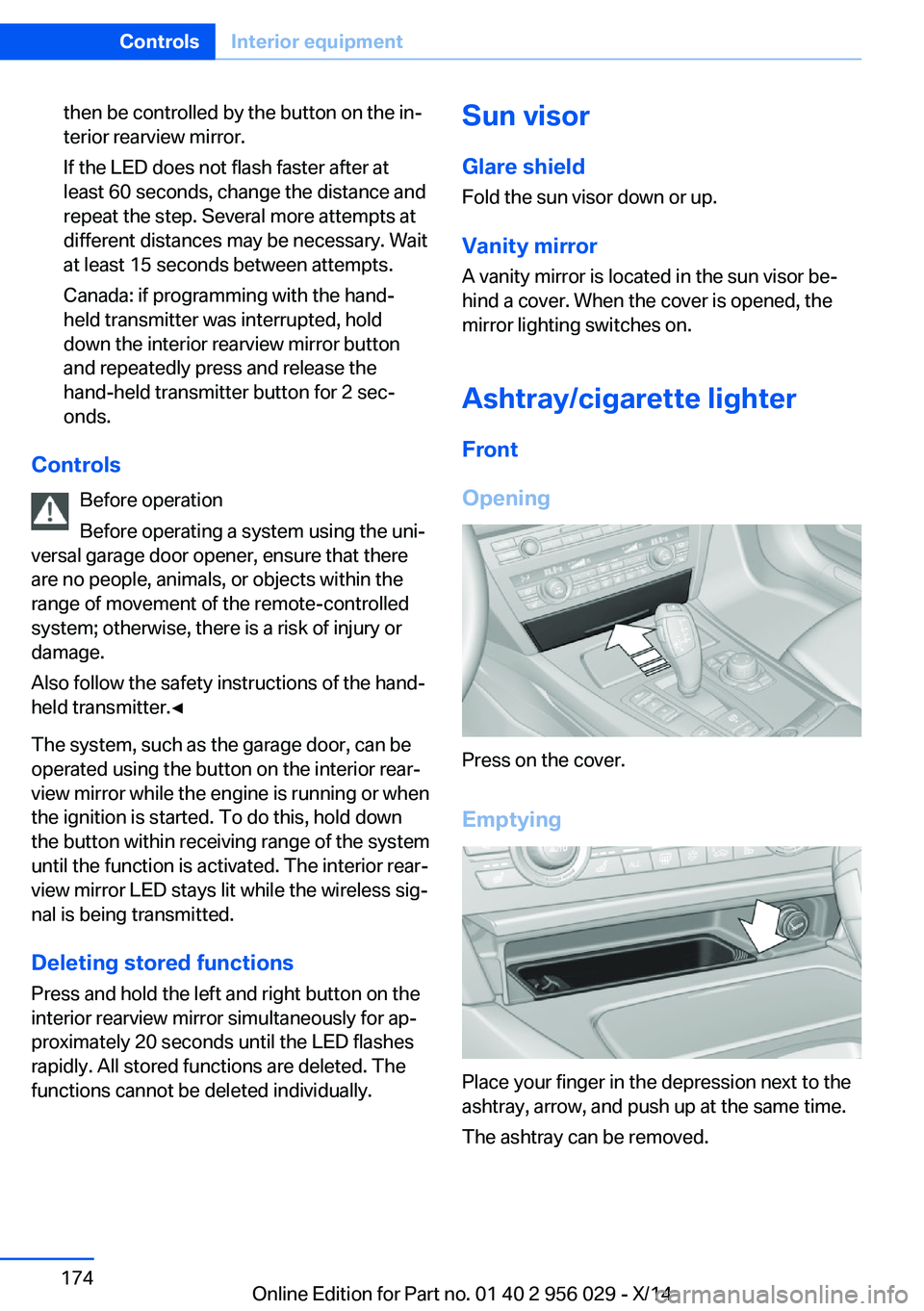
Front
Opening
Press on the cover.
Emptying
Place your finger in the depression next to the
ashtray, arrow, and push up at the same time.
The ashtray can be removed.
Seite 174ControlsInterior equipment174
Online Edition for Part no. 01 40 2 956 029 - X/14
Page 179 of 265
LighterPush in the lighter.
The lighter can be removed as
soon as it pops back out.
Danger of burns
Only hold the hot lighter by its knob; oth‐
erwise, there is a danger of getting burned.
Switch off the ignition and take the remote
control with you when leaving the vehicle so
that children cannot use the lighter and burn
themselves.◀
Replace the cover after use
Reinsert the lighter or socket cover after
use, otherwise objects may get into the lighter
socket or fixture and cause a short circuit.◀
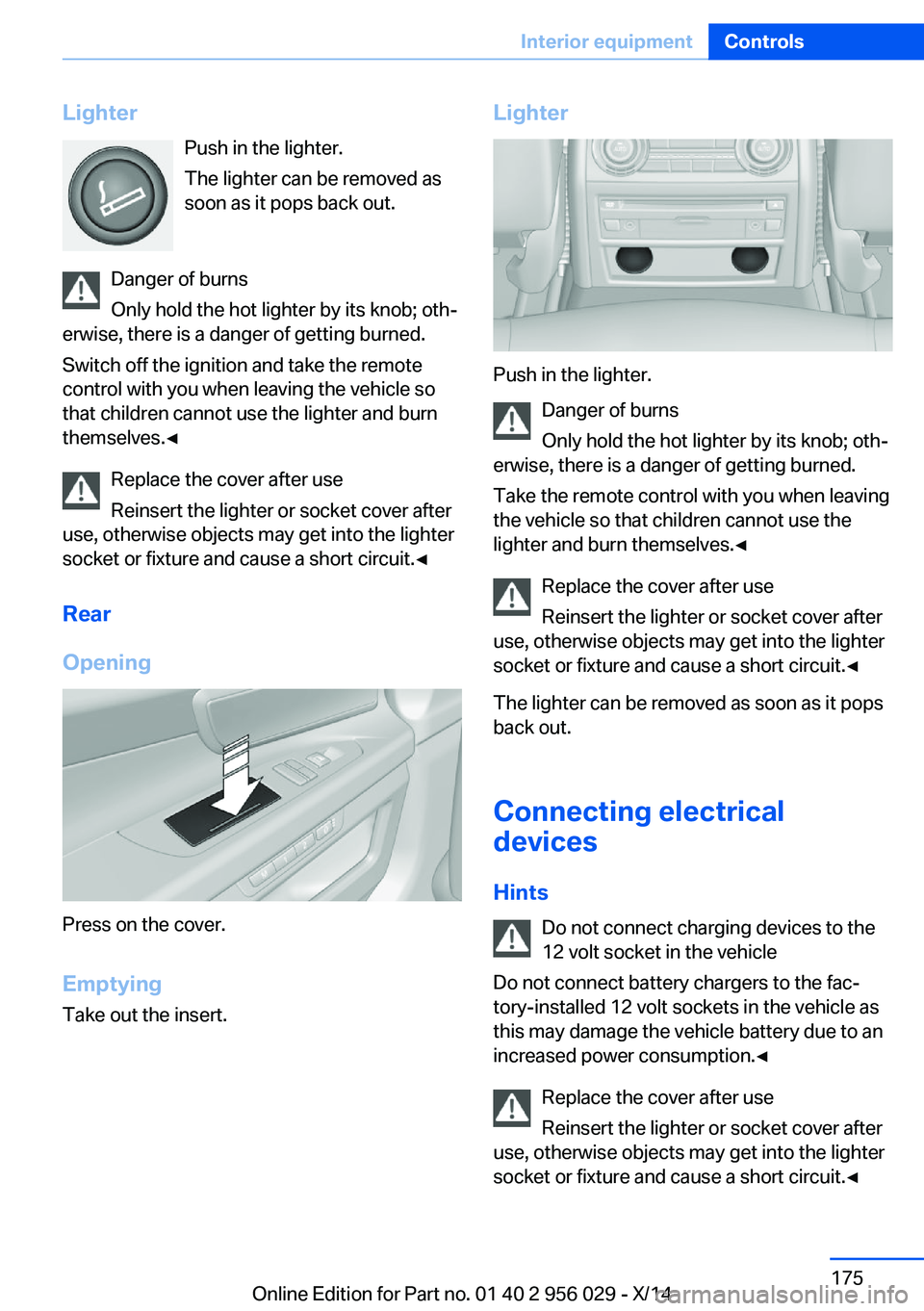
Rear
Opening
Press on the cover.
Emptying Take out the insert.
Lighter
Push in the lighter.
Danger of burns
Only hold the hot lighter by its knob; oth‐
erwise, there is a danger of getting burned.
Take the remote control with you when leaving
the vehicle so that children cannot use the
lighter and burn themselves.◀
Replace the cover after use
Reinsert the lighter or socket cover after
use, otherwise objects may get into the lighter
socket or fixture and cause a short circuit.◀
The lighter can be removed as soon as it pops
back out.
Connecting electricaldevices
Hints Do not connect charging devices to the
12 volt socket in the vehicle
Do not connect battery chargers to the fac‐
tory-installed 12 volt sockets in the vehicle as
this may damage the vehicle battery due to an
increased power consumption.◀
Replace the cover after use
Reinsert the lighter or socket cover after
use, otherwise objects may get into the lighter
socket or fixture and cause a short circuit.◀
Seite 175Interior equipmentControls175
Online Edition for Part no. 01 40 2 956 029 - X/14
Page 180 of 265
Sockets
General information
The lighter socket can be used as a socket for
electrical equipment while the engine is run‐
ning or when the ignition is switched on.
NoteThe total load of all sockets must not exceed
140 watts at 12 volts.
Do not damage the socket by using unsuitable
connectors.
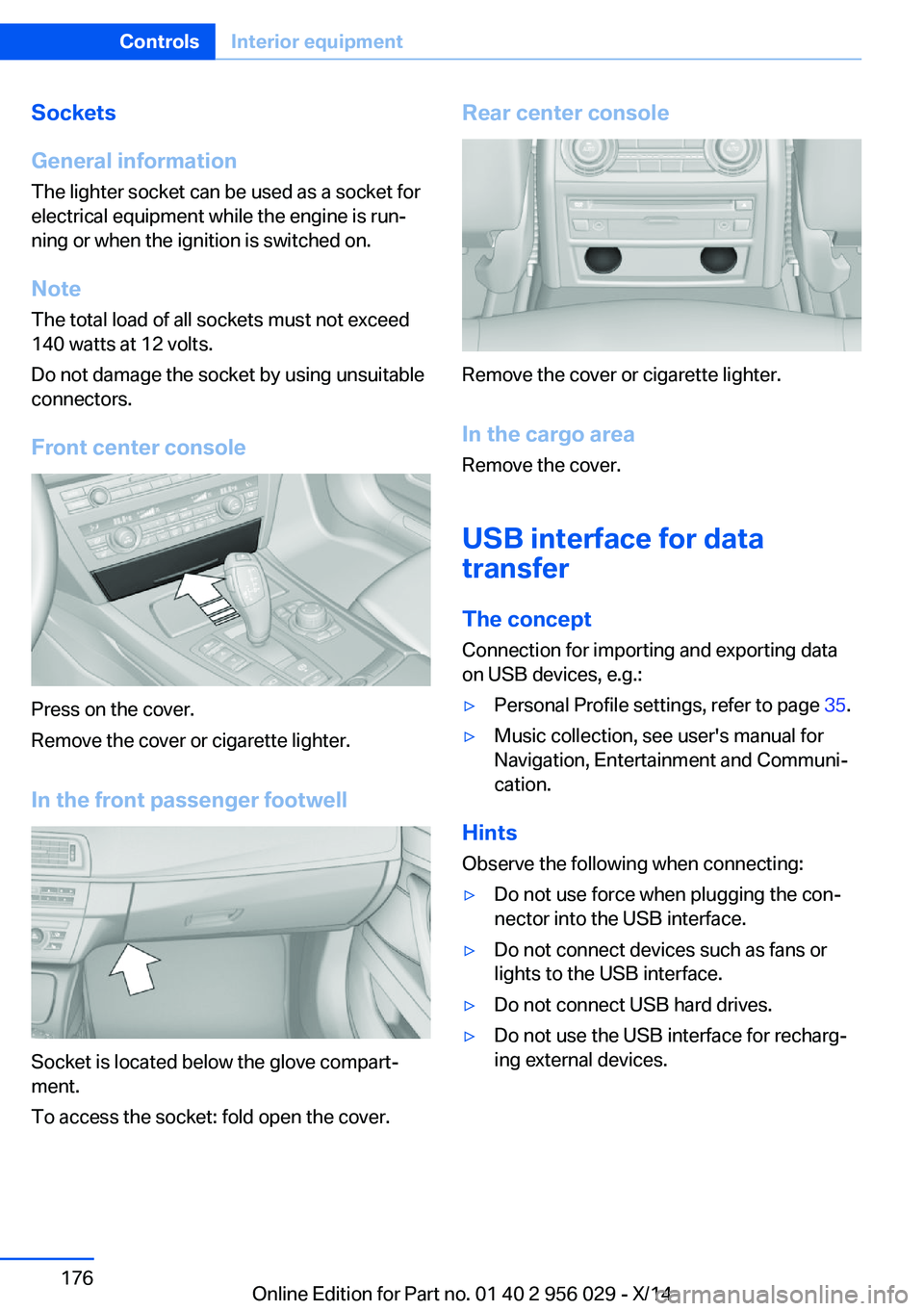
Front center console
Press on the cover.
Remove the cover or cigarette lighter.
In the front passenger footwell
Socket is located below the glove compart‐
ment.
To access the socket: fold open the cover.
Rear center console
Remove the cover or cigarette lighter.
In the cargo area Remove the cover.
USB interface for data
transfer
The concept Connection for importing and exporting data
on USB devices, e.g.:
▷Personal Profile settings, refer to page 35.▷Music collection, see user's manual for
Navigation, Entertainment and Communi‐
cation.
Hints
Observe the following when connecting:
▷Do not use force when plugging the con‐
nector into the USB interface.▷Do not connect devices such as fans or
lights to the USB interface.▷Do not connect USB hard drives.▷Do not use the USB interface for recharg‐
ing external devices.Seite 176ControlsInterior equipment176
Online Edition for Part no. 01 40 2 956 029 - X/14
Page 181 of 265
With navigation system Professional
or TV: at a glance
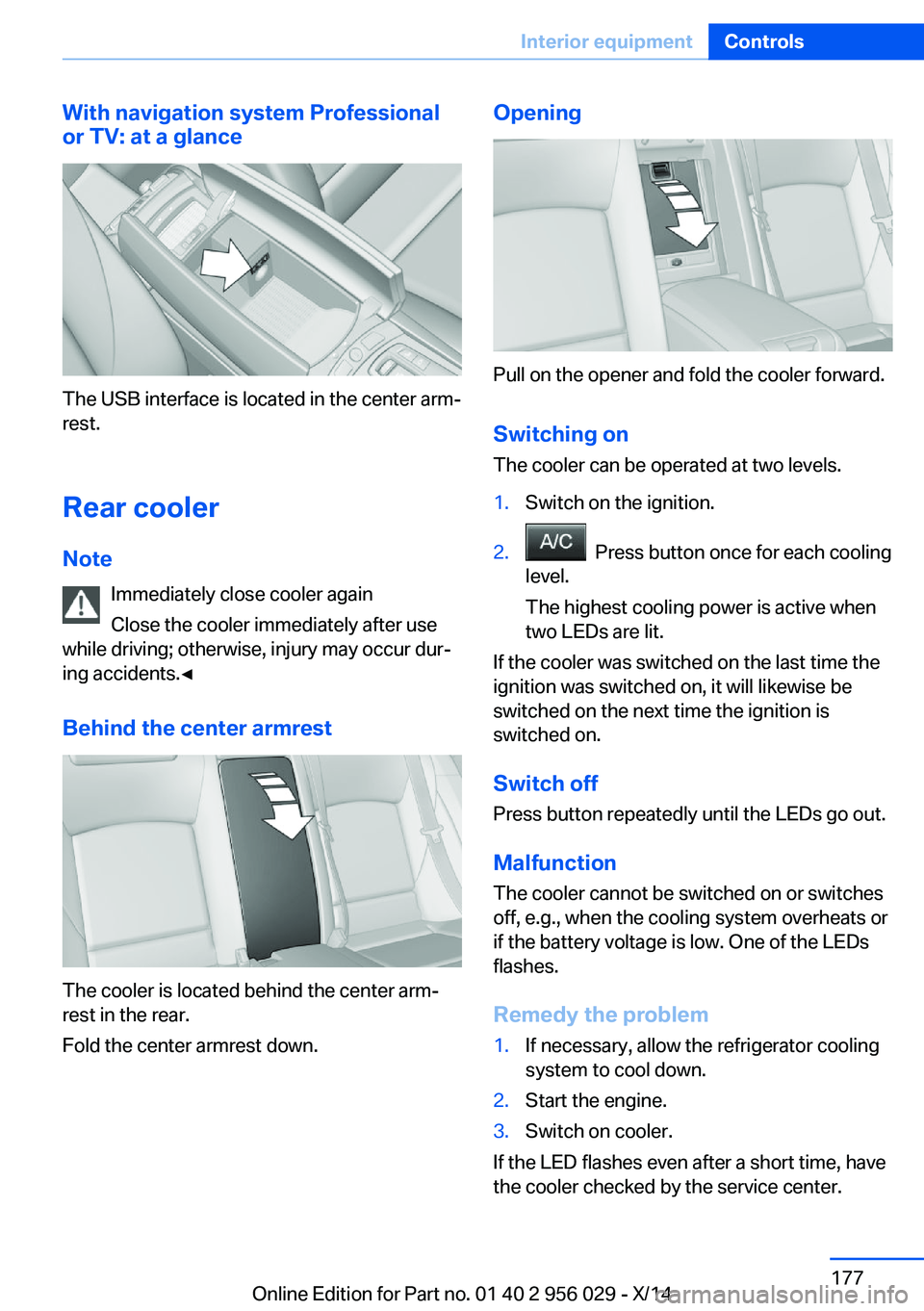
The USB interface is located in the center arm‐
rest.
Rear cooler Note Immediately close cooler again
Close the cooler immediately after use
while driving; otherwise, injury may occur dur‐
ing accidents.◀
Behind the center armrest
The cooler is located behind the center arm‐
rest in the rear.
Fold the center armrest down.
Opening
Pull on the opener and fold the cooler forward.
Switching onThe cooler can be operated at two levels.
1.Switch on the ignition.2. Press button once for each cooling
level.
The highest cooling power is active when
two LEDs are lit.
If the cooler was switched on the last time the
ignition was switched on, it will likewise be
switched on the next time the ignition is
switched on.
Switch off
Press button repeatedly until the LEDs go out.
Malfunction
The cooler cannot be switched on or switches
off, e.g., when the cooling system overheats or
if the battery voltage is low. One of the LEDs
flashes.
Remedy the problem
1.If necessary, allow the refrigerator cooling
system to cool down.2.Start the engine.3.Switch on cooler.
If the LED flashes even after a short time, have
the cooler checked by the service center.
Seite 177Interior equipmentControls177
Online Edition for Part no. 01 40 2 956 029 - X/14
Page 209 of 265
Suitable Diesel exhaust fluid▷Preferred: BMW Diesel Exhaust Fluid. With
this bottle and its special adapter, Diesel
exhaust fluid can be replenished simply
and safely.▷Alternative: NOx reduction agent AUS 32
Diesel exhaust fluid can be purchased at your
service center.
Refill quantity
When the Reserve display starts, add at least
3 bottles of reducing agent.
This corresponds to approx. 1.5 US gal/6 liters.
Tank for reducing agent
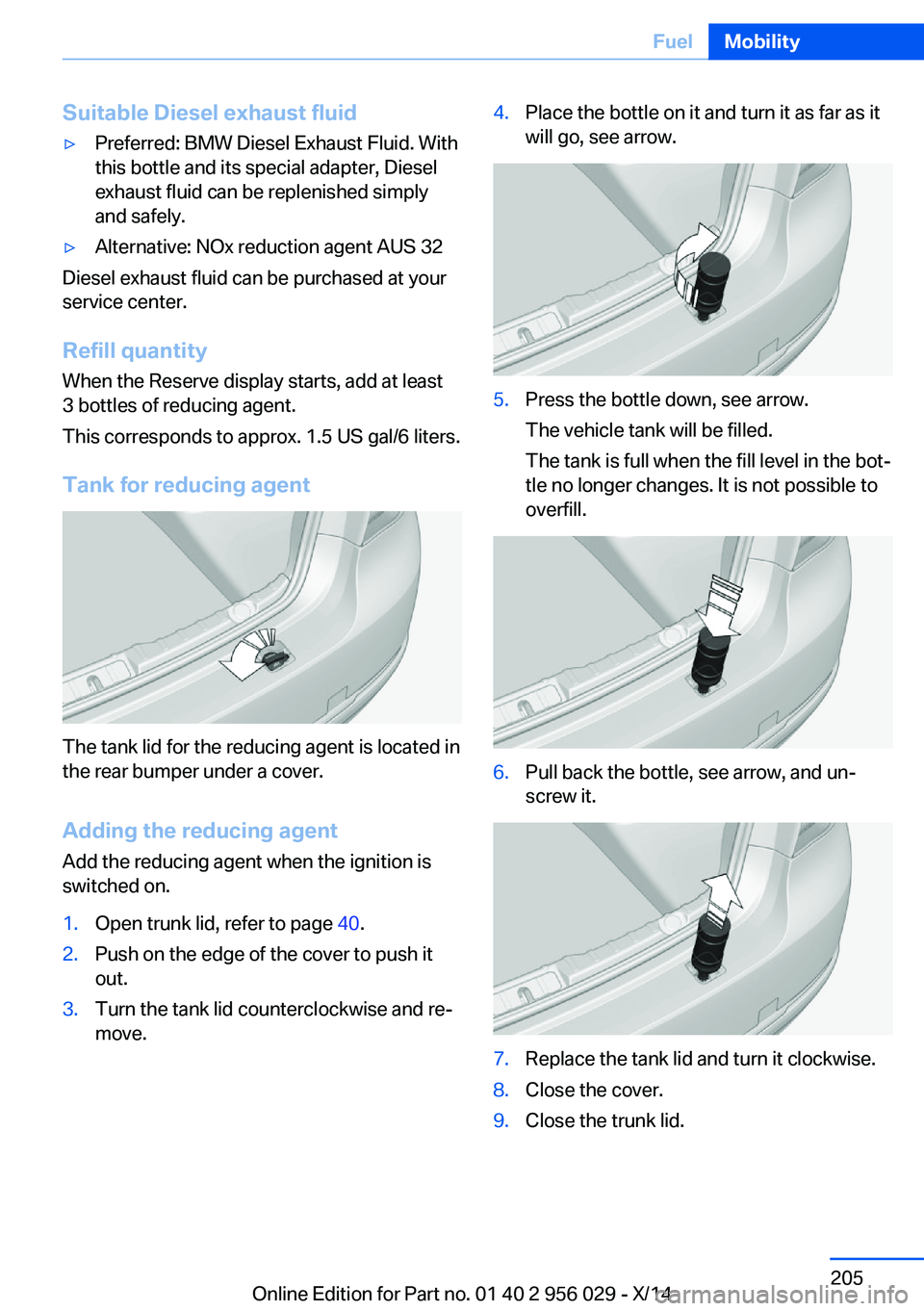
The tank lid for the reducing agent is located in
the rear bumper under a cover.
Adding the reducing agent Add the reducing agent when the ignition is
switched on.
1.Open trunk lid, refer to page 40.2.Push on the edge of the cover to push it
out.3.Turn the tank lid counterclockwise and re‐
move.4.Place the bottle on it and turn it as far as it
will go, see arrow.5.Press the bottle down, see arrow.
The vehicle tank will be filled.
The tank is full when the fill level in the bot‐
tle no longer changes. It is not possible to
overfill.6.Pull back the bottle, see arrow, and un‐
screw it.7.Replace the tank lid and turn it clockwise.8.Close the cover.9.Close the trunk lid.Seite 205FuelMobility205
Online Edition for Part no. 01 40 2 956 029 - X/14
Page 210 of 265
After adding Diesel exhaust fluid
Note Incorrect fluids
After filling with incorrect fluids, such as
antifreeze for washer fluid, do not start the en‐
gine, otherwise there is risk of fire.◀
Contact your service center.
Disposing of bottles You take your empty Diesel exhaust
fluid bottles to your service center for
disposal.
Do not dispose of empty bottles with house‐
hold waste unless this is permitted by local
regulations.
Reserve indication The Reserve display will still ap‐
pear along with the remaining
range after refilling.
Engine can be started.
After several minutes of driving,
the Reserve indication goes out.
Diesel exhaust fluid on minimum After filling, the indication -- is
still displayed.
Only after the display goes out
can the engine -- be started.1.Switch on the ignition.
Display -- goes out after approx. 1 minute.2.Engine can be started.Seite 206MobilityFuel206
Online Edition for Part no. 01 40 2 956 029 - X/14
Page 225 of 265
Detailed measurement
The concept In the detailed measurement the engine oil
level is checked and displayed via a scale.
During the measurement, the idle speed is in‐
creased somewhat.
General information
A detailed measurement is only possible with
certain engines.
Requirements▷Vehicle is on level road.▷Steptronic transmission: selector lever in
selector lever position N or P and accelera‐
tor pedal not depressed.▷Engine is running and is at operating tem‐
perature.
Performing a detailed measurement
In order to perform a detailed measurement of
the engine oil level:
1."Vehicle info"2."Vehicle status"3. "Measure engine oil level"4."Start measurement"
The engine oil level is checked and displayed
via a scale.
Time: approx. 1 minute.
Adding engine oil General information
Switch off the ignition and safely park the vehi‐
cle before engine oil is added.
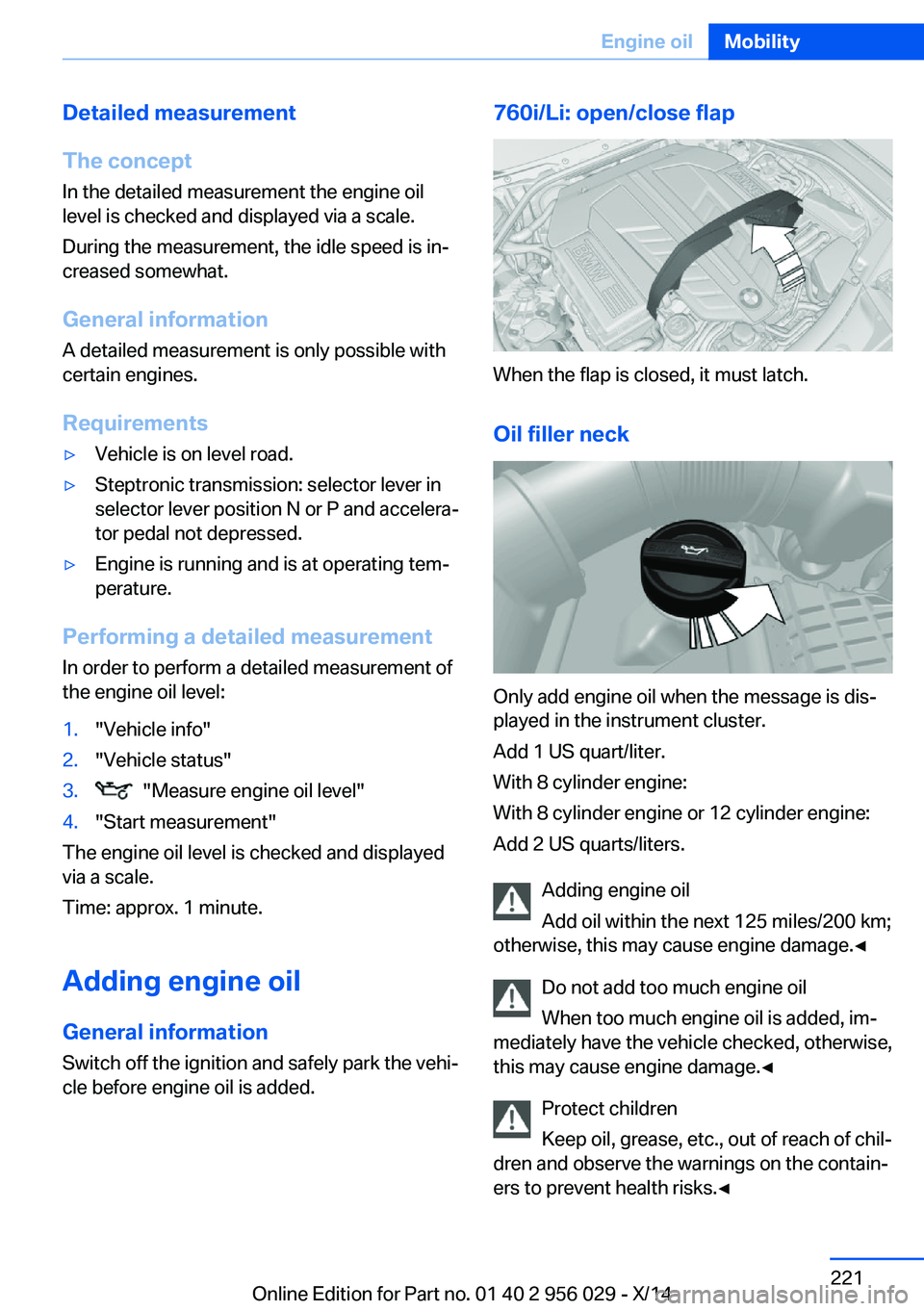
760i/Li: open/close flap
When the flap is closed, it must latch.
Oil filler neck
Only add engine oil when the message is dis‐
played in the instrument cluster.
Add 1 US quart/liter.
With 8 cylinder engine:
With 8 cylinder engine or 12 cylinder engine:
Add 2 US quarts/liters.
Adding engine oil
Add oil within the next 125 miles/200 km;
otherwise, this may cause engine damage.◀
Do not add too much engine oil
When too much engine oil is added, im‐
mediately have the vehicle checked, otherwise,
this may cause engine damage.◀
Protect children
Keep oil, grease, etc., out of reach of chil‐
dren and observe the warnings on the contain‐
ers to prevent health risks.◀
Seite 221Engine oilMobility221
Online Edition for Part no. 01 40 2 956 029 - X/14
Page 244 of 265
In this way, the ignition remains switched
on, and a Check-Control message is dis‐
played.
Do not turn off the ignition in the car
wash
Do not turn off the ignition in the car wash;
otherwise, selector lever position P is en‐
gaged and damages can result.◀
The vehicle cannot be locked from the outside
when in selector lever position N. A signal
sounds when an attempt is made to lock the
vehicle.
To start the engine:
1.Depress the brake pedal.2.Press the Start/Stop button.
Pressing the Start/Stop button without step‐
ping on the brake turns the ignition off.
Selector lever positionSelector lever position P is engaged automati‐
cally:
▷When the ignition is switched off.▷After approx. 15 minutes.
Headlights
▷Do not rub dry and do not use abrasive or
acidic cleansers.▷Soak areas that have been dirtied e. g.,
from insects, with shampoo and wash off
with water.▷Thaw ice with de-icing spray; do not use an
ice scraper.
After washing the vehicle
After washing the vehicle, apply the brakes
briefly to dry them; otherwise, braking action
can be reduced and corrosion of the brake
discs can occur.
Completely remove all residues on the win‐
dows, to minimize loss of visibility due to
smearing and to reduce wiper noises and
wiper blade wear.
Vehicle care
Car care productsBMW recommends using care and cleaning
products from BMW, since these have been
tested and approved.
Car care and cleaning products
Follow the instructions on the container.
When cleaning the interior, open the doors or
windows.
Only use products intended for cleaning vehi‐ cles.
Cleansers can contain substances that are
dangerous and harmful to your health.◀
Vehicle paint Regular care contributes to driving safety and
value retention. Environmental influences in
areas with elevated air pollution or natural con‐
taminants, such as tree resin or pollen can af‐
fect the vehicle's paintwork. Tailor the fre‐
quency and extent of your car care to these
influences.
Aggressive substances such as spilled fuel, oil,
grease or bird droppings, must be removed im‐
mediately to prevent the finish from being al‐
tered or discolored.
Only use respectively approved cleaning and
care products for vehicles with matte finish.
Suitable care products for matte finishes are
available from the service center.
Leather care Remove dust from the leather often, using a
cloth or vacuum cleaner.
Otherwise, particles of dust and road grime
chafe in pores and folds, and lead to increased
wear and premature degradation of the leather
surface.
To guard against discoloration, such as from
clothing, provide leather care roughly every
two months.Seite 240MobilityCare240
Online Edition for Part no. 01 40 2 956 029 - X/14
Page 258 of 265
Gear change, Steptronictransmission 84
Gear shift indicator 97
General driving notes 186
Gentleman function 56
Glare shield 174
Glass sunroof, powered 51
Glove compartment 180
Gross vehicle weight, ap‐ proved 247
H
Handbrake, refer to Parking brake 76
Hand-held transmitter, alter‐ nating code 173
Hazard warning flashers 234
HDC Hill Descent Con‐ trol 138
Head airbags 110
Headlight control, auto‐ matic 106
Headlight courtesy delay fea‐ ture 105
Headlight courtesy delay fea‐ ture via remote control 38
Headlight flasher 81
Headlight glass 228
Headlights, care 240
Headlight washer system 81
Head restraints 54
Head restraints, front 61
Head restraints, rear 62
Head-up Display 103
Head-up Display, care 242
Heavy cargo, stowing 190
Height, vehicle 246
High-beam Assistant 107
High beams 81
High beams/low beams, refer to High-beam Assistant 107
Hill Descent Control HDC 138
Hills 188 Hill start assistant, refer to
Drive-off assistant 136
Hints 6
Holder for beverages 182
Hood 218
Horn 14
Hotel function, trunk lid 43
Hot exhaust system 186
HUD Head-up Display 103
Hydroplaning 187
I Ice warning, see External temperature warning 95
Icy roads, see External tem‐ perature warning 95
Identification marks, tires 212
Identification number, see ve‐ hicle identification num‐
ber 9
iDrive 18
Ignition key, refer to Remote control 34
Ignition off 73
Ignition on 73
Indication of a flat tire 114 , 116
Indicator and alarm lamps, see Check Control 90
Indicator lamp, see Check Control 90
Individual air distribution 166
Individual settings, refer to Personal Profile 35
Inflation pressure, tires 207
Inflation pressure warning FTM, tires 113
Info display, refer to Com‐ puter 99
Initialization, Integral Active Steering 140
Initialize, Tire Pressure Moni‐ tor TPM 116
Initializing, Flat Tire Monitor FTM 113 Instrument cluster 87
Instrument cluster, electronic displays 87
Instrument display, multifunc‐ tional 88
Instrument lighting 108
Integral Active Steering 140
Integrated key 34
Integrated Owner's Manual in the vehicle 29
Intelligent Emergency Re‐ quest 234
Intelligent Safety 118
Intensity, AUTO pro‐ gram 166
Interior equipment 172
Interior lights 108
Interior lights via remote con‐ trol 38
Interior motion sensor 48
Interior rearview mirror, auto‐ matic dimming feature 67
Interior rearview mirror, man‐ ually dimmable 67
Interval display, service re‐ quirements 96
J Jacking points for the vehicle jack 231
Joystick, Steptronic transmis‐ sion 84
Jump-starting 235
K
Key/remote control 34
Keyless Go, refer to Comfort Access 43
Key Memory, refer to Per‐ sonal Profile 35
Kickdown, Steptronic trans‐ mission 84
Knee airbag 110 Seite 254ReferenceEverything from A to Z254
Online Edition for Part no. 01 40 2 956 029 - X/14