parking brake BMW 750LI 2006 User Guide
[x] Cancel search | Manufacturer: BMW, Model Year: 2006, Model line: 750LI, Model: BMW 750LI 2006Pages: 247, PDF Size: 8.66 MB
Page 71 of 247
Controls
69Reference
At a glance
Driving tips
Communications
Navigation
Entertainment
Mobility
Deactivating system
>Press the lever up or down, arrow3 for
approx. 3 seconds
>or switch off the ignition.
The stored speed5 is deleted, however the
stored marks6 are retained.
Active cruise control*
The concept
With active cruise control you can select a
desired speed which is not only automatically
maintained when driving on open roadways, but
also varied to maintain a selected distance set-
ting as slower traffic is encountered.
Active cruise control represents a technological
advance over the familiar cruise control and is a
welcome relief from the constant adjustment of
speed that can accompany driving in traffic on
highways or other high-speed thoroughfares.
Especially on longer trips, the system can
reduce fatigue and tension, while increasing
your enjoyment of driving. Please use it safely
and responsibly.
In addition to holding a steady cruising speed,
if you encounter slower vehicles ahead, active
cruise control will, within the scope of given
possibilities, adjust your vehicle's speed auto-
matically so that you can flow with the traffic
without having to make constant adjustments.
If, for example, while cruising at the selected
speed, you begin to approach a slower vehicle
ahead of you in the same lane, the system will
reduce your vehicle's speed to the same as that
of the vehicle ahead to maintain your selected
distance setting between your vehicle and the
vehicle ahead. You can vary the distance, which
is additionally speed-dependent. Based on
your selected distance setting, the system
automatically decreases the throttle setting and
lightly applies the brakes if necessary. The vehi-
cle brake lamps will automatically illuminate to
signal a following driver to take action. In addi-
tion, it may be necessary for the vehicle to
downshift to maintain the distance setting
selected. If the vehicle ahead speeds up or when the lane ahead becomes clear, your vehi-
cle will accelerate to the speed you have
selected by increasing the throttle setting and
shifting gears as needed. Your selected speed
will be maintained when driving downhill, too.
Active cruise control is not and must not
be used as a collision avoidance/warning
system.<
Since this active cruise control system is
a new technology and operates differ-
ently from conventional cruise control systems
to which you may be accustomed, you are
strongly urged to read all of the pages relating
to this system before use. Pay special attention
to the information contained in the Things to
know about active cruise control section begin-
ning on page73.<
Brake pedal feel
>When the system brakes and you also
depress the brake pedal, a somewhat differ-
ent braking feeling results.
>Any noises produced during automatic
braking are normal.
Applications
As with conventional cruise control systems,
active cruise control in no way diminishes or
substitutes for the driver's own personal
responsibility, alertness and awareness in
adjusting speed, braking or otherwise control-
ling the vehicle. The driver should decide when
to use the system on the basis of road, traffic,
visibility, and weather conditions. Active cruise
control is intended for use on highway-type
roadways where traffic is moving relatively
smoothly. Do not use this system in city driving;
heavy traffic such as during rush hour; on curvy,
winding roads, slippery roads or roads with
sharp curves such as highway off-ramps; during
inclement weather such as snow, strong rain or
fog; or when entering interchanges, service/
parking areas or toll booths. It is also important
to regulate your vehicle's speed and distance
setting within applicable legal limits. Always be
ready to take action or apply the brakes if nec-
essary, especially when the system is actively
Page 73 of 247
Controls
71Reference
At a glance
Driving tips
Communications
Navigation
Entertainment
Mobility
Selecting distance
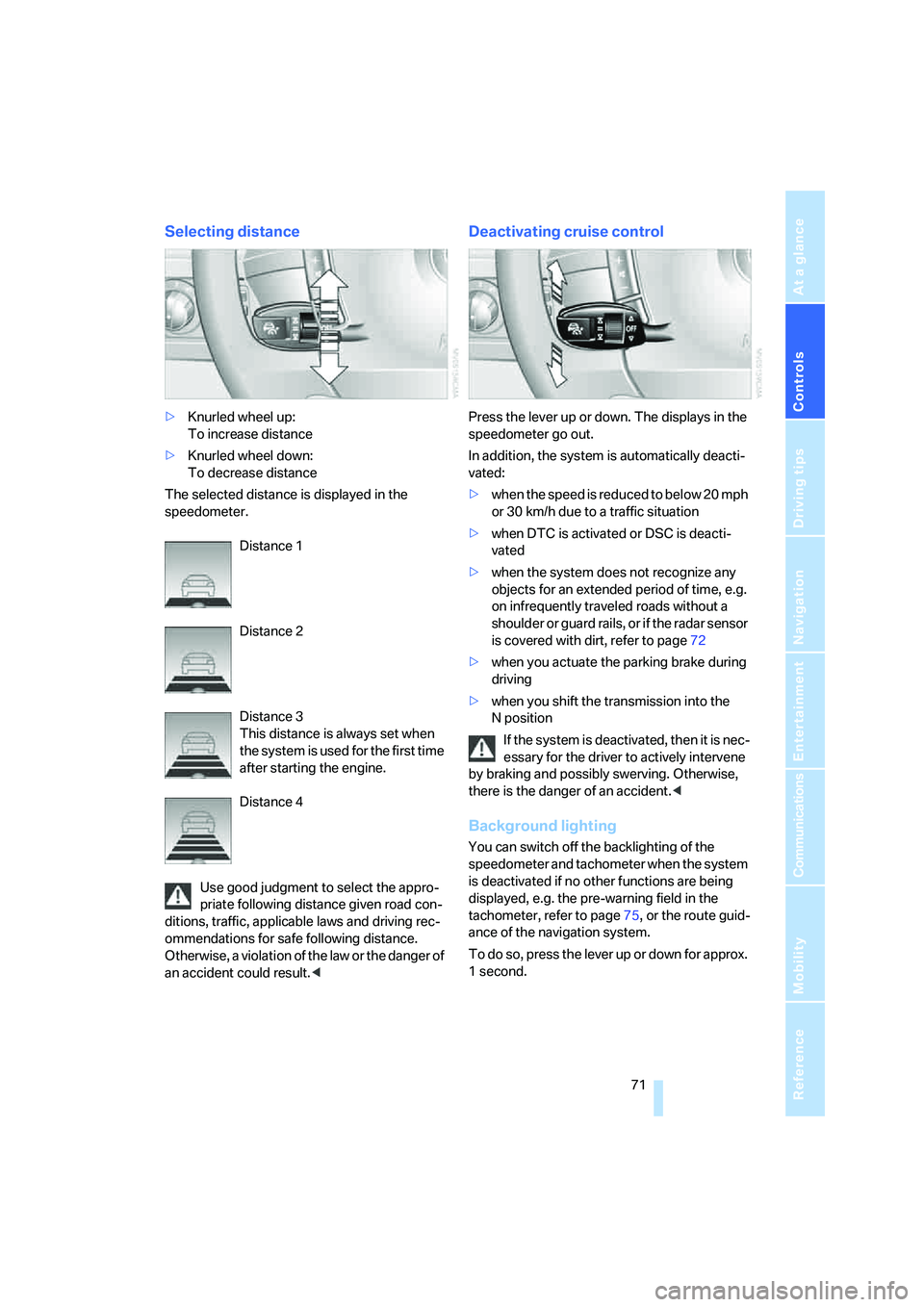
>Knurled wheel up:
To increase distance
>Knurled wheel down:
To decrease distance
The selected distance is displayed in the
speedometer.
Distance 1
Distance 2
Distance 3
This distance is always set when
the system is used for the first time
after starting the engine.
Distance 4
Use good judgment to select the appro-
priate following distance given road con-
ditions, traffic, applicable laws and driving rec-
ommendations for safe following distance.
Otherwise, a violation of the law or the danger of
an accident could result.<
Deactivating cruise control
Press the lever up or down. The displays in the
speedometer go out.
In addition, the system is automatically deacti-
vated:
>when the speed is reduced to below 20 mph
or 30 km/h due to a traffic situation
>when DTC is activated or DSC is deacti-
vated
>when the system does not recognize any
objects for an extended period of time, e.g.
on infrequently traveled roads without a
shoulder or guard rails, or if the radar sensor
is covered with dirt, refer to page72
>when you actuate the parking brake during
driving
>when you shift the transmission into the
Nposition
If the system is deactivated, then it is nec-
essary for the driver to actively intervene
by braking and possibly swerving. Otherwise,
there is the danger of an accident.<
Background lighting
You can switch off the backlighting of the
speedometer and tachometer when the system
is deactivated if no other functions are being
displayed, e.g. the pre-warning field in the
tachometer, refer to page75, or the route guid-
ance of the navigation system.
To do so, press the lever up or down for approx.
1second.
Page 75 of 247
Controls
73Reference
At a glance
Driving tips
Communications
Navigation
Entertainment
Mobility
Things to know about active cruise control
As with conventional cruise control sys-
tems, active cruise control in no way
diminishes or substitutes for the driver's own
personal responsibility, alertness and aware-
ness in adjusting speed, braking or otherwise
controlling the vehicle. The driver should
decide when to use the system on the basis of
road, traffic, visibility, and weather conditions.
Active cruise control is intended for use on
highway-type roadways where traffic is moving
relatively smoothly. Do not use this system in
city driving; heavy traffic such as during rush
hour; on curvy, winding roads, slippery roads or
roads with sharp curves such as highway off-
ramps; during inclement weather such as snow,
strong rain or fog; or when entering inter-
changes, service/parking areas or toll booths.
It is also important to regulate your vehicle's
speed and distance setting within applicable
legal limits. Always be ready to take action or
apply the brakes if necessary, especially when
the system is actively following a vehicle in front
of you.<
Always remember that the range and abil-
ity of the system do have physical limita-
tions. It will not apply the brakes or decelerate
your vehicle when there is a slow-moving vehi-
cle, stopped vehicle or stationary object ahead
of you, for example when approaching a traffic
light or a parked vehicle. Also, the system does
not react to oncoming traffic, pedestrians or
other types of potential traffic such as a rider on
horseback. It is also possible that the system
may not detect smaller moving objects such as
motorcycles or bicycles. Be especially alert
when encountering any of these situations as
the system will neither automatically brake, nor
provide a warning to you. Also, be aware that every decrease in the distance setting allows
your vehicle to come closer to a vehicle in front
of you and requires a heightened amount of
alertness.<
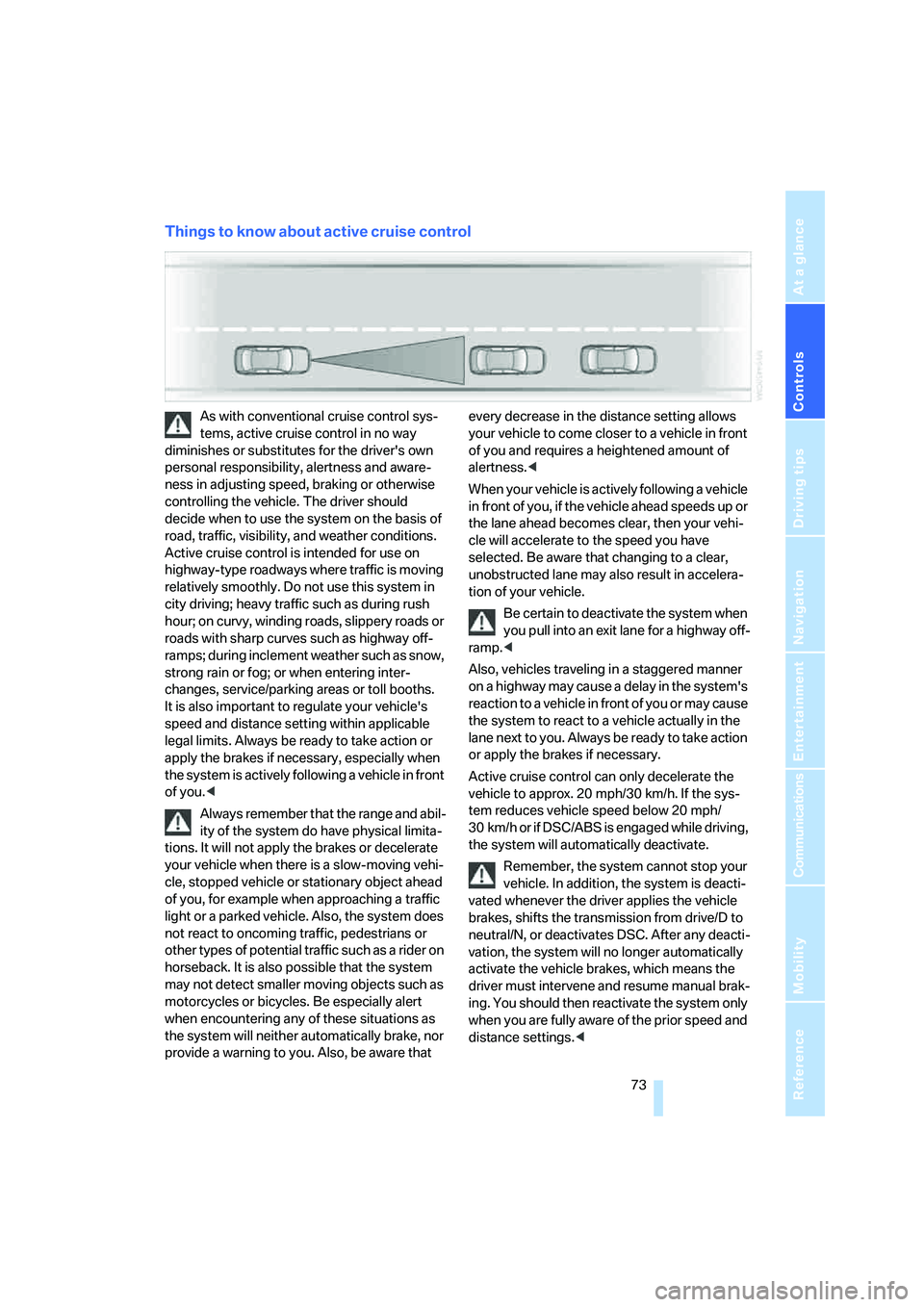
When your vehicle is actively following a vehicle
in front of you, if the vehicle ahead speeds up or
the lane ahead becomes clear, then your vehi-
cle will accelerate to the speed you have
selected. Be aware that changing to a clear,
unobstructed lane may also result in accelera-
tion of your vehicle.
Be certain to deactivate the system when
you pull into an exit lane for a highway off-
ramp.<
Also, vehicles traveling in a staggered manner
on a highway may cause a delay in the system's
reaction to a vehicle in front of you or may cause
the system to react to a vehicle actually in the
lane next to you. Always be ready to take action
or apply the brakes if necessary.
Active cruise control can only decelerate the
vehicle to approx. 20 mph/30 km/h. If the sys-
tem reduces vehicle speed below 20 mph/
30 km/h or if DSC/ABS is engaged while driving,
the system will automatically deactivate.
Remember, the system cannot stop your
vehicle. In addition, the system is deacti-
vated whenever the driver applies the vehicle
brakes, shifts the transmission from drive/D to
neutral/N, or deactivates DSC. After any deacti-
vation, the system will no longer automatically
activate the vehicle brakes, which means the
driver must intervene and resume manual brak-
ing. You should then reactivate the system only
when you are fully aware of the prior speed and
distance settings.<
Page 126 of 247
Things to remember when driving
124 Should corrosion form on the brake rotors, the
brakes will tend to respond with a pulsating
effect that even extended application will fail to
cure.
When vehicle is parked
Condensation forms in the automatic climate
control during operation, and then exits under
the vehicle. Traces of condensed water under
the vehicle are therefore normal.
Before driving into a car wash
1.Fold in the exterior mirrors, refer to page50;
otherwise, they could be damaged due to
the width of the vehicle.
For the vehicle to be able to roll, follow the
instructions on page58.
2.Release the parking brake, especially when
you have activated Automatic Hold. Refer to
page59.
Cargo loading
To avoid loading the tires beyond their
approved carrying capacity, never over-
load the vehicle. Overloading can lead to over-
heating and increases the rate at which damage
develops inside the tires. The ultimate result
can come in the form of a sudden blow-out.<
Determining loading limit
1.Locate the following statement on your
vehicle's door pillar
*:
The combined weight of occupants
and cargo should never exceed
XXX lbs. or YYY kg; otherwise, the vehicle may be damaged and unstable driving con-
ditions may result.<
2.Determine the combined weight of the
driver and passengers that will be riding in
your vehicle.
3.Subtract the combined weight of the driver
and passenger from XXX lbs. or YYY kg.
4.The resulting figure equals the available
amount of cargo and luggage load capacity.
For example, if the XXX amount equals
1,400 lbs. and there will be five 150-lb. pas-
sengers in your vehicle, the amount of avail-
able cargo and luggage load capacity is
650 lbs.:
1400 lbs. minus 750 lbs. = 650 lbs.
5.Determine the combined weight of luggage
and cargo being loaded into the vehicle.
That weight may not safely exceed the
available cargo and luggage load capacity
calculated in step 4.
6.If your vehicle will be towing a trailer, part of
the load from your trailer will be transferred
to your vehicle. Consult the manual for
transporting a trailer to determine how this
may reduce the available cargo and luggage
load capacity of your vehicle.
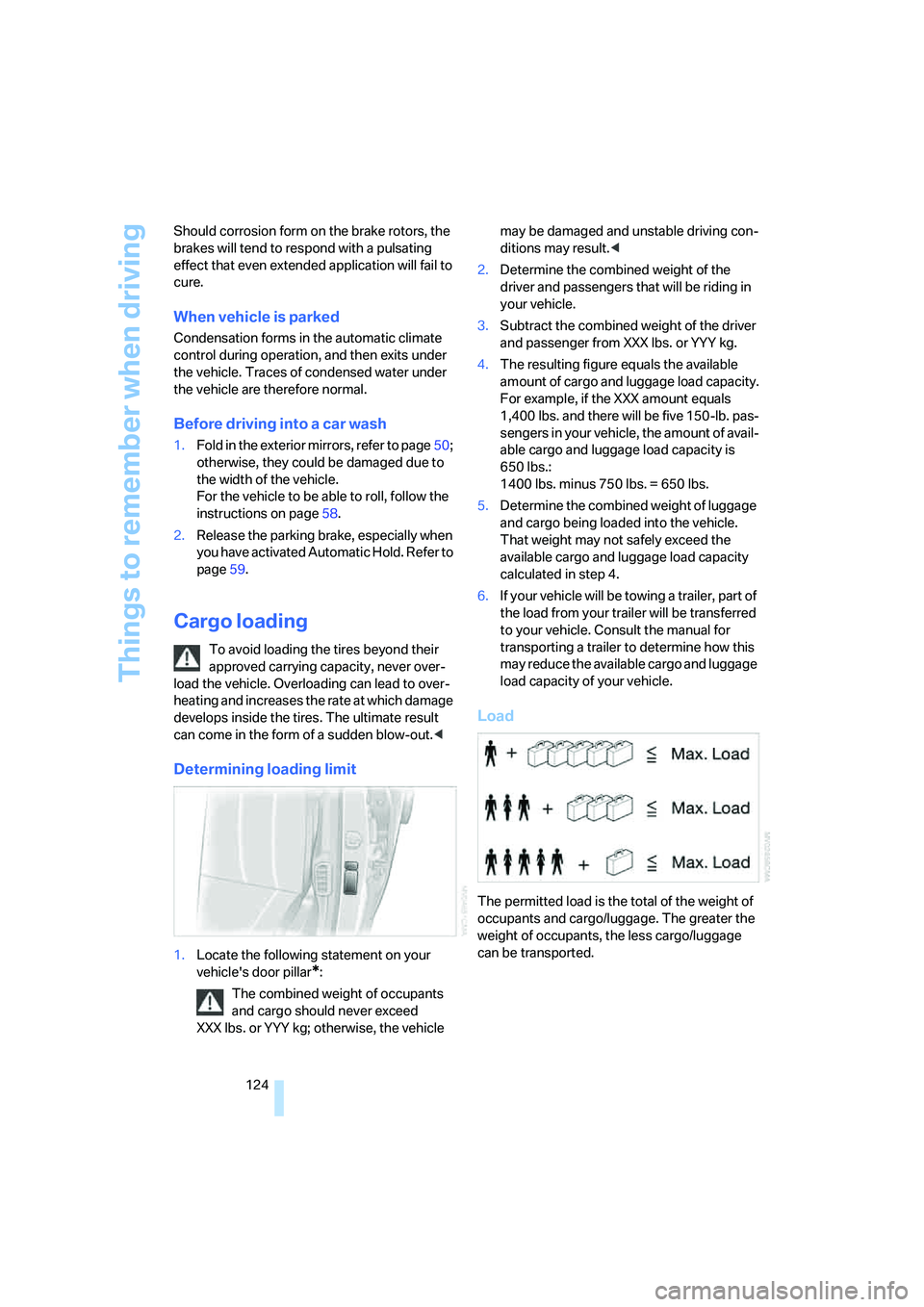
Load
The permitted load is the total of the weight of
occupants and cargo/luggage. The greater the
weight of occupants, the less cargo/luggage
can be transported.
Page 211 of 247
Mobility
209Reference
At a glance
Controls
Driving tips
Communications
Navigation
Entertainment
Lamps in luggage compartment lid
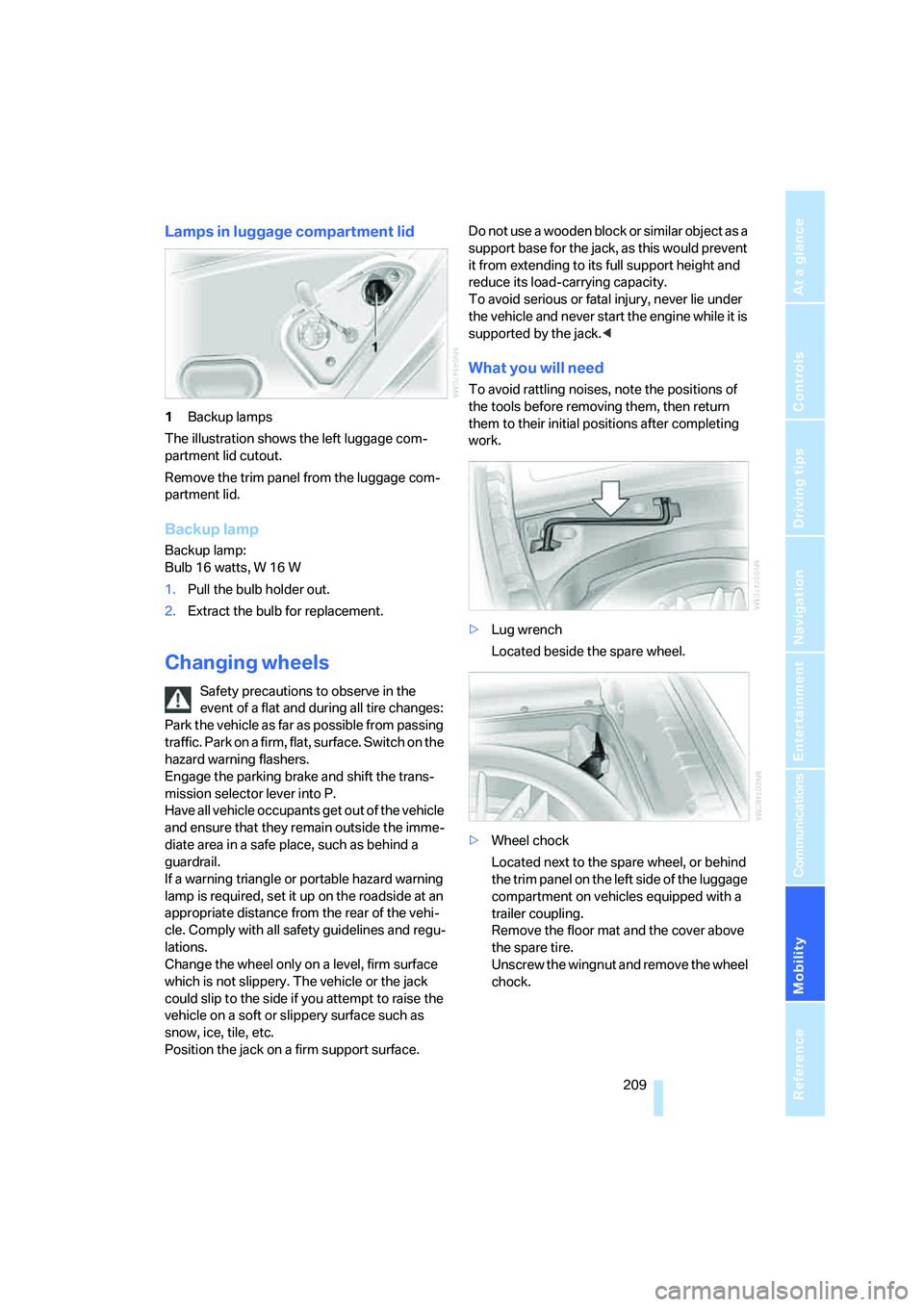
1Backup lamps
The illustration shows the left luggage com-
partment lid cutout.
Remove the trim panel from the luggage com-
partment lid.
Backup lamp
Backup lamp:
Bulb 16 watts, W 16 W
1.Pull the bulb holder out.
2.Extract the bulb for replacement.
Changing wheels
Safety precautions to observe in the
event of a flat and during all tire changes:
Park the vehicle as far as possible from passing
traffic. Park on a firm, flat, surface. Switch on the
hazard warning flashers.
Engage the parking brake and shift the trans-
mission selector lever into P.
Have all vehicle occupants get out of the vehicle
and ensure that they remain outside the imme-
diate area in a safe place, such as behind a
guardrail.
If a warning triangle or portable hazard warning
lamp is required, set it up on the roadside at an
appropriate distance from the rear of the vehi-
cle. Comply with all safety guidelines and regu-
lations.
Change the wheel only on a level, firm surface
which is not slippery. The vehicle or the jack
could slip to the side if you attempt to raise the
vehicle on a soft or slippery surface such as
snow, ice, tile, etc.
Position the jack on a firm support surface. Do not use a wooden block or similar object as a
support base for the jack, as this would prevent
it from extending to its full support height and
reduce its load-carrying capacity.
To avoid serious or fatal injury, never lie under
the vehicle and never start the engine while it is
supported by the jack.<
What you will need
To avoid rattling noises, note the positions of
the tools before removing them, then return
them to their initial positions after completing
work.
>Lug wrench
Located beside the spare wheel.
>Wheel chock
Located next to the spare wheel, or behind
the trim panel on the left side of the luggage
compartment on vehicles equipped with a
trailer coupling.
Remove the floor mat and the cover above
the spare tire.
Unscrew the wingnut and remove the wheel
chock.
Page 228 of 247
Everything from A to Z
226 Bottle holder, refer to Cup
holders115
Brake fluid204
– level204
– warning lamp204
Brake force display94
Brake lamp, adaptive, refer to
Brake force display94
Brake lamps
– brake force display94
– replacing bulbs208
Brake rotors, refer to
Corrosion on brake
rotors123
Brakes123
– ABS87
– brake fluid204
– brake force display94
– breaking-in122
– parking brake58
Brake system204
– BMW Maintenance
System205
– brake fluid204
– brake pads204
– breaking-in122
– refer to Braking safely123
Breakdown service, refer to
Roadside Assistance187
Breaking-in122
Breaking-in differential, refer
to Engine and
differential122
"Brightness"
– BMW Night Vision98
– DVD changer170
– on Control Display85
Brightness of Control
Display85
Bulbs, replacing207
"button", programmable
buttons52
Buttons
– on controller16
– on steering wheel11
C
"Calculate", refer to
Bypassing route
sections146
Calculating distance to
destination77
California Proposition 65
Warning5
Call
– accepting182
– missed184
– rejecting182
– touch tone dialing178
Calling
– from phone book183
– from Top 8 list184
– redialing183
– with retracting telephone
keypad177
Can holder, refer to Cup
holders115
Capacities221
Capacity, luggage
compartment220
Car battery, refer to Vehicle
battery211
Car care, refer to Caring for
your vehicle brochure
Car-care products, refer to
Caring for your vehicle
brochure
"Car Data"78,81
Care, refer to Caring for your
vehicle brochure
Caring for the upholstery, refer
to Caring for your vehicle
brochure
Caring for the vehicle finish,
refer to Caring for your
vehicle brochure
Car key, refer to Remote
control/key30
Carpet care, refer to Caring for
your vehicle brochure
Car radio, refer to Radio155Car wash124
– also refer to Caring for your
vehicle brochure
– with Comfort Access39
Catalytic converter, refer to
High temperatures122
"Categories", radio160
CBC Cornering Brake
Control87
CBS Condition Based
Service205
"CD", CD player162
"CDC", CD changer165
CD changer164
– compressed audio files165
– controls152
– fast forward, reverse166
– installation location164
– random sequence166
– sampling166
– selecting a CD165
– selecting track165
– starting164
– tone control153
– volume153
CD player162
– controls152
– fast forward, reverse163
– random sequence163
– sampling162
– selecting tracks162
– starting162
– tone control153
– volume153
Center armrest
– front113
– rear114
Center console, refer to
Comfort features14
Central locking system32
– Comfort Access38
– interior34
"CHANGE", navigation138
Changes, technical, refer to
For your own safety5
Changing scale144
Page 230 of 247
Everything from A to Z
228 Creating voice address
book141
Cruise control67,69
– refer to Programmable
cruise control67
Cruising range77
Cup holders115
Curb weight, refer to
Weights220
Current consumption, refer to
Energy Control77
Currentness of the Owner's
Manual5
Current position
– displaying146
– storing139
Cursor for navigation, refer to
Selecting destination via
map134
"Curve mode", BMW Night
Vision98
Customizing settings, refer to
Key Memory31
D
Data218
– dimensions219
– engine218
– filling capacities221
– weights220
Date84
– display format84
– displaying84
– setting85
"Date", setting date85
Daytime running lamps99
DBC Dynamic Brake
Control87
"DEACTIV.", BMW Assist189
Deactivating front passenger
airbags54
Defroster, rear window107
Defrosting position, refer to
Defrosting windows106
Defrosting windows106Defrosting windows and
removing condensation106
Defrosting windshield, refer to
Defrosting windows106
"DELETE", navigation140
Deleting address book140
Deleting destination list138
Deleting the entire list184
Destination for navigation131
– selecting using voice141
– selecting via information135
Destinations recently driven
to137
"Dest. input", navigation131
"Dest. list", navigation137
Dialed numbers, refer to
Redialing183
Diamond button52
Digital clock75
Dimensions219
Directional indicators, refer to
Turn signals65
Direction instructions, refer to
Voice instructions145
Directory, refer to
– Address book138
– Phone book184
Displacement, refer to Engine
specifications218
Display, refer to iDrive16
Display elements, refer to Info
Display12
Display illumination, refer to
Instrument lighting101
Display information on track,
CD changer166
Displaying map view144
Display lighting, refer to
Instrument lighting101
Display of faults, refer to
Check Control80
Displays, refer to Info
Display12
Disposal
– battery of remote control39
– vehicle battery211Distance-adjusting cruise
control, refer to Active cruise
control69
Distance to destination77
– units of measure84
Distance to destination, refer
to Remaining distance77
Distance warning, refer to
PDC Park Distance
Control86
Door entry lighting, refer to
Interior lamps102
Door key, refer to Remote
control/key30
Door lock34
Doors
– unlocking and locking from
inside34
– unlocking and locking from
outside32
DOT Quality Grades197
Draft-free ventilation107
Driving lamps, refer to Parking
lamps/low beams99
Driving notes122
Driving route, refer to
Displaying route143
Driving stability control87
Driving tips, refer to Driving
notes122
Dry air, refer to Cooling
function107
DSC Dynamic Stability
Control87
– indicator lamp13
"DTC", vehicle88,89
DTC Dynamic Traction
Control88
– indicator lamp13
"DVD", DVD changer169
Page 231 of 247
Reference 229
At a glance
Controls
Driving tips
Communications
Navigation
Entertainment
Mobility
DVD changer168
– adjusting picture170
– adjusting volume153
– controls152
– country codes168
– DVD controller169
– fast forward169
– freeze frame170
– opening specific menu171
– playing DVD168
– reverse169
– searching for chapter170
– selecting language171
– selecting picture format170
– selecting subtitles171
– starting168
– tone control153
DVD multimedia changer,
refer to DVD changer168
Dynamic Brake Control
DBC87
Dynamic Drive89
Dynamic Stability Control
DSC87
– indicator lamp13
Dynamic Traction Control
DTC88
– indicator lamp13
E
"EDC"89
EDC Electronic Damping
Control89
Eject button, refer to Buttons
on CD player152
Electrical malfunction
– door lock34
– driver's door34
– fuel filler door192
– glass sunroof, electric42
– luggage compartment lid36
– parking brake60
Electric steering wheel
adjustment52
Electronic brake-force
distribution87Electronic Damping Control
EDC89
Electronic Stability Program
ESP, refer to DSC Dynamic
Stability Control87
Electronic toll collection
device, refer to Entry/pass
tags126
Emergency actuation, refer to
Manual operation
– door lock34
– driver's door34
– fuel filler door192
– glass sunroof42
– luggage compartment lid36
– parking brake60
– transmission lock for
automatic transmission with
Steptronic64
Emergency call178
Emergency release of luggage
compartment lid from inside
the luggage
compartment37
Emergency services, refer to
Roadside Assistance187
"Emissions inspection"79
Energy-conscious driving,
refer to Energy Control/
current fuel consumption77
Energy Control77
Engine
– breaking-in122
– data218
– overheated, refer to Coolant
temperature76
– speed218
– starting57
– starting difficulties58
– switching off58
Engine compartment202
Engine coolant203Engine oil
– additives, refer to Approved
engine oils203
– approved oils203
– checking oil level202
– electronic oil level check202
– filling capacity221
– possible displays203
"Engine oil level O.K."203
"Engine oil level too high"203
Engine output, refer to Engine
specifications218
Engine overheating, refer to
Coolant temperature76
Engine speed218
"Enter", navigation134
Entering activation time of
parked car ventilation109
– "Time 1"110
– "Time 2"110
Entering destination
address133
Entering destination town/
city132
Entering house number or
intersection, navigation133
Entering intersection133
Entering name132
Entering street133
"Entertainment", tone
adjustment153
Entertainment sound output
on/off153
Entry/pass tags126
Entry for current position and
destination, refer to Entering
destination manually131
Environmentally friendly
driving, refer to Energy
Control77
ESP Electronic Stability
Program, refer to DSC
Dynamic Stability
Control87
Event Data Recorders206
Exhaust system, refer to Hot
exhaust system122
Page 232 of 247
Everything from A to Z
230 Exterior mirrors50
– adjusting50
– automatic dimming
feature123
– automatic heating51
– folding in and out51
– tilting down passenger-side
mirror51
"Extra"
– rear air conditioning108
– rear refrigerator117
Eyes for lashing, refer to
Securing cargo125
F
Fader154
"Fader", tone control154
Failure messages, refer to
Check Control80
Failure of an electrical device,
refer to Fuses212
False alarm, refer to Avoiding
unintentional alarms38
Fastening safety belts48
"Fastest route",
navigation142
Fast forward
– CD changer166
– CD player163
– DVD changer169
Filter, refer to Microfilter/
activated-charcoal filter107
First aid, refer to First-aid
kit213
First-aid kit213
Fittings for towing and tow
starting214
Flashlight, refer to
Rechargeable flashlight113
Flat tire
– Flat Tire Monitor90
– refer to Changing
wheels209
– refer to Tire condition198
– run-flat tires91,93,199
– spare tire210
– Tire Pressure Monitor91Flat Tire Monitor90
– initializing system90
– limits of system90
– show chains200
– warning lamp91
Flooding, refer to Driving
through water123
Floor coverings, carpet, refer
to Caring for your vehicle
brochure
Floor mat, refer to Caring for
your vehicle brochure
"FM", radio155
FM waveband155
– High Definition Radio161
Fog lamps101
Footbrake, refer to Braking
safely123
Footwell lamps, refer to
Interior lamps102
For specified oil grades, refer
to Approved engine oils203
Fresh air nozzles, refer to
Ventilation107
Front airbags94
Front fog lamps, indicator
lamp11,13
"FTM", Flat Tire Monitor90
Fuel193
– average fuel
consumption77
– gauge76
– quality193
– refer to Average fuel
consumption77
– tank capacity221
Fuel filler door192
– releasing in the event of
electrical malfunction192
Fuel level, refer to Fuel
gauge76
Fuel-saving driving, refer to
Energy Control77
"Full", rear seat screen22
"FULL MENU", DVD
changer171
"Full screen", BMW Night
Vision98
Fuses212
G
Garage door opener, refer to
Integrated universal remote
control111
Gasoline, refer to Fuel
specifications193
Gear changes, refer to
Automatic transmission with
Steptronic62
Gear display, refer to Displays
on Info Display62
"General destination",
navigation135
General driving notes122
Glasses compartment115
Glass sunroof, electric41
– convenience
operation32,34
– moving manually42
Glove compartment113
Grilles, refer to Ventilation107
Gross weight, refer to
Weights220
H
Handbrake, refer to Parking
brake58
– Automatic Hold59
– manual operation59
Hands-free microphone, refer
to Hands-free system177
Hands-free system177
Hazard warning flashers15
"HD", High Definition
Radio161
Head airbags94
Headlamp control,
automatic99
Headlamp cover, care, refer to
Caring for your vehicle
brochure
Headlamp flasher65
– indicator lamp13
Headlamps99
– care, refer to Caring for your
vehicle brochure
Page 235 of 247
Reference 233
At a glance
Controls
Driving tips
Communications
Navigation
Entertainment
Mobility
Luggage compartment lid
– Comfort Access39
– emergency actuation, refer
to Manual operation36
– emergency release37
– locking separately35
– opening from inside36
– opening from outside35
– opening separately35
– opening with remote
control33
– remote control33
– unlocking manually35
Luggage rack, refer to Roof-
mounted luggage rack125
Lumbar support44,45
M
M+S tires, refer to Winter
tires200
Maintenance205
– refer to Service required78
Maintenance System205
Make-up mirror, refer to Illumi-
nated vanity mirror51
Malfunction
– door lock34
– fuel filler door192
– glass sunroof42
– luggage compartment lid37
Malfunction displays, refer to
Check Control80
"MANUAL",
radio156,159,161
Manual operation
– door lock34
– driver's door34
– fuel filler door192
– glass sunroof42
– luggage compartment lid36
– parking brake60
– transmission lock for
automatic transmission with
Steptronic64
Manual station scan156Map CD, refer to Navigation
CD/DVD130
"Map dir. travel",
navigation144
"Map facing N.",
navigation144
Map for navigation
– changing scale24,144
– destination entry134
Map view facing north144
Master key, refer to Remote
control/key30
Maximum cooling106
"medium", automatic climate
control105
Medium wave, MW
– High Definition Radio161
"Memo", hour signal85
Memory, refer to
– Key Memory31
– Seat, mirror and steering
wheel memory46
"MENU", DVD changer171
"menu", rear seat screen22
"Menu name"19
Menus, Control Display17
Microfilter, automatic climate
control107
Microphone for voice
command177
Middle wave, MW
155
Mirror dimming feature123
Mirrors50
– automatic curb monitor51
– folding in and out51
– heating51
– memory, refer to Seat, mirror
and steering wheel
memory46
"Missed", Telephone184
Missed calls184Mobile phone
– changing between mobile
phone and hands-free
system185
– changing from hands-free
system to mobile phone185
– changing from mobile phone
to hands-free system185
– dialing a number from Top 8
list184
– hands-free system177
– initiating an emergency
call178
– inserting179
– inserting phone cradle181
– logging off from vehicle180
– logging onto vehicle179
– missed calls184
– operating179
– operating via retracting
telephone keypad177
– operating with buttons on
steering wheel11
– overview176
– phone book183
– redialing183
– refer to Telephone
overview176
– removing179
– removing phone cradle181
– snap-in adapter176
– volume adjustment177
Modifications, technical, refer
to For your own safety5
Monitor, refer to
– iDrive16
– rear seat screen21
Monitor, refer to iDrive16
Mounting for vehicle jack,
refer to Lifting vehicle210
MP3, refer to Compressed
audio files165
Multi-function steering wheel,
refer to Buttons on steering
wheel11