Manual BMW 750LI 2008 E66 Service Manual
[x] Cancel search | Manufacturer: BMW, Model Year: 2008, Model line: 750LI, Model: BMW 750LI 2008 E66Pages: 254, PDF Size: 7.98 MB
Page 161 of 254
Navigation
Entertainment
Driving tips
159Reference
At a glance
Controls
Communications
Mobility
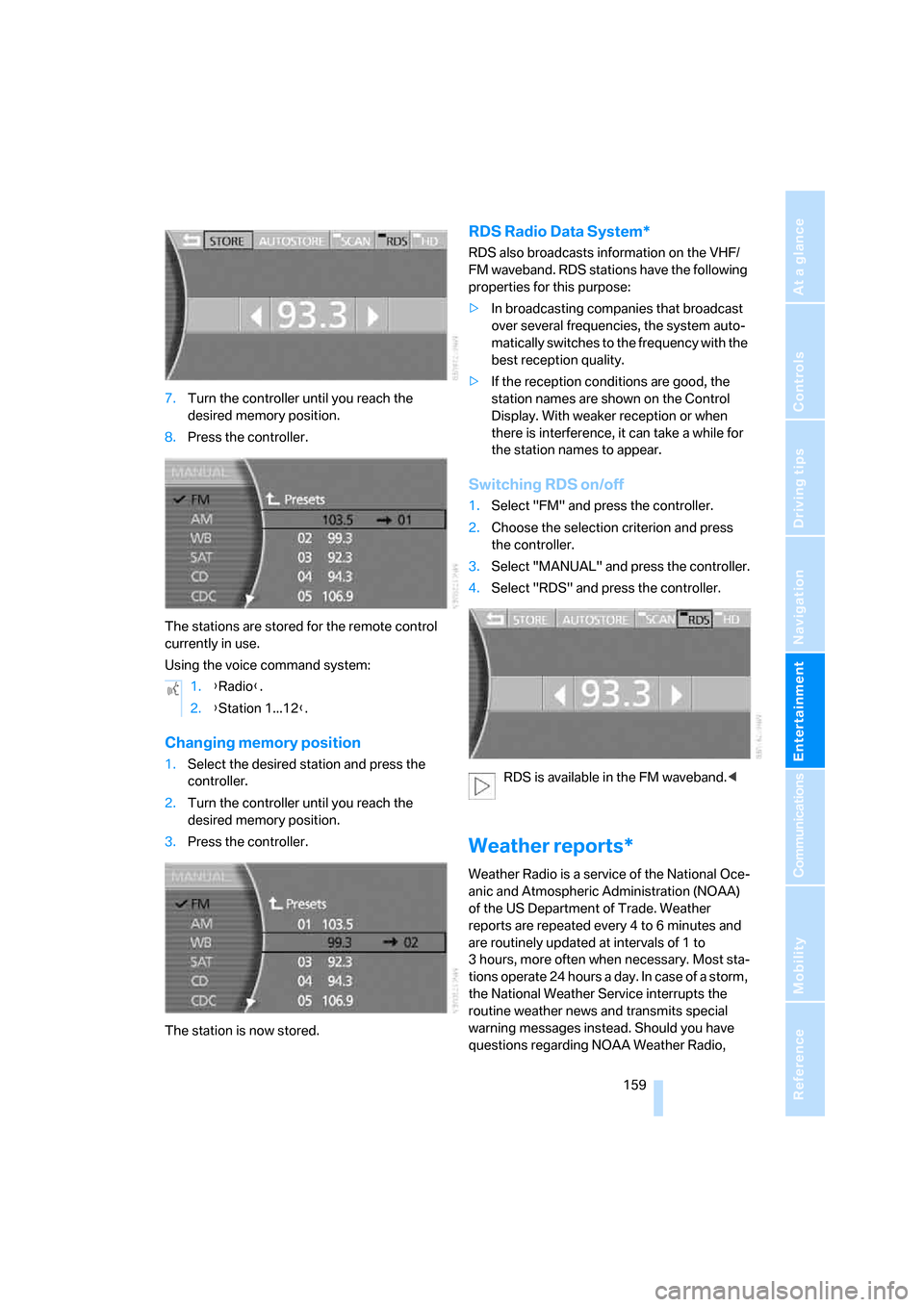
7.Turn the controller until you reach the
desired memory position.
8.Press the controller.
The stations are stored for the remote control
currently in use.
Using the voice command system:
Changing memory position
1.Select the desired station and press the
controller.
2.Turn the controller until you reach the
desired memory position.
3.Press the controller.
The station is now stored.
RDS Radio Data System*
RDS also broadcasts information on the VHF/
FM waveband. RDS stations have the following
properties for this purpose:
>In broadcasting companies that broadcast
over several frequencies, the system auto-
matically switches to the frequency with the
best reception quality.
>If the reception conditions are good, the
station names are shown on the Control
Display. With weaker reception or when
there is interference, it can take a while for
the station names to appear.
Switching RDS on/off
1.Select "FM" and press the controller.
2.Choose the selection criterion and press
the controller.
3.Select "MANUAL" and press the controller.
4.Select "RDS" and press the controller.
RDS is available in the FM waveband.<
Weather reports*
Weather Radio is a service of the National Oce-
anic and Atmospheric Administration (NOAA)
of the US Department of Trade. Weather
reports are repeated every 4 to 6 minutes and
are routinely updated at intervals of 1 to
3 hours, more often when necessary. Most sta-
tions operate 24 hours a day. In case of a storm,
the National Weather Service interrupts the
routine weather news and transmits special
warning messages instead. Should you have
questions regarding NOAA Weather Radio, 1.{Radio}.
2.{Station 1...12}.
Page 164 of 254
Radio
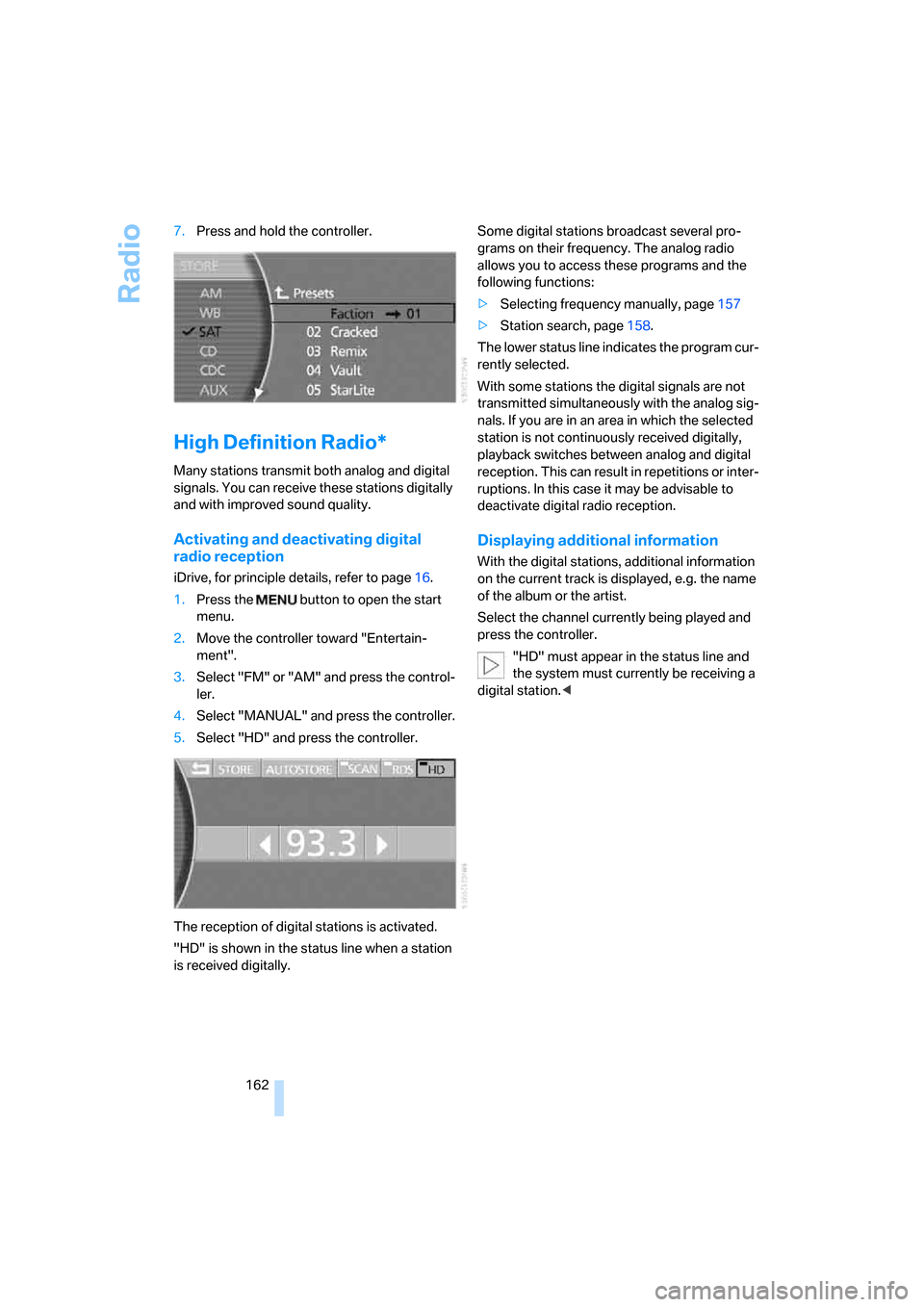
162 7.Press and hold the controller.
High Definition Radio*
Many stations transmit both analog and digital
signals. You can receive these stations digitally
and with improved sound quality.
Activating and deactivating digital
radio reception
iDrive, for principle details, refer to page16.
1.Press the button to open the start
menu.
2.Move the controller toward "Entertain-
ment".
3.Select "FM" or "AM" and press the control-
ler.
4.Select "MANUAL" and press the controller.
5.Select "HD" and press the controller.
The reception of digital stations is activated.
"HD" is shown in the status line when a station
is received digitally.Some digital stations broadcast several pro-
grams on their frequency. The analog radio
allows you to access these programs and the
following functions:
>Selecting frequency manually, page157
>Station search, page158.
The lower status line indicates the program cur-
rently selected.
With some stations the digital signals are not
transmitted simultaneously with the analog sig-
nals. If you are in an area in which the selected
station is not continuously received digitally,
playback switches between analog and digital
reception. This can result in repetitions or inter-
ruptions. In this case it may be advisable to
deactivate digital radio reception.
Displaying additional information
With the digital stations, additional information
on the current track is displayed, e.g. the name
of the album or the artist.
Select the channel currently being played and
press the controller.
"HD" must appear in the status line and
the system must currently be receiving a
digital station.<
Page 180 of 254
Telephone overview
178
Telephone overview
The concept
Your BMW is equipped with a mobile phone
preparation package. After a suitable mobile
phone has been paired with the vehicle once,
you can operate the mobile phone via iDrive, via
the button on the steering wheel, via the phone
keypad and by voice
*.
A mobile phone that has been paired with the
vehicle once is automatically detected again
with the engine running or the ignition switched
on as soon as it is brought inside the vehicle.
The logon data of up to four mobile phones can
be stored simultaneously. If several mobile
phones are detected simultaneously, then the
vehicle can be used to operate the mobile
phone that was most recently paired with it.
Using a phone in your vehicle
Using snap-in adapter*
The so-called snap-in adapter, a cradle for your
mobile phone, is inserted into the center arm-
rest. If the mobile phone is inserted into the
snap-in adapter, the battery is charged and the
mobile phone is connected to the external
antenna of the vehicle whenever the ignition
key is in the radio ready state or higher. This
assures better network reception and uniform
sound quality. Ask your BMW center which
mobile phones snap-in adapters are offered for.
To use the snap-in adapter, refer to page181.
BMW discourages the use of mobile
phones or other mobile communications
devices inside the vehicle without a direct con-
nection to an outside antenna. Otherwise, the
vehicle electronics and mobile communications
device can interfere with each other. In addition,
there is no assurance that the radiation gener-
ated during transmission will be discharged
from the vehicle interior.
phone; otherwise, malfunctions can occur.
The mobile phone can be operated by means
of:
>the button on the steering wheel, refer to
page11
>the retracting telephone keypad, refer to
page179
>iDrive, refer to Initiating communication,
page184
>the voice command system
*, refer to
page23
For information on operating your mobile
phone, please consult the separate operating
instructions.
For your safety
Only make entries when the traffic situa-
tion allows you to do so. Do not hold the
mobile phone in your hand while you are driving;
use the hands-free system instead. If you do
not comply with this precaution, your being dis-
tracted can endanger vehicle occupants and
other road users.<
Suitable mobile phones
Ask your BMW center which mobile phones
with a Bluetooth interface are supported by the
mobile phone preparation package or which
mobile phones snap-in adapters are available
for. These mobile phones support the functions
described in this Owner's Manual with a certain
software version. Malfunctions can occur with
other mobile phones.
*
Page 193 of 254
191
Entertainment
Reference
At a glance
Controls
Driving tips Communications
Navigation
Mobility
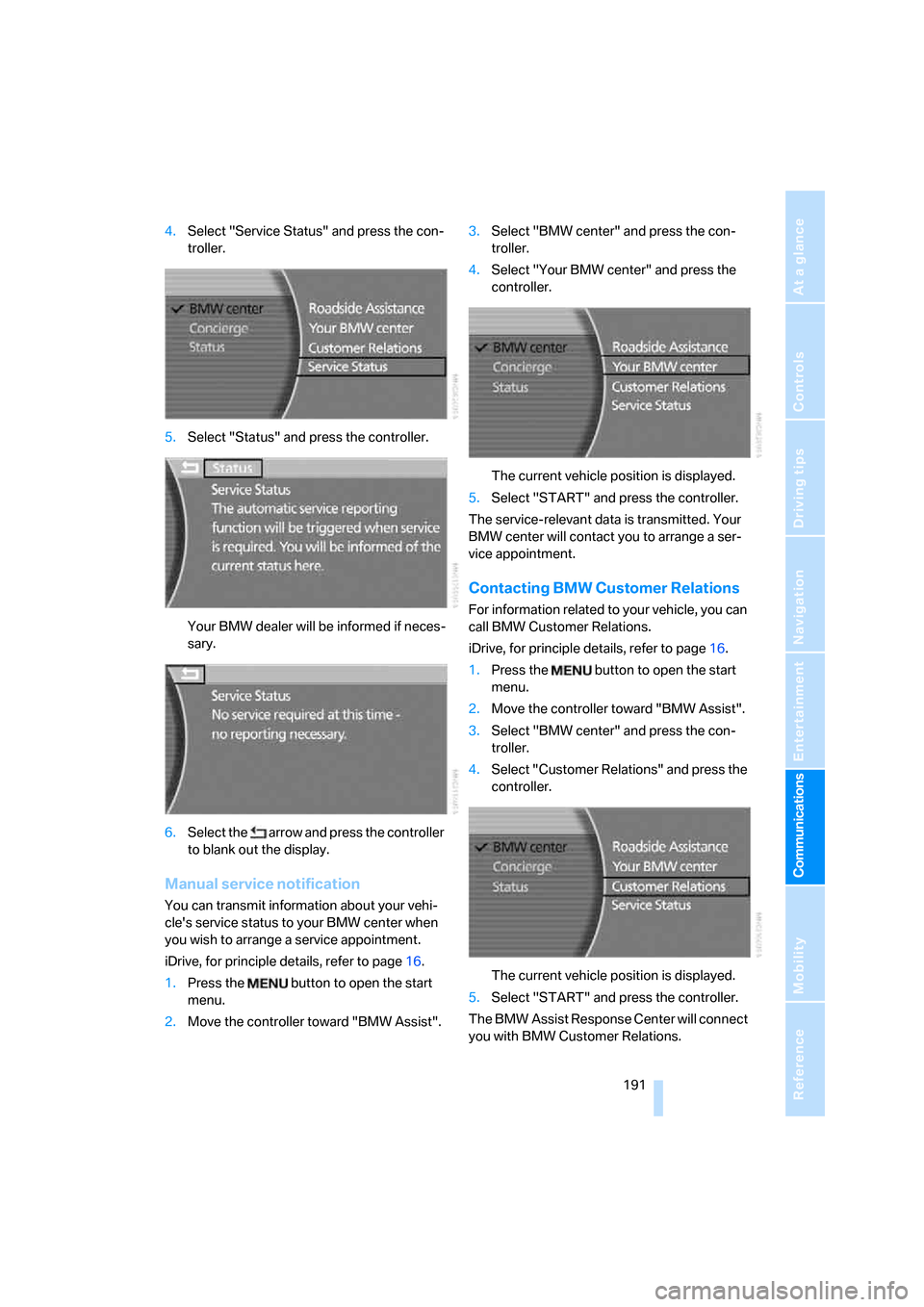
4.Select "Service Status" and press the con-
troller.
5.Select "Status" and press the controller.
Your BMW dealer will be informed if neces-
sary.
6.Select the arrow and press the controller
to blank out the display.
Manual service notification
You can transmit information about your vehi-
cle's service status to your BMW center when
you wish to arrange a service appointment.
iDrive, for principle details, refer to page16.
1.Press the button to open the start
menu.
2.Move the controller toward "BMW Assist".3.Select "BMW center" and press the con-
troller.
4.Select "Your BMW center" and press the
controller.
The current vehicle position is displayed.
5.Select "START" and press the controller.
The service-relevant data is transmitted. Your
BMW center will contact you to arrange a ser-
vice appointment.
Contacting BMW Customer Relations
For information related to your vehicle, you can
call BMW Customer Relations.
iDrive, for principle details, refer to page16.
1.Press the button to open the start
menu.
2.Move the controller toward "BMW Assist".
3.Select "BMW center" and press the con-
troller.
4.Select "Customer Relations" and press the
controller.
The current vehicle position is displayed.
5.Select "START" and press the controller.
The BMW Assist Response Center will connect
you with BMW Customer Relations.
Page 200 of 254
Refueling
198
Refueling
Switch off the engine before refueling;
otherwise, no fuel can be dispensed into
the tank and a message is displayed.<
When handling fuel, take all applicable
precautionary measures and follow all
applicable regulations. Never transport reserve
fuel containers in the vehicle. These can leak
and cause an explosion or a fire in an accident.<
Fuel filler door
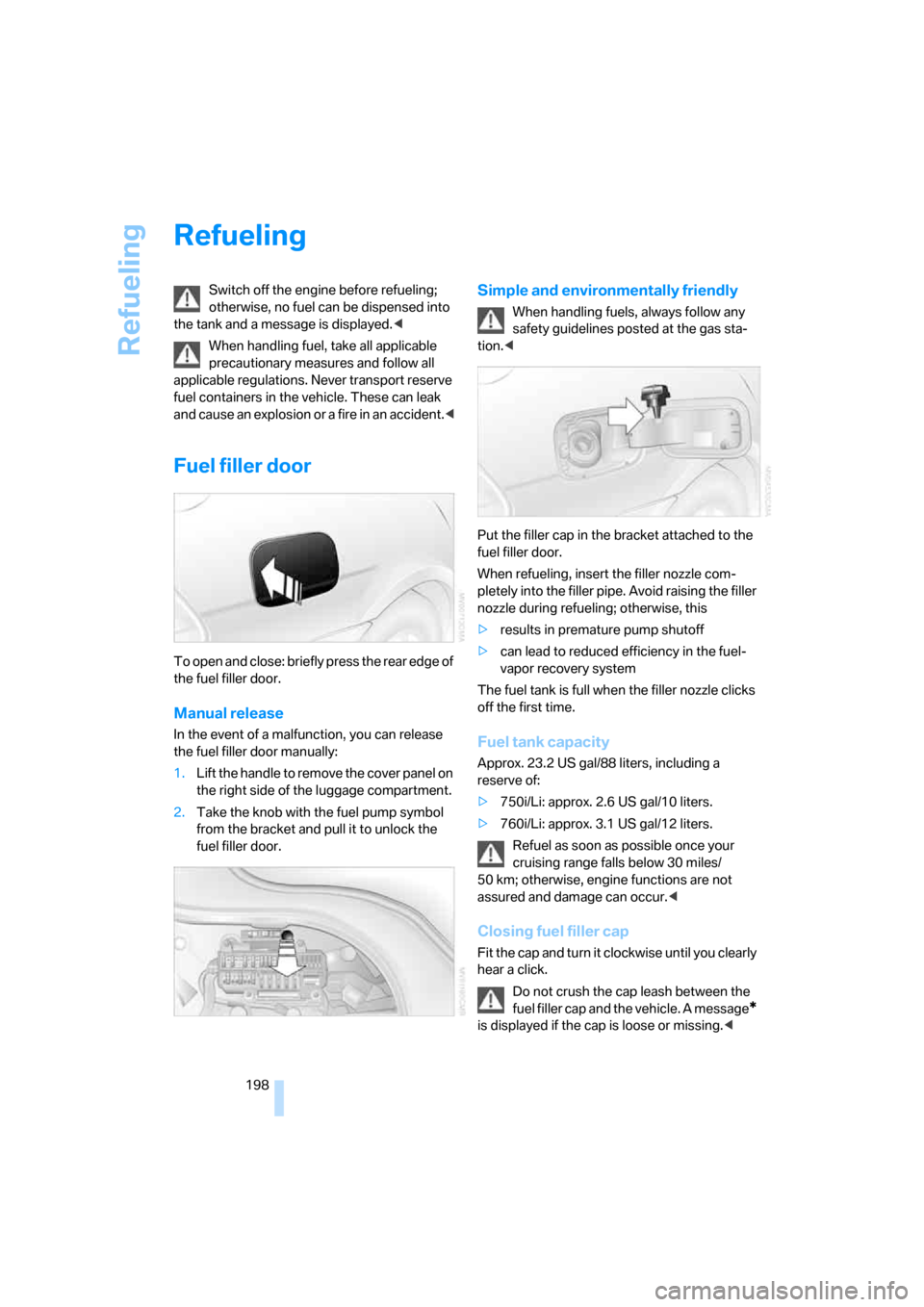
To open and close: briefly press the rear edge of
the fuel filler door.
Manual release
In the event of a malfunction, you can release
the fuel filler door manually:
1.Lift the handle to remove the cover panel on
the right side of the luggage compartment.
2.Take the knob with the fuel pump symbol
from the bracket and pull it to unlock the
fuel filler door.
Simple and environmentally friendly
When handling fuels, always follow any
safety guidelines posted at the gas sta-
tion.<
Put the filler cap in the bracket attached to the
fuel filler door.
When refueling, insert the filler nozzle com-
pletely into the filler pipe. Avoid raising the filler
nozzle during refueling; otherwise, this
>results in premature pump shutoff
>can lead to reduced efficiency in the fuel-
vapor recovery system
The fuel tank is full when the filler nozzle clicks
off the first time.
Fuel tank capacity
Approx. 23.2 US gal/88 liters, including a
reserve of:
>750i/Li: approx. 2.6 US gal/10 liters.
>760i/Li: approx. 3.1 US gal/12 liters.
Refuel as soon as possible once your
cruising range falls below 30 miles/
50 km; otherwise, engine functions are not
assured and damage can occur.<
Closing fuel filler cap
Fit the cap and turn it clockwise until you clearly
hear a click.
Do not crush the cap leash between the
fuel filler cap and the vehicle. A message
*
is displayed if the cap is loose or missing.<
Page 223 of 254
Mobility
221Reference
At a glance
Controls
Driving tips
Communications
Navigation
Entertainment
Your BMW has a special nut that serves as a
body ground or negative terminal, refer to
arrow2.
5.Attach the second negative/– clamp of the
jumper cable to the negative battery termi-
nal or to an engine or body ground on the
vehicle to be started.
Starting engine
1.Start the engine of the assisting vehicle and
allow it to run for several minutes at a fast
idle.
2.Start the engine on the other vehicle in the
usual way.
If the first start attempt is not successful,
wait a few minutes before another attempt
in order to allow the discharged battery to
recharge.
3.Allow the engines to run for several min-
utes.
4.Disconnect the jumper cables again in the
reverse sequence.
If need be, have the battery checked and
recharged.
Never use spray fluids to start the
engine.<
Towing and tow starting
Observe applicable laws and regulations
for tow starting and towing.<
Do not transport any passengers other
than the driver in a vehicle that is being
towed.<
Using tow fitting
The threaded tow fitting is stored in the
onboard tool kit and must always remain in the
vehicle. It can be screwed in at the front or rear
of the BMW.
Only use the tow fitting that comes with
the vehicle and screw it in as far as it will
go. Use the tow fitting for towing only on roads.
Avoid lateral loading of the tow fitting, e.g. do not lift the vehicle by the tow fitting. Otherwise,
damage to the tow fitting and the vehicle can
occur.<
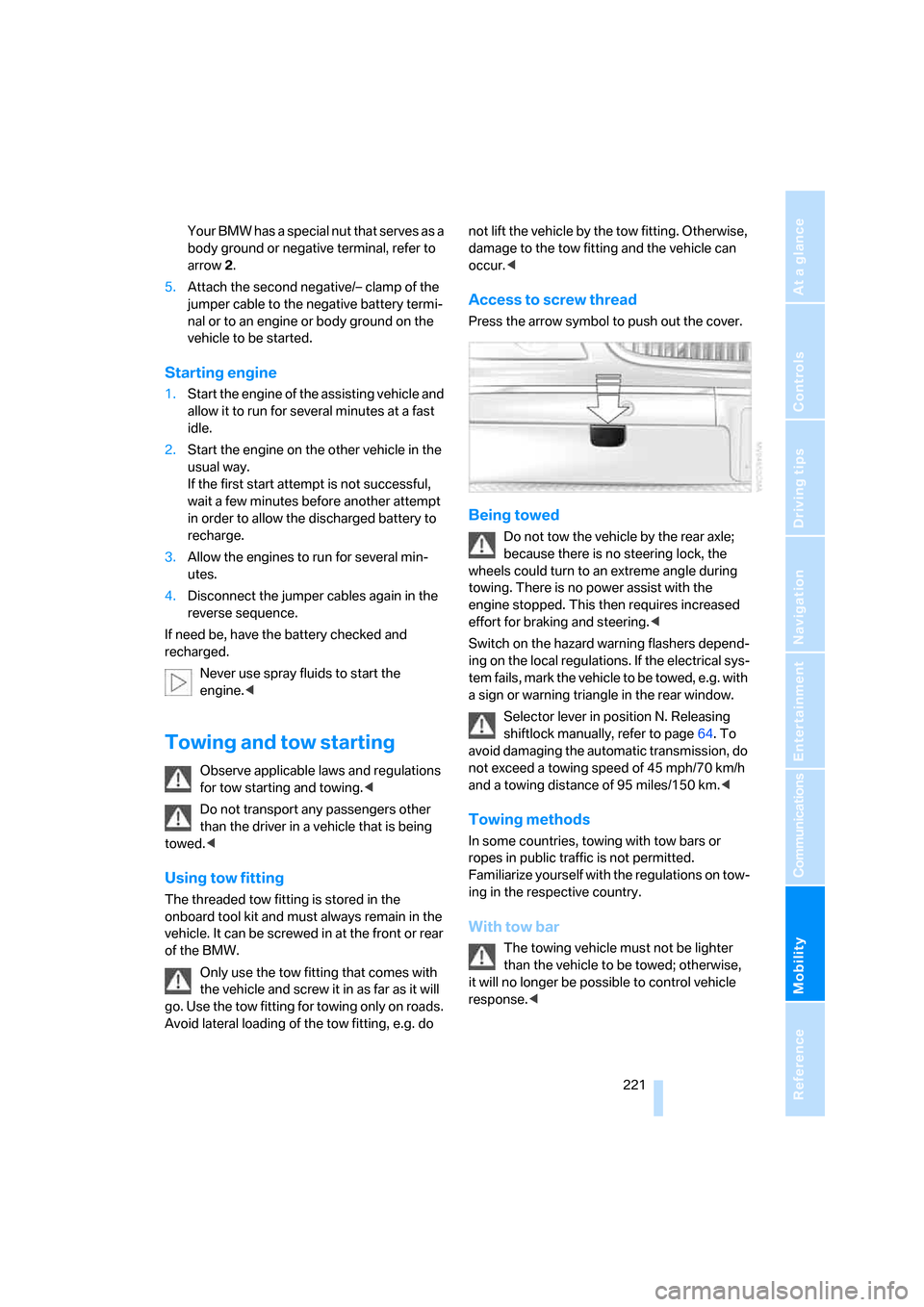
Access to screw thread
Press the arrow symbol to push out the cover.
Being towed
Do not tow the vehicle by the rear axle;
because there is no steering lock, the
wheels could turn to an extreme angle during
towing. There is no power assist with the
engine stopped. This then requires increased
effort for braking and steering.<
Switch on the hazard warning flashers depend-
ing on the local regulations. If the electrical sys-
tem fails, mark the vehicle to be towed, e.g. with
a sign or warning triangle in the rear window.
Selector lever in position N. Releasing
shiftlock manually, refer to page64. To
avoid damaging the automatic transmission, do
not exceed a towing speed of 45 mph/70 km/h
and a towing distance of 95 miles/150 km.<
Towing methods
In some countries, towing with tow bars or
ropes in public traffic is not permitted.
Familiarize yourself with the regulations on tow-
ing in the respective country.
With tow bar
The towing vehicle must not be lighter
than the vehicle to be towed; otherwise,
it will no longer be possible to control vehicle
response.<
Page 234 of 254
Everything from A to Z
232
Everything from A to Z
Index
A
"ABC...", navigation131
ABS Antilock Brake
System87
ACC, refer to Active cruise
control69
"ACCEPT",
navigation140,148
Accessories, refer to Your
individual vehicle5
Accident, refer to
– Initiating an emergency
call219
– Roadside
Assistance190,219
Activated-charcoal filter107
Activating
– BMW Assist193
– High Definition Radio162
Active cruise control69
– indicator lamp71
– malfunction72
– radar sensor72
– sensor, refer to
Malfunction72
Active head restraints,
front47
Active seat50
Active seat ventilation50
Adapter for spare key31
Adaptive brake lamp, refer to
Brake force display94
Adaptive Drive
– refer to Dynamic Drive89
– refer to EDC Electronic
Damper Control89
Adaptive Head Light100
Address
– deleting140
– displaying141
– storing139
– storing current position147"Address book",
navigation139
Adjusting cooling action of
rear climate control108
Adjusting interior
temperature105
Adjusting tone in audio mode,
refer to Tone control153
Adjusting volume153
– ring tone of telephone179
– voice command system25
– voice instructions146
Airbags95
– safe sitting position43
Air conditioning103
– in rear108
– in the rear108
– while parked109
Air distribution
– automatic104
– manual106
Airing, refer to Ventilation107
Air jets, refer to
Ventilation107
Air pressure, refer to Tire
inflation pressure200
Air recirculation, refer to
Recirculated-air mode105
Air vents, refer to
Ventilation107
Air volume
– automatic climate
control106
– rear climate control108
AKI, refer to Fuel
specifications199
Alarm system37
– avoiding unintentional
alarms38
All around the steering
wheel10
All-season tires, refer to
Winter tires206Altering route, refer to
Changing route146
Alternate route, refer to
Changing route146
"AM", radio156
AM, refer to Radio156
"ANGLE", DVD changer173
Antifreeze
– coolant210
– washer fluid66
Antilock Brake System
ABS87
Anti-theft system
– refer to Alarm system37
– refer to Central locking
system32
Approved engine oils209
Armrest, refer to Center
armrest
– front113
– rear114
"Arrow display",
navigation145
"AS ADDRESS",
navigation139,147
Ashtray
– front115
– rear116
Assist, refer to
BMW Assist189
Assistance getting in and
out52
– backrest width44
Assistance systems, refer to
Driving stability control
systems87
Assistance window20
AUC Automatic recirculated-
air control
105
Page 235 of 254
Reference 233
At a glance
Controls
Driving tips
Communications
Navigation
Entertainment
Mobility
Audio152
– controls152
– switching on/off153
– tone control153
– volume153
"AUDIO", DVD changer173
Audio device, external114
Audio mode152
Automatic
– air distribution104
– air volume104
– cruise control67,69
– headlamp control100
– luggage compartment lid
operation33,36
– service notification190
– station storage158
– steering wheel adjustment,
refer to Assistance getting in
and out52
Automatic car wash, refer to
Caring for your vehicle
brochure
Automatic climate control
– adjusting temperature105
– AUTO program104
– defrosting windows and
removing condensation106
– maximum cooling106
– rear climate control108
– rear refrigerator117
– residual heat106
– settings on Control
Display104
– switching cooling function
on and off manually107
– switching on and off105
Automatic closing of doors
and luggage compartment
lid, refer to Automatic Soft
Close35
Automatic curb monitor51
Automatic garage door
opener111
Automatic Hold59
– activation/deactivation59
– parking60
– programmable buttons52Automatic lighting
– refer to Automatic headlamp
control100
– refer to Daytime running
lamps100
– refer to Interior lamps101
– refer to Pathway lighting100
Automatic recirculated-air
control AUC105
Automatic soft closing
– doors
35
– luggage compartment lid36
Automatic station search157
Automatic transmission with
Steptronic62
– buttons on steering
wheel63
– interlock62
– manually unlocking and
locking transmission lock64
– shiftlock62
– towing221
– tow starting222
"AUTO P"
– activating/deactivating
Automatic Hold59
– programmable buttons52
AUTO program, automatic
climate control104
– adjusting intensity104
"Autostore list", radio156
"AUX", external audio
device169
AUX-In
– port114
– refer to External audio
device169
"AUX level", external audio
device169
Average fuel consumption77
– setting units84
Average speed77
– setting units84
"Avoid ferries",
navigation142
"Avoid highway",
navigation142
Avoiding unintentional
alarms38"Avoid route", navigation147
"Avoid sect.", navigation147
"Avoid tolls", navigation142
Avoid tolls, navigation142
Axle loads, refer to
Weights228
"A-Z", telephone185
B
Backrest contour, refer to
Lumbar support
adjustment44
Backrests, refer to Seat
adjustment44
Backrest width adjustment,
refer to Front comfort seat
adjustment44
Backup lamp, replacing
bulbs215
"Balance", balance and
fader154
Bar, refer to Tow bar221
Bass, refer to Tone
control154
"Bass", treble and bass154
Battery217
– jump starting220
– switch218
Battery change, remote
control in Comfort
Access39
"BC", computer77
Belts, refer to Safety belts48
Beverage holder, refer to Cup
holders115
Blower, refer to Air
volume106,108
"BLUETOOTH"183
Bluetooth link, activating/
deactivating183
BMW Assist189
– activating193
– "BMW Assist"193
– "BMW center"190
– "Concierge"192
– info service192
– "Roadside Assistance"190
– services offered189
Page 237 of 254
Reference 235
At a glance
Controls
Driving tips
Communications
Navigation
Entertainment
Mobility
Changes, technical, refer to
For your own safety5
Changing scale, map view in
navigation145
Changing settings on Control
Display84
Changing time display84
Changing units of measure on
Control Display84
Changing wheels215
– run-flat tires205
"Channels", radio160
Check Control80
– "CHECK"81
– CHECK button81
Child's seats, refer to
Installing child restraint
systems54
Child restraint fixing system
LATCH55
Child restraint systems54
Child-safety lock56
Chrome parts, refer to Caring
for your vehicle brochure
Chrome-plated parts, care,
refer to Caring for your
vehicle brochure
Cigarette lighter116
"City / Postal Code",
navigation133
Cleaning, vehicle, refer to
Caring for your vehicle
brochure
Cleaning headlamps, tank
capacity, refer to Wiper fluid
filler neck66
Cleaning windshield65
"Climate"
– activating activation time for
parked car ventilation110
– preselecting activation time
for parked car
ventilation109
– rear climate control108
– rear refrigerator117
– switching parked car
ventilation on and off
directly109Climate comfort
windshield126
Clock75
– 12/24-hour mode84
– also refer to Assistance
window21
– display format84
– setting84
"Clock", settings84
Closing
– from inside34
– from outside32
Clothes hooks114
Cockpit10
Cold start, refer to Starting
engine57
"Color", DVD changer172
Combined instrument, refer to
Info Display12
"Comfort", EDC Electronic
Damper Control
90
Comfort Access38
– before driving into a car
wash39
– changing battery39
Comfort features14
Comfort program, EDC
Electronic Damper
Control90
Comfort seat44
– in rear45
"Communication", phone184
Compact Disc
– refer to CD changer165
– refer to CD player163
Compartments, refer to
Storage compartments113
Compressed audio files,
CD changer166
Computer76
– displays on Control
Display77
– units of measure and display
format84
"Concierge", BMW Assist192
Condensation, refer to When
vehicle is parked123Condition Based Service
CBS211
Connecting car vacuum
cleaner, refer to Power
socket116
Consumption, refer to
Average fuel
consumption77
Consumption statistics, refer
to Average fuel
consumption77
"Continue route guidance?",
navigation144
"Contrast"
– BMW Night Vision98
– DVD changer172
Control Center, refer to
iDrive16
Control Display
– rear seat screen21
– refer to iDrive16
– setting brightness85
Controller
– programmable button52
– rear seat screen21
– refer to iDrive16
Controls and displays10,14
Coolant210
– level210
– temperature76
Cooler, refer to Rear
refrigerator117
Cooling
– maximum106,108
– refer to AUTO program
104
– refer to Rear climate
control108
– refer to Rear refrigerator117
– refer to Switching cooling
function on and off
manually107
Copyright2
Cornering Brake Control
CBC87
Cradle for mobile phone, refer
to Using snap-in
adapter178
Page 238 of 254
Everything from A to Z
236 Creating voice address
book141
Cruise control67,69
– refer to Active cruise
control69
– refer to Programmable
cruise control67
Cruising range77
Cup holders115
Curb weight, refer to
Weights228
Current consumption, refer to
Energy Control77
Currentness of Owner's
Manual5
Current position
– displaying147
– storing139
Cursor for navigation, refer to
Selecting destination via
map135
"Curve mode", BMW Night
Vision98
Customizing settings, refer to
Key Memory31
D
Dashboard, refer to
Cockpit10
Data226
– dimensions227
– engine226
– filling capacities229
– weights228
Date, refer to Assistance
window20
– display format84
– setting84
"Date", setting84
Daytime running lamps100
"DEACTIV.", BMW Assist193
Deactivating front passenger
airbags54
Defroster, rear window107
Defrosting windows106Defrosting windows and
removing condensation106
Dehumidifying air, refer to
Cooling function, switching
on and off manually107
"DELETE", navigation140
Deleting address book140
Deleting entire list, refer to
Deleting entries in lists186
Deleting entries in lists186
Destination for navigation131
– selecting using voice141
– selecting via information135
Destination list in navigation
system, deleting138
"Dest. input", navigation131
"Dest. list", navigation138
Dialed numbers, refer to
Redialing185
Diamond button52
Digital clock75
Dimensions227
Directional indicators, refer to
Turn signals65
Direction announcements,
refer to Route guidance by
voice instructions146
Direction instructions, refer to
Voice instructions146
Directory, refer to
– Address book139
– Phone book186
Displacement, refer to Engine
specifications226
Display, refer to
– iDrive16
– Info Display12
Display illumination, refer to
Instrument lighting101
Displaying track information,
CD changer167
Display lighting, refer to
Instrument lighting101
Display of malfunctions, refer
to Check Control80Disposal
– remote control battery39
– vehicle battery218
Distance to destination77
– refer to Remaining
distance77
– units of measure84
Distance warning, refer to
PDC Park Distance
Control86
Door entry lighting, refer to
Interior lamps101
Door key, refer to Remote
control/key30
Door lock34
Doors
– unlocking and locking from
inside34
– unlocking and locking from
outside32
DOT Quality Grades203
Draft-free ventilation107
Driving lamps, refer to Parking
lamps/low beams100
Driving notes122
Driving route, refer to
Displaying route145
Driving stability control87
Driving tips, refer to Driving
notes122
Dry air, refer to Cooling
function107
DSC Dynamic Stability
Control87
– indicator lamp13
"DTC"88
DTC Dynamic Traction
Control88
– indicator lamp13
"DVD", DVD changer171