idrive BMW 750LI 2008 E66 Workshop Manual
[x] Cancel search | Manufacturer: BMW, Model Year: 2008, Model line: 750LI, Model: BMW 750LI 2008 E66Pages: 254, PDF Size: 7.98 MB
Page 192 of 254
BMW Assist
190 In addition, other services can be provided to
you, such as the information service or route
planning, traffic conditions and weather.
Press the SOS button in order to contact the
BMW Assist Response Center, see below.
Special features of the services offered
The following special features apply to the ser-
vices:
>The services offered are country-specific.
>Voice contact is established or data are
transferred, depending on the equipment
and the country. In some countries, it is
possible to do both.
>The data transmitted can be vehicle data,
for example, your current position or the
data of the CBS Condition Based Service.
Using services
Contacting the BMW Assist Response
Center
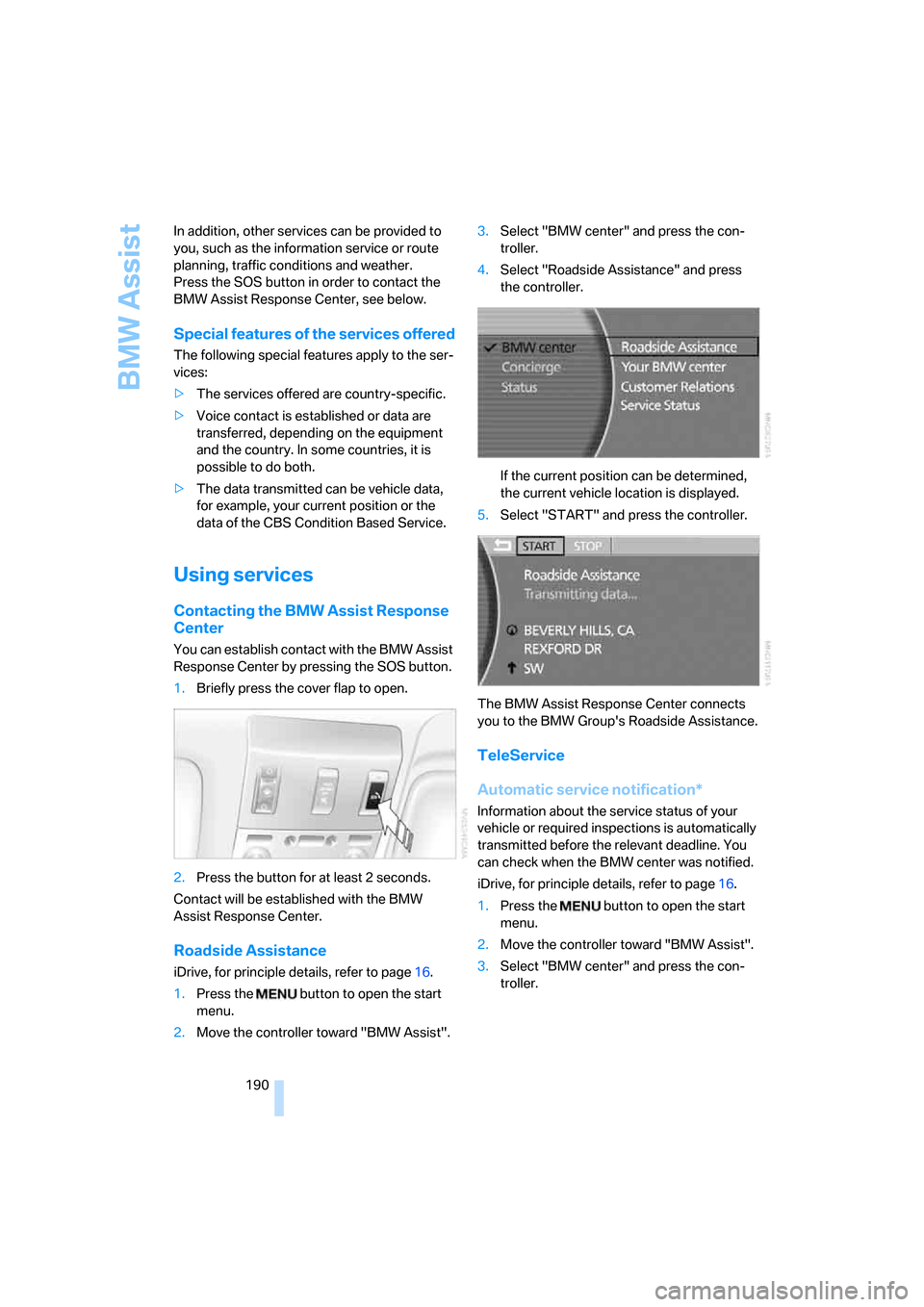
You can establish contact with the BMW Assist
Response Center by pressing the SOS button.
1.Briefly press the cover flap to open.
2.Press the button for at least 2 seconds.
Contact will be established with the BMW
Assist Response Center.
Roadside Assistance
iDrive, for principle details, refer to page16.
1.Press the button to open the start
menu.
2.Move the controller toward "BMW Assist".3.Select "BMW center" and press the con-
troller.
4.Select "Roadside Assistance" and press
the controller.
If the current position can be determined,
the current vehicle location is displayed.
5.Select "START" and press the controller.
The BMW Assist Response Center connects
you to the BMW Group's Roadside Assistance.
TeleService
Automatic service notification*
Information about the service status of your
vehicle or required inspections is automatically
transmitted before the relevant deadline. You
can check when the BMW center was notified.
iDrive, for principle details, refer to page16.
1.Press the button to open the start
menu.
2.Move the controller toward "BMW Assist".
3.Select "BMW center" and press the con-
troller.
Page 193 of 254
191
Entertainment
Reference
At a glance
Controls
Driving tips Communications
Navigation
Mobility
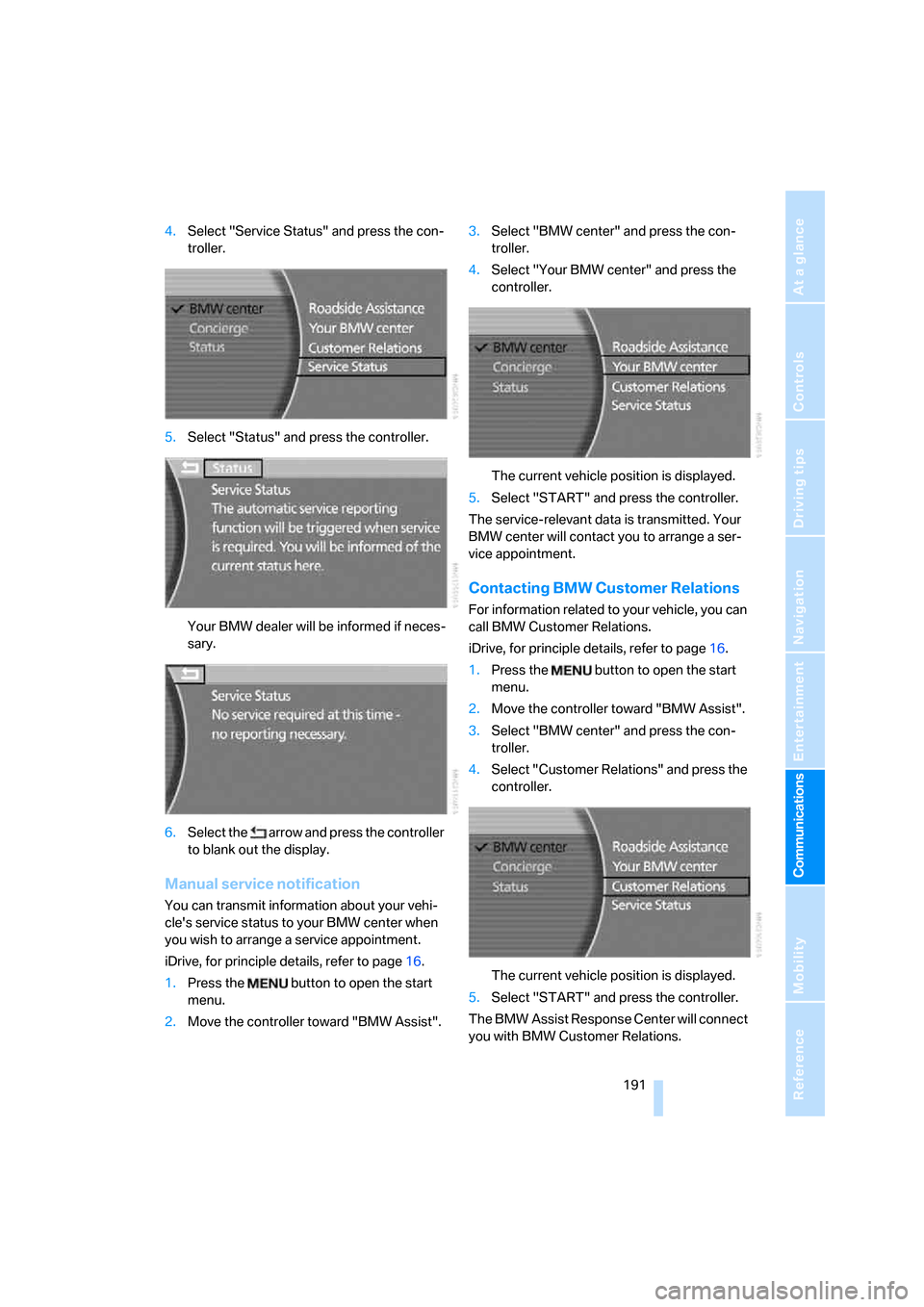
4.Select "Service Status" and press the con-
troller.
5.Select "Status" and press the controller.
Your BMW dealer will be informed if neces-
sary.
6.Select the arrow and press the controller
to blank out the display.
Manual service notification
You can transmit information about your vehi-
cle's service status to your BMW center when
you wish to arrange a service appointment.
iDrive, for principle details, refer to page16.
1.Press the button to open the start
menu.
2.Move the controller toward "BMW Assist".3.Select "BMW center" and press the con-
troller.
4.Select "Your BMW center" and press the
controller.
The current vehicle position is displayed.
5.Select "START" and press the controller.
The service-relevant data is transmitted. Your
BMW center will contact you to arrange a ser-
vice appointment.
Contacting BMW Customer Relations
For information related to your vehicle, you can
call BMW Customer Relations.
iDrive, for principle details, refer to page16.
1.Press the button to open the start
menu.
2.Move the controller toward "BMW Assist".
3.Select "BMW center" and press the con-
troller.
4.Select "Customer Relations" and press the
controller.
The current vehicle position is displayed.
5.Select "START" and press the controller.
The BMW Assist Response Center will connect
you with BMW Customer Relations.
Page 194 of 254
BMW Assist
192
Info service*
When you call BMW Assist's info service, you
can obtain information, for example about cur-
rent events, gas stations or hotels, as well as
receive the relevant telephone numbers and
addresses. Many hotels can be reserved
directly from the BMW info service.
The info service must be enabled separately by
the BMW Assist Response Center.
Calling up information
iDrive, for principle details, refer to page16.
1.Press the button to open the start
menu.
2.Move the controller toward "BMW Assist".
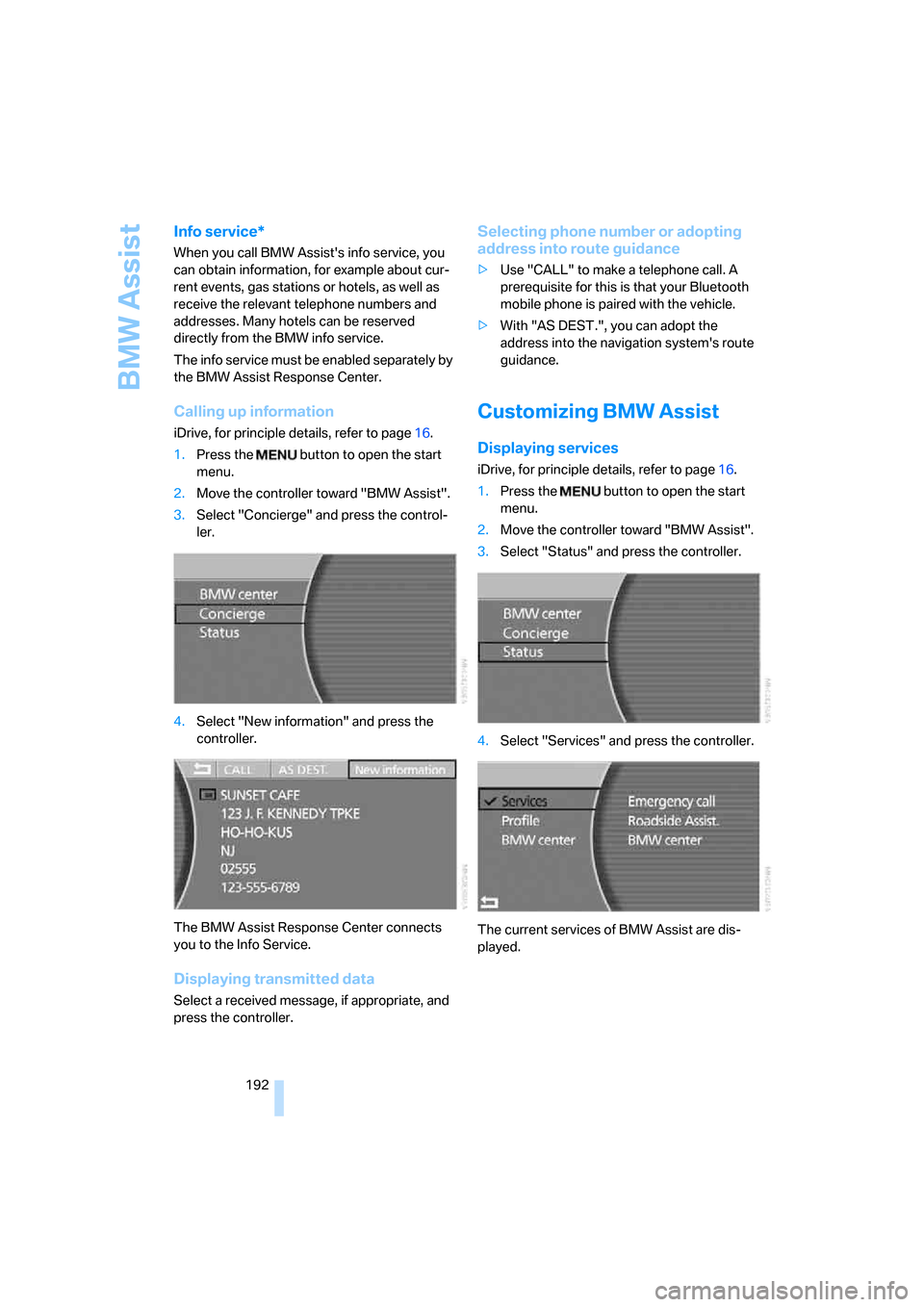
3.Select "Concierge" and press the control-
ler.
4.Select "New information" and press the
controller.
The BMW Assist Response Center connects
you to the Info Service.
Displaying transmitted data
Select a received message, if appropriate, and
press the controller.
Selecting phone number or adopting
address into route guidance
>Use "CALL" to make a telephone call. A
prerequisite for this is that your Bluetooth
mobile phone is paired with the vehicle.
>With "AS DEST.", you can adopt the
address into the navigation system's route
guidance.
Customizing BMW Assist
Displaying services
iDrive, for principle details, refer to page16.
1.Press the button to open the start
menu.
2.Move the controller toward "BMW Assist".
3.Select "Status" and press the controller.
4.Select "Services" and press the controller.
The current services of BMW Assist are dis-
played.
Page 195 of 254
193
Entertainment
Reference
At a glance
Controls
Driving tips Communications
Navigation
Mobility
Updating services
You will be notified of any changes in the ser-
vices offered by BMW Assist. If this occurs, you
should update the services.
iDrive, for principle details, refer to page16.
1.Press the button to open the start
menu.
2.Move the controller toward "BMW Assist".
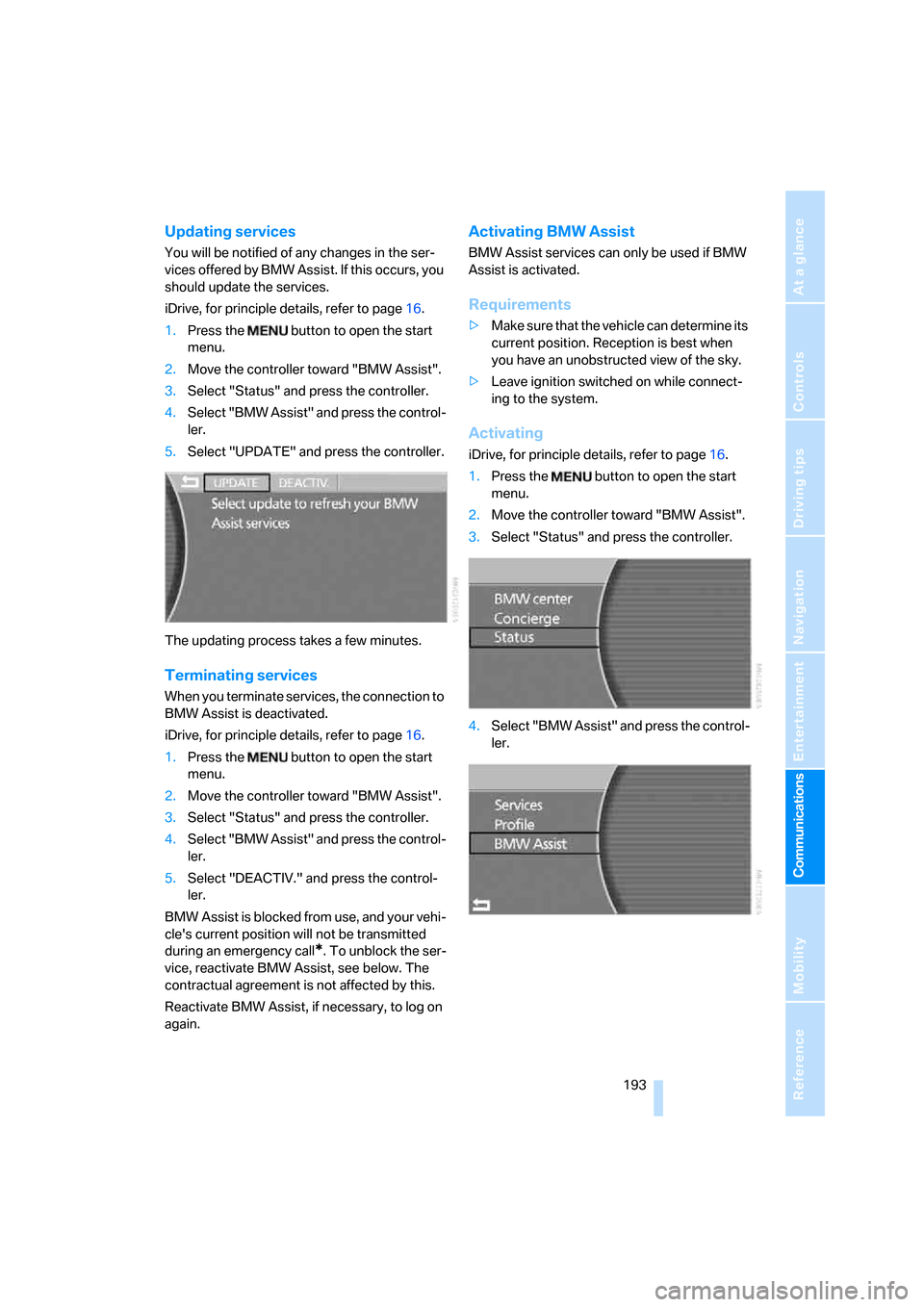
3.Select "Status" and press the controller.
4.Select "BMW Assist" and press the control-
ler.
5.Select "UPDATE" and press the controller.
The updating process takes a few minutes.
Terminating services
When you terminate services, the connection to
BMW Assist is deactivated.
iDrive, for principle details, refer to page16.
1.Press the button to open the start
menu.
2.Move the controller toward "BMW Assist".
3.Select "Status" and press the controller.
4.Select "BMW Assist" and press the control-
ler.
5.Select "DEACTIV." and press the control-
ler.
BMW Assist is blocked from use, and your vehi-
cle's current position will not be transmitted
during an emergency call
*. To unblock the ser-
vice, reactivate BMW Assist, see below. The
contractual agreement is not affected by this.
Reactivate BMW Assist, if necessary, to log on
again.
Activating BMW Assist
BMW Assist services can only be used if BMW
Assist is activated.
Requirements
>Make sure that the vehicle can determine its
current position. Reception is best when
you have an unobstructed view of the sky.
>Leave ignition switched on while connect-
ing to the system.
Activating
iDrive, for principle details, refer to page16.
1.Press the button to open the start
menu.
2.Move the controller toward "BMW Assist".
3.Select "Status" and press the controller.
4.Select "BMW Assist" and press the control-
ler.
Page 196 of 254
BMW Assist
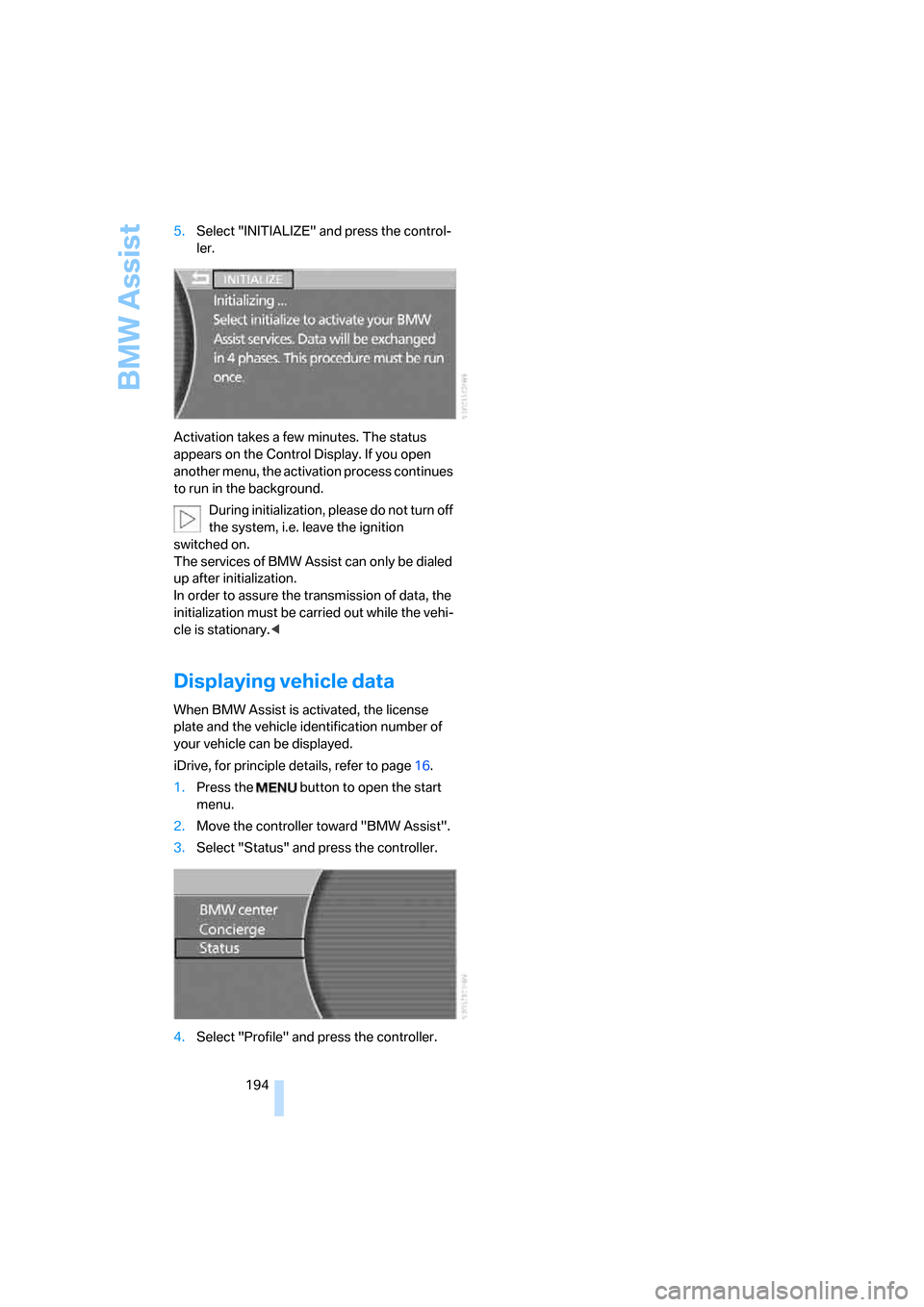
194 5.Select "INITIALIZE" and press the control-
ler.
Activation takes a few minutes. The status
appears on the Control Display. If you open
another menu, the activation process continues
to run in the background.
During initialization, please do not turn off
the system, i.e. leave the ignition
switched on.
The services of BMW Assist can only be dialed
up after initialization.
In order to assure the transmission of data, the
initialization must be carried out while the vehi-
cle is stationary.<
Displaying vehicle data
When BMW Assist is activated, the license
plate and the vehicle identification number of
your vehicle can be displayed.
iDrive, for principle details, refer to page16.
1.Press the button to open the start
menu.
2.Move the controller toward "BMW Assist".
3.Select "Status" and press the controller.
4.Select "Profile" and press the controller.
Page 210 of 254
Under the hood
208
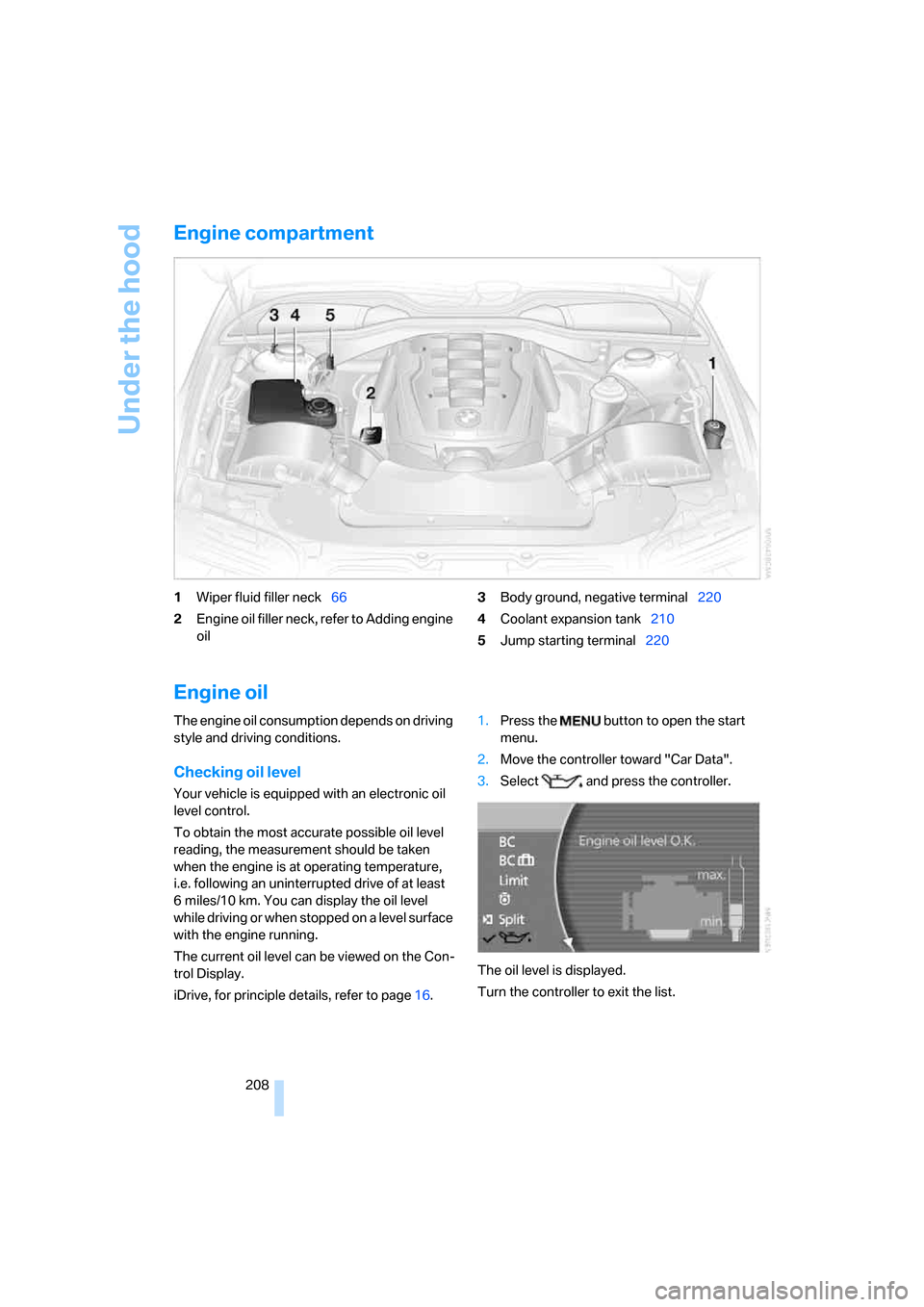
Engine compartment
1Wiper fluid filler neck66
2Engine oil filler neck, refer to Adding engine
oil3Body ground, negative terminal220
4Coolant expansion tank210
5Jump starting terminal220
Engine oil
The engine oil consumption depends on driving
style and driving conditions.
Checking oil level
Your vehicle is equipped with an electronic oil
level control.
To obtain the most accurate possible oil level
reading, the measurement should be taken
when the engine is at operating temperature,
i.e. following an uninterrupted drive of at least
6 miles/10 km. You can display the oil level
while driving or when stopped on a level surface
with the engine running.
The current oil level can be viewed on the Con-
trol Display.
iDrive, for principle details, refer to page16.1.Press the button to open the start
menu.
2.Move the controller toward "Car Data".
3.Select and press the controller.
The oil level is displayed.
Turn the controller to exit the list.
Page 237 of 254
Reference 235
At a glance
Controls
Driving tips
Communications
Navigation
Entertainment
Mobility
Changes, technical, refer to
For your own safety5
Changing scale, map view in
navigation145
Changing settings on Control
Display84
Changing time display84
Changing units of measure on
Control Display84
Changing wheels215
– run-flat tires205
"Channels", radio160
Check Control80
– "CHECK"81
– CHECK button81
Child's seats, refer to
Installing child restraint
systems54
Child restraint fixing system
LATCH55
Child restraint systems54
Child-safety lock56
Chrome parts, refer to Caring
for your vehicle brochure
Chrome-plated parts, care,
refer to Caring for your
vehicle brochure
Cigarette lighter116
"City / Postal Code",
navigation133
Cleaning, vehicle, refer to
Caring for your vehicle
brochure
Cleaning headlamps, tank
capacity, refer to Wiper fluid
filler neck66
Cleaning windshield65
"Climate"
– activating activation time for
parked car ventilation110
– preselecting activation time
for parked car
ventilation109
– rear climate control108
– rear refrigerator117
– switching parked car
ventilation on and off
directly109Climate comfort
windshield126
Clock75
– 12/24-hour mode84
– also refer to Assistance
window21
– display format84
– setting84
"Clock", settings84
Closing
– from inside34
– from outside32
Clothes hooks114
Cockpit10
Cold start, refer to Starting
engine57
"Color", DVD changer172
Combined instrument, refer to
Info Display12
"Comfort", EDC Electronic
Damper Control
90
Comfort Access38
– before driving into a car
wash39
– changing battery39
Comfort features14
Comfort program, EDC
Electronic Damper
Control90
Comfort seat44
– in rear45
"Communication", phone184
Compact Disc
– refer to CD changer165
– refer to CD player163
Compartments, refer to
Storage compartments113
Compressed audio files,
CD changer166
Computer76
– displays on Control
Display77
– units of measure and display
format84
"Concierge", BMW Assist192
Condensation, refer to When
vehicle is parked123Condition Based Service
CBS211
Connecting car vacuum
cleaner, refer to Power
socket116
Consumption, refer to
Average fuel
consumption77
Consumption statistics, refer
to Average fuel
consumption77
"Continue route guidance?",
navigation144
"Contrast"
– BMW Night Vision98
– DVD changer172
Control Center, refer to
iDrive16
Control Display
– rear seat screen21
– refer to iDrive16
– setting brightness85
Controller
– programmable button52
– rear seat screen21
– refer to iDrive16
Controls and displays10,14
Coolant210
– level210
– temperature76
Cooler, refer to Rear
refrigerator117
Cooling
– maximum106,108
– refer to AUTO program
104
– refer to Rear climate
control108
– refer to Rear refrigerator117
– refer to Switching cooling
function on and off
manually107
Copyright2
Cornering Brake Control
CBC87
Cradle for mobile phone, refer
to Using snap-in
adapter178
Page 238 of 254
Everything from A to Z
236 Creating voice address
book141
Cruise control67,69
– refer to Active cruise
control69
– refer to Programmable
cruise control67
Cruising range77
Cup holders115
Curb weight, refer to
Weights228
Current consumption, refer to
Energy Control77
Currentness of Owner's
Manual5
Current position
– displaying147
– storing139
Cursor for navigation, refer to
Selecting destination via
map135
"Curve mode", BMW Night
Vision98
Customizing settings, refer to
Key Memory31
D
Dashboard, refer to
Cockpit10
Data226
– dimensions227
– engine226
– filling capacities229
– weights228
Date, refer to Assistance
window20
– display format84
– setting84
"Date", setting84
Daytime running lamps100
"DEACTIV.", BMW Assist193
Deactivating front passenger
airbags54
Defroster, rear window107
Defrosting windows106Defrosting windows and
removing condensation106
Dehumidifying air, refer to
Cooling function, switching
on and off manually107
"DELETE", navigation140
Deleting address book140
Deleting entire list, refer to
Deleting entries in lists186
Deleting entries in lists186
Destination for navigation131
– selecting using voice141
– selecting via information135
Destination list in navigation
system, deleting138
"Dest. input", navigation131
"Dest. list", navigation138
Dialed numbers, refer to
Redialing185
Diamond button52
Digital clock75
Dimensions227
Directional indicators, refer to
Turn signals65
Direction announcements,
refer to Route guidance by
voice instructions146
Direction instructions, refer to
Voice instructions146
Directory, refer to
– Address book139
– Phone book186
Displacement, refer to Engine
specifications226
Display, refer to
– iDrive16
– Info Display12
Display illumination, refer to
Instrument lighting101
Displaying track information,
CD changer167
Display lighting, refer to
Instrument lighting101
Display of malfunctions, refer
to Check Control80Disposal
– remote control battery39
– vehicle battery218
Distance to destination77
– refer to Remaining
distance77
– units of measure84
Distance warning, refer to
PDC Park Distance
Control86
Door entry lighting, refer to
Interior lamps101
Door key, refer to Remote
control/key30
Door lock34
Doors
– unlocking and locking from
inside34
– unlocking and locking from
outside32
DOT Quality Grades203
Draft-free ventilation107
Driving lamps, refer to Parking
lamps/low beams100
Driving notes122
Driving route, refer to
Displaying route145
Driving stability control87
Driving tips, refer to Driving
notes122
Dry air, refer to Cooling
function107
DSC Dynamic Stability
Control87
– indicator lamp13
"DTC"88
DTC Dynamic Traction
Control88
– indicator lamp13
"DVD", DVD changer171
Page 241 of 254
Reference 239
At a glance
Controls
Driving tips
Communications
Navigation
Entertainment
Mobility
H
Handbrake, refer to Parking
brake58
– Automatic Hold59
– manual operation58
Hands-free system179
Hazard warning flashers15
"HD", High Definition
Radio162
Head airbags95
Headlamp control,
automatic100
Headlamp flasher65
– indicator lamp13
Headlamps100
– care, refer to Caring for your
vehicle brochure
– cleaning, refer to Wiper
system65
– replacing bulbs213
Head light, refer to Adaptive
Head Light100
Headphones22
Head restraints46
– front head restraints,
active47
– installation, front47
– removal, front46
– sitting safely43
Heating103
– exterior mirrors51
– mirrors51
– rear window, refer to Rear
window defroster107
– residual heat106
– seats49
– steering wheel52
– when parked, refer to
Residual heat106
– windshield, refer to
Defrosting windows and
removing condensation106
– windshield washer
nozzles66
Heating and ventilation103Heavy cargo, refer to Stowing
cargo124
Height, refer to
Dimensions227
Height adjustment
– seats44
– steering wheel51
"Help"
– assistance window21
– menu guidance19
"Help text", assistance
window21
Help text on Control
Display21
"Hide map icons",
navigation137
"high", automatic climate
control105
High beams101
– headlamp flasher101
– indicator lamp11
High Definition Radio162
Hills123
Holder for cups115
Home address
– selecting141
– storing140
Hood207
Horn11
Hotel function, refer to
Locking separately35
Hot exhaust system122
Hour signal activation85
"House number",
navigation134
Hydraulic brake assistant,
refer to Brake assistant87
Hydroplaning123
I
ID3 tag, refer to Displaying
track information167
iDrive16
– assistance window20
– automatic climate
control104
– changing date and time84
– changing language84
– changing settings84
– changing units of measure
and display format84
– confirming selection or
entry19
– controller16
– controls16
– displays, menus17
– menus17
– rear seat screen21
– selecting menu item19
– setting brightness85
– showing help text21
– start menu18
– status lines20
– symbols19
Ignition key30
Ignition lock57
Illuminated vanity mirror51
Imitation leather, refer to
Caring for your vehicle
brochure
"Indep. ventil.", automatic
climate control109
Indicator/warning lamps13
– airbags96
– alarm system37
– DSC88
– DTC88
– Flat Tire Monitor91
– fog lamps101
– safety belt warning48
– Tire Pressure Monitor93
Individually programmable
buttons11,52
Individual settings, refer to
Key Memory31
Page 242 of 254
Everything from A to Z
240 Inflation pressure, refer to Tire
inflation pressure200
Inflation pressure monitoring
– refer to Flat Tire Monitor90
– refer to Tire Pressure
Monitor91
Info Display12
"Information", navigation136
Information, navigation
– "On country"135
– "On dest."135
– "On location"135
– "On town/city"135
Info service192
Infrared windshield, refer to
Entry/pass tags126
"INITIALIZE", BMW
Assist194
Inserting navigation CD/
DVD130
Installation location
– CD changer165
– DVD changer170
– mobile phone, refer to
Inserting mobile phone181
– navigation drive130
Instructions, navigation
system, refer to Route
guidance by voice
instructions146
Instrument cluster, refer to
Info Display12
Instrument lighting101
Instrument panel, refer to
Cockpit
– all around the steering
wheel10
– comfort features14
Integrated universal remote
control111
Interior lamps101
– switching on with remote
control32
Interior motion sensor38
– switching off38
Interior rearview mirror,
automatic dimming
feature51Interlock, refer to Switching
off engine58
"INTERM. TIME",
stopwatch83
Interval Display, refer to
Service requirements78
J
Joystick, refer to iDrive16
Jump starting220
K
Keyless-Go, refer to Comfort
Access38
Keyless opening and closing,
refer to Comfort Access38
Key Memory31
Keys30
– adapter for spare key30
– key-related settings, refer to
Key Memory31
Kick-down63
Knock control199
L
Lamps and bulbs213
"Language", settings84
Lashing eyes, refer to
Securing cargo125
"Last", phone186
"Last dest.", navigation137
Last destination driven to,
refer to Destination list138
Last numbers on mobile
phone, refer to Dialing
numbers stored in a list186
LATCH child restraint fixing
system55
Leather care, refer to Caring
for your vehicle brochure
LEDs light-emitting
diodes213
"Left", seat heating49
Length, refer to
Dimensions227Level control system89
Light, refer to Parking lamps/
low beams100
Light alloy wheels, care and
maintenance, refer to Caring
for your vehicle brochure
Light-emitting diodes
LEDs213
Lighter116
Lighter socket, refer to Power
socket116
Lighting
– of instruments101
– of vehicle100
Light switch100
"Limit"82
Limit, refer to Speed limit82
"Limited", rear screen22
Load, refer to Loading124
Loading
– securing cargo125
– vehicle124
"LOC.", navigation140
"Location",
navigation139,147,148
Lock buttons in the doors,
refer to Locking34
Locking
– from inside34
– from outside32
Locking without key, refer to
Comfort Access38
Locking without remote
control, refer to Comfort
Access38
"LOGIC7", tone control154
Longlife oils, approved
oils209
"low", automatic climate
control105
Low beams100
– automatic100
– replacing bulbs, refer to
Xenon light213
Lower back support, refer to
Lumbar support
adjustment44