automatic transmission BMW 750LI 2013 Owner's Manual
[x] Cancel search | Manufacturer: BMW, Model Year: 2013, Model line: 750LI, Model: BMW 750LI 2013Pages: 243, PDF Size: 5.37 MB
Page 183 of 243
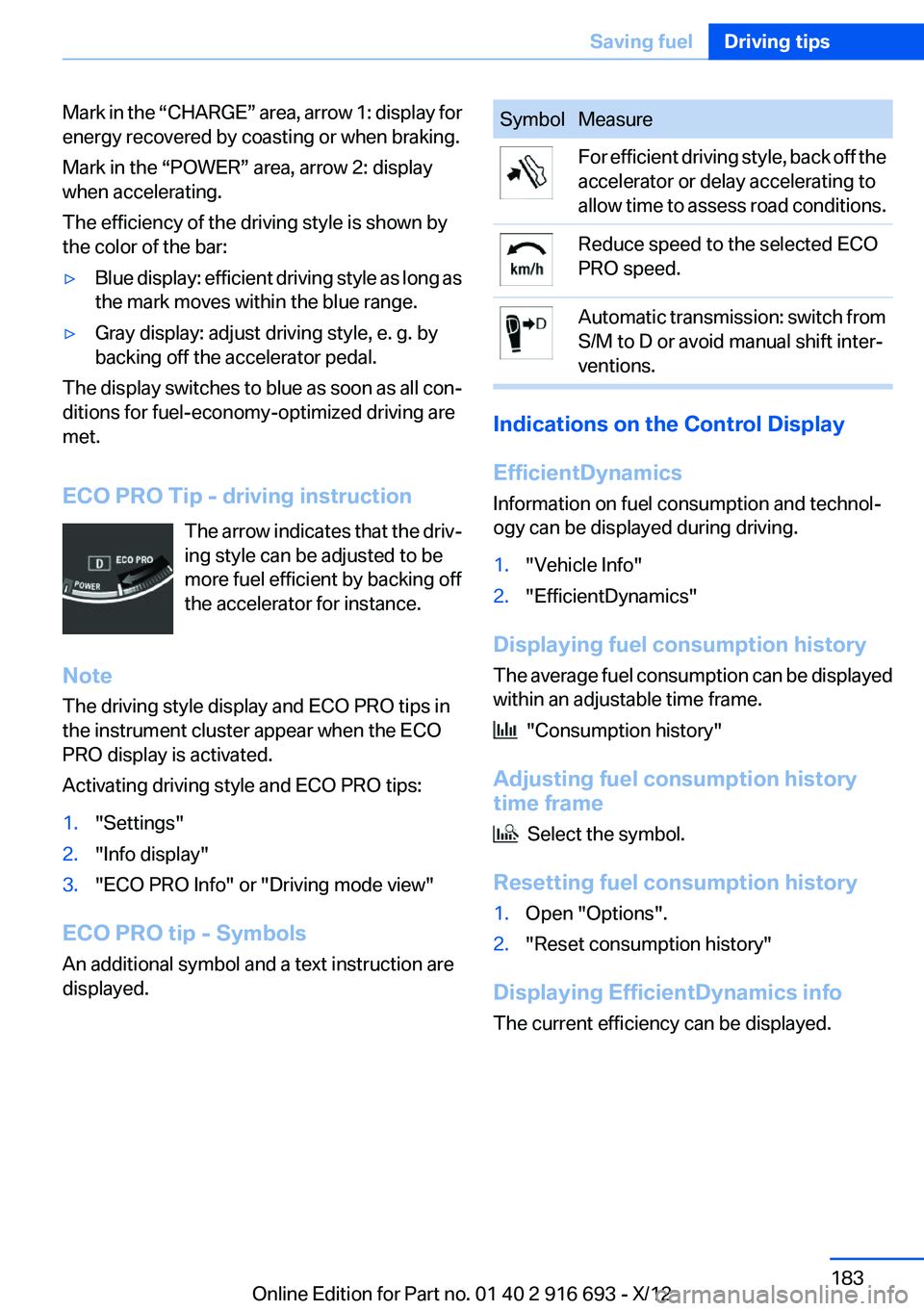
Mark in the “CHARGE” area, arrow 1: display for
energy recovered by coasting or when braking.
Mark in the “POWER” area, arrow 2: display
when accelerating.
The efficiency of the driving style is shown by
the color of the bar:▷Blue display: efficient driving style as long as
the mark moves within the blue range.▷Gray display: adjust driving style, e. g. by
backing off the accelerator pedal.
The display switches to blue as soon as all con‐
ditions for fuel-economy-optimized driving are
met.
ECO PRO Tip - driving instruction The arrow indicates that the driv‐
ing style can be adjusted to be
more fuel efficient by backing off
the accelerator for instance.
Note
The driving style display and ECO PRO tips in
the instrument cluster appear when the ECO
PRO display is activated.
Activating driving style and ECO PRO tips:
1."Settings"2."Info display"3."ECO PRO Info" or "Driving mode view"
ECO PRO tip - Symbols
An additional symbol and a text instruction are
displayed.
SymbolMeasureFor efficient driving style, back off the
accelerator or delay accelerating to
allow time to assess road conditions.Reduce speed to the selected ECO
PRO speed.Automatic transmission: switch from
S/M to D or avoid manual shift inter‐
ventions.
Indications on the Control Display
EfficientDynamics
Information on fuel consumption and technol‐
ogy can be displayed during driving.
1."Vehicle Info"2."EfficientDynamics"
Displaying fuel consumption history
The average fuel consumption can be displayed
within an adjustable time frame.
"Consumption history"
Adjusting fuel consumption history
time frame
Select the symbol.
Resetting fuel consumption history
1.Open "Options".2."Reset consumption history"
Displaying EfficientDynamics info
The current efficiency can be displayed.
Seite 183Saving fuelDriving tips183
Online Edition for Part no. 01 40 2 916 693 - X/12
Page 184 of 243
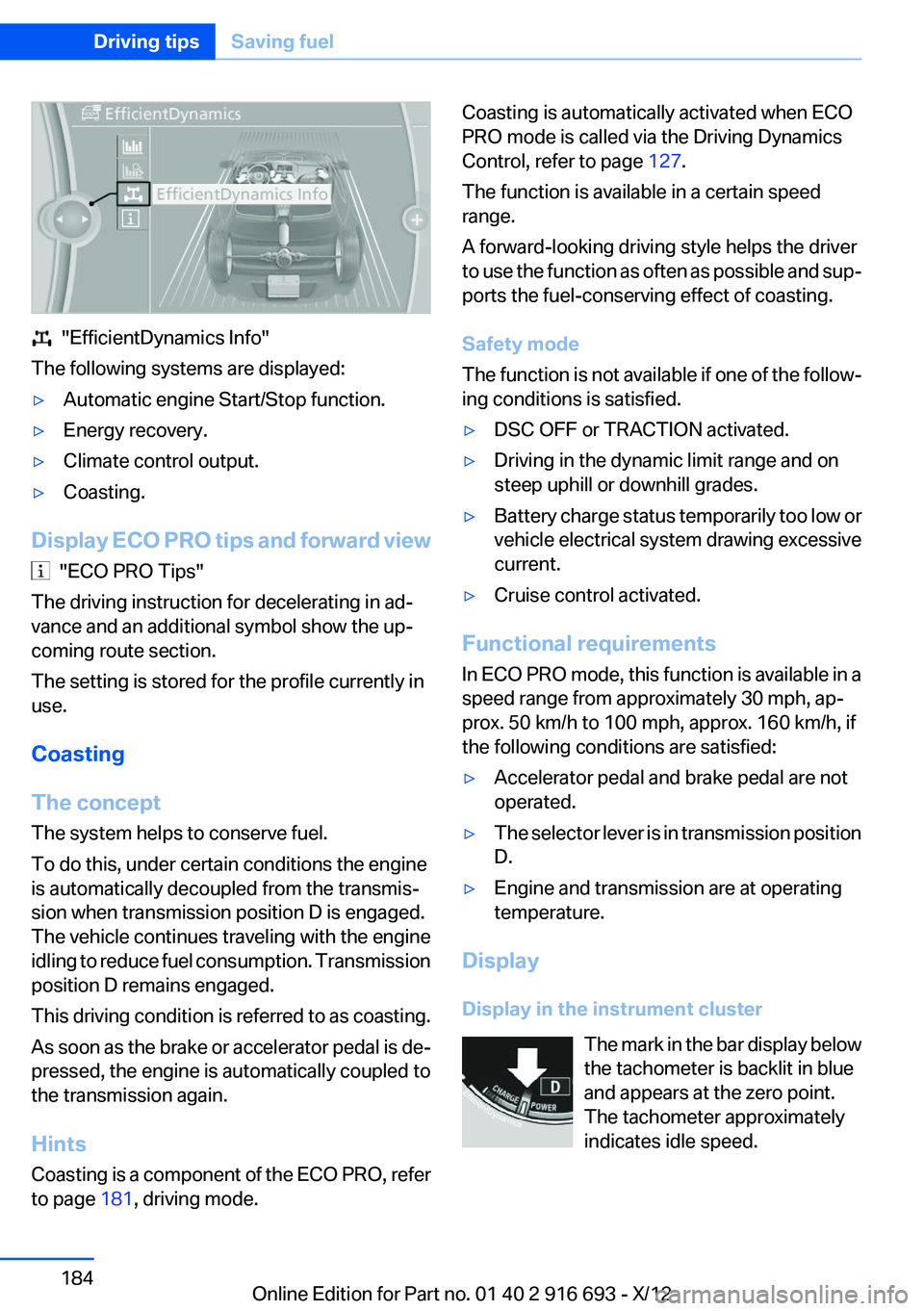
"EfficientDynamics Info"
The following systems are displayed:
▷Automatic engine Start/Stop function.▷Energy recovery.▷Climate control output.▷Coasting.
Display ECO PRO tips and forward view
"ECO PRO Tips"
The driving instruction for decelerating in ad‐
vance and an additional symbol show the up‐
coming route section.
The setting is stored for the profile currently in
use.
Coasting
The concept
The system helps to conserve fuel.
To do this, under certain conditions the engine
is automatically decoupled from the transmis‐
sion when transmission position D is engaged.
The vehicle continues traveling with the engine
idling to reduce fuel consumption. Transmission
position D remains engaged.
This driving condition is referred to as coasting.
As soon as the brake or accelerator pedal is de‐
pressed, the engine is automatically coupled to
the transmission again.
Hints
Coasting is a component of the ECO PRO, refer
to page 181, driving mode.
Coasting is automatically activated when ECO
PRO mode is called via the Driving Dynamics
Control, refer to page 127.
The function is available in a certain speed
range.
A forward-looking driving style helps the driver
to use the function as often as possible and sup‐
ports the fuel-conserving effect of coasting.
Safety mode
The function is not available if one of the follow‐
ing conditions is satisfied.▷DSC OFF or TRACTION activated.▷Driving in the dynamic limit range and on
steep uphill or downhill grades.▷Battery charge status temporarily too low or
vehicle electrical system drawing excessive
current.▷Cruise control activated.
Functional requirements
In ECO PRO mode, this function is available in a
speed range from approximately 30 mph, ap‐
prox. 50 km/h to 100 mph, approx. 160 km/h, if
the following conditions are satisfied:
▷Accelerator pedal and brake pedal are not
operated.▷The selector lever is in transmission position
D.▷Engine and transmission are at operating
temperature.
Display
Display in the instrument cluster The mark in the bar display below
the tachometer is backlit in blue
and appears at the zero point.
The tachometer approximately
indicates idle speed.
Seite 184Driving tipsSaving fuel184
Online Edition for Part no. 01 40 2 916 693 - X/12
Page 204 of 243
Engine oilVehicle equipment
All standard, country-specific and optional
equipment that is offered in the model series is
described in this chapter. Therefore, equipment
is also described that is not available in a vehicle,
e. g., because of the selected optional equip‐
ment or country variant. This also applies for
safety-related functions and systems.
General information
Engine oil consumption depends on driving
style and driving conditions, e.g., if your driving
style is very sporty engine oil consumption will
be considerably greater.
Therefore, regularly check the engine oil level
after refueling.
Checking the oil level
electronically
Status display
The concept
The oil level is monitored electronically during
driving and shown on the Control Display.
If the oil level reaches the minimum level, a
check control message is displayed.
Requirements
Depending on the previous displays, the status
display appears when the engine is running or
after the vehicle has been driven for at least 30
minutes.
Displaying the oil level1."Vehicle Info"2."Vehicle status"3. "Engine oil level"
Oil level display messages
Different messages appear on the display de‐
pending on the oil level. Pay attention to these
messages.
If oil level is too low, immediately add 1 US
quart/liter of oil.
Take care not to add too much engine oil.
Too much engine oil
Have the vehicle checked immediately;
otherwise, surplus oil can lead to engine dam‐
age.◀
Detailed measurement
The concept
In the detailed measurement the oil level is
checked and displayed via a scale.
During the measurement, the idle speed is in‐
creased somewhat.
General information
A detailed measurement is only possible with
certain engines.
Requirements
▷Automatic transmission: selector lever in
transmission position N or P and accelerator
not depressed.▷Vehicle is on a level road and the engine is
running at operating temperature.
Performing a detailed measurement
In order to perform a detailed measurement of
the engine oil level:
1."Vehicle Info"2."Vehicle status"Seite 204MobilityEngine oil204
Online Edition for Part no. 01 40 2 916 693 - X/12
Page 221 of 243
Tow fitting
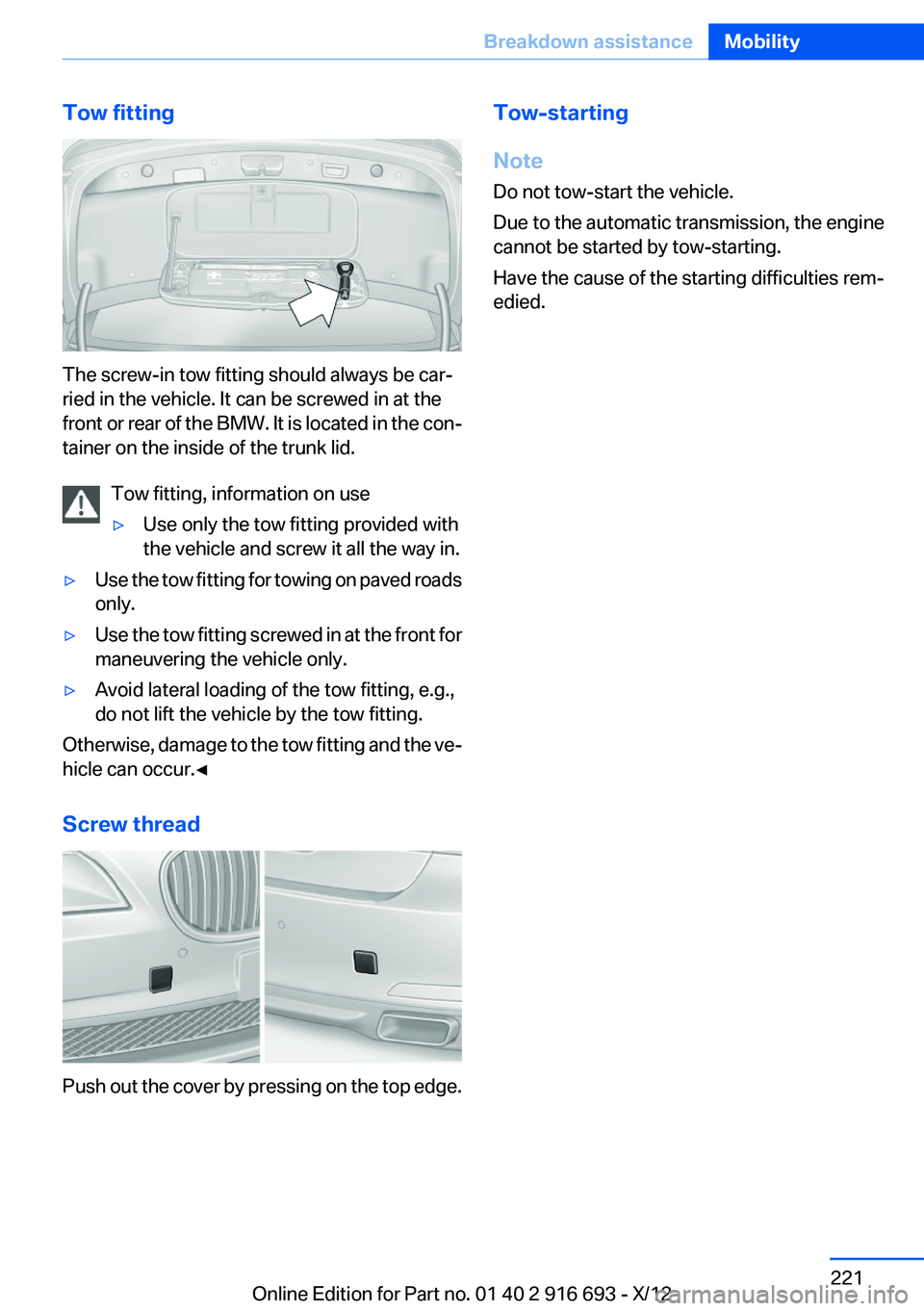
The screw-in tow fitting should always be car‐
ried in the vehicle. It can be screwed in at the
front or rear of the BMW. It is located in the con‐
tainer on the inside of the trunk lid.
Tow fitting, information on use
▷Use only the tow fitting provided with
the vehicle and screw it all the way in.▷Use the tow fitting for towing on paved roads
only.▷Use the tow fitting screwed in at the front for
maneuvering the vehicle only.▷Avoid lateral loading of the tow fitting, e.g.,
do not lift the vehicle by the tow fitting.
Otherwise, damage to the tow fitting and the ve‐
hicle can occur.◀
Screw thread
Push out the cover by pressing on the top edge.
Tow-starting
Note
Do not tow-start the vehicle.
Due to the automatic transmission, the engine
cannot be started by tow-starting.
Have the cause of the starting difficulties rem‐
edied.Seite 221Breakdown assistanceMobility221
Online Edition for Part no. 01 40 2 916 693 - X/12
Page 223 of 243
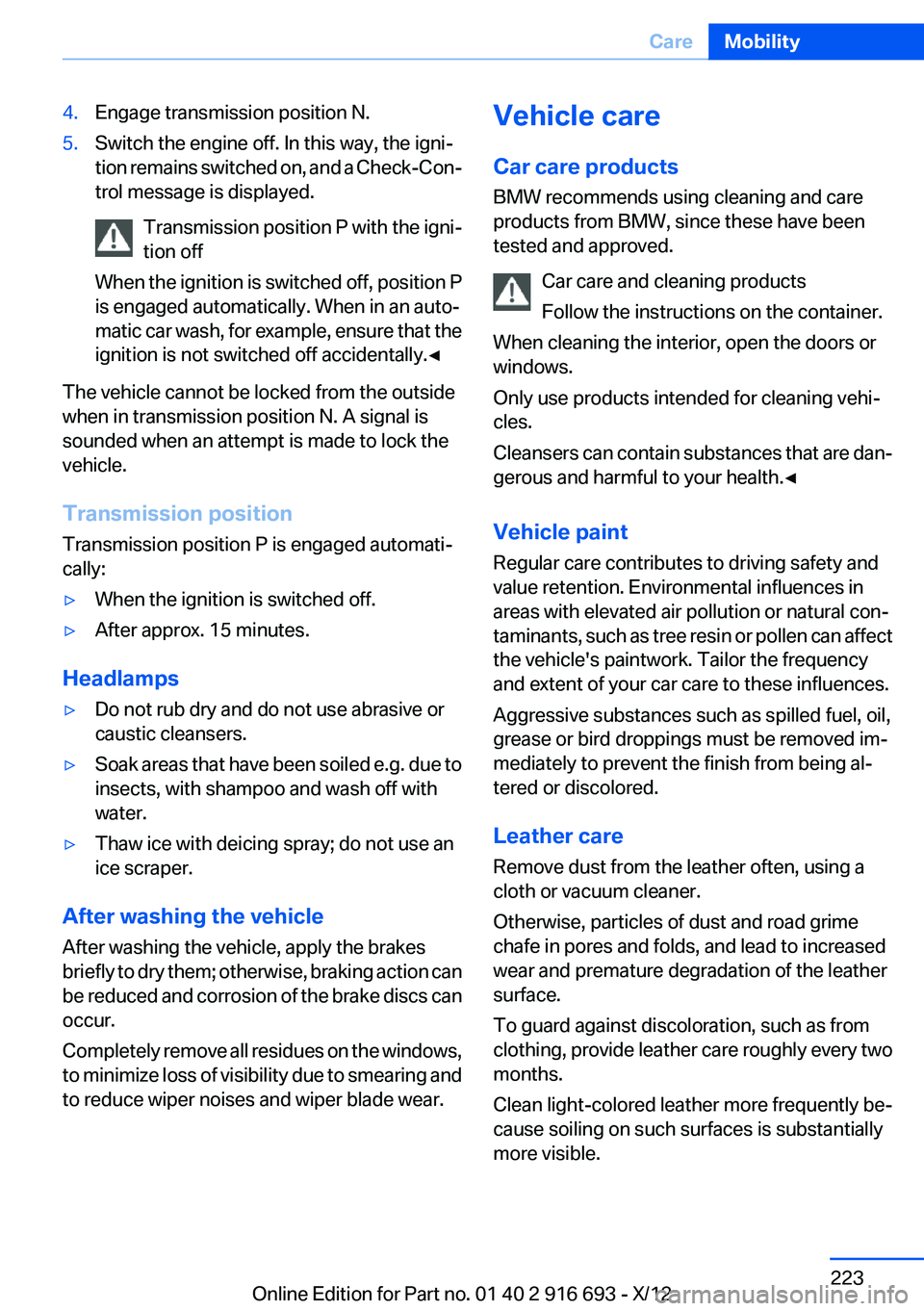
4.Engage transmission position N.5.Switch the engine off. In this way, the igni‐
tion remains switched on, and a Check-Con‐
trol message is displayed.
Transmission position P with the igni‐
tion off
When the ignition is switched off, position P
is engaged automatically. When in an auto‐
matic car wash, for example, ensure that the
ignition is not switched off accidentally.◀
The vehicle cannot be locked from the outside
when in transmission position N. A signal is
sounded when an attempt is made to lock the
vehicle.
Transmission position
Transmission position P is engaged automati‐
cally:
▷When the ignition is switched off.▷After approx. 15 minutes.
Headlamps
▷Do not rub dry and do not use abrasive or
caustic cleansers.▷Soak areas that have been soiled e.g. due to
insects, with shampoo and wash off with
water.▷Thaw ice with deicing spray; do not use an
ice scraper.
After washing the vehicle
After washing the vehicle, apply the brakes
briefly to dry them; otherwise, braking action can
be reduced and corrosion of the brake discs can
occur.
Completely remove all residues on the windows,
to minimize loss of visibility due to smearing and
to reduce wiper noises and wiper blade wear.
Vehicle care
Car care products
BMW recommends using cleaning and care
products from BMW, since these have been
tested and approved.
Car care and cleaning products
Follow the instructions on the container.
When cleaning the interior, open the doors or
windows.
Only use products intended for cleaning vehi‐
cles.
Cleansers can contain substances that are dan‐
gerous and harmful to your health.◀
Vehicle paint
Regular care contributes to driving safety and
value retention. Environmental influences in
areas with elevated air pollution or natural con‐
taminants, such as tree resin or pollen can affect
the vehicle's paintwork. Tailor the frequency
and extent of your car care to these influences.
Aggressive substances such as spilled fuel, oil,
grease or bird droppings must be removed im‐
mediately to prevent the finish from being al‐
tered or discolored.
Leather care
Remove dust from the leather often, using a
cloth or vacuum cleaner.
Otherwise, particles of dust and road grime
chafe in pores and folds, and lead to increased
wear and premature degradation of the leather
surface.
To guard against discoloration, such as from
clothing, provide leather care roughly every two
months.
Clean light-colored leather more frequently be‐
cause soiling on such surfaces is substantially
more visible.Seite 223CareMobility223
Online Edition for Part no. 01 40 2 916 693 - X/12
Page 232 of 243
Everything from A to Z
IndexA
ABS, Antilock Brake Sys‐ tem 123
ACC, Active Cruise Control with Stop & Go 131
Activated-charcoal filter 157
Active Blind Spot Detec‐ tion 118
Active Cruise Control with Stop & Go, ACC 131
Active Protection 120
Active seat, front 50
Active seat ventilation, front 51
Active seat ventilation, rear 54
Active Steering, integral 126
Adaptive brake lights, refer to Brake force display 120
Adaptive drive 125
Adaptive light control 97
Adaptive light control, bulb re‐ placement 212
Additives, oil 205
Adjust front seat 48
Adjustments, seats/head re‐ straints 48
After washing vehicle 223
Airbags 101
Airbags, indicator/warning light 102
Air circulation, refer to Recir‐ culated-air mode 156
Air, dehumidifying, refer to Cooling function 156
Air distribution, manual 155
Air flow, automatic climate control 155
Air pressure, tires 191 Air vents, refer to Ventila‐
tion 157
Alarm system 42
Alarm, unintentional 43
All around the center con‐ sole 14
All around the headliner 15
All around the steering wheel 12
ALL program, automatic cli‐ mate control 156
All-season tires, refer to Win‐ ter tires 199
All-wheel-drive 124
Alternating-code hand-held transmitter 162
Alternative oil types 205
Ambient light 99
Antifreeze, washer fluid 76
Antilock Brake System, ABS 123
Anti-slip control, refer to DSC 123
Approved axle load 229
Approved engine oils 205
Armrest, refer to Center arm‐ rest 169
Arrival time 91
Ashtray 163
Assistance, Roadside Assis‐ tance 218
Assistance when driving off 123
Assist system, refer to Intelli‐ gent Safety 109
Attentiveness assistant 120
AUTO H button, refer to Auto‐ matic Hold 72
AUTO intensity 155
Automatic car wash 222 Automatic climate con‐
trol 154
Automatic Cruise Control with Stop & Go 131
Automatic Curb Monitor 59
Automatic deactivation, front passenger airbags 103
Automatic headlamp con‐ trol 96
Automatic Hold 72
Automatic locking 37
Automatic recirculated-air control 156
Automatic Soft Closing, doors 37
Automatic Soft Closing, trunk lid 38
Automatic tailgate 38
Automatic transmission with Steptronic 76
AUTO program, automatic cli‐ mate control 155
AUTO program, intensity 155
Auto Start/Stop function 68
Average fuel consumption 91
Average speed 91
Axle loads, weights 229
B
Backrest curvature, refer to Lumbar support 49
Backrest, width 49
Back seats, adjusting 51
Backup camera 141
Band-aids, refer to First aid kit 218
Bar for tow-starting/tow‐ ing 220
Basic position, rear seats 53 Seite 232ReferenceEverything from A to Z232
Online Edition for Part no. 01 40 2 916 693 - X/12
Page 239 of 243
S
Safe braking 175
Safety 7
Safety belt reminder for driv‐ er's seat and front passenger
seat 55
Safety belts 54
Safety belts, care 224
Safety Package, refer to Active Protection 120
Safety switch, windows 44
Safety systems, airbags 101
Saving fuel 180
Screen, refer to Control Dis‐ play 16
Screwdriver 210
Screw thread for tow fit‐ ting 221
Seat belts, refer to Safety belts 54
Seat heating, front 50
Seat heating, rear 53
Seating position for chil‐ dren 62
Seat, mirror, and steering wheel memory 58
Seats 48
Seats, rear, adjusting 51
Seat ventilation, front 51
Seat ventilation, rear 54
Selection list in instrument cluster 90
Selector lever, automatic transmission 77
Self-leveling suspension, air suspension 127
Self-leveling suspension, mal‐ function 127
Sensors, care 225
Service and warranty 7
Service requirements, Condi‐ tion Based Service CBS 208
Service requirements, dis‐ play 87 Service, Roadside Assis‐
tance 218
Settings on Control Dis‐ play 93
Settings, storing for seat, mir‐ rors, steering wheel 58
Shifting, automatic transmis‐ sion 76
Shift paddles on steering wheel 78
Shoulder support 49
Side airbags 101
Side View 144
Signaling, horn 12
Signals when unlocking 35
Sitting safely 48
Size 228
Ski bag 166
Slide/tilt glass roof 45
Smallest turning circle 229
Smoker's package 163
Snow chains 200
Socket 164
Socket, OBD Onboard Diag‐ nostics 209
SOS button 217
Spare fuse 216
Speaker lighting 99
Specified engine oil types 205
Speed, average 91
Speed limit detection, on‐ board computer 91
Speed limiter, display 88
Speed Limit Information 88
Speed limit in the com‐ puter 91
Split screen 20
SPORT+ program, Dynamic Driving Control 128
Sport automatic transmis‐ sion 78
SPORT program, Dynamic Driving Control 129
Sport program, transmis‐ sion 78 Stability control systems 123
Start/stop, automatic func‐ tion 68
Start/Stop button 66
Start function during malfunc‐ tion 31
Starting the engine 67
Status display, tires 106
Status information, iDrive 19
Status of Owner's Manual 6
Steering, Integral Active Steering 126
Steering wheel, adjusting 61
Steering wheel heating 61
Steering wheel memory 58
Steptronic, automatic trans‐ mission 76
Stopping the engine 67
Storage compartments 168
Storage compartments, loca‐ tions 168
Storage, tires 200
Storing the vehicle 225
Summer tires, tread 198
Supplementary text mes‐ sage 85
Surround View 141
Suspension settings 127
Switch for Dynamic Driving Control 127
Switch-on times, parked-car ventilation 160
Switch, refer to Cockpit 12
Symbols 6
T
Tachometer 86
Tail and brake lamps 213
Tailgate 37
Tailgate, automatic 38
Tailgate opening with no- touch activation 41
Tailgate via remote control 35
Tail lamps 213 Seite 239Everything from A to ZReference239
Online Edition for Part no. 01 40 2 916 693 - X/12
Page 240 of 243
Tail lamps, bulb replace‐ment 213
Technical changes, refer to Safety 7
Technical data 228
Telephone, see user's manual for Navigation, Entertain‐
ment and Communication
Temperature, automatic cli‐ mate control 155
Temperature display, external temperature 86
Temperature, engine oil 86
Tempomat, refer to Active Cruise Control 131
Terminal, jump-starting 219
Text message, supplemen‐ tary 85
Theft alarm system, refer to Alarm system 42
Theft protection, lug bolts 215
Theft protection, refer to Cen‐ tral locking system 33
Thermal camera, refer to Night Vision 114
Tilt alarm sensor 43
Time of arrival 91
Tire damage 198
Tire identification marks 196
Tire inflation pressure 191
Tire inflation pressure monitor, refer to FTM 104
Tire Pressure Monitor TPM 106
Tires, changing 198
Tires, everything on wheels and tires 191
Tires, run-flat tires 200
Tire tread 198
Tone, see user's manual for Navigation, Entertainment
and Communication
Tools 210
Top View 145
Total vehicle weight 229 Tow fitting 221
Towing 220
Tow-starting 220
TPM Tire Pressure Moni‐ tor 106
Traction control 124
TRACTION program, Dynamic Driving Control 128
Transmission, automatic 76
Transporting children safely 62
Tread, tires 198
Trip computer 92
Triple turn signal activa‐ tion 73
Trip odometer 86
Trunk lid 37
Trunk lid, automatic 38
Trunk lid, emergency unlock‐ ing 40
Trunk lid, hotel function 40
Trunk lid, manual opera‐ tion 38
Trunk lid opening with no- touch activation 41
Trunk lid via remote con‐ trol 35
Turning circle 229
Turning circle lines, backup camera 143
Turn signals, operation 73
Turn signals, rear, bulb re‐ placement 213
U
Unintentional alarm 43
Units of measure 94
Universal remote control 161
Unlock button, automatic transmission 77
Unlocking/locking from in‐ side 37
Unlocking/locking via door lock 36 Unlocking/locking with remote
control 34
Updates made after the edito‐ rial deadline 7
Upholstery care 224
USB interface 165
V
Vanity mirror 60
Variable steering, Integral Ac‐ tive Steering 126
Vehicle battery 215
Vehicle battery, replacing 215
Vehicle, breaking in 174
Vehicle care 223
Vehicle equipment 6
Vehicle identification number, refer to Identification number
in the engine compart‐
ment 202
Vehicle jack 215
Vehicle paint 223
Vehicle storage 225
Vehicle wash 222
Ventilation 157
Ventilation, refer to Parked-car ventilation 160
Voice activation system 22
W
Warning messages, refer to Check Control 83
Warning triangle 218
Washer fluid 76
Washer fluid reservoir, ca‐ pacity 231
Washer nozzles, wind‐ shield 75
Washer system 74
Washing, vehicle 222
Water on roads 175
Weights 229
Welcome lamps 95
Wheel base, vehicle 229 Seite 240ReferenceEverything from A to Z240
Online Edition for Part no. 01 40 2 916 693 - X/12