battery BMW 750LI 2013 Owner's Manual
[x] Cancel search | Manufacturer: BMW, Model Year: 2013, Model line: 750LI, Model: BMW 750LI 2013Pages: 243, PDF Size: 5.37 MB
Page 218 of 243
Assist Response Center contacts you and
takes further steps to help you.
Even if you are unable to respond, the BMW
Assist Response Center can take further
steps to help you under certain circumstan‐
ces.
For this purpose, data that are used to de‐
termine the necessary rescue measures,
such as the current position of the vehicle if
it can be established, are transmitted to the
BMW Assist Response Center.▷If the LED is flashing but the BMW Assist
Response Center cannot be heard on the
hands-free system, the hands-free system
may be malfunctioning. However, the BMW
Assist Response Center may still be able to
hear you.
Initiating an Emergency Request
automatically
Under certain conditions, an Emergency Re‐
quest is automatically initiated immediately after
a severe accident. Automatic Collision Notifica‐
tion is not affected by pressing the SOS button.
Warning triangle
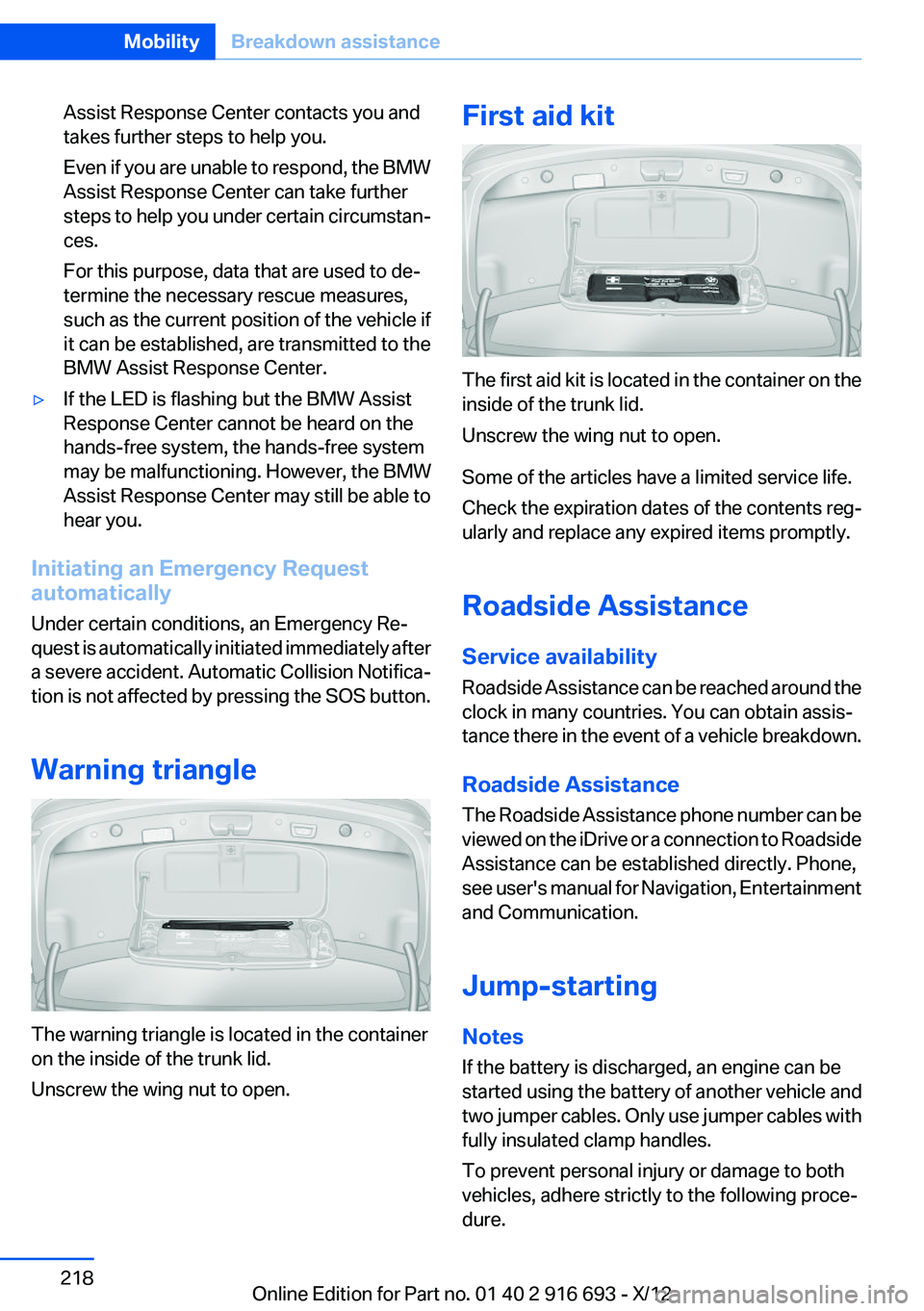
The warning triangle is located in the container
on the inside of the trunk lid.
Unscrew the wing nut to open.
First aid kit
The first aid kit is located in the container on the
inside of the trunk lid.
Unscrew the wing nut to open.
Some of the articles have a limited service life.
Check the expiration dates of the contents reg‐
ularly and replace any expired items promptly.
Roadside Assistance
Service availability
Roadside Assistance can be reached around the
clock in many countries. You can obtain assis‐
tance there in the event of a vehicle breakdown.
Roadside Assistance
The Roadside Assistance phone number can be
viewed on the iDrive or a connection to Roadside
Assistance can be established directly. Phone,
see user's manual for Navigation, Entertainment
and Communication.
Jump-starting
Notes
If the battery is discharged, an engine can be
started using the battery of another vehicle and
two jumper cables. Only use jumper cables with
fully insulated clamp handles.
To prevent personal injury or damage to both
vehicles, adhere strictly to the following proce‐
dure.
Seite 218MobilityBreakdown assistance218
Online Edition for Part no. 01 40 2 916 693 - X/12
Page 219 of 243
Do not touch live parts
To avoid the risk of potentially fatal injury,
always avoid all contact with electrical compo‐
nents while the engine is running.◀
Preparation1.Check whether the battery of the other ve‐
hicle has a voltage of 12 volts. This informa‐
tion can be found on the battery.2.Switch off the engine of the assisting vehi‐
cle.3.Switch off any electronic systems/power
consumers in both vehicles.
Bodywork contact between vehicles
Make sure that there is no contact be‐
tween the bodywork of the two vehicles; other‐
wise, there is the danger of short circuits.◀
Starting aid terminals Connecting order
Connect the jumper cables in the correct
order; otherwise, there is the danger of injury
from sparking.◀
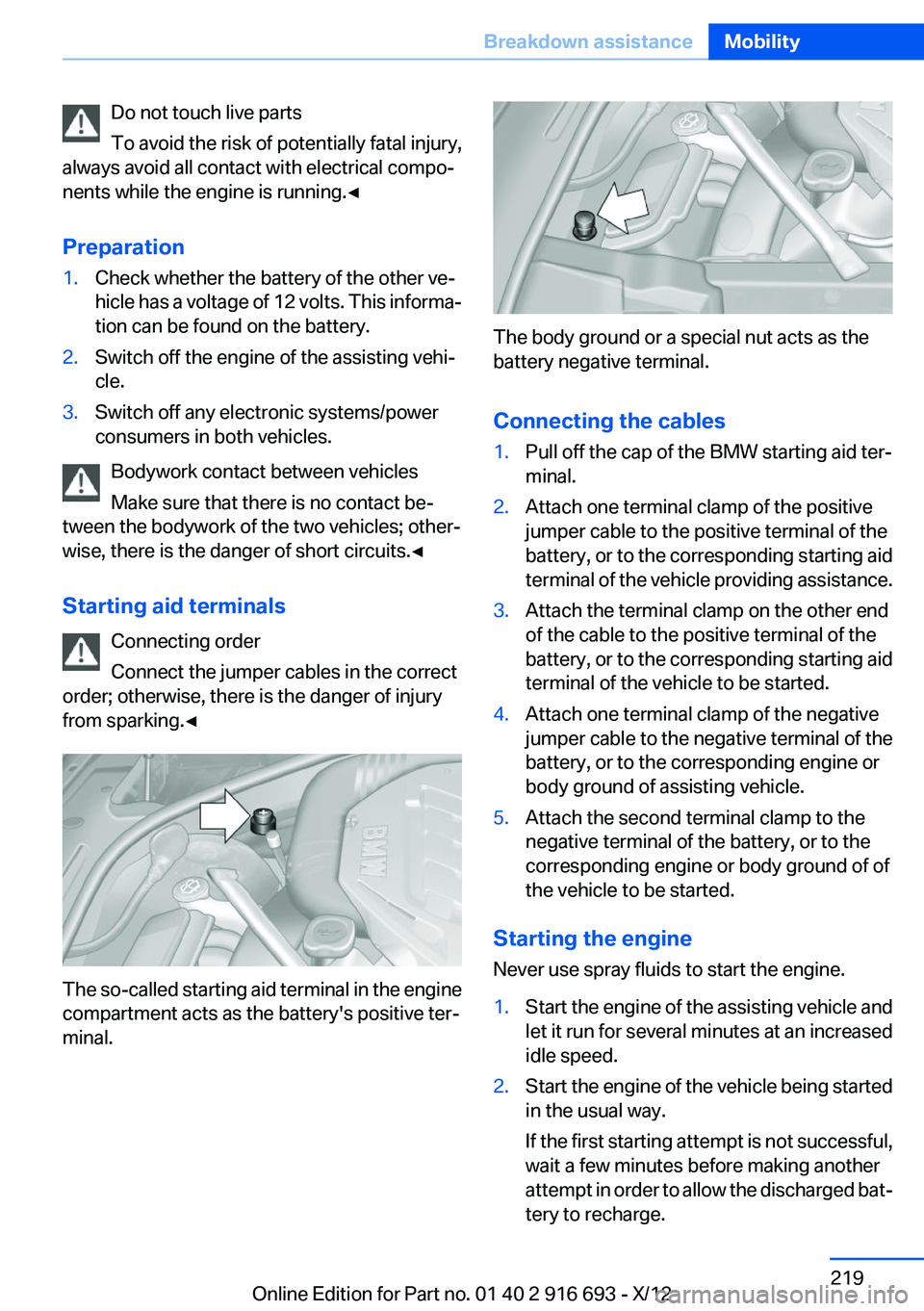
The so-called starting aid terminal in the engine
compartment acts as the battery's positive ter‐
minal.
The body ground or a special nut acts as the
battery negative terminal.
Connecting the cables
1.Pull off the cap of the BMW starting aid ter‐
minal.2.Attach one terminal clamp of the positive
jumper cable to the positive terminal of the
battery, or to the corresponding starting aid
terminal of the vehicle providing assistance.3.Attach the terminal clamp on the other end
of the cable to the positive terminal of the
battery, or to the corresponding starting aid
terminal of the vehicle to be started.4.Attach one terminal clamp of the negative
jumper cable to the negative terminal of the
battery, or to the corresponding engine or
body ground of assisting vehicle.5.Attach the second terminal clamp to the
negative terminal of the battery, or to the
corresponding engine or body ground of of
the vehicle to be started.
Starting the engine
Never use spray fluids to start the engine.
1.Start the engine of the assisting vehicle and
let it run for several minutes at an increased
idle speed.2.Start the engine of the vehicle being started
in the usual way.
If the first starting attempt is not successful,
wait a few minutes before making another
attempt in order to allow the discharged bat‐
tery to recharge.Seite 219Breakdown assistanceMobility219
Online Edition for Part no. 01 40 2 916 693 - X/12
Page 220 of 243
3.Let both engines run for several minutes.4.Disconnect the jumper cables in the reverse
order.
Check the battery and recharge if necessary.
Tow-starting and towing
Transporting your vehicle
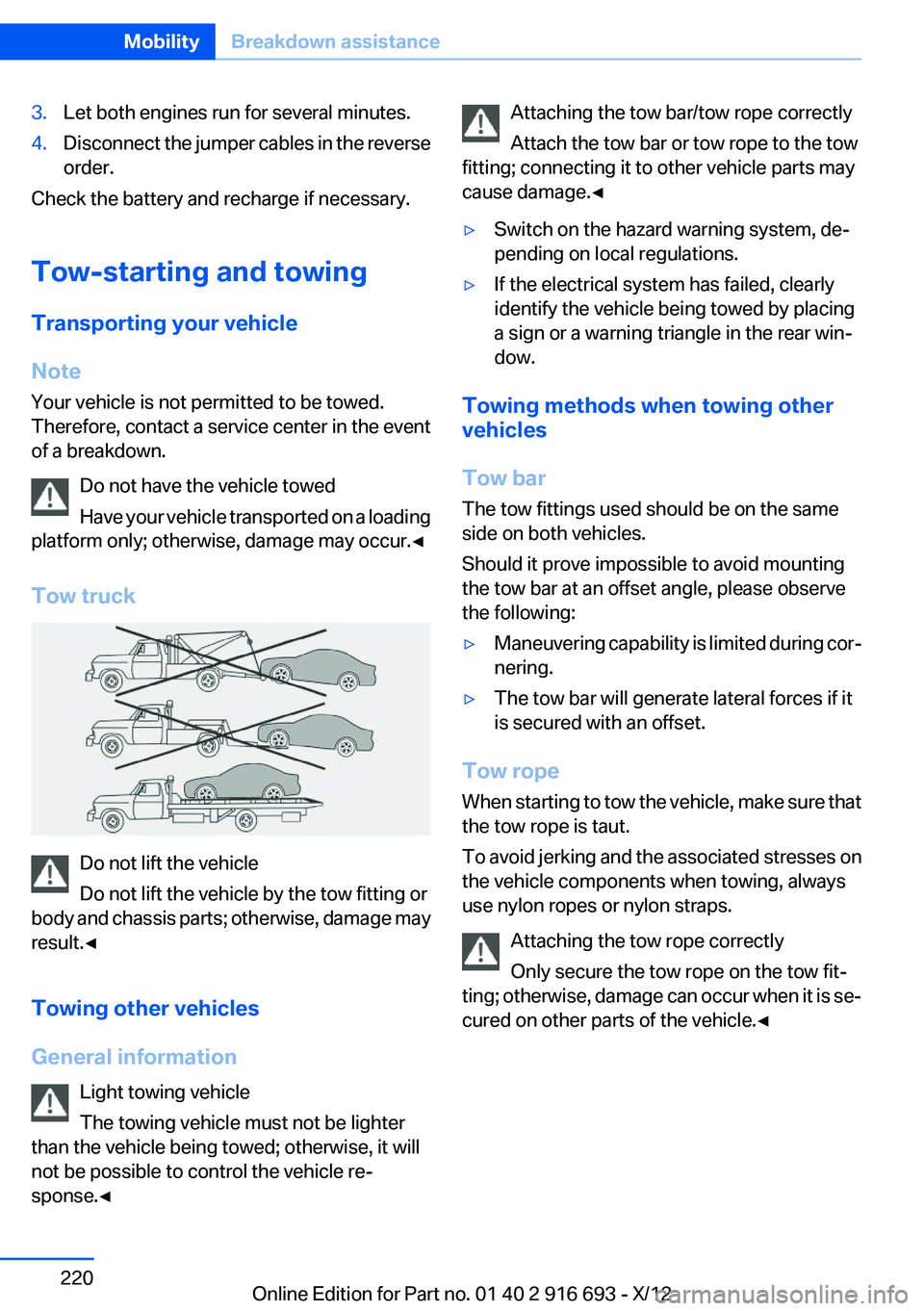
Note
Your vehicle is not permitted to be towed.
Therefore, contact a service center in the event
of a breakdown.
Do not have the vehicle towed
Have your vehicle transported on a loading
platform only; otherwise, damage may occur.◀
Tow truck
Do not lift the vehicle
Do not lift the vehicle by the tow fitting or
body and chassis parts; otherwise, damage may
result.◀
Towing other vehicles
General information Light towing vehicle
The towing vehicle must not be lighter
than the vehicle being towed; otherwise, it will
not be possible to control the vehicle re‐
sponse.◀
Attaching the tow bar/tow rope correctly
Attach the tow bar or tow rope to the tow
fitting; connecting it to other vehicle parts may
cause damage.◀▷Switch on the hazard warning system, de‐
pending on local regulations.▷If the electrical system has failed, clearly
identify the vehicle being towed by placing
a sign or a warning triangle in the rear win‐
dow.
Towing methods when towing other
vehicles
Tow bar
The tow fittings used should be on the same
side on both vehicles.
Should it prove impossible to avoid mounting
the tow bar at an offset angle, please observe
the following:
▷Maneuvering capability is limited during cor‐
nering.▷The tow bar will generate lateral forces if it
is secured with an offset.
Tow rope
When starting to tow the vehicle, make sure that
the tow rope is taut.
To avoid jerking and the associated stresses on
the vehicle components when towing, always
use nylon ropes or nylon straps.
Attaching the tow rope correctly
Only secure the tow rope on the tow fit‐
ting; otherwise, damage can occur when it is se‐
cured on other parts of the vehicle.◀
Seite 220MobilityBreakdown assistance220
Online Edition for Part no. 01 40 2 916 693 - X/12
Page 233 of 243
Battery replacement, vehiclebattery 215
Battery replacement, vehicle remote control 30
Battery, vehicle 215
Belts, safety belts 54
Beverage holder, cu‐ pholder 170
Blinds, sun protection 45
BMW Assist, see user's manual for Navigation, Enter‐
tainment and Communica‐
tion
BMW Homepage 6
BMW Internet page 6
BMW maintenance sys‐ tem 208
Bonus range, ECO PRO 182
Bottle holder, refer to Cu‐ pholder 170
Brake assistant 123
Brake discs, breaking in 174
Brake force display 120
Brake lamps, brake force dis‐ play 120
Brake lamps, bulb replace‐ ment 213
Brake lights, adaptive 120
Brake pads, breaking in 174
Braking, notes 175
Breakdown assis‐ tance 217, 218
Breaking in 174
Brightness of Control Dis‐ play 94
Bulb replacement 210
Bulb replacement, rear 213
Bulbs and lamps 210
Button, RES 134
Button, Start/Stop 66
Bypassing, refer to Jump- starting 218 C
California Proposition 65 Warning 7
Camera, backup camera 142
Camera, care 225
Camera, Side View 144
Camera, Top View 145
Can holder, refer to Cu‐ pholder 170
Car battery 215
Car care products 223
Care, displays 225
Care, vehicle 223
Cargo 177
Cargo area lid 37
Cargo area, storage compart‐ ments 170
Cargo straps, securing cargo 178
Car key, refer to Remote con‐ trol 30
Carpet, care 224
Car wash 222
Catalytic converter, refer to Hot exhaust system 174
CBS Condition Based Serv‐ ice 208
CD/Multimedia, see user's manual for Navigation, Enter‐
tainment and Communica‐
tion
Center armrest 169
Center console 14
Central locking system 33
Central screen, refer to Control Display 16
Changes, technical, refer to Safety 7
Changing parts 210
Changing wheels 214
Changing wheels/tires 198
Check Control 83
Children, seating position 62
Children, transporting safely 62 Child restraint fixing sys‐
tem 62
Child restraint fixing system LATCH 63
Child restraint fixing systems, mounting 62
Child safety locks 65
Child seat, mounting 62
Child seats 62
Chrome parts, care 224
Cigarette lighter 163
Cleaning, displays 225
Climate control 154
Climate control on head‐ liner 159
Climate control wind‐ shield 175
Clock 86
Closing/opening from in‐ side 37
Closing/opening via door lock 36
Closing/opening with remote control 34
Clothes hooks 170
Coasting 184
Coasting with engine decou‐ pled, coasting 184
Coasting with idling en‐ gine 184
Collision warning 110
Collision warning with braking function 112
Combination switch, refer to Turn signals 73
Combination switch, refer to Wiper system 74
COMFORT+ program, Driving Dynamics Control 129
Comfort Access 40
COMFORT program, Driving Dynamics Control 129
Computer 90
Condensation on win‐ dows 155 Seite 233Everything from A to ZReference233
Online Edition for Part no. 01 40 2 916 693 - X/12
Page 234 of 243
Condensation under the vehi‐cle 176
Condition Based Service CBS 208
Configure driving mode 129
Confirmation signal 35
ConnectedDrive, see user's manual for Navigation, Enter‐
tainment and Communica‐
tion
Control Display 16
Control Display, settings 93
Controller 16
Control systems, driving sta‐ bility 123
Convenient opening 34
Coolant 207
Coolant temperature 86
Cooler 165
Cooling function 156
Cooling, maximum 155
Cooling system 207
Corrosion on brake discs 176
Cruise control 137
Cruise control, active with Stop & Go 131
Cruising range 87
Cupholder 170
Curb weight 229
Current fuel consumption 87
D
Damage, tires 198
Damping control, dy‐ namic 126
Data, technical 228
Date 87
Daytime running lights 96
Defrosting, refer to Windows, defrosting 155
Dehumidifying, air 156
Destination distance 91
Digital clock 86
Dimensions 228
Dimmable exterior mirrors 60 Dimmable interior rearview
mirror 60
Direction indicator, refer to Turn signals 73
Display in windshield 151
Display lighting, refer to Instru‐ ment lighting 98
Displays 79, 80
Displays, cleaning 225
Disposal, vehicle battery 216
Distance control, refer to PDC 139
Distance information 152
Distance, selecting for ACC 133
Distance to destination 91
Divided screen view, split screen 20
Door lock, refer to Remote control 30
Doors, Automatic Soft Clos‐ ing 37
Downhill control 125
Drive-off assistant 123
Drive-off assistant, refer to DSC 123
Driving Dynamics Control 127
Driving instructions, breaking in 174
Driving mode 127
Driving notes, general 174
Driving stability control sys‐ tems 123
Driving tips 174
DSC Dynamic Stability Con‐ trol 123
DTC driving dynamics 124
DTC Dynamic Traction Con‐ trol 124
Dynamic Damping Con‐ trol 126
Dynamic Drive 126
Dynamic Light Spot 213
Dynamic Light Spot, refer to Night Vision 114 Dynamic Stability Control
DSC 123
Dynamic Traction Control DTC 124
E
ECO PRO 181
ECO PRO, bonus range 182
ECO PRO display 181
ECO PRO driving mode 181
ECO PRO mode 181
ECO PRO Tip - driving instruc‐ tion 183
EfficientDynamics 183
Electronic displays, instru‐ ment cluster 80
Electronic Stability Program ESP, refer to DSC 123
Emergency detection, remote control 31
Emergency release, door lock 36
Emergency release, fuel filler flap 188
Emergency release, parking brake 70
Emergency Request 217
Emergency service, refer to Roadside Assistance 218
Emergency start function, en‐ gine start 31
Emergency unlocking, trunk lid 40
Energy Control 87
Energy recovery 87
Engine, automatic Start/Stop function 68
Engine, automatic switch- off 68
Engine compartment 202
Engine compartment, working in 202
Engine coolant 207
Engine idling when driving, coasting 184 Seite 234ReferenceEverything from A to Z234
Online Edition for Part no. 01 40 2 916 693 - X/12
Page 240 of 243
Tail lamps, bulb replace‐ment 213
Technical changes, refer to Safety 7
Technical data 228
Telephone, see user's manual for Navigation, Entertain‐
ment and Communication
Temperature, automatic cli‐ mate control 155
Temperature display, external temperature 86
Temperature, engine oil 86
Tempomat, refer to Active Cruise Control 131
Terminal, jump-starting 219
Text message, supplemen‐ tary 85
Theft alarm system, refer to Alarm system 42
Theft protection, lug bolts 215
Theft protection, refer to Cen‐ tral locking system 33
Thermal camera, refer to Night Vision 114
Tilt alarm sensor 43
Time of arrival 91
Tire damage 198
Tire identification marks 196
Tire inflation pressure 191
Tire inflation pressure monitor, refer to FTM 104
Tire Pressure Monitor TPM 106
Tires, changing 198
Tires, everything on wheels and tires 191
Tires, run-flat tires 200
Tire tread 198
Tone, see user's manual for Navigation, Entertainment
and Communication
Tools 210
Top View 145
Total vehicle weight 229 Tow fitting 221
Towing 220
Tow-starting 220
TPM Tire Pressure Moni‐ tor 106
Traction control 124
TRACTION program, Dynamic Driving Control 128
Transmission, automatic 76
Transporting children safely 62
Tread, tires 198
Trip computer 92
Triple turn signal activa‐ tion 73
Trip odometer 86
Trunk lid 37
Trunk lid, automatic 38
Trunk lid, emergency unlock‐ ing 40
Trunk lid, hotel function 40
Trunk lid, manual opera‐ tion 38
Trunk lid opening with no- touch activation 41
Trunk lid via remote con‐ trol 35
Turning circle 229
Turning circle lines, backup camera 143
Turn signals, operation 73
Turn signals, rear, bulb re‐ placement 213
U
Unintentional alarm 43
Units of measure 94
Universal remote control 161
Unlock button, automatic transmission 77
Unlocking/locking from in‐ side 37
Unlocking/locking via door lock 36 Unlocking/locking with remote
control 34
Updates made after the edito‐ rial deadline 7
Upholstery care 224
USB interface 165
V
Vanity mirror 60
Variable steering, Integral Ac‐ tive Steering 126
Vehicle battery 215
Vehicle battery, replacing 215
Vehicle, breaking in 174
Vehicle care 223
Vehicle equipment 6
Vehicle identification number, refer to Identification number
in the engine compart‐
ment 202
Vehicle jack 215
Vehicle paint 223
Vehicle storage 225
Vehicle wash 222
Ventilation 157
Ventilation, refer to Parked-car ventilation 160
Voice activation system 22
W
Warning messages, refer to Check Control 83
Warning triangle 218
Washer fluid 76
Washer fluid reservoir, ca‐ pacity 231
Washer nozzles, wind‐ shield 75
Washer system 74
Washing, vehicle 222
Water on roads 175
Weights 229
Welcome lamps 95
Wheel base, vehicle 229 Seite 240ReferenceEverything from A to Z240
Online Edition for Part no. 01 40 2 916 693 - X/12