wheel BMW 750LI 2014 Repair Manual
[x] Cancel search | Manufacturer: BMW, Model Year: 2014, Model line: 750LI, Model: BMW 750LI 2014Pages: 251, PDF Size: 5.75 MB
Page 156 of 251
Interrupting automaticallyThe system is interrupted automatically in the
following situations:▷If the driver grasps the steering wheel or if
he takes over steering.▷If a gear is selected that does not match
the instruction on the Control Display.▷If a turn signal is activated in the opposite
direction to the desired side for parking.▷If the vehicle speed exceeds approx.
6 mph/10 km/h.▷On snow-covered or slippery road surfaces
if necessary.▷If doors are open.▷When there are obstacles that are hard to
overcome, such as curbs.▷When there are obstacles that suddenly
arise.▷If a maximum number of parking attempts
or the time taken for parking is exceeded.
A Check Control message is displayed.
Continuing
An interrupted parking procedure can be con‐
tinued if necessary.
Follow the instructions on the Control Display
to do this.
System limits
No parking assistance The parking assistant does not offer assis‐
tance in the following situations:
▷In tight curves.
Functional limitations
The system may not be fully functional in the
following situations:
▷When sensors are dirty or iced over.▷In heavy fog, rain or snowfall.▷On bumpy road surfaces such as gravel
roads.▷On slippery ground.▷On steep uphill or downhill grades.▷When leaves or snow has collected in the
parking space.
Limits of ultrasonic measurement
The detection of objects can reach the physi‐
cal limits of ultrasonic measurement, e.g., in
the following circumstances:
▷With tow bars and trailer hitches.▷With thin or wedge-shaped objects.▷With elevated, protruding objects such as
ledges or cargo.▷With objects with corners and sharp edges.▷With objects with a fine surface structure,
such as fences.
Low objects already displayed, e.g., curbs, can
move into the blind area of the sensors before
or after a continuous tone sounds.
High, protruding objects such as ledges may
not be detected.
The parking assistant may identify parking
spaces that are not suitable for parking.
Malfunction
A Check Control message is displayed.
The parking assistant failed. Have the system
checked.
Seite 156ControlsDriving comfort156
Online Edition for Part no. 01 40 2 909 749 - VI/13
Page 161 of 251
Climate control functions in detail
Manual air distribution Press the button repeatedly to select
a program:▷Upper body region.▷Upper body region and footwell.▷Footwell.▷Windows and footwell.▷Windows, upper body region, and footwell.▷Windows: driver's side only.▷Windows and upper body region.
If the windows are fogged over, press the
AUTO button on the driver's side to utilize the
condensation sensor.
Temperature Turn the wheel to set the de‐sired temperature.
The automatic climate control achieves this
temperature as quickly as possible, if neces‐
sary with the maximum cooling or heating ca‐
pacity, and then keeps it constant.
Avoid rapidly switching between different tem‐
perature settings. Otherwise, the automatic cli‐
mate control will not have sufficient time to ad‐
just the set temperature.
AUTO program Press the button.
Air volume, air distribution, and tem‐
perature are controlled automatically.
Depending on the selected temperature, the
AUTO intensity, and outside influences, the air
is directed to the windshield, side windows, upper body, and into the footwell.
The cooling function, refer to page 162, is
switched on automatically with the AUTO pro‐
gram.
At the same time, a condensation sensor con‐
trols the program so as to prevent window
condensation as much as possible.
Intensity of the AUTO program
With the AUTO program switched on, auto‐
matic control of the air flow and air distribution
can be adjusted.
Press the left or right side of the but‐
ton: decrease or increase the inten‐
sity.
The selected intensity is shown on the display
of the automatic climate control.
Air flow, manual To be able to manually adjust the air flow,
switch off the AUTO program first.
Press the left or right side of the but‐
ton: decrease or increase air flow.
The selected air flow is shown on the display of
the automatic climate control.
The air flow of the automatic climate control
may be reduced automatically to save battery
power.
Defrosting windows and removing condensation
Press the button.
Ice and condensation are quickly re‐
moved from the windshield and the front side
windows.
The air volume can be adjusted when the pro‐
gram is active.
If the windows are fogged over, you can also
switch on the cooling function or press the
AUTO button to utilize the condensation sen‐
sor.Seite 161Climate controlControls161
Online Edition for Part no. 01 40 2 909 749 - VI/13
Page 163 of 251
Switching on1.Switch off the ignition.2. Press the right side of the button
on the driver's side.
The symbol appears on the automatic cli‐
mate Control Display.
The interior temperature, air volume and air
distribution can be adjusted with the ignition
switched on.
Switching off
At the lowest fan speed, press the left side of
the button on the driver's side.
The symbol on the display of the automatic
climate control flashes.
Switching the system on/off Switching off
▷Complete system: Press and hold the left button on
the driver's side until the control
clicks off.▷On the front passenger side:
Press and hold the left button on
the front passenger side.
Switching on
Press any button except:
▷SYNC program.▷Rear window defroster.▷Left side of Air volume button.▷Seat heating.▷Seat ventilation.
Microfilter/activated-charcoal filter
The microfilter removes dust and pollen from
the incoming air.
The activated-charcoal filter removes gaseous
pollutants from the outside air that enters the
vehicle.
This combined filter should be replaced during
scheduled maintenance, refer to page 216, of
your vehicle.
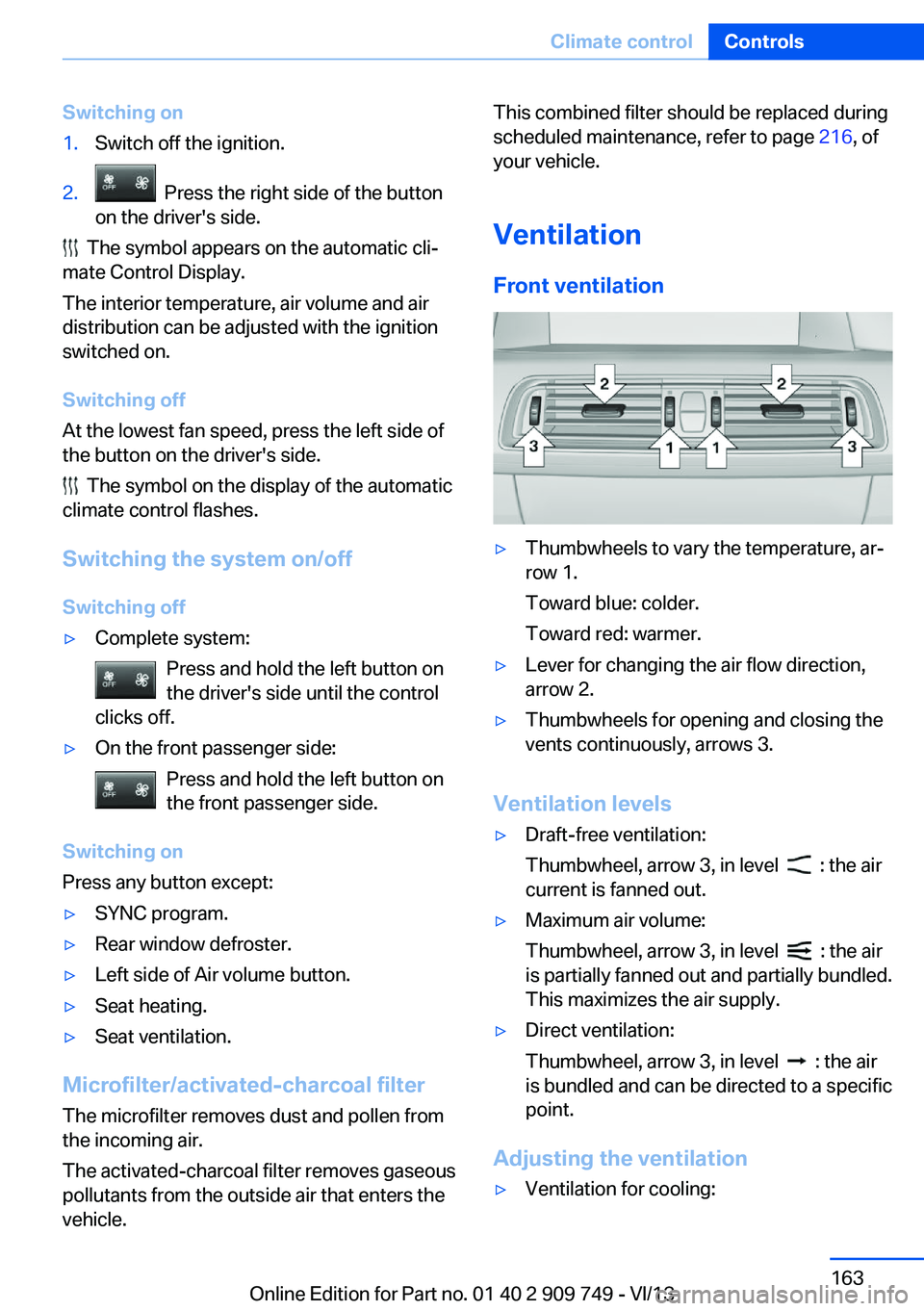
Ventilation Front ventilation▷Thumbwheels to vary the temperature, ar‐
row 1.
Toward blue: colder.
Toward red: warmer.▷Lever for changing the air flow direction,
arrow 2.▷Thumbwheels for opening and closing the
vents continuously, arrows 3.
Ventilation levels
▷Draft-free ventilation:
Thumbwheel, arrow 3, in level
: the air
current is fanned out.
▷Maximum air volume:
Thumbwheel, arrow 3, in level
: the air
is partially fanned out and partially bundled.
This maximizes the air supply.
▷Direct ventilation:
Thumbwheel, arrow 3, in level
: the air
is bundled and can be directed to a specific
point.
Adjusting the ventilation
▷Ventilation for cooling:Seite 163Climate controlControls163
Online Edition for Part no. 01 40 2 909 749 - VI/13
Page 164 of 251
Adjust the vent to direct the air in your di‐
rection, e.g., if the vehicle interior is hot
from the sun.▷Draft-free ventilation:
Adjust the vent to let the air flow past you.
Ventilation in rear, center
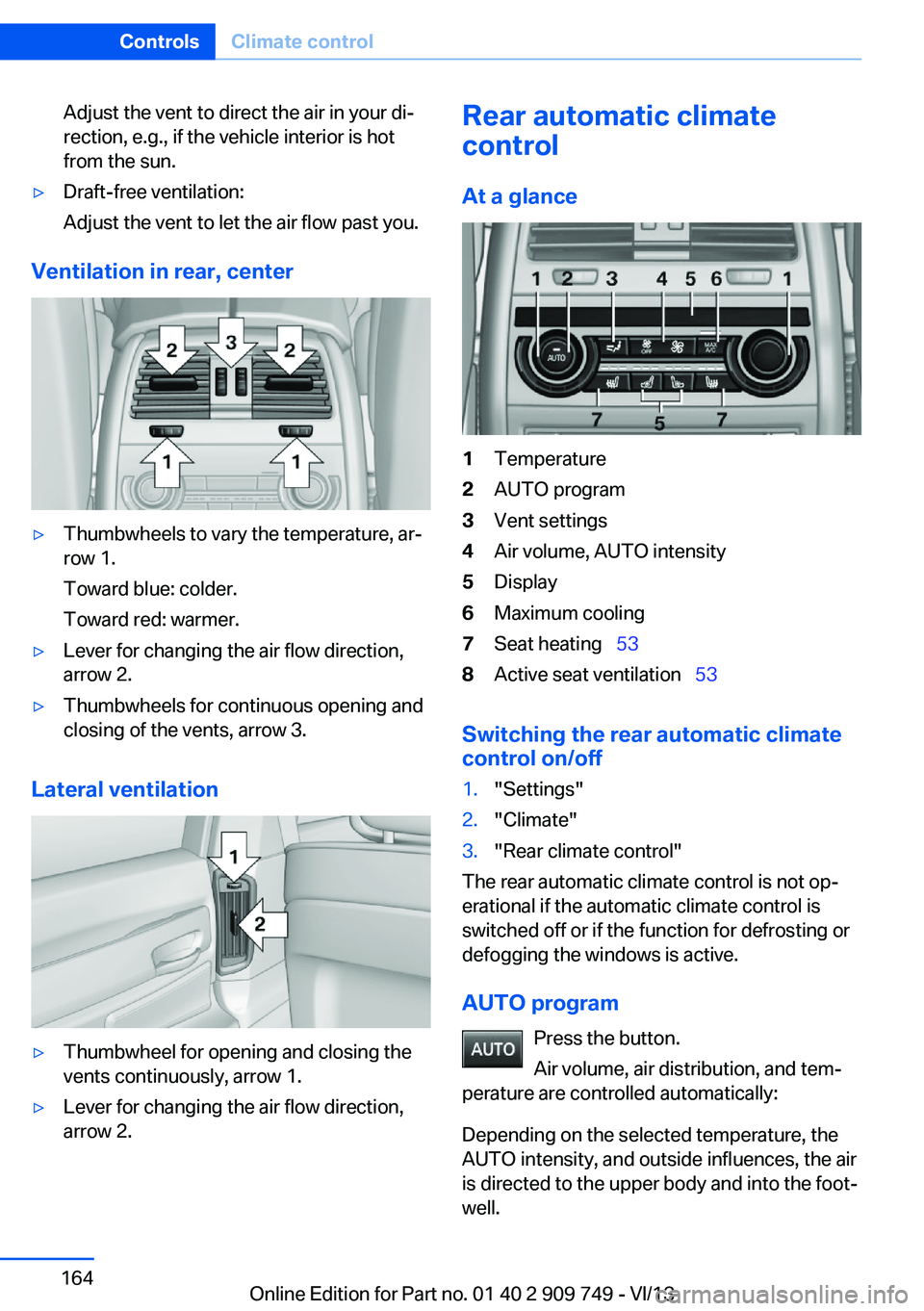
▷Thumbwheels to vary the temperature, ar‐
row 1.
Toward blue: colder.
Toward red: warmer.▷Lever for changing the air flow direction,
arrow 2.▷Thumbwheels for continuous opening and
closing of the vents, arrow 3.
Lateral ventilation
▷Thumbwheel for opening and closing the
vents continuously, arrow 1.▷Lever for changing the air flow direction,
arrow 2.Rear automatic climate
control
At a glance1Temperature2AUTO program3Vent settings4Air volume, AUTO intensity5Display6Maximum cooling7Seat heating 538Active seat ventilation 53
Switching the rear automatic climate
control on/off
1."Settings"2."Climate"3."Rear climate control"
The rear automatic climate control is not op‐
erational if the automatic climate control is
switched off or if the function for defrosting or
defogging the windows is active.
AUTO program Press the button.
Air volume, air distribution, and tem‐
perature are controlled automatically:
Depending on the selected temperature, the
AUTO intensity, and outside influences, the air
is directed to the upper body and into the foot‐
well.
Seite 164ControlsClimate control164
Online Edition for Part no. 01 40 2 909 749 - VI/13
Page 165 of 251
The cooling function is switched on automati‐
cally with the AUTO program.
Intensity of the AUTO program
With the AUTO program switched on, auto‐
matic control of the air volume and air distribu‐
tion can be adjusted.
Press the left or right side of the but‐
ton: decrease or increase the inten‐
sity.
The selected intensity is shown on the display
of the automatic climate control.
Temperature Turn the wheel to set the de‐
sired temperature.
The automatic climate control achieves this
temperature as quickly as possible, if neces‐
sary with the maximum cooling or heating ca‐
pacity, and then keeps it constant.
Avoid rapidly switching between different tem‐
perature settings. The automatic climate con‐
trol will not have sufficient time to adjust the
set temperature.
Manual air distribution
The air distribution can be adjusted to individ‐
ual needs.
Press the button repeatedly to select
a program:▷Upper body region.▷Upper body region and footwell.▷Footwell.
Air volume, manual
To be able to manually adjust the air volume,
switch off the AUTO program first.
Press the left or right side of the but‐
ton: decrease or increase air volume.
The selected air volume is shown on the dis‐
play of the automatic climate control.
Switching the system on/off
Switching off Press and hold the left button.
Switching on
Press any button except:▷Left side of Air volume button.▷Seat heating.▷Seat ventilation.
Maximum cooling
Press the button.
The system is set to the lowest tem‐
perature, maximum air flow and air circulation
mode.
Air flows out of the vents for the upper body
region. Open them for this purpose.
Air is cooled as quickly as possible:
▷At an external temperature of approx.
32 ℉/0 ℃.▷When the engine is running.
Climate control operation on the
headliner
Temperature Turn the wheel to set the de‐
sired temperature.
Seite 165Climate controlControls165
Online Edition for Part no. 01 40 2 909 749 - VI/13
Page 166 of 251
Air volumePress the left or right side of the but‐
ton: decrease or increase air volume.
LEDs indicate the intensity of the air supply.
The air volume may be reduced automatically
to save battery power.
Ventilation
Thumbwheel for changing the air flow direc‐
tion, arrow.
Parked-car ventilation
The concept The parked-car ventilation ventilates the vehi‐cle interior and lowers its temperature, if nec‐
essary.
The switch-on time is automatically deter‐
mined based on the temperature. The system
promptly switches on before the selected de‐
parture time.
The system can be switched on and off di‐
rectly or by using two preset switch-on times. It remains switched on for 30 minutes.
The system can be switched on and off di‐
rectly or by using two preset departure times.
Operation can be performed via iDrive.
Functional requirements
Parked-car ventilation▷Using the preset departure time or when
operated directly: any external tempera‐
ture.
Open the vents to allow air to flow out.
Switching on/off directly
1."Settings"2."Climate"3."Activate comf. ventilation"
The symbol on the automatic climate con‐
trol flashes if the system is switched on.
The system continues to run for some time af‐
ter being switched off.
Preselecting the departure time
1."Settings"2."Climate"3."Dep. time 1:" or "Dep. time 2:"4.Set the desired time.
Activating the departure time
1."Settings"2."Climate"3."Activate depart. time 1" or "Activate
depart. time 2"
The symbol on the automatic climate con‐
trol lights up when the departure time is acti‐
vated.
Seite 166ControlsClimate control166
Online Edition for Part no. 01 40 2 909 749 - VI/13
Page 195 of 251
Mobility
In order to always ensure your mobility, you will find important information on operating fluids,wheels and tires, maintenance and Roadside Assistance in the following.Online Edition for Part no. 01 40 2 909 749 - VI/13
Page 199 of 251
Wheels and tiresVehicle equipment
All standard, country-specific and optional
equipment that is offered in the model series is
described in this chapter. Therefore, equip‐
ment is also described that is not available in a
vehicle, e. g., because of the selected optional
equipment or country variant. This also applies
for safety-related functions and systems.
Tire inflation pressure Safety information
The tire characteristics and tire inflation pres‐
sure influence the following:▷The service life of the tires.▷Road safety.▷Driving comfort.
Checking the pressure
Only check the tire inflation pressure when the
tires are cold. This means after driving no more
than 1.25 miles/2 km or when the vehicle has
been parked for at least 2 hours. When the
tires are warm, the tire inflation pressure is
higher.
Check the tire inflation pressure regularly
Regularly check the tire inflation pres‐
sure, and correct it as needed: at least twice a
month and before a long trip. If you fail to ob‐
serve this precaution, you may be driving on
tires with incorrect tire pressures, a condition
that may not only compromise your vehicle's
driving stability, but also lead to tire damage
and the risk of an accident.◀
After correcting the tire inflation pressure:
▷Reinitialize the Flat Tire Monitor.▷Reinitialize the Tire Pressure Monitor.Pressure specifications The tire inflation pressure table, refer to
page 200, contains all pressure specifications
for the specified tire sizes at the ambient tem‐
perature. Pressure specifications apply to ap‐
proved tire sizes and recommended tire
brands. This information can be obtained from
your service center.
To identify the correct tire inflation pressure,
please note the following:▷Tire sizes of your vehicle.▷Maximum permitted driving speed.
Tire inflation pressures up to
100 mph/160 km/h
For speeds of up to 100 mph/160 km/h and for
optimum driving comfort, note the pressure
values in the tire inflation pressure table, refer
to page 200, and adjust as necessary.
These pressure values can also be found on
the tire inflation pressure label on the driver's
door pillar.
Maximum permissible speed
Do not exceed 100 mph/160 km/h; other‐
wise, tire damage and accidents may result.◀
Seite 199Wheels and tiresMobility199
Online Edition for Part no. 01 40 2 909 749 - VI/13
Page 200 of 251
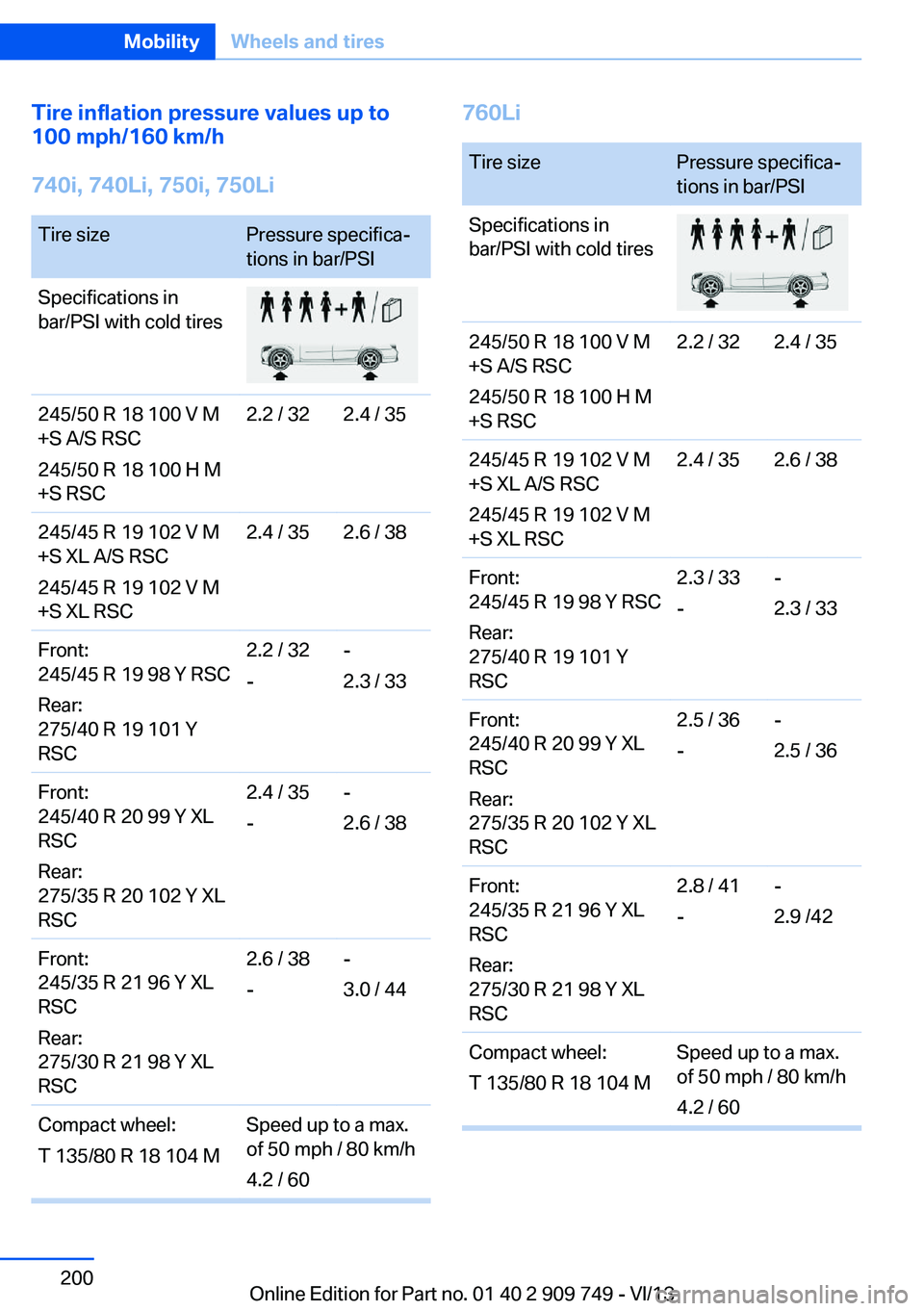
Tire inflation pressure values up to
100 mph/160 km/h
740i, 740Li, 750i, 750LiTire sizePressure specifica‐
tions in bar/PSISpecifications in
bar/PSI with cold tires245/50 R 18 100 V M
+S A/S RSC
245/50 R 18 100 H M
+S RSC2.2 / 322.4 / 35245/45 R 19 102 V M
+S XL A/S RSC
245/45 R 19 102 V M
+S XL RSC2.4 / 352.6 / 38Front:
245/45 R 19 98 Y RSC
Rear:
275/40 R 19 101 Y
RSC2.2 / 32
--
2.3 / 33Front:
245/40 R 20 99 Y XL
RSC
Rear:
275/35 R 20 102 Y XL
RSC2.4 / 35
--
2.6 / 38Front:
245/35 R 21 96 Y XL
RSC
Rear:
275/30 R 21 98 Y XL
RSC2.6 / 38
--
3.0 / 44Compact wheel:
T 135/80 R 18 104 MSpeed up to a max.
of 50 mph / 80 km/h
4.2 / 60760LiTire sizePressure specifica‐
tions in bar/PSISpecifications in
bar/PSI with cold tires245/50 R 18 100 V M
+S A/S RSC
245/50 R 18 100 H M
+S RSC2.2 / 322.4 / 35245/45 R 19 102 V M
+S XL A/S RSC
245/45 R 19 102 V M
+S XL RSC2.4 / 352.6 / 38Front:
245/45 R 19 98 Y RSC
Rear:
275/40 R 19 101 Y
RSC2.3 / 33
--
2.3 / 33Front:
245/40 R 20 99 Y XL
RSC
Rear:
275/35 R 20 102 Y XL
RSC2.5 / 36
--
2.5 / 36Front:
245/35 R 21 96 Y XL
RSC
Rear:
275/30 R 21 98 Y XL
RSC2.8 / 41
--
2.9 /42Compact wheel:
T 135/80 R 18 104 MSpeed up to a max.
of 50 mph / 80 km/h
4.2 / 60Seite 200MobilityWheels and tires200
Online Edition for Part no. 01 40 2 909 749 - VI/13
Page 201 of 251
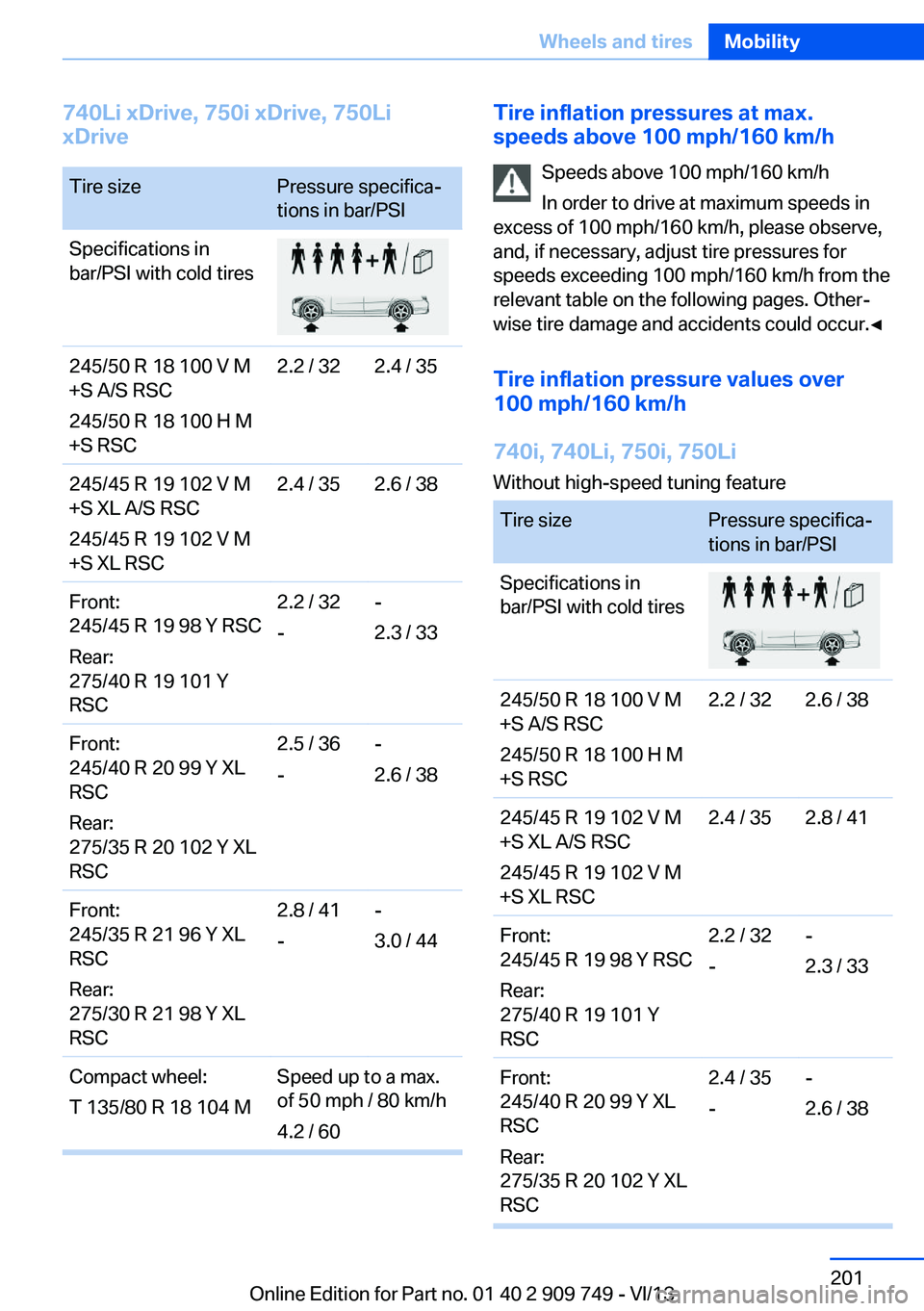
740Li xDrive, 750i xDrive, 750Li
xDriveTire sizePressure specifica‐
tions in bar/PSISpecifications in
bar/PSI with cold tires245/50 R 18 100 V M
+S A/S RSC
245/50 R 18 100 H M
+S RSC2.2 / 322.4 / 35245/45 R 19 102 V M
+S XL A/S RSC
245/45 R 19 102 V M
+S XL RSC2.4 / 352.6 / 38Front:
245/45 R 19 98 Y RSC
Rear:
275/40 R 19 101 Y
RSC2.2 / 32
--
2.3 / 33Front:
245/40 R 20 99 Y XL
RSC
Rear:
275/35 R 20 102 Y XL
RSC2.5 / 36
--
2.6 / 38Front:
245/35 R 21 96 Y XL
RSC
Rear:
275/30 R 21 98 Y XL
RSC2.8 / 41
--
3.0 / 44Compact wheel:
T 135/80 R 18 104 MSpeed up to a max.
of 50 mph / 80 km/h
4.2 / 60Tire inflation pressures at max.
speeds above 100 mph/160 km/h
Speeds above 100 mph/160 km/h
In order to drive at maximum speeds in
excess of 100 mph/160 km/h, please observe,
and, if necessary, adjust tire pressures for
speeds exceeding 100 mph/160 km/h from the
relevant table on the following pages. Other‐
wise tire damage and accidents could occur.◀
Tire inflation pressure values over
100 mph/160 km/h
740i, 740Li, 750i, 750Li Without high-speed tuning featureTire sizePressure specifica‐
tions in bar/PSISpecifications in
bar/PSI with cold tires245/50 R 18 100 V M
+S A/S RSC
245/50 R 18 100 H M
+S RSC2.2 / 322.6 / 38245/45 R 19 102 V M
+S XL A/S RSC
245/45 R 19 102 V M
+S XL RSC2.4 / 352.8 / 41Front:
245/45 R 19 98 Y RSC
Rear:
275/40 R 19 101 Y
RSC2.2 / 32
--
2.3 / 33Front:
245/40 R 20 99 Y XL
RSC
Rear:
275/35 R 20 102 Y XL
RSC2.4 / 35
--
2.6 / 38Seite 201Wheels and tiresMobility201
Online Edition for Part no. 01 40 2 909 749 - VI/13