luggage BMW 760i 2004 E65 User Guide
[x] Cancel search | Manufacturer: BMW, Model Year: 2004, Model line: 760i, Model: BMW 760i 2004 E65Pages: 232, PDF Size: 5.27 MB
Page 66 of 232
Driving
64 Provided that the remote control is
inserted in the ignition lock, you can
also release the parking brake manually
after the engine has been switched off,
refer to page 62. This function is useful in
automatic car washes, etc.
Automatic Hold is deactivated.<
When leaving the vehicle, always
release the remote control from the
detent in the ignition lock; this precaution
prevents children from disengaging the
parking brake, etc.<
For your safety
Automatic Hold is automatically deacti-
vated when
>the engine is switched off
>the system detects that the driver's seat
is not occupied while the engine is run-
ning
>the hood is opened while the engine is
running
>the luggage compartment lid is opened
with the transmission in reverse while
the engine is running, and
>when the parking brake is used to bring
the vehicle to a stop.
The indicator lamp changes from
green to red, and the AUTO P letters in the
Info Display disappear.
Before starting off again, briefly press the
button to disengage the parking brake
manually, refer to page 62, or reactivate
Automatic Hold, refer to page 63.
Before leaving the vehicle with the
engine running, always move the
automatic transmission's selector lever to
position P and ensure that the parking
brake is engaged. The vehicle could start
to roll if you fail to observe these precau-
tions.
Never leave an unattended vehicle with the
engine running, as such a vehicle repre-
sents a potential safety hazard.<
Automatic Hold is automatically
deactivated whenever the system
detects any tendency for the wheels to spin
in response to slippery road surfaces. Note the status reports in the Check Control.
You can find additional information on the
Check Control on page 82.<
Malfunctions
If a malfunction occurs, the indicator
lamp lights up yellow in the Info Dis-
play and a status report will appear in the
Check Control. Please note any supple-
mentary information that appears on the
Control Display.
Releasing the parking brake
manually
You can respond to any interruptions in the
supply of electrical power, for instance, if
the battery is discharged or disconnected,
by releasing the parking brake manually.
Before proceeding to release the
parking brake manually, and each
time you park the vehicle without engaging
the parking brake, always ensure that the
automatic transmission's selector lever is
in position P, refer to page 66. Note the
range indicated in the Info Display.
If the wheel must be changed on a surface
with a more severe slope, take additional
precautions to secure the vehicle from roll-
ing e.g. with a chock, refer to page 203.
Otherwise there is a danger that the vehicle
could start to roll if parked on a steep
slope.<
Should it also be necessary to release the
automatic transmission's lockout manually,
for instance, if the battery is discharged,
always adhere to the following sequence:
1.If necessary, start by manually releasing
the parking brake
2.Then release the automatic transmis-
sion's lockout manually, refer to
page 68.
Jump-starting and towing, refer to
pages 207 and 208.
Page 67 of 232
Controls
65Reference
At a glance
Driving tips
Communications
Navigation
Entertainment
Mobility
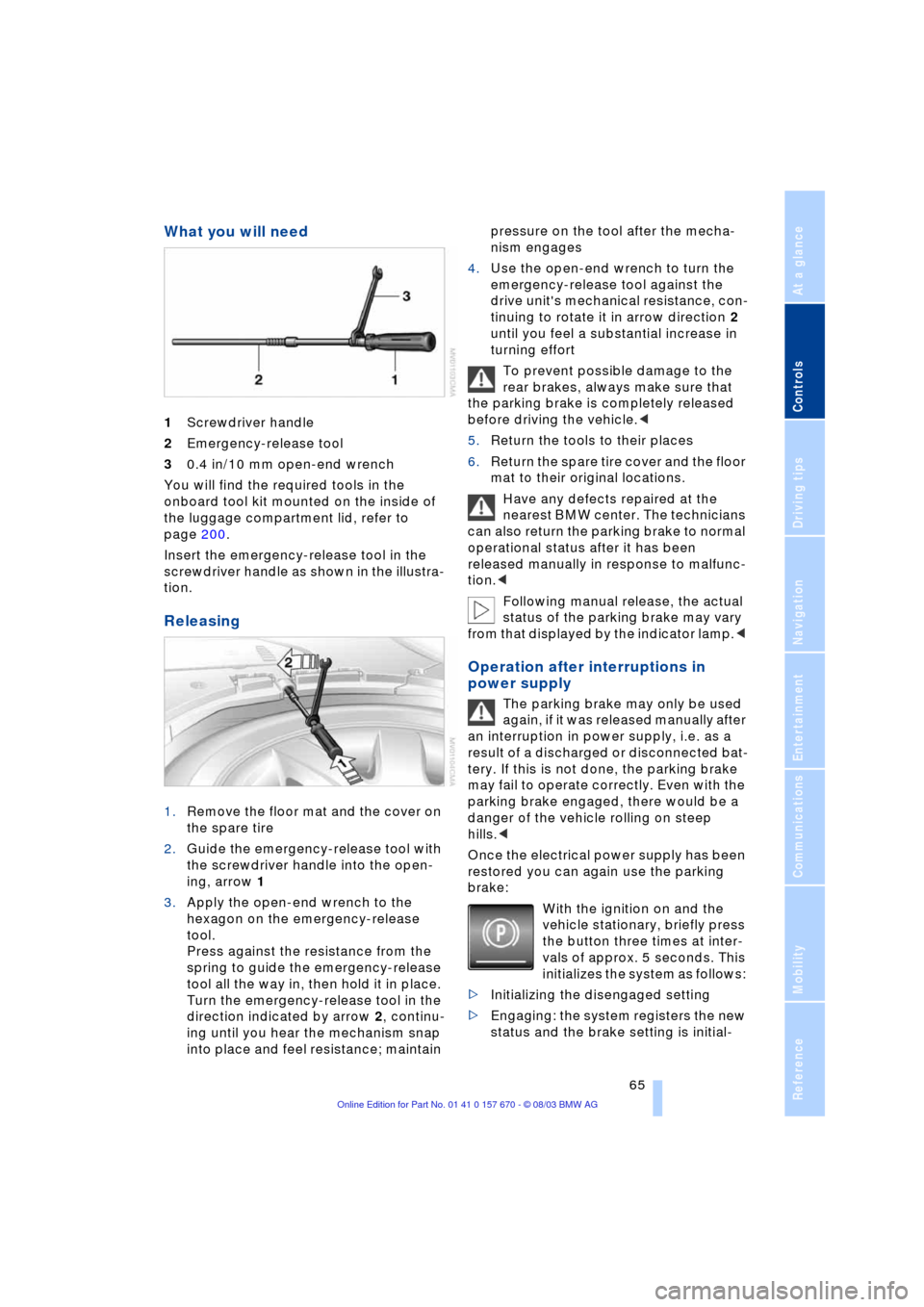
What you will need
1Screwdriver handle
2Emergency-release tool
30.4 in/10 mm open-end wrench
You will find the required tools in the
onboard tool kit mounted on the inside of
the luggage compartment lid, refer to
page 200.
Insert the emergency-release tool in the
screwdriver handle as shown in the illustra-
tion.
Releasing
1.Remove the floor mat and the cover on
the spare tire
2.Guide the emergency-release tool with
the screwdriver handle into the open-
ing, arrow 1
3.Apply the open-end wrench to the
hexagon on the emergency-release
tool.
Press against the resistance from the
spring to guide the emergency-release
tool all the way in, then hold it in place.
Turn the emergency-release tool in the
direction indicated by arrow 2, continu-
ing until you hear the mechanism snap
into place and feel resistance; maintain pressure on the tool after the mecha-
nism engages
4.Use the open-end wrench to turn the
emergency-release tool against the
drive unit's mechanical resistance, con-
tinuing to rotate it in arrow direction 2
until you feel a substantial increase in
turning effort
To prevent possible damage to the
rear brakes, always make sure that
the parking brake is completely released
before driving the vehicle.<
5.Return the tools to their places
6.Return the spare tire cover and the floor
mat to their original locations.
Have any defects repaired at the
nearest BMW center. The technicians
can also return the parking brake to normal
operational status after it has been
released manually in response to malfunc-
tion.<
Following manual release, the actual
status of the parking brake may vary
from that displayed by the indicator lamp.<
Operation after interruptions in
power supply
The parking brake may only be used
again, if it was released manually after
an interruption in power supply, i.e. as a
result of a discharged or disconnected bat-
tery. If this is not done, the parking brake
may fail to operate correctly. Even with the
parking brake engaged, there would be a
danger of the vehicle rolling on steep
hills.<
Once the electrical power supply has been
restored you can again use the parking
brake:
With the ignition on and the
vehicle stationary, briefly press
the button three times at inter-
vals of approx. 5 seconds. This
initializes the system as follows:
>Initializing the disengaged setting
>Engaging: the system registers the new
status and the brake setting is initial-
Page 115 of 232
Controls
113Reference
At a glance
Driving tips
Communications
Navigation
Entertainment
Mobility
3Rear window blind
4Switching to the other side
The side window blind cannot be
extended unless the side window is
closed. If the window is open, the blind will
rise slightly prior to immediately retracting
to its original position.<
Briefly press the safety switch in the
driver's door, refer to page 42. The
indicator lamp must light up. This precau-
tion prevents children from operating the
sun blinds using the rear switches, etc.
Before using always ensure that the sun
blind's travel path is clear and unob-
structed.
When leaving the vehicle, always remove
the remote control from the ignition lock
and close the doors; this precaution pre-
vents children from using the sun blinds
and injuring themselves, etc.<
Automatically extending and
retracting the sun blinds
You can extend and retract the sun blinds
together by pressing and holding button 3
or the button in the driver's door.
Rear cooler*
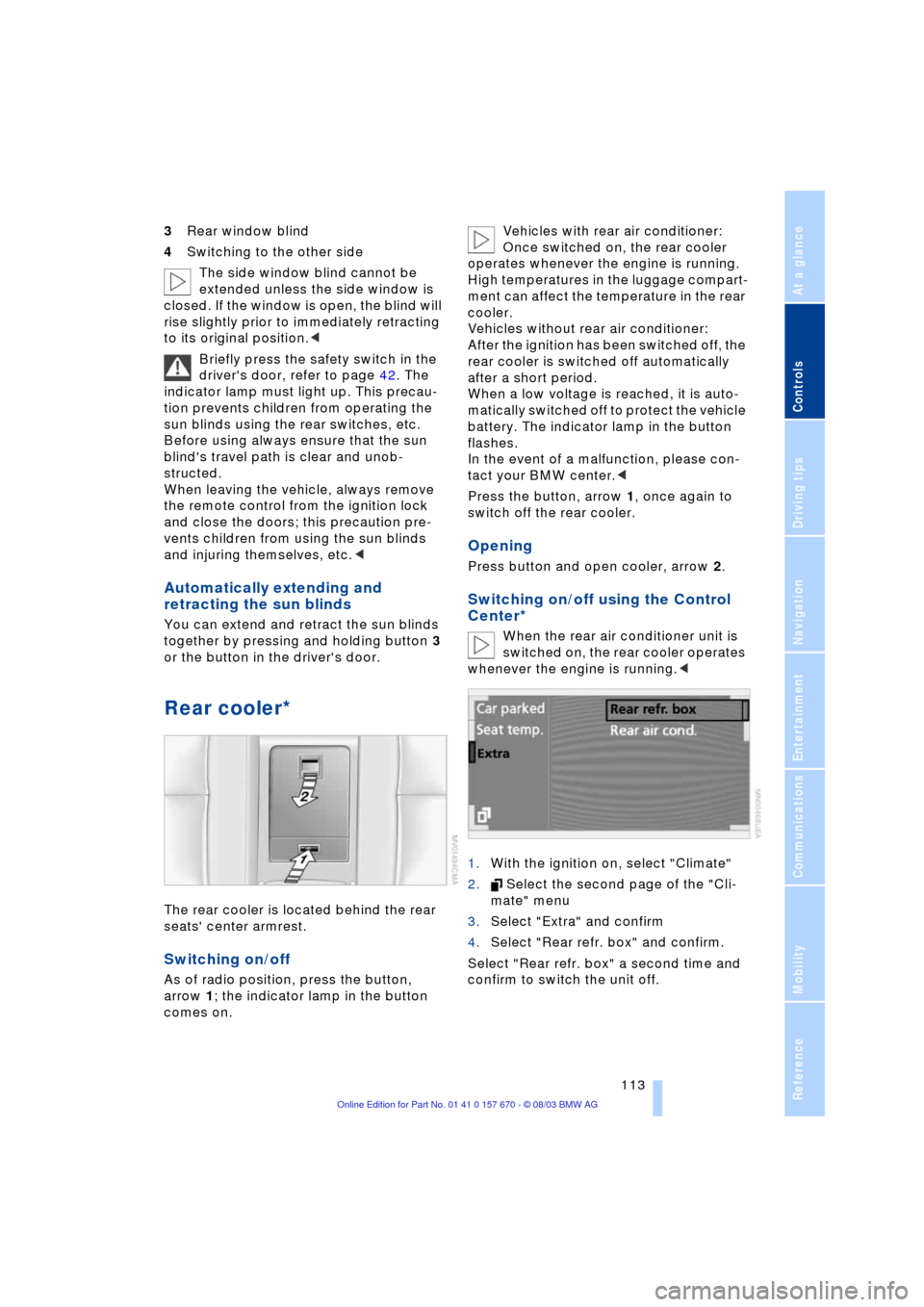
The rear cooler is located behind the rear
seats' center armrest.
Switching on/off
As of radio position, press the button,
arrow 1; the indicator lamp in the button
comes on. Vehicles with rear air conditioner:
Once switched on, the rear cooler
operates whenever the engine is running.
High temperatures in the luggage compart-
ment can affect the temperature in the rear
cooler.
Vehicles without rear air conditioner:
After the ignition has been switched off, the
rear cooler is switched off automatically
after a short period.
When a low voltage is reached, it is auto-
matically switched off to protect the vehicle
battery. The indicator lamp in the button
flashes.
In the event of a malfunction, please con-
tact your BMW center.<
Press the button, arrow 1, once again to
switch off the rear cooler.
Opening
Press button and open cooler, arrow 2.
Switching on/off using the Control
Center*
When the rear air conditioner unit is
switched on, the rear cooler operates
whenever the engine is running.<
1.With the ignition on, select "Climate"
2. Select the second page of the "Cli-
mate" menu
3.Select "Extra" and confirm
4.Select "Rear refr. box" and confirm.
Select "Rear refr. box" a second time and
confirm to switch the unit off.
Page 116 of 232
Practical interior accessories
114
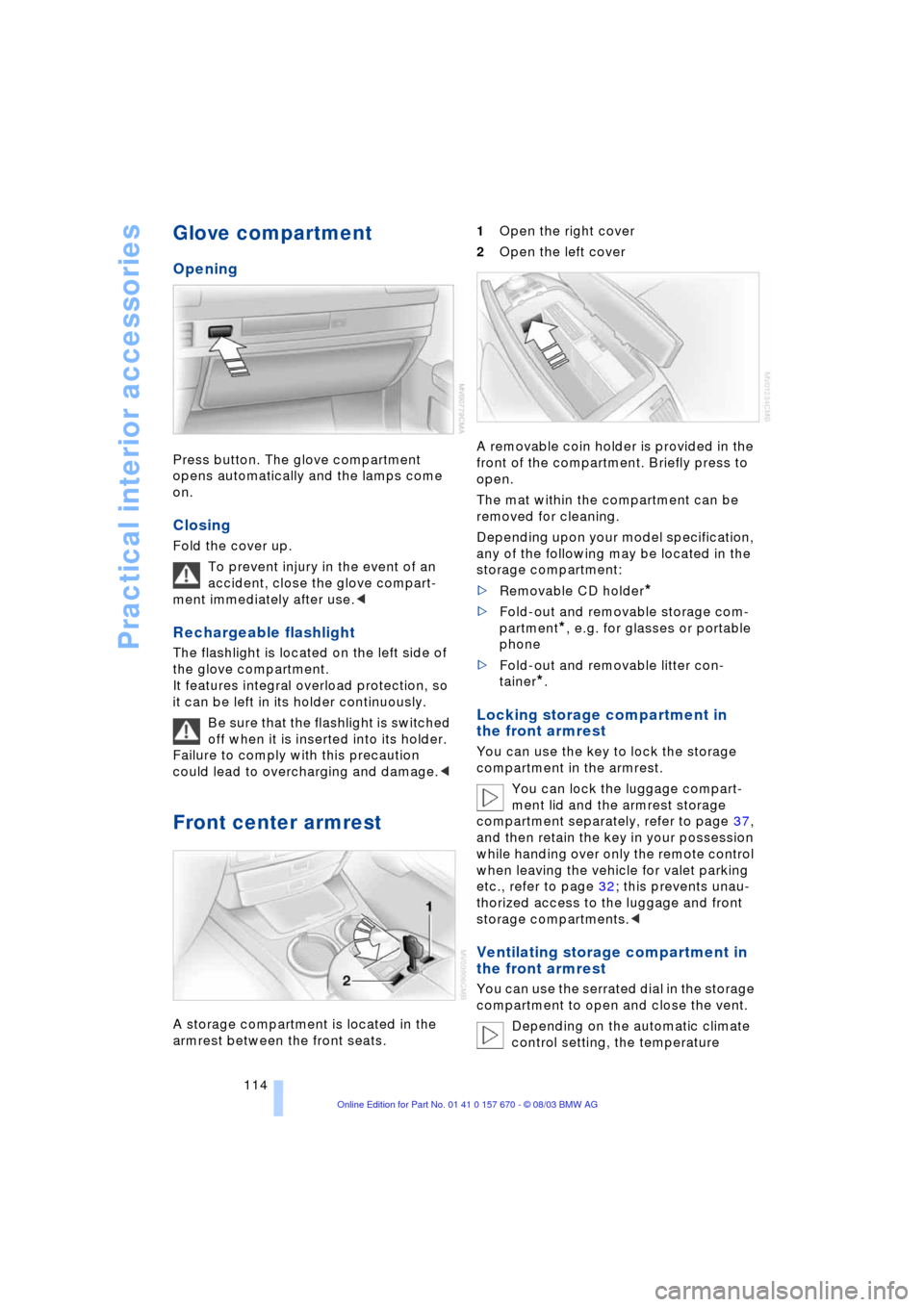
Glove compartment
Opening
Press button. The glove compartment
opens automatically and the lamps come
on.
Closing
Fold the cover up.
To prevent injury in the event of an
accident, close the glove compart-
ment immediately after use.<
Rechargeable flashlight
The flashlight is located on the left side of
the glove compartment.
It features integral overload protection, so
it can be left in its holder continuously.
Be sure that the flashlight is switched
off when it is inserted into its holder.
Failure to comply with this precaution
could lead to overcharging and damage.<
Front center armrest
A storage compartment is located in the
armrest between the front seats. 1Open the right cover
2Open the left cover
A removable coin holder is provided in the
front of the compartment. Briefly press to
open.
The mat within the compartment can be
removed for cleaning.
Depending upon your model specification,
any of the following may be located in the
storage compartment:
>Removable CD holder
*
>Fold-out and removable storage com-
partment
*, e.g. for glasses or portable
phone
>Fold-out and removable litter con-
tainer
*.
Locking storage compartment in
the front armrest
You can use the key to lock the storage
compartment in the armrest.
You can lock the luggage compart-
ment lid and the armrest storage
compartment separately, refer to page 37,
and then retain the key in your possession
while handing over only the remote control
when leaving the vehicle for valet parking
etc., refer to page 32; this prevents unau-
thorized access to the luggage and front
storage compartments.<
Ventilating storage compartment in
the front armrest
You can use the serrated dial in the storage
compartment to open and close the vent.
Depending on the automatic climate
control setting, the temperature
Page 119 of 232
Controls
117Reference
At a glance
Driving tips
Communications
Navigation
Entertainment
Mobility
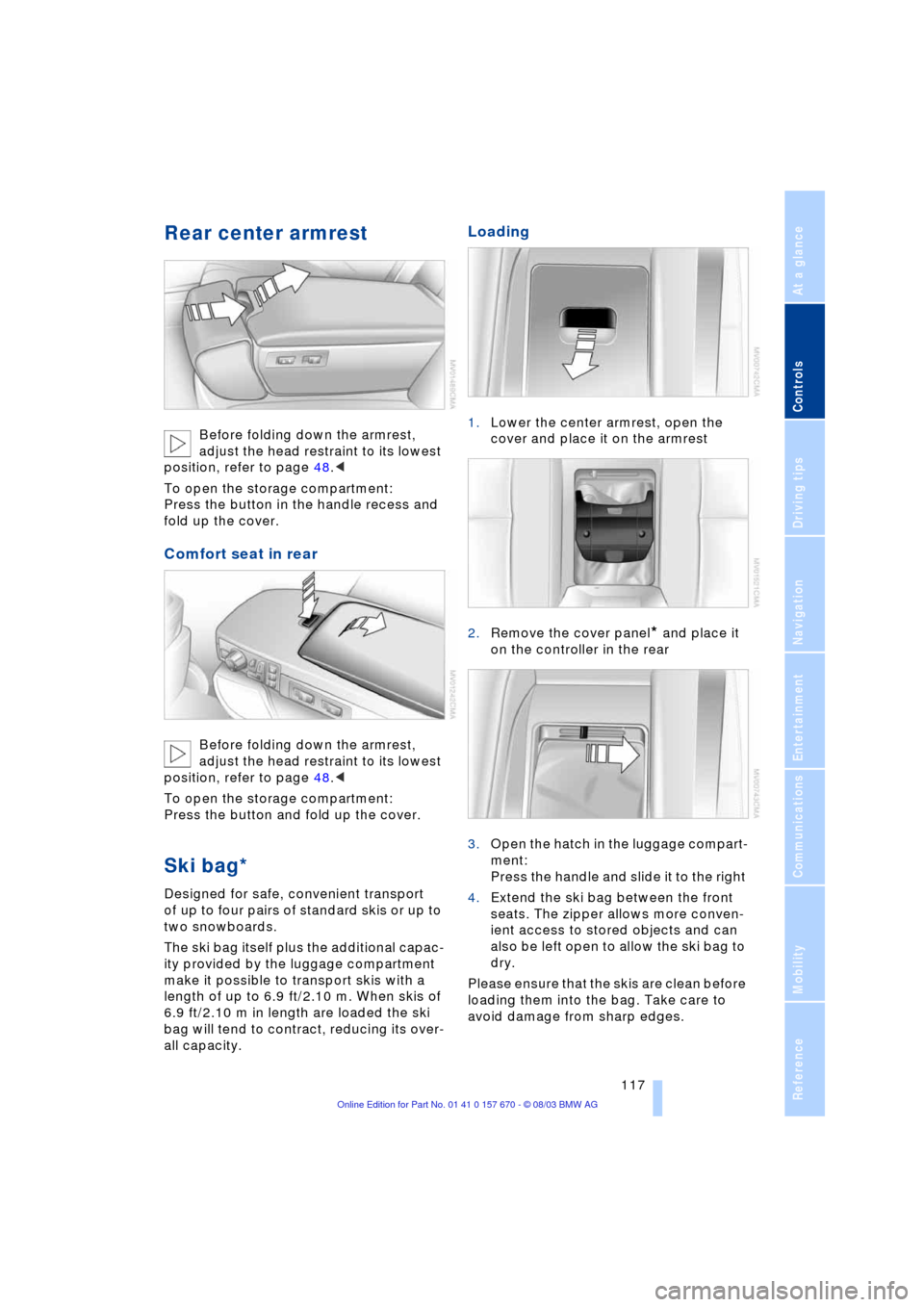
Rear center armrest
Before folding down the armrest,
adjust the head restraint to its lowest
position, refer to page 48.<
To open the storage compartment:
Press the button in the handle recess and
fold up the cover.
Comfort seat in rear
Before folding down the armrest,
adjust the head restraint to its lowest
position, refer to page 48.<
To open the storage compartment:
Press the button and fold up the cover.
Ski bag*
Designed for safe, convenient transport
of up to four pairs of standard skis or up to
two snowboards.
The ski bag itself plus the additional capac-
ity provided by the luggage compartment
make it possible to transport skis with a
length of up to 6.9 ft/2.10 m. When skis of
6.9 ft/2.10 m in length are loaded the ski
bag will tend to contract, reducing its over-
all capacity.
Loading
1.Lower the center armrest, open the
cover and place it on the armrest
2.Remove the cover panel
* and place it
on the controller in the rear
3.Open the hatch in the luggage compart-
ment:
Press the handle and slide it to the right
4.Extend the ski bag between the front
seats. The zipper allows more conven-
ient access to stored objects and can
also be left open to allow the ski bag to
dry.
Please ensure that the skis are clean before
loading them into the bag. Take care to
avoid damage from sharp edges.
Page 120 of 232
Practical interior accessories
118
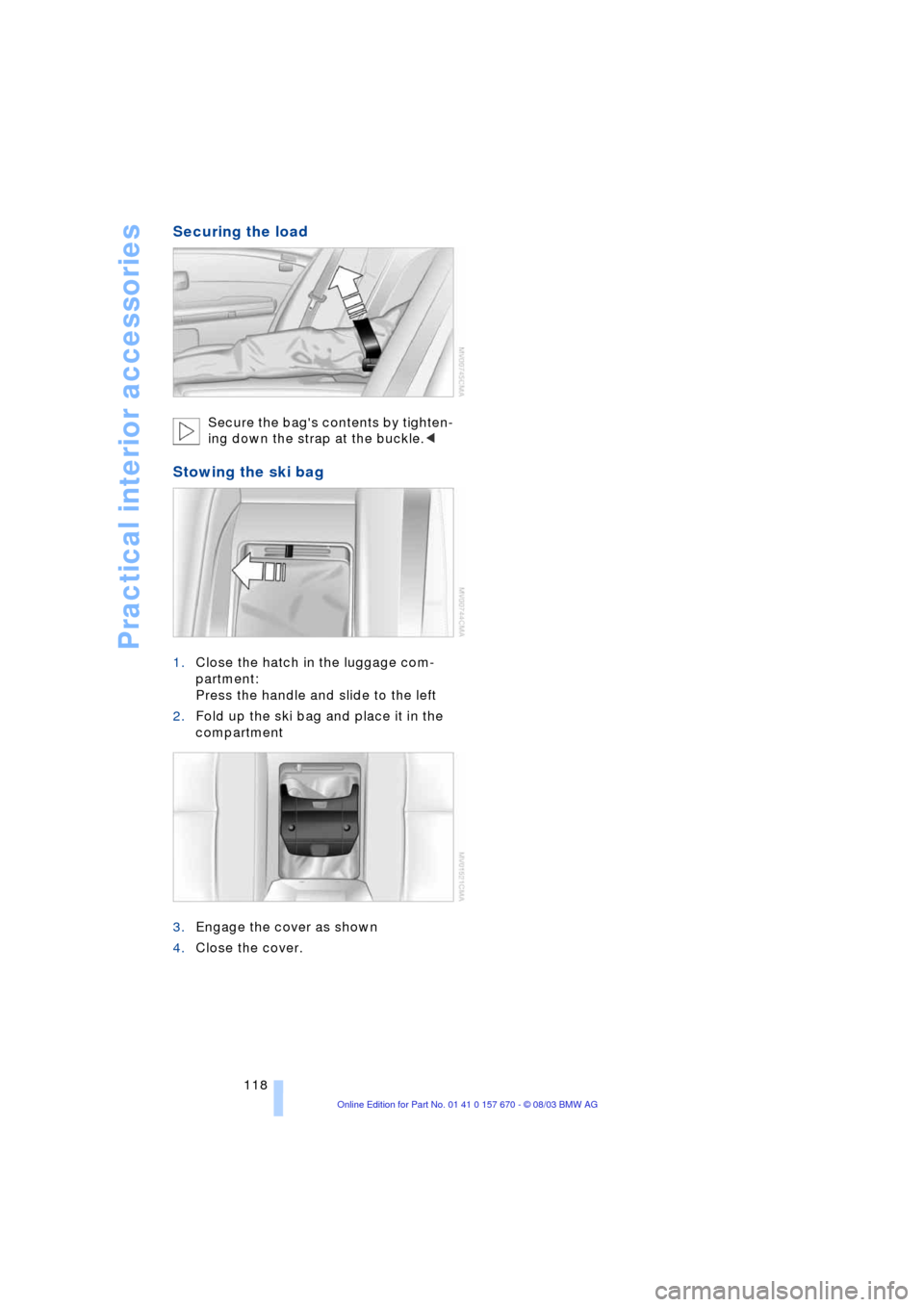
Securing the load
Secure the bag's contents by tighten-
ing down the strap at the buckle.<
Stowing the ski bag
1.Close the hatch in the luggage com-
partment:
Press the handle and slide to the left
2.Fold up the ski bag and place it in the
compartment
3.Engage the cover as shown
4.Close the cover.
Page 126 of 232
Things to remember when driving
124 Warning lamp for Canadian models.
The brake pads have reached their mini-
mum pad thickness. Have them replaced
at your BMW center as soon as possible.
For your own safety: use only brake
pads that BMW has released for your
particular vehicle model. As BMW cannot
assess the suitability of other brake pads
for use on your vehicle, we are unable to
assume continued responsibility for the
vehicle's operating safety if non-approved
pads are installed.<
Cargo loading
To avoid loading the tires beyond
their approved carrying capacity,
never overload the vehicle. Overloading
can lead to overheating and increases the
rate at which damage develops inside the
tires. The ultimate result can assume the
form of a sudden air loss.<
Determining loading limit
1.Locate the following statement on your
vehicle's door pillar
*:
The combined weight of occu-
pants and cargo should never
exceed XXX lbs. or YYY kg, as other-
wise the vehicle may be damaged and
unstable driving conditions may
result.<
2.Determine the combined weight of the
driver and passenger that will be riding
in your vehicle3.Subtract the combined weight of the
driver and passenger from XXX lbs. or
YYY kg
4.The resulting figure equals the available
amount of cargo and luggage load
capacity.
For example, if the XXX amount equals
1,400 lbs. and there will be five 150-
pound passengers in your vehicle, the
amount of available cargo and luggage
load capacity is 650 lbs.:
1,400 Ibs. minus 750 Ibs. = 650 Ibs.
5.Determine the combined weight of lug-
gage and cargo being loaded on the
vehicle. That weight should not exceed
the available cargo and luggage load
capacity calculated in step 4
6.If your vehicle will be towing a trailer,
part of the load from your trailer will be
transferred to your vehicle. Consult the
manual for transporting a trailer to
determine how this may reduce the
available cargo and luggage load
capacity of your vehicle.
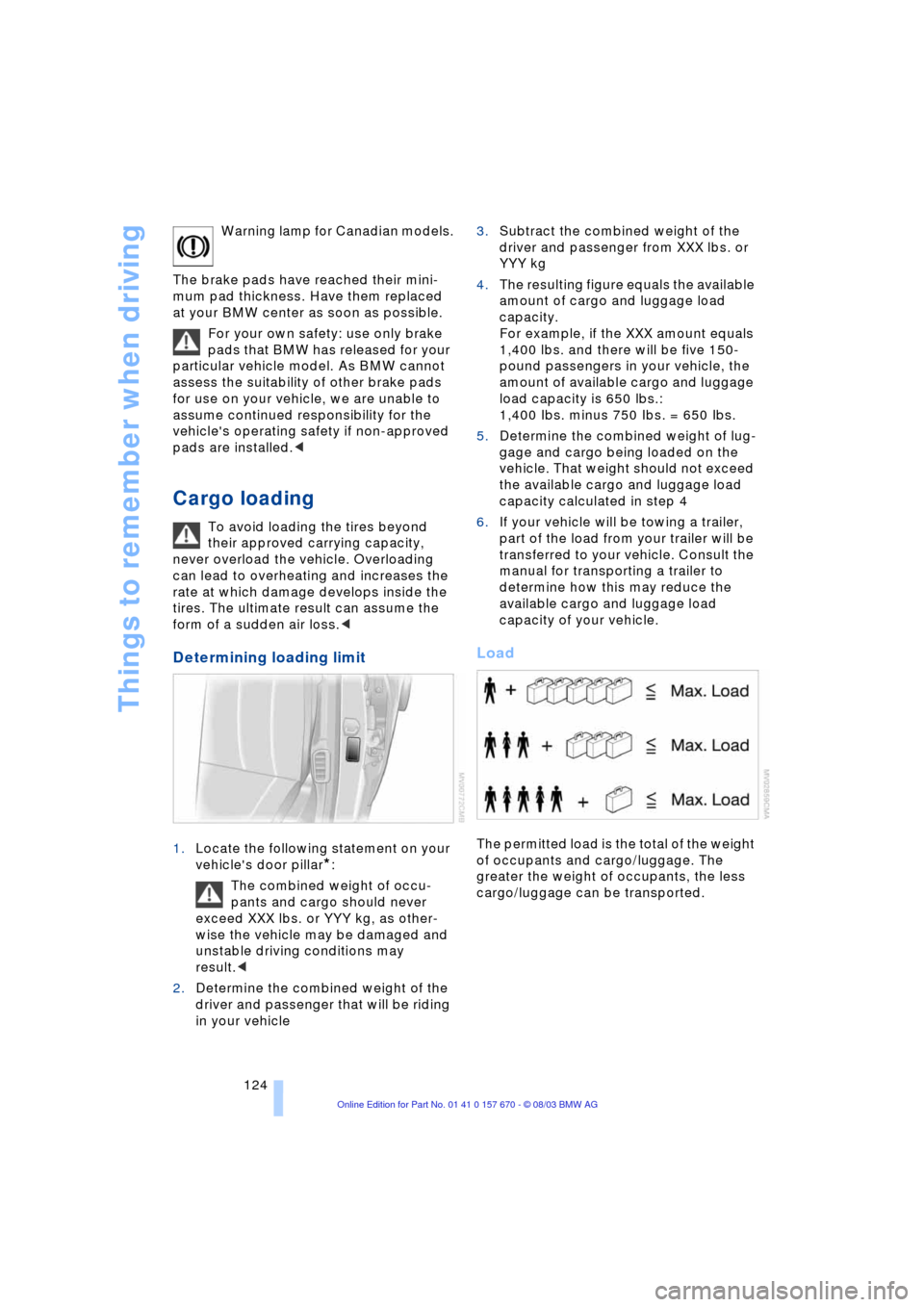
Load
The permitted load is the total of the weight
of occupants and cargo/luggage. The
greater the weight of occupants, the less
cargo/luggage can be transported.
Page 127 of 232
Driving tips
125Reference
At a glance
Controls
Communications
Navigation
Entertainment
Mobility
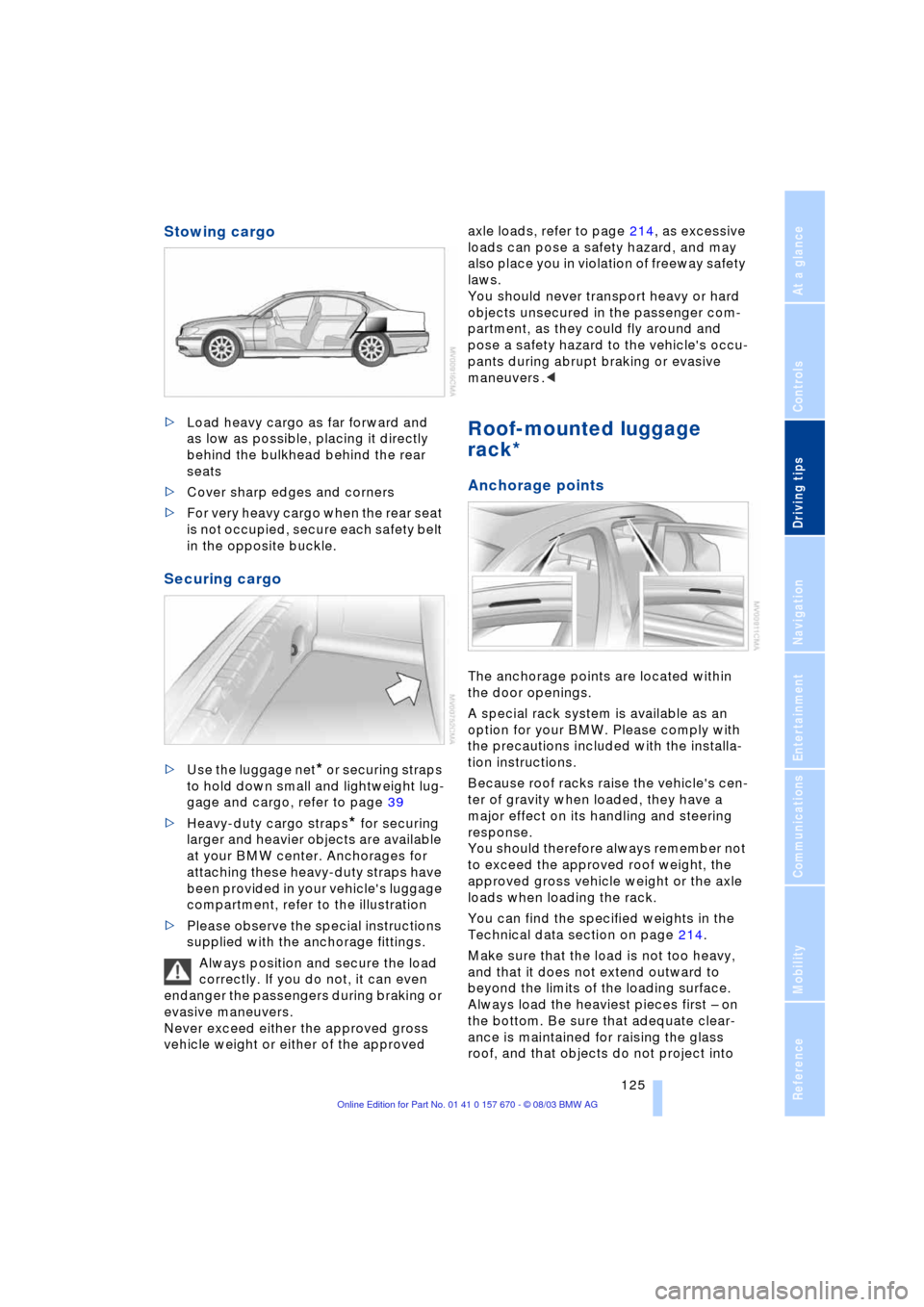
Stowing cargo
>Load heavy cargo as far forward and
as low as possible, placing it directly
behind the bulkhead behind the rear
seats
>Cover sharp edges and corners
>For very heavy cargo when the rear seat
is not occupied, secure each safety belt
in the opposite buckle.
Securing cargo
>Use the luggage net* or securing straps
to hold down small and lightweight lug-
gage and cargo, refer to page 39
>Heavy-duty cargo straps
* for securing
larger and heavier objects are available
at your BMW center. Anchorages for
attaching these heavy-duty straps have
been provided in your vehicle's luggage
compartment, refer to the illustration
>Please observe the special instructions
supplied with the anchorage fittings.
Always position and secure the load
correctly. If you do not, it can even
endanger the passengers during braking or
evasive maneuvers.
Never exceed either the approved gross
vehicle weight or either of the approved axle loads, refer to page 214, as excessive
loads can pose a safety hazard, and may
also place you in violation of freeway safety
laws.
You should never transport heavy or hard
objects unsecured in the passenger com-
partment, as they could fly around and
pose a safety hazard to the vehicle's occu-
pants during abrupt braking or evasive
maneuvers .<
Roof-mounted luggage
rack*
Anchorage points
The anchorage points are located within
the door openings.
A special rack system is available as an
option for your BMW. Please comply with
the precautions included with the installa-
tion instructions.
Because roof racks raise the vehicle's cen-
ter of gravity when loaded, they have a
major effect on its handling and steering
response.
You should therefore always remember not
to exceed the approved roof weight, the
approved gross vehicle weight or the axle
loads when loading the rack.
You can find the specified weights in the
Technical data section on page 214.
Make sure that the load is not too heavy,
and that it does not extend outward to
beyond the limits of the loading surface.
Always load the heaviest pieces first Ð on
the bottom. Be sure that adequate clear-
ance is maintained for raising the glass
roof, and that objects do not project into
Page 128 of 232
Things to remember when driving
126 the opening path of the luggage compart-
ment lid.
Secure roof-mounted cargo correctly and
securely to prevent it from shifting or being
lost during the trip.
Drive smoothly. Avoid sudden acceleration
and braking maneuvers. Take corners gen-
tly.
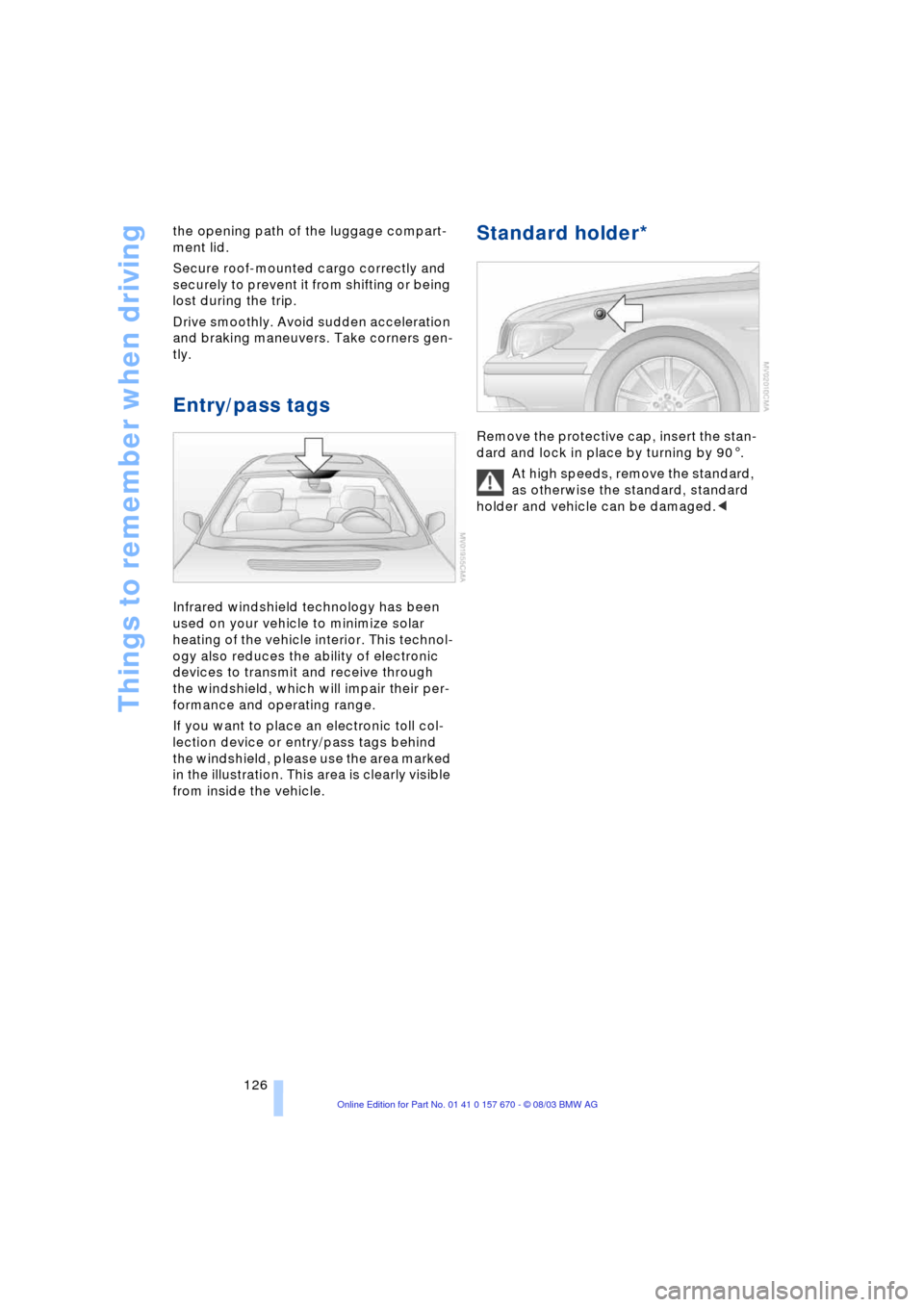
Entry/pass tags
Infrared windshield technology has been
used on your vehicle to minimize solar
heating of the vehicle interior. This technol-
ogy also reduces the ability of electronic
devices to transmit and receive through
the windshield, which will impair their per-
formance and operating range.
If you want to place an electronic toll col-
lection device or entry/pass tags behind
the windshield, please use the area marked
in the illustration. This area is clearly visible
from inside the vehicle.
Standard holder*
Remove the protective cap, insert the stan-
dard and lock in place by turning by 901.
At high speeds, remove the standard,
as otherwise the standard, standard
holder and vehicle can be damaged.<
Page 132 of 232
Starting the navigation system
130
Starting the navigation system
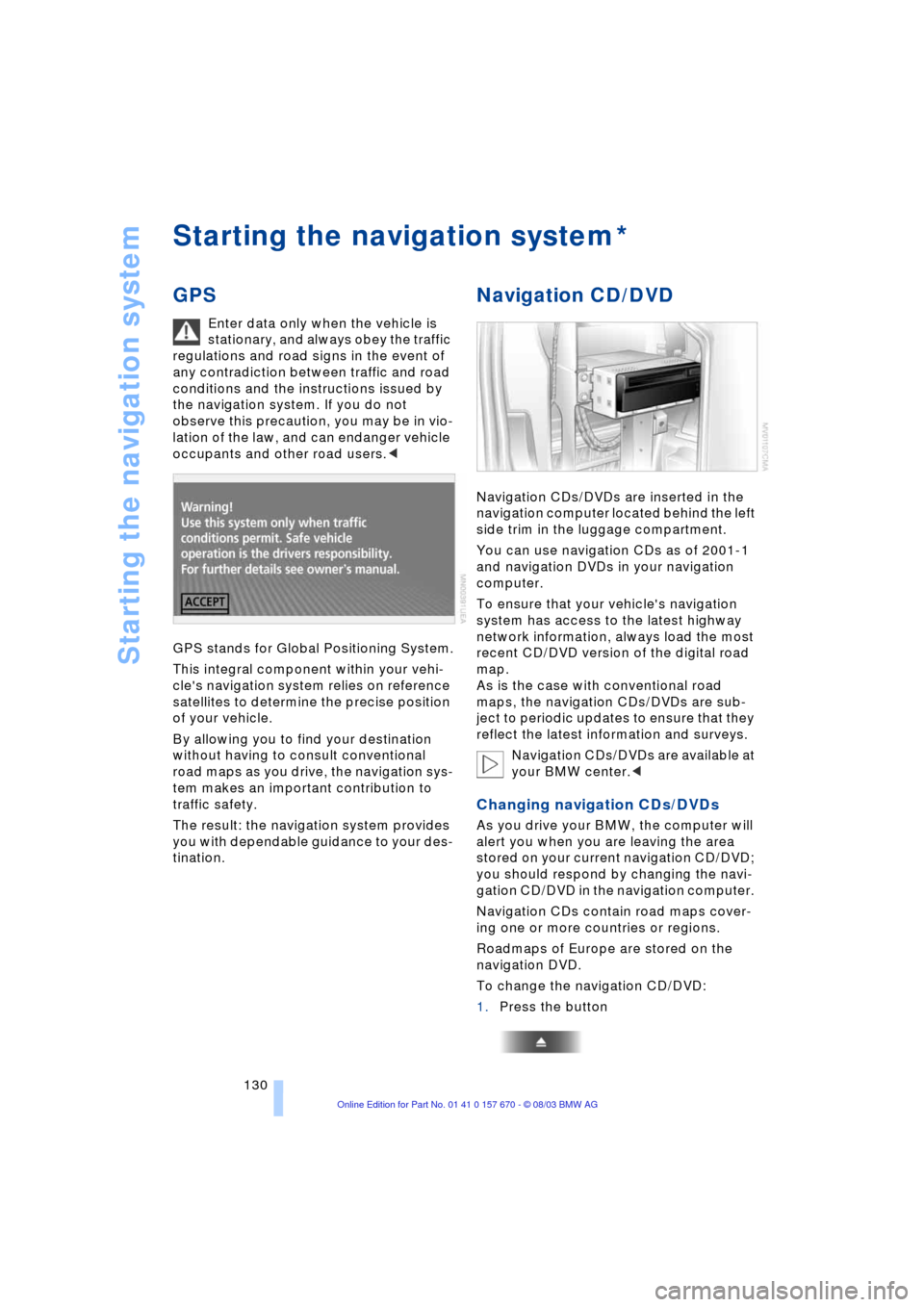
GPS
Enter data only when the vehicle is
stationary, and always obey the traffic
regulations and road signs in the event of
any contradiction between traffic and road
conditions and the instructions issued by
the navigation system. If you do not
observe this precaution, you may be in vio-
lation of the law, and can endanger vehicle
occupants and other road users.<
GPS stands for Global Positioning System.
This integral component within your vehi-
cle's navigation system relies on reference
satellites to determine the precise position
of your vehicle.
By allowing you to find your destination
without having to consult conventional
road maps as you drive, the navigation sys-
tem makes an important contribution to
traffic safety.
The result: the navigation system provides
you with dependable guidance to your des-
tination.
Navigation CD/DVD
Navigation CDs/DVDs are inserted in the
navigation computer located behind the left
side trim in the luggage compartment.
You can use navigation CDs as of 2001-1
and navigation DVDs in your navigation
computer.
To ensure that your vehicle's navigation
system has access to the latest highway
network information, always load the most
recent CD/DVD version of the digital road
map.
As is the case with conventional road
maps, the navigation CDs/DVDs are sub-
ject to periodic updates to ensure that they
reflect the latest information and surveys.
Navigation CDs/DVDs are available at
your BMW center.<
Changing navigation CDs/DVDs
As you drive your BMW, the computer will
alert you when you are leaving the area
stored on your current navigation CD/DVD;
you should respond by changing the navi-
gation CD/DVD in the navigation computer.
Navigation CDs contain road maps cover-
ing one or more countries or regions.
Roadmaps of Europe are stored on the
navigation DVD.
To change the navigation CD/DVD:
1.Press the button
*