Gear BMW 760i 2004 E65 Owner's Manual
[x] Cancel search | Manufacturer: BMW, Model Year: 2004, Model line: 760i, Model: BMW 760i 2004 E65Pages: 232, PDF Size: 5.27 MB
Page 69 of 232
Controls
67Reference
At a glance
Driving tips
Communications
Navigation
Entertainment
Mobility
the brake pedal until you are ready to start.
You can activate the Automatic Hold fea-
ture to suppress the vehicle's tendency to
creep, refer to page 63.<
Shift commands are transmitted electroni-
cally. To help avoid malfunctions, each
command undergoes a plausibility check
prior to execution.
Remember to observe the Check Control
for status messages.
You can find additional information on the
Check Control on page 82.
To prevent the vehicle from rolling,
always select position P and engage
the parking brake before leaving the vehi-
cle with the engine running. Note the infor-
mation provided in the Info Display.
Never leave an unattended vehicle with the
engine running, as such a vehicle repre-
sents a potential safety hazard.<
P Park
Select P only when the vehicle is station-
ary. The transmission lockout prevents the
rear wheels from turning. The lockout dis-
engages when you press the selector lever
toward D, N or R while the engine is run-
ning.
P is engaged automatically as soon as
you switch off the engine unless N is
engaged and the remote control is inserted
in the ignition lock, refer to page 61.<
R Reverse
Select R only when the vehicle is station-
ary.
N Neutral
Select N only if your journey is interrupted
for a long period.
>From D press the selector lever up
>From R press the selector lever down.
Note the arrows indicating direction in the
range display.
N remains engaged whenever the
remote control unit remains in the
ignition lock after the ignition is switched
off. This function is useful in automatic car washes, etc.
After approx. 30 minutes the system auto-
matically engages P. Remember to
observe the Check Control for status mes-
sages.
Switching off the engine, refer to
page 61.<
D Drive, automatic driving position
This is the range recommended for normal
vehicle operation. All forward gears are
available.
Under normal operating conditions, fuel
consumption is lowest when driving in
position D.
Kickdown
The kickdown mode provides maximum
acceleration.
Press the accelerator pedal beyond the
full-throttle resistance point.
Sport program and manual operation
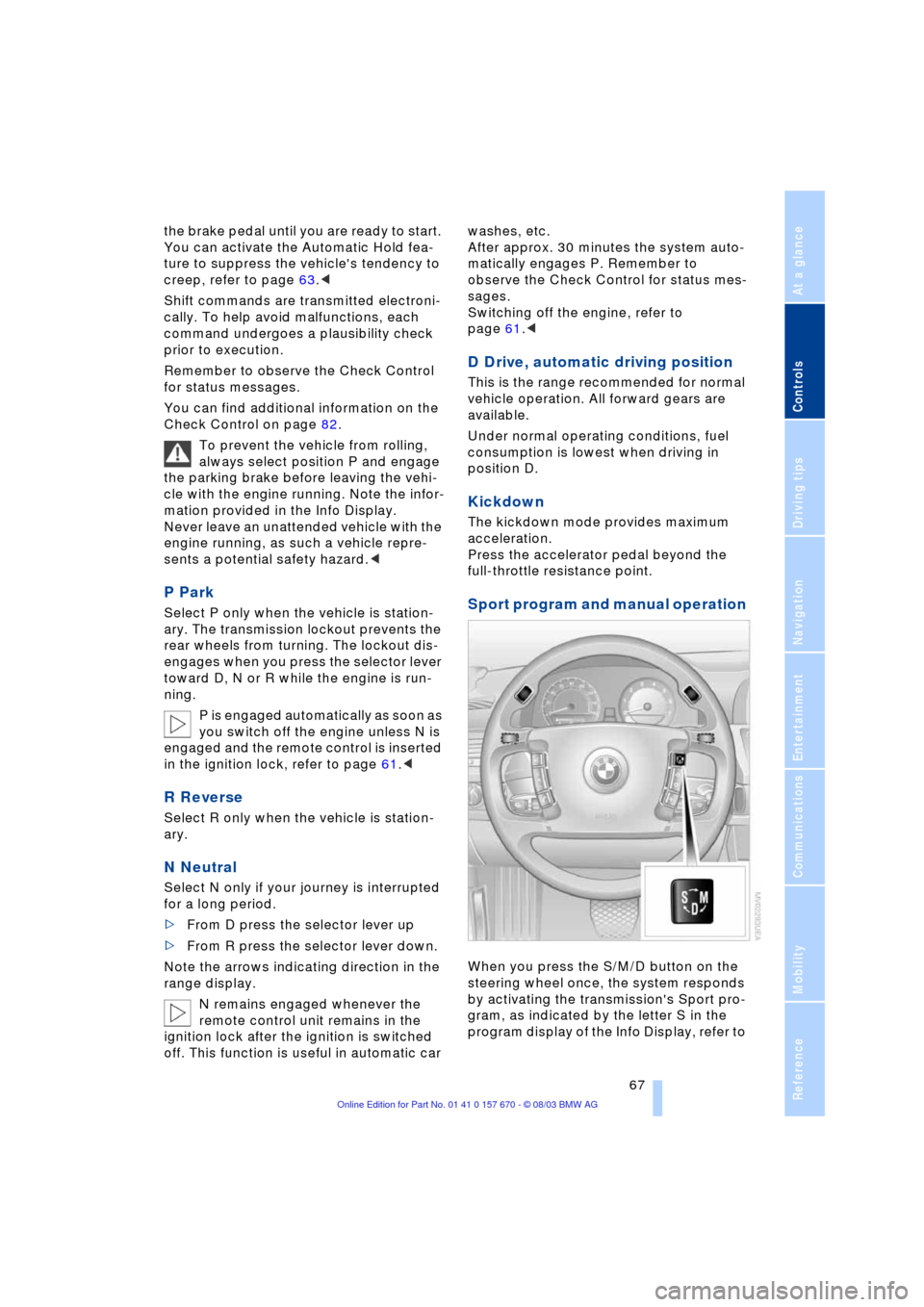
When you press the S/M/D button on the
steering wheel once, the system responds
by activating the transmission's Sport pro-
gram, as indicated by the letter S in the
program display of the Info Display, refer to
Page 70 of 232
Driving
68 page 66. We recommend this program for
performance-oriented driving.
When you press the S/M/D button a sec-
ond time the transmission switches to its
manual mode; press again to return to the
automatic program.
You can also return to the standard auto-
matic program by reselecting D.
In the manual mode the transmission
upshifts when you briefly press the buttons
on the rear of the steering wheel. You
downshift by briefly pressing the buttons
on the front of the steering wheel. The Info
Display shows the manual ranges M1
through M6.
Upshifts and downshifts are executed only
when they will result in a plausible combi-
nation of engine and vehicle speed; thus,
for example, a downshift that would cause
the engine to overrev will not be executed
by the system. The selected gear appears
briefly in the Info Display, followed by the
current gear.
To obtain maximum acceleration, for
passing maneuvers, etc., during
operation in the manual mode, use the
kickdown or downshift manually.<
Malfunctions
A status report will appear in the Check
Control to alert you to any malfunctions in
the transmission-control system. Please
note any supplementary information that
appears on the Control Display. The direc-
tional arrows also start to flash in the Info
Display.
While it will remain still possible to move
the selector lever to any desired position,
the transmission will revert to operation in
its default mode with only a limited number
of forward gears.
Some types of malfunction will make it
impossible to engage all gears.
The engine may respond with reduced out-
put when accelerating from a standing
start. If this happens, avoid extreme engine loads
and consult the nearest BMW center.
If no status messages appear in the
Info Display you should accelerate
carefully to confirm that you are driving in
the desired direction.
Never work in the engine compartment
with any of the forward or reverse gears
engaged, as the vehicle could start to
move. Engaging the parking brake, refer to
page 62.<
Manual release of transmission
lockout
You can respond to any interruptions in the
supply of electrical power, for instance, if
the battery is discharged or disconnected,
by releasing the transmission lockout man-
ually.
To prevent the drive wheels from
locking up and sliding, the transmis-
sion lockout must always be released man-
ually before the vehicle is towed.<
Press the brake pedal before releas-
ing the transmission lockout manu-
ally. If the brakes are not applied, the vehi-
cle could start to roll if parked on a steep
slope.
The transmission lockout should only be
released for towing. Remember to engage
the transmission lockout when you repark
the vehicle after moving it.
Should it also be necessary to release
the parking brake manually, owing to a dis-
charged battery, etc., always adhere to the
following sequence:
1.Start by manually releasing the parking
brake, refer to page 64
2.Then proceed to manually release the
transmission lockout.<
Jump-starting and towing, refer to
pages 207 and 208.
Page 76 of 232
Driving
74 In addition to holding a steady cruising
speed, if you do encounter slower vehicles
ahead, active cruise control will Ð within the
scope of given possibilities Ð adjust your
vehicle's speed automatically so that one
can flow with the traffic without frequent
intervention by the driver. If, for example,
while cruising at the selected speed, you
begin to approach a slower vehicle ahead
of you in the same lane, the system will
reduce your vehicle's speed to the same as
that of the vehicle ahead to maintain your
selected distance setting between your
vehicle and the vehicle ahead. There are
four settings for distance, which is addi-
tionally speed-dependent. Based on your
selected distance setting, the system auto-
matically decreases the throttle setting and
lightly applies the brakes if necessary.
The vehicle brake lamps will automatically
illuminate to signal a following driver to
take action. In addition, it may be neces-
sary for the vehicle to downshift to maintain
the distance setting selected. If the vehicle
ahead speeds up or when the lane ahead
becomes clear, your vehicle will accelerate
to the speed you have selected by increas-
ing the throttle setting and shifting gears as
needed.
Active cruise control is not and must
not be used as a collision avoidance/
warning system.<
Since this active cruise control sys-
tem is a new technology and operates
differently from conventional cruise control
systems which you may be accustomed to,
you are strongly urged to read all of the
pages relating to this system before use.
Pay special attention to the information
contained in the Things to know about
active cruise control section in this manual
beginning on page 77.<
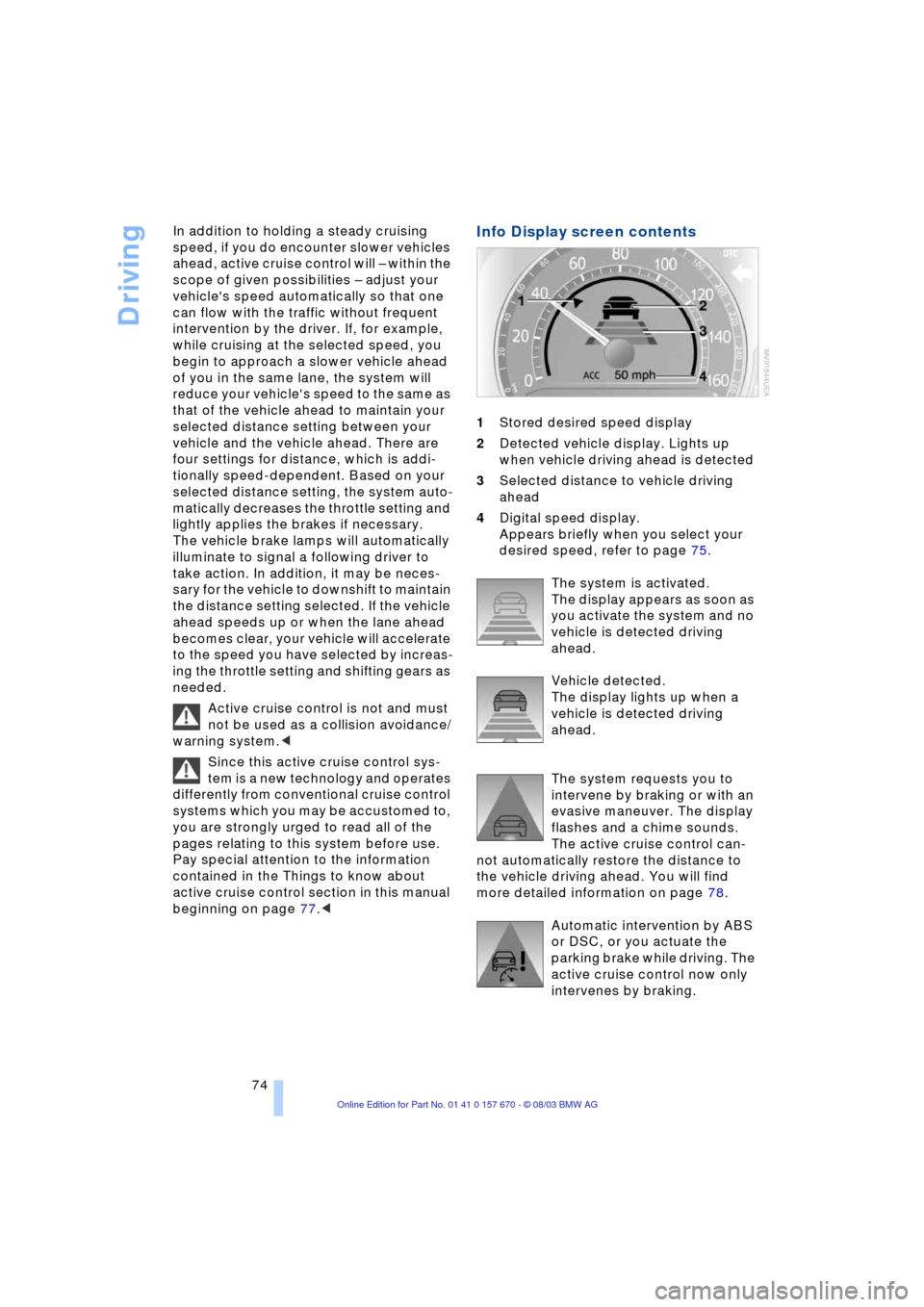
Info Display screen contents
1Stored desired speed display
2Detected vehicle display. Lights up
when vehicle driving ahead is detected
3Selected distance to vehicle driving
ahead
4Digital speed display.
Appears briefly when you select your
desired speed, refer to page 75.
The system is activated.
The display appears as soon as
you activate the system and no
vehicle is detected driving
ahead.
Vehicle detected.
The display lights up when a
vehicle is detected driving
ahead.
The system requests you to
intervene by braking or with an
evasive maneuver. The display
flashes and a chime sounds.
The active cruise control can-
not automatically restore the distance to
the vehicle driving ahead. You will find
more detailed information on page 78.
Automatic intervention by ABS
or DSC, or you actuate the
parking brake while driving. The
active cruise control now only
intervenes by braking.
Page 125 of 232
Driving tips
123Reference
At a glance
Controls
Communications
Navigation
Entertainment
Mobility
to as hydroplaning, and is characterized
by a partial or complete loss of contact
between tires and road surface, ultimately
undermining your ability to steer and brake
the vehicle.<
Driving through water
Do not drive through water on the
road if it is deeper than 1 ft/30 cm,
and then only at walking speed at the most.
Otherwise, the vehicle's engine, the electri-
cal systems and the transmission may be
damaged.<
Brake system
Braking with ABS
The best way to achieve the best response
from the ABS is to apply maximum pres-
sure to the brake pedal Ð panic stop. Since
the vehicle maintains steering responsive-
ness, you can nevertheless avoid possible
obstacles with a minimum of steering
effort.
Pulsation at the brake pedal combines with
sounds from the hydraulic circuits to indi-
cate to the driver that ABS is in its active
mode.
Do not drive with your foot resting on
the brake pedal. Otherwise, even light
but consistent pedal pressure can lead to
high temperatures, brake wear and possi-
bly even brake failure.<
Disc brakes
Driving in wet conditions
While driving in wet conditions and in
heavy rain, it is a good idea to apply light
pressure to the brake pedal every few
miles. Monitor traffic conditions to ensure
that this maneuver does not endanger
other road users. The heat generated in this
process helps dry the pads and rotors to
ensure that full braking efficiency will then
be available when you need it.
Hills
You can retain full and unimpaired braking
efficiency by downshifting to a gear in
which only minimal brake applications are
needed when descending long or steep
downhill stretches.
You can further enhance the engine's
braking effect by selecting a lower gear
in the automatic transmission's manual
mode, downshifting as far as first gear
on extremely steep stretches, refer to
page 67. This strategy helps you avoid
placing excessive loads on the brake sys-
tem.
Never allow the vehicle to coast with
the transmission in Neutral Ð or with
the engine switched off Ð as there is no
engine braking when the transmission is in
Neutral, and no power-assist for brakes
and steering when the engine is not run-
ning.
Never allow floor mats, carpets or any other
objects to protrude into the area around the
accelerator and brake pedals and obstruct
their movement.<
Corrosion
When the vehicle is driven only occasion-
ally, during extended periods when the
vehicle is not used at all, and in operating
conditions where brake applications are
less frequent, there is an increased ten-
dency for corrosion to form on rotors, while
contaminants accumulate on the brake
pads. This occurs because the minimal
pressure which must be exerted by the
pads during brake applications to clean the
rotors is not reached.
Should corrosion form on the brake rotors,
the brakes will tend to respond with a pul-
sating effect that even extended applica-
tion will fail to cure.
Brake pads
If the brake pad wear warning lamp
appears in the Check Control,
accompanied by a text. Please take
careful note of the additional information on
the Control Display.
Page 222 of 232
Everything from A to Z
220 Environmentally friendly
driving, refer to Energy
Control 85
Equalizer 149, 150
ESP, refer to DSC 92
Extended vehicle storage,
refer to the Caring for
your vehicle brochure
Exterior mirrors 51
Ð automatic dimming
feature 51
"Extra"
Ð in "Climate" menu 106
Ð rear air conditioning 109
Ð rear cooler 113
F
Factory preparations for
phone installation 177
Fader 149
"Fader" for audio mode 150
Failure messages, refer to
Check Control 82
Failure of a current
consumer 206
Fan, refer to Air supply 104
"Fastest route" 137
Fastest route 137
Filling the washer
reservoir 71
Filling the windshield
washer reservoir 71
First-aid kit 207
Fittings, towing 209
Flashlight 114
Flat Tire Monitor 95
Flat tires 188, 191
"FM..." 148, 152, 154
FM waveband 152
Fog lamps 100
"Footwell" 107
Footwell lamps 101
Front armrest, refer to Front
center armrest 114
Front center armrest 114
Front seat adjustment 44
Front-to-rear adjustment in
audio mode 149"FTM" 95
Fuel 187
Fuel capacity 186
Fuel economy 86
Fuel filler door 186
Ð releasing in the event of
electrical defect 186
Fuel gauge 85
Fuel-saving driving, refer to
Energy Control 85
Fuel specifications 187
Fuel tank capacity 186
"FULL MENU" 167, 168
"Full Release" 24
Fuses 206
G
Garage door opener, refer
to Integrated universal
remote control 111
Gasoline 187
Gear changes, refer to
Automatic transmission
with Steptronic 66
Gearshifts, refer to
Automatic transmission
with Steptronic 66
General driving notes 122
Glasses compartment 115
Glass roof, electrical 42
Ð closing in the event of an
electrical malfunction 43
Ð convenience operation 36
Ð remote control 34
Glove compartment 114
GPS, refer to Navigation
system 130
H
Hand lamp 114
Hands-free
microphone 177
Hands-free system 177
Having vehicle towed 208
Hazard warning flashers 14
Headlamp control,
automatic 99
Headlamp flasher 69
Headlamp washers 70Headlamp washer
system 71
Head Light, refer to
Adaptive Head Light 99
Head restraints 47
Ð front head restraints,
active 47
Heated seats 49
Heated steering wheel 52
Heating and ventilation 102
Heating while stopped 105
Height 213
Height adjustment
Ð seats 45
Ð steering wheel 52
"Help" 18, 21
Help texts in Control
Display 22
High beams 100
Ð replacing bulbs 201
Home address 142, 143
Horn 11
"Hotline" 182
Hydraulic brake assistant,
refer to DBC 93
Hydroplaning 122, 191
I
Ice warning 80
iDrive, refer to Control
Center 17
Ignition key 32
Ignition lock 60
Ð with Comfort Access 60
Independent
ventilation 109
"Indep. ventil." 109
Indicator lamps 12
"Individual" 107
Individual button
assignment 17
Ð on steering wheel 52
Inflation pressure 188
Info Display 12
"Information" for
navigation 135, 136
Information on the
navigation system, refer
to Voice guidance for
navigation 141