ignition BMW 760i 2005 E65 Owner's Guide
[x] Cancel search | Manufacturer: BMW, Model Year: 2005, Model line: 760i, Model: BMW 760i 2005 E65Pages: 239, PDF Size: 8.03 MB
Page 76 of 239
Driving
74
One lever for all functions
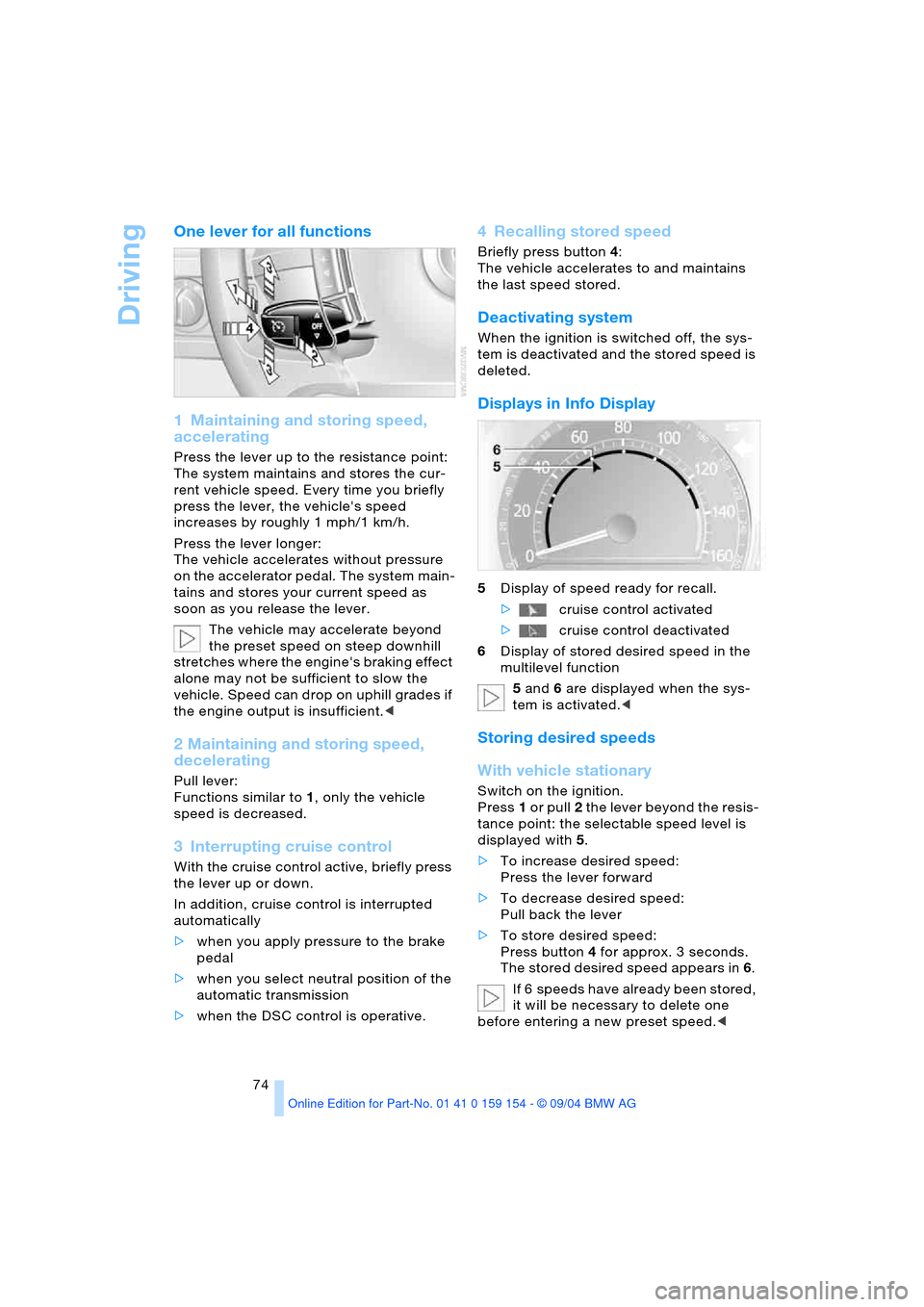
1 Maintaining and storing speed,
accelerating
Press the lever up to the resistance point:
The system maintains and stores the cur-
rent vehicle speed. Every time you briefly
press the lever, the vehicle's speed
increases by roughly 1 mph/1 km/h.
Press the lever longer:
The vehicle accelerates without pressure
on the accelerator pedal. The system main-
tains and stores your current speed as
soon as you release the lever.
The vehicle may accelerate beyond
the preset speed on steep downhill
stretches where the engine's braking effect
alone may not be sufficient to slow the
vehicle. Speed can drop on uphill grades if
the engine output is insufficient.<
2 Maintaining and storing speed,
decelerating
Pull lever:
Functions similar to1, only the vehicle
speed is decreased.
3 Interrupting cruise control
With the cruise control active, briefly press
the lever up or down.
In addition, cruise control is interrupted
automatically
>when you apply pressure to the brake
pedal
>when you select neutral position of the
automatic transmission
>when the DSC control is operative.
4 Recalling stored speed
Briefly press button4:
The vehicle accelerates to and maintains
the last speed stored.
Deactivating system
When the ignition is switched off, the sys-
tem is deactivated and the stored speed is
deleted.
Displays in Info Display
5Display of speed ready for recall.
>cruise control activated
>cruise control deactivated
6Display of stored desired speed in the
multilevel function
5 and 6 are displayed when the sys-
tem is activated.<
Storing desired speeds
With vehicle stationary
Switch on the ignition.
Press1 or pull2 the lever beyond the resis-
tance point: the selectable speed level is
displayed with5.
>To increase desired speed:
Press the lever forward
>To decrease desired speed:
Pull back the lever
>To store desired speed:
Press button4 for approx. 3 seconds.
The stored desired speed appears in 6.
If 6 speeds have already been stored,
it will be necessary to delete one
before entering a new preset speed.<
Page 77 of 239
Controls
75Reference
At a glance
Driving tips
Communications
Navigation
Entertainment
Mobility
While driving
Press1 or pull2 the lever beyond the resis-
tance point:
Press button4 for approx. 3 seconds. The
respective driven speed is applied as the
desired speed and displayed with6.
If all of the graduations flash twice,
this indicates that 6 desired speeds
have already been stored. You must then
delete at least one.<
Deleting desired speeds
Select the desired speed5.
Press button4 for approx. 3 seconds.
Activating multilevel preset mode
Press 1 or pull 2 the lever beyond the resis-
tance point.
The current driving speed is maintained,
stored and displayed as the available
speed5.
If no desired speeds are stored, you
can increase or reduce the speed by
5 mph/10 km/h with the multilevel preset
mode activated each time you press or pull
the lever beyond the resistance point.<
Selecting desired speed
Press 1 or pull 2 the lever beyond the resis-
tance point.
The next desired speed is selected.
The available speed changes to the
minimum speed of approx. 20 mph/
30 km/h when you pull the lever beyond the
resistance point 2 at the lowest desired
speed.<
Interrupting the cruise control
With the cruise control active, briefly press
the lever up or down3.
Hiding display for multilevel preset
function
When activated, press the lever up or
down3 for approx. 3 seconds.
Showing display for multilevel preset
function again
Press 1 or pull2 the lever beyond the resis-
tance point.
Deactivating multilevel preset mode
The multilevel preset function is also deac-
tivated when you switch off the ignition.
Active cruise control*
The concept
With active cruise control you can select a
desired speed which is not only automati-
cally maintained when driving on open
roadways, but also varied to maintain a
selected distance setting as slower traffic is
encountered.
Active cruise control is a technological
advance over the familiar cruise control and
is a welcome relief from the constant
adjustment of speed that can accompany
driving in traffic on freeways or other high-
speed thoroughfares. Especially on longer
trips, the system can reduce fatigue and
tension, while increasing your enjoyment of
driving. Please use it safely and responsi-
bly.
In addition to holding a steady cruising
speed, if you do encounter slower vehicles
ahead, active cruise control will, within the
scope of given possibilities, adjust your
vehicle’s speed automatically so that you
can flow with the traffic without frequent
intervention by the driver. If, for example,
while cruising at the selected speed, you
begin to approach a slower vehicle ahead
of you in the same lane, the system will
reduce your vehicle's speed to the same as
that of the vehicle ahead to maintain your
selected distance setting between your
vehicle and the vehicle ahead. There are
four settings for distance, which is addi-
tionally speed-dependent. Based on your
selected distance setting, the system auto-
matically decreases the throttle setting and
lightly applies the brakes if necessary.
Page 81 of 239
Controls
79Reference
At a glance
Driving tips
Communications
Navigation
Entertainment
Mobility
in city driving; heavy traffic such as during
rush hour; on curvy, winding roads, slip-
pery roads or roads with sharp curves such
as highway off-ramps; during inclement
weather such as snow, strong rain or fog;
or when entering interchanges, service/
parking areas or toll booths. It is also
important to regulate your vehicle's speed
and distance setting within applicable legal
limits. Always be ready to take action or
apply the brakes if necessary, especially
when the system is actively following a
vehicle in front of you.<
Always remember that the range and
ability of the system does have physi-
cal limitations. It will not apply the brakes or
decelerate your vehicle when there is a
slow-moving vehicle, stopped vehicle or
stationary object ahead of you, as for
example, at a traffic light or a parked vehi-
cle. Also, the system does not react to
oncoming traffic, pedestrians or other type
of potential traffic such as a rider on horse-
back. It is also possible that the system
may not detect smaller moving objects
such as motorcycles or bicycles. Be espe-
cially alert when encountering any of these
situations as the system will neither auto-
matically brake, nor provide a warning to
you. Also, be aware that every decrease in
the distance setting allows your vehicle to
come closer to a vehicle in front of you and
requires a heightened amount of alert-
ness.<
If while your vehicle is actively following a
vehicle in front of you and the vehicle
ahead speeds up or the lane ahead
becomes clear, then your vehicle will
accelerate to the speed you have selected.
Be aware that changing to a clear, unob-
st r uc ted lan e w il l als o r esu lt in y ou r v eh icle
accelerating.
Be certain to deactivate the system
when you pull into an exit lane for a
highway off-ramp.<
Also, vehicles traveling in a staggered man-
ner on a highway may cause a delay in the
system's reaction to a vehicle in front of you
or may cause the system to react to a vehi-
cle actually in the lane next to you. Always be ready to take action or apply the brakes
if necessary.
Active cruise control can only decelerate
the vehicle to approx. 20 mph/30 km/h. If
the system reduces vehicle speed below
20 mph/30 km/h or if DSC/ABS is engaged
while driving, the system will automatically
deactivate.
Remember, the system cannot stop
your vehicle. In addition, the system is
deactivated whenever the driver applies
the vehicle brakes, shifts the transmission
from drive/D to neutral/N, or deactivates
DSC. After any deactivation, the system will
no longer automatically activate the vehicle
brakes, which means the driver must inter-
vene and resume manual braking. You
should then reactivate the system only
when you are fully aware of the prior speed
and distance settings.<
Active cruise control may brake when you
reduce the stored desired speed; however,
the driver must constantly monitor traffic
and intervene if necessary.
When you switch off the engine or ignition,
active cruise control is fully switched off,
too, and any settings you have selected are
canceled.
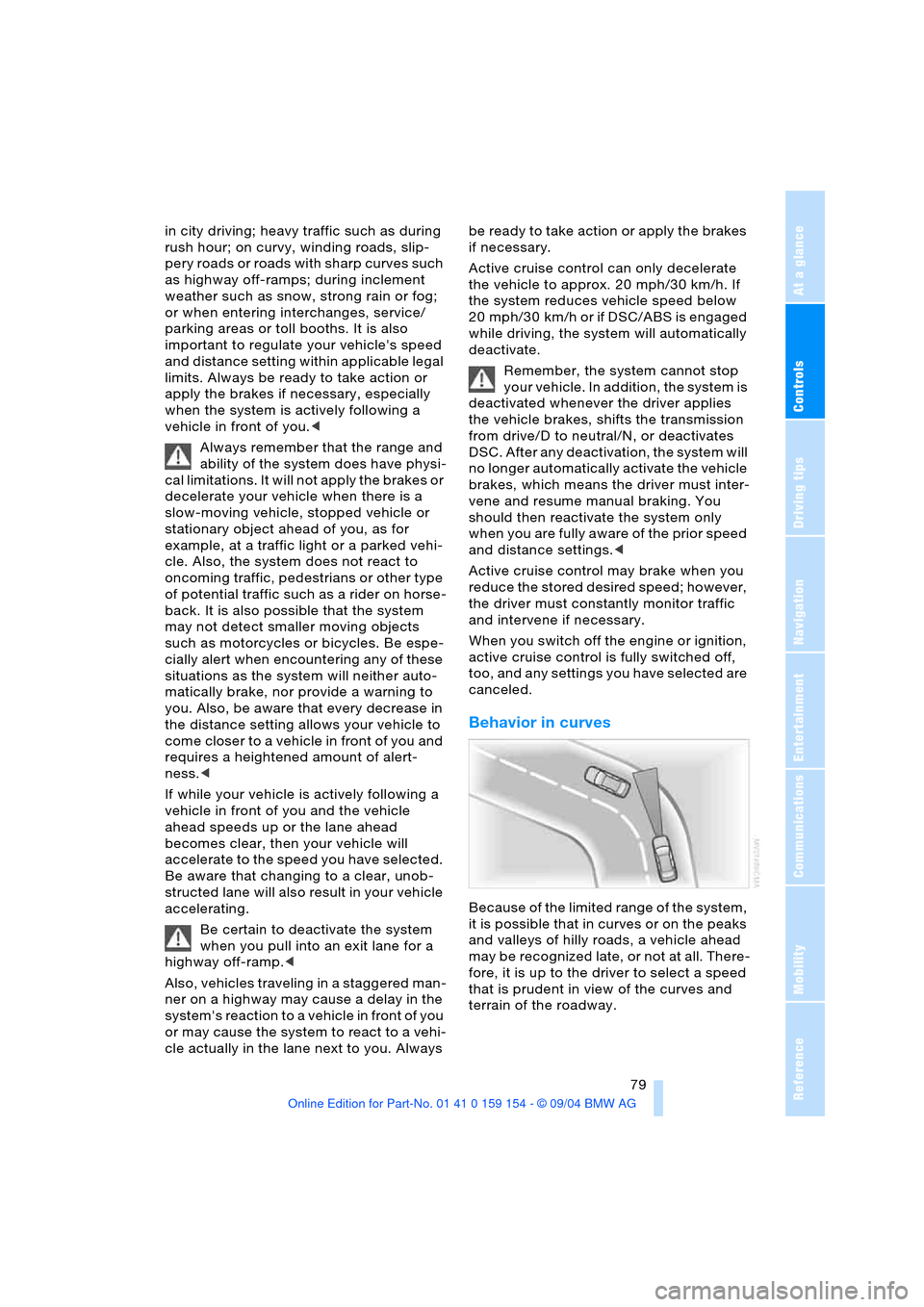
Behavior in curves
Because of the limited range of the system,
it is possible that in curves or on the peaks
and valleys of hilly roads, a vehicle ahead
may be recognized late, or not at all. There-
fore, it is up to the driver to select a speed
that is prudent in view of the curves and
terrain of the roadway.
Page 83 of 239
Controls
81Reference
At a glance
Driving tips
Communications
Navigation
Entertainment
Mobility
Everything under control
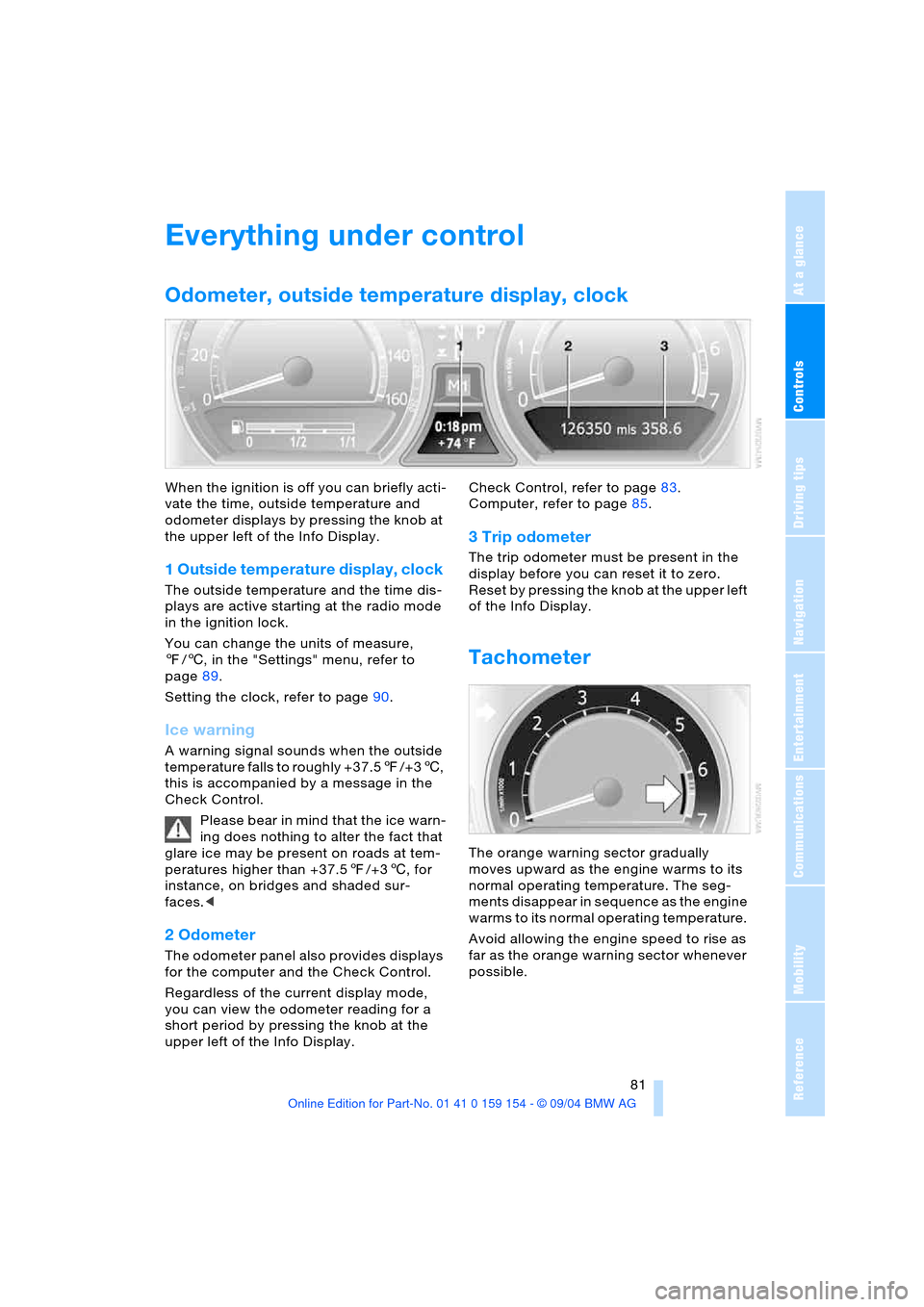
Odometer, outside temperature display, clock
When the ignition is off you can briefly acti-
vate the time, outside temperature and
odometer displays by pressing the knob at
the upper left of the Info Display.
1 Outside temperature display, clock
The outside temperature and the time dis-
plays are active starting at the radio mode
in the ignition lock.
You can change the units of measure,
7/6, in the "Settings" menu, refer to
page89.
Setting the clock, refer to page90.
Ice warning
A warning signal sounds when the outside
temperature falls to roughly +37.57/+36,
this is accompanied by a message in the
Check Control.
Please bear in mind that the ice warn-
ing does nothing to alter the fact that
glare ice may be present on roads at tem-
peratures higher than +37.57/+36, for
instance, on bridges and shaded sur-
faces.<
2 Odometer
The odometer panel also provides displays
for the computer and the Check Control.
Regardless of the current display mode,
you can view the odometer reading for a
short period by pressing the knob at the
upper left of the Info Display. Check Control, refer to page83.
Computer, refer to page85.
3 Trip odometer
The trip odometer must be present in the
display before you can reset it to zero.
Reset by pressing the knob at the upper left
of the Info Display.
Tachometer
The orange warning sector gradually
moves upward as the engine warms to its
normal operating temperature. The seg-
ments disappear in sequence as the engine
warms to its normal operating temperature.
Avoid allowing the engine speed to rise as
far as the orange warning sector whenever
possible.
Page 84 of 239
Everything under control
82
Service requirement display
Info Display screen contents
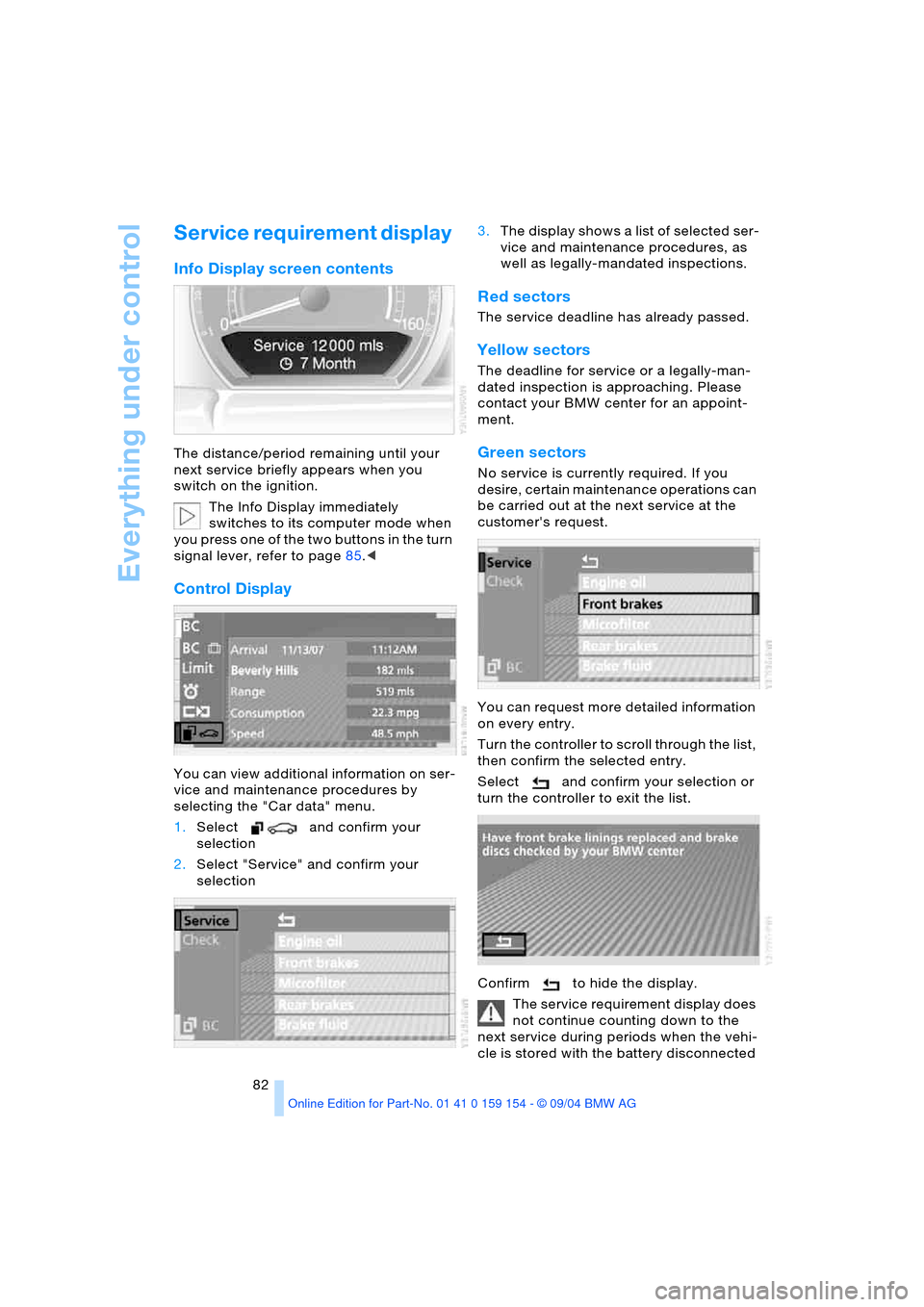
The distance/period remaining until your
next service briefly appears when you
switch on the ignition.
The Info Display immediately
switches to its computer mode when
you press one of the two buttons in the turn
signal lever, refer to page85.<
Control Display
You can view additional information on ser-
vice and maintenance procedures by
selecting the "Car data" menu.
1.Select and confirm your
selection
2.Select "Service" and confirm your
selection 3.The display shows a list of selected ser-
vice and maintenance procedures, as
well as legally-mandated inspections.
Red sectors
The service deadline has already passed.
Yellow sectors
The deadline for service or a legally-man-
dated inspection is approaching. Please
contact your BMW center for an appoint-
ment.
Green sectors
No service is currently required. If you
desire, certain maintenance operations can
be carried out at the next service at the
customer's request.
You can request more detailed information
on every entry.
Turn the controller to scroll through the list,
then confirm the selected entry.
Select and confirm your selection or
turn the controller to exit the list.
Confirm to hide the display.
The service requirement display does
not continue counting down to the
next service during periods when the vehi-
cle is stored with the battery disconnected
Page 85 of 239
Controls
83Reference
At a glance
Driving tips
Communications
Navigation
Entertainment
Mobility
or the battery switch OFF.
Please remember that brake fluid should be
changed every two years at the latest, even
if the display does not yet indicate that ser-
vice is required, refer to page197.
This same precaution applies to all of the
other service and maintenance operations
scheduled according to periodic inter-
vals.<
Displaying and entering dates for
legally-mandated emission and
vehicle inspections
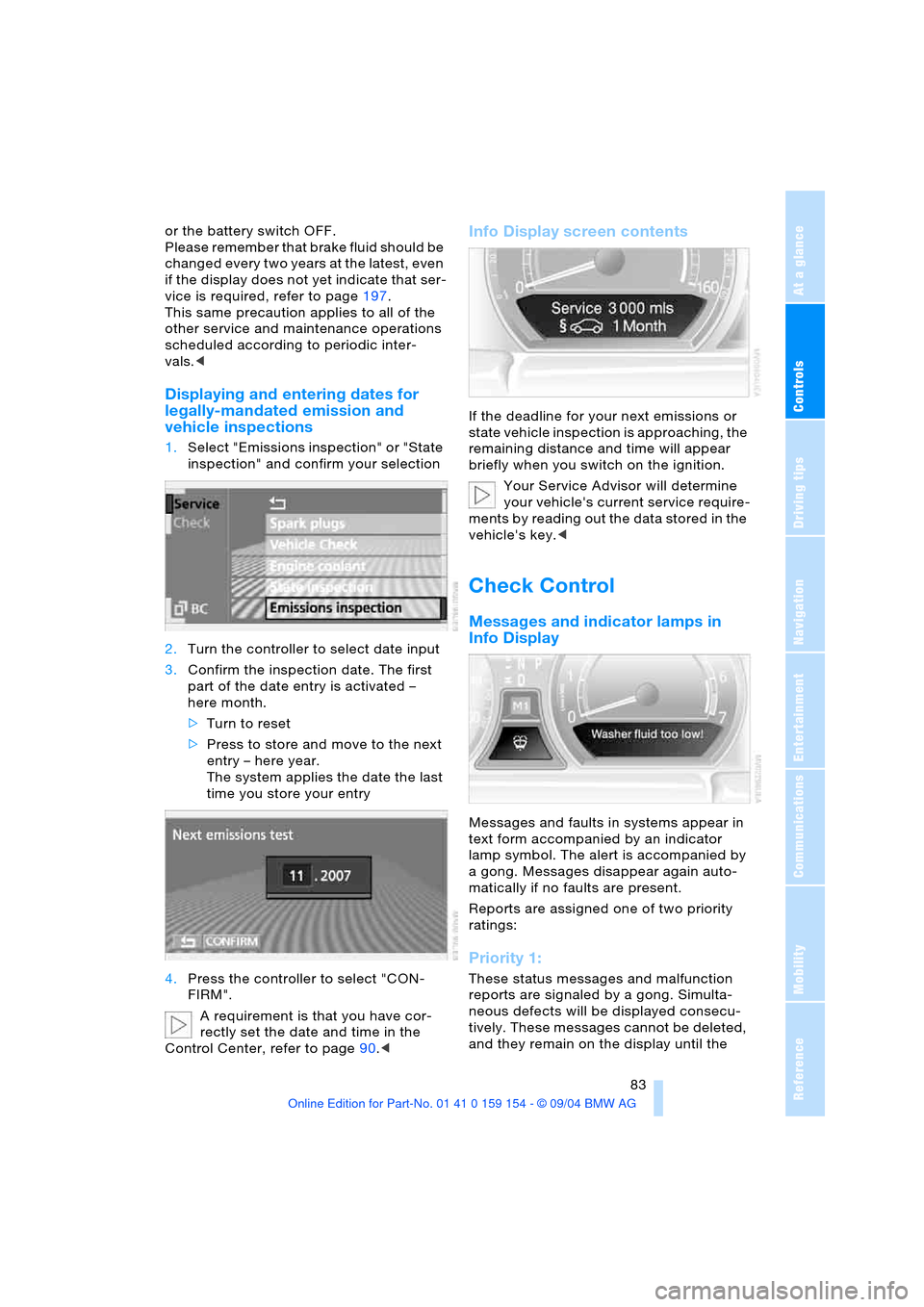
1.Select "Emissions inspection" or "State
inspection" and confirm your selection
2.Turn the controller to select date input
3.Confirm the inspection date. The first
part of the date entry is activated –
here month.
>Turn to reset
>Press to store and move to the next
entry – here year.
The system applies the date the last
time you store your entry
4.Press the controller to select "CON-
FIRM".
A requirement is that you have cor-
rectly set the date and time in the
Control Center, refer to page90.<
Info Display screen contents
If the deadline for your next emissions or
state vehicle inspection is approaching, the
remaining distance and time will appear
briefly when you switch on the ignition.
Your Service Advisor will determine
your vehicle's current service require-
ments by reading out the data stored in the
vehicle's key.<
Check Control
Messages and indicator lamps in
Info Display
Messages and faults in systems appear in
text form accompanied by an indicator
lamp symbol. The alert is accompanied by
a gong. Messages disappear again auto-
matically if no faults are present.
Reports are assigned one of two priority
ratings:
Priority 1:
These status messages and malfunction
reports are signaled by a gong. Simulta-
neous defects will be displayed consecu-
tively. These messages cannot be deleted,
and they remain on the display until the
Page 87 of 239
Controls
85Reference
At a glance
Driving tips
Communications
Navigation
Entertainment
Mobility
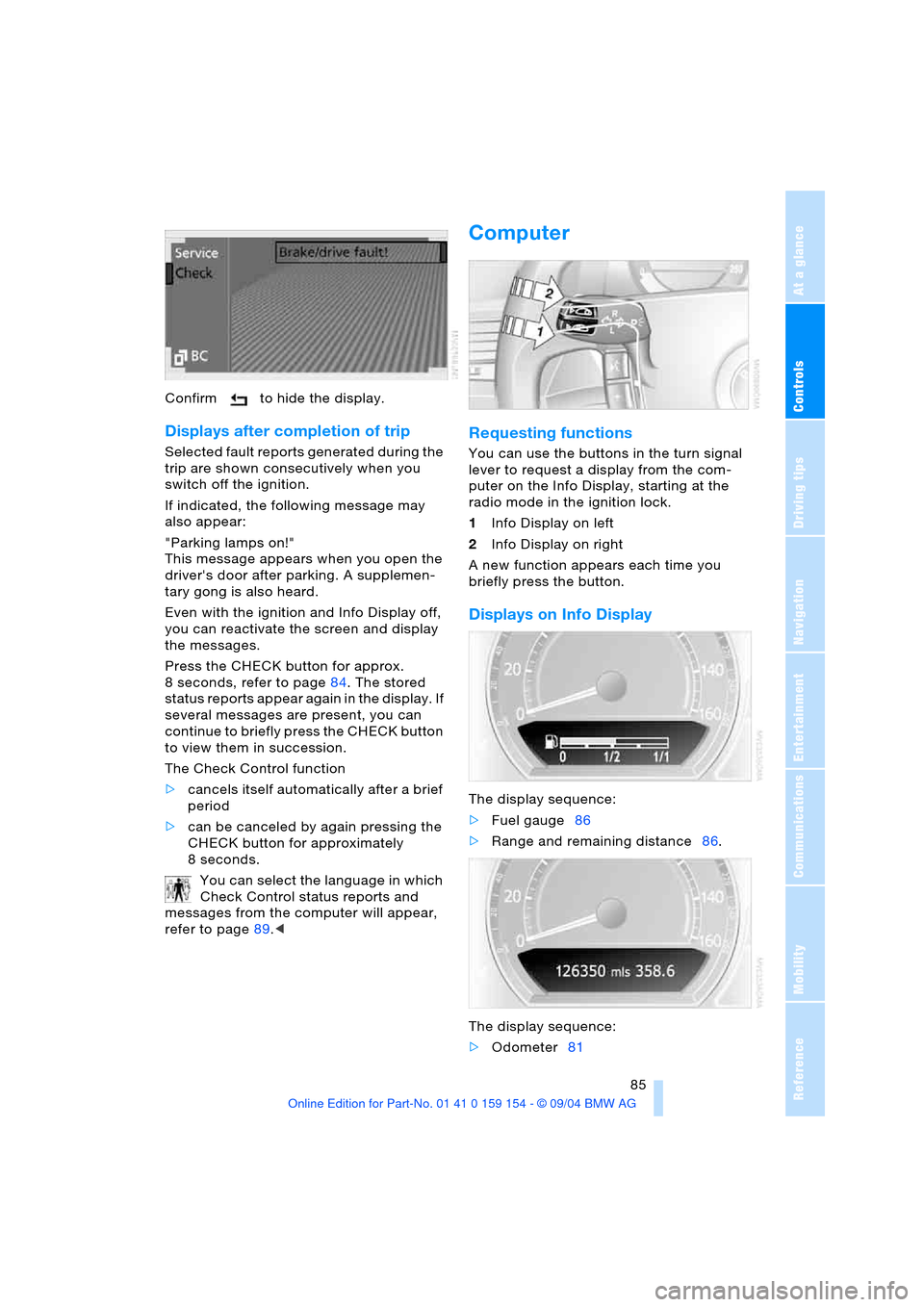
Confirm to hide the display.
Displays after completion of trip
Selected fault reports generated during the
trip are shown consecutively when you
switch off the ignition.
If indicated, the following message may
also appear:
"Parking lamps on!"
This message appears when you open the
driver's door after parking. A supplemen-
tary gong is also heard.
Even with the ignition and Info Display off,
you can reactivate the screen and display
the messages.
Press the CHECK button for approx.
8 seconds, refer to page84. The stored
status reports appear again in the display. If
several messages are present, you can
continue to briefly press the CHECK button
to view them in succession.
The Check Control function
>cancels itself automatically after a brief
period
>can be canceled by again pressing the
CHECK button for approximately
8seconds.
You can select the language in which
Check Control status reports and
messages from the computer will appear,
refer to page89.<
Computer
Requesting functions
You can use the buttons in the turn signal
lever to request a display from the com-
puter on the Info Display, starting at the
radio mode in the ignition lock.
1Info Display on left
2Info Display on right
A new function appears each time you
briefly press the button.
Displays on Info Display
The display sequence:
>Fuel gauge86
>Range and remaining distance86.
The display sequence:
>Odometer81
Page 93 of 239
Controls
91Reference
At a glance
Driving tips
Communications
Navigation
Entertainment
Mobility
Technology for comfort, convenience
and safety
PDC Park Distance Control*
The concept
The PDC assists you when you are parking.
Signal tones indicate the current distance
to an object behind or in front of your vehi-
cle. Four ultrasonic sensors in both the
bumpers monitor the distance to the near-
est object. The sensors at the front and at
the two rear corners have a range of
approx. 2 ft/60 cm; the rear middle sensors
have approx. 5 ft/1.50 m.
PDC is a parking aid that can indicate
objects when they are approached
slowly, as is usually the case when parking.
Avoid approaching an object at high speed,
as otherwise the physical circumstances
would mean that the system warning was
too late.<
Automatic function
Whenever the ignition is on the system
automatically assumes operational status
after a few seconds each time you engage
the transmission position R.
Wait this short period before revers-
ing.<
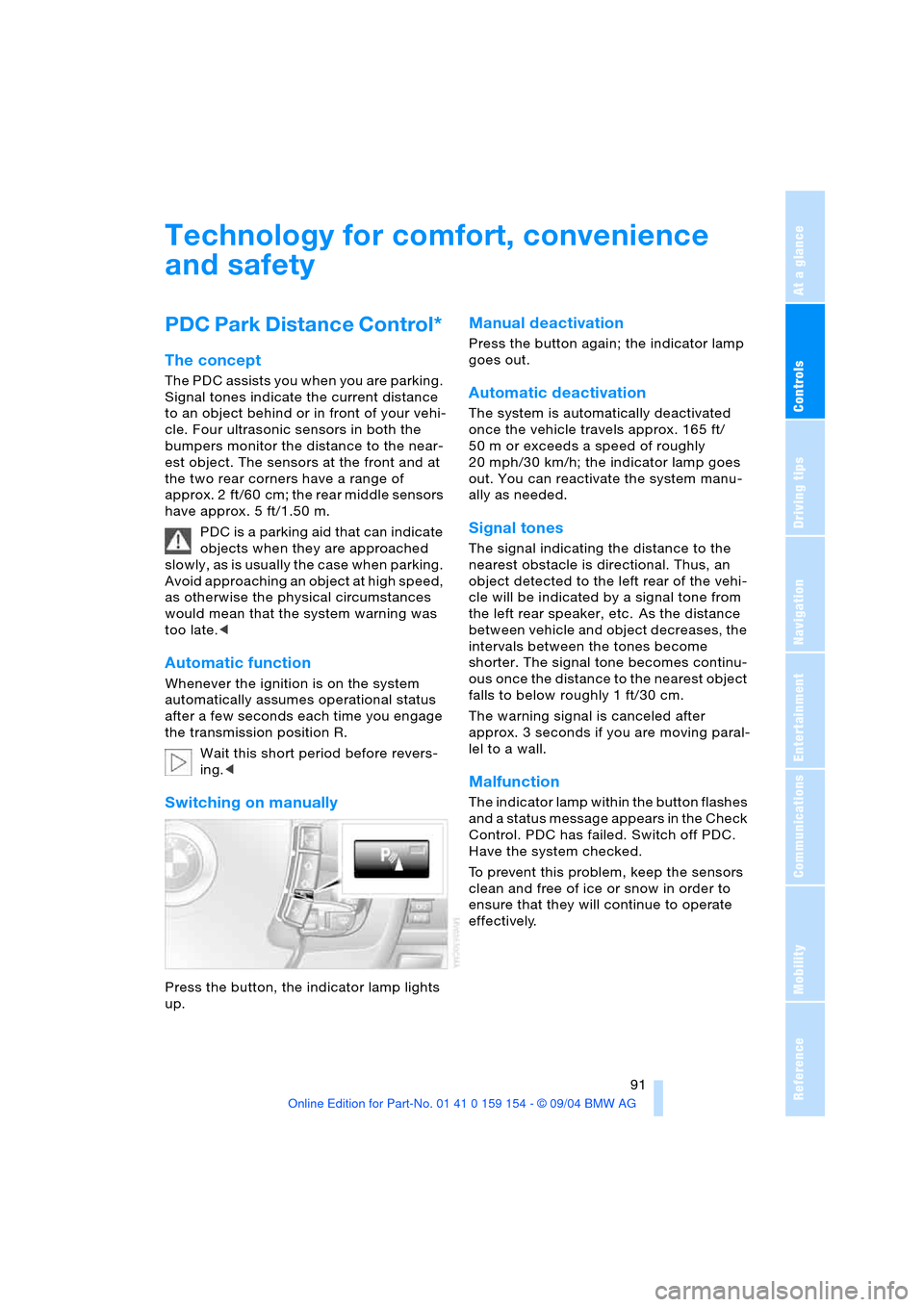
Switching on manually
Press the button, the indicator lamp lights
up.
Manual deactivation
Press the button again; the indicator lamp
goes out.
Automatic deactivation
The system is automatically deactivated
once the vehicle travels approx. 165 ft/
50 m or exceeds a speed of roughly
20 mph/30 km/h; the indicator lamp goes
out. You can reactivate the system manu-
ally as needed.
Signal tones
The signal indicating the distance to the
nearest obstacle is directional. Thus, an
object detected to the left rear of the vehi-
cle will be indicated by a signal tone from
the left rear speaker, etc. As the distance
between vehicle and object decreases, the
intervals between the tones become
shorter. The signal tone becomes continu-
ous once the distance to the nearest object
falls to below roughly 1 ft/30 cm.
The warning signal is canceled after
approx. 3 seconds if you are moving paral-
lel to a wall.
Malfunction
The indicator lamp within the button flashes
and a status message appears in the Check
Control. PDC has failed. Switch off PDC.
Have the system checked.
To prevent this problem, keep the sensors
clean and free of ice or snow in order to
ensure that they will continue to operate
effectively.
Page 101 of 239
Controls
99Reference
At a glance
Driving tips
Communications
Navigation
Entertainment
Mobility
whether or not the seat is occupied by a
child in the child-restraint system or an
adult.
>When a child is seated in the child-
restraint system or with an empty seat,
the front and side airbags are automat-
ically deactivated on the passenger's
side
>When an adult is traveling in the front
seat, the front and side airbags remain
active on the passenger side.
Although not desired, it can occur in
the case of heavier children that the
front passenger airbags remain active or in
the case of very light adults or young per-
sons that the front passenger airbags are
deactivated.
The state of the front passenger airbags is
shown with the indicator lamp, refer to Indi-
cator lamps in the following. In this case
transport the corresponding persons on the
rear seat.
Except when persons to be transported, do
not increase the load on the front passen-
ger seat with additional items. Do not fit
seat covers, seat cushion padding, ball
mats or other items to the front passenger
seat unless they are specifically recom-
mended by BMW. Do not place any items
under the seat. Otherwise, the function of
the seat occupation detection could be
impaired.<
Indicator lamps
Airbag system ready for use
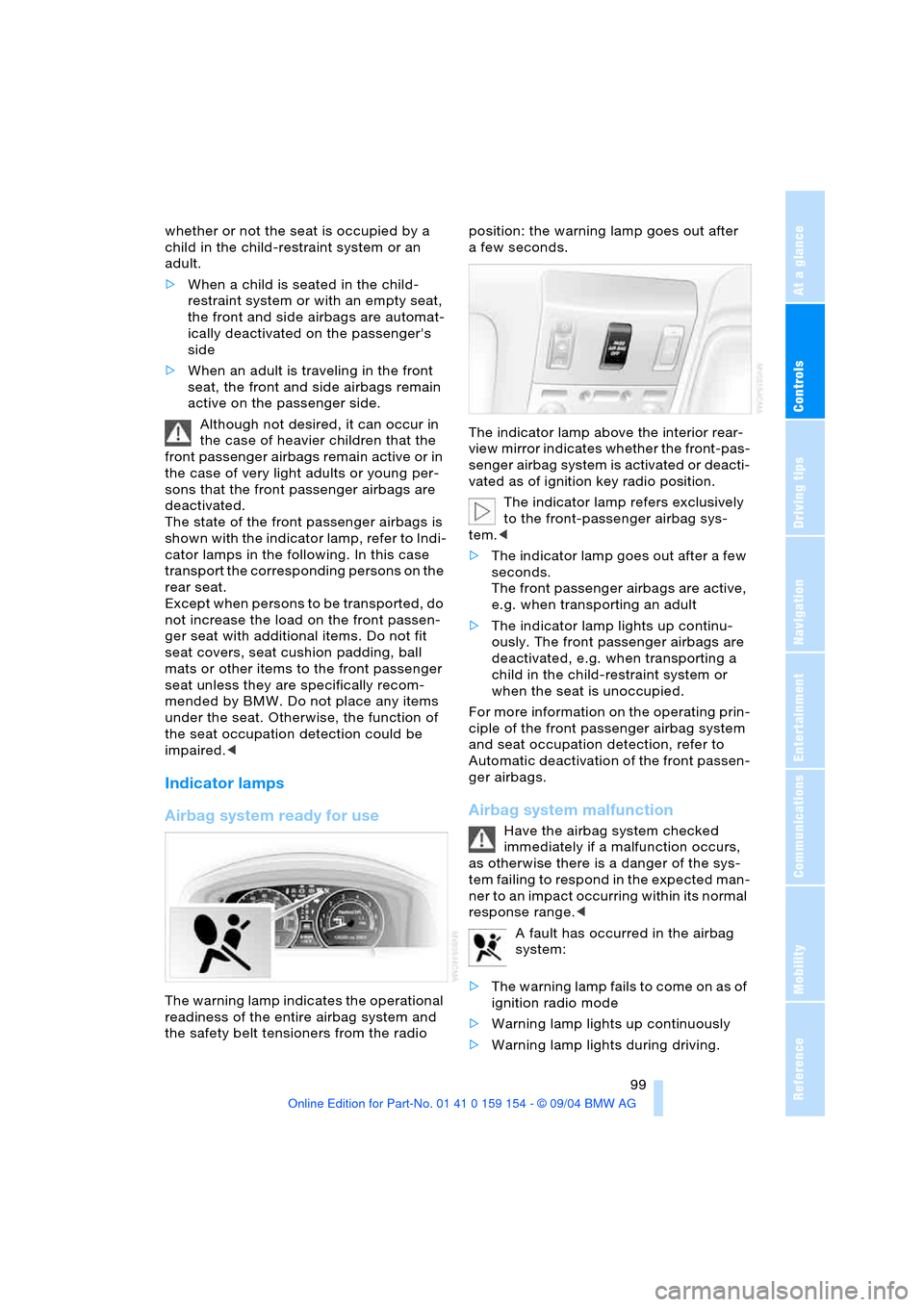
The warning lamp indicates the operational
readiness of the entire airbag system and
the safety belt tensioners from the radio position: the warning lamp goes out after
afew seconds.
The indicator lamp above the interior rear-
view mirror indicates whether the front-pas-
senger airbag system is activated or deacti-
vated as of ignition key radio position.
The indicator lamp refers exclusively
to the front-passenger airbag sys-
tem.<
>The indicator lamp goes out after a few
seconds.
The front passenger airbags are active,
e.g. when transporting an adult
>The indicator lamp lights up continu-
ously. The front passenger airbags are
deactivated, e.g. when transporting a
child in the child-restraint system or
when the seat is unoccupied.
For more information on the operating prin-
ciple of the front passenger airbag system
and seat occupation detection, refer to
Automatic deactivation of the front passen-
ger airbags.
Airbag system malfunction
Have the airbag system checked
immediately if a malfunction occurs,
as otherwise there is a danger of the sys-
tem failing to respond in the expected man-
ner to an impact occurring within its normal
response range.<
A fault has occurred in the airbag
system:
>The warning lamp fails to come on as of
ignition radio mode
>Warning lamp lights up continuously
>Warning lamp lights during driving.
Page 102 of 239
Lamps
100
Lamps
Parking lamps/low beams
Parking lamps
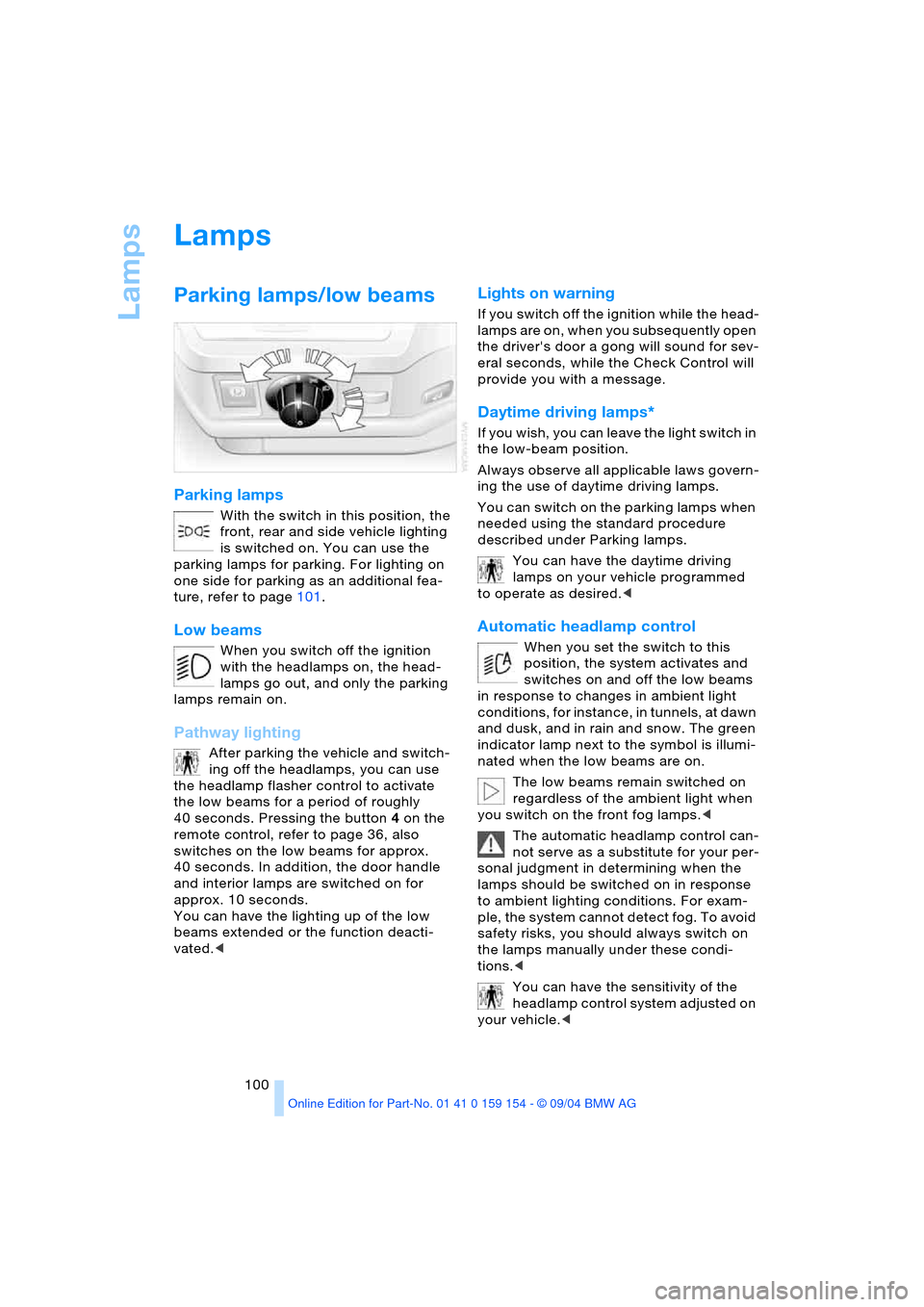
With the switch in this position, the
front, rear and side vehicle lighting
is switched on. You can use the
parking lamps for parking. For lighting on
one side for parking as an additional fea-
ture, refer to page101.
Low beams
When you switch off the ignition
with the headlamps on, the head-
lamps go out, and only the parking
lamps remain on.
Pathway lighting
After parking the vehicle and switch-
ing off the headlamps, you can use
the headlamp flasher control to activate
the low beams for a period of roughly
40 seconds. Pressing the button 4 on the
remote control, refer to page 36, also
switches on the low beams for approx.
40 seconds. In addition, the door handle
and interior lamps are switched on for
approx. 10 seconds.
You can have the lighting up of the low
beams extended or the function deacti-
vated.<
Lights on warning
If you switch off the ignition while the head-
lamps are on, when you subsequently open
the driver's door a gong will sound for sev-
eral seconds, while the Check Control will
provide you with a message
.
Daytime driving lamps*
If you wish, you can leave the light switch in
the low-beam position.
Always observe all applicable laws govern-
ing the use of daytime driving lamps.
You can switch on the parking lamps when
needed using the standard procedure
described under Parking lamps.
You can have the daytime driving
lamps on your vehicle programmed
to operate as desired.<
Automatic headlamp control
When you set the switch to this
position, the system activates and
switches on and off the low beams
in response to changes in ambient light
conditions, for instance, in tunnels, at dawn
and dusk, and in rain and snow. The green
indicator lamp next to the symbol is illumi-
nated when the low beams are on.
The low beams remain switched on
regardless of the ambient light when
you switch on the front fog lamps.<
The automatic headlamp control can-
not serve as a substitute for your per-
sonal judgment in determining when the
lamps should be switched on in response
to ambient lighting conditions. For exam-
ple, the system cannot detect fog. To avoid
safety risks, you should always switch on
the lamps manually under these condi-
tions.<
You can have the sensitivity of the
headlamp control system adjusted on
your vehicle.<