steering BMW 760i 2005 E65 Owner's Guide
[x] Cancel search | Manufacturer: BMW, Model Year: 2005, Model line: 760i, Model: BMW 760i 2005 E65Pages: 239, PDF Size: 8.03 MB
Page 103 of 239
Controls
101Reference
At a glance
Driving tips
Communications
Navigation
Entertainment
Mobility
Adaptive Head Light*
The concept
Adaptive Head Light is a variable headlamp
control system that enables dynamic illumi-
nation of the road surface. Depending on
the steering angle and other assumptions,
the light from the headlamp follows the
course of the road.
Activating Adaptive Head Light
With the ignition on, refer to
page62, turn the light switch to the
position 'Automatic headlamp con-
trol', refer to page100.
To avoid blinding oncoming traffic, the
Adaptive Head Light:
>Is not active when driving in reverse
>Is only active toward the passenger's
side with the vehicle stationary.
Malfunction
The LED above the symbol for automatic
headlamp control flashes. Adaptive Head
Light is faulty or has failed. Have the system
checked as soon as possible.
High beams/standing lamps
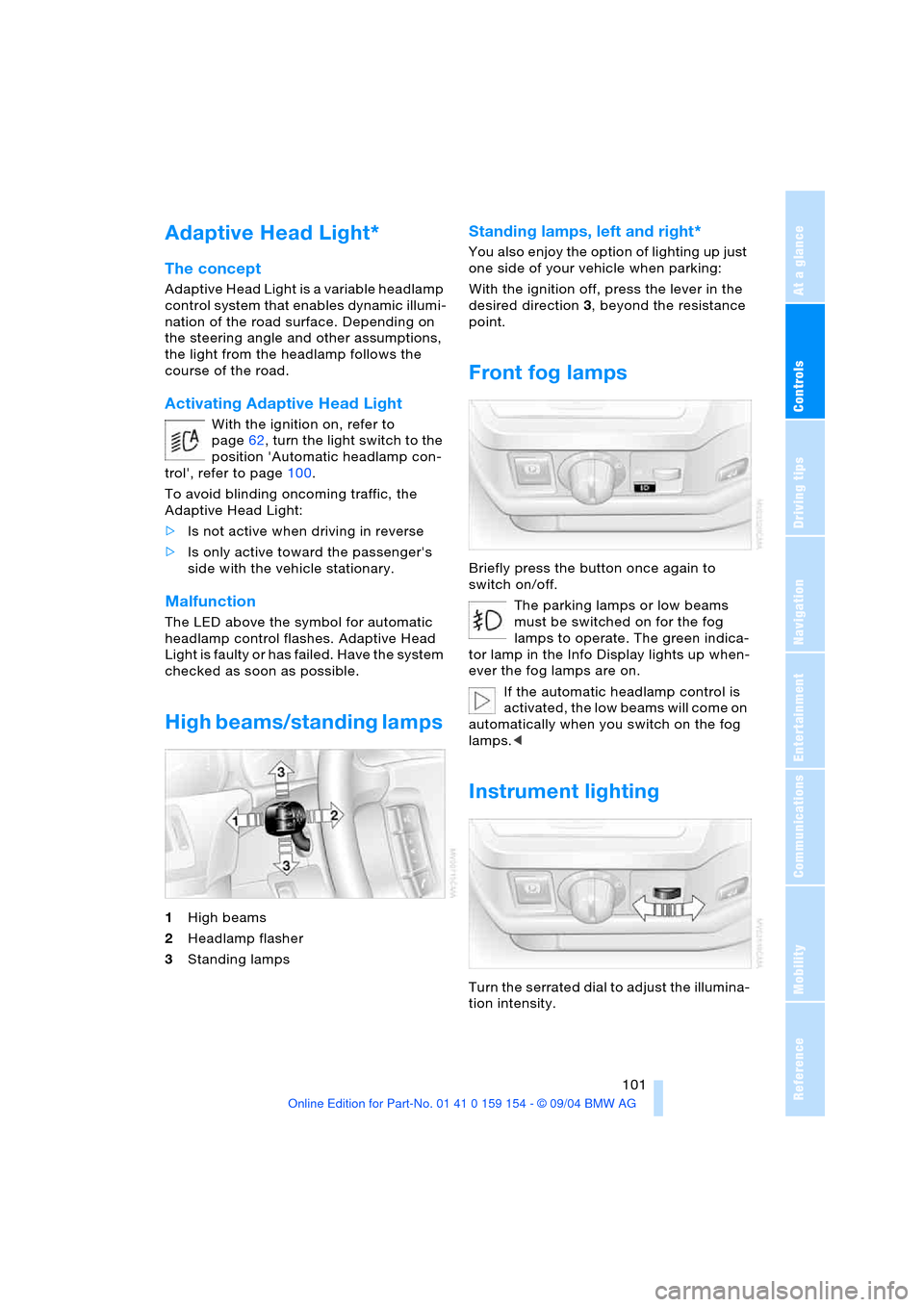
1High beams
2Headlamp flasher
3Standing lamps
Standing lamps, left and right*
You also enjoy the option of lighting up just
one side of your vehicle when parking:
With the ignition off, press the lever in the
desired direction3, beyond the resistance
point.
Front fog lamps
Briefly press the button once again to
switch on/off.
The parking lamps or low beams
must be switched on for the fog
lamps to operate. The green indica-
tor lamp in the Info Display lights up when-
ever the fog lamps are on.
If the automatic headlamp control is
activated, the low beams will come on
automatically when you switch on the fog
lamps.<
Instrument lighting
Turn the serrated dial to adjust the illumina-
tion intensity.
Page 125 of 239
Driving tips
123Reference
At a glance
Controls
Communications
Navigation
Entertainment
Mobility
Hydroplaning
When driving on wet or slushy roads,
reduce road speed. If you do not, a
wedge of water can form between tires and
road surface. This phenomenon is referred
to as hydroplaning, and is characterized by
a partial or complete loss of contact
between tires and road surface, ultimately
undermining your ability to steer and brake
the vehicle.<
Driving through water
Only drive through water with a maxi-
mum depth of 1 ft/30 cm, and then
only at walking speed at the most. Other-
wise, the vehicle's engine, the electrical
systems and the transmission may be dam-
aged.<
Safe braking
Your BMW is equipped with ABS as stan-
dard equipment. The best way to brake is
to apply maximum pressure to the brake
pedal during emergency: full brake applica-
tion. Since the vehicle maintains steering
responsiveness, you can nevertheless
avoid possible obstacles with a minimum
of steering effort.
Pulsation at the brake pedal combines with
sounds from the hydraulic circuits to indi-
cate to the driver that ABS is in its active
mode.
Driving in wet conditions
While driving in wet conditions and in heavy
rain, it is a good idea to apply light pressure
to the brake pedal every few miles. Monitor
traffic conditions to ensure that this maneu-
ver does not endanger other road users.
The heat generated in this process helps
dry the pads and rotors to ensure that full
braking efficiency will then be available
when you need it.
Hills
To prevent overheating and reduced
efficiency of the brake system, drive
long or steep downhill gradients in the gear
in which the least braking is required. Otherwise, even light but consistent pedal
pressure can lead to high temperatures,
brake wear and possibly even brake fail-
ure.<
You can further enhance the engine's brak-
ing effect by selecting a lower gear in the
automatic transmission's manual mode,
downshifting as far as first gear on
extremely steep stretches, refer to
page70. This strategy helps you avoid
placing excessive loads on the brake sys-
tem.
Never allow the vehicle to coast with
the transmission in Neutral – or with
the engine switched off – as there is no
engine braking when the transmission is in
Neutral, and no power-assist for brakes
and steering when the engine is not run-
ning.
Never allow floor mats, carpets or any other
objects to protrude into the area around the
accelerator and brake pedals and obstruct
their movement.<
Corrosion on brake rotors
When the vehicle is driven only occasion-
ally, during extended periods when the
vehicle is not used at all, and in operating
conditions where brake applications are
less frequent, there is an increased ten-
dency for corrosion to form on rotors, while
contaminants accumulate on the brake
pads. This occurs because the minimal
pressure which must be exerted by the
pads during brake applications to clean the
rotors is not reached.
Should corrosion form on the brake rotors,
the brakes will tend to respond with a pul-
sating effect that even extended applica-
tion will fail to cure.
Mobile communications devices in
vehicle
BMW does not recommend using
mobile communications devices, e.g.
portable phones, in the interior of the vehi-
cle without a direct connection to an out-
side antenna. Otherwise the vehicle elec-
tronics and mobile communications device
can affect each other. In addition, it is not
Page 127 of 239
Driving tips
125Reference
At a glance
Controls
Communications
Navigation
Entertainment
Mobility
Securing cargo
>Use the luggage net* or securing straps
to hold down small and lightweight lug-
gage and cargo, refer to page42
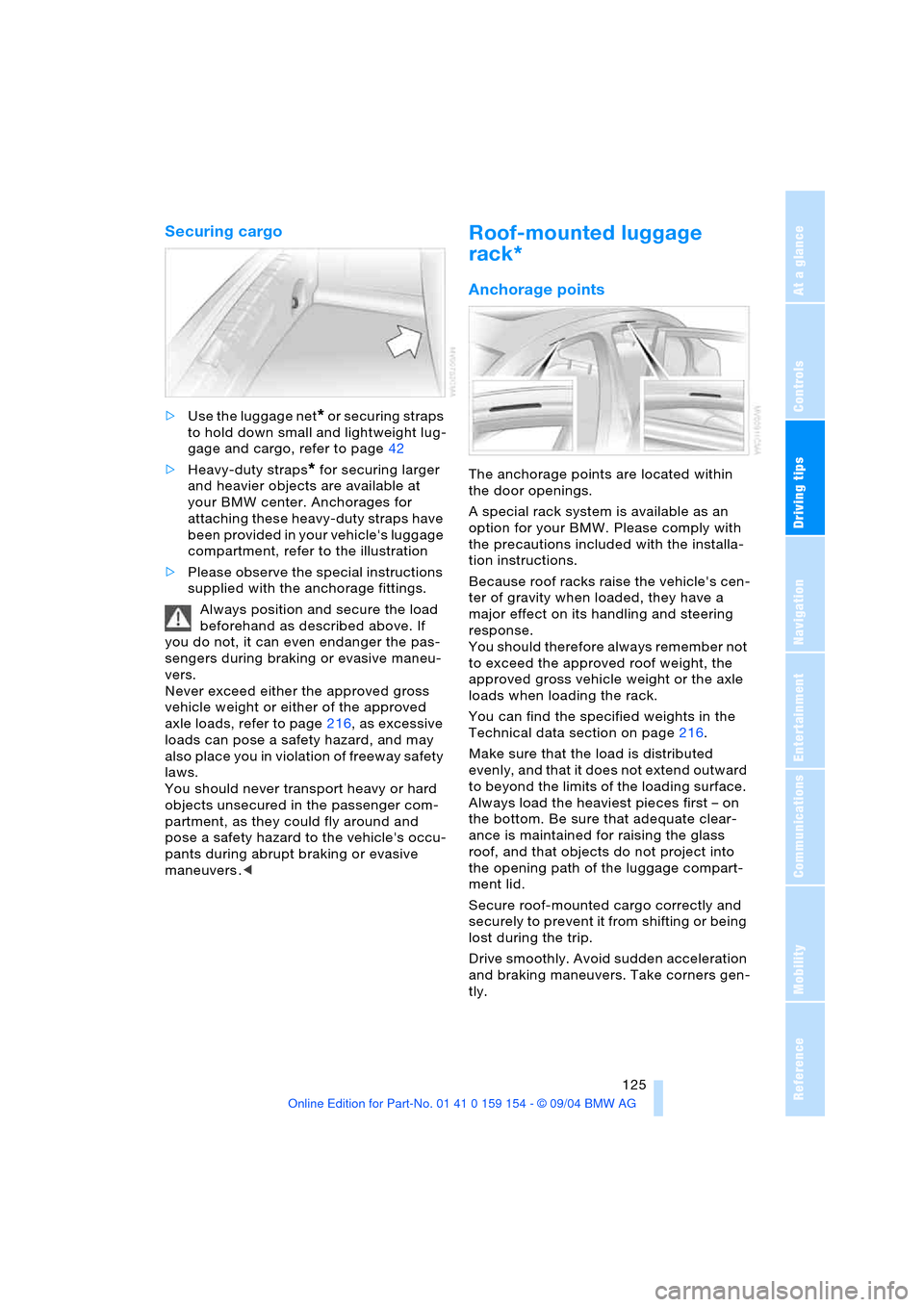
>Heavy-duty straps
* for securing larger
and heavier objects are available at
your BMW center. Anchorages for
attaching these heavy-duty straps have
been provided in your vehicle's luggage
compartment, refer to the illustration
>Please observe the special instructions
supplied with the anchorage fittings.
Always position and secure the load
beforehand as described above. If
you do not, it can even endanger the pas-
sengers during braking or evasive maneu-
vers.
Never exceed either the approved gross
vehicle weight or either of the approved
axle loads, refer to page216, as excessive
loads can pose a safety hazard, and may
also place you in violation of freeway safety
laws.
You should never transport heavy or hard
objects unsecured in the passenger com-
partment, as they could fly around and
pose a safety hazard to the vehicle's occu-
pants during abrupt braking or evasive
maneuvers .<
Roof-mounted luggage
rack*
Anchorage points
The anchorage points are located within
the door openings.
A special rack system is available as an
option for your BMW. Please comply with
the precautions included with the installa-
tion instructions.
Because roof racks raise the vehicle's cen-
ter of gravity when loaded, they have a
major effect on its handling and steering
response.
You should therefore always remember not
to exceed the approved roof weight, the
approved gross vehicle weight or the axle
loads when loading the rack.
You can find the specified weights in the
Technical data section on page216.
Make sure that the load is distributed
evenly, and that it does not extend outward
to beyond the limits of the loading surface.
Always load the heaviest pieces first – on
the bottom. Be sure that adequate clear-
ance is maintained for raising the glass
roof, and that objects do not project into
the opening path of the luggage compart-
ment lid.
Secure roof-mounted cargo correctly and
securely to prevent it from shifting or being
lost during the trip.
Drive smoothly. Avoid sudden acceleration
and braking maneuvers. Take corners gen-
tly.
Page 150 of 239
On/off, tone
148
On/off, tone
Controls
Operation using buttons
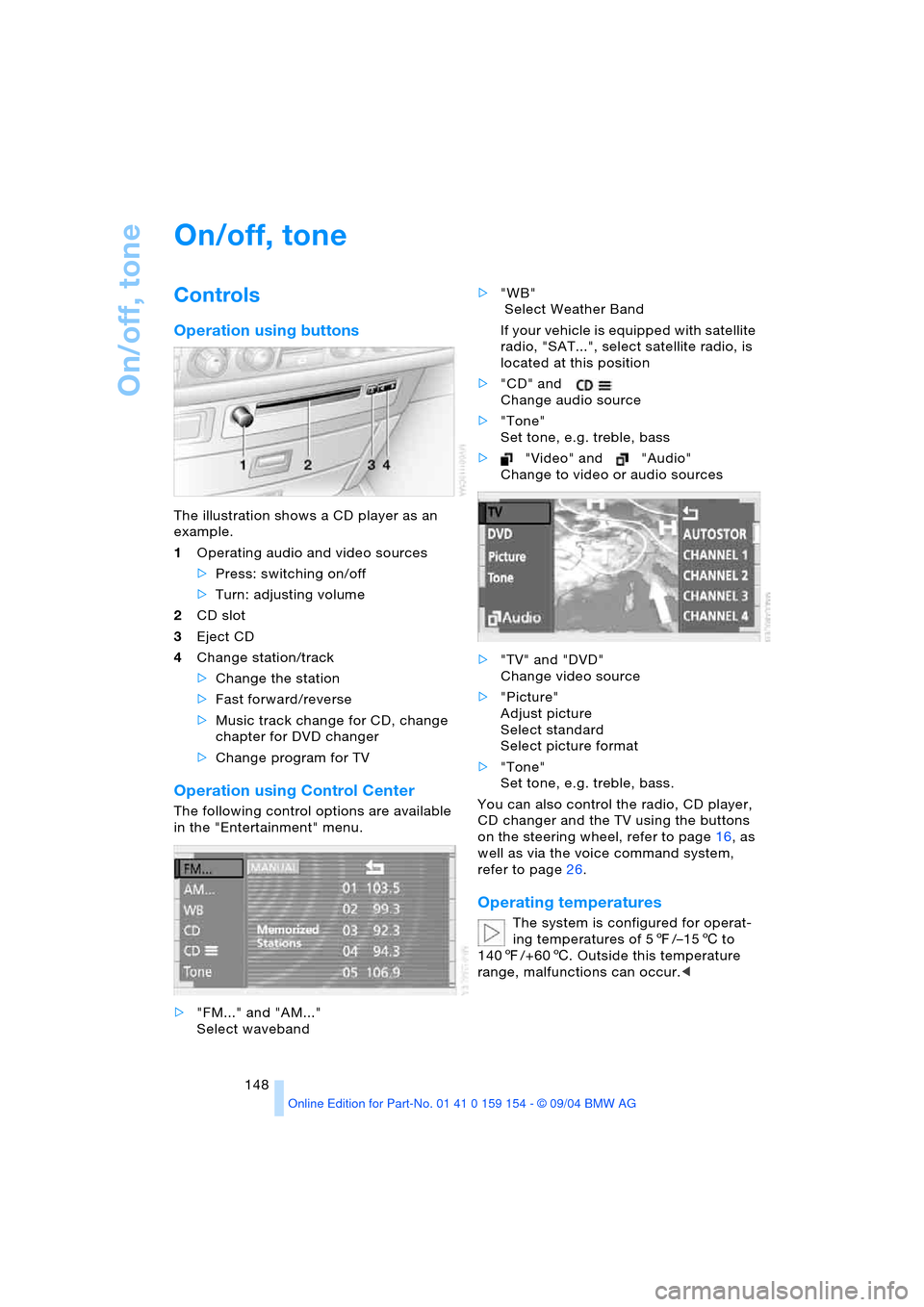
The illustration shows a CD player as an
example.
1Operating audio and video sources
>Press: switching on/off
>Turn: adjusting volume
2CD slot
3Eject CD
4Change station/track
>Change the station
>Fast forward/reverse
>Music track change for CD, change
chapter for DVD changer
>Change program for TV
Operation using Control Center
The following control options are available
in the "Entertainment" menu.
>"FM..." and "AM..."
Select waveband>"WB"
Select Weather Band
If your vehicle is equipped with satellite
radio, "SAT...", select satellite radio, is
located at this position
>"CD" and
Change audio source
>"Tone"
Set tone, e.g. treble, bass
>"Video" and "Audio"
Change to video or audio sources
>"TV" and "DVD"
Change video source
>"Picture"
Adjust picture
Select standard
Select picture format
>"Tone"
Set tone, e.g. treble, bass.
You can also control the radio, CD player,
CD changer and the TV using the buttons
on the steering wheel, refer to page16, as
well as via the voice command system,
refer to page26.
Operating temperatures
The system is configured for operat-
ing temperatures of 57/–156 to
1407/+606. Outside this temperature
range, malfunctions can occur.<
Page 177 of 239
175
Entertainment
Reference
At a glance
Controls
Driving tips Communications
Navigation
Mobility
influencing the cardiac pacemaker.
With the slightest sign of a cardiac pace-
maker malfunction, switch the BMW porta-
ble phone off immediately.<
Batteries
To avoid possible short circuits, after
removing a battery you should never
allow it to come into contact with metallic
surfaces of any kind. This is why you should
handle charged batteries with care, in par-
ticular if you place batteries, e.g. in jacket
or shirt pockets that contain metal objects.
If you are in an environment where there is
a risk of explosion, do not remove the bat-
tery from the device, as otherwise sparks
from your battery could cause explosions
or fire.<
Disposing of used batteries
Return used batteries to a recycling
collection point or to your BMW cen-
ter.<
Care instructions
You can find useful information on caring
for your portable phone in the Caring for
your vehicle brochure and in the separate
portable phone Owner's Manual.
Controls
To be able to use the BMW portable phone
via the vehicle equipment, it must be
located in the cradle, refer to page178.
For information on operating your
portable phone, please consult the
separate Owner's Manual.<
The BMW portable phone can be operated
by means of:
>The steering wheel, refer to page16
>The Control Center.
>The folding telephone keypad
>The voice command system, except for
incoming calls.
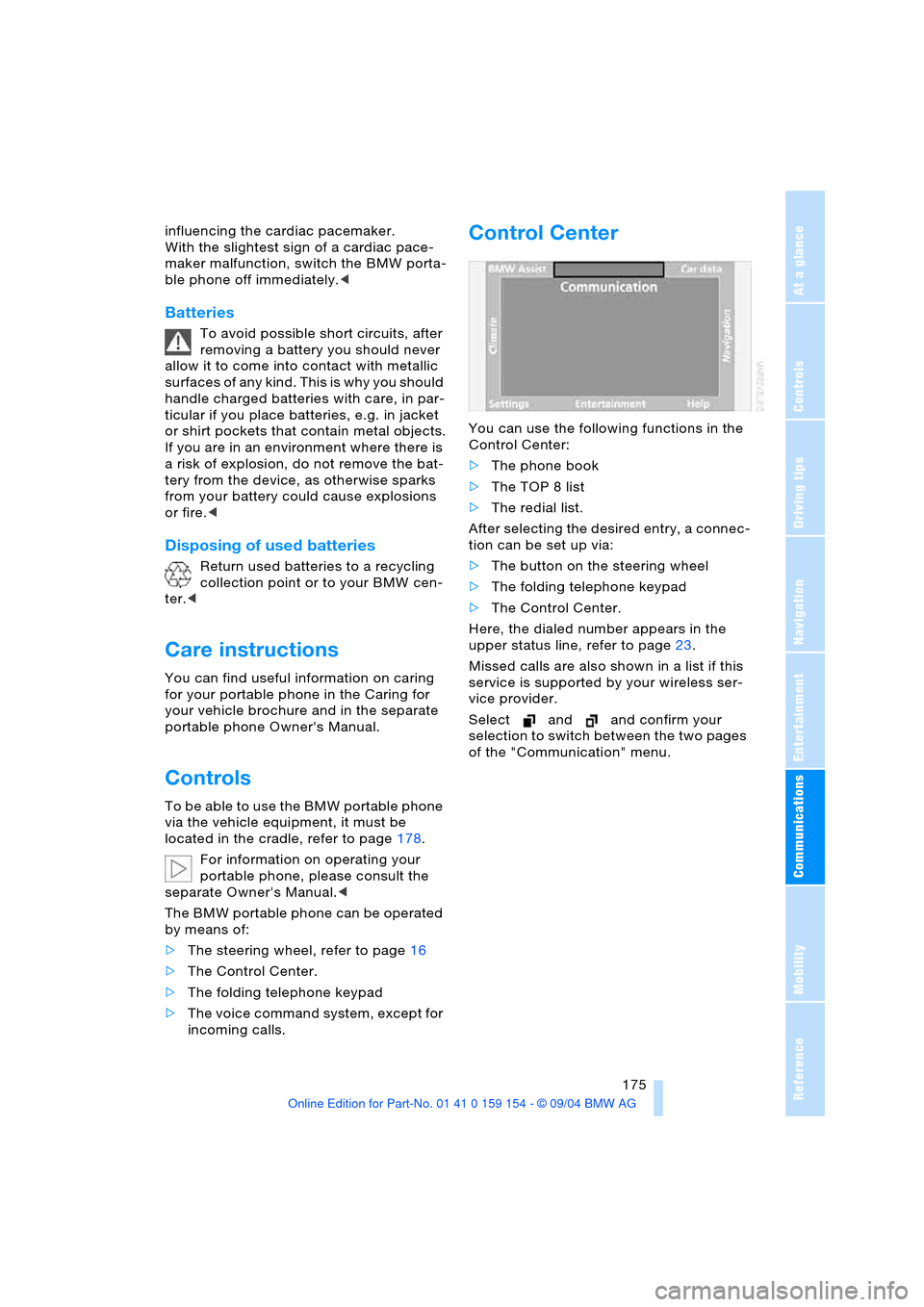
Control Center
You can use the following functions in the
Control Center:
>The phone book
>The TOP 8 list
>The redial list.
After selecting the desired entry, a connec-
tion can be set up via:
>The button on the steering wheel
>The folding telephone keypad
>The Control Center.
Here, the dialed number appears in the
upper status line, refer to page23.
Missed calls are also shown in a list if this
service is supported by your wireless ser-
vice provider.
Select and and confirm your
selection to switch between the two pages
of the "Communication" menu.
Page 179 of 239
177
Entertainment
Reference
At a glance
Controls
Driving tips Communications
Navigation
Mobility
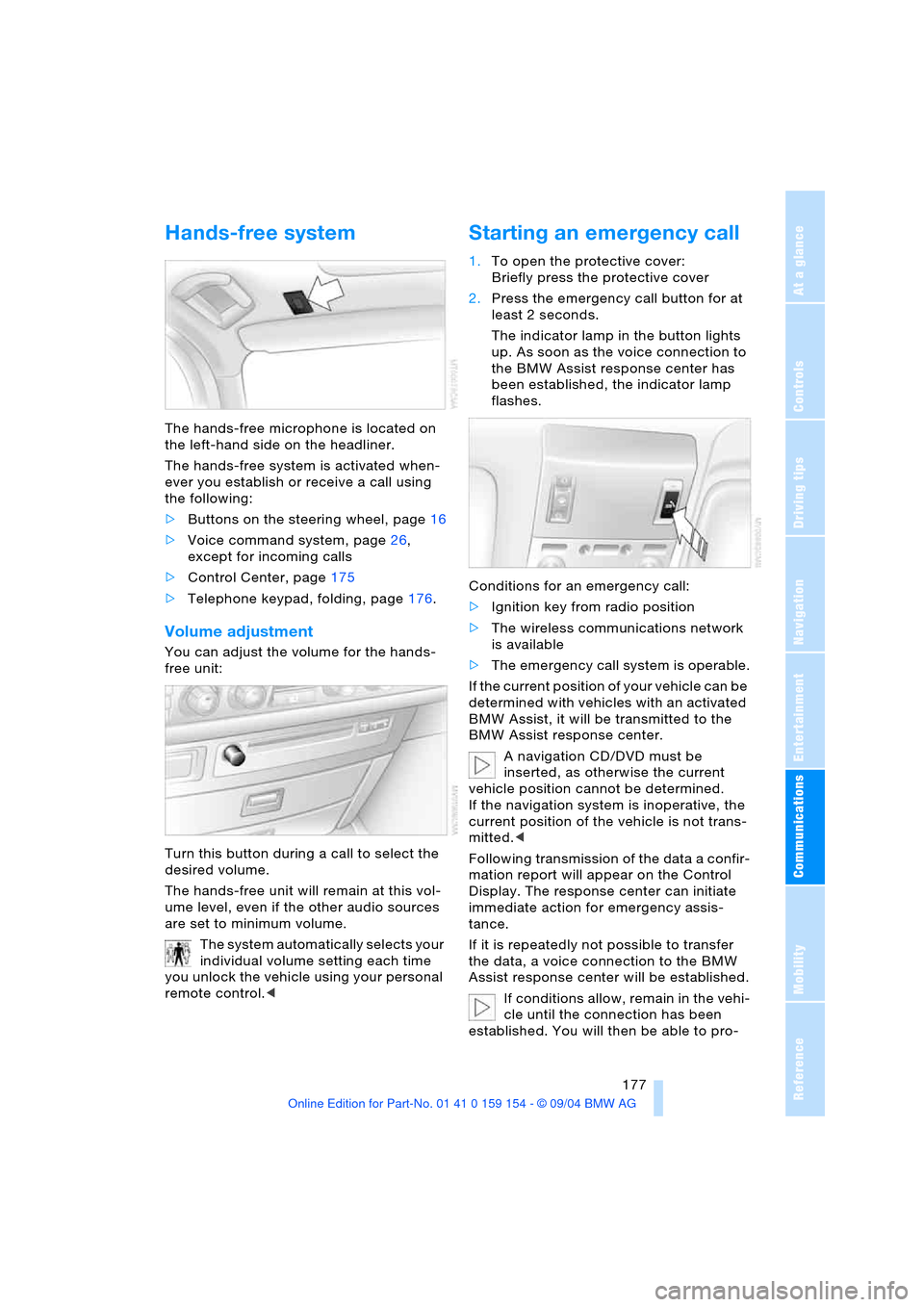
Hands-free system
The hands-free microphone is located on
the left-hand side on the headliner.
The hands-free system is activated when-
ever you establish or receive a call using
the following:
>Buttons on the steering wheel, page16
>Voice command system, page26,
except for incoming calls
>Control Center, page175
>Telephone keypad, folding, page176.
Volume adjustment
You can adjust the volume for the hands-
free unit:
Turn this button during a call to select the
desired volume.
The hands-free unit will remain at this vol-
ume level, even if the other audio sources
are set to minimum volume.
The system automatically selects your
individual volume setting each time
you unlock the vehicle using your personal
remote control.<
Starting an emergency call
1.To open the protective cover:
Briefly press the protective cover
2.Press the emergency call button for at
least 2 seconds.
The indicator lamp in the button lights
up. As soon as the voice connection to
the BMW Assist response center has
been established, the indicator lamp
flashes.
Conditions for an emergency call:
>Ignition key from radio position
>The wireless communications network
is available
>The emergency call system is operable.
If the current position of your vehicle can be
determined with vehicles with an activated
BMW Assist, it will be transmitted to the
BMW Assist response center.
A navigation CD/DVD must be
inserted, as otherwise the current
vehicle position cannot be determined.
If the navigation system is inoperative, the
current position of the vehicle is not trans-
mitted.<
Following transmission of the data a confir-
mation report will appear on the Control
Display. The response center can initiate
immediate action for emergency assis-
tance.
If it is repeatedly not possible to transfer
the data, a voice connection to the BMW
Assist response center will be established.
If conditions allow, remain in the vehi-
cle until the connection has been
established. You will then be able to pro-
Page 180 of 239
Using the phone in your vehicle
178 vide a detailed description of the situa-
tion.<
For technical reasons, the emergency
call cannot be guaranteed under
unfavorable conditions.<
Under certain conditions, an emergency
call is started automatically immediately
after a severe accident. The automatic
emergency call is not affected by the emer-
gency call button being pressed.
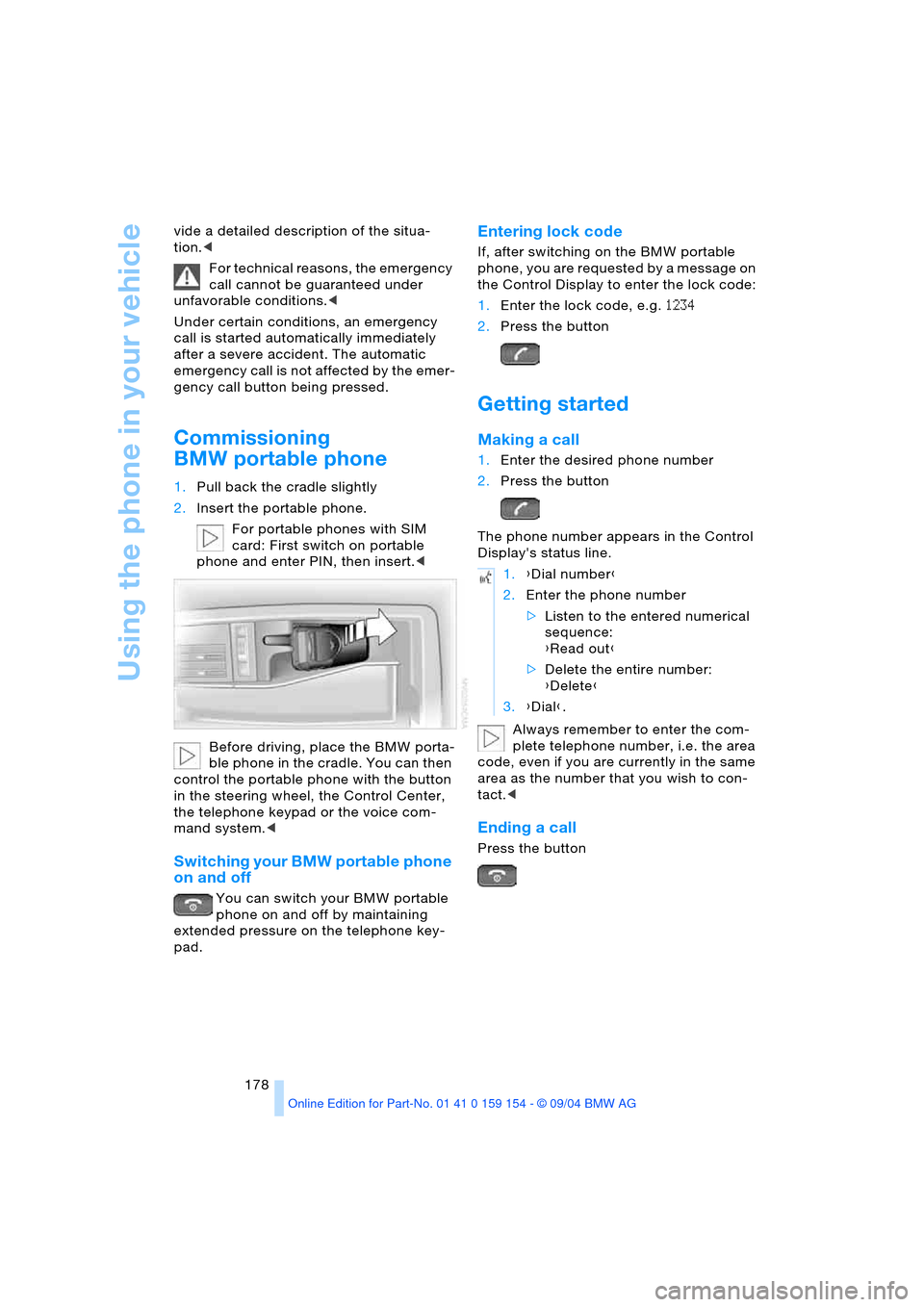
Commissioning
BMW portable phone
1.Pull back the cradle slightly
2.Insert the portable phone.
For portable phones with SIM
card: First switch on portable
phone and enter PIN, then insert.<
Before driving, place the BMW porta-
ble phone in the cradle. You can then
control the portable phone with the button
in the steering wheel, the Control Center,
the telephone keypad or the voice com-
mand system.<
Switching your BMW portable phone
on and off
You can switch your BMW portable
phone on and off by maintaining
extended pressure on the telephone key-
pad.
Entering lock code
If, after switching on the BMW portable
phone, you are requested by a message on
the Control Display to enter the lock code:
1.Enter the lock code, e.g. 1234
2.Press the button
Getting started
Making a call
1.Enter the desired phone number
2.Press the button
The phone number appears in the Control
Display's status line.
Always remember to enter the com-
plete telephone number, i.e. the area
code, even if you are currently in the same
area as the number that you wish to con-
tact.<
Ending a call
Press the button
1.{Dial number}
2.Enter the phone number
>Listen to the entered numerical
sequence:
{Read out}
>Delete the entire number:
{Delete}
3.{Dial}.
Page 182 of 239
Using the phone in your vehicle
180 The connection is established.
Here, the dialed number appears in the
upper status line, refer to page23.
The system dials the number.
The connection can also be estab-
lished using the button on the steer-
ing wheel or the telephone keypad.<
Select and confirm to end the call.
Viewing entries
Deleting individual entries
Deleting entire phone book
Selecting a number from
Top 8 list
The eight numbers that you call most fre-
quently on the BMW portable phone are
automatically stored in the Top 8 list.
The phone numbers are only stored in
the Top 8 list when these phone num-
bers are stored as an entry in the portable
phone.<
The number called most often appears at
the top of the list.1.In the "Communication" menu, select
"TOP 8" and confirm your selection
2.Select an entry from the list that now
appears on the display, and confirm
your selection
3.Select and confirm your selec-
tion.
The connection is established. Here,
the dialed number appears in the upper
status line, refer to page23.
The connection can also be set up
using the button on the steering
wheel or the telephone keypad.<
Select and confirm to end the call.
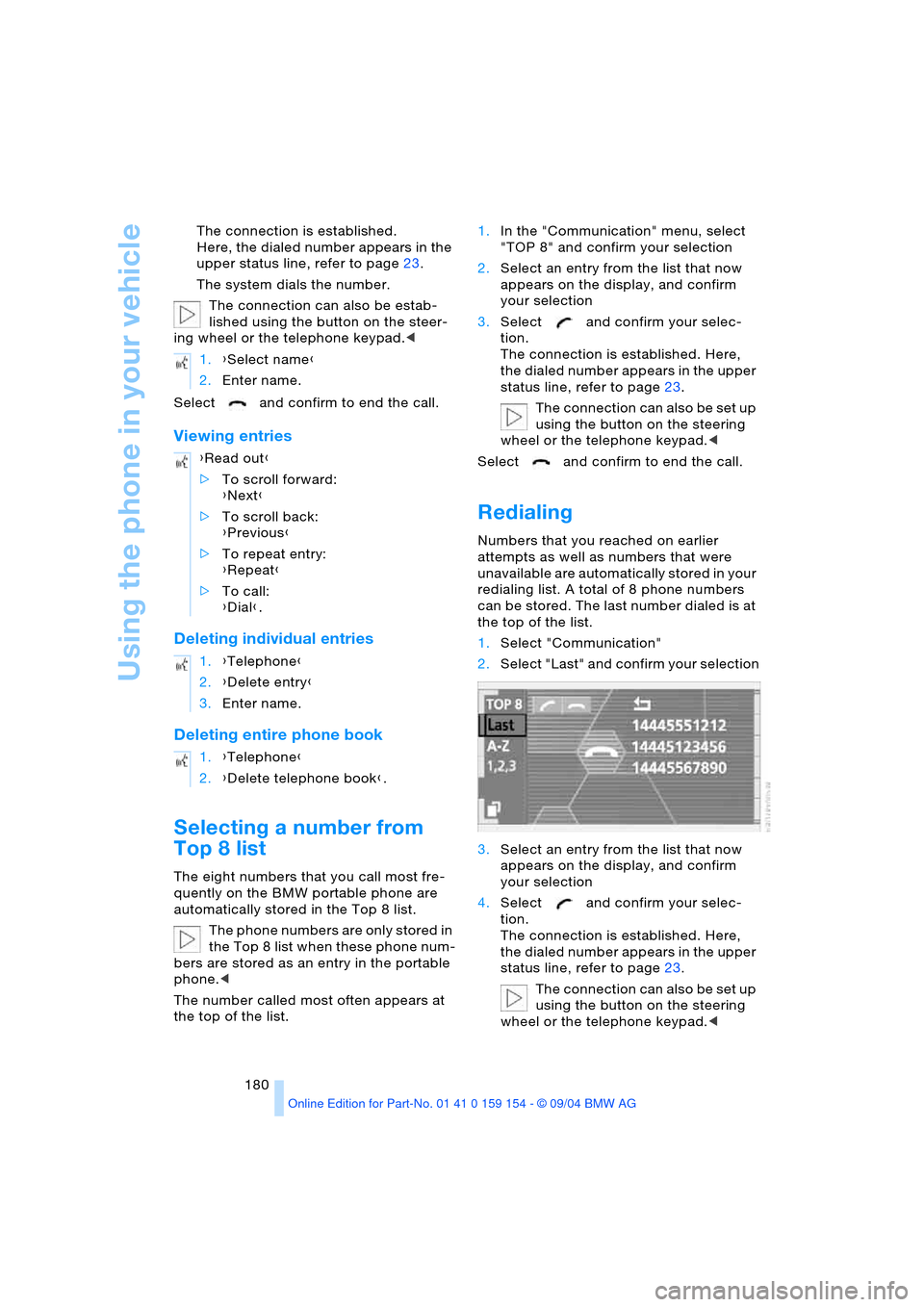
Redialing
Numbers that you reached on earlier
attempts as well as numbers that were
unavailable are automatically stored in your
redialing list. A total of 8 phone numbers
can be stored. The last number dialed is at
the top of the list.
1.Select "Communication"
2.Select "Last" and confirm your selection
3.Select an entry from the list that now
appears on the display, and confirm
your selection
4.Select and confirm your selec-
tion.
The connection is established. Here,
the dialed number appears in the upper
status line, refer to page23.
The connection can also be set up
using the button on the steering
wheel or the telephone keypad.< 1.{Select name}
2.Enter name.
{Read out}
>To scroll forward:
{Next}
>To scroll back:
{Previous}
>To repeat entry:
{Repeat}
>To call:
{Dial}.
1.{Telephone}
2.{Delete entry}
3.Enter name.
1.{Telephone}
2.{Delete telephone book}.
Page 183 of 239
181
Entertainment
Reference
At a glance
Controls
Driving tips Communications
Navigation
Mobility
You can use the voice command system to
redial the last number called:
Select and confirm to end the call.
Missed calls
If the phone number of the caller was trans-
ferred, you can have a list of all missed calls
displayed if this service is supported by
your wireless service provider.
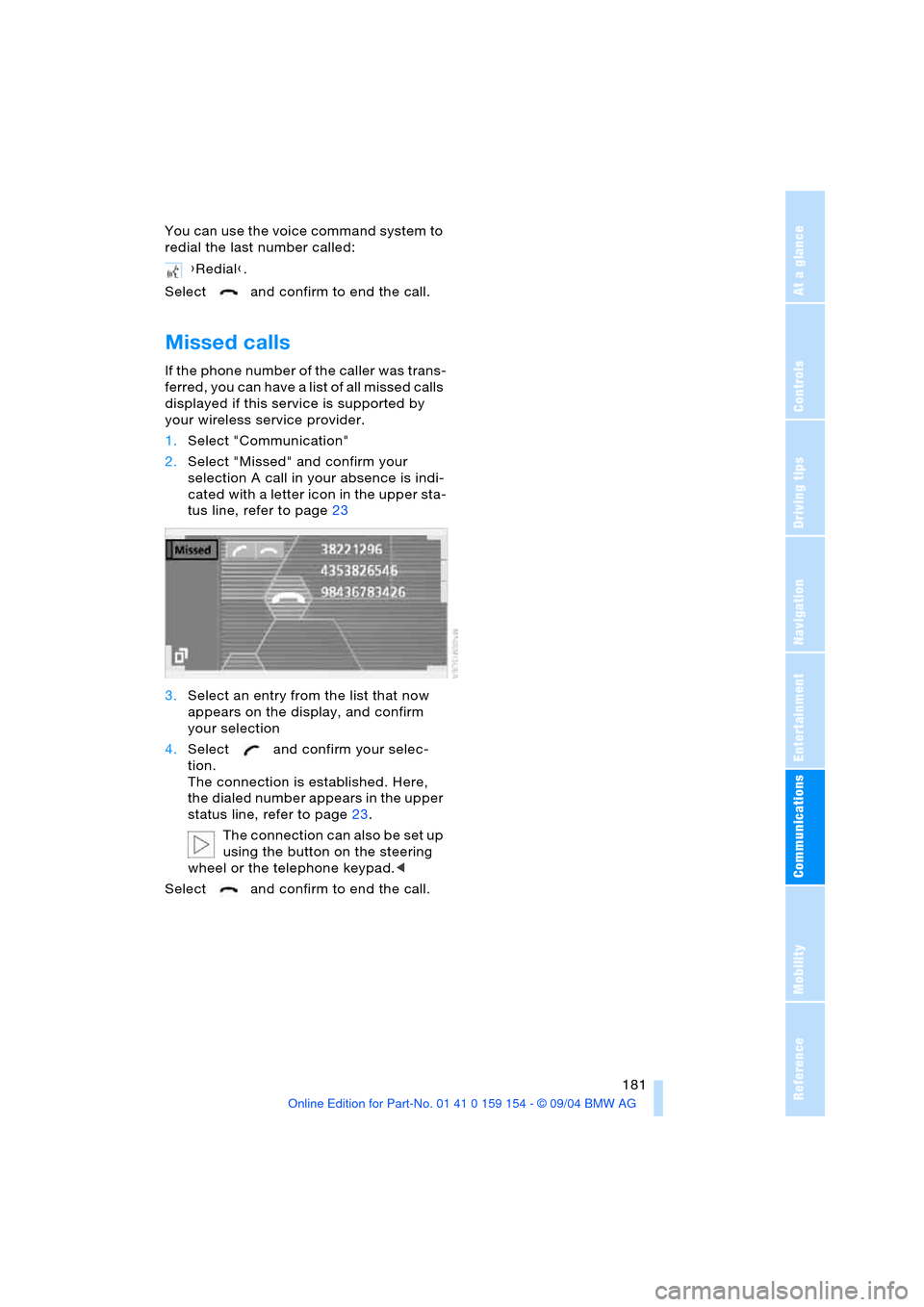
1.Select "Communication"
2.Select "Missed" and confirm your
selection A call in your absence is indi-
cated with a letter icon in the upper sta-
tus line, refer to page23
3.Select an entry from the list that now
appears on the display, and confirm
your selection
4.Select and confirm your selec-
tion.
The connection is established. Here,
the dialed number appears in the upper
status line, refer to page23.
The connection can also be set up
using the button on the steering
wheel or the telephone keypad.<
Select and confirm to end the call.{Redial}.
Page 194 of 239
Wheels and tires
192
Run-flat tires*
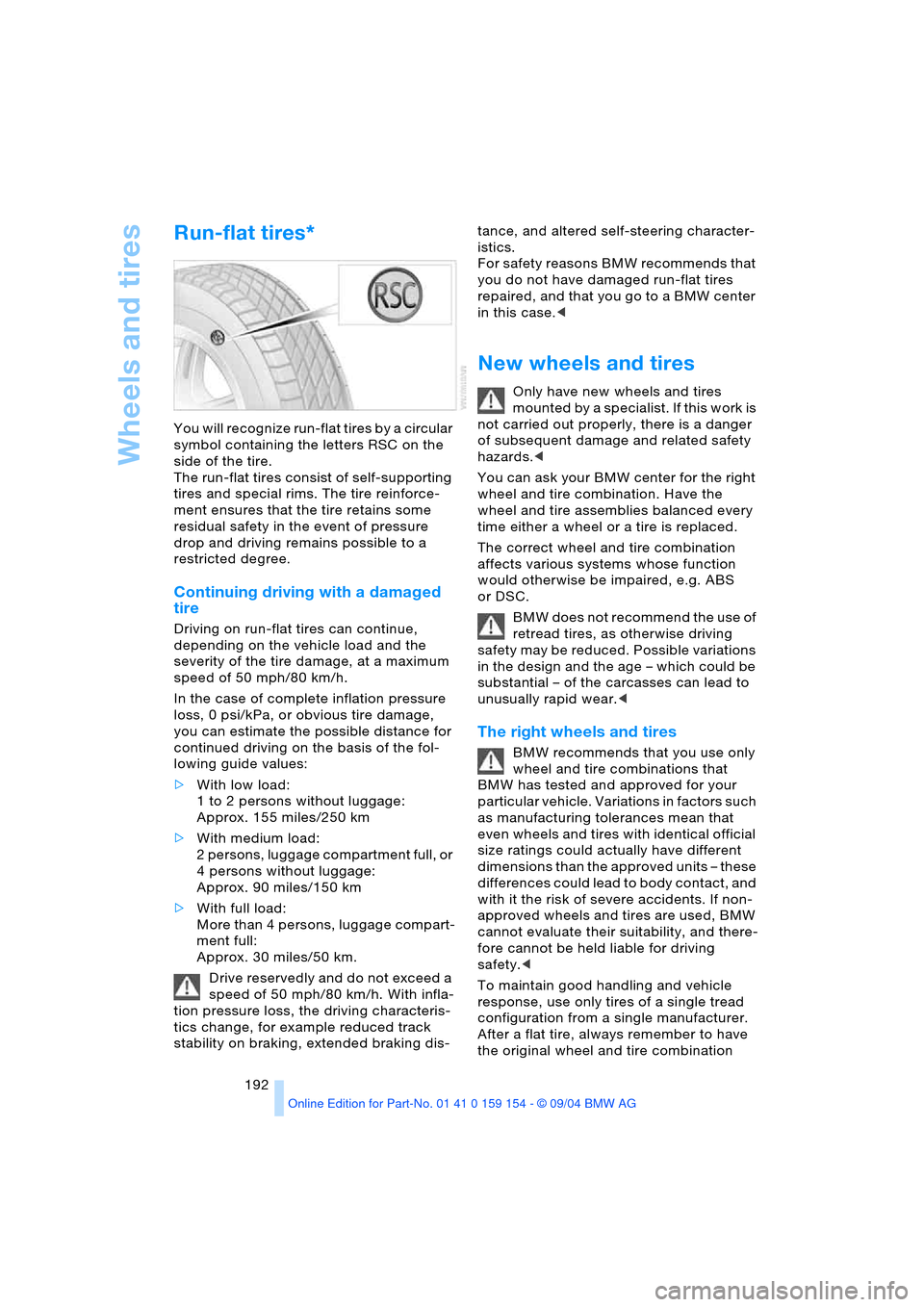
You will recognize run-flat tires by a circular
symbol containing the letters RSC on the
side of the tire.
The run-flat tires consist of self-supporting
tires and special rims. The tire reinforce-
ment ensures that the tire retains some
residual safety in the event of pressure
drop and driving remains possible to a
restricted degree.
Continuing driving with a damaged
tire
Driving on run-flat tires can continue,
depending on the vehicle load and the
severity of the tire damage, at a maximum
speed of 50 mph/80 km/h.
In the case of complete inflation pressure
loss, 0 psi/kPa, or obvious tire damage,
you can estimate the possible distance for
continued driving on the basis of the fol-
lowing guide values:
>With low load:
1 to 2 persons without luggage:
Approx. 155 miles/250 km
>With medium load:
2 persons, luggage compartment full, or
4 persons without luggage:
Approx. 90 miles/150 km
>With full load:
More than 4 persons, luggage compart-
ment full:
Approx. 30 miles/50 km.
Drive reservedly and do not exceed a
speed of 50 mph/80 km/h. With infla-
tion pressure loss, the driving characteris-
tics change, for example reduced track
stability on braking, extended braking dis-tance, and altered self-steering character-
istics.
For safety reasons BMW recommends that
you do not have damaged run-flat tires
repaired, and that you go to a BMW center
in this case.<
New wheels and tires
Only have new wheels and tires
mounted by a specialist. If this work is
not carried out properly, there is a danger
of subsequent damage and related safety
hazards.<
You can ask your BMW center for the right
wheel and tire combination. Have the
wheel and tire assemblies balanced every
time either a wheel or a tire is replaced.
The correct wheel and tire combination
affects various systems whose function
would otherwise be impaired, e.g. ABS
or DSC.
BMW does not recommend the use of
retread tires, as otherwise driving
safety may be reduced. Possible variations
in the design and the age – which could be
substantial – of the carcasses can lead to
unusually rapid wear.<
The right wheels and tires
BMW recommends that you use only
wheel and tire combinations that
BMW has tested and approved for your
particular vehicle. Variations in factors such
as manufacturing tolerances mean that
even wheels and tires with identical official
size ratings could actually have different
dimensions than the approved units – these
differences could lead to body contact, and
with it the risk of severe accidents. If non-
approved wheels and tires are used, BMW
cannot evaluate their suitability, and there-
fore cannot be held liable for driving
safety.<
To maintain good handling and vehicle
response, use only tires of a single tread
configuration from a single manufacturer.
After a flat tire, always remember to have
the original wheel and tire combination