CD changer BMW 760I 2007 E65 User Guide
[x] Cancel search | Manufacturer: BMW, Model Year: 2007, Model line: 760I, Model: BMW 760I 2007 E65Pages: 254, PDF Size: 7.98 MB
Page 170 of 254
CD changer
168
General malfunctions
The BMW CD changer is optimized for opera-
tion in the vehicle. It may react more sensitively
to defective CDs than devices intended for sta-
tionary use.
If a CD cannot be played back, first check to
make sure it has been correctly inserted.
Humidity
High humidity can fog the CD or the focusing
lens for the laser beam, temporarily preventing
playback.
Malfunctions with individual CDs
If malfunctions occur only with particular CDs,
this can be due to one of the following causes.
Home-recorded CDs
Malfunction sources in home-recorded CDs
include, for example, inconsistent data origina-
tion and recording processes as well as low
quality or pronounced aging of the blanks used.
Only write on CDs with a marker especially
designed for this purpose.
Damaged CDs
Avoid finger prints, dust, scratches, and mois-
ture.
Store CDs in a sleeve.
Do not expose CDs to temperatures above
1227/506, high humidity or direct sunlight.
CDs with copy protection
Manufacturers often provide CDs with copy
protection. This can prevent or limit the play-
back of these CDs.
Care instructions
You can find everything you need to know about
this topic by consulting the separate Caring for
your vehicle brochure.
Page 172 of 254
DVD changer
170
DVD changer
Installation location
The BMW DVD changer for six DVDs or audio
CDs is mounted behind the left side trim panel
in the luggage compartment.
Removing DVD magazine
To insert DVDs into the DVD magazine or
remove them from it, you must first remove the
magazine from the DVD changer:
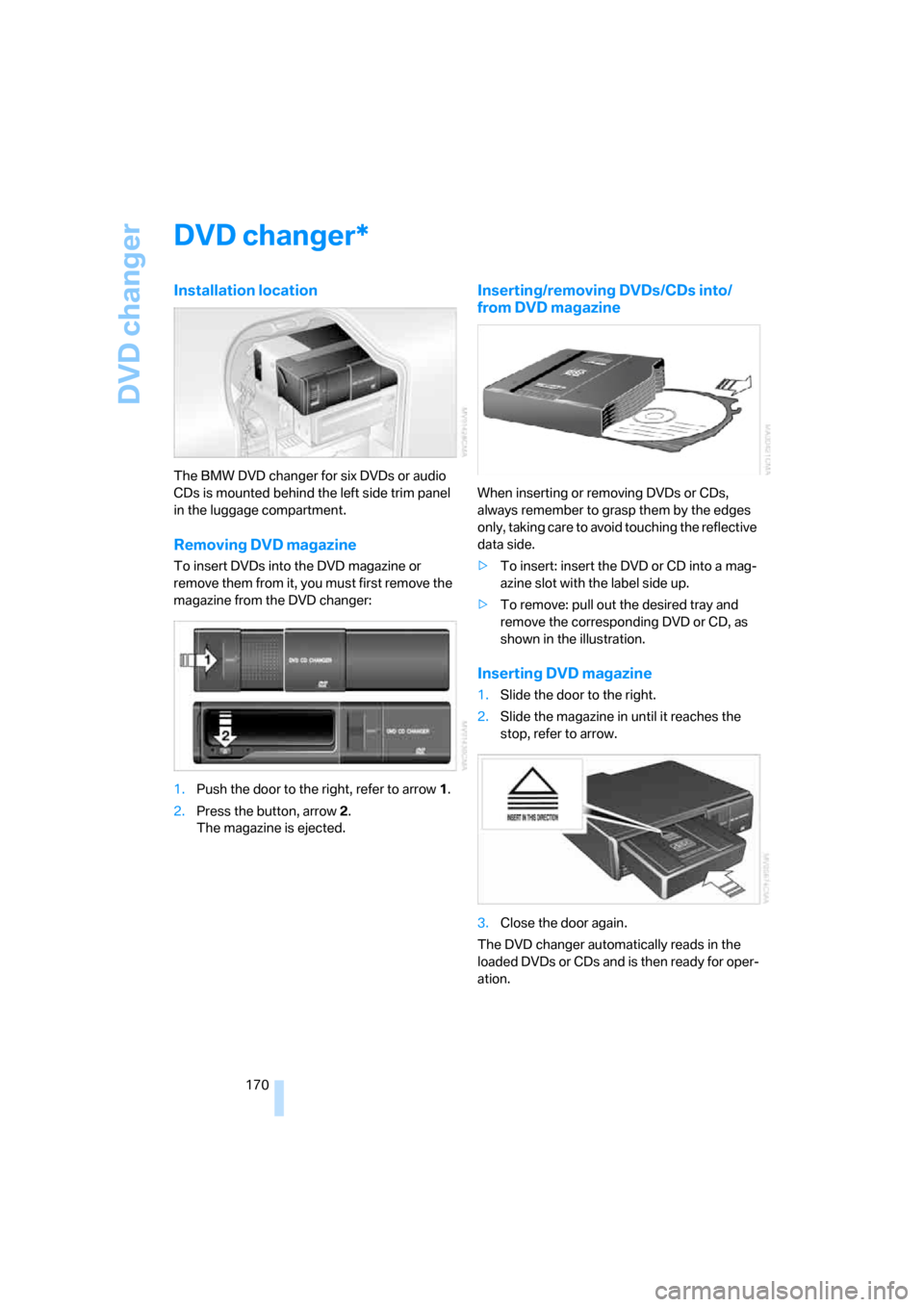
1.Push the door to the right, refer to arrow1.
2.Press the button, arrow2.
The magazine is ejected.
Inserting/removing DVDs/CDs into/
from DVD magazine
When inserting or removing DVDs or CDs,
always remember to grasp them by the edges
only, taking care to avoid touching the reflective
data side.
>To insert: insert the DVD or CD into a mag-
azine slot with the label side up.
>To remove: pull out the desired tray and
remove the corresponding DVD or CD, as
shown in the illustration.
Inserting DVD magazine
1.Slide the door to the right.
2.Slide the magazine in until it reaches the
stop, refer to arrow.
3.Close the door again.
The DVD changer automatically reads in the
loaded DVDs or CDs and is then ready for oper-
ation.
*
Page 173 of 254
Navigation
Entertainment
Driving tips
171Reference
At a glance
Controls
Communications
Mobility
DVD country codes
Your DVD changer will only play back DVDs
coded for your home region, e.g. USA,
Canada = 1. The country code supported by
your DVD is indicated in the information sup-
plied with the DVD. This coding cannot be
changed. An overview of the six coding zones:
DVDs with the Code 0 can be played on
all devices.<
Playing DVDs
Playback is only possible on the rear seat
screen, refer to Rear seat screen
* on page21.
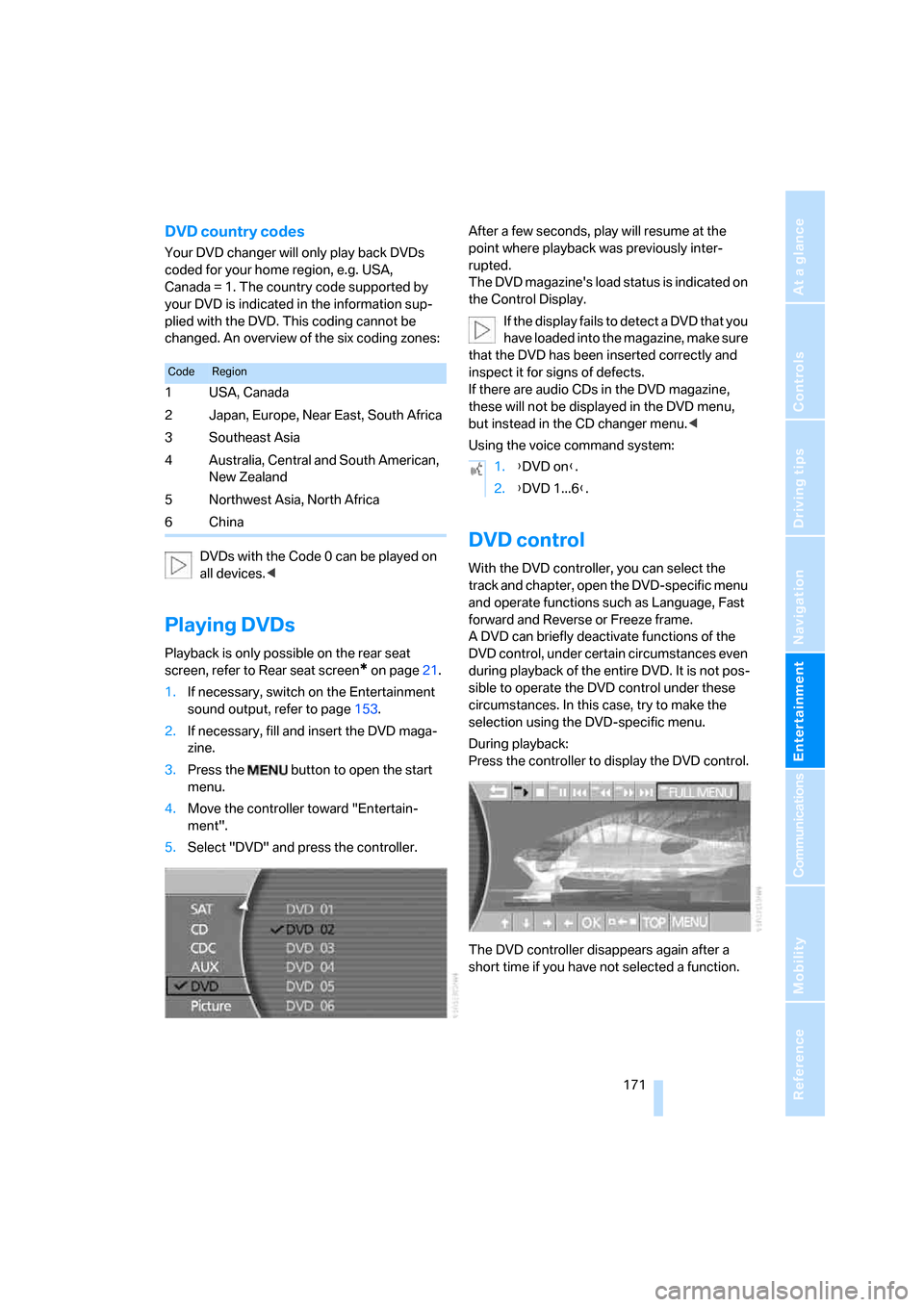
1.If necessary, switch on the Entertainment
sound output, refer to page153.
2.If necessary, fill and insert the DVD maga-
zine.
3.Press the button to open the start
menu.
4.Move the controller toward "Entertain-
ment".
5.Select "DVD" and press the controller.After a few seconds, play will resume at the
point where playback was previously inter-
rupted.
The DVD magazine's load status is indicated on
the Control Display.
If the display fails to detect a DVD that you
have loaded into the magazine, make sure
that the DVD has been inserted correctly and
inspect it for signs of defects.
If there are audio CDs in the DVD magazine,
these will not be displayed in the DVD menu,
but instead in the CD changer menu.<
Using the voice command system:
DVD control
With the DVD controller, you can select the
track and chapter, open the DVD-specific menu
and operate functions such as Language, Fast
forward and Reverse or Freeze frame.
A DVD can briefly deactivate functions of the
DVD control, under certain circumstances even
during playback of the entire DVD. It is not pos-
sible to operate the DVD control under these
circumstances. In this case, try to make the
selection using the DVD-specific menu.
During playback:
Press the controller to display the DVD control.
The DVD controller disappears again after a
short time if you have not selected a function.
CodeRegion
1USA, Canada
2 Japan, Europe, Near East, South Africa
3Southeast Asia
4 Australia, Central and South American,
New Zealand
5Northwest Asia, North Africa
6China
1.{DVD on}.
2.{DVD 1...6}.
Page 174 of 254
DVD changer
172
Fast forward/reverse
Forward/reverse with DVD control
1.During playback, press the controller to dis-
play the DVD control.
2.Select and press the controller.
3.To increase the fast forward/reverse speed,
press the controller several times.
The DVD playback will be distorted.
To cancel fast forward/reverse:
Select and press the controller.
The DVD will start play at the point selected.
Forward/reverse with controller
1.During playback, turn the controller.
Fast forward/reverse is started.
2.Turn the controller further.
The speed is increased.
3.Release the controller.
Fast forward/reverse is interrupted. The
system will continue play at the point on the
DVD at which the controller was released.
Skipping chapter
You can change to the next or previous chapter
during playback.
1.During playback, press the controller to dis-
play the DVD control.
2.Select and press repeatedly until
you reach the desired chapter.
or:
Press the button on the left or right
repeatedly until you reach the desired chapter.
Adjusting picture
1.During playback, press the controller to dis-
play the DVD control.
2.Select and press the controller.
3.Select the arrow and press the control-
ler.
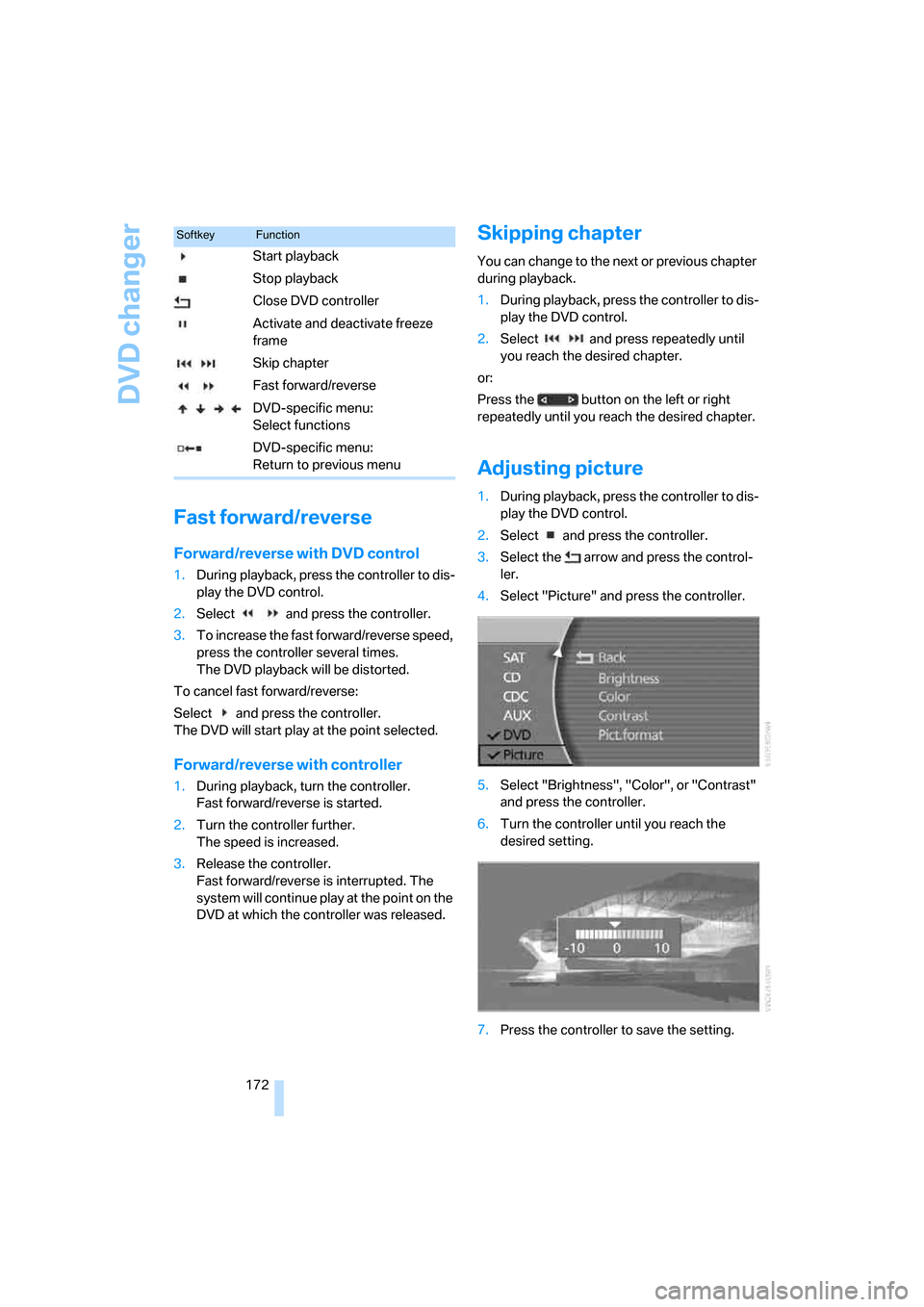
4.Select "Picture" and press the controller.
5.Select "Brightness", "Color", or "Contrast"
and press the controller.
6.Turn the controller until you reach the
desired setting.
7.Press the controller to save the setting.
SoftkeyFunction
Start playback
Stop playback
Close DVD controller
Activate and deactivate freeze
frame
Skip chapter
Fast forward/reverse
DVD-specific menu:
Select functions
DVD-specific menu:
Return to previous menu
Page 176 of 254
DVD changer
174 Refer to the information on your DVD for possi-
ble selections.<
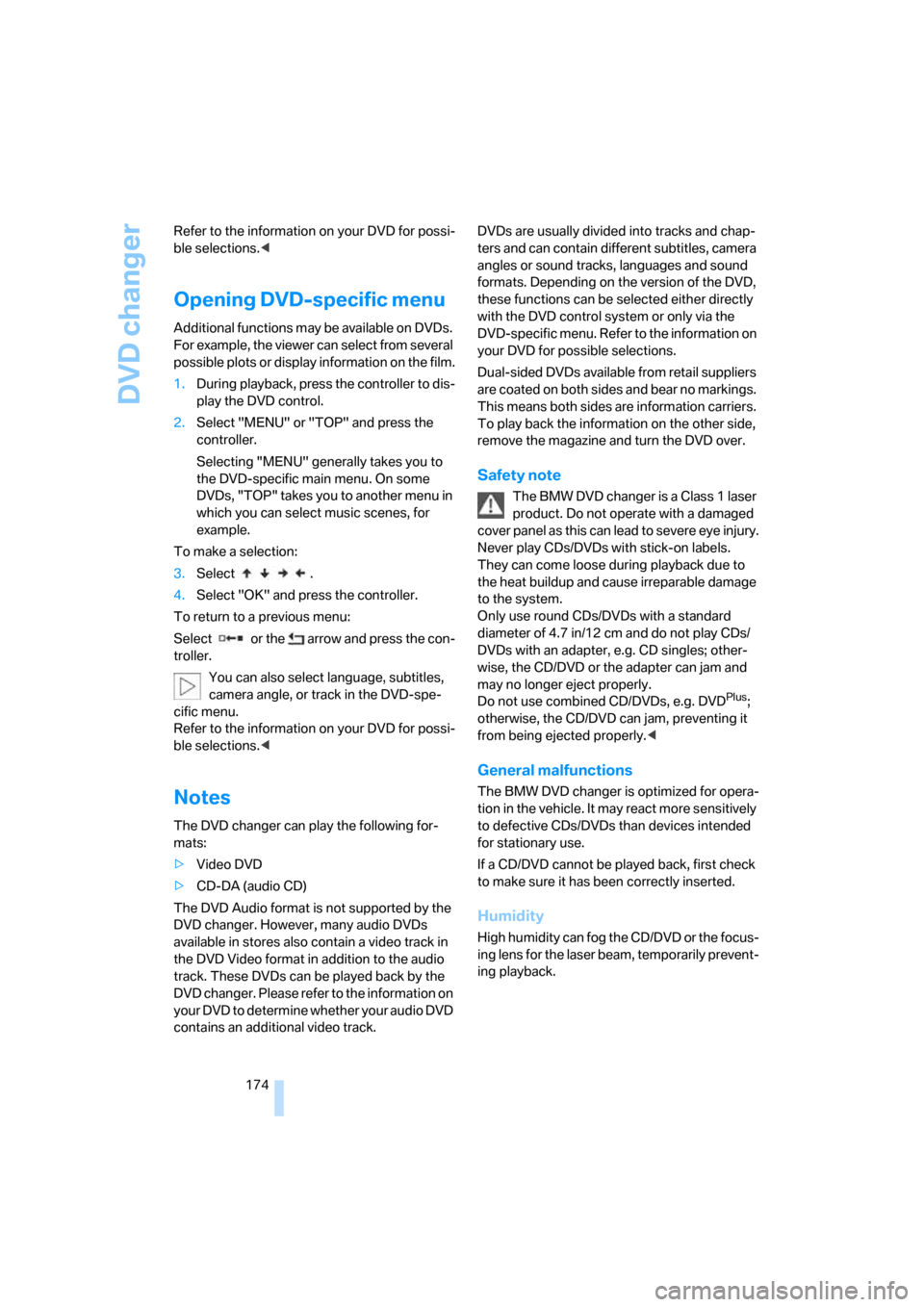
Opening DVD-specific menu
Additional functions may be available on DVDs.
For example, the viewer can select from several
possible plots or display information on the film.
1.During playback, press the controller to dis-
play the DVD control.
2.Select "MENU" or "TOP" and press the
controller.
Selecting "MENU" generally takes you to
the DVD-specific main menu. On some
DVDs, "TOP" takes you to another menu in
which you can select music scenes, for
example.
To make a selection:
3.Select .
4.Select "OK" and press the controller.
To return to a previous menu:
Select or the arrow and press the con-
troller.
You can also select language, subtitles,
camera angle, or track in the DVD-spe-
cific menu.
Refer to the information on your DVD for possi-
ble selections.<
Notes
The DVD changer can play the following for-
mats:
>Video DVD
>CD-DA (audio CD)
The DVD Audio format is not supported by the
DVD changer. However, many audio DVDs
available in stores also contain a video track in
the DVD Video format in addition to the audio
track. These DVDs can be played back by the
DVD changer. Please refer to the information on
your DVD to determine whether your audio DVD
contains an additional video track.DVDs are usually divided into tracks and chap-
ters and can contain different subtitles, camera
angles or sound tracks, languages and sound
formats. Depending on the version of the DVD,
these functions can be selected either directly
with the DVD control system or only via the
DVD-specific menu. Refer to the information on
your DVD for possible selections.
Dual-sided DVDs available from retail suppliers
are coated on both sides and bear no markings.
This means both sides are information carriers.
To play back the information on the other side,
remove the magazine and turn the DVD over.
Safety note
The BMW DVD changer is a Class 1 laser
product. Do not operate with a damaged
cover panel as this can lead to severe eye injury.
Never play CDs/DVDs with stick-on labels.
They can come loose during playback due to
the heat buildup and cause irreparable damage
to the system.
Only use round CDs/DVDs with a standard
diameter of 4.7 in/12 cm and do not play CDs/
DVDs with an adapter, e.g. CD singles; other-
wise, the CD/DVD or the adapter can jam and
may no longer eject properly.
Do not use combined CD/DVDs, e.g. DVD
Plus;
otherwise, the CD/DVD can jam, preventing it
from being ejected properly.<
General malfunctions
The BMW DVD changer is optimized for opera-
tion in the vehicle. It may react more sensitively
to defective CDs/DVDs than devices intended
for stationary use.
If a CD/DVD cannot be played back, first check
to make sure it has been correctly inserted.
Humidity
High humidity can fog the CD/DVD or the focus-
ing lens for the laser beam, temporarily prevent-
ing playback.
Page 232 of 254
Short commands of the voice command system
230
Short commands of the voice command
system
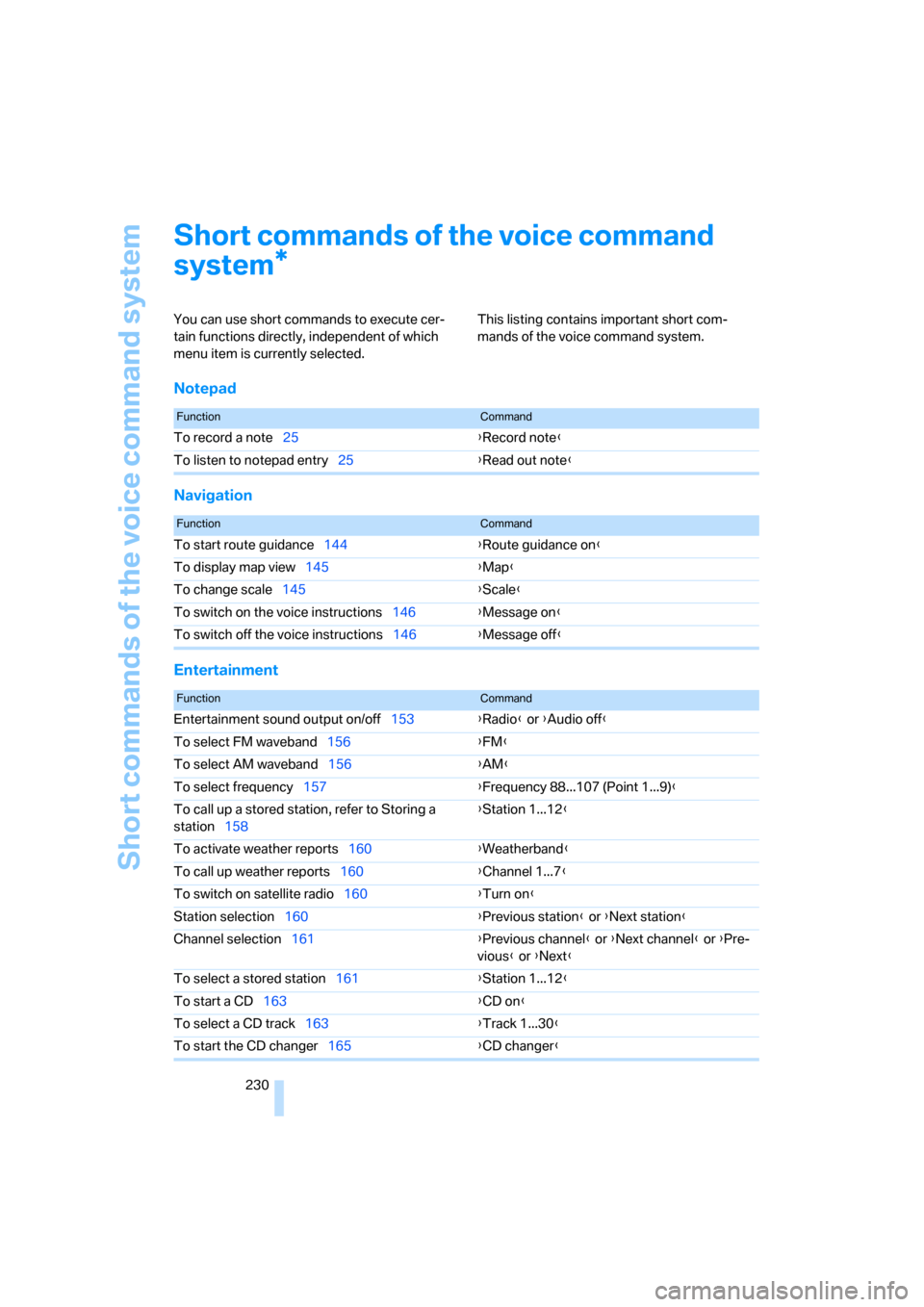
You can use short commands to execute cer-
tain functions directly, independent of which
menu item is currently selected. This listing contains important short com-
mands of the voice command system.
Notepad
Navigation
Entertainment
*
FunctionCommand
To record a note25{Record note}
To listen to notepad entry25{Read out note}
FunctionCommand
To start route guidance144{Route guidance on}
To display map view145{Map}
To change scale145{Scale}
To switch on the voice instructions146{Message on}
To switch off the voice instructions146{Message off}
FunctionCommand
Entertainment sound output on/off153{Radio} or {Audio off}
To select FM waveband156{FM}
To select AM waveband156{AM}
To select frequency157{Frequency 88...107 (Point 1...9)}
To call up a stored station, refer to Storing a
station158{Station 1...12}
To activate weather reports160{Weatherband}
To call up weather reports160{Channel 1...7}
To switch on satellite radio160{Turn on}
Station selection160{Previous station} or {Next station}
Channel selection161{Previous channel} or {Next channel} or {Pre-
vious} or {Next}
To select a stored station161{Station 1...12}
To start a CD163{CD on}
To select a CD track163{Track 1...30}
To start the CD changer165{CD changer}
Page 234 of 254
Everything from A to Z
232
Everything from A to Z
Index
A
"ABC...", navigation131
ABS Antilock Brake
System87
ACC, refer to Active cruise
control69
"ACCEPT",
navigation140,148
Accessories, refer to Your
individual vehicle5
Accident, refer to
– Initiating an emergency
call219
– Roadside
Assistance190,219
Activated-charcoal filter107
Activating
– BMW Assist193
– High Definition Radio162
Active cruise control69
– indicator lamp71
– malfunction72
– radar sensor72
– sensor, refer to
Malfunction72
Active head restraints,
front47
Active seat50
Active seat ventilation50
Adapter for spare key31
Adaptive brake lamp, refer to
Brake force display94
Adaptive Drive
– refer to Dynamic Drive89
– refer to EDC Electronic
Damper Control89
Adaptive Head Light100
Address
– deleting140
– displaying141
– storing139
– storing current position147"Address book",
navigation139
Adjusting cooling action of
rear climate control108
Adjusting interior
temperature105
Adjusting tone in audio mode,
refer to Tone control153
Adjusting volume153
– ring tone of telephone179
– voice command system25
– voice instructions146
Airbags95
– safe sitting position43
Air conditioning103
– in rear108
– in the rear108
– while parked109
Air distribution
– automatic104
– manual106
Airing, refer to Ventilation107
Air jets, refer to
Ventilation107
Air pressure, refer to Tire
inflation pressure200
Air recirculation, refer to
Recirculated-air mode105
Air vents, refer to
Ventilation107
Air volume
– automatic climate
control106
– rear climate control108
AKI, refer to Fuel
specifications199
Alarm system37
– avoiding unintentional
alarms38
All around the steering
wheel10
All-season tires, refer to
Winter tires206Altering route, refer to
Changing route146
Alternate route, refer to
Changing route146
"AM", radio156
AM, refer to Radio156
"ANGLE", DVD changer173
Antifreeze
– coolant210
– washer fluid66
Antilock Brake System
ABS87
Anti-theft system
– refer to Alarm system37
– refer to Central locking
system32
Approved engine oils209
Armrest, refer to Center
armrest
– front113
– rear114
"Arrow display",
navigation145
"AS ADDRESS",
navigation139,147
Ashtray
– front115
– rear116
Assist, refer to
BMW Assist189
Assistance getting in and
out52
– backrest width44
Assistance systems, refer to
Driving stability control
systems87
Assistance window20
AUC Automatic recirculated-
air control
105
Page 235 of 254
Reference 233
At a glance
Controls
Driving tips
Communications
Navigation
Entertainment
Mobility
Audio152
– controls152
– switching on/off153
– tone control153
– volume153
"AUDIO", DVD changer173
Audio device, external114
Audio mode152
Automatic
– air distribution104
– air volume104
– cruise control67,69
– headlamp control100
– luggage compartment lid
operation33,36
– service notification190
– station storage158
– steering wheel adjustment,
refer to Assistance getting in
and out52
Automatic car wash, refer to
Caring for your vehicle
brochure
Automatic climate control
– adjusting temperature105
– AUTO program104
– defrosting windows and
removing condensation106
– maximum cooling106
– rear climate control108
– rear refrigerator117
– residual heat106
– settings on Control
Display104
– switching cooling function
on and off manually107
– switching on and off105
Automatic closing of doors
and luggage compartment
lid, refer to Automatic Soft
Close35
Automatic curb monitor51
Automatic garage door
opener111
Automatic Hold59
– activation/deactivation59
– parking60
– programmable buttons52Automatic lighting
– refer to Automatic headlamp
control100
– refer to Daytime running
lamps100
– refer to Interior lamps101
– refer to Pathway lighting100
Automatic recirculated-air
control AUC105
Automatic soft closing
– doors
35
– luggage compartment lid36
Automatic station search157
Automatic transmission with
Steptronic62
– buttons on steering
wheel63
– interlock62
– manually unlocking and
locking transmission lock64
– shiftlock62
– towing221
– tow starting222
"AUTO P"
– activating/deactivating
Automatic Hold59
– programmable buttons52
AUTO program, automatic
climate control104
– adjusting intensity104
"Autostore list", radio156
"AUX", external audio
device169
AUX-In
– port114
– refer to External audio
device169
"AUX level", external audio
device169
Average fuel consumption77
– setting units84
Average speed77
– setting units84
"Avoid ferries",
navigation142
"Avoid highway",
navigation142
Avoiding unintentional
alarms38"Avoid route", navigation147
"Avoid sect.", navigation147
"Avoid tolls", navigation142
Avoid tolls, navigation142
Axle loads, refer to
Weights228
"A-Z", telephone185
B
Backrest contour, refer to
Lumbar support
adjustment44
Backrests, refer to Seat
adjustment44
Backrest width adjustment,
refer to Front comfort seat
adjustment44
Backup lamp, replacing
bulbs215
"Balance", balance and
fader154
Bar, refer to Tow bar221
Bass, refer to Tone
control154
"Bass", treble and bass154
Battery217
– jump starting220
– switch218
Battery change, remote
control in Comfort
Access39
"BC", computer77
Belts, refer to Safety belts48
Beverage holder, refer to Cup
holders115
Blower, refer to Air
volume106,108
"BLUETOOTH"183
Bluetooth link, activating/
deactivating183
BMW Assist189
– activating193
– "BMW Assist"193
– "BMW center"190
– "Concierge"192
– info service192
– "Roadside Assistance"190
– services offered189
Page 236 of 254
Everything from A to Z
234 BMW homepage4
BMW Maintenance
System211
BMW Night Vision97
– activating/deactivating98
– cleaning camera99
– making settings98
Boot, refer to Luggage
compartment119
Bottle holder, refer to Cup
holders115
Brake assistant87
Brake force display94
Brake lamp, adaptive, refer to
Brake force display94
Brake lamps
– brake force display94
– replacing bulbs214
Brake rotors, refer to
Corrosion on brake
rotors123
Brakes123
– ABS87
– brake force display94
– breaking-in122
– parking brake58
Brake system
– BMW Maintenance
System211
– breaking-in122
– refer to Braking safely123
Breakdown service, refer to
Roadside
Assistance190,219
Breaking-in122
Breaking-in differential, refer
to Engine and
differential122
"Brightness"
– BMW Night Vision99
– DVD changer172
– on Control Display85
Bulbs, replacing213
"button", programmable
buttons52
Buttons
– next to the controller16
– on steering wheel11
C
"Calculate", refer to
Bypassing route
sections147
Calculating distance to
destination77
California Proposition 65
Warning6
"CALL"192
Call
– accepting184
– automatically accepting,
refer to Hands-free
system179
– rejecting184
– touch tone dialing180
– while away, refer to Dialing
numbers stored in a list186
Call back list, refer to Dialing a
number from phone book or
from numbers stored in a
list185
Calling
– from phone book185
– from Top 8 list186
– redialing185
– with retracting telephone
keypad179
Can holder, refer to Cup
holders115
Capacities229
– luggage compartment228
Car battery, refer to Vehicle
battery217
Car care, refer to Caring for
your vehicle brochure
Car-care products, refer to
Caring for your vehicle
brochure
"Car Data"79,81
Care, refer to Caring for your
vehicle brochure
Caring for the upholstery, refer
to Caring for your vehicle
brochure
Caring for the vehicle finish,
refer to Caring for your
vehicle brochureCar key, refer to Remote
control/key30
Carpet care, refer to Caring for
your vehicle brochure
Car radio, refer to Radio156
Car wash123
– also refer to Caring for your
vehicle brochure
– with Comfort Access39
Catalytic converter, refer to
Hot exhaust system122
"Categories", radio161
CBC Cornering Brake
Control87
CBS Condition Based
Service211
"CD", CD player163
"CDC", CD changer166
CD changer165
– compressed audio files166
– controls152
– fast forward, reverse
167
– installation location165
– random sequence167
– sampling167
– selecting a CD166
– selecting track166
– starting165
– tone control153
– volume153
CD player163
– controls152
– fast forward, reverse164
– random sequence164
– sampling163
– selecting tracks163
– starting163
– tone control153
– volume153
Center armrest
– front113
– rear114
Center console, refer to
Comfort features14
Central locking system31
– Comfort Access38
– from the inside34
"CHANGE", navigation138
Page 237 of 254
Reference 235
At a glance
Controls
Driving tips
Communications
Navigation
Entertainment
Mobility
Changes, technical, refer to
For your own safety5
Changing scale, map view in
navigation145
Changing settings on Control
Display84
Changing time display84
Changing units of measure on
Control Display84
Changing wheels215
– run-flat tires205
"Channels", radio160
Check Control80
– "CHECK"81
– CHECK button81
Child's seats, refer to
Installing child restraint
systems54
Child restraint fixing system
LATCH55
Child restraint systems54
Child-safety lock56
Chrome parts, refer to Caring
for your vehicle brochure
Chrome-plated parts, care,
refer to Caring for your
vehicle brochure
Cigarette lighter116
"City / Postal Code",
navigation133
Cleaning, vehicle, refer to
Caring for your vehicle
brochure
Cleaning headlamps, tank
capacity, refer to Wiper fluid
filler neck66
Cleaning windshield65
"Climate"
– activating activation time for
parked car ventilation110
– preselecting activation time
for parked car
ventilation109
– rear climate control108
– rear refrigerator117
– switching parked car
ventilation on and off
directly109Climate comfort
windshield126
Clock75
– 12/24-hour mode84
– also refer to Assistance
window21
– display format84
– setting84
"Clock", settings84
Closing
– from inside34
– from outside32
Clothes hooks114
Cockpit10
Cold start, refer to Starting
engine57
"Color", DVD changer172
Combined instrument, refer to
Info Display12
"Comfort", EDC Electronic
Damper Control
90
Comfort Access38
– before driving into a car
wash39
– changing battery39
Comfort features14
Comfort program, EDC
Electronic Damper
Control90
Comfort seat44
– in rear45
"Communication", phone184
Compact Disc
– refer to CD changer165
– refer to CD player163
Compartments, refer to
Storage compartments113
Compressed audio files,
CD changer166
Computer76
– displays on Control
Display77
– units of measure and display
format84
"Concierge", BMW Assist192
Condensation, refer to When
vehicle is parked123Condition Based Service
CBS211
Connecting car vacuum
cleaner, refer to Power
socket116
Consumption, refer to
Average fuel
consumption77
Consumption statistics, refer
to Average fuel
consumption77
"Continue route guidance?",
navigation144
"Contrast"
– BMW Night Vision98
– DVD changer172
Control Center, refer to
iDrive16
Control Display
– rear seat screen21
– refer to iDrive16
– setting brightness85
Controller
– programmable button52
– rear seat screen21
– refer to iDrive16
Controls and displays10,14
Coolant210
– level210
– temperature76
Cooler, refer to Rear
refrigerator117
Cooling
– maximum106,108
– refer to AUTO program
104
– refer to Rear climate
control108
– refer to Rear refrigerator117
– refer to Switching cooling
function on and off
manually107
Copyright2
Cornering Brake Control
CBC87
Cradle for mobile phone, refer
to Using snap-in
adapter178