buttons BMW 760I 2007 E65 Owner's Guide
[x] Cancel search | Manufacturer: BMW, Model Year: 2007, Model line: 760I, Model: BMW 760I 2007 E65Pages: 254, PDF Size: 7.98 MB
Page 154 of 254
On/off and settings
152
On/off and settings
The following audio and video sources share
the same controls and adjustment options.
>Radio
>CD player
*
>CD changer*
>DVD changer*
The CD changer can play CDs with com-
pressed audio files, such as MP3s.<
Controls
The audio and video sources can be operated
using:
>Buttons on the CD player
>iDrive
>Buttons on steering wheel, refer to page11
Buttons on the CD player
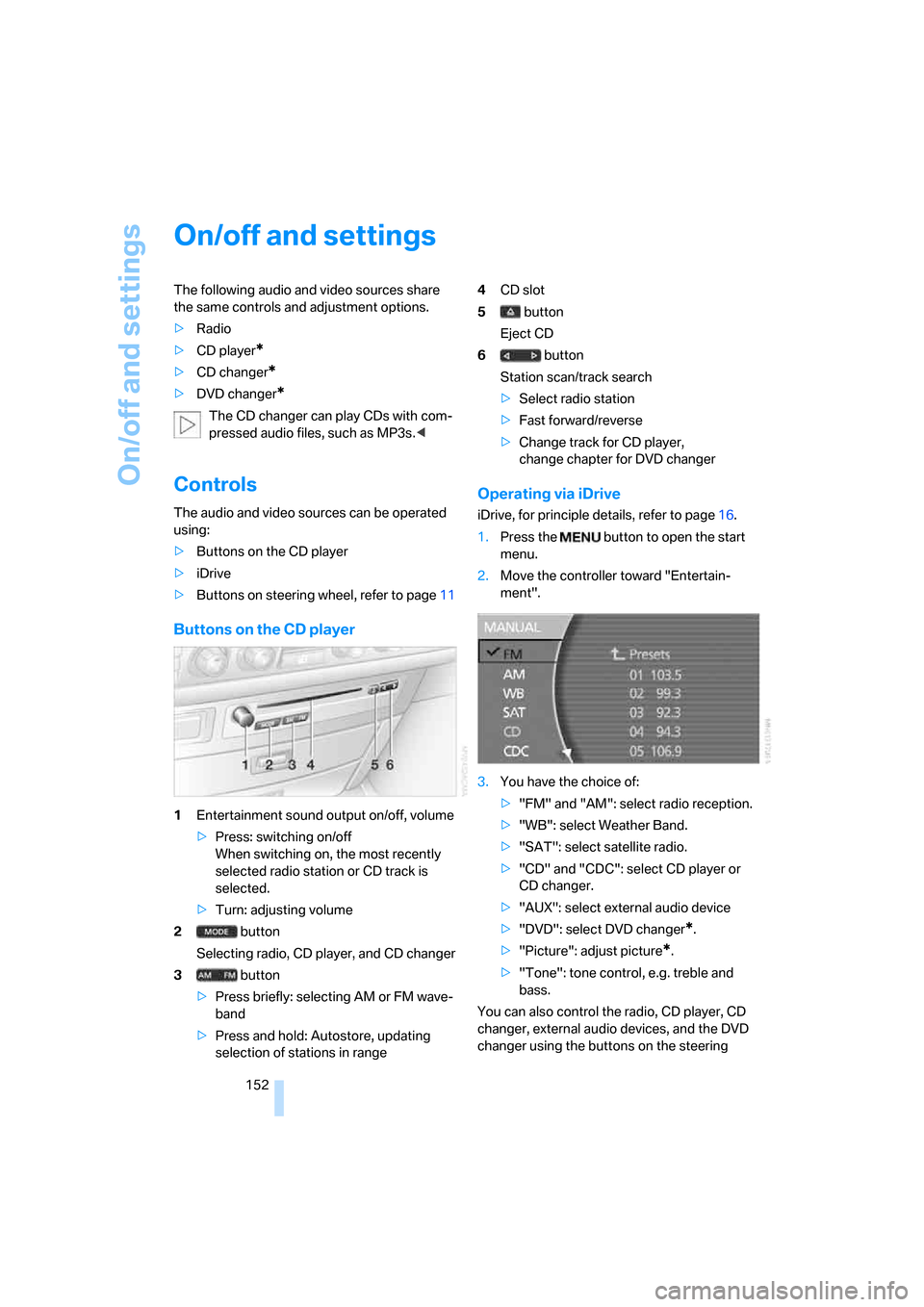
1Entertainment sound output on/off, volume
>Press: switching on/off
When switching on, the most recently
selected radio station or CD track is
selected.
>Turn: adjusting volume
2 button
Selecting radio, CD player, and CD changer
3 button
>Press briefly: selecting AM or FM wave-
band
>Press and hold: Autostore, updating
selection of stations in range4CD slot
5 button
Eject CD
6 button
Station scan/track search
>Select radio station
>Fast forward/reverse
>Change track for CD player,
change chapter for DVD changer
Operating via iDrive
iDrive, for principle details, refer to page16.
1.Press the button to open the start
menu.
2.Move the controller toward "Entertain-
ment".
3.You have the choice of:
>"FM" and "AM": select radio reception.
>"WB": select Weather Band.
>"SAT": select satellite radio.
>"CD" and "CDC": select CD player or
CD changer.
>"AUX": select external audio device
>"DVD": select DVD changer
*.
>"Picture": adjust picture
*.
>"Tone": tone control, e.g. treble and
bass.
You can also control the radio, CD player, CD
changer, external audio devices, and the DVD
changer using the buttons on the steering
Page 158 of 254
Radio
156
Radio
Your radio is equipped to receive the FM and
AM wavebands.
Listening to radio
Switch on audio or video sources, refer to
page153.
iDrive, for principle details, refer to page16.
1.Press the button to open the start
menu.
2.Move the controller toward "Entertain-
ment".
3.Select "FM" or "AM" and press the control-
ler.
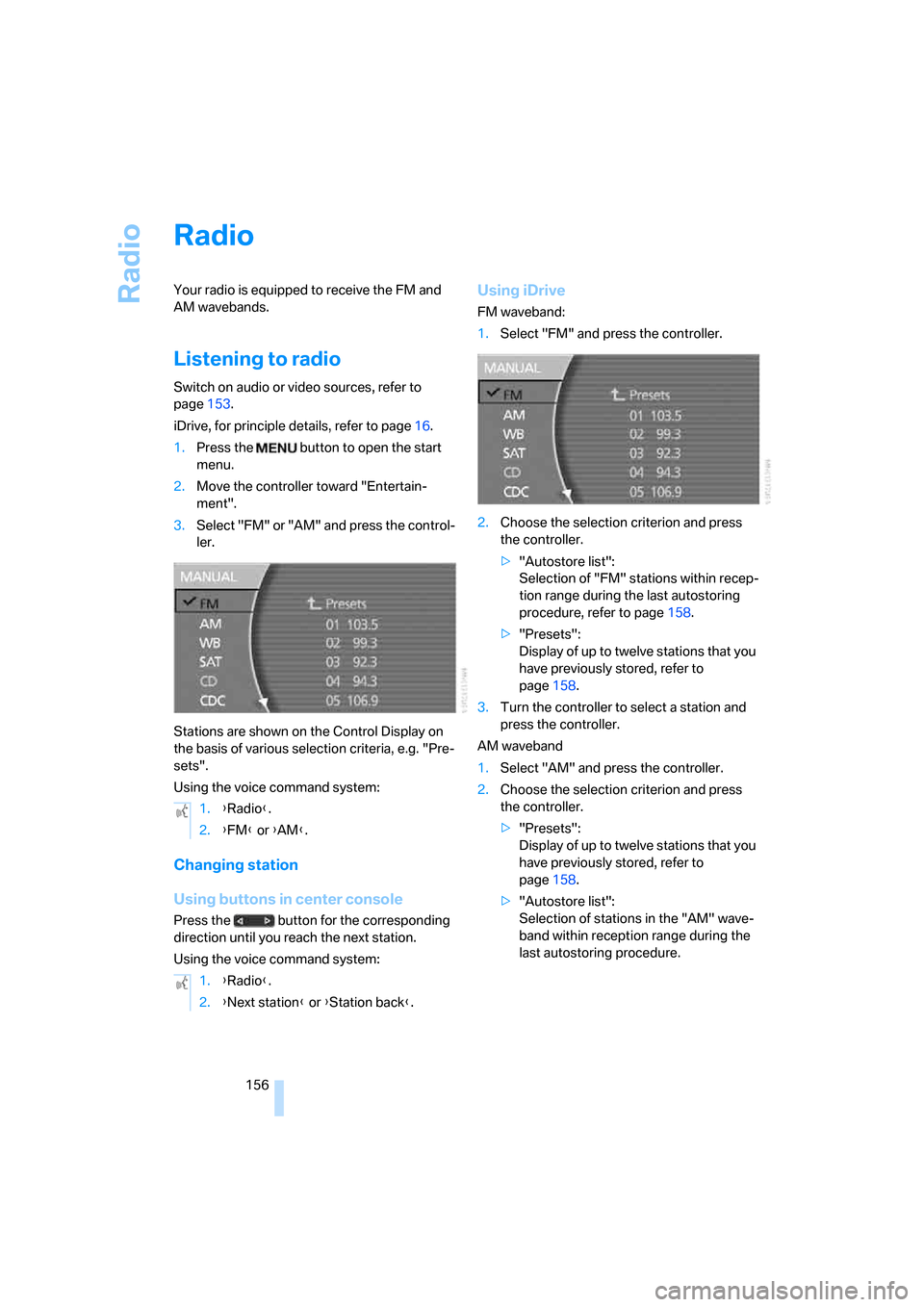
Stations are shown on the Control Display on
the basis of various selection criteria, e.g. "Pre-
sets".
Using the voice command system:
Changing station
Using buttons in center console
Press the button for the corresponding
direction until you reach the next station.
Using the voice command system:
Using iDrive
FM waveband:
1.Select "FM" and press the controller.
2.Choose the selection criterion and press
the controller.
>"Autostore list":
Selection of "FM" stations within recep-
tion range during the last autostoring
procedure, refer to page158.
>"Presets":
Display of up to twelve stations that you
have previously stored, refer to
page158.
3.Turn the controller to select a station and
press the controller.
AM waveband
1.Select "AM" and press the controller.
2.Choose the selection criterion and press
the controller.
>"Presets":
Display of up to twelve stations that you
have previously stored, refer to
page158.
>"Autostore list":
Selection of stations in the "AM" wave-
band within reception range during the
last autostoring procedure. 1.{Radio}.
2.{FM} or {AM}.
1.{Radio}.
2.{Next station} or {Station back}.
Page 160 of 254
Radio
158 Using the voice command system:
Updating selection of stations in
receiving range
In the course of longer trips, when you travel
outside the transmission range of the originally
selected stations, you can update the selection
of stations in receiving range.
1.Select "AM" and press the controller.
2.Select "MANUAL" and press the controller.
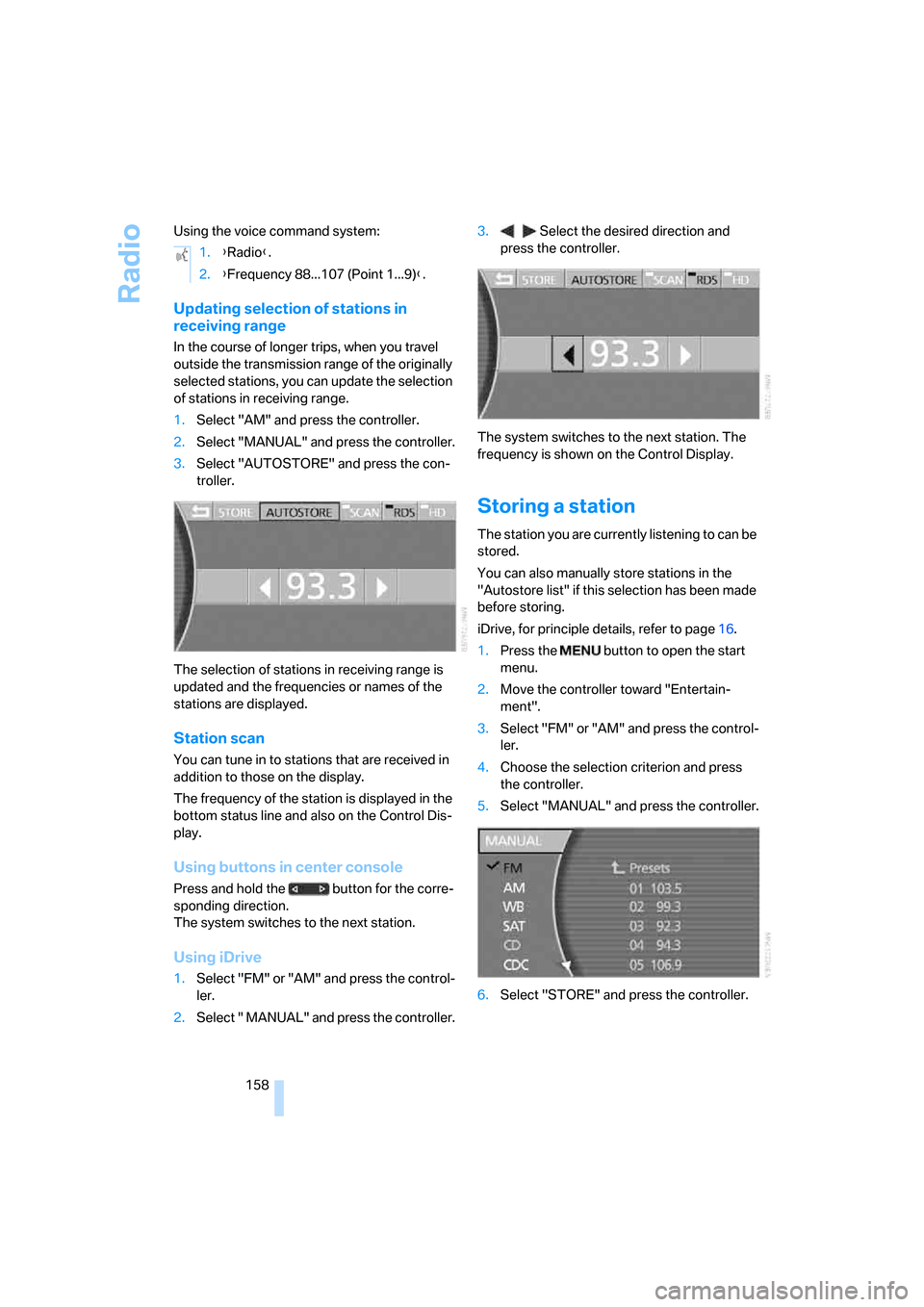
3.Select "AUTOSTORE" and press the con-
troller.
The selection of stations in receiving range is
updated and the frequencies or names of the
stations are displayed.
Station scan
You can tune in to stations that are received in
addition to those on the display.
The frequency of the station is displayed in the
bottom status line and also on the Control Dis-
play.
Using buttons in center console
Press and hold the button for the corre-
sponding direction.
The system switches to the next station.
Using iDrive
1.Select "FM" or "AM" and press the control-
ler.
2.Select " MANUAL" and press the controller.3. Select the desired direction and
press the controller.
The system switches to the next station. The
frequency is shown on the Control Display.
Storing a station
The station you are currently listening to can be
stored.
You can also manually store stations in the
"Autostore list" if this selection has been made
before storing.
iDrive, for principle details, refer to page16.
1.Press the button to open the start
menu.
2.Move the controller toward "Entertain-
ment".
3.Select "FM" or "AM" and press the control-
ler.
4.Choose the selection criterion and press
the controller.
5.Select "MANUAL" and press the controller.
6.Select "STORE" and press the controller. 1.{Radio}.
2.{Frequency 88...107 (Point 1...9)}.
Page 162 of 254
Radio
160 please contact the nearest office of the National
Weather Service or write to the National
Weather Service at: W/OM1, National Oceanic
and Atmospheric Administration, 1325 East-
West Highway, Silver Spring, MD 20910.
Calling up weather reports
iDrive, for principle details, refer to page16.
1.Press the button to open the start
menu.
2.Move the controller toward "Entertain-
ment".
3.Select "WB" and press the controller.
A list of the available channels is displayed.
4.Turn the controller until the desired channel
is selected and press the controller.
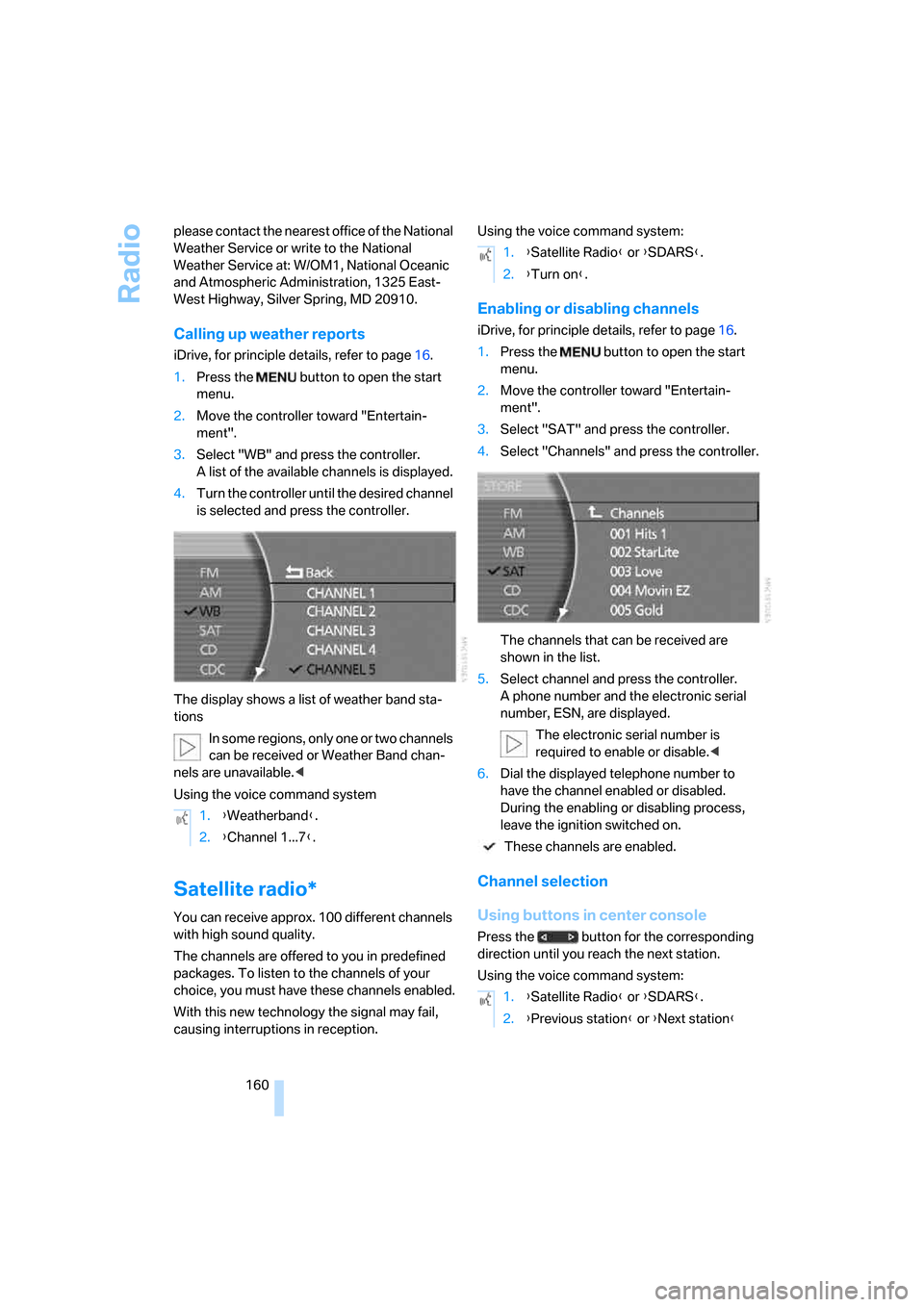
The display shows a list of weather band sta-
tions
In some regions, only one or two channels
can be received or Weather Band chan-
nels are unavailable.<
Using the voice command system
Satellite radio*
You can receive approx. 100 different channels
with high sound quality.
The channels are offered to you in predefined
packages. To listen to the channels of your
choice, you must have these channels enabled.
With this new technology the signal may fail,
causing interruptions in reception.Using the voice command system:
Enabling or disabling channels
iDrive, for principle details, refer to page16.
1.Press the button to open the start
menu.
2.Move the controller toward "Entertain-
ment".
3.Select "SAT" and press the controller.
4.Select "Channels" and press the controller.
The channels that can be received are
shown in the list.
5.Select channel and press the controller.
A phone number and the electronic serial
number, ESN, are displayed.
The electronic serial number is
required to enable or disable.<
6.Dial the displayed telephone number to
have the channel enabled or disabled.
During the enabling or disabling process,
leave the ignition switched on.
These channels are enabled.
Channel selection
Using buttons in center console
Press the button for the corresponding
direction until you reach the next station.
Using the voice command system: 1.{Weatherband}.
2.{Channel 1...7}.
1.{Satellite Radio} or {SDARS}.
2.{Turn on}.
1.{Satellite Radio} or {SDARS}.
2.{Previous station} or {Next station}
Page 165 of 254
Navigation
Entertainment
Driving tips
163Reference
At a glance
Controls
Communications
Mobility
CD player
Listening to CDs
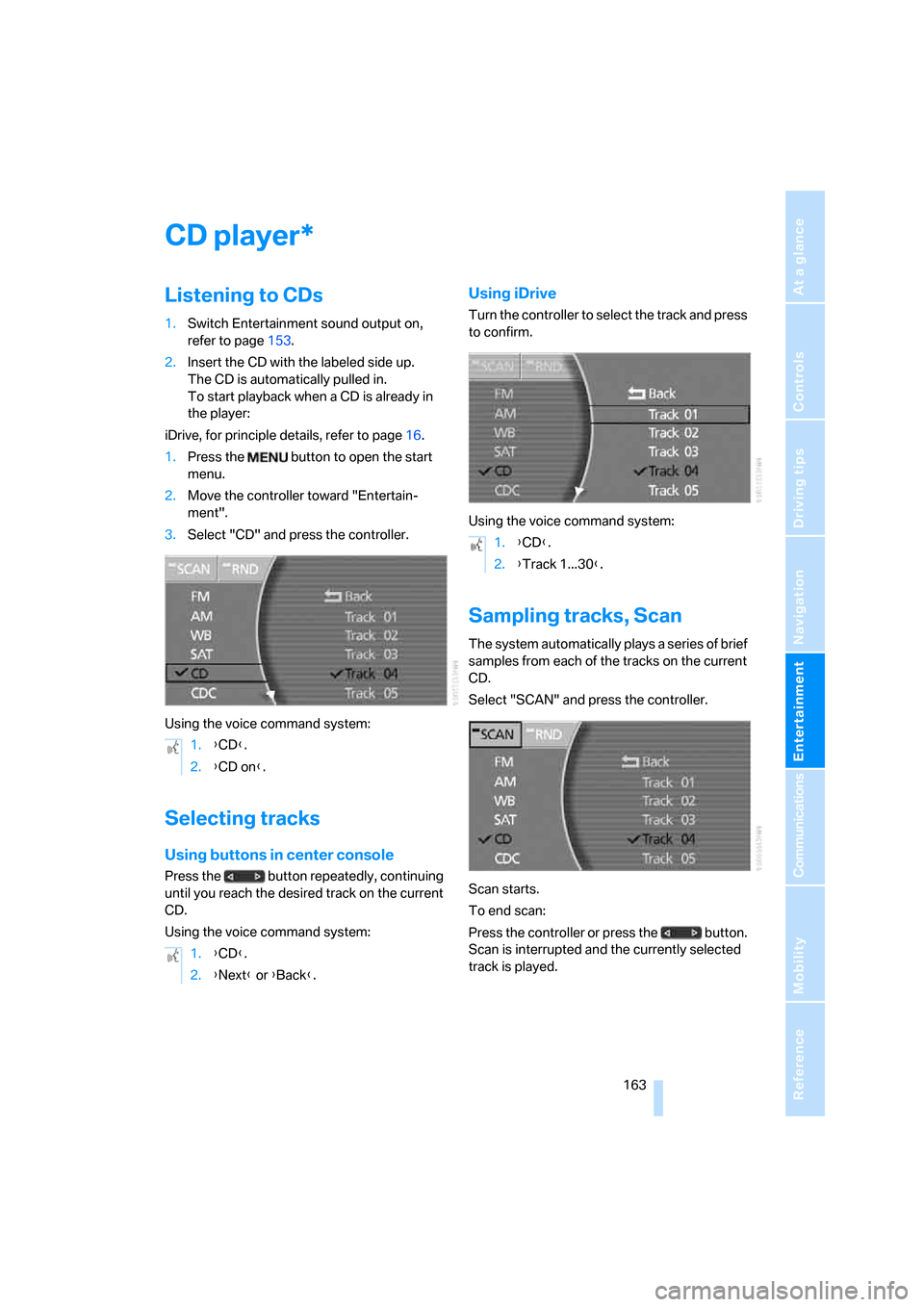
1.Switch Entertainment sound output on,
refer to page153.
2.Insert the CD with the labeled side up.
The CD is automatically pulled in.
To start playback when a CD is already in
the player:
iDrive, for principle details, refer to page16.
1.Press the button to open the start
menu.
2.Move the controller toward "Entertain-
ment".
3.Select "CD" and press the controller.
Using the voice command system:
Selecting tracks
Using buttons in center console
Press the button repeatedly, continuing
until you reach the desired track on the current
CD.
Using the voice command system:
Using iDrive
Turn the controller to select the track and press
to confirm.
Using the voice command system:
Sampling tracks, Scan
The system automatically plays a series of brief
samples from each of the tracks on the current
CD.
Select "SCAN" and press the controller.
Scan starts.
To end scan:
Press the controller or press the button.
Scan is interrupted and the currently selected
track is played.
*
1.{CD}.
2.{CD on}.
1.{CD}.
2.{Next} or {Back}.
1.{CD}.
2.{Track 1...30}.
Page 168 of 254
CD changer
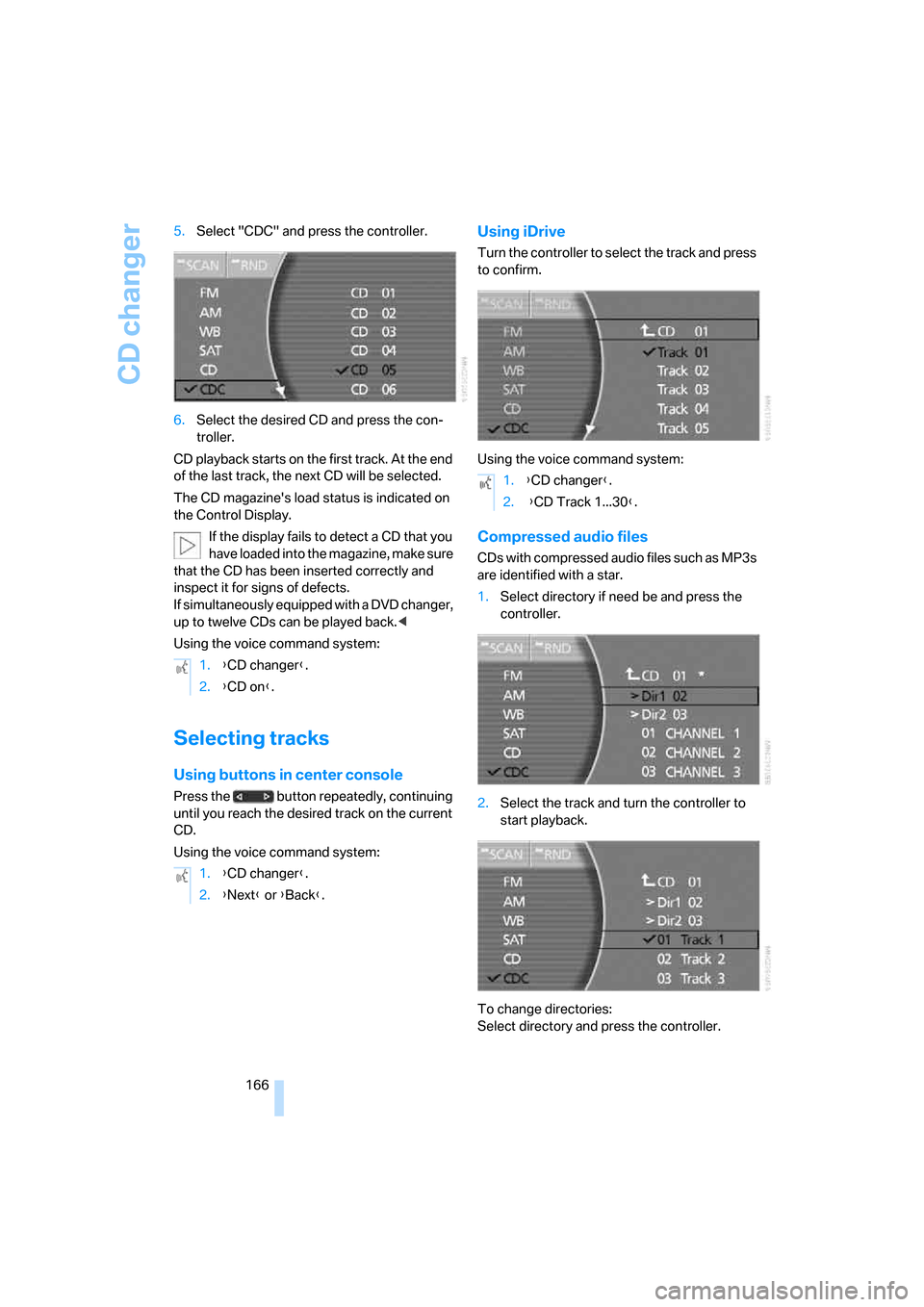
166 5.Select "CDC" and press the controller.
6.Select the desired CD and press the con-
troller.
CD playback starts on the first track. At the end
of the last track, the next CD will be selected.
The CD magazine's load status is indicated on
the Control Display.
If the display fails to detect a CD that you
have loaded into the magazine, make sure
that the CD has been inserted correctly and
inspect it for signs of defects.
If simultaneously equipped with a DVD changer,
up to twelve CDs can be played back.<
Using the voice command system:
Selecting tracks
Using buttons in center console
Press the button repeatedly, continuing
until you reach the desired track on the current
CD.
Using the voice command system:
Using iDrive
Turn the controller to select the track and press
to confirm.
Using the voice command system:
Compressed audio files
CDs with compressed audio files such as MP3s
are identified with a star.
1.Select directory if need be and press the
controller.
2.Select the track and turn the controller to
start playback.
To change directories:
Select directory and press the controller. 1.{CD changer}.
2.{CD on}.
1.{CD changer}.
2.{Next} or {Back}.
1.{CD changer}.
2. {CD Track 1...30}.
Page 181 of 254
179
Entertainment
Reference
At a glance
Controls
Driving tips Communications
Navigation
Mobility
Hands-free system
The hands-free microphone is located on the
left-hand side on the headliner.
The hands-free system is activated whenever
you establish or receive a call using the follow-
ing:
>the button on the steering wheel, refer to
page11
>the retracting telephone keypad
>iDrive, refer to Initiating communication,
page184
>the voice command system
*, refer to
page23, except for incoming calls
Volume adjustment
You can set the volume for the hands-free sys-
tem and the ring tone separately:
>Turn knob during a call.
>Turn knob during an incoming call.
The volume can also be adjusted using
the buttons on the steering wheel.<
This volume is maintained, even if the other
audio sources are set to minimum volume.
The setting is stored for the remote control cur-
rently in use.
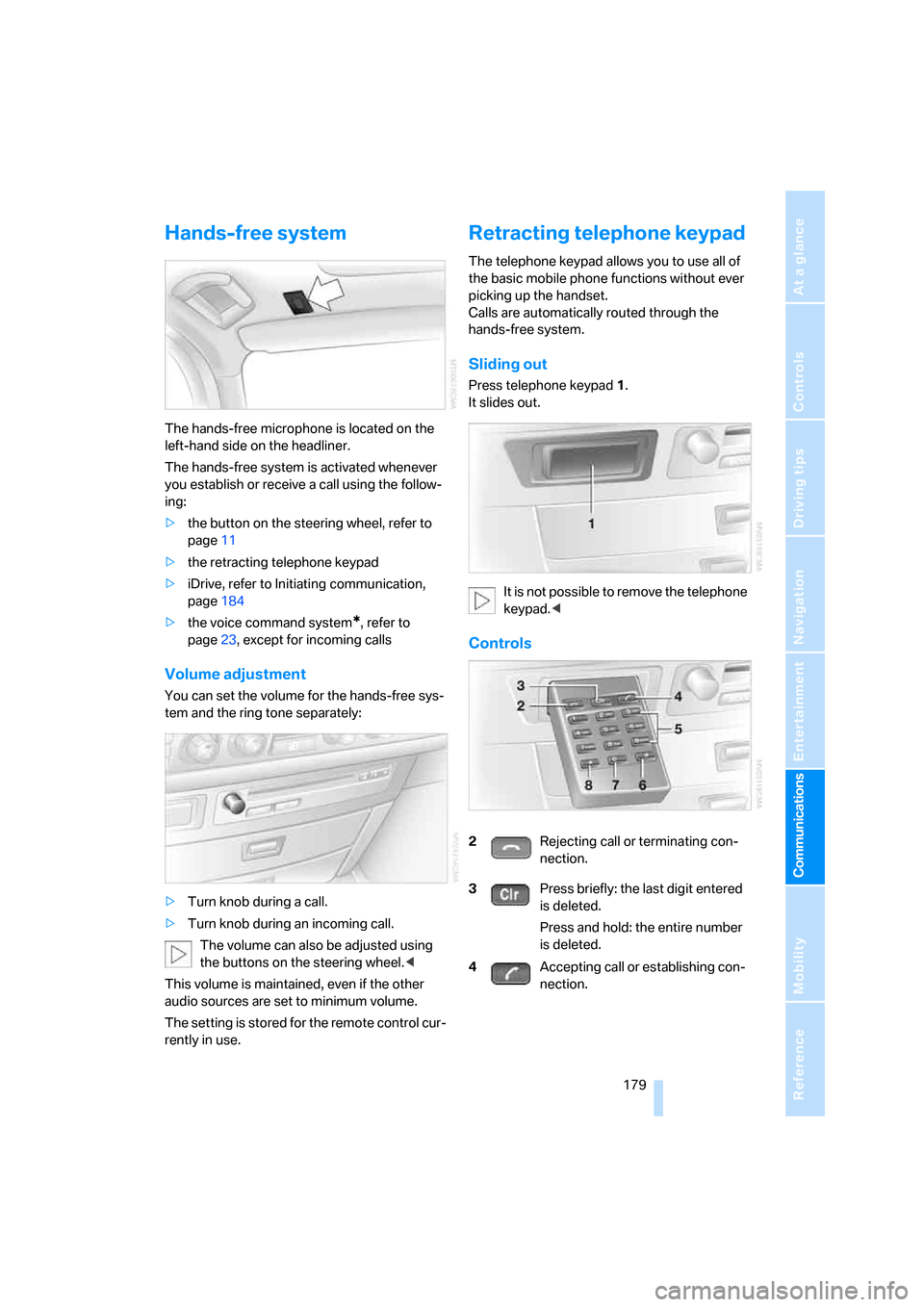
Retracting telephone keypad
The telephone keypad allows you to use all of
the basic mobile phone functions without ever
picking up the handset.
Calls are automatically routed through the
hands-free system.
Sliding out
Press telephone keypad1.
It slides out.
It is not possible to remove the telephone
keypad.<
Controls
2Rejecting call or terminating con-
nection.
3Press briefly: the last digit entered
is deleted.
Press and hold: the entire number
is deleted.
4Accepting call or establishing con-
nection.
Page 183 of 254
181
Entertainment
Reference
At a glance
Controls
Driving tips Communications
Navigation
Mobility
Getting started
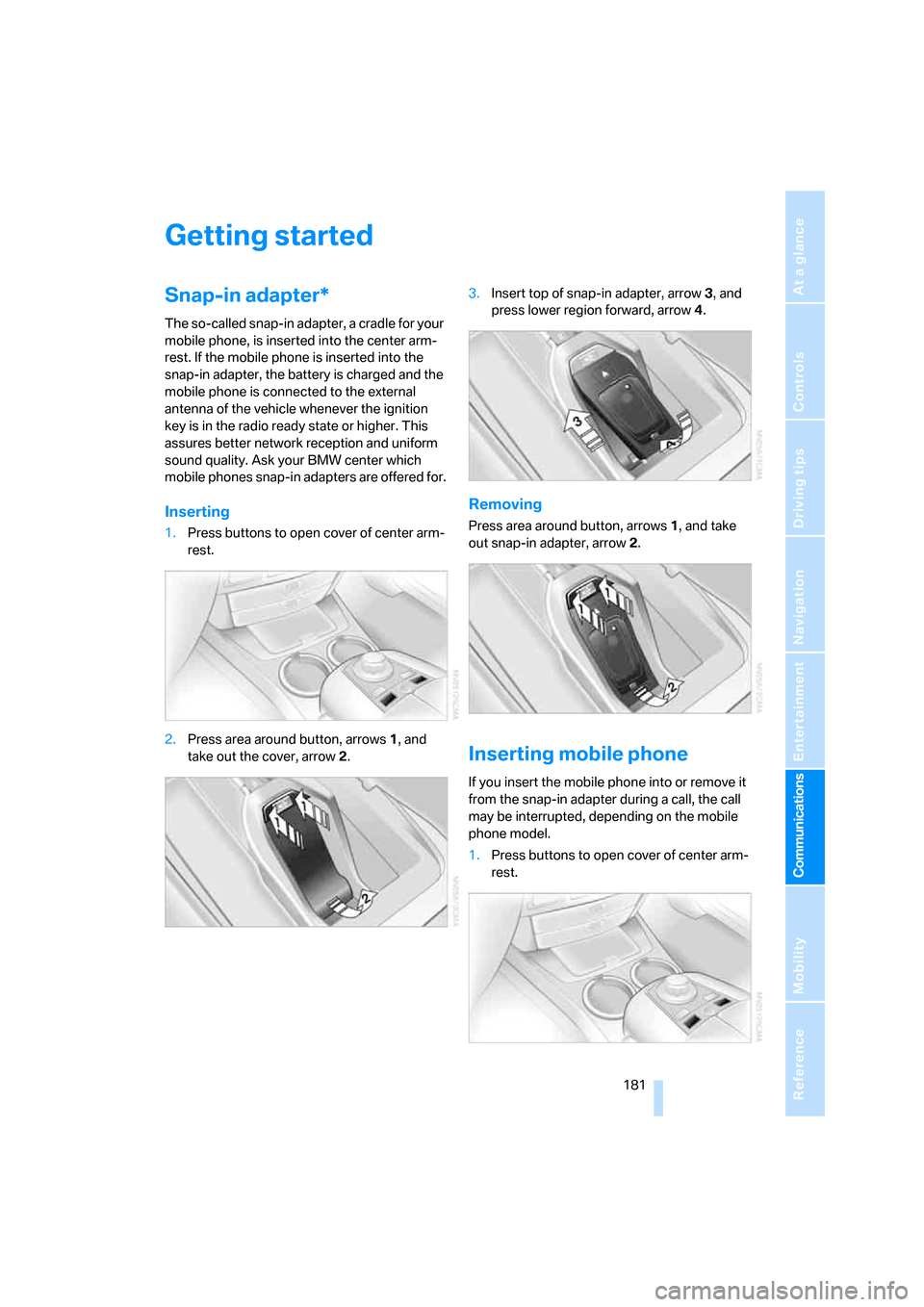
Snap-in adapter*
The so-called snap-in adapter, a cradle for your
mobile phone, is inserted into the center arm-
rest. If the mobile phone is inserted into the
snap-in adapter, the battery is charged and the
mobile phone is connected to the external
antenna of the vehicle whenever the ignition
key is in the radio ready state or higher. This
assures better network reception and uniform
sound quality. Ask your BMW center which
mobile phones snap-in adapters are offered for.
Inserting
1.Press buttons to open cover of center arm-
rest.
2.Press area around button, arrows1, and
take out the cover, arrow2.3.Insert top of snap-in adapter, arrow3, and
press lower region forward, arrow4.
Removing
Press area around button, arrows1, and take
out snap-in adapter, arrow2.
Inserting mobile phone
If you insert the mobile phone into or remove it
from the snap-in adapter during a call, the call
may be interrupted, depending on the mobile
phone model.
1.Press buttons to open cover of center arm-
rest.
Page 235 of 254
Reference 233
At a glance
Controls
Driving tips
Communications
Navigation
Entertainment
Mobility
Audio152
– controls152
– switching on/off153
– tone control153
– volume153
"AUDIO", DVD changer173
Audio device, external114
Audio mode152
Automatic
– air distribution104
– air volume104
– cruise control67,69
– headlamp control100
– luggage compartment lid
operation33,36
– service notification190
– station storage158
– steering wheel adjustment,
refer to Assistance getting in
and out52
Automatic car wash, refer to
Caring for your vehicle
brochure
Automatic climate control
– adjusting temperature105
– AUTO program104
– defrosting windows and
removing condensation106
– maximum cooling106
– rear climate control108
– rear refrigerator117
– residual heat106
– settings on Control
Display104
– switching cooling function
on and off manually107
– switching on and off105
Automatic closing of doors
and luggage compartment
lid, refer to Automatic Soft
Close35
Automatic curb monitor51
Automatic garage door
opener111
Automatic Hold59
– activation/deactivation59
– parking60
– programmable buttons52Automatic lighting
– refer to Automatic headlamp
control100
– refer to Daytime running
lamps100
– refer to Interior lamps101
– refer to Pathway lighting100
Automatic recirculated-air
control AUC105
Automatic soft closing
– doors
35
– luggage compartment lid36
Automatic station search157
Automatic transmission with
Steptronic62
– buttons on steering
wheel63
– interlock62
– manually unlocking and
locking transmission lock64
– shiftlock62
– towing221
– tow starting222
"AUTO P"
– activating/deactivating
Automatic Hold59
– programmable buttons52
AUTO program, automatic
climate control104
– adjusting intensity104
"Autostore list", radio156
"AUX", external audio
device169
AUX-In
– port114
– refer to External audio
device169
"AUX level", external audio
device169
Average fuel consumption77
– setting units84
Average speed77
– setting units84
"Avoid ferries",
navigation142
"Avoid highway",
navigation142
Avoiding unintentional
alarms38"Avoid route", navigation147
"Avoid sect.", navigation147
"Avoid tolls", navigation142
Avoid tolls, navigation142
Axle loads, refer to
Weights228
"A-Z", telephone185
B
Backrest contour, refer to
Lumbar support
adjustment44
Backrests, refer to Seat
adjustment44
Backrest width adjustment,
refer to Front comfort seat
adjustment44
Backup lamp, replacing
bulbs215
"Balance", balance and
fader154
Bar, refer to Tow bar221
Bass, refer to Tone
control154
"Bass", treble and bass154
Battery217
– jump starting220
– switch218
Battery change, remote
control in Comfort
Access39
"BC", computer77
Belts, refer to Safety belts48
Beverage holder, refer to Cup
holders115
Blower, refer to Air
volume106,108
"BLUETOOTH"183
Bluetooth link, activating/
deactivating183
BMW Assist189
– activating193
– "BMW Assist"193
– "BMW center"190
– "Concierge"192
– info service192
– "Roadside Assistance"190
– services offered189
Page 236 of 254
Everything from A to Z
234 BMW homepage4
BMW Maintenance
System211
BMW Night Vision97
– activating/deactivating98
– cleaning camera99
– making settings98
Boot, refer to Luggage
compartment119
Bottle holder, refer to Cup
holders115
Brake assistant87
Brake force display94
Brake lamp, adaptive, refer to
Brake force display94
Brake lamps
– brake force display94
– replacing bulbs214
Brake rotors, refer to
Corrosion on brake
rotors123
Brakes123
– ABS87
– brake force display94
– breaking-in122
– parking brake58
Brake system
– BMW Maintenance
System211
– breaking-in122
– refer to Braking safely123
Breakdown service, refer to
Roadside
Assistance190,219
Breaking-in122
Breaking-in differential, refer
to Engine and
differential122
"Brightness"
– BMW Night Vision99
– DVD changer172
– on Control Display85
Bulbs, replacing213
"button", programmable
buttons52
Buttons
– next to the controller16
– on steering wheel11
C
"Calculate", refer to
Bypassing route
sections147
Calculating distance to
destination77
California Proposition 65
Warning6
"CALL"192
Call
– accepting184
– automatically accepting,
refer to Hands-free
system179
– rejecting184
– touch tone dialing180
– while away, refer to Dialing
numbers stored in a list186
Call back list, refer to Dialing a
number from phone book or
from numbers stored in a
list185
Calling
– from phone book185
– from Top 8 list186
– redialing185
– with retracting telephone
keypad179
Can holder, refer to Cup
holders115
Capacities229
– luggage compartment228
Car battery, refer to Vehicle
battery217
Car care, refer to Caring for
your vehicle brochure
Car-care products, refer to
Caring for your vehicle
brochure
"Car Data"79,81
Care, refer to Caring for your
vehicle brochure
Caring for the upholstery, refer
to Caring for your vehicle
brochure
Caring for the vehicle finish,
refer to Caring for your
vehicle brochureCar key, refer to Remote
control/key30
Carpet care, refer to Caring for
your vehicle brochure
Car radio, refer to Radio156
Car wash123
– also refer to Caring for your
vehicle brochure
– with Comfort Access39
Catalytic converter, refer to
Hot exhaust system122
"Categories", radio161
CBC Cornering Brake
Control87
CBS Condition Based
Service211
"CD", CD player163
"CDC", CD changer166
CD changer165
– compressed audio files166
– controls152
– fast forward, reverse
167
– installation location165
– random sequence167
– sampling167
– selecting a CD166
– selecting track166
– starting165
– tone control153
– volume153
CD player163
– controls152
– fast forward, reverse164
– random sequence164
– sampling163
– selecting tracks163
– starting163
– tone control153
– volume153
Center armrest
– front113
– rear114
Center console, refer to
Comfort features14
Central locking system31
– Comfort Access38
– from the inside34
"CHANGE", navigation138