change time BMW 760I 2007 E65 Owner's Guide
[x] Cancel search | Manufacturer: BMW, Model Year: 2007, Model line: 760I, Model: BMW 760I 2007 E65Pages: 254, PDF Size: 7.98 MB
Page 174 of 254
DVD changer
172
Fast forward/reverse
Forward/reverse with DVD control
1.During playback, press the controller to dis-
play the DVD control.
2.Select and press the controller.
3.To increase the fast forward/reverse speed,
press the controller several times.
The DVD playback will be distorted.
To cancel fast forward/reverse:
Select and press the controller.
The DVD will start play at the point selected.
Forward/reverse with controller
1.During playback, turn the controller.
Fast forward/reverse is started.
2.Turn the controller further.
The speed is increased.
3.Release the controller.
Fast forward/reverse is interrupted. The
system will continue play at the point on the
DVD at which the controller was released.
Skipping chapter
You can change to the next or previous chapter
during playback.
1.During playback, press the controller to dis-
play the DVD control.
2.Select and press repeatedly until
you reach the desired chapter.
or:
Press the button on the left or right
repeatedly until you reach the desired chapter.
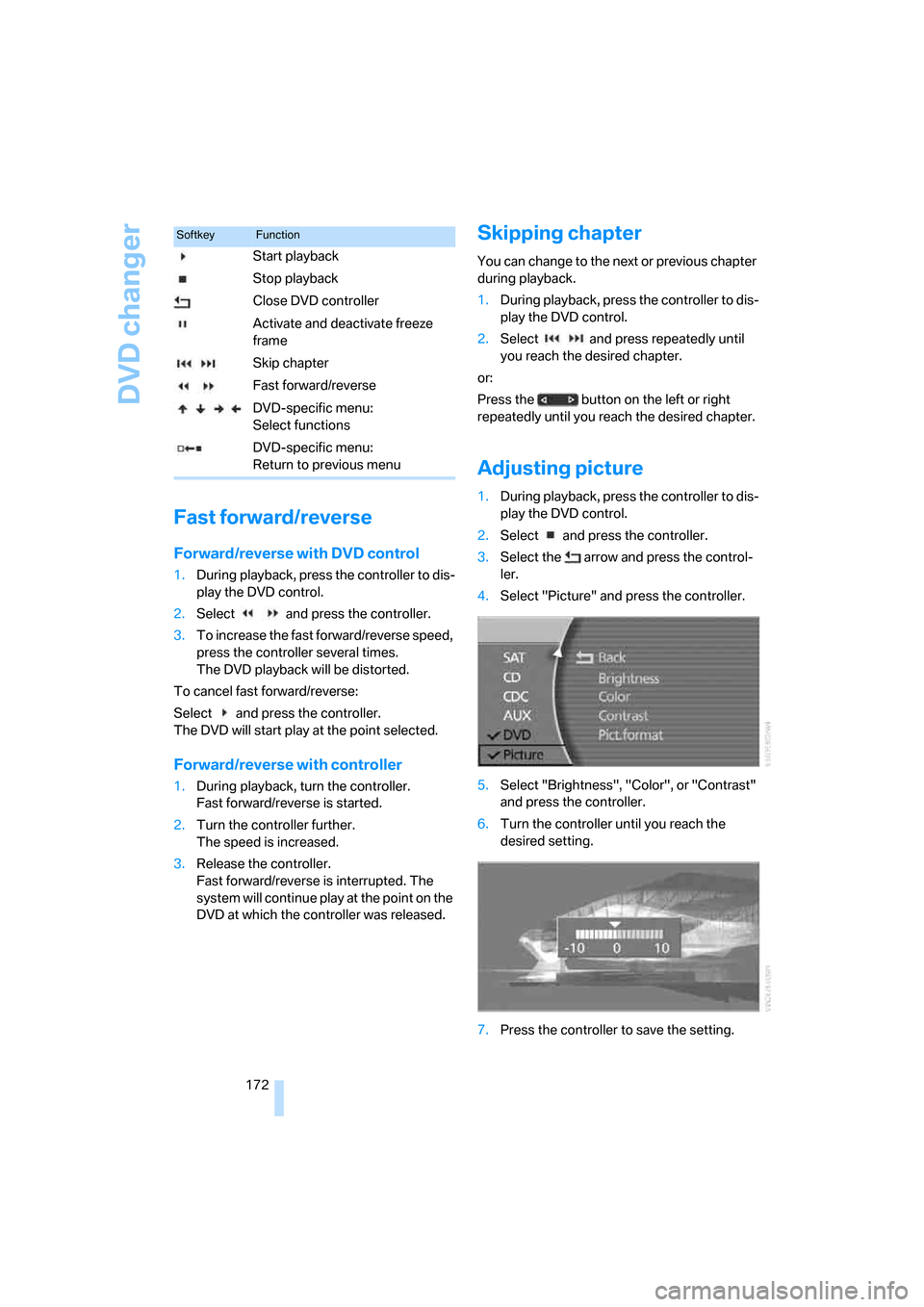
Adjusting picture
1.During playback, press the controller to dis-
play the DVD control.
2.Select and press the controller.
3.Select the arrow and press the control-
ler.
4.Select "Picture" and press the controller.
5.Select "Brightness", "Color", or "Contrast"
and press the controller.
6.Turn the controller until you reach the
desired setting.
7.Press the controller to save the setting.
SoftkeyFunction
Start playback
Stop playback
Close DVD controller
Activate and deactivate freeze
frame
Skip chapter
Fast forward/reverse
DVD-specific menu:
Select functions
DVD-specific menu:
Return to previous menu
Page 211 of 254
Mobility
209Reference
At a glance
Controls
Driving tips
Communications
Navigation
Entertainment
Possible displays
>"Update of engine oil level in process".
>"Engine oil level O.K.".
>"Oil level at minimum! Add 1 quart engine
oil": add a maximum of 1 quart/1 liter of
engine oil at the earliest opportunity, refer
to Adding engine oil.
>"Oil level under min.! Add 1 quart engine
oil": add a maximum of 1 quart/1 liter of
engine oil at the earliest opportunity, refer
to Adding engine oil.
>"Engine oil level too high".
Have vehicle checked immediately;
otherwise, overfilled oil can lead to
engine damage.<
>"No measurement possible at this time".
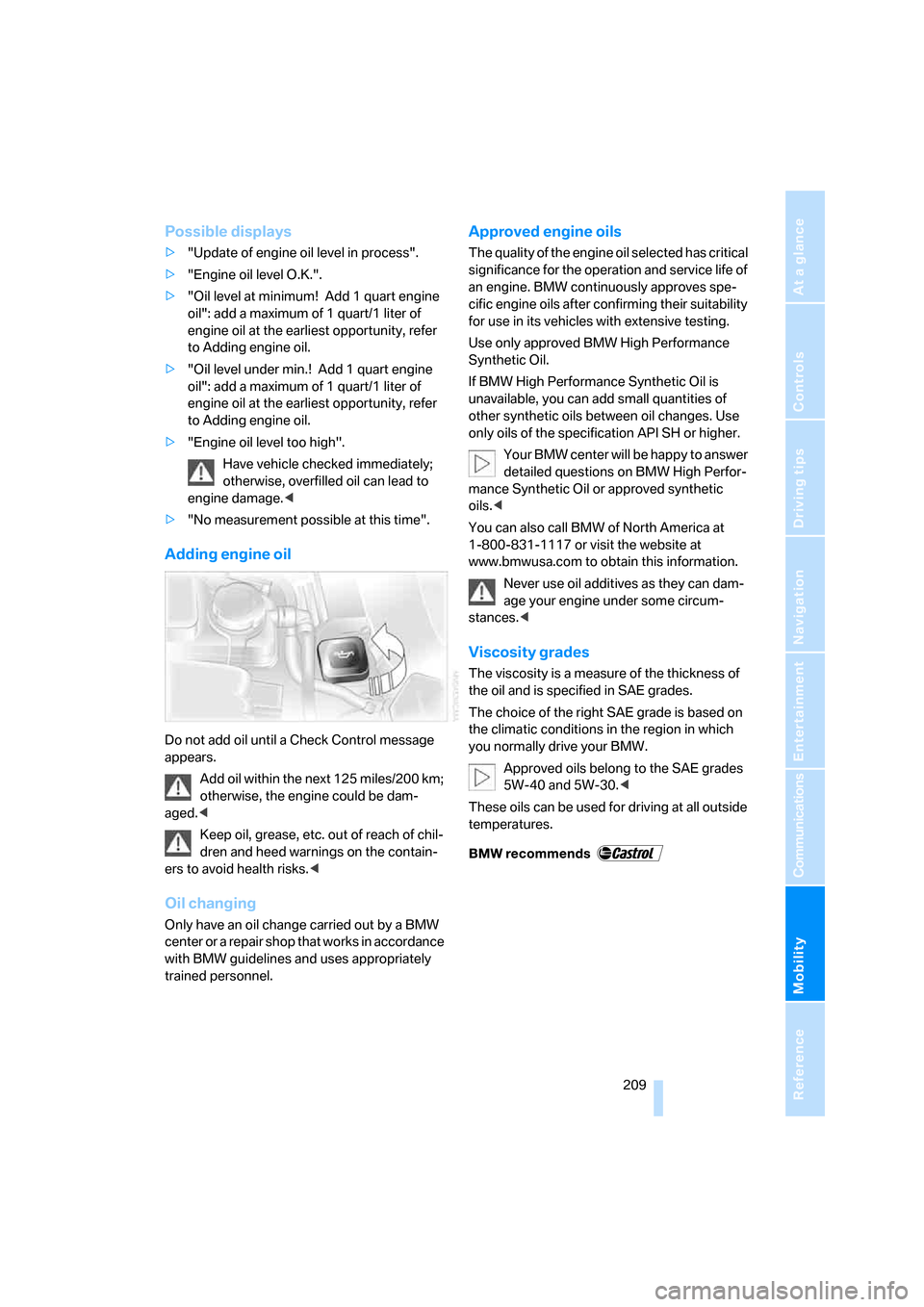
Adding engine oil
Do not add oil until a Check Control message
appears.
Add oil within the next 125 miles/200 km;
otherwise, the engine could be dam-
aged.<
Keep oil, grease, etc. out of reach of chil-
dren and heed warnings on the contain-
ers to avoid health risks.<
Oil changing
Only have an oil change carried out by a BMW
center or a repair shop that works in accordance
with BMW guidelines and uses appropriately
trained personnel.
Approved engine oils
The quality of the engine oil selected has critical
significance for the operation and service life of
an engine. BMW continuously approves spe-
cific engine oils after confirming their suitability
for use in its vehicles with extensive testing.
Use only approved BMW High Performance
Synthetic Oil.
If BMW High Performance Synthetic Oil is
unavailable, you can add small quantities of
other synthetic oils between oil changes. Use
only oils of the specification API SH or higher.
Your BMW center will be happy to answer
detailed questions on BMW High Perfor-
mance Synthetic Oil or approved synthetic
oils.<
You can also call BMW of North America at
1-800-831-1117 or visit the website at
www.bmwusa.com to obtain this information.
Never use oil additives as they can dam-
age your engine under some circum-
stances.<
Viscosity grades
The viscosity is a measure of the thickness of
the oil and is specified in SAE grades.
The choice of the right SAE grade is based on
the climatic conditions in the region in which
you normally drive your BMW.
Approved oils belong to the SAE grades
5W-40 and 5W-30.<
These oils can be used for driving at all outside
temperatures.
Page 215 of 254
Mobility
213Reference
At a glance
Controls
Driving tips
Communications
Navigation
Entertainment
Replacing components
Onboard tool kit
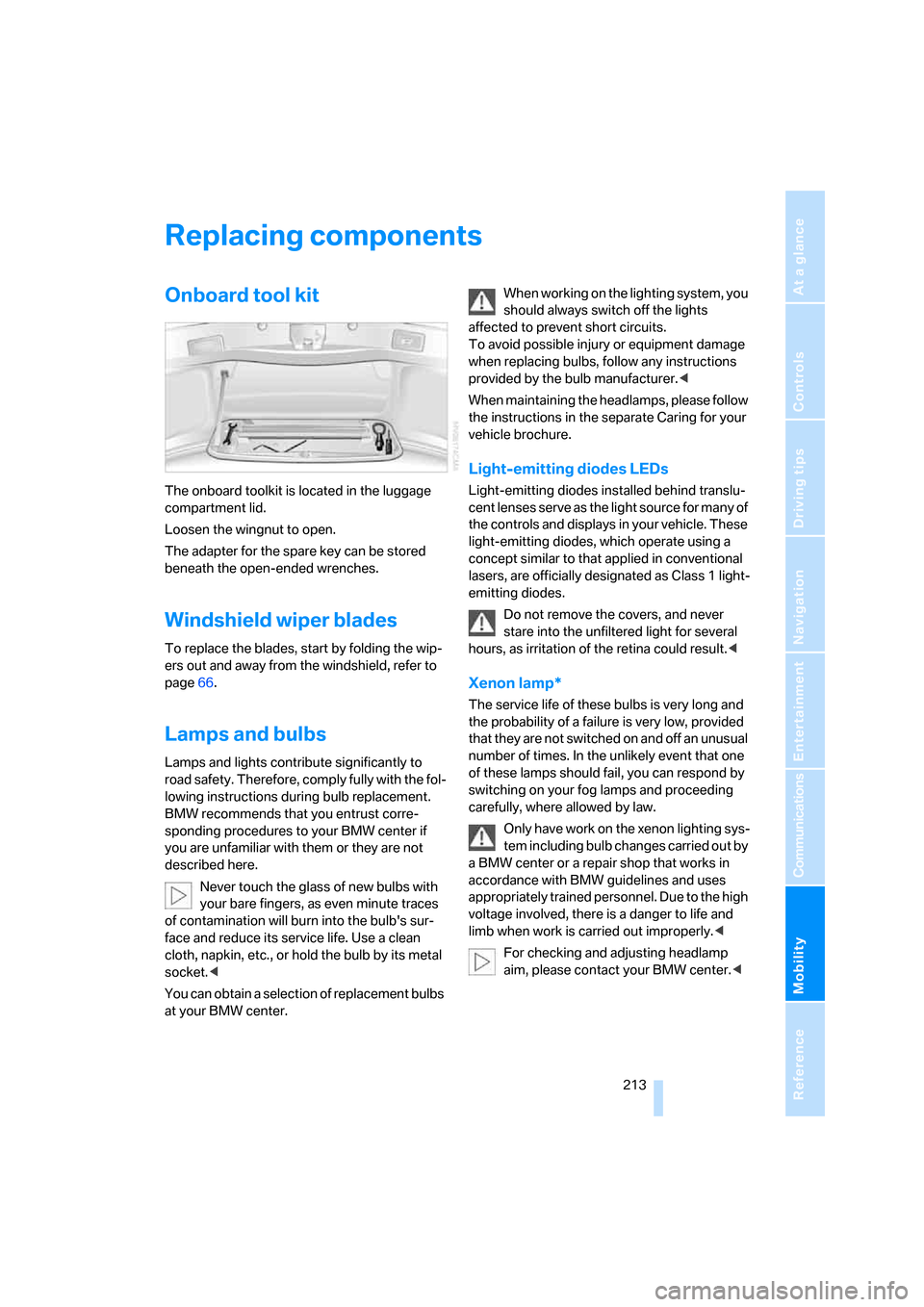
The onboard toolkit is located in the luggage
compartment lid.
Loosen the wingnut to open.
The adapter for the spare key can be stored
beneath the open-ended wrenches.
Windshield wiper blades
To replace the blades, start by folding the wip-
ers out and away from the windshield, refer to
page66.
Lamps and bulbs
Lamps and lights contribute significantly to
road safety. Therefore, comply fully with the fol-
lowing instructions during bulb replacement.
BMW recommends that you entrust corre-
sponding procedures to your BMW center if
you are unfamiliar with them or they are not
described here.
Never touch the glass of new bulbs with
your bare fingers, as even minute traces
of contamination will burn into the bulb's sur-
face and reduce its service life. Use a clean
cloth, napkin, etc., or hold the bulb by its metal
socket.<
You can obtain a selection of replacement bulbs
at your BMW center.When working on the lighting system, you
should always switch off the lights
affected to prevent short circuits.
To avoid possible injury or equipment damage
when replacing bulbs, follow any instructions
provided by the bulb manufacturer.<
When maintaining the headlamps, please follow
the instructions in the separate Caring for your
vehicle brochure.
Light-emitting diodes LEDs
Light-emitting diodes installed behind translu-
cent lenses serve as the light source for many of
the controls and displays in your vehicle. These
light-emitting diodes, which operate using a
concept similar to that applied in conventional
lasers, are officially designated as Class 1 light-
emitting diodes.
Do not remove the covers, and never
stare into the unfiltered light for several
hours, as irritation of the retina could result.<
Xenon lamp*
The service life of these bulbs is very long and
the probability of a failure is very low, provided
that they are not switched on and off an unusual
number of times. In the unlikely event that one
of these lamps should fail, you can respond by
switching on your fog lamps and proceeding
carefully, where allowed by law.
Only have work on the xenon lighting sys-
tem including bulb changes carried out by
a BMW center or a repair shop that works in
accordance with BMW guidelines and uses
appropriately trained personnel. Due to the high
voltage involved, there is a danger to life and
limb when work is carried out improperly.<
For checking and adjusting headlamp
aim, please contact your BMW center.<
Page 235 of 254
Reference 233
At a glance
Controls
Driving tips
Communications
Navigation
Entertainment
Mobility
Audio152
– controls152
– switching on/off153
– tone control153
– volume153
"AUDIO", DVD changer173
Audio device, external114
Audio mode152
Automatic
– air distribution104
– air volume104
– cruise control67,69
– headlamp control100
– luggage compartment lid
operation33,36
– service notification190
– station storage158
– steering wheel adjustment,
refer to Assistance getting in
and out52
Automatic car wash, refer to
Caring for your vehicle
brochure
Automatic climate control
– adjusting temperature105
– AUTO program104
– defrosting windows and
removing condensation106
– maximum cooling106
– rear climate control108
– rear refrigerator117
– residual heat106
– settings on Control
Display104
– switching cooling function
on and off manually107
– switching on and off105
Automatic closing of doors
and luggage compartment
lid, refer to Automatic Soft
Close35
Automatic curb monitor51
Automatic garage door
opener111
Automatic Hold59
– activation/deactivation59
– parking60
– programmable buttons52Automatic lighting
– refer to Automatic headlamp
control100
– refer to Daytime running
lamps100
– refer to Interior lamps101
– refer to Pathway lighting100
Automatic recirculated-air
control AUC105
Automatic soft closing
– doors
35
– luggage compartment lid36
Automatic station search157
Automatic transmission with
Steptronic62
– buttons on steering
wheel63
– interlock62
– manually unlocking and
locking transmission lock64
– shiftlock62
– towing221
– tow starting222
"AUTO P"
– activating/deactivating
Automatic Hold59
– programmable buttons52
AUTO program, automatic
climate control104
– adjusting intensity104
"Autostore list", radio156
"AUX", external audio
device169
AUX-In
– port114
– refer to External audio
device169
"AUX level", external audio
device169
Average fuel consumption77
– setting units84
Average speed77
– setting units84
"Avoid ferries",
navigation142
"Avoid highway",
navigation142
Avoiding unintentional
alarms38"Avoid route", navigation147
"Avoid sect.", navigation147
"Avoid tolls", navigation142
Avoid tolls, navigation142
Axle loads, refer to
Weights228
"A-Z", telephone185
B
Backrest contour, refer to
Lumbar support
adjustment44
Backrests, refer to Seat
adjustment44
Backrest width adjustment,
refer to Front comfort seat
adjustment44
Backup lamp, replacing
bulbs215
"Balance", balance and
fader154
Bar, refer to Tow bar221
Bass, refer to Tone
control154
"Bass", treble and bass154
Battery217
– jump starting220
– switch218
Battery change, remote
control in Comfort
Access39
"BC", computer77
Belts, refer to Safety belts48
Beverage holder, refer to Cup
holders115
Blower, refer to Air
volume106,108
"BLUETOOTH"183
Bluetooth link, activating/
deactivating183
BMW Assist189
– activating193
– "BMW Assist"193
– "BMW center"190
– "Concierge"192
– info service192
– "Roadside Assistance"190
– services offered189
Page 237 of 254
Reference 235
At a glance
Controls
Driving tips
Communications
Navigation
Entertainment
Mobility
Changes, technical, refer to
For your own safety5
Changing scale, map view in
navigation145
Changing settings on Control
Display84
Changing time display84
Changing units of measure on
Control Display84
Changing wheels215
– run-flat tires205
"Channels", radio160
Check Control80
– "CHECK"81
– CHECK button81
Child's seats, refer to
Installing child restraint
systems54
Child restraint fixing system
LATCH55
Child restraint systems54
Child-safety lock56
Chrome parts, refer to Caring
for your vehicle brochure
Chrome-plated parts, care,
refer to Caring for your
vehicle brochure
Cigarette lighter116
"City / Postal Code",
navigation133
Cleaning, vehicle, refer to
Caring for your vehicle
brochure
Cleaning headlamps, tank
capacity, refer to Wiper fluid
filler neck66
Cleaning windshield65
"Climate"
– activating activation time for
parked car ventilation110
– preselecting activation time
for parked car
ventilation109
– rear climate control108
– rear refrigerator117
– switching parked car
ventilation on and off
directly109Climate comfort
windshield126
Clock75
– 12/24-hour mode84
– also refer to Assistance
window21
– display format84
– setting84
"Clock", settings84
Closing
– from inside34
– from outside32
Clothes hooks114
Cockpit10
Cold start, refer to Starting
engine57
"Color", DVD changer172
Combined instrument, refer to
Info Display12
"Comfort", EDC Electronic
Damper Control
90
Comfort Access38
– before driving into a car
wash39
– changing battery39
Comfort features14
Comfort program, EDC
Electronic Damper
Control90
Comfort seat44
– in rear45
"Communication", phone184
Compact Disc
– refer to CD changer165
– refer to CD player163
Compartments, refer to
Storage compartments113
Compressed audio files,
CD changer166
Computer76
– displays on Control
Display77
– units of measure and display
format84
"Concierge", BMW Assist192
Condensation, refer to When
vehicle is parked123Condition Based Service
CBS211
Connecting car vacuum
cleaner, refer to Power
socket116
Consumption, refer to
Average fuel
consumption77
Consumption statistics, refer
to Average fuel
consumption77
"Continue route guidance?",
navigation144
"Contrast"
– BMW Night Vision98
– DVD changer172
Control Center, refer to
iDrive16
Control Display
– rear seat screen21
– refer to iDrive16
– setting brightness85
Controller
– programmable button52
– rear seat screen21
– refer to iDrive16
Controls and displays10,14
Coolant210
– level210
– temperature76
Cooler, refer to Rear
refrigerator117
Cooling
– maximum106,108
– refer to AUTO program
104
– refer to Rear climate
control108
– refer to Rear refrigerator117
– refer to Switching cooling
function on and off
manually107
Copyright2
Cornering Brake Control
CBC87
Cradle for mobile phone, refer
to Using snap-in
adapter178
Page 238 of 254
Everything from A to Z
236 Creating voice address
book141
Cruise control67,69
– refer to Active cruise
control69
– refer to Programmable
cruise control67
Cruising range77
Cup holders115
Curb weight, refer to
Weights228
Current consumption, refer to
Energy Control77
Currentness of Owner's
Manual5
Current position
– displaying147
– storing139
Cursor for navigation, refer to
Selecting destination via
map135
"Curve mode", BMW Night
Vision98
Customizing settings, refer to
Key Memory31
D
Dashboard, refer to
Cockpit10
Data226
– dimensions227
– engine226
– filling capacities229
– weights228
Date, refer to Assistance
window20
– display format84
– setting84
"Date", setting84
Daytime running lamps100
"DEACTIV.", BMW Assist193
Deactivating front passenger
airbags54
Defroster, rear window107
Defrosting windows106Defrosting windows and
removing condensation106
Dehumidifying air, refer to
Cooling function, switching
on and off manually107
"DELETE", navigation140
Deleting address book140
Deleting entire list, refer to
Deleting entries in lists186
Deleting entries in lists186
Destination for navigation131
– selecting using voice141
– selecting via information135
Destination list in navigation
system, deleting138
"Dest. input", navigation131
"Dest. list", navigation138
Dialed numbers, refer to
Redialing185
Diamond button52
Digital clock75
Dimensions227
Directional indicators, refer to
Turn signals65
Direction announcements,
refer to Route guidance by
voice instructions146
Direction instructions, refer to
Voice instructions146
Directory, refer to
– Address book139
– Phone book186
Displacement, refer to Engine
specifications226
Display, refer to
– iDrive16
– Info Display12
Display illumination, refer to
Instrument lighting101
Displaying track information,
CD changer167
Display lighting, refer to
Instrument lighting101
Display of malfunctions, refer
to Check Control80Disposal
– remote control battery39
– vehicle battery218
Distance to destination77
– refer to Remaining
distance77
– units of measure84
Distance warning, refer to
PDC Park Distance
Control86
Door entry lighting, refer to
Interior lamps101
Door key, refer to Remote
control/key30
Door lock34
Doors
– unlocking and locking from
inside34
– unlocking and locking from
outside32
DOT Quality Grades203
Draft-free ventilation107
Driving lamps, refer to Parking
lamps/low beams100
Driving notes122
Driving route, refer to
Displaying route145
Driving stability control87
Driving tips, refer to Driving
notes122
Dry air, refer to Cooling
function107
DSC Dynamic Stability
Control87
– indicator lamp13
"DTC"88
DTC Dynamic Traction
Control88
– indicator lamp13
"DVD", DVD changer171
Page 239 of 254
Reference 237
At a glance
Controls
Driving tips
Communications
Navigation
Entertainment
Mobility
DVD changer170
– adjusting picture172
– adjusting volume153
– controls152
– country codes171
– DVD controller171
– fast forward172
– freeze frame173
– opening specific menu174
– playing DVD171
– reverse172
– searching for chapter172
– selecting language173
– selecting picture format173
– selecting subtitles173
– starting171
– tone control153
DVD multimedia changer,
refer to DVD changer170
Dynamic Drive89
Dynamic Stability Control
DSC87
– indicator lamp13
Dynamic Traction Control
DTC88
– indicator lamp13
E
"EDC"89
EDC Electronic Damping
Control89
Eject button, refer to Buttons
on CD player152
Electrical malfunction
– door lock34
– driver's door34
– fuel filler door198
– glass sunroof, electric42
– luggage compartment lid36
– parking brake60
Electric steering wheel
adjustment51
Electronic brake-force
distribution87
Electronic Damping Control
EDC89Electronic Stability Program
ESP, refer to DSC Dynamic
Stability Control87
Electronic toll collection
device, refer to Entry/pass
tags126
Emergency actuation, refer to
Manual operation
– door lock34
– driver's door34
– fuel filler door198
– glass sunroof42
– luggage compartment lid36
– parking brake60
– transmission lock for
automatic transmission with
Steptronic64
Emergency call219
Emergency release of luggage
compartment lid from inside
the luggage
compartment37
Emergency services, refer to
Roadside
Assistance190,219
Energy-conscious driving,
refer to Energy Control/
current fuel consumption77
Energy Control77
Engine
– breaking-in122
– data226
– overheated, refer to Coolant
temperature76
– speed75,226
– starting57
– switching off58
Engine compartment208
Engine coolant210
Engine oil
– additives, refer to Approved
engine oils209
– approved oils209
– checking oil level208
– electronic oil level check208
– oil types, also refer to
Approved engine oils209
– possible displays of oil level
check209"Engine oil level O.K."209
"Engine oil level too high"209
Engine output, refer to Engine
specifications226
Engine overheating, refer to
Coolant temperature76
Engine speed226
"Enter", navigation134
Entering activation time of
parked car ventilation109
– "Time 1"110
– "Time 2"110
Entering destination
address133
Entering house number or
intersection, navigation133
Entering intersection,
navigation133
Entering name, destination in
navigation132
Entering street,
navigation133
"Entertainment", tone
control153
Entertainment sound output
on/off153
Entry/pass tags126
Entry for current position and
destination, refer to Entering
destination manually131
Environmentally friendly
driving, refer to Energy
Control77
Erasing entire list, refer to
Deleting entries in lists186
ESP Electronic Stability
Program, refer to DSC
Dynamic Stability
Control87
Event Data Recorders212
Exhaust system, refer to Hot
exhaust system122
Page 242 of 254
Everything from A to Z
240 Inflation pressure, refer to Tire
inflation pressure200
Inflation pressure monitoring
– refer to Flat Tire Monitor90
– refer to Tire Pressure
Monitor91
Info Display12
"Information", navigation136
Information, navigation
– "On country"135
– "On dest."135
– "On location"135
– "On town/city"135
Info service192
Infrared windshield, refer to
Entry/pass tags126
"INITIALIZE", BMW
Assist194
Inserting navigation CD/
DVD130
Installation location
– CD changer165
– DVD changer170
– mobile phone, refer to
Inserting mobile phone181
– navigation drive130
Instructions, navigation
system, refer to Route
guidance by voice
instructions146
Instrument cluster, refer to
Info Display12
Instrument lighting101
Instrument panel, refer to
Cockpit
– all around the steering
wheel10
– comfort features14
Integrated universal remote
control111
Interior lamps101
– switching on with remote
control32
Interior motion sensor38
– switching off38
Interior rearview mirror,
automatic dimming
feature51Interlock, refer to Switching
off engine58
"INTERM. TIME",
stopwatch83
Interval Display, refer to
Service requirements78
J
Joystick, refer to iDrive16
Jump starting220
K
Keyless-Go, refer to Comfort
Access38
Keyless opening and closing,
refer to Comfort Access38
Key Memory31
Keys30
– adapter for spare key30
– key-related settings, refer to
Key Memory31
Kick-down63
Knock control199
L
Lamps and bulbs213
"Language", settings84
Lashing eyes, refer to
Securing cargo125
"Last", phone186
"Last dest.", navigation137
Last destination driven to,
refer to Destination list138
Last numbers on mobile
phone, refer to Dialing
numbers stored in a list186
LATCH child restraint fixing
system55
Leather care, refer to Caring
for your vehicle brochure
LEDs light-emitting
diodes213
"Left", seat heating49
Length, refer to
Dimensions227Level control system89
Light, refer to Parking lamps/
low beams100
Light alloy wheels, care and
maintenance, refer to Caring
for your vehicle brochure
Light-emitting diodes
LEDs213
Lighter116
Lighter socket, refer to Power
socket116
Lighting
– of instruments101
– of vehicle100
Light switch100
"Limit"82
Limit, refer to Speed limit82
"Limited", rear screen22
Load, refer to Loading124
Loading
– securing cargo125
– vehicle124
"LOC.", navigation140
"Location",
navigation139,147,148
Lock buttons in the doors,
refer to Locking34
Locking
– from inside34
– from outside32
Locking without key, refer to
Comfort Access38
Locking without remote
control, refer to Comfort
Access38
"LOGIC7", tone control154
Longlife oils, approved
oils209
"low", automatic climate
control105
Low beams100
– automatic100
– replacing bulbs, refer to
Xenon light213
Lower back support, refer to
Lumbar support
adjustment44
Page 244 of 254
Everything from A to Z
242 Mounting for vehicle jack,
refer to Lifting vehicle216
MP3, refer to Compressed
audio files166
Multi-function steering wheel,
refer to Buttons on steering
wheel11
Multifunction switch
– refer to Turn signals/
headlamp flasher65
– refer to Wiper/washer
system65
N
"Name", navigation132
"Navigation"130,144
Navigation announcements,
refer to Switching voice
instructions on/off146
Navigation destination
– manual entry131
– selecting via map135
Navigation drive, installation
location130
Navigation system130
– address book139
– adjusting volume25,146
– changing route146
– current position147
– destination input131
– destination list138
– displaying route145
– manually entering
destination address131
– navigation CD/DVD130
– recent destinations137
– route guidance in assistance
window130
– route list146
– selecting destination via
information135
– selecting destination via
map135
– selecting route criteria141
– starting route guidance144
– terminating/continuing route
guidance144
– voice instructions146"Navi info", programmable
buttons52
Neck supports, refer to Head
restraints46
Nets, refer to Securing
cargo125
"New dest.",
navigation131,135
"New information", BMW
Assist192
New remote control, for
vehicle30
"New route",
navigation142,146
"Next", navigation135
Night vision device, refer to
BMW Night Vision97
"No measurement possible at
this time", checking engine
oil level209
"None", rear screen22
Non-smokers' equipment
package, refer to Power
socket116
Notepad of voice command
system25
Nozzles, refer to
Ventilation107
Number of cylinders, refer to
Engine specifications226
Nylon rope, refer to Towing
and tow starting221
O
OBD socket212
Octane numbers, refer to Fuel
specifications199
Odometer75
Oil
– additives, refer to Approved
engine oils209
– approved engine oils209
– consumption, refer to
Engine oil, checking208
– level208
– topping up, refer to Adding
engine oil209
– viscosity ratings209Oil change interval, refer to
Service requirements78
Oil consumption, refer to
Checking engine oil208
"Oil level at minimum! Add
1 quart engine oil", checking
engine oil level209
"Oil level under min.! Add
1 quart engine oil", checking
engine oil level209
"OK", DVD changer174
"ON / OFF", speed limit82
Onboard computer, refer to
iDrive16
Onboard tool kit213
"On country", navigation136
"On dest.", navigation136
Online help, refer to Roadside
Assistance190
"On location", navigation136
"On town/city",
navigation136
Opening and closing
– from inside34
– from outside32
– via door lock34
– with remote control32
Oral note25
Orientation menu, refer to
Opening start menu18
Outlet slits, refer to
Ventilation107
Outside air, refer to Automatic
recirculated-air control
AUC/recirculated-air
mode105
Outside temperature
display75
– changing units of
measure84
Overview
– all around the steering
wheel10
– comfort area14
– iDrive16
– radio control152
Page 245 of 254
Reference 243
At a glance
Controls
Driving tips
Communications
Navigation
Entertainment
Mobility
P
"PAIRING", phone182
Panic mode33
Park Distance Control PDC86
"Parked car", parked car
ventilation109
Parked car ventilation109
– activating activation
time110
– preselecting activation
time109
– switching on and off
directly109
Parking, vehicle58
Parking aid, refer to PDC Park
Distance Control86
Parking assistant, refer to
PDC Park Distance
Control86
Parking brake58
– Automatic Hold59
Parking lamps100
Parking lamps/low beams100
Parking with Automatic
Hold60
Park lock, refer to Parking62
Partial distance odometer,
refer to Trip odometer75
Parts and accessories, refer to
Your individual vehicle5
Passenger airbag status
lamp96
Passenger-side exterior
mirror, tilting down51
Pathway lighting100
PDC Park Distance Control86
"PDC pic."87
Pen tray, refer to Storage
compartment in center
console115
Perimeter lighting, refer to
Interior lamps101
Permissible axle load, refer to
Weights228
Permissible gross weight,
refer to Weights228
"Perspective", navigation145
"Phone"182Phone book185
– deleting all entries186
– deleting entry186
– displaying entry185
– on the Control Display185
– select entry186
– via iDrive185
Phone book, refer to Voice
command phone book186
– creating entry186
– deleting all entries187
– deleting entry187
– reading entry aloud
187
– selecting entry187
– updating186
Phone number
– deleting individual entry187
– dialing from phone book185
– dialing via retracting
telephone keypad179
– redialing185
– Top 8 list186
Phone preparation package,
refer to Preparation package
mobile phone178
"Pict.format", DVD
changer173
"Picture", DVD
changer172,173
Pinch protection system
– glass sunroof, electric41
– power windows40
Plasters, refer to First-aid
kit220
Plastic, refer to Caring for your
vehicle brochure
Playing music tracks in
random sequence
– CD changer167
– CD player164
Pollen, refer to Microfilter/
activated-charcoal filter107
Position, refer to
– Displaying current
position147
– Saving current position139
Power failure218
Power output, refer to Engine
specifications226Power rear backrests45
Power seat, rear45
Power socket116
Power windows39
– convenience operation32
– safety switch40
Precious wood, refer to Caring
for your vehicle brochure
Preparedness services, refer
to Roadside Assistance219
"Presets", radio156,161
Pressure, tires200
Pressure monitoring, tires
– refer to Flat Tire Monitor90
– refer to Tire Pressure
Monitor91
"Profile", BMW Assist194
Programmable
– buttons52
– cruise control67
Protective function
– glass sunroof, electric41
– power windows40
"Public places, business and
shopping", navigation136
Publishers2
Puncture, Flat Tire Monitor90
R
Radiator, refer to Coolant210
Radiator fluid, refer to
Coolant210
Radio156
– Autostore158
– controls152
– High Definition Radio162
– sampling stations157
– satellite radio160
– selecting the waveband156
– storing stations158
– switching on/off153
– tone control153
– updating selection of
stations in receiving
range158
– volume153
– weather reports159
Radio Data System RDS159