ECO mode BMW 760I 2008 E65 User Guide
[x] Cancel search | Manufacturer: BMW, Model Year: 2008, Model line: 760I, Model: BMW 760I 2008 E65Pages: 254, PDF Size: 7.98 MB
Page 109 of 254
Controls
107Reference
At a glance
Driving tips
Communications
Navigation
Entertainment
Mobility
The interior temperature, air volume, and air
distribution can be set starting from the radio
ready state.
Switching cooling function on and off
manually
When activated, the air conditioner
mode cools and dehumidifies the
incoming air, reheating it as
required, depending on the temperature set-
ting. Depending on the weather, the windshield
may fog over briefly when the engine is started.
The cooling function is switched on automati-
cally with the AUTO program. The passenger
compartment can only be cooled with the
engine running.
Rear window defroster
The rear window defroster
switches off automatically after a
while. Depending on your equip-
ment package, the upper wires are used as an
antenna and are not part of the rear window
defroster.
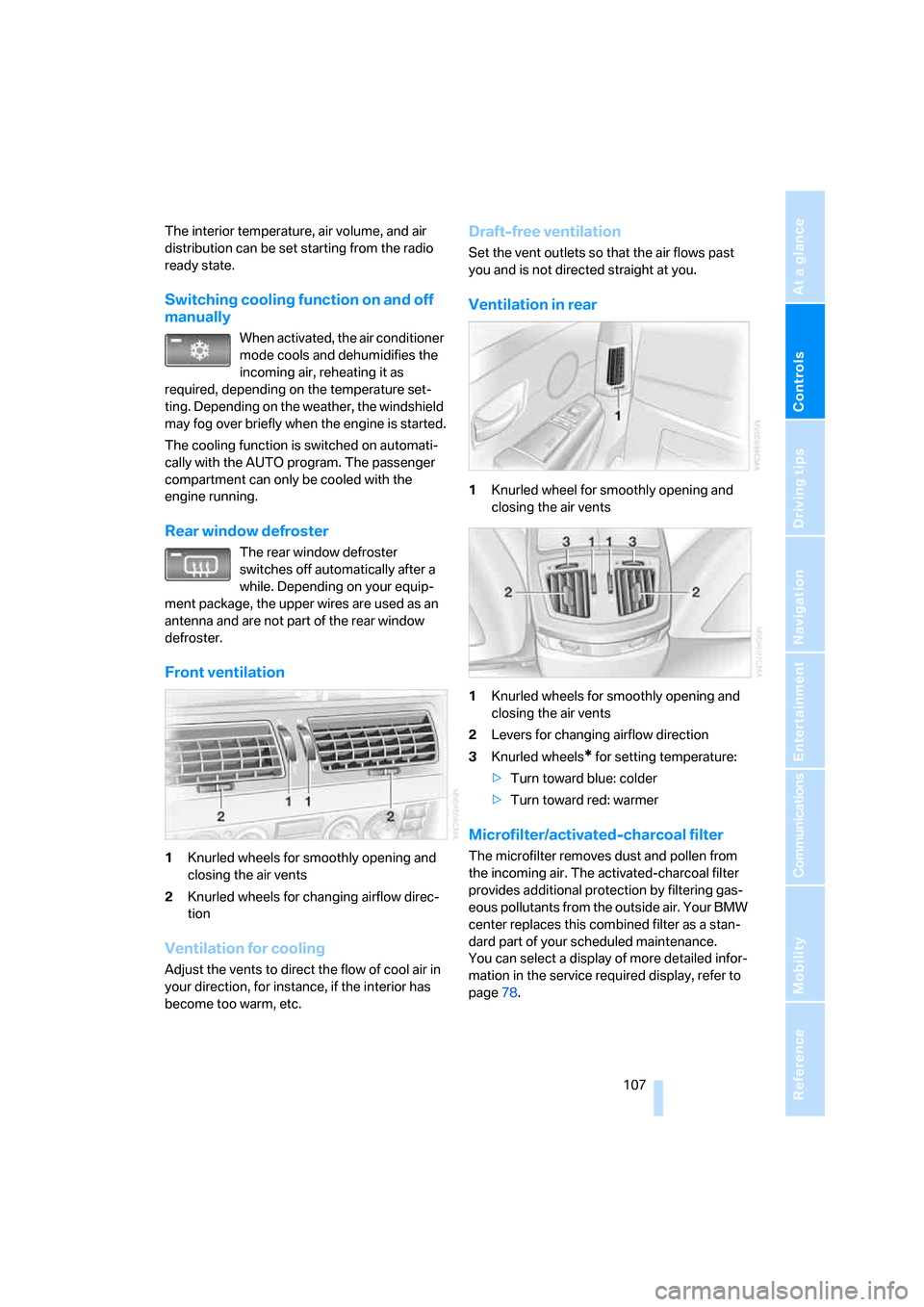
Front ventilation
1Knurled wheels for smoothly opening and
closing the air vents
2Knurled wheels for changing airflow direc-
tion
Ventilation for cooling
Adjust the vents to direct the flow of cool air in
your direction, for instance, if the interior has
become too warm, etc.
Draft-free ventilation
Set the vent outlets so that the air flows past
you and is not directed straight at you.
Ventilation in rear
1Knurled wheel for smoothly opening and
closing the air vents
1Knurled wheels for smoothly opening and
closing the air vents
2Levers for changing airflow direction
3Knurled wheels
* for setting temperature:
>Turn toward blue: colder
>Turn toward red: warmer
Microfilter/activated-charcoal filter
The microfilter removes dust and pollen from
the incoming air. The activated-charcoal filter
provides additional protection by filtering gas-
eous pollutants from the outside air. Your BMW
center replaces this combined filter as a stan-
dard part of your scheduled maintenance.
You can select a display of more detailed infor-
mation in the service required display, refer to
page78.
Page 110 of 254
Climate
108
Rear climate control*
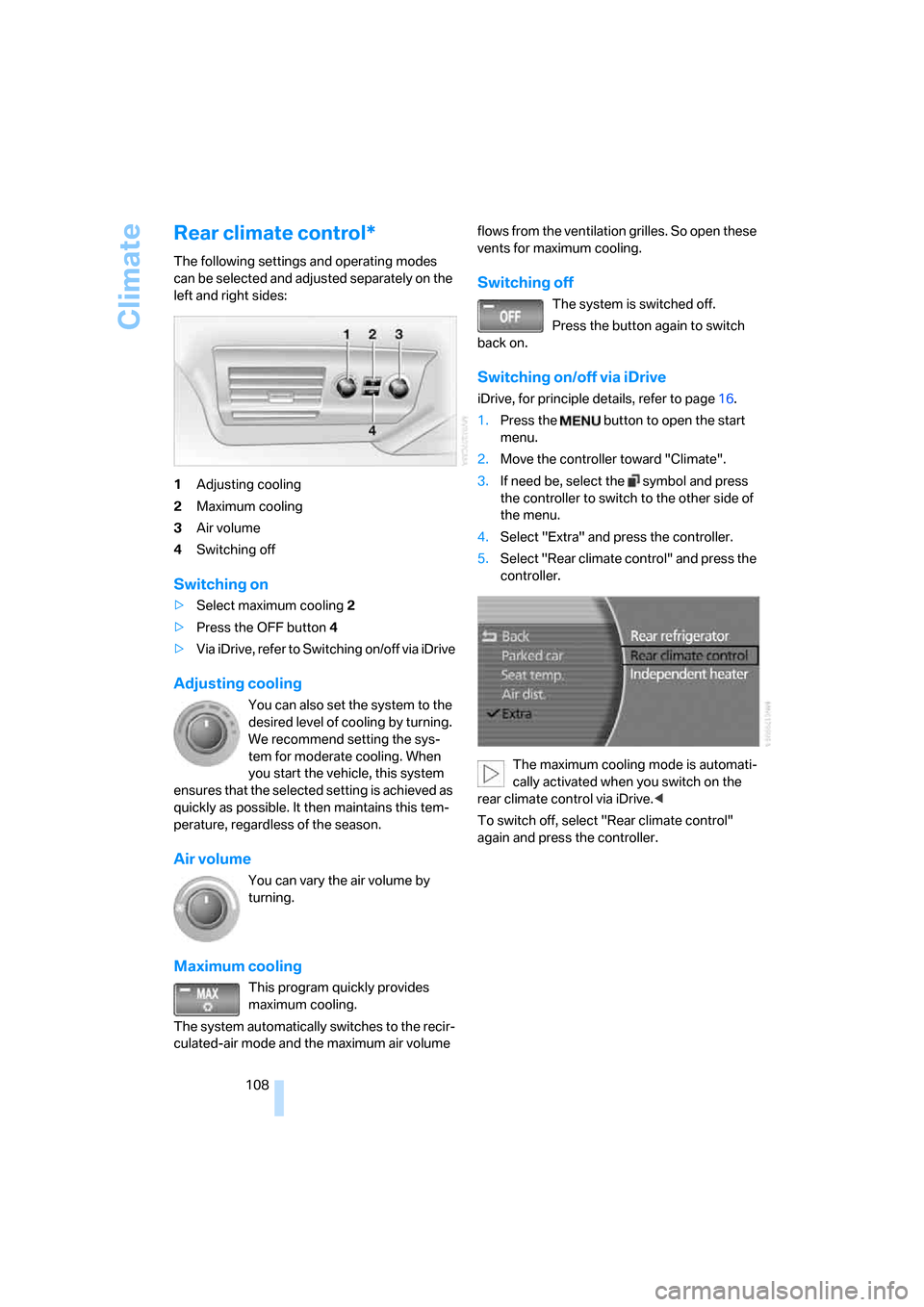
The following settings and operating modes
can be selected and adjusted separately on the
left and right sides:
1Adjusting cooling
2Maximum cooling
3Air volume
4Switching off
Switching on
>Select maximum cooling2
>Press the OFF button 4
>Via iDrive, refer to Switching on/off via iDrive
Adjusting cooling
You can also set the system to the
desired level of cooling by turning.
We recommend setting the sys-
tem for moderate cooling. When
you start the vehicle, this system
ensures that the selected setting is achieved as
quickly as possible. It then maintains this tem-
perature, regardless of the season.
Air volume
You can vary the air volume by
turning.
Maximum cooling
This program quickly provides
maximum cooling.
The system automatically switches to the recir-
culated-air mode and the maximum air volume flows from the ventilation grilles. So open these
vents for maximum cooling.
Switching off
The system is switched off.
Press the button again to switch
back on.
Switching on/off via iDrive
iDrive, for principle details, refer to page16.
1.Press the button to open the start
menu.
2.Move the controller toward "Climate".
3.If need be, select the symbol and press
the controller to switch to the other side of
the menu.
4.Select "Extra" and press the controller.
5.Select "Rear climate control" and press the
controller.
The maximum cooling mode is automati-
cally activated when you switch on the
rear climate control via iDrive.<
To switch off, select "Rear climate control"
again and press the controller.
Page 124 of 254
Things to remember when driving
122
Things to remember when driving
Breaking-in
Moving parts need time to adjust to one
another. To ensure that your vehicle continues
to furnish optimized economy of operation
throughout an extended service life, we request
that you devote careful attention to the follow-
ing information.
Engine and differential
Always obey all official speed limits.
Up to 1,200 miles/2,000 km
Drive with changing engine and vehicle speeds,
but do not exceed:
4500 rpm or 100 mph/160 km/h
Avoid full-throttle operation and use of the
transmission's kick-down mode during these
initial miles.
After 1,200 miles/2,000 km
The engine and vehicle speed can gradually be
increased.
Tires
Due to technical factors associated with their
manufacture, tires do not achieve their full trac-
tion potential until after an initial break-in
period. Therefore, drive reservedly during the
first 200 miles/300 km.
Brake system
Brakes require an initial break-in period of
approx. 300 miles/500 km to achieve optimized
contact and wear patterns between brake pads
and rotors.
Following component replacements
Follow the break-in sequence again if compo-
nents addressed above must be replaced again
during subsequent driving.
General driving notes
Closing luggage compartment lid
Operate the vehicle only when the lug-
gage compartment lid is completely
closed. Otherwise, exhaust fumes could pene-
trate into the passenger compartment.<
If special circumstances should make it abso-
lutely necessary to operate the vehicle with the
luggage compartment lid open:
1.Close all windows and the glass sunroof.
2.Adjust the automatic climate control's
blower to supply a high rate of airflow, refer
to page106.
Hot exhaust system
As in all vehicles, extremely high temper-
atures are generated in the exhaust sys-
tem. Do not remove the heat shields installed
adjacent to it, and never apply undercoating to
them. When driving, standing at idle, and park-
ing, take care to avoid possible contact
between the hot exhaust system and any highly
flammable materials such as hay, leaves, grass,
etc. Such contact could lead to a fire, accompa-
nied by the risk of serious property damage and
personal injury.<
Mobile communications devices in
vehicle
BMW does not recommend using mobile
communications devices, e.g. mobile
phones, inside the vehicle without a direct con-
nection to an outside antenna. Otherwise, the
vehicle electronics and mobile communications
device can interfere with each other. In addition,
there is no assurance that the radiation which
results during transmission will be discharged
from the vehicle interior.<
Page 213 of 254
Mobility
211Reference
At a glance
Controls
Driving tips
Communications
Navigation
Entertainment
Maintenance
BMW Maintenance System
The BMW Maintenance System serves to
retain the operating and road safety of your
BMW. The service schedule also includes oper-
ations related to the vehicle's comfort and con-
venience features, such as replacement of the
filters for the inside air. The aim is to optimize
maintenance procedures with a view to reduc-
ing the cost of running the vehicle.
Should the day come when you decide to sell
your BMW, you will find that a complete dealer
service history is an asset of inestimable value.
CBS Condition Based Service
Sensors and special algorithms take the differ-
ent driving conditions of your BMW into
account. As a result, Condition Based Service
determines the current and future maintenance
requirements. By letting you define a service
and maintenance regimen that reflects your
own individual requirements, the system forms
the basis for trouble-free driving.
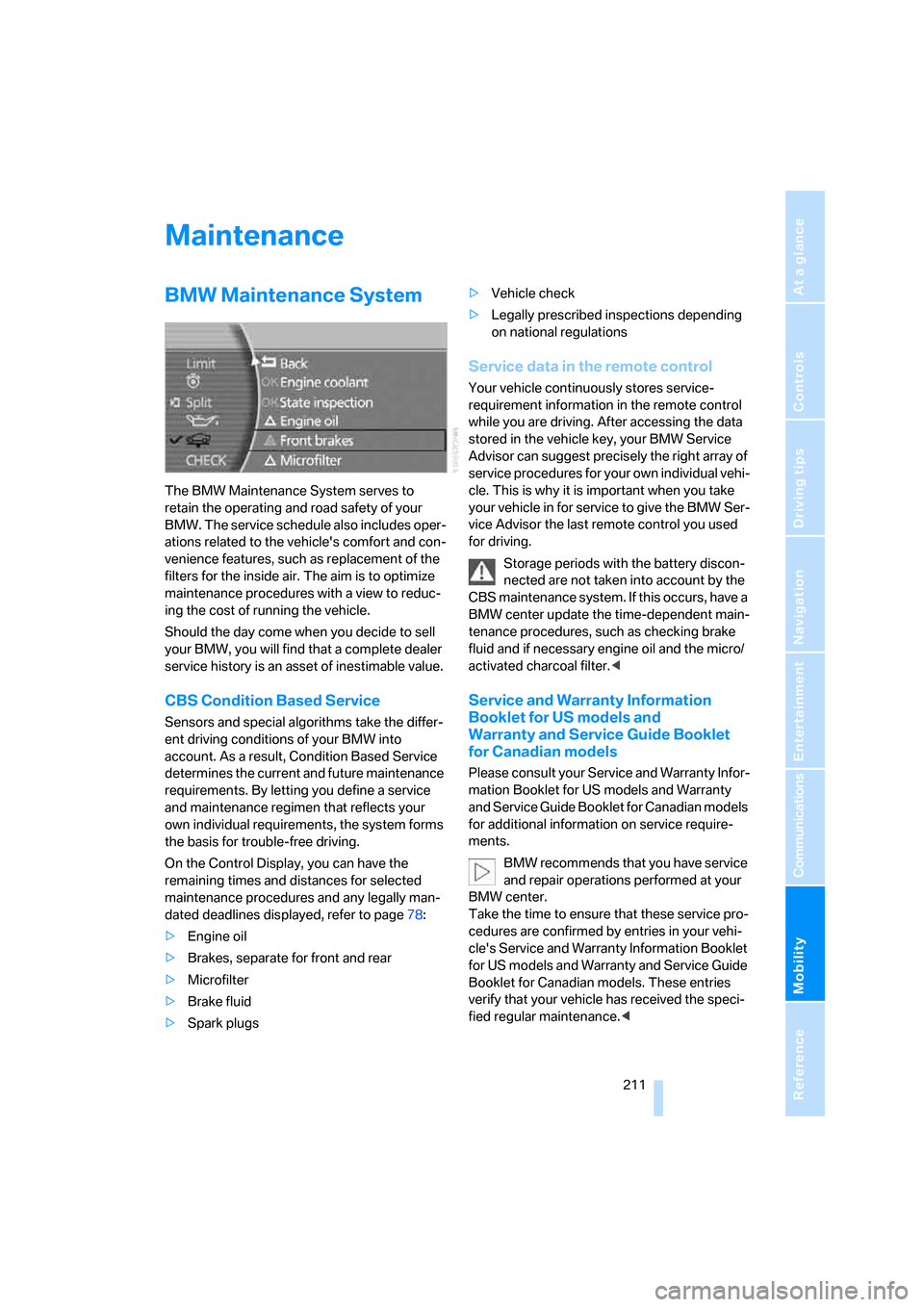
On the Control Display, you can have the
remaining times and distances for selected
maintenance procedures and any legally man-
dated deadlines displayed, refer to page78:
>Engine oil
>Brakes, separate for front and rear
>Microfilter
>Brake fluid
>Spark plugs>Vehicle check
>Legally prescribed inspections depending
on national regulations
Service data in the remote control
Your vehicle continuously stores service-
requirement information in the remote control
while you are driving. After accessing the data
stored in the vehicle key, your BMW Service
Advisor can suggest precisely the right array of
service procedures for your own individual vehi-
cle. This is why it is important when you take
your vehicle in for service to give the BMW Ser-
vice Advisor the last remote control you used
for driving.
Storage periods with the battery discon-
nected are not taken into account by the
CBS maintenance system. If this occurs, have a
BMW center update the time-dependent main-
tenance procedures, such as checking brake
fluid and if necessary engine oil and the micro/
activated charcoal filter.<
Service and Warranty Information
Booklet for US models and
Warranty and Service Guide Booklet
for Canadian models
Please consult your Service and Warranty Infor-
mation Booklet for US models and Warranty
and Service Guide Booklet for Canadian models
for additional information on service require-
ments.
BMW recommends that you have service
and repair operations performed at your
BMW center.
Take the time to ensure that these service pro-
cedures are confirmed by entries in your vehi-
cle's Service and Warranty Information Booklet
for US models and Warranty and Service Guide
Booklet for Canadian models. These entries
verify that your vehicle has received the speci-
fied regular maintenance.<
Page 214 of 254
Maintenance
212
Socket for OBD Onboard
Diagnostics
Components which are decisive for the
exhaust-gas composition can be checked via
the OBD socket with a device.
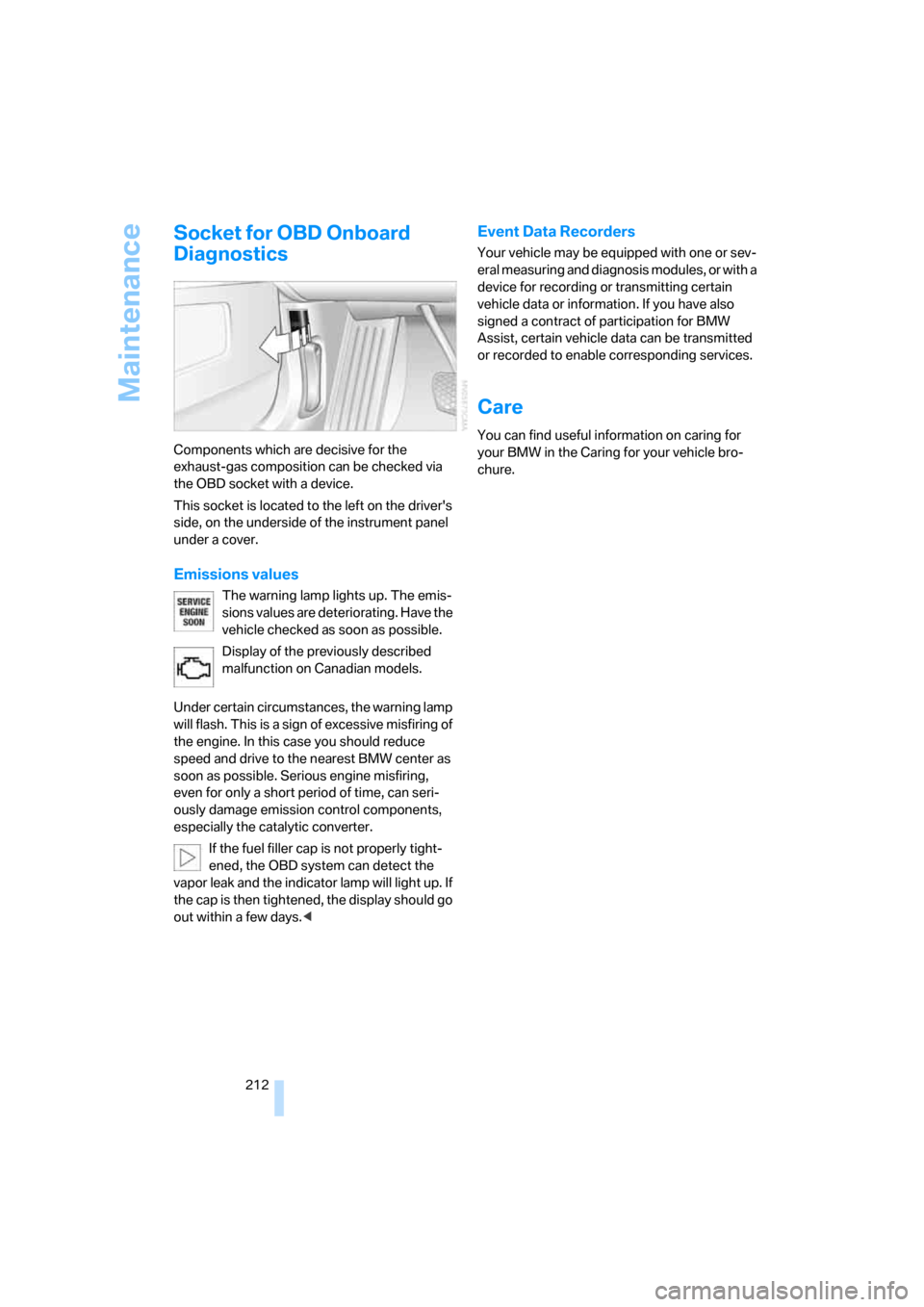
This socket is located to the left on the driver's
side, on the underside of the instrument panel
under a cover.
Emissions values
The warning lamp lights up. The emis-
sions values are deteriorating. Have the
vehicle checked as soon as possible.
Display of the previously described
malfunction on Canadian models.
Under certain circumstances, the warning lamp
will flash. This is a sign of excessive misfiring of
the engine. In this case you should reduce
speed and drive to the nearest BMW center as
soon as possible. Serious engine misfiring,
even for only a short period of time, can seri-
ously damage emission control components,
especially the catalytic converter.
If the fuel filler cap is not properly tight-
ened, the OBD system can detect the
vapor leak and the indicator lamp will light up. If
the cap is then tightened, the display should go
out within a few days.<
Event Data Recorders
Your vehicle may be equipped with one or sev-
eral measuring and diagnosis modules, or with a
device for recording or transmitting certain
vehicle data or information. If you have also
signed a contract of participation for BMW
Assist, certain vehicle data can be transmitted
or recorded to enable corresponding services.
Care
You can find useful information on caring for
your BMW in the Caring for your vehicle bro-
chure.
Page 246 of 254
Everything from A to Z
244 Radio key, refer to Remote
control/key30
Radio ready state57
– with Comfort Access39
Rain sensor65
"RDS", radio159
RDS Radio Data System159
Reading lamps102
"Rear", rear screen22
Rear air conditioner
– cooling adjustment108
– switching off108
– switching on/off via
iDrive108
Rear armrest, refer to Center
armrest114
Rear climate control108
– rear refrigerator117
"Rear climate control", rear
climate control108
Rear lamps
– refer to Tail lamps214
– replacing bulbs214
Rear lock, rear seat screen22
"Rear refrigerator"117
Rear refrigerator117
Rear-seat area ventilation107
Rear seat backrests, electric,
refer to Rear comfort seat
adjustment45
Rear seats
– adjusting45
– adjusting passenger seat
from rear45
– head restraint adjustment47
– heating49
Rear seat screen21
Rearview mirror50
Rear window blind, refer to
Sun blinds112
Rear window defroster107
Rear window safety switch40
Reception, radio
– refer to Changing
station156
– refer to Updating stations in
receiving range158
Rechargeable flashlight113"Recirc. air", programmable
buttons52
Recirculated-air mode,
automatic climate
control105
Reclining seat, refer to Seat
adjustment44
Recording time, refer to
Stopwatch83
Reflectors, refer to Tail
lamps214
Refueling198
Remaining distance
– for service required78
– refer to Cruising range77
Remaining distance to
destination77
Remote control30
– changing battery39
– Comfort Access38
– garage door opener111
– luggage compartment lid33
– malfunction33
Removing fog on the
windows106
Removing head restraints,
rear seats47
Replacement fuses218
Replacement key, refer to
New remote controls30
Replacement of tires205
– changing wheels215
– tire replacement205
Replacing bulbs, refer to
Lamps and bulbs213
Reporting an accident, refer
Initiating an emergency
call219
Reserve, fuel, refer to Fuel
gauge76
"RESET"
– Tire Pressure Monitor92
– tone control155
Resetting tone settings155
"Reset tire pressure", Flat Tire
Monitor90
Residual heat106Restraint systems
– for children54
– refer to Safety belts48
Retaining straps, refer to
Securing cargo125
Retracting telephone
keypad179
Reverse
– CD changer167
– CD player164
– DVD changer172
Reverse gear, automatic
transmission with
Steptronic63
"Right", seat heating49
"RND"
– CD changer167
– CD player164
Road map135
Roadside Assistance219
Roadside parking lamps101
Roadside service, refer to
Roadside Assistance190
Roaming display, refer to
Status lines20
Roller sun blind, refer to Sun
blinds112
Roof load capacity
228
Roof-mounted luggage
rack125
Rope, refer to Towing
methods221
Rotary pushbutton, refer to
iDrive16
Route
– bypassing sections147
– changing criteria142
– changing route146
– displaying145
– displaying streets or towns/
cities146
– selecting141
– selecting arrow display145
– selecting map view145
"Route guid.", navigation144
Page 251 of 254
Reference 249
At a glance
Controls
Driving tips
Communications
Navigation
Entertainment
Mobility
W
Warning and indicator
lamps13
Warnings, refer to Check
Control80
Warning triangle220
Warranty and Service Guide
Booklet for Canadian
models211
Washer fluid66
Washer jets, refer to
Windshield washer
nozzles66
Washing systems, refer to
Wiper fluid filler neck66
Washing the vehicle, refer to
Caring for your vehicle
brochure
Waste receptacle, refer to
– Ashtray, front115
– Center armrest, front114
Water on roads, refer to
Driving through water123
Waveband156
– High Definition Radio162
"WB", radio160
WB, weather reports159
Wear indicators in tires, refer
to Minimum tread depth204
Weather reports159
Weights228
Wheel/tire combination, refer
to New wheels and tires205
Wheelbase, refer to
Dimensions227
Wheel change, spare
wheel216
Wheel changing between
axles206
Wheel chock, refer to What
you will need216
Wheel replacement205
Wheels and tires200
Width, refer to
Dimensions227Windshield
– cleaning, refer to Windshield
cleaning66
– defrosting, refer to
Defrosting windows and
removing condensation106
Windshield washer system
– refer to Wiper system65
– washer fluid66
– windshield washer
nozzles66
Windshield wipers, refer to
Wiper system65
– care, refer to Caring for your
vehicle brochure
– changing wiper blades213
Winter tires206
– changing215
– condition204
– run-flat tires206
– speed limit selection82
– storage
206
Wiper blade replacement213
Wiper fluid, filler neck66
Wiper system65
"With highway",
navigation142
"With map", navigation135
Without freeway, refer to
Changing route criteria142
Wood decoration, refer to
Caring for your vehicle
brochure
Wordmatch principle for
navigation142
Wrenches/screwdrivers, refer
to Onboard toolkit213
X
Xenon lamp, replacing
bulbs213
Y
"YES", navigation
– deleting address book140
– deleting destination list138
– deleting individual
destinations from address
book140
"YES", Tire Pressure
Monitor92
Your individual vehicle5
Z
"Zoom", BMW Night Vision98