auto p BMW 760I 2008 E65 User Guide
[x] Cancel search | Manufacturer: BMW, Model Year: 2008, Model line: 760I, Model: BMW 760I 2008 E65Pages: 254, PDF Size: 7.98 MB
Page 34 of 254
Opening and closing
32 Each time the central locking system is locked
or unlocked from outside the vehicle, this simul-
taneously engages or disengages the anti-theft
system. The alarm system is also armed or dis-
armed. The remote control also switches the
interior lamps on and off.
For additional details on alarm system
refer to
page37.
In an accident of corresponding severity, the
central locking system automatically unlocks
the vehicle. In addition, the hazard warning
flashers and interior lamps switch on.
Opening and closing: from
outside
Using remote control
Persons or animals left unattended in a
parked vehicle can lock the doors from
the inside. For this reason, bring the remote
control with you whenever you leave the vehicle
so that you will always be able to unlock the
vehicle from outside.<
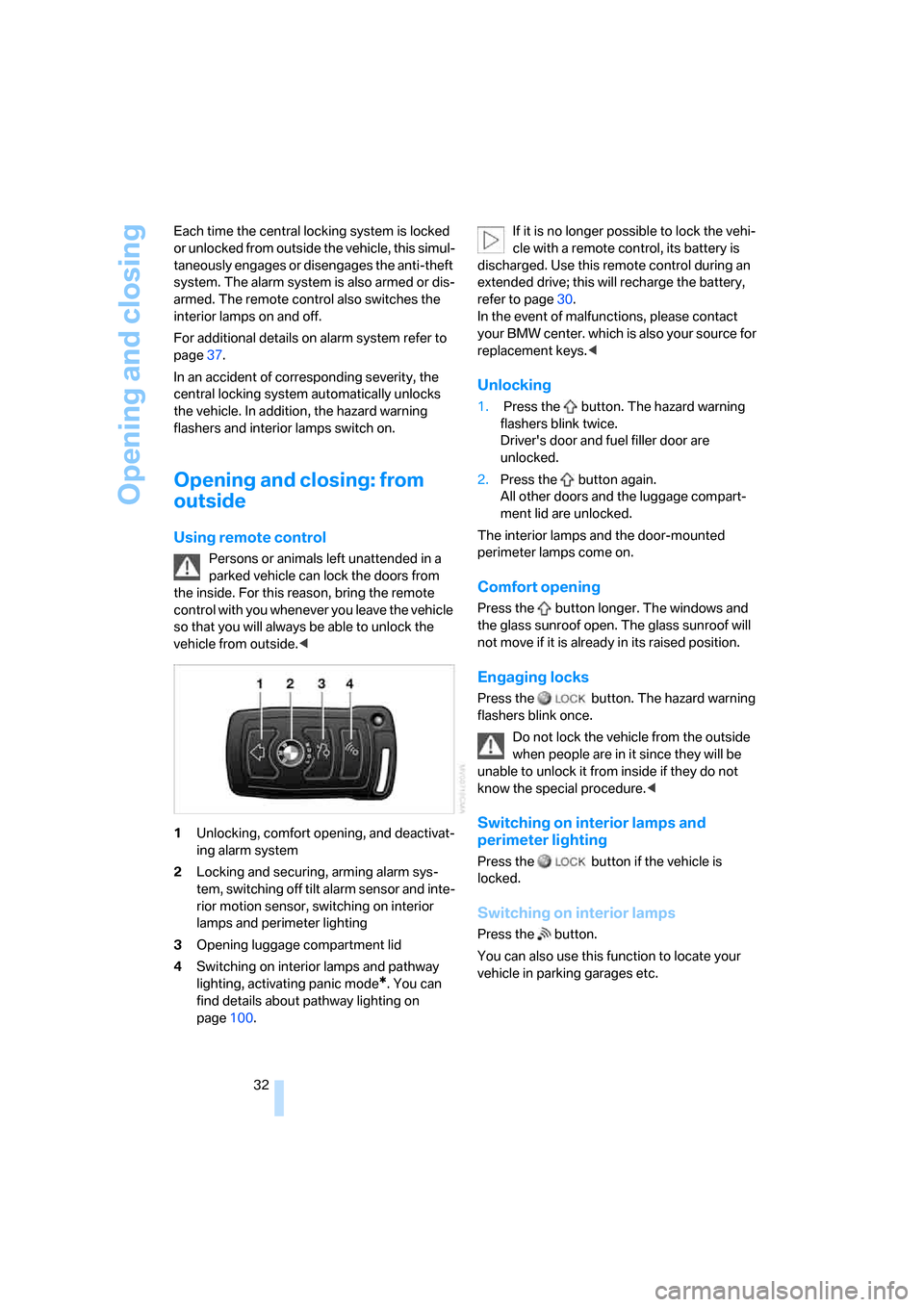
1Unlocking, comfort opening, and deactivat-
ing alarm system
2Locking and securing, arming alarm sys-
tem, switching off tilt alarm sensor and inte-
rior motion sensor, switching on interior
lamps and perimeter lighting
3Opening luggage compartment lid
4Switching on interior lamps and pathway
lighting, activating panic mode
*. You can
find details about pathway lighting on
page100.If it is no longer possible to lock the vehi-
cle with a remote control, its battery is
discharged. Use this remote control during an
extended drive; this will recharge the battery,
refer to page30.
In the event of malfunctions, please contact
your BMW center. which is also your source for
replacement keys.<
Unlocking
1. Press the button. The hazard warning
flashers blink twice.
Driver's door and fuel filler door are
unlocked.
2.Press the button again.
All other doors and the luggage compart-
ment lid are unlocked.
The interior lamps and the door-mounted
perimeter lamps come on.
Comfort opening
Press the button longer. The windows and
the glass sunroof open. The glass sunroof will
not move if it is already in its raised position.
Engaging locks
Press the button. The hazard warning
flashers blink once.
Do not lock the vehicle from the outside
when people are in it since they will be
unable to unlock it from inside if they do not
know the special procedure.<
Switching on interior lamps and
perimeter lighting
Press the button if the vehicle is
locked.
Switching on interior lamps
Press the button.
You can also use this function to locate your
vehicle in parking garages etc.
Page 35 of 254
Controls
33Reference
At a glance
Driving tips
Communications
Navigation
Entertainment
Mobility
Panic mode*
You can trigger the alarm system in case of
danger:
Press the button for at least 3 seconds.
To deactivate the alarm: press any button
Opening luggage compartment lid
Press the button for approx. one second.
The luggage compartment lid opens, regard-
less of whether it was previously locked or
unlocked.
During opening, the luggage compart-
ment lid pivots back and up. Make sure
there is adequate clearance available before
opening.
To avoid being inadvertently locked out, never
set the remote control down in the luggage
compartment. A previously locked luggage
compartment lid is also locked again after clos-
ing.<
Automatic luggage compartment lid
operation*
Opening luggage compartment lid
Press the button for approx. one second.
The luggage compartment lid opens all the way,
regardless of whether it was previously locked
or unlocked.
To interrupt the opening process:
Press the button again while opening is in
progress.
During opening, the luggage compart-
ment lid pivots back and up. Make sure
there is adequate clearance available before
opening.
To avoid being inadvertently locked out, never
set the remote control down in the luggage
compartment. A previously locked luggage
compartment lid is also locked again after clos-
ing.<
Malfunction
Local radio waves can cause the remote control
to malfunction.
Should the remote control fail to operate due to
interference of this kind, the vehicle can be
opened and closed with a key via the door lock.
If it is no longer possible to lock the vehicle with
a remote control, then its battery is discharged.
Use this remote control during an extended
drive; this will recharge the battery, refer to
page30.
For US owners only
The transmitter and receiver units comply with
part 15 of the FCC/Federal Communication
Commission regulations. Operation is gov-
erned by the following:
FCC ID:
>LX8766S
>LX8766E
>LX8CAS
>LX8CAS2
Compliance statement:
This device complies with part 15 of the FCC
Rules. Operation is subject to the following two
conditions:
>This device may not cause harmful interfer-
ence, and
>this device must accept any interference
received, including interference that may
cause undesired operation.
Any unauthorized modifications or
changes to these devices could void the
user's authority to operate this equipment.<
Page 37 of 254
Controls
35Reference
At a glance
Driving tips
Communications
Navigation
Entertainment
Mobility
To prevent the driver from being inadvertently
locked out of the vehicle, the lock button on the
driver's door automatically extends again after a
brief period if the door remains open.
Persons or animals left unattended in a
parked vehicle can lock the doors from
the inside. For this reason, bring the remote
control with you whenever you leave the vehicle
so that you will always be able to unlock the
vehicle from outside.<
Doors
Automatic soft closing*
Apply gentle pressure to the door to close it.
The closing process will then be carried out
automatically.
To avoid injuries, make sure that the
door's travel path is completely free and
clear before closing.<
Luggage compartment lid
Opening from outside
Press the button on the luggage compartment
lid or the button on the remote control for
approx. 1 second: the luggage compartment lid
opens.
During opening, the luggage compart-
ment lid pivots back and up. Make sure
there is adequate clearance available before
opening.<
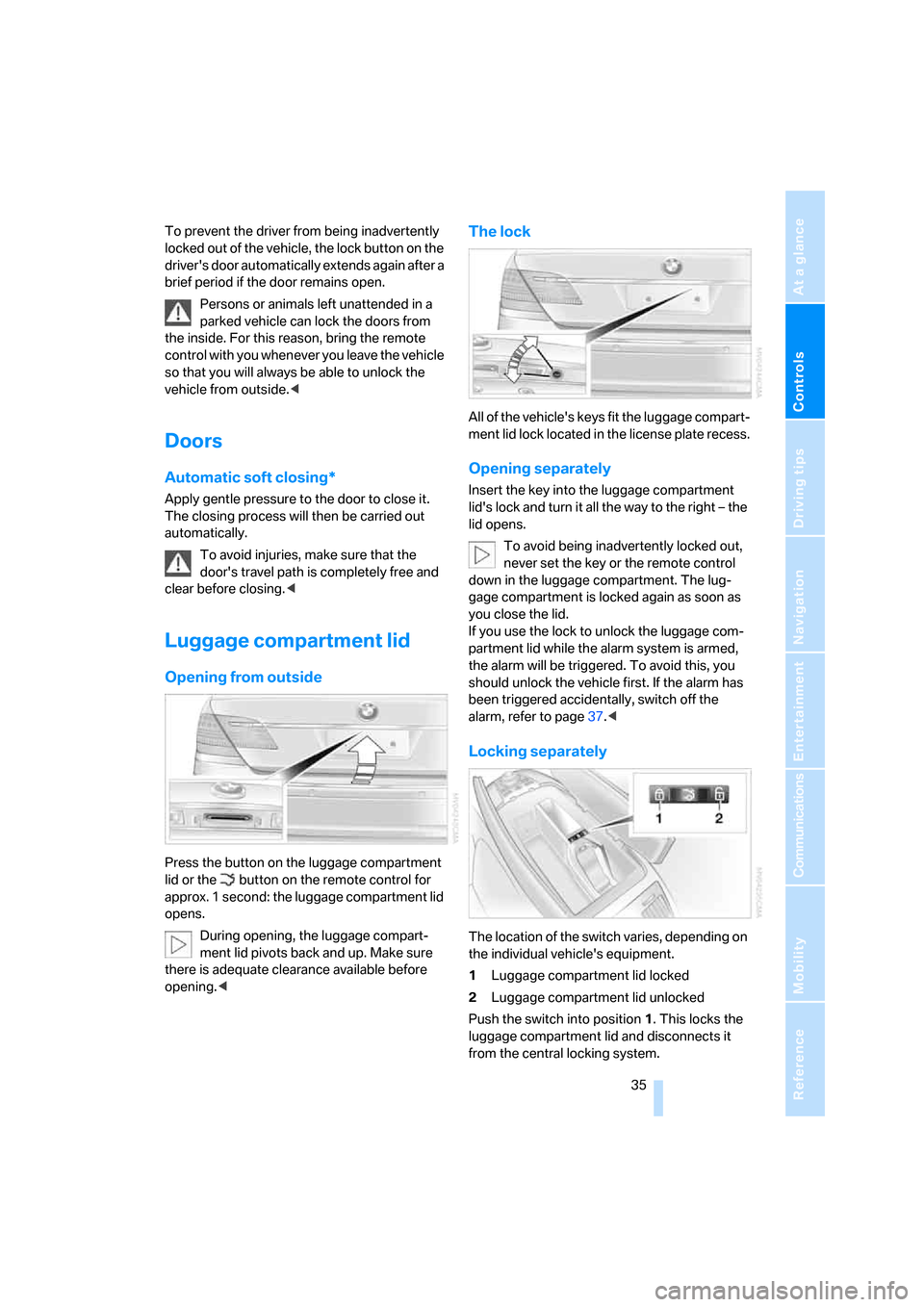
The lock
All of the vehicle's keys fit the luggage compart-
ment lid lock located in the license plate recess.
Opening separately
Insert the key into the luggage compartment
lid's lock and turn it all the way to the right – the
lid opens.
To avoid being inadvertently locked out,
never set the key or the remote control
down in the luggage compartment. The lug-
gage compartment is locked again as soon as
you close the lid.
If you use the lock to unlock the luggage com-
partment lid while the alarm system is armed,
the alarm will be triggered. To avoid this, you
should unlock the vehicle first. If the alarm has
been triggered accidentally, switch off the
alarm, refer to page37.<
Locking separately
The location of the switch varies, depending on
the individual vehicle's equipment.
1Luggage compartment lid locked
2Luggage compartment lid unlocked
Push the switch into position1. This locks the
luggage compartment lid and disconnects it
from the central locking system.
Page 38 of 254
Opening and closing
36 If you then lock the storage compartment under
the front center armrest, refer to page114, and
only surrender the remote control without the
key, refer to page30, for example when leaving
the vehicle for valet parking, etc., this will pre-
vent unauthorized access to the vehicle
through the luggage compartment lid. This is an
advantage in a hotel, for example.
Manual operation
If an electrical malfunction occurs, refer to
Opening separately on page35.
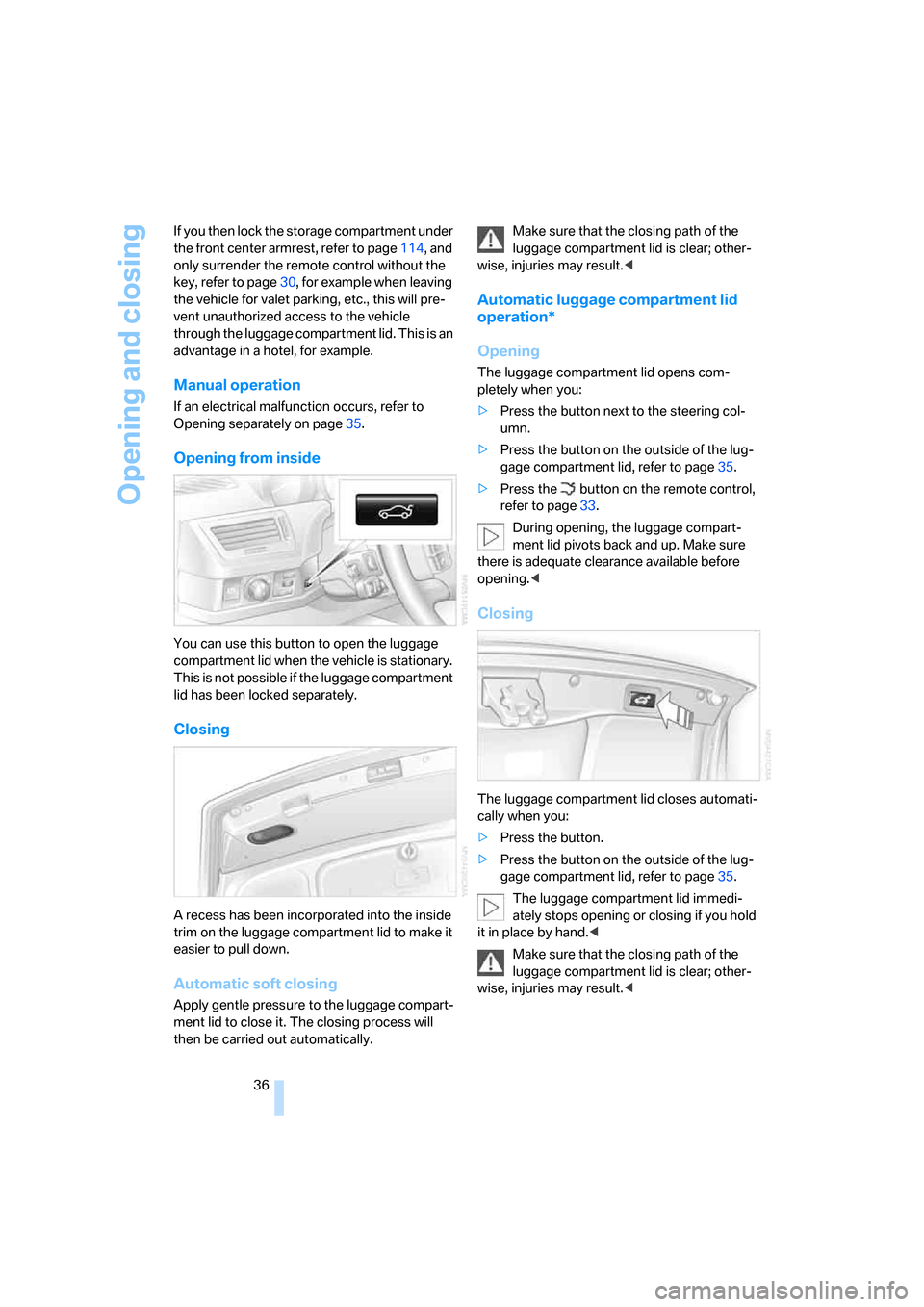
Opening from inside
You can use this button to open the luggage
compartment lid when the vehicle is stationary.
This is not possible if the luggage compartment
lid has been locked separately.
Closing
A recess has been incorporated into the inside
trim on the luggage compartment lid to make it
easier to pull down.
Automatic soft closing
Apply gentle pressure to the luggage compart-
ment lid to close it. The closing process will
then be carried out automatically.Make sure that the closing path of the
luggage compartment lid is clear; other-
wise, injuries may result.<
Automatic luggage compartment lid
operation*
Opening
The luggage compartment lid opens com-
pletely when you:
>Press the button next to the steering col-
umn.
>Press the button on the outside of the lug-
gage compartment lid, refer to page35.
>Press the button on the remote control,
refer to page33.
During opening, the luggage compart-
ment lid pivots back and up. Make sure
there is adequate clearance available before
opening.<
Closing
The luggage compartment lid closes automati-
cally when you:
>Press the button.
>Press the button on the outside of the lug-
gage compartment lid, refer to page35.
The luggage compartment lid immedi-
ately stops opening or closing if you hold
it in place by hand.<
Make sure that the closing path of the
luggage compartment lid is clear; other-
wise, injuries may result.<
Page 40 of 254
Opening and closing
38
Tilt alarm sensor
The tilt of the vehicle is monitored. The alarm
system reacts, e.g. in case of an attempted
wheel theft or towing.
Interior motion sensor
In order for the interior motion sensor to func-
tion properly, the windows and glass sunroof
must be completely closed.
Avoiding unintentional alarms
The tilt alarm sensor and interior motion sensor
may be switched off at the same time. This pre-
vents unintentional alarms, e.g. in the following
situations:
>In duplex garages
>During transport on car-carrying trains,
boats/ships or on a trailer
>When animals are to remain in the vehicle
Switching off tilt alarm sensor and
interior motion sensor
Press the button on the remote control
again as soon as the vehicle is locked.
The indicator lamp lights up briefly and then
flashes continuously. The tilt alarm sensor and
the interior motion sensor are switched off until
the next time the vehicle is unlocked and subse-
quently locked again.
Comfort Access*
With Comfort Access, you can have access to
your vehicle without having to hold the remote
control in your hand. It is sufficient to carry the
remote control on your person, e.g. in a jacket
pocket. The vehicle automatically detects the
associated remote control inside the vehicle or
in its immediate vicinity.
Comfort Access supports the following func-
tions:
>Locking/unlocking the vehicle
>Unlocking the luggage compartment lid
separately
>Starting the engine
Functional requirements
>The vehicle can only be locked if the remote
control is outside the vehicle.
>The next unlocking and locking cycle is not
possible until after approx. 2 seconds.
>The engine can only be started if the remote
control is inside the vehicle.
Comparison to conventional remote
control
You can control the functions mentioned previ-
ously with the Comfort Access or by pressing
the buttons on the remote control. Therefore
please first familiarize yourself with the instruc-
tions for opening and closing, starting on
page32.
The specific features involved in the use of
Comfort Access are described below.
If a short delay occurs when opening or
closing the windows and the glass sun-
roof, then this indicates that the system is
checking whether a remote control is located in
the vehicle. Please repeat opening or closing if
necessary.<
Unlocking
Pull a door handle. This corresponds to press-
ing the button.
Only the door of the door handle you have
pulled is unlocked.
You unlock the other doors from the inside,
using the central locking system button, refer to
page34.<
Locking
Push a door handle. This corresponds to press-
ing the button.
Before locking, make sure that the igni-
tion and all current-consuming devices
are switched off in order to minimized the drain
on the battery.
If a remote control is detected in the interior, the
vehicle is unlocked again or not locked in the
first place.<
Page 42 of 254
Opening and closing
40
Opening, closing
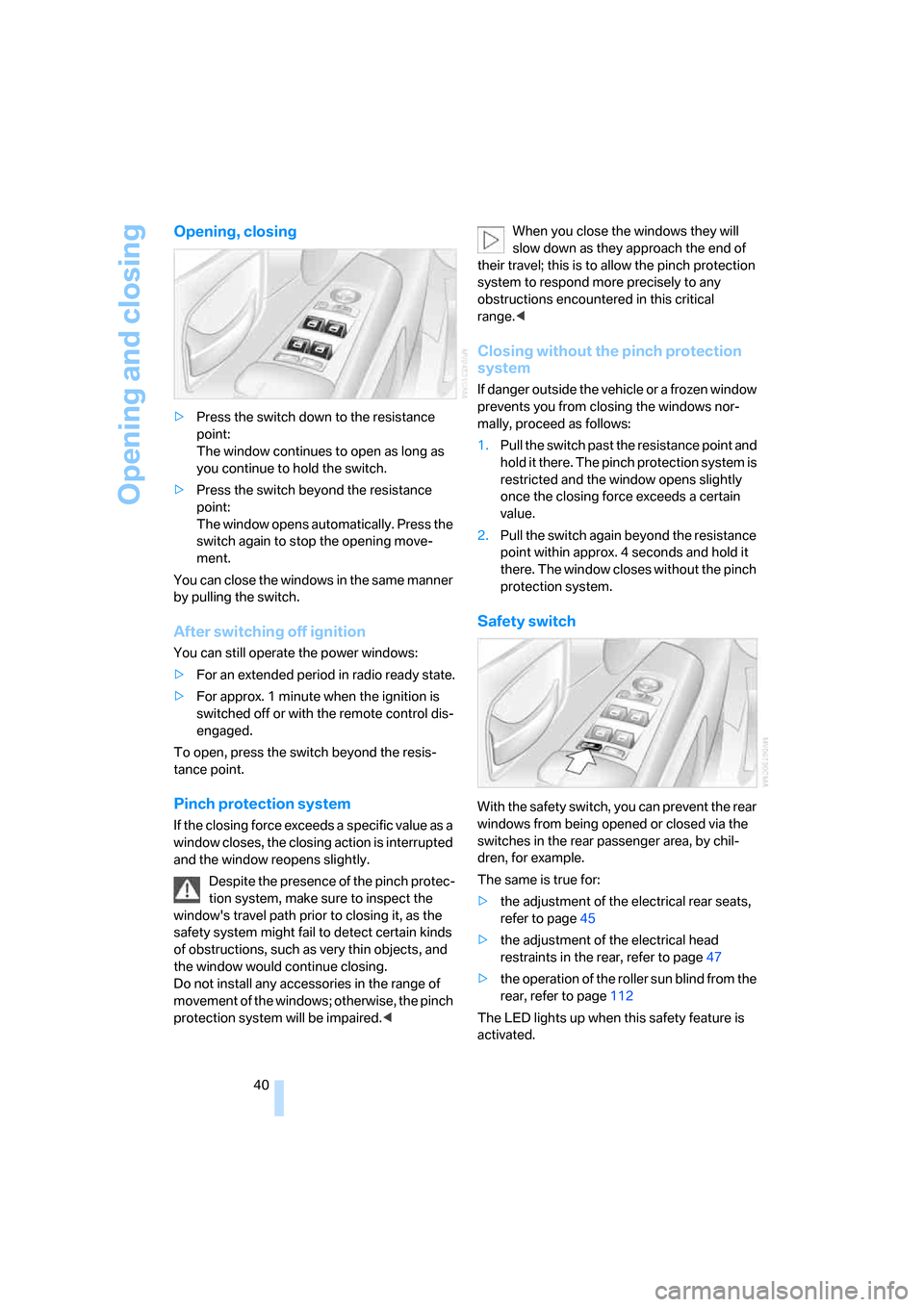
>Press the switch down to the resistance
point:
The window continues to open as long as
you continue to hold the switch.
>Press the switch beyond the resistance
point:
The window opens automatically. Press the
switch again to stop the opening move-
ment.
You can close the windows in the same manner
by pulling the switch.
After switching off ignition
You can still operate the power windows:
>For an extended period in radio ready state.
>For approx. 1 minute when the ignition is
switched off or with the remote control dis-
engaged.
To open, press the switch beyond the resis-
tance point.
Pinch protection system
If the closing force exceeds a specific value as a
window closes, the closing action is interrupted
and the window reopens slightly.
Despite the presence of the pinch protec-
tion system, make sure to inspect the
window's travel path prior to closing it, as the
safety system might fail to detect certain kinds
of obstructions, such as very thin objects, and
the window would continue closing.
Do not install any accessories in the range of
movement of the windows; otherwise, the pinch
protection system will be impaired.
their travel; this is to allow the pinch protection
system to respond more precisely to any
obstructions encountered in this critical
range.<
Closing without the pinch protection
system
If danger outside the vehicle or a frozen window
prevents you from closing the windows nor-
mally, proceed as follows:
1.Pull the switch past the resistance point and
hold it there. The pinch protection system is
restricted and the window opens slightly
once the closing force exceeds a certain
value.
2.Pull the switch again beyond the resistance
point within approx. 4 seconds and hold it
there. The window closes without the pinch
protection system.
Safety switch
With the safety switch, you can prevent the rear
windows from being opened or closed via the
switches in the rear passenger area, by chil-
dren, for example.
The same is true for:
>the adjustment of the electrical rear seats,
refer to page45
>the adjustment of the electrical head
restraints in the rear, refer to page47
>the operation of the roller sun blind from the
rear, refer to page112
The LED lights up when this safety feature is
activated.
Page 43 of 254
Controls
41Reference
At a glance
Driving tips
Communications
Navigation
Entertainment
Mobility
Press the safety switch when children
ride in the rear; otherwise, unsupervised
closing of the windows could lead to injuries.<
In order to deactivate the function again,
you must insert the remote control into
the ignition lock or, with Comfort Access, you
must switch into radio ready state.<
Glass sunroof, electric*
To prevent bodily injuries, watch the
glass sunroof as it closes.
Always take along the remote control when you
leave the vehicle; otherwise, children could, for
example, operate the roof and injure them-
selves.<
Raising
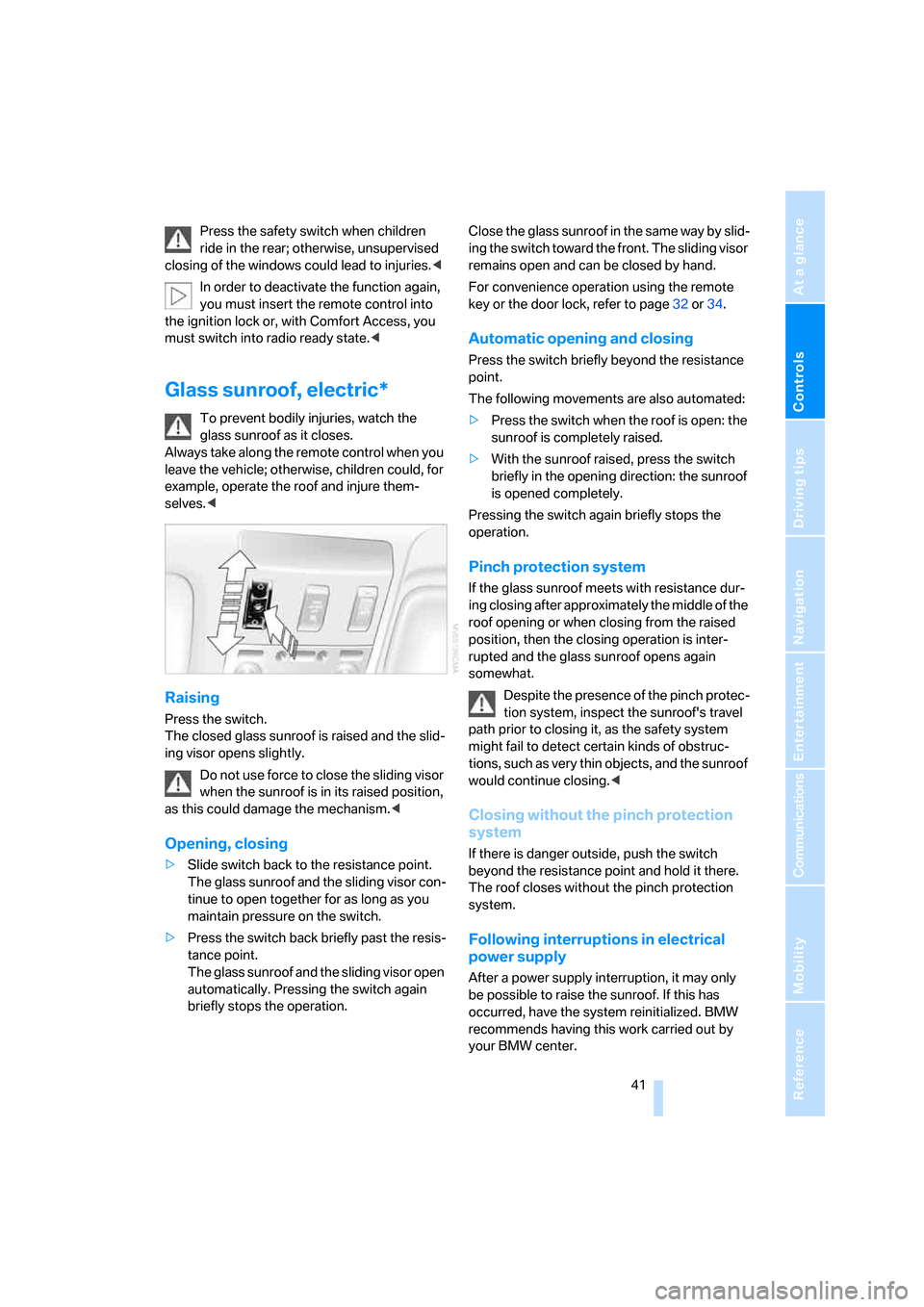
Press the switch.
The closed glass sunroof is raised and the slid-
ing visor opens slightly.
Do not use force to close the sliding visor
when the sunroof is in its raised position,
as this could damage the mechanism.<
Opening, closing
>Slide switch back to the resistance point.
The glass sunroof and the sliding visor con-
tinue to open together for as long as you
maintain pressure on the switch.
>Press the switch back briefly past the resis-
tance point.
The glass sunroof and the sliding visor open
automatically. Pressing the switch again
briefly stops the operation.Close the glass sunroof in the same way by slid-
ing the switch toward the front. The sliding visor
remains open and can be closed by hand.
For convenience operation using the remote
key or the door lock, refer to page32 or34.
Automatic opening and closing
Press the switch briefly beyond the resistance
point.
The following movements are also automated:
>Press the switch when the roof is open: the
sunroof is completely raised.
>With the sunroof raised, press the switch
briefly in the opening direction: the sunroof
is opened completely.
Pressing the switch again briefly stops the
operation.
Pinch protection system
If the glass sunroof meets with resistance dur-
ing closing after approximately the middle of the
roof opening or when closing from the raised
position, then the closing operation is inter-
rupted and the glass sunroof opens again
somewhat.
Despite the presence of the pinch protec-
tion system, inspect the sunroof's travel
path prior to closing it, as the safety system
might fail to detect certain kinds of obstruc-
tions, such as very thin objects, and the sunroof
would continue closing.<
Closing without the pinch protection
system
If there is danger outside, push the switch
beyond the resistance point and hold it there.
The roof closes without the pinch protection
system.
Following interruptions in electrical
power supply
After a power supply interruption, it may only
be possible to raise the sunroof. If this has
occurred, have the system reinitialized. BMW
recommends having this work carried out by
your BMW center.
Page 46 of 254
Adjusting
44 Also on the passenger side, do not recline the
backrest too far to the rear while the vehicle is
being driven; otherwise, there is a danger in the
event of an accident of 'sliding under' the safety
belt, eliminating the protection normally pro-
vided by the belt.<
Please note the information on damage to
safety belts provided on page49 and the infor-
mation on the active head restraints on
page47.
The concept
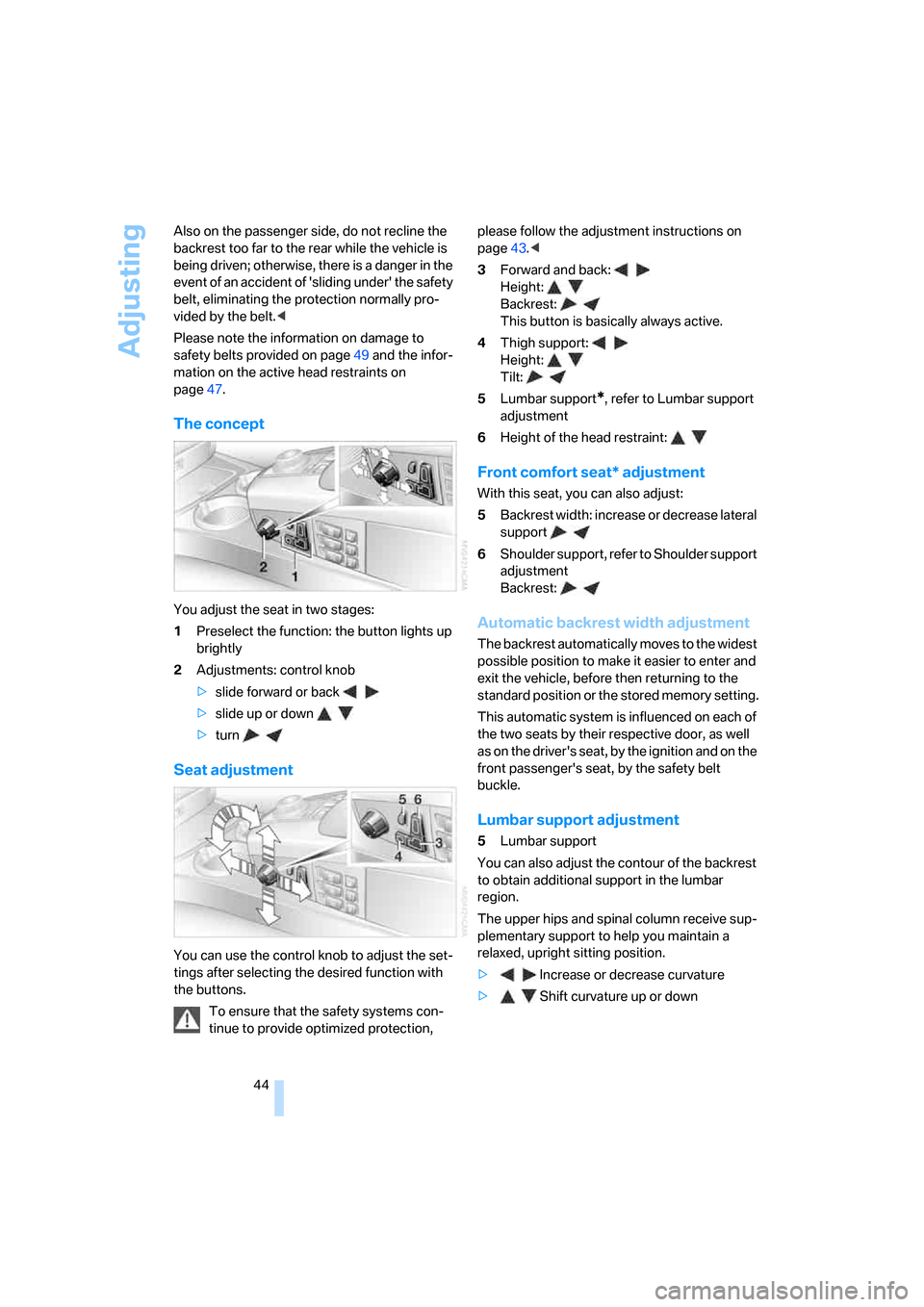
You adjust the seat in two stages:
1Preselect the function: the button lights up
brightly
2Adjustments: control knob
>slide forward or back
>slide up or down
>turn
Seat adjustment
You can use the control knob to adjust the set-
tings after selecting the desired function with
the buttons.
To ensure that the safety systems con-
tinue to provide optimized protection, please follow the adjustment instructions on
page43.<
3Forward and back:
Height:
Backrest:
This button is basically always active.
4Thigh support:
Height:
Tilt:
5Lumbar support
*, refer to Lumbar support
adjustment
6Height of the head restraint:
Front comfort seat* adjustment
With this seat, you can also adjust:
5Backrest width: increase or decrease lateral
support
6Shoulder support, refer to Shoulder support
adjustment
Backrest:
Automatic backrest width adjustment
The backrest automatically moves to the widest
possible position to make it easier to enter and
exit the vehicle, before then returning to the
standard position or the stored memory setting.
This automatic system is influenced on each of
the two seats by their respective door, as well
as on the driver's seat, by the ignition and on the
front passenger's seat, by the safety belt
buckle.
Lumbar support adjustment
5Lumbar support
You can also adjust the contour of the backrest
to obtain additional support in the lumbar
region.
The upper hips and spinal column receive sup-
plementary support to help you maintain a
relaxed, upright sitting position.
>Increase or decrease curvature
>Shift curvature up or down
Page 49 of 254
Controls
47Reference
At a glance
Driving tips
Communications
Navigation
Entertainment
Mobility
Installing
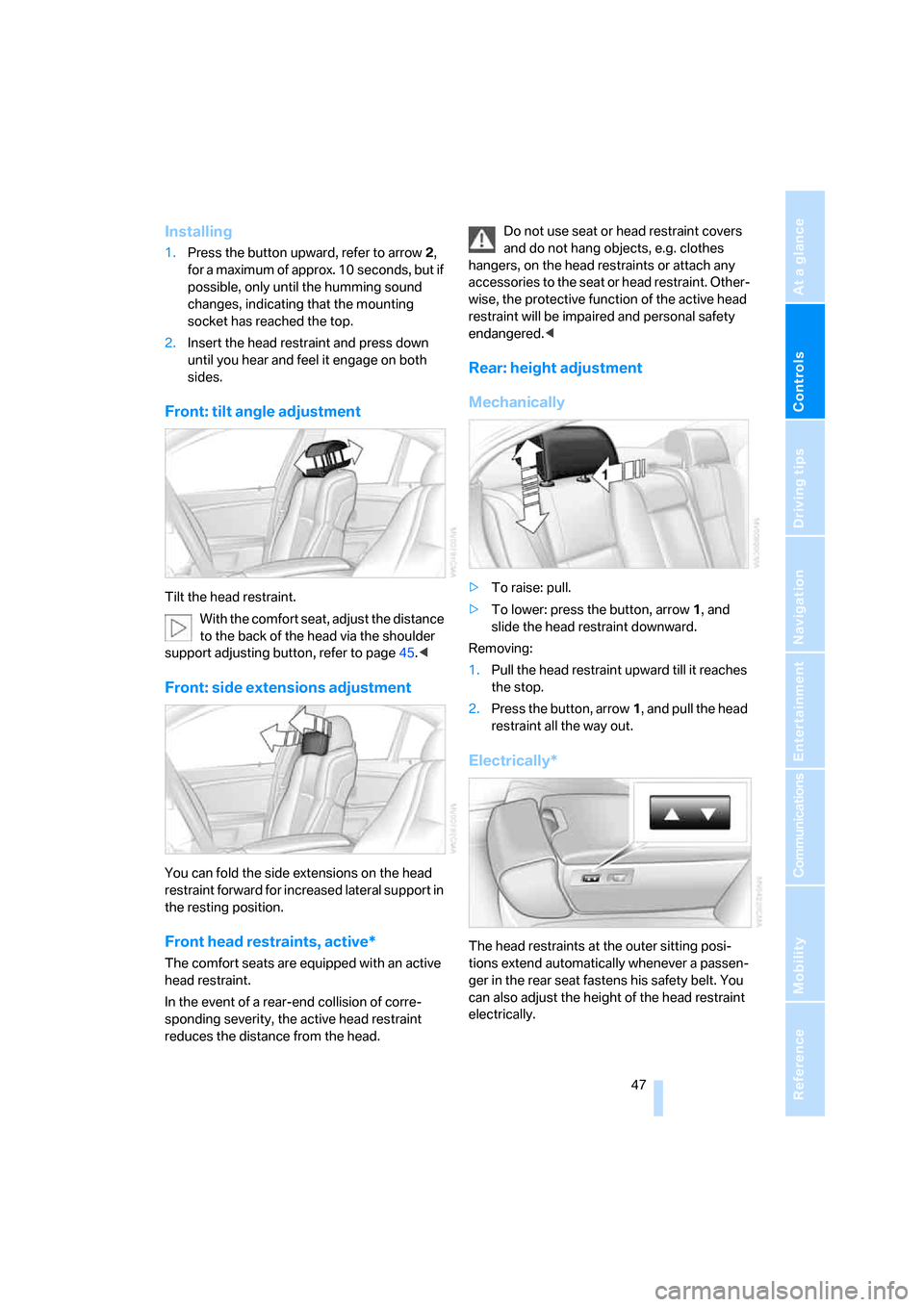
1.Press the button upward, refer to arrow2,
for a maximum of approx. 10 seconds, but if
possible, only until the humming sound
changes, indicating that the mounting
socket has reached the top.
2.Insert the head restraint and press down
until you hear and feel it engage on both
sides.
Front: tilt angle adjustment
Tilt the head restraint.
With the comfort seat, adjust the distance
to the back of the head via the shoulder
support adjusting button, refer to page45.<
Front: side extensions adjustment
You can fold the side extensions on the head
restraint forward for increased lateral support in
the resting position.
Front head restraints, active*
The comfort seats are equipped with an active
head restraint.
In the event of a rear-end collision of corre-
sponding severity, the active head restraint
reduces the distance from the head.Do not use seat or head restraint covers
and do not hang objects, e.g. clothes
hangers, on the head restraints or attach any
accessories to the seat or head restraint. Other-
wise, the protective function of the active head
restraint will be impaired and personal safety
endangered.<
Rear: height adjustment
Mechanically
>To raise: pull.
>To lower: press the button, arrow1, and
slide the head restraint downward.
Removing:
1.Pull the head restraint upward till it reaches
the stop.
2.Press the button, arrow1, and pull the head
restraint all the way out.
Electrically*
The head restraints at the outer sitting posi-
tions extend automatically whenever a passen-
ger in the rear seat fastens his safety belt. You
can also adjust the height of the head restraint
electrically.
Page 52 of 254
Adjusting
50
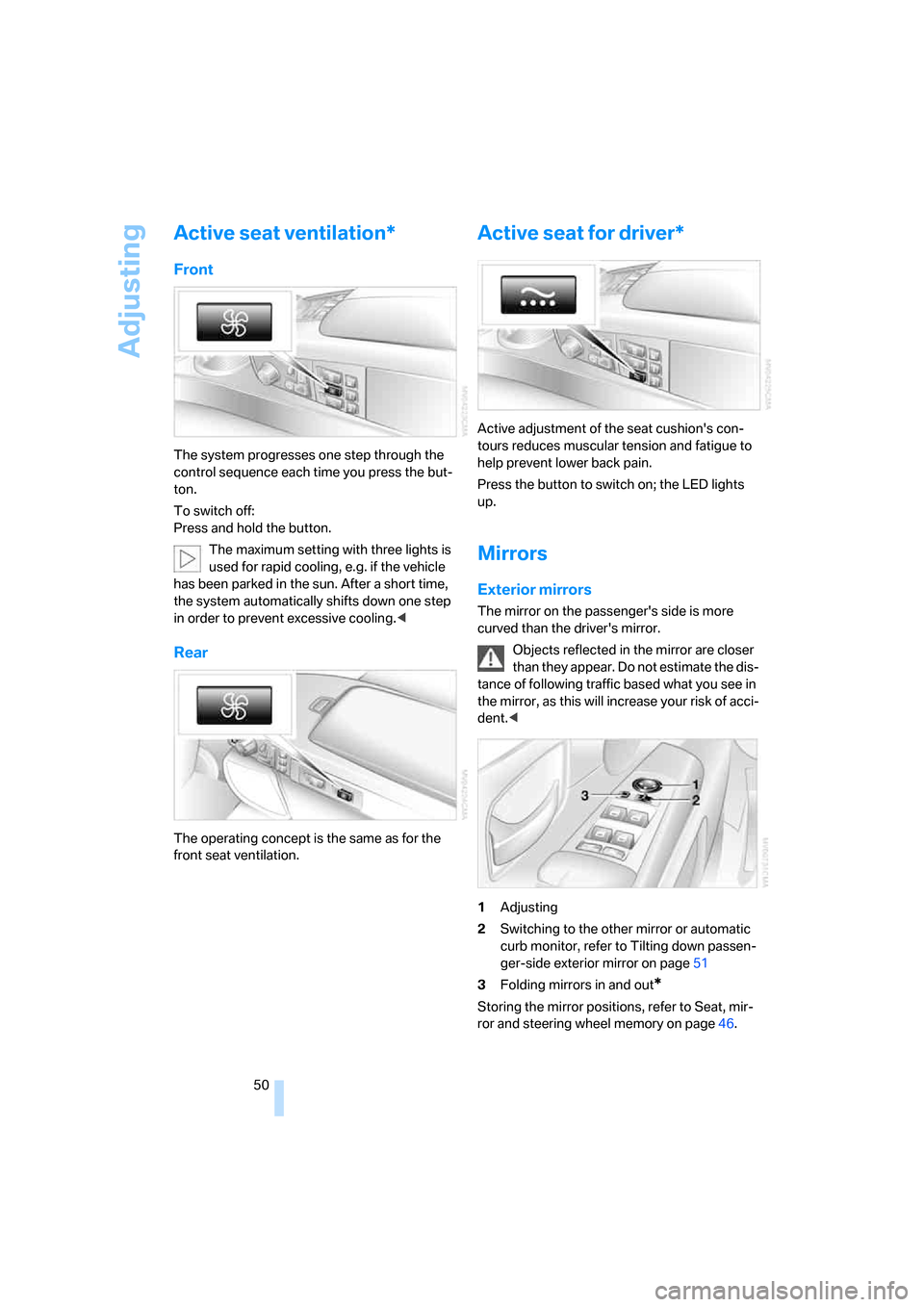
Active seat ventilation*
Front
The system progresses one step through the
control sequence each time you press the but-
ton.
To switch off:
Press and hold the button.
The maximum setting with three lights is
used for rapid cooling, e.g. if the vehicle
has been parked in the sun. After a short time,
the system automatically shifts down one step
in order to prevent excessive cooling.<
Rear
The operating concept is the same as for the
front seat ventilation.
Active seat for driver*
Active adjustment of the seat cushion's con-
tours reduces muscular tension and fatigue to
help prevent lower back pain.
Press the button to switch on; the LED lights
up.
Mirrors
Exterior mirrors
The mirror on the passenger's side is more
curved than the driver's mirror.
Objects reflected in the mirror are closer
than they appear. Do not estimate the dis-
tance of following traffic based what you see in
the mirror, as this will increase your risk of acci-
dent.<
1Adjusting
2Switching to the other mirror or automatic
curb monitor, refer to Tilting down passen-
ger-side exterior mirror on page51
3Folding mirrors in and out
*
Storing the mirror positions, refer to Seat, mir-
ror and steering wheel memory on page46.