phone BMW 760Li 2004 E66 User Guide
[x] Cancel search | Manufacturer: BMW, Model Year: 2004, Model line: 760Li, Model: BMW 760Li 2004 E66Pages: 232, PDF Size: 5.27 MB
Page 29 of 232
At a glance
27Reference
Controls
Driving tips
Communications
Navigation
Entertainment
Mobility
Notes
Do not use the voice command sys-
tem to make emergency calls. Your
voice and habitual tone could be affected
by stressful situations, as a result of which
the process of establishing the telephone
connection could be unnecessarily
delayed. Instead, use the emergency call
button near the interior rearview mirror,
refer to page 177.<
Environmental conditions
The voice command system uses a special
hands-free microphone located in the front
of your vehicle's headliner. Although the
system is designed to filter out ambient
noise, you can help ensure that your com-
mands will be understood by observing the
following instructions:
>Speak smoothly and clearly, at a normal
volume. Do not place any unusual
stress on individual syllables, and avoid
pauses
>Do not speak while the voice command
system is talking
>Keep the doors, windows and glass
roof closed to prevent interference from
ambient noise
>Avoid other sources of noise in the
vehicle while speaking, and ask other
vehicle occupants to refrain from talk-
ing while you are using the system
>The hands-free microphone is aimed
toward the driver. This means that the
system might be unable to register the
voices of other vehicle occupants prop-
erly.
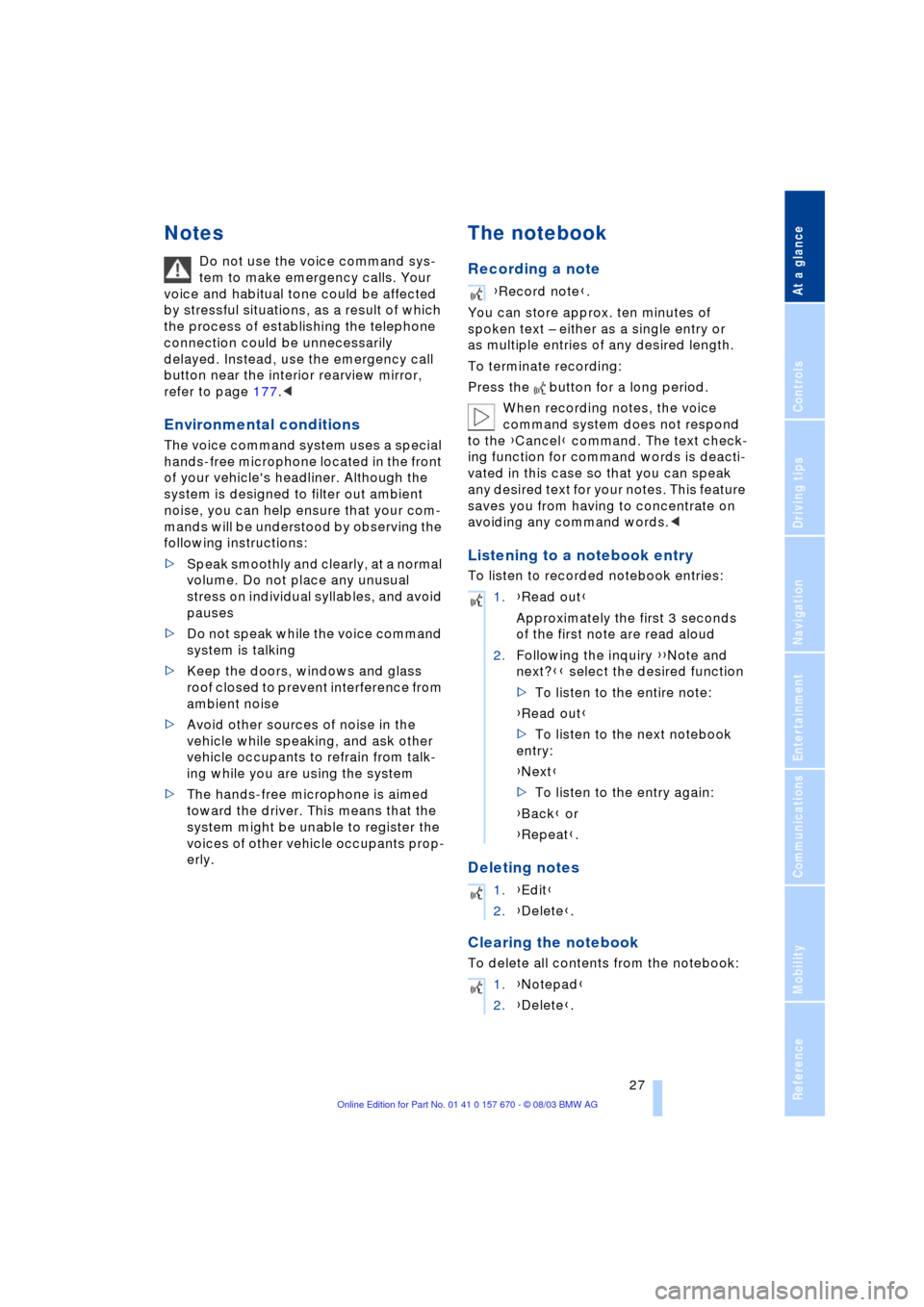
The notebook
Recording a note
You can store approx. ten minutes of
spoken text Ð either as a single entry or
as multiple entries of any desired length.
To terminate recording:
Press the button for a long period.
When recording notes, the voice
command system does not respond
to the {Cancel} command. The text check-
ing function for command words is deacti-
vated in this case so that you can speak
any desired text for your notes. This feature
saves you from having to concentrate on
avoiding any command words.<
Listening to a notebook entry
To listen to recorded notebook entries:
Deleting notes
Clearing the notebook
To delete all contents from the notebook:
{Record note}.
1.{Read out}
Approximately the first 3 seconds
of the first note are read aloud
2.Following the inquiry {{Note and
next?}} select the desired function
>To listen to the entire note:
{Read out}
>To listen to the next notebook
entry:
{Next}
>To listen to the entry again:
{Back} or
{Repeat}.
1.{Edit}
2.{Delete}.
1.{Notepad}
2.{Delete}.
Page 31 of 232
At a glance
29Reference
Controls
Driving tips
Communications
Navigation
Entertainment
Mobility
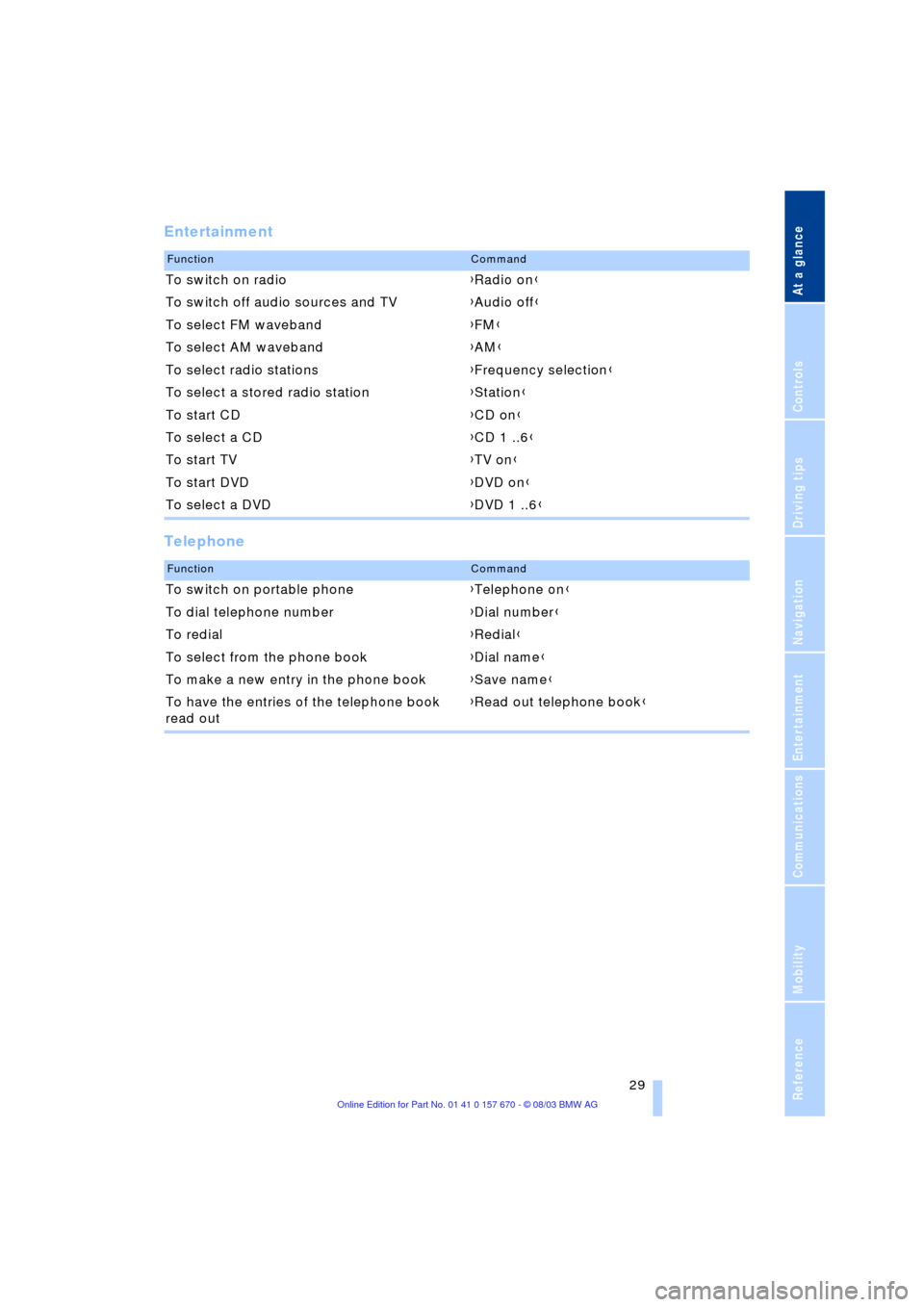
Entertainment
Telephone
FunctionCommand
To switch on radio{Radio on}
To switch off audio sources and TV{Audio off}
To select FM waveband{FM}
To select AM waveband{AM}
To select radio stations{Frequency selection}
To select a stored radio station{Station}
To start CD{CD on}
To select a CD{CD 1 ..6}
To start TV{TV on}
To start DVD{DVD on}
To select a DVD{DVD 1 ..6}
FunctionCommand
To switch on portable phone{Telephone on}
To dial telephone number{Dial number}
To redial{Redial}
To select from the phone book{Dial name}
To make a new entry in the phone book{Save name}
To have the entries of the telephone book
read out{Read out telephone book}
Page 44 of 232
Opening and closing
42
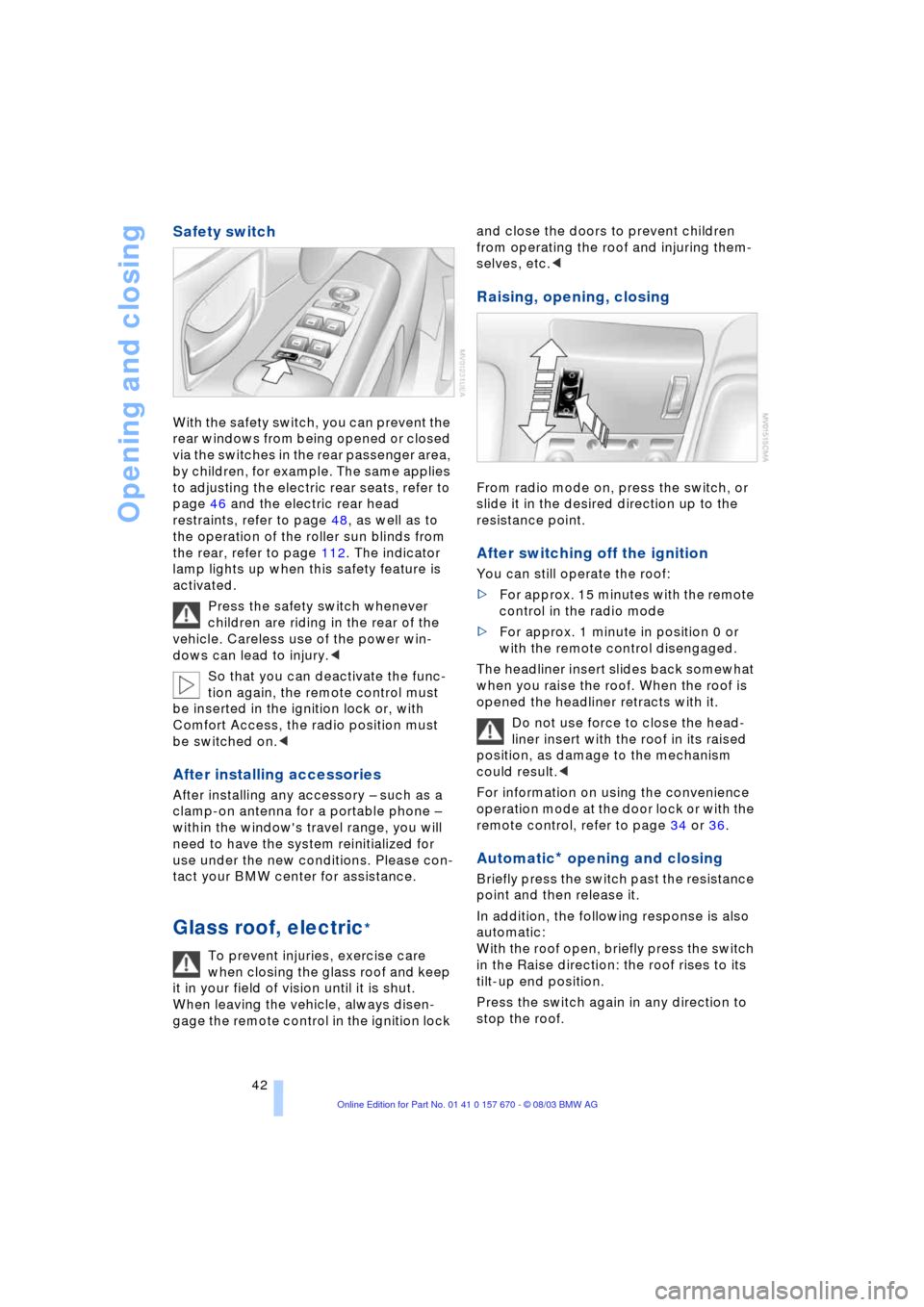
Safety switch
With the safety switch, you can prevent the
rear windows from being opened or closed
via the switches in the rear passenger area,
by children, for example. The same applies
to adjusting the electric rear seats, refer to
page 46 and the electric rear head
restraints, refer to page 48, as well as to
the operation of the roller sun blinds from
the rear, refer to page 112. The indicator
lamp lights up when this safety feature is
activated.
Press the safety switch whenever
children are riding in the rear of the
vehicle. Careless use of the power win-
dows can lead to injury.<
So that you can deactivate the func-
tion again, the remote control must
be inserted in the ignition lock or, with
Comfort Access, the radio position must
be switched on.<
After installing accessories
After installing any accessory Ð such as a
clamp-on antenna for a portable phone Ð
within the window's travel range, you will
need to have the system reinitialized for
use under the new conditions. Please con-
tact your BMW center for assistance.
Glass roof, electric*
To prevent injuries, exercise care
when closing the glass roof and keep
it in your field of vision until it is shut.
When leaving the vehicle, always disen-
gage the remote control in the ignition lock and close the doors to prevent children
from operating the roof and injuring them-
selves, etc.<
Raising, opening, closing
From radio mode on, press the switch, or
slide it in the desired direction up to the
resistance point.
After switching off the ignition
You can still operate the roof:
>For approx. 15 minutes with the remote
control in the radio mode
>For approx. 1 minute in position 0 or
with the remote control disengaged.
The headliner insert slides back somewhat
when you raise the roof. When the roof is
opened the headliner retracts with it.
Do not use force to close the head-
liner insert with the roof in its raised
position, as damage to the mechanism
could result.<
For information on using the convenience
operation mode at the door lock or with the
remote control, refer to page 34 or 36.
Automatic* opening and closing
Briefly press the switch past the resistance
point and then release it.
In addition, the following response is also
automatic:
With the roof open, briefly press the switch
in the Raise direction: the roof rises to its
tilt-up end position.
Press the switch again in any direction to
stop the roof.
Page 116 of 232
Practical interior accessories
114
Glove compartment
Opening
Press button. The glove compartment
opens automatically and the lamps come
on.
Closing
Fold the cover up.
To prevent injury in the event of an
accident, close the glove compart-
ment immediately after use.<
Rechargeable flashlight
The flashlight is located on the left side of
the glove compartment.
It features integral overload protection, so
it can be left in its holder continuously.
Be sure that the flashlight is switched
off when it is inserted into its holder.
Failure to comply with this precaution
could lead to overcharging and damage.<
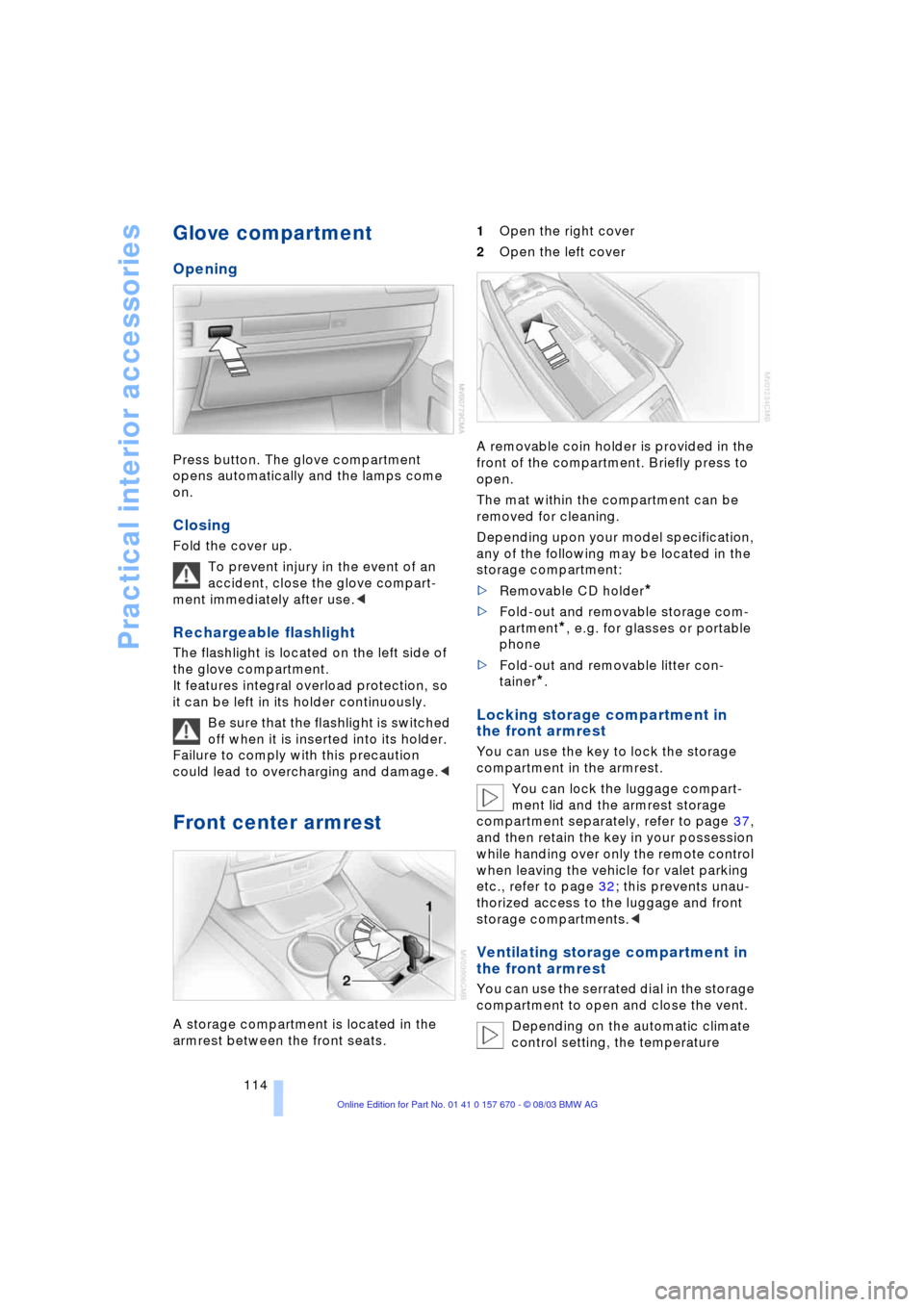
Front center armrest
A storage compartment is located in the
armrest between the front seats. 1Open the right cover
2Open the left cover
A removable coin holder is provided in the
front of the compartment. Briefly press to
open.
The mat within the compartment can be
removed for cleaning.
Depending upon your model specification,
any of the following may be located in the
storage compartment:
>Removable CD holder
*
>Fold-out and removable storage com-
partment
*, e.g. for glasses or portable
phone
>Fold-out and removable litter con-
tainer
*.
Locking storage compartment in
the front armrest
You can use the key to lock the storage
compartment in the armrest.
You can lock the luggage compart-
ment lid and the armrest storage
compartment separately, refer to page 37,
and then retain the key in your possession
while handing over only the remote control
when leaving the vehicle for valet parking
etc., refer to page 32; this prevents unau-
thorized access to the luggage and front
storage compartments.<
Ventilating storage compartment in
the front armrest
You can use the serrated dial in the storage
compartment to open and close the vent.
Depending on the automatic climate
control setting, the temperature
Page 151 of 232
Navigation
Entertainment
Driving tips
149Reference
At a glance
Controls
Communications
Mobility
Care instructions
You can find everything you need to know
on this topic by consulting the separate
Caring for your vehicle brochure.
Switching on/off
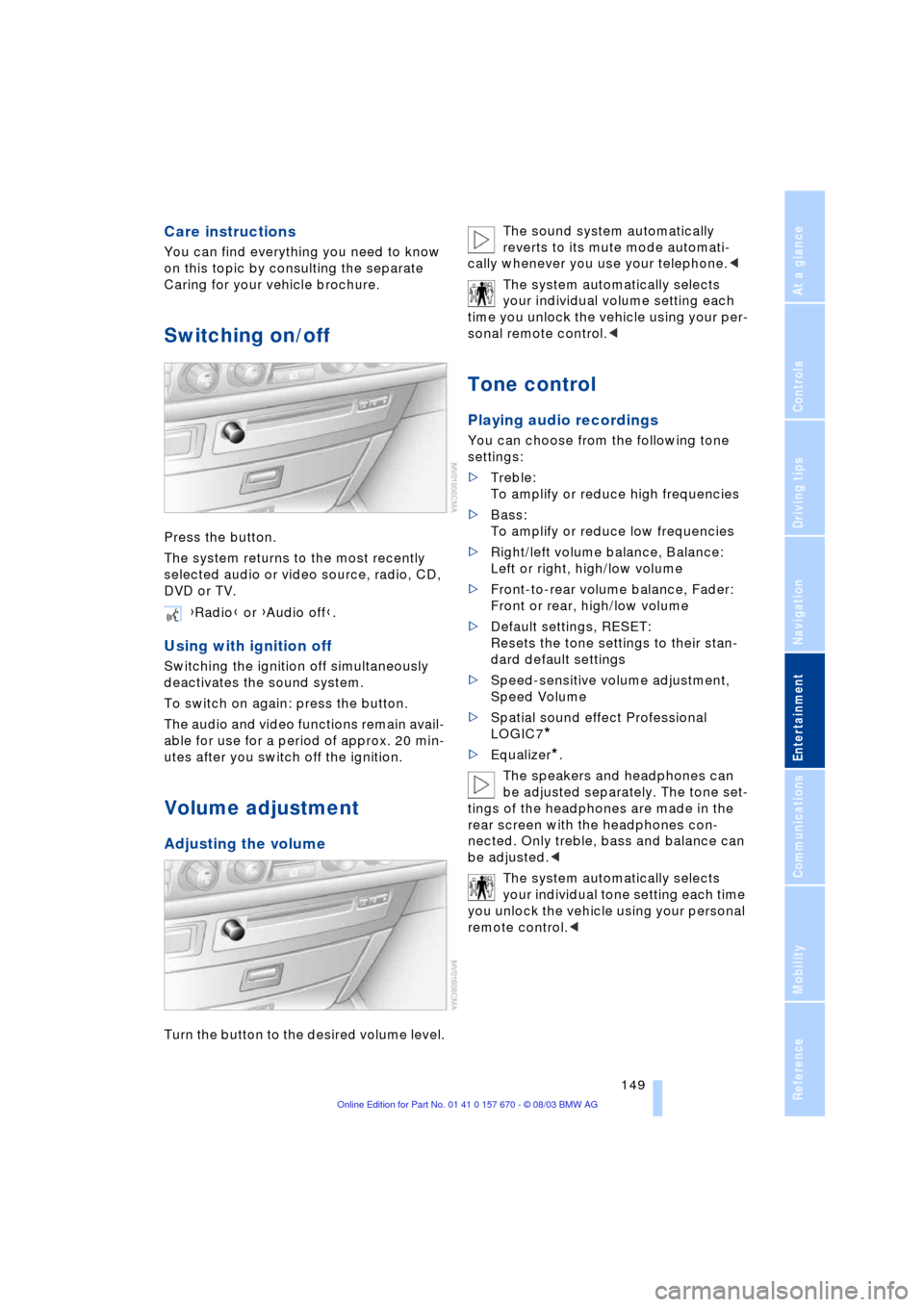
Press the button.
The system returns to the most recently
selected audio or video source, radio, CD,
DVD or TV.
Using with ignition off
Switching the ignition off simultaneously
deactivates the sound system.
To switch on again: press the button.
The audio and video functions remain avail-
able for use for a period of approx. 20 min-
utes after you switch off the ignition.
Volume adjustment
Adjusting the volume
Turn the button to the desired volume level.The sound system automatically
reverts to its mute mode automati-
cally whenever you use your telephone.<
The system automatically selects
your individual volume setting each
time you unlock the vehicle using your per-
sonal remote control.<
Tone control
Playing audio recordings
You can choose from the following tone
settings:
>Treble:
To amplify or reduce high frequencies
>Bass:
To amplify or reduce low frequencies
>Right/left volume balance, Balance:
Left or right, high/low volume
>Front-to-rear volume balance, Fader:
Front or rear, high/low volume
>Default settings, RESET:
Resets the tone settings to their stan-
dard default settings
>Speed-sensitive volume adjustment,
Speed Volume
>Spatial sound effect Professional
LOGIC7
*
>Equalizer*.
The speakers and headphones can
be adjusted separately. The tone set-
tings of the headphones are made in the
rear screen with the headphones con-
nected. Only treble, bass and balance can
be adjusted.<
The system automatically selects
your individual tone setting each time
you unlock the vehicle using your personal
remote control.< {Radio} or {Audio off}.
Page 158 of 232
Radio
156
Enabling channels
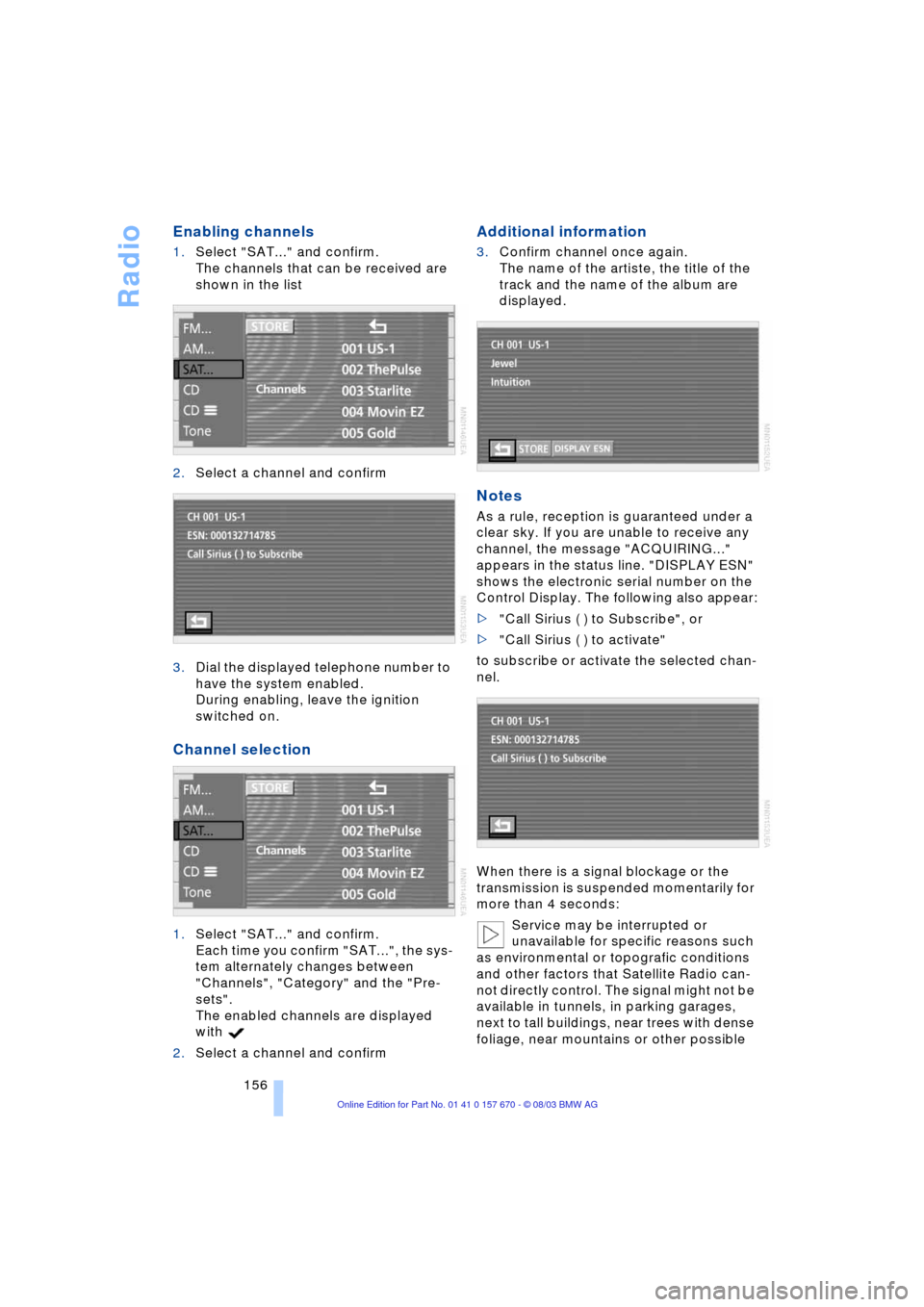
1.Select "SAT..." and confirm.
The channels that can be received are
shown in the list
2.Select a channel and confirm
3.Dial the displayed telephone number to
have the system enabled.
During enabling, leave the ignition
switched on.
Channel selection
1.Select "SAT..." and confirm.
Each time you confirm "SAT...", the sys-
tem alternately changes between
"Channels", "Category" and the "Pre-
sets".
The enabled channels are displayed
with
2.Select a channel and confirm
Additional information
3.Confirm channel once again.
The name of the artiste, the title of the
track and the name of the album are
displayed.
Notes
As a rule, reception is guaranteed under a
clear sky. If you are unable to receive any
channel, the message "ACQUIRING..."
appears in the status line. "DISPLAY ESN"
shows the electronic serial number on the
Control Display. The following also appear:
>"Call Sirius ( ) to Subscribe", or
>"Call Sirius ( ) to activate"
to subscribe or activate the selected chan-
nel.
When there is a signal blockage or the
transmission is suspended momentarily for
more than 4 seconds:
Service may be interrupted or
unavailable for specific reasons such
as environmental or topografic conditions
and other factors that Satellite Radio can-
not directly control. The signal might not be
available in tunnels, in parking garages,
next to tall buildings, near trees with dense
foliage, near mountains or other possible
Page 176 of 232
Using the phone in your vehicle
174
Using the phone in your vehicle
Safety notes
A car phone can provide many services, in
an emergency even initiating a lifesaving
rescue. However, bear the following in
mind:
Adjustments
To avoid posing an unnecessary haz-
ard due to inattention, both to your
own vehicle's occupants and to other road
users: never attempt to use the controls or
make entries unless traffic and road condi-
tions allow.<
Using the phone in your vehicle
Using a portable phone to make and
receive calls while driving is now ille-
gal in virtually every country in the world.
Always use your hands-free system, or
stop your vehicle in an area where you will
not pose a safety hazard to other road
users and switch the engine off.<
Antenna
When using the phone, ensure that
all persons in the area are at least
20 in/50 cm from the antenna. Never use
your BMW portable phone if the antenna is
damaged. Contact between your skin and
a damaged antenna can result in minor
burns.
If the antenna is damaged, have it replaced
immediately.<
Special environmental conditions
Do not use your phone from within a
garage, or near an open hood. The air
in these areas could contain fuel vapors,
and the phone might generate sparks that
could result in burns.
This same precaution applies to opening
luggage compartment lids on vehicles
equipped for operation using natural gas or
hydrogen, and to all vehicles with luggage
compartment-mounted batteries.Always switch off your BMW portable
phone in areas where blasting work is
being conducted with explosives. The
phone signals could potentially act as a
high-frequency transmitter and set off
explosions.
Always switch off your BMW portable
phone in areas where an increased explo-
sion danger is present. This category
includes filling stations along with fuel and
chemical storage depots, etc., and all
areas in which the air can contain fuel,
chemicals or metal particles. Under these
conditions, your BMW portable phone
could conceivably generate sparks that
could lead to a fire or explosion. Always
observe all legal regulations governing the
use of portable phones in the vicinity of fill-
ing stations, chemical factories and other
areas where an explosion potential exists.
Never use the BMW portable phone in hos-
pitals, care centers or at other locations
where medical equipment may be in oper-
ation, such as accident sites, etc.
Your service provider can furnish you with
more detailed information on legal regula-
tions governing the use of your phone.<
Medical equipment
Portable phones can generate inter-
ference capable of preventing hearing
aids and cardiac pacemakers from operat-
ing correctly. If you or any occupant of the
vehicle will be using such equipment, con-
sult a physician or the manufacturer of the
equipment to determine whether it is ade-
quately shielded against high-frequency
energy.
Persons with cardiac pacemakers should
bear the following in mind:
Always hold the switched-on BMW porta-
ble phone more than 15 cm away from the
cardiac pacemaker.
Do not carry the BMW portable phone in
your breast pocket.
Use the ear on the opposite side of the car-
diac pacemaker to reduce the likelihood of
Page 177 of 232
175
Entertainment
Reference
At a glance
Controls
Driving tips Communications
Navigation
Mobility
influencing the cardiac pacemaker.
With the slightest sign of a cardiac pace-
maker malfunction, switch the BMW porta-
ble phone off immediately.<
Batteries
To avoid possible short circuits, after
removing a battery you should never
allow it to come into contact with metallic
surfaces of any kind. This is why you should
handle charged batteries with care, in par-
ticular if you place batteries, e.g. in jacket
or shirt pockets that contain metal objects.
If you are in an environment where there is
a risk of explosion, do not remove the bat-
tery from the device, as otherwise sparks
from your battery could cause explosions
or fire.<
Disposing of used batteries
Return used batteries to a recycling
collection point or to your BMW cen-
ter.<
Care instructions
You can find useful information on caring
for your portable phone in the separate
Caring for your vehicle brochure and in the
separate portable phone Owner's Manual.
Controls
You have the option of making phone calls
with the car phone
* or the BMW portable
phone.
If there is no BMW portable phone in the
cradle, the Personal Calling connection is
set up with the car phone.
The car phone must be enabled prior
to initial use. In this connection,
please consult your BMW center.<
The telephone used to set up a connection
appears in the upper status line.
For information on operating your
portable phone, please consult the
separate Owner's Manual.
>The Control Center
>The folding telephone keypad
>The voice command system Ð not for
incoming calls.
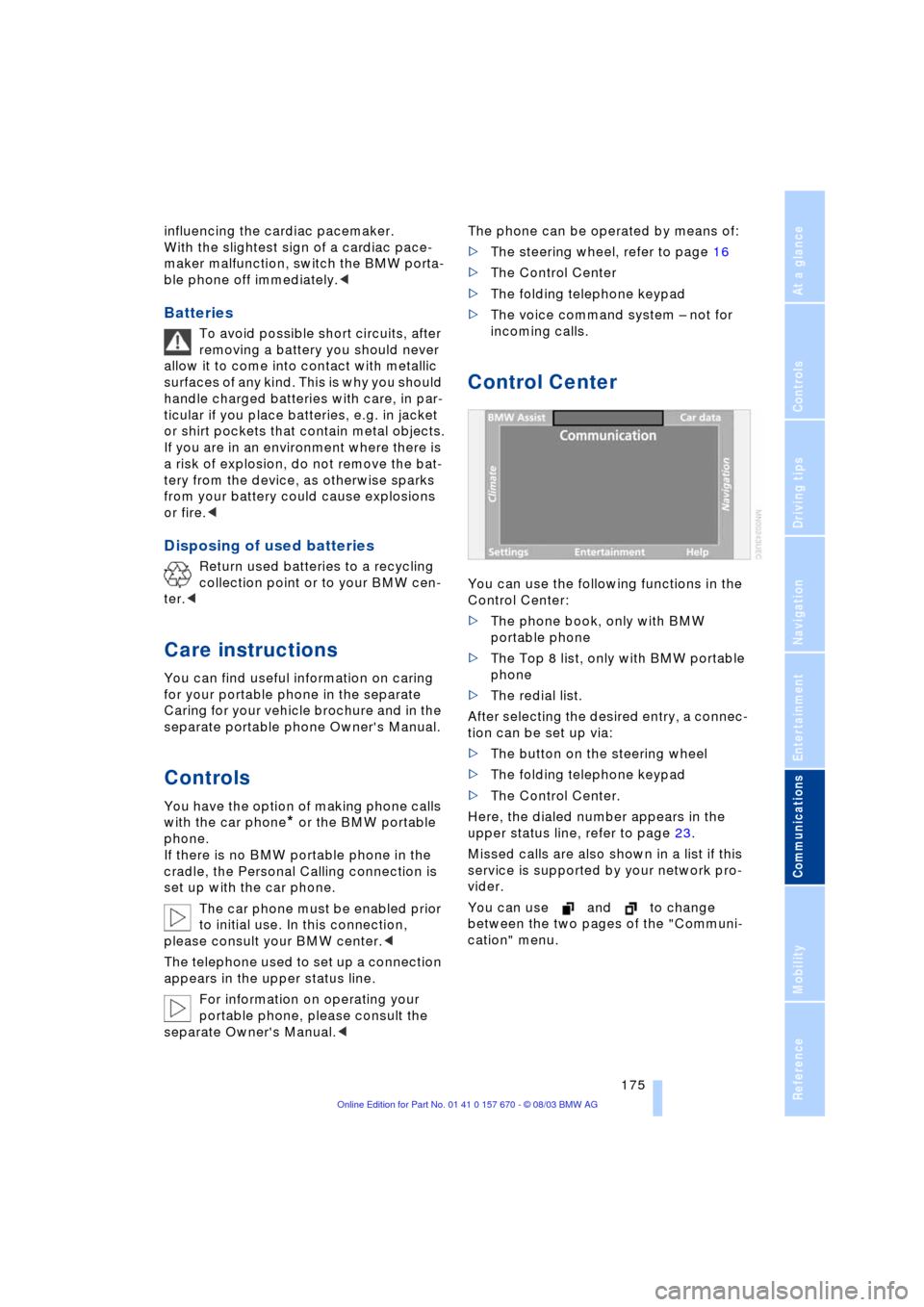
Control Center
You can use the following functions in the
Control Center:
>The phone book, only with BMW
portable phone
>The Top 8 list, only with BMW portable
phone
>The redial list.
After selecting the desired entry, a connec-
tion can be set up via:
>The button on the steering wheel
>The folding telephone keypad
>The Control Center.
Here, the dialed number appears in the
upper status line, refer to page 23.
Missed calls are also shown in a list if this
service is supported by your network pro-
vider.
You can use and to change
between the two pages of the "Communi-
cation" menu.
Page 178 of 232
Using the phone in your vehicle
176
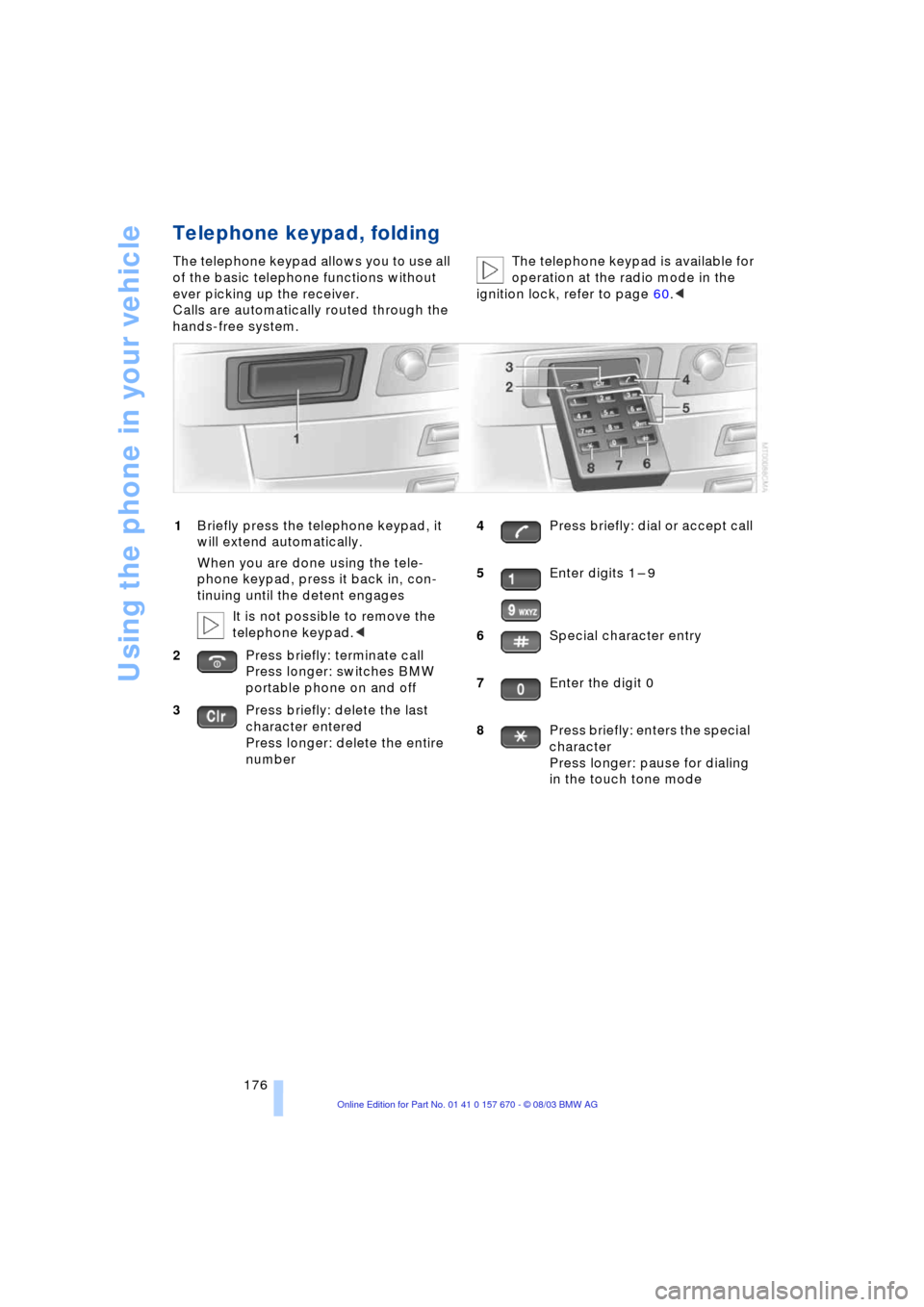
Telephone keypad, folding
The telephone keypad allows you to use all
of the basic telephone functions without
ever picking up the receiver.
Calls are automatically routed through the
hands-free system.The telephone keypad is available for
operation at the radio mode in the
ignition lock, refer to page 60.<
1Briefly press the telephone keypad, it
will extend automatically.
When you are done using the tele-
phone keypad, press it back in, con-
tinuing until the detent engages
It is not possible to remove the
telephone keypad.<
2Press briefly: terminate call
Press longer: switches BMW
portable phone on and off
3Press briefly: delete the last
character entered
Press longer: delete the entire
number4Press briefly: dial or accept call
5Enter digits 1 Ð 9
6Special character entry
7Enter the digit 0
8Press briefly: enters the special
character
Press longer: pause for dialing
in the touch tone mode
Page 179 of 232
177
Entertainment
Reference
At a glance
Controls
Driving tips Communications
Navigation
Mobility
Hands-free system
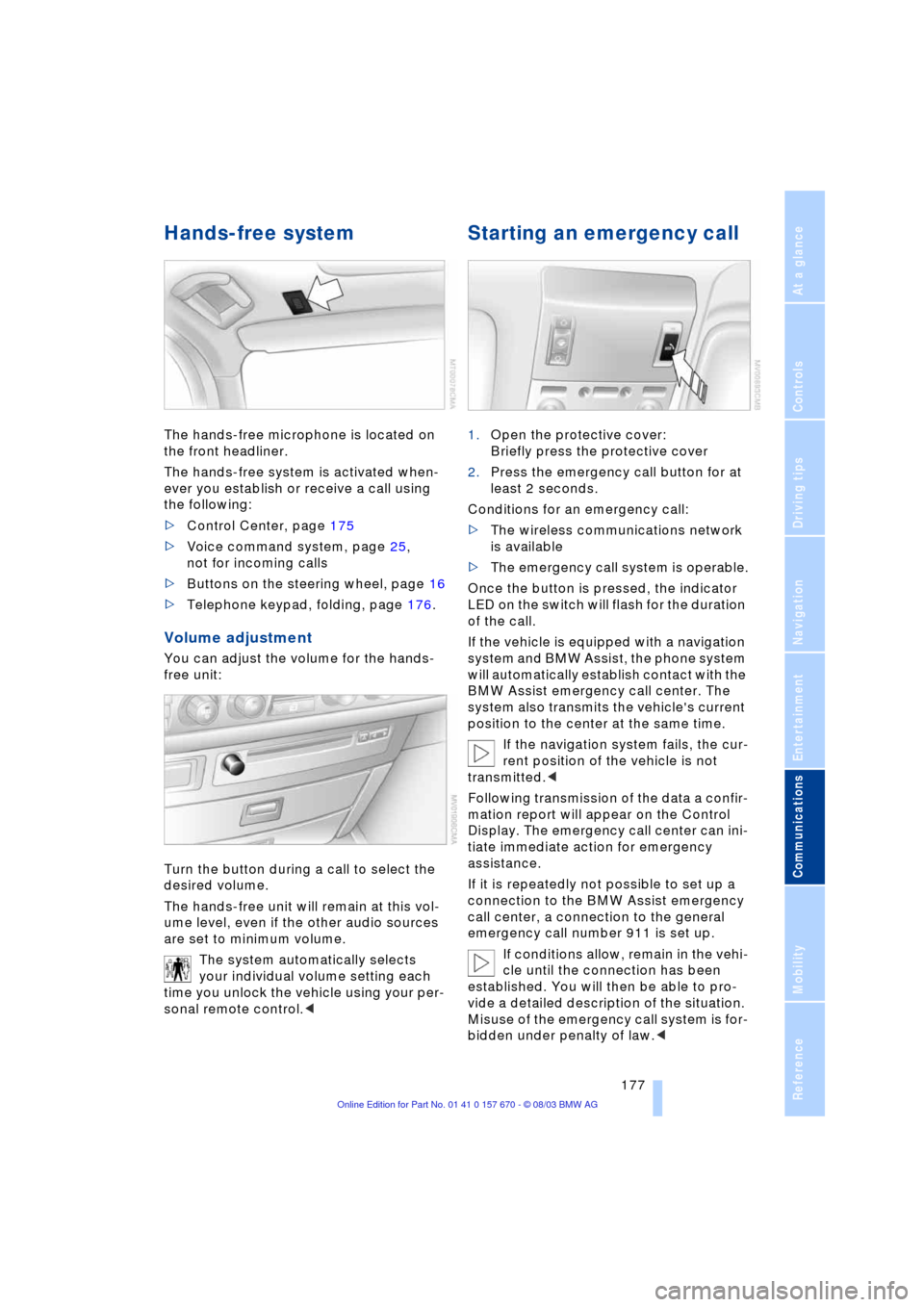
The hands-free microphone is located on
the front headliner.
The hands-free system is activated when-
ever you establish or receive a call using
the following:
>Control Center, page 175
>Voice command system, page 25,
not for incoming calls
>Buttons on the steering wheel, page 16
>Telephone keypad, folding, page 176.
Volume adjustment
You can adjust the volume for the hands-
free unit:
Turn the button during a call to select the
desired volume.
The hands-free unit will remain at this vol-
ume level, even if the other audio sources
are set to minimum volume.
The system automatically selects
your individual volume setting each
time you unlock the vehicle using your per-
sonal remote control.<
Starting an emergency call
1.Open the protective cover:
Briefly press the protective cover
2.Press the emergency call button for at
least 2 seconds.
Conditions for an emergency call:
>The wireless communications network
is available
>The emergency call system is operable.
Once the button is pressed, the indicator
LED on the switch will flash for the duration
of the call.
If the vehicle is equipped with a navigation
system and BMW Assist, the phone system
will automatically establish contact with the
BMW Assist emergency call center. The
system also transmits the vehicle's current
position to the center at the same time.
If the navigation system fails, the cur-
rent position of the vehicle is not
transmitted.<
Following transmission of the data a confir-
mation report will appear on the Control
Display. The emergency call center can ini-
tiate immediate action for emergency
assistance.
If it is repeatedly not possible to set up a
connection to the BMW Assist emergency
call center, a connection to the general
emergency call number 911 is set up.
If conditions allow, remain in the vehi-
cle until the connection has been
established. You will then be able to pro-
vide a detailed description of the situation.
Misuse of the emergency call system is for-
bidden under penalty of law.<