key BMW 760Li 2006 E66 Owner's Guide
[x] Cancel search | Manufacturer: BMW, Model Year: 2006, Model line: 760Li, Model: BMW 760Li 2006 E66Pages: 247, PDF Size: 8.66 MB
Page 186 of 247
Using the phone
184 The connection can also be established
via the button on the steering wheel or the
telephone keypad.<
Dialing phone numbers stored in a list
To select an entry and establish a connection:
1.Select the list and press the controller.
>"TOP 8"
>"Last"
>"Missed"
2.Select the desired entry and press the con-
troller.
3.Select the symbol and press the control-
ler.
The system dials the number.
The phone number is displayed in the top sta-
tus line as this happens.
The connection can also be established
via the button on the steering wheel or the
telephone keypad.<
Deleting entries in lists
You can delete the lists of the most frequently
called phone numbers, missed calls and the last
subscribers called.
1.Select the desired list and press the con-
troller.
The stored entries are shown on the right
side of the Control Displays.
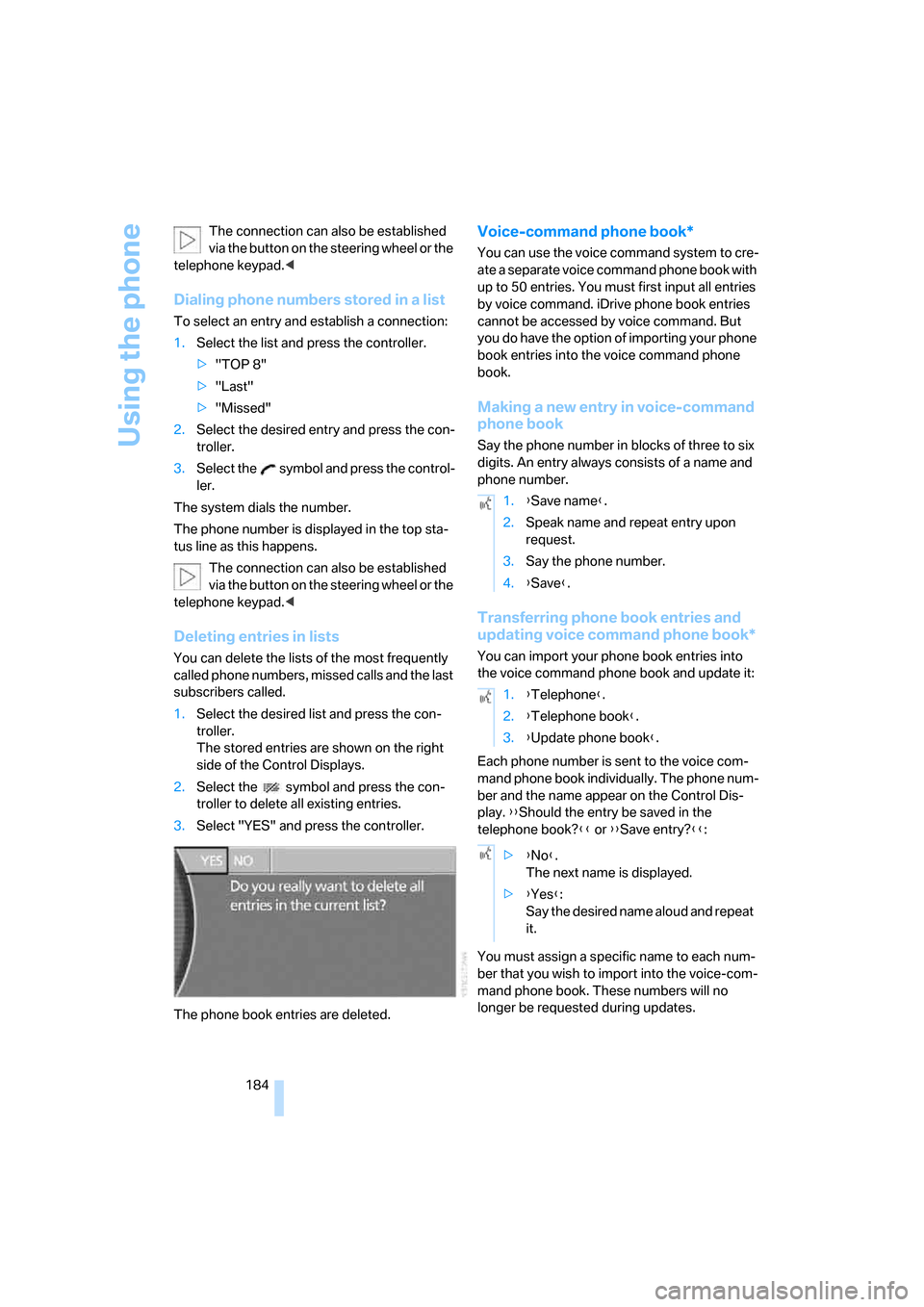
2.Select the symbol and press the con-
troller to delete all existing entries.
3.Select "YES" and press the controller.
The phone book entries are deleted.
Voice-command phone book*
You can use the voice command system to cre-
ate a separate voice command phone book with
up to 50 entries. You must first input all entries
by voice command. iDrive phone book entries
cannot be accessed by voice command. But
you do have the option of importing your phone
book entries into the voice command phone
book.
Making a new entry in voice-command
phone book
Say the phone number in blocks of three to six
digits. An entry always consists of a name and
phone number.
Transferring phone book entries and
updating voice command phone book*
You can import your phone book entries into
the voice command phone book and update it:
Each phone number is sent to the voice com-
mand phone book individually. The phone num-
ber and the name appear on the Control Dis-
play. {{Should the entry be saved in the
telephone book?}} or {{Save entry?}}:
You must assign a specific name to each num-
ber that you wish to import into the voice-com-
mand phone book. These numbers will no
longer be requested during updates.
1.{Save name}.
2.Speak name and repeat entry upon
request.
3.Say the phone number.
4.{Save}.
1.{Telephone}.
2.{Telephone book}.
3.{Update phone book}.
>{No}.
The next name is displayed.
>{Yes}:
Say the desired name aloud and repeat
it.
Page 207 of 247
Mobility
205Reference
At a glance
Controls
Driving tips
Communications
Navigation
Entertainment
Maintenance
The BMW Maintenance
System
The BMW Maintenance System serves to
retain the operating and road safety of your
BMW. The service schedule also includes oper-
ations related to the vehicle's comfort and con-
venience features, such as replacement of the
filters for the inside air. The aim is to optimize
maintenance procedures with a view to reduc-
ing the cost of running the vehicle.
Should the day come when you decide to sell
your BMW, you will find that a complete dealer
service history is an asset of inestimable value.
CBS Condition Based Service
Sensors and special algorithms take the differ-
ent driving conditions of your BMW into
account. As a result, Condition Based Service
determines the current and future maintenance
requirements. By letting you define a service
and maintenance regimen that reflects your
own individual requirements, the system forms
the basis for trouble-free driving.
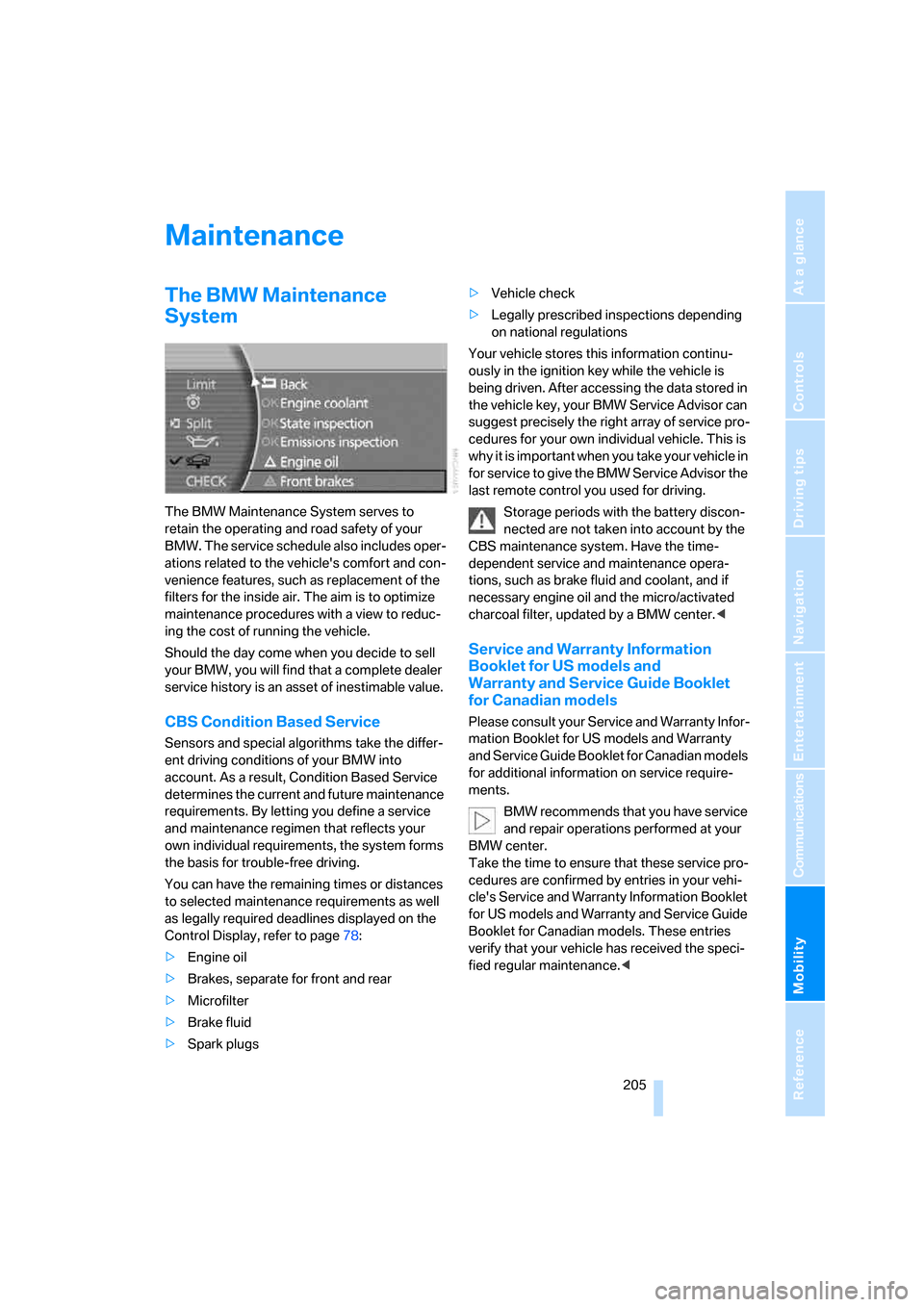
You can have the remaining times or distances
to selected maintenance requirements as well
as legally required deadlines displayed on the
Control Display, refer to page78:
>Engine oil
>Brakes, separate for front and rear
>Microfilter
>Brake fluid
>Spark plugs>Vehicle check
>Legally prescribed inspections depending
on national regulations
Your vehicle stores this information continu-
ously in the ignition key while the vehicle is
being driven. After accessing the data stored in
the vehicle key, your BMW Service Advisor can
suggest precisely the right array of service pro-
cedures for your own individual vehicle. This is
why it is important when you take your vehicle in
for service to give the BMW Service Advisor the
last remote control you used for driving.
Storage periods with the battery discon-
nected are not taken into account by the
CBS maintenance system. Have the time-
dependent service and maintenance opera-
tions, such as brake fluid and coolant, and if
necessary engine oil and the micro/activated
charcoal filter, updated by a BMW center.<
Service and Warranty Information
Booklet for US models and
Warranty and Service Guide Booklet
for Canadian models
Please consult your Service and Warranty Infor-
mation Booklet for US models and Warranty
and Service Guide Booklet for Canadian models
for additional information on service require-
ments.
BMW recommends that you have service
and repair operations performed at your
BMW center.
Take the time to ensure that these service pro-
cedures are confirmed by entries in your vehi-
cle's Service and Warranty Information Booklet
for US models and Warranty and Service Guide
Booklet for Canadian models. These entries
verify that your vehicle has received the speci-
fied regular maintenance.<
Page 209 of 247
Mobility
207Reference
At a glance
Controls
Driving tips
Communications
Navigation
Entertainment
Replacing components
Onboard tool kit
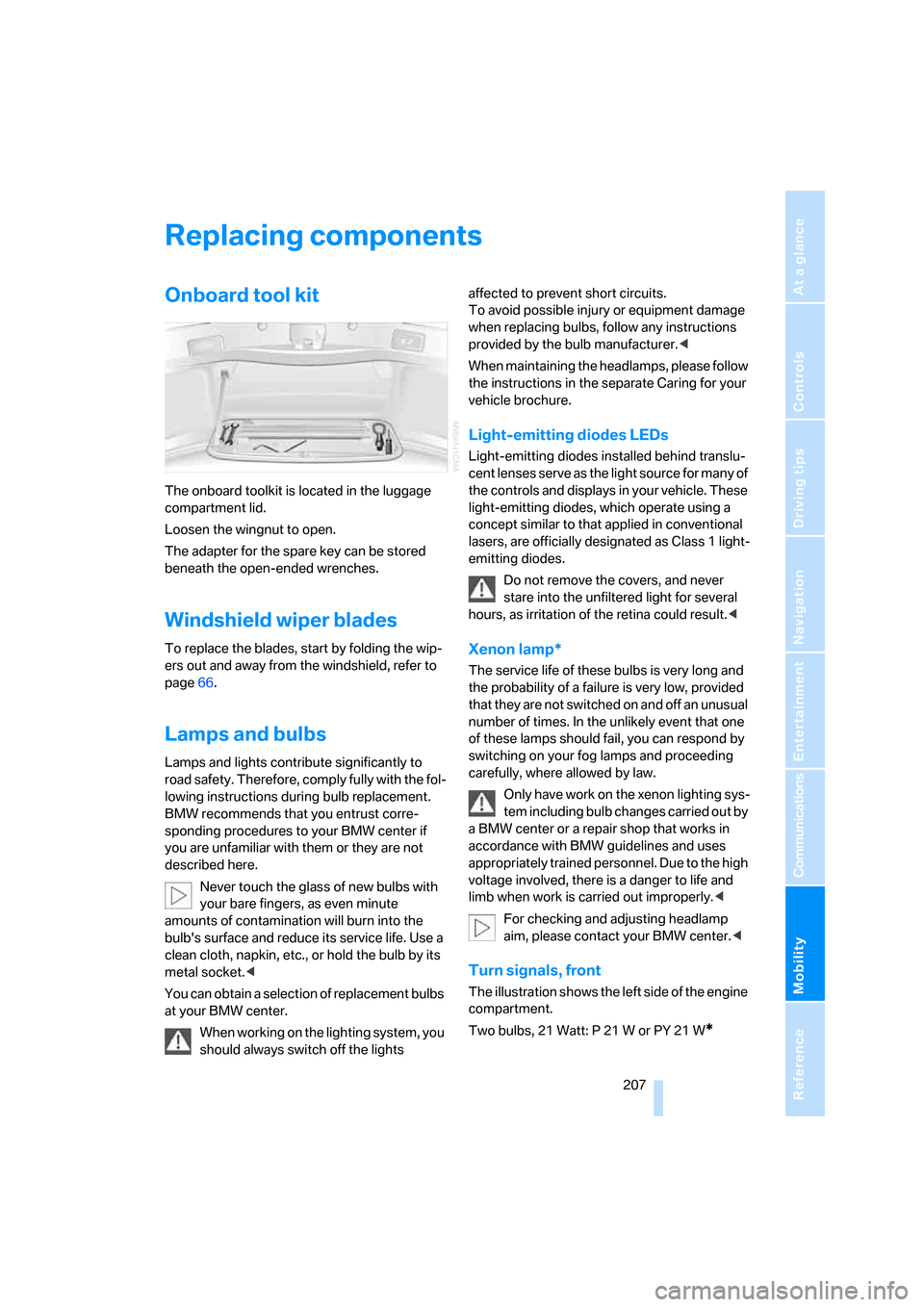
The onboard toolkit is located in the luggage
compartment lid.
Loosen the wingnut to open.
The adapter for the spare key can be stored
beneath the open-ended wrenches.
Windshield wiper blades
To replace the blades, start by folding the wip-
ers out and away from the windshield, refer to
page66.
Lamps and bulbs
Lamps and lights contribute significantly to
road safety. Therefore, comply fully with the fol-
lowing instructions during bulb replacement.
BMW recommends that you entrust corre-
sponding procedures to your BMW center if
you are unfamiliar with them or they are not
described here.
Never touch the glass of new bulbs with
your bare fingers, as even minute
amounts of contamination will burn into the
bulb's surface and reduce its service life. Use a
clean cloth, napkin, etc., or hold the bulb by its
metal socket.<
You can obtain a selection of replacement bulbs
at your BMW center.
When working on the lighting system, you
should always switch off the lights affected to prevent short circuits.
To avoid possible injury or equipment damage
when replacing bulbs, follow any instructions
provided by the bulb manufacturer.<
When maintaining the headlamps, please follow
the instructions in the separate Caring for your
vehicle brochure.
Light-emitting diodes LEDs
Light-emitting diodes installed behind translu-
cent lenses serve as the light source for many of
the controls and displays in your vehicle. These
light-emitting diodes, which operate using a
concept similar to that applied in conventional
lasers, are officially designated as Class 1 light-
emitting diodes.
Do not remove the covers, and never
stare into the unfiltered light for several
hours, as irritation of the retina could result.<
Xenon lamp*
The service life of these bulbs is very long and
the probability of a failure is very low, provided
that they are not switched on and off an unusual
number of times. In the unlikely event that one
of these lamps should fail, you can respond by
switching on your fog lamps and proceeding
carefully, where allowed by law.
Only have work on the xenon lighting sys-
tem including bulb changes carried out by
a BMW center or a repair shop that works in
accordance with BMW guidelines and uses
appropriately trained personnel. Due to the high
voltage involved, there is a danger to life and
limb when work is carried out improperly.<
For checking and adjusting headlamp
aim, please contact your BMW center.<
Turn signals, front
The illustration shows the left side of the engine
compartment.
Two bulbs, 21 Watt: P 21 W or PY 21 W
*
Page 226 of 247
Everything from A to Z
224
Everything from A to Z
Index
A
"ABC...", navigation131
ABS Antilock Brake
System87
ACC, refer to Active cruise
control69
"ACCEPT",
navigation140,147
Accepting call, automatic177
Accessories, refer to Your
individual vehicle5
Accident, refer to
– Initiating an emergency
call178
– Roadside Assistance187
Activated-charcoal filter107
Activating High Definition
Radio161
Active cruise control69
– indicator lamp72
– malfunction72
– radar sensor72
– sensor, refer to
Malfunction72
Active head restraints,
front47
Active seat50
Active seat ventilation50
Adapter for spare key31
Adaptive Drive
– refer to Dynamic Drive89
– refer to EDC Electronic
Damper Control89
Adaptive Head Light100
Address
– deleting140
– displaying141
– storing139
– storing current position146
"Address book",
navigation138Adjusting cooling effect of
rear air conditioner108
Adjusting interior
temperature105
Adjusting sound in audio
mode, refer to Tone
control153
Adjusting volume153
– ring tone of telephone177
– voice command system25
– voice instructions145
Air, drying, refer to Air condi-
tioner mode107
Airbags94
– safe sitting position43
Air conditioner in the rear108
Air conditioning103
– in rear108
– while parked109
Air-conditioning front
windshield126
Air distribution
– automatic104
– manual106
Airing, refer to Ventilation107
Air jets, refer to
Ventilation107
Air pressure, refer to Tire
inflation pressure194
Air recirculation, refer to
Recirculated air105
Air vents, refer to
Ventilation107
Air volume
– automatic climate
control106
– rear air conditioner108
AKI, refer to Fuel
specifications193
Alarm system37
– avoiding unintentional
alarms38All-season tires, refer to
Winter tires200
Altering route, refer to
Changing route145
Alternate route, refer to
Changing route145
"AM", radio155
AM waveband155
– High Definition Radio161
"ANGLE", DVD changer171
Antifreeze
– coolant203
– washer fluid66
Antilock Brake System
ABS87
Anti-theft alarm system, refer
to Alarm system37
Anti-theft system, refer to
Central locking system32
Approved engine oils203
Armrest, refer to Center
armrest
– front113
– rear114
"Arrow display",
navigation144
"AS ADDRESS",
navigation139,146
Ashtray115
– front115
– rear116
Assist, refer to
BMW Assist186
Assistance getting in and
out52
– backrest width44
Assistance system, refer to
DSC Dynamic Stability
Control87
Assistance window20
AUC Automatic recirculated-
air control105
Page 228 of 247
Everything from A to Z
226 Bottle holder, refer to Cup
holders115
Brake fluid204
– level204
– warning lamp204
Brake force display94
Brake lamp, adaptive, refer to
Brake force display94
Brake lamps
– brake force display94
– replacing bulbs208
Brake rotors, refer to
Corrosion on brake
rotors123
Brakes123
– ABS87
– brake fluid204
– brake force display94
– breaking-in122
– parking brake58
Brake system204
– BMW Maintenance
System205
– brake fluid204
– brake pads204
– breaking-in122
– refer to Braking safely123
Breakdown service, refer to
Roadside Assistance187
Breaking-in122
Breaking-in differential, refer
to Engine and
differential122
"Brightness"
– BMW Night Vision98
– DVD changer170
– on Control Display85
Brightness of Control
Display85
Bulbs, replacing207
"button", programmable
buttons52
Buttons
– on controller16
– on steering wheel11
C
"Calculate", refer to
Bypassing route
sections146
Calculating distance to
destination77
California Proposition 65
Warning5
Call
– accepting182
– missed184
– rejecting182
– touch tone dialing178
Calling
– from phone book183
– from Top 8 list184
– redialing183
– with retracting telephone
keypad177
Can holder, refer to Cup
holders115
Capacities221
Capacity, luggage
compartment220
Car battery, refer to Vehicle
battery211
Car care, refer to Caring for
your vehicle brochure
Car-care products, refer to
Caring for your vehicle
brochure
"Car Data"78,81
Care, refer to Caring for your
vehicle brochure
Caring for the upholstery, refer
to Caring for your vehicle
brochure
Caring for the vehicle finish,
refer to Caring for your
vehicle brochure
Car key, refer to Remote
control/key30
Carpet care, refer to Caring for
your vehicle brochure
Car radio, refer to Radio155Car wash124
– also refer to Caring for your
vehicle brochure
– with Comfort Access39
Catalytic converter, refer to
High temperatures122
"Categories", radio160
CBC Cornering Brake
Control87
CBS Condition Based
Service205
"CD", CD player162
"CDC", CD changer165
CD changer164
– compressed audio files165
– controls152
– fast forward, reverse166
– installation location164
– random sequence166
– sampling166
– selecting a CD165
– selecting track165
– starting164
– tone control153
– volume153
CD player162
– controls152
– fast forward, reverse163
– random sequence163
– sampling162
– selecting tracks162
– starting162
– tone control153
– volume153
Center armrest
– front113
– rear114
Center console, refer to
Comfort features14
Central locking system32
– Comfort Access38
– interior34
"CHANGE", navigation138
Changes, technical, refer to
For your own safety5
Changing scale144
Page 230 of 247
Everything from A to Z
228 Creating voice address
book141
Cruise control67,69
– refer to Programmable
cruise control67
Cruising range77
Cup holders115
Curb weight, refer to
Weights220
Current consumption, refer to
Energy Control77
Currentness of the Owner's
Manual5
Current position
– displaying146
– storing139
Cursor for navigation, refer to
Selecting destination via
map134
"Curve mode", BMW Night
Vision98
Customizing settings, refer to
Key Memory31
D
Data218
– dimensions219
– engine218
– filling capacities221
– weights220
Date84
– display format84
– displaying84
– setting85
"Date", setting date85
Daytime running lamps99
DBC Dynamic Brake
Control87
"DEACTIV.", BMW Assist189
Deactivating front passenger
airbags54
Defroster, rear window107
Defrosting position, refer to
Defrosting windows106
Defrosting windows106Defrosting windows and
removing condensation106
Defrosting windshield, refer to
Defrosting windows106
"DELETE", navigation140
Deleting address book140
Deleting destination list138
Deleting the entire list184
Destination for navigation131
– selecting using voice141
– selecting via information135
Destinations recently driven
to137
"Dest. input", navigation131
"Dest. list", navigation137
Dialed numbers, refer to
Redialing183
Diamond button52
Digital clock75
Dimensions219
Directional indicators, refer to
Turn signals65
Direction instructions, refer to
Voice instructions145
Directory, refer to
– Address book138
– Phone book184
Displacement, refer to Engine
specifications218
Display, refer to iDrive16
Display elements, refer to Info
Display12
Display illumination, refer to
Instrument lighting101
Display information on track,
CD changer166
Displaying map view144
Display lighting, refer to
Instrument lighting101
Display of faults, refer to
Check Control80
Displays, refer to Info
Display12
Disposal
– battery of remote control39
– vehicle battery211Distance-adjusting cruise
control, refer to Active cruise
control69
Distance to destination77
– units of measure84
Distance to destination, refer
to Remaining distance77
Distance warning, refer to
PDC Park Distance
Control86
Door entry lighting, refer to
Interior lamps102
Door key, refer to Remote
control/key30
Door lock34
Doors
– unlocking and locking from
inside34
– unlocking and locking from
outside32
DOT Quality Grades197
Draft-free ventilation107
Driving lamps, refer to Parking
lamps/low beams99
Driving notes122
Driving route, refer to
Displaying route143
Driving stability control87
Driving tips, refer to Driving
notes122
Dry air, refer to Cooling
function107
DSC Dynamic Stability
Control87
– indicator lamp13
"DTC", vehicle88,89
DTC Dynamic Traction
Control88
– indicator lamp13
"DVD", DVD changer169
Page 233 of 247
Reference 231
At a glance
Controls
Driving tips
Communications
Navigation
Entertainment
Mobility
Head light, refer to Adaptive
Head Light100
Headphones22
Head restraints46
– front head restraints,
active47
– sitting safely43
Heated
– mirrors51
– seats49
Heated rear window, refer to
Rear window defroster107
Heated steering wheel52
Heater, windshield, refer to
Defrosting windows and
removing condensation106
Heating103
– exterior mirrors51
– residual heat106
– seats49
– steering wheel52
– windshield washer
nozzles66
Heating and ventilation103
Heating when parked, refer to
Residual heat106
Heavy cargo, refer to Stowing
cargo125
Height, refer to
Dimensions219
Height adjustment
– seats44
– steering wheel52
"Help"
– assistance window20
– menu navigation19
"Help text", assistance
window20
Help text on Control
Display20
"Hide map icons",
navigation137
"high", automatic climate
control105
High-beam assistant100
High beams100
– headlamp flasher100
– indicator lamp11High Definition Radio161
High temperatures122
Hills123
Holder for cups115
Home address
– selecting140
– storing140
Hood201
Horn11
Hour signal activation85
"House Number",
navigation134
Hydraulic brake assistant,
refer to DBC87
Hydroplaning123
I
ID3 tag, refer to Displaying
information on track166
iDrive16
– assistance window20
– automatic climate
control104
– changing date and time84
– changing language84
– changing settings84
– changing units of measure
and display format84
– confirming selection or
entry19
– controller16
– controls16
– displays, menus17
– menus17
– rear seat screen21
– selecting menu item19
– setting brightness85
– showing help text20
– start menu18
– status lines20
– symbols20
Ignition key30
Ignition lock57
Illuminated vanity mirror51
Imitation leather, refer to
Caring for your vehicle
brochure"Indep. ventil.", automatic
climate control109
Indicator/warning lamps12
– airbags95
– alarm system37
– DSC88
– DTC88
– Flat Tire Monitor91
– fog lamps101
– safety belt warning49
– Tire Pressure Monitor93
Individually programmable
buttons11,52
Individual settings, refer to
Key Memory31
Inflation pressure, refer to Tire
inflation pressure194
Inflation pressure monitoring,
refer to Flat Tire Monitor90
Inflation pressure monitoring,
refer to Tire Pressure
Monitor91
Info Display12
Info menu, refer to Assistance
window20
"Information",
navigation135,136
Information, navigation
– "On country"135
– "On dest."135
– "On location"135
– "On town/city"135
Information on travel direction,
refer to Voice
instructions145
Infrared windshield, refer to
Entry/pass tags126
"INITIALIZE", BMW
Assist186
Initializing BMW Assist186
Inserting navigation CD/
DVD130
Installation location
– CD changer164
– DVD changer168
– mobile phone, refer to
Inserting mobile phone179
– navigation drive130
Page 234 of 247
Everything from A to Z
232 Instructions, navigation
system, refer to Route
guidance by voice
instructions145
Instrument cluster, refer to
Info Display12
Instrument lighting101
Instrument panel, refer to
Cockpit10
– all around the steering
wheel10
– comfort features14
Integrated universal remote
control111
Interior lamps102
– switching on with remote
control33
Interior motion sensor38
– switching off38
Interior rearview mirror,
automatic dimming
feature123
Interlock, refer to Switching
off engine58
"INTERM. TIME",
stopwatch83
Interval Display, refer to
Service requirements78
J
Joystick, refer to iDrive16
Jump starting213
K
Keyless-Go, refer to Comfort
Access38
Keyless opening and closing,
refer to Comfort Access38
Key Memory31
Keys30
– adapter for spare key30
– key-related settings, refer to
Key Memory31
Kick-down63
Knock control193
L
Lamps and bulbs207
"Language", settings84
Lashing eyes, refer to
Securing cargo125
"Last", telephone184
"Last dest.", navigation137
LATCH child-restraint fixing
system55
Leather care, refer to Caring
for your vehicle brochure
LEDs light-emitting
diodes207
"Left", seat heating49
Length, refer to
Dimensions219
Level control system89
Light
– refer to High-beam
assistant100
– refer to Parking lamps/low
beams99
– refer to Roadside parking
lamps/low beams100
Light alloy wheels, care and
maintenance, refer to Caring
for your vehicle brochure
Light-emitting diodes
LEDs207
Lighter116
Lighter socket, refer to Power
socket116
Lighting
– of instruments101
– of vehicle99
Light switch99
"Limit"82
Limit, refer to Speed limit82
"Limited", rear seat screen22
Load, refer to Loading124
Loading
– securing cargo125
– vehicle124
"LOC.", navigation140
"Location",
navigation139,146,147Lock buttons in the doors,
refer to Locking34
Locking
– from inside34
– from outside33
Locking without key, refer to
Comfort Access38
Locking without remote
control, refer to Comfort
Access38
"LOGIC7", tone control154
Longlife oils, approved
oils203
Long wave, LW155
– High Definition Radio161
"low", automatic climate
control105
Low beams99
– automatic99
– indicator lamp, defective
lamp80
Lower back support, refer to
Lumbar support
adjustment45
Low-fuel warning light, refer to
Fuel gauge76
Lows, refer to Tone
adjustment153
Lug bolts
– refer to Preparing for a wheel
change210
– tightening torque, refer to
After mounting211
– wrench, refer to What you
will need209
Luggage compartment119
– capacity220
– Comfort Access39
– opening/closing, refer to
Luggage compartment
lid35
– opening from inside36
– opening from outside35
– opening with remote
control33
Page 235 of 247
Reference 233
At a glance
Controls
Driving tips
Communications
Navigation
Entertainment
Mobility
Luggage compartment lid
– Comfort Access39
– emergency actuation, refer
to Manual operation36
– emergency release37
– locking separately35
– opening from inside36
– opening from outside35
– opening separately35
– opening with remote
control33
– remote control33
– unlocking manually35
Luggage rack, refer to Roof-
mounted luggage rack125
Lumbar support44,45
M
M+S tires, refer to Winter
tires200
Maintenance205
– refer to Service required78
Maintenance System205
Make-up mirror, refer to Illumi-
nated vanity mirror51
Malfunction
– door lock34
– fuel filler door192
– glass sunroof42
– luggage compartment lid37
Malfunction displays, refer to
Check Control80
"MANUAL",
radio156,159,161
Manual operation
– door lock34
– driver's door34
– fuel filler door192
– glass sunroof42
– luggage compartment lid36
– parking brake60
– transmission lock for
automatic transmission with
Steptronic64
Manual station scan156Map CD, refer to Navigation
CD/DVD130
"Map dir. travel",
navigation144
"Map facing N.",
navigation144
Map for navigation
– changing scale24,144
– destination entry134
Map view facing north144
Master key, refer to Remote
control/key30
Maximum cooling106
"medium", automatic climate
control105
Medium wave, MW
– High Definition Radio161
"Memo", hour signal85
Memory, refer to
– Key Memory31
– Seat, mirror and steering
wheel memory46
"MENU", DVD changer171
"menu", rear seat screen22
"Menu name"19
Menus, Control Display17
Microfilter, automatic climate
control107
Microphone for voice
command177
Middle wave, MW
155
Mirror dimming feature123
Mirrors50
– automatic curb monitor51
– folding in and out51
– heating51
– memory, refer to Seat, mirror
and steering wheel
memory46
"Missed", Telephone184
Missed calls184Mobile phone
– changing between mobile
phone and hands-free
system185
– changing from hands-free
system to mobile phone185
– changing from mobile phone
to hands-free system185
– dialing a number from Top 8
list184
– hands-free system177
– initiating an emergency
call178
– inserting179
– inserting phone cradle181
– logging off from vehicle180
– logging onto vehicle179
– missed calls184
– operating179
– operating via retracting
telephone keypad177
– operating with buttons on
steering wheel11
– overview176
– phone book183
– redialing183
– refer to Telephone
overview176
– removing179
– removing phone cradle181
– snap-in adapter176
– volume adjustment177
Modifications, technical, refer
to For your own safety5
Monitor, refer to
– iDrive16
– rear seat screen21
Monitor, refer to iDrive16
Mounting for vehicle jack,
refer to Lifting vehicle210
MP3, refer to Compressed
audio files165
Multi-function steering wheel,
refer to Buttons on steering
wheel11
Page 237 of 247
Reference 235
At a glance
Controls
Driving tips
Communications
Navigation
Entertainment
Mobility
P
"PAIRING", phone179
Panic mode33
Park Distance Control PDC86
"Parked car", parked car
ventilation109
Parked car ventilation
– activating activation
time110
– preselecting activation
time109
– switching on and off
directly109
Parking, vehicle58
Parking aid, refer to PDC Park
Distance Control86
Parking assistant, refer to
PDC Park Distance
Control86
Parking brake58
– Automatic Hold59
Parking lamps99
Parking lamps/low beams99
Parking with Automatic
Hold60
Park lock, refer to Parking62
Parts and accessories, refer to
Your individual vehicle5
Passenger airbag status
lamp95
Passenger-side exterior
mirror, tilting down51
Pathway lighting99
PDC Park Distance Control86
"PDC pic."87
Pen tray, refer to Storage
compartment in center
console115
Perimeter lighting, refer to
Interior lamps102
Permissible axle load, refer to
Weights220
Permissible gross weight,
refer to Weights220
"Perspective",
navigation144,145"Phone"179,180,181
Phone book184
– creating entry in voice
command phone book184
– deleting all entries185
– deleting entry185
– displaying entry185
– having entries read185
– selecting name185
– via iDrive183
Phone number
– deleting individual entry185
– dialing from phone book183
– dialing via retracting
telephone keypad
177
– redialing183
– Top 8 list184
"Pict.format", DVD
changer171
"Picture", DVD changer170
Pinch protection system
– glass sunroof, electric41
– power windows40
Plasters, refer to First-aid
kit213
Plastic, refer to Caring for your
vehicle brochure
Playing music tracks in
random sequence
– CD changer166
– CD player163
Pollen, refer to Microfilter/
activated-charcoal filter107
Position
– displaying146
– storing139
Power failure211
Power output, refer to Engine
specifications218
Power rear backrests45
Power seat, rear45
Power socket116
Power windows39
– convenience operation32
– safety switch40
Precious wood, refer to Caring
for your vehicle brochurePreparation package for
phone, refer to Hands-free
system177
"Presets", radio155,160
Pressure, tires194
Pressure monitoring, tires,
refer to Flat Tire Monitor90
Pressure monitoring, tires,
refer to Tire Pressure
Monitor91
"Profile", BMW Assist189
Programmable
– buttons52
– cruise control67
Protective function
– glass sunroof, electric41
– power windows40
"Public places, business and
shopping", navigation136
Puncture, Flat Tire Monitor90
R
Radiator, refer to Coolant203
Radiator fluid, refer to
Coolant203
Radio155
– Autostore157
– controls152
– High Definition Radio161
– sampling stations156
– satellite radio159
– selecting the waveband155
– storing stations158
– switching on/off153
– tone control153
– updating selection of
stations in receiving
range157
– volume153
– weather reports159
Radio Data System RDS158
Radio key, refer to Remote
control/key30
Radio ready state57
– with Comfort Access39
Rain sensor65