steering wheel BMW 760LI 2006 Owner's Manual
[x] Cancel search | Manufacturer: BMW, Model Year: 2006, Model line: 760LI, Model: BMW 760LI 2006Pages: 247, PDF Size: 8.66 MB
Page 154 of 247
On/off and settings
152
On/off and settings
The following audio and video sources share
the same controls and adjustment options.
>Radio
>CD player
*
>CD changer*
>DVD changer*
The CD changer can play CDs with com-
pressed audio files, such as MP3s.<
Controls
The audio and video sources can be operated
using:
>Buttons on the CD player
>iDrive
>Buttons on steering wheel, refer to page11
Buttons on the CD player
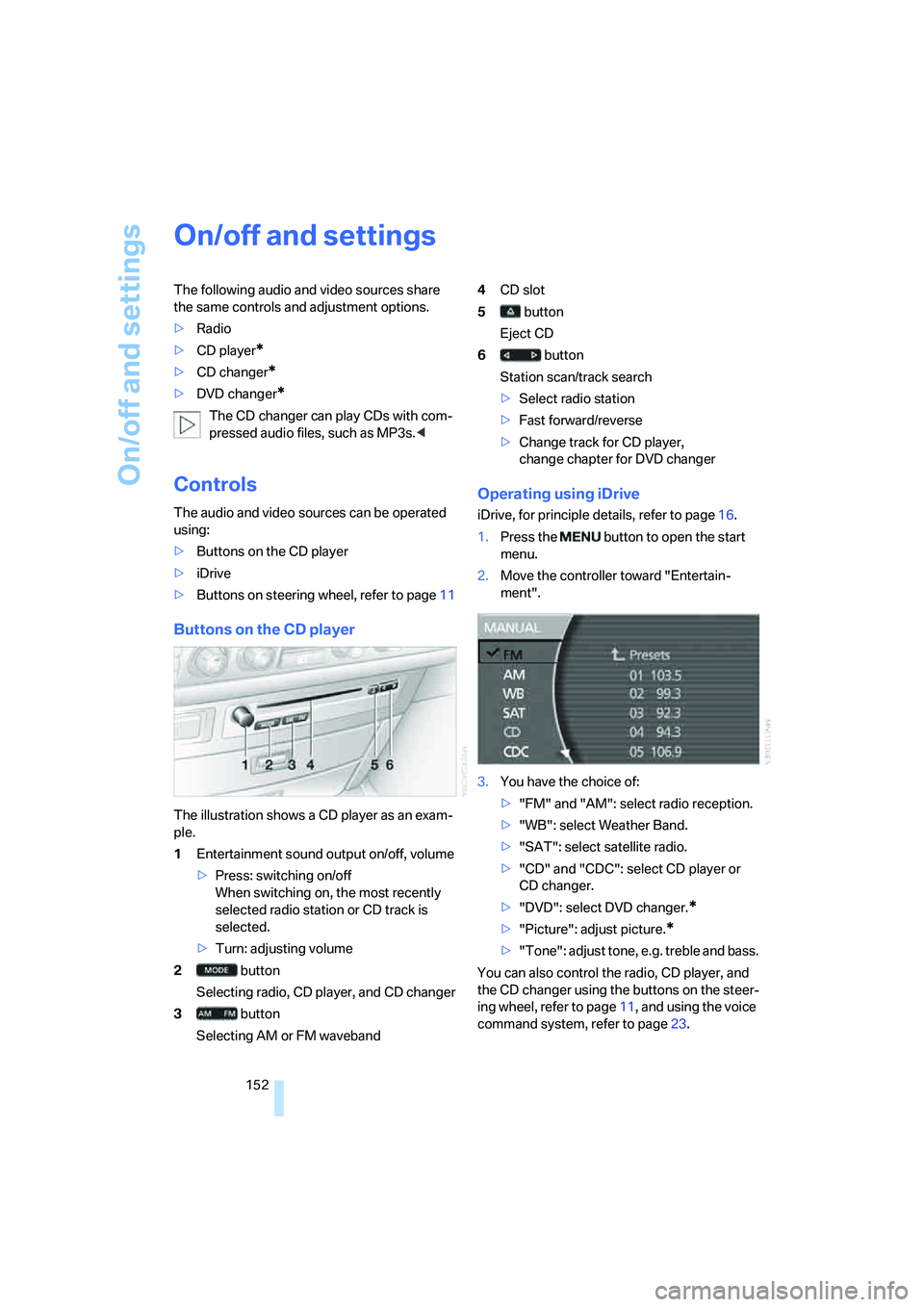
The illustration shows a CD player as an exam-
ple.
1Entertainment sound output on/off, volume
>Press: switching on/off
When switching on, the most recently
selected radio station or CD track is
selected.
>Turn: adjusting volume
2 button
Selecting radio, CD player, and CD changer
3 button
Selecting AM or FM waveband4CD slot
5 button
Eject CD
6 button
Station scan/track search
>Select radio station
>Fast forward/reverse
>Change track for CD player,
change chapter for DVD changer
Operating using iDrive
iDrive, for principle details, refer to page16.
1.Press the button to open the start
menu.
2.Move the controller toward "Entertain-
ment".
3.You have the choice of:
>"FM" and "AM": select radio reception.
>"WB": select Weather Band.
>"SAT": select satellite radio.
>"CD" and "CDC": select CD player or
CD changer.
>"DVD": select DVD changer.
*
>"Picture": adjust picture.*
>"Tone": adjust tone, e.g. treble and bass.
You can also control the radio, CD player, and
the CD changer using the buttons on the steer-
ing wheel, refer to page11, and using the voice
command system, refer to page23.
Page 178 of 247
Telephone overview
176
Telephone overview
The concept
Your BMW is equipped with a mobile phone
preparation package. After a suitable mobile
phone has been logged onto the vehicle once,
you can operate the mobile phone via iDrive,
via the buttons on the steering wheel, via the
phone keypad and by voice.
A mobile phone that has been logged on once is
automatically detected again with the engine
running or the ignition switched on as soon as
it is in the vehicle interior. The logon data of up
to four mobile phones can be stored simulta-
neously. If several mobile phones are detected
simultaneously, the mobile phone logged on
most recently can be operated via the vehicle.
Using a phone in your vehicle
Using snap-in adapter*
The so-called snap-in adapter, a mobile phone
cradle, enables the battery to be charged and
the mobile phone to be connected to the exter-
nal antenna of your vehicle. This assures better
network reception and uniform sound quality.
Ask your BMW center which mobile phones
snap-in adapters are offered for.
BMW discourages the use of mobile
phones or other mobile communications
devices inside the vehicle without a direct con-
nection to an outside antenna. Otherwise, the
vehicle electronics and mobile communications
device can affect each other. In addition, there
is no assurance that the radiation generated
during transmission will be discharged from the
vehicle interior.<
Avoid operating a mobile phone detected by
the vehicle with the keypad of the mobile
phone; otherwise, malfunctions can occur.The mobile phone can be operated by means
of:
>Buttons on the steering wheel, refer to
page11
>Retracting telephone keypad, refer to
page177
>iDrive, for principle details, refer to page16.
>Voice command system
*, refer to page23,
except for incoming calls
For information on operating your mobile
phone, please consult the separate operating
instructions.
For your safety
Only make entries when the traffic situa-
tion allows you to do so. Do not hold the
mobile phone in your hand while you are driving;
use the hands-free system instead. If you do
not observe this precaution, your being dis-
tracted can endanger vehicle occupants and
other road users.<
Suitable mobile phones
Ask your BMW center which mobile phones
with a Bluetooth interface are supported by the
mobile phone preparation package or which
mobile phones snap-in adapters are available
for. These mobile phones support the functions
described in this Owner's Manual with a certain
software version. Malfunctions can occur with
other mobile phones.
*
Page 179 of 247
177
Entertainment
Reference
At a glance
Controls
Driving tips Communications
Navigation
Mobility
Hands-free system
The hands-free microphone is located on the
left-hand side on the headliner.
The hands-free system is activated whenever
you establish or receive a call using the follow-
ing:
>Buttons on the steering wheel, page11
>Voice command system
*, page23, except
for incoming calls
>Retracting telephone keypad
>iDrive, refer to Using the phone, page182
Volume adjustment
You can set the volume for the hands-free sys-
tem and the ring tone separately:
>Turn knob during a call.
>Turn knob during an incoming call.
This volume is maintained, even if the other
audio sources are set to minimum volume.
The setting is stored for the remote control cur-
rently in use.
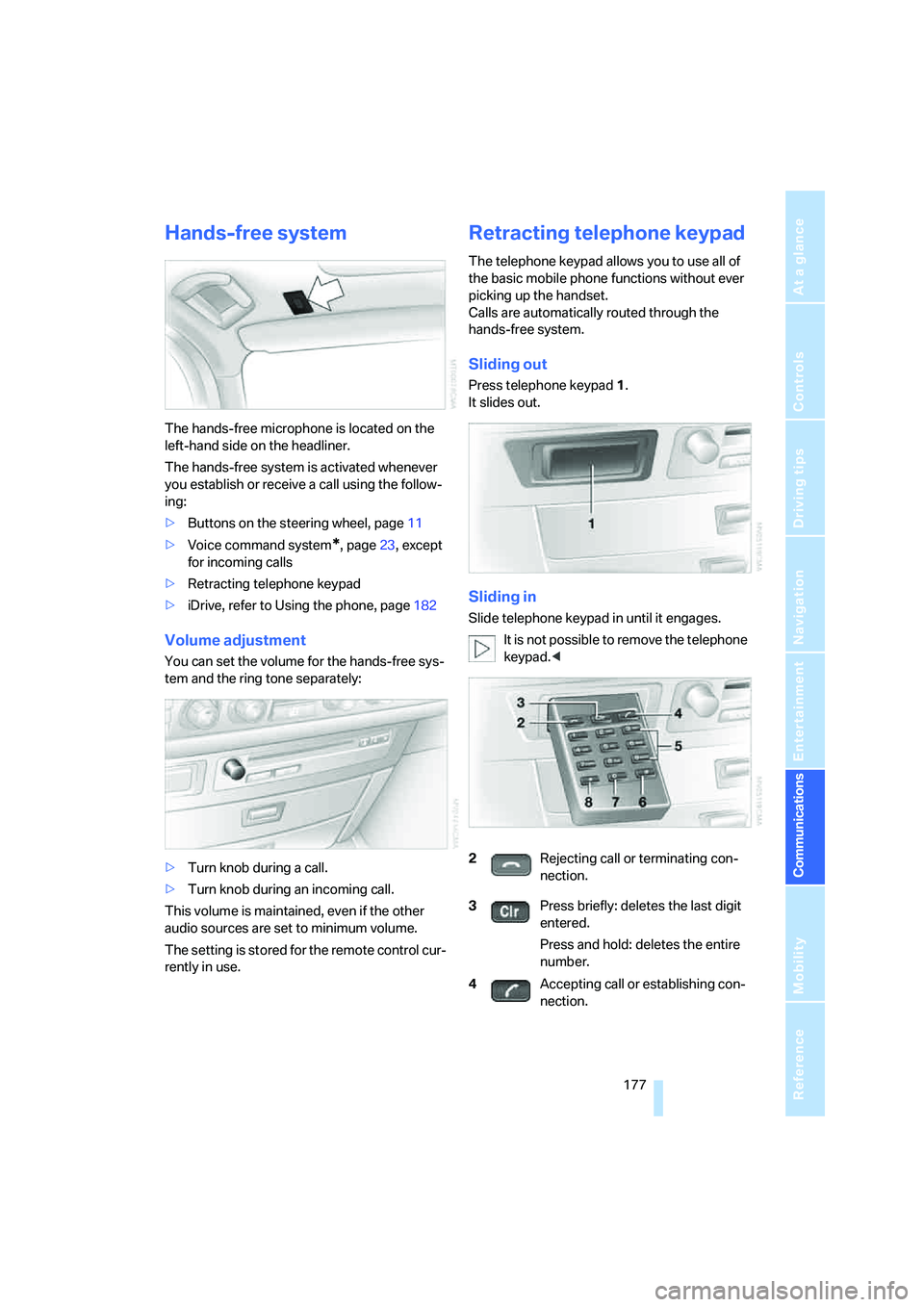
Retracting telephone keypad
The telephone keypad allows you to use all of
the basic mobile phone functions without ever
picking up the handset.
Calls are automatically routed through the
hands-free system.
Sliding out
Press telephone keypad1.
It slides out.
Sliding in
Slide telephone keypad in until it engages.
It is not possible to remove the telephone
keypad.<
2Rejecting call or terminating con-
nection.
3Press briefly: deletes the last digit
entered.
Press and hold: deletes the entire
number.
4Accepting call or establishing con-
nection.
Page 184 of 247
Using the phone
182
Using the phone
You have the option of controlling the phone
using various parts of the vehicle equipment:
>The button on the steering wheel
>The retracting telephone keypad
>iDrive
>The voice command system
*
The phone number appears in the upper status
line, refer to page20.
With the ignition switched off, you can continue
an ongoing call for a maximum of 16 minutes via
the hands-free system.
Requirements
>The logon data of the mobile phone are
stored in the vehicle and the mobile phone
is ready to operate.
>The ignition is switched on.
>The mobile phone is detected by the vehi-
cle.
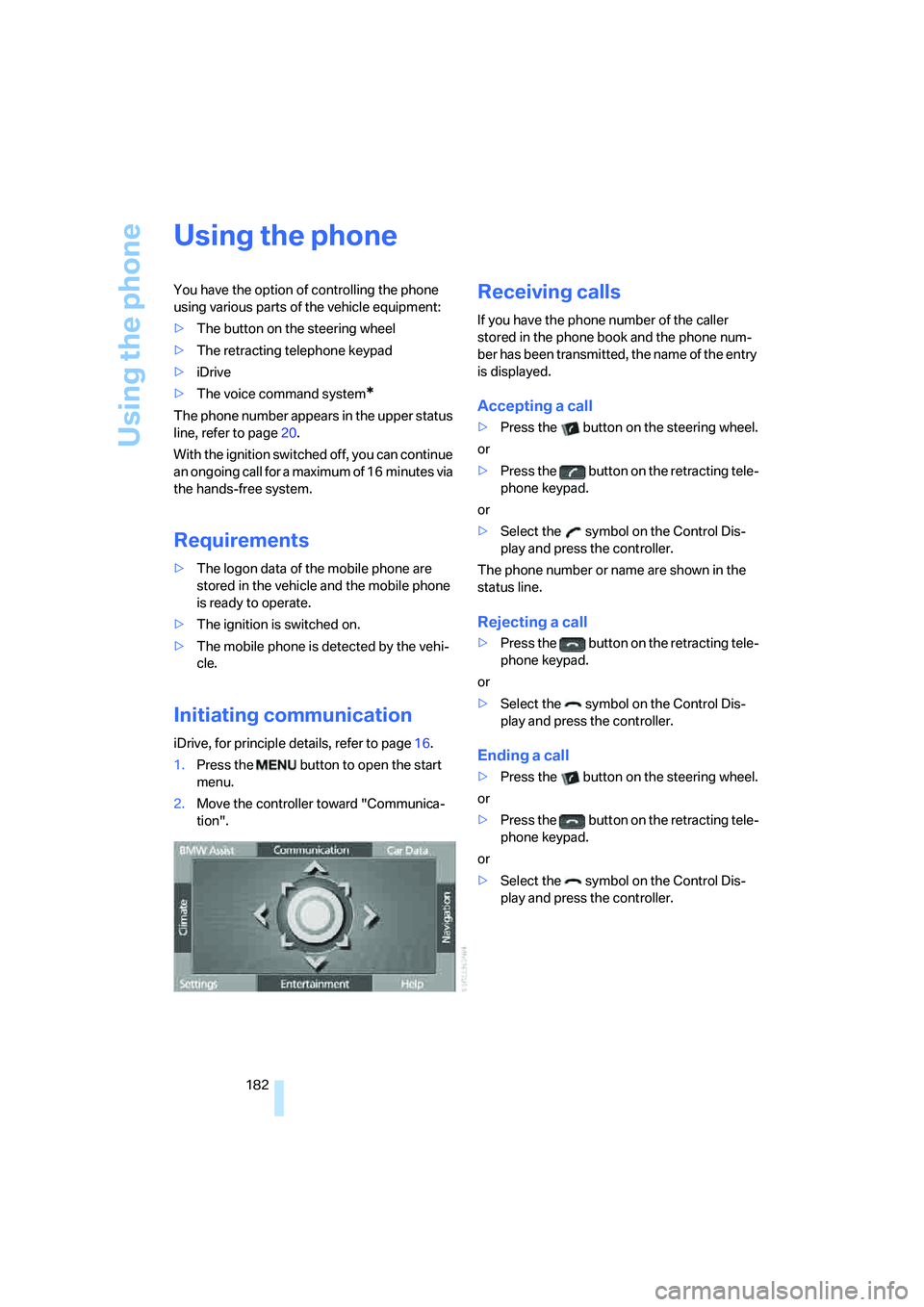
Initiating communication
iDrive, for principle details, refer to page16.
1.Press the button to open the start
menu.
2.Move the controller toward "Communica-
tion".
Receiving calls
If you have the phone number of the caller
stored in the phone book and the phone num-
ber has been transmitted, the name of the entry
is displayed.
Accepting a call
>Press the button on the steering wheel.
or
>Press the button on the retracting tele-
phone keypad.
or
>Select the symbol on the Control Dis-
play and press the controller.
The phone number or name are shown in the
status line.
Rejecting a call
>Press the button on the retracting tele-
phone keypad.
or
>Select the symbol on the Control Dis-
play and press the controller.
Ending a call
>Press the button on the steering wheel.
or
>Press the button on the retracting tele-
phone keypad.
or
>Select the symbol on the Control Dis-
play and press the controller.
Page 186 of 247
Using the phone
184 The connection can also be established
via the button on the steering wheel or the
telephone keypad.<
Dialing phone numbers stored in a list
To select an entry and establish a connection:
1.Select the list and press the controller.
>"TOP 8"
>"Last"
>"Missed"
2.Select the desired entry and press the con-
troller.
3.Select the symbol and press the control-
ler.
The system dials the number.
The phone number is displayed in the top sta-
tus line as this happens.
The connection can also be established
via the button on the steering wheel or the
telephone keypad.<
Deleting entries in lists
You can delete the lists of the most frequently
called phone numbers, missed calls and the last
subscribers called.
1.Select the desired list and press the con-
troller.
The stored entries are shown on the right
side of the Control Displays.
2.Select the symbol and press the con-
troller to delete all existing entries.
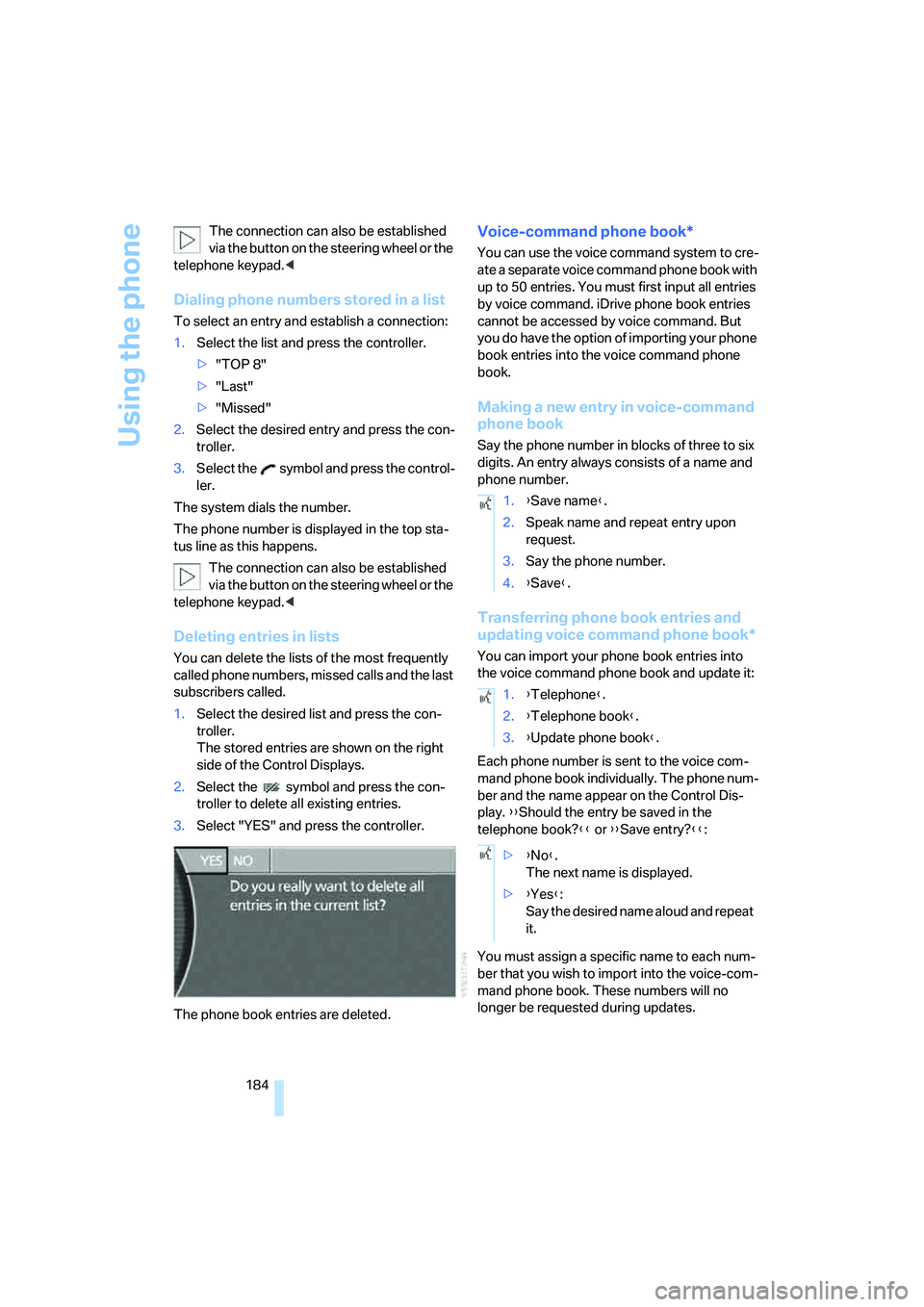
3.Select "YES" and press the controller.
The phone book entries are deleted.
Voice-command phone book*
You can use the voice command system to cre-
ate a separate voice command phone book with
up to 50 entries. You must first input all entries
by voice command. iDrive phone book entries
cannot be accessed by voice command. But
you do have the option of importing your phone
book entries into the voice command phone
book.
Making a new entry in voice-command
phone book
Say the phone number in blocks of three to six
digits. An entry always consists of a name and
phone number.
Transferring phone book entries and
updating voice command phone book*
You can import your phone book entries into
the voice command phone book and update it:
Each phone number is sent to the voice com-
mand phone book individually. The phone num-
ber and the name appear on the Control Dis-
play. {{Should the entry be saved in the
telephone book?}} or {{Save entry?}}:
You must assign a specific name to each num-
ber that you wish to import into the voice-com-
mand phone book. These numbers will no
longer be requested during updates.
1.{Save name}.
2.Speak name and repeat entry upon
request.
3.Say the phone number.
4.{Save}.
1.{Telephone}.
2.{Telephone book}.
3.{Update phone book}.
>{No}.
The next name is displayed.
>{Yes}:
Say the desired name aloud and repeat
it.
Page 213 of 247
Mobility
211Reference
At a glance
Controls
Driving tips
Communications
Navigation
Entertainment
After mounting
1.Tighten the lug bolts in a diagonal pattern.
To ensure safety, always have the
lug bolts checked with a calibrated
torque wrench as soon as possible to
ensure that they are tightened to the speci-
fied torque. The tightening torque is
100lbft/140Nm.<
2.Reverse the removal sequence when stor-
ing the wheel and tools in the vehicle.
3.Check and correct the tire inflation pressure
at the earliest opportunity.
Protect valve stems and valve stem
seal caps from dirt and contamina-
tion. Dirt in valve stems is a frequent source
of gradual air loss.<
4.Reinitialize the Flat Tire Monitor, refer to
page90, or reset the Tire Pressure Monitor,
refer to page92.
5.Replace the damaged tire as soon as possi-
ble and have the new wheel/tire balanced.
Driving with spare tire
On certain wheel-tire combinations, the
size of the spare tire differs from that of
the rest of the tires. The spare tire is fully capa-
ble of running in all load and speed ranges.
However, to recreate the original conditions,
the tire should be replaced as soon as possi-
ble.<
Vehicle battery
Maintenance
The battery is 100 % maintenance-free, i.e., the
electrolyte will last for the life of the battery
when the vehicle is operated in a temperate cli-
mate. Your BMW center will be happy to advise
you on all questions concerning the battery.
Charging battery
Charge the battery in the vehicle only via the
terminals in the engine compartment and with
the engine off. Connections, refer to Jump
starting on page213.
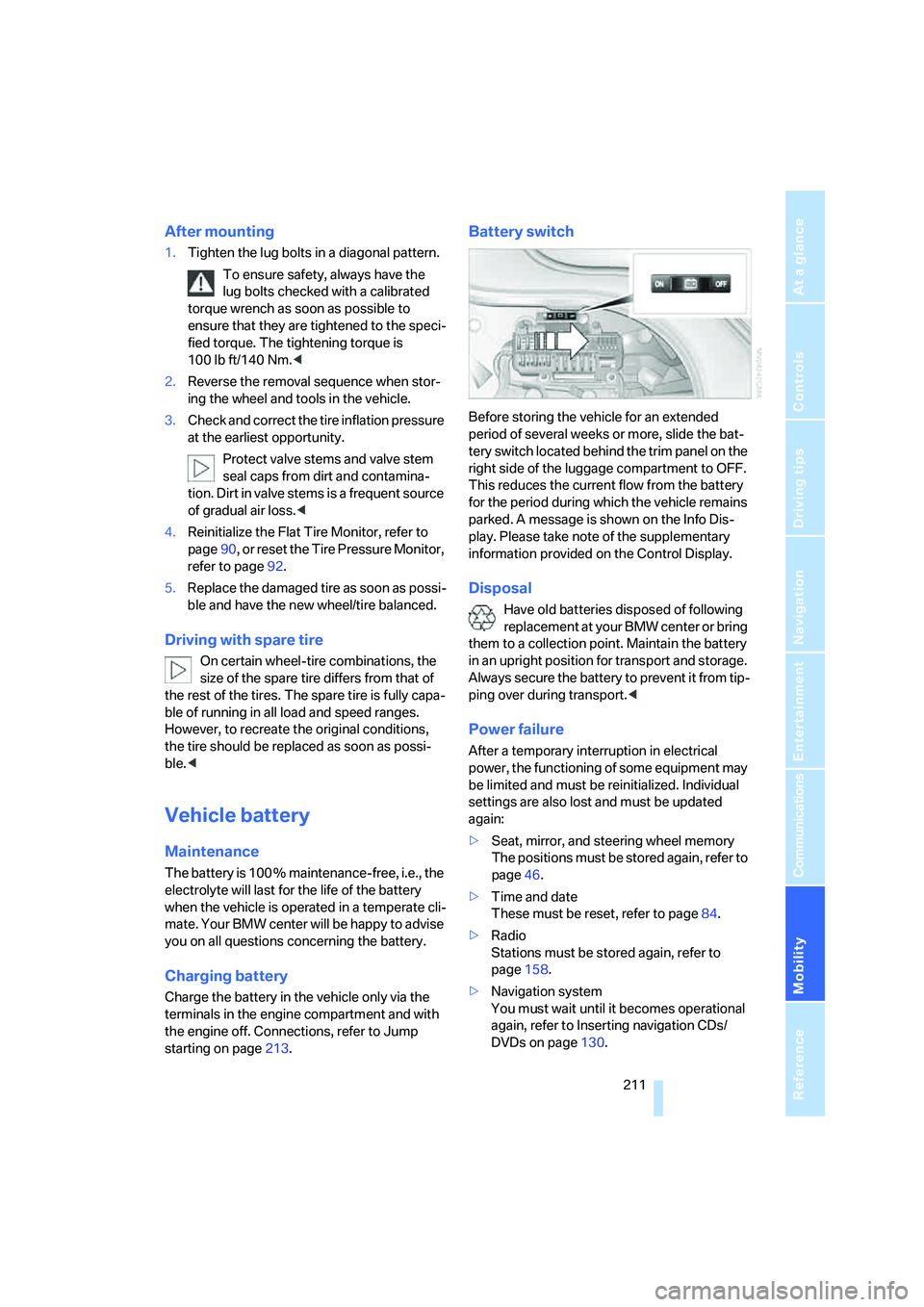
Battery switch
Before storing the vehicle for an extended
period of several weeks or more, slide the bat-
tery switch located behind the trim panel on the
right side of the luggage compartment to OFF.
This reduces the current flow from the battery
for the period during which the vehicle remains
parked. A message is shown on the Info Dis-
play. Please take note of the supplementary
information provided on the Control Display.
Disposal
Have old batteries disposed of following
replacement at your BMW center or bring
them to a collection point. Maintain the battery
in an upright position for transport and storage.
Always secure the battery to prevent it from tip-
ping over during transport.<
Power failure
After a temporary interruption in electrical
power, the functioning of some equipment may
be limited and must be reinitialized. Individual
settings are also lost and must be updated
again:
>Seat, mirror, and steering wheel memory
The positions must be stored again, refer to
page46.
>Time and date
These must be reset, refer to page84.
>Radio
Stations must be stored again, refer to
page158.
>Navigation system
You must wait until it becomes operational
again, refer to Inserting navigation CDs/
DVDs on page130.
Page 216 of 247
Giving and receiving assistance
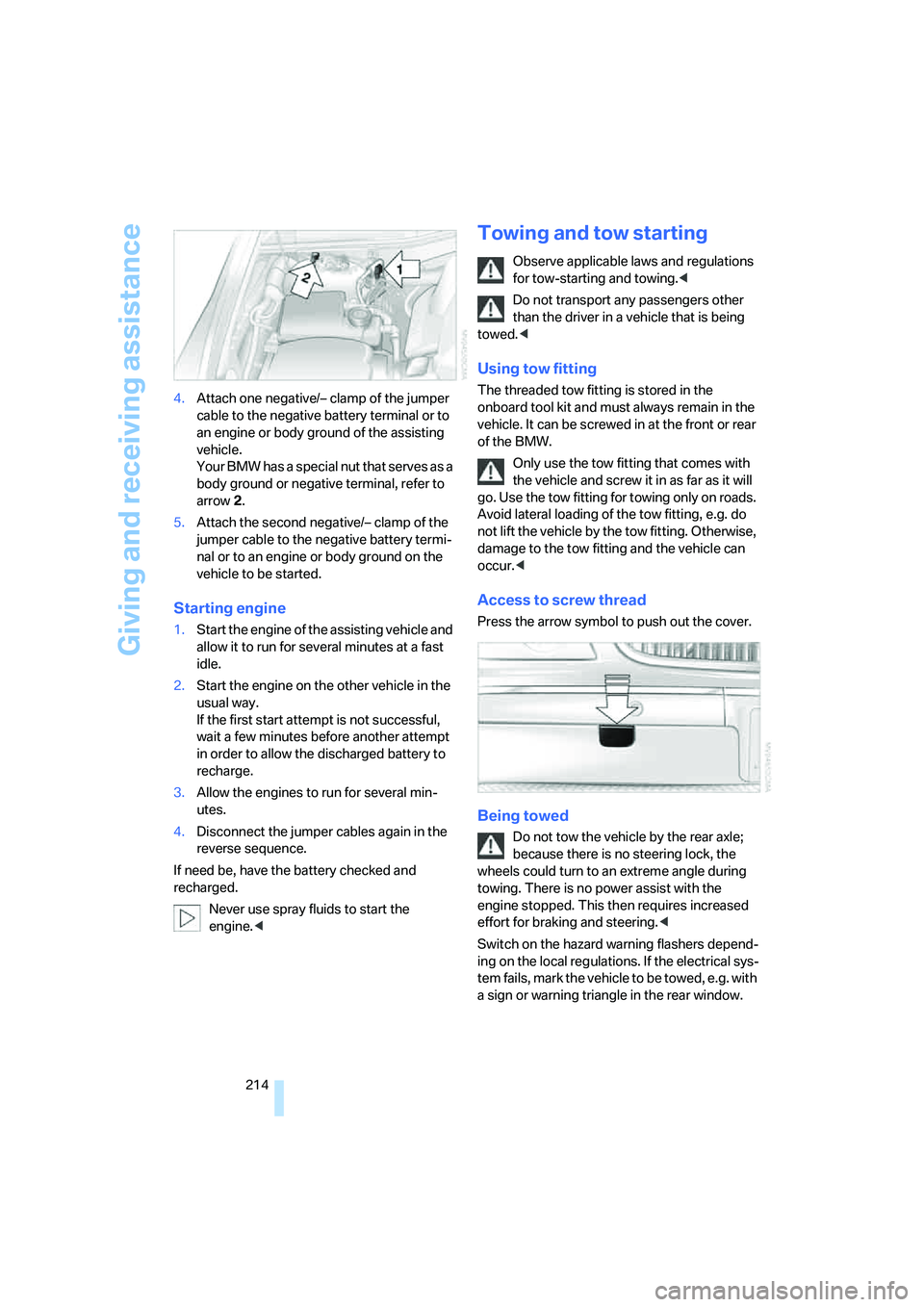
214 4.Attach one negative/– clamp of the jumper
cable to the negative battery terminal or to
an engine or body ground of the assisting
vehicle.
Your BMW has a special nut that serves as a
body ground or negative terminal, refer to
arrow2.
5.Attach the second negative/– clamp of the
jumper cable to the negative battery termi-
nal or to an engine or body ground on the
vehicle to be started.
Starting engine
1.Start the engine of the assisting vehicle and
allow it to run for several minutes at a fast
idle.
2.Start the engine on the other vehicle in the
usual way.
If the first start attempt is not successful,
wait a few minutes before another attempt
in order to allow the discharged battery to
recharge.
3.Allow the engines to run for several min-
utes.
4.Disconnect the jumper cables again in the
reverse sequence.
If need be, have the battery checked and
recharged.
Never use spray fluids to start the
engine.<
Towing and tow starting
Observe applicable laws and regulations
for tow-starting and towing.<
Do not transport any passengers other
than the driver in a vehicle that is being
towed.<
Using tow fitting
The threaded tow fitting is stored in the
onboard tool kit and must always remain in the
vehicle. It can be screwed in at the front or rear
of the BMW.
Only use the tow fitting that comes with
the vehicle and screw it in as far as it will
go. Use the tow fitting for towing only on roads.
Avoid lateral loading of the tow fitting, e.g. do
not lift the vehicle by the tow fitting. Otherwise,
damage to the tow fitting and the vehicle can
occur.<
Access to screw thread
Press the arrow symbol to push out the cover.
Being towed
Do not tow the vehicle by the rear axle;
because there is no steering lock, the
wheels could turn to an extreme angle during
towing. There is no power assist with the
engine stopped. This then requires increased
effort for braking and steering.<
Switch on the hazard warning flashers depend-
ing on the local regulations. If the electrical sys-
tem fails, mark the vehicle to be towed, e.g. with
a sign or warning triangle in the rear window.
Page 227 of 247
Reference 225
At a glance
Controls
Driving tips
Communications
Navigation
Entertainment
Mobility
Audio152
– controls152
– switching on/off153
– tone control153
– volume153
"AUDIO", DVD changer171
Audio mode152
Automatic
– air distribution104
– air volume104
– cruise control67,69
– headlamp control99
– service notification187
– station storage157
– steering wheel adjustment,
refer to Assistance getting in
and out52
– tailgate operation33,36
Automatically switching
between high beams and
low beams, refer to High-
beam assistant100
Automatic car wash, refer to
Caring for your vehicle
brochure
Automatic climate control
– adjusting temperature105
– AUTO program104
– defrosting windows and
removing condensation106
– maximum cooling106
– rear air conditioner108
– rear refrigerator117
– residual heat106
– settings on Control
Display104
– switching cooling function
on and off manually107
– switching off105
Automatic closing of doors
and trunk lid, refer to
Automatic Soft Close35,36
Automatic curb monitor51
Automatic garage door
opener111
Automatic Hold59
– activation/deactivation59
– parking60Automatic lighting
– refer to Automatic headlamp
control99
– refer to Daytime running
lamps99
– refer to High-beam
assistant100
– refer to Interior lamps102
– refer to Pathway lighting99
Automatic recirculated-air
control AUC105
Automatic soft closing
– doors
35
– luggage compartment lid36
Automatic station search156
Automatic transmission with
Steptronic62
– buttons on steering
wheel63
– interlock62
– manually releasing trans-
mission lock64
– shiftlock62
– towing214
– tow-starting215
Automatic windshield washer
system65
"AUTO P"
– Automatic Hold activation/
deactivation59
– programmable buttons52
AUTO program, automatic
climate control104
– adjusting intensity104
"Autostore list", radio155
Average fuel consumption77
– setting units84
Average speed77
– setting units84
"Avoid ferries",
navigation142
"Avoid highway",
navigation142
Avoiding tolls142
Avoiding unintentional
alarms38
"Avoid route", navigation146
"Avoid sect.", navigation146
"Avoid tolls", navigation142Axle loads, refer to
Weights220
"A-Z", telephone183
B
Backrest contour, refer to
Lumbar support
adjustment45
Backrests, refer to Seats,
adjusting44
Backrest width adjustment,
refer to Front comfort seat
adjustment44
Backup lamps, replacing
bulbs209
"Balance", balance and
fader154
Bar, refer to Tow bar215
"Bass", Treble and bass153
Battery211
– jump starting213
– switch211
Battery change, remote
control in Comfort
Access39
"BC", computer77
Belts, refer to Safety belts48
Beverage holder, refer to Cup
holders115
Blower
– refer to Air volume106
– refer to Manually adjusting
air volume108
"BLUETOOTH"181
Bluetooth link, activating/
deactivating180
BMW Assist186
– "BMW Assist"186
– "BMW center"187
– "Customer Relations"188
– "Roadside Assistance"187
BMW Maintenance
System205
BMW Night Vision96
– cleaning camera98
– deactivating97
– making settings97
Page 228 of 247
Everything from A to Z
226 Bottle holder, refer to Cup
holders115
Brake fluid204
– level204
– warning lamp204
Brake force display94
Brake lamp, adaptive, refer to
Brake force display94
Brake lamps
– brake force display94
– replacing bulbs208
Brake rotors, refer to
Corrosion on brake
rotors123
Brakes123
– ABS87
– brake fluid204
– brake force display94
– breaking-in122
– parking brake58
Brake system204
– BMW Maintenance
System205
– brake fluid204
– brake pads204
– breaking-in122
– refer to Braking safely123
Breakdown service, refer to
Roadside Assistance187
Breaking-in122
Breaking-in differential, refer
to Engine and
differential122
"Brightness"
– BMW Night Vision98
– DVD changer170
– on Control Display85
Brightness of Control
Display85
Bulbs, replacing207
"button", programmable
buttons52
Buttons
– on controller16
– on steering wheel11
C
"Calculate", refer to
Bypassing route
sections146
Calculating distance to
destination77
California Proposition 65
Warning5
Call
– accepting182
– missed184
– rejecting182
– touch tone dialing178
Calling
– from phone book183
– from Top 8 list184
– redialing183
– with retracting telephone
keypad177
Can holder, refer to Cup
holders115
Capacities221
Capacity, luggage
compartment220
Car battery, refer to Vehicle
battery211
Car care, refer to Caring for
your vehicle brochure
Car-care products, refer to
Caring for your vehicle
brochure
"Car Data"78,81
Care, refer to Caring for your
vehicle brochure
Caring for the upholstery, refer
to Caring for your vehicle
brochure
Caring for the vehicle finish,
refer to Caring for your
vehicle brochure
Car key, refer to Remote
control/key30
Carpet care, refer to Caring for
your vehicle brochure
Car radio, refer to Radio155Car wash124
– also refer to Caring for your
vehicle brochure
– with Comfort Access39
Catalytic converter, refer to
High temperatures122
"Categories", radio160
CBC Cornering Brake
Control87
CBS Condition Based
Service205
"CD", CD player162
"CDC", CD changer165
CD changer164
– compressed audio files165
– controls152
– fast forward, reverse166
– installation location164
– random sequence166
– sampling166
– selecting a CD165
– selecting track165
– starting164
– tone control153
– volume153
CD player162
– controls152
– fast forward, reverse163
– random sequence163
– sampling162
– selecting tracks162
– starting162
– tone control153
– volume153
Center armrest
– front113
– rear114
Center console, refer to
Comfort features14
Central locking system32
– Comfort Access38
– interior34
"CHANGE", navigation138
Changes, technical, refer to
For your own safety5
Changing scale144
Page 231 of 247
Reference 229
At a glance
Controls
Driving tips
Communications
Navigation
Entertainment
Mobility
DVD changer168
– adjusting picture170
– adjusting volume153
– controls152
– country codes168
– DVD controller169
– fast forward169
– freeze frame170
– opening specific menu171
– playing DVD168
– reverse169
– searching for chapter170
– selecting language171
– selecting picture format170
– selecting subtitles171
– starting168
– tone control153
DVD multimedia changer,
refer to DVD changer168
Dynamic Brake Control
DBC87
Dynamic Drive89
Dynamic Stability Control
DSC87
– indicator lamp13
Dynamic Traction Control
DTC88
– indicator lamp13
E
"EDC"89
EDC Electronic Damping
Control89
Eject button, refer to Buttons
on CD player152
Electrical malfunction
– door lock34
– driver's door34
– fuel filler door192
– glass sunroof, electric42
– luggage compartment lid36
– parking brake60
Electric steering wheel
adjustment52
Electronic brake-force
distribution87Electronic Damping Control
EDC89
Electronic Stability Program
ESP, refer to DSC Dynamic
Stability Control87
Electronic toll collection
device, refer to Entry/pass
tags126
Emergency actuation, refer to
Manual operation
– door lock34
– driver's door34
– fuel filler door192
– glass sunroof42
– luggage compartment lid36
– parking brake60
– transmission lock for
automatic transmission with
Steptronic64
Emergency call178
Emergency release of luggage
compartment lid from inside
the luggage
compartment37
Emergency services, refer to
Roadside Assistance187
"Emissions inspection"79
Energy-conscious driving,
refer to Energy Control/
current fuel consumption77
Energy Control77
Engine
– breaking-in122
– data218
– overheated, refer to Coolant
temperature76
– speed218
– starting57
– starting difficulties58
– switching off58
Engine compartment202
Engine coolant203Engine oil
– additives, refer to Approved
engine oils203
– approved oils203
– checking oil level202
– electronic oil level check202
– filling capacity221
– possible displays203
"Engine oil level O.K."203
"Engine oil level too high"203
Engine output, refer to Engine
specifications218
Engine overheating, refer to
Coolant temperature76
Engine speed218
"Enter", navigation134
Entering activation time of
parked car ventilation109
– "Time 1"110
– "Time 2"110
Entering destination
address133
Entering destination town/
city132
Entering house number or
intersection, navigation133
Entering intersection133
Entering name132
Entering street133
"Entertainment", tone
adjustment153
Entertainment sound output
on/off153
Entry/pass tags126
Entry for current position and
destination, refer to Entering
destination manually131
Environmentally friendly
driving, refer to Energy
Control77
ESP Electronic Stability
Program, refer to DSC
Dynamic Stability
Control87
Event Data Recorders206
Exhaust system, refer to Hot
exhaust system122