seats BMW 760LI 2013 User Guide
[x] Cancel search | Manufacturer: BMW, Model Year: 2013, Model line: 760LI, Model: BMW 760LI 2013Pages: 243, PDF Size: 5.37 MB
Page 103 of 243
When there is a malfunction, have the air‐
bag system checked immediately
When there is a malfunction, have the airbag
system checked immediately; otherwise, there
is a risk that the system does not function as ex‐
pected in the event of an accident despite cor‐
responding severity of the accident.◀
Automatic deactivation of the front
passenger airbags
The system determines whether the front pas‐
senger seat is occupied by measuring the re‐
sistance of the human body.
The front, knee, and side airbag on the front
passenger side are activated or deactivated ac‐
cordingly.
Leave feet in the footwell
Make sure that the front passenger keeps
his or her feet in the footwell; otherwise, the front
passenger airbags may not function properly.◀
Child restraint fixing system in the front
passenger seat
Before transporting a child on the front passen‐
ger seat, see the safety notes and instructions
under Children on the front passenger seat.◀
Malfunction of the automatic
deactivation system
When transporting older children and adults, the
front passenger airbags may be deactivated in
certain sitting positions. In this case, the indica‐
tor lamp for the front passenger airbags lights
up.
In this case, change the sitting position so that
the front passenger airbags are activated and
the indicator lamp goes out.
If it is not possible to activate the airbags, have
the person sit in the rear.
To make sure that the occupied seat cushion
can be evaluated correctly▷Do not attach covers, cushions, ball mats or
other items to the front passenger seat un‐less they are specifically recommended by
the manufacturer of your vehicle.▷Do not place any electronic devices on the
passenger seat if a child restraint system is
to be installed on it.▷Do not place objects under the seat that
could press against the seat from below.
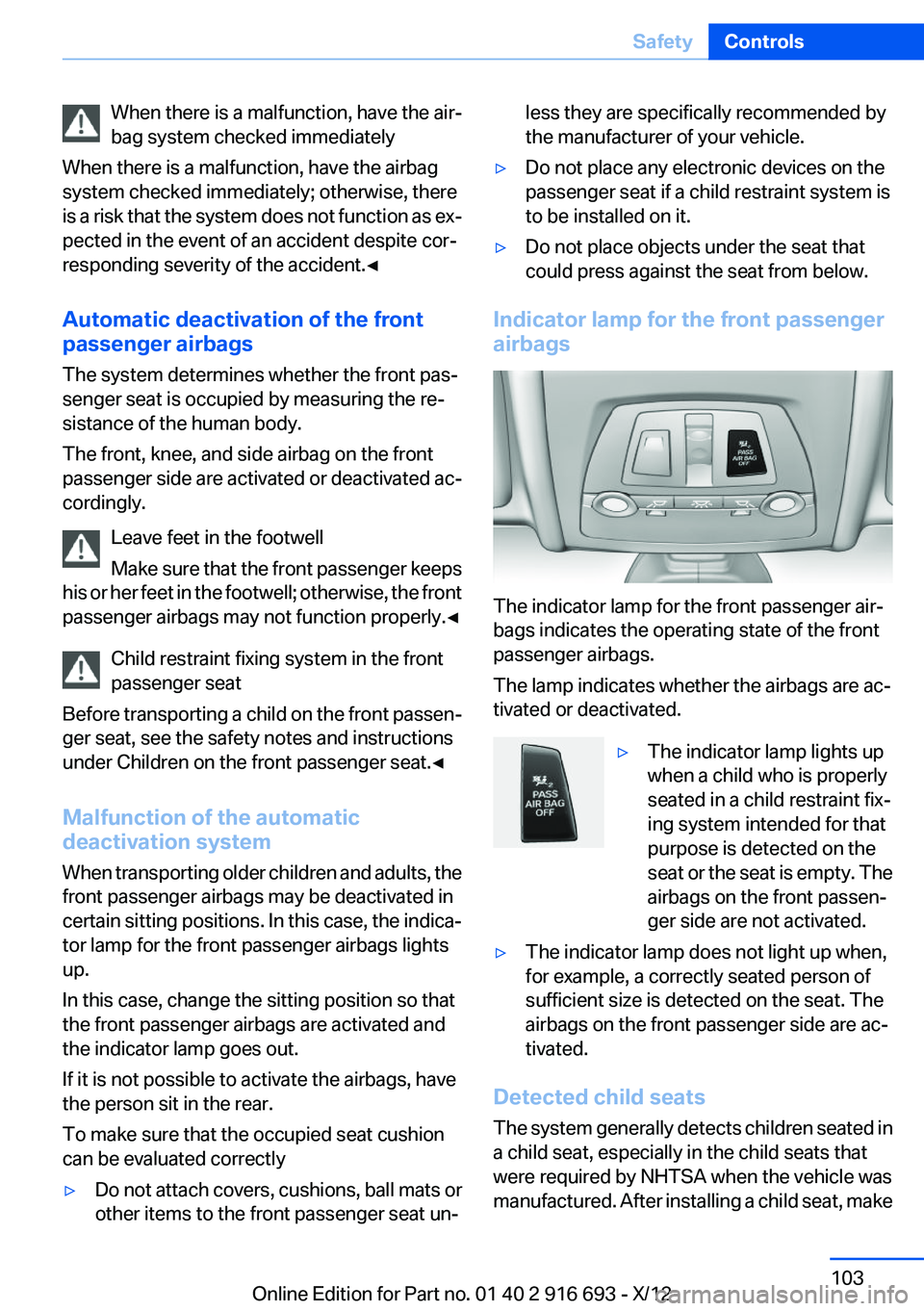
Indicator lamp for the front passenger
airbags
The indicator lamp for the front passenger air‐
bags indicates the operating state of the front
passenger airbags.
The lamp indicates whether the airbags are ac‐
tivated or deactivated.
▷The indicator lamp lights up
when a child who is properly
seated in a child restraint fix‐
ing system intended for that
purpose is detected on the
seat or the seat is empty. The
airbags on the front passen‐
ger side are not activated.▷The indicator lamp does not light up when,
for example, a correctly seated person of
sufficient size is detected on the seat. The
airbags on the front passenger side are ac‐
tivated.
Detected child seats
The system generally detects children seated in
a child seat, especially in the child seats that
were required by NHTSA when the vehicle was
manufactured. After installing a child seat, make
Seite 103SafetyControls103
Online Edition for Part no. 01 40 2 916 693 - X/12
Page 104 of 243
sure that the indicator lamp for the front pas‐
senger airbags lights up. This indicates that the
child seat has been detected and the front pas‐
senger airbags are not activated.
Strength of the driver's and front
passenger airbag
The strength with which the driver's and front
passenger airbags are triggered depends on the
position of the driver's and front passenger
seats.
To maintain the accuracy of this function over
the long-term, calibrate the front seats when a
corresponding message appears on the Control
Display.
Calibrating the front seats
A corresponding message appears on the Con‐
trol Display.1.Move the respective seat forward all the
way.2.Move the respective seat forward again. It
moves forward briefly.3.Readjust the seat to the desired position.
The calibration procedure is completed when
the message on the Control Display disappears.
If the message continues to be displayed, repeat
the calibration.
If the message does not disappear after a repeat
calibration, have the system checked as soon as
possible.
Unobstructed area of movement
Ensure that the area of movement of the
seats is unobstructed to avoid personal injury or
damage to objects.◀
FTM Flat Tire Monitor
The concept
The system does not measure the actual infla‐
tion pressure in the tires.
It detects a pressure loss in a tire by comparing
the rotational speeds of the individual wheels
while moving.
In the event of a pressure loss, the diameter and
therefore the rotational speed of the corre‐
sponding wheel change. This is detected and
reported as a flat tire.
Functional requirements
The system must have been initialized when the
tire inflation pressure was correct; otherwise,
reliable signaling of a flat tire is not ensured. In‐
itialize the system after each correction of the
tire inflation pressure and after every tire or
wheel change.
System limits Sudden tire damage
Sudden serious tire damage caused by
external influences cannot be indicated in ad‐
vance.◀
A natural, even pressure loss in all four tires can‐
not be detected. Therefore, check the tire infla‐
tion pressure regularly.
The system could be delayed or malfunction in
the following situations:▷When the system has not been initialized.▷When driving on a snowy or slippery road
surface.▷Sporty driving style: slip in the drive wheels,
high lateral acceleration.▷When driving with snow chains.
Status display
The current status of the Flat Tire Monitor can
be displayed on the Control Display, e.g.,
whether or not the FTM is active.
1."Vehicle Info"2."Vehicle status"3. "Flat Tire Monitor"
The status is displayed.
Seite 104ControlsSafety104
Online Edition for Part no. 01 40 2 916 693 - X/12
Page 121 of 243
Starting at approximately 43 mph/70 km/h, the
system is active and can display a recommen‐
dation to take a break.
Break recommendation
If the driver becomes increasingly less alert or
fatigued, a message is displayed in the Control
Display with the recommendation to take a
break.
A recommendation to take a break is displayed
only once during an uninterrupted trip.
After a break, another recommendation to take
a break cannot be displayed until after approxi‐
mately 45 minutes.
System limits
The function may be limited in the following sit‐
uations, for instance, and will either output an
incorrect warning or no warning at all:▷When the clock is set incorrectly.▷When the vehicle speed is mainly below
about 43 mph/70 km/h.▷With a sporty driving style, such as during
rapid acceleration or when cornering
quickly.▷In active driving situations, such as when
changing lanes frequently.▷When the road surface is poor.▷In the event of strong side winds.
PreCrash
The concept
With this system critical driving situations that
might result in an accident can be detected
above a speed of approx. 19 mph/30 km/h. In
these situations, preventative protection meas‐
ures are automatically undertaken to minimize
the risk in the event of an accident as much as
possible.
Critical driving situations may include:
▷Full brake applications.▷Severe understeering.▷Severe oversteering.
If the vehicle includes the collision warning or
collision warning with braking feature, impend‐
ing collisions with vehicles driving ahead or
stopped in front of you can also be detected
within the system's range.
Personal responsibility
The system cannot serve as a substitute
for the driver's personal judgment of the traffic
situation. The system may not always detect
critical situations reliably and in a timely manner.
Adapt speed to traffic situation and drive alertly;
otherwise, a risk to safety may result.◀
Function
After the safety belt is buckled, the front belts
are automatically pretensioned once after the
vehicle is driven is away.
In critical driving situations, the following indi‐
vidual functions become active as needed:
▷The front belts are automatically preten‐
sioned.▷Automatic closing of the windows.▷Automatic closing of the glass sunroof.▷Automatic Positioning of the backrest for
the front passenger seat.▷For vehicles equipped with Comfort Seats in
the rear: automatic positioning of the back‐
rests for the rear passenger seats.
After a critical driving situation without an acci‐
dent, the front belts are loosened again. All other
systems can be restored to the desired setting.
If the belt tension does not loosen automatically,
stop the vehicle and unbuckle the belt using the
red button in the buckle. Fasten the belt before
continuing on your trip.
PostCrash
If an accident above a certain degree of severity,
the system automatically brakes the vehicle to a
Seite 121SafetyControls121
Online Edition for Part no. 01 40 2 916 693 - X/12
Page 168 of 243
Storage compartmentsVehicle equipment
All standard, country-specific and optional
equipment that is offered in the model series is
described in this chapter. Therefore, equipment
is also described that is not available in a vehicle,
e. g., because of the selected optional equip‐
ment or country variant. This also applies for
safety-related functions and systems.
Notes No loose objects in the passenger com‐
partment
Do not stow any objects in the passenger com‐
partment without securing them; otherwise,
they may present a danger to occupants for in‐
stance during braking and avoidance maneu‐
vers.◀
Do not place anti-slip mats on the dash‐
board
Do not place anti-slip mats on the dashboard.
The mat materials could damage the dash‐
board.◀
Storage compartments
The following storage compartments are avail‐
able in the vehicle interior:▷Glove compartment on the driver's and front
passenger side, refer to page 168.▷Storage compartment in the center armrest,
refer to page 169, in the front and rear.▷Compartments in the doors.▷Pockets on the backrests of the front seats.▷Net in the front passenger footwell.Glove compartment
Front passenger side
Opening
Pull the handle.
The light in the glove compartment switches on.
Close the glove compartment again im‐
mediately
Close the glove compartment immediately after
use while driving; otherwise, injury may occur
during accidents.◀
Closing
Fold up the cover.
Opening the top cover
Press the button.
The top cover opens automatically.
Seite 168ControlsStorage compartments168
Online Edition for Part no. 01 40 2 916 693 - X/12
Page 169 of 243
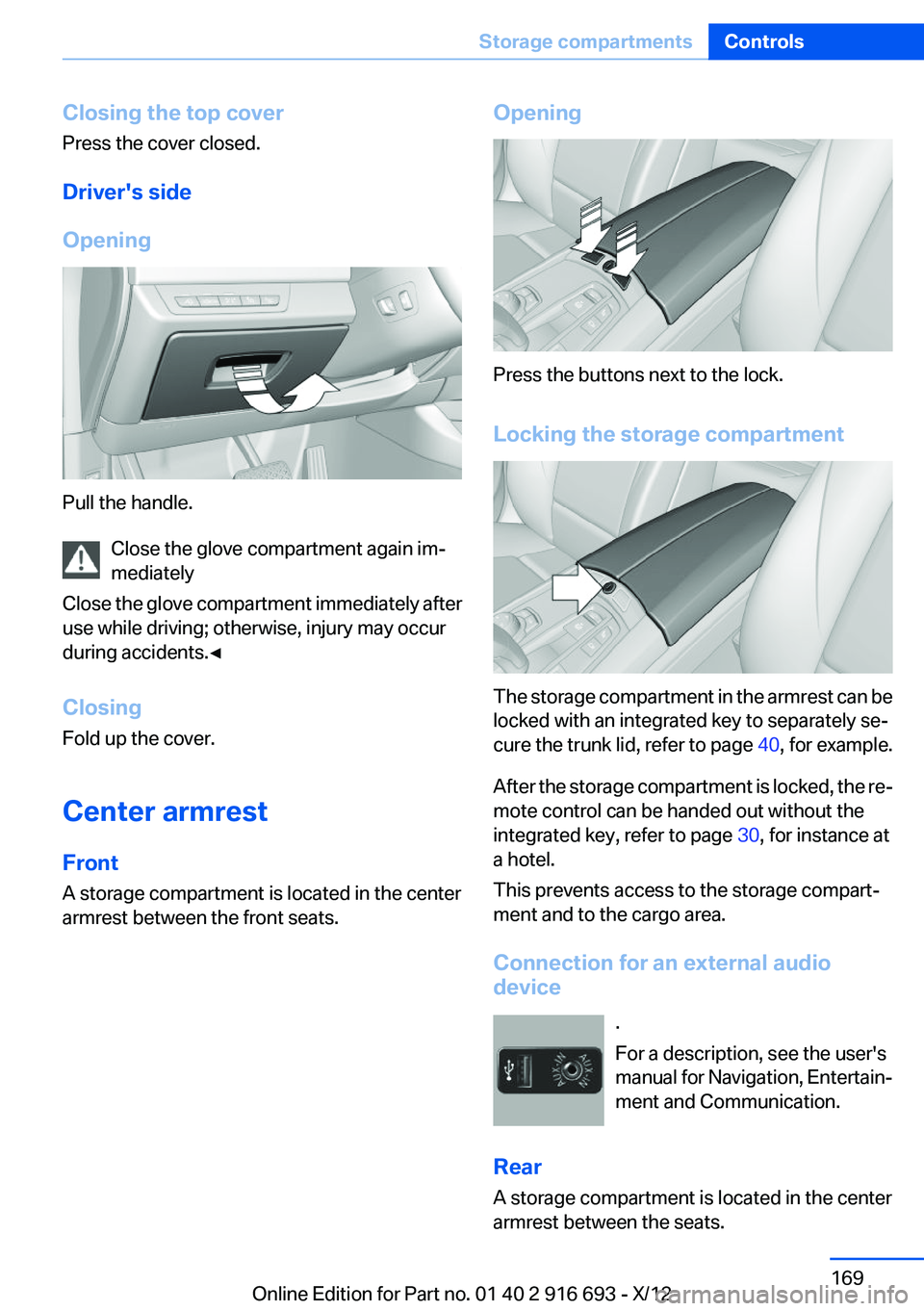
Closing the top cover
Press the cover closed.
Driver's side
Opening
Pull the handle. Close the glove compartment again im‐
mediately
Close the glove compartment immediately after
use while driving; otherwise, injury may occur
during accidents.◀
Closing
Fold up the cover.
Center armrest
Front
A storage compartment is located in the center
armrest between the front seats.
Opening
Press the buttons next to the lock.
Locking the storage compartment
The storage compartment in the armrest can be
locked with an integrated key to separately se‐
cure the trunk lid, refer to page 40, for example.
After the storage compartment is locked, the re‐
mote control can be handed out without the
integrated key, refer to page 30, for instance at
a hotel.
This prevents access to the storage compart‐
ment and to the cargo area.
Connection for an external audio
device
.
For a description, see the user's
manual for Navigation, Entertain‐
ment and Communication.
Rear
A storage compartment is located in the center
armrest between the seats.
Seite 169Storage compartmentsControls169
Online Edition for Part no. 01 40 2 916 693 - X/12
Page 232 of 243
Everything from A to Z
IndexA
ABS, Antilock Brake Sys‐ tem 123
ACC, Active Cruise Control with Stop & Go 131
Activated-charcoal filter 157
Active Blind Spot Detec‐ tion 118
Active Cruise Control with Stop & Go, ACC 131
Active Protection 120
Active seat, front 50
Active seat ventilation, front 51
Active seat ventilation, rear 54
Active Steering, integral 126
Adaptive brake lights, refer to Brake force display 120
Adaptive drive 125
Adaptive light control 97
Adaptive light control, bulb re‐ placement 212
Additives, oil 205
Adjust front seat 48
Adjustments, seats/head re‐ straints 48
After washing vehicle 223
Airbags 101
Airbags, indicator/warning light 102
Air circulation, refer to Recir‐ culated-air mode 156
Air, dehumidifying, refer to Cooling function 156
Air distribution, manual 155
Air flow, automatic climate control 155
Air pressure, tires 191 Air vents, refer to Ventila‐
tion 157
Alarm system 42
Alarm, unintentional 43
All around the center con‐ sole 14
All around the headliner 15
All around the steering wheel 12
ALL program, automatic cli‐ mate control 156
All-season tires, refer to Win‐ ter tires 199
All-wheel-drive 124
Alternating-code hand-held transmitter 162
Alternative oil types 205
Ambient light 99
Antifreeze, washer fluid 76
Antilock Brake System, ABS 123
Anti-slip control, refer to DSC 123
Approved axle load 229
Approved engine oils 205
Armrest, refer to Center arm‐ rest 169
Arrival time 91
Ashtray 163
Assistance, Roadside Assis‐ tance 218
Assistance when driving off 123
Assist system, refer to Intelli‐ gent Safety 109
Attentiveness assistant 120
AUTO H button, refer to Auto‐ matic Hold 72
AUTO intensity 155
Automatic car wash 222 Automatic climate con‐
trol 154
Automatic Cruise Control with Stop & Go 131
Automatic Curb Monitor 59
Automatic deactivation, front passenger airbags 103
Automatic headlamp con‐ trol 96
Automatic Hold 72
Automatic locking 37
Automatic recirculated-air control 156
Automatic Soft Closing, doors 37
Automatic Soft Closing, trunk lid 38
Automatic tailgate 38
Automatic transmission with Steptronic 76
AUTO program, automatic cli‐ mate control 155
AUTO program, intensity 155
Auto Start/Stop function 68
Average fuel consumption 91
Average speed 91
Axle loads, weights 229
B
Backrest curvature, refer to Lumbar support 49
Backrest, width 49
Back seats, adjusting 51
Backup camera 141
Band-aids, refer to First aid kit 218
Bar for tow-starting/tow‐ ing 220
Basic position, rear seats 53 Seite 232ReferenceEverything from A to Z232
Online Edition for Part no. 01 40 2 916 693 - X/12
Page 233 of 243
Battery replacement, vehiclebattery 215
Battery replacement, vehicle remote control 30
Battery, vehicle 215
Belts, safety belts 54
Beverage holder, cu‐ pholder 170
Blinds, sun protection 45
BMW Assist, see user's manual for Navigation, Enter‐
tainment and Communica‐
tion
BMW Homepage 6
BMW Internet page 6
BMW maintenance sys‐ tem 208
Bonus range, ECO PRO 182
Bottle holder, refer to Cu‐ pholder 170
Brake assistant 123
Brake discs, breaking in 174
Brake force display 120
Brake lamps, brake force dis‐ play 120
Brake lamps, bulb replace‐ ment 213
Brake lights, adaptive 120
Brake pads, breaking in 174
Braking, notes 175
Breakdown assis‐ tance 217, 218
Breaking in 174
Brightness of Control Dis‐ play 94
Bulb replacement 210
Bulb replacement, rear 213
Bulbs and lamps 210
Button, RES 134
Button, Start/Stop 66
Bypassing, refer to Jump- starting 218 C
California Proposition 65 Warning 7
Camera, backup camera 142
Camera, care 225
Camera, Side View 144
Camera, Top View 145
Can holder, refer to Cu‐ pholder 170
Car battery 215
Car care products 223
Care, displays 225
Care, vehicle 223
Cargo 177
Cargo area lid 37
Cargo area, storage compart‐ ments 170
Cargo straps, securing cargo 178
Car key, refer to Remote con‐ trol 30
Carpet, care 224
Car wash 222
Catalytic converter, refer to Hot exhaust system 174
CBS Condition Based Serv‐ ice 208
CD/Multimedia, see user's manual for Navigation, Enter‐
tainment and Communica‐
tion
Center armrest 169
Center console 14
Central locking system 33
Central screen, refer to Control Display 16
Changes, technical, refer to Safety 7
Changing parts 210
Changing wheels 214
Changing wheels/tires 198
Check Control 83
Children, seating position 62
Children, transporting safely 62 Child restraint fixing sys‐
tem 62
Child restraint fixing system LATCH 63
Child restraint fixing systems, mounting 62
Child safety locks 65
Child seat, mounting 62
Child seats 62
Chrome parts, care 224
Cigarette lighter 163
Cleaning, displays 225
Climate control 154
Climate control on head‐ liner 159
Climate control wind‐ shield 175
Clock 86
Closing/opening from in‐ side 37
Closing/opening via door lock 36
Closing/opening with remote control 34
Clothes hooks 170
Coasting 184
Coasting with engine decou‐ pled, coasting 184
Coasting with idling en‐ gine 184
Collision warning 110
Collision warning with braking function 112
Combination switch, refer to Turn signals 73
Combination switch, refer to Wiper system 74
COMFORT+ program, Driving Dynamics Control 129
Comfort Access 40
COMFORT program, Driving Dynamics Control 129
Computer 90
Condensation on win‐ dows 155 Seite 233Everything from A to ZReference233
Online Edition for Part no. 01 40 2 916 693 - X/12
Page 238 of 243
Onboard DiagnosticsOBD 209
Onboard monitor, refer to Control Display 16
Onboard vehicle tool kit 210
Opening/closing from in‐ side 37
Opening/closing via door lock 36
Opening/closing with remote control 34
Opening the trunk lid with no- touch activation 41
Operating concept, iDrive 16
Optional equipment, standard equipment 6
Outside air, refer to Automatic recirculated-air control 156
Overheating of engine, refer to Coolant temperature 86
Overtaking prohibitions 88
P
Paint, vehicle 223
Parallel parking assistant 147
Park Distance Control PDC 139
Parked-car ventilation 160
Parked vehicle, condensa‐ tion 176
Parking aid, refer to PDC 139
Parking assistant 147
Parking brake 70
Parking lamps 95
Parking lamps and roadside parking lamps, refer to Light-
emitting diodes, LEDs 212
Parking with Auto Hold 72
Passenger side mirror, tilting downward 59
Pathway lines, backup cam‐ era 143
PDC Park Distance Con‐ trol 139 People detection, refer to
Night Vision 114
Personal Profile 31
Pinch protection system, glass sunroof 46
Pinch protection system, win‐ dows 44
Plastic, care 224
Power failure 216
Power sunroof, glass 45
Power windows 43
Pressure, tire air pres‐ sure 191
Pressure warning FTM, tires 104
Profile, refer to Personal Pro‐ file 31
Programmable memory but‐ tons, iDrive 20
Protective function, glass sun‐ roof 46
Protective function, win‐ dows 44
Push-and-turn switch, refer to Controller 16
R
Radiator fluid 207
Radio-operated key, refer to Remote control 30
Radio ready state 67
Radio, see user's manual for Navigation, Entertainment
and Communication
Rain sensor 75
Rear automatic climate con‐ trol 158
Rear axle steering 126
Rear cooler 165
Rear lamps 213
Rear seats, adjusting 51
Rear seats, basic position 53
Rear sockets 165
Rearview mirror 59
Rear window defroster 156 Recirculated-air mode 156
Recommended tire brands 199
Refueling 188
Remaining range 87
Remote control/key 30
Remote control, malfunc‐ tion 35
Remote control, universal 161
Replacement fuse 216
Replacing parts 210
Replacing wheels/tires 198
Reporting safety defects 9
RES button 134
Reserve warning, refer to Range 87
Reset, Tire Pressure Monitor TPM 107
Residual heat, automatic cli‐ mate control 156
Retaining straps, securing cargo 178
Retreaded tires 199
Reversing lamp, bulb replace‐ ment 213
Roadside parking lamps 96
Roller sunblinds 45
Roll stabilization, refer to Adaptive Drive 125
Roll stabilization, refer to Dy‐ namic Drive 126
RON gasoline quality 190
Roof load capacity 229
Roof-mounted luggage rack 178
Rope for tow-starting/tow‐ ing 220
RSC Run Flat System Compo‐ nent, refer to Run-flat
tires 200
Rubber components, care 224
Run-flat tires 200 Seite 238ReferenceEverything from A to Z238
Online Edition for Part no. 01 40 2 916 693 - X/12
Page 239 of 243
S
Safe braking 175
Safety 7
Safety belt reminder for driv‐ er's seat and front passenger
seat 55
Safety belts 54
Safety belts, care 224
Safety Package, refer to Active Protection 120
Safety switch, windows 44
Safety systems, airbags 101
Saving fuel 180
Screen, refer to Control Dis‐ play 16
Screwdriver 210
Screw thread for tow fit‐ ting 221
Seat belts, refer to Safety belts 54
Seat heating, front 50
Seat heating, rear 53
Seating position for chil‐ dren 62
Seat, mirror, and steering wheel memory 58
Seats 48
Seats, rear, adjusting 51
Seat ventilation, front 51
Seat ventilation, rear 54
Selection list in instrument cluster 90
Selector lever, automatic transmission 77
Self-leveling suspension, air suspension 127
Self-leveling suspension, mal‐ function 127
Sensors, care 225
Service and warranty 7
Service requirements, Condi‐ tion Based Service CBS 208
Service requirements, dis‐ play 87 Service, Roadside Assis‐
tance 218
Settings on Control Dis‐ play 93
Settings, storing for seat, mir‐ rors, steering wheel 58
Shifting, automatic transmis‐ sion 76
Shift paddles on steering wheel 78
Shoulder support 49
Side airbags 101
Side View 144
Signaling, horn 12
Signals when unlocking 35
Sitting safely 48
Size 228
Ski bag 166
Slide/tilt glass roof 45
Smallest turning circle 229
Smoker's package 163
Snow chains 200
Socket 164
Socket, OBD Onboard Diag‐ nostics 209
SOS button 217
Spare fuse 216
Speaker lighting 99
Specified engine oil types 205
Speed, average 91
Speed limit detection, on‐ board computer 91
Speed limiter, display 88
Speed Limit Information 88
Speed limit in the com‐ puter 91
Split screen 20
SPORT+ program, Dynamic Driving Control 128
Sport automatic transmis‐ sion 78
SPORT program, Dynamic Driving Control 129
Sport program, transmis‐ sion 78 Stability control systems 123
Start/stop, automatic func‐ tion 68
Start/Stop button 66
Start function during malfunc‐ tion 31
Starting the engine 67
Status display, tires 106
Status information, iDrive 19
Status of Owner's Manual 6
Steering, Integral Active Steering 126
Steering wheel, adjusting 61
Steering wheel heating 61
Steering wheel memory 58
Steptronic, automatic trans‐ mission 76
Stopping the engine 67
Storage compartments 168
Storage compartments, loca‐ tions 168
Storage, tires 200
Storing the vehicle 225
Summer tires, tread 198
Supplementary text mes‐ sage 85
Surround View 141
Suspension settings 127
Switch for Dynamic Driving Control 127
Switch-on times, parked-car ventilation 160
Switch, refer to Cockpit 12
Symbols 6
T
Tachometer 86
Tail and brake lamps 213
Tailgate 37
Tailgate, automatic 38
Tailgate opening with no- touch activation 41
Tailgate via remote control 35
Tail lamps 213 Seite 239Everything from A to ZReference239
Online Edition for Part no. 01 40 2 916 693 - X/12