battery BMW 760LI SEDAN 2003 Owner's Manual
[x] Cancel search | Manufacturer: BMW, Model Year: 2003, Model line: 760LI SEDAN, Model: BMW 760LI SEDAN 2003Pages: 229, PDF Size: 4.35 MB
Page 204 of 229
Giving and receiving assistance
202
Giving and receiving assistance
Warning triangle*
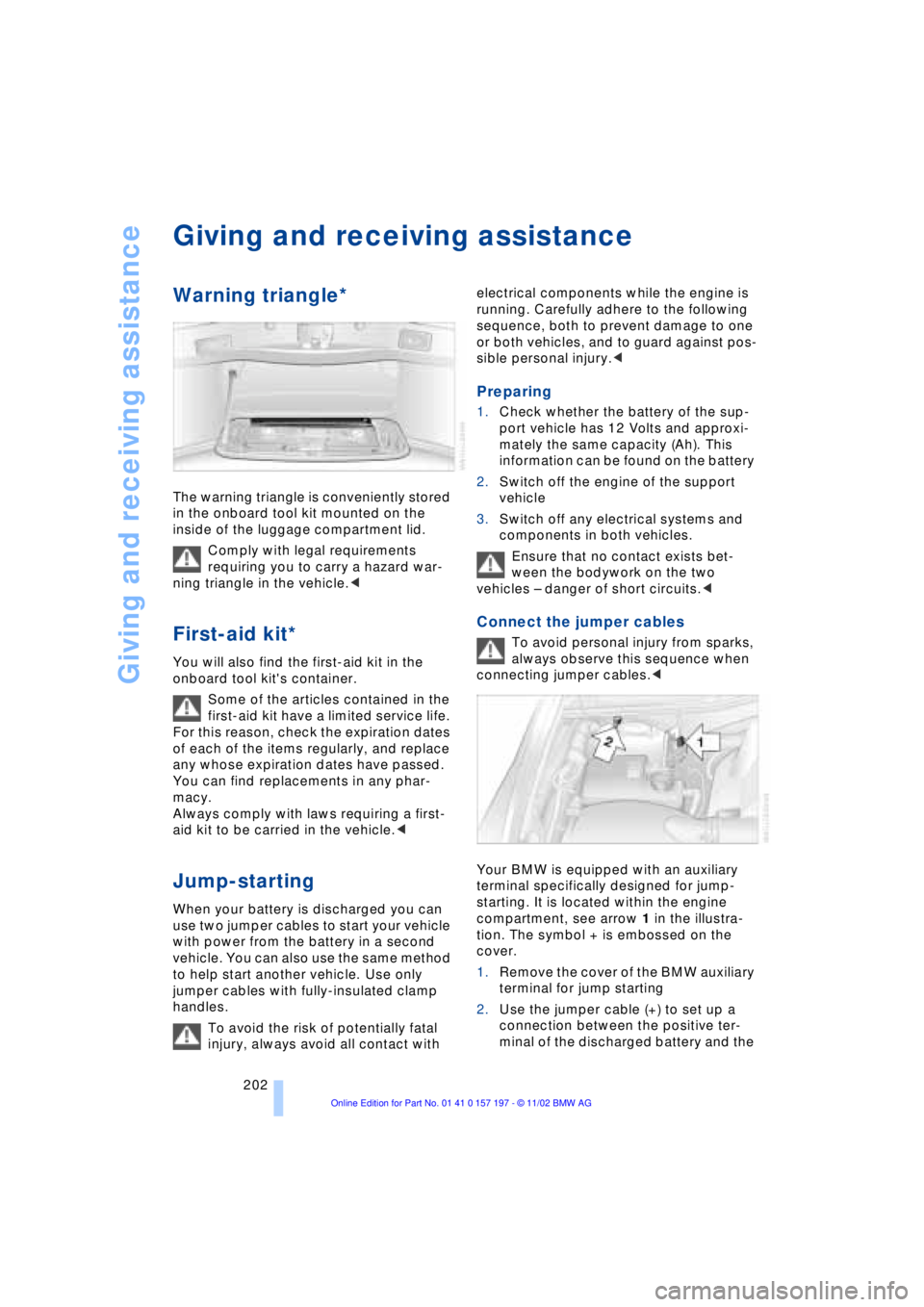
The warning triangle is conveniently stored
in the onboard tool kit mounted on the
inside of the luggage compartment lid.
Comply with legal requirements
requiring you to carry a hazard war-
ning triangle in the vehicle.<
First-aid kit*
You will also find the first-aid kit in the
onboard tool kit's container.
Some of the articles contained in the
first-aid kit have a limited service life.
For this reason, check the expiration dates
of each of the items regularly, and replace
any whose expiration dates have passed.
You can find replacements in any phar-
macy.
Always comply with laws requiring a first-
aid kit to be carried in the vehicle.<
Jump-starting
When your battery is discharged you can
use two jumper cables to start your vehicle
with power from the battery in a second
vehicle. You can also use the same method
to help start another vehicle. Use only
jumper cables with fully-insulated clamp
handles.
To avoid the risk of potentially fatal
injury, always avoid all contact with electrical components while the engine is
running. Carefully adhere to the following
sequence, both to prevent damage to one
or both vehicles, and to guard against pos-
sible personal injury.<
Preparing
1.Check whether the battery of the sup-
port vehicle has 12 Volts and approxi-
mately the same capacity (Ah). This
information can be found on the battery
2.Switch off the engine of the support
vehicle
3.Switch off any electrical systems and
components in both vehicles.
Ensure that no contact exists bet-
ween the bodywork on the two
vehicles Ð danger of short circuits.<
Connect the jumper cables
To avoid personal injury from sparks,
always observe this sequence when
connecting jumper cables.<
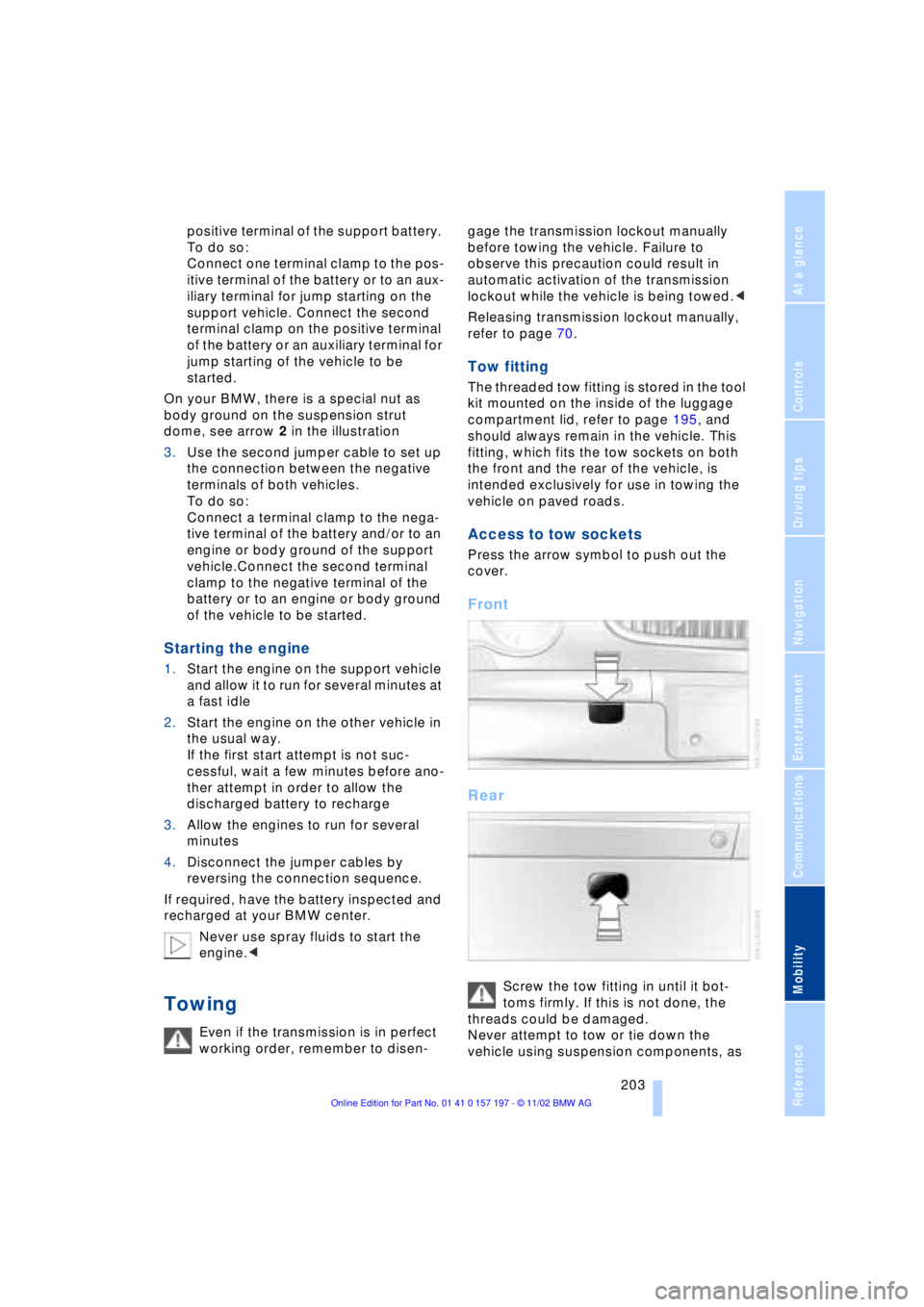
Your BMW is equipped with an auxiliary
terminal specifically designed for jump-
starting. It is located within the engine
compartment, see arrow 1 in the illustra-
tion. The symbol + is embossed on the
cover.
1.Remove the cover of the BMW auxiliary
terminal for jump starting
2.Use the jumper cable (+) to set up a
connection between the positive ter-
minal of the discharged battery and the
Page 205 of 229
At a glance
Controls
Driving tips
Communications
Navigation
Entertainment
Mobility
Reference
203
positive terminal of the support battery.
To do so:
Connect one terminal clamp to the pos-
itive terminal of the battery or to an aux-
iliary terminal for jump starting on the
support vehicle. Connect the second
terminal clamp on the positive terminal
of the battery or an auxiliary terminal for
jump starting of the vehicle to be
started.
On your BMW, there is a special nut as
body ground on the suspension strut
dome, see arrow 2 in the illustration
3.Use the second jumper cable to set up
the connection between the negative
terminals of both vehicles.
To do so:
Connect a terminal clamp to the nega-
tive terminal of the battery and/or to an
engine or body ground of the support
vehicle.Connect the second terminal
clamp to the negative terminal of the
battery or to an engine or body ground
of the vehicle to be started.
Starting the engine
1.Start the engine on the support vehicle
and allow it to run for several minutes at
a fast idle
2.Start the engine on the other vehicle in
the usual way.
If the first start attempt is not suc-
cessful, wait a few minutes before ano-
ther attempt in order to allow the
discharged battery to recharge
3.Allow the engines to run for several
minutes
4.Disconnect the jumper cables by
reversing the connection sequence.
If required, have the battery inspected and
recharged at your BMW center.
Never use spray fluids to start the
engine.<
Towing
Even if the transmission is in perfect
working order, remember to disen-gage the transmission lockout manually
before towing the vehicle. Failure to
observe this precaution could result in
automatic activation of the transmission
lockout while the vehicle is being towed.<
Releasing transmission lockout manually,
refer to page 70.
Tow fitting
The threaded tow fitting is stored in the tool
kit mounted on the inside of the luggage
compartment lid, refer to page 195, and
should always remain in the vehicle. This
fitting, which fits the tow sockets on both
the front and the rear of the vehicle, is
intended exclusively for use in towing the
vehicle on paved roads.
Access to tow sockets
Press the arrow symbol to push out the
cover.
Front
Rear
Screw the tow fitting in until it bot-
toms firmly. If this is not done, the
threads could be damaged.
Never attempt to tow or tie down the
vehicle using suspension components, as
Page 215 of 229
213
At a glance
Controls
Driving tips
Communications
Navigation
Entertainment
Mobility
Reference
Automatic recirculated-air
control AUC 107
Automatic transmission
with L mode 67
Automatic transmission
with Steptronic 69
Ð operation via buttons in
steering wheel 69
"AUTO P" 54, 64
"AUTOSTOR" 161
"Autostore" for radio
operation 150
Average fuel
consumption 88
Average speed 88
Avoid false alarms 41
"Avoid highway" 137
"Avoid route" 139
"Avoid sect." 139
"Avoid tolls" 137
Avoid unintentional
alarms 41
"A-Z" 175
B
Backrest adjustment 47
Ð front seats 46
Ð rear seats 47
Backrests, refer to
Seats 45
Backup lamp, bulb
replacement 197
Balance 147
"Balance" in sound system
operation 148
Bass 147
"Bass" in sound system
operation 148
Battery 200
Ð discharged 202
Ð switch 201
"BC", refer to Computer 88
Belts 50
Beverage holders 118
Blinds 115
Blower 107
BMW active seat 52"BMW Assist" 19, 22, 178
Ð "Roadside
Assistance" 178
BMW Assist 178
BMW comfort seat 46
"BMW Services" 178
"Booktape" 158
Brake, malfunctions 192
Brake assistant, refer to
Dynamic Brake Control
DBC 96
Brake fluid 192
Brake hydraulic
systems 192
Brake lamp, adaptive 101
Brake lamps, bulb
replacement 197
Brake pads 125, 193
Brakes 125
Brake system
Ð brake fluid 192
Break-in procedures 124
"Brief info" information
bulletin 23
"Brightness" during
TV operation 161
"Brightness" in the Control
Center 92
Bulb changes 195
Buttons in steering
wheel 18
Ð refer to Automatic
transmission with
Steptronic 69
C
California Proposition
65 Warning 194
Call
Ð ending 175
Ð making 174
Calling 174
Ð from telephone
directory 175
Ð from the redialing list 176
Ð from the Top 8 list 176
Ð redialing 176Can holders, refer to
Beverage holders 118
Capacities 211
Car care, refer to Care
manual
"Car data" 19, 22
Cargo, securing 126
Cargo area
Ð emergency release 40
Ð manual operation 40
Ð opening and locking
separately 39
Ð opening from the
inside 39
Ð opening from the
outside 38
Ð operating via remote
control 36
Cargo loading 126
"Car parked" 109, 112
Car phone 171, 174
Car radio, refer to
Radio 146
Car wash 124
Car wash, refer to Care
manual
Cassette 158
Cassette deck 158
Ð adjusting the tone 147
Ð "Booktape" 158
Ð controls 146
Ð Dolby 158
Ð fast forward 159
Ð music search 159
Ð operating
temperatures 158
Ð reverse 159
Ð selecting tape side 158
Ð skipping pauses 159
Ð switching on 158
Ð volume 147
CBC Cornering Brake
Control 96
CBS Condition Based
Service 193
"CD" 146, 153
Page 222 of 229
Everything from A to Z
220 Phone number, refer to
Portable phone 174
"Pict. format" 166
"Picture" 146
Ð DVD changer 166
Ð TV 161
Please fasten safety belts
warning lamp 50
Pollen 111
Portable phone
Ð adjusting volume 173
Ð calling 174
Ð call termination 175
Ð controlling with the
buttons on the steering
wheel 18
Ð emergency calls 173
Ð hands-free system 173
Ð missed calls 176
Ð operating using the
Control Display 171
Ð redialing 176
Ð refer to separate Portable
phone manual 170
Ð selecting phone
numbers 174
Ð switching on and off 174
Ð Top 8 list 176
Portable phone battery 171
Portable phone codes 174
Power electric seat 47
Power rating 208
Power socket 119
Pressure, tires 184
Pressure monitor, tires 98
Programmable cruise
control 73
Programming settings,
refer to Vehicle Memory,
Key Memory 60
Publishers 2
Puncture
Ð Flat Tire Monitor 98
R
Radio
Ð adjusting the tone 147
Ð autostore 150
Ð controls 146
Ð frequency band
selection 149
Ð memory locations 150
Ð operating
temperatures 149
Ð sample 150
Ð scan 150
Ð station search 150
Ð station selection 151
Ð store station 150
Ð switching on 149
Ð volume 147
Ð Weather Band 151
Radio mode 61
Radio waveband
selection 149
Rain sensor 72
Reading lamps 104
"Rear" 25
Rear air conditioner 111
Ð air supply 111
Ð cooling adjustment 111
Ð "Extra" 112
Ð maximum cooling 111
Ð "Rear air cond." 112
Ð switching off 111
Ð switching on/off in the
Control Display 112
Rear armrest, refer to
Center armrest 120
Rear cooler 116
Ð "Extra" 116
Ð "Rear refr. box" 116
Rear monitor, refer to
Control Center in rear 24
Rear screen 24
Rear seat heaters 51Rear seats
Ð adjusting passenger seat
from the rear 47
Ð comfort seat
adjustments 47
Ð head restraint
adjustment 48
Rearview mirror 52
Rear window blind, refer to
Sun blinds 115
Rear window defroster 16
Rear window safety
switch 12, 43
"Recirc. air" 54
Reclining seat 45
Redialing list 176
Redialing with portable
phone 176
Refueling 182
Releasing the hood 189
Remaining distance 88
Remote control 34, 35
Remote control unit 34
Removing condensation
from windows 107
Replacement fuses 201
Replacement keys 35
Replacing tires 186
Reserve warning 87
Reservoir, washer
system 73
Reset 147
"RESET" for
audio operation 148
Residual heat mode 108
"Right"
Ð for automatic climate
control 109
Ð for heated seats 51
"RND"
Ð CD changer 157
Ð CD player 154
"Roadside Assistance" 178
Roadside assistance calls
Ð manual activation 173
Roof-mounted luggage
rack 127
"Route" 139
Page 224 of 229
Everything from A to Z
222 "Sport"
Ð "EDC" 97
Stability control,
refer to Driving stability
control 94
Standard during TV
operation 161
Standing lamps 103
Start/stop button 61
Starting 62
Starting and stopping
Ð cassette deck 158
Ð CD changer 156
Ð CD player 153
Ð DVD changer 164
Ð radio 149
Ð TV 160
Starting
problems 62, 203, 204
Starting the engine 62
"State inspection" 84
Station, refer to Radio 150
Status lines in Control
Center 24
Steering wheel 18
Ð adjustment 53
Ð individual button
assignment options 53
Steering wheel adjustment,
automatic 53
Steering wheel heater 53
Steering wheel memory 54
Steptronic 69
Stopwatch 90
Ð "INTERM. TIME" 90
Storage, refer to Care
manual
Storage compartments 117
Storing desired speeds,
refer to Programmable
cruise control 75
Storing destination per
voice 141
Storing seating position,
refer to Seat, mirror and
steering wheel
memory 54
Straps, refer to Cargo
loading 126
"Street" for navigation 134"SUBTITLE" in DVD
mode 167
Summer tires 187
Sun blinds 115
Switch for battery 201
Switching audio sources
on/off 147
Switching off the engine 62
Switching on and off
portable phone 174
"Switch. time1" 113
"Switch. time 2" 113
Symbols 6
Ð Control Center 20
System failure reports, refer
to Check Control 85
T
Tachometer 82
Tail lamps 197
Ð bulb replacement 197
"Tape" 146, 158, 159
Target cursor for
navigation 134, 135
Technical data 208
Technical modifications 8
Telephone 170
Ð operation with the
telephone keypad,
folding 172
Telephone directory 175
Ð creating voice command
telephone directory 175
Ð deleting all entries 176
Ð dialing numbers 175
Ð dialing numbers
using voice command
system 175
Ð entering numbers in voice
command directory 175
Ð entry deletion 176
Ð updating voice command
telephone directory 175
Ð viewing entries 176
Telephone keypad,
folding 172
Television, refer to TV 160
"Temp. distribution" 51
Temperature
adjustment 107Temperature display,
outside temperature 82
Tilt function, passenger-
side mirror 55
Time of arrival,
estimated 88
Timing 90
"Tint" during
TV operation 161
Tire change 197
Tire inflation pressures 184
Ð checking 184
Tire-pressure
monitoring 98, 99
Tire Pressure Monitor
TPM 99
Tire Quality Grading 187
Tires
Ð flat tire 197
Ð tire changes 197
Ð tire damage 186
Ð tire inflation
pressures 184
Ð tire pressure control 99
Ð tire replacement 186
Ð tire size, refer to Wheel
and tire
combinations 187
Ð tire tread 186
Ð treadwear indicators 186
"TITLE" 165
Title search
Ð cassette deck 159
"Tone" for audio
operation 146
Tone for audio operation
Ð adjusting 147
"Tone" in sound system
operation 148
Tools 195
"TOP 8" 176
"TOP" in DVD mode 167
Torque 208
Tow fittings 203
Towing 203, 204
Tow-starting 204
"TPM" 99
Ð "INITIALIZE" 99
TPM Tire Pressure
Monitor 99
Ð "INITIALIZE" 99
Page 225 of 229
223
At a glance
Controls
Driving tips
Communications
Navigation
Entertainment
Mobility
Reference
Track 209
Traction Control System
Ð refer to DSC 94
Traffic congestion, refer to
Selecting new route 139
Transmission
Ð automatic transmission
with L mode 67
Ð automatic transmission
with Steptronic 69
Transmission lockout 68
Ð manual release 70
Transporting children
safely 57
Travel route, refer to
Route 138
Tread depth, tires 186
Treble 147
"Treble" in sound system
operation 148
Trip odometer 82
Trunk lid
Ð refer to luggage
compartment lid 38
Turning circle 209
Turn signal indicators 71
Ð bulb
replacement 196, 197
"TV" 146, 160, 161
TV 160
Ð adjusting picture 161
Ð adjusting the tone 147
Ð controls 146
Ð NTSC 161
Ð PAL 161
Ð SECAM 161
Ð selecting programs 160
Ð selecting standard 161
Ð storing programs 160
Ð switching on 160
Ð volume 147
"TV format" 161
U
Undercoating, refer to Care
manual
Uniform Tire Quality
Grading UTQR 187Universal garage door
opener, refer to
Integrated universal
remote control 114
Upholstery care, refer to
Care manual
Used batteries 201
V
Vacuum cleaner
connection 119
Valve caps 199
Vehicle battery 200
Vehicle
dimensions 209
Vehicle keys 34
Vehicle Memory 60
Ventilation 108
Ventilation, draft-free 108
Ventilation while
parked 112
Vents, ventilation 105
"Video" 146
"View" for
navigation 138, 139
Viscosity 191
Voice command
system 18, 26
Voice guidance for
navigation 139
Volume
Ð audio 147
Ð cassette deck 147
Ð CD changer 147
Ð CD player 147
Ð DVD changer 147
Ð navigation 140
Ð portable phone 173
Ð radio 147
Ð TV 147
Ð voice command
system 27
W
Warm feet and a cool
head 108
Warning lamps 15
Warnings in Check
Control 85Warning triangle 202
Washer nozzles,
windshield 72
"WB" 146
Wear indicators in the
tires 186
Weather Band 151
Weights 210
Wheel and tire
combinations 187
Wheelbase 209
Wheels and tires 184
Width 209
"Window" 110
Windows 42
Ð convenience mode 37
Ð convenience operation 36
Ð safety switch 43
Windshield and headlamp
washer system
Ð washer fluid 73
Windshield wiper blade
replacement 195
Windshield wiper
system 72
Ð washer nozzles 72
Winter tires 188
Wiper blade
replacement 195
Wiper system 72
"With highway" 137
"With map" for
navigation 134, 135
Wordmatch principle for
navigation 142
Working in the engine
compartment 189
X
Xenon lamps 196