bulb BMW 760LI SEDAN 2003 Owners Manual
[x] Cancel search | Manufacturer: BMW, Model Year: 2003, Model line: 760LI SEDAN, Model: BMW 760LI SEDAN 2003Pages: 229, PDF Size: 4.35 MB
Page 7 of 229
At a glance
Operation
Driving tips
Communications
Navigation
Entertainment
Mobility
Reference
188Special characteristics of winter tires
188Snow chains
*
Under the hood
189Hood
190Engine compartment
190Engine oil
191Coolant
192Brake fluid
192Brake hydraulic systems
Maintenance
193The BMW Maintenance System
193Care
Rules and regulations
194California Proposition 65 Warning
194OBD connector
Replacing components
195Onboard tool kit
195Windshield wiper blades
195Lamps and bulbs
197Changing a tire
200Battery
201Fuses
Giving and receiving assistance
202Warning triangle
*
202First-aid kit
*
202Jump-starting
203Towing
Technical data
208Engine specifications
209Dimensions
210Weights
211Capacities
Everything from A to Z
212Contents
Page 73 of 229
At a glance
Controls
Driving tips
Communications
Navigation
Entertainment
Mobility
Reference
71
place Ð the transmission lockout is
released.
Re-engage the transmission lockout
after parking the vehicle at its destina-
tion. Otherwise there is a danger that the
vehicle could start to roll if parked on a
steep slope.<
Engaging again
1.Disengage the release lever by pressing
it together with the red detent lever,
arrow 1
2.Guide the release lever all the way back
into its original position Ð the transmis-
sion lockout is again engaged
3.Fold up and lock the cover panel. Now Ð
and not before Ð the key may be
removed.
Once the transmission lockout has
been re-engaged, the warning in the
Check Control should disappear, and the
symbol in the Info Display should change
from N to P. Should this fail to happen,
there is a danger that the vehicle could
start to roll.<
Information on jump-starting, tow-starting
and towing begins on page 202.
Turn signal indicators/
headlamp flasher
1High beams Ð blue indicator lamp
2Headlamp flasher Ð blue indicator lamp
3Turn signal indicators Ð the green indi-
cator lamp flashes, accompanied by a
periodic ticking from the turn signal
indicator relay
Using turn signal indicators
Move the lever beyond the detent position.
It then returns to the center position when
released. Press the lever as far as the
detent to switch off the turn signal indica-
tors.
Signaling briefly
Press the lever up to but not beyond the
detent. It then returns to the center position
when released.
If the flashing of the indicator lamp and the
ticking from the relay are both faster than
normal, this indicates that one of the bulbs
is defective; if a trailer is attached, this
could also indicate that one of its turn
signal indicator bulbs is defective.
Page 197 of 229
Overview
Controls
Driving tips
Communications
Navigation
Entertainment
Mobility
Reference
195
Replacing components
Onboard tool kit
The onboard tool kit is located in the lug-
gage compartment lid.
Loosen the wingnut to open.
The adapter for the spare key can be stored
beneath the open-ended spanners.
Windshield wiper blades
To replace the blades, start by folding the
wipers out and away from the windshield,
refer to page 73.
Lamps and bulbs
The lamps and bulbs are essential factors
contributing to the safety of your vehicle.
Therefore, comply fully with the following
instructions during bulb replacement. If you
are not familiar with the specified proce-
dures, have the replacements carried out at
your BMW center.
Never touch the glass on new bulbs
with your bare fingers, as even minute
amounts of contamination will burn into the
bulb's surface and reduce its service life.
Use a clean cloth, napkin, etc., or hold the
bulb by its metal socket.<
You can obtain a selection of replacement
bulbs at your BMW center. To prevent short circuits, before wor-
king on any electrical system, equip-
ment or accessory you should always
switch it off and disconnect the cable from
the battery's negative terminal before star-
ting.
To avoid possible injury or equipment
damage when changing bulbs, observe any
instructions provided by the bulb manufac-
turer.<
When maintaining the headlamps,
please comply with the instructions in
the separate Care manual.<
Headlamps
For checking and adjusting headlamp
aim, please contact your BMW
center.<
Engine compartment, left side:
Turn the quick-release fasteners 905 coun-
terclockwise and remove the cover.
After replacing the bulb return the cover to
its original position and press the quick-
release fasteners down.
Page 198 of 229
Replacing components
196
Releasing the lamp cover
The illustration shows the left-hand side of
the engine compartment.
1High beams
Press the tab down, see arrow.
Always wear gloves and eye protec-
tion Ð the atmosphere within the bulb
is pressurized. Failure to observe this pre-
caution can lead to personal injury should
the bulb be damaged.<
1 High beams
H7 bulb, 55 watts
1.Remove the cover
2.Turn the bulb holder to the left and
remove
3.Remove and replace the bulb.
Xenon lamps
The service life of these bulbs is very long
and the probability of a failure is very low,
provided that they are not switched on and
off an unusual number of times. In the
unlikely event that one of these lamps
should fail, you can respond by switching
on your fog lamps and proceeding care-
fully, where allowed by law. To avoid risk of potentially fatal inju-
ries: owing to the extremely high vol-
tages at which these units operate, service
work should always be entrusted to quali-
fied personnel.<
Parking and standing lamps
In the event of a malfunction, please con-
tact your BMW center.
Turn signal indicator, front
Two bulbs 21 watts Ð P 21 W
1.Turn the bulb holder to the left and
remove
2.Apply gentle pressure to the bulb while
turning it to the left for removal and
replacement.
Side-mounted turn signal indicators
Bulb 5 watts Ð W 5 W
1.Press against the front edge of the lamp
with the tip of your finger, then push it to
the rear and release the detent at the
front
2.Turn the lamp 903 and remove
3.Turn the bulb holder to the left and
remove
Page 199 of 229
Overview
Controls
Driving tips
Communications
Navigation
Entertainment
Mobility
Reference
197
4.Extract the bulb for replacement.
Side marker lamps, front and rear
Please contact your BMW center for
replacement.
Tail lamps
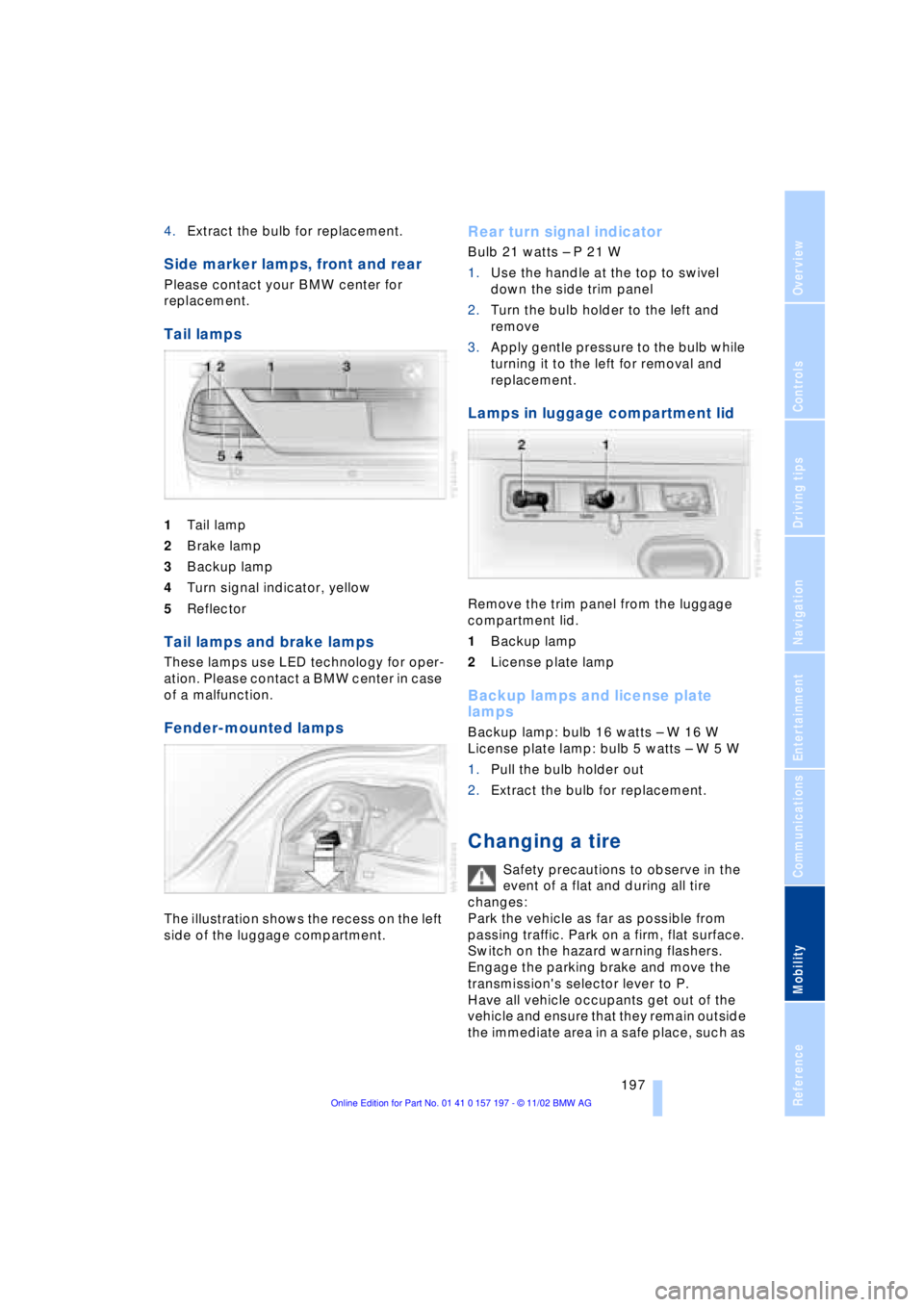
1Tail lamp
2Brake lamp
3Backup lamp
4Turn signal indicator, yellow
5Reflector
Tail lamps and brake lamps
These lamps use LED technology for oper-
ation. Please contact a BMW center in case
of a malfunction.
Fender-mounted lamps
The illustration shows the recess on the left
side of the luggage compartment.
Rear turn signal indicator
Bulb 21 watts Ð P 21 W
1.Use the handle at the top to swivel
down the side trim panel
2.Turn the bulb holder to the left and
remove
3.Apply gentle pressure to the bulb while
turning it to the left for removal and
replacement.
Lamps in luggage compartment lid
Remove the trim panel from the luggage
compartment lid.
1Backup lamp
2License plate lamp
Backup lamps and license plate
lamps
Backup lamp: bulb 16 watts Ð W 16 W
License plate lamp: bulb 5 watts Ð W 5 W
1.Pull the bulb holder out
2.Extract the bulb for replacement.
Changing a tire
Safety precautions to observe in the
event of a flat and during all tire
changes:
Park the vehicle as far as possible from
passing traffic. Park on a firm, flat surface.
Switch on the hazard warning flashers.
Engage the parking brake and move the
transmission's selector lever to P.
Have all vehicle occupants get out of the
vehicle and ensure that they remain outside
the immediate area in a safe place, such as
Page 215 of 229
213
At a glance
Controls
Driving tips
Communications
Navigation
Entertainment
Mobility
Reference
Automatic recirculated-air
control AUC 107
Automatic transmission
with L mode 67
Automatic transmission
with Steptronic 69
Ð operation via buttons in
steering wheel 69
"AUTO P" 54, 64
"AUTOSTOR" 161
"Autostore" for radio
operation 150
Average fuel
consumption 88
Average speed 88
Avoid false alarms 41
"Avoid highway" 137
"Avoid route" 139
"Avoid sect." 139
"Avoid tolls" 137
Avoid unintentional
alarms 41
"A-Z" 175
B
Backrest adjustment 47
Ð front seats 46
Ð rear seats 47
Backrests, refer to
Seats 45
Backup lamp, bulb
replacement 197
Balance 147
"Balance" in sound system
operation 148
Bass 147
"Bass" in sound system
operation 148
Battery 200
Ð discharged 202
Ð switch 201
"BC", refer to Computer 88
Belts 50
Beverage holders 118
Blinds 115
Blower 107
BMW active seat 52"BMW Assist" 19, 22, 178
Ð "Roadside
Assistance" 178
BMW Assist 178
BMW comfort seat 46
"BMW Services" 178
"Booktape" 158
Brake, malfunctions 192
Brake assistant, refer to
Dynamic Brake Control
DBC 96
Brake fluid 192
Brake hydraulic
systems 192
Brake lamp, adaptive 101
Brake lamps, bulb
replacement 197
Brake pads 125, 193
Brakes 125
Brake system
Ð brake fluid 192
Break-in procedures 124
"Brief info" information
bulletin 23
"Brightness" during
TV operation 161
"Brightness" in the Control
Center 92
Bulb changes 195
Buttons in steering
wheel 18
Ð refer to Automatic
transmission with
Steptronic 69
C
California Proposition
65 Warning 194
Call
Ð ending 175
Ð making 174
Calling 174
Ð from telephone
directory 175
Ð from the redialing list 176
Ð from the Top 8 list 176
Ð redialing 176Can holders, refer to
Beverage holders 118
Capacities 211
Car care, refer to Care
manual
"Car data" 19, 22
Cargo, securing 126
Cargo area
Ð emergency release 40
Ð manual operation 40
Ð opening and locking
separately 39
Ð opening from the
inside 39
Ð opening from the
outside 38
Ð operating via remote
control 36
Cargo loading 126
"Car parked" 109, 112
Car phone 171, 174
Car radio, refer to
Radio 146
Car wash 124
Car wash, refer to Care
manual
Cassette 158
Cassette deck 158
Ð adjusting the tone 147
Ð "Booktape" 158
Ð controls 146
Ð Dolby 158
Ð fast forward 159
Ð music search 159
Ð operating
temperatures 158
Ð reverse 159
Ð selecting tape side 158
Ð skipping pauses 159
Ð switching on 158
Ð volume 147
CBC Cornering Brake
Control 96
CBS Condition Based
Service 193
"CD" 146, 153
Page 216 of 229
Everything from A to Z
214 CD changer 155, 156
Ð adjusting the tone 147
Ð controls 146
Ð copy protection 155
Ð fast forward 157
Ð humidity 156
Ð operating
temperatures 156
Ð random play 157
Ð reverse 157
Ð safety 155
Ð sampling 157
Ð scan 157
Ð selecting CD 157
Ð selecting track 157
Ð skipping tracks 157
Ð switching on 156
Ð temperature range 156
Ð track search 157
Ð volume 147
CD player 153
Ð adjusting the tone 147
Ð atmospheric humidity 153
Ð controls 146
Ð fast forward 154
Ð operating
temperatures 153
Ð random play 154
Ð reverse 154
Ð sampling 154
Ð scan 154
Ð selecting track 154
Ð skipping tracks 154
Ð switching on 153
Ð temperature range 153
Ð track search 154
Ð volume 147
Cell phone, refer to
separate Portable phone
manual 170
"Center" 110
Center armrest 120
Center console, refer to
Comfort features 16
Central locking system 35
Ð button 38
Ð remote control 35"CHANGE" for
navigation 136
Changing bulbs, refer to
Lamps and bulbs 195
Changing language 91
Changing settings in the
Control Display 91
Changing units of measure
in Control Display 91
Check Control 85
Ð "Check" 86
Checking engine oil
level 190, 190
Checking tire
pressures 184
Child's seat 57
Child-restraint system 57
Child-safety lock 59
Cigarette lighter 119
Cleaning, refer to Care
manual
Cleaning windshield 72, 73
"Climate" 19, 22
Climate control
Ð automatic air
distribution 107
"Clock" 91
Clock 82
Ð setting time and date 91
Closing
Ð from inside 37
Ð from outside 35
Closing assist
Ð doors 38
Ð luggage compartment
lid 39
Cockpit 12, 16
Coin holder, refer to
Storage
compartments 117
Coin tray, refer to Storage
compartments 117
Cold start 62
"Color" during
TV operation 161
"Comfort"
Ð "EDC" 97
Comfort features 16Comfort seat 46
Ð in rear 47
"Communication"
19, 22, 171
Compact Disc, refer to
CD 153
Compartments, refer to
Storage
compartments 117
Computer 86
Computer, refer to Control
Center 19
Ð automatic climate
control 109
Ð "BC" 89
Ð changing settings 91
Ð display, menus 22
Ð displays in the Control
Display 88
Ð language selection 91
Ð setting time and date 91
Ð status lines 24
Ð symbols 21
Condition Based Service
CBS 193
Confirming a menu item in
the Control Display 20
Connecting car vacuum
cleaner 119
Consumption display 87
"Contrast" during
TV operation 161
Page 217 of 229
215
At a glance
Controls
Driving tips
Communications
Navigation
Entertainment
Mobility
Reference
Control Center 19
Ð assistance window 23
Ð automatic climate
control 109
Ð changing menu page 20
Ð changing settings 91
Ð confirm selection or
entry 20
Ð display, menus 22
Ð display help texts 23
Ð language selection 91
Ð lists 20
Ð menu entry selection 20
Ð rear 24
Ð selecting units of measure
and display format 91
Ð setting time and date 91
Ð status lines 24
Ð symbols 21
Ð symbols and lists 20
Control Center, setting
brightness 92
Control Display 19
Ð rear 24
Controller, refer to Control
Center 19
Controls 12, 16
Convenience operation of
windows and sliding/tilt
sunroof 36, 37
Convenience starting
feature 62
Coolant 190, 191
Cooler, refer to Rear
cooler 116
Cooling adjustment
Ð rear air conditioner 111
Copyright 2
Cornering Brake Control
CBC 96
Country of destination 133
Courtesy lamps 104
Creating voice address
book 141
Cruise control
Ð active cruise control 75
Cruise control, refer to
Programmable cruise
control 73Cruising range 87
Cup holders, refer to
Beverage holders 118
Curb lamp
Ð bulb replacement 196
Curb weight 210
Current fuel
consumption 88
"Customer Relations" 178
D
Dashboard 12, 16
Data 208
"Date" 91
Daytime driving lamps 102
DBC Dynamic Brake
Control 96
Deactivating
Ð interior motion
sensor 36, 41
Ð tilt alarm sensor 36, 41
Default settings 147
Defrosting windows and
removing
condensation 107
Defrosting windshield, refer
to Defrosting windows
and removing
condensation 107
Defrost setting 107
"DELETE" for
navigation 136, 137
Destination 132
Destination during
navigation
Ð selecting with
"Information" 135
Ð select using voice 141
Destination entry 132
Destination list for
navigation system 136
"Destinations" 132
"Dest. input" 132
"Detour" 139
Dialed numbers 176
Digital coverage area for
navigation 130
Dimensions 209Dimming mirrors 52
Dipstick, engine oil 190
Direction
Ð arrow 138
Ð to destination 137
Ð voice instructions 140
Directional indicators, refer
to Turn signal
indicators 71
Disc brakes 125
Displacement 208
Display
Ð computer 22
Ð Control Center 22
Display, refer to Control
Display 19
Display format and units of
measure in Control
Display, changing 91
Display illumination 103
Display lighting, refer to
Instrument lighting 103
Displays 14
Distance 88
Distance tempomat
Ð refer to Active cruise
control 75
Distance to destination 88
Distance warning 93
"Dolby..." for audio
operation 159
Door keys 34
Door mirrors
Ð automatic dimming 52
Doors
Ð child-safety lock 59
Ð locking and unlocking 35
Ð manual operation 37
Ð remote control 35
DOT Quality Grades 186
Draft-free ventilation 108
Drink holders, refer to
Beverage holders 118
Driving stability
control 94, 96
Driving tips 124
"DSC" 95
DSC Dynamic Stability
Control 94
Page 219 of 229
217
At a glance
Controls
Driving tips
Communications
Navigation
Entertainment
Mobility
Reference
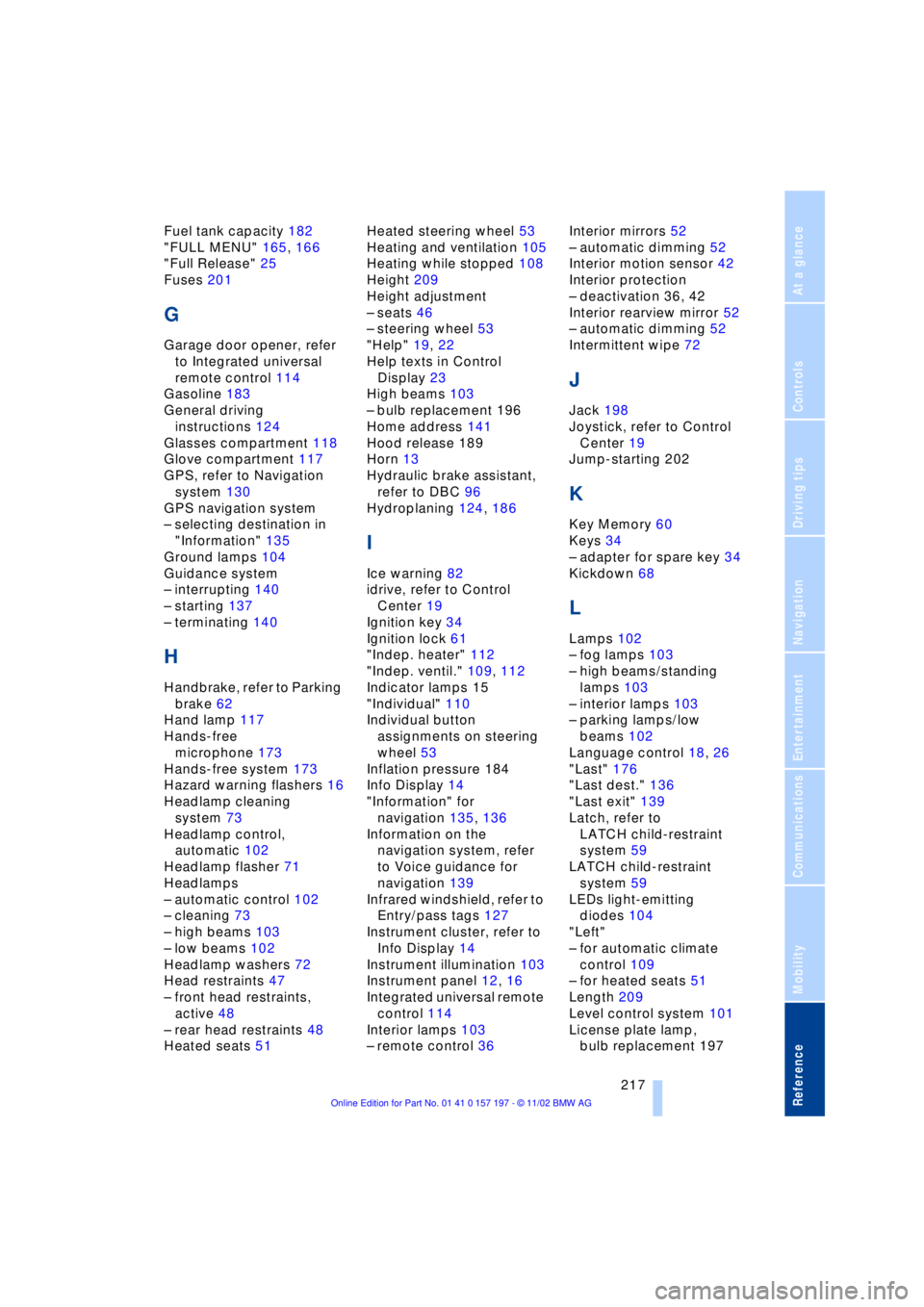
Fuel tank capacity 182
"FULL MENU" 165, 166
"Full Release" 25
Fuses 201
G
Garage door opener, refer
to Integrated universal
remote control 114
Gasoline 183
General driving
instructions 124
Glasses compartment 118
Glove compartment 117
GPS, refer to Navigation
system 130
GPS navigation system
Ð selecting destination in
"Information" 135
Ground lamps 104
Guidance system
Ð interrupting 140
Ð starting 137
Ð terminating 140
H
Handbrake, refer to Parking
brake 62
Hand lamp 117
Hands-free
microphone 173
Hands-free system 173
Hazard warning flashers 16
Headlamp cleaning
system 73
Headlamp control,
automatic 102
Headlamp flasher 71
Headlamps
Ð automatic control 102
Ð cleaning 73
Ð high beams 103
Ð low beams 102
Headlamp washers 72
Head restraints 47
Ð front head restraints,
active 48
Ð rear head restraints 48
Heated seats 51Heated steering wheel 53
Heating and ventilation 105
Heating while stopped 108
Height 209
Height adjustment
Ð seats 46
Ð steering wheel 53
"Help" 19, 22
Help texts in Control
Display 23
High beams 103
Ð bulb replacement 196
Home address 141
Hood release 189
Horn 13
Hydraulic brake assistant,
refer to DBC 96
Hydroplaning 124, 186
I
Ice warning 82
idrive, refer to Control
Center 19
Ignition key 34
Ignition lock 61
"Indep. heater" 112
"Indep. ventil." 109, 112
Indicator lamps 15
"Individual" 110
Individual button
assignments on steering
wheel 53
Inflation pressure 184
Info Display 14
"Information" for
navigation 135, 136
Information on the
navigation system, refer
to Voice guidance for
navigation 139
Infrared windshield, refer to
Entry/pass tags 127
Instrument cluster, refer to
Info Display 14
Instrument illumination 103
Instrument panel 12, 16
Integrated universal remote
control 114
Interior lamps 103
Ð remote control 36Interior mirrors 52
Ð automatic dimming 52
Interior motion sensor 42
Interior protection
Ð deactivation 36, 42
Interior rearview mirror 52
Ð automatic dimming 52
Intermittent wipe 72
J
Jack 198
Joystick, refer to Control
Center 19
Jump-starting 202
K
Key Memory 60
Keys 34
Ð adapter for spare key 34
Kickdown 68
L
Lamps 102
Ð fog lamps 103
Ð high beams/standing
lamps 103
Ð interior lamps 103
Ð parking lamps/low
beams 102
Language control 18, 26
"Last" 176
"Last dest." 136
"Last exit" 139
Latch, refer to
LATCH child-restraint
system 59
LATCH child-restraint
system 59
LEDs light-emitting
diodes 104
"Left"
Ð for automatic climate
control 109
Ð for heated seats 51
Length 209
Level control system 101
License plate lamp,
bulb replacement 197
Page 221 of 229
219
At a glance
Controls
Driving tips
Communications
Navigation
Entertainment
Mobility
Reference
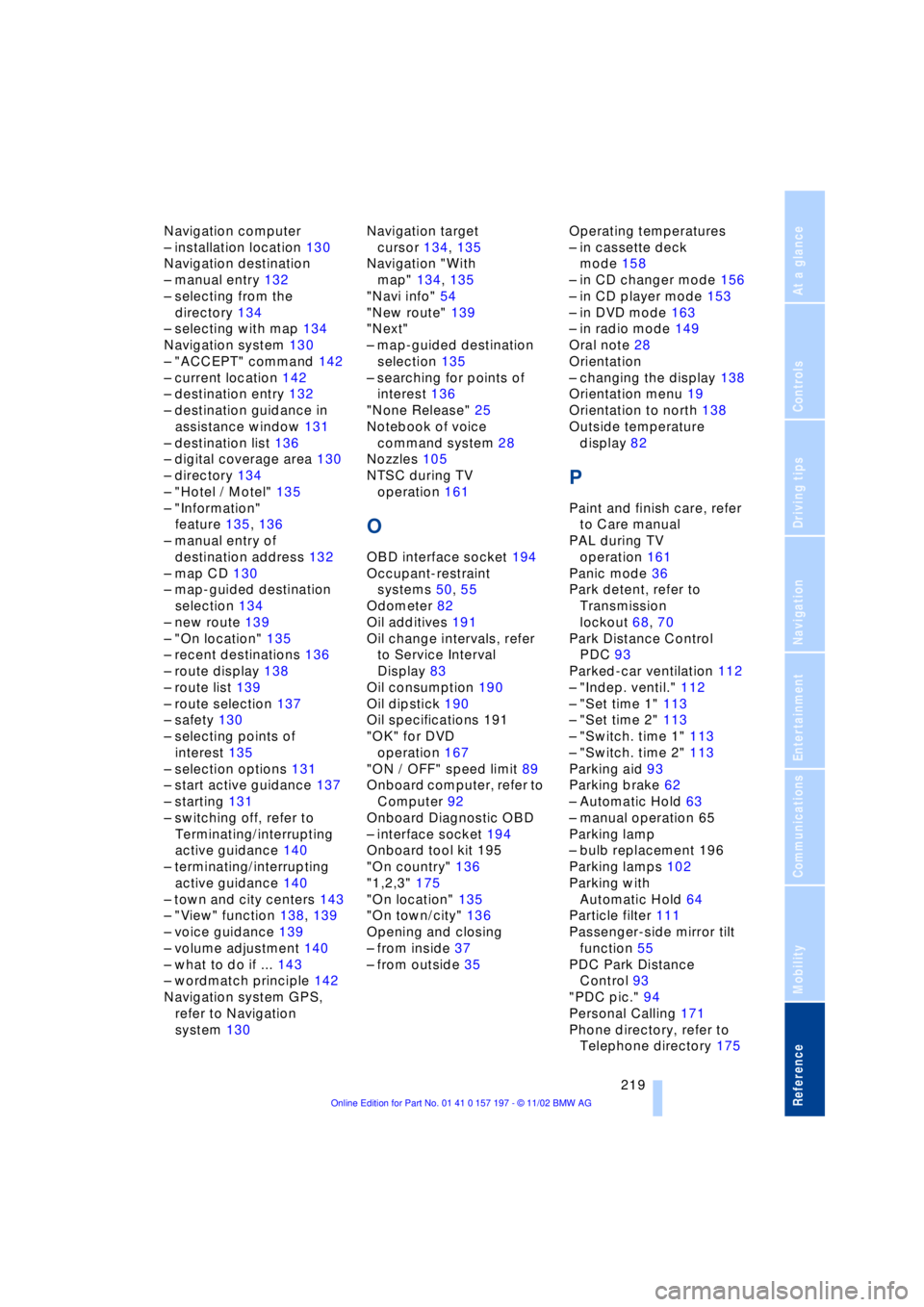
Navigation computer
Ð installation location 130
Navigation destination
Ð manual entry 132
Ð selecting from the
directory 134
Ð selecting with map 134
Navigation system 130
Ð "ACCEPT" command 142
Ð current location 142
Ð destination entry 132
Ð destination guidance in
assistance window 131
Ð destination list 136
Ð digital coverage area 130
Ð directory 134
Ð "Hotel / Motel" 135
Ð "Information"
feature 135, 136
Ð manual entry of
destination address 132
Ð map CD 130
Ð map-guided destination
selection 134
Ð new route 139
Ð "On location" 135
Ð recent destinations 136
Ð route display 138
Ð route list 139
Ð route selection 137
Ð safety 130
Ð selecting points of
interest 135
Ð selection options 131
Ð start active guidance 137
Ð starting 131
Ð switching off, refer to
Terminating/interrupting
active guidance 140
Ð terminating/interrupting
active guidance 140
Ð town and city centers 143
Ð "View" function 138, 139
Ð voice guidance 139
Ð volume adjustment 140
Ð what to do if ... 143
Ð wordmatch principle 142
Navigation system GPS,
refer to Navigation
system 130Navigation target
cursor 134, 135
Navigation "With
map" 134, 135
"Navi info" 54
"New route" 139
"Next"
Ð map-guided destination
selection 135
Ð searching for points of
interest 136
"None Release" 25
Notebook of voice
command system 28
Nozzles 105
NTSC during TV
operation 161
O
OBD interface socket 194
Occupant-restraint
systems 50, 55
Odometer 82
Oil additives 191
Oil change intervals, refer
to Service Interval
Display 83
Oil consumption 190
Oil dipstick 190
Oil specifications 191
"OK" for DVD
operation 167
"ON / OFF" speed limit 89
Onboard computer, refer to
Computer 92
Onboard Diagnostic OBD
Ð interface socket 194
Onboard tool kit 195
"On country" 136
"1,2,3" 175
"On location" 135
"On town/city" 136
Opening and closing
Ð from inside 37
Ð from outside 35Operating temperatures
Ð in cassette deck
mode 158
Ð in CD changer mode 156
Ð in CD player mode 153
Ð in DVD mode 163
Ð in radio mode 149
Oral note 28
Orientation
Ð changing the display 138
Orientation menu 19
Orientation to north 138
Outside temperature
display 82
P
Paint and finish care, refer
to Care manual
PAL during TV
operation 161
Panic mode 36
Park detent, refer to
Transmission
lockout 68, 70
Park Distance Control
PDC 93
Parked-car ventilation 112
Ð "Indep. ventil." 112
Ð "Set time 1" 113
Ð "Set time 2" 113
Ð "Switch. time 1" 113
Ð "Switch. time 2" 113
Parking aid 93
Parking brake 62
Ð Automatic Hold 63
Ð manual operation 65
Parking lamp
Ð bulb replacement 196
Parking lamps 102
Parking with
Automatic Hold 64
Particle filter 111
Passenger-side mirror tilt
function 55
PDC Park Distance
Control 93
"PDC pic." 94
Personal Calling 171
Phone directory, refer to
Telephone directory 175