radio BMW 760LI SEDAN 2003 Owners Manual
[x] Cancel search | Manufacturer: BMW, Model Year: 2003, Model line: 760LI SEDAN, Model: BMW 760LI SEDAN 2003Pages: 229, PDF Size: 4.35 MB
Page 6 of 229
Contents
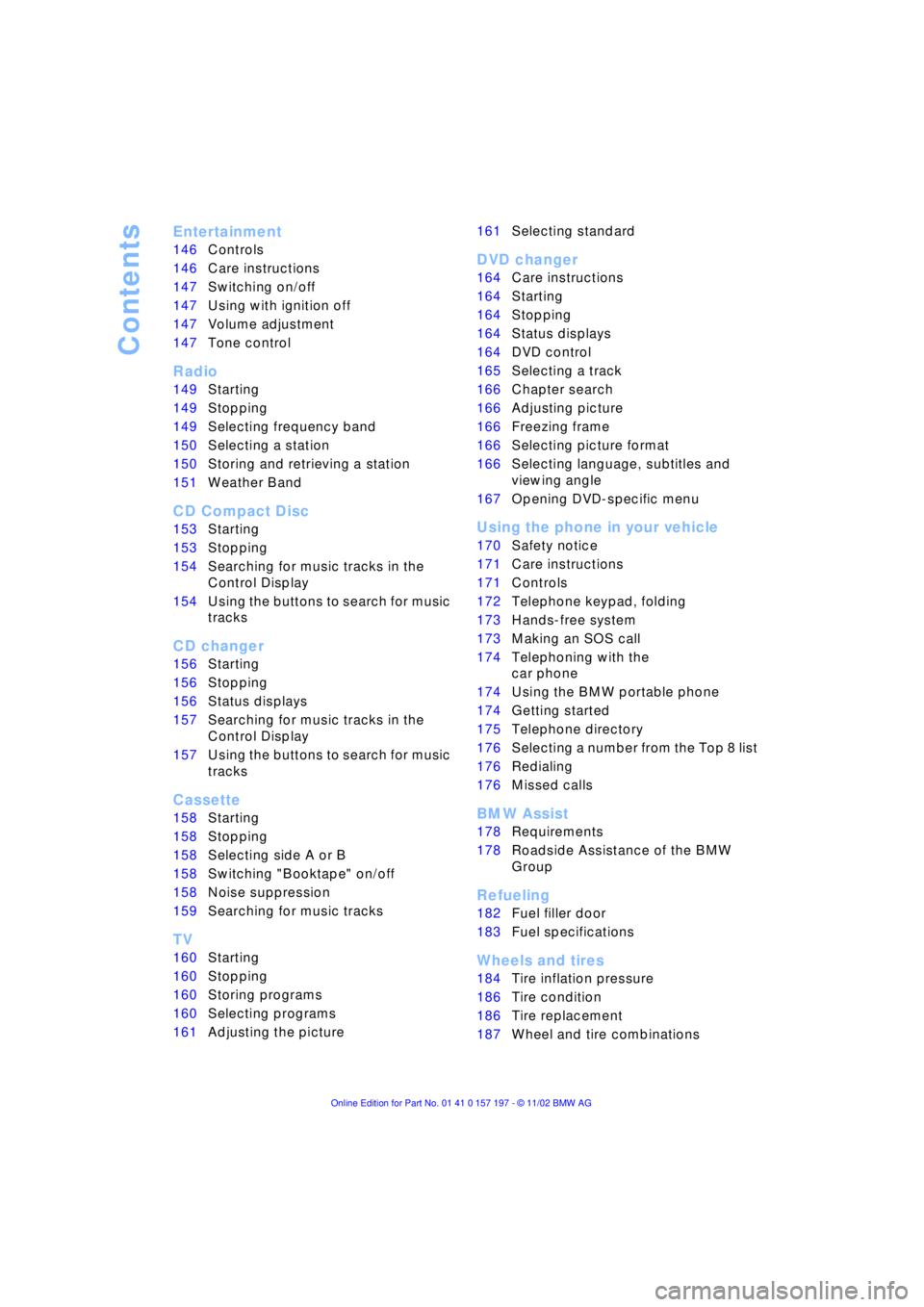
Entertainment
146Controls
146Care instructions
147Switching on/off
147Using with ignition off
147Volume adjustment
147Tone control
Radio
149Starting
149Stopping
149Selecting frequency band
150Selecting a station
150Storing and retrieving a station
151Weather Band
CD Compact Disc
153Starting
153Stopping
154Searching for music tracks in the
Control Display
154Using the buttons to search for music
tracks
CD changer
156Starting
156Stopping
156Status displays
157Searching for music tracks in the
Control Display
157Using the buttons to search for music
tracks
Cassette
158Starting
158Stopping
158Selecting side A or B
158Switching "Booktape" on/off
158Noise suppression
159Searching for music tracks
TV
160Starting
160Stopping
160Storing programs
160Selecting programs
161Adjusting the picture
*
161Selecting standard
DVD changer
164Care instructions
164Starting
164Stopping
164Status displays
164DVD control
165Selecting a track
166Chapter search
166Adjusting picture
166Freezing frame
166Selecting picture format
166Selecting language, subtitles and
viewing angle
167Opening DVD-specific menu
Using the phone in your vehicle
170Safety notice
171Care instructions
171Controls
172Telephone keypad, folding
173Hands-free system
173Making an SOS call
174Telephoning with the
car phone
174Using the BMW portable phone
174Getting started
175Telephone directory
176Selecting a number from the Top 8 list
176Redialing
176Missed calls
BMW Assist
178Requirements
178Roadside Assistance of the BMW
Group
Refueling
182Fuel filler door
183Fuel specifications
Wheels and tires
184Tire inflation pressure
186Tire condition
186Tire replacement
187Wheel and tire combinations
Page 10 of 229
Notes
8
For your own safety
Use unleaded gasoline only. Fuels
containing up to and including
10 % ethanol or other oxygenates with up
to 2.8 % oxygen by weight Ð that is,
15 % MTBE or 3 % methanol plus an equiv-
alent amount of co-solvent Ð will not void
the applicable warranties with respect to
defects in materials or workmanship. Field
experience has indicated significant differ-
ences in fuel quality Ð volatility, composi-
tion, additives, etc. Ð among gasolines
offered for sale in the United States and
Canada. The use of poor-quality fuels may
result in driveability, starting and stalling
problems especially under certain environ-
mental conditions such as high ambient
temperature and high altitude.
Should you encounter driveability prob-
lems which you suspect could be related to
the fuel you are using, we recommend that
you respond by switching to a recognized
high-quality brand.
Failure to comply with these recommenda-
tions may result in unscheduled mainte-
nance.
Follow the relevant safety rules when you
are handling gasoline.
<
Important safety information
For your own safety, use genuine
parts and accessories approved by
BMW.
When you purchase accessories tested
and approved by BMW and Original BMW
Parts, you simultaneously acquire the
assurance that they have been thoroughly
tested by BMW to ensure optimum perfor-
mance when installed on your vehicle.
BMW warrants these parts to be free from
defects in material and workmanship.
BMW will not accept any liability for
damage resulting from installation of parts
and accessories not approved by BMW.
BMW cannot test every product made by
other manufacturers to verify if it can be
used on a BMW safely and without risk to
either the vehicle, its operation, or its occu-
pants.
Original BMW Parts, BMW Accessories
and other products approved by BMW,
together with professional advice on using
these items, are available from all BMW
centers.
Installation and operation of non-BMW
approved accessories such as alarms,
radios, amplifiers, radar detectors, wheels,
suspension components, brake dust
shields, telephones Ð including operation of
any mobile phone from within the vehicle
without using an externally mounted
antenna Ð or transceiver equipment, for
instance, CBs, walkie-talkie, ham radio or
similar accessories, may cause extensive
damage to the vehicle, compromise its
safety, interfere with the vehicle's electrical
system or affect the validity of the BMW
Limited Warranty. See your BMW center for
additional information.
<
Maintenance, replacement, or repair
of the emission control devices and
systems may be performed by any automo-
tive repair establishment or individual using
any certified automotive part.
<
Page 20 of 229
Cockpit
18
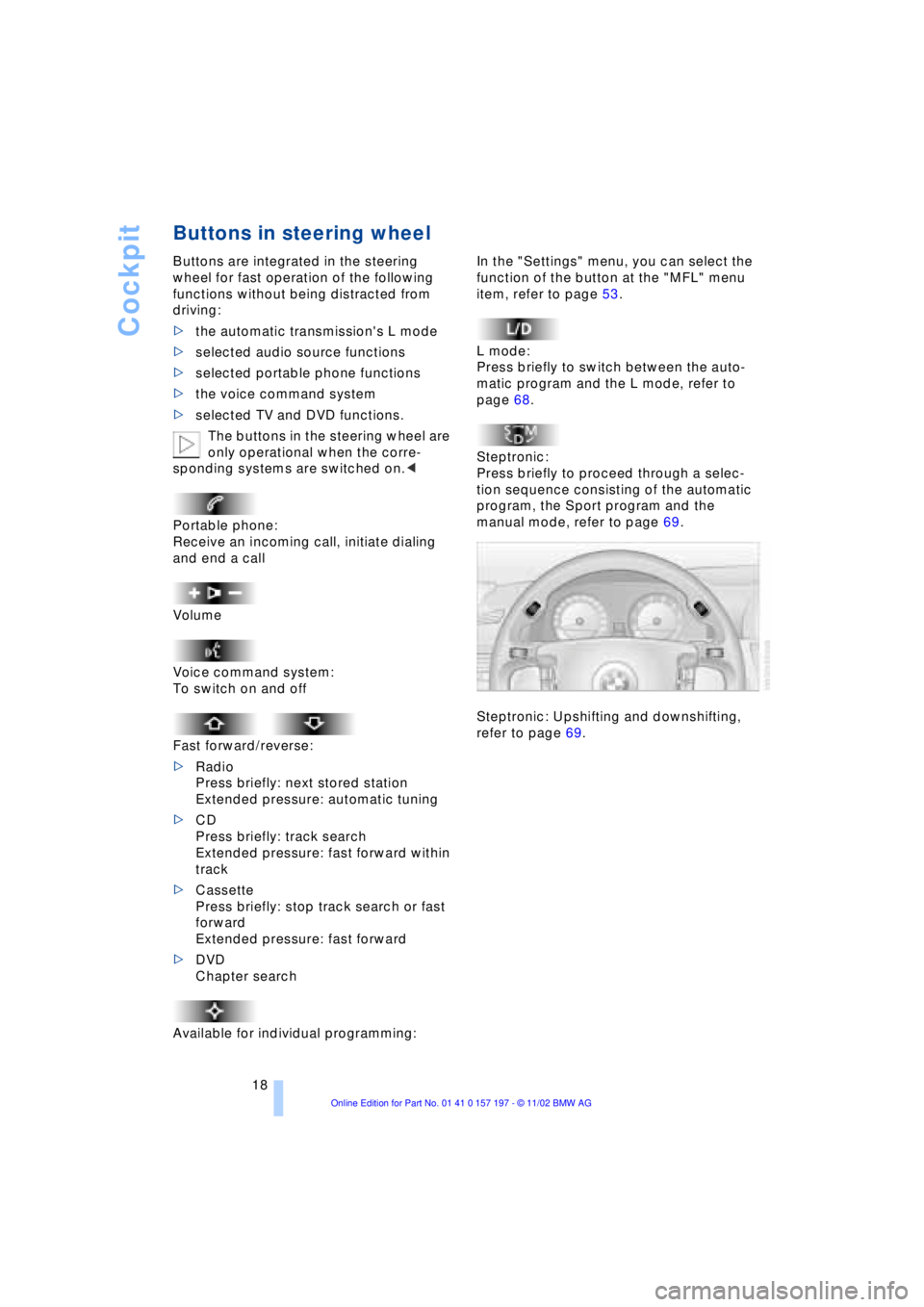
Buttons in steering wheel
Buttons are integrated in the steering
wheel for fast operation of the following
functions without being distracted from
driving:
>the automatic transmission's L mode
>selected audio source functions
>selected portable phone functions
>the voice command system
>selected TV and DVD functions.
The buttons in the steering wheel are
only operational when the corre-
sponding systems are switched on.<
Portable phone:
Receive an incoming call, initiate dialing
and end a call
Volume
Voice command system:
To switch on and off
Fast forward/reverse:
>Radio
Press briefly: next stored station
Extended pressure: automatic tuning
>CD
Press briefly: track search
Extended pressure: fast forward within
track
>Cassette
Press briefly: stop track search or fast
forward
Extended pressure: fast forward
>DVD
Chapter search
Available for individual programming:
In the "Settings" menu, you can select the
function of the button at the "MFL" menu
item, refer to page 53.
L mode:
Press briefly to switch between the auto-
matic program and the L mode, refer to
page 68.
Steptronic:
Press briefly to proceed through a selec-
tion sequence consisting of the automatic
program, the Sport program and the
manual mode, refer to page 69.
Steptronic: Upshifting and downshifting,
refer to page 69.
Page 22 of 229
Control Center
20
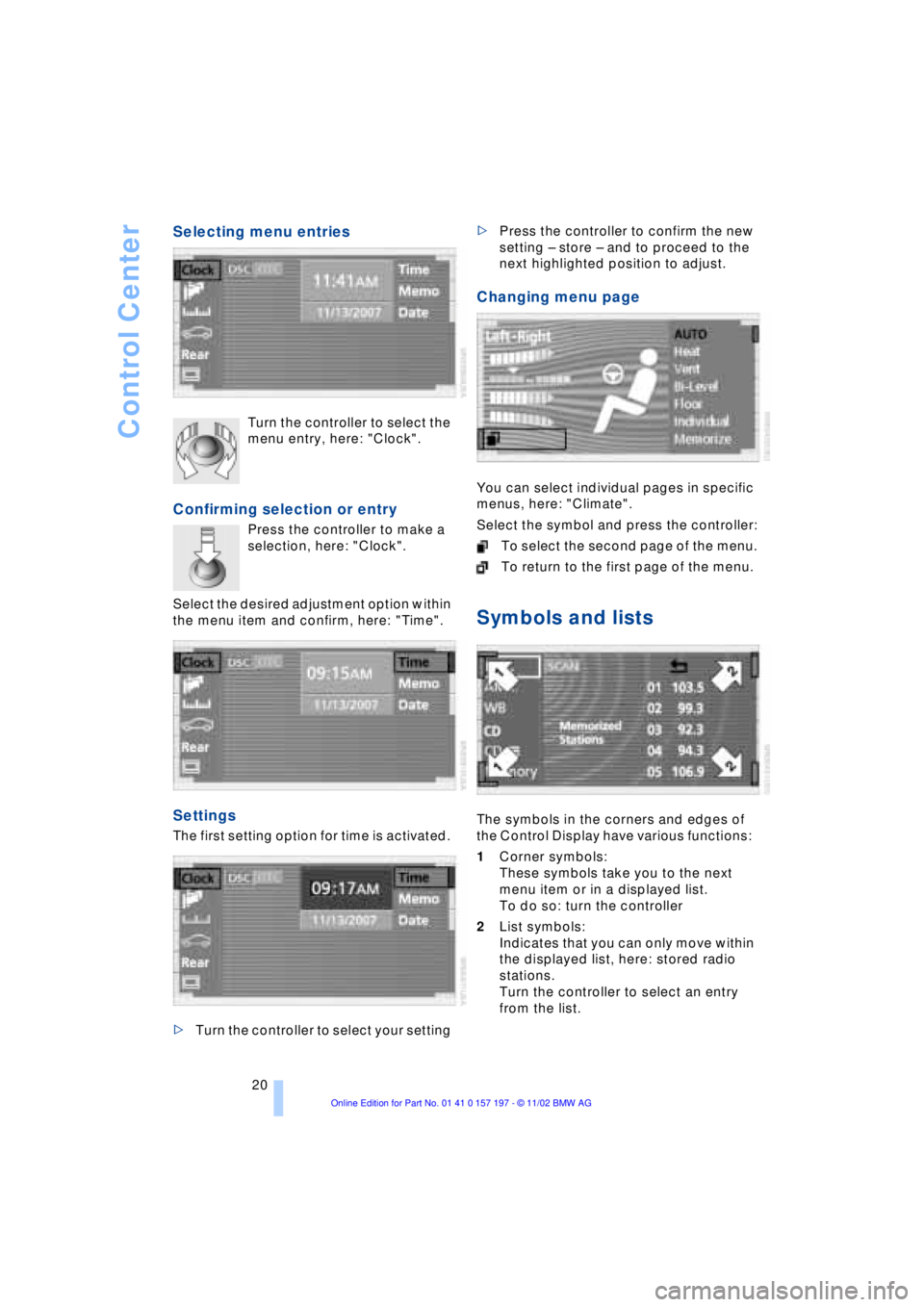
Selecting menu entries
Turn the controller to select the
menu entry, here: "Clock".
Confirming selection or entry
Press the controller to make a
selection, here: "Clock".
Select the desired adjustment option within
the menu item and confirm, here: "Time".
Settings
The first setting option for time is activated.
>Turn the controller to select your setting >Press the controller to confirm the new
setting Ð store Ð and to proceed to the
next highlighted position to adjust.
Changing menu page
You can select individual pages in specific
menus, here: "Climate".
Select the symbol and press the controller:
To select the second page of the menu.
To return to the first page of the menu.
Symbols and lists
The symbols in the corners and edges of
the Control Display have various functions:
1Corner symbols:
These symbols take you to the next
menu item or in a displayed list.
To do so: turn the controller
2List symbols:
Indicates that you can only move within
the displayed list, here: stored radio
stations.
Turn the controller to select an entry
from the list.
Page 24 of 229
Control Center
22
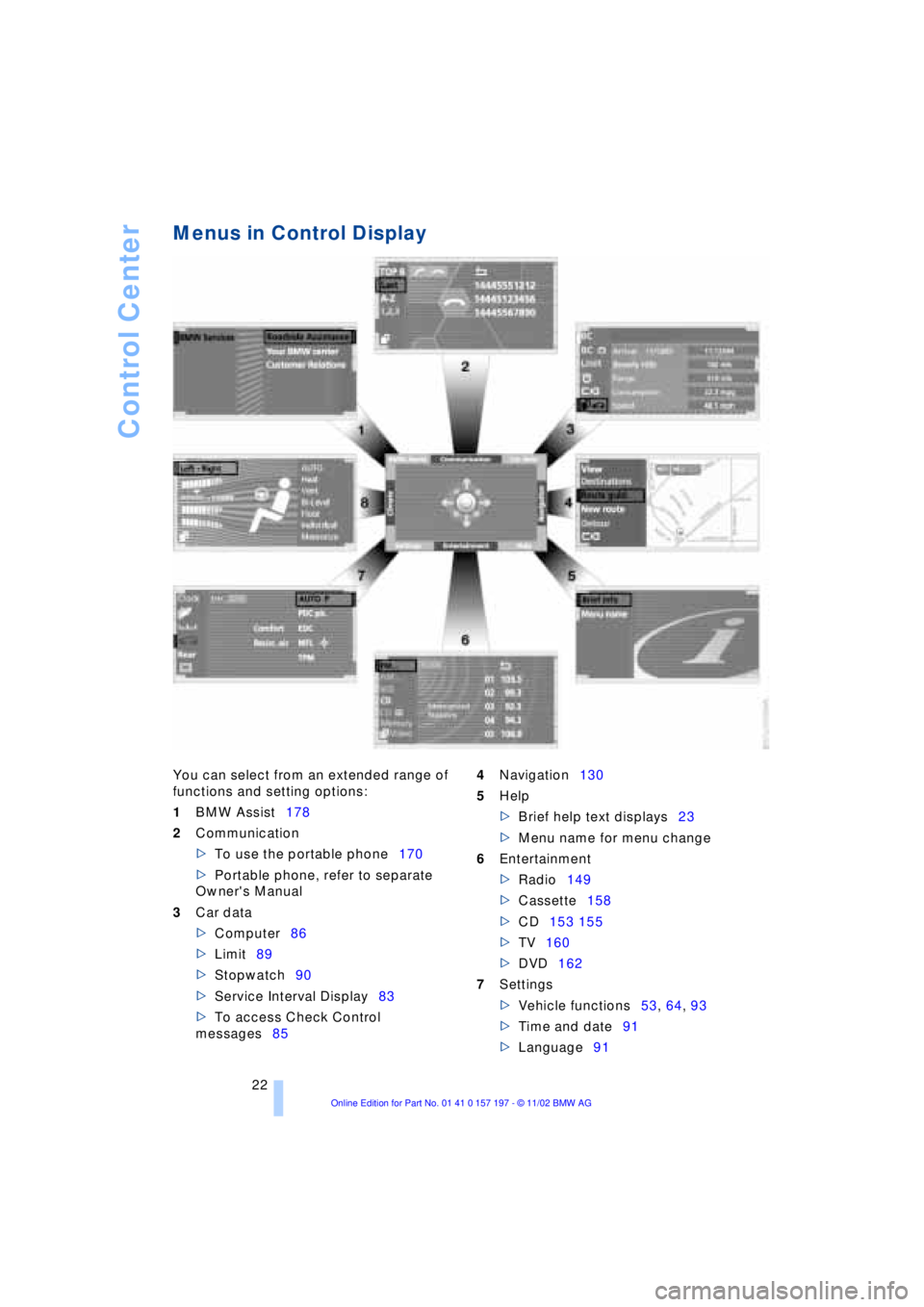
Menus in Control Display
You can select from an extended range of
functions and setting options:
1BMW Assist178
2Communication
>To use the portable phone170
>Portable phone, refer to separate
Owner's Manual
3Car data
>Computer86
>Limit89
>Stopwatch90
>Service Interval Display83
>To access Check Control
messages854Navigation130
5Help
>Brief help text displays23
>Menu name for menu change
6Entertainment
>Radio149
>Cassette158
>CD153 155
>TV160
>DVD162
7Settings
>Vehicle functions53, 64, 93
>Time and date91
>Language91
Page 26 of 229
Control Center
24
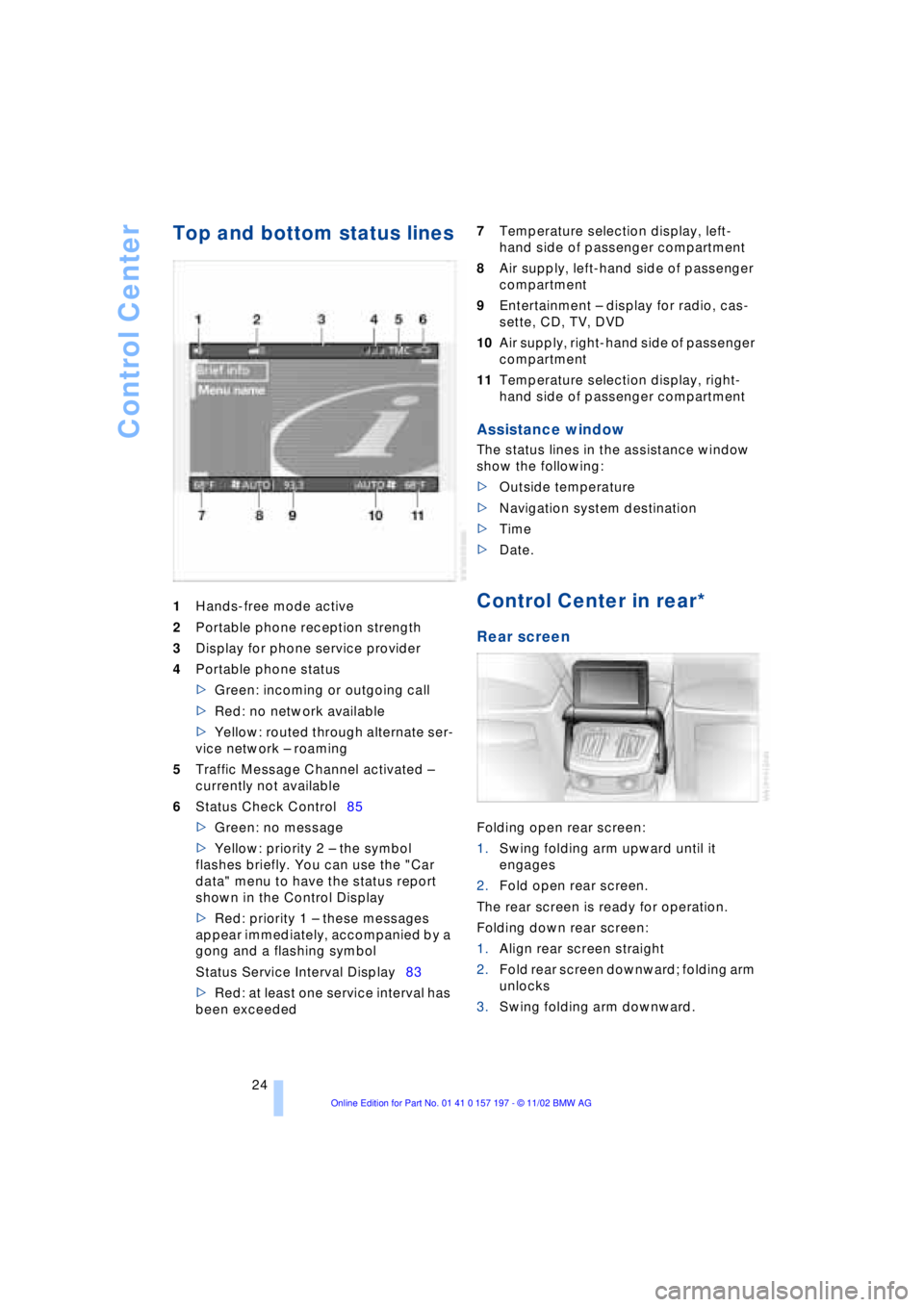
Top and bottom status lines
1Hands-free mode active
2Portable phone reception strength
3Display for phone service provider
4Portable phone status
>Green: incoming or outgoing call
>Red: no network available
>Yellow: routed through alternate ser-
vice network Ð roaming
5Traffic Message Channel activated Ð
currently not available
6Status Check Control85
>Green: no message
>Yellow: priority 2 Ð the symbol
flashes briefly. You can use the "Car
data" menu to have the status report
shown in the Control Display
>Red: priority 1 Ð these messages
appear immediately, accompanied by a
gong and a flashing symbol
Status Service Interval Display83
>Red: at least one service interval has
been exceeded 7Temperature selection display, left-
hand side of passenger compartment
8Air supply, left-hand side of passenger
compartment
9Entertainment Ð display for radio, cas-
sette, CD, TV, DVD
10Air supply, right-hand side of passenger
compartment
11Temperature selection display, right-
hand side of passenger compartment
Assistance window
The status lines in the assistance window
show the following:
>Outside temperature
>Navigation system destination
>Time
>Date.
Control Center in rear*
Rear screen
Folding open rear screen:
1.Swing folding arm upward until it
engages
2.Fold open rear screen.
The rear screen is ready for operation.
Folding down rear screen:
1.Align rear screen straight
2.Fold rear screen downward; folding arm
unlocks
3.Swing folding arm downward.
Page 28 of 229
Voice command
26
Voice command
Voice command system
The concept
The voice command system allows you to
control operation of various vehicle sys-
tems without ever removing your hands
from the steering wheel. The system oper-
ates on the basis of voice commands that
you will learn easily after using them a few
times. In many cases, the voice command
system supports you with announcements
or questions while you are making your
entries.
The voice command system transforms
your oral commands and dialog answers
into control signals for the selected sys-
tems.
Please take the time to acquaint your-
self with how a particular system
operates before proceeding to control it
using the voice command system.<
Symbols used
{...}Verbal instructions to use with the
voice command system.
{{...}} Identifies the answers generated by
the voice command system.
Systems available for use with voice
command
>{Telephone}, refer to page 170
>{Navigation}, refer to page 130
>{Radio}, refer to page 149
>{CD}, refer to page 153
>{CD changer}, refer to page 155
>{Tape}, refer to page 158
>{Notepad}, refer to page 28
>{DVD}, refer to page 162. Either the system that you are now oper-
ating or any current error messages will
appear in the Info Display, refer to page 27.
Voice commands
Activating voice command system
Briefly press the button in the steering
wheel.
A signal tone and "SVS active" in the Info
Display, refer to page 27, indicate that the
system is ready for use. You are automati-
cally in the main menu.
From here, you can call up all the equip-
ment that can be operated.
Canceling voice command entry
Briefly press the button in the steering
wheel
or
In dialogs in which any text can be spoken,
e.g. names, notes, canceling is only pos-
sible using the button.
The system automatically switches
over to its telephone mode if you
receive a call during voice input. "SVS off"
appears in the Info Display, refer to
page 27.<
Voice commands
The voice command system operates on
the basis of specific, predefined com-
mands; these commands should be
spoken precisely as indicated. You can
have the possible commands read back at
any stage. To do so, say the command
{Options}.
In addition to the commands described,
there are often other commands that run
the same function. Instead of {Options},
you can, for example, also say {What now}.
More detailed commands such as {Change
*
These sections contain information on
using the voice command system.
{Cancel}.
Page 32 of 229
Voice command
30
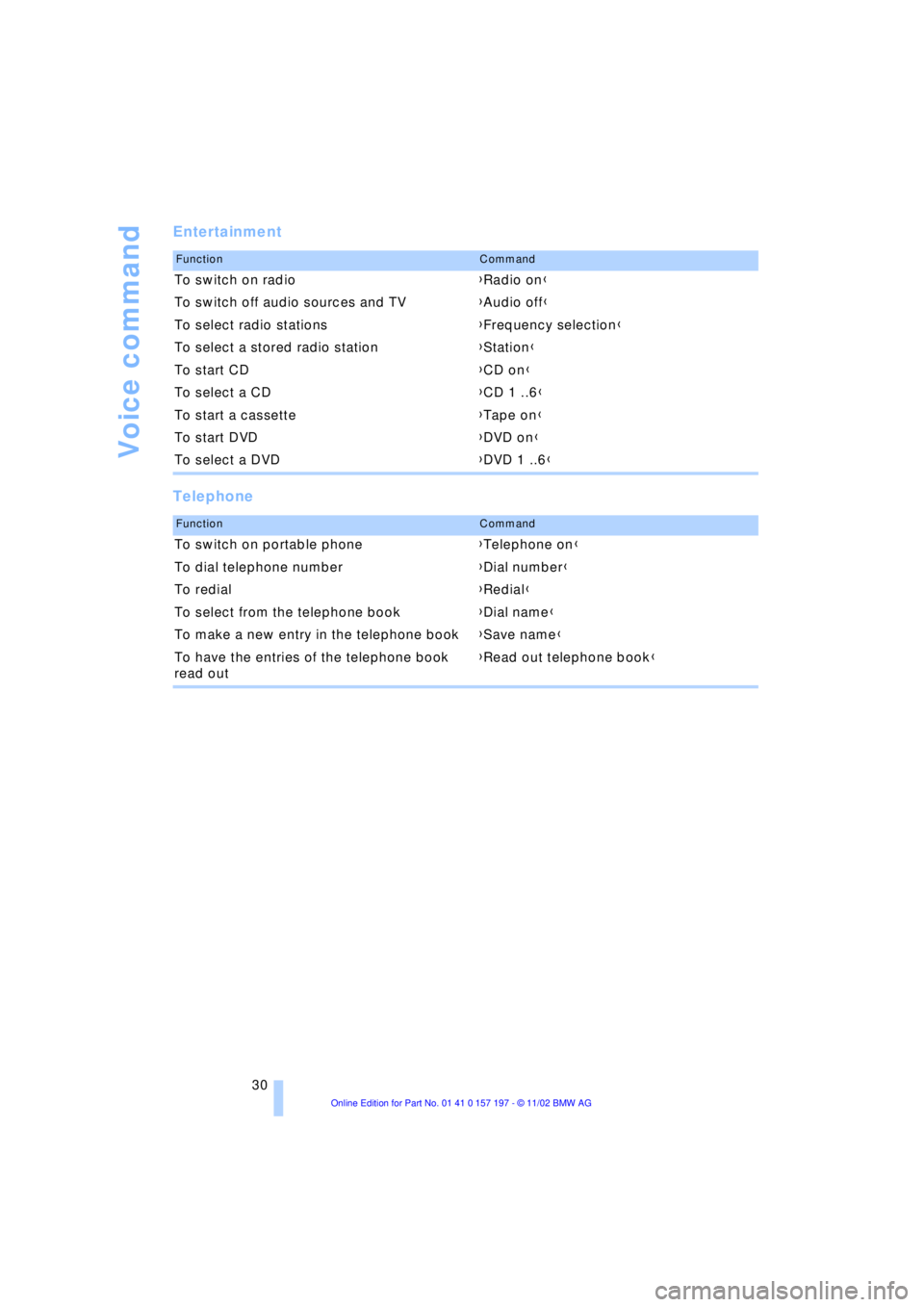
Entertainment
Telephone
FunctionCommand
To switch on radio{Radio on}
To switch off audio sources and TV{Audio off}
To select radio stations{Frequency selection}
To select a stored radio station{Station}
To start CD{CD on}
To select a CD{CD 1 ..6}
To start a cassette{Tape on}
To start DVD{DVD on}
To select a DVD{DVD 1 ..6}
FunctionCommand
To switch on portable phone{Telephone on}
To dial telephone number{Dial number}
To redial{Redial}
To select from the telephone book{Dial name}
To make a new entry in the telephone book{Save name}
To have the entries of the telephone book
read out{Read out telephone book}
Page 44 of 229
Opening and closing
42 Lock, i.e. arm by pressing twice; press
button 2of the remote control
twice in succession, refer to page 36, or
lock twice with the key, refer to page 37.
The indicator lamp lights up briefly and
then flashes continuously. The tilt alarm
sensor and the interior motion sensor are
switched off as long as the system is
armed.
If you desire, the
>tilt alarm sensor
>interior motion sensor
can be switched off permanently. Please
contact your BMW center for assistance.<
Interior motion sensor
In order for the interior motion sensor to
function properly, the windows and sliding/
tilt sunroof must be completely closed.
Be sure to deactivate the interior motion
sensor, refer to section on Avoiding unin-
tentional alarms, when you wish to leave
the windows or sliding/tilt sunroof open.
Electric power windows
Opening and closing windows
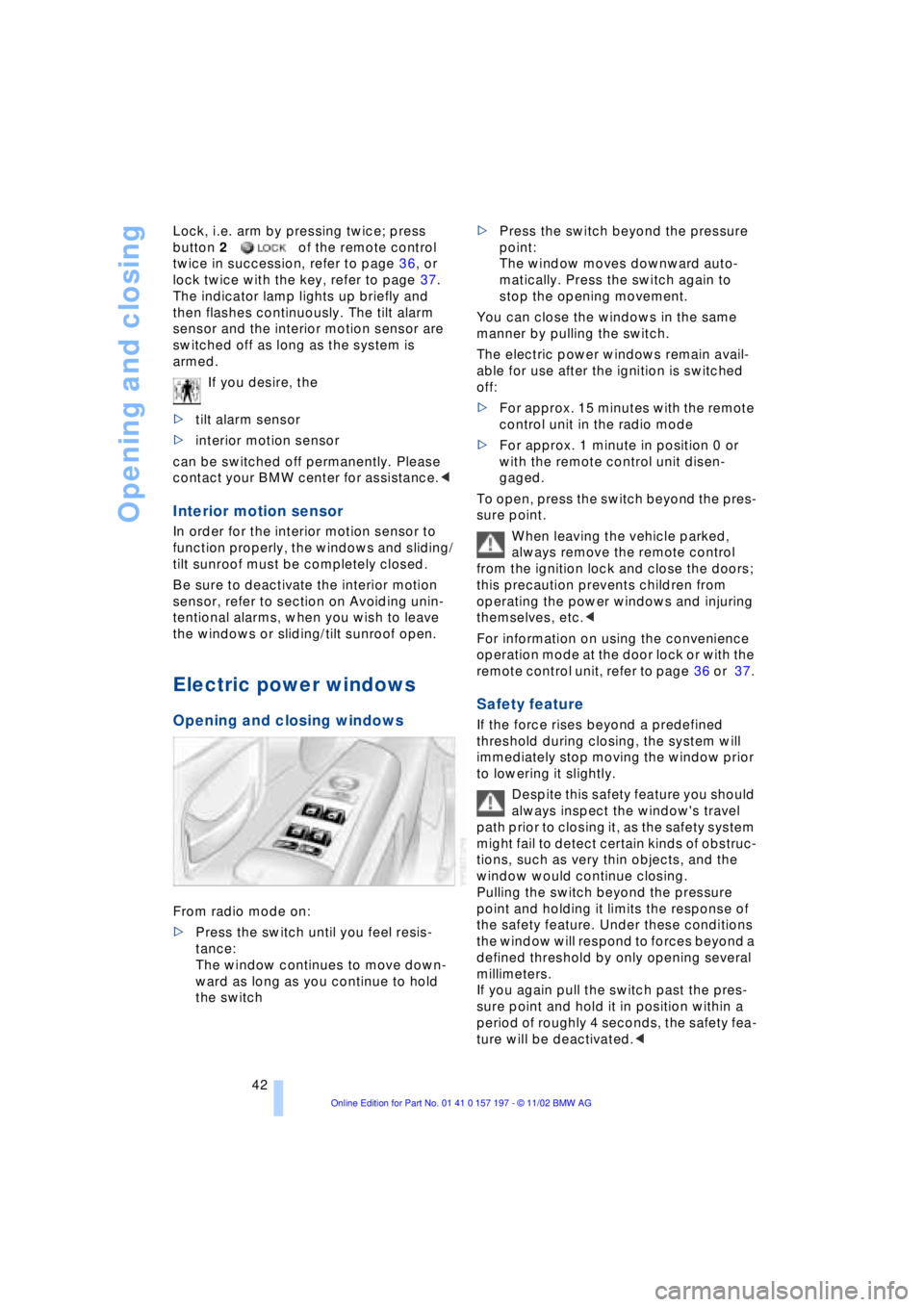
From radio mode on:
>Press the switch until you feel resis-
tance:
The window continues to move down-
ward as long as you continue to hold
the switch >Press the switch beyond the pressure
point:
The window moves downward auto-
matically. Press the switch again to
stop the opening movement.
You can close the windows in the same
manner by pulling the switch.
The electric power windows remain avail-
able for use after the ignition is switched
off:
>For approx. 15 minutes with the remote
control unit in the radio mode
>For approx. 1 minute in position 0 or
with the remote control unit disen-
gaged.
To open, press the switch beyond the pres-
sure point.
When leaving the vehicle parked,
always remove the remote control
from the ignition lock and close the doors;
this precaution prevents children from
operating the power windows and injuring
themselves, etc.<
For information on using the convenience
operation mode at the door lock or with the
remote control unit, refer to page 36 or 37.
Safety feature
If the force rises beyond a predefined
threshold during closing, the system will
immediately stop moving the window prior
to lowering it slightly.
Despite this safety feature you should
always inspect the window's travel
path prior to closing it, as the safety system
might fail to detect certain kinds of obstruc-
tions, such as very thin objects, and the
window would continue closing.
Pulling the switch beyond the pressure
point and holding it limits the response of
the safety feature. Under these conditions
the window will respond to forces beyond a
defined threshold by only opening several
millimeters.
If you again pull the switch past the pres-
sure point and hold it in position within a
period of roughly 4 seconds, the safety fea-
ture will be deactivated.<
Page 45 of 229
At a glance
Controls
Driving tips
Communications
Navigation
Entertainment
Mobility
Reference
43
When you close the windows they will
slow down as they approach the end
of their travel; this is to allow the safety fea-
ture to respond more precisely to any
obstructions encountered in this critical
range.<
Safety switch
With the safety switch, you can prevent the
rear windows from being opened or closed
via the switches in the rear passenger area,
by children, for example. The switch also
deactivates the rear-mounted switches
controlling the rear seats' power adjust-
ment, refer to page 47, and the rear
window sun blinds, refer to page 115. The
indicator lamp lights up when this safety
feature is activated.
Press the safety switch whenever
children are riding in the rear of the
vehicle. Careless use of the power win-
dows can lead to injury.<
The remote control unit must be
locked in position in the ignition lock
before this safety feature can be deacti-
vated.<
After installing accessories
After installing any accessory Ð such as a
clamp-on antenna for a portable phone Ð
within the window's travel range, you will
need to have the system reinitialized for
use under the new conditions. Please con-
tact your BMW center for assistance.
Sliding/tilt sunroof*
To prevent injuries, exercise care
when closing the sliding/tilt sunroof
and keep it in your field of vision until it is
shut.
When leaving the vehicle, always disen-
gage the remote control in the ignition lock
and close the doors to prevent children
from operating the sunroof and injuring
themselves, etc.<
Raising Ð opening Ð closing
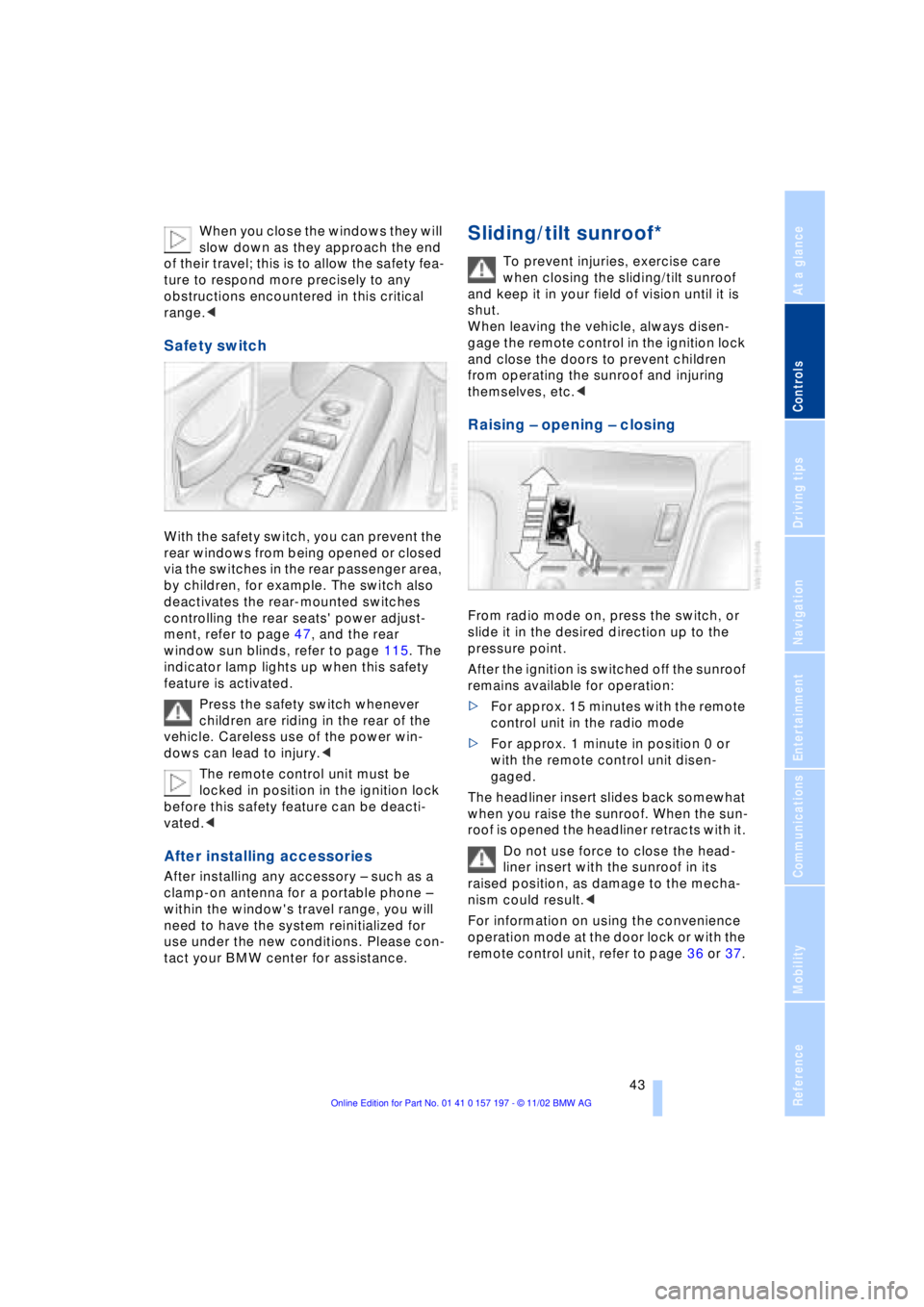
From radio mode on, press the switch, or
slide it in the desired direction up to the
pressure point.
After the ignition is switched off the sunroof
remains available for operation:
>For approx. 15 minutes with the remote
control unit in the radio mode
>For approx. 1 minute in position 0 or
with the remote control unit disen-
gaged.
The headliner insert slides back somewhat
when you raise the sunroof. When the sun-
roof is opened the headliner retracts with it.
Do not use force to close the head-
liner insert with the sunroof in its
raised position, as damage to the mecha-
nism could result.<
For information on using the convenience
operation mode at the door lock or with the
remote control unit, refer to page 36 or 37.