service BMW 760LI SEDAN 2003 Owners Manual
[x] Cancel search | Manufacturer: BMW, Model Year: 2003, Model line: 760LI SEDAN, Model: BMW 760LI SEDAN 2003Pages: 229, PDF Size: 4.35 MB
Page 3 of 229

745i
745Li
760Li
Congratulations, and thank you for choosing a BMW.
Thorough familiarity with your vehicle will provide you with
enhanced control and security when you drive it. We there-
fore have this request:
Please take the time to read this Owner's Manual and
familiarize yourself with the information that we have com-
piled for you before starting off in your new vehicle. It con-
tains important data and instructions intended to assist you
in gaining maximum use and satisfaction from your BMW's
unique range of technical features. The manual also con-
tains information on maintenance designed to enhance
operating safety and contribute to maintaining the value of
your BMW throughout an extended service life.
This Owner's Manual should be considered a permanent
part of this vehicle. It should stay with the vehicle when
sold to provide the next owner with important operating,
safety and maintenance information.
This manual is supplemented by a Service and Warranty
Information Booklet for US models or a Warranty and
Service Guide Booklet for Canadian models.
We wish you an enjoyable driving experience.
BMW AG
Page 4 of 229
Contents
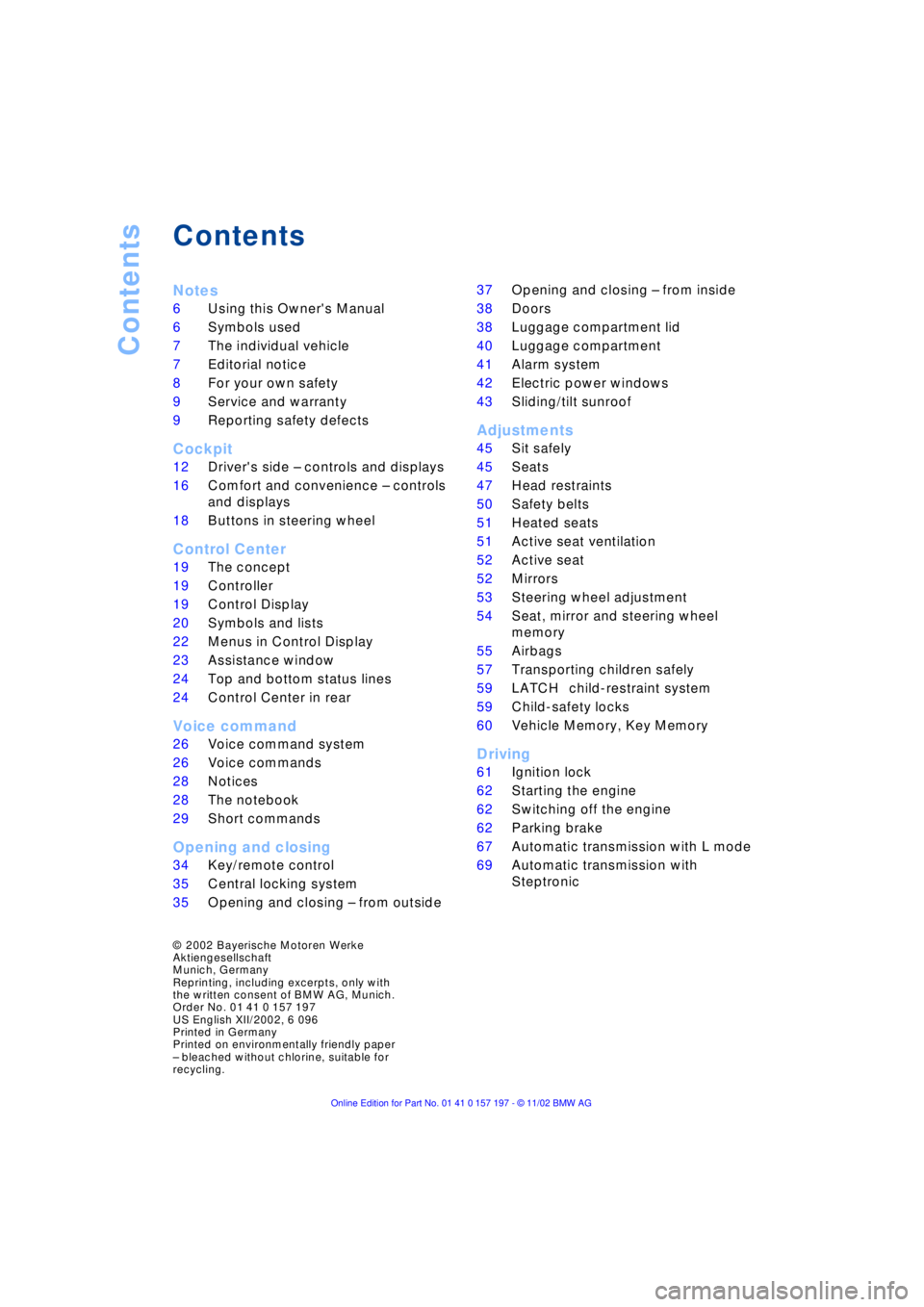
Contents
Notes
6Using this Owner's Manual
6Symbols used
7The individual vehicle
7Editorial notice
8For your own safety
9Service and warranty
9Reporting safety defects
Cockpit
12Driver's side Ð controls and displays
16Comfort and convenience Ð controls
and displays
18Buttons in steering wheel
Control Center
19The concept
19Controller
19Control Display
20Symbols and lists
22Menus in Control Display
23Assistance window
*
24Top and bottom status lines
24Control Center in rear
*
Voice command
26Voice command system
26Voice commands
28Notices
28The notebook
29Short commands
Opening and closing
34Key/remote control
35Central locking system
35Opening and closing Ð from outside 37Opening and closing Ð from inside
38Doors
38Luggage compartment lid
40Luggage compartment
41Alarm system
42Electric power windows
43Sliding/tilt sunroof
*
Adjustments
45Sit safely
45Seats
47Head restraints
50Safety belts
51Heated seats
*
51Active seat ventilation
*
52Active seat
*
52Mirrors
53Steering wheel adjustment
54Seat, mirror and steering wheel
memory
55Airbags
57Transporting children safely
59LATCH
*
child-restraint system
59Child-safety locks
60Vehicle Memory, Key Memory
Driving
61Ignition lock
62Starting the engine
62Switching off the engine
62Parking brake
67Automatic transmission with L mode
69Automatic transmission with
Steptronic
*
© 2002 Bayerische Motoren Werke
Aktiengesellschaft
Munich, Germany
Reprinting, including excerpts, only with
the written consent of BMW AG, Munich.
Order No. 01 41 0 157 197
US English XII/2002, 6 096
Printed in Germany
Printed on environmentally friendly paper
Ð bleached without chlorine, suitable for
recycling.
Page 5 of 229
At a glance
Operation
Driving tips
Communications
Navigation
Entertainment
Mobility
Reference
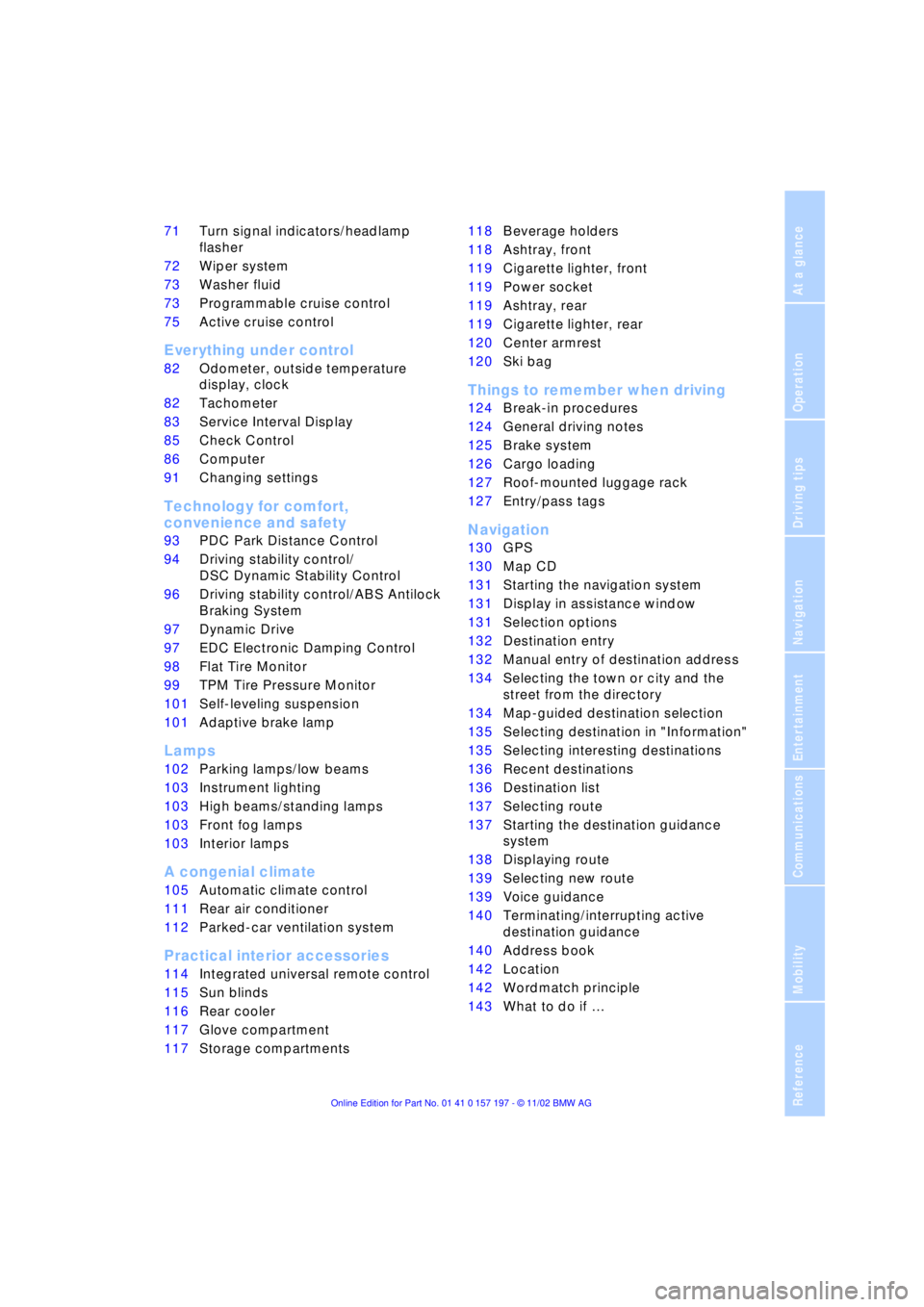
71Turn signal indicators/headlamp
flasher
72Wiper system
73Washer fluid
73Programmable cruise control
75Active cruise control
*
Everything under control
82Odometer, outside temperature
display, clock
82Tachometer
83Service Interval Display
85Check Control
86Computer
91Changing settings
Technology for comfort,
convenience and safety
93PDC Park Distance Control
*
94Driving stability control/
DSC Dynamic Stability Control
96Driving stability control/ABS Antilock
Braking System
97Dynamic Drive
97EDC Electronic Damping Control
*
98Flat Tire Monitor
*
99TPM Tire Pressure Monitor
*
101Self-leveling suspension
*
101Adaptive brake lamp
Lamps
102Parking lamps/low beams
103Instrument lighting
103High beams/standing lamps
103Front fog lamps
103Interior lamps
A congenial climate
105Automatic climate control
111Rear air conditioner
*
112Parked-car ventilation system
Practical interior accessories
114Integrated universal remote control
*
115Sun blinds
*
116Rear cooler
*
117Glove compartment
117Storage compartments118Beverage holders
118Ashtray, front
119Cigarette lighter, front
119Power socket
119Ashtray, rear
119Cigarette lighter, rear
120Center armrest
120Ski bag
*
Things to remember when driving
124Break-in procedures
124General driving notes
125Brake system
126Cargo loading
127Roof-mounted luggage rack
*
127Entry/pass tags
Navigation
130GPS
130Map CD
131Starting the navigation system
131Display in assistance window
*
131Selection options
132Destination entry
132Manual entry of destination address
134Selecting the town or city and the
street from the directory
134Map-guided destination selection
135Selecting destination in "Information"
135Selecting interesting destinations
136Recent destinations
136Destination list
137Selecting route
137Starting the destination guidance
system
138Displaying route
139Selecting new route
139Voice guidance
140Terminating/interrupting active
destination guidance
140Address book
142Location
142Wordmatch principle
143What to do if É
Page 11 of 229

At a glance
Controls
Driving tips
Communications
Navigation
Entertainment
Mobility
Reference
9
Service and warranty
We recommend that you read this publica-
tion thoroughly.
Your BMW is covered by the following war-
ranties:
Ð New Vehicle Limited Warranty
Ð Rust Perforation Limited Warranty
Ð Federal Emissions System Defect
Warranty
Ð Federal Emissions Performance Warranty
Ð California Emission Control System
Limited Warranty
Detailed information about these warran-
ties is listed in the Service and Warranty
Information Booklet for US models or in the
Warranty and Service Guide Booklet for
Canadian models.
Reporting safety defects
The following only applies to vehicles
owned and operated in the US.
If you believe that your vehicle has a defect
which could cause a crash or could cause
injury or death, you should immediately
inform the National Highway Traffic Safety
Administration (NHTSA) in addition to noti-
fying BMW of North America, LLC, P.O.
Box 1227, Westwood, New Jersey 07675-
1227, Telephone (800) 831-1117.
If NHTSA receives similar complaints, it
may open an investigation, and if it finds
that a safety defect exists in a group of
vehicles, it may order a recall and remedy
campaign. However, NHTSA cannot
become involved in individual problems
between you, your dealer, or BMW of North
America, LLC.
To contact NHTSA, you may either call the
Auto Safety Hotline toll-free at 1-800-424-
9393 (or 366-0123 in Washington, D.C.
area) or write to: NHTSA, U.S. Department
of Transportation, Washington, D.C.
20590. You can also obtain other informa-
tion about motor vehicle safety from the
Hotline.
Page 23 of 229
At a glance
Controls
Driving tips
Communications
Navigation
Entertainment
Mobility
Reference
21
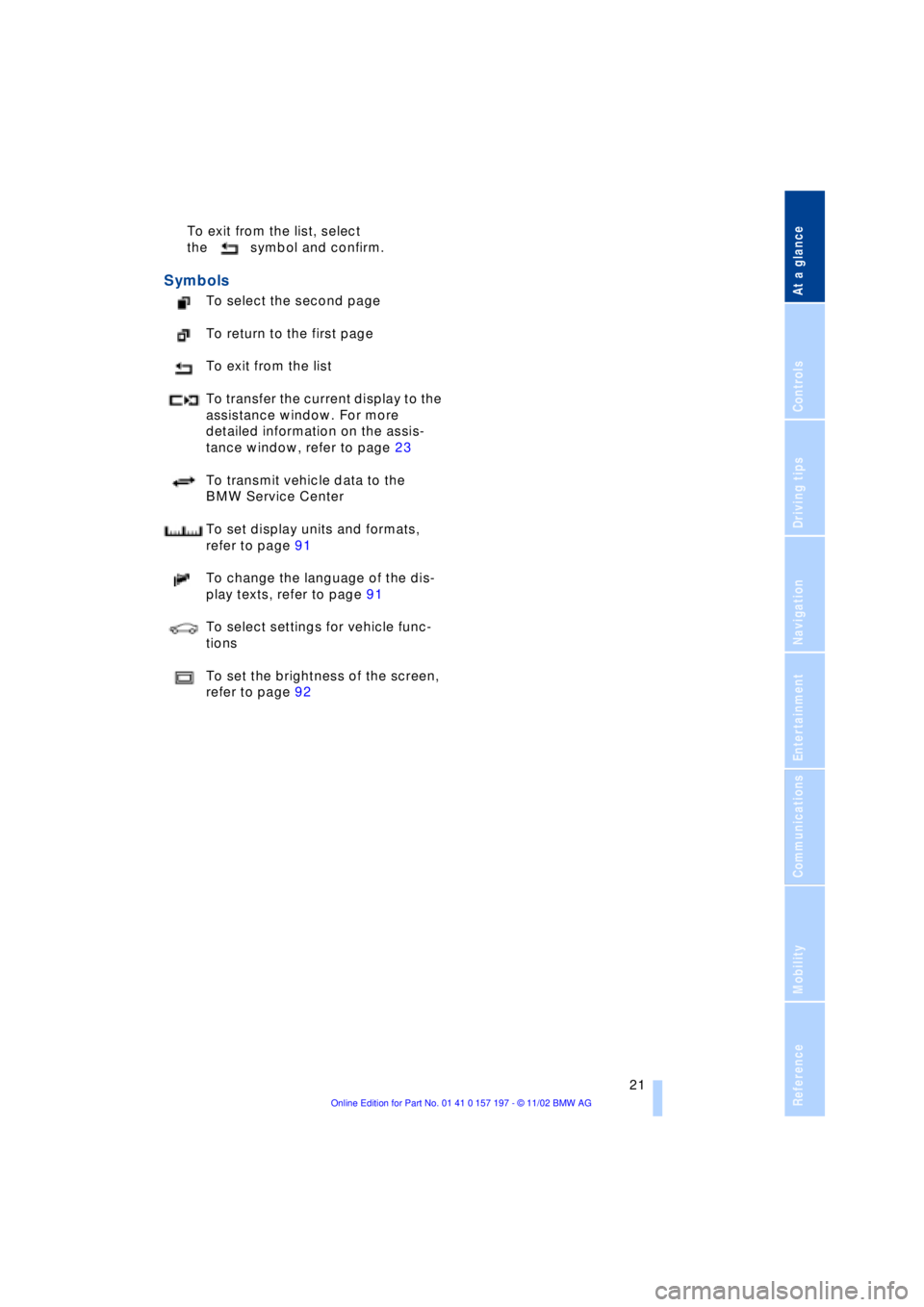
To exit from the list, select
the symbol and confirm.
Symbols
To select the second page
To return to the first page
To exit from the list
To transfer the current display to the
assistance window. For more
detailed information on the assis-
tance window, refer to page 23
To transmit vehicle data to the
BMW Service Center
To set display units and formats,
refer to page 91
To change the language of the dis-
play texts, refer to page 91
To select settings for vehicle func-
tions
To set the brightness of the screen,
refer to page 92
Page 24 of 229
Control Center
22
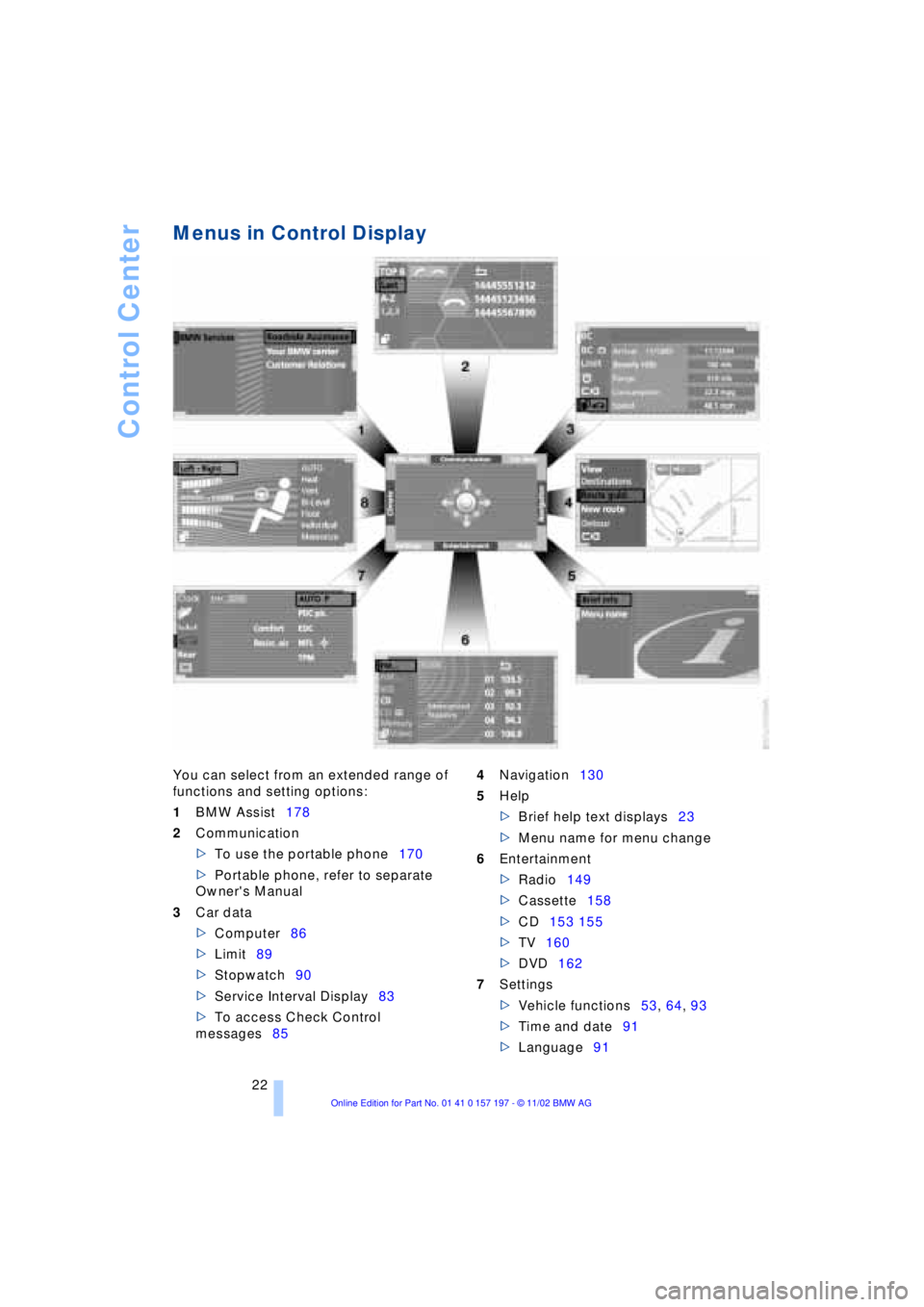
Menus in Control Display
You can select from an extended range of
functions and setting options:
1BMW Assist178
2Communication
>To use the portable phone170
>Portable phone, refer to separate
Owner's Manual
3Car data
>Computer86
>Limit89
>Stopwatch90
>Service Interval Display83
>To access Check Control
messages854Navigation130
5Help
>Brief help text displays23
>Menu name for menu change
6Entertainment
>Radio149
>Cassette158
>CD153 155
>TV160
>DVD162
7Settings
>Vehicle functions53, 64, 93
>Time and date91
>Language91
Page 26 of 229
Control Center
24
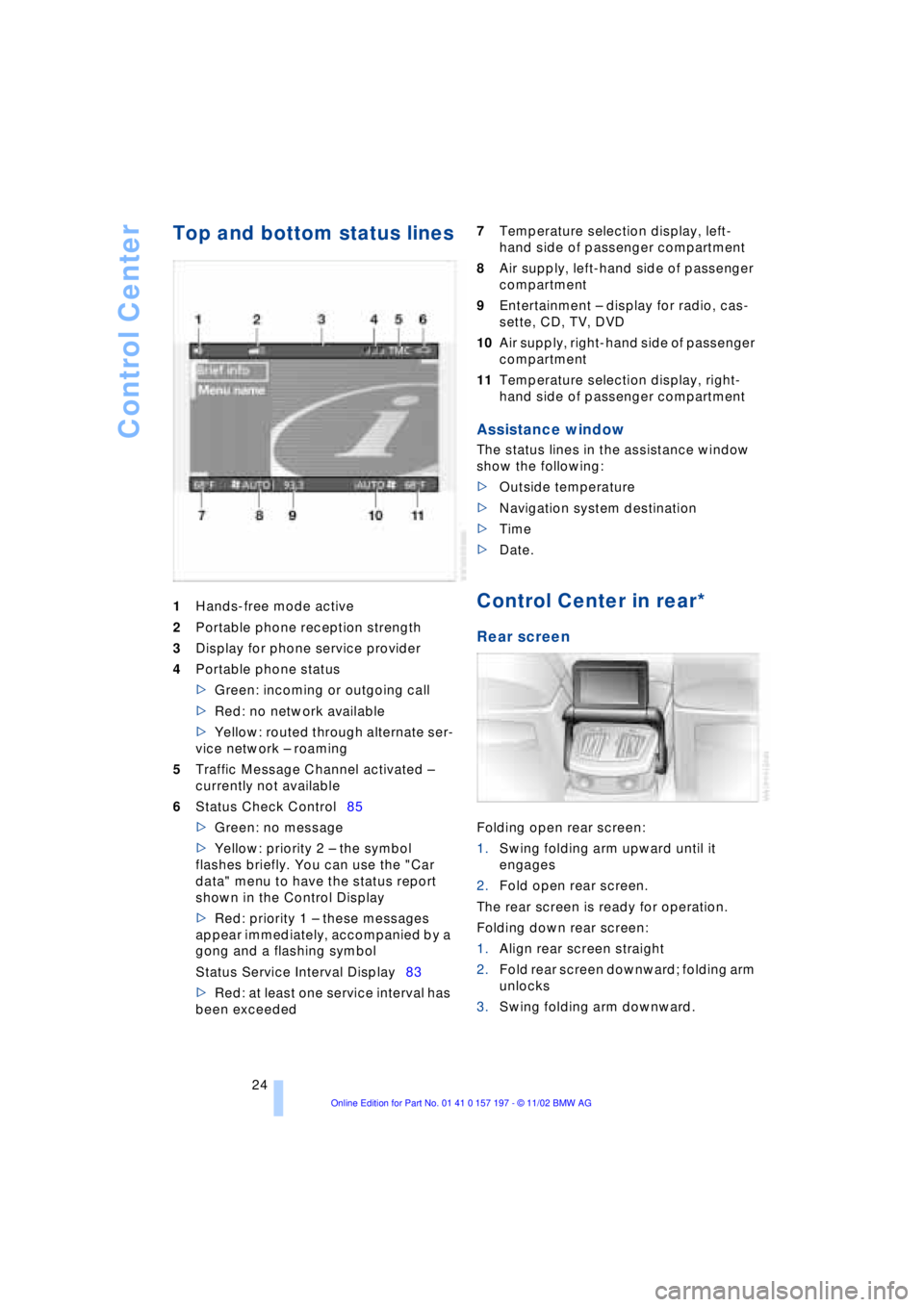
Top and bottom status lines
1Hands-free mode active
2Portable phone reception strength
3Display for phone service provider
4Portable phone status
>Green: incoming or outgoing call
>Red: no network available
>Yellow: routed through alternate ser-
vice network Ð roaming
5Traffic Message Channel activated Ð
currently not available
6Status Check Control85
>Green: no message
>Yellow: priority 2 Ð the symbol
flashes briefly. You can use the "Car
data" menu to have the status report
shown in the Control Display
>Red: priority 1 Ð these messages
appear immediately, accompanied by a
gong and a flashing symbol
Status Service Interval Display83
>Red: at least one service interval has
been exceeded 7Temperature selection display, left-
hand side of passenger compartment
8Air supply, left-hand side of passenger
compartment
9Entertainment Ð display for radio, cas-
sette, CD, TV, DVD
10Air supply, right-hand side of passenger
compartment
11Temperature selection display, right-
hand side of passenger compartment
Assistance window
The status lines in the assistance window
show the following:
>Outside temperature
>Navigation system destination
>Time
>Date.
Control Center in rear*
Rear screen
Folding open rear screen:
1.Swing folding arm upward until it
engages
2.Fold open rear screen.
The rear screen is ready for operation.
Folding down rear screen:
1.Align rear screen straight
2.Fold rear screen downward; folding arm
unlocks
3.Swing folding arm downward.
Page 58 of 229
Adjustments
56
Protective effect
The front airbags help protect the front
passengers by responding to frontal
impacts in which safety belts alone cannot
provide adequate restraint. When needed,
the head and side airbags help provide
protection in the event of side impact. The
side airbags help restrain the side of the
occupant's upper torso, and the head air-
bags help support the head while also
helping provide protection against any
objects penetrating into the passenger
compartment. The knee airbags help pro-
tect the legs against impact against the
cockpit.
The side airbags in the rear pas-
senger area of your vehicle may
already have been deactivated either at the
time of manufacture or by a BMW center.
You may have them activated if you desire
to do so. Please contact your BMW center
for additional information.<
For information on the correct sitting posi-
tion, refer to page 45.
The airbags do not deploy in
response to minor accidents or rear
collisions, nor do they respond to certain
kinds of vehicle rollover.<
Even when all safety guidelines are
observed, there is a small residual risk that
passengers will sustain facial, hand or arm
injuries in isolated instances. The ignition
and inflation noise may provoke a mild Ð
usually temporary Ð hearing loss in
extremely sensitive individuals.
Important safety notes
Do not apply adhesive materials to
the cover panels of the airbags, cover
them or modify them in any other way.
Do not attempt to remove the airbag
restraint system from the vehicle. If you
note any indication of system malfunction,
if you desire to have an airbag deactivated,
or if the airbags are triggered in response
to an accident, you should always entrust
all inspection, repair and dismantling oper-
ations to your BMW center.
Never modify or tamper with either the wiring or the individual components in the
airbag system. This category includes the
upholstery in the center of the steering
wheel, on the instrument panel, the side
trim panels on the front or rear doors, and
the roof pillars along with the sides of the
headliner. Do not attempt to remove or dis-
mantle the steering wheel.
To ensure compliance with official safety
regulations, entrust disposal of airbag gen-
erators only to a BMW center.
Unprofessional attempts to service the
system could lead to failure in an emer-
gency or undesired airbag activation, either
of which could result in personal injury.
Do not touch the individual components
directly after the system has been trig-
gered, because there is a danger of
burns.<
At all times, occupants should sit
upright and be properly restrained Ð
infants and small children in appropriate
child-restraint systems; larger children and
adults using the safety belts. Never let an
occupant's head rest near or on a side
airbag because the inflating airbag could
cause a serious or fatal injury. Please note
that the word Airbag imprinted on the door
trim panel indicates the airbag's location.
Never install a rearward-facing child-
restraint system on the front passenger
seat. If you do so, the child could be
severely injured when the airbag is trig-
gered.
Children under 13 years of age and chil-
dren less than 5 ft (150 cm) tall should
always ride in the rear and the restraint sys-
tems should be secured with the vehicle's
safety belts.
Accident research shows that the safest
place for children in an automobile is in the
rear seat. However, a child sitting in the
rear seat and not properly restrained may
place his or her head on or near the airbag,
if so equipped.
For example, a child Ñ even though belted
Ñ may fall asleep with his or her head
against the side airbag. It may be difficult
for a driver to ensure that children in the
rear seat will remain properly positioned at
all times and do not place their heads on or
Page 81 of 229
At a glance
Controls
Driving tips
Communications
Navigation
Entertainment
Mobility
Reference
79
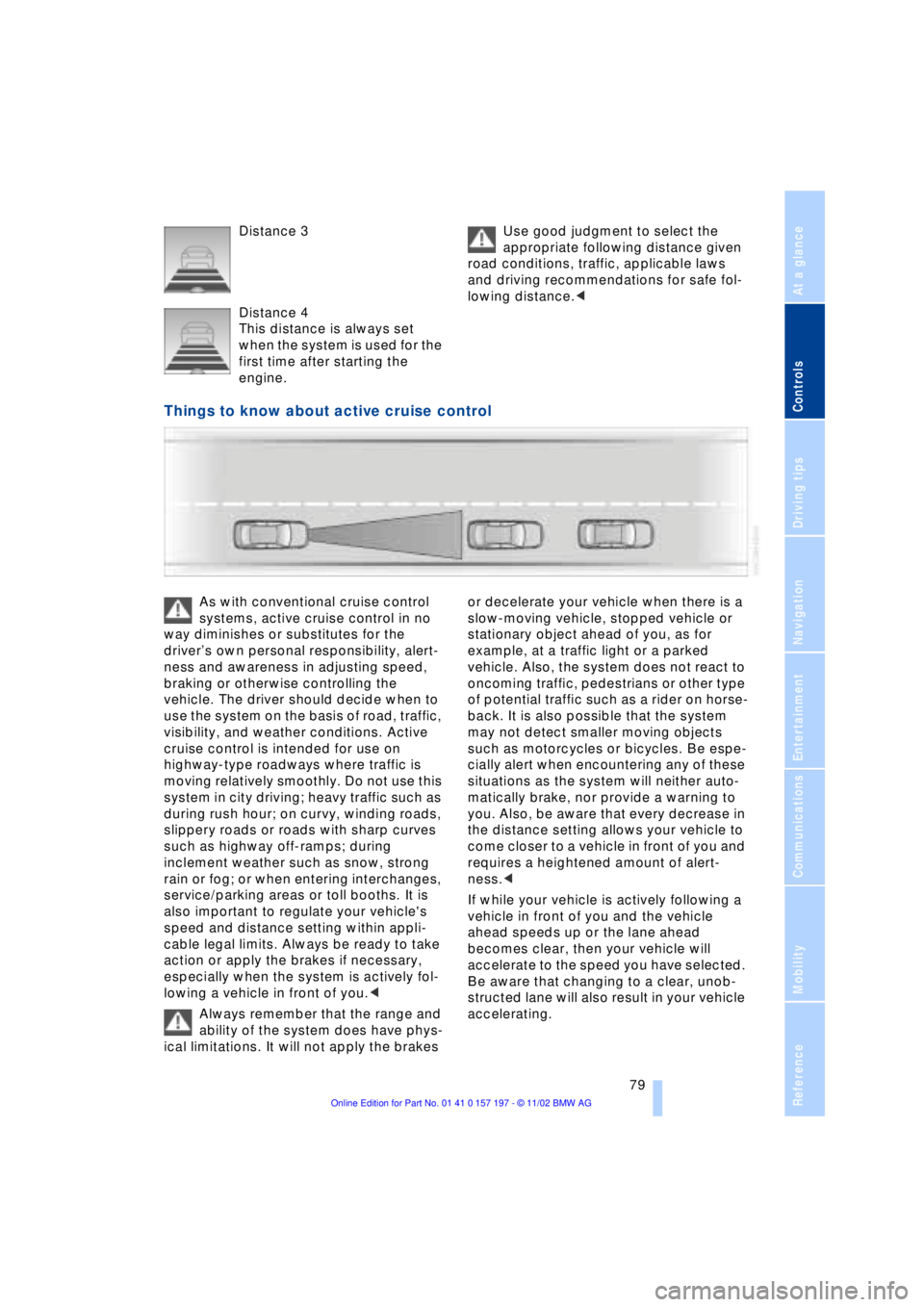
Distance 3
Distance 4
This distance is always set
when the system is used for the
first time after starting the
engine. Use good judgment to select the
appropriate following distance given
road conditions, traffic, applicable laws
and driving recommendations for safe fol-
lowing distance.<
Things to know about active cruise control
As with conventional cruise control
systems, active cruise control in no
way diminishes or substitutes for the
driverÕs own personal responsibility, alert-
ness and awareness in adjusting speed,
braking or otherwise controlling the
vehicle. The driver should decide when to
use the system on the basis of road, traffic,
visibility, and weather conditions. Active
cruise control is intended for use on
highway-type roadways where traffic is
moving relatively smoothly. Do not use this
system in city driving; heavy traffic such as
during rush hour; on curvy, winding roads,
slippery roads or roads with sharp curves
such as highway off-ramps; during
inclement weather such as snow, strong
rain or fog; or when entering interchanges,
service/parking areas or toll booths. It is
also important to regulate your vehicle's
speed and distance setting within appli-
cable legal limits. Always be ready to take
action or apply the brakes if necessary,
especially when the system is actively fol-
lowing a vehicle in front of you.<
Always remember that the range and
ability of the system does have phys-
ical limitations. It will not apply the brakes or decelerate your vehicle when there is a
slow-moving vehicle, stopped vehicle or
stationary object ahead of you, as for
example, at a traffic light or a parked
vehicle. Also, the system does not react to
oncoming traffic, pedestrians or other type
of potential traffic such as a rider on horse-
back. It is also possible that the system
may not detect smaller moving objects
such as motorcycles or bicycles. Be espe-
cially alert when encountering any of these
situations as the system will neither auto-
matically brake, nor provide a warning to
you. Also, be aware that every decrease in
the distance setting allows your vehicle to
come closer to a vehicle in front of you and
requires a heightened amount of alert-
ness.<
If while your vehicle is actively following a
vehicle in front of you and the vehicle
ahead speeds up or the lane ahead
becomes clear, then your vehicle will
accelerate to the speed you have selected.
Be aware that changing to a clear, unob-
structed lane will also result in your vehicle
accelerating.
Page 85 of 229
At a glance
Controls
Driving tips
Communications
Navigation
Entertainment
Mobility
Reference
83
normal operating temperature. The seg-
ments disappear in sequence as the engine
warms to its normal operating temperature.
Avoid allowing the engine speed to rise as
far as the orange warning sector whenever
possible.
Service Interval Display
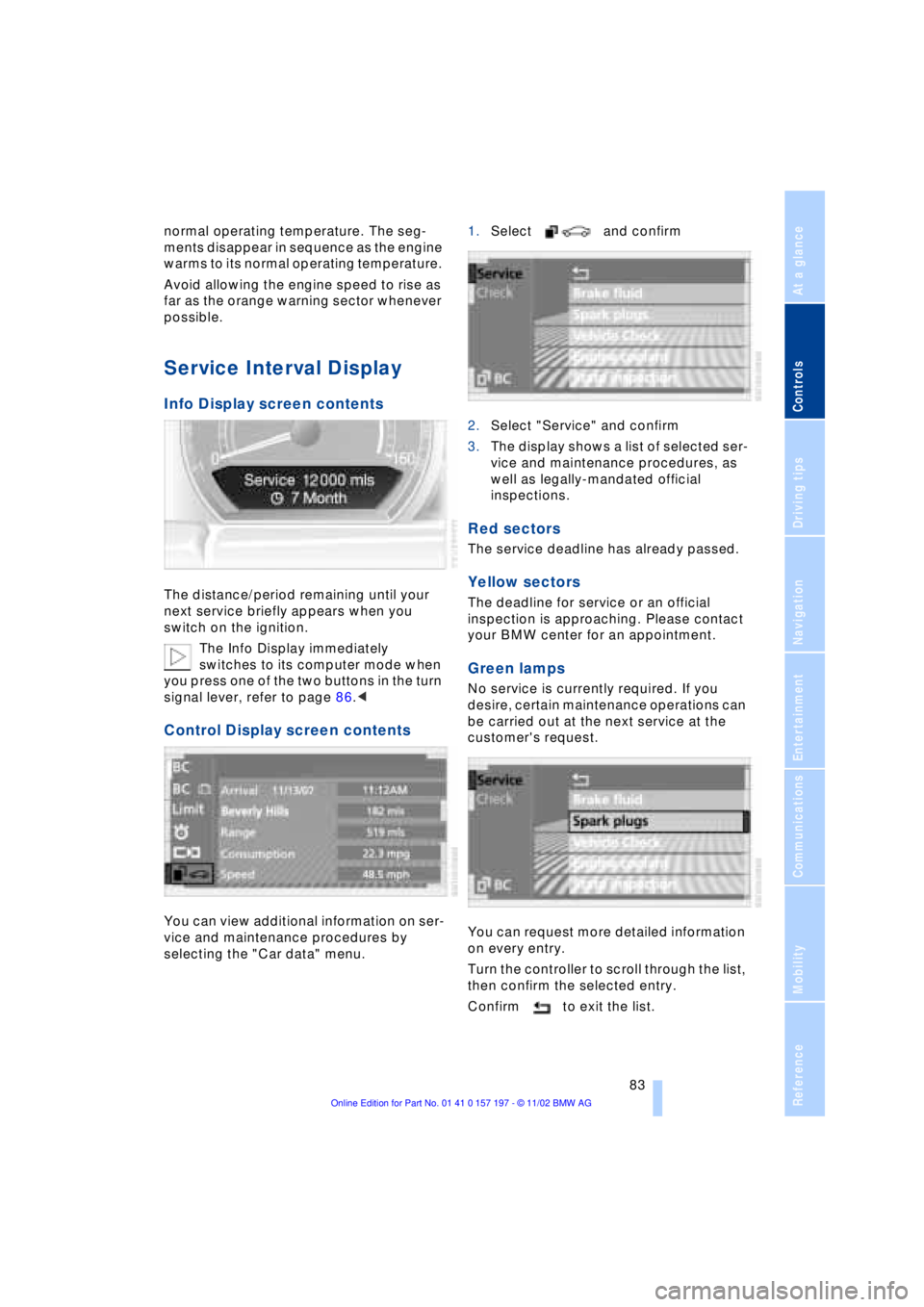
Info Display screen contents
The distance/period remaining until your
next service briefly appears when you
switch on the ignition.
The Info Display immediately
switches to its computer mode when
you press one of the two buttons in the turn
signal lever, refer to page 86.<
Control Display screen contents
You can view additional information on ser-
vice and maintenance procedures by
selecting the "Car data" menu. 1.Select and confirm
2.Select "Service" and confirm
3.The display shows a list of selected ser-
vice and maintenance procedures, as
well as legally-mandated official
inspections.
Red sectors
The service deadline has already passed.
Yellow sectors
The deadline for service or an official
inspection is approaching. Please contact
your BMW center for an appointment.
Green lamps
No service is currently required. If you
desire, certain maintenance operations can
be carried out at the next service at the
customer's request.
You can request more detailed information
on every entry.
Turn the controller to scroll through the list,
then confirm the selected entry.
Confirm to exit the list.