AC System BMW 760LI SEDAN 2004 Workshop Manual
[x] Cancel search | Manufacturer: BMW, Model Year: 2004, Model line: 760LI SEDAN, Model: BMW 760LI SEDAN 2004Pages: 232, PDF Size: 5.27 MB
Page 75 of 232
Controls
73Reference
At a glance
Driving tips
Communications
Navigation
Entertainment
Mobility
mode activated each time you press or pull
the lever beyond the resistance point.<
Changing preset level
Push 1 or pull 2 the lever beyond the resis-
tance point. The preset speed progresses
to the next desired speed.
The available speed changes to the
minimum speed of approx. 20 mph/
30 km/h when you pull 2 the lever beyond
the resistance point at the lowest desired
speed.<
Interrupting the cruise control
With the cruise control active, briefly press
the lever up or down.
Hiding display for multilevel preset
mode
When activated, press the lever upward or
downward for approx. 3 seconds.
Showing display for multilevel preset
mode again
Press 1 or pull 2 the lever beyond the resis-
tance point.
Deactivating the multilevel preset
mode
The multilevel preset mode is also deacti-
vated when you switch off the ignition.
Storing desired speeds
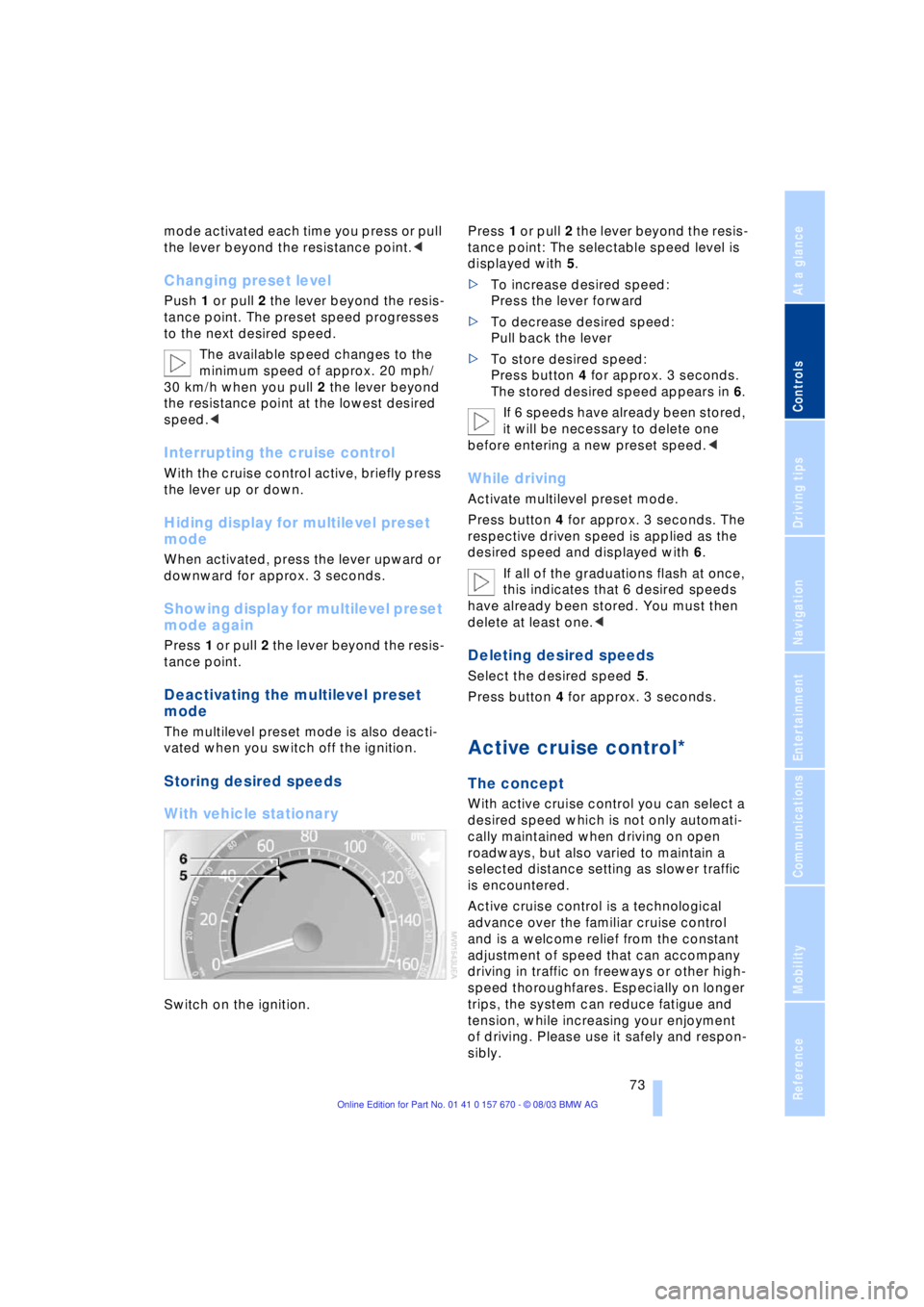
With vehicle stationary
Switch on the ignition. Press 1 or pull 2 the lever beyond the resis-
tance point: The selectable speed level is
displayed with 5.
>To increase desired speed:
Press the lever forward
>To decrease desired speed:
Pull back the lever
>To store desired speed:
Press button 4 for approx. 3 seconds.
The stored desired speed appears in 6.
If 6 speeds have already been stored,
it will be necessary to delete one
before entering a new preset speed.<
While driving
Activate multilevel preset mode.
Press button 4 for approx. 3 seconds. The
respective driven speed is applied as the
desired speed and displayed with 6.
If all of the graduations flash at once,
this indicates that 6 desired speeds
have already been stored. You must then
delete at least one.<
Deleting desired speeds
Select the desired speed 5.
Press button 4 for approx. 3 seconds.
Active cruise control*
The concept
With active cruise control you can select a
desired speed which is not only automati-
cally maintained when driving on open
roadways, but also varied to maintain a
selected distance setting as slower traffic
is encountered.
Active cruise control is a technological
advance over the familiar cruise control
and is a welcome relief from the constant
adjustment of speed that can accompany
driving in traffic on freeways or other high-
speed thoroughfares. Especially on longer
trips, the system can reduce fatigue and
tension, while increasing your enjoyment
of driving. Please use it safely and respon-
sibly.
Page 76 of 232
Driving
74 In addition to holding a steady cruising
speed, if you do encounter slower vehicles
ahead, active cruise control will Ð within the
scope of given possibilities Ð adjust your
vehicle's speed automatically so that one
can flow with the traffic without frequent
intervention by the driver. If, for example,
while cruising at the selected speed, you
begin to approach a slower vehicle ahead
of you in the same lane, the system will
reduce your vehicle's speed to the same as
that of the vehicle ahead to maintain your
selected distance setting between your
vehicle and the vehicle ahead. There are
four settings for distance, which is addi-
tionally speed-dependent. Based on your
selected distance setting, the system auto-
matically decreases the throttle setting and
lightly applies the brakes if necessary.
The vehicle brake lamps will automatically
illuminate to signal a following driver to
take action. In addition, it may be neces-
sary for the vehicle to downshift to maintain
the distance setting selected. If the vehicle
ahead speeds up or when the lane ahead
becomes clear, your vehicle will accelerate
to the speed you have selected by increas-
ing the throttle setting and shifting gears as
needed.
Active cruise control is not and must
not be used as a collision avoidance/
warning system.<
Since this active cruise control sys-
tem is a new technology and operates
differently from conventional cruise control
systems which you may be accustomed to,
you are strongly urged to read all of the
pages relating to this system before use.
Pay special attention to the information
contained in the Things to know about
active cruise control section in this manual
beginning on page 77.<
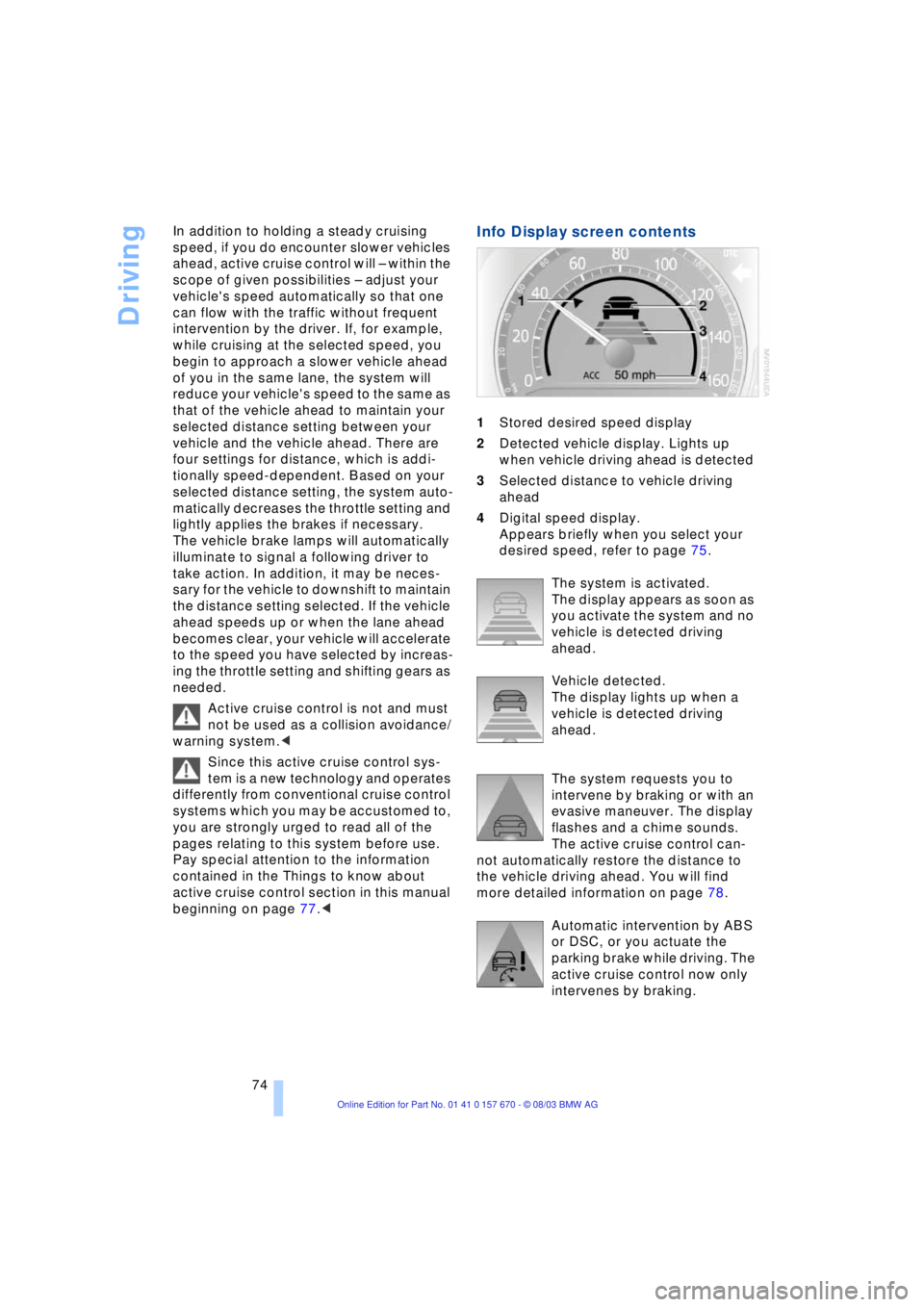
Info Display screen contents
1Stored desired speed display
2Detected vehicle display. Lights up
when vehicle driving ahead is detected
3Selected distance to vehicle driving
ahead
4Digital speed display.
Appears briefly when you select your
desired speed, refer to page 75.
The system is activated.
The display appears as soon as
you activate the system and no
vehicle is detected driving
ahead.
Vehicle detected.
The display lights up when a
vehicle is detected driving
ahead.
The system requests you to
intervene by braking or with an
evasive maneuver. The display
flashes and a chime sounds.
The active cruise control can-
not automatically restore the distance to
the vehicle driving ahead. You will find
more detailed information on page 78.
Automatic intervention by ABS
or DSC, or you actuate the
parking brake while driving. The
active cruise control now only
intervenes by braking.
Page 77 of 232
Controls
75Reference
At a glance
Driving tips
Communications
Navigation
Entertainment
Mobility
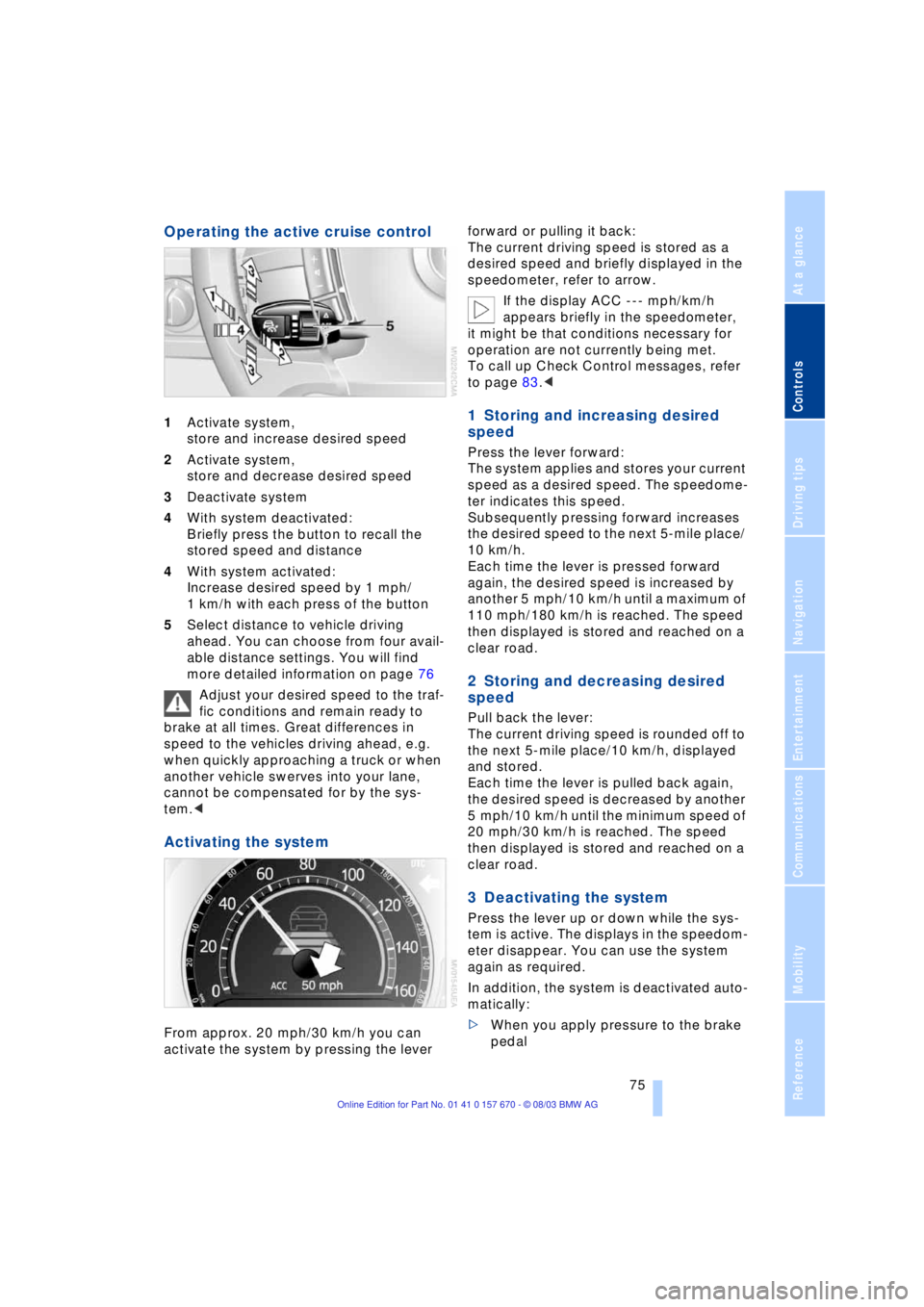
Operating the active cruise control
1Activate system,
store and increase desired speed
2Activate system,
store and decrease desired speed
3Deactivate system
4With system deactivated:
Briefly press the button to recall the
stored speed and distance
4With system activated:
Increase desired speed by 1 mph/
1 km/h with each press of the button
5Select distance to vehicle driving
ahead. You can choose from four avail-
able distance settings. You will find
more detailed information on page 76
Adjust your desired speed to the traf-
fic conditions and remain ready to
brake at all times. Great differences in
speed to the vehicles driving ahead, e.g.
when quickly approaching a truck or when
another vehicle swerves into your lane,
cannot be compensated for by the sys-
tem.<
Activating the system
From approx. 20 mph/30 km/h you can
activate the system by pressing the lever forward or pulling it back:
The current driving speed is stored as a
desired speed and briefly displayed in the
speedometer, refer to arrow.
If the display ACC --- mph/km/h
appears briefly in the speedometer,
it might be that conditions necessary for
operation are not currently being met.
To call up Check Control messages, refer
to page 83.<
1 Storing and increasing desired
speed
Press the lever forward:
The system applies and stores your current
speed as a desired speed. The speedome-
ter indicates this speed.
Subsequently pressing forward increases
the desired speed to the next 5-mile place/
10 km/h.
Each time the lever is pressed forward
again, the desired speed is increased by
another 5 mph/10 km/h until a maximum of
110 mph/180 km/h is reached. The speed
then displayed is stored and reached on a
clear road.
2 Storing and decreasing desired
speed
Pull back the lever:
The current driving speed is rounded off to
the next 5-mile place/10 km/h, displayed
and stored.
Each time the lever is pulled back again,
the desired speed is decreased by another
5 mph/10 km/h until the minimum speed of
20 mph/30 km/h is reached. The speed
then displayed is stored and reached on a
clear road.
3 Deactivating the system
Press the lever up or down while the sys-
tem is active. The displays in the speedom-
eter disappear. You can use the system
again as required.
In addition, the system is deactivated auto-
matically:
>When you apply pressure to the brake
pedal
Page 78 of 232
Driving
76 >When you select the automatic trans-
mission's neutral range N
>When you deactivate the DSC Dynamic
Stability Control
>When you actuate the parking brake
during driving
>When the system reduces the speed to
below 20 mph/30 km/h due to a traffic
situation.
The system deactivates automatically
when the speed is set to below
20 mph/30 km/h. A gong sounds and a
message appears in the Check Control.
The active intervention of the driver is
required, otherwise there is an accident
danger.<
Background lighting
You can switch off the background lighting
of the speedometer and tachometer
>when you have deactivated the system
>when the prewarning field in the
tachometer has gone out, refer to
page 80
>when the destination guidance system
of the navigation system is deactivated.
Press the lever up or down for approx.
1 second.
4 Resuming stored desired speed
and distance setting
Press button 4:
The displays appear in the speedometer.
The system is reactivated and uses the last
stored desired speed and distance setting.
4 Fine adjustment of desired speed
In the activated state, the desired speed
increases by 1 mph/1 km/h each time
button 4 is pressed briefly.
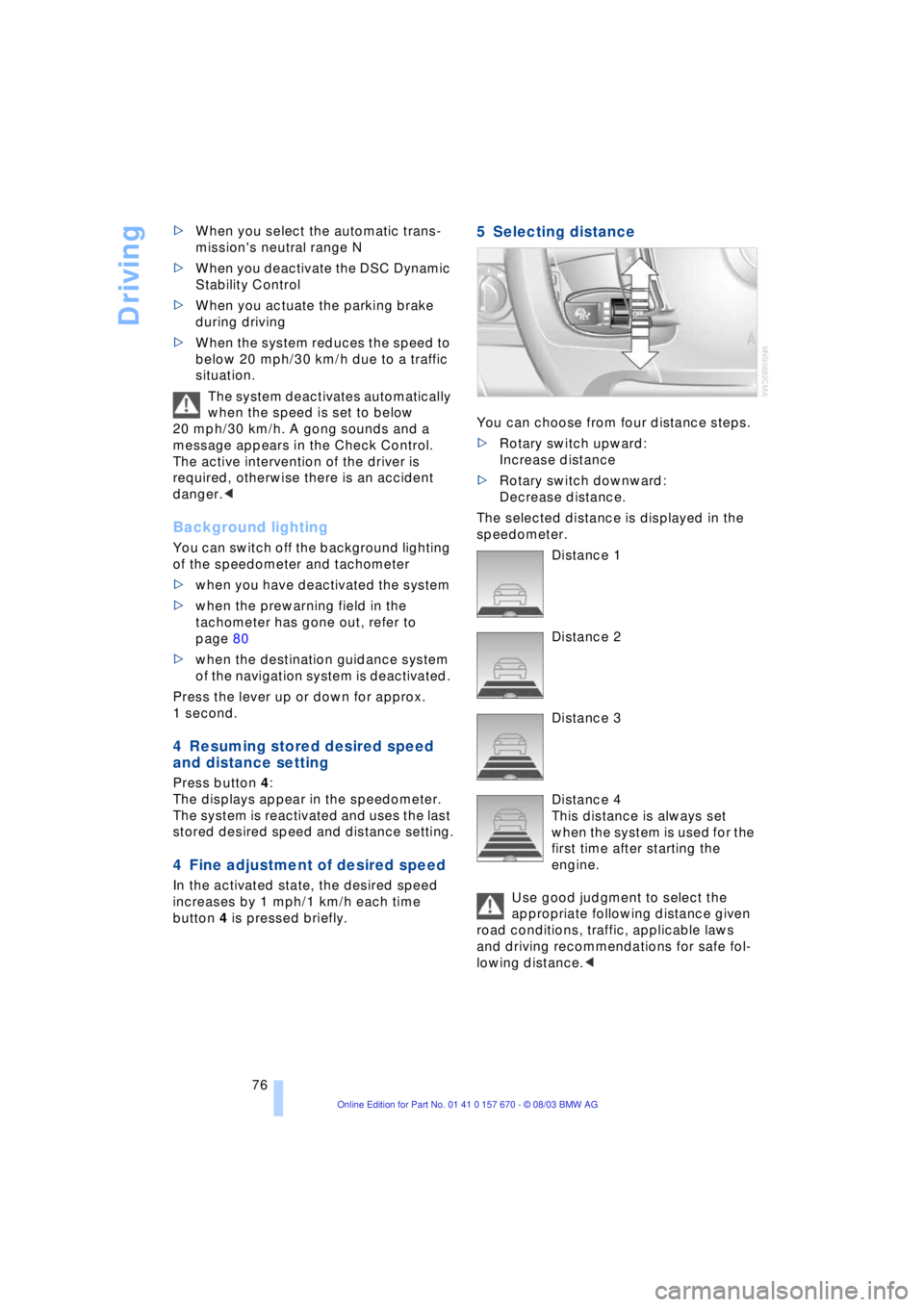
5 Selecting distance
You can choose from four distance steps.
>Rotary switch upward:
Increase distance
>Rotary switch downward:
Decrease distance.
The selected distance is displayed in the
speedometer.
Distance 1
Distance 2
Distance 3
Distance 4
This distance is always set
when the system is used for the
first time after starting the
engine.
Use good judgment to select the
appropriate following distance given
road conditions, traffic, applicable laws
and driving recommendations for safe fol-
lowing distance.<
Page 79 of 232
Controls
77Reference
At a glance
Driving tips
Communications
Navigation
Entertainment
Mobility
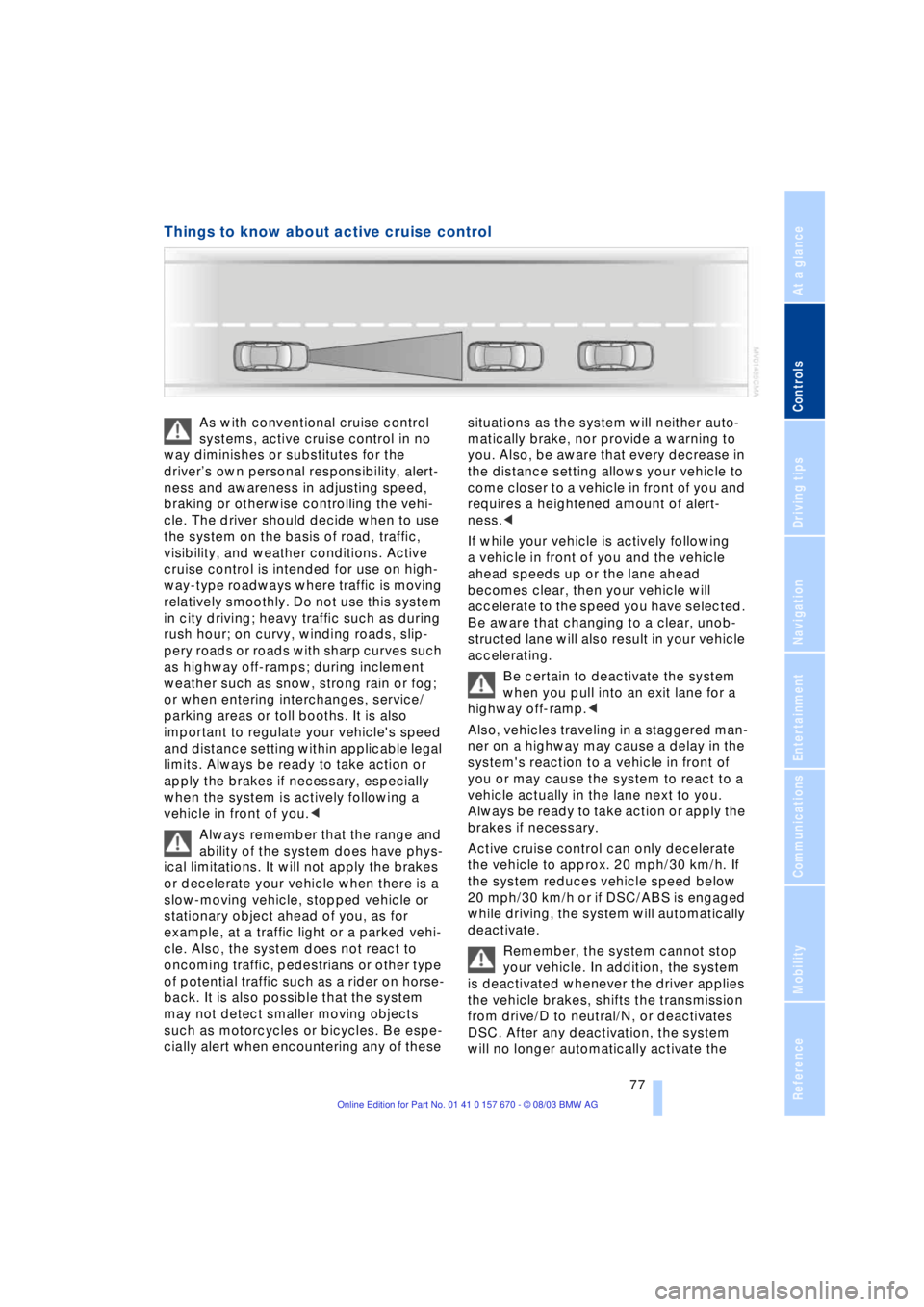
Things to know about active cruise control
As with conventional cruise control
systems, active cruise control in no
way diminishes or substitutes for the
driverÕs own personal responsibility, alert-
ness and awareness in adjusting speed,
braking or otherwise controlling the vehi-
cle. The driver should decide when to use
the system on the basis of road, traffic,
visibility, and weather conditions. Active
cruise control is intended for use on high-
way-type roadways where traffic is moving
relatively smoothly. Do not use this system
in city driving; heavy traffic such as during
rush hour; on curvy, winding roads, slip-
pery roads or roads with sharp curves such
as highway off-ramps; during inclement
weather such as snow, strong rain or fog;
or when entering interchanges, service/
parking areas or toll booths. It is also
important to regulate your vehicle's speed
and distance setting within applicable legal
limits. Always be ready to take action or
apply the brakes if necessary, especially
when the system is actively following a
vehicle in front of you.<
Always remember that the range and
ability of the system does have phys-
ical limitations. It will not apply the brakes
or decelerate your vehicle when there is a
slow-moving vehicle, stopped vehicle or
stationary object ahead of you, as for
example, at a traffic light or a parked vehi-
cle. Also, the system does not react to
oncoming traffic, pedestrians or other type
of potential traffic such as a rider on horse-
back. It is also possible that the system
may not detect smaller moving objects
such as motorcycles or bicycles. Be espe-
cially alert when encountering any of these situations as the system will neither auto-
matically brake, nor provide a warning to
you. Also, be aware that every decrease in
the distance setting allows your vehicle to
come closer to a vehicle in front of you and
requires a heightened amount of alert-
ness.<
If while your vehicle is actively following
a vehicle in front of you and the vehicle
ahead speeds up or the lane ahead
becomes clear, then your vehicle will
accelerate to the speed you have selected.
Be aware that changing to a clear, unob-
structed lane will also result in your vehicle
accelerating.
Be certain to deactivate the system
when you pull into an exit lane for a
highway off-ramp.<
Also, vehicles traveling in a staggered man-
ner on a highway may cause a delay in the
system's reaction to a vehicle in front of
you or may cause the system to react to a
vehicle actually in the lane next to you.
Always be ready to take action or apply the
brakes if necessary.
Active cruise control can only decelerate
the vehicle to approx. 20 mph/30 km/h. If
the system reduces vehicle speed below
20 mph/30 km/h or if DSC/ABS is engaged
while driving, the system will automatically
deactivate.
Remember, the system cannot stop
your vehicle. In addition, the system
is deactivated whenever the driver applies
the vehicle brakes, shifts the transmission
from drive/D to neutral/N, or deactivates
DSC. After any deactivation, the system
will no longer automatically activate the
Page 80 of 232
Driving
78 vehicle brakes, which means the driver
must intervene and resume manual brak-
ing. You should then reactivate the system
only when you are fully aware of the prior
speed and distance settings.<
Active cruise control may brake when you
reduce the stored desired speed; however,
the driver must constantly monitor traffic
and intervene if necessary.
When you switch off the engine or ignition,
active cruise control is fully switched off,
too, and any settings you have selected are
canceled.
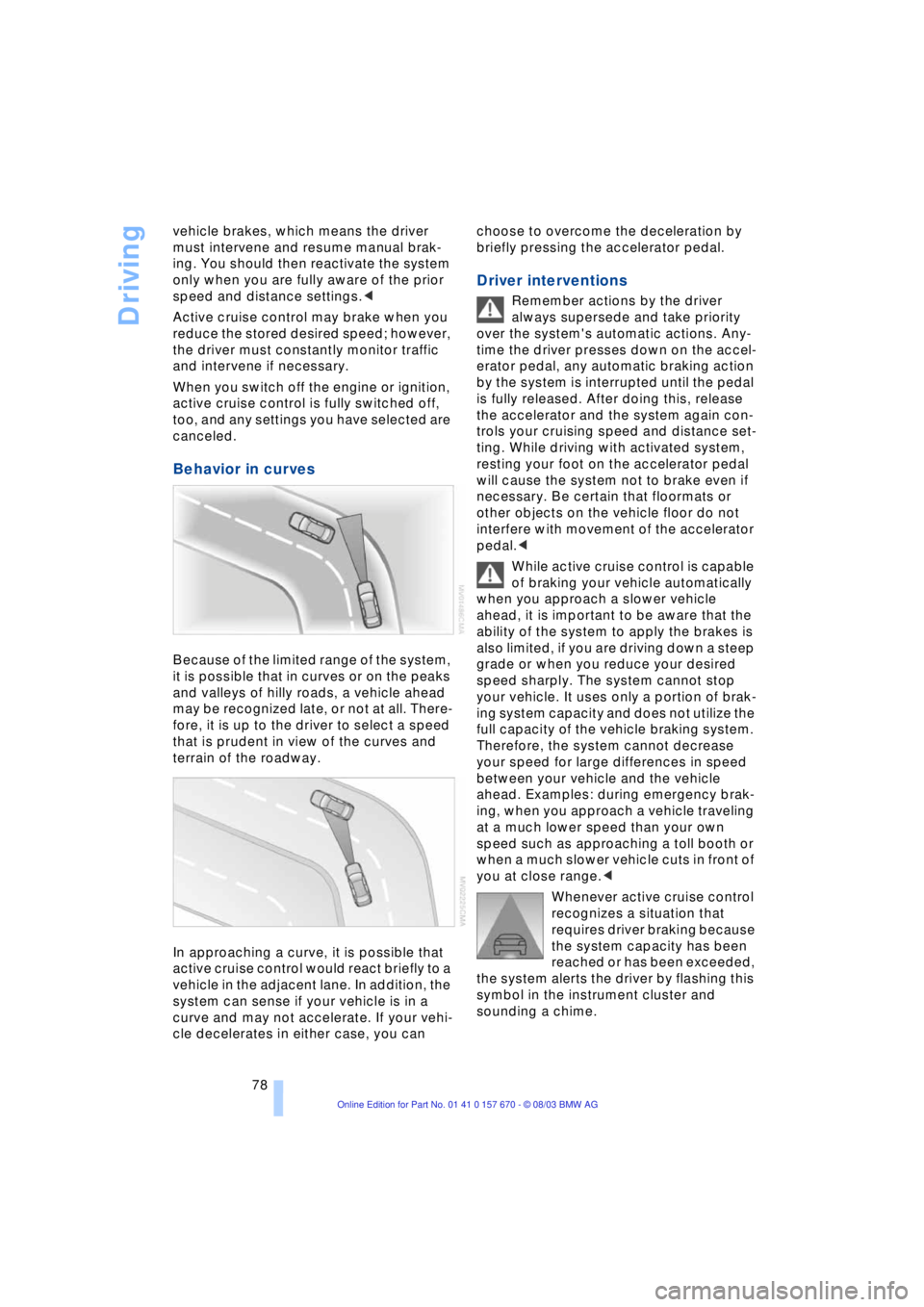
Behavior in curves
Because of the limited range of the system,
it is possible that in curves or on the peaks
and valleys of hilly roads, a vehicle ahead
may be recognized late, or not at all. There-
fore, it is up to the driver to select a speed
that is prudent in view of the curves and
terrain of the roadway.
In approaching a curve, it is possible that
active cruise control would react briefly to a
vehicle in the adjacent lane. In addition, the
system can sense if your vehicle is in a
curve and may not accelerate. If your vehi-
cle decelerates in either case, you can choose to overcome the deceleration by
briefly pressing the accelerator pedal.
Driver interventions
Remember actions by the driver
always supersede and take priority
over the system's automatic actions. Any-
time the driver presses down on the accel-
erator pedal, any automatic braking action
by the system is interrupted until the pedal
is fully released. After doing this, release
the accelerator and the system again con-
trols your cruising speed and distance set-
ting. While driving with activated system,
resting your foot on the accelerator pedal
will cause the system not to brake even if
necessary. Be certain that floormats or
other objects on the vehicle floor do not
interfere with movement of the accelerator
pedal.<
While active cruise control is capable
of braking your vehicle automatically
when you approach a slower vehicle
ahead, it is important to be aware that the
ability of the system to apply the brakes is
also limited, if you are driving down a steep
grade or when you reduce your desired
speed sharply. The system cannot stop
your vehicle. It uses only a portion of brak-
ing system capacity and does not utilize the
full capacity of the vehicle braking system.
Therefore, the system cannot decrease
your speed for large differences in speed
between your vehicle and the vehicle
ahead. Examples: during emergency brak-
ing, when you approach a vehicle traveling
at a much lower speed than your own
speed such as approaching a toll booth or
when a much slower vehicle cuts in front of
you at close range.<
Whenever active cruise control
recognizes a situation that
requires driver braking because
the system capacity has been
reached or has been exceeded,
the system alerts the driver by flashing this
symbol in the instrument cluster and
sounding a chime.
Page 81 of 232
Controls
79Reference
At a glance
Driving tips
Communications
Navigation
Entertainment
Mobility
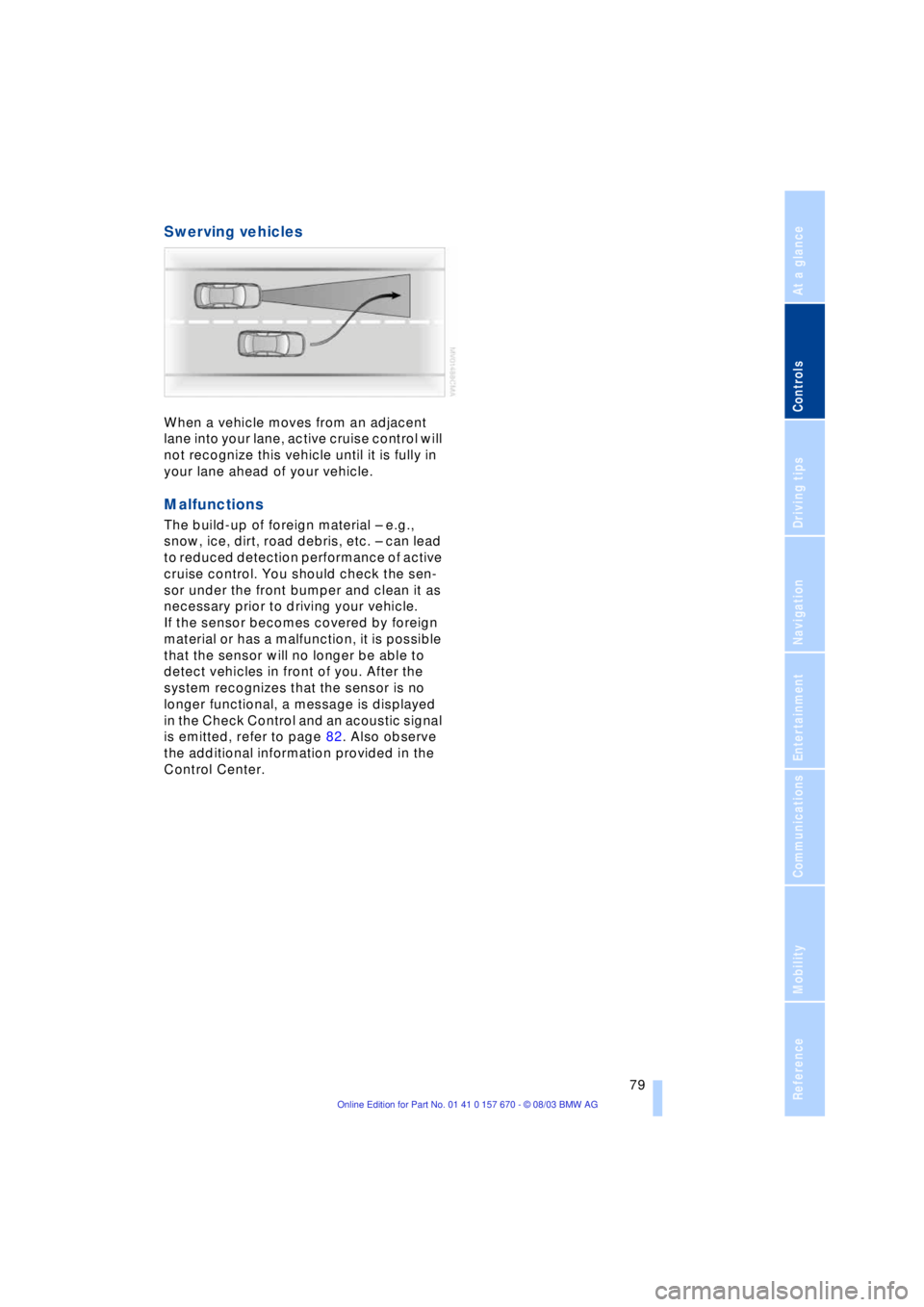
Swerving vehicles
When a vehicle moves from an adjacent
lane into your lane, active cruise control will
not recognize this vehicle until it is fully in
your lane ahead of your vehicle.
Malfunctions
The build-up of foreign material Ð e.g.,
snow, ice, dirt, road debris, etc. Ð can lead
to reduced detection performance of active
cruise control. You should check the sen-
sor under the front bumper and clean it as
necessary prior to driving your vehicle.
If the sensor becomes covered by foreign
material or has a malfunction, it is possible
that the sensor will no longer be able to
detect vehicles in front of you. After the
system recognizes that the sensor is no
longer functional, a message is displayed
in the Check Control and an acoustic signal
is emitted, refer to page 82. Also observe
the additional information provided in the
Control Center.
Page 84 of 232
Everything under control
82 The Service Interval Display does not
continue counting down to the next
service during periods when the vehicle is
stored with the battery disconnected or the
battery switch OFF.
Please remember that brake fluid should
be changed every two years at the latest,
even if the display does not yet indicate
that service is required, refer to page 197.
This same precaution applies to all of the
other service and maintenance operations
scheduled according to periodic inter-
vals.<
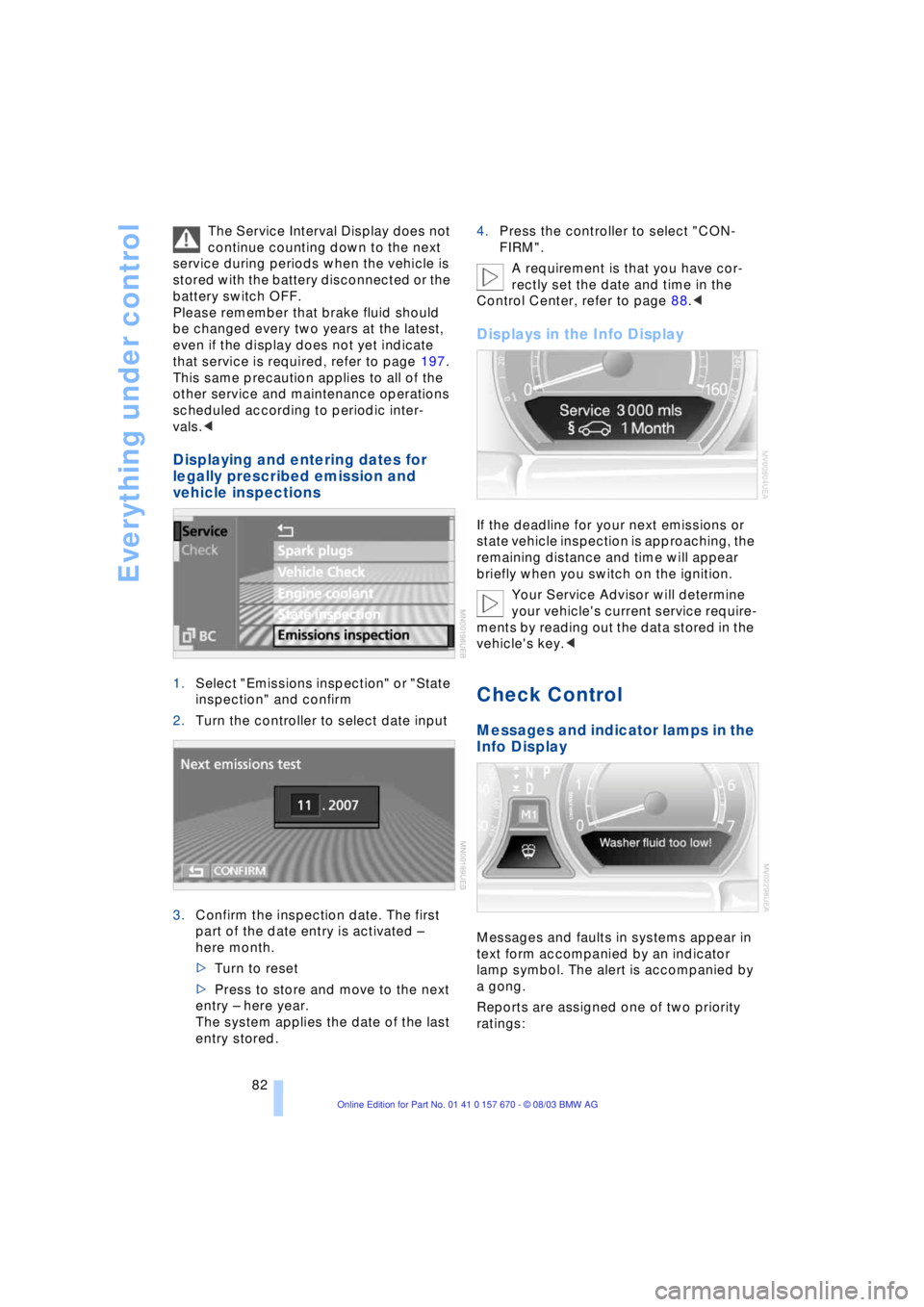
Displaying and entering dates for
legally prescribed emission and
vehicle inspections
1.Select "Emissions inspection" or "State
inspection" and confirm
2.Turn the controller to select date input
3.Confirm the inspection date. The first
part of the date entry is activated Ð
here month.
>Turn to reset
>Press to store and move to the next
entry Ð here year.
The system applies the date of the last
entry stored.4.Press the controller to select "CON-
FIRM".
A requirement is that you have cor-
rectly set the date and time in the
Control Center, refer to page 88.<
Displays in the Info Display
If the deadline for your next emissions or
state vehicle inspection is approaching, the
remaining distance and time will appear
briefly when you switch on the ignition.
Your Service Advisor will determine
your vehicle's current service require-
ments by reading out the data stored in the
vehicle's key.<
Check Control
Messages and indicator lamps in the
Info Display
Messages and faults in systems appear in
text form accompanied by an indicator
lamp symbol. The alert is accompanied by
a gong.
Reports are assigned one of two priority
ratings:
Page 85 of 232
Controls
83Reference
At a glance
Driving tips
Communications
Navigation
Entertainment
Mobility
Priority 1:
These status messages and malfunction
reports are signaled by a gong. Simulta-
neous defects will be displayed consecu-
tively. These messages cannot be deleted,
and they remain in the display until the
problem is corrected. Supplementary infor-
mation is also shown on the Control Dis-
play, refer to Automatic display on the Con-
trol Display.
Priority 2:
These status messages and malfunction
reports appear in the Info Display for
approx. 20 seconds.
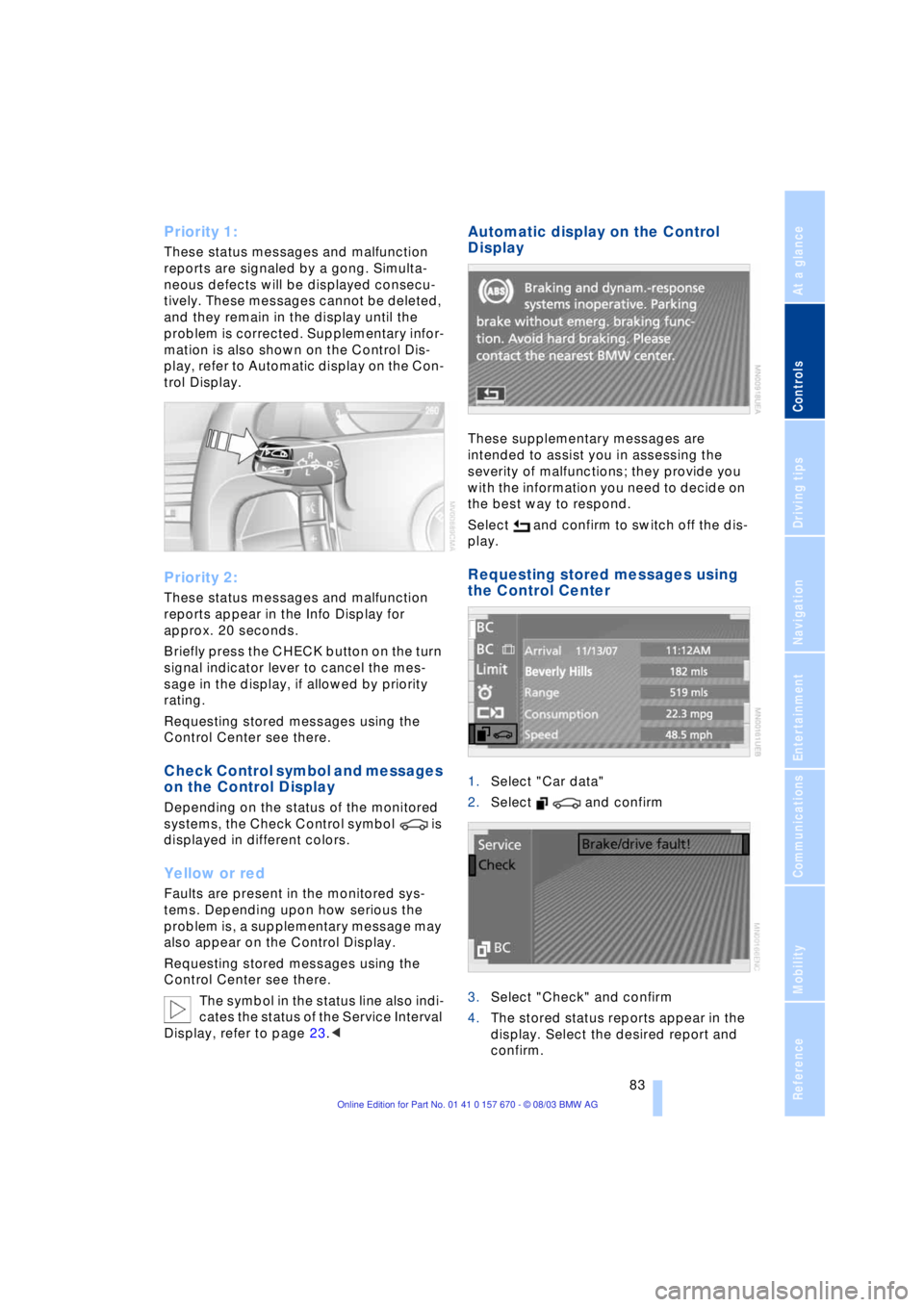
Briefly press the CHECK button on the turn
signal indicator lever to cancel the mes-
sage in the display, if allowed by priority
rating.
Requesting stored messages using the
Control Center see there.
Check Control symbol and messages
on the Control Display
Depending on the status of the monitored
systems, the Check Control symbol is
displayed in different colors.
Yellow or red
Faults are present in the monitored sys-
tems. Depending upon how serious the
problem is, a supplementary message may
also appear on the Control Display.
Requesting stored messages using the
Control Center see there.
The symbol in the status line also indi-
cates the status of the Service Interval
Display, refer to page 23.<
Automatic display on the Control
Display
These supplementary messages are
intended to assist you in assessing the
severity of malfunctions; they provide you
with the information you need to decide on
the best way to respond.
Select and confirm to switch off the dis-
play.
Requesting stored messages using
the Control Center
1.Select "Car data"
2.Select and confirm
3.Select "Check" and confirm
4.The stored status reports appear in the
display. Select the desired report and
confirm.
Page 87 of 232
Controls
85Reference
At a glance
Driving tips
Communications
Navigation
Entertainment
Mobility
Briefly press the button again to view the
last display.<
Fuel gauge
The fuel gauge display appears automati-
cally once the fuel level falls into the
reserve range. At the same time, the words
"Fuel reserve" appear. The tank still con-
tains approx. 2.6 gallons/10 liters of fuel.
It will not be possible to cancel the
computer display once the fuel level
drops into the reserve range. However, you
can still request a display of the travel
range. Computer, refer to page 84.<
Tank capacity: approx. 23.2 gallons/
88 liters. You can find information on refu-
eling on page 186.
If the tilt of the vehicle varies, when you are
driving in mountainous areas, for example,
the indicator may fluctuate slightly.
Refuel well before the tank is empty,
as otherwise engine functions will not
be ensured and damage can occur if you
drive down to the last drop.<
Cruising range
Displays the estimated cruising range
available with the remaining fuel. The sys-
tem calculates the cruising range based on
operating conditions and the amount of fuel
remaining in the tank. The basis for the cal-
culations is the average fuel consumption
over the preceding 20 miles/30 km.
Always refuel as soon as possible
once your range falls to below
30 miles/50 kilometers, as otherwise
engine functions are not ensured and dam-
age can occur.<
Refueling is only registered by the com-
puter for fuel amounts above approx.
1.3 gallons/5 liters.
Remaining distance
When you enter a destination in the naviga-
tion system or manually enter a distance in
the computer prior to departure, the sys-
tem can also display the distance remain-ing to your destination, refer to page 132
or 86.
The system automatically applies the dis-
tance to your destination using the route
recommended by the navigation system.
When you enter a destination in the
navigation system, any manual
entries will be overwritten no later than
once 1,640 ft/500 meters of the calculated
distance have elapsed.<
Energy Control/
Current fuel consumption
Shows the current fuel consumption. This
allows you to see whether your current
driving style is conducive to fuel economy
with minimum exhaust emissions.
Average fuel consumption
The average fuel consumption is calculated
for the time during which the engine is run-
ning.
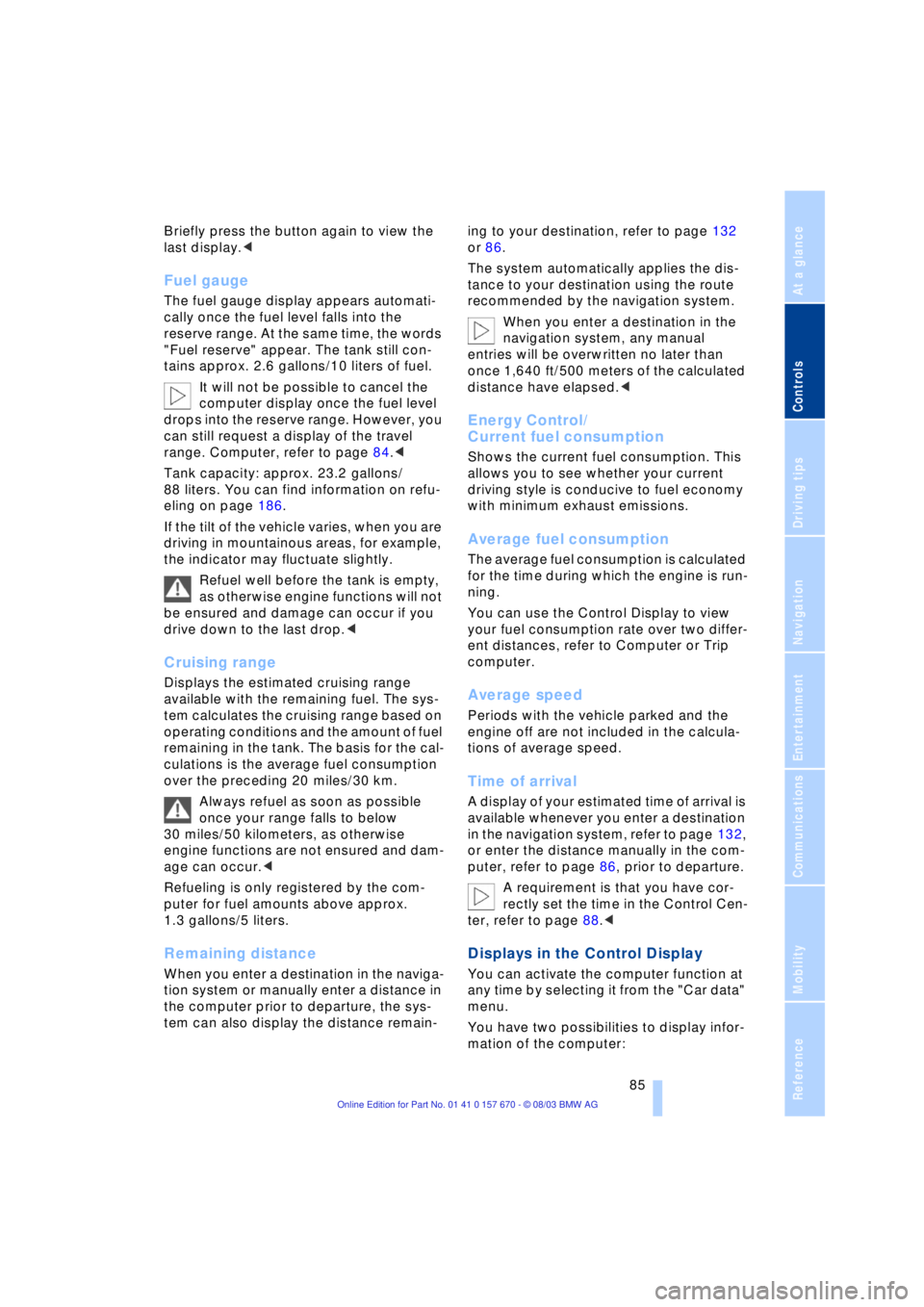
You can use the Control Display to view
your fuel consumption rate over two differ-
ent distances, refer to Computer or Trip
computer.
Average speed
Periods with the vehicle parked and the
engine off are not included in the calcula-
tions of average speed.
Time of arrival
A display of your estimated time of arrival is
available whenever you enter a destination
in the navigation system, refer to page 132,
or enter the distance manually in the com-
puter, refer to page 86, prior to departure.
A requirement is that you have cor-
rectly set the time in the Control Cen-
ter, refer to page 88.<
Displays in the Control Display
You can activate the computer function at
any time by selecting it from the "Car data"
menu.
You have two possibilities to display infor-
mation of the computer: