ECU BMW 760LI SEDAN 2007 User Guide
[x] Cancel search | Manufacturer: BMW, Model Year: 2007, Model line: 760LI SEDAN, Model: BMW 760LI SEDAN 2007Pages: 253, PDF Size: 8.59 MB
Page 127 of 253
Driving tips
125Reference
At a glance
Controls
Communications
Navigation
Entertainment
Mobility
Securing cargo
>Use the luggage net* or securing straps to
secure small and lightweight luggage and
cargo.
>Heavy-duty straps
* for securing larger and
heavier objects are available at your BMW
center. Four lashing eyes for attaching
these heavy-duty straps are provided in the
luggage compartment, refer to illustration.
>Please follow the special instructions sup-
plied with the heavy-duty straps.
Always position and secure the load as
described above. If you do not, it can
endanger the passengers, for example during
braking or evasive maneuvers.
Attach heavy-duty straps only to the lashing
eyes, refer to illustration, otherwise, the heavy-
duty straps could come loose or the vehicle
could be damaged.
Never exceed either the approved gross vehicle
weight or either of the approved axle loads, refer
to page226, as excessive loads can impair the
operational safety of the vehicle and may also
put you in violation of highway safety laws.
You should never transport unsecured heavy or
hard objects in the passenger compartment, as
they could fly around and pose a safety hazard
to the vehicle's occupants during abrupt brak-
ing or evasive maneuvers .<
Roof-mounted luggage rack*
A special rack system is available as an option
for your BMW. Please comply with the precau-
tions included with the installation instructions.
Anchorage points
The anchorage points are located inside the
door openings.
Loading roof rack
Because roof racks raise the vehicle's center of
gravity when loaded, they have a major effect on
its handling and steering response.
You should therefore always remember not to
exceed the approved roof load capacity, the
approved gross vehicle weight or the axle loads
when loading the rack.
You can find this information under Weights on
page226.
The roof load must be uniformly distributed and
should not be too large in area. Always load the
heaviest pieces on the bottom. Be sure that
adequate clearance is maintained for raising the
glass sunroof, and that objects do not project
into the opening path of the luggage compart-
ment lid.
Secure roof-mounted cargo correctly and
securely to prevent it from shifting or falling off
as you drive.
Drive smoothly. Avoid sudden acceleration and
braking maneuvers. Take corners gently.
Page 208 of 253
Under the hood
206
Under the hood
Never attempt to perform any service or
repair operations on your vehicle without
the required, professional technical training.
If you are unfamiliar with the regulations to be
observed, only have work on your vehicle car-
ried out by a BMW center or a repair shop that
works in accordance with BMW guidelines and
uses appropriately trained personnel. If this
work is not carried out properly, there is a dan-
ger of subsequent damage and related safety
hazards.<
Hood
Unlocking
Pull the lever located under the left side of the
instrument panel.
Opening
Pull the release handle and open the hood.
Closing
Close the hood with force. It must be clearly
heard to engage.
Take the same precautions that apply to
all closing operations by ensuring that the
hood's travel range is clear and unobstructed
before allowing the hood to fall into position.
If you see any signs that the hood is not com-
pletely closed while you are driving your vehicle,
you should stop at once and close it securely.<
Page 217 of 253
Mobility
215Reference
At a glance
Controls
Driving tips
Communications
Navigation
Entertainment
>Wheel chock
Located next to the spare wheel, or behind
the trim panel on the left side of the luggage
compartment on vehicles equipped with a
trailer coupling.
Remove the floor mat and the cover above
the spare tire.
Unscrew the wingnut and remove the wheel
chock.
>Vehicle jack
Located in the luggage compartment
behind the right-hand side panel.
Grasp the handle in the upper panel and fold
it down.
Loosen the wingnut and remove the jack.
After use, screw the jack all the way back
down and snap the handle back into place.
Spare tire
1.Loosen the wing nut 1.
2.Remove the washer 2 from the side.
3.Completely unscrew the threaded rod 3.
4.Remove the spare tire.
Preparing for a wheel change
1.Read carefully and comply with the safety
precautions on page214.
2.Secure the vehicle to prevent it from rolling:
Place the wheel chock against the rear sur-
face of the front tire on the side opposite the
side being raised. If the vehicle is parked on
a downward slope, place the wheel chock
securely in front of the tire. On a steep
grade, take additional precautions to secure
the vehicle against rolling.
3.Loosen the lug bolts a half turn.
Lifting vehicle
1.Position the jack at the jacking point closest
to the wheel so that the entire jack base
makes contact vertically under the jacking
point.
The vehicle jack is designed for
changing wheels only. Do not attempt
to raise another vehicle model with it or to
raise any load of any kind. To do so could
cause accidents and personal injury.<
Page 218 of 253
Replacing components
216 2.Guide the jack head into the rectangular
recess of the jacking point when cranking
up the jack, refer to section of illustration.
3.Jack the vehicle up until the wheel you are
changing is raised from the ground.
Mounting a wheel
1.Unscrew the lug bolts and remove the
wheel.
2.Remove accumulations of mud or dirt from
the mounting surfaces of the wheel and
hub. Clean the lug bolts.
3.Position the new wheel or spare tire on the
hub and screw in at least two bolts diago-
nally.
When you mount wheels other than Genu-
ine BMW light-alloy wheels, different lug
bolts may also be required.
4.Screw in the remaining lug bolts. Tighten all
the bolts securely in a diagonal pattern.
5.Lower the vehicle and remove the jack from
beneath the vehicle.
After mounting
1.Tighten the lug bolts in a diagonal pattern.
To ensure safety, always have the
lug bolts checked with a calibrated
torque wrench as soon as possible to
ensure that they are tightened to the speci-
fied torque. The tightening torque is
100 lb ft/140 Nm.<
2.Reverse the removal sequence when stor-
ing the wheel and tools in the vehicle.3.Check and correct the tire inflation pressure
at the earliest opportunity.
Use valve stem seal caps to protect
valve stems from dirt and contamina-
tion. Dirt in valve stems is a frequent source
of gradual air loss.<
4.Reinitialize the Flat Tire Monitor, refer to
page90, or reset the Tire Pressure Monitor,
refer to page92.
5.Replace the damaged tire as soon as possi-
ble and have the new wheel/tire balanced.
Driving with spare tire
On certain wheel-tire combinations, the
size of the spare tire differs from that of
the rest of the tires. The spare tire is fully capa-
ble of running in all load and speed ranges.
However, to recreate the original conditions,
the tire should be replaced as soon as possi-
ble.<
Vehicle battery
Maintenance
The battery is 100 % maintenance-free, i.e., the
electrolyte will last for the life of the battery
when the vehicle is operated in a temperate cli-
mate. Your BMW center will be happy to advise
you on all questions concerning the battery.
Charging battery
Charge the battery in the vehicle only via the
terminals in the engine compartment and with
the engine off. Connections, refer to Jump
starting on page219.
Page 219 of 253
Mobility
217Reference
At a glance
Controls
Driving tips
Communications
Navigation
Entertainment
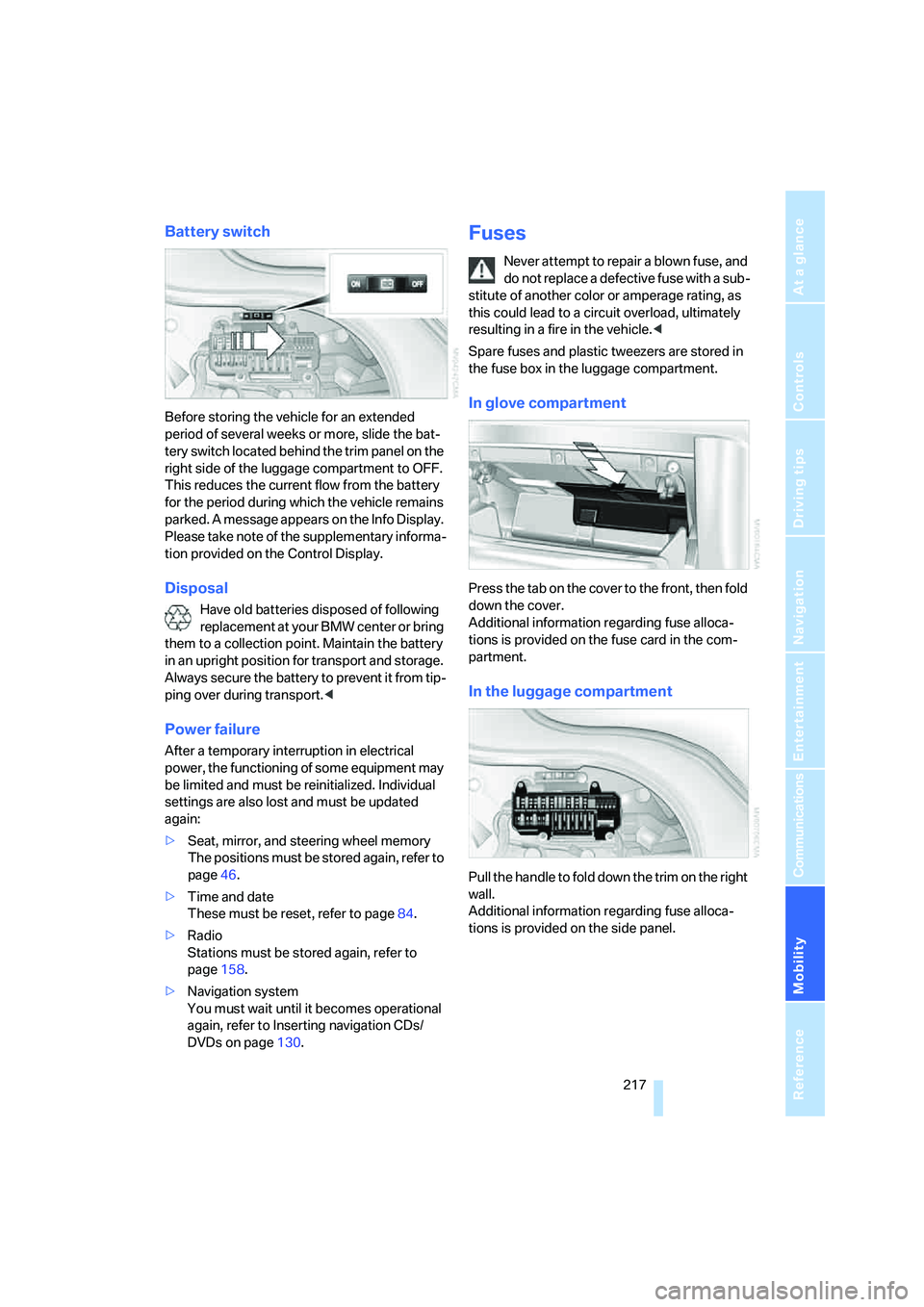
Battery switch
Before storing the vehicle for an extended
period of several weeks or more, slide the bat-
tery switch located behind the trim panel on the
right side of the luggage compartment to OFF.
This reduces the current flow from the battery
for the period during which the vehicle remains
parked. A message appears on the Info Display.
Please take note of the supplementary informa-
tion provided on the Control Display.
Disposal
Have old batteries disposed of following
replacement at your BMW center or bring
them to a collection point. Maintain the battery
in an upright position for transport and storage.
Always secure the battery to prevent it from tip-
ping over during transport.<
Power failure
After a temporary interruption in electrical
power, the functioning of some equipment may
be limited and must be reinitialized. Individual
settings are also lost and must be updated
again:
>Seat, mirror, and steering wheel memory
The positions must be stored again, refer to
page46.
>Time and date
These must be reset, refer to page84.
>Radio
Stations must be stored again, refer to
page158.
>Navigation system
You must wait until it becomes operational
again, refer to Inserting navigation CDs/
DVDs on page130.
Fuses
Never attempt to repair a blown fuse, and
do not replace a defective fuse with a sub-
stitute of another color or amperage rating, as
this could lead to a circuit overload, ultimately
resulting in a fire in the vehicle.<
Spare fuses and plastic tweezers are stored in
the fuse box in the luggage compartment.
In glove compartment
Press the tab on the cover to the front, then fold
down the cover.
Additional information regarding fuse alloca-
tions is provided on the fuse card in the com-
partment.
In the luggage compartment
Pull the handle to fold down the trim on the right
wall.
Additional information regarding fuse alloca-
tions is provided on the side panel.
Page 223 of 253
Mobility
221Reference
At a glance
Controls
Driving tips
Communications
Navigation
Entertainment
>When mounted at an angle, the tow bar will
exert lateral forces, tending to push the
vehicle sideways.
Only secure the tow bar to the tow fitting;
otherwise, damage can occur when it is
secured to other parts of the vehicle.<
With tow rope
When starting off in the towing vehicle, make
sure that the towrope is taut.
To avoid jerking and the associated
stresses on vehicle components when
towing, always use nylon ropes or nylon straps.
Only secure the tow rope on the tow fitting; oth-
erwise, damage can occur when it is secured on
other parts of the vehicle.<
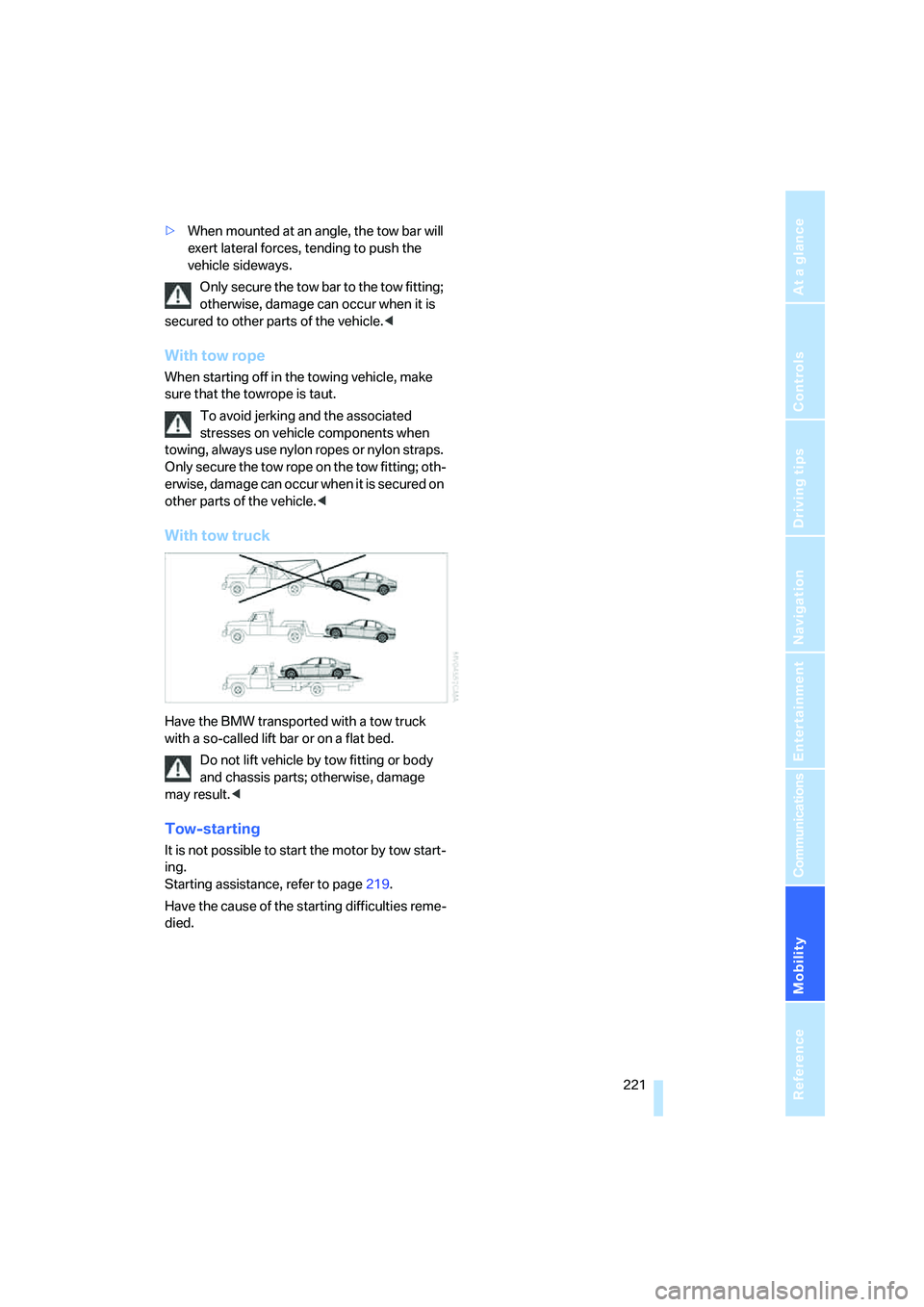
With tow truck
Have the BMW transported with a tow truck
with a so-called lift bar or on a flat bed.
Do not lift vehicle by tow fitting or body
and chassis parts; otherwise, damage
may result.<
Tow-starting
It is not possible to start the motor by tow start-
ing.
Starting assistance, refer to page219.
Have the cause of the starting difficulties reme-
died.
Page 230 of 253
Short commands of the voice command system
228
Short commands of the voice command
system
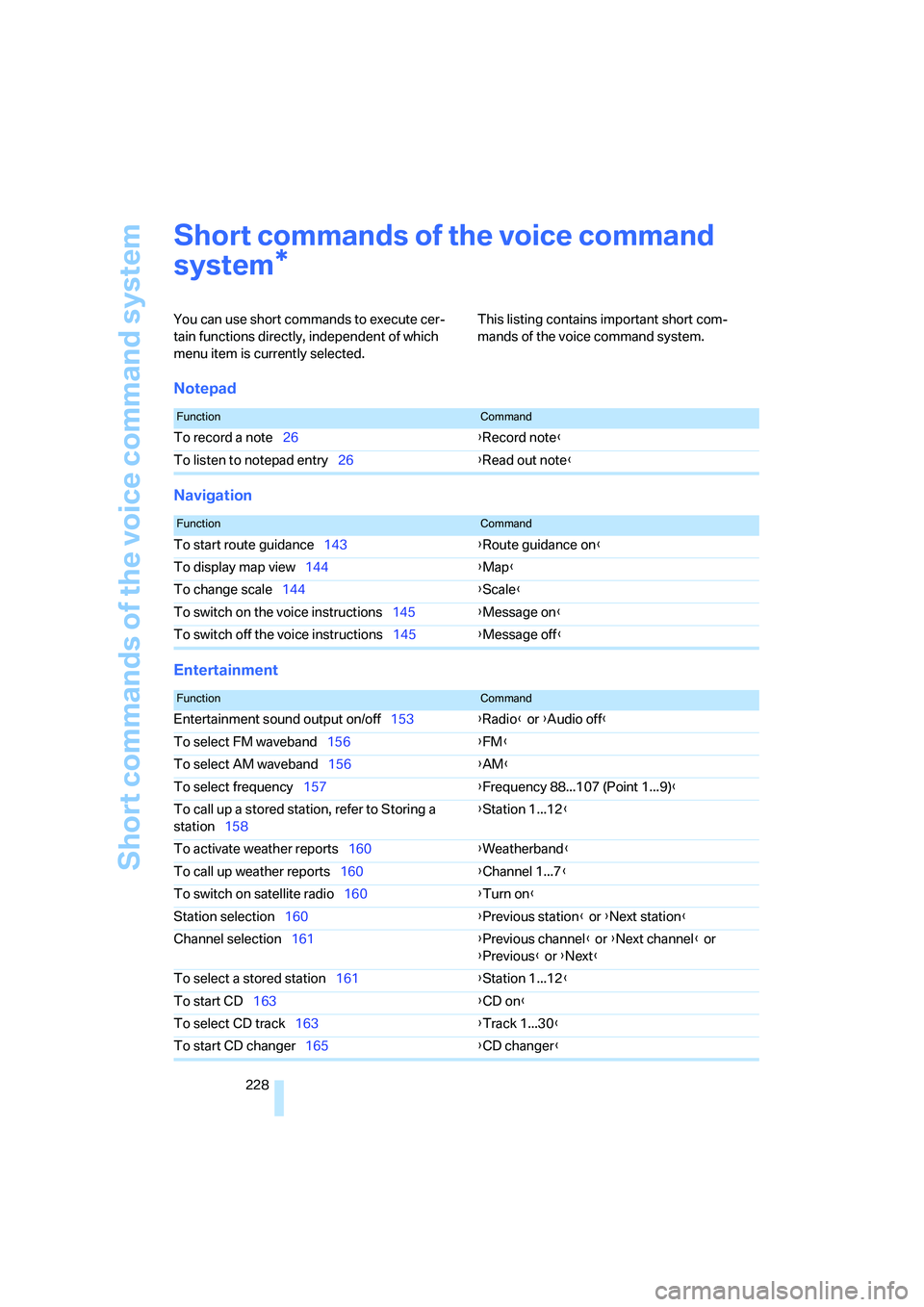
You can use short commands to execute cer-
tain functions directly, independent of which
menu item is currently selected. This listing contains important short com-
mands of the voice command system.
Notepad
Navigation
Entertainment
*
FunctionCommand
To record a note26{Record note}
To listen to notepad entry26{Read out note}
FunctionCommand
To start route guidance143{Route guidance on}
To display map view144{Map}
To change scale144{Scale}
To switch on the voice instructions145{Message on}
To switch off the voice instructions145{Message off}
FunctionCommand
Entertainment sound output on/off153{Radio} or {Audio off}
To select FM waveband156{FM}
To select AM waveband156{AM}
To select frequency157{Frequency 88...107 (Point 1...9)}
To call up a stored station, refer to Storing a
station158{Station 1...12}
To activate weather reports160{Weatherband}
To call up weather reports160{Channel 1...7}
To switch on satellite radio160{Turn on}
Station selection160{Previous station} or {Next station}
Channel selection161{Previous channel} or {Next channel} or
{Previous} or {Next}
To select a stored station161{Station 1...12}
To start CD163{CD on}
To select CD track163{Track 1...30}
To start CD changer165{CD changer}
Page 238 of 253
Everything from A to Z
236 ESP Electronic Stability
Program, refer to DSC
Dynamic Stability
Control87
Event Data Recorders211
Exhaust system, refer to Hot
exhaust system122
Exterior mirrors50
– adjusting50
– automatic dimming
feature51
– automatic heating51
– folding in and out51
– tilting down passenger-side
mirror51
External audio
device114,169
"Extra"
– rear air conditioner108
– rear refrigerator117
Eyes for lashing, refer to
Securing cargo125
F
"Fader", balance and
fader154
Failure messages, refer to
Check Control80
Failure of an electrical device,
refer to Fuses217
False alarm, refer to Avoiding
unintentional alarms38
Fastening safety belts48
"Fastest route",
navigation141
Fast forward
– CD changer167
– CD player164
– DVD changer172
Filter, refer to Microfilter/
activated-charcoal filter107
First-aid kit219
Fittings for towing and tow
starting220
Flashlight, refer to
Rechargeable flashlight113Flat tire
– Flat Tire Monitor90
– refer to Changing
wheels214
– refer to Tire condition203
– run-flat tires91,93,204
– spare tire215
– Tire Pressure Monitor91
Flat Tire Monitor90
– initializing system90
– limits of system90
– show chains205
– warning lamp91
Flooding, refer to Driving
through water123
Floor coverings, carpet, refer
to Caring for your vehicle
brochure
Floor mat, refer to Caring for
your vehicle brochure
"FM", radio156
FM, refer to Radio156
Fog lamps, refer to Front fog
lamps101
Footbrake, refer to Braking
safely123
Footwell lamps, refer to
Interior lamps102
For specified oil grades, refer
to Approved engine oils208
Fresh air vents, refer to
Ventilation107
Front airbags95
Front fog lamps, indicator
lamp11,13
Fuel197
– average fuel
consumption77
– gauge76
– quality197
– refer to Average fuel
consumption77
– reserve, refer to Fuel
gauge76
– tank capacity227
Fuel consumption display,
refer to Energy control/
current consumption77Fuel filler door196
– manually unlocking196
Fuel level, refer to Fuel
gauge76
Fuel-saving driving, refer to
Energy Control77
"Full", rear seat screen22
"FULL MENU", DVD
changer173
"Full screen", BMW Night
Vision98
Fuses217
G
Garage door opener, refer to
Integrated universal remote
control111
Gas
– display, refer to Fuel
gauge76
– fuel quality197
Gear changes, refer to
Automatic transmission with
Steptronic62
Gear display, refer to Displays
on Info Display62
"General destination",
navigation135
General driving notes122
Glasses compartment115
Glass sunroof, electric41
– convenience operation32
– moving manually42
Glove compartment113
Grilles, refer to Ventilation107
Gross weight, refer to
Weights226
Page 240 of 253
Everything from A to Z
238 Inflation pressure, refer to Tire
inflation pressure198
Inflation pressure monitoring
– refer to Flat Tire Monitor90
– refer to Tire Pressure
Monitor91
Info Display12
"Information", navigation135
Information, navigation
– "On country"135
– "On dest."135
– "On location"135
– "On town/city"135
Info service191
Infrared windshield, refer to
Entry/pass tags126
"INITIALIZE", BMW
Assist193
Inserting navigation CD/
DVD130
Installation location
– CD changer165
– DVD changer170
– mobile phone, refer to
Inserting mobile phone181
– navigation drive130
Instructions, navigation
system, refer to Route
guidance by voice
instructions145
Instrument cluster, refer to
Info Display12
Instrument lighting102
Instrument panel, refer to
Cockpit
– all around the steering
wheel10
– comfort features14
Integrated universal remote
control111
Interior lamps102
– switching on with remote
control32
Interior motion sensor38
– switching off38
Interior rearview mirror,
automatic dimming
feature51Interlock, refer to Switching
off engine58
"INTERM. TIME",
stopwatch83
Interval Display, refer to
Service requirements78
J
Joystick, refer to iDrive16
Jump starting219
K
Keyless-Go, refer to Comfort
Access38
Keyless opening and closing,
refer to Comfort Access38
Key Memory31
Keys30
– adapter for spare key30
– key-related settings, refer to
Key Memory31
Kick-down63
Knock control197
L
Lamps and bulbs212
"Language", settings84
Lashing eyes, refer to
Securing cargo125
"Last", phone186
"Last dest.", navigation137
Last destination driven to,
refer to Destination list137
Last numbers on mobile
phone, refer to Dialing
numbers stored in a list186
LATCH child restraint fixing
system55
Leather care, refer to Caring
for your vehicle brochure
LEDs light-emitting
diodes212
"Left", seat heating49
Length, refer to
Dimensions225Level control system89
Light, refer to Parking lamps/
low beams100
Light alloy wheels, care and
maintenance, refer to Caring
for your vehicle brochure
Light-emitting diodes
LEDs212
Lighter116
Lighter socket, refer to Power
socket116
Lighting
– of instruments102
– of vehicle100
Light switch100
"Limit"82
Limit, refer to Speed limit82
"Limited", rear seat screen22
Load, refer to Loading124
Loading
– securing cargo125
– vehicle124
"LOC.", navigation140
"Location",
navigation139,146,147
Lock buttons in the doors,
refer to Locking34
Locking
– from inside34
– from outside32
Locking without key, refer to
Comfort Access38
Locking without remote
control, refer to Comfort
Access38
"LOGIC7", tone control154
Longlife oils, approved
oils208
"low", automatic climate
control105
Low beams100
– automatic100
– changing bulb, refer to
Xenon light212
Lower back support, refer to
Lumbar support
adjustment45
Page 242 of 253
Everything from A to Z
240 Modifications, technical, refer
to For your own safety5
Monitor, refer to
– iDrive16
– rear seat screen21
Mounting for vehicle jack,
refer to Lifting vehicle215
MP3, refer to Compressed
audio files166
Multi-function steering wheel,
refer to Buttons on steering
wheel11
Multifunction switch
– refer to Turn signals/
headlamp flasher65
– refer to Wiper/washer
system65
N
"Name", navigation132
"Navigation"130,143
Navigation announcements,
refer to Switching voice
instructions on/off145
Navigation destination
– manual entry131
– selecting via map134
Navigation drive, installation
location130Navigation system130
– address book138
– adjusting volume26,145
– changing route145
– current position146
– destination input131
– destination list137
– displaying route144
– manually entering
destination address131
– navigation CD/DVD130
– recent destinations137
– route guidance in assistance
window130
– route list145
– selecting destination via
information135
– selecting destination via
map134
– selecting route criteria141
– starting route guidance143
– switching off, refer to
Terminating/continuing
route guidance143
– terminating/continuing route
guidance143
– voice instructions145
"Navi info", programmable
buttons52
Neck supports, refer to Head
restraints46
Nets, refer to Securing
cargo125
"New dest.",
navigation131,134
"New information",
BMW Assist191
New remote control for
vehicle30
"New route",
navigation141,145
"Next", navigation135
Night vision device, refer to
BMW Night Vision96
"No measurement possible at
this time", checking engine
oil level208
"None", rear seat screen
22Non-smokers' equipment
package, refer to Power
socket116
Notepad of voice command
system26
Nozzles, refer to
Ventilation107
Number of cylinders, refer to
Engine specifications224
Nylon rope, refer to Towing
and tow starting220
O
OBD socket211
Octane numbers, refer to Fuel
specifications197
Odometer75
Oil
– additives, refer to Approved
engine oils208
– approved engine oils208
– consumption, refer to
Engine oil, checking207
– level207
– topping up, refer to Adding
engine oil208
– viscosity ratings208
Oil change interval, refer to
Service requirements78
Oil consumption, refer to
Checking engine oil207
"Oil level at minimum! Add
1 quart engine oil", checking
engine oil level208
"Oil level under min.! Add
1 quart engine oil", checking
engine oil level208
"OK", DVD changer174
"ON / OFF", speed limit82
Onboard monitor, refer to
iDrive16
Onboard tool kit212
"On country", navigation136
"On dest.", navigation136
Online help, refer to Roadside
Assistance189
"On location", navigation136