change key battery BMW 760LI SEDAN 2007 Owners Manual
[x] Cancel search | Manufacturer: BMW, Model Year: 2007, Model line: 760LI SEDAN, Model: BMW 760LI SEDAN 2007Pages: 253, PDF Size: 8.59 MB
Page 35 of 253
Controls
33Reference
At a glance
Driving tips
Communications
Navigation
Entertainment
Mobility
Switching on interior lamps
Press the button.
You can also use this function to locate your
vehicle in parking garages etc.
Panic mode*
You can also trigger the alarm system in case of
danger:
Press the button for at least 3 seconds.
To deactivate the alarm: press any button
Opening luggage compartment lid
Press the button for approx. one second.
The luggage compartment lid opens, regard-
less of whether it was previously locked or
unlocked.
During opening, the luggage compart-
ment lid pivots back and up. Make sure
there is adequate clearance available before
opening.
To avoid being inadvertently locked out, never
set the remote control down in the luggage
compartment. A previously locked luggage
compartment lid is also locked again after clos-
ing.<
Automatic luggage compartment lid
operation*
Opening luggage compartment lid
Press the button for approx. one second.
The luggage compartment lid opens all the way,
regardless of whether it was previously locked
or unlocked.
To interrupt the opening process:
Press the button again while opening is in
progress.
During opening, the luggage compart-
ment lid pivots back and up. Make sure
there is adequate clearance available before
opening.
To avoid being inadvertently locked out, never
set the remote control down in the luggage
compartment. A previously locked luggage
compartment lid is also locked again after clos-
ing.<
Malfunction
Local radio waves can cause the remote control
to malfunction.
Should the remote control fail to operate due to
interference of this kind, the vehicle can be
opened and closed with a key via the door lock.
If it is no longer possible to lock the vehicle with
a remote control, then its battery is discharged.
Use this remote control during an extended
drive; this will recharge the battery, refer to
page30.
For US owners only
The transmitter and receiver units comply with
part 15 of the FCC/Federal Communication
Commission regulations. Operation is gov-
erned by the following:
FCC ID:
>LX8766S
>LX8766E
>LX8CAS
>LX8CAS2
Compliance statement:
This device complies with part 15 of the FCC
Rules. Operation is subject to the following two
conditions:
>This device may not cause harmful interfer-
ence, and
>this device must accept any interference
received, including interference that may
cause undesired operation.
Any unauthorized modifications or
changes to these devices could void the
user's authority to operate this equipment.<
Page 39 of 253
Controls
37Reference
At a glance
Driving tips
Communications
Navigation
Entertainment
Mobility
Manual operation
In the case of an electrical malfunction, you can
unlock the luggage compartment lid with the
key, refer to page35, and slowly open and close
it without sudden movements.
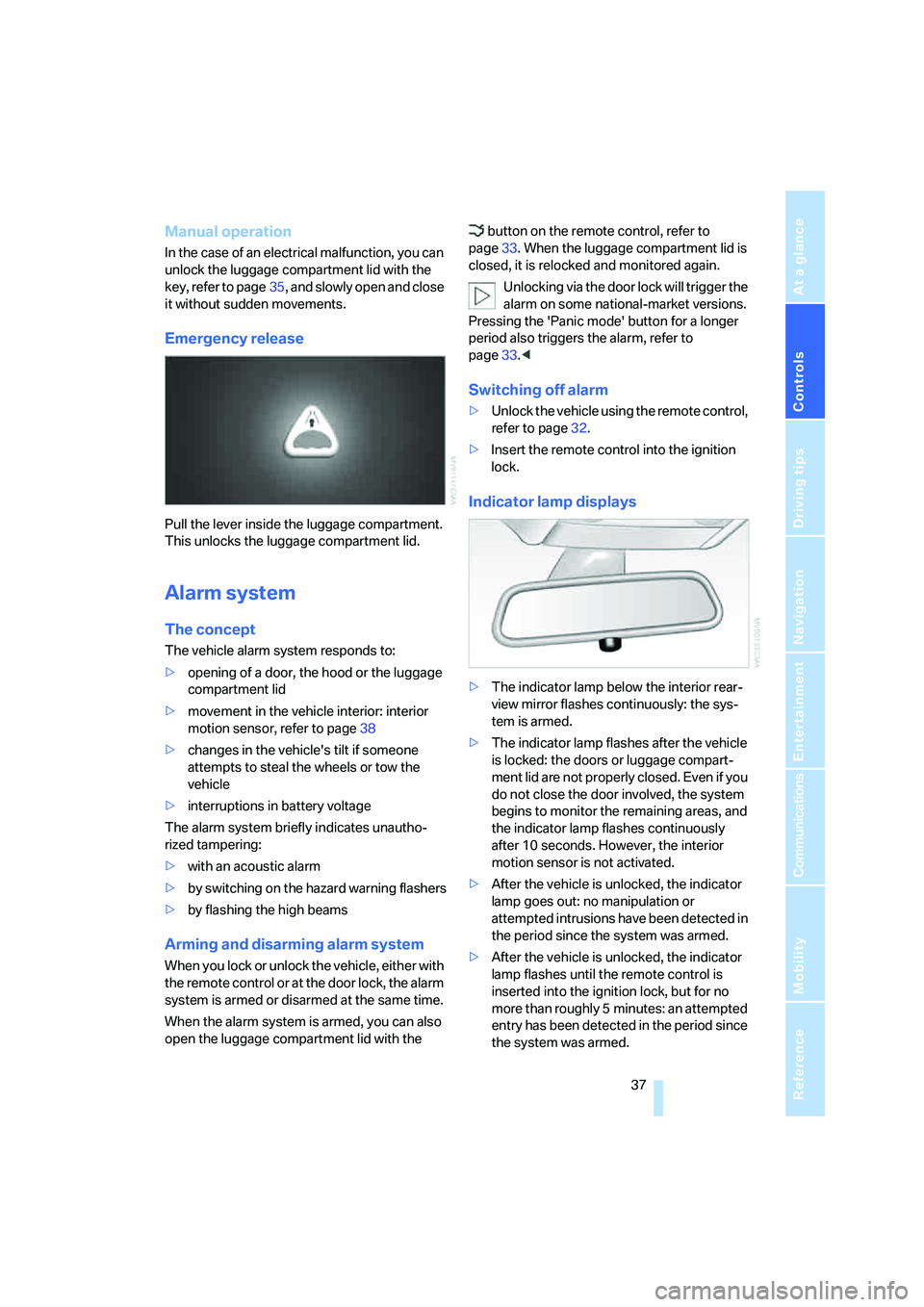
Emergency release
Pull the lever inside the luggage compartment.
This unlocks the luggage compartment lid.
Alarm system
The concept
The vehicle alarm system responds to:
>opening of a door, the hood or the luggage
compartment lid
>movement in the vehicle interior: interior
motion sensor, refer to page38
>changes in the vehicle's tilt if someone
attempts to steal the wheels or tow the
vehicle
>interruptions in battery voltage
The alarm system briefly indicates unautho-
rized tampering:
>with an acoustic alarm
>by switching on
the hazard warning flashers
>by flashing the high beams
Arming and disarming alarm system
When you lock or unlock the vehicle, either with
the remote control or at the door lock, the alarm
system is armed or disarmed at the same time.
When the alarm system is armed, you can also
open the luggage compartment lid with the button on the remote control, refer to
page33. When the luggage compartment lid is
closed, it is relocked and monitored again.
Unlocking via the door lock will trigger the
alarm on some national-market versions.
Pressing the 'Panic mode' button for a longer
period also triggers the alarm, refer to
page33.<
Switching off alarm
>Unlock the vehicle using the remote control,
refer to page32.
>Insert the remote control into the ignition
lock.
Indicator lamp displays
>The indicator lamp below the interior rear-
view mirror flashes continuously: the sys-
tem is armed.
>The indicator lamp flashes after the vehicle
is locked: the doors or luggage compart-
ment lid are not properly closed. Even if you
do not close the door involved, the system
begins to monitor the remaining areas, and
the indicator lamp flashes continuously
after 10 seconds. However, the interior
motion sensor is not activated.
>After the vehicle is unlocked, the indicator
lamp goes out: no manipulation or
attempted intrusions have been detected in
the period since the system was armed.
>After the vehicle is unlocked, the indicator
lamp flashes until the remote control is
inserted into the ignition lock, but for no
more than roughly 5 minutes: an attempted
entry has been detected in the period since
the system was armed.
Page 66 of 253
Driving
64
Manually releasing transmission lock
In the event of a power supply interrup-
tion, e.g. with a drained or disconnected
battery or when there is an electrical malfunc-
tion, the transmission lock must be released
manually; otherwise, the rear wheels are locked
and the vehicle cannot be towed.<
When manually releasing the transmis-
sion lock, depress the brake pedal; other-
wise, there is a danger of the vehicle rolling
when the transmission lock is manually
released.<
The transmission lock should only be released
for towing. Reengage the transmission lock
after parking the vehicle at its destination.
If it also becomes necessary to manually
release the parking brake, follow this sequence:
1.Start by manually releasing the parking
brake, refer to page60.
2.Then proceed to manually releasing the
transmission lock.
Releasing
1.Use the vehicle key to release the cover
panel beneath the instrument panel by turn-
ing the lock counterclockwise, then fold
down the cover.
2.Pull out the release lever with the loop1
until it locks into place: the transmission
lock is unlocked.Reengage the transmission lock after
parking the vehicle at its destination. Oth-
erwise, there is a danger of the vehicle rolling.<
Engaging locks
1.Disengage the release lever by pressing it
together with the red locking lever, refer to
arrow.
2.Guide the release lever all the way back into
its original position – the transmission lock
is engaged once more.
3.Fold up and lock the cover panel again. Now
– and not before – the key may be removed.
Once the transmission lock has been
engaged, the message in the Info Display
should disappear, and the symbol on the Info
Display should change from N to P. Otherwise,
there is a danger of the vehicle rolling.<
Jump starting and tow starting information,
refer to section starting on page219.
Page 234 of 253
Everything from A to Z
232 BMW homepage4
BMW Maintenance
System210
BMW Night Vision96
– activating/deactivating98
– cleaning camera99
– making settings98
Boot, refer to Luggage
compartment119
Bottle holder, refer to Cup
holders115
Brake force display94
Brake lamp, adaptive, refer to
Brake force display94
Brake lamps
– brake force display94
– replacing bulbs213
Brake rotors, refer to
Corrosion on brake
rotors123
Brakes123
– ABS87
– brake force display94
– breaking-in122
– parking brake58
Brake system
– BMW Maintenance
System210
– breaking-in122
– refer to Braking safely123
Breakdown service, refer to
Roadside
Assistance189,218
Breaking-in122
Breaking-in differential, refer
to Engine and
differential122
"Brightness"
– BMW Night Vision98
– DVD changer172
– on Control Display85
Bulbs, replacing212
"button", programmable
buttons52
Buttons
– next to the controller16
– on steering wheel11
C
"Calculate", refer to
Bypassing route
sections146
Calculating distance to
destination77
California Proposition 65
Warning6
"CALL"191
Call
– accepting184
– automatically accepting,
refer to Hands-free
system179
– rejecting184
– touch tone dialing180
– while away, refer to Dialing
numbers stored in a list186
Call back list, refer to Dialing a
number from phone book or
from numbers stored in a
list185
Calling
– from phone book185
– from Top 8 list186
– redialing185
– with retracting telephone
keypad179
Can holder, refer to Cup
holders115
Capacities227
Capacity, luggage
compartment226
Car battery, refer to Vehicle
battery216
Car care, refer to Caring for
your vehicle brochure
Car-care products, refer to
Caring for your vehicle
brochure
"Car Data"79,81
Care, refer to Caring for your
vehicle brochure
Caring for the upholstery, refer
to Caring for your vehicle
brochureCaring for the vehicle finish,
refer to Caring for your
vehicle brochure
Car key, refer to Remote
control/key30
Carpet care, refer to Caring for
your vehicle brochure
Car radio, refer to Radio156
Car wash123
– also refer to Caring for your
vehicle brochure
– with Comfort Access39
Catalytic converter, refer to
Hot exhaust system122
"Categories", radio161
CBC Cornering Brake
Control87
CBS Condition Based
Service210
"CD", CD player163
"CDC", CD changer166
CD changer165
– compressed audio files166
– controls152
– fast forward, reverse
167
– installation location165
– random sequence167
– sampling167
– selecting a CD166
– selecting track166
– starting165
– tone control153
– volume153
CD player163
– controls152
– fast forward, reverse164
– random sequence164
– sampling163
– selecting tracks163
– starting163
– tone control153
– volume153
Center armrest
– front113
– rear114
Center console, refer to
Comfort features14
Central locking, from the
inside34
Page 236 of 253
Everything from A to Z
234 Cradle for mobile phone, refer
to Using snap-in
adapter178
Creating voice address
book141
Cruise control67,69
– refer to Programmable
cruise control67
Cruising range77
Cup holders115
Curb weight, refer to
Weights226
Current consumption, refer to
Energy Control77
Currentness of Owner's
Manual5
Current position
– displaying146
– storing139
Cursor for navigation, refer to
Selecting destination via
map134
"Curve mode", BMW Night
Vision98
Customizing settings, refer to
Key Memory31
D
Dashboard, refer to
Cockpit10
Data224
– dimensions225
– engine224
– filling capacities227
– weights226
Date, refer to Assistance
window21
– display format84
– setting84
"Date", setting84
Daytime running lamps101
DBC Dynamic Brake
Control87
"DEACTIV.", BMW Assist192
Deactivating front passenger
airbags54Defroster, rear window107
Defrosting windows106
Defrosting windows and
removing condensation106
Dehumidifying air, refer to
Cooling function, switching
on and off manually107
"DELETE", navigation140
Delete entire list, refer to
Deleting entries in lists186
Deleting address book140
Deleting entries in lists186
Destination for navigation131
– selecting using voice140
– selecting via information135
Destination list in navigation
system, deleting138
"Dest. input", navigation131
"Dest. list", navigation137
Dialed numbers, refer to
Redialing185
Diamond button52
Digital clock75
Dimensions225
Directional indicators, refer to
Turn signals65
Direction announcements,
refer to Route guidance by
voice instructions145
Direction instructions, refer to
Voice instructions145
Directory, refer to
– Address book138
– Phone book186
Displacement, refer to Engine
specifications224
Display, refer to
– iDrive16
– Info Display12
Display illumination, refer to
Instrument lighting102
Displaying track information,
CD changer
167
Display lighting, refer to
Instrument lighting102
Display of malfunctions, refer
to Check Control80Disposal
– remote control battery39
– vehicle battery217
Distance-adjusting cruise
control, refer to Active cruise
control69
Distance to destination77
– refer to Remaining
distance77
– units of measure84
Distance warning, refer to
PDC Park Distance
Control86
Door entry lighting, refer to
Interior lamps102
Door key, refer to Remote
control/key30
Door lock34
Doors
– unlocking and locking from
inside34
– unlocking and locking from
outside32
DOT Quality Grades202
Draft-free ventilation107
Driving lamps, refer to Parking
lamps/low beams100
Driving notes122
Driving route, refer to
Displaying route144
Driving stability control87
Driving tips, refer to Driving
notes122
Dry air, refer to Cooling
function107
DSC Dynamic Stability
Control87
– indicator lamp13
"DTC"88
DTC Dynamic Traction
Control88
– indicator lamp13
"DVD", DVD changer171
Page 244 of 253
Everything from A to Z
242 Pressure monitoring, tires,
refer to Tire Pressure
Monitor91
"Profile", BMW Assist193
Programmable
– buttons52
– cruise control67
Protective function
– glass sunroof, electric41
– power windows40
"Public places, business and
shopping", navigation136
Puncture, Flat Tire Monitor90
R
Radiator, refer to Coolant208
Radiator fluid, refer to
Coolant208
Radio156
– Autostore158
– controls152
– High Definition Radio162
– sampling stations157
– satellite radio160
– selecting the waveband156
– storing stations158
– switching on/off153
– tone control153
– updating selection of
stations in receiving
range158
– volume153
– weather reports159
Radio Data System RDS159
Radio key, refer to Remote
control/key30
Radio ready state57
– with Comfort Access39
Rain sensor65
"RDS", radio159
RDS Radio Data System159
Reading lamps102
"Rear", rear seat screen22
Rear air conditioner
– cooling adjustment108
– switching off108
– switching on/off via
iDrive108Rear armrest, refer to Center
armrest114
Rear climate control108
"Rear climate control", rear air
conditioner108
Rear climate control, rear
refrigerator117
Rear lamps
– refer to Tail lamps213
– replacing bulbs213
Rear lock, rear seat screen22
"Rear refrigerator"117
Rear refrigerator117
Rear-seat area ventilation107
Rear seat backrests, electric,
refer to Rear comfort seat
adjustment45
Rear seats
– adjusting45
– adjusting passenger seat
from rear45
– head restraint adjustment47
– heating50
Rear seat screen21
Rearview mirror50
Rear window blind, refer to
Sun blinds112
Rear window defroster107
Rear window safety switch40
Reception, radio
– refer to Changing
station156
– refer to Updating stations in
receiving range158
Rechargeable flashlight113
"Recirc. air", programmable
buttons52
Recirculated-air mode,
automatic climate
control105
Reclining seat, refer to Seat
adjustment44
Recording time, refer to
Stopwatch83
Reflectors, refer to Tail
lamps213
Refueling196Remaining distance
– for service required78
– refer to Cruising range77
Remaining distance to
destination77
Remote control30
– changing battery39
– Comfort Access38
– garage door opener111
– luggage compartment lid33
– malfunction33
Removing fog on the
windows106
Removing head restraints,
rear seats47
Replacement fuses217
Replacement key, refer to
New remote controls30
Replacement of tires204
– changing wheels214
– tire replacement204
Replacing bulbs, refer to
Lamps and bulbs212
Reporting an accident, refer
Initiating an emergency
call218
Reserve, fuel, refer to Fuel
gauge76
Reservoir for washer
systems67
"RESET"
– Tire Pressure Monitor92
– tone control155
Reset, resetting tone
settings155
"Reset tire pressure", Flat Tire
Monitor90
Residual heat106
Restraint systems
– for children54
– refer to Safety belts
48
Retaining straps, refer to
Securing cargo125
Retracting telephone
keypad179
Reverse
– CD changer167
– CD player164
– DVD changer172
Page 248 of 253
Everything from A to Z
246 Tires
– age202
– breaking-in122
– changing214
– condition203
– damage203
– flat tire214
– inflation pressure198
– pressure monitoring, refer to
Flat Tire Monitor90
– pressure monitoring, refer to
TPM Tire Pressure
Monitor91
– replacing204
– run-flat tires204
– size202
– size, refer to New wheels and
tires204
– storage205
– tread203
– winter tires205
"Tires: FTM", Flat Tire
Monitor90
"Tires: TPM", Tire Pressure
Monitor92
"TITLE", DVD changer173
Tone153
– adjusting153
– resetting settings155
"Tone", tone control153
Tools, refer to Onboard tool
kit212
"TOP", DVD changer174
"Top 8", telephone186
Top 8 on phone186
– deleting entire list186
– dialing phone number186
Torque
– engine224
– lug bolts, refer to After
mounting216
Touch tone dialing180
Tow fitting220
Towing220
– tow fitting220
"Town/City", navigation132
Tow-starting221Track, refer to
Dimensions225
Traction aid, refer to DSC87
Traction control, refer to DSC
Dynamic Stability
Control87
Traffic congestion, bypassing
route sections146
Transmission, refer to
Automatic transmission with
Steptronic62
Transporting children
safely
54
"Travel information",
navigation136
Tray for pens115
Tread depth, refer to Minimum
tread depth203
"Treble", treble and bass154
Treble and bass154
Trip computer78
Triple turn signal activation65
Trip odometer75
Trunk, refer to Luggage
compartment119
Trunk lid, refer to Luggage
compartment lid35
Turning circle, refer to
Dimensions225
Turn signals65
– indicator lamp13
– replacing bulbs213
TV
– controls152
– switching on153
– volume153
Twist-and-press button, refer
to iDrive16
U
Undercoating, refer to Caring
for your vehicle brochure
Uniform Tire Quality
Grading202
"Units", changing settings84Units of measure
– average fuel
consumption84
– average speed84
– consumption84
– distance84
– temperature84
Universal remote control, refer
to Integrated universal
remote control111
"Unlock", rear seat screen22
Unlocking
– from inside34
– from outside32
– hood206
– luggage compartment
lid33,39
Unlocking without key, refer to
Comfort Access38
"UPDATE", BMW Assist192
"Update of engine oil level in
process"208
Used batteries, refer to
Disposal217
Using the phone184
V
Valve screw caps, refer to
After mounting216
Vanity mirror, illuminated52
Vehicle
– battery216
– breaking-in122
– care, refer to Caring for your
vehicle brochure
– dimensions225
– loading124
– locking from inside34
– locking from outside32
– parking58
– position, refer to Current
position146
– storage, refer to Caring for
your vehicle brochure
– washing, refer to Caring for
your vehicle brochure
– weight226