horn BMW 760LI SEDAN 2007 Owners Manual
[x] Cancel search | Manufacturer: BMW, Model Year: 2007, Model line: 760LI SEDAN, Model: BMW 760LI SEDAN 2007Pages: 253, PDF Size: 8.59 MB
Page 13 of 253
At a glance
11Reference
Controls
Driving tips
Communications
Navigation
Entertainment
Mobility
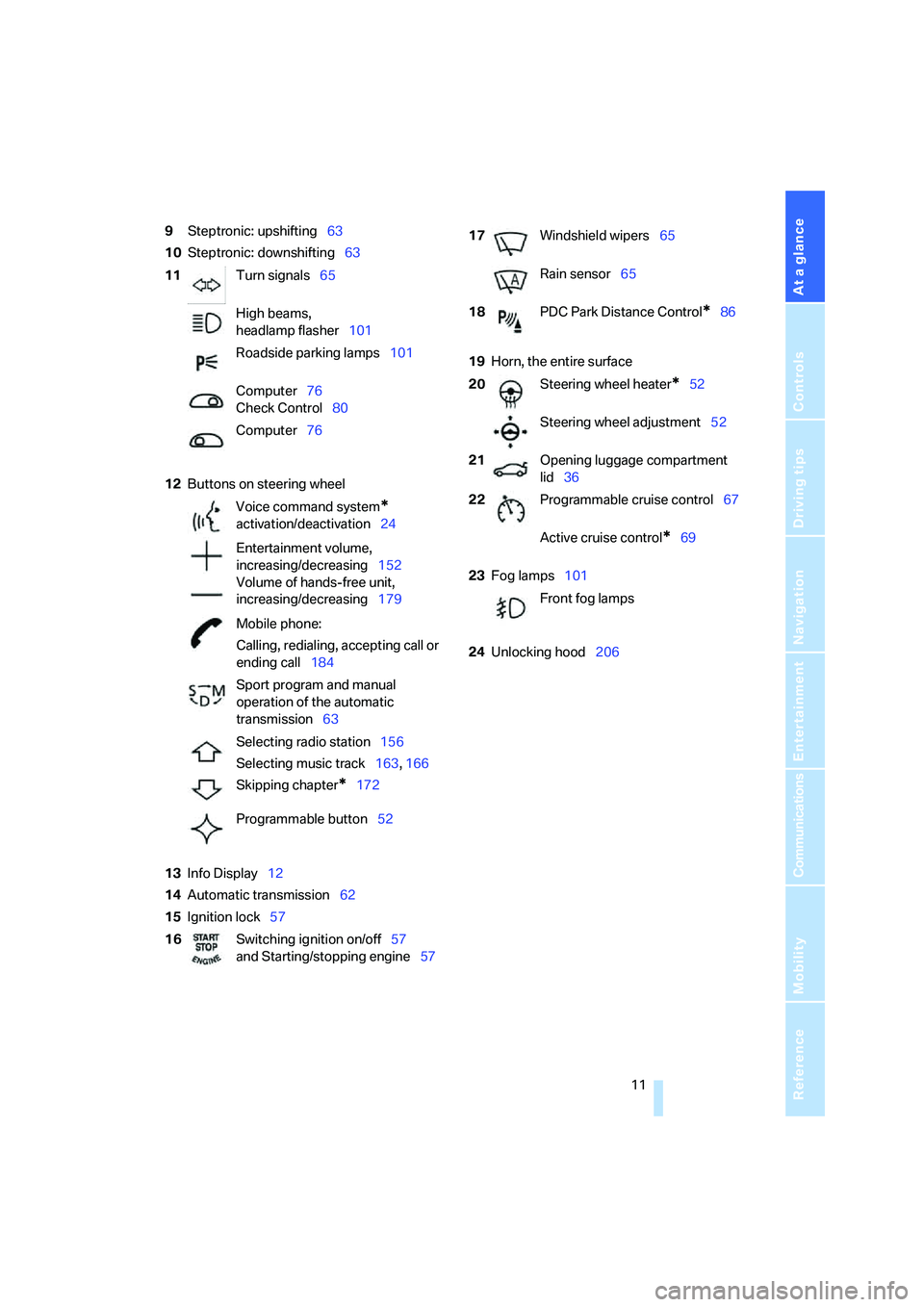
9Steptronic: upshifting63
10Steptronic: downshifting63
12Buttons on steering wheel
13Info Display12
14Automatic transmission62
15Ignition lock5719Horn, the entire surface
23Fog lamps101
24Unlocking hood206 11Turn signals65
High beams,
headlamp flasher101
Roadside parking lamps101
Computer76
Check Control80
Computer76
Voice command system
*
activation/deactivation24
Entertainment volume,
increasing/decreasing152
Volume of hands-free unit,
increasing/decreasing179
Mobile phone:
Calling, redialing, accepting call or
ending call184
Sport program and manual
operation of the automatic
transmission63
Selecting radio station156
Selecting music track163, 166
Skipping chapter
*172
Programmable button52
16Switching ignition on/off57
and Starting/stopping engine57
17Windshield wipers65
Rain sensor65
18PDC Park Distance Control
*86
20Steering wheel heater
*52
Steering wheel adjustment52
21Opening luggage compartment
lid36
22Programmable cruise control67
Active cruise control
*69
Front fog lamps
Page 98 of 253
Technology for comfort, convenience and safety
96 refer to page54.
In certain sitting positions, teenagers and adults
can deactivate the front, knee and side airbag
on the front passenger side; when this occurs,
the indicator lamp for the front passenger air-
bags lights up. In these cases, change the sit-
ting position so that the front passenger airbags
are activated and the indicator lamp goes out.
If the desired status cannot be produced by
changing the sitting position, have the person
ride in the back. Do not place slip covers, seat
cushions, beaded mats, or other objects on the
passenger seat that are not specifically recom-
mended by BMW. Do not lay objects under the
seat which could press against the seat from
below. Otherwise, a correct evaluation of the
occupied seat surface cannot be assured.<
Operating state of front passenger
airbags
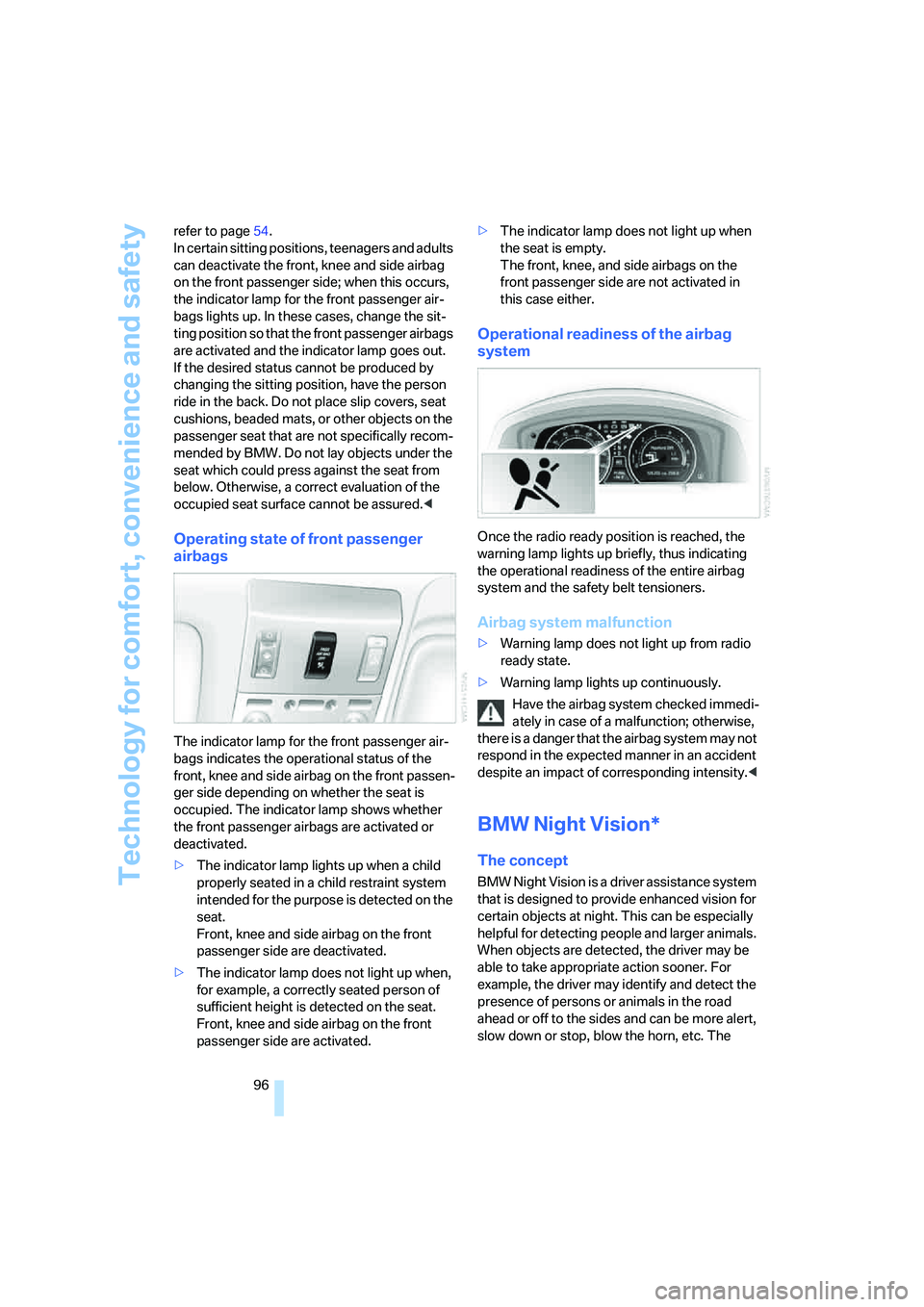
The indicator lamp for the front passenger air-
bags indicates the operational status of the
front, knee and side airbag on the front passen-
ger side depending on whether the seat is
occupied. The indicator lamp shows whether
the front passenger airbags are activated or
deactivated.
>The indicator lamp lights up when a child
properly seated in a child restraint system
intended for the purpose is detected on the
seat.
Front, knee and side airbag on the front
passenger side are deactivated.
>The indicator lamp does not light up when,
for example, a correctly seated person of
sufficient height is detected on the seat.
Front, knee and side airbag on the front
passenger side are activated.>The indicator lamp does not light up when
the seat is empty.
The front, knee, and side airbags on the
front passenger side are not activated in
this case either.
Operational readiness of the airbag
system
Once the radio ready position is reached, the
warning lamp lights up briefly, thus indicating
the operational readiness of the entire airbag
system and the safety belt tensioners.
Airbag system malfunction
>Warning lamp does not light up from radio
ready state.
>Warning lamp lights up continuously.
Have the airbag system checked immedi-
ately in case of a malfunction; otherwise,
there is a danger that the airbag system may not
respond in the expected manner in an accident
despite an impact of corresponding intensity.<
BMW Night Vision*
The concept
BMW Night Vision is a driver assistance system
that is designed to provide enhanced vision for
certain objects at night. This can be especially
helpful for detecting people and larger animals.
When objects are detected, the driver may be
able to take appropriate action sooner. For
example, the driver may identify and detect the
presence of persons or animals in the road
ahead or off to the sides and can be more alert,
slow down or stop, blow the horn, etc. The
Page 99 of 253
Controls
97Reference
At a glance
Driving tips
Communications
Navigation
Entertainment
Mobility
driver can decide which actions are appropriate
and then react accordingly.
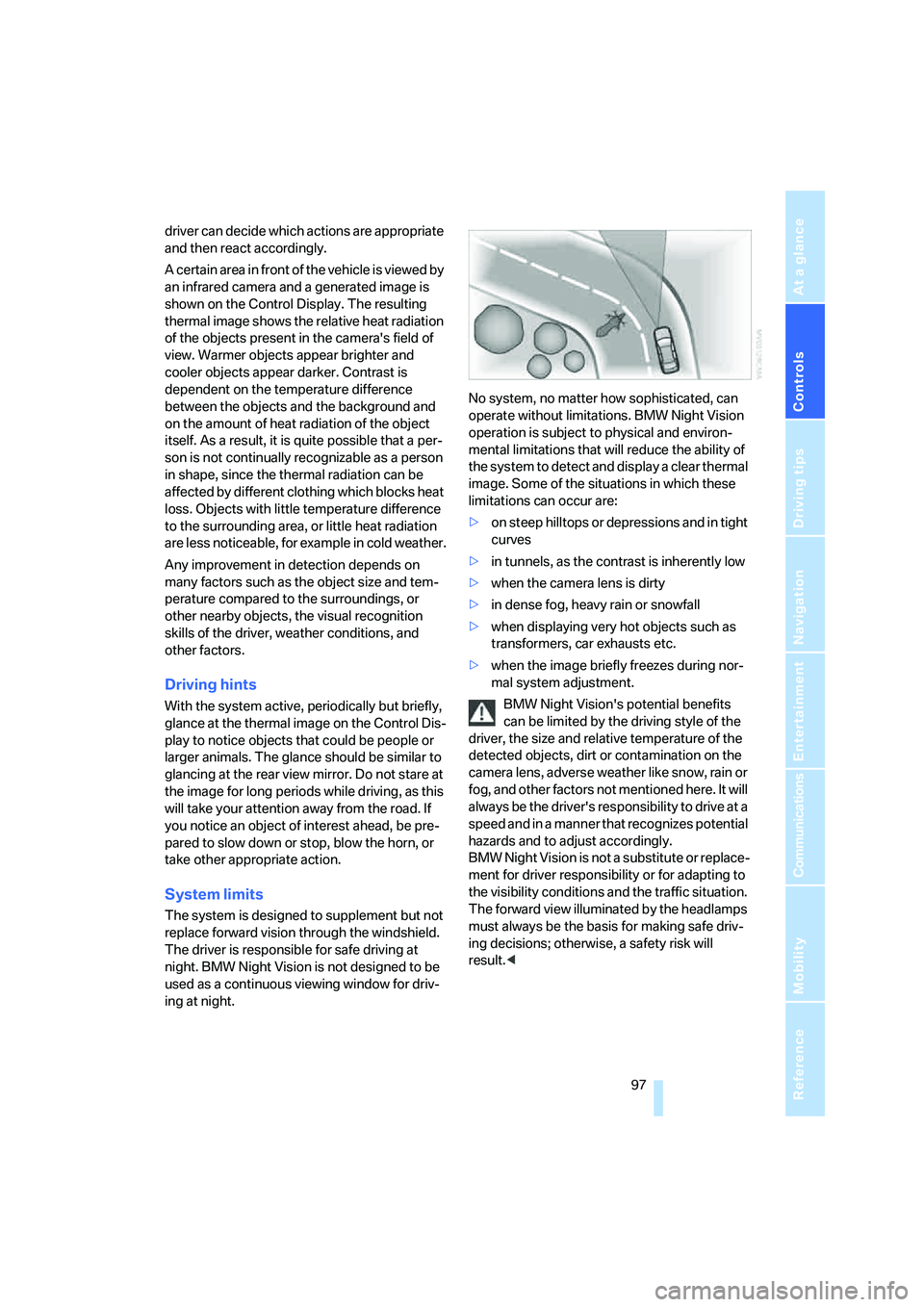
A certain area in front of the vehicle is viewed by
an infrared camera and a generated image is
shown on the Control Display. The resulting
thermal image shows the relative heat radiation
of the objects present in the camera's field of
view. Warmer objects appear brighter and
cooler objects appear darker. Contrast is
dependent on the temperature difference
between the objects and the background and
on the amount of heat radiation of the object
itself. As a result, it is quite possible that a per-
son is not continually recognizable as a person
in shape, since the thermal radiation can be
affected by different clothing which blocks heat
loss. Objects with little temperature difference
to the surrounding area, or little heat radiation
are less noticeable, for example in cold weather.
Any improvement in detection depends on
many factors such as the object size and tem-
perature compared to the surroundings, or
other nearby objects, the visual recognition
skills of the driver, weather conditions, and
other factors.
Driving hints
With the system active, periodically but briefly,
glance at the thermal image on the Control Dis-
play to notice objects that could be people or
larger animals. The glance should be similar to
glancing at the rear view mirror. Do not stare at
the image for long periods while driving, as this
will take your attention away from the road. If
you notice an object of interest ahead, be pre-
pared to slow down or stop, blow the horn, or
take other appropriate action.
System limits
The system is designed to supplement but not
replace forward vision through the windshield.
The driver is responsible for safe driving at
night. BMW Night Vision is not designed to be
used as a continuous viewing window for driv-
ing at night.No system, no matter how sophisticated, can
operate without limitations. BMW Night Vision
operation is subject to physical and environ-
mental limitations that will reduce the ability of
the system to detect and display a clear thermal
image. Some of the situations in which these
limitations can occur are:
>on steep hilltops or depressions and in tight
curves
>in tunnels, as the contrast is inherently low
>when the camera lens is dirty
>in dense fog, heavy rain or snowfall
>when displaying very hot objects such as
transformers, car exhausts etc.
>when the image briefly freezes during nor-
mal system adjustment.
BMW Night Vision's potential benefits
can be limited by the driving style of the
driver, the size and relative temperature of the
detected objects, dirt or contamination on the
camera lens, adverse weather like snow, rain or
fog, and other factors not mentioned here. It will
always be the driver's responsibility to drive at a
speed and in a manner that recognizes potential
hazards and to adjust accordingly.
BMW Night Vision is not a substitute or replace-
ment for driver responsibility or for adapting to
the visibility conditions and the traffic situation.
The forward view illuminated by the headlamps
must always be the basis for making safe driv-
ing decisions; otherwise, a safety risk will
result.<
Page 239 of 253
Reference 237
At a glance
Controls
Driving tips
Communications
Navigation
Entertainment
Mobility
H
Handbrake, refer to Parking
brake58
Hands-free system179
Hazard warning flashers15
"HD", High Definition
Radio162
Head airbags95
Headlamp control,
automatic100
Headlamp flasher65
– indicator lamp13
Headlamps100
– care, refer to Caring for your
vehicle brochure
– cleaning, refer to Wiper
system65
– replacing bulbs212
Head light, refer to Adaptive
Head Light101
Headphones22
Head restraints46
– front head restraints,
active47
– installation, front47
– removal, front47
– sitting safely43
Heater, windshield, refer to
Defrosting windows and
removing condensation106
Heating103
– exterior mirrors51
– mirrors51
– rear window, refer to Rear
window defroster107
– residual heat106
– seats49
– steering wheel52
– windshield washer
nozzles66
Heating and ventilation103
Heating when parked, refer to
Residual heat106
Heavy cargo, refer to Stowing
cargo124
Height, refer to
Dimensions225Height adjustment
– seats44
– steering wheel52
"Help"
– assistance window21
– menu guidance19
"Help text", assistance
window21
Help text on Control
Display21
"Hide map icons",
navigation137
"high", automatic climate
control105
High beams101
– headlamp flasher101
– indicator lamp11
High Definition Radio162
Hills123
Holder for cups115
Home address
– selecting140
– storing140
Hood206
Horn11
Hotel function, refer to
Locking separately35
Hot exhaust system122
Hour signal activation85
"House number",
navigation134
Hydraulic brake assistant,
refer to DBC87
Hydroplaning123
I
ID3 tag, refer to Displaying
track information167
iDrive16
– assistance window21
– automatic climate
control104
– changing date and time84
– changing language84
– changing settings84
– changing units of measure
and display format84
– confirming selection or
entry19
– controller16
– controls16
– displays, menus17
– menus17
– rear seat screen21
– selecting menu item19
– setting brightness85
– showing help text21
– start menu18
– status lines20
– symbols19
Ignition key30
Ignition lock57
Illuminated vanity mirror52
Imitation leather, refer to
Caring for your vehicle
brochure
"Indep. ventil.", automatic
climate control109
Indicator/warning lamps12
– airbags96
– alarm system37
– DSC88
– DTC88
– Flat Tire Monitor91
– fog lamps101
– safety belt warning49
– Tire Pressure Monitor93
Individually programmable
buttons11,52
Individual settings, refer to
Key Memory31
Page 246 of 253
Everything from A to Z
244 Service and Warranty
Information Booklet for
US models210
Service car, refer to Roadside
Assistance189,218
Service required78
Service requirement
display210
"Services", BMW Assist192
"Service Status", BMW
Assist190
"SET", setting speed limit82
"Set time 1", parked car
ventilation109
"Set time 2", parked car
ventilation109
Setting button, refer to
iDrive16
Setting language on Control
Display84
"Settings"
– activating/deactivating
Bluetooth link183
– logging on mobile phone in
vehicle182
Settings
– assistance window21
– BMW Night Vision98
– data and time84
– entertainment152
– Key Memory31
– language84
– units of measure84
Setting time, refer to
Preselecting activation
time109
Setting volume, speed-
dependent154
Shifting, for automatic
transmission with
Steptronic62
Shiftlock, refer to Selecting
transmission range62
Short commands of the voice
command system228
"Shortest route",
navigation141"Short info", programmable
buttons53
Shoulder support
adjustment45
Side airbags95
Side-mounted turn signals,
replacing bulbs213
Side window blind, refer to
Sun blinds112
Signal horn, refer to Horn11
Sitting safely43
– with airbags43
– with head restraint43
– with safety belts43
Ski bag117
Sliding/tilt sunroof, refer to
Glass sunroof, electric
41
Smokers' package, refer to
Ashtray115
Snap-in adapter181
Snow chains205
Socket
– for Onboard
Diagnostics211
– for remote control, refer to
Ignition lock57
Soft closure aid
– doors, refer to Automatic
soft closing35
– luggage compartment lid,
refer to Automatic soft
closing36
SOS, refer to Initiating an
emergency call218
Spare fuses217
Spare key30
– adapter30
Spare tire215
Spare wheel, refer to Spare
tire215
Special oils, refer to Approved
engine oils208
Speed
– average77
– limit82
Speed-dependent
volume154
Speed limit82Speedometer12
"Speed vol.", speed-
dependent volume
control154
"Split"
– assistance window for
onboard data83
– navigation, refer to Display in
assistance window130
Split screen view, refer to
Assistance window21
"Sport", EDC Electronic
Damper Control90
Sport program
– automatic transmission with
Steptronic63
– EDC Electronic Damper
Control90
Stability control, refer to
Driving stability control
systems87
Star button, refer to
Programming button
function52
"START", BMW Assist189
"START / RESET", trip
computer78
Start/Stop button57
Starting, refer to Starting
engine57
Starting difficulties
– jump starting219
– refer to Special starting
conditions58
Starting engine57
"State / Province",
navigation132
Stations
– refer to Radio156
– storing for radio158
"Status", BMW
Assist190,192
"Status: Resetting TPM...",
Tire Pressure Monitor93
"Status: Tire low!", Tire
Pressure Monitor93
"Status: TPM active", Tire
Pressure Monitor92